TestNG introduction
Denis Bazhin, 2012
Table of contents
• JUnit quick overview
• Why TestNG?
• TestNG VS JUnit4
• TestNG overview
PART 1: JUnit quick overview
● 1st and simple JAVA testing FW
● Based on test methods, test classes and test
suites
● De facto standard in the Java world
JUnit quick overview
• Strengths:
• Simple to understand: test methods, classes, suites
• Easy to implement: extend TestCase, write test
methods starts with “test_”
• setUp() and clearDown() methods for initialization
and clean up
• Text or graphical result
• Lot of add-ons (GUI testing, DB testing, etc.)
JUnit quick overview
• JUnit3 Problems:
• JUnit instantiates the class before invoking each
test method
• To run individual test method need to comment
out all other methods
• To disable/enable certain test methods need to
modify suite() method, recompile and rerun the
test
JUnit quick overview
• JUnit3 Problems:
• Initially designed for unit testing only but used for other
testing now (FT, ST, etc.) – many limitations:
• No dependent test methods
• Poor config control (setUp and tearDown)
• Intrusive (forces you to extend classes and name your
methods a certain way)
• Static programming model (forces you to recompile
unnecessarily)
• Doesn’t use the latest Java features (annotations, asserts)
• Needs a lot of add-ons to be usable
PART 2: Why TestNG?
● Needs to meet the challenges
● Needs to have more flexibility
● Needs to use new JAVA functions (like
annotations in JDK 5)
Why TestNG?
• Testing New Generation:
• No need to extend a base class
• No need to start your test methods with “test”
• Configuration methods can be called anything you
want, not just setUp() and tearDown(). You can
have as many as you want and they can be invoked
either around methods or classes
• Test methods can receive parameters
• Annotations based
Why TestNG?
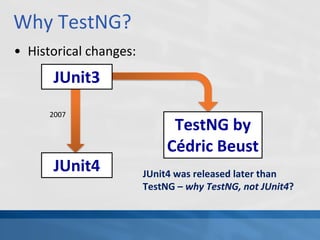
• Historical changes:
JUnit3
TestNG by
Cédric Beust
JUnit4
2007
JUnit4 was released later than
TestNG – why TestNG, not JUnit4?
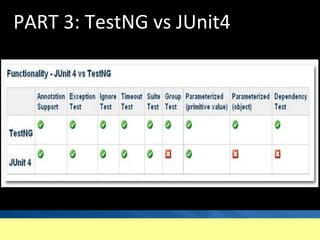
PART 3: TestNG vs JUnit4
TestNG vs JUnit4
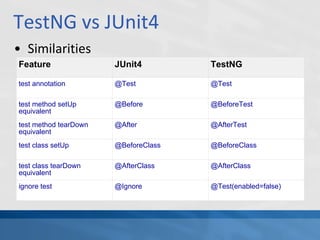
• Similarities
Feature JUnit4 TestNG
test annotation @Test @Test
test method setUp
equivalent
@Before @BeforeTest
test method tearDown
equivalent
@After @AfterTest
test class setUp @BeforeClass @BeforeClass
test class tearDown
equivalent
@AfterClass @AfterClass
ignore test @Ignore @Test(enabled=false)
TestNG vs JUnit4
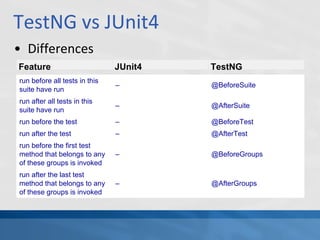
• Differences
run before all tests in this
suite have run
– @BeforeSuite
run after all tests in this
suite have run
– @AfterSuite
run before the test – @BeforeTest
run after the test – @AfterTest
run before the first test
method that belongs to any
of these groups is invoked
– @BeforeGroups
run after the last test
method that belongs to any
of these groups is invoked
– @AfterGroups
Feature JUnit4 TestNG
TestNG vs JUnit4
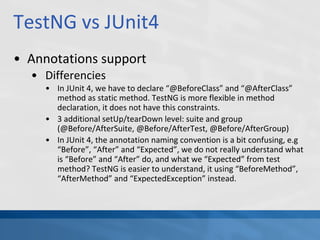
• Annotations support
• Differencies
• In JUnit 4, we have to declare “@BeforeClass” and “@AfterClass”
method as static method. TestNG is more flexible in method
declaration, it does not have this constraints.
• 3 additional setUp/tearDown level: suite and group
(@Before/AfterSuite, @Before/AfterTest, @Before/AfterGroup)
• In JUnit 4, the annotation naming convention is a bit confusing, e.g
“Before”, “After” and “Expected”, we do not really understand what
is “Before” and “After” do, and what we “Expected” from test
method? TestNG is easier to understand, it using “BeforeMethod”,
“AfterMethod” and “ExpectedException” instead.
PART 4: TestNG overview
● Main features description
TestNG overview
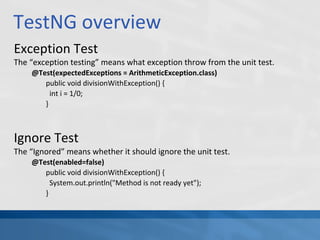
Exception Test
The “exception testing” means what exception throw from the unit test.
@Test(expectedExceptions = ArithmeticException.class)
public void divisionWithException() {
int i = 1/0;
}
Ignore Test
The “Ignored” means whether it should ignore the unit test.
@Test(enabled=false)
public void divisionWithException() {
System.out.println("Method is not ready yet");
}
TestNG overview
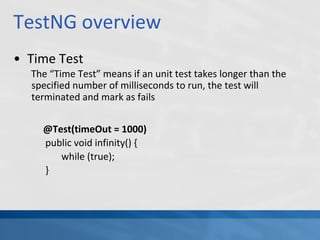
• Time Test
The “Time Test” means if an unit test takes longer than the
specified number of milliseconds to run, the test will
terminated and mark as fails
@Test(timeOut = 1000)
public void infinity() {
while (true);
}
TestNG overview
Test Suite
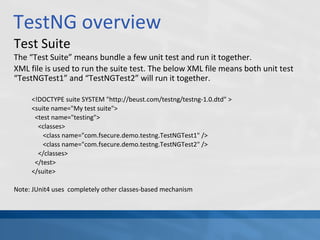
The “Test Suite” means bundle a few unit test and run it together.
XML file is used to run the suite test. The below XML file means both unit test
“TestNGTest1” and “TestNGTest2” will run it together.
<!DOCTYPE suite SYSTEM "http://beust.com/testng/testng-1.0.dtd" >
<suite name="My test suite">
<test name="testing">
<classes>
<class name="com.fsecure.demo.testng.TestNGTest1" />
<class name="com.fsecure.demo.testng.TestNGTest2" />
</classes>
</test>
</suite>
Note: JUnit4 uses completely other classes-based mechanism
TestNG overview
• Test Suite
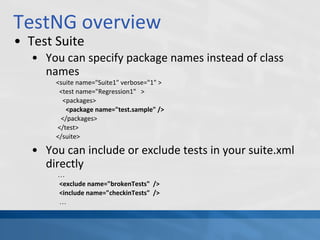
• You can specify package names instead of class
names
<suite name="Suite1" verbose="1" >
<test name="Regression1" >
<packages>
<package name="test.sample" />
</packages>
</test>
</suite>
• You can include or exclude tests in your suite.xml
directly
…
<exclude name="brokenTests" />
<include name="checkinTests" />
…
TestNG overview
• Test Suite
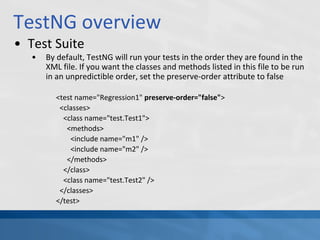
• By default, TestNG will run your tests in the order they are found in the
XML file. If you want the classes and methods listed in this file to be run
in an unpredictible order, set the preserve-order attribute to false
<test name="Regression1" preserve-order="false">
<classes>
<class name="test.Test1">
<methods>
<include name="m1" />
<include name="m2" />
</methods>
</class>
<class name="test.Test2" />
</classes>
</test>
TestNG overview
• Group Tests
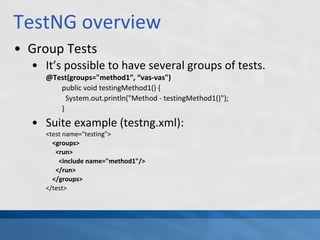
• It’s possible to have several groups of tests.
@Test(groups="method1”, “vas-vas")
public void testingMethod1() {
System.out.println("Method - testingMethod1()");
}
• Suite example (testng.xml):
<test name="testing">
<groups>
<run>
<include name="method1"/>
</run>
</groups>
</test>
TestNG overview
• Play with groups as you want in your
testng.xml:
• Which groups should be run
(include-groups)
• Which groups should not be run
(exclude-groups)
• Define additional groups (“groups of groups”)
TestNG overview
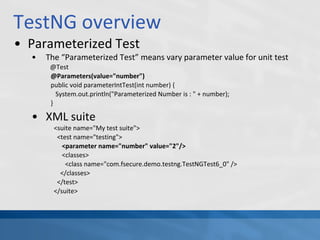
• Parameterized Test
• The “Parameterized Test” means vary parameter value for unit test
@Test
@Parameters(value="number")
public void parameterIntTest(int number) {
System.out.println("Parameterized Number is : " + number);
}
• XML suite
<suite name="My test suite">
<test name="testing">
<parameter name="number" value="2"/>
<classes>
<class name="com.fsecure.demo.testng.TestNGTest6_0" />
</classes>
</test>
</suite>
TestNG overview
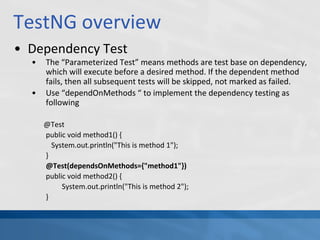
• Dependency Test
• The “Parameterized Test” means methods are test base on dependency,
which will execute before a desired method. If the dependent method
fails, then all subsequent tests will be skipped, not marked as failed.
• Use “dependOnMethods “ to implement the dependency testing as
following
@Test
public void method1() {
System.out.println("This is method 1");
}
@Test(dependsOnMethods={"method1"})
public void method2() {
System.out.println("This is method 2");
}
TestNG overview
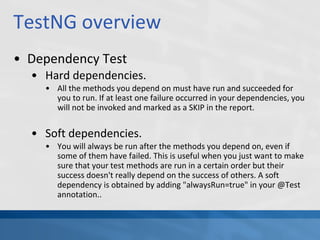
• Dependency Test
• Hard dependencies.
• All the methods you depend on must have run and succeeded for
you to run. If at least one failure occurred in your dependencies, you
will not be invoked and marked as a SKIP in the report.
• Soft dependencies.
• You will always be run after the methods you depend on, even if
some of them have failed. This is useful when you just want to make
sure that your test methods are run in a certain order but their
success doesn't really depend on the success of others. A soft
dependency is obtained by adding "alwaysRun=true" in your @Test
annotation..
TestNG overview
• Mixed mode
• TestNG can automaticaly recognize JUnit 3 and JUnit 4 tests
and run them if a user asks TestNG to do so and puts JUnit
library on TestNG's classpath.
• This is achieved through called -mixed.
• The only requirement here is that TestNG is able to find
JUnit library on its test classpath.
• Suite example:
<test name="Test1" junit="true">
<classes>
<!-- ... -->
TestNG overview
• Parallel execution.
• use the following values in the parallel configuration
parameter:
• classes
• Each test class will be executed in an independent execution
thread.
• methods
• Each test method will be run as an independent test in a separate
thread.
• tests
• If you use a TestNG Suite XML file and you list a test element that
groups a number of related tests, listing test in the parallel
configuration element will configure TestNG to use a separate
thread for each <test> element..
TestNG overview
• Listeners
• There are several interfaces that allow you to modify
TestNG's behavior. These interfaces are broadly called
"TestNG Listeners". Here are a few listeners:
• ISuiteListener (doc, javadoc)
• ITestListener (doc, javadoc)
• When you implement one of these interfaces, you can let
TestNG know about it with either of the following ways:
Using -listener on the command line.
Using <listeners> with ant.
Using <listeners> in your testng.xml file.
Using the @Listeners annotation on any of your test classes.
Using ServiceLoader.
TestNG overview
• Listeners
• To create your own listener:
• Create new class which extends appropriate default
listener, e.g. JcatSuiteListener
• Override the onExecutionStart() and onExecutionFinish()
methods
• Specify new listener class by one of the following ways:
• in your suite.xml (recommended for DMX/CMX/SCX)
• in your VM args
• in the configuration file
• in test case class directly
TestNG overview
• Factories
• Factories allow you to create tests dynamically
public class WebTestFactory {
@Factory
public Object[] createInstances() {
Object[] result = new Object[10];
for (int i = 0; i < 10; i++) {
result[i] = new WebTest(i * 10);
}
return result;
}
}
public class WebTest {
private int m_numberOfTimes;
public WebTest(int numberOfTimes) {
m_numberOfTimes =
numberOfTimes;
}
@Test
public void testServer() {
for (int i = 0; i < m_numberOfTimes;
i++) {
// access the web page
}
}
}
TestNG overview
• Logging and results
• Logging Listeners
• Logging Reporters
• JUnitReports
• Reporter API
• XML Reports
Links
• Referenced links:
• http://testng.org
• http://www.mkyong.com/unittest/junit-4-vs-testn
g-comparison/
• http://docs.codehaus.org/display/XPR/Migration+t
o+JUnit4+or+TestNG

TestNG introduction

  • 1.
  • 2.
    Table of contents •JUnit quick overview • Why TestNG? • TestNG VS JUnit4 • TestNG overview
  • 3.
    PART 1: JUnitquick overview ● 1st and simple JAVA testing FW ● Based on test methods, test classes and test suites ● De facto standard in the Java world
  • 4.
    JUnit quick overview •Strengths: • Simple to understand: test methods, classes, suites • Easy to implement: extend TestCase, write test methods starts with “test_” • setUp() and clearDown() methods for initialization and clean up • Text or graphical result • Lot of add-ons (GUI testing, DB testing, etc.)
  • 5.
    JUnit quick overview •JUnit3 Problems: • JUnit instantiates the class before invoking each test method • To run individual test method need to comment out all other methods • To disable/enable certain test methods need to modify suite() method, recompile and rerun the test
  • 6.
    JUnit quick overview •JUnit3 Problems: • Initially designed for unit testing only but used for other testing now (FT, ST, etc.) – many limitations: • No dependent test methods • Poor config control (setUp and tearDown) • Intrusive (forces you to extend classes and name your methods a certain way) • Static programming model (forces you to recompile unnecessarily) • Doesn’t use the latest Java features (annotations, asserts) • Needs a lot of add-ons to be usable
  • 7.
    PART 2: WhyTestNG? ● Needs to meet the challenges ● Needs to have more flexibility ● Needs to use new JAVA functions (like annotations in JDK 5)
  • 8.
    Why TestNG? • TestingNew Generation: • No need to extend a base class • No need to start your test methods with “test” • Configuration methods can be called anything you want, not just setUp() and tearDown(). You can have as many as you want and they can be invoked either around methods or classes • Test methods can receive parameters • Annotations based
  • 9.
    Why TestNG? • Historicalchanges: JUnit3 TestNG by Cédric Beust JUnit4 2007 JUnit4 was released later than TestNG – why TestNG, not JUnit4?
  • 10.
    PART 3: TestNGvs JUnit4
  • 11.
    TestNG vs JUnit4 •Similarities Feature JUnit4 TestNG test annotation @Test @Test test method setUp equivalent @Before @BeforeTest test method tearDown equivalent @After @AfterTest test class setUp @BeforeClass @BeforeClass test class tearDown equivalent @AfterClass @AfterClass ignore test @Ignore @Test(enabled=false)
  • 12.
    TestNG vs JUnit4 •Differences run before all tests in this suite have run – @BeforeSuite run after all tests in this suite have run – @AfterSuite run before the test – @BeforeTest run after the test – @AfterTest run before the first test method that belongs to any of these groups is invoked – @BeforeGroups run after the last test method that belongs to any of these groups is invoked – @AfterGroups Feature JUnit4 TestNG
  • 13.
    TestNG vs JUnit4 •Annotations support • Differencies • In JUnit 4, we have to declare “@BeforeClass” and “@AfterClass” method as static method. TestNG is more flexible in method declaration, it does not have this constraints. • 3 additional setUp/tearDown level: suite and group (@Before/AfterSuite, @Before/AfterTest, @Before/AfterGroup) • In JUnit 4, the annotation naming convention is a bit confusing, e.g “Before”, “After” and “Expected”, we do not really understand what is “Before” and “After” do, and what we “Expected” from test method? TestNG is easier to understand, it using “BeforeMethod”, “AfterMethod” and “ExpectedException” instead.
  • 14.
    PART 4: TestNGoverview ● Main features description
  • 15.
    TestNG overview Exception Test The“exception testing” means what exception throw from the unit test. @Test(expectedExceptions = ArithmeticException.class) public void divisionWithException() { int i = 1/0; } Ignore Test The “Ignored” means whether it should ignore the unit test. @Test(enabled=false) public void divisionWithException() { System.out.println("Method is not ready yet"); }
  • 16.
    TestNG overview • TimeTest The “Time Test” means if an unit test takes longer than the specified number of milliseconds to run, the test will terminated and mark as fails @Test(timeOut = 1000) public void infinity() { while (true); }
  • 17.
    TestNG overview Test Suite The“Test Suite” means bundle a few unit test and run it together. XML file is used to run the suite test. The below XML file means both unit test “TestNGTest1” and “TestNGTest2” will run it together. <!DOCTYPE suite SYSTEM "http://beust.com/testng/testng-1.0.dtd" > <suite name="My test suite"> <test name="testing"> <classes> <class name="com.fsecure.demo.testng.TestNGTest1" /> <class name="com.fsecure.demo.testng.TestNGTest2" /> </classes> </test> </suite> Note: JUnit4 uses completely other classes-based mechanism
  • 18.
    TestNG overview • TestSuite • You can specify package names instead of class names <suite name="Suite1" verbose="1" > <test name="Regression1" > <packages> <package name="test.sample" /> </packages> </test> </suite> • You can include or exclude tests in your suite.xml directly … <exclude name="brokenTests" /> <include name="checkinTests" /> …
  • 19.
    TestNG overview • TestSuite • By default, TestNG will run your tests in the order they are found in the XML file. If you want the classes and methods listed in this file to be run in an unpredictible order, set the preserve-order attribute to false <test name="Regression1" preserve-order="false"> <classes> <class name="test.Test1"> <methods> <include name="m1" /> <include name="m2" /> </methods> </class> <class name="test.Test2" /> </classes> </test>
  • 20.
    TestNG overview • GroupTests • It’s possible to have several groups of tests. @Test(groups="method1”, “vas-vas") public void testingMethod1() { System.out.println("Method - testingMethod1()"); } • Suite example (testng.xml): <test name="testing"> <groups> <run> <include name="method1"/> </run> </groups> </test>
  • 21.
    TestNG overview • Playwith groups as you want in your testng.xml: • Which groups should be run (include-groups) • Which groups should not be run (exclude-groups) • Define additional groups (“groups of groups”)
  • 22.
    TestNG overview • ParameterizedTest • The “Parameterized Test” means vary parameter value for unit test @Test @Parameters(value="number") public void parameterIntTest(int number) { System.out.println("Parameterized Number is : " + number); } • XML suite <suite name="My test suite"> <test name="testing"> <parameter name="number" value="2"/> <classes> <class name="com.fsecure.demo.testng.TestNGTest6_0" /> </classes> </test> </suite>
  • 23.
    TestNG overview • DependencyTest • The “Parameterized Test” means methods are test base on dependency, which will execute before a desired method. If the dependent method fails, then all subsequent tests will be skipped, not marked as failed. • Use “dependOnMethods “ to implement the dependency testing as following @Test public void method1() { System.out.println("This is method 1"); } @Test(dependsOnMethods={"method1"}) public void method2() { System.out.println("This is method 2"); }
  • 24.
    TestNG overview • DependencyTest • Hard dependencies. • All the methods you depend on must have run and succeeded for you to run. If at least one failure occurred in your dependencies, you will not be invoked and marked as a SKIP in the report. • Soft dependencies. • You will always be run after the methods you depend on, even if some of them have failed. This is useful when you just want to make sure that your test methods are run in a certain order but their success doesn't really depend on the success of others. A soft dependency is obtained by adding "alwaysRun=true" in your @Test annotation..
  • 25.
    TestNG overview • Mixedmode • TestNG can automaticaly recognize JUnit 3 and JUnit 4 tests and run them if a user asks TestNG to do so and puts JUnit library on TestNG's classpath. • This is achieved through called -mixed. • The only requirement here is that TestNG is able to find JUnit library on its test classpath. • Suite example: <test name="Test1" junit="true"> <classes> <!-- ... -->
  • 26.
    TestNG overview • Parallelexecution. • use the following values in the parallel configuration parameter: • classes • Each test class will be executed in an independent execution thread. • methods • Each test method will be run as an independent test in a separate thread. • tests • If you use a TestNG Suite XML file and you list a test element that groups a number of related tests, listing test in the parallel configuration element will configure TestNG to use a separate thread for each <test> element..
  • 27.
    TestNG overview • Listeners •There are several interfaces that allow you to modify TestNG's behavior. These interfaces are broadly called "TestNG Listeners". Here are a few listeners: • ISuiteListener (doc, javadoc) • ITestListener (doc, javadoc) • When you implement one of these interfaces, you can let TestNG know about it with either of the following ways: Using -listener on the command line. Using <listeners> with ant. Using <listeners> in your testng.xml file. Using the @Listeners annotation on any of your test classes. Using ServiceLoader.
  • 28.
    TestNG overview • Listeners •To create your own listener: • Create new class which extends appropriate default listener, e.g. JcatSuiteListener • Override the onExecutionStart() and onExecutionFinish() methods • Specify new listener class by one of the following ways: • in your suite.xml (recommended for DMX/CMX/SCX) • in your VM args • in the configuration file • in test case class directly
  • 29.
    TestNG overview • Factories •Factories allow you to create tests dynamically public class WebTestFactory { @Factory public Object[] createInstances() { Object[] result = new Object[10]; for (int i = 0; i < 10; i++) { result[i] = new WebTest(i * 10); } return result; } } public class WebTest { private int m_numberOfTimes; public WebTest(int numberOfTimes) { m_numberOfTimes = numberOfTimes; } @Test public void testServer() { for (int i = 0; i < m_numberOfTimes; i++) { // access the web page } } }
  • 30.
    TestNG overview • Loggingand results • Logging Listeners • Logging Reporters • JUnitReports • Reporter API • XML Reports
  • 31.
    Links • Referenced links: •http://testng.org • http://www.mkyong.com/unittest/junit-4-vs-testn g-comparison/ • http://docs.codehaus.org/display/XPR/Migration+t o+JUnit4+or+TestNG