1
Technology in Action
Chapter 5
Using the Internet:
Making the Most of the Web’s Resources

Copyright © 2011 Pearson Education, Inc. Publishing as Prentice Hall

2
Chapter Topics
•
•
•
•
•
•
•

History of the Internet
Forms of Internet communication
Web entertainment
E-commerce
Web browsers
URLs
Hyperlinks

Copyright © 2011 Pearson Education, Inc. Publishing as Prentice Hall

3
Chapter Topics (cont.)
•
•
•
•
•

Search engines
Improving search results
Evaluating Web sites
Connecting to the Internet
Future of the Internet

Copyright © 2011 Pearson Education, Inc. Publishing as Prentice Hall

4
History of the Internet
• Developed for secure military
communications
• Evolved from Advanced Research Projects
Agency Network (ARPANET)
• Funded by the U.S. government in the
1960s
• Enabled computers at leading universities
and research organizations to
communicate with each other
Copyright © 2011 Pearson Education, Inc. Publishing as Prentice Hall

5
The Web vs. the Internet
• The Web is part of the Internet,
distinguished by
– Common communication protocols
– Hyperlinks

• 1989: Web invented by Tim Berners-Lee
• 1993: Mosaic browser released
• 1994: Netscape Navigator marked
beginning of the Web’s major growth
Copyright © 2011 Pearson Education, Inc. Publishing as Prentice Hall

6
Internet Communications
•
•
•
•

E-mail
Instant messaging
Voice over Internet Protocol (VoIP)
Group communication

Copyright © 2011 Pearson Education, Inc. Publishing as Prentice Hall

7
E-Mail
• Electronic mail
• Asynchronous communication
• Types of e-mail accounts
– Client-based
– Web-based

• Not private
– Can be printed or forwarded
– Employer can monitor

Copyright © 2011 Pearson Education, Inc. Publishing as Prentice Hall

8
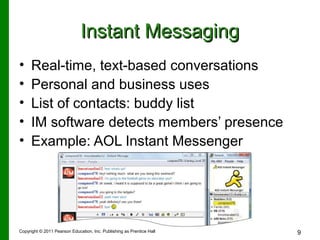
Instant Messaging
•
•
•
•
•

Real-time, text-based conversations
Personal and business uses
List of contacts: buddy list
IM software detects members’ presence
Example: AOL Instant Messenger

Copyright © 2011 Pearson Education, Inc. Publishing as Prentice Hall

9
Voice over Internet Protocol
• VoIP: Using the Internet to place phone
calls
• Uses technology similar to e-mail to send
voice data digitally
• Requires speakers, a microphone, an
Internet connection, and a VoIP provider

Copyright © 2011 Pearson Education, Inc. Publishing as Prentice Hall

10
Voice over Internet Protocol
• VoIP services differ:
– Free services require an account on both
ends
– Paid services connect phone to computer
– Cable/DSL providers offer phone through
broadband
– Wi-Fi IP phones call through Internet hotspots
and wireless networks

Copyright © 2011 Pearson Education, Inc. Publishing as Prentice Hall

11

Technology in Action

  • 1.
  • 2.
    Technology in Action Chapter5 Using the Internet: Making the Most of the Web’s Resources Copyright © 2011 Pearson Education, Inc. Publishing as Prentice Hall 2
  • 3.
    Chapter Topics • • • • • • • History ofthe Internet Forms of Internet communication Web entertainment E-commerce Web browsers URLs Hyperlinks Copyright © 2011 Pearson Education, Inc. Publishing as Prentice Hall 3
  • 4.
    Chapter Topics (cont.) • • • • • Searchengines Improving search results Evaluating Web sites Connecting to the Internet Future of the Internet Copyright © 2011 Pearson Education, Inc. Publishing as Prentice Hall 4
  • 5.
    History of theInternet • Developed for secure military communications • Evolved from Advanced Research Projects Agency Network (ARPANET) • Funded by the U.S. government in the 1960s • Enabled computers at leading universities and research organizations to communicate with each other Copyright © 2011 Pearson Education, Inc. Publishing as Prentice Hall 5
  • 6.
    The Web vs.the Internet • The Web is part of the Internet, distinguished by – Common communication protocols – Hyperlinks • 1989: Web invented by Tim Berners-Lee • 1993: Mosaic browser released • 1994: Netscape Navigator marked beginning of the Web’s major growth Copyright © 2011 Pearson Education, Inc. Publishing as Prentice Hall 6
  • 7.
    Internet Communications • • • • E-mail Instant messaging Voiceover Internet Protocol (VoIP) Group communication Copyright © 2011 Pearson Education, Inc. Publishing as Prentice Hall 7
  • 8.
    E-Mail • Electronic mail •Asynchronous communication • Types of e-mail accounts – Client-based – Web-based • Not private – Can be printed or forwarded – Employer can monitor Copyright © 2011 Pearson Education, Inc. Publishing as Prentice Hall 8
  • 9.
    Instant Messaging • • • • • Real-time, text-basedconversations Personal and business uses List of contacts: buddy list IM software detects members’ presence Example: AOL Instant Messenger Copyright © 2011 Pearson Education, Inc. Publishing as Prentice Hall 9
  • 10.
    Voice over InternetProtocol • VoIP: Using the Internet to place phone calls • Uses technology similar to e-mail to send voice data digitally • Requires speakers, a microphone, an Internet connection, and a VoIP provider Copyright © 2011 Pearson Education, Inc. Publishing as Prentice Hall 10
  • 11.
    Voice over InternetProtocol • VoIP services differ: – Free services require an account on both ends – Paid services connect phone to computer – Cable/DSL providers offer phone through broadband – Wi-Fi IP phones call through Internet hotspots and wireless networks Copyright © 2011 Pearson Education, Inc. Publishing as Prentice Hall 11

Editor's Notes

  • #3 The Internet has changed our world. Communications and commerce move instantaneously across borders and around the world. Anyone can publish their wares, ideas, or desires. Chapter 3 will present a brief introduction to the history of the Internet, its structure, and how it is used.
  • #4 Topics in this chapter include: History of the Internet Internet basics and forms of Internet communications Web entertainment E-commerce Web browsers URLs Hyperlinks
  • #5 Search engines Improving search results Web site evaluation Connecting to the Internet The future of the Internet
  • #6 Scientists were asked to come up with a solution to secure communications between large computer centers in case of a nuclear attack. They responded by inventing packet switching and routers. By taking data messages and breaking them into small packets, each packet could be addressed and sent individually to a destination through a series of routers. The routers would send each packet along the optimum path to the next router, depending on traffic and availability. The Internet is a network of networks that utilizes a common communication protocol so that computers from different manufacturers can communicate. Today we can’t imagine life without the Internet. It is the way we communicate, shop, research, entertain, and express ourselves.
  • #7 What distinguishes the Web from the rest of the Internet is its use of: Common communication protocols enabling different computers to talk to teach other and display information. Special links (called hyperlinks) enabling users to jump from one place to another on the Web. The Web was invented long after the Internet, in 1989 by Tim Berners-Lee at CERN in Switzerland. In 1993, the National Center for Supercomputing Applications (NCSA) released the Mosaic browser. Netscape Navigator heralded the beginning of the Web’s monumental growth.
  • #8 Forms of Internet-based communication include: E-mail Instant messaging Voice over Internet Protocol (VoIP) Group communication such as chat rooms, newsgroups, listservs, and social networks
  • #9 E-mail is short for electronic mail and has quickly caught on as the primary method of electronic communication because it’s fast and convenient and it reduces postage and long-distance phone call expenses. With e-mail, the sender and receiver don’t have to be available at the same time to communicate. Some e-mail accounts are client-based and use programs such as Microsoft Outlook. Client-based systems are normally tied to a local Internet service provider (ISP) and use that domain for an address. If a user changes ISPs, his or her e-mail address changes. Web-based e-mail, on the other hand, finds the messages at a host site received by and stored on a mail server and can be accessed from anywhere. A Web-based e-mail address will stay the same no matter what ISP is used. Free e-mail accounts such as Yahoo! or Hotmail use Web-based e-mail clients. Be careful what you say in an e-mail message because it might come back to haunt you.
  • #10 Instant messaging (IM) uses real-time text-based conversations, similar to chat rooms. IM isn’t just for casual conversations between friends and family, as more and more businesses are using it for communications between co-workers. Users set up a list of contacts, often called a buddy list. IM software detects the presence of members who are online. Examples include: AOL Instant Messenger Yahoo! Messenger Windows Live Messenger Many of the popular IM services are proprietary, but universal chat services are now available to allow users to communicate no matter which service they use.
  • #11 VoIP turns the Internet into a means for placing phone calls. VoIP uses a protocol similar to e-mail to send voice data. Voice is digitized as an alternative to analog phone lines. VoIP minimally requires Speakers A microphone An Internet connection A VoIP provider
  • #12 VoIP services differ. Free services like Skype require an account on both ends. Paid services like Vonage connect your regular phone to your computer through a special adapter. Cable and DSL providers offer telephone service through their existing broadband account. Wi-Fi IP phones allow calls through Internet hotspots and wireless networks.