Technical Writing for Engineers
© parson AG
Standardizing and Structuring Information
Basic Principles and Introduction
Levels of Structuring Information
Exercise
User-Oriented Writing
Target Group Analysis
Topic-Based Writing
© parson AG Technical Writing for Engineers 2
Day 1
Benefits of Standard and Structure
Manufacturer:
• Easy and efficient document creation
• More consistency
• Shorter texts
• Less redundancy
• More completeness
• Better reuse of text modules
Users:
• Improved orientation
• Improved comprehensibility
• More acceptance
© parson AG Technical Writing for Engineers 3
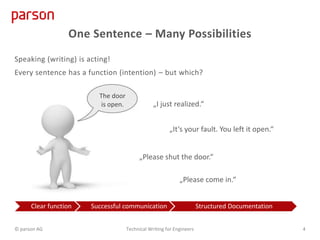
One Sentence – Many Possibilities
Speaking (writing) is acting!
Every sentence has a function (intention) – but which?
The door
is open. „I just realized.“
„Please shut the door.“
„It‘s your fault. You left it open.“
„Please come in.“
Clear function Successful communication Structured Documentation
© parson AG Technical Writing for Engineers 4
Exercise
Assign functions to the following sentences:
To upgrade the Admin module, you need to first remove it and then
reinstall it.
To remove the module, open the “Module Management” page and
select the Admin module from the list of installed modules.
Then click the “Remove” button.
The Admin module is removed.
Make sure that no users are logged in. All user sessions are
automatically closed when removing the module.
After removing the module, you automatically return to the “Module
Management” page.
On that page, click “Install New Module” and choose the folder
where the Admin module file is stored.
The module is installed.
 Description
 Instructions
 Step result
 Warning
 Step result
 Instruction
 Step result
© parson AG Technical Writing for Engineers 5
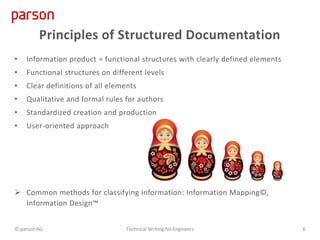
• Information product = functional structures with clearly defined elements
• Functional structures on different levels
• Clear definitions of all elements
• Qualitative and formal rules for authors
• Standardized creation and production
• User-oriented approach
 Common methods for classifying information: Information Mapping©,
Information Design™
Principles of Structured Documentation
© parson AG Technical Writing for Engineers 6
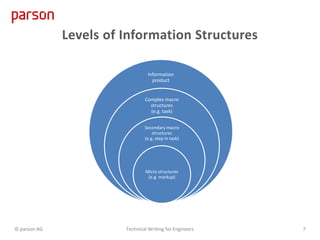
Levels of Information Structures
Information
product
Complex macro
structures
(e.g. task)
Secondary macro
structures
(e.g. step in task)
Micro structures
(e.g. markup)
© parson AG Technical Writing for Engineers 7
Target Audience Analysis
• Identify target audiences
• Analyze information requirements of target group
• Analyze product
Methods
• Personas
• Responsibility matrix
© parson AG Technical Writing for Engineers 8
Questions to Ask
• Who uses the product? Are there different types of users?
• What do the users do with the product?
• What does my audience already know about the product?
• What level of education does my target audience have? Are they familiar with
terms commonly used in the industry?
• What is the level of English proficiency of my target audience?
• What does my audience need to know?
• In which scenarios will the documentation be read? Are environmental
conditions relevant (such as lighting)?
© parson AG Technical Writing for Engineers 9
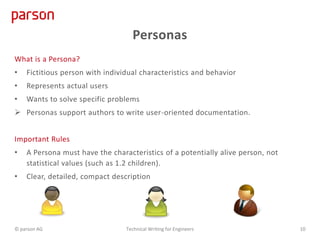
Personas
What is a Persona?
• Fictitious person with individual characteristics and behavior
• Represents actual users
• Wants to solve specific problems
 Personas support authors to write user-oriented documentation.
Important Rules
• A Persona must have the characteristics of a potentially alive person, not
statistical values (such as 1.2 children).
• Clear, detailed, compact description
© parson AG Technical Writing for Engineers 10
User-Oriented Content
• When deciding what to document, consider the users goals.
• Choose task titles from the users point of view, not the systems.
• Write titles in user language so that users recognize their goals.
• Focus the user’s attention on the action, use action verbs (imperatives).
• Eliminate introductory sections that provide little or no valuable information to
users.
© parson AG Technical Writing for Engineers 11
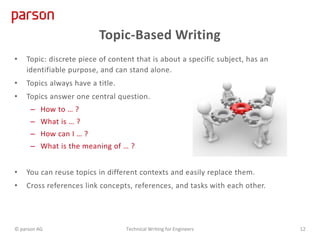
Topic-Based Writing
• Topic: discrete piece of content that is about a specific subject, has an
identifiable purpose, and can stand alone.
• Topics always have a title.
• Topics answer one central question.
– How to … ?
– What is … ?
– How can I … ?
– What is the meaning of … ?
• You can reuse topics in different contexts and easily replace them.
• Cross references link concepts, references, and tasks with each other.
© parson AG Technical Writing for Engineers 12
Topic Types
Topics have a specific function. The basic functions are:
• Instruct
• Inform
• Provide facts
Task (Instruct)
Procedures
Instructional
User-oriented
Concept (Inform)
Descriptive
Help to understand
Background information
Reference (Provide facts)
Used to look up facts
Window descriptions
Parameters
Values
© parson AG Technical Writing for Engineers 13
Grammar and Punctuation
Clarity
Minimalistic Writing
Typical Mistakes
Day 2
Style Guide
Terminology
Figures
Legal Requirements and Safety Notes
Best Practices
© parson AG Technical Writing for Engineers 14
Commas
Serial comma
• Place a comma between all elements of a series, including the conjunctions
• The serial comma removes ambiguity.
x I would like to thank my parents, Ayn Rand and God.
 The first letters of the alphabet are a, b, and c.
After introductory phrases at the beginning of a sentence
• If clauses:
 If the monitoring device reports an error, call the support.
• (Optional) Adverbial phrases:
 In the Project Management window, click Create Project.
 After installing the device, set up the configuration files.
© parson AG Technical Writing for Engineers 15
That and Which
that introduces a restrictive relative clause.
• Restrictive clauses are essential to the meaning of the main clause.
• Do not place a comma before that.
 Remove the screw from the Measurement Module that is connected to the Elevation
Table.
 There are several Measurement Modules, one is connected to the Elevation Table.
which introduces non-restrictive clauses.
• You can omit a non-restrictive relative clause without changing the meaning of the main
clause.
• Always place a comma before which.
 Remove the screw from the Measurement Module, which is connected to the Elevation
Table.
 There is only one Measurement Module. It is connected to the Elevation Table.
© parson AG Technical Writing for Engineers 16
Active vs. Passive Voice
Voice indicates the relation of the subject to the action of the verb. When the verb
is in the active voice, the subject acts.
• Use active voice as much as possible. Active voice is more precise and direct.
Also, it focuses on the user.
• Only use passive voice when the acting person is unknown or irrelevant.
x The software must be backed up by the administrator every week.
 The administrator must back up the software every week.
 Back up the software every week.
x The settings must be made after installation of the software.
 Configure the software after the installation.
© parson AG Technical Writing for Engineers 17
Fewer Words
Delete meaningless words and avoid commonly used words that provide no value
to the sentence or paragraph.
• Words that can be removed in most cases:
x kind of, actually, really, generally, practically, essentially, basically
x completely, really, quite, totally, very, rather
x essentially, particular, certain, various
• Replace long verbs with shorter, simpler forms:
x utilize   use
© parson AG Technical Writing for Engineers 18
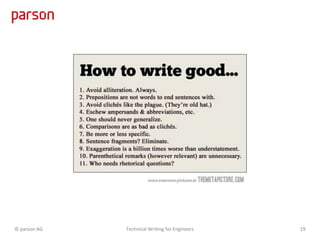
© parson AG Technical Writing for Engineers 19
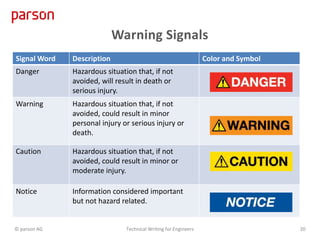
Warning Signals
Signal Word Description Color and Symbol
Danger Hazardous situation that, if not
avoided, will result in death or
serious injury.
Warning Hazardous situation that, if not
avoided, could result in minor
personal injury or serious injury or
death.
Caution Hazardous situation that, if not
avoided, could result in minor or
moderate injury.
Notice Information considered important
but not hazard related.
© parson AG Technical Writing for Engineers 20
© parson AG Technical Writing for Engineers 21
parson AG
Chrysanderstr. 69A
21029 Hamburg
Germany
Photo credits
Fotolia.com
• Anatoly Maslennikov
• Ievgen Melamud
• Coramax
http://themetapicture.com/
Tel. +49 (0)40 7200 500-0
e-mail: contact@parson-europe.com
www.parson-europe.com

Technical Writing Training for Engineers

  • 1.
    Technical Writing forEngineers © parson AG
  • 2.
    Standardizing and StructuringInformation Basic Principles and Introduction Levels of Structuring Information Exercise User-Oriented Writing Target Group Analysis Topic-Based Writing © parson AG Technical Writing for Engineers 2 Day 1
  • 3.
    Benefits of Standardand Structure Manufacturer: • Easy and efficient document creation • More consistency • Shorter texts • Less redundancy • More completeness • Better reuse of text modules Users: • Improved orientation • Improved comprehensibility • More acceptance © parson AG Technical Writing for Engineers 3
  • 4.
    One Sentence –Many Possibilities Speaking (writing) is acting! Every sentence has a function (intention) – but which? The door is open. „I just realized.“ „Please shut the door.“ „It‘s your fault. You left it open.“ „Please come in.“ Clear function Successful communication Structured Documentation © parson AG Technical Writing for Engineers 4
  • 5.
    Exercise Assign functions tothe following sentences: To upgrade the Admin module, you need to first remove it and then reinstall it. To remove the module, open the “Module Management” page and select the Admin module from the list of installed modules. Then click the “Remove” button. The Admin module is removed. Make sure that no users are logged in. All user sessions are automatically closed when removing the module. After removing the module, you automatically return to the “Module Management” page. On that page, click “Install New Module” and choose the folder where the Admin module file is stored. The module is installed.  Description  Instructions  Step result  Warning  Step result  Instruction  Step result © parson AG Technical Writing for Engineers 5
  • 6.
    • Information product= functional structures with clearly defined elements • Functional structures on different levels • Clear definitions of all elements • Qualitative and formal rules for authors • Standardized creation and production • User-oriented approach  Common methods for classifying information: Information Mapping©, Information Design™ Principles of Structured Documentation © parson AG Technical Writing for Engineers 6
  • 7.
    Levels of InformationStructures Information product Complex macro structures (e.g. task) Secondary macro structures (e.g. step in task) Micro structures (e.g. markup) © parson AG Technical Writing for Engineers 7
  • 8.
    Target Audience Analysis •Identify target audiences • Analyze information requirements of target group • Analyze product Methods • Personas • Responsibility matrix © parson AG Technical Writing for Engineers 8
  • 9.
    Questions to Ask •Who uses the product? Are there different types of users? • What do the users do with the product? • What does my audience already know about the product? • What level of education does my target audience have? Are they familiar with terms commonly used in the industry? • What is the level of English proficiency of my target audience? • What does my audience need to know? • In which scenarios will the documentation be read? Are environmental conditions relevant (such as lighting)? © parson AG Technical Writing for Engineers 9
  • 10.
    Personas What is aPersona? • Fictitious person with individual characteristics and behavior • Represents actual users • Wants to solve specific problems  Personas support authors to write user-oriented documentation. Important Rules • A Persona must have the characteristics of a potentially alive person, not statistical values (such as 1.2 children). • Clear, detailed, compact description © parson AG Technical Writing for Engineers 10
  • 11.
    User-Oriented Content • Whendeciding what to document, consider the users goals. • Choose task titles from the users point of view, not the systems. • Write titles in user language so that users recognize their goals. • Focus the user’s attention on the action, use action verbs (imperatives). • Eliminate introductory sections that provide little or no valuable information to users. © parson AG Technical Writing for Engineers 11
  • 12.
    Topic-Based Writing • Topic:discrete piece of content that is about a specific subject, has an identifiable purpose, and can stand alone. • Topics always have a title. • Topics answer one central question. – How to … ? – What is … ? – How can I … ? – What is the meaning of … ? • You can reuse topics in different contexts and easily replace them. • Cross references link concepts, references, and tasks with each other. © parson AG Technical Writing for Engineers 12
  • 13.
    Topic Types Topics havea specific function. The basic functions are: • Instruct • Inform • Provide facts Task (Instruct) Procedures Instructional User-oriented Concept (Inform) Descriptive Help to understand Background information Reference (Provide facts) Used to look up facts Window descriptions Parameters Values © parson AG Technical Writing for Engineers 13
  • 14.
    Grammar and Punctuation Clarity MinimalisticWriting Typical Mistakes Day 2 Style Guide Terminology Figures Legal Requirements and Safety Notes Best Practices © parson AG Technical Writing for Engineers 14
  • 15.
    Commas Serial comma • Placea comma between all elements of a series, including the conjunctions • The serial comma removes ambiguity. x I would like to thank my parents, Ayn Rand and God.  The first letters of the alphabet are a, b, and c. After introductory phrases at the beginning of a sentence • If clauses:  If the monitoring device reports an error, call the support. • (Optional) Adverbial phrases:  In the Project Management window, click Create Project.  After installing the device, set up the configuration files. © parson AG Technical Writing for Engineers 15
  • 16.
    That and Which thatintroduces a restrictive relative clause. • Restrictive clauses are essential to the meaning of the main clause. • Do not place a comma before that.  Remove the screw from the Measurement Module that is connected to the Elevation Table.  There are several Measurement Modules, one is connected to the Elevation Table. which introduces non-restrictive clauses. • You can omit a non-restrictive relative clause without changing the meaning of the main clause. • Always place a comma before which.  Remove the screw from the Measurement Module, which is connected to the Elevation Table.  There is only one Measurement Module. It is connected to the Elevation Table. © parson AG Technical Writing for Engineers 16
  • 17.
    Active vs. PassiveVoice Voice indicates the relation of the subject to the action of the verb. When the verb is in the active voice, the subject acts. • Use active voice as much as possible. Active voice is more precise and direct. Also, it focuses on the user. • Only use passive voice when the acting person is unknown or irrelevant. x The software must be backed up by the administrator every week.  The administrator must back up the software every week.  Back up the software every week. x The settings must be made after installation of the software.  Configure the software after the installation. © parson AG Technical Writing for Engineers 17
  • 18.
    Fewer Words Delete meaninglesswords and avoid commonly used words that provide no value to the sentence or paragraph. • Words that can be removed in most cases: x kind of, actually, really, generally, practically, essentially, basically x completely, really, quite, totally, very, rather x essentially, particular, certain, various • Replace long verbs with shorter, simpler forms: x utilize   use © parson AG Technical Writing for Engineers 18
  • 19.
    © parson AGTechnical Writing for Engineers 19
  • 20.
    Warning Signals Signal WordDescription Color and Symbol Danger Hazardous situation that, if not avoided, will result in death or serious injury. Warning Hazardous situation that, if not avoided, could result in minor personal injury or serious injury or death. Caution Hazardous situation that, if not avoided, could result in minor or moderate injury. Notice Information considered important but not hazard related. © parson AG Technical Writing for Engineers 20
  • 21.
    © parson AGTechnical Writing for Engineers 21 parson AG Chrysanderstr. 69A 21029 Hamburg Germany Photo credits Fotolia.com • Anatoly Maslennikov • Ievgen Melamud • Coramax http://themetapicture.com/ Tel. +49 (0)40 7200 500-0 e-mail: contact@parson-europe.com www.parson-europe.com

Editor's Notes

  • #9 Identifying your audience will do more than ensure that you write clearly. It will also help you focus on the audience’s needs. Start out by thinking about what your audience knows about the situation now. Then, think about how to guide them from their current knowledge to what you need them to know. To help you do this, try answering the following questions: Who is my audience? What does my audience already know about the subject? What does my audience need to know? What questions will my audience have? Novices want to get started quickly. Novice users generally have little time for learning and need immediate success in their actions. Novices have only theoretical knowledge, because they have little or no prior experience. • Advanced Beginners perform new tasks as the need arises. They are willing to learn, but only have time for a small amount of new learning. Advanced beginners start to apply practical knowledge and experience to their daily tasks. • Competent Performers need to solve problems quickly. They focus on troubleshooting and have the ability to identify, diagnose, and solve problems. Competent performers have a grasp of the basic rules and begin to violate them. • Proficient users begin to work more effectively using the tools you provide. They are ready to learn more concepts and have a need to understand the underlying processes. Proficient users can perform more advanced tasks with little help. • Experts want to increase their efficiency using your tools. They understand the products and tools completely and understand the results of their actions. Expert users need to understand the principles and theories behind the tools and need more than just isolated facts.
  • #14 Concept: descriptive information that helps users to understand the background and context of a subject. Reference: detailed facts that users look up. Reference topics support the correct execution of tasks. Task: description of a procedure from a user’s point of view. A topic is a top-level sequence pattern. It is a practical application of a sequence pattern. We have a fixed purpose and (if enforced via XML) a fixed sequence of functional items (elements).
  • #16  The comma (,) helps readers understand the writer's meaning and prevents ambiguity. Commas are used to make sentences clearer and more readable. Do not use a comma to introduce bulleted lists, procedures, and “do the following” statements. Use a colon instead. In general, use commas in the following situations: • Before a conjunction (and, but, or, nor) that links an independent clause. Do not use a comma when two independent clauses are short and closely related, unless there is a possibility of confusing the reader. • To enclose non-restrictive clauses and parenthetical elements. • To separate items in a series. Include a comma before the last item in a series to avoid confusion.
  • #17 That Use that to introduce a restrictive clause. Clauses beginning with that are generally not set off with commas. Do not omit the word that when it is optional because it is hard to localize. Example 3-3: That Correct This is the forum that answers the question about whether to use email or e-mail. Explanation There are many forums; the phrase that answers the question about whether to use email or e-mail restricts (narrows the meaning of) the subject of the sentence to one forum. Which Use which to introduce a non-restrictive clause. Clauses beginning with which are always set off with commas.
  • #18 Voice indicates the relation of the subject to the action of the verb. When the verb is in the active voice, the subject acts. When the verb is in the passive voice, the subject is acted upon. The passive voice often causes confusion, leaves incomplete sentences, hides the subject of the sentence within the text, and results in wordy sentences. Use the active voice whenever possible, and always use the active voice in procedures and instructions. Avoid the passive voice, if possible. Using the passive voice causes the following concerns for the translator: • Passive voice is not commonly used in some languages, which may require the translator to convert the sentence to active voice. • Passive voice sentences tend to be less concise than active voice. The added complexity may impede comprehension and make the content more difficult to localize. • In some languages, there may be more than one way to translate a passive verb construction. Multiple options can lead to inconsistencies in the localized document. Was mir hier noch fehlt, ist, dass Passiv inhaltliche Ungenauigkeiten nach sich zieht - der Akteur wird nicht benannt, folglich wird der Anwender es nicht unbedingt auf sich beziehen und ggf. eine Handlung nicht ausführen > Haftung Aktivsätze sind kürzer und verringern die Übersetzungskosten Auch bei automatisch passierenden Aktionen kann man einen Akteur benennen, z.B. die Software oder das IT-System
  • #19 Fewer vs. less aufnehmen