IMS on z/OS Using
                 EMC Symmetrix
                 Storage Systems

                                            Version 2.0


• IMS Performance and Layout
• Backup, Recovery, and Disaster Recovery
• Cloning and Replication


Paul Pendle
Copyright © 2002, 2003, 2007, 2009, 2010, 2013 EMC Corporation. All rights reserved.
    EMC believes the information in this publication is accurate as of its publication date. The information is
    subject to change without notice.

    THE INFORMATION IN THIS PUBLICATION IS PROVIDED “AS IS.” EMC CORPORATION MAKES NO
    REPRESENTATIONS OR WARRANTIES OF ANY KIND WITH RESPECT TO THE INFORMATION IN THIS
    PUBLICATION, AND SPECIFICALLY DISCLAIMS IMPLIED WARRANTIES OF MERCHANTABILITY OR
    FITNESS FOR A PARTICULAR PURPOSE.

    Use, copying, and distribution of any EMC software described in this publication requires an applicable
    software license.

    For the most up-to-date regulatory document for your product line, go to the Technical Documentation and
    Advisories section on EMC Online Support.

    For the most up-to-date listing of EMC product names, see EMC Corporation Trademarks on EMC.com.

    All other trademarks used herein are the property of their respective owners.

    Part number h903.5


2       IMS on z/OS Using EMC Symmetrix Storage Systems Version 2.0
Contents


Preface

Chapter 1   IMS on z/OS
            Overview............................................................................................ 18
            IMS components................................................................................ 19
            IMS subsystems................................................................................. 19
               IMS datasets.................................................................................21
            IMS data sharing ............................................................................... 23


Chapter 2   EMC Foundation Products
            Introduction ....................................................................................... 26
            Symmetrix hardware and Enginuity features............................... 28
                Symmetrix VMAX platform......................................................28
                Enginuity operating environment............................................30
                Symmetrix features for mainframe ..........................................31
            ResourcePak Base for z/OS............................................................. 33
                Features ........................................................................................35
            SRDF family of products for z/OS................................................. 38
                SRDF Host Component for z/OS.............................................39
                SRDF mainframe features..........................................................39
                Concurrent SRDF and SRDF/Star............................................40
                Multi-Session Consistency.........................................................42
                SRDF/AR .....................................................................................42
                EMC Geographically Dispersed Disaster Restart .................42
                SRDF Enterprise Consistency Group for z/OS ......................43
                Restart in the event of a disaster or non-disasters .................48
            EMC AutoSwap................................................................................. 49
                AutoSwap highlights .................................................................50


                  IMS on z/OS Using EMC Symmetrix Storage Systems Version 2.0                                         3
Contents


                                     Use cases ...................................................................................... 51
                                 TimeFinder family products for z/OS........................................... 51
                                     TimeFinder/Clone for z/OS..................................................... 52
                                     TimeFinder Utility for z/OS ..................................................... 53
                                     TimeFinder/Snap for z/OS ...................................................... 53
                                     TimeFinder/Mirror for z/OS ................................................... 54
                                     TimeFinder/CG .......................................................................... 55
                                     Consistent dataset snap ............................................................. 56
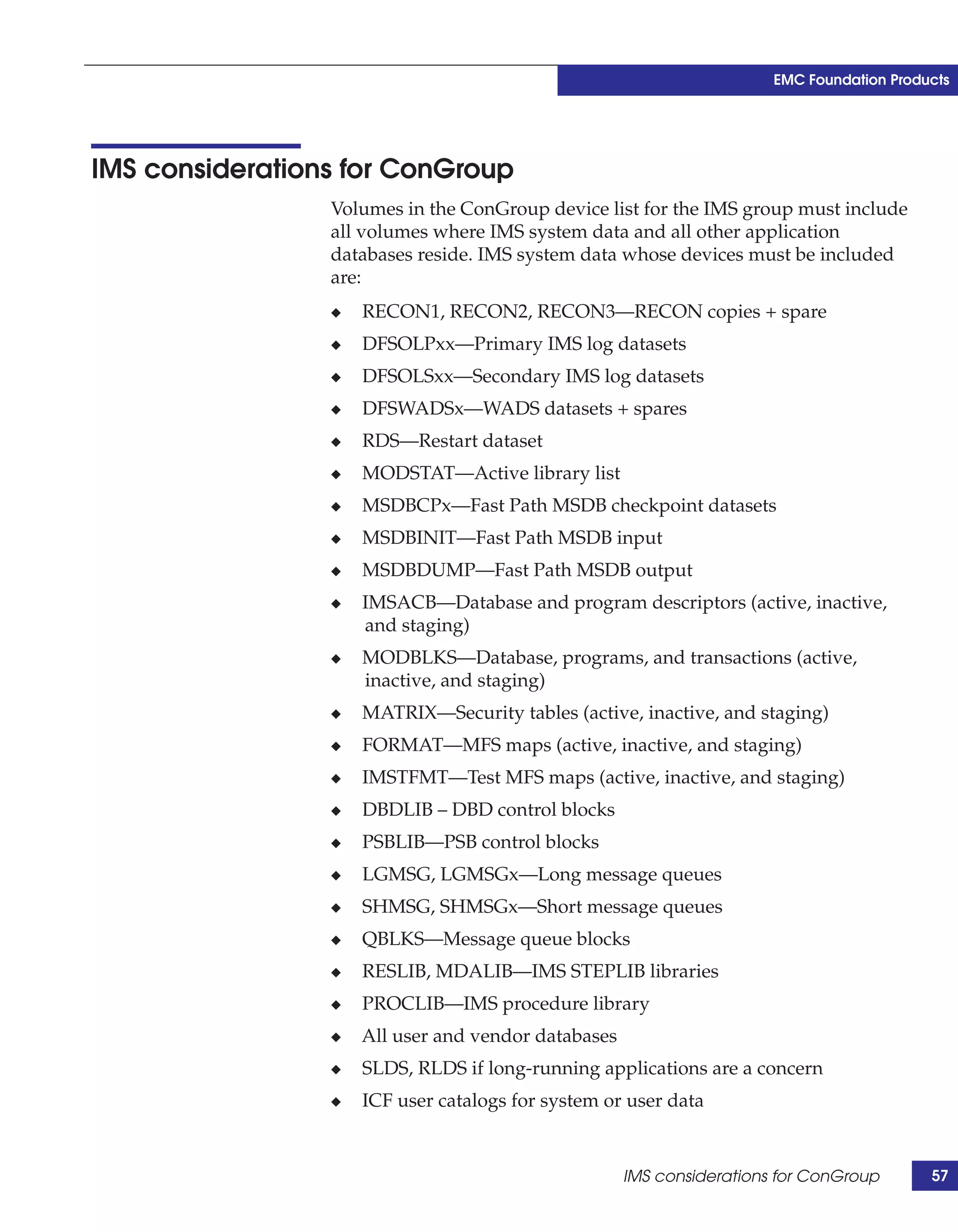
                                 IMS considerations for ConGroup ................................................. 57
                                 EMC z/OS Storage Manager .......................................................... 58
                                 Symmetrix Management Console .................................................. 59
                                 Symmetrix Performance Analyzer ................................................. 60
                                 Unisphere for VMAX ....................................................................... 61
                                 Virtual Provisioning ......................................................................... 62
                                 Fully Automated Storage Tiering ................................................... 62
                                 Data at Rest Encryption ................................................................... 63


               Chapter 3         Advanced Storage Provisioning
                                 Virtual Provisioning ......................................................................... 66
                                     Terminology ................................................................................ 66
                                     Overview ..................................................................................... 68
                                     Virtual Provisioning operations ............................................... 69
                                     Host allocation considerations ................................................. 71
                                     Balanced configurations ............................................................ 71
                                     Pool management ....................................................................... 72
                                     Thin device monitoring ............................................................. 74
                                     Considerations for IMS components on thin devices ........... 75
                                     Replication considerations ........................................................ 75
                                     Performance considerations...................................................... 77
                                 Fully Automated Storage Tiering ................................................... 78
                                     Introduction................................................................................. 78
                                     Best practices for IMS and FAST VP........................................ 80
                                     Unisphere for VMAX ................................................................. 81
                                     IMS and SMS storage groups.................................................... 84
                                     IMS and HSM.............................................................................. 84


               Chapter 4         IMS Database Cloning
                                 IMS database cloning ....................................................................... 88
                                 Replicating the data.......................................................................... 89
                                    Cloning IMS data using TimeFinder/Mirror ......................... 90
                                    Cloning IMS databases using TimeFinder/Clone................. 92


4          IMS on z/OS Using EMC Symmetrix Storage Systems Version 2.0
Contents


                  Cloning IMS databases using dataset snap.............................94


Chapter 5   Backing Up IMS Environments
            Overview ............................................................................................ 98
            IMS commands for TimeFinder integration................................ 100
            Creating a TimeFinder/Mirror backup for restart ..................... 100
               Creating a TimeFinder/Mirror backup .................................101
               TimeFinder/Mirror using remote consistent split...............103
               TimeFinder/Mirror using ConGroups ..................................104
               TimeFinder/Mirror backup methods comparisons.............105
            TimeFinder/Mirror backup for recovery..................................... 106
               TimeFinder/Mirror backup for recovery ..............................106
               TimeFinder/Mirror backup for remote recovery ................108
               Creating IMS image copies ......................................................109
            Backing up IMS databases using dataset snap ........................... 113
            Creating multiple split mirrors ..................................................... 114
            Backing up a TimeFinder copy...................................................... 115
               Backup using DFDSS................................................................116
               Backup using FDR ....................................................................117
            Keeping track of dataset placement on backup volumes.......... 117


Chapter 6   IMS Database Recovery Procedures
            Overview .......................................................................................... 120
            Database recovery from an IMS image copy............................... 123
            Database recovery using DFDSS or FDR ..................................... 123
            Restoring a non-IMS copy.............................................................. 124
                Restoring using TimeFinder/Mirror backup........................125
                Restoring using TimeFinder/Clone backup .........................126
                Restoring using dataset snap backup ....................................127
                Restoring IMS using DFDSS....................................................127
                Restoring IMS from an FDR dump ........................................128
            Recovering IMS from a non-IMS copy ......................................... 129
                Recovering using TimeFinder/Mirror...................................129
                Recovering using TimeFinder/Clone ....................................131
                Restoring IMS using a dataset snap backup .........................133


Chapter 7   Disaster Recovery and Disaster Restart
            Overview .......................................................................................... 138
            Disaster restart versus disaster recovery ..................................... 139
            Definitions ........................................................................................ 140


                  IMS on z/OS Using EMC Symmetrix Storage Systems Version 2.0                                          5
Contents


                                     Dependent-write consistency ................................................. 140
                                     Database restart ........................................................................ 141
                                     Database recovery .................................................................... 141
                                     Roll-forward recovery.............................................................. 142
                                 Considerations for disaster recovery/restart ............................. 142
                                     Recovery point objective ......................................................... 143
                                     Recovery time objective........................................................... 143
                                     Operational complexity ........................................................... 144
                                     Source LPAR activity ............................................................... 145
                                     Production impact .................................................................... 145
                                     Target host activity................................................................... 145
                                     Number of copies of data ........................................................ 145
                                     Distance for solution ................................................................ 146
                                     Bandwidth requirements......................................................... 146
                                     Federated consistency.............................................................. 146
                                 Tape-based solutions ...................................................................... 148
                                     Tape-based disaster recovery ................................................. 148
                                     Tape-based disaster restart ..................................................... 148
                                 Remote replication challenges ...................................................... 149
                                     Propagation delay .................................................................... 150
                                     Bandwidth requirements......................................................... 150
                                     Network infrastructure............................................................ 151
                                     Method and frequency of instantiation................................. 151
                                     Method of re-instantiation ...................................................... 151
                                     Change rate at the source site ................................................. 152
                                     Locality of reference ................................................................. 152
                                     Expected data loss .................................................................... 153
                                     Failback considerations ........................................................... 153
                                 Array-based remote replication.................................................... 154
                                 Planning for array-based replication ........................................... 154
                                 SRDF/S single Symmetrix array to single Symmetrix array.... 155
                                 SRDF/S and consistency groups .................................................. 156
                                     Rolling disaster ......................................................................... 156
                                     Protecting against rolling disasters........................................ 158
                                     SRDF/S with multiple source Symmetrix arrays ................ 160
                                     ConGroup considerations ....................................................... 161
                                     Consistency groups and IMS dual WADS............................ 162
                                 SRDF/A............................................................................................ 168
                                     Preparation for SRDF/A ......................................................... 169
                                     SRDF/A using multiple source Symmetrix.......................... 170
                                     How to restart in the event of a disaster ............................... 171
                                 SRDF/AR single-hop ..................................................................... 172
                                     How to restart in the event of a disaster ............................... 174


6          IMS on z/OS Using EMC Symmetrix Storage Systems Version 2.0
Contents


             SRDF/Star ........................................................................................ 174
             SRDF/Extended Distance Protection ........................................... 175
             High-availability solutions ............................................................ 177
                AutoSwap...................................................................................177
                Geographically Dispersed Disaster Restart ..........................178
             IMS Fast Path Virtual Storage Option .......................................... 180


Chapter 8    Performance Topics
             Overview .......................................................................................... 184
             The performance stack ................................................................... 184
                 Importance of I/O avoidance..................................................185
                 Storage system layer considerations ......................................186
             Traditional IMS layout recommendations ................................... 186
                 General principles for layout...................................................187
                 IMS layouts and replication considerations..........................187
             RAID considerations....................................................................... 188
                 RAID recommendations ..........................................................191
             Flash drives ...................................................................................... 193
                 Magnetic disk history ...............................................................193
                 IMS workloads best suited for Flash drives..........................194
                 Flash drives and storage tiering..............................................195
             Data placement considerations ..................................................... 197
                 Disk performance considerations ...........................................197
                 Hypervolume contention.........................................................199
                 Maximizing data spread across the back end .......................200
                 Minimizing disk head movement ..........................................201
             Other layout considerations .......................................................... 202
                 Database layout considerations with SRDF/S .....................202
                 TimeFinder targets and sharing spindles..............................203
                 Database clones using TimeFinder/Snap .............................204
             Extended address volumes ............................................................ 204

Appendix A   References
             References......................................................................................... 208

Appendix B   Sample Skeleton JCL
             Modified image copy skeleton sample JCL................................. 210


Glossary


                   IMS on z/OS Using EMC Symmetrix Storage Systems Version 2.0                                         7
Contents


               Index


8          IMS on z/OS Using EMC Symmetrix Storage Systems Version 2.0
Figures


     Title                                                                                             Page
1    IMS processing architecture overview ........................................................ 19
2    IMS in a sysplex configuration ..................................................................... 23
3    Symmetrix hardware and software layers.................................................. 28
4    Symmetrix VMAX logical diagram ............................................................. 30
5    z/OS SymmAPI architecture........................................................................ 34
6    SRDF family for z/OS.................................................................................... 39
7    Classic SRDF/Star support configuration .................................................. 41
8    SRDF Consistency Group using SRDF-ECA .............................................. 47
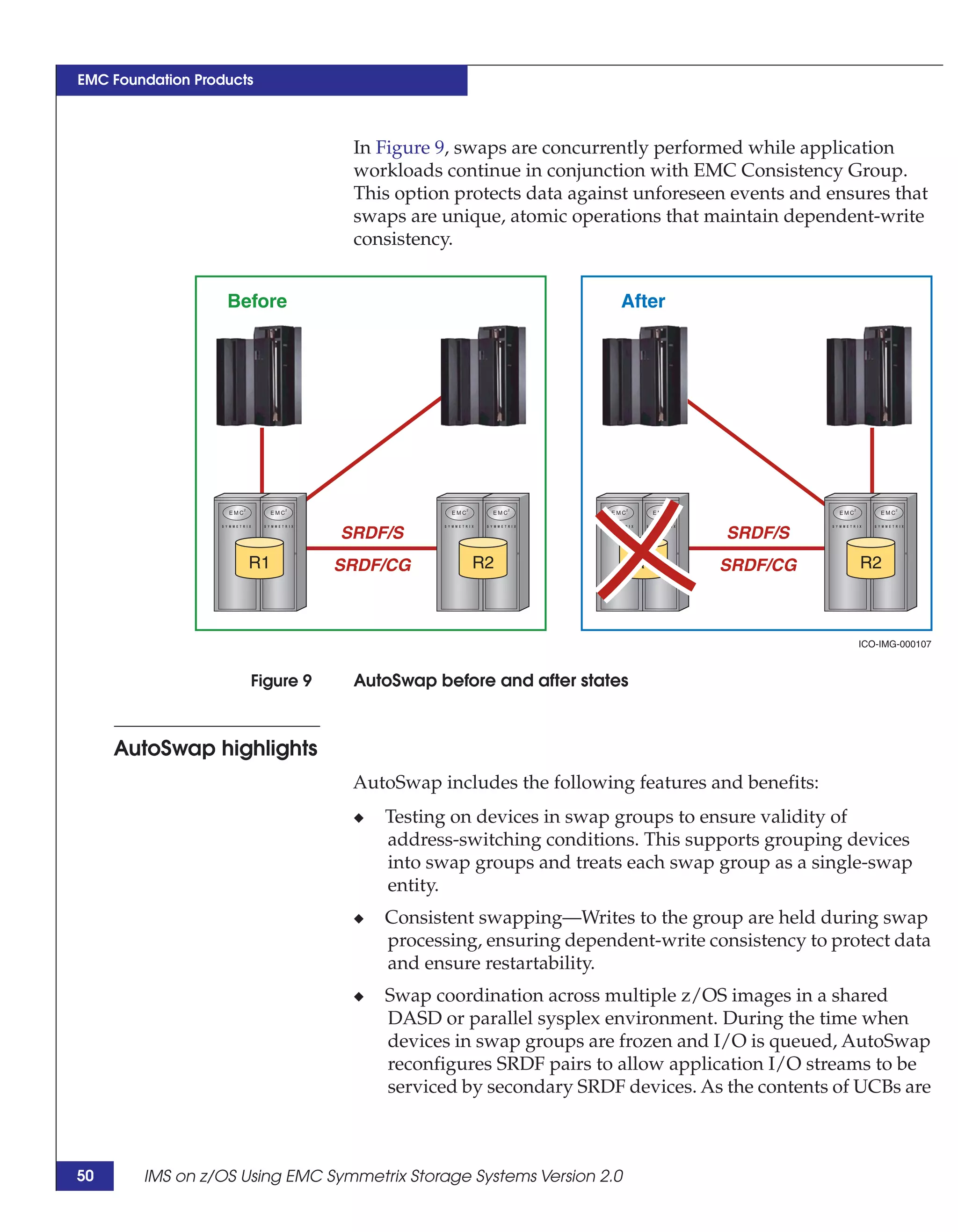
9    AutoSwap before and after states ................................................................ 50
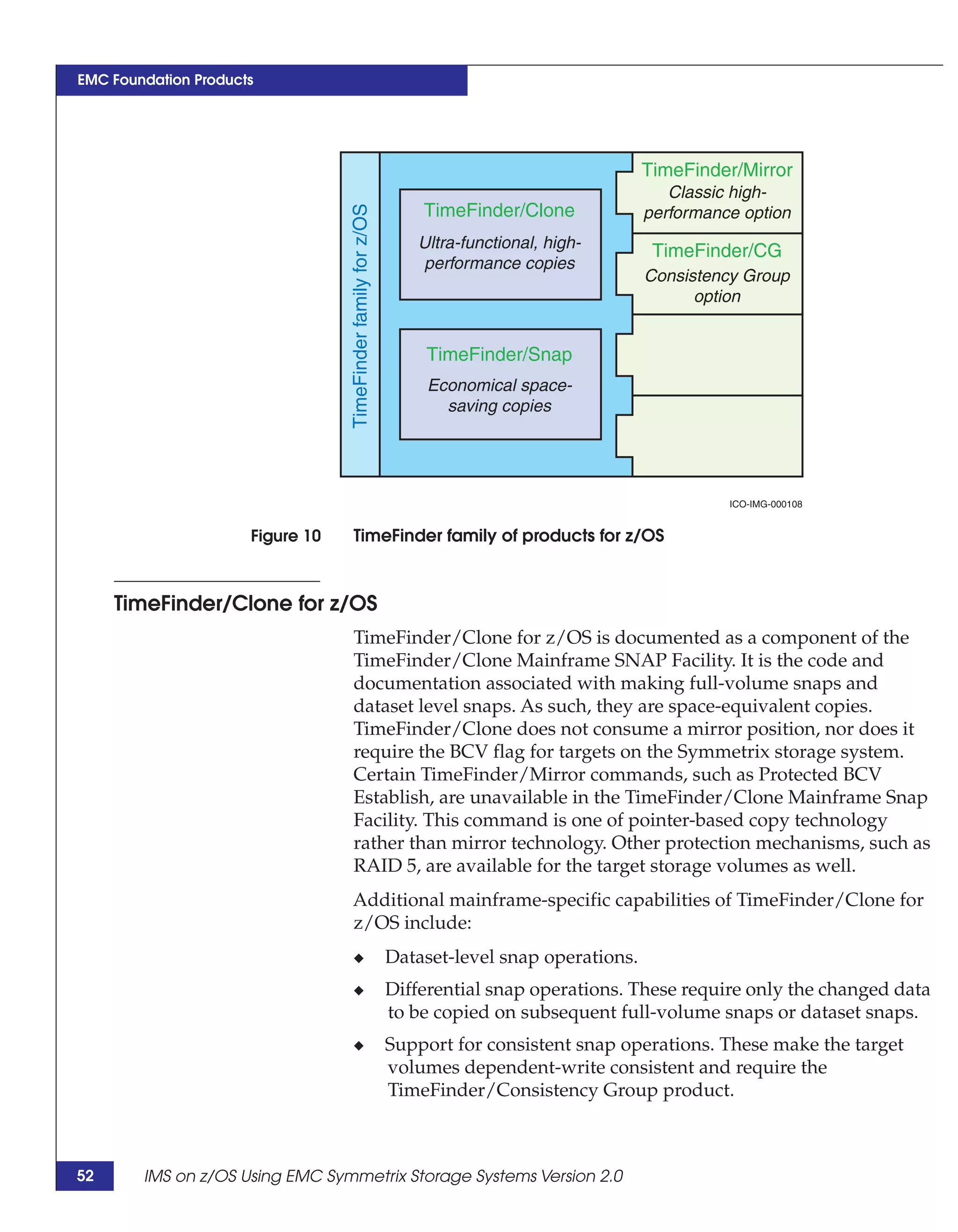
10   TimeFinder family of products for z/OS.................................................... 52
11   EMC z/OS Storage Manager functionality ................................................ 58
12   Thin devices, pools, and physical disks ...................................................... 70
13   Thin device pool with devices filling up .................................................... 73
14   Thin device pool rebalanced with new devices......................................... 73
15   FAST VP storage groups, policies, and tiers .............................................. 80
16   IMS metadata and physical cloning processes........................................... 89
17   IMS databases cloning using TimeFinder/Mirror .................................... 90
18   IMS databases cloning using TimeFinder/Clone...................................... 92
19   IMS database cloning using dataset snap ................................................... 94
20   TimeFinder/Mirror backup using consistent split.................................. 102
21   TimeFinder/Mirror backup using remote consistent split .................... 103
22   TimeFinder/Mirror backup using ConGroup ......................................... 104
23   TimeFinder/Mirror backup for recovery ................................................. 107
24   TimeFinder/Mirror backup for recovery using remote split ................ 108
25   IMS image copy from a BCV ...................................................................... 110
26   IMS image copy from a dataset snap ........................................................ 112
27   Backing up IMS databases using dataset snap ........................................ 113
28   IMS configured with three sets of BCVs ................................................... 115
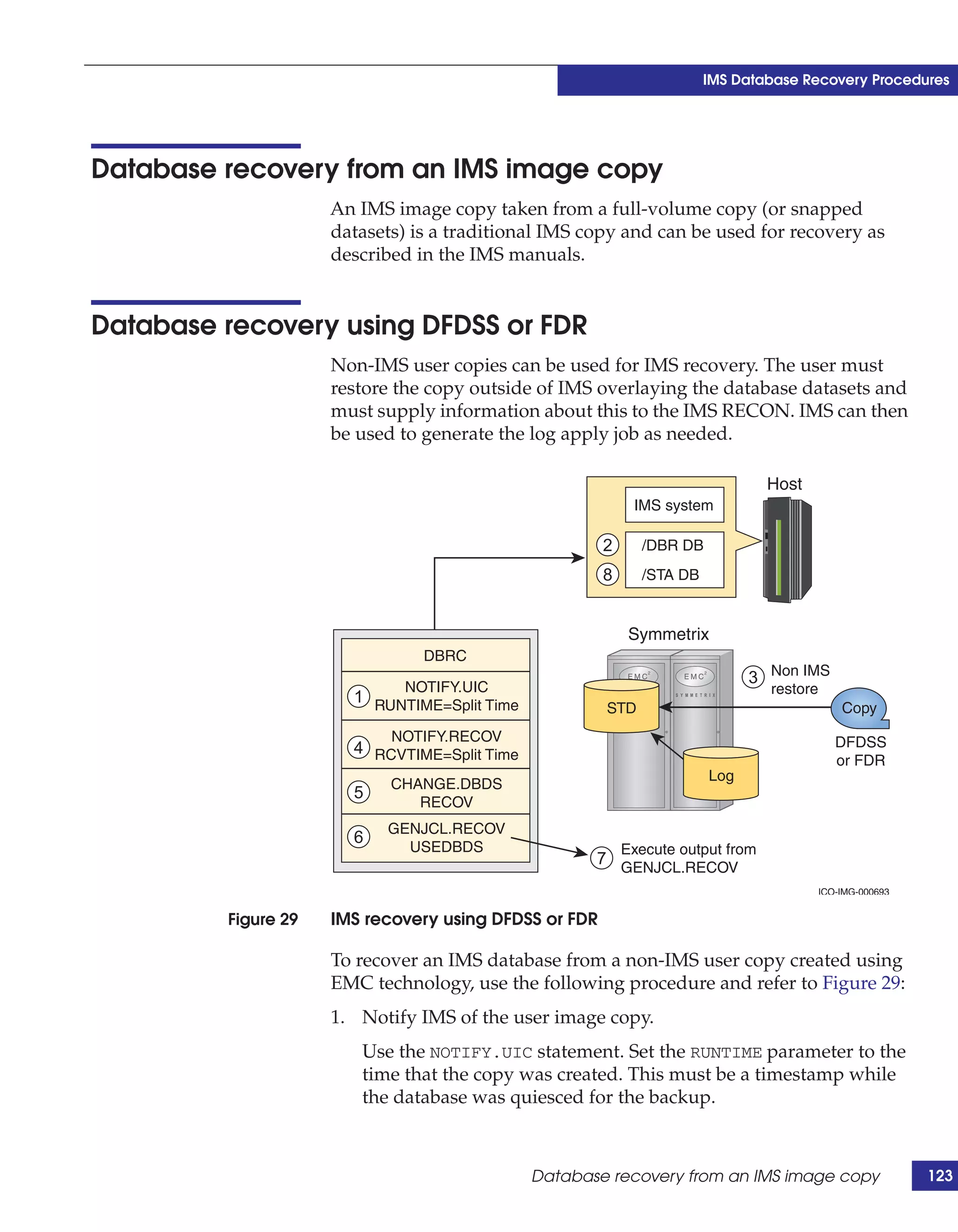
29   IMS recovery using DFDSS or FDR ........................................................... 123
30   Restoring an IMS database to a point in time using BCVs..................... 130


                      IMS on z/OS Using EMC Symmetrix Storage Systems Version 2.0                                  9
Figures


                31      Restoring an IMS database to a point in time using STDs .....................                            132
                32      Single Symmetrix array to single Symmetrix array ................................                        155
                33      Rolling disaster with multiple production Symmetrix arrays ..............                                157
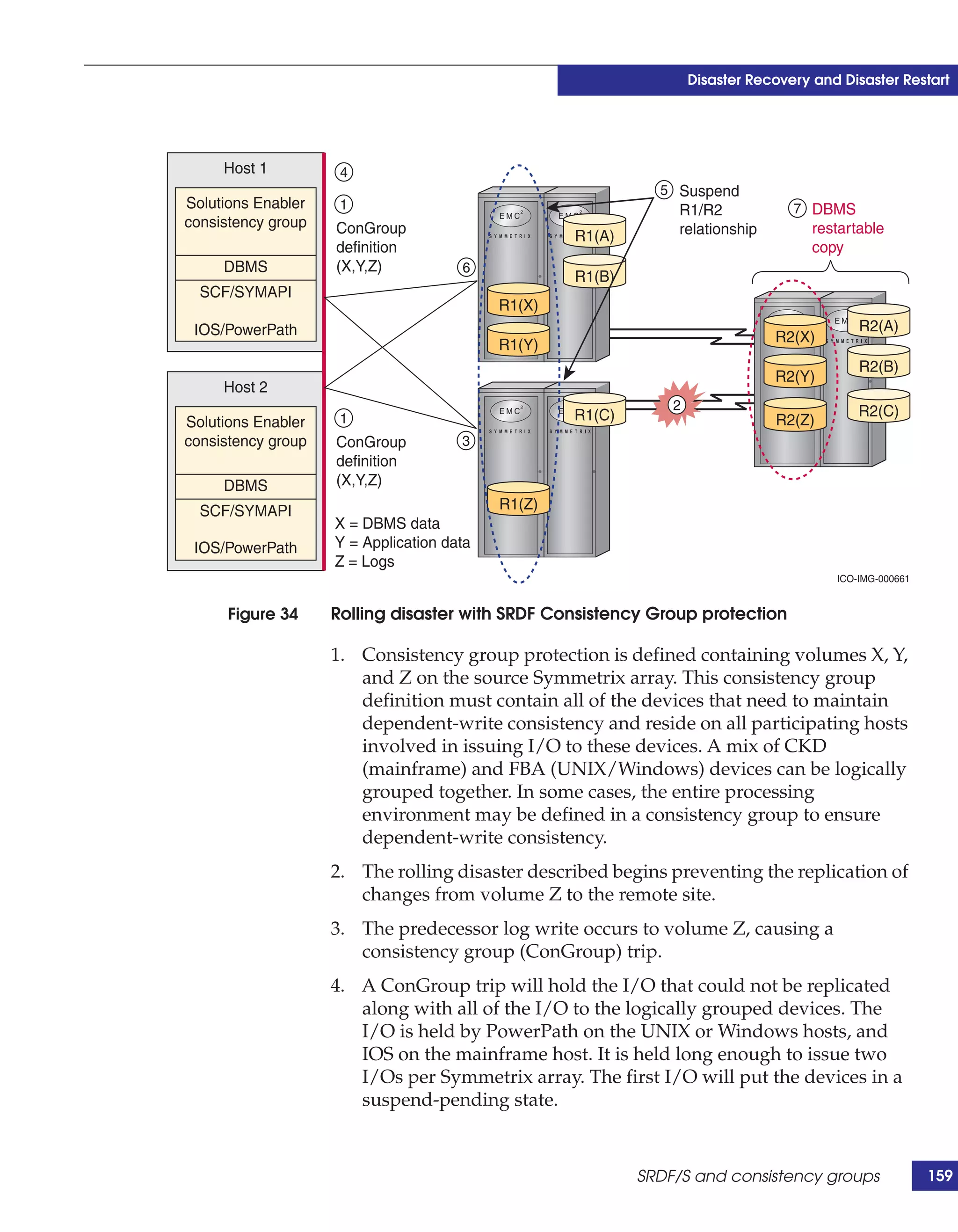
                34      Rolling disaster with SRDF Consistency Group protection ..................                               159
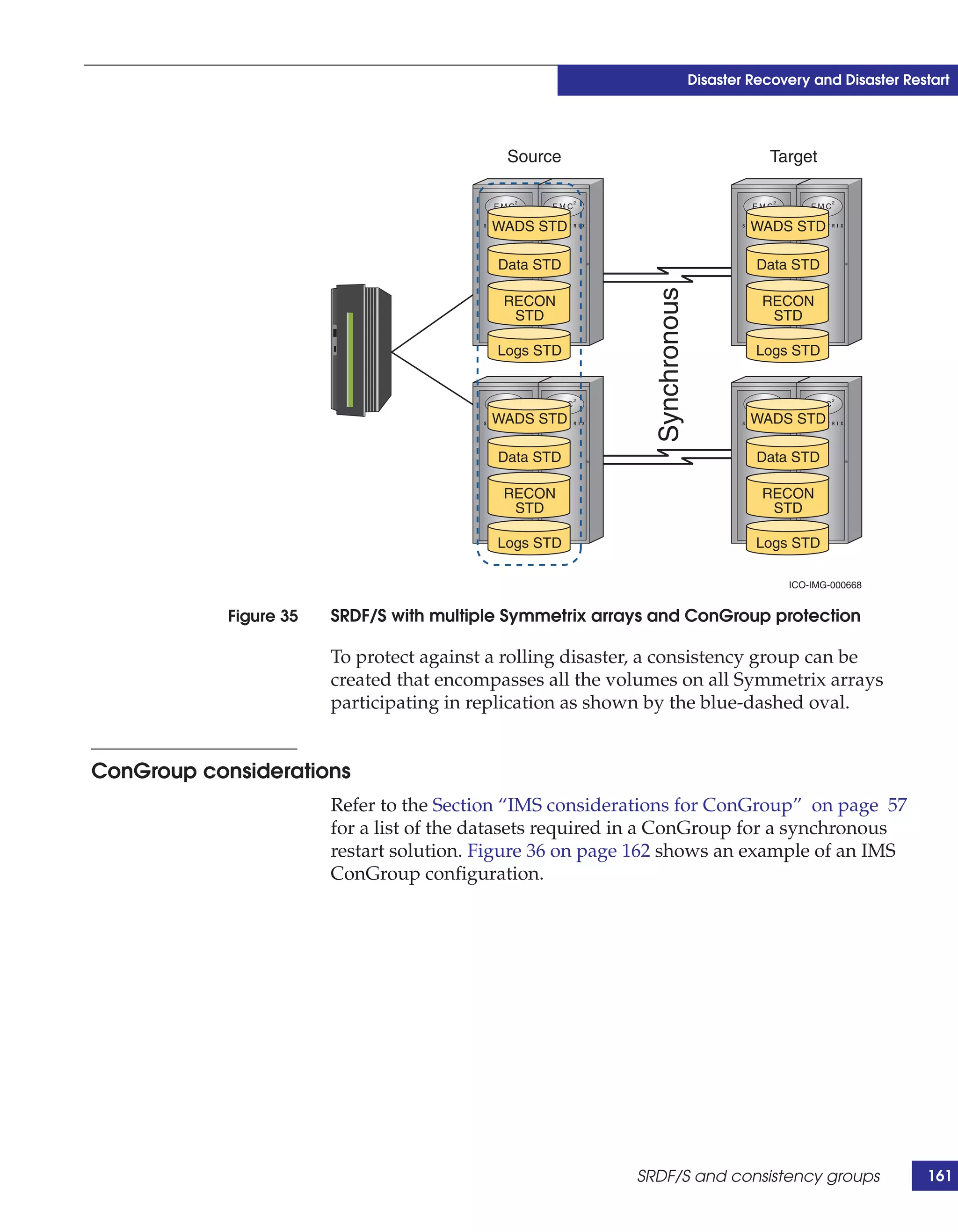
                35      SRDF/S with multiple Symmetrix arrays and ConGroup protection .                                          161
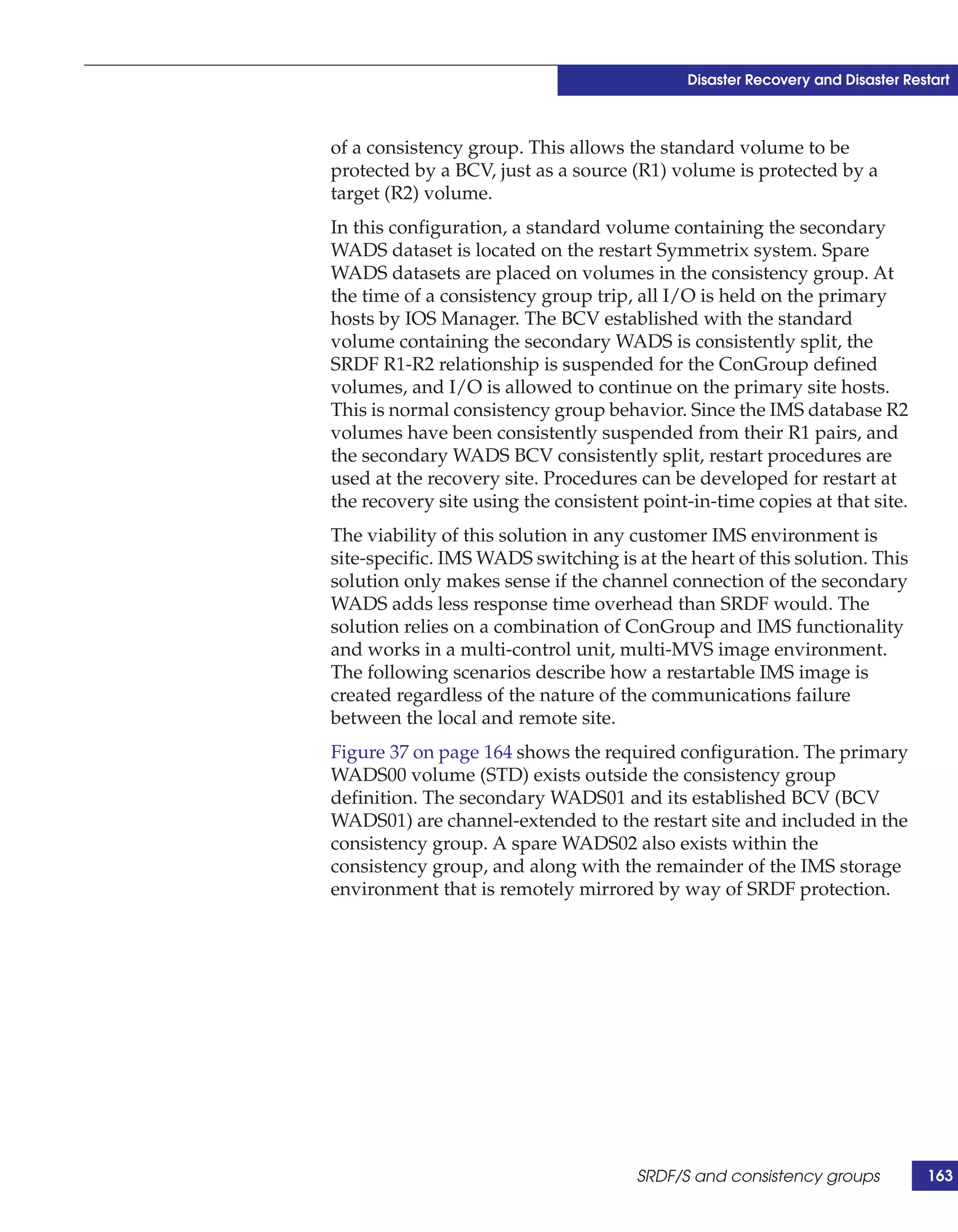
                36      IMS ConGroup configuration ....................................................................          162
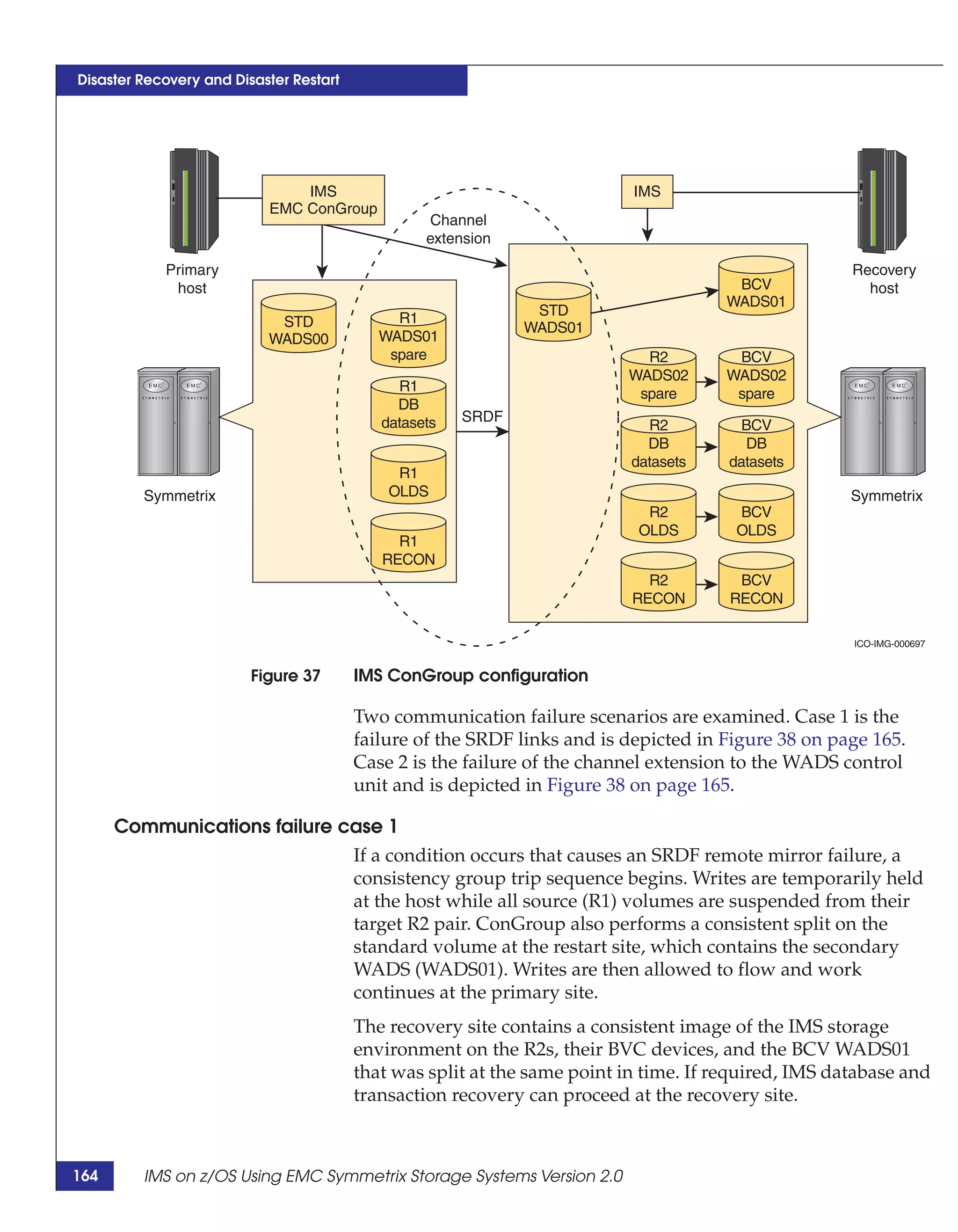
                37      IMS ConGroup configuration ....................................................................          164
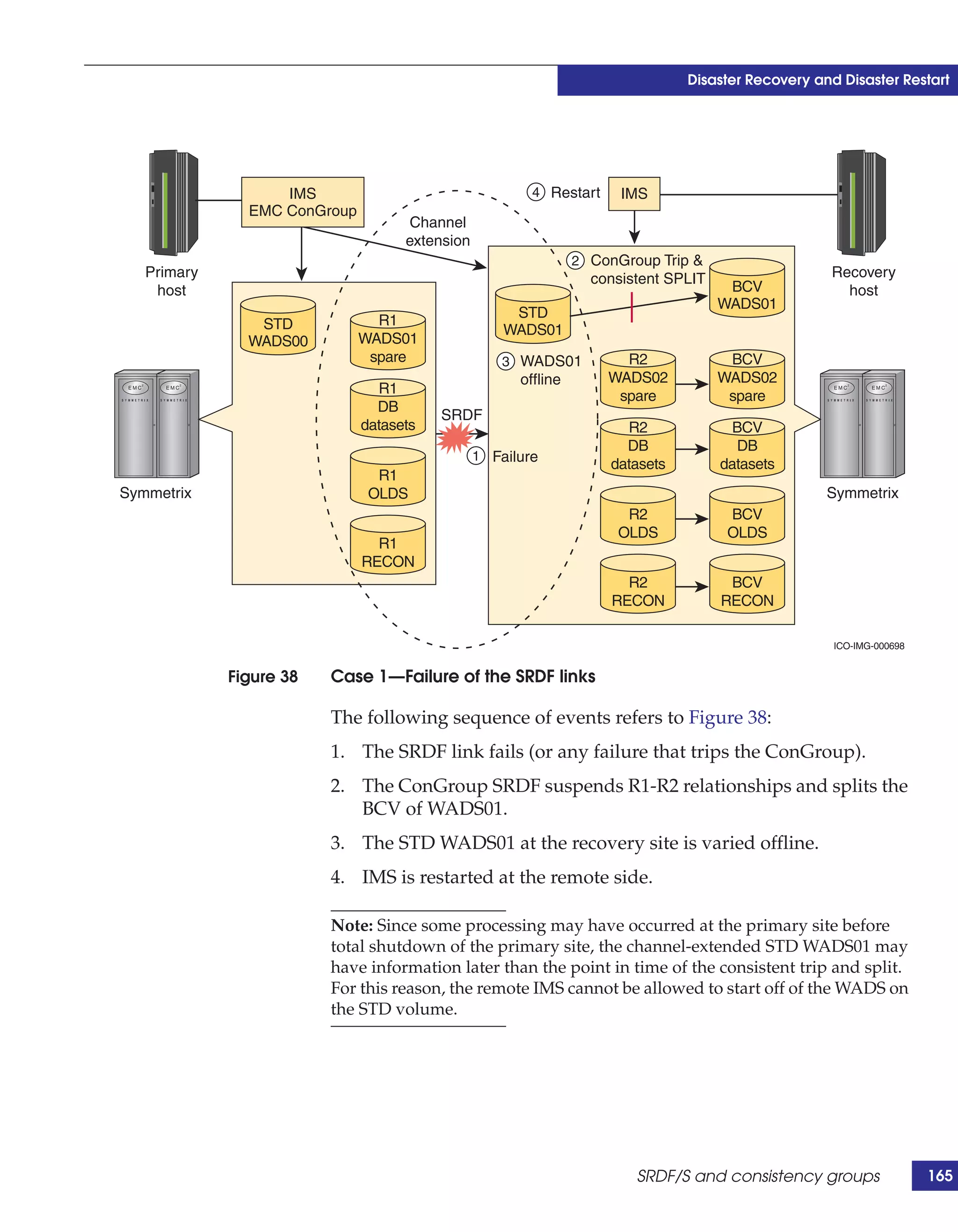
                38      Case 1—Failure of the SRDF links .............................................................           165
                39      Case 2—Channel extension fails first ........................................................            167
                40      SRDF/Asynchronous replication configuration .....................................                        168
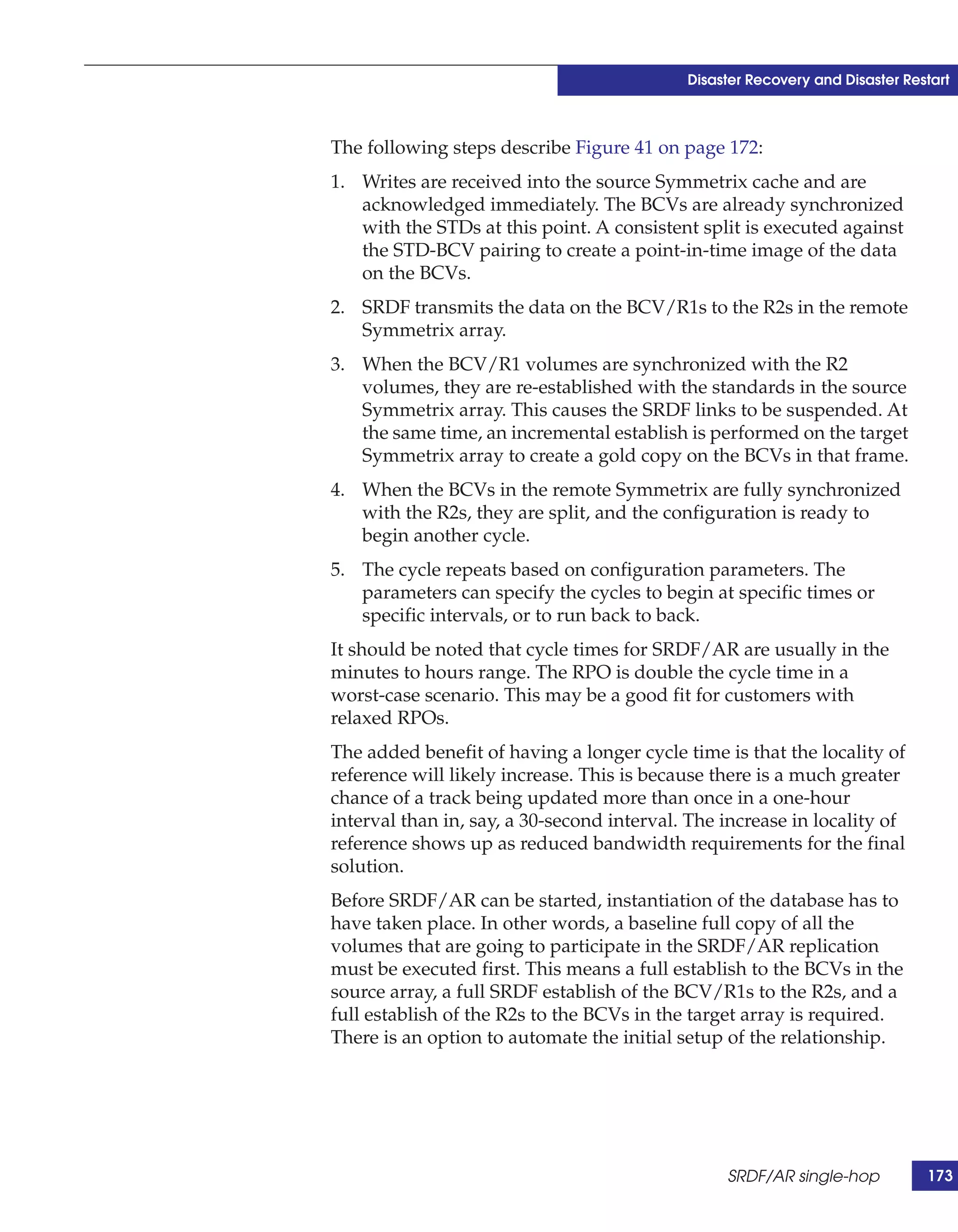
                41      SRDF/AR single-hop replication configuration......................................                       172
                42      SRDF/Star configuration ............................................................................     175
                43      SRDF/EDP block diagram..........................................................................         176
                44      GDDR-managed configuration with SRDF/Star and AutoSwap.........                                          179
                45      EMC foundation products ..........................................................................       180
                46      The performance stack ................................................................................   185
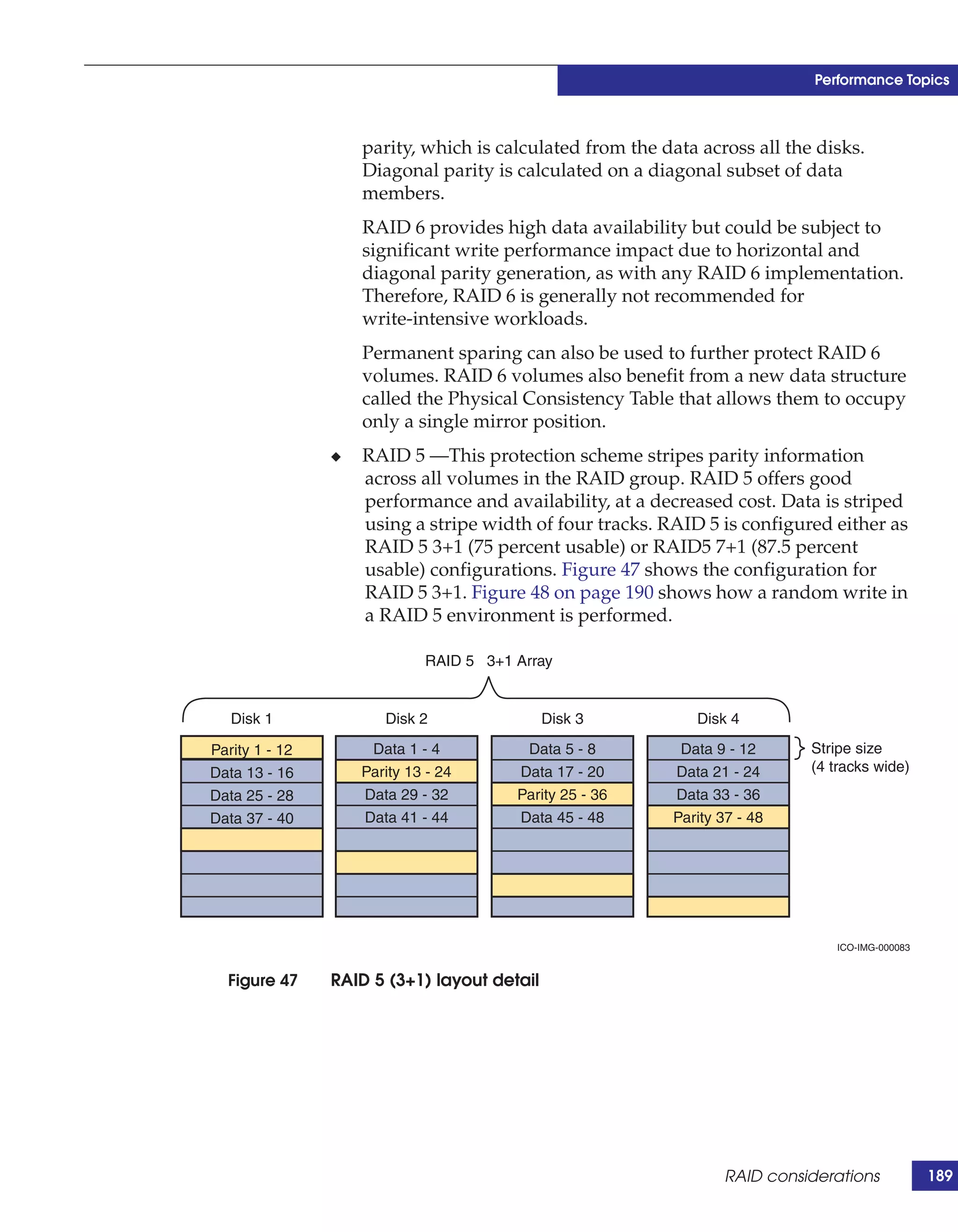
                47      RAID 5 (3+1) layout detail ..........................................................................    189
                48      Anatomy of a RAID 5 random write.........................................................                190
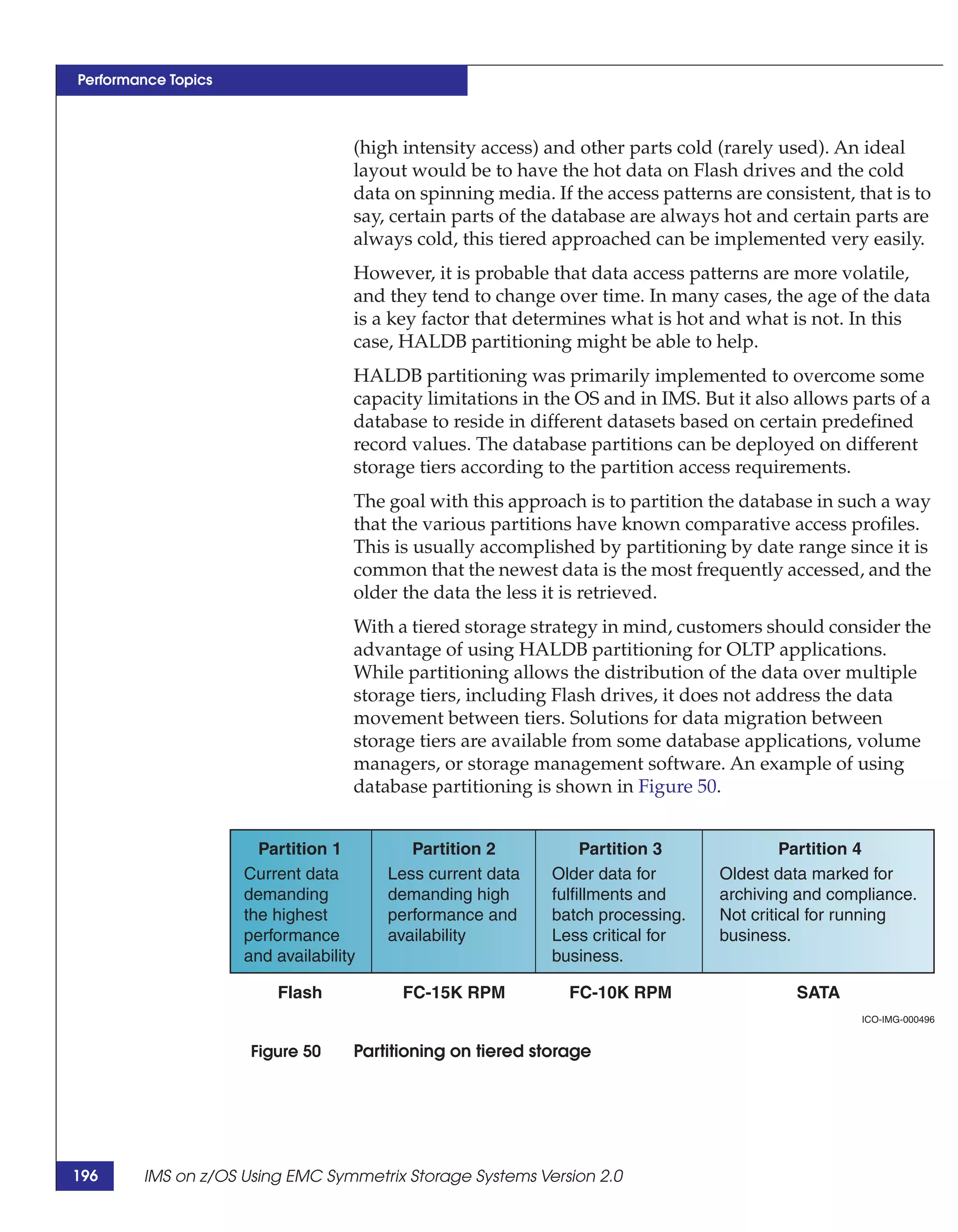
                49      Magnetic disk capacity and performance history ...................................                       194
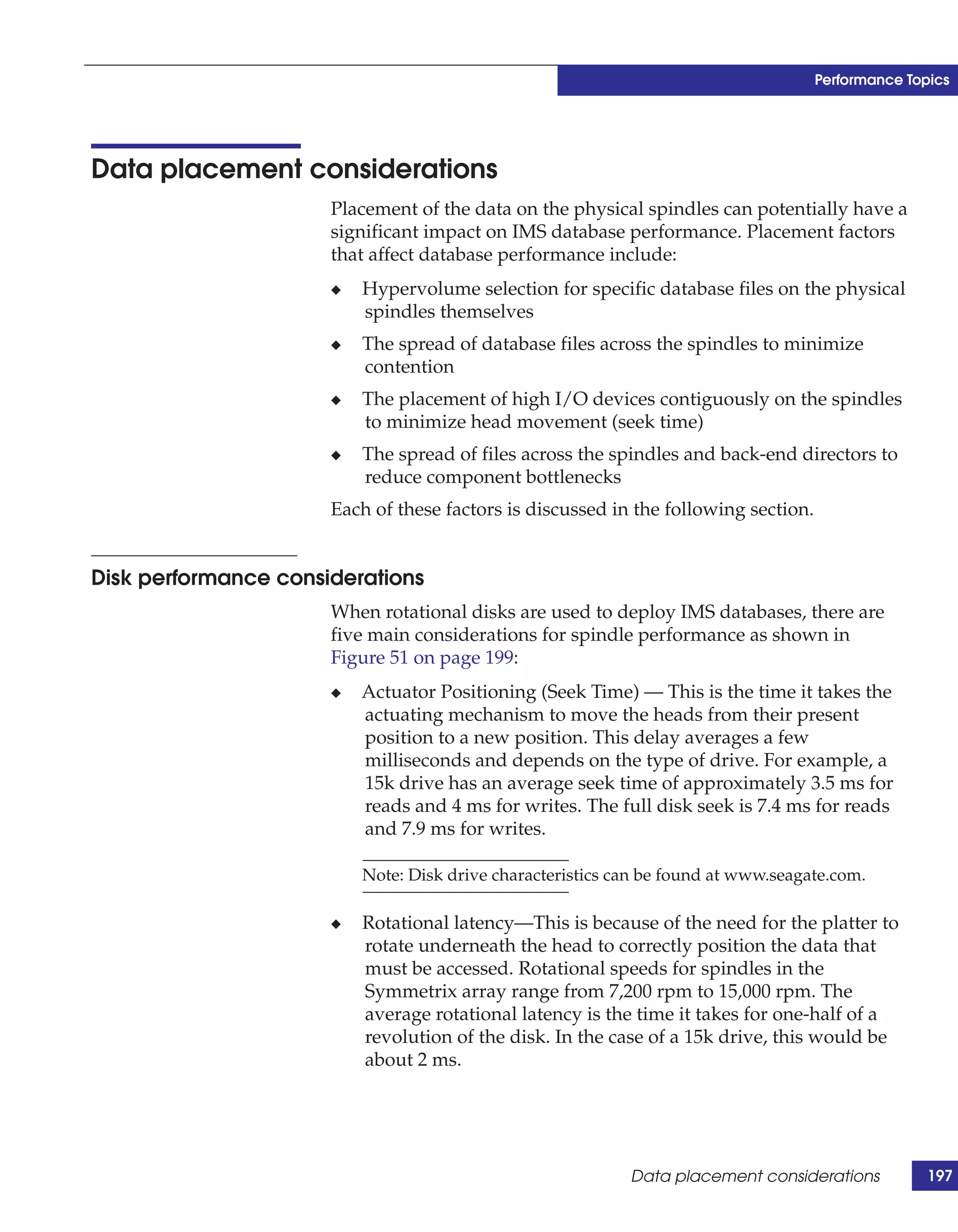
                50      Partitioning on tiered storage.....................................................................      196
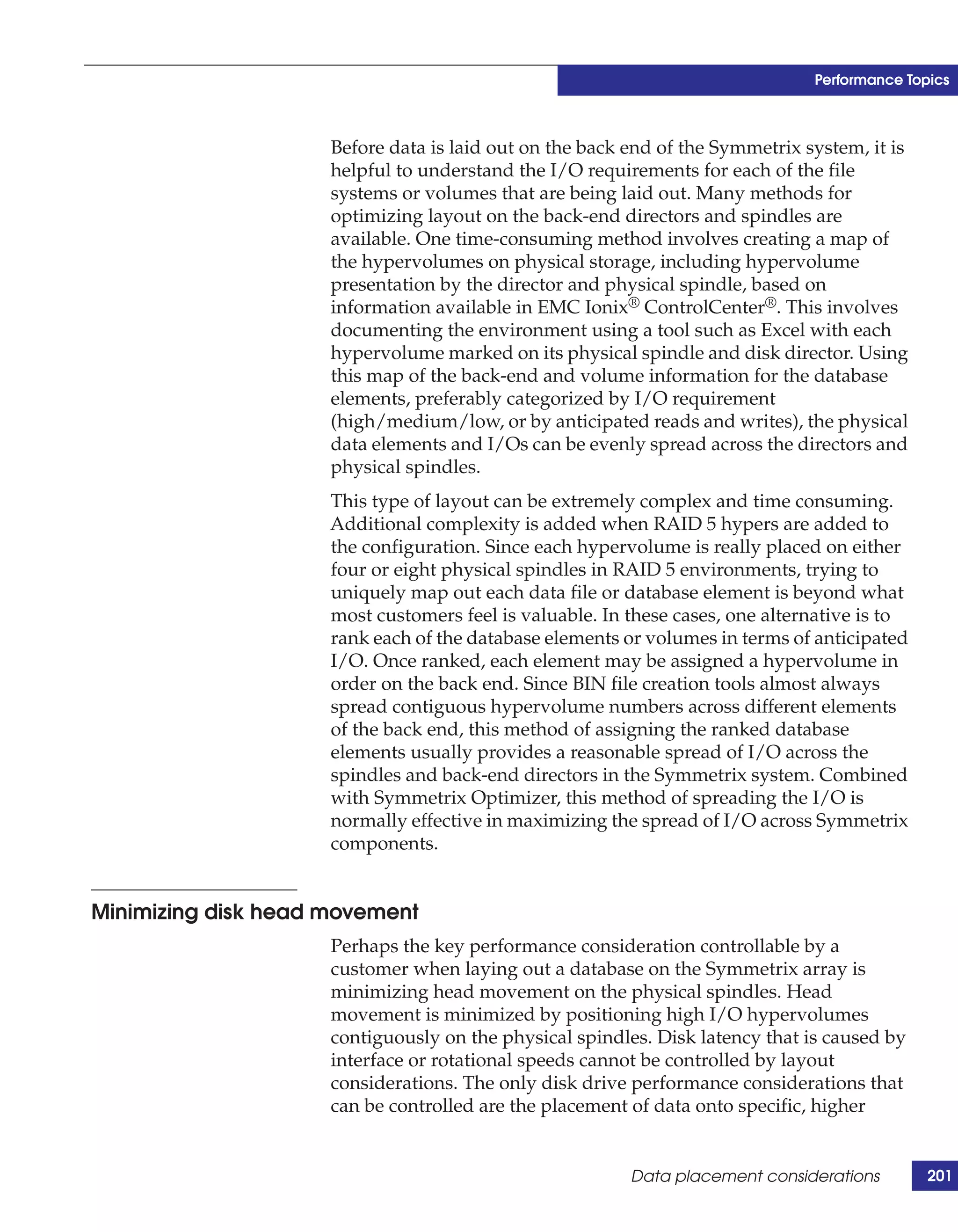
                51      Disk performance factors ............................................................................    199


10        IMS on z/OS Using EMC Symmetrix Storage Systems Version 2.0
Tables


    Title                                                                                            Page
1   Virtual Provisioning terms............................................................................. 66
2   Thick-to-thin host migrations........................................................................ 76
3   Thick-to-thin array-based migrations .......................................................... 76
4   Backup methods and categories.................................................................... 99
5   TimeFinder/Mirror backup methods ........................................................ 106
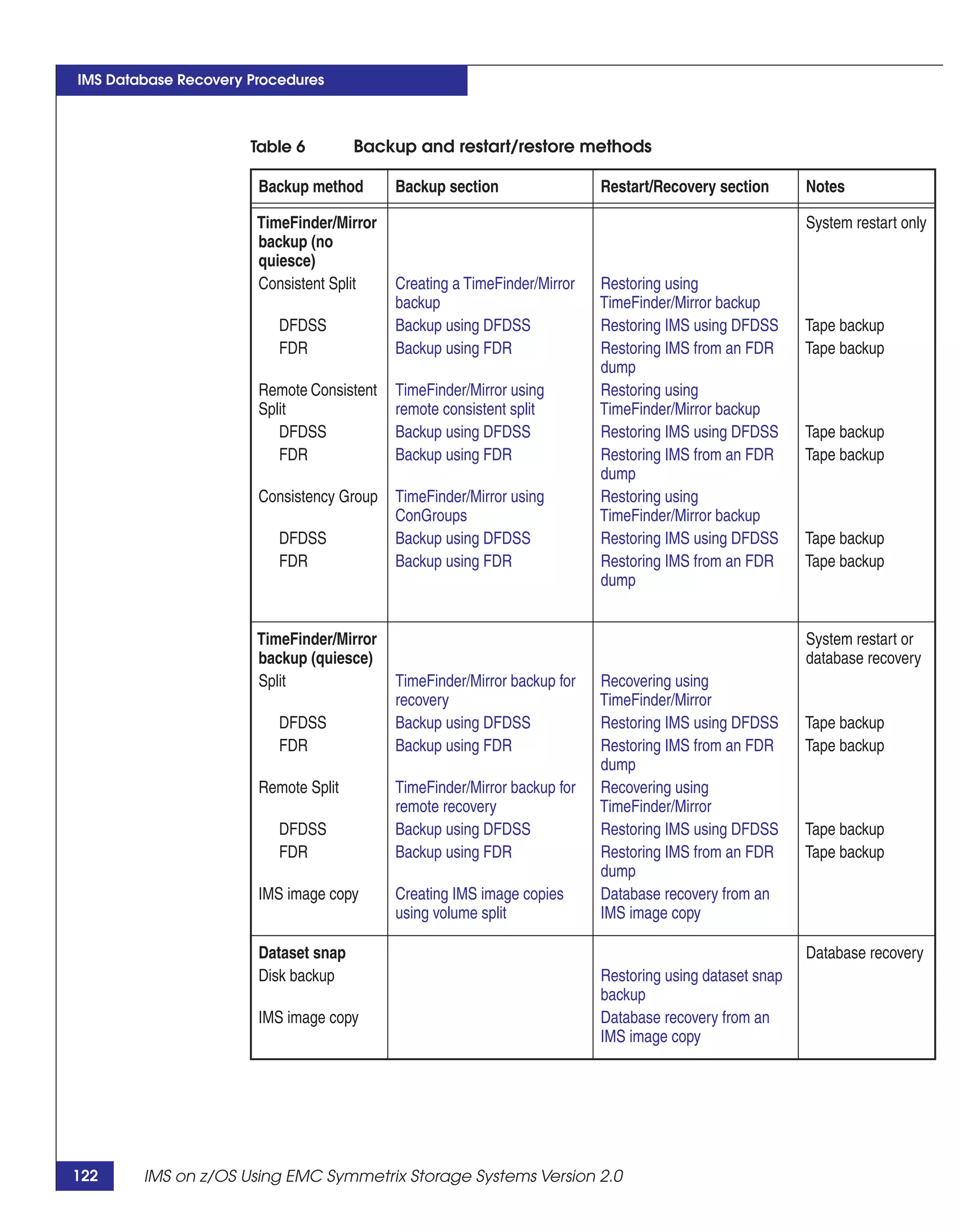
6   Backup and restart/restore methods ......................................................... 122


                     IMS on z/OS Using EMC Symmetrix Storage Systems Version 2.0                                 11
12   IMS on z/OS Using EMC Symmetrix Storage Systems Version 2.0
Preface


               As part of an effort to improve and enhance the performance and
               capabilities of its product lines, EMC periodically releases revisions
               of its hardware and software. Therefore, some functions described in
               this document may not be supported by all versions of the software
               or hardware currently in use. For the most up-to-date information on
               product features, refer to your product release notes.
               This document provides a comprehensive treatment of EMC
               Symmetrix technologies that can be used to enhance IMS z/OS
               databases.

  Audience     This TechBook is part of the Symmetrix documentation set and is
               intended for use by database and system administrators, systems
               integrators, and members of EMC Global Services who support and
               work with IMS for z/OS.
               Readers of this document are expected to be familiar with the
               following topics:
               ◆   IMS for z/OS
               ◆   z/OS operating system
               ◆   Symmetrix fundamentals

Organization   This TechBook is divided into the following seven chapters and two
               appendices:
               Chapter 1, “IMS on z/OS,” provides a high-level overview of IMS
               components in a z/OS operating environment.
               Chapter 2, “EMC Foundation Products,” describes EMC products
               used to support the management of IMS z/OS environments.


                       IMS on z/OS Using EMC Symmetrix Storage Systems Version 2.0      13
Preface


                                   Chapter 3, “Advanced Storage Provisioning,” provides information
                                   on storage provisioning enhancements that are new with Enginuity
                                   5876.
                                   Chapter 4, “IMS Database Cloning,” provides guidance on how to
                                   clone IMS systems and databases using TimeFinder technology.
                                   Chapter 5, “Backing Up IMS Environments,” describes how EMC
                                   Symmetrix technology can be used to enhance an IMS backup
                                   strategy.
                                   Chapter 6, “IMS Database Recovery Procedures,” is a follow-on to
                                   Chapter 4 and describes how recovery processes can be facilitated
                                   using the backups described in Chapter 4.
                                   Chapter 7, “Disaster Recovery and Disaster Restart,” describes the
                                   difference between using traditional IMS recovery techniques versus
                                   EMC restart solutions.
                                   Chapter 8, “Performance Topics,” describes the best practices for IMS
                                   performance on Symmetrix systems.
                                   Appendix A, “References,” provides the reader a list of references for
                                   additional material available from either EMC or IBM.
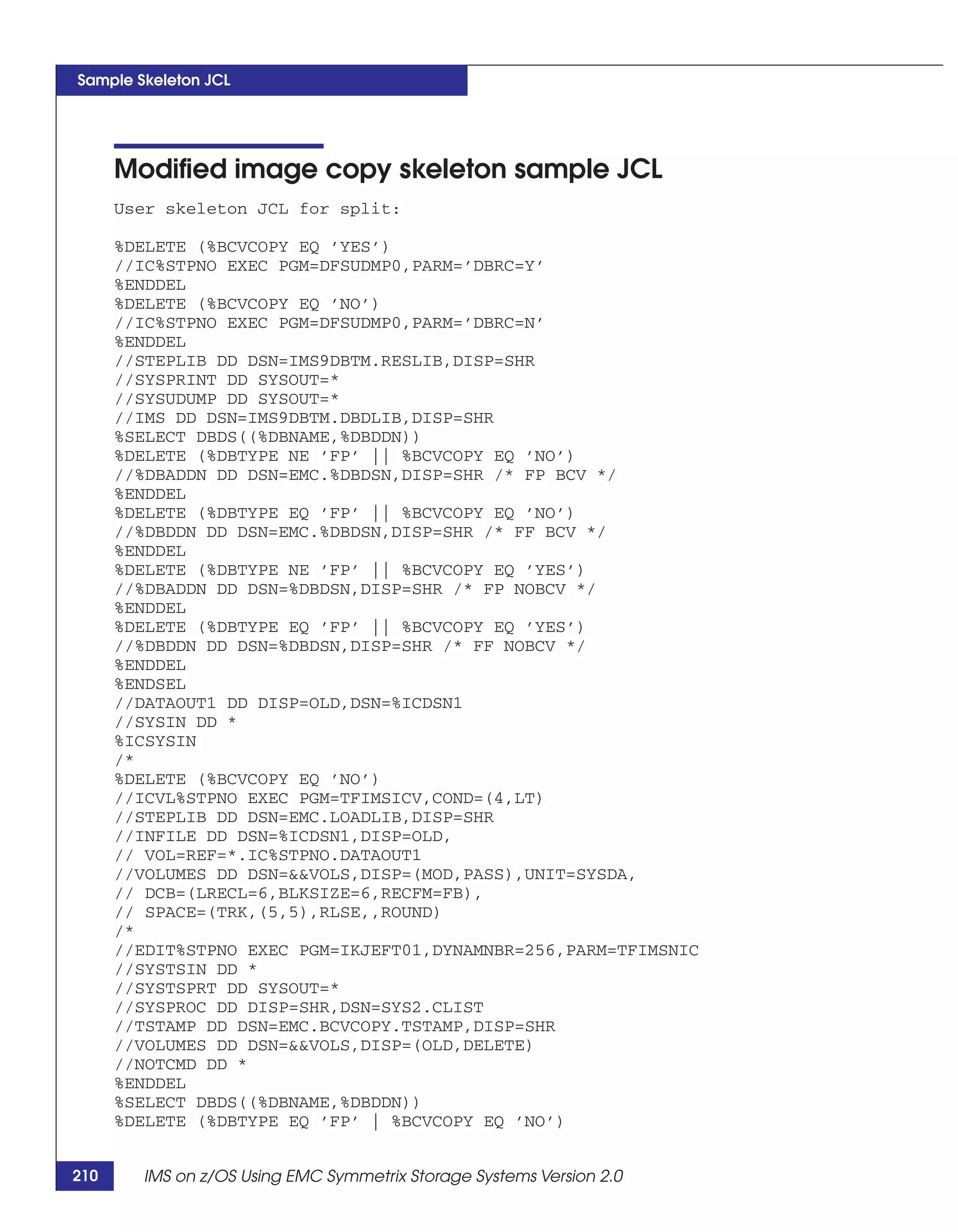
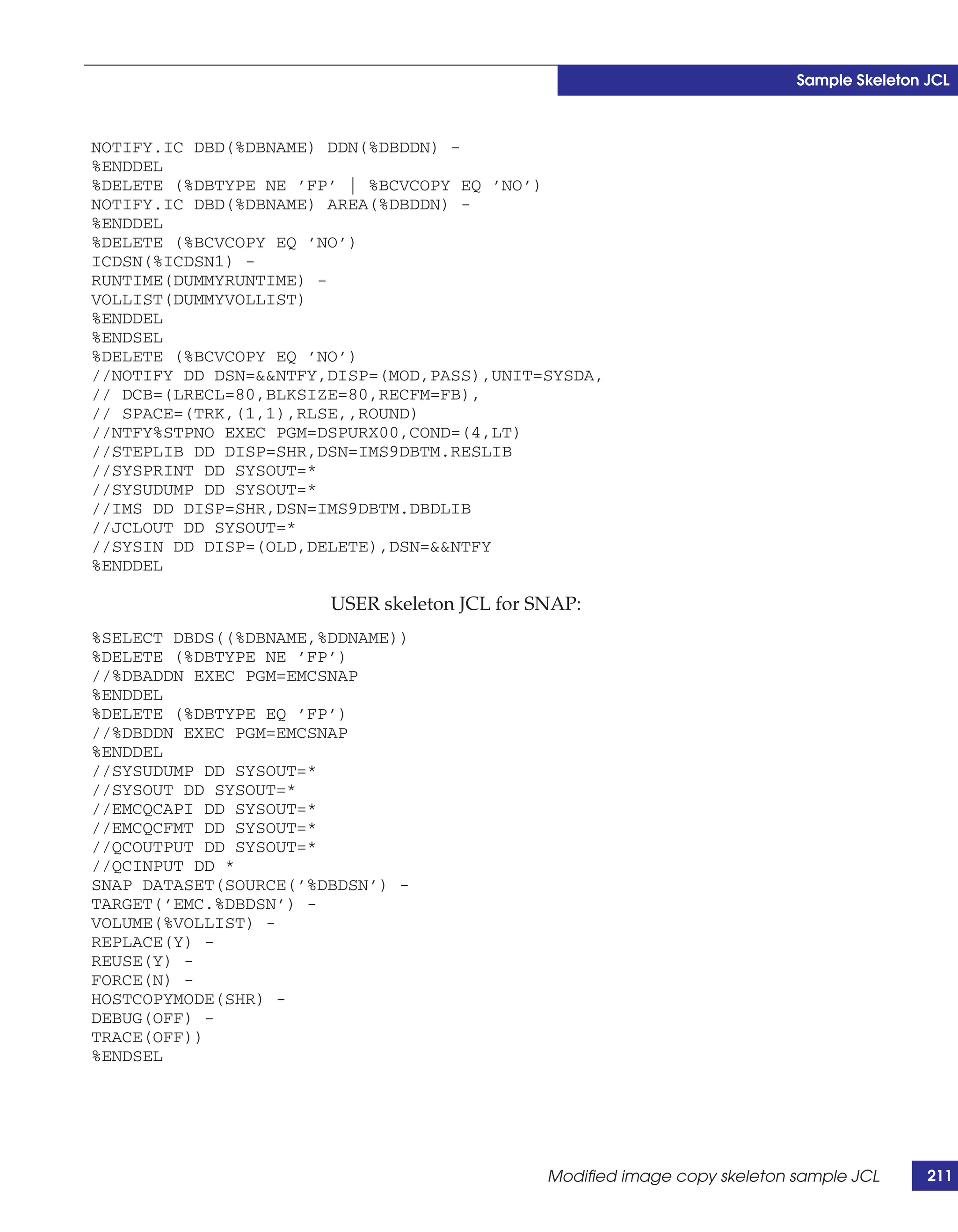
                                   Appendix B, “Sample Skeleton JCL,” provides sample skeleton JCL
                                   for TimeFinder/Mirror and TimeFinder/Clone snap operations.

          Conventions used in      EMC uses the following conventions for special notices.
               this document
                                   Note: A note presents information that is important, but not hazard-related.


14        IMS on z/OS Using EMC Symmetrix Storage Systems Version 2.0
Preface


Typographical     EMC uses the following type style conventions in this document:
  conventions

   Normal               Used in running (nonprocedural) text for:
                        • Names of interface elements (such as names of windows, dialog boxes, buttons,
                          fields, and menus)
                        • Names of resources, attributes, pools, Boolean expressions, buttons, DQL
                          statements, keywords, clauses, environment variables, functions, utilities
                        • URLs, pathnames, filenames, directory names, computer names, filenames,
                          links, groups, service keys, file systems, notifications

   Bold                 Used in running (nonprocedural) text for:
                        • Names of commands, daemons, options, programs, processes, services,
                          applications, utilities, kernels, notifications, system calls, man pages

                        Used in procedures for:
                        • Names of interface elements (such as names of windows, dialog boxes, buttons,
                          fields, and menus)
                        • What user specifically selects, clicks, presses, or types

   Italic               Used in all text (including procedures) for:
                        • Full titles of publications referenced in text
                        • Emphasis (for example a new term)
                        • Variables

   Courier              Used for:
                        • System output, such as an error message or script
                        • URLs, complete paths, filenames, prompts, and syntax when shown outside of
                          running text

   Courier bold         Used for:
                        • Specific user input (such as commands)

   Courier italic       Used in procedures for:
                        • Variables on command line
                        • User input variables

   <>                   Angle brackets enclose parameter or variable values supplied by the user

   []                   Square brackets enclose optional values

   |                    Vertical bar indicates alternate selections - the bar means “or”

   {}                   Braces indicate content that you must specify (that is, x or y or z)

   ...                  Ellipses indicate nonessential information omitted from the example


                          IMS on z/OS Using EMC Symmetrix Storage Systems Version 2.0                      15
Preface


            The author of this     This TechBook was written by Paul Pendle, an EMC employee
                   TechBook        working for the Symmetrix Mainframe Engineering team based at
                                   Hopkinton, Massachusetts. Paul Pendle has over 35 years of
                                   experience in databases, hardware, software and operating systems,
                                   both from a database administrator perspective and from a systems
                                   administrator/systems programming perspective.

             Your comments         Your suggestions will help us continue to improve the accuracy,
                                   organization, and overall quality of the user publications. Send your
                                   opinions of this document to:
                                   techpubcomments@emc.com


16        IMS on z/OS Using EMC Symmetrix Storage Systems Version 2.0
1

                                                                                 IMS on z/OS


This chapter presents these topics:
◆   Overview .............................................................................................   18
◆   IMS components.................................................................................          19
◆   IMS subsystems ..................................................................................        19
◆   IMS data sharing ................................................................................        23


                                                                                       IMS on z/OS                17
IMS on z/OS


     Overview
                                 IBM’s IMS database management system (DBMS) was developed and
                                 released in the mid-1960s, becoming one of the first commercial
                                 DBMSs available in the marketplace. The IMS database server is still
                                 the DBMS of choice for business environments that dictate
                                 performance, availability, and reliability, as attested to by its wide
                                 acceptance in the marketplace.
                                 Traditionally, IMS has been used for large databases requiring
                                 high-volume transaction and/or batch processing. IMS has been the
                                 cornerstone database for many industries, such as retail point of sale,
                                 the financial marketplace, the banking community, and airline
                                 reservation systems. IMS installations in these industries require a
                                 high number of concurrent transactions coupled with high
                                 availability for the database and operational environments in general.
                                 The evolution of IMS during the past four decades has introduced
                                 many features, each designed to enhance the data center's ability to
                                 reach its reliability and availability goals. IMS continues the evolution
                                 by providing improved performance, scalability, concurrency,
                                 operational, and high-availability features. Version 10 provides
                                 support for Java, XML, and Service-Oriented Architecture(SOA).


18      IMS on z/OS Using EMC Symmetrix Storage Systems Version 2.0
IMS on z/OS


IMS components
                        There are two components to IMS:
                        ◆    IMS DB (IMS Database Manager)—A database management
                             system
                        ◆    IMS TM (IMS Transaction Manager)—A data communications
                             system
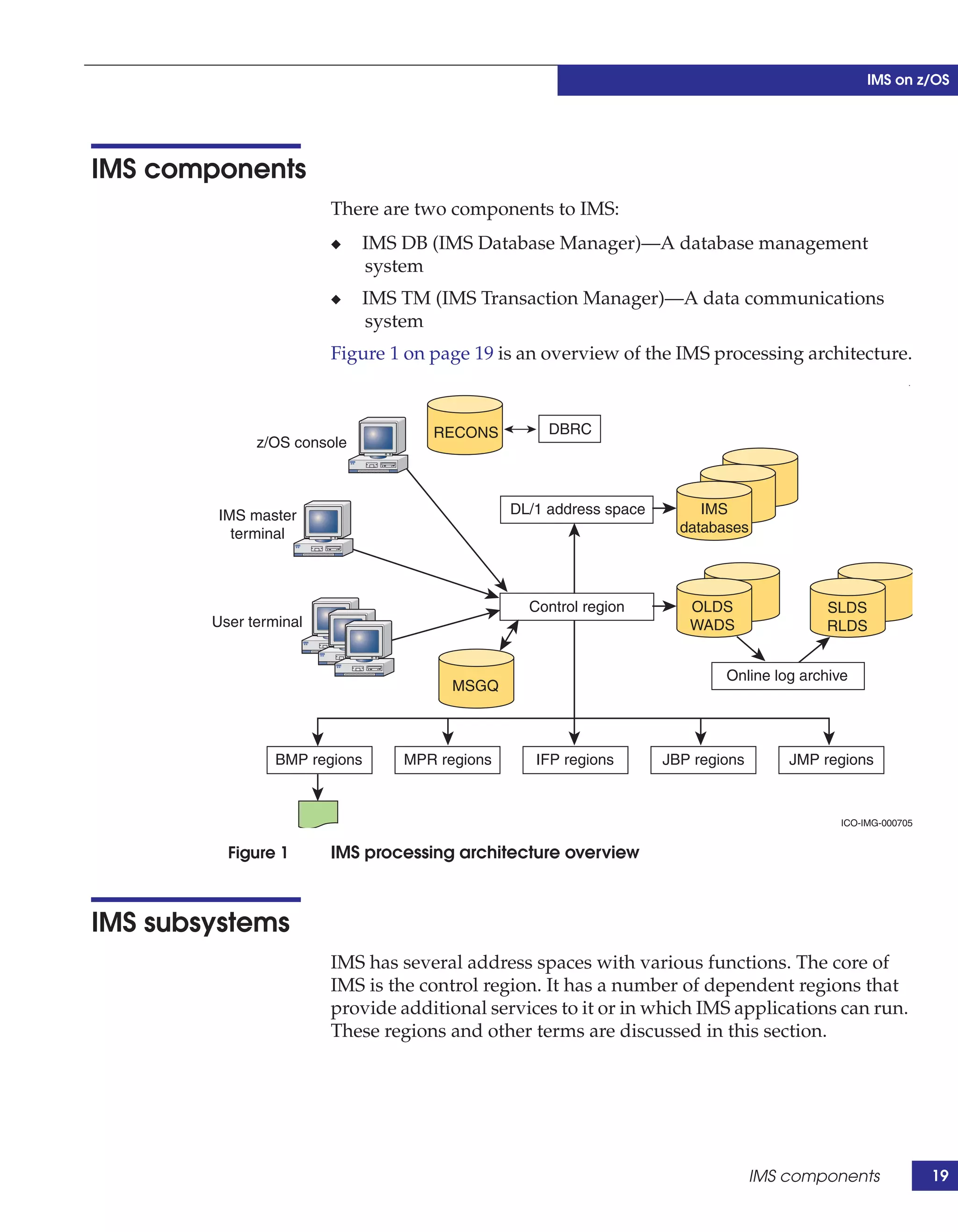
                        Figure 1 on page 19 is an overview of the IMS processing architecture.
                                                                                                         .


                                    RECONS          DBRC
              z/OS console


        IMS master                             DL/1 address space        IMS
          terminal                                                    databases


                                                 Control region        OLDS               SLDS
        User terminal                                                  WADS               RLDS


                                                                            Online log archive
                                       MSGQ


                 BMP regions     MPR regions      IFP regions       JBP regions       JMP regions


                                                                                            ICO-IMG-000705


          Figure 1      IMS processing architecture overview


IMS subsystems
                        IMS has several address spaces with various functions. The core of
                        IMS is the control region. It has a number of dependent regions that
                        provide additional services to it or in which IMS applications can run.
                        These regions and other terms are discussed in this section.


                                                                                  IMS components             19
IMS on z/OS


                                 Control region—This is the address space that provides many
                                 database management services, such as logging, archiving, restart
                                 and recovery, and shutdown. The terminals, message queues, and
                                 logs are attached to this region. The control region uses cross-memory
                                 services to communicate with the other regions.
                                 There are three types of control regions, depending on the
                                 components being used:
                                 ◆   DB/DC—Control region with both transaction manager and
                                     database manager components installed. This started task runs
                                     continuously and is normally started by a z/OS START
                                     command. The Control region starts the DBRC region during
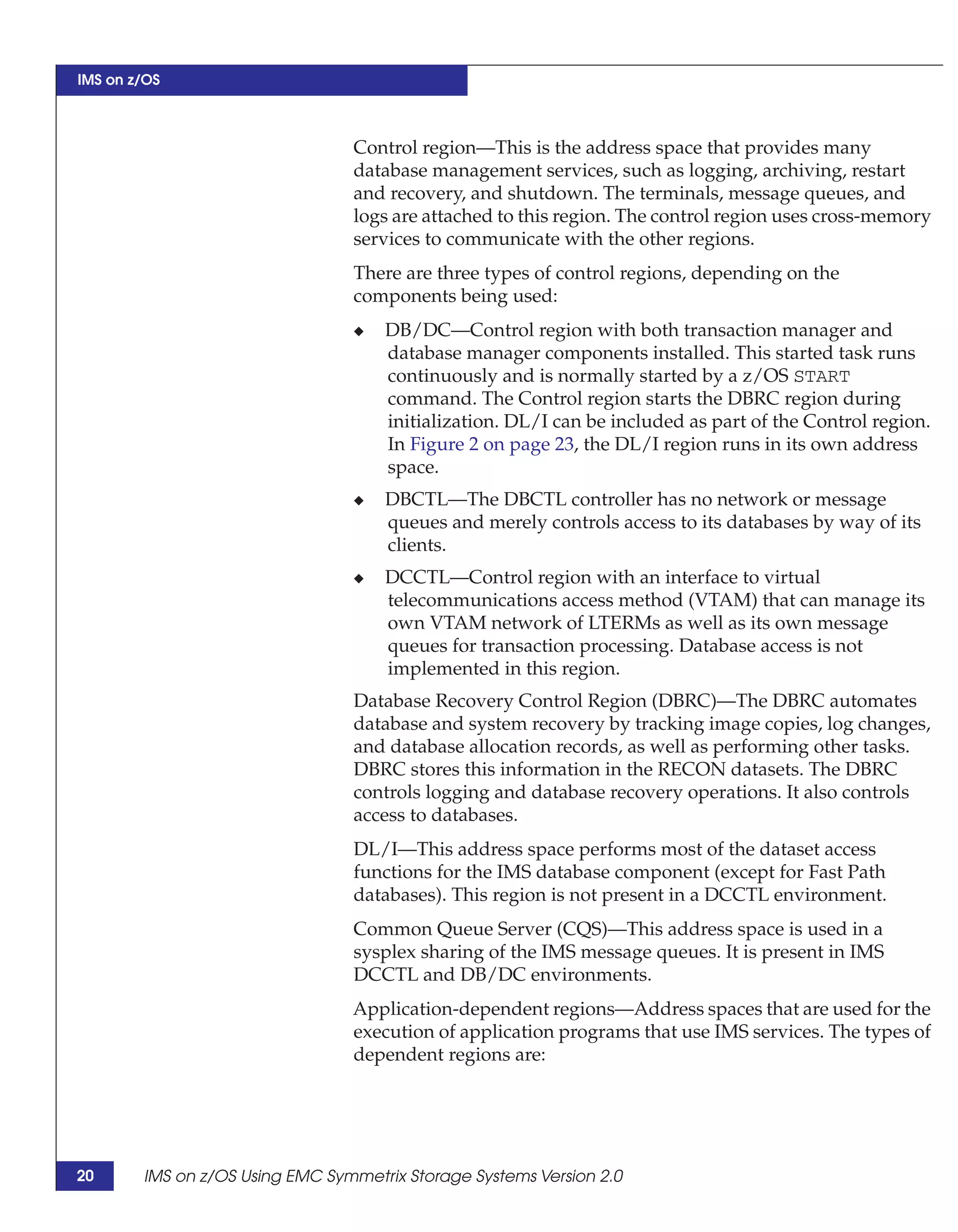
                                     initialization. DL/I can be included as part of the Control region.
                                     In Figure 2 on page 23, the DL/I region runs in its own address
                                     space.
                                 ◆   DBCTL—The DBCTL controller has no network or message
                                     queues and merely controls access to its databases by way of its
                                     clients.
                                 ◆   DCCTL—Control region with an interface to virtual
                                     telecommunications access method (VTAM) that can manage its
                                     own VTAM network of LTERMs as well as its own message
                                     queues for transaction processing. Database access is not
                                     implemented in this region.
                                 Database Recovery Control Region (DBRC)—The DBRC automates
                                 database and system recovery by tracking image copies, log changes,
                                 and database allocation records, as well as performing other tasks.
                                 DBRC stores this information in the RECON datasets. The DBRC
                                 controls logging and database recovery operations. It also controls
                                 access to databases.
                                 DL/I—This address space performs most of the dataset access
                                 functions for the IMS database component (except for Fast Path
                                 databases). This region is not present in a DCCTL environment.
                                 Common Queue Server (CQS)—This address space is used in a
                                 sysplex sharing of the IMS message queues. It is present in IMS
                                 DCCTL and DB/DC environments.
                                 Application-dependent regions—Address spaces that are used for the
                                 execution of application programs that use IMS services. The types of
                                 dependent regions are:


20      IMS on z/OS Using EMC Symmetrix Storage Systems Version 2.0
IMS on z/OS


               ◆   Message Processing Regions (MPR) — These regions are assigned
                   transaction classes that correspond to classes assigned to
                   transaction codes. Transactions come into MPRs by way of IMS
                   TM.
               ◆   Batch Message Processing (BMP)—Batch programs run in this
                   mode against IMS databases without stopping the databases to
                   online transactions. Two types of applications can run in BMP
                   regions: Message-driven programs that read and process the IMS
                   message queue, and non-message driven programs that are
                   initiated by batch jobs.
               ◆   IMS Fast Path (IFP) program region—These regions process
                   transactions against Fast Path databases.
               ◆   Java Message Processing (JMP) region—These regions are similar
                   to MPR regions. JMP programs are executed through transactions
                   invoked through terminals or other applications.
               ◆   Java Batch Processing (JBP) region—JBP applications perform
                   batch-type processing online and can access IMS message queues
                   for output processing. These applications are started from TSO or
                   by submitting a batch job.
               ◆   DBCTL thread (DBT)
               ◆   Utility type regions (BMH, FPU)
               Batch application regions—Applications that only use database
               manager functions can run in a separate z/OS address space not
               connected to an IMS control region.
               Internal Resource Lock Manager (IRLM)—Manages (serializes)
               concurrent database update requests from applications. IRLM can act
               globally among external IMS systems and is required for sysplex data
               sharing.


IMS datasets
               IMS Databases are physical structures used to store data in an
               organized manner. IMS uses a hierarchical model to store its data. It
               uses VSAM or OSAM access methods at the dataset layer. These are
               some of the critical recovery datasets used by IMS:
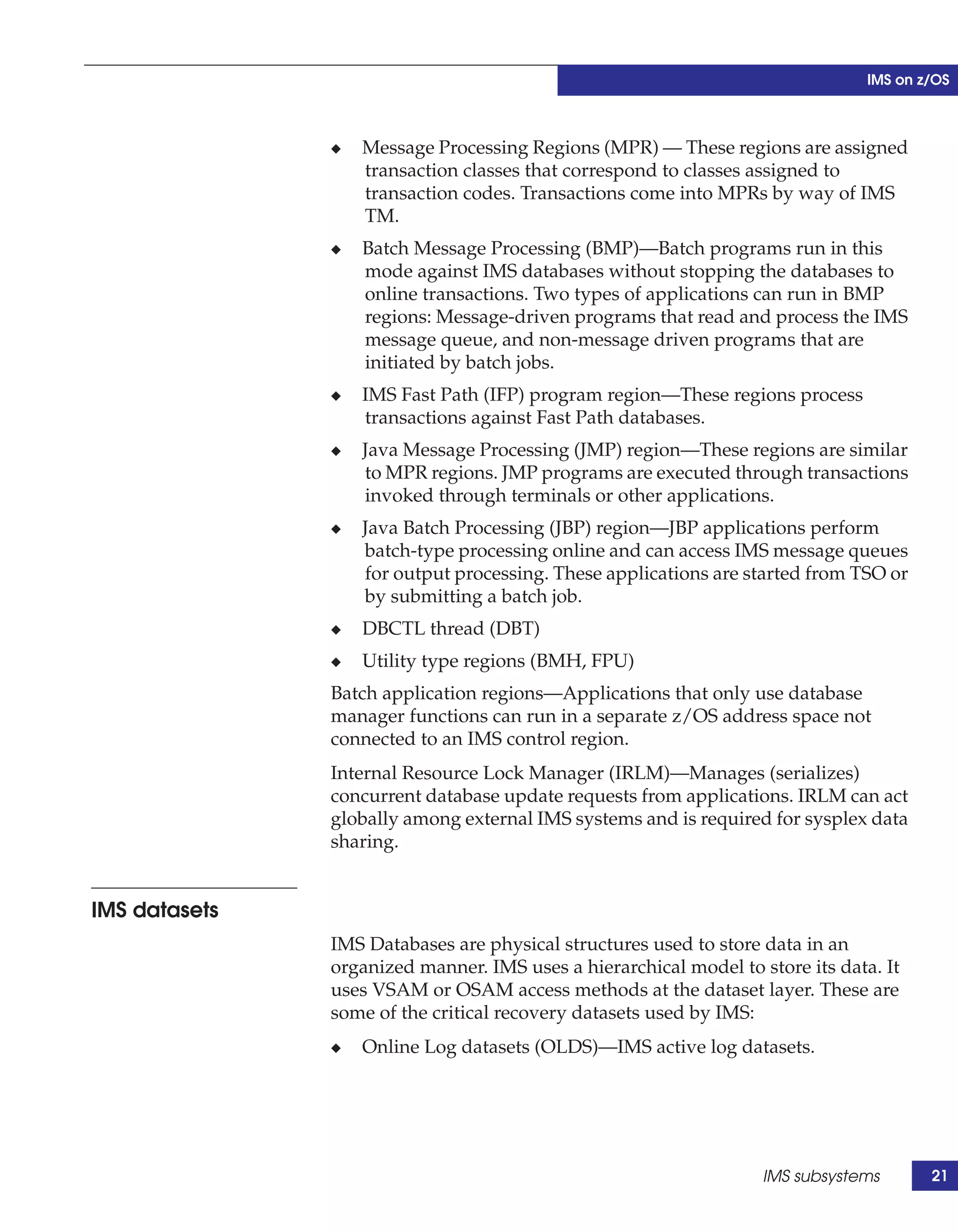
               ◆   Online Log datasets (OLDS)—IMS active log datasets.


                                                                   IMS subsystems       21
IMS on z/OS


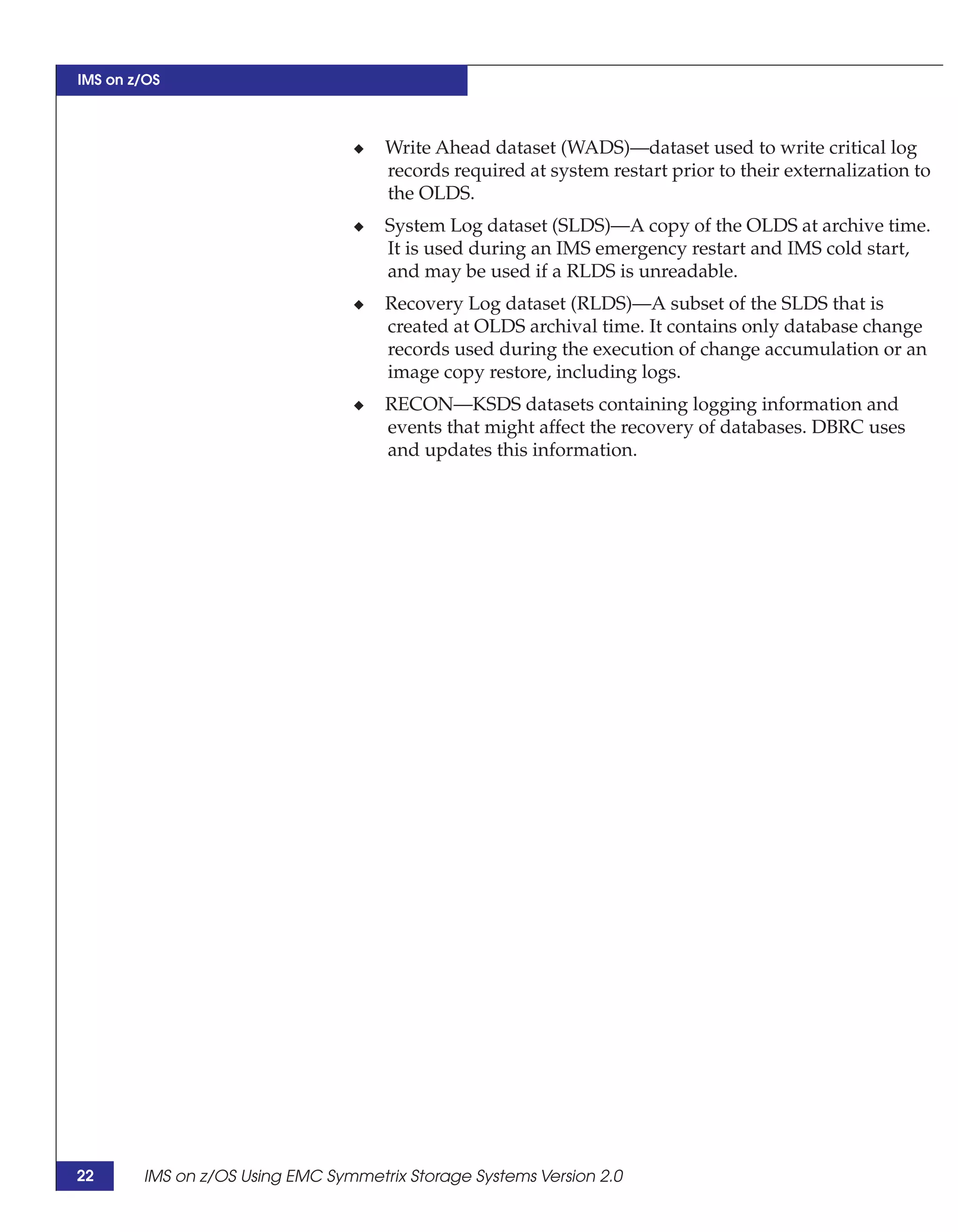
                                 ◆   Write Ahead dataset (WADS)—dataset used to write critical log
                                     records required at system restart prior to their externalization to
                                     the OLDS.
                                 ◆   System Log dataset (SLDS)—A copy of the OLDS at archive time.
                                     It is used during an IMS emergency restart and IMS cold start,
                                     and may be used if a RLDS is unreadable.
                                 ◆   Recovery Log dataset (RLDS)—A subset of the SLDS that is
                                     created at OLDS archival time. It contains only database change
                                     records used during the execution of change accumulation or an
                                     image copy restore, including logs.
                                 ◆   RECON—KSDS datasets containing logging information and
                                     events that might affect the recovery of databases. DBRC uses
                                     and updates this information.


22      IMS on z/OS Using EMC Symmetrix Storage Systems Version 2.0
IMS on z/OS


IMS data sharing
                     IMS data sharing configurations allow multiple IMS systems to
                     access the same databases while spreading the workload across
                     multiple LPARs. There are performance improvements that can be
                     gained by enabling data sharing, especially in very busy systems that
                     have heavy update/logging activity.
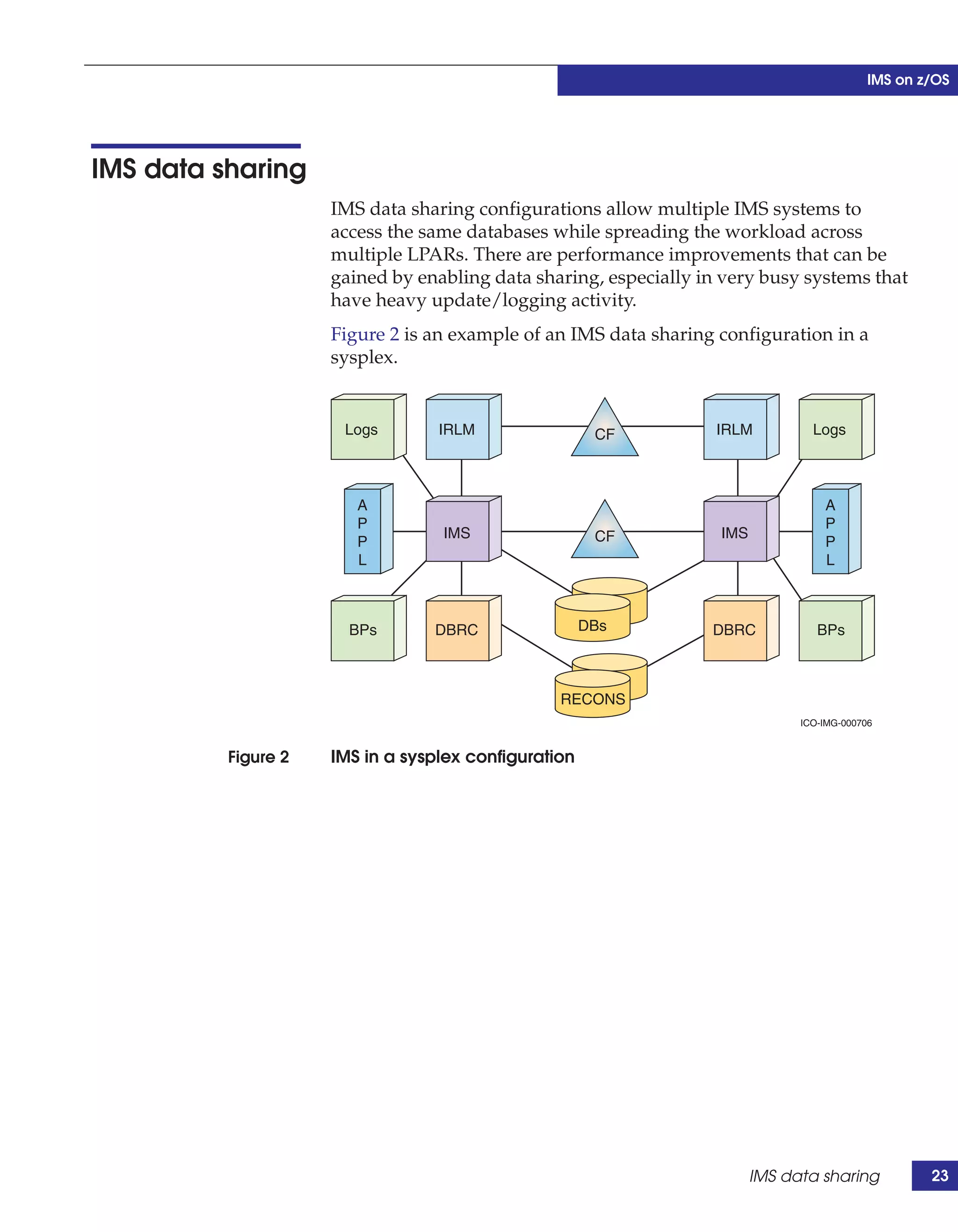
                     Figure 2 is an example of an IMS data sharing configuration in a
                     sysplex.


                      Logs        IRLM                 CF          IRLM          Logs


                        A                                                          A
                        P                                                          P
                                  IMS                  CF          IMS
                        P                                                          P
                        L                                                          L


                       BPs       DBRC                 DBs         DBRC            BPs


                                                 RECONS
                                                                               ICO-IMG-000706


          Figure 2   IMS in a sysplex configuration


                                                                         IMS data sharing           23
IMS on z/OS


24      IMS on z/OS Using EMC Symmetrix Storage Systems Version 2.0
2
                                                                     EMC Foundation
                                                                           Products


This chapter introduces the EMC foundation products discussed in
this document that are used in a combined Symmetrix, IMS, and
z/OS environment:
◆   Introduction ........................................................................................   26
◆   Symmetrix hardware and Enginuity features................................                               28
◆   ResourcePak Base for z/OS ..............................................................                33
◆   SRDF family of products for z/OS ..................................................                     38
◆   EMC AutoSwap..................................................................................          49
◆   TimeFinder family products for z/OS ............................................                        51
◆   IMS considerations for ConGroup...................................................                      57
◆   EMC z/OS Storage Manager............................................................                    58
◆   Symmetrix Management Console ...................................................                        59
◆   Symmetrix Performance Analyzer ..................................................                       60
◆   Unisphere for VMAX.........................................................................             61
◆   Virtual Provisioning...........................................................................         62
◆   Fully Automated Storage Tiering ....................................................                    62
◆   Data at Rest Encryption.....................................................................            63


                                                                 EMC Foundation Products                         25
EMC Foundation Products


     Introduction
                                 EMC® provides many hardware and software products that support
                                 application environments on Symmetrix® systems. The following
                                 products, which are highlighted and discussed, were used and/or
                                 tested with the IMS on z/OS. This chapter provides a technical
                                 overview of the EMC products used in this document.
                                 EMC Symmetrix—EMC offers an extensive product line of high-end
                                 storage solutions targeted to meet the requirements of
                                 mission-critical databases and applications. The Symmetrix product
                                 line includes the DMX™ Direct Matrix Architecture® and the VMAX®
                                 Virtual Matrix Family. EMC Symmetrix is a fully redundant,
                                 high-availability storage processor, providing nondisruptive
                                 component replacements and code upgrades. The Symmetrix system
                                 features high levels of performance, data integrity, reliability, and
                                 availability.
                                 EMC Enginuity™ Operating Environment—Enginuity enables
                                 interoperation between current and previous generations of
                                 Symmetrix systems and enables them to connect to a large number of
                                 server types, operating systems, and storage software products, and a
                                 broad selection of network connectivity elements and other devices,
                                 including Fibre Channel, ESCON, FICON, GigE, iSCSI, directors, and
                                 switches.
                                 EMC Mainframe Enabler—Mainframe Enabler is a package that
                                 contains all the Symmetrix API runtime libraries for all EMC MF
                                 software. These software packages can be used to monitor device
                                 configuration and status, and to perform control operations on
                                 devices and data objects within a storage complex.
                                 EMC Symmetrix Remote Data Facility (SRDF®)—SRDF is a
                                 business continuity software solution that replicates and maintains a
                                 mirror image of data at the storage block level in a remote Symmetrix
                                 system. The SRDF host component (HC) is a licensed feature product,
                                 and when licensed in the SCF address space, it provides command
                                 sets to inquire on and manipulate remote Symmetrix relationships.
                                 EMC SRDF Consistency Groups—An SRDF consistency group is a
                                 collection of related Symmetrix devices that are configured to act in
                                 unison to maintain data integrity. The devices in consistency groups
                                 can be spread across multiple Symmetrix systems.


26      IMS on z/OS Using EMC Symmetrix Storage Systems Version 2.0
EMC Foundation Products


EMC TimeFinder®—TimeFinder is a family of products that enable
volume-based replication within a single Symmetrix system. Data is
copied from Symmetrix devices using array-based resources without
using host CPU or I/O. The source Symmetrix devices remain online
for regular I/O operations while the copies are created. The
TimeFinder family has three separate and distinct software products,
TimeFinder/Mirror, TimeFinder/Clone, and TimeFinder/Snap:
◆   TimeFinder/Mirror enables users to configure special devices,
    called business continuance volumes (BCVs), to create a mirror
    image of Symmetrix standard devices. Using BCVs, TimeFinder
    creates a point-in-time copy of data that can be repurposed. The
    TimeFinder/Mirror component extends the basic API command
    set of Mainframe Enabler to include commands that specifically
    manage Symmetrix BCVs and standard devices.
◆   TimeFinder/Clone or, more fully, TimeFinder/Clone Mainframe
    Snap Facility (TFCMSF) enables users to make copies of data
    from source volumes to target volumes without consuming
    mirror positions within the Symmetrix. The data is available to a
    target’s host immediately upon activation, even if the copy
    process has not completed. Data may be copied from a single
    source device to as many as 16 target devices. A source device
    can be either a Symmetrix standard device or a BCV device.
    TFCSMF also can replicate datasets using the dataset snap
    feature.
◆   TimeFinder/Snap enables users to utilize special devices in the
    Symmetrix array called virtual devices (VDEVs) and save area
    devices (SAVDEVs). These devices can be used to make
    pointer-based, space-saving copies of data simultaneously on
    multiple target devices from a single source device. The data is
    available to a target’s host immediately upon activation. Data
    may be copied from a single source device to as many as 128
    VDEVs. A source device can be either a Symmetrix standard
    device or a BCV device. A target device is a VDEV. A SAVDEV is
    a special device, without a host address, that is used to hold the
    changing contents of the source or target device after the snap is
    activated.
EMC Change Tracker—EMC Symmetrix Change Tracker software
measures changes to data on a Symmetrix volume or group of
volumes. Change Tracker software is often used as a planning tool in
the analysis and design of configurations that use the EMC
TimeFinder or SRDF components to store data at remote sites.


                                                       Introduction      27
EMC Foundation Products


     Symmetrix hardware and Enginuity features
                                 Symmetrix hardware architecture and the Enginuity operating
                                 environment are the foundation for the Symmetrix storage platform.
                                 This environment consists of the following components:
                                 ◆   Symmetrix hardware
                                 ◆   Enginuity operating functions
                                 ◆   Symmetrix application program interface (API) for mainframe
                                 ◆   Symmetrix applications
                                 ◆   Host-based Symmetrix applications
                                 ◆   Independent software vendor (ISV) applications
                                 Figure 3 shows the relationship between these software layers and
                                 the Symmetrix hardware.


                                                    Symmetrix-based applications

                                                 Host-based Symmetrix applications

                                              Independent Software Vendor applications

                                     EMC Mainframe Enabler Applications Program Interface (API)


                                             Enginuity operating environment functions


                                                        Symmetrix hardware


                                                                                           ICO-IMG-000746


                      Figure 3   Symmetrix hardware and software layers


     Symmetrix VMAX platform
                                 The EMC Symmetrix VMAX array with Enginuity is the latest entry
                                 to the Symmetrix product line. Built on the strategy of simple,
                                 intelligent, modular storage, it incorporates a scalable fabric
                                 interconnect design that allows the storage array to grow seamlessly
                                 from an entry-level configuration into the world's largest storage
                                 system. The Symmetrix VMAX array provides improved

28      IMS on z/OS Using EMC Symmetrix Storage Systems Version 2.0
EMC Foundation Products


performance and scalability for demanding enterprise storage
environments, while maintaining support for EMC's broad portfolio
of platform software offerings.
The 5876 Enginuity operating environment for Symmetrix systems is
a feature-rich Enginuity release supporting Symmetrix VMAX
storage arrays. With the release of Enginuity 5876, Symmetrix VMAX
systems deliver software capabilities that improve capacity
utilization, ease of use, business continuity, and security.
The Symmetrix VMAX subsystem also maintains customer
expectations for high-end storage in terms of availability. High-end
availability is more than just redundancy. It means nondisruptive
operations and upgrades, and being always online. Symmetrix
VMAX arrays provide:
◆   Nondisruptive expansion of capacity and performance at a lower
    price point
◆   Sophisticated migration for multiple storage tiers within the array
◆   The power to maintain service levels and functionality as
    consolidation grows
◆   Simplified control for provisioning in complex environments
Many of the new features provided by the new EMC Symmetrix
VMAX platform can reduce operational costs for customers
deploying IMS on z/OS solutions, as well as enhance functionality to
enable greater benefits. This TechBook details those features that
provide significant benefits to customers utilizing IMS on z/OS.
Figure 4 on page 30 illustrates the architecture and interconnection of
the major components in the Symmetrix VMAX storage system.


                         Symmetrix hardware and Enginuity features        29
EMC Foundation Products


                                                                        ICO-IMG-000752


                      Figure 4   Symmetrix VMAX logical diagram


     Enginuity operating environment
                                 Symmetrix Enginuity is the operating environment for all Symmetrix
                                 systems. Enginuity manages and ensures the optimal flow and
                                 integrity of data through the different hardware components. It also
                                 manages Symmetrix operations associated with monitoring and
                                 optimizing internal data flow. This ensures the fastest response to the
                                 user's requests for information, along with protecting and replicating
                                 data. Enginuity provides the following services:
                                 ◆   Manages system resources to intelligently optimize performance
                                     across a wide range of I/O requirements.
                                 ◆   Ensures system availability through advanced fault monitoring,
                                     detection, and correction capabilities and provides concurrent
                                     maintenance and serviceability features.
                                 ◆   Offers the foundation for specific software features available
                                     through EMC disaster recovery, business continuance, and
                                     storage management software.
                                 ◆   Provides functional services for both array-based functionality
                                     and for a large suite of EMC storage application software.


30      IMS on z/OS Using EMC Symmetrix Storage Systems Version 2.0
EMC Foundation Products


                       ◆   Defines priority of each task, including basic system maintenance,
                           I/O processing, and application processing.
                       ◆   Provides uniform access through APIs for internal calls, and
                           provides an external interface to allow integration with other
                           software providers and ISVs.


Symmetrix features for mainframe
                       This section discusses supported Symmetrix features for mainframe
                       environments.

I/O support features
                       Parallel Access Volume (PAV)—Parallel Access Volumes are
                       implemented within a z/OS environment. It allows one I/O to take
                       place for each base unit control block (UCB), and one for each
                       statically or dynamically assigned alias UCB. These alias UCBs allow
                       parallel I/O access for volumes. Current Enginuity releases provide
                       support for static, dynamic, and hyperPAVs. HyperPAVs allow fewer
                       aliases to be defined within a logical control unit. With hyperPAVs,
                       aliases are applied to the base UCBs (devices) that require them the
                       most at the time of need.
                       Multiple Allegiance (MA)—While PAVs facilitate multiple parallel
                       accesses to the same device from a single LPAR, Multiple Allegiance
                       (MA) allows multiple parallel nonconflicting accesses to the same
                       device from multiple LPARs. Multiple Allegiance I/O executes
                       concurrently with PAV I/O. The Symmetrix storage system treats
                       them equally and guarantees data integrity by serializing writes
                       where extent conflicts exist.
                       Host connectivity options—Mainframe host connectivity is
                       supported through Fibre Channel, ESCON, and FICON channels.
                       Symmetrix storage systems appear to mainframe operating systems
                       as any of the following control units: IBM 3990, IBM 2105, and IBM
                       2107. The physical storage devices can appear to the mainframe
                       operating system as any mixture of different sized 3380 and 3390
                       devices.
                       ESCON support—Enterprise Systems Connection (ESCON) is a
                       fiber-optic connection technology that interconnects mainframe
                       computers, workstations, and network-attached storage devices


                                                Symmetrix hardware and Enginuity features       31
EMC Foundation Products


                                 across a single channel and supports half-duplex data transfers.
                                 ESCON may also be used for handling Symmetrix Remote Data
                                 Facility (SRDF) remote links.
                                 FICON support—Fiber Connection (FICON) is a fiber-optic channel
                                 technology that extends the capabilities of its previous fiber-optic
                                 channel standard, ESCON. Unlike ESCON, FICON supports
                                 full-duplex data transfers and enables greater throughput rates over
                                 longer distances. FICON uses a mapping layer based on technology
                                 developed for Fibre Channel and multiplexing technology, which
                                 allows small data transfers to be transmitted at the same time as
                                 larger ones. With Enginuity 5670 and later, Symmetrix storage
                                 systems support FICON ports. With Enginuity service release
                                 5874.207, a VMAX supports 8 Gb FICON connectivity.
                                 zHPF support—System z10 High Performance FICON (zHPF)
                                 represents the latest enhancement to the FICON interface architecture
                                 aimed at offering an improvement in the performance of online
                                 transaction processing (OLTP) workloads. Customers that are
                                 presently channel-constrained running heavy IMS workloads using a
                                 4K page size will reap the greatest benefit from this feature. zHPF is
                                 chargeable, licensable feature with Enginuity service release 5874.207.
                                 Fibre Channel support—Fibre Channel is a supported option in
                                 SRDF environments.
                                 GigE support—GigE is a supported option in SRDF environments.
                                 Symmetrix GigE directors in an SRDF environment provide direct,
                                 end-to-end TCP/IP connectivity for remote replication solutions over
                                 extended distances with built-in compression. This removes the need
                                 for costly FC-to-IP converters and helps utilize the existing IP
                                 infrastructures without major disruptions.

     Data protection options
                                 Symmetrix subsystems incorporate many standard features that
                                 provide a higher level of data availability than conventional Direct
                                 Access Storage Devices (DASD). These options ensure an even
                                 greater level of data recoverability and availability. They are
                                 configurable at the logical volume level so different protection
                                 schemes can be applied to different classes of data within the same
                                 Symmetrix controller on the same physical device. Customers can
                                 choose from the following data protection options to match their data
                                 requirements:
                                 ◆   Mirroring (RAID 1) or RAID 10


32      IMS on z/OS Using EMC Symmetrix Storage Systems Version 2.0
EMC Foundation Products


                 ◆   RAID 6 (6+2) and RAID 6 (14+2)
                 ◆   RAID 5 (3+1) and RAID 5 (7+1)
                 ◆   Symmetrix Remote Data Facility (SRDF)
                 ◆   TimeFinder
                 ◆   Dynamic Sparing
                 ◆   Global Sparing

Other features
                 Other IBM-supported compatibility features include:
                 ◆   Channel Command Emulation for IBM ESS 2105/2107
                 ◆   Concurrent Copy
                 ◆   Peer to Peer Remote Copy (PPRC)
                 ◆   PPRC/XRC Incremental Resync
                 ◆   Extended Remote Copy (XRC) with multireader
                 ◆   Dynamic Channel Path Management (DCM)
                 ◆   Dynamic Path Reconnection (DPR) support
                 ◆   Host data compression
                 ◆   Logical Path and Control Unit Address support (CUADD)
                 ◆   Multi-System Imaging
                 ◆   Partitioned dataset (PDS) Search Assist
                 ◆   FlashCopy Version 1 and 2
                 ◆   High Performance Ficon (zHPF) and multitrack zHPF
                 ◆   Extended Address Volumes (EAV)


ResourcePak Base for z/OS
                 EMC ResourcePak® Base for z/OS is a software facility that makes
                 communication between mainframe-based applications (provided by
                 EMC or ISVs) and a Symmetrix storage subsystem more efficient.
                 ResourcePak Base is designed to improve performance and ease of
                 use of mainframe-based Symmetrix applications.
                 ResourcePak Base delivers EMC Symmetrix Control Facility
                 (EMCSCF) for IBM and IBM-compatible mainframes. EMCSCF
                 provides a uniform interface for EMC and ISV software products,


                                                         ResourcePak Base for z/OS       33
EMC Foundation Products


                                     where all products are using the same interface at the same function
                                     level. EMCSCF delivers a persistent address space on the host that
                                     facilitates communication between the host and the Symmetrix
                                     subsystem, as well as other applications delivered by EMC and its
                                     partners.
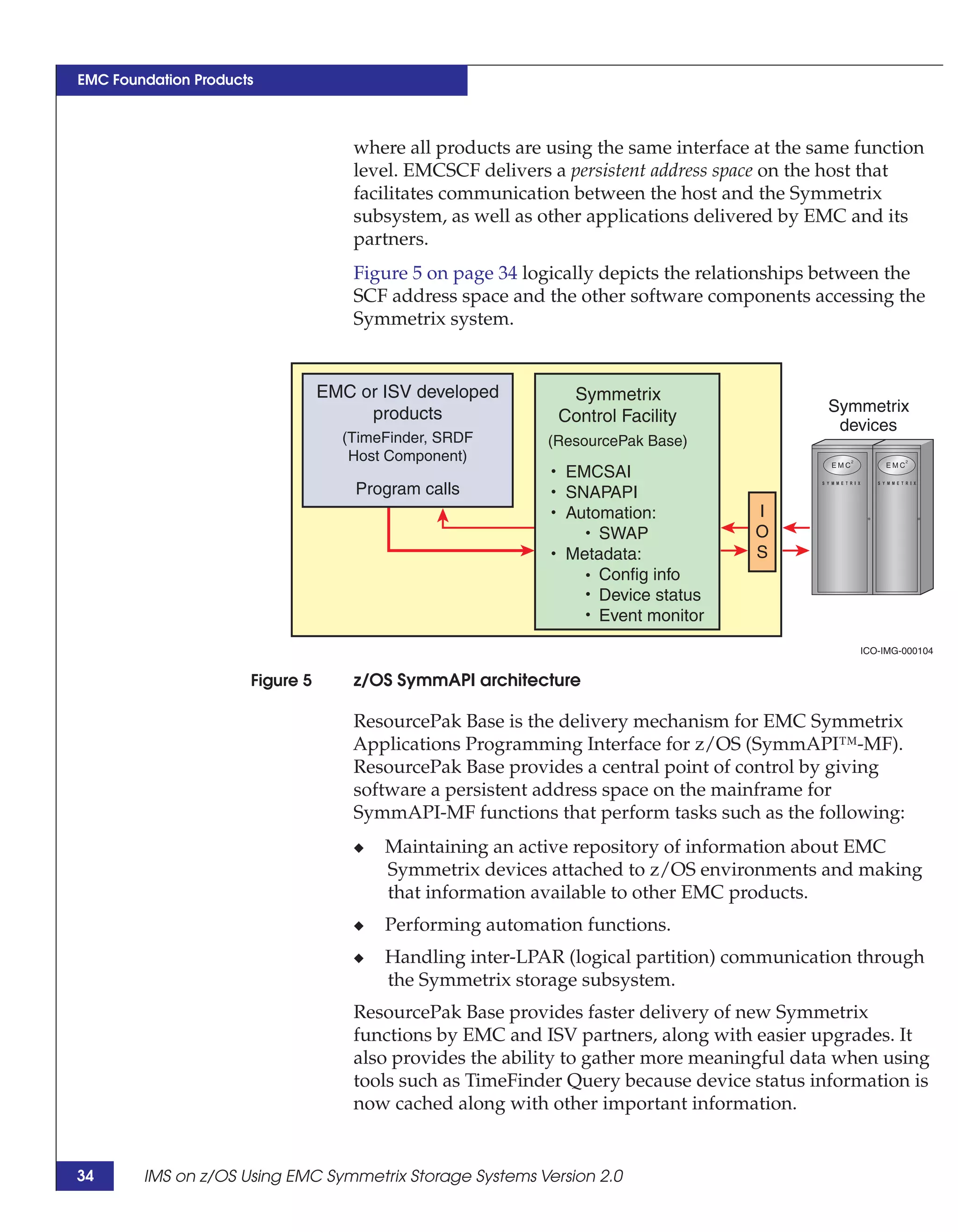
                                     Figure 5 on page 34 logically depicts the relationships between the
                                     SCF address space and the other software components accessing the
                                     Symmetrix system.


                                 EMC or ISV developed         Symmetrix
                                      products                                               Symmetrix
                                                             Control Facility                 devices
                                   (TimeFinder, SRDF        (ResourcePak Base)
                                    Host Component)
                                                              EMCSAI
                                     Program calls            SNAPAPI
                                                              Automation:           I
                                                                  SWAP              O
                                                              Metadata:             S
                                                                  Config info
                                                                  Device status
                                                                  Event monitor
                                                                                                 ICO-IMG-000104


                      Figure 5       z/OS SymmAPI architecture

                                    ResourcePak Base is the delivery mechanism for EMC Symmetrix
                                    Applications Programming Interface for z/OS (SymmAPI™-MF).
                                    ResourcePak Base provides a central point of control by giving
                                    software a persistent address space on the mainframe for
                                    SymmAPI-MF functions that perform tasks such as the following:
                                     ◆   Maintaining an active repository of information about EMC
                                         Symmetrix devices attached to z/OS environments and making
                                         that information available to other EMC products.
                                     ◆   Performing automation functions.
                                     ◆   Handling inter-LPAR (logical partition) communication through
                                         the Symmetrix storage subsystem.
                                     ResourcePak Base provides faster delivery of new Symmetrix
                                     functions by EMC and ISV partners, along with easier upgrades. It
                                     also provides the ability to gather more meaningful data when using
                                     tools such as TimeFinder Query because device status information is
                                     now cached along with other important information.


34      IMS on z/OS Using EMC Symmetrix Storage Systems Version 2.0
EMC Foundation Products


                         ResourcePak Base for z/OS is a prerequisite for EMC mainframe
                         applications, like the TimeFinder Product Set for z/OS or SRDF Host
                         Component for z/OS, and is included with these products.
                         With EMC Mainframe Enabler V7.0 and later, ResourcePak Base,
                         TimeFinder, and SRDF are shipped in a single distribution.


Features
                         ResourcePak Base provides the following functionality with
                         EMCSCF:
                         ◆   Cross-system communication
                         ◆   Nondisruptive SymmAPI-MF refreshes
                         ◆   Save Device Monitor
                         ◆   SRDF/A Monitor
                         ◆   Group Name Service (GNS) support
                         ◆   Pool management (save, DSE, thin)
                         ◆   SRDF/AR resiliency
                         ◆   SRDF/A Multi-Session Consistency
                         ◆   SWAP services
                         ◆   Recovery services
                         ◆   FlashCopy emulation (Enginuity 5772 or earlier)
                         ◆   Licensed feature code management

Cross-system communication
                      Inter-LPAR communication is handled by the EMCSCF cross-system
                      communication (CSC) component. CSC uses a Symmetrix storage
                      subsystem to facilitate communications between LPARs. Several
                      EMC Symmetrix mainframe applications use CSC to handle
                      inter-LPAR communications.

Nondisruptive SymmAPI-MF refreshes
                       EMCSCF allows the SymmAPI-MF to be refreshed nondisruptively.
                       Refreshing SymmAPI-MF does not impact currently executing
                       applications that use SymmAPI-MF, for example, Host Component or
                       TimeFinder.


                                                                 ResourcePak Base for z/OS         35
EMC Foundation Products


     Save Device Monitor
                                 The Save Device Monitor periodically examines the consumed
                                 capacity of the device pool (SNAPPOOL) used by TimeFinder/Snap
                                 with the VDEV licensed feature code enabled. The Save Device
                                 Monitor also checks the capacity of the device pool (DSEPOOL) used
                                 by SRDF/A.
                                 The Save Device Monitor function of EMCSCF provides a way to:
                                 ◆   Automatically check space consumption thresholds.
                                 ◆   Trigger an automated response that is tailored to the specific
                                     needs of the installation.

     SRDF/A Monitor
                                 The SRDF/A Monitor in ResourcePak Base is designed to:
                                 ◆   Find EMC Symmetrix controllers that are running SRDF/A.
                                 ◆   Collect and write SMF data about those controllers.
                                 After ResourcePak Base is installed, the SRDF/A Monitor is started
                                 as a subtask of EMCSCF.

     Group Name Service support
                            ResourcePak Base includes support for Symmetrix Group Name
                            Service (GNS). GNS allows you to define a device group once, and
                            then use that single definition across multiple EMC products on
                            multiple platforms. This means that you can use a device group
                            defined through GNS with both mainframe and open systems-based
                            EMC applications. GNS also allows you to define group names for
                            volumes that can then be operated upon by various other commands.

     Pool management
                                 With ResourcePak Base version 5.7 and later, generalized device pool
                                 management is a provided service. Pool devices are a predefined set
                                 of devices that provide a pool of physical space. Pool devices are not
                                 host-accessible. The CONFIGPOOL commands allow management of
                                 SNAPPOOLs or DSEPOOLs with CONFIGPOOL batch statements.

     SRDF/AR resiliency
                                 SRDF/AR can recover from internal failures without manual
                                 intervention. Device replacement pools for SRDF/AR (or
                                 SARPOOLs) are provided to prevent SRDF/AR from halting due to
                                 device failure. In effect, SARPOOLs are simply a group of devices
                                 that are unused until SRDF/AR needs one of them.


36      IMS on z/OS Using EMC Symmetrix Storage Systems Version 2.0
EMC Foundation Products


SRDF/A Multi-Session Consistency
                         SRDF/A Multi-Session Consistency (MSC) is a task in EMCSCF that
                         ensures remote R2 consistency across multiple Symmetrix
                         subsystems running SRDF/A. MSC provides the following:
                           ◆   Coordination of SRDF/A cycle switches across systems.
                           ◆   Up to 24 SRDF groups in a multi-session group.
                           ◆   One SRDF/A session per Symmetrix array, and one SRDF/A
                               group per Symmetrix system when using Enginuity 5X70.
                           ◆   With Enginuity level 5x71 and later, SRDF/A groups are dynamic
                               and are not limited to one per Symmetrix. Group commands of
                               ENABLE, DISPLAY, DISABLE, REFRESH, and RESTART are
                               now available.

SWAP services
                           ResourcePak Base deploys a SWAP service in EMCSCF. It is used by
                           AutoSwap™ for planned outages with the ConGroup Continuous
                           Availability Extensions (CAX).

Recovery services
                           Recovery service commands allow you to perform recovery on local
                           or remote devices (if the links are available for the remote devices).

FlashCopy support in SCF
                           FlashCopy version 1 and version 2 support is enabled in EMCSCF
                           through a LFC when using Enginuity 5772 or earlier. FlashCopy
                           support is enabled in Enginuity 5773 and later and does not require a
                           license key in EMCSCF.

Licensed feature code management
                        EMCSCF manages licensed feature codes (LFCs) to enable separately
                        chargeable features in EMC software. These features require an LFC
                        to be provided during the installation and customization of EMCSCF.
                        LFCs are available for:
                           ◆   Symmetrix Priority Control
                           ◆   Dynamic Cache Partitioning
                           ◆   AutoSwap (ConGroup with AutoSwap Extensions)—Separate
                               LFCs required for planned and unplanned swaps
                           ◆   EMC Compatible Flash (Host Software Emulation)
                           ◆   EMC z/OS Storage Manager (EzSM)


                                                                    ResourcePak Base for z/OS        37
EMC Foundation Products


                                 ◆   SRDF/Asynchronous (MSC)
                                 ◆   SRDF/Automated Replication
                                 ◆   SRDF/Star
                                 ◆   TimeFinder/Clone MainFrame Snap Facility
                                 ◆   TimeFinder/Consistency Group
                                 ◆   TimeFinder/Snap (VDEV)


     SRDF family of products for z/OS
                                 At the conceptual level, SRDF is mirroring (RAID level 1) one logical
                                 disk device (the primary source/R1 within a primary Symmetrix
                                 subsystem) to a second logical device (the secondary target/R2, in a
                                 physically separate secondary Symmetrix subsystem) over ESCON,
                                 Fibre Channel, or GigE high-speed communication links. The
                                 distance separating the two Symmetrix subsystems can vary from a
                                 few feet to thousands of miles. SRDF is the first software product for
                                 the Symmetrix storage subsystem. Its basic premise is that a remote
                                 mirror of data (data in a different Symmetrix subsystem) can serve as
                                 a valuable resource for:
                                 ◆   Protecting data using geographical separation.
                                 ◆   Giving applications a second location from which to retrieve data
                                     should the primary location become unavailable for any reason.
                                 ◆   Providing a means to establish a set of volumes on which to
                                     conduct parallel operations, such as testing or modeling.
                                 SRDF has evolved to provide different operation modes
                                 (synchronous, adaptive copy—write pending mode, adaptive
                                 copy—disk mode, and asynchronous mode). More advanced
                                 solutions have been built upon it, such as SRDF/Automated
                                 Replication and SRDF/Star, Cascaded SRDF and SRDF/EDP.
                                 Persistent throughout these evolutionary stages has been control of
                                 the SRDF family products, by the mainframe-based application called
                                 SRDF Host Component. SRDF Host Component is a control
                                 mechanism through which all SRDF functionality is made available
                                 to the mainframe user. EMC Consistency Group for z/OS is another
                                 useful feature for managing dependent-write consistency across
                                 inter-Symmetrix links with one or more mainframes attached.


38      IMS on z/OS Using EMC Symmetrix Storage Systems Version 2.0
EMC Foundation Products


                                                                                SRDF/Star
                                                        SRDF/S                   Multi-point
                                                    Synchronous for           replication option


                       SRDF family for z/OS
                                                   zero data exposure
                                                                                 SRDF/CG
                                                                             Consistency Group
                                                        SRDF/A                     option
                                                    Asynchronous for
                                                   extended distances            SRDF/AR
                                                                            Automated Replication
                                                                                   option
                                                       SRDF/DM
                                                  Efficient data mobility       SRDF/EDP
                                                     between arrays          Extended Distance
                                                                                 Protection

                                                                                         ICO-IMG-000745


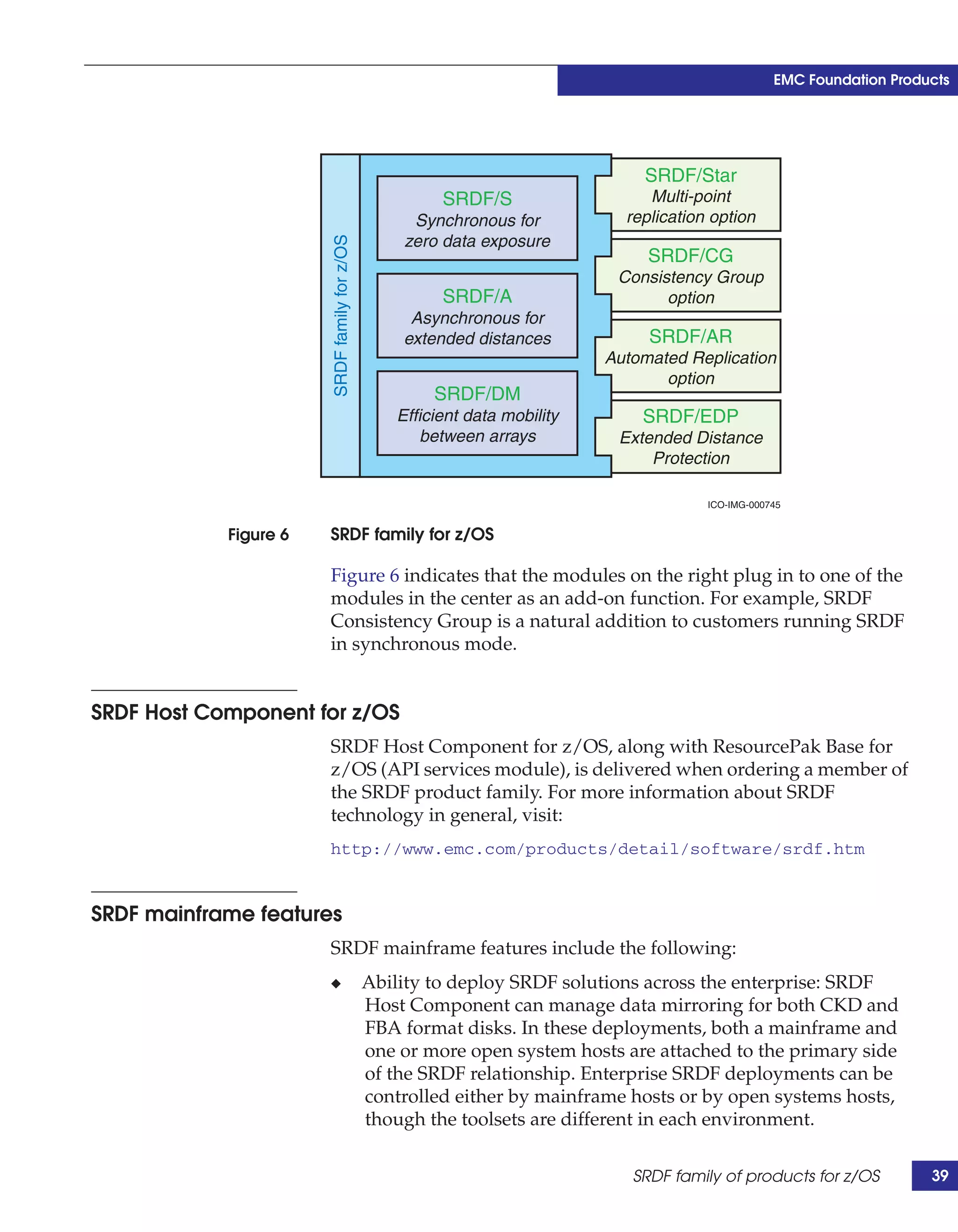
            Figure 6   SRDF family for z/OS

                       Figure 6 indicates that the modules on the right plug in to one of the
                       modules in the center as an add-on function. For example, SRDF
                       Consistency Group is a natural addition to customers running SRDF
                       in synchronous mode.


SRDF Host Component for z/OS
                       SRDF Host Component for z/OS, along with ResourcePak Base for
                       z/OS (API services module), is delivered when ordering a member of
                       the SRDF product family. For more information about SRDF
                       technology in general, visit:
                       http://www.emc.com/products/detail/software/srdf.htm


SRDF mainframe features
                       SRDF mainframe features include the following:
                       ◆                      Ability to deploy SRDF solutions across the enterprise: SRDF
                                              Host Component can manage data mirroring for both CKD and
                                              FBA format disks. In these deployments, both a mainframe and
                                              one or more open system hosts are attached to the primary side
                                              of the SRDF relationship. Enterprise SRDF deployments can be
                                              controlled either by mainframe hosts or by open systems hosts,
                                              though the toolsets are different in each environment.

                                                                               SRDF family of products for z/OS          39
EMC Foundation Products


                                 ◆   Support for either ESCON or FICON host channels regardless of
                                     the SRDF link protocol employed: SRDF is a protocol that
                                     connects Symmetrix systems, mirroring data on both sides of the
                                     communications link. Host connectivity to the Symmetrix storage
                                     system (ESCON versus FICON) is independent of the protocols
                                     used in moving data between the SRDF links. SRDF supports all
                                     the standard link protocols: ESCON, Extended ESCON, Fibre
                                     Channel, and GigE.
                                 ◆   Software support for taking an SRDF link offline: SRDF Host
                                     Component has a software command that can take an SRDF link
                                     offline independent of whether it is taking the target volume
                                     offline. This feature is useful if there are multiple links in the
                                     configuration and only one is experiencing issues, for example
                                     too many bounces (sporadic link loss) or error conditions. In this
                                     case, it is unnecessary to take all links offline, when taking the
                                     one in question offline is sufficient.
                                 ◆   SRDF Host Component additional interfaces: Besides the console
                                     interface, all features of SRDF Host Component can be employed
                                     using REXX scripting and/or the Stored Procedure Executive
                                     (SPE), a powerful tool for automating repeated processes.


     Concurrent SRDF and SRDF/Star
                                 SRDF/Star is built upon several key technologies:
                                 ◆   Dynamic SRDF, Concurrent SRDF
                                 ◆   ResourcePak Base for z/OS
                                 ◆   SRDF/Synchronous
                                 ◆   SRDF/Asynchronous
                                 ◆   SRDF Consistency Group
                                 ◆   Certain features within Enginuity
                                 SRDF/Star provides advanced multi-site business continuity
                                 protection that augments Concurrent SRDF and SRDF/A operations
                                 from the same primary volumes with the ability to incrementally
                                 establish an SRDF/A session between the two remote sites in the
                                 event of a primary site outage. This capability is only available
                                 through SRDF/Star software.


40      IMS on z/OS Using EMC Symmetrix Storage Systems Version 2.0
EMC Foundation Products


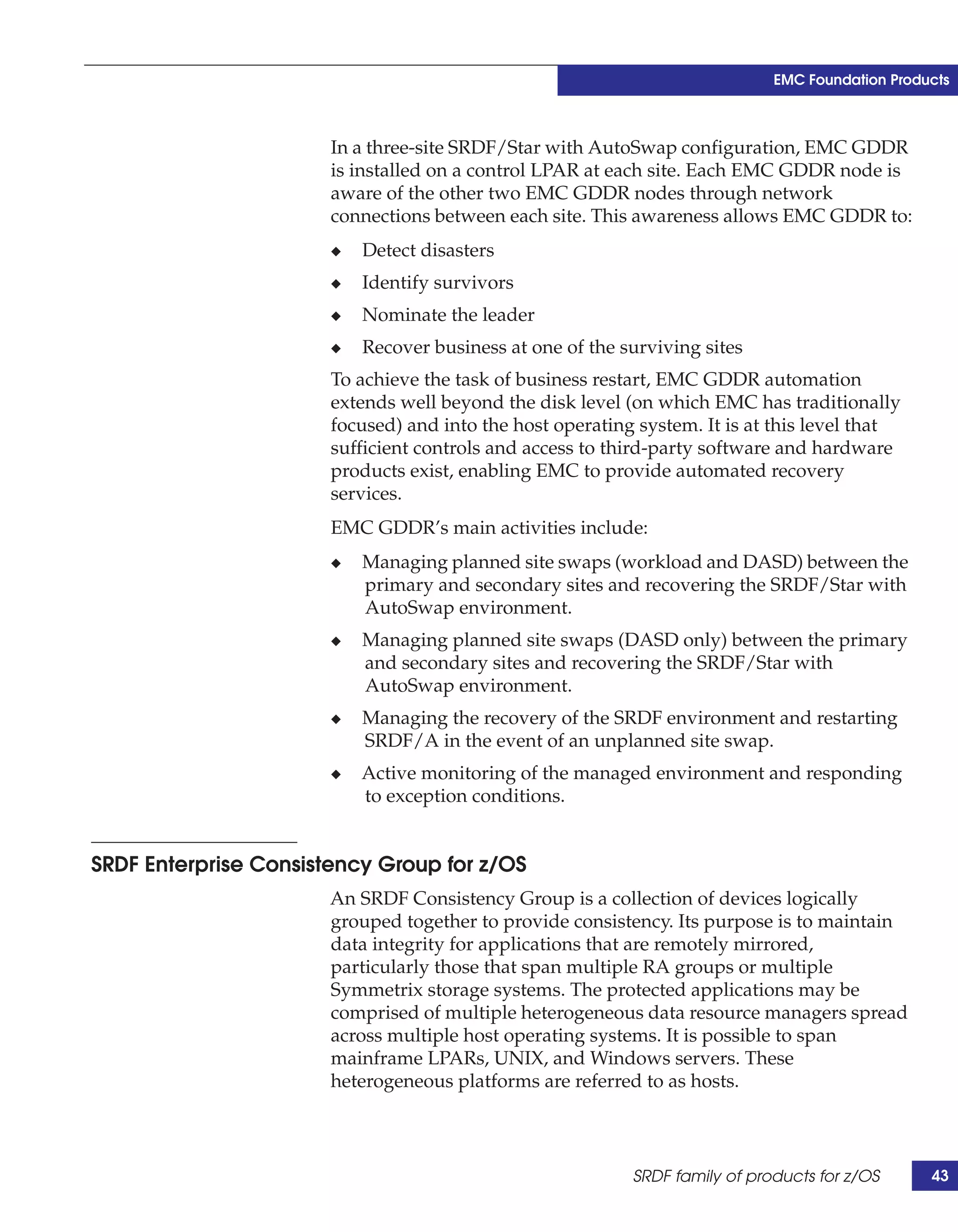
           SRDF/Star is a combination of mainframe host software and
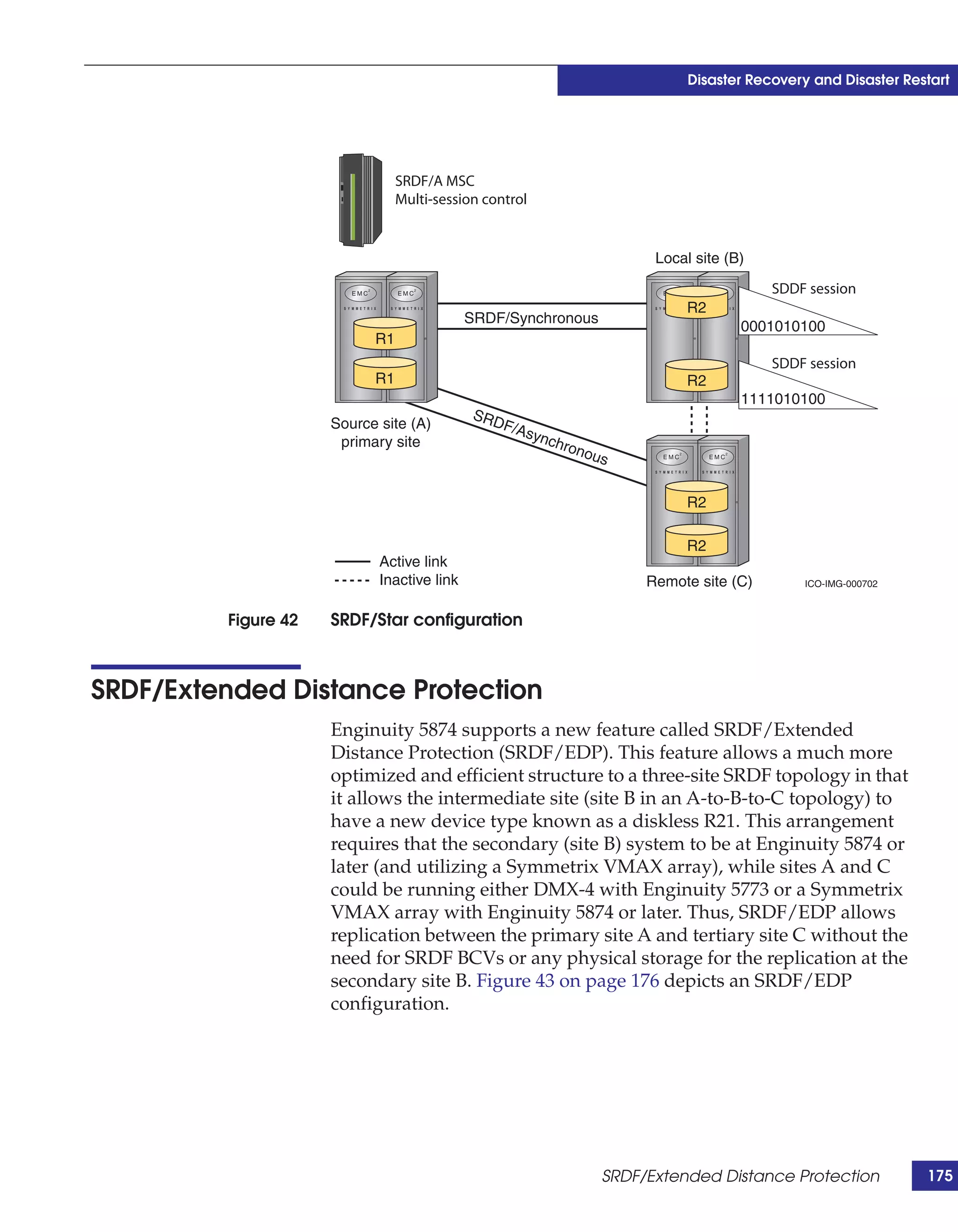
           Enginuity functionality that operates concurrently. Figure 7 depicts a
           classic three-site SRDF/Star configuration.

           Primary site (A)
            (production)                                        Local site (B)


                                 SRDF/Synchronous
                 R1                                               R2


                      SRDF/Asynchronous                         Remote site (C)


                                                                 BCV

               Active                                             R2
               Inactive
                                                                       ICO-IMG-000105


Figure 7   Classic SRDF/Star support configuration

           The concurrent configuration option of SRDF/A provides the ability
           to restart an environment at long distances with minimal data loss,
           while simultaneously providing a zero data loss restart capability at a
           local site. Such a configuration provides protection for both a site
           disaster and a regional disaster, while minimizing performance
           impact and loss of data.
           In a concurrent SRDF/A configuration without SRDF/Star
           functionality, the loss of the primary A site would normally mean
           that the long-distance replication would stop, and data would no
           longer propagate to the C site. Data at C would continue to age as
           production was resumed at site B. Resuming SRDF/A between sites
           B and C would require a full resynchronization to re-enable disaster
           recovery protection. This consumes both time and resources and is a
           prolonged period without normal DR protection.
           SRDF/Star provides a rapid re-establishment of cross-site protection
           in the event of a primary site (A) failure. Rather than a full
           resynchronization between sites B and C, SRDF/Star provides a
           differential B-C synchronization, dramatically reducing the time to

                                                SRDF family of products for z/OS        41
EMC Foundation Products


                                 remotely protect the new production site. SRDF/Star also provides a
                                 mechanism for the user to determine which site (B or C) has the most
                                 current data in the event of a rolling disaster affecting site A. In all
                                 cases, the choice of which site to use in a failure is left to the
                                 customer’s discretion.


     Multi-Session Consistency
                                 In SRDF/A environments, consistency across multiple Symmetrix
                                 systems for SRDF/A sessions is provided by the Multi-Session
                                 Consistency (MSC) task that executes in the EMCSCF address space.
                                 MSC provides consistency across as many as 24 SRDF/A sessions
                                 and is enabled by a Licensed Feature Code.


     SRDF/AR
                                 SRDF/Automated Replication (SRDF/AR) is an automated solution
                                 that uses both SRDF and TimeFinder to provide periodic
                                 asynchronous replication of a restartable data image. In a single-hop
                                 SRDF/AR configuration, the magnitude of controlled data loss could
                                 depend on the cycle time chosen. However, if greater protection is
                                 required, a multi-hop SRDF/AR configuration can provide
                                 long-distance disaster restart with zero data loss using a middle or
                                 bunker site.


     EMC Geographically Dispersed Disaster Restart
                                 EMC Geographically Dispersed Disaster Restart (GDDR) is a
                                 mainframe software product that automates business recovery
                                 following both planned outages and disasters, including the total loss
                                 of a data center. EMC GDDR achieves this goal by providing
                                 monitoring, automation, and quality controls for many EMC and
                                 third-party hardware and software products required for business
                                 restart.
                                 Because EMC GDDR restarts production systems following disasters,
                                 it does not reside on the same LPAR that it protects. EMC GDDR
                                 resides on separate logical partition (LPAR) from the host system that
                                 is running application workloads.


42      IMS on z/OS Using EMC Symmetrix Storage Systems Version 2.0
EMC Foundation Products


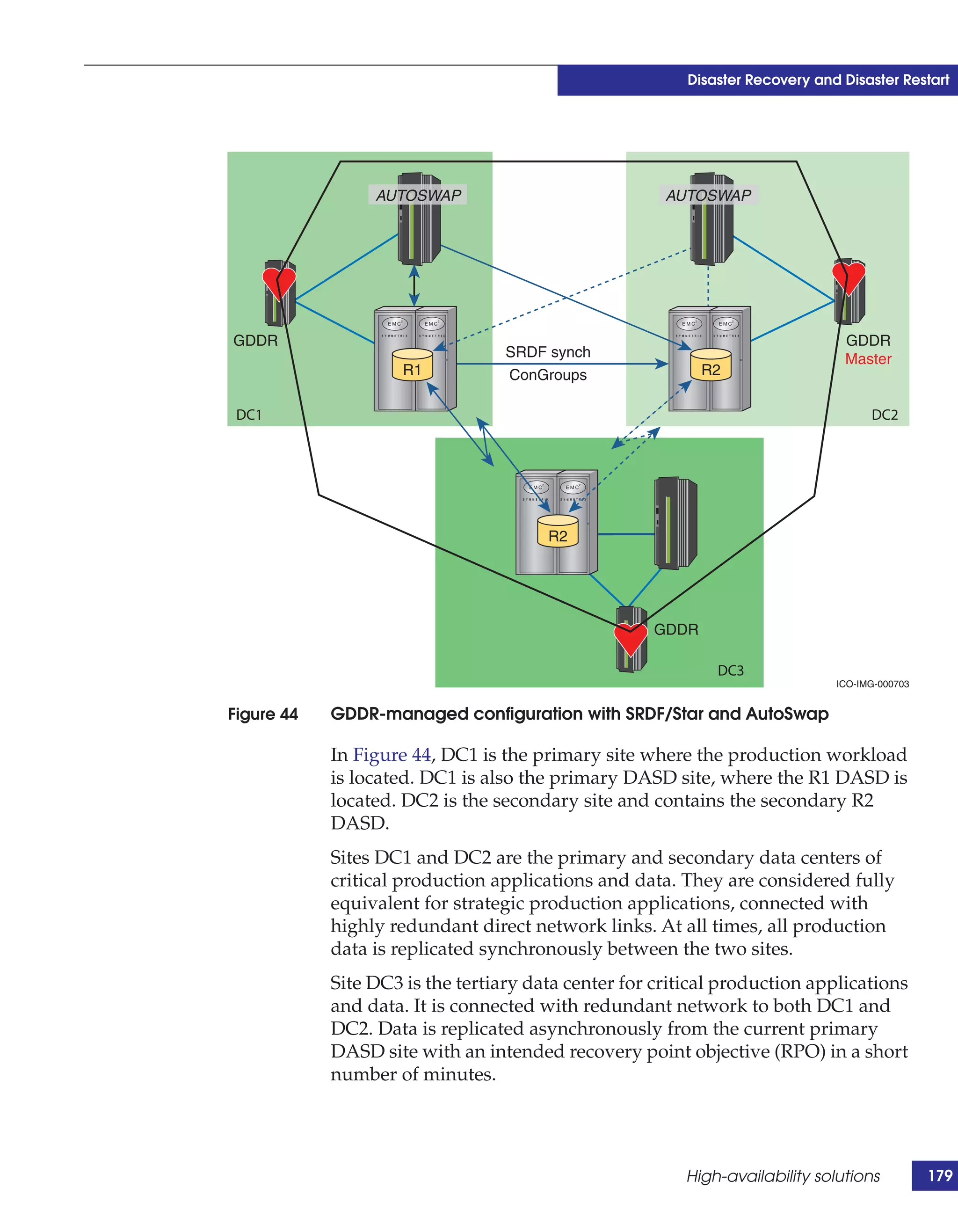
                       In a three-site SRDF/Star with AutoSwap configuration, EMC GDDR
                       is installed on a control LPAR at each site. Each EMC GDDR node is
                       aware of the other two EMC GDDR nodes through network
                       connections between each site. This awareness allows EMC GDDR to:
                       ◆   Detect disasters
                       ◆   Identify survivors
                       ◆   Nominate the leader
                       ◆   Recover business at one of the surviving sites
                       To achieve the task of business restart, EMC GDDR automation
                       extends well beyond the disk level (on which EMC has traditionally
                       focused) and into the host operating system. It is at this level that
                       sufficient controls and access to third-party software and hardware
                       products exist, enabling EMC to provide automated recovery
                       services.
                       EMC GDDR’s main activities include:
                       ◆   Managing planned site swaps (workload and DASD) between the
                           primary and secondary sites and recovering the SRDF/Star with
                           AutoSwap environment.
                       ◆   Managing planned site swaps (DASD only) between the primary
                           and secondary sites and recovering the SRDF/Star with
                           AutoSwap environment.
                       ◆   Managing the recovery of the SRDF environment and restarting
                           SRDF/A in the event of an unplanned site swap.
                       ◆   Active monitoring of the managed environment and responding
                           to exception conditions.


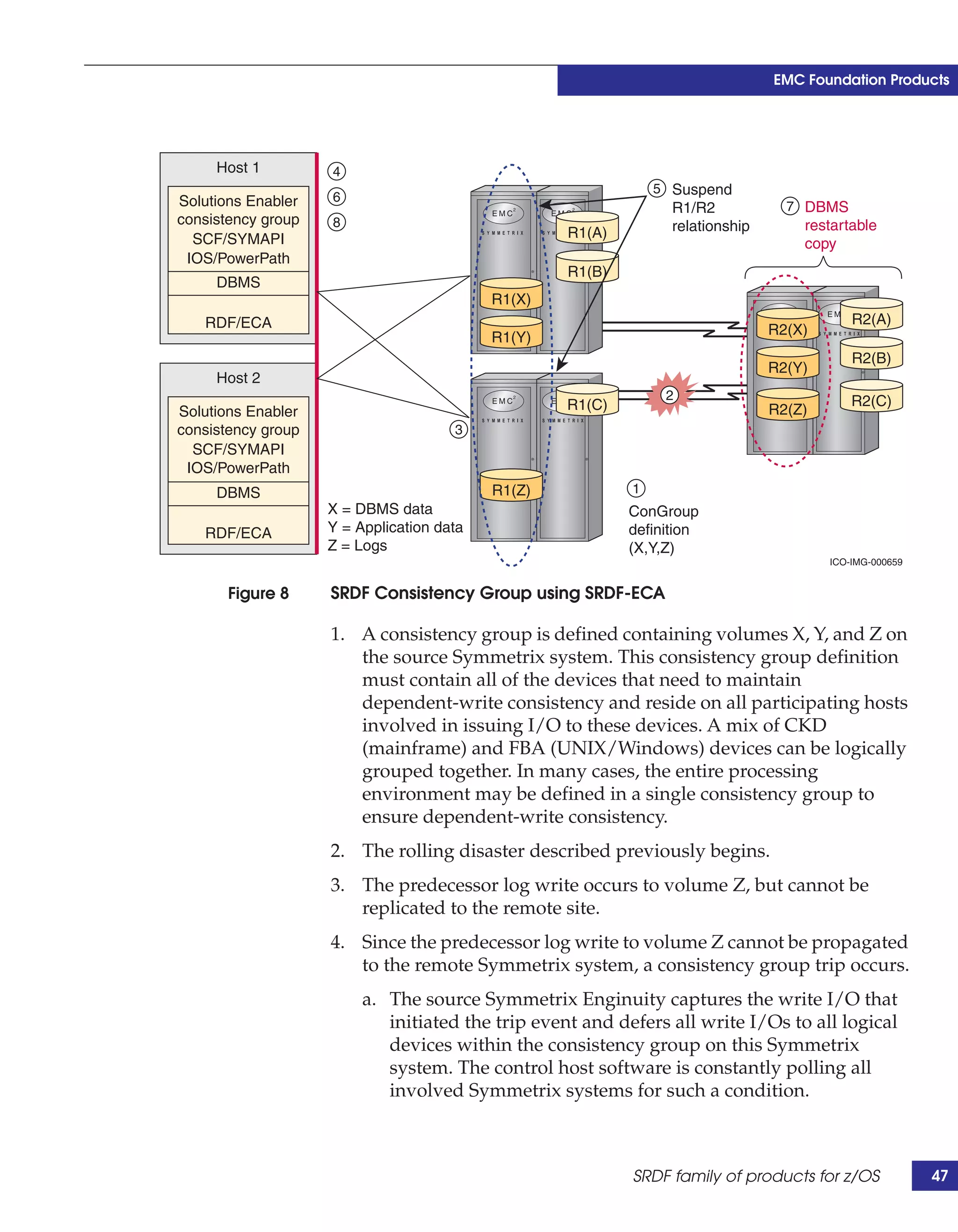
SRDF Enterprise Consistency Group for z/OS
                       An SRDF Consistency Group is a collection of devices logically
                       grouped together to provide consistency. Its purpose is to maintain
                       data integrity for applications that are remotely mirrored,
                       particularly those that span multiple RA groups or multiple
                       Symmetrix storage systems. The protected applications may be
                       comprised of multiple heterogeneous data resource managers spread
                       across multiple host operating systems. It is possible to span
                       mainframe LPARs, UNIX, and Windows servers. These
                       heterogeneous platforms are referred to as hosts.


                                                           SRDF family of products for z/OS      43
EMC Foundation Products


                                 If a primary volume in the consistency group cannot propagate data
                                 to its corresponding secondary volume, EMC software suspends data
                                 propagation from all primary volumes in the consistency group. The
                                 suspension halts all data flow to the secondary volumes and ensures
                                 a dependent-write consistent secondary volume copy at the point in
                                 time that the consistency group tripped.
                                 The dependent-write principle concerns the logical dependency
                                 between writes that are embedded by the logic of an application,
                                 operating system, or database management system (DBMS). This
                                 notion is that a write will not be issued by an application until a prior,
                                 related write has completed (a logical dependency, not a time
                                 dependency). Some aspects of this notion are:
                                 ◆   Inherent in all DBMS
                                 ◆   IMS block write is a dependent write based on a successful log
                                     write
                                 ◆   Applications can also use this technology
                                 ◆   Power failures create dependent-write consistent images
                                 DBMS restart transforms a dependent-write consistent data state to a
                                 transactionally consistent data state.
                                 When the amount of data for an application becomes very large, the
                                 time and resources required for host-based software to protect, back
                                 up, or execute decision-support queries on these databases becomes
                                 critical. In addition, the time required to shut down those
                                 applications for offline backup is no longer acceptable, and
                                 alternative implementations are required. One alternative is SRDF
                                 Consistency Group technology that allows users to remotely mirror
                                 the largest data environments and automatically create
                                 dependent-write consistent, restartable copies of applications in
                                 seconds without interruption to online services.
                                 Disaster restart solutions that use consistency groups provide remote
                                 restart with short recovery time objectives. SRDF synchronous
                                 configurations provide zero data loss solutions using consistency
                                 groups. Zero data loss implies that all completed transactions at the
                                 beginning of a disaster will be available at the target storage system
                                 after restart.
                                 An SRDF consistency group has two methodologies to preserve a
                                 dependent-write consistent image while providing a synchronous
                                 disaster restart solution with a zero data loss scenario. These two
                                 methodologies are described in the following two sections.


44      IMS on z/OS Using EMC Symmetrix Storage Systems Version 2.0
EMC Foundation Products


ConGroup using IOS and PowerPath
                        This methodology preserves a dependent-write consistent image
                        using IOS on mainframe hosts and PowerPath® on open systems
                        hosts. This method requires all hosts have connectivity to all involved
                        Symmetrix storage systems, either through direct connections or
                        indirectly through one or more SAN configurations. These hosts are
                        not required to have the logical devices visible, A path (gatekeeper)
                        to each involved Symmetrix storage system is sufficient. The
                        consistency group definition, software, and licenses must reside on
                        all hosts involved in the consistency group. The read and write I/Os
                        are both held with the IOS and PowerPath methodology.

ConGroup using SRDF/ECA
                       This is the preferred methodology with ConGroup. It preserves a
                       dependent-write consistent image using SRDF Enginuity
                       Consistency Assist (SRDF-ECA). This method requires a minimum of
                       one host having connectivity to all involved Symmetrix storage
                       systems, either through direct connections or indirectly through one
                       or more storage network configurations. EMC recommends having at
                       least two such hosts for redundancy purposes. In the event of a host
                       failure, the second host can automatically take over control of the
                       consistency functions. These hosts are referred to as control hosts,
                       and are the only hosts required to have the consistency group
                       definition, software, and licenses. During a ConGroup trip,
                       SRDF-ECA defers writes to all involved logical volumes in the
                       consistency group. Subsequent read I/Os are held per logical volume
                       once the first write on that volume is deferred. This is done only for a
                       short period of time while the consistency group suspends transfer
                       operations to the secondary volumes.
                           EMC recommends that SRDF-ECA mode be configured when using a
                           consistency group in a mixed mainframe and open systems
                           environment with both CKD and FBA (fixed block architecture)
                           devices.
                           Tripping a consistency group can occur either automatically or
                           manually. Scenarios in which an automatic trip would occur include:
                           ◆   One or more primary volumes cannot propagate writes to their
                               corresponding secondary volumes.
                           ◆   The remote device fails.
                           ◆   The SRDF directors on either the primary or secondary
                               Symmetrix storage systems fail.


                                                              SRDF family of products for z/OS      45
EMC Foundation Products


                                 In an automatic trip, the Symmetrix storage system completes the
                                 write to the primary volume, but indicates that the write did not
                                 propagate to the secondary volume. EMC software, combined with
                                 Symmetrix Enginuity, intercepts the I/O and instructs the Symmetrix
                                 storage system to suspend all primary volumes in the consistency
                                 group from propagating any further writes to the secondary
                                 volumes. Once the suspension is complete, writes to all primary
                                 volumes in the consistency group continue normally, but are not
                                 propagated to the target side until normal SRDF mirroring resumes.
                                 An explicit trip occurs when a susp-cgrp (suspend ConGroup)
                                 command is invoked using SRDF Host Component software.
                                 Suspending the consistency group creates an on-demand, restartable
                                 copy of the database at the secondary site. BCV devices synchronized
                                 with the secondary volumes are then split after the consistency group
                                 is tripped, creating a second dependent-write consistent copy of the
                                 data. During the explicit trip, SRDF Host Component issues the
                                 command to create the dependent-write consistent copy, but may
                                 require assistance from either IOSLEVEL or SRDF-ECA by way of
                                 ConGroup software if I/O is received on one or more of the primary
                                 volumes, or if the Symmetrix commands issued are abnormally
                                 terminated before the explicit trip.
                                 An SRDF consistency group maintains consistency within
                                 applications spread across multiple Symmetrix storage systems in an
                                 SRDF configuration by monitoring data propagation from the
                                 primary volumes in a consistency group to their corresponding
                                 secondary volumes. Consistency groups provide data integrity
                                 protection during a rolling disaster. The loss of an SRDF
                                 communication link is an example of an event that could be a part of
                                 a rolling disaster.
                                 Figure 8 on page 47 depicts a dependent-write I/O sequence where a
                                 predecessor log write happens before a IMS block write from a
                                 database buffer pool. The log device and data device are on different
                                 Symmetrix storage systems with different replication paths. Figure 8
                                 on page 47 also demonstrates how rolling disasters are prevented
                                 using SRDF Consistency Group technology.


46      IMS on z/OS Using EMC Symmetrix Storage Systems Version 2.0
EMC Foundation Products


     Host 1         4
                                                               5 Suspend
Solutions Enabler   6
                                                                 R1/R2            7 DBMS
consistency group   8                                            relationship       restartable
  SCF/SYMAPI                                       R1(A)
                                                                                    copy
 IOS/PowerPath
                                                   R1(B)
     DBMS
                                           R1(X)
   RDF/ECA                                                                                  R2(A)
                                                                                R2(X)
                                           R1(Y)
                                                                                            R2(B)
                                                                                R2(Y)
     Host 2
                                                                2                           R2(C)
Solutions Enabler                                  R1(C)                        R2(Z)
consistency group                     3
  SCF/SYMAPI
 IOS/PowerPath
     DBMS                                  R1(Z)           1
                    X = DBMS data                          ConGroup
   RDF/ECA          Y = Application data                   definition
                    Z = Logs                               (X,Y,Z)
                                                                                        ICO-IMG-000659


       Figure 8     SRDF Consistency Group using SRDF-ECA

                    1. A consistency group is defined containing volumes X, Y, and Z on
                       the source Symmetrix system. This consistency group definition
                       must contain all of the devices that need to maintain
                       dependent-write consistency and reside on all participating hosts
                       involved in issuing I/O to these devices. A mix of CKD
                       (mainframe) and FBA (UNIX/Windows) devices can be logically
                       grouped together. In many cases, the entire processing
                       environment may be defined in a single consistency group to
                       ensure dependent-write consistency.
                    2. The rolling disaster described previously begins.
                    3. The predecessor log write occurs to volume Z, but cannot be
                       replicated to the remote site.
                    4. Since the predecessor log write to volume Z cannot be propagated
                       to the remote Symmetrix system, a consistency group trip occurs.
                         a. The source Symmetrix Enginuity captures the write I/O that
                            initiated the trip event and defers all write I/Os to all logical
                            devices within the consistency group on this Symmetrix
                            system. The control host software is constantly polling all
                            involved Symmetrix systems for such a condition.


                                                           SRDF family of products for z/OS              47
EMC Foundation Products


                                     b. Once a trip event is detected by the host software, an
                                        instruction is sent to all involved Symmetrix systems in the
                                        consistency group definition to defer all write I/Os for all
                                        logical devices in the group. This trip is not an atomic event.
                                        The process guarantees dependent-write consistency,
                                        however, because of the integrity of the dependent write I/O
                                        principle. Once a write I/O could not be received as complete
                                        to the host (the predecessor log write), the DBMS prevents the
                                        dependent I/O from being issued.
                                 5. Once all of the involved Symmetrix storage systems have
                                    deferred the writes for all involved logical volumes of the
                                    consistency group, the host software issues a suspend action on
                                    the primary/secondary relationships for the logically grouped
                                    volumes, which immediately disables all replication of those
                                    grouped volumes to the remote site. Other volumes outside of the
                                    group are allowed to continue replicating, provided the
                                    communication links are available.
                                 6. After the relationships are suspended, the completion of the
                                    predecessor write is acknowledged back to the issuing host.
                                    Furthermore, all I/Os that were held during the consistency
                                    group trip operation are released.
                                 7. The dependent data write is issued by the DBMS and arrives at X
                                    but is not replicated to its secondary volume.
                                 When a complete failure occurs from this rolling disaster, the
                                 dependent-write consistency at the secondary site is preserved. If a
                                 complete disaster does not occur, and the failed links are reactivated,
                                 consistency group replication can be resumed. EMC recommends
                                 creating a copy of the dependent-write consistent image while the
                                 resume takes place. After the SRDF process reaches synchronization,
                                 the dependent-write consistent copy is achieved at the remote site.


     Restart in the event of a disaster or non-disasters
                                 Two major circumstances require restartability or continuity of
                                 business processes as facilitated by SRDF: a true, unexpected disaster,
                                 and an abnormal termination of processes on which dataflow
                                 depends. Both circumstances require that a customer immediately
                                 deploy the proper resource and procedures to correct the situation. It
                                 is generally the case that an actual disaster is more demanding of all
                                 necessary resources in order to successfully recover/restart.


48      IMS on z/OS Using EMC Symmetrix Storage Systems Version 2.0
EMC Foundation Products


Disaster
                         In the event of a disaster, where the primary Symmetrix storage
                         system is lost, it is necessary to run database and application services
                         from the DR site. This requires a host at the DR site. The first action is
                         to write-enable the secondary devices (R2s). At this point, the host
                         can issue the necessary commands to access the disks.
                         After the data is available to the remote host, the IMS system may be
                         restarted. IMS performs an implicit recovery when restarted by
                         resolving in-flight transactions. Transactions that were committed,
                         but not completed, are rolled forward and completed using the
                         information in the active logs. Transactions that have updates applied
                         to the database, but were not committed, are rolled back. The result is
                         a transactionally consistent database.

Abnormal termination (not a disaster)
                         An SRDF session can be interrupted by any situation that prevents
                         the flow of data from the primary site to the secondary site (for
                         example, a software failure, network failure, or hardware failure).


EMC AutoSwap
                         EMC AutoSwap provides the ability to move (swap) workloads
                         transparently from volumes in one set of Symmetrix storage systems
                         to volumes in other Symmetrix storage systems without operational
                         interruption. Swaps may be initiated either manually as planned
                         events or automatically as unplanned events (upon failure detection):
                         ◆   Planned swaps facilitate operations such as nondisruptive
                             building maintenance, power reconfiguration, DASD relocation,
                             and channel path connectivity reorganization.
                         ◆   Unplanned swaps protect systems against outages in a number of
                             scenarios. Examples include: power supply failures, building
                             infrastructure faults, air conditioning problems, loss of channel
                             connectivity, entire DASD system failures, operator error, or the
                             consequences of intended or unintended fire suppression system
                             discharge.
                         AutoSwap, with SRDF and SRDF Consistency Group, dramatically
                         increase data availability.


                                                                               EMC AutoSwap           49
EMC Foundation Products


                                  In Figure 9, swaps are concurrently performed while application
                                  workloads continue in conjunction with EMC Consistency Group.
                                  This option protects data against unforeseen events and ensures that
                                  swaps are unique, atomic operations that maintain dependent-write
                                  consistency.


                   Before                                         After


                                 SRDF/S                                       SRDF/S
                      R1         SRDF/CG        R2                    R1     SRDF/CG         R2


                                                                                             ICO-IMG-000107


                      Figure 9    AutoSwap before and after states


     AutoSwap highlights
                                  AutoSwap includes the following features and benefits:
                                  ◆   Testing on devices in swap groups to ensure validity of
                                      address-switching conditions. This supports grouping devices
                                      into swap groups and treats each swap group as a single-swap
                                      entity.
                                  ◆   Consistent swapping—Writes to the group are held during swap
                                      processing, ensuring dependent-write consistency to protect data
                                      and ensure restartability.
                                  ◆   Swap coordination across multiple z/OS images in a shared
                                      DASD or parallel sysplex environment. During the time when
                                      devices in swap groups are frozen and I/O is queued, AutoSwap
                                      reconfigures SRDF pairs to allow application I/O streams to be
                                      serviced by secondary SRDF devices. As the contents of UCBs are


50      IMS on z/OS Using EMC Symmetrix Storage Systems Version 2.0
EMC Foundation Products


                      swapped, I/O redirection takes place transparently to the
                      applications. This redirection persists until the next Initial
                      Program Load (IPL) event.


Use cases
                  AutoSwap includes the following features and benefits:
                  ◆   Performs dynamic workload reconfiguration without application
                      downtime.
                  ◆   Swaps large numbers of devices concurrently.
                  ◆   Handles device group operations.
                  ◆   Relocates logical volumes.
                  ◆   Performs consistent swaps.
                  ◆   Implements planned outages of individual devices or entire
                      subsystems.
                  ◆   Reacts appropriately to unforeseen disasters if an unplanned
                      event occurs.
                  ◆   Protects against the loss of all DASD channel paths or an entire
                      storage subsystem. This augments the data integrity protection
                      provided by consistency groups by providing continuous
                      availability in the event of a failure affecting the connectivity to a
                      primary device.


TimeFinder family products for z/OS
                  For years, the TimeFinder family of products has provided important
                  capabilities for the mainframe. TimeFinder was recently repackaged
                  as shown in Figure 10 on page 52, but the product’s features and
                  functions remain the same.


                                                     TimeFinder family products for z/OS       51
EMC Foundation Products


                                                                                                TimeFinder/Mirror
                                                                                                   Classic high-
                                                                   TimeFinder/Clone


                                  TimeFinder family for z/OS
                                                                                                performance option
                                                                  Ultra-functional, high-
                                                                                                 TimeFinder/CG
                                                                   performance copies
                                                                                                Consistency Group
                                                                                                      option


                                                                   TimeFinder/Snap
                                                                    Economical space-
                                                                      saving copies


                                                                                                          ICO-IMG-000108


                      Figure 10   TimeFinder family of products for z/OS


     TimeFinder/Clone for z/OS
                                  TimeFinder/Clone for z/OS is documented as a component of the
                                  TimeFinder/Clone Mainframe SNAP Facility. It is the code and
                                  documentation associated with making full-volume snaps and
                                  dataset level snaps. As such, they are space-equivalent copies.
                                  TimeFinder/Clone does not consume a mirror position, nor does it
                                  require the BCV flag for targets on the Symmetrix storage system.
                                  Certain TimeFinder/Mirror commands, such as Protected BCV
                                  Establish, are unavailable in the TimeFinder/Clone Mainframe Snap
                                  Facility. This command is one of pointer-based copy technology
                                  rather than mirror technology. Other protection mechanisms, such as
                                  RAID 5, are available for the target storage volumes as well.
                                  Additional mainframe-specific capabilities of TimeFinder/Clone for
                                  z/OS include:
                                  ◆                            Dataset-level snap operations.
                                  ◆                            Differential snap operations. These require only the changed data
                                                               to be copied on subsequent full-volume snaps or dataset snaps.
                                  ◆                            Support for consistent snap operations. These make the target
                                                               volumes dependent-write consistent and require the
                                                               TimeFinder/Consistency Group product.


52      IMS on z/OS Using EMC Symmetrix Storage Systems Version 2.0
EMC Foundation Products


                         ◆    Up to 16 simultaneous point-in-time copies of a single primary
                              volume.
                         ◆    Compatibility with STK Snapshot Copy and IBM snap products,
                              including reuse of its SIBBATCH syntax.


TimeFinder Utility for z/OS
                         This utility conditions the catalog by relabeling and recataloging
                         entries to avoid issues associated with duplicate volume names in the
                         mainframe environment. This utility is also delivered with
                         TimeFinder/Mirror, TimeFinder/Clone, and TimeFinder/Snap
                         products. TimeFinder Utility for z/OS offers:
                         ◆    Compatibility with mainframe security mechanisms such as
                              RACF.
                         ◆    Integration with many mainframe-specific ISVs and their
                              respective products.


TimeFinder/Snap for z/OS
                         TimeFinder/Snap for z/OS uses the code and documentation from
                         TimeFinder/Clone, but with an important difference: Snaps made
                         with this product are virtual snaps, meaning they take only a portion
                         of the space a full-volume snap would. Invocation of this feature is
                         through the keyword VDEV (Virtual Device). If the VDEV argument
                         is used, only the pre-update image of the changed data plus a pointer
                         is kept on the target. This technique considerably reduces disk space
                         usage for the target. This feature also provides for one or more named
                         SNAPPOOLs that can be managed independently.
                         Mainframe-specific features of the TimeFinder/Snap for z/OS
                         product include:
                         ◆    The same code and syntax as the TimeFinder/Clone Mainframe
                              SNAP Facility (plus the addition of the VDEV keyword).
                         ◆    The same features and functions as TimeFinder/Clone
                              Mainframe SNAP Facility, and therefore, the same benefits.
                         ◆    Full-volume support only (no dataset support).
                         ◆    Up to 128 simultaneous point-in-time SNAPs of a single primary
                              volume.


                                                          TimeFinder family products for z/OS      53
EMC Foundation Products


                                 ◆   Duplicate Snap—Duplicate Snap provides the ability to create a
                                     point-in-time copy of a previously activated virtual device. This
                                     allows the creation of multiple copies of a point-in-time copy.
                                     This feature requires Mainframe Enablers V7.2 or later, and is
                                     manageable using Symmetrix Management Console V7.2 or later.
                                 ◆   ICF Catalog conditioning with TimeFinder Utility for z/OS—This
                                     allows relabeling and recataloging entries and avoids issues
                                     associated with duplicate volume names in the mainframe
                                     environment.
                                 ◆   Compatibility with mainframe security mechanisms such as
                                     RACF.
                                 ◆   Integration with many mainframe-specific ISVs and their
                                     respective products.


     TimeFinder/Mirror for z/OS
                                 TimeFinder/Mirror for z/OS provides BCVs and the means by which
                                 a mainframe application can manipulate them. BCVs are specially
                                 tagged logical volumes manipulated by using these
                                 TimeFinder/Mirror commands: ESTABLISH, SPLIT,
                                 RE-ESTABLISH, and RESTORE.
                                 Mainframe-specific features of the TimeFinder/Mirror product
                                 include:
                                 ◆   The TimeFinder Utility for z/OS, which conditions the VTOC,
                                     VTOCIX, the VVDS, and the ICF catalog by re-labeling and
                                     re-cataloging entries, thereby avoiding issues associated with
                                     duplicate volume names and dataset names.
                                 ◆   The ability to create dependent-write consistent BCVs locally or
                                     remotely (with the plug-in module called TimeFinder/
                                     Consistency Group) without the need to quiesce production jobs.
                                 ◆   BCV operations important to IT departments include:
                                     • Using the BCV as the source for backup operations.
                                     • Using the BCV for test LPARs with real data. The speed with
                                       which a BCV can be rebuilt means that multiple test cycles can
                                       occur rapidly and sequentially. Applications can be staged
                                       using BCVs before committing them to the next application
                                       refresh cycle.


54      IMS on z/OS Using EMC Symmetrix Storage Systems Version 2.0
EMC Foundation Products


                    • Using the BCV as the source for data warehousing
                      applications rather than the production volumes. Because the
                      BCVs are a point-in-time mirror image of the production data,
                      they can be used as golden copies of data to be written and
                      rewritten repeatedly.
                ◆   The use of SRDF/Automated Replication.
                ◆   The support for mainframe TimeFinder queries including the use
                    of wildcard matching.
                ◆   The compatibility with mainframe security mechanisms such as
                    RACF.
                ◆   The integration of DBMS utilities available from ISVs and their
                    products.
                ◆   The integration of many mainframe-specific ISVs and their
                    products.
                On the Symmetrix VMAX platform, all TimeFinder/Mirror
                operations are emulated in Enginuity and converted to
                TimeFinder/Clone operations transparently.


TimeFinder/CG
                TimeFinder/CG (Consistency Group) is a plug-in module for the
                TimeFinder/Mirror, TimeFinder/Clone, and TimeFinder/Snap
                products. TimeFinder/CG provides consistency support for various
                TimeFinder family commands. TimeFinder/CG is licensed separately
                and uses a Licensed Feature Code implementation model.
                TimeFinder/CG allows the use of the CONSISTENT(YES) parameter
                on TimeFinder/Clone and TimeFinder/Snap, as well as the CONS
                parameter on TimeFinder/Mirror SPLIT statements. This allows
                TimeFinder to create an instantaneous point-in-time copy of all the
                volumes being copied. The copy thus created is a dependent-write
                consistent copy that is in a state very similar to that which is created
                during a power outage. If an IMS system is copied this way, a
                restartable image is created.
                TimeFinder/CG invokes ECA (Enginuity Consistency Assist) to hold
                I/Os while the copy is taken. There is little or no effect on the host
                application or database during this time.


                                                  TimeFinder family products for z/OS      55
EMC Foundation Products


     Consistent dataset snap
                                 The consistent dataset snap capability for z/OS, offered with
                                 Enginuity 5875, is unique to EMC. Consistent dataset snap allows the
                                 user to obtain a dependent-write consistent image of multiple IMS
                                 datasets using the TimeFinder/Clone MF Snap Facility SNAP
                                 DATASET function.
                                 Currently, inter-dataset consistency is only achievable by requesting
                                 an exclusive enqueue on the source datasets, which is very
                                 impractical in production IMS environments. The larger the
                                 production environment is, the more impractical it becomes. In
                                 addition, the enqueue approach does not provide for cross-sysplex
                                 consistency, another consideration in very large environments.
                                 Other factors prohibiting this function in the past were that the SNAP
                                 dataset approach operated on a single dataset at a time, and the
                                 Enginuity extent snap took far too long to be executed under an
                                 Enginuity Consistency Assist (ECA) window. A further complication
                                 was that the extent snap did not allow for the separation of the
                                 establish and activate phases of the snap of a dataset (but was
                                 allowed for a full volume). This was critically needed and has now
                                 been provided.
                                 Thus, the new consistent extent snap feature of Enginuity 5875
                                 provides the ability to do separate establish and activate extent-level
                                 snap operations, which in turn results in dataset snap processing on
                                 an entire group of datasets such that dependent-write consistency is
                                 ensured across the resulting group of target datasets.
                                 A separate ACTIVATE statement can now follow SNAP dataset
                                 statements and CONSISTENT(YES) is now allowed on ACTIVATE as
                                 documented in detail in the EMC TimeFinder/Clone Mainframe SNAP
                                 Facility Product Guide.


56      IMS on z/OS Using EMC Symmetrix Storage Systems Version 2.0
EMC Foundation Products


IMS considerations for ConGroup
                 Volumes in the ConGroup device list for the IMS group must include
                 all volumes where IMS system data and all other application
                 databases reside. IMS system data whose devices must be included
                 are:
                 ◆   RECON1, RECON2, RECON3—RECON copies + spare
                 ◆   DFSOLPxx—Primary IMS log datasets
                 ◆   DFSOLSxx—Secondary IMS log datasets
                 ◆   DFSWADSx—WADS datasets + spares
                 ◆   RDS—Restart dataset
                 ◆   MODSTAT—Active library list
                 ◆   MSDBCPx—Fast Path MSDB checkpoint datasets
                 ◆   MSDBINIT—Fast Path MSDB input
                 ◆   MSDBDUMP—Fast Path MSDB output
                 ◆   IMSACB—Database and program descriptors (active, inactive,
                     and staging)
                 ◆   MODBLKS—Database, programs, and transactions (active,
                     inactive, and staging)
                 ◆   MATRIX—Security tables (active, inactive, and staging)
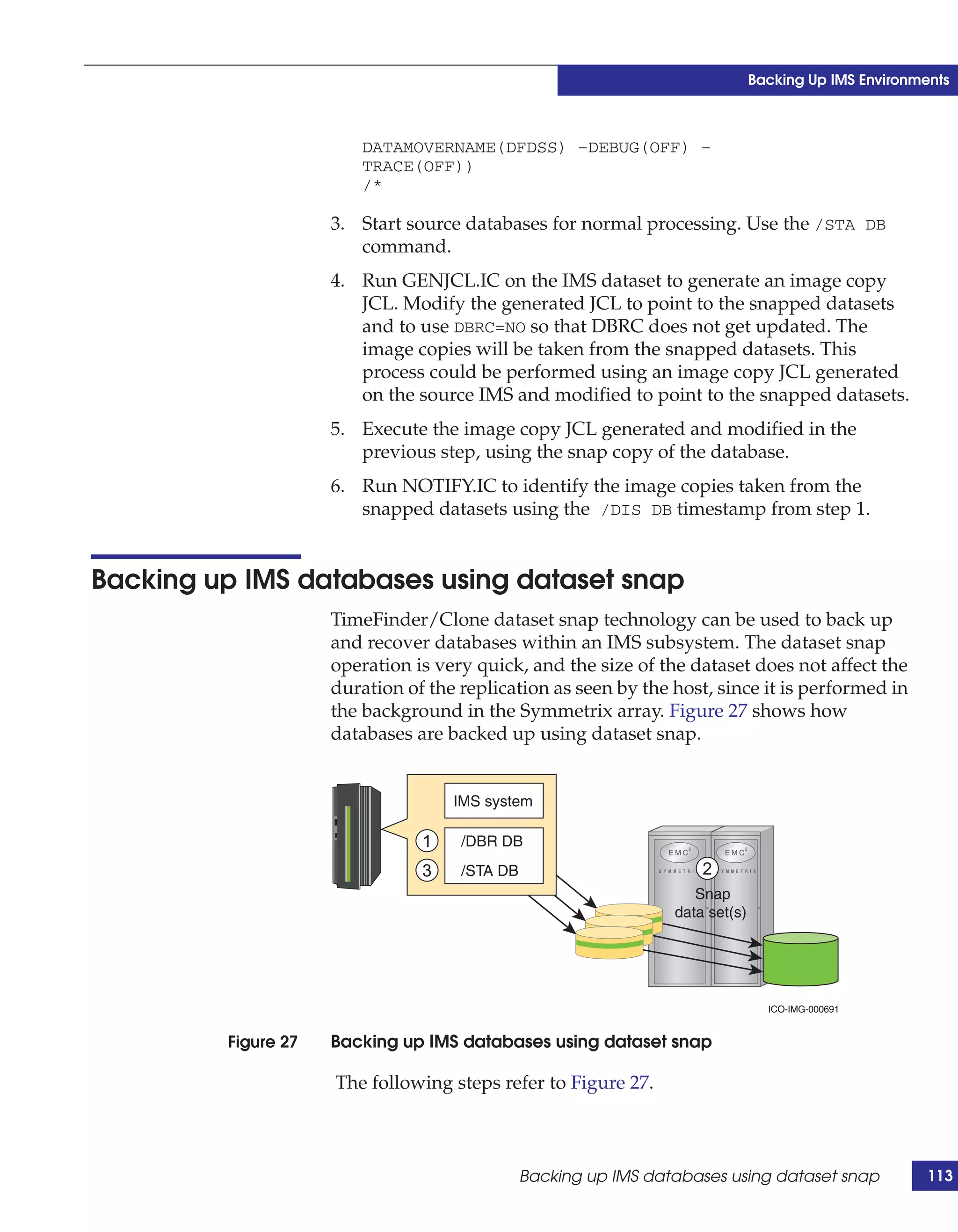
                 ◆   FORMAT—MFS maps (active, inactive, and staging)
                 ◆   IMSTFMT—Test MFS maps (active, inactive, and staging)
                 ◆   DBDLIB – DBD control blocks
                 ◆   PSBLIB—PSB control blocks
                 ◆   LGMSG, LGMSGx—Long message queues
                 ◆   SHMSG, SHMSGx—Short message queues
                 ◆   QBLKS—Message queue blocks
                 ◆   RESLIB, MDALIB—IMS STEPLIB libraries
                 ◆   PROCLIB—IMS procedure library
                 ◆   All user and vendor databases
                 ◆   SLDS, RLDS if long-running applications are a concern
                 ◆   ICF user catalogs for system or user data


                                                     IMS considerations for ConGroup       57
EMC Foundation Products


                                  ◆   System runtime libraries
                                  ◆   User program libraries


     EMC z/OS Storage Manager
                                  The EMC z/OS Storage Manager (EzSM) is a mainframe software
                                  product providing storage management in a Symmetrix
                                  environment. EzSM provides mainframe storage managers and
                                  operations staff a flexible, z/OS-centric view of storage that presents
                                  both Symmetrix-specific information and z/OS storage management
                                  data in a single easy-to-use 3270 interface.
                                  With EzSM, users can discover and monitor the volumes in a
                                  Symmetrix controller, set alerts for volumes, summarize Symmetrix
                                  configuration information, and much more. EzSM is installed with
                                  SMP/E (System Modification Program Extended), an element of
                                  z/OS that is used to install most software products. EzSM logs user
                                  activity and records changes in SMP. Standard security packages and
                                  z/OS messaging are used, which allows customer automation
                                  packages to filter EzSM messages. Figure 11 is a logical view of EzSM
                                  functionality.

                                        z/OS resources     Storage resources


                                       Catalog
                                                                    Volumes
                                       migration
                                                                    datasets
                                       storage
                                                         SMS
                                                         HSM
                                                                       Symmetrix


                                                     Functions
                                                   infrastructure

                                                                               ICO-IMG-000750


                      Figure 11   EMC z/OS Storage Manager functionality


58      IMS on z/OS Using EMC Symmetrix Storage Systems Version 2.0
EMC Foundation Products


Symmetrix Management Console
               Symmetrix Management Console (SMC) employs a simple and
               intuitive Web-based user interface to administer the most common
               daily storage management functions for the Symmetrix array. The
               intention is that SMC can be used quickly and efficiently by operators
               of all experience levels.
               Members of the mainframe community typically participate in a
               structured change control process to manage their storage
               environment with certainty and stability. When using the SMC,
               mainframe storage administrators can avoid consultation with EMC
               personnel on array change control activities and perform the actions
               themselves, removing one level of complexity in the change control
               process. It is anticipated that changes can be enacted in a more timely
               fashion, and communication errors avoided, when SMC is used by
               authorized customer administrators to directly perform array
               modifications.
               SMC puts control of the following array activities into the hands of
               the mainframe storage administrator:
               ◆   Device creation and removal
               ◆   Device base and alias addressing
               ◆   Local and remote replication
               ◆   Quality of service
               ◆   Replication and quality-of-service monitoring
               ◆   Management of FAST policies and configurations
               SMC is designed to deliver Symmetrix array management that is
               responsive to user controls and modest on server resource
               requirements. As a consequence of this design mandate, one SMC
               instance is recommended for controlling a maximum of 64 K devices.
               Some mainframe sites may require several SMC instances to provide
               management coverage for the entire storage pool. Each SMC instance,
               however, shares a server with other applications, and each instance
               remains quick, light, and independent.
               SMC is intended to make array management faster and easier. Using
               dialog boxes structured into task wizards, SMC accelerates setup,
               configuration, and routine tasks. By providing simplified replication
               management and monitoring, SMC delivers ease of use that
               translates into efficient operation. Finally, managing for the future,


                                                  Symmetrix Management Console           59
EMC Foundation Products


                                 SMC makes new functionality available in the same simple intuitive
                                 manner, greatly lessening the learning curve necessary to implement
                                 any new technology and functionality.
                                 With SMC, the mainframe user community now has an additional
                                 choice in Symmetrix array management. This choice is a tool that is
                                 easy to deploy, simplifies complex tasks through structured templates
                                 and wizards, delivers responsive user interaction, and readily
                                 integrates the tasks and changes of tomorrow.

                                 Note: In May 2012 SMC merged into a new GUI product named Unisphere®.


     Symmetrix Performance Analyzer
                                 EMC Symmetrix Performance Analyzer (SPA) is an intuitive,
                                 browser-based tool used to perform historical trending and analysis
                                 of Symmetrix array performance data. SPA was developed to work
                                 with the Symmetrix Management Console (SMC). The SPA interface
                                 can open in its own web window from the SMC menu or on its own.
                                 SPA adds an optional layer of data collection, analysis, and
                                 presentation tools to the SMC implementation. You can use SPA to:
                                 ◆   Set performance thresholds and alerts
                                 ◆   View high frequency metrics as they become available
                                 ◆   Perform root cause analysis
                                 ◆   View graphs detailing system performance
                                 ◆   Drill down through data to investigate issues
                                 ◆   Monitor performance and capacity over time
                                 SPA also provides a fast lane to display possible performance road
                                 blocks with one click, and includes export and print capability for all
                                 data graphs.

                                 Note: In May 2012, SMC merged into a new GUI product named Unisphere.


60      IMS on z/OS Using EMC Symmetrix Storage Systems Version 2.0
EMC Foundation Products


Unisphere for VMAX
                 Available since May 2012, EMC Unisphere for VMAX replaces
                 Symmetrix Management Console (SMC) and Symmetrix
                 Performance Analyzer (SPA). With Unisphere for VMAX, customers
                 can provision, manage, monitor, and analyze VMAX arrays from one
                 console, significantly reducing storage administration time.
                 Unisphere for VMAX offers big-button navigation and streamlined
                 operations to simplify and reduce the time required to manage data
                 center storage. Unisphere for VMAX simplifies storage management
                 under a common framework. You can use Unisphere to:
                 ◆   Perform configuration operations
                 ◆   Manage volumes
                 ◆   Perform and monitor local and remote replication functions
                 ◆   Monitor VMAX alerts
                 ◆   Manage Fully Automated Storage Tiering (FAST and FAST/ VP)
                 ◆   Manage user accounts and their roles
                 Unisphere for VMAX provides a single GUI interface for centralized
                 management of your entire VMAX storage environment. This
                 includes:
                 Configuration—Volume creation, set VMAX and volume attributes,
                 set port flags, and create SAVE volume pools. Change volume
                 configuration, set volume status, and create/dissolve metavolumes.
                 Performance—Performance data previously available through
                 Symmetrix Performance Analyzer (SPA) is now included in
                 Unisphere for VMAX. Monitor, analyze, and manage performance
                 settings such as threshold, alerts, metrics and reports.
                 Replication monitoring—View and manage TimeFinder sessions.
                 Includes session controls, details, and modes. View and manage
                 SRDF groups and pools.
                 Usability—Provides a simple, intuitive graphical user interface for
                 array discovery, monitoring, configuration, and control of Symmetrix
                 subsystems. A single pane of glass provides a view of Symmetrix
                 arrays. From a dashboard view (that provides an overall view of the
                 VMAX environment), you can drill down into the array dashboard.
                 The array dashboard provides a summary of the physical and virtual


                                                               Unisphere for VMAX        61
EMC Foundation Products


                                 capacity for that array. Additionally, the alerts are summarized here,
                                 and a user can further drill down into the alerts to get more
                                 information.
                                 Security—Unisphere for VMAX supports the following types of
                                 authentication: Windows, LDAP, and local Unisphere users. User
                                 authentication and authorization using defined user roles, such as
                                 StorageAdmin, Auditor, SecurityAdmin, and Monitor.


     Virtual Provisioning
                                 The Enginuity 5876 release for Symmetrix VMAX arrays delivers
                                 Virtual Provisioning™ for CKD devices. After several years of
                                 successful deployment in open systems (FBA) environments,
                                 mainframe VMAX users now have the opportunity to deploy thin
                                 devices for IMS and other mainframe applications. Virtual
                                 Provisioning for IMS subsystems is described in detail in Chapter 3.


     Fully Automated Storage Tiering
                                 The Enginuity 5874 service release for Symmetrix VMAX arrays
                                 provides the mainframe user Fully Automatic Storage Tiering (FAST)
                                 capability. Using FAST, whole IMS devices can be moved from one
                                 storage type to another storage type based on user-defined policies.
                                 Device movement plans are automatically recommended (and
                                 optionally executed) seamlessly by the FAST controller in the storage
                                 array. FAST operates at a granularity of a Symmetrix logical device,
                                 so it is always a full device that is migrated between storage types
                                 (drive types and RAID protections).
                                 The Enginuity 5876 provides FAST functionality at the sub-volume
                                 and sub-dataset level. When a IMS subsystem has been built using
                                 thin devices using Virtual Provisioning, it can take advantage of this
                                 feature. The 5876 Enginuity feature is called Fully Automated Storage
                                 Tiering Virtual Pools (FAST VP). This feature is describe in more
                                 detail in Chapter 3, page 3-65.
                                 The Unisphere graphical user interface is used to manage FAST and
                                 FAST VP operations. At this time, there is no specific batch job control
                                 to automate the functions of data movement.


62      IMS on z/OS Using EMC Symmetrix Storage Systems Version 2.0
EMC Foundation Products


Data at Rest Encryption
                  Enginuity 5875 provides support for Symmetrix Data at Rest
                  Encryption (Data Encryption) on all drive types supported by the
                  Symmetrix VMAX system. The Data Encryption feature is available
                  for new VMAX systems shipping with Enginuity 5875. It is not
                  available as an upgrade option for existing VMAX systems (installed
                  prior to the availability of Enginuity 5875), nor can it be made
                  available through the RPQ process. This feature makes use of some
                  special new hardware at the device adapter (DA) level. Further, this
                  capability at the DA level to provide encryption for all drives
                  controlled by that director represents a competitive advantage since
                  other enterprise-class subsystems require that special drives be used
                  to achieve encryption.
                  There are no user controls to enable or disable Data Encryption in a
                  VMAX subsystem.
                  DARE adds Data Encryption capability to the back end of the VMAX
                  subsystem, and adds encryption key management services to the
                  service processor. Key management is provided by the RSA® Key
                  Manager (RKM) “lite” version that can be installed on the VMAX
                  service processor by the Enginuity installer program. This new
                  functionality for the service processor consists of the RKM client and
                  embedded server software from RSA.


                                                              Data at Rest Encryption      63
EMC Foundation Products


64      IMS on z/OS Using EMC Symmetrix Storage Systems Version 2.0
3
                                                          Advanced Storage
                                                               Provisioning


This chapter describes the advanced storage provisioning techniques
that were introduced with Enginuity 5876.
◆   Virtual Provisioning........................................................................... 66
◆   Fully Automated Storage Tiering .................................................... 78


                                                     Advanced Storage Provisioning                       65
Advanced Storage Provisioning


     Virtual Provisioning
                                 Enginuity 5876 includes significant enhancements for mainframe
                                 users of the Symmetrix VMAX array that rival in importance to the
                                 original introduction of the first Symmetrix Integrated Cached Disk
                                 Array in the early 1990s. After several years of successful deployment
                                 in open systems (FBA) environments, mainframe VMAX users now
                                 have the opportunity to deploy Virtual Provisioning and Fully
                                 Automated Storage Tiering for Virtual Pools (FAST VP) for count key
                                 data (CKD) volumes.
                                 This chapter describes the considerations for deploying an IMS for
                                 z/OS database using Virtual Provisioning. An understanding of the
                                 principles that are described here will allow the reader to deploy IMS
                                 for z/OS databases on thin devices in the most effective manner.


     Terminology
                                 The Virtual Provisioning for mainframe feature brings with it some
                                 new terms that may be unfamiliar to mainframe practitioners. Table 1
                                 describes these new terms which are used extensively throughout
                                 this chapter.

                       Table 1   Virtual Provisioning terms

                                  Term              Description

                                  Device            A logical unit of storage defined within a Symmetrix array.

                                  Device capacity   The actual storage capacity of a device.

                                  Device extent     The size of the smallest contiguous region of a device for which
                                                    an extent mapping can occur.

                                  Host-accessible   A device that is presented on a FICON channel for host use.
                                  device

                                  Internal device   A device used for internal function of the array.

                                  Storage pool      A collection of internal devices for some specific purpose.

                                  Thin device       A host-accessible device that has no storage directly associated
                                                    with it.

                                  Data device       An internal device that provides storage capacity to be used by
                                                    a thin device.


66      IMS on z/OS Using EMC Symmetrix Storage Systems Version 2.0
Advanced Storage Provisioning


Table 1   Virtual Provisioning terms (continued)

          Term                 Description

          Extent mapping       Specifies the relationship between the thin device and data
                               device extents. The extent sizes between a thin device and a
                               data device do not need to be the same.

          Thin pool            A collection of data devices that provide storage capacity for
                               'Thin Devices'

          Thin pool capacity   The sum of the capacities of the member data devices.

          Bind                 The process by which one or more thin devices are associated
                               to a thin pool.

          Unbind               The process by which a thin device is disassociated from a
                               given thin pool. When unbound, all previous extent allocations
                               from the data devices are erased and returned for reuse.

          Enabled data         A data device belonging to a thin pool on which extents can be
          device               allocated for thin devices bound to that thin pool.

          Disabled data        A data device belonging to a thin pool from which capacity
          device               cannot be allocated for thin devices. This state is under user
                               control. If a data device has existing extent allocations when a
                               disable operation is executed against it, the extents are
                               relocated to other enabled data devices with available free
                               space within the thin pool.

          Thin pool enabled    The sum of the capacities of enabled data devices belonging to
          capacity             a thin pool.

          Thin pool            A subset of thin pool enabled capacity that has been allocated
          allocated capacity   for the exclusive use of all thin devices bound to that thin pool.

          Thin pool            The initial amount of capacity that is allocated when a thin
          pre-allocated        device is bound to a thin pool. This property is under user
          capacity             control. For CKD thin volumes, the amount of pre-allocation is
                               either 0% or 100%.

          Thin device          The minimum amount of capacity that is pre-allocated to a thin
          minimum              device when it is bound to a thin pool. This property is not under
          pre-allocated        user control.
          capacity


                                                                            Virtual Provisioning      67
Advanced Storage Provisioning


                       Table 1   Virtual Provisioning terms (continued)

                                  Term                  Description

                                  Thin device written   The capacity on a thin device that was written to by a host. In
                                  capacity              most implementations, this is a subset of the thin device
                                                        allocated capacity.

                                  Thin device           The total capacity that a thin device is entitled to withdraw from
                                  subscribed            a thin pool, which may be equal to or less than the thin device
                                  capacity              capacity.

                                  Thin device           The capacity limit that a thin device is entitled to withdraw from a
                                  allocation limit      thin pool, which may be equal to or less than the thin device
                                                        subscribed capacity.


     Overview
                                 Virtual Provisioning brings a new type of device into the mainframe
                                 environment called a thin device. Symmetrix thin devices are logical
                                 devices that can be used in many of the same ways that standard
                                 Symmetrix devices have traditionally been used. Unlike traditional
                                 Symmetrix devices, thin devices do not need to have physical storage
                                 completely allocated at the time the device is created and presented
                                 to a host. The physical storage that is used to supply disk space to
                                 thin devices comes from a shared storage pool called a thin pool. The
                                 thin pool is comprised of devices called data devices that provide the
                                 actual physical storage to support the thin device allocations.
                                 Virtual Provisioning brings many benefits:
                                 ◆    Balanced performance
                                 ◆    Better capacity utilization
                                 ◆    Ease of provisioning
                                 ◆    Simplified storage layouts
                                 ◆    Simplified database allocation
                                 ◆    Foundation for storage tiering
                                 It is possible to over-provision thin storage volumes using Virtual
                                 Provisioning. Over-provisioning means that more space is presented
                                 to the mainframe host than is actually available in the underlying
                                 storage pools. Customers may decide to over-provision storage
                                 because it simplifies the provisioning process, or because they want
                                 to improve capacity utilization, or both. In either case, when an
                                 over-provisioning configuration is being used, careful monitoring of

68      IMS on z/OS Using EMC Symmetrix Storage Systems Version 2.0
Advanced Storage Provisioning


                        the storage pools is required to ensure that they do not reach 100
                        percent utilization. In addition, processes to reclaim storage that has
                        been used and then deleted need to be executed to reclaim capacity
                        and return it to the pool.
                        If over-provisioning is not needed, customers simply provide thin
                        device capacity that matches the pool capacity. With this kind of
                        implementation neither pool monitoring nor space reclamation are
                        necessary.


Virtual Provisioning operations
                        When a write is performed to a part of the thin device for which
                        physical storage has not yet been allocated, the Symmetrix subsystem
                        allocates physical storage from the thin pool only for that portion of
                        the thin device. The Symmetrix operating environment, Enginuity,
                        satisfies the requirement by providing a block of storage from the
                        thin pool, called a thin device extent. This approach reduces the
                        amount of storage that is actually consumed.
                        The minimum amount of physical storage that can be reserved at a
                        time for the dedicated use of a thin device is called a thin device
                        extent. This is the minimum amount of physical storage that can be
                        reserved at a time for the dedicated use of a thin device. This
                        approach reduces the amount of storage that is actually consumed.
                        The entire thin device extent is physically allocated to the thin device
                        at the time the thin storage allocation is made. The thin device extent
                        is allocated from any one of the data devices in the associated thin
                        pool.
                        When a read is performed on a thin device, the data being read is
                        retrieved from the appropriate data device in the thin pool to which
                        the thin device is associated. If, for some reason, a read is performed
                        against an unallocated portion of the thin device, standard record 0 is
                        returned.
                        When more physical data storage is required to service existing or
                        future thin devices (for example, when a thin pool is approaching
                        maximum usage), data devices can be added dynamically to existing
                        thin pools without the need for a system outage. A rebalance process
                        can be executed to ensure that the pool capacities are balanced to
                        provide an even distribution across all the devices in the pool, both
                        new and old. New thin devices can also be created and associated
                        with existing thin pools.


                                                                          Virtual Provisioning      69
Advanced Storage Provisioning


                                   When data devices are added to a thin pool, they can be in an enabled
                                   or disabled state. In order for the data device to be used for thin
                                   extent allocation, it needs to be in the enabled state. For it to be
                                   removed from the thin pool, it needs to be in the disabled state.
                                   Disabling a data device with active thin device allocations is the first
                                   step to removing the device from the pool. The second step is to drain
                                   it, which causes all the active extents on the device to be transferred
                                   to other enabled devices in the pool. When fully drained, the data
                                   device can be removed from the pool and utilized for other purposes.
                                   Figure 12 depicts the relationships between thin devices and their
                                   associated thin pools. The host-visible thin devices are presented on a
                                   channel and have UCB addresses. The storage for the thin devices is
                                   provisioned from the thin device pool. The data devices in the thin
                                   device pool are created from RAID ranks in the Symmetrix VMAX
                                   array. The data devices do not have an address on the channel.


                                                                       Thin       Thin
                                                                      devices     device        Physical
                                                                      (3390)      pool           disks


                                                                                  VMAX
                       Figure 12   Thin devices, pools, and physical disks

                                   The way thin extents are allocated across the data devices results in a
                                   form of striping in the thin pool. The more data devices that are in the
                                   thin pool, the wider the striping, and the greater the number of
                                   devices that can participate in application input/output (I/O). The
                                   thin extent size for CKD devices is 12 3390 tracks in size.

     Requirements
                                   Virtual Provisioning for CKD devices requires Enginuity code level of
                                   5876 or later. In order to create thin pools and manage them,
                                   Mainframe Enablers V7.4 or later is required. Unisphere™ can also be


70      IMS on z/OS Using EMC Symmetrix Storage Systems Version 2.0
Advanced Storage Provisioning


                       used to manage Virtual Provisioning components. Thin device pools
                       can only be created by the user and they cannot be created during the
                       bin file (VMAX configuration) creation process. Thin pools cannot
                       use RAID 10 protection when using CKD format. RAID 1, RAID 5, or
                       RAID 6 are available for devices in the thin pool.


Host allocation considerations
                       Host dataset and volume management activities behave in subtly
                       different ways when using Virtual Provisioning. These behaviors are
                       usually invisible to end users. However, the introduction of thin
                       devices can put these activities in a new perspective. For example, the
                       amount of consumed space on a volume, as seen through ISPF 3.4
                       may be different from the actual consumed space from the thin pool.
                       From a Virtual Provisioning point of view, a thin device could be
                       using a substantial number of thin extents, even though the space is
                       showing as available to the operating system. Alternatively, the
                       volume may look completely full from a VTOC point of view and yet
                       may be consuming minimal space from the thin pool.
                       These situations and perspectives are new with Virtual Provisioning.
                       A clear understanding of them is necessary for a successful
                       deployment of a thinly provisioned IMS subsystem. An awareness of
                       how IMS and z/OS behave with this technology can lead to an
                       educated choice of host deployment options and can yield maximum
                       value from the Virtual Provisioning infrastructure.


Balanced configurations
                       With Virtual Provisioning on CKD volumes, it is now possible to
                       have the nirvana of storage layouts: Balanced capacity and balanced
                       performance. To achieve this goal prior to this product was a near
                       impossibility. SMS does its level best to balance capacity, but without
                       regard for performance. This manifests in the terribly skewed
                       configurations that EMC encounters on a daily basis, where 20
                       percent of the IMS volumes are performing 80 percent of the
                       workload.
                       Deploying a skewed IMS subsystem on thin devices still leaves the
                       access to the thin devices skewed, but the storage layer is completely
                       balanced due to the nature of the wide striping of the thin volumes


                                                                        Virtual Provisioning      71
Advanced Storage Provisioning


                                  across the pool. So now it is possible to have the best of both worlds:
                                  Better utilization and better performance, since bottlenecks at the
                                  disk layer have been removed.


     Pool management
     Fully provisioning volumes
                                  It is possible to fully provision a z/OS volume when binding it to a
                                  thin pool. This means that all the tracks of the thin volume are
                                  allocated immediately from the thin pool. When this approach is
                                  used for all thin volumes assigned to a thin pool, and when there is
                                  more space in the pool than the aggregate total of thin-device
                                  capacity, it is a strategy to avoid oversubscription. This method of
                                  provisioning requires that the capacity of the thin pool is at least as
                                  large as the sum of the capacities of all the thin devices bound to the
                                  pool.
                                  Fully provisioning thin volumes has the significant advantage of
                                  wide striping the thin volumes across all the devices in the thin pool
                                  (a benefit that should be utilized with large volumes, such as
                                  MOD27s, MOD54s, and EAVs).
                                  To prevent space-reclamation routines from returning free space that
                                  results from deleting files, the thin devices must be bound to the pool
                                  using the persistent option.

     Oversubscription
                                  Oversubscription is a key value of EMC Virtual Provisioning.
                                  Oversubscription allows storage administrators to provision more
                                  storage to the end user than is actually present. It is a common
                                  practice to request more storage than is actually needed simply to
                                  avoid the administrative overhead of the requisition/provisioning
                                  process. In many cases, this additional storage is never used. When
                                  this is the case, oversubscription can reduce your overall Total Cost of
                                  Ownership (TCO).
                                  When implementing IMS systems with oversubscription, it is very
                                  important to manage the capacity of a thin pool. As the thin pool
                                  starts to fill up, more storage has to be added to the pool to alleviate
                                  the situation. When a pool fills up and there is no more space to
                                  allocate to a write, IMS receives I/O errors on the dataset. This is not
                                  a desirable situation.


72      IMS on z/OS Using EMC Symmetrix Storage Systems Version 2.0
Advanced Storage Provisioning


                           Messages are written to SYSLOG indicating that the thin pool
                           utilization level after certain pre-defined levels have been exceeded.
                           Automation can be used to track these messages and issue the
                           appropriate alerts.

Adding storage to a pool and rebalancing
                         When the pool thresholds are exceeded (or at any other time), data
                         devices may be added to the thin pool to increase capacity. When
                         devices are added, an imbalance is created in the device capacity
                         utilization. Some volumes may be nearly full, while the new volumes
                         will be empty.
                           Figure 13 shows the four volumes that comprise a thin pool, each at
                           75 percent of capacity:


               Figure 13   Thin device pool with devices filling up

                           Adding two additional volumes to the pool, and rebalancing the
                           capacity, as shown in Figure 14, results in a capacity redistribution:


               Figure 14   Thin device pool rebalanced with new devices

                           Note that the rebalancing activity is transparent to the host and
                           executes without using any host I/O or CPU. For best practices, it is
                           recommended that you do not add just two volumes to the pool. You
                           should add enough devices to avoid frequent rebalancing efforts.


                                                                             Virtual Provisioning      73
Advanced Storage Provisioning


     Space reclamation
                                 Space reclamation is a process of returning disk space to the pool
                                 after it is no longer in use. For example, when a IMS online REORG
                                 takes place, a shadow copy of the IMS database is created. The
                                 original location of the database is eventually deleted. Even though it
                                 has been deleted from a z/OS perspective, and the space is showing
                                 as available when viewing the VTOC, the space is actually still
                                 consumed in the thin pool.
                                 The management of the space reclaim function is not usually in the
                                 domain of the DBA, however, it is still instructive to understand how
                                 it works.
                                 Space reclamation is performed by the Thin Reclaim Utility (TRU),
                                 which is a part of Mainframe Enablers V7.4 and later. For thin devices
                                 that are not bound with the PERSIST and PREALLOCATE attributes,
                                 TRU enables the reclamation of the thin device track groups for reuse
                                 within the virtual pool by other thin devices. It does this by first
                                 identifying the free space in VTOC, initially by way of a scan
                                 function, then on an ongoing basis by way of the z/OS scratch exit. It
                                 then periodically performs a reclaim operation, which marks tracks
                                 as empty in the array (no user records, only standard R0). The
                                 Symmetrix zero reclaim background task then returns these empty
                                 track groups to the free list in the virtual pool.
                                 Note that this function only applies to volumes that have been thin
                                 provisioned in the Symmetrix subsystem. Volumes that are fully
                                 pre-allocated and marked persistent are not eligible for reclamation.


     Thin device monitoring
                                 In a situation where over-provisioning has been used, that is to say
                                 the aggregate size of the thin devices exceeds the size of the thin pool,
                                 it is mandatory that some kind of pool monitor is active to alert on
                                 pool threshold conditions. The Symmetrix Control Facility actively
                                 monitors thin pools and sends alerts to SYSLOG based on certain
                                 percentage full conditions of the thin pool. Based on these messages,
                                 the storage administrator can add more devices to the thin pool as
                                 needed.


74      IMS on z/OS Using EMC Symmetrix Storage Systems Version 2.0
Advanced Storage Provisioning


Considerations for IMS components on thin devices
                            There are certain aspects of deploying a IMS subsystem using Virtual
                            Provisioning that the IMS DBA should be aware of. How the various
                            components work in this kind of configuration depends on the
                            component itself, its usage, and, sometimes, the underlying host data
                            structure supporting the component. This section describes how the
                            various IMS components interact with Virtual Provisioning devices.

OLDS and WADS
                            IMS log files are formatted by the DBA as a part of the subsystem
                            creation process. Every single page of the log files is written to at this
                            time, meaning that the log files become fully provisioned when they
                            are initialized and will not cause any thin extent allocations after this.
                            One thing to remember is that the active log files become striped
                            across all the devices in the thin pool. Therefore, no single physical
                            disk will incur the overhead of all the writes that come to the logs. If
                            the standards for a particular site require that logs need to be
                            separated from the data, then this can be achieved by creating a
                            second thin pool that is dedicated for the active log files.
                            For better IMS performance, it is recommended to VSAM stripe the
                            IMS log files. This recommendation holds true even if the IMS logs
                            are deployed on thin devices.


Replication considerations
                            Thin devices behave in exactly the same way as normal, standard
                            Symmetrix devices in regards to both local and remote replication.
                            Thus, a thin device can be either a source or a target volume for a
                            TimeFinder replication process, and it can be either an R1 or an R2 in
                            an SRDF configuration. There are no specific considerations related to
                            thin devices using either of these two replication functions.

Migration from thick to thin
                            When a customer decides to use Virtual Provisioning for the first time
                            in a mainframe environment, and needs to migrate existing IMS
                            subsystems to thin devices, a question arises: What is the best way to
                            migrate from thick to thin?


                                                                               Virtual Provisioning      75
Advanced Storage Provisioning


                                 Table 2 and Table 3 show some different utilities that can be used and
                                 the particular considerations with those method.

                       Table 2   Thick-to-thin host migrations

                                                         Disruptive to
                                                         application
                                                         (access must be
                                  Host-based copy        interrupted)       Notes

                                  DFDSS, FDRDSF, other YES                  Offers dataset extent consolidation
                                  utilities

                                  DFSMS re-allocation    YES                Redefinition of batch datasets results in
                                                                            migration to a new SMS group of thin
                                                                            devices with volume selection changes in
                                                                            ACS routines

                                  EMC z/OS Migrator      NO                Volume and dataset level in single product;
                                                                           smaller-to-larger volume REFVTOC
                                                                           performed

                                  TDMF (ZDMF)            NO                TDMF=Volume-level product;
                                                                           ZDMF=datast-level product;
                                                                           smaller-to-larger volume REFVTOC
                                                                           performed

                                  FDRPAS (FDRMOVE)       NO                 FDRPAS=Volume level product;
                                                                            FDRMOVE=dataset level product;
                                                                            smaller-to-larger volume REFVTOC
                                                                            performed

                       Table 3   Thick-to-thin array-based migrations

                                  VMAX array-based       Disruptive to application
                                  replication            (access must be interrupted) Notes

                                  EMC SRDF/Data          YES                           Check EMC Support matrix for
                                  Mobility (Adaptive                                   supported Enginuity code
                                  Copy)                                                levels.

                                  EMC TimeFinder/Clone   YES
                                  (SNAP VOLUME)

                                  EMC TimeFinder/Clone   YES
                                  (SNAP DATASET)


76      IMS on z/OS Using EMC Symmetrix Storage Systems Version 2.0
Advanced Storage Provisioning


Performance considerations
                            Virtual Provisioning provides balanced performance due to the
                            wide-striping and balanced capacity in the thin pool. With the small
                            chunk size of 12 tracks, it is highly unlikely that any workload skew
                            will be visible on a particular disk. This drives the performance
                            capability of the system up to much higher levels than can be
                            achieved on normally provisioned systems.
                            There are some other considerations that need to be understood
                            when deploying IMS using Virtual Provisioning.

Chunk size and sequential processing
                         The Virtual Provisioning chunk size of 12 tracks is the effective stripe
                         size across the thin pool. This allows for more balanced performance
                         as mentioned above. One effect of this striping is to make IMS pages
                         that are adjacent on the thin device to be non-adjacent on the actual
                         physical disks. This has the potential to de-optimize IMS sequential
                         activity on the actual array because the disk is unable to go into
                         streaming mode. A single user performing read ahead functions,
                         such as OSAM Sequential Buffering, will complete a scan faster than
                         the equivalent scan on a thin device.
                            However, it is very important to understand, that it is extremely rare
                            to have a single user/process owning a disk. On busy systems, the
                            disk is going to be shared among many users and processes, and the
                            disk/head mechanism will be servicing many different access extents
                            on these very large physical disks. This disables the ability of the disk
                            to stream reads to the host. Thus the random layout of the chunks on
                            the DASD is not such a big problem in busy environments.

Virtual provisioning overhead
                            When a block is read from or written to a thin device, Enginuity
                            examines the metadata (pointers) for the thin device to determine the
                            location of the appropriate block in the thin pool. There is a slight cost
                            in I/O response time for this activity. In addition, when a new chunk
                            is allocated from the thin pool, there is also additional code that needs
                            to be executed. Both of these overheads are extremely small when
                            compared to the overall performance of a widely striped IMS
                            subsystem that runs with no disk-storage bottlenecks.


                                                                               Virtual Provisioning      77
Advanced Storage Provisioning


     Fully Automated Storage Tiering
                                 This section provides information for IMS for z/OS and FAST VP
                                 deployments and also includes some best practices regarding
                                 implementation of IMS for z/OS with FAST VP configurations.


     Introduction
                                 FAST VP is a dynamic storage tiering solution for the VMAX Family
                                 of storage controllers that manages the movement of data between
                                 tiers of storage to maximize performance and reduce cost. Volumes
                                 that are managed by FAST VP must be thin devices.
                                 Delivered with Enginuity 5876, FAST VP is a VMAX array feature
                                 that dynamically moves data between tiers to maximize performance
                                 and reduce cost. It non-disruptively moves sets of 10-track groups
                                 (6.8 MB) between storage tiers automatically at the sub-volume level
                                 in response to changing workloads. It is based on, and requires,
                                 virtually provisioned volumes in the VMAX array.
                                 EMC determined the ideal chunk size (6.8 MB) from analysis of 50
                                 billion I/Os provided to EMC by customers. A smaller size increases
                                 the management overhead to an unacceptable level. A larger size
                                 increases the waste of valuable and expensive Enterprise Flash drive
                                 (EFD) space by moving data to EFD that is not active. Tiering
                                 solutions using larger chunk sizes require a larger capacity of
                                 solid-state drives, which increases the overall cost.
                                 FAST VP fills a long-standing need in z/OS storage management:
                                 Active performance management of data at the array level. It does
                                 this very effectively by moving data in small units, making it both
                                 responsive to the workload and efficient in its use of control-unit
                                 resources.
                                 Such sub-volume, and more importantly, sub-dataset, performance
                                 management has never been available before and represents a
                                 revolutionary step forward by providing truly autonomic storage
                                 management.
                                 As a result of this innovative approach, compared to an all-Fibre
                                 Channel (FC) disk drive configuration, FAST VP can offer better
                                 performance at the same cost, or the same performance at a lower
                                 cost.


78      IMS on z/OS Using EMC Symmetrix Storage Systems Version 2.0
Advanced Storage Provisioning


FAST VP also helps users reduce DASD costs by enabling
exploitation of very high capacity SATA technology for low-access
data, without requiring intensive performance management by
storage administrators.
Most impressively, FAST VP delivers all these benefits without using
any host resources whatsoever.
FAST VP uses three constructs to achieve this:
FAST storage group
A collection of thin volumes that represent an application or
workload. These can be based on SMS storage group definitions in a
z/OS environment.
FAST policy
The FAST VP policy contains rules that govern how much capacity of
a storage group (in percentage terms) is allowed to be moved into
each tier. The percentages in a policy must total at least 100 percent,
but may exceed 100 percent. This may seem counter-intuitive but is
easily explained. Suppose you have an application that you want
FAST VP to determine exactly where the data needs to be without
constraints, you would create a policy that permits 100 percent of the
storage group to be on EFD, 100 percent on FC, and 100 percent on
SATA. This policy totals 300 percent. This kind of policy is the least
restrictive that you can make. Mostly likely you will constrain how
much EFD and FC a particular application is able to use but leave
SATA at 100 percent for inactive data.
Each FAST storage group is associated with a single FAST policy
definition.
FAST tier
A collection of up to four virtual pools with common drive
technology and RAID protection. At the time of writing, the VMAX
array supports four FAST tiers.
Figure 15 depicts the relationship between VP and FAST VP in the
VMAX Family arrays. Thin devices are grouped together into storage
groups. Each storage group is usually mapped to one or more
applications or IMS subsystems that have common performance
characteristics.


                                     Fully Automated Storage Tiering       79
Advanced Storage Provisioning


                                                                                            200 GB EFD
                                                                 OpƟmizaƟon                 RAID 5 (3+1)
                                            IMSA
                                                                    100%
                                                                    100%
                                                                    100%                        450 GB FC
                                                                                                RAID 1
                                                                   Custom
                                            IMSB
                                                                     5%
                                                                     65%                           2TB SATA
                                                                     30%                           RAID 6 (6+2)


                                     Storage groups              Policies                  Tiers

                       Figure 15   FAST VP storage groups, policies, and tiers

                                   A policy is assigned to the storage group that denotes how much of
                                   each storage tier the application is permitted to use. The figure shows
                                   two IMS subsystems, IMSA and IMSB, with a different policy.
                                   IMSA
                                   This has a policy labeled Optimization, which allows IMSA to have
                                   its storage occupy up to 100 percent of the three assigned tiers. In
                                   other words, there is no restriction on where the storage for IMSA can
                                   reside.
                                   IMSB
                                   This has a policy labeled Custom, which forces an exact amount of
                                   storage for each tier. This is the most restrictive kind of policy that can
                                   be used and is effected by making the total of the allocations equal
                                   one hundred percent.
                                   More details on FAST VP can be found in the white paper
                                   Implementing Fully Automated Storage Tiering for Virtual Pools (FAST
                                   VP) for EMC Symmetrix VMAX Series Arrays.


     Best practices for IMS and FAST VP
                                   In this section, some best practices are presented for IMS for z/OS in
                                   a FAST VP context. IMS can automatically take advantage of the
                                   advanced dynamic and automatic tiering provided by FAST VP
                                   without any changes. However, there are some decisions that need to
                                   be made at setup time with respect to the performance and capacity
                                   requirements on each tier. There is the also the setup of the storage


80      IMS on z/OS Using EMC Symmetrix Storage Systems Version 2.0
Advanced Storage Provisioning


                     group, as well as the time windows, and some other additional
                     parameters. All of the settings can be performed using Unisphere for
                     VMAX.


Unisphere for VMAX
                     Unisphere for VMAX is used to manage all the necessary components
                     to enable FAST VP for IMS subsystems. While details on the use of
                     Unisphere are beyond the scope of this TechBook, the following
                     parameters need to be understood to make an informed decision
                     about the FAST VP setup.

Storage groups
                     When creating a FAST VP storage group (not to be confused with an
                     SMS storage group), you should select thin volumes that are going to
                     be treated in the same way, with the same performance and capacity
                     characteristics. A single IMS subsystem and all of its volumes might
                     be an appropriate grouping. It might also be convenient to map a
                     FAST VP storage group to a single SMS storage group, or you could
                     place multiple SMS storage groups into one FAST VP storage group.
                     Whatever is the choice, remember that a FAST VP storage group can
                     only have thin devices in it.
                     If you have implemented Virtual Provisioning and are later adding
                     FAST VP, when creating the FAST VP storage group with Unisphere,
                     you must use the option Manual Selection and select the thin
                     volumes that are to be in the FAST VP storage group.

FAST VP policies
                     For each storage group that you define for IMS, you need to assign a
                     policy for the tiers that the storage is permitted to reside on. If your
                     tiers are EFD, FC, and SATA, as an example, you can have a policy
                     that permits up to 5 percent of the storage group to reside on EFD, up
                     to 60 percent to reside on FC, and up to 100 percent to reside on
                     SATA. If you don't know what proportions are appropriate, you can
                     use an empirical approach and start incrementally. The initial settings
                     for this would be 100 percent on FC and nothing on the other two
                     tiers. With these settings, all the data remains on FC (presuming it
                     lives on there already). At a later time, you can dynamically change
                     the policy to add the other tiers and gradually increase the amount of
                     capacity allowed on EFD and SATA. This can be performed using the


                                                          Fully Automated Storage Tiering        81
Advanced Storage Provisioning


                                 Unisphere GUI. Evaluation of performance lets you know how
                                 successful the adjustments were, and the percentage thresholds can
                                 be modified accordingly.
                                 A policy totaling exactly 100 percent for all tiers is the most restrictive
                                 policy and determines what exact capacity is allowed on each tier.
                                 The least restrictive policy allows up to 100 percent of the storage
                                 group to be allocated on each tier.
                                 IMS test systems would be good targets for placing large quantities
                                 on SATA. This is because the data can remain for long times between
                                 development cycles, and the performance requirements can be
                                 somewhat looser. In addition, test systems do not normally have a
                                 high performance requirement and most likely will not need to reside
                                 on the EFD tier. An example of this kind of policy would be 50
                                 percent on FC and 100 percent on SATA.
                                 Even with high I/O rate IMS subsystems, there is always data that is
                                 rarely accessed that could reside on SATA drives without incurring a
                                 performance penalty. For this reason, you should consider putting
                                 SATA drives in your production policy. FAST VP does not demote
                                 any data to SATA that is accessed frequently. An example of a policy
                                 for this kind of subsystem would be 5 percent on EFD, 100 percent on
                                 FC, and 100 percent on SATA.

     Time windows for data collection
                              Make sure that you collect data only during the times that are critical
                              for the IMS applications. For instance, if you reorganize IMS
                              databases on a Sunday afternoon, you may want to exclude that time
                              from the FAST VP statistics collection. Note that the performance
                              time windows apply to the entire VMAX controller, so you need to
                              coordinate the collection time windows with your storage
                              administrator.

     Time windows for data movement
                                 Make sure you create the time windows that define when data can be
                                 moved from tier to tier. Data movements can be performance-based
                                 or policy-based. In either case, it places additional load on the VMAX
                                 array and should be performed at times when the application is less
                                 demanding. Note that the movement time windows apply to the
                                 entire VMAX controller, so you need to coordinate them with other
                                 applications requirements that are under FAST VP control.


82      IMS on z/OS Using EMC Symmetrix Storage Systems Version 2.0
Advanced Storage Provisioning


IMS OLDS and WADS
                    IMS log files are formatted by the DBA when initializing IMS. Every
                    single page of the log files is written to at this time, meaning that the
                    log files become fully provisioned when they are initialized and will
                    not cause any thin extent allocations after this. The IMS logs are thus
                    spread across the pool and take advantage of being widely striped.
                    FAST VP does not use cache hits as a part of the analysis algorithms
                    to determine what data needs to be moved. Since all writes are cache
                    hits, and the IMS log activity is primarily writes, it is highly unlikely
                    that FAST VP will move parts of the active log to another tier. Think
                    of it this way: Response times are already at memory speed due to the
                    DASD fast write response, so can you make it any faster?
                    For better IMS performance, it is recommended to VSAM stripe the
                    IMS log files, especially when SRDF is being used. This
                    recommendation holds true even if the IMS active logs are deployed
                    on thin devices.

IMS REORGs
                    Any kind of reorganization for an IMS database can undo a lot of the
                    good work that FAST has accomplished. Consider a database that has
                    been optimized by FAST VP and has its hot pages on EFD, its warm
                    pages on FC, and its cold pages on SATA. At some point, the DBA
                    decides to do an online REORG. A complete copy of the database is
                    made in new unoccupied space and potentially unallocated part of
                    the thin storage pool. If the database can fit, it is completely allocated
                    on the thin pool associated with the new thin device containing the
                    database. This new database on a thin device is (most likely) all on
                    Fibre Channel drives again. In other words, de-optimized. After some
                    operational time, FAST VP begins to promote and demote the
                    database track groups when it has obtained enough information
                    about the processing characteristics of these new chunks. So, it is a
                    reality, that an IMS REORG could actually reduce the performance of
                    the tables space/partition.
                    There is no real good answer to this. But on the bright side, it is
                    entirely possible that the performance gain through using FAST VP
                    could reduce the frequency of REORGs, if the reason for doing the
                    REORG is performance based. So when utilizing FAST VP, you
                    should consider revisiting the REORG operational process for IMS.


                                                          Fully Automated Storage Tiering        83
Advanced Storage Provisioning


     z/OS utilities
                                 Any utility that moves a dataset/volume (for instance ADRDSSU)
                                 changes the performance characteristics of that dataset/volume until
                                 FAST VP has gained enough performance statistics to determine
                                 which track groups of the new dataset should be moved back to the
                                 different tiers they used to reside upon. This could take some time,
                                 depending on the settings for the time windows and performance
                                 collection windows.


     IMS and SMS storage groups
                                 There is a natural congruence between SMS and FAST VP where
                                 storage groups are concerned. Customers group applications and
                                 databases together into a single SMS storage group when they have
                                 similar operational characteristics. If this storage group were built on
                                 thin devices (a requirement for FAST VP), a FAST VP storage group
                                 could be created to match the devices in the SMS storage group.
                                 While this is not a requirement with FAST VP, it is a simple and
                                 logical way to approach the creation of FAST VP storage groups. Built
                                 in this fashion, FAST VP can manage the performance characteristics
                                 of the underlying applications in much the same way that SMS
                                 manages the other aspects of the storage management.


     IMS and HSM
                                 It is unusual to have HSM archive processes apply to production IMS
                                 databases, but it is fairly common to have them apply to test,
                                 development, and QA environments. HMIGRATE operations are
                                 fairly frequent in those configurations, releasing valuable storage for
                                 other purposes. With FAST VP, you can have the primary volumes
                                 augmented with economic SATA capacity and use less aggressive
                                 HSM migration policies.
                                 The disadvantages of HSM are:
                                 ◆   When a single record is accessed from a migrated
                                     database/partition, the entire database needs to be HRECALLed.
                                 ◆   When HSM migrates and recalls databases, it uses costly host
                                     CPU and I/O resources.
                                 The advantages of using FAST VP to move data to primary volumes
                                 on SATA are:


84      IMS on z/OS Using EMC Symmetrix Storage Systems Version 2.0
Advanced Storage Provisioning


◆   If the database resides on SATA, it can be accessed directly from
    there without recalling the entire database.
◆   FAST VP uses the VMAX storage controller to move data between
    tiers.
An example of a FAST VP policy to use with IMS test subsystems is 0
percent on EFD, 50 percent on FC, and 100 percent on SATA. Over
time, if the subsystems are not used, and there is demand for the FC
tier, FAST VP will move the idle data to SATA.


                                    Fully Automated Storage Tiering        85
Advanced Storage Provisioning


86      IMS on z/OS Using EMC Symmetrix Storage Systems Version 2.0
4

                                                   IMS Database Cloning


This chapter presents these topics:
◆   IMS database cloning......................................................................... 88
◆   Replicating the data ........................................................................... 89


                                                                  IMS Database Cloning                    87
IMS Database Cloning


     IMS database cloning
                                 Many IMS customers require IMS databases to be cloned within an
                                 IMS system or across IMS systems. The reasons for cloning IMS
                                 databases include:
                                 ◆   Building test environments
                                 ◆   Providing system integration and test environments
                                 ◆   Building read-only decision support environments
                                 ◆   Satisfying a number of other business-related requirements for
                                     IMS data
                                 The amount of data cloned and the frequency at which it is cloned
                                 tend to be driven by the business requirements of the organization
                                 and ultimately determine the technology used to replicate the
                                 information.
                                 Cloning IMS data with TimeFinder minimizes mainframe resources
                                 by moving data within the Symmetrix system, without using host
                                 I/O and CPU. This mechanism also minimizes database
                                 unavailability and reduces database I/O contention that can occur
                                 with host-based cloning.
                                 Cloned IMS databases can be used for ad hoc reporting while
                                 reducing contention on production databases. Using TimeFinder to
                                 clone the data provides a very fast method for creating the cloned
                                 databases and reduces downtime required for performing this task.
                                 Historically, IMS databases have been cloned using application
                                 programs to unload data and then reload it back into its target
                                 databases. Other data cloning implementations use Hierarchical
                                 Storage Management (HSM) software and tape management
                                 software, like FDR or DFDSS, to copy database datasets to tape, and
                                 then restore the datasets on a target IMS database system. Both of
                                 these data cloning techniques require significant mainframe I/O and
                                 CPU resources to copy the data from its source to some intermediate
                                 storage device and then to the target system.
                                 Cloning data within and across IMS database management systems
                                 with EMC TimeFinder involves two separate processes. Figure 16 on
                                 page 89 shows the processes involved when cloning IMS data from a
                                 source environment to a target environment.


88      IMS on z/OS Using EMC Symmetrix Storage Systems Version 2.0
IMS Database Cloning


                                                                      Symmetrix
                                     Metadata management
                      Host
                                        Source IMS                     Source
                                         database                       data


                                         Target IMS                     Target
                                          database                       data


                                                                            ICO-IMG-000670


          Figure 16    IMS metadata and physical cloning processes

                       The following steps described the circled numbers in Figure 16:
                       1. Establish all associated metadata on the target environment. This
                          is done once to allow access to the cloned database on the target
                          IMS system and requires the following procedures:
                             • Defining the databases in the target environment, system
                               generation
                             • Generating the DBD and the ACB (DBDGEN, ACBGEN)
                             • Assembling the target Dynamic Allocation Macro to link the
                               database definition to its physical database dataset
                             • Registering the database in target RECON
                       2. Clone the data. The Symmetrix system performs this task, which
                          is directed by utilities executing on the host.


Replicating the data
                       Copying the data using TimeFinder/Mirror and TimeFinder/Clone
                       can be done in three ways:
                       ◆     Volume mirroring (TimeFinder/Mirror)
                       ◆     Volume snap (TimeFinder/Clone and TimeFinde/Snap)
                       ◆     dataset snap (TimeFinder/Clone)
                       The best technique depends on the density of cloned datasets on the
                       volumes, and the number of concurrent copies required. The
                       following are criteria to consider prior to selecting the technique for a
                       given environment:

                                                                       Replicating the data         89
IMS Database Cloning


                                   ◆     The volume-level techniques are best suited for cloning big
                                         applications that are populated on a fixed set of volumes.
                                         Volume-level techniques use incremental techniques within the
                                         array to make the copying more efficient.
                                   ◆     Some cloning implementations require creating multiple copies of
                                         the database at the same time. These types of implementations
                                         may be suited for dataset snap or volume snap processing
                                         because multiple copies of the same data could be performed at
                                         the same time.
                                   ◆     dataset snap is best suited for cloning IMS databases that are
                                         sparsely populated across a number of volumes. Customers that
                                         are in an SMS-managed environment and/or do not have a set of
                                         dedicated volumes to contain IMS data may be more likely to
                                         choose dataset snap for cloning data over the volume-level
                                         processes.


     Cloning IMS data using TimeFinder/Mirror
                                   Cloning IMS data using TimeFinder/Mirror requires the database to
                                   be quiesced for update processing through the duration of the SPLIT.
                                   Once the SPLIT has completed, the source IMS databases can be
                                   restarted for normal update processing. The time required for the
                                   SPLIT is measured in seconds. Figure 17 on page 90 depicts a
                                   high-level setup used to replicate IMS databases using
                                   TimeFinder/Mirror.

                                                         Symmetrix
                                       Host


                                                        ESTABLISH
                                              Source                     Target
                                               data       SPLIT           data
                                               STD                         BCV


                                                                      ICO-IMG-000715


                       Figure 17   IMS databases cloning using TimeFinder/Mirror

                                   To clone IMS databases using TimeFinder/Mirror, use the following
                                   procedure:


90      IMS on z/OS Using EMC Symmetrix Storage Systems Version 2.0
IMS Database Cloning


1. De-allocate the datasets from the target IMS to externalize target
   IMS buffers to disk. Use the /DBR DB command, and issue a
   subsequent /DIS DB command to ensure databases have been
   quiesced.
   Execute a TimeFinder/Mirror ESTABLISH command to
   synchronize the BCV volumes to the source IMS volumes that
   contain the databases to be cloned. The ESTABLISH can be
   performed while processing on the source IMS database
   continues and is transparent to the applications running there.
   Use the following sample JCL to perform the ESTABLISH:
   //ESTABLIS EXEC PGM=EMCTF
   //SYSOUT   DD    SYSOUT=*
   //SYSIN    DD    *
   GLOBAL    WAIT,MAXRC=0,FASTEST(Y)
   QUERY     1,5420
   ESTABLISH 2,5420,5410
   QUERY     3,5420
   /*

2. De-allocate datasets from the IMS source databases and
   externalize source IMS buffers to disk. When the copy of the
   volumes is required, the source databases must be quiesced using
   the /DBR DB command. Issue a subsequent /DIS DB command to
   ensure databases have been quiesced.
3. Issue the TimeFinder SPLIT command to split the BCVs. Use the
   following sample JCL to perform the TimeFinder/Mirror SPLIT:
   //TFSPLIT     EXEC PGM=EMCTF
   //SYSOUT      DD    SYSOUT=*
   //SYSIN       DD    *
   GLOBAL       NOWAIT,MAXRC=0
   QUERY        1,5420
   SPLIT        2,5420
   QUERY        3,5420
   /*

4. Start source IMS databases for normal processing. Normal
   processing can now be resumed on the source databases. Use the
   /STA DB command.

5. The BCVs are now ready to be processed to allow access to the
   database by the target IMS. The TimeFinder utility is used to
   relabel the volumes so that they can be varied online for dataset
   processing. The RELABEL statement specifies the new VOLSER.
   The RENAME statement changes the high-level qualifier of the
   dataset to match that of the target IMS. The PROCESS statement


                                              Replicating the data       91
IMS Database Cloning


                                      identifies the types of files to be processed for each BCV. The
                                      CATALOG statement identifies the ICF catalog that catalogs the
                                      renamed datasets. Use the following sample JCL to condition the
                                      BCVs:
                                      //TFURNM   EXEC PGM=EMCTFU
                                      //SYSOUT   DD   SYSOUT=*
                                      //TFINPUT DD    *
                                        RELABEL CUU=5420,OLD-VOLSER=EMCS01,NEW-VOLSER=EMCT01
                                        PROCESS CUU=5420,VOLSER=EMCT01,VSAM
                                        CATALOG IMSTPRD1.USER.CATALOG,DEFAULT
                                        RENAME source_hlq, target_hlq
                                      /*

                                   6. Use the /STA DB command to start the target IMS databases for
                                      normal processing.


     Cloning IMS databases using TimeFinder/Clone
                                   The replication procedure when using TimeFinder/Clone full
                                   volume snap is similar to that of TimeFinder/Mirror. Target
                                   databases should be defined on the target IMS and the source
                                   databases must be de-allocated before doing the volume snap.

                                                       Symmetrix
                                    Host


                                                        TF/Clone
                                                         Volume
                                                          SNAP
                                            Source                       Target
                                             data                         data


                                                                      ICO-IMG-000716


                       Figure 18   IMS databases cloning using TimeFinder/Clone

                                   To copy IMS databases using TimeFinder/Clone, use the following
                                   procedure:
                                   1. De-allocate datasets from the target IMS and externalize target
                                      IMS buffers to disk. Use the /DBR DB command. Issue a
                                      subsequent /DIS DB command to ensure databases have been
                                      quiesced.


92      IMS on z/OS Using EMC Symmetrix Storage Systems Version 2.0
IMS Database Cloning


2. De-allocate datasets from the source IMS database and
   externalize IMS buffers to disk. The databases must be quiesced
   using the /DBR DB command. Issue a subsequent /DIS DB
   command to ensure the databases have been quiesced.
3. Snap the volumes containing the datasets that are associated with
   the databases being cloned. The following sample JCL can be
   used to perform a volume snap:
   //SNAPVOL EXEC PGM=EMCSNAP
   //SYSOUT   DD    SYSOUT=*
   //EMCQCAPI DD    SYSOUT=*
   //EMCQCFMT DD    SYSOUT=*
   //QCOUTPUT DD    SYSOUT=*
   //QCINPUT DD     *
   GLOBAL CONSISTENT(YES)-
          PARALLEL(YES)
   SNAP VOLUME ( SOURCE (UNIT(1000)) -
                 TARGET (UNIT(1001)) -
                 WAITFORCOMPLETION(NO) -
                 COPYV(N) -
                 REPL(Y) -
                 WAITFORSESSION(NO))
   SNAP VOLUME ( SOURCE (UNIT(1002)) -
                 TARGET (UNIT(1003)) -
                 WAITFORCOMPLETION(NO) -
                 COPYV(N) -
                 REPL(Y) -
                 WAITFORSESSION(NO))
   ACTIVATE
   /*

4. Normal processing can now be resumed on the source databases.
   Use the /STA DB command.
5. Using the TimeFinder utility rename the copied datasets. The
   following sample JCL renames the source HLQ to the target HLQ:
   //TFURNM    EXEC PGM=EMCTFU
   //SYSOUT    DD    SYSOUT=*
   //TFINPUT DD      *
     RELABEL CUU=1001,OLD-VOLSER=EMCS01,NEW-VOLSER=EMCT01
     RELABEL CUU=1003,OLD-VOLSER=EMCS02,NEW-VOLSER=EMCT02
      PROCESS CUU=1001,VOLSER=EMCT01,VSAM
      PROCESS CUU=1003,VOLSER=EMCT02,VSAM
      CATALOG IMSTPRD1.USER.CATALOG,DEFAULT
      RENAME source_hlq,target_hlq
   /*


                                             Replicating the data      93
IMS Database Cloning


                                   6. Start the target IMS databases for normal processing. Use the
                                      /STA DB command.


     Cloning IMS databases using dataset snap
                                   dataset snap comes as a part of the TimeFinder/Clone Mainframe
                                   Snap Facility. Cloning IMS databases using dataset snap processing is
                                   best for cloning IMS databases that are sparsely populated across a
                                   number of volumes. The snap process can create multiple clone
                                   copies.

                                                            Symmetrix
                                    Host

                                                         TimeFinder/Snap
                                                             dataset
                                                              snap


                                                           Target data

                                           Source data            ICO-IMG-000714


                       Figure 19   IMS database cloning using dataset snap

                                   To copy an IMS database using dataset snap use the following
                                   procedure:
                                   1. De-allocate datasets from the target IMS and externalize source
                                      IMS buffers to disk. Use the /DBR DB command. Issue a
                                      subsequent /DIS DB command to ensure that the database has
                                      been quiesced.
                                   2. Snap the datasets associated with the databases to be cloned. Use
                                      the following sample JCL to perform the dataset snap:
                                      //RUNSNAP EXEC PGM=EMCSNAP
                                      //SYSUDUMP DD    SYSOUT=*
                                      //SYSOUT   DD    SYSOUT=*
                                      //QCINPUT DD     *
                                      SNAP DATASET ( -
                                      SOURCE('source_hlq_qualifiers')-
                                      TARGET('target_hlq_qualifiers')-
                                         VOLUME(EMCT01)-
                                         REPLACE(Y)-


94      IMS on z/OS Using EMC Symmetrix Storage Systems Version 2.0
IMS Database Cloning


        REUSE(Y)-
        FORCE(N)-
        HOSTCOPYMODE(SHR)-
        DATAMOVERNAME(DFDSS)-
        DEBUG(OFF)-
        TRACE(OFF)
   /*

3. Start the source IMS databases for normal processing. Normal
   processing can now resume on the source databases. Use the /STA
   DB command.

4. Start the target IMS databases for normal processing. Processing
   can now resume on the cloned target databases. Use the /STA DB
   command.


                                            Replicating the data       95
IMS Database Cloning


96      IMS on z/OS Using EMC Symmetrix Storage Systems Version 2.0
5
                                                                       Backing Up IMS
                                                                         Environments


This chapter provides a detailed description on how to use
TimeFinder to enhance an IMS backup strategy.
◆   Overview ............................................................................................. 98
◆   IMS commands for TimeFinder integration................................. 100
◆   Creating a TimeFinder/Mirror backup for restart ...................... 100
◆   TimeFinder/Mirror backup for recovery ..................................... 106
◆   Backing up IMS databases using dataset snap ............................ 113
◆   Creating multiple split mirrors ...................................................... 114
◆   Backing up a TimeFinder copy ...................................................... 115
◆   Keeping track of dataset placement on backup volumes........... 117


                                                            Backing Up IMS Environments                         97
Backing Up IMS Environments


     Overview
                                 The size and complexity of information systems continually increase
                                 year over year. The requirement for high availability is more
                                 important than ever. The 24/7 requirement makes it extremely
                                 difficult to perform database maintenance operations and to prepare
                                 for fast recovery in case of a disaster. Acceptable solutions are ones
                                 that do not compromise availability or performance.
                                 A TimeFinder backup solution is recommended for backing up IMS
                                 environments. This solution offers a quick way of creating backup
                                 environments and has little effect on production availability and
                                 performance. TimeFinder backups can be done in two basic modes:
                                 ◆   Where production processing is ongoing, without quiescing the
                                     IMS databases: This is a quick backup that has no effect on
                                     availability or performance of the production system. This
                                     backup can be used for a fast IMS restart in case of a disaster or
                                     fallback from unsuccessful planned operations, but cannot be
                                     used for database recovery.
                                 ◆   Where production processing is quiesced: This is a quick way of
                                     backing up databases (or the entire IMS environment) and can be
                                     used for fast database point-in-time recovery or as a source for an
                                     IMS image copy.
                                 TimeFinder integration with image copies (IC) at the storage
                                 processor level provides enhanced availability and performance
                                 improvements for IMS environments. Availability is enhanced by
                                 quiescing the databases only for the time it takes for TimeFinder
                                 functions to complete, as opposed to the time required for traditional
                                 image copies to complete. Performance is improved by having the
                                 image copy read activity directed to a copy of the database, rather
                                 than executing the in the production environment.
                                 IMS may be backed up for use in IMS recovery or restart operations.
                                 Backups created for recovery purposes are used in IMS recovery
                                 operations by restoring an IMS backup and then applying logs to
                                 bring the database to a known point of consistency. Backups can also
                                 be created for restart purposes. These backups can be restored, and
                                 then the IMS system is restarted using the restored copy.


98      IMS on z/OS Using EMC Symmetrix Storage Systems Version 2.0
Backing Up IMS Environments


          The following three sections describe these methodologies and the
          procedures involved in backing up IMS environments and are
          categorized as either a recovery or a restart solution. The following
          table shows the category in which each section falls.

Table 4   Backup methods and categories

          Backup method       Section                                   Notes

          TimeFinder/Mirror                                             System restart only
          backup (no
          quiesce)
          Consistent Split    Creating a TimeFinder/Mirror backup
             DFDSS            Backup using DFDSS                        Tape backup
             FDR              Backup using FDR                          Tape backup
          Remote Consistent   TimeFinder/Mirror using remote
          Split               consistent split
             DFDSS            Backup using DFDSS                        Tape backup
             FDR              Backup using FDR                          Tape backup
          Consistency Group   TimeFinder/Mirror using ConGroups
             DFDSS            Backup using DFDSS                        Tape backup
             FDR              Backup using FDR                          Tape backup

          TimeFinder/Mirror                                             System restart or database
          backup (quiesce)                                              recovery
          Split               TimeFinder/Mirror backup for recovery
             DFDSS            Backup using DFDSS                        Tape backup
             FDR              Backup using FDR                          Tape backup
          Remote Split        TimeFinder/Mirror backup for remote
                              recovery
             DFDSS            Backup using DFDSS                        Tape backup
             FDR              Backup using FDR                          Tape backup
          IMS image copy      Creating IMS image copies using volume
                              split

          Dataset Snap                                                  Database recovery
          Disk backup         Backing up IMS databases using dataset
                              snap
          IMS image copy      Creating IMS image copies using dataset
                              snap


                                                                                Overview             99
Backing Up IMS Environments


      IMS commands for TimeFinder integration
                                 When working with TimeFinder replication for backup and recovery
                                 there are certain DBRC commands that should be used to enhance the
                                 integration. These DBRC commands make it possible to integrate
                                 IMS into various EMC functions:
                                 ◆   NOTIFY.IC—Adds image copy information to the RECON. This
                                     command cannot be used for ILDS or Index DBDs of HALDB
                                     partitions.
                                 ◆   NOTIFY.UIC—Adds information to the RECON pertaining to a
                                     nonstandard image copy dataset. A nonstandard image copy
                                     dataset is one that was not created by the IMS image copy utility,
                                     but created by utilities such as FDR or DFDSS. This command
                                     cannot be used for a DBDS defined with the REUSE attribute or
                                     for ILDS or Index DBDs of HALDB partitions.
                                 ◆   NOTIFY.RECOV—Adds information about recovery of a DBDS
                                     or DEDB area to the RECON. This command is used whenever it
                                     is required to perform the recovery of a DBDS or DEDB area
                                     outside of the Database Recovery utility. An example of when
                                     this would be used is if a DBDS was recovered using a backup
                                     created by DFDSS or FDR.
                                 ◆   CHANGE.DBDS—Changes information about a DBDS in the
                                     RECON datasets. When used with the RECOV parameter, this
                                     command marks the DBDS or area as "needs recovery."
                                 ◆   GENJCL.RECOV—Generates the JCL and utility control
                                     statements required to run the database recovery utility. The JCL
                                     and utility control statements can be requested for a full recovery
                                     or a time-stamp recovery of a DBDS or DEDB area. All log data
                                     must be archived; otherwise, the GENJCL.RECOV command
                                     fails.


      Creating a TimeFinder/Mirror backup for restart
                                 There are three methods to create the TimeFinder/Mirror backup for
                                 IMS restart without quiescing the databases. All of the methods are
                                 based on the same concept of holding application writes to the
                                 production volumes, and then splitting the BCVs. This split process
                                 creates a consistent copy of the IMS system on the BCVs. The three


100     IMS on z/OS Using EMC Symmetrix Storage Systems Version 2.0
Backing Up IMS Environments


                      ways to create a TimeFinder/Mirror backup differ in the mechanisms
                      in which I/Os are stopped, in the operational procedures, and in the
                      hardware requirements:
                      ◆   Consistent split is a TimeFinder/Mirror feature that can be used
                          to create a restartable copy of an IMS environment on BCVs. The
                          IMS system is not quiesced while the copy is created.
                      ◆   Remote consistent split can be used to create a restartable copy of
                          an IMS environment at a remote site. This backup method
                          requires that SRDF be implemented between the local and the
                          remote site, and that BCVs are configured in the remote
                          Symmetrix system.
                      ◆   In remotely mirrored environments, the SRDF ConGroup feature
                          provides a way to preserve consistency across a group of
                          volumes that contain all data for an IMS system when an SRDF
                          link is dropped.
                      Creating TimeFinder/Mirror backups for the IMS system enables
                      restart of the entire system to a prior point in time. Restarting IMS
                      from a TimeFinder/Mirror backup is similar to recovery from a local
                      power failure due to hardware or physical environment disruption.


Creating a TimeFinder/Mirror backup
                      Consistent split holds all I/Os on the devices that are being split, and
                      performs an instant split to create the TimeFinder/Mirror backup
                      environment. From the IMS perspective, the state of the data on the
                      BCVs is as if the z/OS system incurred a power outage. The
                      TimeFinder/Mirror backup environment is consistent from the
                      dependent-write I/O perspective, and when restarted, all running
                      units of work will be resolved.


                                            Creating a TimeFinder/Mirror backup for restart       101
Backing Up IMS Environments


                                                     4100        4101          4120      4121

                                                     WADS       RECON            BCV      BCV


                                                      IMS        OLDS            BCV      BCV
                                                   databases
                                                     4102        4103            4122     4123


                                                                  2 Consistent split

                                                   1 (Re)Establish      TimeFinder

                                                                           IMS
                                                                          Update
                                                                        transaction
                                      Host                                              ICO-IMG-000674


                       Figure 20   TimeFinder/Mirror backup using consistent split

                                   To create a TimeFinder/Mirror backup using consistent split, use the
                                   following procedure, and refer to Figure 20 on page 102:
                                   1. Re-establish (establish if it is the first time) BCV devices to the
                                      standard volumes that make up the entire IMS environment, and
                                      wait until synchronized. Use the following sample JCL to
                                      perform the TimeFinder re-establish:
                                      //RUNUTIL   EXEC PGM=EMCTF
                                      //SYSUDUMP DD    SYSOUT=*
                                      //SYSOUT    DD   SYSOUT=*
                                      //SYSIN     DD   *
                                      GLOBAL     MAXRC=4,WAIT
                                      RE-ESTABLISH 01,4120-4123
                                      /*

                                      The four BCV devices are identified by the UCBs 4120-4123. It is
                                      not necessary to specify the source device UCBs as these BCVs are
                                      already in a relationship, and the Symmetrix knows what
                                      volumes are paired.
                                   2. Perform a consistent split across all the devices. Use the following
                                      sample JCL to perform the consistent split:
                                      //SPLIT       EXEC       PGM=EMCTF
                                      //SYSOUT      DD         SYSOUT=*
                                      //SYSIN       DD         *


102     IMS on z/OS Using EMC Symmetrix Storage Systems Version 2.0
Backing Up IMS Environments


                                           GLOBAL    MAXRC=4,NOWAIT
                                           SPLIT 1,4120-4123,CONS(GLOBAL(ECA))
                                           /*


TimeFinder/Mirror using remote consistent split
                                     In remotely mirrored environments, a remote consistent split can be
                                     used to create a consistent image of the IMS environment on the
                                     remote BCV devices.

                                                                   1 Establish      2 Consistent split
         Host                                            SRDF
       component                                          links     4100         4101             4120       4121
                                    4100        4101
       ConGroup
                                                                   WADS       RECONS               BCV        BCV
                                    WADS       RECONS
             IMS

         Update                                                      IMS
       transaction                                                               OLDS              BCV        BCV
                                  IMS           OLDS              Databases
                               Databases
                                                                       4102      4103              4122       4123
                                    4102         4103             R2                              Remote mirror BCVs
    Host 1
                               R1                             Remote Symmetrix System
                           Local Symmetrix System                                       Host 1’            Host utilities
                                                                                                           EMCTFU


                                                                                                             ICO-IMG-000675


                   Figure 21         TimeFinder/Mirror backup using remote consistent split

                                     To create a TimeFinder/Mirror backup using remote consistent split,
                                     use the following procedure, and refer to Figure 21:
                                     1. Re-establish (establish if it is the first time) remote BCVs to the R2
                                        devices that make up the entire IMS environment (user datasets
                                        and system datasets, ICF catalogs) and wait until synchronized.
                                           The following JCL can be used to perform a remote ESTABLISH:
                                           //ESTABL   EXEC PGM=EMCTF
                                           //SYSOUT   DD    SYSOUT=*
                                           //SYSIN    DD    *
                                           GLOBAL MAXRC=4,WAIT,FASTEST(Y)
                                           ESTABLISH 01,RMT(4100,00A0-00A3,0040-0043,04)
                                           /*

                                     2. Perform the remote consistent split.


                                                            Creating a TimeFinder/Mirror backup for restart                   103
Backing Up IMS Environments


                                                 The following JCL can be used to perform the remote consistent
                                                 SPLIT:
                                                 //SPLIT    EXEC PGM=EMCTF
                                                 //SYSOUT   DD    SYSOUT=*
                                                 //SYSIN    DD    *
                                                 GLOBAL MAXRC=4,NOWAIT
                                                 SPLIT 01,RMT(4100,00A0-00A3,04),CONS(GLOBAL)
                                                 /*


      TimeFinder/Mirror using ConGroups
                                           In remotely mirrored environments that use SRDF and ConGroup, an
                                           explicit ConGroup trip can be used to create a consistent image of the
                                           IMS environment on the R2 devices. The ConGroup can then be
                                           immediately resumed using the remote split option to trigger an
                                           instant split of the R2 BCVs before resuming the ConGroup.

           2 ConGroup Suspend             3 ConGroup Resume/Split
                                                                            1 Establish
               Host                                             SRDF
             component                                           links      4100          4101             4120       4121
                                          4100         4101
             ConGroup
                                                                            WADS      RECONS                BCV        BCV
                                          WADS       RECONS
                   IMS

               Update                                                        IMS
             transaction                                                                  OLDS              BCV        BCV
                                        IMS           OLDS                Databases
                                     Databases
                                                                               4102       4103              4122       4123
                                          4102         4103               R2                               Remote mirror BCVs
          Host 1
                                     R1                                  Remote Symmetrix system
                                 Local Symmetrix system                                          Host 1’            Host utilities
                                                                                                                    EMCTFU


                                                                                                                      ICO-IMG-000676


                         Figure 22         TimeFinder/Mirror backup using ConGroup

                                           To create a TimeFinder/Mirror backup using ConGroup, use the
                                           following procedure and refer to Figure 22:
                                           1. Re-establish (establish if it is the first time) R2 BCVs to the R2
                                              devices that make up the entire IMS environment and wait until
                                              synchronized. Use the following sample JCL to perform the
                                              TimeFinder re-establish:


104     IMS on z/OS Using EMC Symmetrix Storage Systems Version 2.0
Backing Up IMS Environments


                        //RUNTF    EXEC PGM=EMCTF
                        //SYSUDUMP DD    SYSOUT=*
                        //SYSOUT   DD    SYSOUT=*
                        //SYSIN    DD    *
                        GLOBAL MAXRC=4,WAIT
                        RE-ESTABLISH 02,RMT(4100,00A0-00A3,04)
                        /*

                     2. Perform an explicit trip of the ConGroup using the following
                        SRDF Host Component command with a CUU that is one of the
                        devices in the ConGroup:
                        SC VOL,cuu,SUSP-CGRP
                        Issue the following display command to make sure the
                           ConGroup is suspended:
                        F con_group_task,DIS CON con_group_name NOLIST

                     3. Immediately resume the ConGroup with the remote split option
                        using the following operator command:
                        F con_group_task,RESUME con_group_name,SPLIT

                        This command performs an instant split on all ConGroup R2
                        BCVs and immediately resumes the suspended devices to
                        continue propagating updates to the remote site.
                     Interpret the results of the following command to make sure that the
                     TimeFinder/Mirror backup environment is ready:
                     F con_group_task,DIS CON con_group_name NOLIST


TimeFinder/Mirror backup methods comparisons
                     The consistent split solution has minimal performance impact on the
                     running system, but requires TimeFinder release 5.1.0 or later to
                     support multi-image data sharing environments. The ConGroup
                     solution works in data sharing environments across z/OS images,
                     and there is no performance impact. ConGroup can also be used to
                     back up heterogeneous environments. Remote consistent split has no


                                          Creating a TimeFinder/Mirror backup for restart       105
Backing Up IMS Environments


                                 performance impact on the running system and creates a restartable
                                 image of the IMS system on remote BCVs. Table 5 compares the three
                                 methods.

                       Table 5   TimeFinder/Mirror backup methods

                                  Backup method                   SRDF required   BCVs required   Cross-platform

                                  Consistent split                No              Local           Yes

                                  Remote consistent split         Yes             Remote          Yesa

                                  ConGroup                        Yes             Remote          Yes
                                     a. Initiated from the mainframe platform.


      TimeFinder/Mirror backup for recovery
                                 There are two ways to create the TimeFinder/Mirror backup for IMS
                                 recovery. Both are based on the same concept of quiescing IMS
                                 databases and splitting the BCVs. The split process creates a
                                 consistent copy of the IMS system on the BCVs. The two ways to
                                 create a TimeFinder/Mirror backup differ in the mechanisms in the
                                 operational procedures, and in the hardware requirements:
                                 ◆    TimeFinder consistent split can be used to create a backup on
                                      BCVs that can be used for IMS recovery.
                                 ◆    Remote split provides the ability to create a point-in-time copy of
                                      an IMS system at the remote site that can be used for recovery.
                                 Creating TimeFinder/Mirror backups for the IMS system while the
                                 databases are quiesced enables recovery of databases to a prior point
                                 in time by restoring them from the backup. The restored database can
                                 then be rolled forward using the IMS logs.


      TimeFinder/Mirror backup for recovery
                                 A TimeFinder/Mirror backup can be used for recovering IMS
                                 databases. To create this type of backup, the IMS databases must be
                                 quiesced using the /DBR DB command prior to the split.
                                 To create a TimeFinder/Mirror backup for recovery, use the following
                                 procedure, and refer to Figure 23 on page 107.


106     IMS on z/OS Using EMC Symmetrix Storage Systems Version 2.0
Backing Up IMS Environments


                                            4100       4101
                                                               3       4120       4121

                                            WADS       RECON           BCV         BCV


                                             IMS       OLDS            BCV         BCV
                                          Databases
                                             4102       4103            4122      4123


                                3 Instant split

              1 (Re)Establish        TimeFinder

                                         IMS
                                  Update transaction
                           2      /DBR DB
                           4      /STA DB
                                                               Host              ICO-IMG-000677


Figure 23   TimeFinder/Mirror backup for recovery

            1. Re-establish (establish if it is the first time) BCV devices to the
               standard volumes that make up the entire IMS environment, and
               wait until synchronized. Use the following sample JCL to
               perform the TimeFinder re-establish:
               //RUNUTIL EXEC PGM=EMCTF
               //SYSOUT   DD    SYSOUT=*
               //SYSIN    DD    *
               GLOBAL MAXRC=4,WAIT
               RE-ESTABLISH 01,4120-4123
               /*

            2. De-allocate datasets from the source IMS, and externalize IMS
               buffers to disk. Use the /DBR DB command, and issue a
               subsequent /DIS DB command to ensure that the databases have
               been quiesced.
            3. Perform a SPLIT across all the devices. Use the following sample
               JCL to perform the TimeFinder SPLIT:
               //SPLIT    EXEC PGM=EMCTF
               //SYSOUT   DD    SYSOUT=*
               //SYSIN    DD    *
               GLOBAL MAXRC=4,NOWAIT
               SPLIT 01,4120-4123
               /*


                                               TimeFinder/Mirror backup for recovery              107
Backing Up IMS Environments


                                           4. Resume production processing. Issue /STA DB commands to
                                              resume processing on the databases.


      TimeFinder/Mirror backup for remote recovery
                                           In remotely mirrored environments, a remote SPLIT can be used to
                                           create an image of the IMS environment on BCV devices in the
                                           remote Symmetrix array.

                                                                            1 Establish      3 Remote split
                Host                                            SRDF
              component                                          links      4100          4101             4120       4121
                                           4100        4101
               ConGroup
                                                                            WADS      RECONS                BCV        BCV
                                           WADS       RECONS
                    IMS

              2 /DBR DB                                                      IMS          OLDS              BCV        BCV
                                          IMS                             databases
              4 /STA DB                databases
                                                       OLDS
                                                                               4102       4103              4122       4123
                                           4102         4103              R2                               Remote mirror BCVs

           Host 1                     R1                                 Remote Symmetrix system
                                      Local Symmetrix system                                     Host 1’            Host utilities
                                                                                                                    EMCTFU


                                                                                                                      ICO-IMG-00067


                          Figure 24        TimeFinder/Mirror backup for recovery using remote split

                                           To create a TimeFinder/Mirror backup remotely, use the following
                                           procedure and refer to Figure 24:
                                           1. Re-establish (establish if it is the first time) BCVs to the R2 devices
                                              that make up the entire IMS environment and wait until
                                              synchronized. Use the following sample JCL to perform the
                                              TimeFinder re-establish:
                                                  //REESTBL EXEC PGM=EMCTF
                                                  //SYSOUT   DD    SYSOUT=*
                                                  //SYSIN    DD    *
                                                  GLOBAL MAXRC=4,WAIT
                                                  RE-ESTABLISH 01,RMT(4100,00A0-00A3,04)
                                                  /*

                                           2. De-allocate datasets from IMS, and externalize IMS buffers to
                                              disk. Use the /DBR DB command, and issue a subsequent /DIS
                                              DB command to ensure that the databases have been quiesced.


108     IMS on z/OS Using EMC Symmetrix Storage Systems Version 2.0
Backing Up IMS Environments


                          3. Perform a TimeFinder remote SPLIT using the following sample
                             JCL:
                              //RSPLIT   EXEC PGM=EMCTF
                              //SYSOUT   DD    SYSOUT=*
                              //SYSIN    DD    *
                              GLOBAL MAXRC=4,NOWAIT
                              SPLIT 01,RMT(4100,00A0-00A3,04)
                              /*

                          4. Resume production processing. Issue /STA DB commands to
                             resume processing on the databases.


Creating IMS image copies
                          It is possible to create IMS image copies from TimeFinder copies of
                          IMS databases. The IMS databases must be quiesced by issuing a
                          /DBR DB command prior to creating the copy. Additionally, a
                          timestamp must be recorded at the time of the TimeFinder backup.
                          Refer to Chapter 6, “IMS Database Recovery Procedures,”for
                          additional information on the timestamp requirement.
                          TimeFinder database copies are usable for recovery only after they
                          have been properly identified in the RECON dataset. NOTIFY.IC is
                          used to establish proper identification in the RECON dataset. Once
                          the image copies have been properly identified, then
                          GENJCL.RECOV will construct the correct recovery JCL. For more
                          information on these commands, refer to the Section “IMS commands
                          for TimeFinder integration” on page 100.
                          There are two methods for creating the copy of the databases to be
                          backed up. These methods are described in the following sections.

Creating IMS image copies using volume split
                        Image copies can be taken from quiesced IMS databases that reside
                        on full-volume targets after the SPLIT/ACTIVATE process.
                        TimeFinder dataset copies can be used as input to an IMS image copy
                        process. The image copies are used as a basis for traditional IMS
                        recoveries.


                                                        TimeFinder/Mirror backup for recovery       109
Backing Up IMS Environments


                                                                                     6
                                                   IMS system                              GENJCL.IC

                                           2       /DBR DB
                                                                                     7
                                           4       /STA DB                               Image copy job
                                                                                         modified for BCV
                                                                                            datasets
                                                                                           no DBRC


                                                                               5 Recondition
                                                                      1          BCV
                                                                TF ESTABLISH
                                                    STD                          BCV
                                                                  TF SPLIT
                                                                      3

                                                      NOTIFY.IC                                Image
                                                   Using TimeFinder                             copy
                                               8    split timestamp
                                                                                               ICO-IMG-000680


                       Figure 25   IMS image copy from a BCV

                                   To create IMS image copies from a BCV, use the following procedure,
                                   and refer to Figure 25:
                                   1. Establish the BCV devices to the standard volumes that contain
                                      the databases that have to be copied, and wait until synchronized.
                                      Use the following sample JCL to perform the TimeFinder
                                      ESTABLISH:
                                      //ESTABL   EXEC PGM=EMCTF
                                      //SYSOUT   DD    SYSOUT=*
                                      //SYSIN    DD    *
                                      GLOBAL MAXRC=4,WAIT
                                      ESTABLISH 01,4120,4100
                                      /*

                                   2. De-allocate datasets from the source IMS database and
                                      externalize IMS buffers to disk. Use the /DBR DB command, and
                                      issue a subsequent /DIS DB command to ensure that the
                                      databases have been quiesced. Make a note of the timestamp from
                                      the /DBR DB command for later use.
                                   3. Perform a SPLIT across all the devices. Use the following sample
                                      JCL to perform the TimeFinder split:
                                      //SPLIT           EXEC    PGM=EMCTF


110     IMS on z/OS Using EMC Symmetrix Storage Systems Version 2.0
Backing Up IMS Environments


                             //SYSOUT   DD    SYSOUT=*
                             //SYSIN    DD    *
                             GLOBAL MAXRC=4,NOWAIT
                             SPLIT 01,4120
                             /*

                          4. Start databases for normal processing. Use the /STA DB
                             command.
                          5. Relabel and process the target volumes.
                             The target volumes are now ready to be reconditioned. The
                             TimeFinder utility is used to relabel the volumes so that they can
                             be varied online for the image copy processing. The RELABEL
                             statement specifies the new VOLSER. The RENAME statement
                             changes the high-level qualifier of the dataset. This is so it can be
                             brought online and an image copy taken from the BCV. The
                             PROCESS statement identifies the types of files to be processed for
                             each BCV. The CATALOG statement identifies the ICF catalog that
                             contains the renamed datasets. Use the following sample JCL to
                             condition the BCVs:
                             //RELABEL EXEC PGM=EMCTFU
                             //SYSOUT   DD    SYSOUT=*
                             //SYSIN    DD    *
                             RELABEL 4120,OLD-VOLSER=EMCS01,NEW-VOLSER=EMCT01
                             PROCESS CUU=4120,VOLSER=EMCT01,BOTH
                             CATALOG IMSTPRD1.USER.CATALOG,DEFAULT
                             RENAME source_hlq,target_hlq
                             /*

                          6. Run GENJCL.IC on the IMS dataset to generate image copy JCL.
                             Modify the generated JCL to point to the BCV datasets and to use
                             DBRC=NO so that DBRC does not get updated. The image copies
                             will be taken from the BCV. This process could be performed
                             using image copy JCL generated on the source IMS and modified
                             to point to the BCV datasets.
                          7. Execute the image copy JCL generated and modified in the
                             previous step, using the BCV copy of the database.
                          8. Run NOTIFY.IC to identify the image copies taken from the BCV
                             using the timestamp of the /DBR DB issued in step 2.

Creating IMS image copies using dataset snap
                        TimeFinder dataset snap can be used to copy IMS databases. Image
                        copies can then be taken from those backup datasets.


                                                        TimeFinder/Mirror backup for recovery        111
Backing Up IMS Environments


                                                                                      4
                                                     IMS system                             GENJCL.IC

                                             1       /DBR DB
                                                                                      5
                                             3       /STA DB                               Image copy job
                                                                                          modified for snap
                                                                                              datasets
                                                                                             no DBRC


                                                                        2
                                                                  Data set snap
                                                      STD                         BCV or
                                                                                   STD


                                                        NOTIFY.IC                                Image
                                                     Using TimeFinder                             copy
                                                 6    split timestamp
                                                                                                 ICO-IMG-000690


                       Figure 26   IMS image copy from a dataset snap

                                   To create IMS image copies from snapped datasets, use the following
                                   procedure, and refer to Figure 26:
                                   1. De-allocate datasets from IMS and externalize IMS buffers to
                                      disk. Use the /DBR DB command, and issue a subsequent /DIS DB
                                      command to ensure that the databases have been quiesced. Make
                                      a note of the timestamp from the /DBR DB command for later
                                      use.
                                   2. Snap the datasets associated with the copied databases. Use the
                                      following sample JCL to perform the dataset snap:
                                      //RUNSNAP EXEC PGM=EMCSNAP
                                      //SYSOUT    DD   SYSOUT=*
                                      //EMCQCAPI DD    SYSOUT=*
                                      //EMCQCFMT DD    SYSOUT=*
                                      //QCOUTPUT DD    SYSOUT=*
                                      //QCINPUT DD     *
                                      SNAP DATASET ( -
                                      SOURCE(‘source_hlq.other_qualifiers’) –
                                      TARGET(‘target_hlq.other_qualifiers’) –
                                      VOLUME(EMCT01) –
                                      REPLACE(YES) –
                                      REUSE(YES) –
                                      FORCE(NO) –
                                      HOSTCOPYMODE(SHR) –


112     IMS on z/OS Using EMC Symmetrix Storage Systems Version 2.0
Backing Up IMS Environments


                        DATAMOVERNAME(DFDSS) –DEBUG(OFF) –
                        TRACE(OFF))
                        /*

                     3. Start source databases for normal processing. Use the /STA DB
                        command.
                     4. Run GENJCL.IC on the IMS dataset to generate an image copy
                        JCL. Modify the generated JCL to point to the snapped datasets
                        and to use DBRC=NO so that DBRC does not get updated. The
                        image copies will be taken from the snapped datasets. This
                        process could be performed using an image copy JCL generated
                        on the source IMS and modified to point to the snapped datasets.
                     5. Execute the image copy JCL generated and modified in the
                        previous step, using the snap copy of the database.
                     6. Run NOTIFY.IC to identify the image copies taken from the
                        snapped datasets using the /DIS DB timestamp from step 1.


Backing up IMS databases using dataset snap
                     TimeFinder/Clone dataset snap technology can be used to back up
                     and recover databases within an IMS subsystem. The dataset snap
                     operation is very quick, and the size of the dataset does not affect the
                     duration of the replication as seen by the host, since it is performed in
                     the background in the Symmetrix array. Figure 27 shows how
                     databases are backed up using dataset snap.


                                    IMS system

                                1    /DBR DB
                                3    /STA DB                         2
                                                                    Snap
                                                                 data set(s)


                                                                                 ICO-IMG-000691


         Figure 27   Backing up IMS databases using dataset snap

                     The following steps refer to Figure 27.


                                               Backing up IMS databases using dataset snap             113
Backing Up IMS Environments


                                 1. De-allocate datasets from IMS and externalize IMS buffers to
                                    disk. Use the /DBR DB command, and issue a subsequent /DIS DB
                                    command to ensure that the databases have been quiesced.
                                 2. Snap the datasets associated with the copied databases. Use the
                                    following sample JCL to perform the dataset snap:
                                     //RUNSNAP EXEC PGM=EMCSNAP
                                     //SYSOUT    DD   SYSOUT=*
                                     //EMCQCAPI DD    SYSOUT=*
                                     //EMCQCFMT DD    SYSOUT=*
                                     //QCOUTPUT DD    SYSOUT=*
                                     //QCINPUT DD     *
                                     SNAP DATASET ( -
                                     SOURCE(‘source_hlq.other_qualifiers’) –
                                     TARGET(‘target_hlq.other_qualifiers’) –
                                     VOLUME(EMCT01) –
                                     REPLACE(YES) –
                                     REUSE(YES) –
                                     FORCE(NO) –
                                     HOSTCOPYMODE(SHR) –
                                     DATAMOVERNAME(DFDSS) –
                                     DEBUG(OFF) –
                                     TRACE(OFF))
                                     /*

                                 3. Start databases for normal processing. Use the /STA DB
                                    command.


      Creating multiple split mirrors
                                 There are several reasons to keep multiple sets of BCVs to hold
                                 additional split-mirror copies of an IMS database:
                                 ◆   While re-establishing the BCV devices to copy the tracks that
                                     have changed while the BCV was split, the environment is not
                                     synchronized or protected. If there is an event that requires
                                     recovery, a full-volume restore from tape will be required,
                                     assuming a tape backup is available.
                                 ◆   Most recoveries are caused by user or application errors. It may
                                     take a while to recognize that the data is corrupted and that the
                                     logical error might have already been propagated to the
                                     TimeFinder/Mirror backup environment. A second set of BCVs
                                     from a prior point in time will allow for a fast disk-based restore
                                     rather than a slow tape-based restore.


114     IMS on z/OS Using EMC Symmetrix Storage Systems Version 2.0
Backing Up IMS Environments


                     ◆   Using multiple sets of BCVs adds the flexibility of creating copies
                         of the system for testing, while other copies can serve as a hot
                         standby system that will operate simultaneously.
                     It is recommended to have at least two sets of BCVs and to toggle
                     between them when creating TimeFinder/Mirror backup
                     environments. To eliminate the resynchronization exposure, multiple
                     BCV sets will increase the chances of having a good copy on BCVs to
                     start with in case of a disaster. Restoring the environment from BCVs
                     is significantly faster than restoring from tape.
                     Figure 28 shows IMS volumes with three sets of BCVs. These BCVs
                     are used on Monday, Wednesday, and Friday for creating
                     TimeFinder/Mirror backups.

                                        IMS dedicated BCVs

                                                             TimeFinder/Mirror backup - Monday


                     IMS volumes


                                                             TimeFinder/Mirror backup - Wednesday


                                                             TimeFinder/Mirror backup - Friday

                                                                                        ICO-IMG-000692


         Figure 28   IMS configured with three sets of BCVs


Backing up a TimeFinder copy
                     Once the array-based copy is created, a backup to tape can be made.
                     A full-volume dump to tape of the TimeFinder replica is
                     recommended. A full-volume dump is performed at the volume
                     level. The resulting output tape would typically have a dataset name
                     that reflects the VOLSER that is being backed up. This process
                     requires no renaming of the datasets that are included in the backup.


                                                             Backing up a TimeFinder copy                115
Backing Up IMS Environments


                                 Note: In this section, a full-volume dump means a full physical volume
                                 dump to sequential media.

                                 Alternatively, a logical dump may be taken at the dataset level. If a
                                 logical dump is taken from the same host, or a different host with
                                 shared ICF catalogs, then all datasets must be renamed using the
                                 TimeFinder utility. This renaming process is time-consuming and
                                 recovery from it will take longer than from a full-volume dump. If the
                                 logical dump is performed from an LPAR that does not share ICF
                                 user catalogs with the source LPAR, renaming the dumped datasets is
                                 not a requirement.
                                 To prepare for a full-volume dump, run the TimeFinder utility with
                                 RELABEL statements to relabel the BCVs and vary them online to the
                                 host. Use the following sample JCL to perform the relabel:
                                 //EMCTFU   EXEC PGM=EMCTFU
                                 //SYSOUT   DD    SYSOUT=*
                                 //EMCRENAM DD    SYSOUT=*
                                 //TFINPUT DD     *
                                 RELABEL CUU=4120,OLD-VOLSER=IMS000,NEW-VOLSER=IMST00
                                 RELABEL CUU=4121,OLD-VOLSER=IMS001,NEW-VOLSER=IMST01
                                 /*


      Backup using DFDSS
                                 Take a full-volume DFDSS dump. Use the following sample JCL to
                                 perform the backup:
                                 //DUMPA     EXEC PGM=ADRDSSU
                                 //SYSPRINT DD     SYSOUT=*
                                 //SYSOUT    DD    SYSOUT=*
                                 //DISK1     DD    UNIT=3390,DISP=SHR,VOL=SER=IMST00
                                 //TAPE1     DD DSN=IMS.FULLBKUP.IMST00,
                                 //              UNIT=TAPE,DISP=(NEW,KEEP),LABEL=(1,SL),
                                 //              VOL=SER=TAPE00
                                 //DISK2     DD    UNIT=3390,DISP=SHR,VOL=SER=IMST01
                                 //TAPE2     DD    DSN=IMS.FULLBKUP.IMST01,
                                 //              UNIT=TAPE,DISP=(NEW,KEEP),LABEL=(1,SL),
                                 //              VOL=SER=TAPE01
                                 //SYSIN     DD    *
                                    DUMP FULL INDD(DISK1) OUTDD(TAPE1) OPT(4)
                                    DUMP FULL INDD(DISK2) OUTDD(TAPE2) OPT(4)
                                 /*


116     IMS on z/OS Using EMC Symmetrix Storage Systems Version 2.0
Backing Up IMS Environments


Backup using FDR
                   Take a full-volume FDR dump. Use the following sample JCL to
                   perform the backup:
                   //DUMP      EXEC PGM=FDR
                   //SYSPRINT DD      SYSOUT=*
                   //DISK1     DD     UNIT=3390,VOL=SER=IMST00,DISP=OLD
                   //TAPE1     DD     DSN=IMS.FULLBKUP.IMST00,
                   //               UNIT=TAPE,DISP=(NEW,KEEP),LABEL=(1,SL),
                   //               VOL=SER=TAPE00
                   //DISK2     DD     UNIT=3390,VOL=SER=IMST01,DISP=OLD
                   //TAPE2     DD     DSN=IMS.FULLBKUP.IMST01,
                   //               UNIT=TAPE,DISP=(NEW,KEEP),LABEL=(1,SL),
                   //               VOL=SER=TAPE01
                   //SYSIN     DD     *
                      DUMP TYPE=FDR
                   /*


Keeping track of dataset placement on backup volumes
                   The TimeFinder utility can be run immediately after the TimeFinder
                   full-volume operation is completed to create a recovery report. The
                   RENAME command to a dummy dataset is used to create the recovery
                   report. The RENAME command processes all volumes in the listed in
                   the SYSIN, and create a report that contains the mapping of all
                   datasets to their volumes. Information from the recovery report and
                   the tape management system can be used to locate a single dataset for
                   a logical restore even after a backup to tape has been done. This
                   report should be accessible in the event that a recovery is required.
                   Use the following sample JCL to produce this report:
                   //EMCTFU   EXEC PGM=EMCTFU
                   //SYSOUT   DD    SYSOUT=*
                   //TFINPUT DD     *
                   PROCESS CUU=4120,VOLSER=IMS000,BOTH
                   PROCESS CUU=4121,VOLSER=IMS003,BOTH
                   *
                   CATALOG IMSDSN21.USER.CATALOG,DEFAULT
                   SOURCECATALOG DEFAULT=NO,DIRECT=YES
                   RENAME DUMMY.DATA.SET1.*,
                   DUMMY.DATA.SET2.*,
                   CATALOG=IMSDSN21.USER.CATALOG
                   /*

                   A sample of the recovery report follows:
                   DSN.MULTIVOL.SAMPLE


                               Keeping track of dataset placement on backup volumes         117
Backing Up IMS Environments


                                    VOLUME: IMS003 IMS000
                                 IMS.RECON01.DATA
                                    VOLUME: IMS003
                                 IMS.RECON01.INDEX
                                    VOLUME: IMS003
                                 IMS.RECON02.DATA
                                    VOLUME: IMS000
                                 IMS.RECON02.INDEX
                                    VOLUME: IMS000
                                 IMS.USER.CATALOG
                                    VOLUME: IMS003
                                 IMS.USER.CATALOG.CATINDEX
                                    VOLUME: IMS003


118     IMS on z/OS Using EMC Symmetrix Storage Systems Version 2.0
6
                                                   IMS Database Recovery
                                                              Procedures


This chapter presents topics related to the recovery of IMS databases
using EMC technology.
◆   Overview ...........................................................................................   120
◆   Database recovery from an IMS image copy ...............................                               123
◆   Database recovery using DFDSS or FDR......................................                             123
◆   Restoring a non-IMS copy ..............................................................                124
◆   Recovering IMS from a non-IMS copy..........................................                           129


                                                  IMS Database Recovery Procedures                               119
IMS Database Recovery Procedures


      Overview
                                   TimeFinder can be used with IMS to enhance and speed up recovery
                                   processing. Full-volume copies of IMS databases can be used for
                                   recovery purposes in one of two ways:
                                   ◆   Recovery of databases (to a copy, point in time, or current) using a
                                       traditional IMS image copy taken from a quiesced TimeFinder
                                       backup or snapped datasets.
                                   ◆   Recovery of databases (to a copy, point in time, or current) using a
                                       quiesced non-IMS copy (TimeFinder full-volume backup, dataset
                                       snap, or a DFDSS/FDR dump of these).


120     IMS on z/OS Using EMC Symmetrix Storage Systems Version 2.0
IMS Database Recovery Procedures


◆   The following sections describe these methodologies and the
    procedures involved in restarting or recovering IMS
    environments and databases. Table 6 on page 122 shows the
    category in which each section falls.


                                                        Overview        121
IMS Database Recovery Procedures


                      Table 6         Backup and restart/restore methods

                       Backup method       Backup section                 Restart/Recovery section       Notes

                       TimeFinder/Mirror                                                                 System restart only
                       backup (no
                       quiesce)
                       Consistent Split    Creating a TimeFinder/Mirror   Restoring using
                                           backup                         TimeFinder/Mirror backup
                          DFDSS            Backup using DFDSS             Restoring IMS using DFDSS      Tape backup
                          FDR              Backup using FDR               Restoring IMS from an FDR      Tape backup
                                                                          dump
                       Remote Consistent   TimeFinder/Mirror using        Restoring using
                       Split               remote consistent split        TimeFinder/Mirror backup
                          DFDSS            Backup using DFDSS             Restoring IMS using DFDSS      Tape backup
                          FDR              Backup using FDR               Restoring IMS from an FDR      Tape backup
                                                                          dump
                       Consistency Group   TimeFinder/Mirror using        Restoring using
                                           ConGroups                      TimeFinder/Mirror backup
                          DFDSS            Backup using DFDSS             Restoring IMS using DFDSS      Tape backup
                          FDR              Backup using FDR               Restoring IMS from an FDR      Tape backup
                                                                          dump


                       TimeFinder/Mirror                                                                 System restart or
                       backup (quiesce)                                                                  database recovery
                       Split               TimeFinder/Mirror backup for   Recovering using
                                           recovery                       TimeFinder/Mirror
                          DFDSS            Backup using DFDSS             Restoring IMS using DFDSS      Tape backup
                          FDR              Backup using FDR               Restoring IMS from an FDR      Tape backup
                                                                          dump
                       Remote Split        TimeFinder/Mirror backup for   Recovering using
                                           remote recovery                TimeFinder/Mirror
                          DFDSS            Backup using DFDSS             Restoring IMS using DFDSS      Tape backup
                          FDR              Backup using FDR               Restoring IMS from an FDR      Tape backup
                                                                          dump
                       IMS image copy      Creating IMS image copies      Database recovery from an
                                           using volume split             IMS image copy

                       Dataset snap                                                                      Database recovery
                       Disk backup                                        Restoring using dataset snap
                                                                          backup
                       IMS image copy                                     Database recovery from an
                                                                          IMS image copy


122     IMS on z/OS Using EMC Symmetrix Storage Systems Version 2.0
IMS Database Recovery Procedures


Database recovery from an IMS image copy
                     An IMS image copy taken from a full-volume copy (or snapped
                     datasets) is a traditional IMS copy and can be used for recovery as
                     described in the IMS manuals.


Database recovery using DFDSS or FDR
                     Non-IMS user copies can be used for IMS recovery. The user must
                     restore the copy outside of IMS overlaying the database datasets and
                     must supply information about this to the IMS RECON. IMS can then
                     be used to generate the log apply job as needed.

                                                                                 Host
                                                            IMS system

                                                       2     /DBR DB
                                                       8     /STA DB


                                                            Symmetrix
                                DBRC
                                                                             3 Non IMS
                            NOTIFY.UIC                                           restore
                       1 RUNTIME=Split Time
                                                       STD                                     Copy
                            NOTIFY.RECOV                                                      DFDSS
                       4 RCVTIME=Split Time
                                                                                              or FDR
                                                                       Log
                            CHANGE.DBDS
                       5
                               RECOV
                           GENJCL.RECOV
                       6
                             USEDBDS                       Execute output from
                                                     7 GENJCL.RECOV
                                                                                           ICO-IMG-000693


         Figure 29   IMS recovery using DFDSS or FDR

                     To recover an IMS database from a non-IMS user copy created using
                     EMC technology, use the following procedure and refer to Figure 29:
                     1. Notify IMS of the user image copy.
                        Use the NOTIFY.UIC statement. Set the RUNTIME parameter to the
                        time that the copy was created. This must be a timestamp while
                        the database was quiesced for the backup.


                                              Database recovery from an IMS image copy                      123
IMS Database Recovery Procedures


                                   2. Quiesce the databases to be copied. Use the /DBR DB command.
                                      Issue a subsequent /DIS DB command to ensure that the
                                      databases have been quiesced.
                                   3. Restore the user copy. Refer to “Restoring a non-IMS copy,” for
                                      detailed procedures.
                                   4. Notify IMS that the database has been restored.
                                       Use the NOTIFY.RECOV statement. The RCVTIME parameter is set
                                       to the time that the copy was created. This could be the
                                       timestamp used in step 1.

                                   Note: The next three steps should be performed only if it is desired to apply
                                   log records to roll the database forward to a point in time that is more current
                                   than the copy that has just been restored.

                                   5. Notify IMS that the database should be recovered.
                                       Use the CHANGE.DBDS statement with the RECOV parameter.
                                   6. Run GENJCL.RECOV with the USEDBDS parameter to generate
                                      recovery JCL.
                                       The USEDBDS parameter tells IMS to perform recovery using only
                                       the changes that have occurred to the DBDS in its current state.
                                       An image copy is not restored prior to applying the changes.
                                   7. Execute the recovery JCL generated in step 6 to perform the
                                      recovery.
                                   8. Resume normal processing on the database. Use the /STA DB
                                      command to start the database.


      Restoring a non-IMS copy
                                   When recovering an IMS database from a non-IMS copy, it is the
                                   user’s responsibility to restore the database datasets before
                                   performing the IMS recovery. This section describes the procedures
                                   for restoring the following non-IMS copies:
                                   ◆   TimeFinder/Mirror backup
                                   ◆   TimeFinder/Clone backup
                                   ◆   Dataset snap
                                   ◆   DFDSS


124     IMS on z/OS Using EMC Symmetrix Storage Systems Version 2.0
IMS Database Recovery Procedures


                      ◆   FDR


Restoring using TimeFinder/Mirror backup
                      To restore an IMS database from a TimeFinder/Mirror backup, follow
                      these steps:
                      1. De-allocate source datasets from IMS and externalize IMS buffers
                         to disk.
                          Use the /DBR DB command, and issue a subsequent /DIS DB
                          command to ensure that the databases have been quiesced.
                      2. Use the TimeFinder utility to relabel the volumes and vary them
                         online. The following sample JCL can be used to relabel the BCV
                         volume:
                          //RELABEL   EXEC PGM=EMCTFU
                          //SYSOUT    DD    SYSOUT=*
                          //TFINPUT   DD    *
                          RELABEL CUU=020D,OLD-VOLSER=IMS001,NEW-VOLSER=BCV001
                          /*

                      3. Use the TimeFinder utility to rename a dataset. The following JCL
                         is an example of how to do this:
                          //RENAME   EXEC PGM=EMCTFU
                          //SYSOUT   DD    SYSOUT=*
                          //TFINPUT DD     *
                          PROCESS VOLSER=BCV001,BOTH
                          RENAME
                             IMS.DB01,BCVIMS.DB01,CATALOG=IMSBCV.USER.CATALOG
                          /*

                      4. Use TimeFinder dataset snap to overlay the IMS dataset.The
                         following JCL is an example of how to do this:
                          //RUNSNAP EXEC PGM=EMCSNAP
                          //SYSOUT   DD     SYSOUT=*
                          //EMCQCAPI DD     SYSOUT=*
                          //EMCQCFMT DD     SYSOUT=*
                          //QCOUTPUT DD     SYSOUT=*
                          //QCINPUT DD      *
                          SNAP DATASET ( -
                          SOURCE(’BCVIMS.DB01*’) -
                          TARGET(’IMS.DB01*’) -
                                 REPLACE(Y) -
                                 REUSE(Y) -
                                 FORCE(N) -
                                 WAITFORCOMPLETION(N) -


                                                               Restoring a non-IMS copy       125
IMS Database Recovery Procedures


                                               HOSTCOPYMODE(SHR) -
                                               DATAMOVERNAME(NONE))
                                      /*


      Restoring using TimeFinder/Clone backup
                                   To restore an IMS database from a TimeFinder/Clone backup, follow
                                   these steps:
                                   1. De-allocate datasets from IMS and externalize IMS buffers to
                                      disk.
                                      Use the /DBR DB command, and issue a subsequent /DIS DB
                                      command to ensure databases have been quiesced.
                                   2. Use TimeFinder utility to rename the dataset. The following JCL
                                      is an example of how to do this:
                                      //RENAME   EXEC PGM=EMCTFU
                                      //SYSUDUMP DD    SYSOUT=*
                                      //SYSOUT   DD    SYSOUT=*
                                      //TFINPUT DD     *
                                      PROCESS VOLSER=STD001,BOTH
                                      RENAME
                                         IMS.DB01,STDIMS.DB01,CATALOG=IMSSTD.USER.CATALOG
                                      /*

                                   3. Use TimeFinder dataset snap to overlay the IMS dataset. The
                                      following JCL is an example of how to do this:
                                      //RUNSNAP EXEC PGM=EMCSNAP
                                      //SYSUDUMP DD     SYSOUT=*
                                      //SYSOUT   DD     SYSOUT=*
                                      //EMCQCAPI DD     SYSOUT=*
                                      //EMCQCFMT DD     SYSOUT=*
                                      //QCOUTPUT DD     SYSOUT=*
                                      //QCINPUT DD      *
                                      SNAP DATASET ( -
                                      SOURCE(’STDIMS.DB01*’) -
                                      TARGET(’IMS.DB01*’) -
                                             REPLACE(Y) -
                                             REUSE(Y) -
                                             FORCE(N) -
                                             WAITFORCOMPLETION(N) -
                                             HOSTCOPYMODE(SHR) -
                                             DATAMOVERNAME(NONE))
                                      /*


126     IMS on z/OS Using EMC Symmetrix Storage Systems Version 2.0
IMS Database Recovery Procedures


Restoring using dataset snap backup
                            To restore an IMS database from a snapped dataset, follow these
                            steps:
                            1. De-allocate source datasets from IMS and externalize IMS buffers
                               to disk. Use the /DBR DB command, and issue a subsequent
                               /DIS DB command to ensure that the databases have been
                               quiesced.
                            2. Use TimeFinder dataset snap to overlay the IMS dataset. Use the
                               following sample JCL to perform the snap:
                               //RUNSNAP EXEC PGM=EMCSNAP
                               //SYSOUT   DD    SYSOUT=*
                               //EMCQCAPI DD    SYSOUT=*
                               //EMCQCFMT DD    SYSOUT=*
                               //QCOUTPUT DD    SYSOUT=*
                               //QCINPUT DD     *
                               SNAP DATASET ( -
                                             SOURCE(’STDIMS.DB01*’) -
                                             TARGET(’IMS.DB01*’) -
                                             REPLACE(Y) -
                                             REUSE(Y) -
                                             FORCE(N) -
                                             WAITFORCOMPLETION(N) -
                                             HOSTCOPYMODE(SHR) –
                                             DATAMOVERNAME(NONE))
                               /*


Restoring IMS using DFDSS
                            An IMS database recovery, or system recovery, may be required to a
                            point of consistency that no longer exists on disk. In this case, DFDSS
                            may be used to restore the standard volumes from tape to a prior
                            point in time.

Full-volume DFDSS restore
                            To perform a full restore of a volume from tape to a standard volume,
                            use the following JCL:
                               //RESTA       EXEC PGM=ADRDSSU
                               //SYSPRINT    DD    SYSOUT=*
                               //SYSOUT      DD    SYSOUT=*
                               //DISK1       DD    UNIT=3390,DISP=SHR,VOL=SER=IMS001
                               //TAPE1       DD    DSN=IMS.FULLBKUP.IMS001,
                               //                UNIT=TAPE,DISP=(OLD,KEEP),LABEL=(1,SL),


                                                                       Restoring a non-IMS copy       127
IMS Database Recovery Procedures


                                      //             VOL=SER=TAPE00
                                      //DISK2    DD    UNIT=3390,DISP=SHR,VOL=SER=IMS002
                                      //TAPE2    DD    DSN=IMS.FULLBKUP.IMS002,
                                      //             UNIT=TAPE,DISP=(OLD,KEEP),LABEL=(1,SL),
                                      //             VOL=SER=TAPE01
                                      //SYSIN    DD    *
                                       RESTORE INDD(TAPE1) OUTDD(DISK1)
                                       RESTORE INDD(TAPE2) OUTDD(DISK2)
                                      /*

                                   If the entire environment is restored (including the ICF user catalogs),
                                   no further steps are required. However, if the ICF catalog is not
                                   restored, then an IDCAMS DEFINE RECATALOG for the datasets on the
                                   restored volumes is required to synchronize the ICF user catalogs and
                                   the actual volume contents.

      Logical dataset restore using DFDSS
                                 To perform a logical restore of an IMS database from a DFDSS
                                 full-volume dump, follow these steps:
                                   1. De-allocate datasets from IMS and externalize IMS buffers to
                                      disk. Use the /DBR DB command, and issue a subsequent /DIS
                                      DB command to ensure that the databases have been quiesced.

                                   2. Use IDCAMS to delete the IMS dataset.
                                   3. Perform a dataset restore using the following JCL:
                                      //RESTORE EXEC PGM=ADRDSSU
                                      //SYSPRINT DD    SYSOUT=*
                                      //SYSOUT   DD    SYSOUT=*
                                      //DISK1    DD    UNIT=3390,DISP=SHR,VOL=SER=IMS001
                                      //TAPE1    DD    DSN=IMS.FULLBKUP.IMS001,
                                      //             UNIT=TAPE,DISP=(OLD,KEEP),
                                      //             LABEL=(1,SL),VOL=SER=TAPE01
                                      //SYSIN    DD    *
                                      RESTORE DS(IMSDB01.**)INDD(TAPE1) OUTDD(DISK1)
                                      /*

                                   4. If the restored dataset is a VSAM dataset, perform an IDCAMS
                                      DEFINE RECATALOG for the restored cluster.


      Restoring IMS from an FDR dump
                                   A recovery may be required to a point of consistency that no longer
                                   exists on disk. In this case, FDR may be used to restore the standard
                                   volumes from tape to a prior point in time.


128      IMS on z/OS Using EMC Symmetrix Storage Systems Version 2.0
IMS Database Recovery Procedures


Full FDR database restore
                            To perform a full restore of a volume from tape to the standard
                            volume, use the following JCL:
                            //FDRREST EXEC PGM=FDRDSF
                            //SYSPRINT DD    SYSOUT=*
                            //DISK1    DD    UNIT=3390,VOL=SER=IMS000,DISP=OLD
                            //TAPE1    DD    DSN=IMS.FULLBKUP.DB1,
                            //            UNIT=TAPE,DISP=(OLD,KEEP),LABEL=(1,SL),
                            //            VOL=SER=TAPE00
                            //DISK2    DD    UNIT=3390,VOL=SER=IMS001,DISP=OLD
                            //TAPE2    DD    DSN=IMS.FULLBKUP.DB2,
                            //            UNIT=TAPE,DISP=(OLD,KEEP),LABEL=(1,SL),
                            //            VOL=SER=TAPE01
                            //SYSIN    DD  *
                             RESTORE TYPE=FDR
                            /*

Logical dataset restore using FDR
                           To perform a logical restore of a single dataset from a full volume
                           dump, use the following JCL after stopping the database:
                            //RESTB       EXEC  PGM=FDRDSF
                            //SYSPRINT    DD    SYSOUT=*
                            //TAPE1       DD    DSN=IMS.FULLBKUP.DB1,
                            //                UNIT=TAPE,DISP=(OLD,KEEP),LABEL=(1,SL),
                            //                VOL=SER=TAPE00
                            //DISK1       DD    UNIT=3390,DISP=SHR,VOL=SER=IMS001
                            //SYSIN       DD    *
                               RESTORE    TYPE=DSF
                               SELECT     DSN=IMS.DB001
                            /*

                            An IDCAMS DEFINE RECATALOG is not required when restoring with
                            FDR.


Recovering IMS from a non-IMS copy

Recovering using TimeFinder/Mirror
                            IMS application databases can be recovered after restoring the source
                            devices from a previous re-establish/split operation. This operation
                            may require a roll-forward recovery to be performed on those
                            databases involved in the restore.


                                                           Recovering IMS from a non-IMS copy         129
IMS Database Recovery Procedures


                                   Note: Be aware all datasets are restored from the BCV. Use caution in
                                   performing this type of recovery. Make sure all datasets being restored and
                                   therefore overlaid require recovery.

                                   When the following steps are executed, the database datasets can
                                   participate in an IMS recovery. TimeFinder/Mirror copies can be
                                   used for point-in-time IMS copies and can be used as a basis for IMS
                                   database recovery. The BCV restore process requires no additional
                                   host resources.


                                                                          Application
                                             IMS                          processing
                                     1 NOTIFY.UIC
                                                                   Host                  Symmetrix
                                     2 /DBR DB
                                                                           Application   3 RESTORE Application
                                     4 NOTIFY.RECOV                          data                       data

                                     5 CHANGE.DBDS                            STD                       BCV

                                     6 GENJCL.RECOV
                                                                           Recovery                  Recovery
                                     7 Execute output from                 structures                structures
                                        GENJCL.RECOV
                                                                              STD                       BCV
                                     8 /STADB
                                                                                                     ICO-IMG-000694


                      Figure 30    Restoring an IMS database to a point in time using BCVs

                                   To restore an IMS database to a point in time using BCVs, use the
                                   following procedure and refer to Figure 30:
                                   1. Notify IMS of the user image copy for each database that is
                                      restored. Use the NOTIFY.UIC statement. Set the RUNTIME
                                      parameter to the time that the TimeFinder/Mirror backup was
                                      created. This must be a timestamp while the database was
                                      quiesced for the backup.
                                   2. Quiesce the databases that are restored. Use the /DBR DB
                                      command. Issue a subsequent /DIS DB command to ensure that
                                      the databases have been quiesced.
                                   3. Restore the application data BCVs. This will restore the databases
                                      to the TimeFinder/Mirror backup point in time. This permits
                                      rolling the database forward, if desired.


130     IMS on z/OS Using EMC Symmetrix Storage Systems Version 2.0
IMS Database Recovery Procedures


                      4. Notify IMS that the databases have been restored. Use the
                         NOTIFY.RECOV statement. The RCVTIME parameter is set to the
                         time that the copy was created. This could be the timestamp used
                         in step 1.

                      Note: The next three steps should be performed only if it is desired to apply
                      log records to roll the databases forward to a point in time that is more
                      current than the copy that has just been restored.

                      5. Notify IMS that the databases should be recovered. Use the
                         CHANGE.DBDS statement with the RECOV parameter for all the
                         databases that have been restored.
                      6. Run GENJCL.RECOV with the USEDBDS parameter to generate
                         recovery JCL. The USEDBDS parameter tells IMS to perform
                         recovery using only the changes that have occurred to the DBDS
                         in its current state. An image copy is not restored prior to
                         applying the changes.
                      7. Execute the recovery JCL generated in step 6 to perform the
                         recovery.
                      8. Resume normal processing on the database. Use the /STA DB
                         command to start the databases.
                      When TimeFinder/Mirror RESTORE is used to restore application
                      database volumes, it is critical that the recovery structures such as the
                      IMS RECON, WADS, OLDS, and RDS datasets and their
                      corresponding ICF user catalogs be positioned on volumes other than
                      those of the application databases. A TimeFinder BCV volume restore
                      could overlay datasets that are critical for the IMS recovery if placed
                      incorrectly on these volumes. For a list of all datasets to be considered
                      in dataset placement, refer to the Section “IMS considerations for
                      ConGroup” on page 57.


Recovering using TimeFinder/Clone
                      IMS application databases can be recovered after restoring the IMS
                      source devices from a previous TimeFinder/Clone volume-level
                      backup. This operation may require a roll-forward recovery to be
                      performed on those databases involved in the restore.


                                                         Recovering IMS from a non-IMS copy           131
IMS Database Recovery Procedures


                                   Note: Be aware all datasets are restored from the clone target. Use caution in
                                   performing this type of recovery. Make sure all datasets being restored and
                                   overlaid require recovery.

                                   When the following steps are executed, the database datasets can
                                   participate in an IMS recovery. TimeFinder/Clone copies can be used
                                   for point-in-time IMS copies and can be used as a basis for IMS
                                   database recovery. The TimeFinder/Clone restore process is in fact a
                                   full volume snap back from the target to the source. The is exactly like
                                   a snap in reverse.


                                                                                             Symmetrix
                                             IMS                           Application
                                                                           processing
                                     1 NOTIFY.UIC

                                     2 /DBR DB
                                                                   Host                  3 FULL VOLUME SNAP

                                     4 NOTIFY.RECOV                        Application               Application
                                                                             data                      data
                                     5 CHANGE.DBDS                            STD
                                     6 GENJCL.RECOV
                                                                           Recovery                   Recovery
                                     7 Execute output from                 structures                 structures
                                         GENJCL.RECOV
                                     8 /STADB                                 STD
                                                                                                      ICO-IMG-000695


                      Figure 31    Restoring an IMS database to a point in time using STDs

                                   To restore an IMS database to a point in time using
                                   TimeFinder/Clone targets, use the following procedure, and refer to
                                   Figure 31:
                                   1. Notify IMS of the user image copy for each database that is
                                      restored. Use the NOTIFY.UIC statement. Set the RUNTIME
                                      parameter to the time that the TimeFinder/Clone backup was
                                      created. This must be a timestamp while the database was
                                      quiesced for the backup.
                                   2. Quiesce the databases that are about to be restored. Use the /DBR
                                      DB command. Issue a subsequent /DIS DB command to ensure
                                      that the databases have been quiesced.


132     IMS on z/OS Using EMC Symmetrix Storage Systems Version 2.0
IMS Database Recovery Procedures


                      3. Restore the source IMS application volumes from the
                         TimeFinder/Clone backup volumes. This allows rolling the
                         database forward, if desired.
                      4. Notify IMS that the databases have been restored. Use the
                         NOTIFY.RECOV statement. The RCVTIME parameter is set to the
                         time that the copy was created. This could be the timestamp used
                         in step 1.

                      Note: The next three steps should be performed only if it is desired to apply
                      log records to roll the databases forward to a point in time that is more
                      current than the copy that has just been restored.

                      5. Notify IMS that the databases should be recovered. Use the
                         CHANGE.DBDS statement with the RECOV parameter for all the
                         databases that have been restored.
                      6. Run GENJCL.RECOV with the USEDBDS parameter to generate
                         recovery JCL. The USEDBDS parameter tells IMS to perform
                         recovery using only the changes that have occurred to the DBDS
                         in its current state. An image copy is not restored prior to
                         applying the changes.
                      7. Execute the recovery JCL generated in step 6 to perform the
                         recovery.
                      8. Resume normal processing on the database. Use the /STA DB
                         command to start the databases.
                      When TimeFinder full volume snap is used to restore application
                      databases, it is critical that the recovery structures such as the IMS
                      RECON, WADS, OLDS, and RDS datasets and their corresponding
                      ICF user catalogs be positioned on volumes other than those of the
                      application databases. A TimeFinder volume snap could overlay
                      datasets that are critical for the IMS recovery if placed incorrectly on
                      these volumes. For a list of all datasets to be considered in dataset
                      placement, refer to the Section “IMS considerations for ConGroup”
                      on page 57.


Restoring IMS using a dataset snap backup
                      To restore an IMS database from a snapped dataset, follow these
                      steps:


                                                         Recovering IMS from a non-IMS copy           133
IMS Database Recovery Procedures


                                   1. Notify IMS of the user image copy for each database that is
                                      restored. Use the NOTIFY.UIC statement. Set the RUNTIME
                                      parameter to the time that the TimeFinder/Clone backup was
                                      created. This must be a timestamp while the database was
                                      quiesced for the backup.
                                   2. Quiesce the databases that are going to be restored. Use the /DBR
                                      DB command. Issue a subsequent /DIS DB command to ensure
                                      that the databases have been quiesced.
                                   3. Use TimeFinder dataset snap to overlay the IMS dataset. Use the
                                      following sample JCL to perform the snap:
                                       //RUNSNAP EXEC PGM=EMCSNAP
                                       //SYSOUT   DD    SYSOUT=*
                                       //EMCQCAPI DD    SYSOUT=*
                                       //EMCQCFMT DD    SYSOUT=*
                                       //QCOUTPUT DD    SYSOUT=*
                                       //QCINPUT DD     *
                                       SNAP DATASET ( -
                                           SOURCE(’STDIMS.DB01*’) -
                                           TARGET(’IMS.DB01*’) -
                                           REPLACE(Y) -
                                           REUSE(Y) -
                                           FORCE(N) -
                                           WAITFORCOMPLETION(N) -
                                           HOSTCOPYMODE(SHR) –
                                           DATAMOVERNAME(NONE))
                                       /*

                                   4. Notify IMS that the databases have been restored. Use the
                                      NOTIFY.RECOV statement. The RCVTIME parameter is set to the
                                      time that the copy was created. This could be the timestamp used
                                      in step 1.

                                   Note: The next three steps should be performed only if it is desired to apply
                                   log records to roll the databases forward to a point in time that is more
                                   current than the copy that has just been restored.

                                   5. Notify IMS that the databases should be recovered. Use the
                                      CHANGE.DBDS statement with the RECOV parameter for all the
                                      databases that have been restored.
                                   6. Run GENJCL.RECOV with the USEDBDS parameter to generate
                                      recovery JCL. The USEDBDS parameter tells IMS to perform
                                      recovery using only the changes that have occurred to the DBDS
                                      in its current state. An image copy is not restored prior to
                                      applying the changes.


134     IMS on z/OS Using EMC Symmetrix Storage Systems Version 2.0
IMS Database Recovery Procedures


7. Execute the recovery JCL generated in step 6 to perform the
   recovery.
8. Resume normal processing on the database. Use the /STA DB
   command to start the databases.


                              Recovering IMS from a non-IMS copy        135
IMS Database Recovery Procedures


136     IMS on z/OS Using EMC Symmetrix Storage Systems Version 2.0
7
                                                       Disaster Recovery and
                                                              Disaster Restart


This chapter describes how Symmetrix arrays can be used in a
disaster restart and a disaster recovery strategy for IMS.
◆   Overview ...........................................................................................   138
◆   Disaster restart versus disaster recovery ......................................                       139
◆   Definitions.........................................................................................   140
◆   Considerations for disaster recovery/restart...............................                            142
◆   Tape-based solutions .......................................................................           148
◆   Remote replication challenges........................................................                  149
◆   Array-based remote replication .....................................................                   154
◆   Planning for array-based replication.............................................                      154
◆   SRDF/S single Symmetrix array to single Symmetrix array.....                                           155
◆   SRDF/S and consistency groups ...................................................                      156
◆   SRDF/A .............................................................................................   168
◆   SRDF/AR single-hop ......................................................................              172
◆   SRDF/Star .........................................................................................    174
◆   SRDF/Extended Distance Protection............................................                          175
◆   High-availability solutions .............................................................              177
◆   IMS Fast Path Virtual Storage Option ...........................................                       180


                                               Disaster Recovery and Disaster Restart                            137
Disaster Recovery and Disaster Restart


      Overview
                                         A critical part of managing a database is planning for an unexpected
                                         loss of data. The loss can occur from a disaster, like fire or flood, or it
                                         can come from hardware or software failures. It can even come
                                         through human error or malicious intent. In each system, the
                                         database must be restored to some usable point, before application
                                         services can be resumed.
                                         The effectiveness of any plan for restart or recovery involves
                                         answering the following questions:
                                         ◆   How much downtime is acceptable to the business?
                                         ◆   How much data loss is acceptable to the business?
                                         ◆   How complex is the solution?
                                         ◆   Are multiple recovery sites required?
                                         ◆   Does the solution accommodate the data architecture?
                                         ◆   How much does the solution cost?
                                         ◆   What disasters does the solution protect against?
                                         ◆   Is there protection against logical corruption?
                                         ◆   Is there protection against physical corruption?
                                         ◆   Is the database restartable or recoverable?
                                         ◆   Can the solution be tested?
                                         ◆   If failover happens, will failback work?
                                         All restart and recovery plans include a replication component. In its
                                         simplest form, the replication process may be as easy as making a
                                         tape copy of the database and application. In a more sophisticated
                                         form, it could be real-time replication of all changed data to some
                                         remote location. Remote replication of data has its own challenges
                                         centered around:
                                         ◆   Distance
                                         ◆   Propagation delay (latency)
                                         ◆   Network infrastructure
                                         ◆   Data loss


138      IMS on z/OS Using EMC Symmetrix Storage Systems Version 2.0
Disaster Recovery and Disaster Restart


                   This chapter provides an introduction to the spectrum of disaster
                   recovery and disaster restart solutions for IMS databases on EMC
                   Symmetrix arrays.


Disaster restart versus disaster recovery
                   Disaster recovery implies the use of backup technology in which data
                   is copied to tape, and then shipped off site. When a disaster is
                   declared, the remote site copies are restored and logs are applied to
                   bring the data to a point of consistency. Once all recoveries are
                   completed, the data is validated to ensure that it is correct.
                   Coordinating to a common business point of recovery across all
                   applications and other platforms can be difficult, if not impossible,
                   using traditional recovery methods.
                   Disaster restart solutions allow the restart of all participating DBMSs
                   to a common point of consistency, utilizing the automated
                   application of DBMS recovery logs during DBMS initialization. The
                   restart time is comparable to the length of time required for the
                   application to restart after a power failure. A disaster restart solution
                   can include other data, such as VSAM and IMS datasets, flat files, and
                   so on, and is made possible with EMC technology. Restartable images
                   that are dependent-write consistent can be created locally, and then
                   transported to off site storage site by way of tape or SRDF to be used
                   for disaster restart. These restartable images can also be created
                   remotely. Dependent-write consistency is ensured by EMC
                   technology, and transactional consistency is ensured by the DBMS at
                   restart, similar to recovery from a local power failure.
                   Transactional consistency is made possible by the dependent I/O
                   philosophies inherent in logging DBMS systems. Dependent-write
                   I/O is the methodology all logging DBMS systems use to maintain
                   integrity. Data writes are dependent on a successful log write in these
                   systems, and therefore, restartability is guaranteed. Restarting a
                   database environment instead of recovering it enhances availability
                   and reduces recovery time objective (RTO). The time required to do a
                   traditional IMS recovery is significantly greater than restarting an
                   IMS system at the recovery site.
                   The entire IMS subsystem can be restored at the volume level, and
                   then restarted instead of recovered. EMC consistency technology
                   ensures that the IMS system is consistent, from the dependent-write
                   perspective. IMS, upon restart, manages the in-flight transactions to


                                                  Disaster restart versus disaster recovery       139
Disaster Recovery and Disaster Restart


                                         bring the database to a point of transactional consistency. This
                                         method of restart is significantly faster than the traditional recovery
                                         methods.
                                         EMC supports synchronous and asynchronous restart solutions.
                                         Asynchronous remote replication solutions are distinguished from
                                         synchronous remote replication solutions at the application or
                                         database level. With synchronous replication, the application waits
                                         for an acknowledgment from the storage unit that the remote data
                                         write has completed. Application logic does not allow any
                                         dependent-write activity until this acknowledgment has been
                                         received. If the time to receive this notice is elongated, then response
                                         times for users or applications can increase.
                                         The alternative is to use an asynchronous remote replication solution
                                         that provides notice to the application that the write has been
                                         completed, regardless of whether the remote physical write activity
                                         has completed. The application can then allow dependent-write
                                         activity to proceed immediately.
                                         It is possible to lose consistency and/or data in an asynchronous
                                         remote replication solution, so various techniques have been
                                         developed in the industry to prevent data loss and/or ensure data
                                         consistency. EMC uses SRDF Consistency Groups, TimeFinder
                                         Consistency Groups, SRDF/AR, and SRDF/A individually or in
                                         combination, to address this issue. Refer to Chapter 2, “EMC
                                         Foundation Products,” for further information on EMC products.


      Definitions
                                         In the following sections, the terms dependent-write consistency,
                                         database restart, database recovery, and roll-forward recovery are used. A
                                         clear definition of these terms is required to understand the context of
                                         this chapter.


      Dependent-write consistency
                                         A dependent-write I/O cannot be issued until a related predecessor
                                         I/O has completed. Dependent-write consistency is a data state
                                         where data integrity is guaranteed by dependent-write I/Os
                                         embedded in application logic. Database management systems are
                                         good examples of the practice of dependent-write consistency.


140      IMS on z/OS Using EMC Symmetrix Storage Systems Version 2.0
Disaster Recovery and Disaster Restart


                    Database management systems must devise protection against
                    abnormal termination in order to successfully recover from one. The
                    most common technique used is to guarantee that a dependent write
                    can not be issued until a predecessor write has completed. Typically
                    the dependent write is a data or index write while the predecessor
                    write is a write to the log. Because the write to the log must be
                    completed prior to issuing the dependent data write, the application
                    thread is synchronous to the log write, that is, it waits for that write to
                    complete prior to continuing. The result of this kind of strategy is a
                    dependent-write consistent database.


Database restart
                    Database restart is the implicit application of database logs during its
                    normal initialization process to ensure a transactionally consistent
                    data state.
                    If a database is shut down normally, the process of getting to a point
                    of consistency during restart requires minimal work. If the database
                    abnormally terminates, then the restart process takes longer
                    depending on the number and size of in-flight transactions at the
                    time of termination. An image of the database created by using EMC
                    consistency technology while it is running, without conditioning the
                    database, is in a dependent-write consistent data state, which is
                    similar to that created by a local power failure. This is also known as
                    a DBMS restartable image. The restart of this image transforms it to a
                    transactionally consistent data state by completing committed
                    transactions and rolling back uncommitted transactions during the
                    normal database initialization process.


Database recovery
                    Database recovery is the process of rebuilding a database from a
                    backup image, and then explicitly applying subsequent logs to roll
                    the data state forward to a designated point of consistency. Database
                    recovery is only possible with databases configured with archive
                    logging.
                    Creation of a restartable or recoverable IMS database copy on z/OS
                    can be performed in one of three ways:
                    1. Using traditional backup utilities (restart and recovery)


                                                                                  Definitions       141
Disaster Recovery and Disaster Restart


                                         2. With the database quiesced and copying the database
                                            components using external tools (restart and recovery)
                                         3. Using storage mechanisms
                                            a. With the database in quiesced mode and copying the database
                                               using external tools (restart and recovery)
                                            b. Quiesced using external tools (restart and recovery)
                                            c. Running using consistency technology to create a restartable
                                               image (restart only)


      Roll-forward recovery
                                         With IMS, it is possible to take a DBMS restartable image of the
                                         database and apply subsequent archive logs to roll forward the
                                         database to a point in time after the image was created. This means
                                         that the image created can be used in a backup strategy in
                                         combination with archive logs.


      Considerations for disaster recovery/restart
                                         Loss of data or loss of application availability has a varying impact
                                         from one business type to another. For instance, the loss of
                                         transactions for a bank could cost millions, whereas system
                                         downtime may not have a major fiscal impact. On the other hand,
                                         businesses that are primarily Web-based may require 100 percent
                                         application availability in order to survive. The two factors, loss of
                                         data and loss of uptime, are the business drivers that are baseline
                                         requirements for a DR solution. When quantified, these two factors
                                         are more formally known as recovery point objective (RPO) and
                                         recovery time objective (RTO), respectively.
                                         When evaluating a solution, the RPO and RTO requirements of the
                                         business need to be met. In addition, the solution needs to take into
                                         consideration operational complexity, cost, and the ability to return
                                         the whole business to a point of consistency. Each of these aspects is
                                         discussed in the following sections.


142      IMS on z/OS Using EMC Symmetrix Storage Systems Version 2.0
Disaster Recovery and Disaster Restart


Recovery point objective
                      The RPO is a point of consistency to which a user wants to recover or
                      restart. It is measured in the amount of time from when the point of
                      consistency was created or captured to the time the disaster occurred.
                      This time equates to the acceptable amount of data loss. Zero data
                      loss (no loss of committed transactions from the time of the disaster)
                      is the ideal goal but the high cost of implementing such a solution
                      must be weighed against the business impact and cost of a controlled
                      data loss.
                      Some organizations, like banks, have zero data loss requirements.
                      The database transactions entered at one location must be replicated
                      immediately to another location. This can have an impact on
                      application performance when the two locations are far apart. On the
                      other hand, keeping the two locations close to one another might not
                      protect against a regional disaster like a power outage or a hurricane.
                      Defining the required RPO is usually a compromise between the
                      needs of the business, the cost of the solution, and the risk of a
                      particular event happening.


Recovery time objective
                      The RTO is the maximum amount of time allowed for recovery or
                      restart to a specified point of consistency. This time involves many
                      factors. The time taken to:
                      ◆    Provision power, utilities, and so on
                      ◆    Provision servers with the application and database software
                      ◆    Configure the network
                      ◆    Restore the data at the new site
                      ◆    Roll forward the data to a known point of consistency
                      ◆    Validate the data
                      Some delays can be reduced or eliminated by choosing certain DR
                      options, like having a hot site where servers are preconfigured and on
                      standby. Also, if storage-based replication is used, the time taken to
                      restore the data to a usable state is almost completely eliminated.


                                                 Considerations for disaster recovery/restart        143
Disaster Recovery and Disaster Restart


                                         As with RPO, each solution for RTO will have a different cost profile.
                                         Defining the RTO is usually a compromise between the cost of the
                                         solution and the cost to the business when database and applications
                                         are unavailable.


      Operational complexity
                                         The operational complexity of a DR solution may be the most critical
                                         factor in determining the success or failure of a DR activity. The
                                         complexity of a DR solution can be considered as three separate
                                         phases:
                                         1. Initial setup of the implementation
                                         2. Maintenance and management of the running solution, including
                                            testing
                                         3. Execution of the DR plan in the event of a disaster
                                         While initial configuration and operational complexities can be a
                                         demand on people resources, the third phase, execution of the plan, is
                                         where automation and simplicity must be the focus. When a disaster
                                         is declared, key personnel may not be available in addition to the loss
                                         of servers, storage, networks, buildings, and other resources. If the
                                         complexity of the DR solution is such that skilled personnel with an
                                         intimate knowledge of all systems involved are required to restore,
                                         recover, and validate application and database services, the solution
                                         has a high probability of failure.
                                         Multiple database environments grow organically over time into
                                         complex federated database architectures. In these federated
                                         database environments, reducing the complexity of DR is absolutely
                                         critical. Validation of transactional consistency within the complex
                                         database architecture is time-consuming and costly, and requires
                                         intimate knowledge of the application. One of the reasons for this
                                         complexity is due to the heterogeneous databases and operating
                                         systems in these federated environments. Across multiple
                                         heterogeneous platforms it is hard to establish a common clock, and
                                         therefore, hard to determine a business point of consistency across all
                                         platforms. This business point of consistency has to be created from
                                         intimate knowledge of the transactions and data flows.


144      IMS on z/OS Using EMC Symmetrix Storage Systems Version 2.0
Disaster Recovery and Disaster Restart


Source LPAR activity
                       DR solutions may or may not require additional processing activity
                       on the source LPARs. The extent of that activity can impact both
                       response time and throughput of the production application. This
                       effect should be understood and quantified for any given solution to
                       ensure that the impact to the business is minimized. The effect for
                       some solutions is continuous while the production application is
                       running. For other solutions, the impact is sporadic, where bursts of
                       write activity are followed by periods of inactivity.


Production impact
                       Some DR solutions delay the host activity while taking actions to
                       propagate the changed data to another location. This action only
                       affects write activity, and although the introduced delay may only be
                       of the order of a few milliseconds, it can impact response time in a
                       high-write environment. Synchronous solutions introduce delay into
                       write transactions at the source site; asynchronous solutions do not.


Target host activity
                       Some DR solutions require a target host at the remote location to
                       perform DR operations. The remote host has both software and
                       hardware costs and needs personnel with physical access to it for
                       basic operational functions like power on and power off. Ideally, this
                       host could have some usage like running development or test
                       databases and applications. Some DR solutions require more target
                       host activity than others, and some require none.


Number of copies of data
                       DR solutions require replication of data in one form or another.
                       Replication of a database and associated files can be as simple as
                       making a tape backup and shipping the tapes to a DR site, or as
                       sophisticated as asynchronous array-based replication. Some
                       solutions require multiple copies of the data to support DR functions.
                       More copies of the data may be required to perform testing of the DR
                       solution, in addition to those that support the DR process.


                                                 Considerations for disaster recovery/restart        145
Disaster Recovery and Disaster Restart


      Distance for solution
                                         Disasters, when they occur, have differing ranges of impact. For
                                         instance, a fire may take out a building, an earthquake may destroy a
                                         city, or a hurricane may devastate a region. The level of protection for
                                         a DR solution should address the probable disasters for a given
                                         location. For example, when protecting against an earthquake, the
                                         DR site should not be in the same locale as the production site. For
                                         regional protection, the two sites need to be in two different regions.
                                         The distance associated with the DR solution affects the kind of DR
                                         solution that can be implemented.


      Bandwidth requirements
                                         One of the largest costs for DR is in provisioning bandwidth for the
                                         solution. Bandwidth costs are an operational expense. This makes
                                         solutions that have reduced bandwidth requirements very attractive
                                         to customers. It is important to recognize in advance the bandwidth
                                         consumption of a given solution to be able to anticipate the running
                                         costs. Incorrect provisioning of bandwidth for DR solutions can have
                                         an adverse affect on production performance and can invalidate the
                                         overall solution.


      Federated consistency
                                         Databases are rarely isolated islands of information with no
                                         interaction or integration with other applications or databases. Most
                                         commonly, databases are loosely and/or tightly coupled to other
                                         databases using triggers, database links, and stored procedures. Some
                                         databases provide information downstream for other databases using
                                         information distribution middleware. Other databases receive feeds
                                         and inbound data from message queues and EDI transactions. The
                                         result can be a complex interwoven architecture with multiple
                                         interrelationships. This is referred to as a federated database
                                         architecture.
                                         With a federated database architecture, making a DR copy of a single
                                         database, without regard to other components, invites consistency
                                         issues and creates logical data integrity problems. All components in
                                         a federated architecture need to be recovered or restarted to the same
                                         dependent-write consistent point of time to avoid these problems.


146      IMS on z/OS Using EMC Symmetrix Storage Systems Version 2.0
Disaster Recovery and Disaster Restart


                       With this in mind, it is possible that point database solutions for DR,
                       like log-shipping, do not provide the required business point of
                       consistency in a federated database architecture. Federated
                       consistency solutions guarantee that all components, databases,
                       applications, middleware, flat files, and so on are recovered or
                       restarted to the same dependent-write consistent point in time.

Testing the solution
                       Tested, proven, and documented procedures are also required for a
                       DR solution. Many times the DR test procedures are operationally
                       different from a true disaster set of procedures. Operational
                       procedures need to be clearly documented. In the best-case scenario,
                       companies should periodically execute the actual set of procedures
                       for DR. This could be costly to the business because of the application
                       downtime required to perform such a test, but it is necessary to
                       ensure the validity of the DR solution.
                       Ideally, DR test procedures should be executed by personnel not
                       involved with creating the procedures. This helps ensure the
                       thoroughness and efficacy of the DR implementation.

Cost
                       The cost of doing DR can be justified by comparing it to the cost of
                       not doing it. What does it cost the business when the database and
                       application systems are unavailable to users? For some companies
                       this is easily measurable, and revenue loss can be calculated per hour
                       of downtime or per hour of data loss.
                       Whatever the business, the DR cost is going to be an extra expense
                       item and, in many cases, with little in return. The costs include, but
                       are not limited to:
                       ◆   Hardware (storage, servers, and maintenance)
                       ◆   Software licenses and maintenance
                       ◆   Facility leasing/purchase
                       ◆   Utilities
                       ◆   Network infrastructure
                       ◆   Personnel


                                                 Considerations for disaster recovery/restart        147
Disaster Recovery and Disaster Restart


      Tape-based solutions
                                         When it is not feasible to implement an SRDF solution, tape-based
                                         solutions are alternatives that have been used for many years. The
                                         following sections describe tape-based disaster recovery and restart
                                         solutions.


      Tape-based disaster recovery
                                         Traditionally, the most common form of disaster recovery was to
                                         make a copy of the database onto tape, and using PTAM (Pickup
                                         Truck Access Method), take the tapes off site to a hardened facility. In
                                         most cases, the database and application needed to be available to
                                         users during the backup process. Taking a backup of a running
                                         database created a fuzzy image of the database on tape, one that
                                         required database recovery after the image had been restored.
                                         Recovery usually involved application of logs that were active during
                                         the time the backup was in process. These logs had to be archived
                                         and kept with the backup image to ensure successful recovery.
                                         The rapid growth of data over the last two decades has meant that
                                         this method has become unmanageable. Making a hot copy of the
                                         database is now the standard, but this method has its own challenges.
                                         How can a consistent copy of the database and supporting files be
                                         made when they are changing throughout the duration of the
                                         backup? What exactly is the content of the tape backup at
                                         completion? The reality is that the tape data is a fuzzy image of the
                                         disk data, and considerable expertise is required to restore the
                                         database back to a database point of consistency.
                                         In addition, the challenge of returning the data to a business point of
                                         consistency, where a particular database must be recovered to the
                                         same point as other databases or applications, is making this solution
                                         less viable.


      Tape-based disaster restart
                                         Tape-based disaster restart is a recent development in disaster
                                         recovery strategies and is used to avoid the fuzziness of a backup
                                         taken while the database and application are running. A restart copy
                                         of the system data is created by using storage arrays to create a local,
                                         dependent-write consistent point-in-time image of the disks. This
                                         image is a DBMS restartable image as described earlier. Thus, if this

148      IMS on z/OS Using EMC Symmetrix Storage Systems Version 2.0
Disaster Recovery and Disaster Restart


                 image were restored and the database brought up, the database
                 would perform an implicit recovery to attain transactional
                 consistency. Forward recovery using archived logs and this database
                 image is possible with IMS.
                 The restartable image on the disks can be backed up to tape and
                 moved off site to a secondary facility. The frequency that the backups
                 are created and shipped off site determines the amount of data loss
                 with this solution. Other circumstances, such as bad tapes, could also
                 dictate how much data loss is incurred at the remote site.
                 The time taken to restore the database is a factor to consider since
                 reading from tape is typically slow. Consequently, this solution can be
                 effective for customers with relaxed RTOs.


Remote replication challenges
                 Replicating database information over long distances for the purpose
                 of disaster recovery is challenging. Synchronous replication over
                 distances greater than 200 km may not be feasible due to the negative
                 impact on the performance of writes because of propagation delay.
                 Some form of asynchronous replication must be adopted.
                 Considerations in this section apply to all forms of remote replication
                 technology, whether they are array-based, host-based, or managed
                 by the database.
                 Remote replication solutions usually start with initially copying a full
                 database image to the remote location. This is called instantiation of
                 the database. There are a variety of ways to perform this. After
                 instantiation, only the changes from the source site are replicated to
                 the target site in an effort to keep the target up to date. Some
                 methodologies may not send all of the changes (certain log-shipping
                 techniques for system), by omission rather than design. These
                 methodologies may require periodic re-instantiation of the database
                 at the remote site.
                 The following considerations apply to remote replication of
                 databases:
                 ◆   Propagation delay (latency due to distance)
                 ◆   Bandwidth requirements
                 ◆   Network infrastructure
                 ◆   Method and frequency of instantiation


                                                       Remote replication challenges           149
Disaster Recovery and Disaster Restart


                                         ◆   Change rate at the source site
                                         ◆   Locality of reference
                                         ◆   Expected data loss
                                         ◆   Failback considerations


      Propagation delay
                                         Electronic operations execute at the speed of light. The speed of light
                                         in a vacuum is 186,000 miles per second. The speed of light through
                                         glass (in the case of fiber-optic media) is less, approximately 115,000
                                         miles per second. In other words, in an optical network like SONET
                                         for system, it takes 1 millisecond to send a data packet 125 miles, or 8
                                         milliseconds for 1,000 miles. All remote replication solutions need to
                                         be designed with a clear understanding of the propagation delay
                                         impact.


      Bandwidth requirements
                                         All remote-replication solutions have some bandwidth requirements
                                         because the changes from the source site must be propagated to the
                                         target site. The more changes there are, the greater the bandwidth
                                         that is needed. It is the change rate and replication methodology that
                                         determine the bandwidth requirement, not necessarily the size of the
                                         database.
                                         Data compression can help reduce the quantity of data transmitted,
                                         and therefore, the size of the pipe required. Certain network devices,
                                         like switches and routers, provide native compression, some by
                                         software and some by hardware. GigE directors provide native
                                         compression in an SRDF pairing between Symmetrix systems. The
                                         amount of compression achieved is dependent on the type of data
                                         that is being compressed. Typical character and numeric database
                                         data compresses at about a 2 to 1 ratio. A good way to estimate how
                                         the data will compress is to assess how much tape space is required to
                                         store the database during a full backup process. Tape drives perform
                                         hardware compression on the data prior to writing it. For system, if a
                                         300 GB database takes 200 GB of space on tape, the compression ratio
                                         is 1.5 to 1.
                                         For most customers, a major consideration in the disaster recovery
                                         design is cost. It is important to recognize that some components of
                                         the end solution represent a capital expenditure and some an


150      IMS on z/OS Using EMC Symmetrix Storage Systems Version 2.0
Disaster Recovery and Disaster Restart


                         operational expenditure. Bandwidth costs are operational expenses,
                         and thus, any reduction in this area, even at the cost of some capital
                         expense, is highly desirable.


Network infrastructure
                         The choice of channel-extension equipment, network protocols,
                         switches, routers, and so on ultimately determines the operational
                         characteristics of the solution. EMC has a proprietary BC Design Tool
                         to assist customers in analysis of the source systems and to determine
                         the required network infrastructure to support a remote-replication
                         solution.


Method and frequency of instantiation
                         In all remote-replication solutions, a common requirement is for an
                         initial, consistent copy of the complete database to be replicated to
                         the remote site. The initial copy from source to target is called
                         instantiation of the database at the remote site. Following
                         instantiation, only the changes made at the source site are replicated.
                         For large databases, sending only the changes after the initial copy is
                         the only practical and cost-effective solution for remote database
                         replication.
                         In some solutions, instantiation of the database at the remote site uses
                         a process that is similar to the one that replicates the changes. Some
                         solutions do not even provide for instantiation at the remote site (log
                         shipping for system). In all cases, it is critical to understand the pros
                         and cons of the complete solution.


Method of re-instantiation
                         Some techniques to perform remote replication of a database require
                         periodic refreshing of the remote system with a full copy of the
                         database. This is called re-instantiation. Technologies such as
                         log-shipping frequently require this since not all activity on the
                         production database may be represented in the log. In these cases, the
                         disaster recovery plan must account for re-instantiation and also for
                         the fact there may be a disaster during the refresh. The business
                         objectives of RPO and RTO must likewise be met under those
                         circumstances.


                                                               Remote replication challenges            151
Disaster Recovery and Disaster Restart


      Change rate at the source site
                                         After instantiation of the database at the remote site, only changes to
                                         the database are replicated remotely. There are many methods of
                                         replication to the remote site, and each has differing operational
                                         characteristics. The changes can be replicated using logging
                                         technology, hardware and software mirroring, for example. Before
                                         designing a solution with remote replication, it is important to
                                         quantify the average change rate. It is also important to quantify the
                                         change rate during periods of burst write activity. These periods
                                         might correspond to end of month/quarter/year processing, billing,
                                         or payroll cycles. The solution needs to be designed to allow for peak
                                         write workloads.


      Locality of reference
                                         Locality of reference is a factor that needs to be measured to
                                         understand if there will be a reduction of bandwidth consumption
                                         when any form of asynchronous transmission is used. Locality of
                                         reference is a measurement of how much write activity on the source
                                         is skewed. For system, a high locality of reference application may
                                         make many updates to a few records in the database, whereas a low
                                         locality of reference application rarely updates the same records in
                                         the database during a given period of time.
                                         It is important to understand that while the activity on the databases
                                         may have a low locality of reference, the write activity into an index
                                         might be clustered when inserted records have the same or similar
                                         index values, rendering a high locality of reference on the index
                                         components.
                                         In some asynchronous replication solutions, updates are batched up
                                         into periods of time and sent to the remote site to be applied. In a
                                         given batch, only the last image of a given block is replicated to the
                                         remote site. So, for highly skewed application writes, this results in
                                         bandwidth savings. Generally, the greater the time period of batched
                                         updates, the greater the savings on bandwidth.
                                         Log-shipping technologies do not take into account locality of
                                         reference. For example, a record updated 100 times is transmitted 100
                                         times to the remote site, whether the solution is synchronous or
                                         asynchronous.


152      IMS on z/OS Using EMC Symmetrix Storage Systems Version 2.0
Disaster Recovery and Disaster Restart


Expected data loss
                      Synchronous DR solutions are zero data loss solutions, that is to say,
                      there is no loss of committed transactions from the time of the
                      disaster. Synchronous solutions may also be impacted by a rolling
                      disaster, in which case work completed at the source site after the
                      rolling disaster started may be lost. Rolling disasters are discussed in
                      detail in a later section.
                      Asynchronous DR solutions have the potential for data loss. How
                      much data is lost depends on many factors, most of which have been
                      defined previously. The quantity of data loss that is expected for a
                      given solution is called the recovery point objective (RPO). For
                      asynchronous replication, where updates are batched and sent to a
                      remote site, the maximum amount of data lost will be two cycles or
                      two batches worth. The two cycles that may be lost include the cycle
                      currently being captured on the source site and the one currently
                      being transmitted to the remote site. With inadequate network
                      bandwidth, data loss could increase due to the increase in
                      transmission time.


Failback considerations
                      If there is the slightest chance that failover to the DR site may be
                      required, then there is a 100 percent chance that failback to the
                      primary site will also be required, unless the primary site is lost
                      permanently. The DR architecture should be designed in such a way
                      as to make failback simple, efficient, and low risk. If failback is not
                      planned for, there may be no reasonable or acceptable way to move
                      the processing from the DR site, where the applications may be
                      running on tier 2 servers and tier 2 networks and so on, back to the
                      production site.
                      In a perfect world, the DR process should be tested once a quarter,
                      with database and application services fully failed over to the DR site.
                      The integrity of the application and database needs to be verified at
                      the remote site to ensure that all required data was copied
                      successfully. Ideally, production services are brought up at the DR site
                      as the ultimate test. This means that production data would be
                      maintained on the DR site, requiring a failback when the DR test
                      completed. While this is not always possible, it is the ultimate test of a
                      DR solution. It not only validates the DR process but also trains the
                      staff on managing the DR process should a catastrophic failure ever


                                                             Remote replication challenges           153
Disaster Recovery and Disaster Restart


                                         occur. The downside for this approach is that duplicate sets of servers
                                         and storage need to be present in order to make an effective and
                                         meaningful test. This tends to be an expensive proposition.


      Array-based remote replication
                                         Customers can use the capabilities of a Symmetrix storage array to
                                         replicate the database from the production location to a secondary
                                         location. No host CPU cycles are used for this, leaving the host
                                         dedicated to running the production application and database. In
                                         addition, no host I/O is required to facilitate this: The array takes care
                                         of all replication, and no hosts are required at the target location to
                                         manage the target array.
                                         EMC provides multiple solutions for remote replication of databases:
                                         ◆   SRDF/S: Synchronous SRDF.
                                         ◆   SRDF/A: Asynchronous SRDF.
                                         ◆   SRDF/AR: SRDF Automated Replication.
                                         ◆   SRDF/Star: Software that enables concurrent SRDF/S and
                                             SRDF/A operations from the same source volumes.
                                         Each of these solutions is discussed in detail in the following sections.
                                         In order to use any of the array-based solutions, it is necessary to
                                         coordinate the disk layout of the databases with this kind of
                                         replication in mind.


      Planning for array-based replication
                                         All Symmetrix solutions replicating data from one location to another
                                         are disk based. This allows the Symmetrix system to be agnostic to
                                         applications, database systems, operating systems, and so on.
                                         In addition, if an IMS system is to be replicated independently of
                                         other IMS systems, it should have its own set of dedicated devices.
                                         That is, the devices used by an IMS system should not be shared with
                                         other applications or IMS systems.


154      IMS on z/OS Using EMC Symmetrix Storage Systems Version 2.0
Disaster Recovery and Disaster Restart


SRDF/S single Symmetrix array to single Symmetrix array
                      Synchronous SRDF, or SRDF/S, is a method of replicating production
                      data changes from locations that are no greater than 200 km apart.
                      Synchronous replication takes writes that are inbound to the source
                      Symmetrix array and copies them to the target Symmetrix array. The
                      write operation is not acknowledged as complete to the host until
                      both Symmetrix arrays have the data in cache. It is important to
                      realize that while the following examples involve Symmetrix arrays,
                      the fundamentals of synchronous replication described here are true
                      for all synchronous replication solutions. Figure 32 shows this
                      process.
                                                                                                      .


                                    4                            3

                                    1
                                                                 2


                      IMS on z/OS             Source                            Target
                                                                                  ICO-IMG-000696


          Figure 32   Single Symmetrix array to single Symmetrix array

                      The following steps describe Figure 32:
                      1. A write is received into the source Symmetrix cache. At this time,
                         the host does not receive acknowledgment that the write is
                         complete.
                      2. The source Symmetrix array uses SRDF/S to transmit the write to
                         the target Symmetrix array.
                      3. The target Symmetrix array sends an acknowledgment back to
                         the source that the write was received.
                      4. Channel-end/device-end are presented to the host.
                      These four steps cause a delay in the processing of writes as
                      perceived by the database on the source host. The amount of delay
                      depends on the exact configuration of the network, the storage, the
                      write block size, and the distance between the two locations. Note
                      that reads from the source Symmetrix array are not affected by the
                      replication.


                                        SRDF/S single Symmetrix array to single Symmetrix array           155
Disaster Recovery and Disaster Restart


                                         Dependent-write consistency is inherent in a synchronous
                                         relationship as the target R2 volumes are at all times equal to the
                                         source, provided that a single RA group is used. If multiple RA
                                         groups are used, or if more than one Symmetrix array is used on the
                                         source site, SRDF Consistency Groups (SRDF/CG) must be used to
                                         guarantee consistency. SRDF/CG is described in the following
                                         section.
                                         Once the R2s in the group are made visible to the host, the host can
                                         issue the necessary commands to access the devices, and they can
                                         then be varied online to the host. When the data is available to the
                                         host, the IMS systems can be restarted. IMS performs an implicit
                                         recovery when restarted. Transactions that were committed but not
                                         completed are rolled forward and completed using the information in
                                         the OLDS and WADS. Transactions that have updates applied to the
                                         database but were not committed are rolled back. The result is a
                                         transactionally consistent database.


      SRDF/S and consistency groups
                                         Zero data loss disaster recovery techniques tend to use
                                         straightforward database and application restart procedures. These
                                         procedures work well if all processing and data mirroring stop at the
                                         same instant in time at the production site, when a disaster happens.
                                         This is the case when there is a site power failure.
                                         However, in most cases, it is unlikely that all data processing ceases at
                                         an instant in time. Computing operations can be measured in
                                         nanoseconds, and even if a disaster takes only a millisecond to
                                         complete, many such computing operations could be completed
                                         between the start of a disaster until all data processing ceases. This
                                         gives us the notion of a rolling disaster. A rolling disaster is a series of
                                         events taken over a period of time that comprise a true disaster. The
                                         specific period of time that makes up a rolling disaster could be
                                         milliseconds (in the case of an explosion) or minutes in the case of a
                                         fire. In both cases, the DR site must be protected against data
                                         inconsistency.


      Rolling disaster
                                         Protection against a rolling disaster is required when the data for a
                                         database resides on more than one Symmetrix array or multiple RA
                                         groups. Figure 33 on page 157 depicts a dependent-write I/O


156      IMS on z/OS Using EMC Symmetrix Storage Systems Version 2.0
Disaster Recovery and Disaster Restart


               sequence where a predecessor log write is happening prior to a page
               flush from a database buffer pool. The log device and data device are
               on different Symmetrix arrays with different replication paths.
               Figure 33 demonstrates how rolling disasters can affect this
               dependent-write sequence.

                                                                        4 Data
                                                                           ahead
                                                                           of Log
                                             R1(A)
            Host                    R1(X)
                                3            R1(B)
    Host component                  R1(Y)                         3                 R2(A)
      ConGroup                                                         R2(X)
                                                                                    R2(B)
            DBMS                                                       R2(Y)
                                                      1                             R2(C)
                                                                       R2(Z)


                                             R1(C)
    X = Application data        2   R1(Z)
    Y = DBMS data
    Z = Logs
                                                                                ICO-IMG-000660


Figure 33      Rolling disaster with multiple production Symmetrix arrays

               1. This example of a rolling disaster starts with a loss of the
                  synchronous links between the bottom source Symmetrix array
                  and the target Symmetrix array. This prevents the remote
                  replication of data on the bottom source Symmetrix array.
               2. The Symmetrix array, which is now no longer replicating, receives
                  a predecessor log write of a dependent-write I/O sequence. The
                  local I/O is completed, however, it is not replicated to the remote
                  Symmetrix array, and the tracks are marked as being owed to the
                  target Symmetrix array. Nothing prevents the predecessor log
                  write from completing to the host completing the
                  acknowledgment process.
               3. Now that the predecessor log write has completed, the dependent
                  data write is issued. This write is received on both the source and
                  target Symmetrix arrays because the rolling disaster has not yet
                  affected those communication links.


                                                     SRDF/S and consistency groups               157
Disaster Recovery and Disaster Restart


                                         4. If the rolling disaster ended in a complete disaster, the condition
                                            of the data at the remote site is such that it creates a data ahead of
                                            log condition, which is an inconsistent state for a database. The
                                            severity of the situation is that when the database is restarted and
                                            performing an implicit recovery, it may not detect the
                                            inconsistencies. A person extremely familiar with the transactions
                                            running at the time of the rolling disaster might be able to detect
                                            the inconsistencies. Database utilities could also be run to detect
                                            some of the inconsistencies.
                                         A rolling disaster can happen in such a manner that data links
                                         providing remote mirroring support are disabled in a staggered
                                         fashion, while application and database processing continues at the
                                         production site. The sustained replication during the time when some
                                         Symmetrix units are communicating with their remote partners
                                         through their respective links while other Symmetrix units are not
                                         (due to link failures) can cause data integrity exposure at the recovery
                                         site. Some data integrity problems caused by the rolling disaster
                                         cannot be resolved through normal database restart processing, and
                                         may require a full database recovery using appropriate backups and
                                         logs. A full database recovery elongates overall application restart
                                         time at the recovery site.


      Protecting against rolling disasters
                                         SRDF Consistency Group (SRDF/CG) technology provides
                                         protection against rolling disasters. A consistency group is a set of
                                         Symmetrix volumes spanning multiple RA groups and/or multiple
                                         Symmetrix frames that replicate as a logical group to other
                                         Symmetrix arrays using Synchronous SRDF. It is not a requirement to
                                         span multiple RA groups and/or Symmetrix frames when using
                                         SRDF Consistency Group. Consistency group technology guarantees
                                         that if a single source volume is unable to replicate to its partner for
                                         any reason, then all volumes in the group stop replicating. This
                                         ensures that the image of the data on the target Symmetrix array is
                                         consistent from a dependent-write perspective.
                                         Figure 34 on page 159 depicts a dependent-write I/O sequence where
                                         a predecessor log write is happening prior to a changed block written
                                         from a database. The log device and data device are on different
                                         Symmetrix arrays with different replication paths. Figure 34 on
                                         page 159 demonstrates how rolling disasters can be prevented using
                                         SRDF Consistency Group technology.


158      IMS on z/OS Using EMC Symmetrix Storage Systems Version 2.0
Disaster Recovery and Disaster Restart


     Host 1          4
                                                             5 Suspend
Solutions Enabler    1                                          R1/R2             7 DBMS
consistency group   ConGroup                                    relationship         restartable
                                                   R1(A)
                    definition                                                       copy
     DBMS           (X,Y,Z)           6
                                                   R1(B)
  SCF/SYMAPI
                                           R1(X)
 IOS/PowerPath                                                                              R2(A)
                                           R1(Y)                               R2(X)
                                                                                            R2(B)
                                                                               R2(Y)
     Host 2
                                                               2                            R2(C)
Solutions Enabler    1                             R1(C)                       R2(Z)
consistency group   ConGroup          3
                    definition
     DBMS           (X,Y,Z)
  SCF/SYMAPI                               R1(Z)
                    X = DBMS data
 IOS/PowerPath      Y = Application data
                    Z = Logs
                                                                                        ICO-IMG-000661


      Figure 34     Rolling disaster with SRDF Consistency Group protection

                    1. Consistency group protection is defined containing volumes X, Y,
                       and Z on the source Symmetrix array. This consistency group
                       definition must contain all of the devices that need to maintain
                       dependent-write consistency and reside on all participating hosts
                       involved in issuing I/O to these devices. A mix of CKD
                       (mainframe) and FBA (UNIX/Windows) devices can be logically
                       grouped together. In some cases, the entire processing
                       environment may be defined in a consistency group to ensure
                       dependent-write consistency.
                    2. The rolling disaster described begins preventing the replication of
                       changes from volume Z to the remote site.
                    3. The predecessor log write occurs to volume Z, causing a
                       consistency group (ConGroup) trip.
                    4. A ConGroup trip will hold the I/O that could not be replicated
                       along with all of the I/O to the logically grouped devices. The
                       I/O is held by PowerPath on the UNIX or Windows hosts, and
                       IOS on the mainframe host. It is held long enough to issue two
                       I/Os per Symmetrix array. The first I/O will put the devices in a
                       suspend-pending state.


                                                           SRDF/S and consistency groups                 159
Disaster Recovery and Disaster Restart


                                         5. The second I/O performs the suspend of the R1/R2 relationship
                                            for the logically grouped devices, which immediately disables all
                                            replication to the remote site. This allows other devices outside of
                                            the group to continue replicating, provided the communication
                                            links are available.
                                         6. After the R1/R2 relationship is suspended, all deferred write
                                            I/Os are released, allowing the predecessor log write to complete
                                            to the host. The dependent data write is issued by the DBMS and
                                            arrives at X, but is not replicated to the R2(X).
                                         7. If a complete failure occurred from this rolling disaster,
                                            dependent-write consistency at the remote site is preserved. If a
                                            complete disaster did not occur, and the failed links were
                                            activated again, the consistency group replication could be
                                            resumed once synchronous mode is achieved. It is recommended
                                            to create a copy of the dependent-write consistent image at the
                                            target site while the resume takes place. Once the SRDF process
                                            reaches synchronization, the dependent-write consistent copy is
                                            achieved at the remote site.


      SRDF/S with multiple source Symmetrix arrays
                                         The implications of spreading a database across multiple Symmetrix
                                         frames, or across multiple RA groups, and replicating in synchronous
                                         mode were discussed in previous sections. The challenge in this type
                                         of scenario is to protect against a rolling disaster. SRDF Consistency
                                         Groups can be used to avoid data corruption in a rolling disaster
                                         situation.
                                         Consider the architecture depicted in Figure 35 on page 161.


160      IMS on z/OS Using EMC Symmetrix Storage Systems Version 2.0
Disaster Recovery and Disaster Restart


                                            Source                                     Target


                                          WADS STD                                   WADS STD

                                           Data STD                                   Data STD


                                                              Synchronous
                                            RECON                                     RECON
                                             STD                                       STD

                                           Logs STD                                  Logs STD


                                          WADS STD                                   WADS STD

                                           Data STD                                   Data STD

                                            RECON                                     RECON
                                             STD                                       STD

                                           Logs STD                                  Logs STD

                                                                                          ICO-IMG-000668


            Figure 35   SRDF/S with multiple Symmetrix arrays and ConGroup protection

                        To protect against a rolling disaster, a consistency group can be
                        created that encompasses all the volumes on all Symmetrix arrays
                        participating in replication as shown by the blue-dashed oval.


ConGroup considerations
                        Refer to the Section “IMS considerations for ConGroup” on page 57
                        for a list of the datasets required in a ConGroup for a synchronous
                        restart solution. Figure 36 on page 162 shows an example of an IMS
                        ConGroup configuration.


                                                           SRDF/S and consistency groups                      161
Disaster Recovery and Disaster Restart


         RECONx        DFSOLPxx
         DFSOLSxx      DFSWADSx                                                         IMS system libraries
         RDS                                                                            User program libraries
         SLDS          RLDS                                                             Vendor program libraries
                                                  Recovery          Load
                                                  datasets        libraries
             MODSTAT       IMSACB
                                                                                        MCSBCPx
             MODBLKS       MATRIX                  Other                                MSDBINIT
             DBDLIB        PSBLIB                 System          Fastpath              MSDBDUMP
             PROCLIB                              datasets        datasets


                          LGMSGx
                                                  Message          Format               Format
                          SHMSGx
                                                  queues          libraries             IMSTFMT
                          QBLKS


                 User databases
                                                 Databases        ICF user
                 Vendor databases
                                                                  catalogs


                                                                                                     ICO-IMG-000669


                         Figure 36       IMS ConGroup configuration


      Consistency groups and IMS dual WADS
                                         The combination of EMC Consistency Groups and IMS Dual WADS
                                         capability provides a consistent, restartable image of an IMS system,
                                         without using SRDF to remotely mirror the WADS volumes.
                                         For IMS environments where the I/O rate of the IMS Write Ahead
                                         dataset (WADS) is very high, SRDF protection may not meet WADS
                                         response time requirements, due to the overhead inherent in SRDF.
                                         However, IMS does provide support for multiple WADS datasets,
                                         including failover to spare WADS datasets. IMS accommodates dual
                                         and spare WADS datasets, and automatically tracks which WADS
                                         datasets are active.
                                         This solution requires that the primary WADS dataset be placed on
                                         the primary Symmetrix system, and the secondary WADS dataset on
                                         the restart Symmetrix system. Refer to Figure 37 on page 164 for the
                                         required configuration. Additional spare WADS datasets are placed
                                         in the consistency group. EMC SRDF Consistency Group for z/OS
                                         allows configurations with standard (non-SRDF) volumes to be part


162      IMS on z/OS Using EMC Symmetrix Storage Systems Version 2.0
Disaster Recovery and Disaster Restart


of a consistency group. This allows the standard volume to be
protected by a BCV, just as a source (R1) volume is protected by a
target (R2) volume.
In this configuration, a standard volume containing the secondary
WADS dataset is located on the restart Symmetrix system. Spare
WADS datasets are placed on volumes in the consistency group. At
the time of a consistency group trip, all I/O is held on the primary
hosts by IOS Manager. The BCV established with the standard
volume containing the secondary WADS is consistently split, the
SRDF R1-R2 relationship is suspended for the ConGroup defined
volumes, and I/O is allowed to continue on the primary site hosts.
This is normal consistency group behavior. Since the IMS database R2
volumes have been consistently suspended from their R1 pairs, and
the secondary WADS BCV consistently split, restart procedures are
used at the recovery site. Procedures can be developed for restart at
the recovery site using the consistent point-in-time copies at that site.
The viability of this solution in any customer IMS environment is
site-specific. IMS WADS switching is at the heart of this solution. This
solution only makes sense if the channel connection of the secondary
WADS adds less response time overhead than SRDF would. The
solution relies on a combination of ConGroup and IMS functionality
and works in a multi-control unit, multi-MVS image environment.
The following scenarios describe how a restartable IMS image is
created regardless of the nature of the communications failure
between the local and remote site.
Figure 37 on page 164 shows the required configuration. The primary
WADS00 volume (STD) exists outside the consistency group
definition. The secondary WADS01 and its established BCV (BCV
WADS01) are channel-extended to the restart site and included in the
consistency group. A spare WADS02 also exists within the
consistency group, and along with the remainder of the IMS storage
environment that is remotely mirrored by way of SRDF protection.


                                      SRDF/S and consistency groups            163
Disaster Recovery and Disaster Restart


                               IMS                                         IMS
                           EMC ConGroup
                                                   Channel
                                                  extension

            Primary                                                                                   Recovery
             host                                                                      BCV              host
                                                                                      WADS01
                                                               STD
                            STD               R1
                                                              WADS01
                           WADS00           WADS01
                                             spare                          R2         BCV
                                                                          WADS02      WADS02
                                              R1                           spare       spare
                                              DB
                                            datasets   SRDF
                                                                             R2          BCV
                                                                             DB          DB
                                                                           datasets    datasets
                                              R1
         Symmetrix                           OLDS                                                     Symmetrix
                                                                             R2         BCV
                                                                            OLDS        OLDS
                                              R1
                                            RECON
                                                                             R2         BCV
                                                                           RECON       RECON

                                                                                                      ICO-IMG-000697


                         Figure 37       IMS ConGroup configuration

                                         Two communication failure scenarios are examined. Case 1 is the
                                         failure of the SRDF links and is depicted in Figure 38 on page 165.
                                         Case 2 is the failure of the channel extension to the WADS control
                                         unit and is depicted in Figure 38 on page 165.

      Communications failure case 1
                              If a condition occurs that causes an SRDF remote mirror failure, a
                              consistency group trip sequence begins. Writes are temporarily held
                              at the host while all source (R1) volumes are suspended from their
                              target R2 pair. ConGroup also performs a consistent split on the
                              standard volume at the restart site, which contains the secondary
                              WADS (WADS01). Writes are then allowed to flow and work
                              continues at the primary site.
                                         The recovery site contains a consistent image of the IMS storage
                                         environment on the R2s, their BVC devices, and the BCV WADS01
                                         that was split at the same point in time. If required, IMS database and
                                         transaction recovery can proceed at the recovery site.


164      IMS on z/OS Using EMC Symmetrix Storage Systems Version 2.0
Disaster Recovery and Disaster Restart


                   IMS                                  4 Restart     IMS
               EMC ConGroup
                                     Channel
                                    extension
                                                                2 ConGroup Trip &
   Primary                                                        consistent SPLIT                  Recovery
    host                                                                              BCV             host
                                                                                     WADS01
                                                     STD
                STD             R1
                                                    WADS01
               WADS00         WADS01
                               spare                3 WADS01          R2              BCV
                                                      offline       WADS02           WADS02
                                R1                                   spare            spare
                                DB
                                         SRDF
                              datasets                                 R2              BCV
                                                                       DB              DB
                                                1 Failure
                                                                     datasets        datasets
                                R1
Symmetrix                      OLDS                                                                 Symmetrix
                                                                       R2             BCV
                                                                      OLDS            OLDS
                                R1
                              RECON
                                                                       R2             BCV
                                                                     RECON           RECON

                                                                                                     ICO-IMG-000698


             Figure 38   Case 1—Failure of the SRDF links

                         The following sequence of events refers to Figure 38:
                         1. The SRDF link fails (or any failure that trips the ConGroup).
                         2. The ConGroup SRDF suspends R1-R2 relationships and splits the
                            BCV of WADS01.
                         3. The STD WADS01 at the recovery site is varied offline.
                         4. IMS is restarted at the remote side.

                         Note: Since some processing may have occurred at the primary site before
                         total shutdown of the primary site, the channel-extended STD WADS01 may
                         have information later than the point in time of the consistent trip and split.
                         For this reason, the remote IMS cannot be allowed to start off of the WADS on
                         the STD volume.


                                                                        SRDF/S and consistency groups                 165
Disaster Recovery and Disaster Restart


                                         The R2 volumes (or their BCVs) plus the BCV WADS01 constitute a
                                         point-in-time image suitable for restart processing. Splitting all the R2
                                         BCV devices preserves the consistent point-in-time copies on either
                                         the R2 or BCV volumes. The BCV WADS01 also needs to be
                                         protected.

      Communication failure case 2
                              Figure 39 on page 167 is an example of channel-extension failure. If
                              the extended channel fails first, IMS performs the necessary actions to
                              bring the spare WADS02 into the operational configuration. The
                              integrity of the IMS environment is handled by IMS. WADS02 is a
                              member of the consistency group and is protected by SRDF. At this
                              time, the primary WADS00 and dual WADS02 are both in the
                              Symmetrix systems at the primary site. The WADS02 is protected by
                              SRDF at the remote Symmetrix system at the restart site.
                                         If no other failure impacting remote mirroring occurs, the IMS work
                                         continues normally. The performance of the IMS system may be
                                         affected by the SRDF synchronous protection of WADS02. The
                                         primary site continues running with performance degraded but fully
                                         protected by the consistency group. The site then makes decisions
                                         about how to return to a high-performance configuration.


166      IMS on z/OS Using EMC Symmetrix Storage Systems Version 2.0
Disaster Recovery and Disaster Restart


                    IMS                            3 Restart    IMS
                EMC ConGroup
                                      Channel
                                     extension
                                     1                    2 ConGroup trip
   Primary                                                                                     Recovery
    host                                                                        BCV              host
                                                                               WADS01
                                                  STD
                 STD             R1
                                                 WADS01
                WADS00         WADS01
                                spare                            R2             BCV
                                                               WADS02          WADS02
                                 R1                             spare           spare
                                 DB
                                          SRDF
                               datasets                          R2              BCV
                                                                 DB              DB
                                                               datasets        datasets
                                 R1
Symmetrix                       OLDS                                                          Symmetrix
                                                                 R2             BCV
                                                                OLDS            OLDS
                                 R1
                               RECON
                                                                 R2             BCV
                                                               RECON           RECON

                                                                                               ICO-IMG-000699


             Figure 39   Case 2—Channel extension fails first

                         The sequence of events is as follows:
                         1. Failure of channel extension causes IMS to begin writing to spare
                            WADS02 defined on the local site as an R1. IMS may run
                            degraded since this WADS02 is SRDF protected.
                         2. If there is a subsequent remote mirroring failure, a ConGroup trip
                            occurs for all IMS resources.
                         3. IMS is restarted at the remote site.
                         The R2 volumes (or their BCVs) can be the starting point for restart
                         recovery. The STD WADS01 and its BCV are not usable for restart
                         recovery actions due to the extended channel failure. Splitting all the
                         involved BCV devices preserves the consistent point-in-time copies
                         on either the R2 or BCV volumes. The restart Symmetrix systems
                         contains a consistent point-in-time image of the WADS02 and other
                         protected volumes.


                                                                  SRDF/S and consistency groups                 167
Disaster Recovery and Disaster Restart


                                         Note: In all failover scenarios, the STD device containing the WADS at the
                                         remote site must be varied offline. The BCV device containing the WADS at
                                         the remote site must be varied online. The R2 device containing the WADS
                                         must be varied online. IMS contains information in the log records indicating
                                         which WADS to use for restart.


      SRDF/A
                                         SRDF/A, or asynchronous SRDF, is a method of replicating
                                         production data changes from one Symmetrix array to another using
                                         delta set technology. Delta sets are the collection of changed blocks
                                         grouped together by a time interval that can be configured at the
                                         source site. The default time interval is 30 seconds. The delta sets are
                                         then transmitted from the source site to the target site in the order
                                         they were created. SRDF/A preserves the dependent-write
                                         consistency of the database at all times at the remote site.
                                         The distance between the source and target Symmetrix arrays is
                                         unlimited and there is no host impact. Writes are acknowledged
                                         immediately when they reach the cache of the source Symmetrix
                                         array. SRDF/A is only available on the the Symmetrix DMX family or
                                         the VMAX Family. Figure 40 depicts the process:

                                                                  Source                              Target


                                                         1                   2                  3                 4


                                                             R1            N-1                 N-1             R2
                                          IMS                N                                                 N-2

                                                             R1            N-1                 N-1             R2
                                                             N                                                 N-2

                                                                                                            ICO-IMG-000700


                         Figure 40       SRDF/Asynchronous replication configuration

                                         1. Writes are received into the source Symmetrix cache. The host
                                            receives immediate acknowledgment that the write is complete.
                                            Writes are gathered into the capture delta set for 30 seconds.


168      IMS on z/OS Using EMC Symmetrix Storage Systems Version 2.0
Disaster Recovery and Disaster Restart


                         2. A delta set switch occurs and the current capture delta set
                            becomes the transmit delta set by changing a pointer in cache. A
                            new empty capture delta set is created.
                         3. SRDF/A sends the changed blocks that are in the transmit delta
                            set to the remote Symmetrix array. The changes collect in the
                            receive delta set at the target site. When the replication of the
                            transmit delta set is complete, another delta set switch occurs, and
                            a new empty capture delta set is created with the current capture
                            delta set becoming the new transmit delta set. The receive delta set
                            becomes the apply delta set.
                         4. The apply delta set marks all the changes in the delta set against
                            the appropriate volumes as invalid tracks and begins destaging
                            the blocks to disk.
                         5. The cycle repeats continuously.
                         With sufficient bandwidth for the source database write activity,
                         SRDF/A transmits all changed data within the default 30 seconds.
                         This means that the maximum time the target data is behind the
                         source is 60 seconds (two replication cycles). At times of high write
                         activity, it may not be possible to transmit all the changes that occur
                         during a 30-second interval. This means that the target Symmetrix
                         array will fall behind the source Symmetrix array by more than 60
                         seconds. Careful design of the SRDF/A infrastructure and a thorough
                         understanding of write activity at the source site are necessary to
                         design a solution that meets the RPO requirements of the business at
                         all times.
                         Consistency is maintained throughout the replication process on a
                         delta set boundary. The Symmetrix array will not apply a partial delta
                         set, which would invalidate consistency. Dependent-write
                         consistency is preserved by placing a dependent write in either the
                         same delta set as the write it depends on or a subsequent delta set.
                         Different command sets are used to enable SRDF/A depending on
                         whether the SRDF/A group of devices is contained within a single
                         Symmetrix or is spread across multiple Symmetrix.


Preparation for SRDF/A
                         Before the asynchronous mode of SRDF can be established, initial
                         instantiation of the database volumes has to have taken place. In
                         other words, a baseline full copy of all the volumes that are going to


                                                                                       SRDF/A         169
Disaster Recovery and Disaster Restart


                                         participate in the asynchronous replication must be executed first.
                                         This is usually accomplished using the Adaptive Copy mode of
                                         SRDF.
                                         After the bulk of the data has been transferred using Adaptive Copy,
                                         SRDF/A can be turned on. SRDF/A attempts to send the remaining
                                         data to the target Symmetrix array while at the same time managing
                                         ongoing changes on the source array. When the data at the target
                                         array is two delta sets behind the source, SRDF/A status is marked as
                                         consistent.


      SRDF/A using multiple source Symmetrix
                                         When a database is spread across multiple Symmetrix arrays, and
                                         SRDF/A is used for long-distance replication, separate software must
                                         be used to manage the coordination of the delta set boundaries
                                         between the participating Symmetrix arrays and to stop replication if
                                         any of the volumes in the group cannot replicate for any reason. The
                                         software must ensure that all delta set boundaries on every
                                         participating Symmetrix array in the configuration are coordinated to
                                         give a dependent-write consistent point-in-time image of the
                                         database.
                                         SRDF/A Multi-Session Consistency (MSC) provides consistency
                                         across multiple RA groups and/or multiple Symmetrix arrays. MSC
                                         is available on 5671 microcode and later with Solutions Enabler V6.0
                                         and later. SRDF/A with MSC is supported by an SRDF host process
                                         that performs cycle-switching and cache recovery operations across
                                         all SRDF/A sessions in the group. This ensures that a
                                         dependent-write consistent R2 copy of the database exists at the
                                         remote site at all times.
                                         The MSC environment is set up and controlled though SCF
                                         (ResourcePak Base), within which MSC commands are managed.
                                         SRDF must be running on all hosts that can write to the set of
                                         SRDF/A volumes being protected. At the time of an interruption
                                         (SRDF link failure, for instance), MSC analyzes the status of all
                                         SRDF/A sessions and either commits the last cycle of data to the R2
                                         target or discards it.


170      IMS on z/OS Using EMC Symmetrix Storage Systems Version 2.0
Disaster Recovery and Disaster Restart


How to restart in the event of a disaster
                         In the event of a disaster when the primary source Symmetrix array is
                         lost, database and application services must be run from the DR site.
                         A host at the DR site is required for restart. Before restart can be
                         attempted, the R2 devices must be write-enabled.
                         Once the data is available to the host, the database can be restarted.
                         Transactions that were committed but not completed are rolled
                         forward and completed using the information in the OLDS and
                         WADS. Transactions that have updates applied to the database but
                         not committed are rolled back. The result is a transactionally
                         consistent database.


                                                                                        SRDF/A         171
Disaster Recovery and Disaster Restart


      SRDF/AR single-hop
                                         SRDF Automated Replication, or SRDF/AR, is a continuous
                                         movement of dependent-write consistent data to a remote site using
                                         SRDF adaptive copy mode and TimeFinder consistent split
                                         technology. TimeFinder BCVs are used to create a dependent-write
                                         consistent point-in-time image of the data to be replicated. The BCVs
                                         also have an R1 personality, which means that SRDF in adaptive copy
                                         mode can be used to replicate the data from the BCVs to the target
                                         site. Since the BCVs are not changing, replication completes in a finite
                                         length of time. The length of time for replication depends on the size
                                         of the network pipe between the two locations, the distance between
                                         the two locations, the quantity of changed data tracks, and the
                                         locality of reference of the changed tracks. On the remote Symmetrix
                                         array, another BCV copy of the data is made using data on the R2s.
                                         This is necessary because the next SRDF/AR iteration replaces the R2
                                         image in a non-ordered fashion, and if a disaster were to occur while
                                         the R2s were synchronizing, there would not be a valid copy of the
                                         data at the DR site. The BCV copy of the data in the remote
                                         Symmetrix array is commonly called the gold copy of the data. The
                                         whole process then repeats.
                                         With SRDF/AR, there is no host impact. Writes are acknowledged
                                         immediately when they hit the cache of the source Symmetrix array.
                                         Figure 41 shows this process.

                                                                Source                          Target


                                                      5
                                                           1         3                           4

                                                                     R1         2
                                                          STD                              R2        BCV
                                                                    BCV


                                                          STD        R1                    R2        BCV
                                                                    BCV
                                          IMS

                                                                                                     ICO-IMG-000701


                         Figure 41       SRDF/AR single-hop replication configuration


172      IMS on z/OS Using EMC Symmetrix Storage Systems Version 2.0
Disaster Recovery and Disaster Restart


The following steps describe Figure 41 on page 172:
1. Writes are received into the source Symmetrix cache and are
   acknowledged immediately. The BCVs are already synchronized
   with the STDs at this point. A consistent split is executed against
   the STD-BCV pairing to create a point-in-time image of the data
   on the BCVs.
2. SRDF transmits the data on the BCV/R1s to the R2s in the remote
   Symmetrix array.
3. When the BCV/R1 volumes are synchronized with the R2
   volumes, they are re-established with the standards in the source
   Symmetrix array. This causes the SRDF links to be suspended. At
   the same time, an incremental establish is performed on the target
   Symmetrix array to create a gold copy on the BCVs in that frame.
4. When the BCVs in the remote Symmetrix are fully synchronized
   with the R2s, they are split, and the configuration is ready to
   begin another cycle.
5. The cycle repeats based on configuration parameters. The
   parameters can specify the cycles to begin at specific times or
   specific intervals, or to run back to back.
It should be noted that cycle times for SRDF/AR are usually in the
minutes to hours range. The RPO is double the cycle time in a
worst-case scenario. This may be a good fit for customers with
relaxed RPOs.
The added benefit of having a longer cycle time is that the locality of
reference will likely increase. This is because there is a much greater
chance of a track being updated more than once in a one-hour
interval than in, say, a 30-second interval. The increase in locality of
reference shows up as reduced bandwidth requirements for the final
solution.
Before SRDF/AR can be started, instantiation of the database has to
have taken place. In other words, a baseline full copy of all the
volumes that are going to participate in the SRDF/AR replication
must be executed first. This means a full establish to the BCVs in the
source array, a full SRDF establish of the BCV/R1s to the R2s, and a
full establish of the R2s to the BCVs in the target array is required.
There is an option to automate the initial setup of the relationship.


                                                 SRDF/AR single-hop           173
Disaster Recovery and Disaster Restart


                                         As with other SRDF solutions, SRDF/AR does not require a host at
                                         the DR site. The commands to update the R2s and manage the
                                         synchronization of the BCVs in the remote site are all managed
                                         in-band from the production site.


      How to restart in the event of a disaster
                                         In the event of a disaster, it is necessary to determine if the most
                                         current copy of the data is located on the remote site BCVs or R2s at
                                         the remote site. Depending on when in the replication cycle the
                                         disaster occurs, the most current version could be on either set of
                                         disks.


      SRDF/Star
                                         The SRDF/Star disaster recovery solution provides advanced
                                         multi-site business continuity protection for enterprise environments.
                                         It combines the power of Symmetrix Remote Data Facility (SRDF)
                                         synchronous and asynchronous replication, enabling an advanced
                                         three-site business continuity solution. (The SRDF/Star for z/OS User
                                         Guide has more information.)
                                         SRDF/Star enables concurrent SRDF/S and SRDF/A operations
                                         from the same source volumes with the ability to incrementally
                                         establish an SRDF/A session between the two remote sites in the
                                         event of a primary site outage.
                                         This software provides the ability to quickly re-establish protection
                                         between the two remote sites in the event of a primary site failure,
                                         and then just as quickly restore the primary site when conditions
                                         permit.
                                         With SRDF/Star, enterprises can quickly resynchronize the SRDF/S
                                         and SRDF/A copies by replicating only the differences between the
                                         sessions, allowing for a fast resumption of protected services after a
                                         source site failure.
                                         Figure 42 on page 175 is an example of an SRDF/Star configuration.


174      IMS on z/OS Using EMC Symmetrix Storage Systems Version 2.0
Disaster Recovery and Disaster Restart


                                 SRDF/A MSC
                                 Multi-session control


                                                                         Local site (B)
                                                                                          SDDF session
                                                                             R2
                                             SRDF/Synchronous
                                                                                      0001010100
                            R1
                                                                                          SDDF session
                            R1                                               R2
                                                                                      1111010100
                                             SRD
                      Source site (A)             F/A
                                                     syn
                       primary site                      chro
                                                             nou
                                                                s

                                                                             R2

                                                                             R2
                             Active link
                             Inactive link                              Remote site (C)        ICO-IMG-000702


          Figure 42   SRDF/Star configuration


SRDF/Extended Distance Protection
                      Enginuity 5874 supports a new feature called SRDF/Extended
                      Distance Protection (SRDF/EDP). This feature allows a much more
                      optimized and efficient structure to a three-site SRDF topology in that
                      it allows the intermediate site (site B in an A-to-B-to-C topology) to
                      have a new device type known as a diskless R21. This arrangement
                      requires that the secondary (site B) system to be at Enginuity 5874 or
                      later (and utilizing a Symmetrix VMAX array), while sites A and C
                      could be running either DMX-4 with Enginuity 5773 or a Symmetrix
                      VMAX array with Enginuity 5874 or later. Thus, SRDF/EDP allows
                      replication between the primary site A and tertiary site C without the
                      need for SRDF BCVs or any physical storage for the replication at the
                      secondary site B. Figure 43 on page 176 depicts an SRDF/EDP
                      configuration.


                                                                   SRDF/Extended Distance Protection            175
Disaster Recovery and Disaster Restart


                                                Primary              Secondary                 Tertiary
                                                  site A                site B                  site C
                                         Enginuity 5773 or 5874     Enginuity 5874     Enginuity 5773 or 5874


                                                  R1                     R21                     R2


                                                                                                      ICO-IMG-000751


                         Figure 43       SRDF/EDP block diagram

                                         The diskless R21 differs from the real disk R21, introduced in an
                                         earlier release of Enginuity, which had three mirrors (one at each of
                                         the three sites). The diskless R21 device is a new type of device that
                                         does not have any local mirrors. Furthermore, it has no local disk
                                         space allocated on which to store the user data, and therefore, reduces
                                         the cost of disk storage in the site B system. This results in only two
                                         full copies of data, one on the source site A and one on the target site
                                         C.
                                         The purpose of a diskless R21 device is to cascade data directly to the
                                         remote R2 disk device. When using a diskless R21 device, the
                                         changed tracks received from the R1 mirror are saved in cache until
                                         these tracks are sent to the R2 disk device. Once the data is sent to the
                                         R2 device and the receipt is acknowledged, the cache slot is freed and
                                         the data no longer exists on the R21 Symmetrix array.
                                         This advantageous approach to three-site SRDF means that a
                                         customer only needs a Symmetrix system with vault and SFS drives,
                                         plus enough cache to hold common area, user data/updates
                                         (customer data), and device tables, thereby reducing the overall
                                         solution cost. It highlights a serious attempt to address a greener
                                         alternative to the device sprawl brought about by multi-site business
                                         continuity requirements and is sure to be welcomed by many
                                         customers deploying three-site DR solutions. The R21 diskless device
                                         still uses the device table like a disk device and also consumes a
                                         Symmetrix device number. They are not addressable by a host or
                                         assigned to a DA, and therefore, cannot be accessed for any I/Os.
                                         Other considerations with diskless R21 devices include:
                                         ◆   They can only be supported on GigE and Fibre Channel directors.


176      IMS on z/OS Using EMC Symmetrix Storage Systems Version 2.0
Disaster Recovery and Disaster Restart


                   ◆   They cannot participate in dynamic sparing since the DA
                       microcode blocks any type of sparing and performing iVTOC
                       against them.
                   ◆   They cannot be SRDF-paired with other diskless devices.
                   ◆   When used for SRDF/A operations, all devices in the SRDF/A
                       session must be diskless. Non-diskless device types are not
                       allowed.
                   ◆   All Symmetrix replication technologies, other than SRDF
                       (TimeFinder/Mirror, SNAP, and CLONE), do not function with
                       diskless devices configured as either the source or the target of
                       the intended operation.
                   ◆   SDDF sessions are allowed on diskless devices.


High-availability solutions
                   Customers that cannot tolerate any data loss or outages, whether
                   planned or unplanned, require high-availability solutions to maintain
                   business continuity. EMC solutions that provide highly available are
                   discussed in this section.


AutoSwap
                   EMC AutoSwap is a software package that allows I/O to be
                   redirected from a primary (R1) device in an SRDF Synchronous
                   relationship to its partner (R2) device with minimal impact to a
                   running application. AutoSwap allows users to manage planned and
                   unplanned events.
                   ConGroup contains a license-key enabled AutoSwap extension that
                   handles automatic workload swaps between Symmetrix subsystems
                   when the AutoSwap software detects an unplanned outage or
                   problem.
                   AutoSwap can be used in both shared and non-shared DASD
                   environments and uses standard z/OS operating system services to
                   ensure serialization and to affect swaps. AutoSwap uses the Cross
                   System Communication (CSC) facility of SCF 1 to coordinate swaps
                   across multiple z/OS images in a shared DASD or parallel sysplex
                   environment.


                                                              High-availability solutions       177
Disaster Recovery and Disaster Restart


      Geographically Dispersed Disaster Restart
                                         Geographically Dispersed Disaster Restart (GDDR) is a mainframe
                                         software product that standardizes and automates business recovery
                                         for both planned and unplanned outages. GDDR is designed to
                                         restart business operations following disasters ranging from the loss
                                         of computer capacity and/or disk array access, to total loss of a single
                                         data center or a regional disaster, including the loss of dual data
                                         centers. GDDR achieves this goal by providing the automation
                                         quality controls to the functionality of many EMC and third-party
                                         hardware and software products required for business restart.

      The EMC GDDR complex
                                         Because GDDR is used to restart following disasters, it does not
                                         reside on the same servers that it is seeking to protect. For this reason,
                                         GDDR resides on separate logical partitions (LPARs) from the host
                                         servers that run the customer’s application workloads. Thus, in a
                                         three-site SRDF/Star configuration, GDDR is installed on a control
                                         LPAR at each site. Each GDDR node is aware of the other two GDDR
                                         nodes by way of network connections between each site. This
                                         awareness is required to detect disasters, identify survivors,
                                         nominate the leader, and then take the necessary actions to recover
                                         the customer’s business at one of the customer-chosen surviving
                                         sites.
                                         To achieve the task of business restart, GDDR automation extends
                                         well beyond the disk layer where EMC has traditionally focused and
                                         into the host operating system layer. It is at this layer that sufficient
                                         controls and access to third-party software and hardware products
                                         exist to enable EMC to provide automated recovery services.
                                         Figure 44 on page 179 shows a GDDR-managed configuration with
                                         SRDF/Star and AutoSwap.


178      IMS on z/OS Using EMC Symmetrix Storage Systems Version 2.0
Disaster Recovery and Disaster Restart


                 AUTOSWAP                             AUTOSWAP


GDDR                                                                           GDDR
                                  SRDF synch                                   Master
                     R1           ConGroups                R2

 DC1                                                                                DC2


                                       R2


                                                    GDDR

                                                             DC3
                                                                              ICO-IMG-000703


Figure 44   GDDR-managed configuration with SRDF/Star and AutoSwap

            In Figure 44, DC1 is the primary site where the production workload
            is located. DC1 is also the primary DASD site, where the R1 DASD is
            located. DC2 is the secondary site and contains the secondary R2
            DASD.
            Sites DC1 and DC2 are the primary and secondary data centers of
            critical production applications and data. They are considered fully
            equivalent for strategic production applications, connected with
            highly redundant direct network links. At all times, all production
            data is replicated synchronously between the two sites.
            Site DC3 is the tertiary data center for critical production applications
            and data. It is connected with redundant network to both DC1 and
            DC2. Data is replicated asynchronously from the current primary
            DASD site with an intended recovery point objective (RPO) in a short
            number of minutes.


                                                        High-availability solutions            179
Disaster Recovery and Disaster Restart


      GDDR and business continuity
                              Implementing SRDF/S, SRDF/A, TimeFinder, and other EMC and
                              non-EMC technologies are necessary prerequisites to be able to
                              recover or restart following some level of interruption or disaster to
                              normal IT operations. However, these are foundation technologies.
                              Because of the complexity of operation of these various products,
                              including known or unknown dependencies and sequencing of
                              operations, it is necessary to deploy automation to coordinate and
                              control recovery and restart operations.
                                         Figure 45 shows EMC’s foundation technologies used in a GDDR
                                         environment.


                                                           GDDR
                                                           STAR

                                                         AutoSwap

                                                         Congroup

                                                          SRDF/S

                                                       SRDF/A + MSC

                                                         Symmetrix

                                                                         ICO-IMG-000704

                         Figure 45       EMC foundation products

                                         For more information about GDDR see EMC Geographically Dispersed
                                         Disaster Restart Concepts and Facilities and EMC Geographically
                                         Dispersed Disaster Restart Product Guide.


      IMS Fast Path Virtual Storage Option
                                         The IMS Fast Path Virtual Storage Option can be used to map data
                                         into virtual storage or coupling facility structures. This is
                                         accomplished by defining the DEDB areas as VSO areas. This feature
                                         allows for reduced read I/O, decreased locking contention, and fewer
                                         writes to the area dataset.


180      IMS on z/OS Using EMC Symmetrix Storage Systems Version 2.0
Disaster Recovery and Disaster Restart


The facilities that provide for mirroring of DASD, like SRDF, do not
support CF structures. This means that when IMS is restarted at a
disaster recovery site there are no failed persistent structures for the
VSO areas to connect to. The VSO area on DASD is mirrored, and the
data on DASD represents the contents of the structure as of the last
system checkpoint.
At a disaster recovery site, during /ERE, IMS attempts to connect to
the VSO structures. Since the structures from the local site do not
exist at the disaster recovery site, the XES connect process creates new
structures. As a result, all of the updated data in the failed site that
was made after the last system checkpoint is lost. The /ERE process
will not rebuild those updates because as far as IMS restart
processing is concerned, the transactions have completed. Those
transactions that have a 5612 log record are discarded. Those
committed transactions that have not completed will be recovered to
the new CF structure. If applications are allowed to start processing,
the CF structures will be re-populated with old data, and there would
be many data integrity issues.
In order to re-establish those updates, a database recovery procedure
needs to be done. The updates are on the IMS log. All VSO areas that
are updatable need to be recovered at the disaster recovery site.


                                 IMS Fast Path Virtual Storage Option         181
Disaster Recovery and Disaster Restart


182      IMS on z/OS Using EMC Symmetrix Storage Systems Version 2.0
)


                                                                                                               8

                                                                  Performance Topics


    This chapter presents these topics.
    ◆   Overview ...........................................................................................   184
    ◆   The performance stack ....................................................................             184
    ◆   Traditional IMS layout recommendations....................................                             186
    ◆   RAID considerations........................................................................            188
    ◆   Flash drives .......................................................................................   193
    ◆   Data placement considerations ......................................................                   197
    ◆   Other layout considerations ...........................................................                202
    ◆   Extended address volumes.............................................................                  204


                                                                               Performance Topics                    183
Performance Topics


      Overview
                                 Monitoring and managing database performance should be a
                                 continuous process in all IMS environments. Establishing baselines
                                 and then collecting database performance statistics to compare
                                 against them are important to monitor performance trends and
                                 maintain a smoothly running system. The following chapter
                                 discusses the performance stack and how database performance
                                 should be managed in general. Subsequent sections discuss specific
                                 Symmetrix layout and configuration issues to help ensure that the
                                 database meets the required performance levels.


      The performance stack
                                 Performance tuning involves the identification and elimination of
                                 bottlenecks in the various resources that make up the system.
                                 Resources include the application, code that drives the application,
                                 database, host, and storage. Tuning performance involves analyzing
                                 each of these individual components that make up an application,
                                 identifying bottlenecks or potential optimizations that can be made to
                                 improve performance, implementing changes that eliminate the
                                 bottlenecks or improve performance, and verifying that the change
                                 has improved overall performance. This is an iterative process and is
                                 performed until the potential benefits from continued tuning are
                                 outweighed by the effort required to tune the system.
                                 Figure 46 on page 185 shows the various layers that need to be
                                 examined as a part of any performance analysis. The potential
                                 benefits achieved by analyzing and tuning a particular layer of the
                                 performance stack are not equal, however. In general, tuning the
                                 upper layers of the performance stack, that is, the application and
                                 IMS calls, provides a much better ROI than tuning the lower layers,
                                 such as the host or storage layers. For example, implementing a new
                                 index on a heavily used database that changes logical access from a
                                 full database scan to index access can vastly improve database
                                 performance if the call is run many times (thousands or millions) per
                                 day.
                                 When tuning an IMS application, developers, DBAs, systems
                                 administrators, and storage administrators need to work together to
                                 monitor and manage the process. Efforts should begin at the top of
                                 the stack, and address application and IMS calls before moving down


184     IMS on z/OS Using EMC Symmetrix Storage Systems Version 2.0
Performance Topics


                          into the database and host-based tuning parameters. After all of these
                          have been addressed, storage-related tuning efforts should then be
                          performed.


                        Application
                                                                 Poorly written application,
                                                                            inefficient code


                           SQL Statements
                                                          SQL logic errors, missing index


                                DB Engine
                                                             Database resource contention


                                      Operating System
                                                         File system parameters settings,
                                                             kernel tuning, I/O distribution

                                            Storage System
                                                                 Storage allocation errors,
                                                                       volume contention


                                                                                                  ICO-IMG-000040


            Figure 46     The performance stack


Importance of I/O avoidance
                          The primary goal at all levels of the performance stack is disk I/O
                          avoidance. In theory, an ideal database environment is one in which
                          most I/Os are satisfied from memory rather than going to disk to
                          retrieve the required data. In practice, however, this is not realistic.
                          Careful consideration of the disk I/O subsystem is necessary.
                          Optimizing performance of an IMS system on an EMC Symmetrix
                          array involves a detailed evaluation of the I/O requirements of the
                          proposed application or environment. A thorough understanding of
                          the performance characteristics and best practices of the Symmetrix
                          array, including the underlying storage components (disks, directors,
                          and others) is also needed. Additionally, knowledge of
                          complementary software products such as EMC SRDF, TimeFinder,
                          Symmetrix Optimizer, and backup software, along with how utilizing
                          these products affects the database, is important for maximizing


                                                                            The performance stack                  185
Performance Topics


                                 performance. Ensuring optimal configuration for an IMS system
                                 requires a holistic approach to application, host, and storage
                                 configuration planning. Configuration considerations for host- and
                                 application-specific parameters are beyond the scope of this
                                 TechBook.


      Storage system layer considerations
                                 What is the best way to configure IMS on EMC Symmetrix storage?
                                 This is a frequently asked question from customers. However, before
                                 recommendations can be made, a detailed understanding of the
                                 configuration and requirements for the database, hosts, and storage
                                 environment is required. The principal goal for optimizing any
                                 layout on the Symmetrix array is to maximize the spread of I/O
                                 across the components of the array, reducing or eliminating any
                                 potential bottlenecks in the system. The following sections examine
                                 the trade-offs between optimizing storage performance and
                                 manageability for IMS. They also contain recommendations for
                                 laying out IMS on EMC Symmetrix arrays, as well as settings for
                                 storage-related IMS configuration settings.
                                 For the most part, back-end considerations are eliminated when
                                 using Virtual Provisioning. The wide striping provided by the thin
                                 pools eliminates hot spots on the disks and thus allows utilization
                                 levels to be driven much higher. For more details on Virtual
                                 Provisioning see “Advanced Storage Provisioning” on page 65. The
                                 rest of this chapter is concerned with considerations that apply to
                                 thick implementations.


      Traditional IMS layout recommendations
                                 Traditional best practices for database layouts focus on avoiding
                                 contention between storage-related resources. Eliminating contention
                                 involves understanding how the database manages the data flow
                                 process and ensures that concurrent or near-concurrent storage
                                 resource requests are separated on to different physical spindles.
                                 Many of these recommendations still have value in a Symmetrix
                                 environment. Before examining other storage-based optimizations, a
                                 brief digression to discuss these recommendations is made.


186     IMS on z/OS Using EMC Symmetrix Storage Systems Version 2.0
Performance Topics


General principles for layout
                        There are some clear truths that have withstood the test of time that
                        are almost always true for any kind of database and are thus worth
                        mentioning here:
                        ◆   Place OLDS and WADS datasets on separate spindles from the
                            other datasets. Separate the OLDS and WADS for availability and
                            performance. This isolates the sequential write/read activity for
                            these members from other volumes with differing access
                            characteristics.
                        ◆   Place the OLDS datasets and the SLDS/RLDS datasets on
                            separate spindles. This minimizes disk contention when writing
                            to the SLDS and RLDS datasets while reading from the previous
                            OLDS dataset.
                        ◆   Separate INDEX components from their DATA components.
                            Index reads that result in database reads are better serviced from
                            different physical devices to minimize disk contention and head
                            movement.
                        The key point of any recommendation for optimizing the layout is
                        that it is critical to understand both the type (sequential or random),
                        size (long or short), and quantity (low, medium, or high) of I/O
                        against the various databases and other elements. Without clearly
                        understanding data elements and the access patterns expected
                        against them, serious contention issues on the back-end directors or
                        physical spindles may arise that can negatively impact IMS
                        performance. Knowledge of the application, both database segments
                        and access patterns, is critical to ensuring high performance in the
                        database environment.


IMS layouts and replication considerations
                        It is prudent to organize IMS databases in such a way to facilitate
                        recovery. Since array replication techniques copy volumes at the
                        physical disk level (as seen by the host), all databases should be
                        created on a set of disks dedicated to the IMS system and should not
                        be shared with other applications or other IMS systems.
                        In addition to isolating the database to be copied onto its own
                        dedicated volumes, the IMS datasets should also be divided into two
                        parts: the data structures and the recovery structures. The recovery
                        structures comprise the RECON, WADS, SLDS, and RLDS datasets.


                                                     Traditional IMS layout recommendations       187
Performance Topics


                                 The data volumes hold the IMS databases. This division allows the
                                 two parts to be manipulated independently if a recovery becomes
                                 necessary.


      RAID considerations
                                 The following list defines RAID configurations that are available on
                                 the Symmetrix array:
                                 ◆   Unprotected—This configuration is not typically used in a
                                     Symmetrix environment for production volumes. BCVs and
                                     occasionally R2 devices (used as target devices for SRDF) can be
                                     configured as unprotected volumes.
                                 ◆   RAID 1—These are mirrored devices and are the most common
                                     RAID type in a Symmetrix array. Mirrored devices require writes
                                     to both physical spindles. However, intelligent algorithms in the
                                     Enginuity operating environment can use both copies of the data
                                     to satisfy read requests that are not already in the cache of the
                                     Symmetrix array. RAID 1 offers optimal availability and
                                     performance and is more costly than other RAID protection
                                     options since 50 percent of the disk space is used for protection
                                     purposes.
                                 ◆   RAID 10—These are striped and mirrored devices. In this
                                     configuration, Enginuity stripes data of a logical device across
                                     several physical drives. Four Symmetrix devices (each a fourth
                                     the size of the original mainframe device) appear as one
                                     mainframe device to the host, accessible through one channel
                                     address (more addresses can be provided with PAVs). Any four
                                     devices can be chosen to define a group, provided they are
                                     equally sized, of the same type (3380, 3390, and so on), and have
                                     the same mirror configuration. Striping occurs across this group
                                     of four devices with a striping unit of one cylinder.
                                 ◆   RAID 6—Protection schemes such as RAID 1 and RAID 5 can
                                     protect a system from a single physical drive failure within a
                                     mirrored pair or RAID group. RAID 6 supports the ability to
                                     rebuild data in the event that two drives fail within a RAID
                                     group. RAID 6 on the Symmetrix array comes in two
                                     configurations, (6+2) and (14+2).
                                     EMC's implementation of RAID 6 calculates two types of parity,
                                     which is key in order for data to be reconstructed following a
                                     double drive failure. Horizontal parity is identical to RAID 5


188     IMS on z/OS Using EMC Symmetrix Storage Systems Version 2.0
Performance Topics


                    parity, which is calculated from the data across all the disks.
                    Diagonal parity is calculated on a diagonal subset of data
                    members.
                    RAID 6 provides high data availability but could be subject to
                    significant write performance impact due to horizontal and
                    diagonal parity generation, as with any RAID 6 implementation.
                    Therefore, RAID 6 is generally not recommended for
                    write-intensive workloads.
                    Permanent sparing can also be used to further protect RAID 6
                    volumes. RAID 6 volumes also benefit from a new data structure
                    called the Physical Consistency Table that allows them to occupy
                    only a single mirror position.
                ◆   RAID 5 —This protection scheme stripes parity information
                    across all volumes in the RAID group. RAID 5 offers good
                    performance and availability, at a decreased cost. Data is striped
                    using a stripe width of four tracks. RAID 5 is configured either as
                    RAID 5 3+1 (75 percent usable) or RAID5 7+1 (87.5 percent
                    usable) configurations. Figure 47 shows the configuration for
                    RAID 5 3+1. Figure 48 on page 190 shows how a random write in
                    a RAID 5 environment is performed.

                             RAID 5 3+1 Array


   Disk 1              Disk 2                Disk 3          Disk 4

Parity 1 - 12        Data 1 - 4          Data 5 - 8        Data 9 - 12      Stripe size
Data 13 - 16        Parity 13 - 24      Data 17 - 20      Data 21 - 24      (4 tracks wide)
Data 25 - 28        Data 29 - 32        Parity 25 - 36    Data 33 - 36
Data 37 - 40        Data 41 - 44        Data 45 - 48      Parity 37 - 48


                                                                               ICO-IMG-000083


  Figure 47     RAID 5 (3+1) layout detail


                                                                 RAID considerations            189
Performance Topics


                                                    CACHE
                                                                                      rite
                                  Host data                              XOR data w                  Data
                                              1    Data slot     2
                                                                                of old
                                                                          XOR        ata
                                                                                ew d
                                                                     3    and n
                                                   Parity slot
                                                                 4         XOR
                                                                                 parity
                                                                                         write
                                                                                                     Parity

                                                                                                 ICO-IMG-000045


                     Figure 48   Anatomy of a RAID 5 random write

                                 The following describes the process of a random write to a RAID 5
                                 volume:
                                 1. A random write is received from the host and is placed into a data
                                    slot in cache to be destaged to disk.
                                 2. The write is destaged from cache to the physical spindle. When
                                    received, parity information is calculated in cache on the drive by
                                    reading the old data and using an exclusive-or calculation with the
                                    new data.
                                 3. The new parity information is written back to Symmetrix cache.
                                 4. The new parity information is written to the appropriate parity
                                    location on another physical spindle.
                                 The availability and performance requirements of the applications
                                 that utilize the Symmetrix array determine the appropriate level of
                                 RAID to configure in an environment. Combinations of RAID types
                                 are configurable in the Symmetrix array with some exceptions. For
                                 example, storage may be configured as a combination of RAID 1 and
                                 3+1 RAID 5 devices. Combinations of 3+1 and 7+1 RAID 5 are
                                 allowed in the same Symmetrix array when using 5772 Enginuity or
                                 later.
                                 Until recently, RAID 1 was the predominant choice for RAID
                                 protection in Symmetrix storage environments. RAID 1 provides
                                 maximum availability and enhanced performance over other
                                 available RAID protections. In addition, performance optimizations
                                 such as Symmetrix Optimizer, which reduces contention on the
                                 physical spindles by nondisruptively migrating hypervolumes, and
                                 Dynamic Mirror Service Policy, which improves read performance by
                                 optimizing reads from both mirrors, were only available with

190     IMS on z/OS Using EMC Symmetrix Storage Systems Version 2.0
Performance Topics


                   mirrored volumes. While mirrored storage is still the recommended
                   choice for RAID configurations in the Symmetrix array, the addition
                   of RAID 5 storage protection provides customers with a reliable,
                   economical alternative for their production storage needs.
                   RAID 5 storage protection became available with the 5670+ release of
                   the Enginuity operating environment. RAID 5 implements the
                   standard data striping and rotating parity across all members of the
                   RAID group (either 3+1 or 7+1). Additionally, Symmetrix Optimizer
                   functionality is available with RAID 5 to reduce spindle contention.
                   RAID 5 provides customers with a flexible data protection option for
                   dealing with varying workloads and service-level requirements.


RAID recommendations
                   While EMC recommends RAID 1 or RAID 10 to be the primary choice
                   in RAID configuration for reasons of performance and availability,
                   IMS systems can be deployed on RAID 5 protected disks for all but
                   the highest I/O performance-intensive applications. Databases used
                   for test, development, QA, or reporting are likely candidates for
                   using RAID 5 protected volumes.
                   Another potential candidate for deployment on RAID 5 storage is
                   DSS applications. In many DSS environments, read performance
                   greatly outweighs the need for rapid writes. This is because DSS
                   applications typically perform loads off-hours or infrequently (once
                   per week or month). Read performance in the form of database user
                   queries is significantly more important. Since there is no RAID
                   penalty for RAID 5 read performance (only write performance), these
                   types of applications are generally good candidates for RAID 5
                   storage deployments. Conversely, production OLTP applications
                   typically require small random writes to the database, and therefore,
                   are generally more suited to RAID 1 or RAID 10 storage.
                   An important consideration when deploying RAID 5 is disk failures.
                   When a disk containing RAID 5 members fails, two primary issues
                   arise: Performance and data availability. Performance is affected
                   when the RAID group operates in the degraded mode because the
                   missing data must be reconstructed using parity and data
                   information from other members in the RAID group. Performance is
                   also affected when the disk rebuild process is initiated after the failed
                   drive is replaced or a hot spare is disk is activated. Potential data loss
                   is the other important consideration when using RAID 5. Multiple
                   drive failures that cause the loss of multiple members of a single


                                                                     RAID considerations        191
Performance Topics


                                 RAID group result in loss of data. While the probability of such an
                                 event is infinitesimal, the potential in 7+1 RAID 5 environment is
                                 much higher than that for RAID 1. Consequently, the probability of
                                 data loss because of the loss of multiple members of RAID 5 group
                                 should be carefully weighed against the benefits of using RAID 5.
                                 The bottom line in choosing a RAID type is ensuring that the
                                 configuration meets the needs of the customer’s environment.
                                 Considerations include read/write performance, balancing the I/O
                                 across the spindles and back end of the Symmetrix array, tolerance
                                 for reduced application performance when a drive fails, and the
                                 consequences of losing data in the event of multiple disk failures. In
                                 general, EMC recommends RAID 10 for all types of IMS systems.
                                 RAID 10 stripes data across multiple devices and should be used for
                                 all larger MOD sizes.
                                 RAID 5 configurations may be beneficial for many low I/O rate
                                 applications.


192     IMS on z/OS Using EMC Symmetrix Storage Systems Version 2.0
Performance Topics


Flash drives
                        EMC has enhanced Symmetrix Enginuity version 5773 and 5874 to
                        integrate enterprise-class Flash drives directly into the DMX-4 and
                        VMAX storage arrays. With this capability, EMC created a Tier 0
                        ultra-performance storage tier that transcends the limitations
                        previously imposed by magnetic disk drives. By combining
                        enterprise-class Flash drives optimized with EMC technology and
                        advanced Symmetrix functionality, including Virtual LUN migration
                        and FAST VP, organizations now have new tiering options previously
                        unavailable from any vendor.
                        Flash drives provide maximum performance for latency sensitive
                        applications. Flash drives, also referred to as solid-state drives (SSD),
                        contain no moving parts and appear as normal Fibre Channel drives
                        to existing Symmetrix management tools, allowing administrators to
                        manage Tier 0 storage without special processes or custom tools. Tier
                        0 Flash storage is ideally suited for applications with high transaction
                        rates, and those requiring the fastest possible retrieval and storage of
                        data, such as currency exchange and electronic trading systems, and
                        real-time data feed processing. A Symmetrix subsystem with Flash
                        drives can deliver single-millisecond application response times and
                        up to 30 times more IOPS than traditional 15,000 rpm Fibre Channel
                        disk drives. Additionally, because there are no mechanical
                        components, Flash drives require up to 98 percent less energy per
                        IOPS than traditional disk drives.


Magnetic disk history
                        For years, the most demanding enterprise applications have been
                        limited by the performance of magnetic disk media. Tier 1
                        performance in storage arrays has been unable to surpass the
                        physical limitations of hard disk drives. With the addition of Flash
                        drives to DMX-4 and VMAX arrays, EMC provides organizations
                        with the ability to take advantage of ultra-high performance
                        optimized for the highest-level enterprise requirements. Flash drives
                        for Tier 0 requirements deliver unprecedented performance and
                        response times for DMX-4 and VMAX arrays. Figure 49 on page 194
                        shows, using a logarithmic scale, how magnetic disk capacity and
                        performance have grown over the last decade and a half as compared
                        to the demand of applications.


                                                                                  Flash drives      193
Performance Topics


                                 100T                                                                               1,000


                                     10T                                                                            100
                                                                  Transaction


                                                                                                                           Disk Performance
                                                                    Growth
                     Disk Capacity


                                      1                                                                             10
                                                                                              Performance
                                                                                                   Gap
                                     .1T                                                                            1


                                     .01                                                                            10
                                                                                   Disk IOPS Growth
                                                                                      ~14% CAGR
                              .001T                                                                                 1
                                           199   1994    1996     1998     2000    2002     2004     2006    2008
                                                                                                                 ICO-IMG-000497


                             Figure 49           Magnetic disk capacity and performance history


      IMS workloads best suited for Flash drives
                                                 It is important to understand that any I/O request from the host is
                                                 serviced by the Symmetrix array from its global cache. Under normal
                                                 circumstances, a write request is always written to cache and incurs
                                                 no delay due to physical disk access. In the case of a read request, if
                                                 the requested data is in the global cache either because of recent read
                                                 or write, or due to sequential prefetch, the request is immediately
                                                 serviced without disk I/O. A read serviced from cache without
                                                 causing disk access is called a read hit. If the requested data is not in
                                                 the global cache, the Symmetrix array must retrieve it from disk. This
                                                 is referred to as a read miss. A read miss incurs increased I/O
                                                 response time due to the innate mechanical delays of hard disk
                                                 drives.
                                                 Since workloads with high Symmetrix cache read-hit rates are
                                                 already serviced at memory access speed, deploying them on Flash
                                                 drive technology may show little benefit. Workloads with low
                                                 Symmetrix cache read-hit rates that exhibit random I/O patterns,
                                                 with small I/O requests of up to 16 KB, and require high transaction
                                                 throughput benefit most from the low latency of Flash drives.


194      IMS on z/OS Using EMC Symmetrix Storage Systems Version 2.0
Performance Topics


Log and database file placement recommendations
                         As mentioned earlier, all application I/Os to the Symmetrix array
                         pass through Symmetrix cache. Under normal operational
                         circumstances, writes are always serviced immediately after being
                         received in cache. Read response times, however, can differ
                         considerably depending on whether the data is found in cache (read
                         hit) or needs to be read from disk (read miss). In the case of a read
                         miss, the physical characteristics of the disk being read from and how
                         busy it is affect the response time significantly.
                           When a Symmetrix array identifies sequential read streams, it
                           attempts to use prefetch to bring the requested data into cache ahead
                           of time, increasing the cache read-hit for this data. Based on this, it
                           can be concluded that the most obvious advantage for the Flash
                           drives by virtue of their extremely low latency is to service small I/O
                           (16 KB and less) random read miss workloads.
                           Database log file activity is mostly sequential writes and because
                           writes are serviced from cache, logs are not necessarily good
                           candidates for placement on Flash drives and can be placed on HDD
                           to leave more capacity for other files on the Flash drives.
                           Database datasets supporting an OLTP workload are good
                           candidates for placement on Flash drives. Typically, an OLTP
                           workload generates small I/O, random read/write activity to the
                           database datasets. When a random OLTP application creates a lot of
                           read-miss activity, Flash drives can improve the performance of the
                           workload many times over HDD.

Secondary indices
                           IMS secondary indices tend to also create random read activity.
                           Indices are commonly B-tree structures, and when they do not fit in
                           the Symmetrix cache, they benefit from being positioned on Flash
                           drives.
                           Other database file types can be considered for Flash drives
                           according to their I/O profile and the requirement for high
                           throughput and low random read response time.


Flash drives and storage tiering
                           While it may be feasible to have a complete IMS system deployed on
                           high-cost Flash drives, it may not be economically justifiable if the
                           system is very large. Moreover, parts of the database may be hot


                                                                                   Flash drives      195
Performance Topics


                                    (high intensity access) and other parts cold (rarely used). An ideal
                                    layout would be to have the hot data on Flash drives and the cold
                                    data on spinning media. If the access patterns are consistent, that is to
                                    say, certain parts of the database are always hot and certain parts are
                                    always cold, this tiered approached can be implemented very easily.
                                    However, it is probable that data access patterns are more volatile,
                                    and they tend to change over time. In many cases, the age of the data
                                    is a key factor that determines what is hot and what is not. In this
                                    case, HALDB partitioning might be able to help.
                                    HALDB partitioning was primarily implemented to overcome some
                                    capacity limitations in the OS and in IMS. But it also allows parts of a
                                    database to reside in different datasets based on certain predefined
                                    record values. The database partitions can be deployed on different
                                    storage tiers according to the partition access requirements.
                                    The goal with this approach is to partition the database in such a way
                                    that the various partitions have known comparative access profiles.
                                    This is usually accomplished by partitioning by date range since it is
                                    common that the newest data is the most frequently accessed, and the
                                    older the data the less it is retrieved.
                                    With a tiered storage strategy in mind, customers should consider the
                                    advantage of using HALDB partitioning for OLTP applications.
                                    While partitioning allows the distribution of the data over multiple
                                    storage tiers, including Flash drives, it does not address the data
                                    movement between tiers. Solutions for data migration between
                                    storage tiers are available from some database applications, volume
                                    managers, or storage management software. An example of using
                                    database partitioning is shown in Figure 50.


                       Partition 1         Partition 2            Partition 3              Partition 4
                     Current data       Less current data    Older data for       Oldest data marked for
                     demanding          demanding high       fulfillments and     archiving and compliance.
                     the highest        performance and      batch processing.    Not critical for running
                     performance        availability         Less critical for    business.
                     and availability                        business.

                         Flash            FC-15K RPM           FC-10K RPM                   SATA
                                                                                                    ICO-IMG-000496


                      Figure 50     Partitioning on tiered storage


196     IMS on z/OS Using EMC Symmetrix Storage Systems Version 2.0
Performance Topics


Data placement considerations
                      Placement of the data on the physical spindles can potentially have a
                      significant impact on IMS database performance. Placement factors
                      that affect database performance include:
                      ◆   Hypervolume selection for specific database files on the physical
                          spindles themselves
                      ◆   The spread of database files across the spindles to minimize
                          contention
                      ◆   The placement of high I/O devices contiguously on the spindles
                          to minimize head movement (seek time)
                      ◆   The spread of files across the spindles and back-end directors to
                          reduce component bottlenecks
                      Each of these factors is discussed in the following section.


Disk performance considerations
                      When rotational disks are used to deploy IMS databases, there are
                      five main considerations for spindle performance as shown in
                      Figure 51 on page 199:
                      ◆   Actuator Positioning (Seek Time) — This is the time it takes the
                          actuating mechanism to move the heads from their present
                          position to a new position. This delay averages a few
                          milliseconds and depends on the type of drive. For example, a
                          15k drive has an average seek time of approximately 3.5 ms for
                          reads and 4 ms for writes. The full disk seek is 7.4 ms for reads
                          and 7.9 ms for writes.

                          Note: Disk drive characteristics can be found at www.seagate.com.

                      ◆   Rotational latency—This is because of the need for the platter to
                          rotate underneath the head to correctly position the data that
                          must be accessed. Rotational speeds for spindles in the
                          Symmetrix array range from 7,200 rpm to 15,000 rpm. The
                          average rotational latency is the time it takes for one-half of a
                          revolution of the disk. In the case of a 15k drive, this would be
                          about 2 ms.


                                                            Data placement considerations           197
Performance Topics


                                 ◆   Interface speed—This is a measure of the transfer rate from the
                                     drive into the Symmetrix cache. It is important to ensure that the
                                     transfer rate between the drive and cache is greater than the
                                     drive’s rate to deliver data. Delay caused by this is typically a
                                     very small value, on the order of a fraction of a millisecond.
                                 ◆   Areal density— his is a measure of the number of bits of data that
                                     fits on a given surface area on the disk. The greater the density,
                                     the more data per second can be read from the disk as it passes
                                     under the disk head.
                                 ◆   Drive cache capacity and algorithms—Newer disk drives have
                                     improved read and write algorithms, as well as cache, to improve
                                     the transfer of data in and out of the drive and to make parity
                                     calculations for RAID 5.
                                 Delay caused by the movement of the disk head across the platter
                                 surface is called seek time. The time associated with a data track
                                 rotating to the required location under the disk head is referred to as
                                 rotational latency or delay. The cache capacity on the drive, disk
                                 algorithms, interface speed, and the areal density (or zoned bit
                                 recording) combines to produce a disk transfer time. Therefore, the
                                 time it takes to complete an I/O (or disk latency) consists of the seek
                                 time, the rotational delay, and the transfer time.
                                 Data transfer times are typically on the order of fractions of a
                                 millisecond. Therefore, rotational delays and delays because of
                                 repositioning the actuator heads are the primary sources of latency on
                                 a physical spindle. Additionally, rotational speeds of disk drives have
                                 increased from top speeds of 7,200 rpm up to 15,000 rpm, but still
                                 average a few milliseconds. The seek time continues to be the largest
                                 source of latency in disk assemblies when using the entire disk.
                                 Transfer delays are lengthened in the inner parts of the drive. More
                                 data can be read per second on the outer parts of the disk surface than
                                 compared to the inner regions. Therefore, performance is
                                 significantly improved on the outer parts of the disk. In many cases,
                                 performance improvements of more than 50 percent can sometimes
                                 be realized on the outer cylinders of a physical spindle. This
                                 performance differential typically leads customers to place high I/O
                                 objects on the outer portions of the drive.
                                 Performance differences across the drives inside the Symmetrix array
                                 are significantly smaller than the stand-alone disk characteristics
                                 would attest. Enginuity operating environment algorithms,
                                 particularly the algorithms that optimize ordering of I/O as the disk
                                 heads scan across the disk, greatly reduce differences in performance

198     IMS on z/OS Using EMC Symmetrix Storage Systems Version 2.0
Performance Topics


                        across the drive. Although this smoothing of disk latency may
                        actually increase the delay of a particular I/O, overall performance
                        characteristics of I/Os to hypervolumes across the face of the spindle
                        will be more uniform.


                        Areal density                                Rotational speed


                                                                     Position actuator


                          Cache and
                          algorithms


                                   Interface speed

                                                                            ICO-IMG-000037


            Figure 51   Disk performance factors


Hypervolume contention
                        Disk drives are capable of receiving only a limited number of read or
                        write requests before performance degrades. While disk
                        improvements and cache, both on the physical drives and in disk
                        arrays, have improved disk read and write performance, the physical
                        devices can still become a critical bottleneck in IMS database
                        environments. Eliminating contention on the physical spindles is a
                        key factor in ensuring maximum IMS performance on Symmetrix
                        arrays.
                        Contention can occur on a physical spindle when I/O (read or write)
                        to one or more hypervolumes exceeds the I/O capacity of the disk.
                        While contention on a physical spindle is undesirable, migrating high
                        I/O data onto other devices with lower utilization can rectify this
                        type of contention. This can be accomplished using a number of
                        methods, depending on the type of contention that is found. For


                                                            Data placement considerations           199
Performance Topics


                                 example, when two or more hypervolumes on the same physical
                                 spindle have excessive I/O, contention may be eliminated by
                                 migrating one of the hypervolumes to another, lower utilized
                                 physical spindle. One method of reducing hypervolume contention
                                 is careful layout of the data across the physical spindles on the back
                                 end of the Symmetrix system.
                                 Hypervolume contention can be found in a number of ways.
                                 IMS-specific data collection and analysis tools such as the IMS
                                 monitor, as well as host server tools, can identify areas of reduced
                                 I/O performance in the database. Additionally, EMC tools such as
                                 Performance Manager can help to identify performance bottlenecks
                                 in the Symmetrix array. Establishing baselines for the system and
                                 proactive monitoring are essential to maintain an efficient,
                                 high-performance database.
                                 Commonly, tuning database performance on the Symmetrix system is
                                 performed post-implementation. This is unfortunate because with a
                                 small amount of up-front effort and detailed planning, significant
                                 I/O contention issues could be minimized or eliminated in a new
                                 implementation. While detailed I/O patterns of a database
                                 environment are not always well known, particularly in the case of a
                                 new system implementation, careful layout consideration of a
                                 database on the back end of the Symmetrix system can save time and
                                 future effort in trying to identify and eliminate I/O contention on the
                                 disk drives.


      Maximizing data spread across the back end
                                 Data on the Symmetrix should be spread across the back-end
                                 directors and physical spindles before locating data on the same
                                 physical drives. By spreading the I/O across the back end of the
                                 Symmetrix system, I/O bottlenecks in any one array component can
                                 be minimized or eliminated.
                                 Considering recent improvements in the Symmetrix component
                                 technologies, such as CPU performance on the directors and the
                                 Direct Matrix architecture, the most common bottleneck in new
                                 implementations is with contention on the physical spindles and the
                                 back-end directors. To reduce these contention issues, a detailed
                                 examination of the I/O requirements for each application that will
                                 utilize the Symmetrix storage should be made. From this analysis, a
                                 detailed layout that balances the anticipated I/O requirements across
                                 both back-end directors and physical spindles should be made.


200     IMS on z/OS Using EMC Symmetrix Storage Systems Version 2.0
Performance Topics


                     Before data is laid out on the back end of the Symmetrix system, it is
                     helpful to understand the I/O requirements for each of the file
                     systems or volumes that are being laid out. Many methods for
                     optimizing layout on the back-end directors and spindles are
                     available. One time-consuming method involves creating a map of
                     the hypervolumes on physical storage, including hypervolume
                     presentation by the director and physical spindle, based on
                     information available in EMC Ionix® ControlCenter®. This involves
                     documenting the environment using a tool such as Excel with each
                     hypervolume marked on its physical spindle and disk director. Using
                     this map of the back-end and volume information for the database
                     elements, preferably categorized by I/O requirement
                     (high/medium/low, or by anticipated reads and writes), the physical
                     data elements and I/Os can be evenly spread across the directors and
                     physical spindles.
                     This type of layout can be extremely complex and time consuming.
                     Additional complexity is added when RAID 5 hypers are added to
                     the configuration. Since each hypervolume is really placed on either
                     four or eight physical spindles in RAID 5 environments, trying to
                     uniquely map out each data file or database element is beyond what
                     most customers feel is valuable. In these cases, one alternative is to
                     rank each of the database elements or volumes in terms of anticipated
                     I/O. Once ranked, each element may be assigned a hypervolume in
                     order on the back end. Since BIN file creation tools almost always
                     spread contiguous hypervolume numbers across different elements
                     of the back end, this method of assigning the ranked database
                     elements usually provides a reasonable spread of I/O across the
                     spindles and back-end directors in the Symmetrix system. Combined
                     with Symmetrix Optimizer, this method of spreading the I/O is
                     normally effective in maximizing the spread of I/O across Symmetrix
                     components.


Minimizing disk head movement
                     Perhaps the key performance consideration controllable by a
                     customer when laying out a database on the Symmetrix array is
                     minimizing head movement on the physical spindles. Head
                     movement is minimized by positioning high I/O hypervolumes
                     contiguously on the physical spindles. Disk latency that is caused by
                     interface or rotational speeds cannot be controlled by layout
                     considerations. The only disk drive performance considerations that
                     can be controlled are the placement of data onto specific, higher


                                                         Data placement considerations        201
Performance Topics


                                 performing areas of the drive (discussed in a previous section), and
                                 the reduction of actuator movement by trying to place high I/O
                                 objects in adjacent hypervolumes on the physical spindles.
                                 One method, described in the previous section, describes how
                                 volumes can be ranked by anticipated I/O requirements. Utilizing a
                                 documented map of the back-end spindles, high I/O objects can be
                                 placed on the physical spindles, grouping the highest I/O objects
                                 together. Recommendations differ as to whether placing the highest
                                 I/O objects together on the outer parts of the spindle (that is, the
                                 highest performing parts of a physical spindle) or in the center of a
                                 spindle are optimal. Since there is no consensus to this, the historical
                                 recommendation of putting high I/O objects together on the outer
                                 part of the spindle is still a reasonable suggestion. Placing these high
                                 I/O objects together on the outer parts of the spindle should help to
                                 reduce disk actuator movement when doing reads and writes to each
                                 hypervolume on the spindle, thereby improving a controllable
                                 parameter in any data layout exercise.


      Other layout considerations
                                 Besides the layout considerations described in previous sections, a
                                 few additional factors may be important to DBAs or storage
                                 administrators who want to optimize database performance. Some
                                 additional configuration factors to consider include:
                                 ◆   Implementing SRDF/S for the database
                                 ◆   Creating database backups using TimeFinder/Mirror or
                                     TimeFinder/Clone
                                 ◆   Creating database backups using TimeFinder/Snap
                                 These additional layout considerations are discussed in the next
                                 sections.


      Database layout considerations with SRDF/S
                                 There are two primary concerns that must be considered when
                                 SRDF/S is implemented. The first is the inherent latency added for
                                 each write to the database. Latency occurs because each write must
                                 be first written to both the local and remote Symmetrix caches before
                                 the write can be acknowledged to the host. This latency must always


202     IMS on z/OS Using EMC Symmetrix Storage Systems Version 2.0
Performance Topics


                       be considered as a part of any SRDF/S implementation. Because the
                       speed of light cannot be circumvented, there is little that can be done
                       to mitigate this latency.
                       The second consideration is more amenable to DBA mitigation. Each
                       hypervolume configured in the Symmetrix system is only allowed to
                       send a single I/O across the SRDF link. Performance degradation
                       results when multiple I/Os are written to a single hypervolume, since
                       subsequent writes must wait for predecessors to complete. Striping at
                       the host level can be particularly helpful in these situations. Utilizing
                       a smaller stripe size (32 KB to 128 KB) ensures that larger writes will
                       be spread across multiple hypervolumes. This reduces the chances
                       for SRDF to serialize writes across the link.


TimeFinder targets and sharing spindles
                       Database cloning is useful when DBAs wish to create a backup or
                       images of a database for other purposes. A common question when
                       laying out a database is whether BCVs should share the same
                       physical spindles as the production volumes or whether the BCVs
                       should be isolated on separate physical disks. There are pros and
                       cons to each of the solutions. The optimal solution generally depends
                       on the anticipated workload.
                       The primary benefit of spreading BCVs across all physical spindles is
                       performance. By spreading I/Os across more spindles, there is a
                       reduced chance of developing bottlenecks on the physical disks.
                       Workloads that utilize BCVs, such as backups and reporting
                       databases, may generate high I/O rates. Spreading this workload
                       across more physical spindles may significantly improve
                       performance in these environments.
                       Drawbacks to spreading BCVs across all spindles in the Symmetrix
                       system are that the resynchronization process may cause spindle
                       contention and BCV workloads may negatively impact production
                       database performance. When resynchronizing the BCVs, data is read
                       from the production hypervolumes and copied into cache. From
                       there, it is destaged to the BCVs. When the physical disks contain
                       both production volumes and BCVs, the synchronization rates can be
                       greatly reduced because of increased seek times, due to the head
                       reading one part of the disk and writing to another. Sharing the
                       spindles increases the chance that contention may arise, decreasing
                       database performance.


                                                                 Other layout considerations       203
Performance Topics


                                 Determining the appropriate location for BCVs, sharing the same
                                 physical spindles or isolated on their own disks, depends on
                                 customer preference and workload. In general, it is recommended
                                 that the BCVs share the same physical spindles. However, in cases
                                 where the BCV synchronization and utilization negatively impact
                                 applications (such as databases that run 24/7 with high I/O
                                 requirements), it may be beneficial for the BCVs to be isolated on
                                 their own physical disks.


      Database clones using TimeFinder/Snap
                                 TimeFinder/Snap provides many of the benefits of full-volume
                                 replication techniques, such as TimeFinder/Mirror or
                                 TimeFinder/Clone, but at greatly reduced costs. However, two
                                 performance considerations must be taken into account when using
                                 TimeFinder/Snap to make database clones for backups or other
                                 business continuity functions. The first of these penalties, Copy On
                                 First Write (COFW), derives from the need for data to be copied from
                                 the production hypervolumes to the SAVE area as data is changed.
                                 This penalty affects only writes to the source volumes. With
                                 Enginuity 5772 and later, the COFW penalty is mostly eliminated
                                 since the copying of the track is asynchronous to the write activity.
                                 The second potential penalty happens when snaps are accessed.
                                 Tracks that have not been copied to the save area have to be read from
                                 the source volumes. This additional load on the source volumes can
                                 have an impact on heavily loaded systems.


      Extended address volumes
                                 Enginuity 5874 introduced the ability to create and utilize
                                 hypervolumes that can be up to 262,668 cylinders in size. These large
                                 volumes are supported as IBM 3390 format, with a capacity of up to
                                 223 GB and are configured as 3390 Model As. This large volume size
                                 matches the capacity announced in z/OS 1.10 for 3390 Extended
                                 Address Volumes (EAV). IBM defines an EAV to be any volume that
                                 is greater than 65,520 cylinders, hence any subset volume size greater
                                 than 65,520 cylinders and less than or equal to 262,668 cylinders is an
                                 EAV. An EAV is currently limited to 262,668 cylinders but has a
                                 defined architectural limit of 268,434,453 cylinders.


204     IMS on z/OS Using EMC Symmetrix Storage Systems Version 2.0
Performance Topics


With Enginuity 5874, large volumes may be configured and used in a
similar manner to the old, regular devices that users are already
familiar with. While large volumes can co-exist alongside the older
volumes, there are limitations to their use imposed by certain access
methods (operating system restrictions) and other independent
vendor’s software.
The collective reference to the space above 65,520 cylinders is known
as the extended addressing space (EAS), while the space below 65,520
cylinders is referred to as the base addressing space. Today, the major
exploiter of the EAS portions of EAVs are applications using any form
of VSAM (KSDS, RRDS, ESDS, and linear). This covers DB2, IMS,
CICS, zFS, and NFS. A few restrictions are notable with z/OS 1.10
with respect to VSAM datasets not supported in the EAS; they are:
catalogs, paging spaces, VVDS datasets, and those with KEYRANGE
or IMBED attributes.
Large volumes offer the ability to consolidate many smaller volumes
onto a single device address. This, in turn, goes a long way in solving
the sprawling device configurations, which placed users at the
Logical Partition (LPAR) device limit of 65,280 devices. In fact, the
two main culprits of device sprawl in many environments are: The
excessive and prolonged use of very small volume sizes (3390-3,
3390-9, etc.), and the significant and growing business continuity
requirements as business applications proliferate.
Not only are large volumes an important component in the device
consolidation strategy, but it is quickly recognized as an even more
vital component in providing the very high z/OS system capacities
required by the newer class of applications running on the ever more
powerful processors. In short, even with a few addresses configured
with these large capacities, the result is very large system capacities.
One of the stated goals of large volumes and the accompanying
reduction of device addresses required to support them is the overall
simplification of the storage system, and hence, the reduction of
storage management costs. This has a direct impact on storage
personnel productivity and proves to be a strong determinant in its
adoption.
Last, but certainly not least, is the reduction of processor resources
associated with multi-volume usage and processing since datasets
and clusters can now be wholly contained within large enough single
extents, thereby relegating multi-volume extents and their drawbacks


                                          Extended address volumes         205
Performance Topics


                                 to something of user preference and choice rather than necessity. The
                                 reduction in frequency of OPEN/CLOSE/End of Volume processing
                                 helps expedite many currently long running batch jobs.
                                 At this time, it is not recommended to put high-demand production
                                 IMS systems on very large EAV volumes since there may be
                                 insufficient spindles to service the I/O workload. EAV volumes may
                                 be applicable for IMS systems in test or QA where performance
                                 criteria may not be so important as in production applications.


206     IMS on z/OS Using EMC Symmetrix Storage Systems Version 2.0
A

                                                                                References


This appendix lists references and additional related material.
◆   References.......................................................................................... 208


                                                                                     References                207
References


      References
                                 The information in this document was compiled using the following
                                 sources:
                                 From EMC Corporation:
                                 ◆   EMC TimeFinder/Clone Mainframe SNAP Facility Product Guide
                                 ◆   EMC TimeFinder/Mirror for z/OS Product Guide
                                 ◆   TimeFinder Utility for z/OS Product Guide
                                 ◆   EMC Symmetrix Remote Data Facility (SRDF) Product Guide
                                 ◆   EMC Consistency Group for z/OS Product Guide
                                 From IBM Corporation:
                                 ◆   IMS Version 12: Database Administration: SC19-3013
                                 ◆   IMS Version 12: System Administration: SC19-3020
                                 ◆   IMS Version 12: System Utilities: SC19-3023
                                 ◆   IMS Version 12: Operations and Automation: SC19-3018


208     IMS on z/OS Using EMC Symmetrix Storage Systems Version 2.0
B

                                           Sample Skeleton JCL


This appendix presents this topic.
◆   Modified image copy skeleton sample JCL.................................. 210


                                                      Sample Skeleton JCL           209
Sample Skeleton JCL


      Modified image copy skeleton sample JCL
      User skeleton JCL for split:

      %DELETE (%BCVCOPY EQ ’YES’)
      //IC%STPNO EXEC PGM=DFSUDMP0,PARM=’DBRC=Y’
      %ENDDEL
      %DELETE (%BCVCOPY EQ ’NO’)
      //IC%STPNO EXEC PGM=DFSUDMP0,PARM=’DBRC=N’
      %ENDDEL
      //STEPLIB DD DSN=IMS9DBTM.RESLIB,DISP=SHR
      //SYSPRINT DD SYSOUT=*
      //SYSUDUMP DD SYSOUT=*
      //IMS DD DSN=IMS9DBTM.DBDLIB,DISP=SHR
      %SELECT DBDS((%DBNAME,%DBDDN))
      %DELETE (%DBTYPE NE ’FP’ || %BCVCOPY EQ ’NO’)
      //%DBADDN DD DSN=EMC.%DBDSN,DISP=SHR /* FP BCV */
      %ENDDEL
      %DELETE (%DBTYPE EQ ’FP’ || %BCVCOPY EQ ’NO’)
      //%DBDDN DD DSN=EMC.%DBDSN,DISP=SHR /* FF BCV */
      %ENDDEL
      %DELETE (%DBTYPE NE ’FP’ || %BCVCOPY EQ ’YES’)
      //%DBADDN DD DSN=%DBDSN,DISP=SHR /* FP NOBCV */
      %ENDDEL
      %DELETE (%DBTYPE EQ ’FP’ || %BCVCOPY EQ ’YES’)
      //%DBDDN DD DSN=%DBDSN,DISP=SHR /* FF NOBCV */
      %ENDDEL
      %ENDSEL
      //DATAOUT1 DD DISP=OLD,DSN=%ICDSN1
      //SYSIN DD *
      %ICSYSIN
      /*
      %DELETE (%BCVCOPY EQ ’NO’)
      //ICVL%STPNO EXEC PGM=TFIMSICV,COND=(4,LT)
      //STEPLIB DD DSN=EMC.LOADLIB,DISP=SHR
      //INFILE DD DSN=%ICDSN1,DISP=OLD,
      // VOL=REF=*.IC%STPNO.DATAOUT1
      //VOLUMES DD DSN=&&VOLS,DISP=(MOD,PASS),UNIT=SYSDA,
      // DCB=(LRECL=6,BLKSIZE=6,RECFM=FB),
      // SPACE=(TRK,(5,5),RLSE,,ROUND)
      /*
      //EDIT%STPNO EXEC PGM=IKJEFT01,DYNAMNBR=256,PARM=TFIMSNIC
      //SYSTSIN DD *
      //SYSTSPRT DD SYSOUT=*
      //SYSPROC DD DISP=SHR,DSN=SYS2.CLIST
      //TSTAMP DD DSN=EMC.BCVCOPY.TSTAMP,DISP=SHR
      //VOLUMES DD DSN=&&VOLS,DISP=(OLD,DELETE)
      //NOTCMD DD *
      %ENDDEL
      %SELECT DBDS((%DBNAME,%DBDDN))
      %DELETE (%DBTYPE EQ ’FP’ | %BCVCOPY EQ ’NO’)


210     IMS on z/OS Using EMC Symmetrix Storage Systems Version 2.0
Sample Skeleton JCL


NOTIFY.IC DBD(%DBNAME) DDN(%DBDDN) -
%ENDDEL
%DELETE (%DBTYPE NE ’FP’ | %BCVCOPY EQ ’NO’)
NOTIFY.IC DBD(%DBNAME) AREA(%DBDDN) -
%ENDDEL
%DELETE (%BCVCOPY EQ ’NO’)
ICDSN(%ICDSN1) -
RUNTIME(DUMMYRUNTIME) -
VOLLIST(DUMMYVOLLIST)
%ENDDEL
%ENDSEL
%DELETE (%BCVCOPY EQ ’NO’)
//NOTIFY DD DSN=&&NTFY,DISP=(MOD,PASS),UNIT=SYSDA,
// DCB=(LRECL=80,BLKSIZE=80,RECFM=FB),
// SPACE=(TRK,(1,1),RLSE,,ROUND)
//NTFY%STPNO EXEC PGM=DSPURX00,COND=(4,LT)
//STEPLIB DD DISP=SHR,DSN=IMS9DBTM.RESLIB
//SYSPRINT DD SYSOUT=*
//SYSUDUMP DD SYSOUT=*
//IMS DD DISP=SHR,DSN=IMS9DBTM.DBDLIB
//JCLOUT DD SYSOUT=*
//SYSIN DD DISP=(OLD,DELETE),DSN=&&NTFY
%ENDDEL

                       USER skeleton JCL for SNAP:
%SELECT DBDS((%DBNAME,%DDNAME))
%DELETE (%DBTYPE NE ’FP’)
//%DBADDN EXEC PGM=EMCSNAP
%ENDDEL
%DELETE (%DBTYPE EQ ’FP’)
//%DBDDN EXEC PGM=EMCSNAP
%ENDDEL
//SYSUDUMP DD SYSOUT=*
//SYSOUT DD SYSOUT=*
//EMCQCAPI DD SYSOUT=*
//EMCQCFMT DD SYSOUT=*
//QCOUTPUT DD SYSOUT=*
//QCINPUT DD *
SNAP DATASET(SOURCE(’%DBDSN’) -
TARGET(’EMC.%DBDSN’) -
VOLUME(%VOLLIST) -
REPLACE(Y) -
REUSE(Y) -
FORCE(N) -
HOSTCOPYMODE(SHR) -
DEBUG(OFF) -
TRACE(OFF))
%ENDSEL


                                              Modified image copy skeleton sample JCL      211
Sample Skeleton JCL


212     IMS on z/OS Using EMC Symmetrix Storage Systems Version 2.0
Glossary


                  This glossary contains terms related to disk storage subsystems.
                  Many of these terms are used in this manual.

                  A
      actuator    A set of access arms and their attached read/write heads, which
                  move as an independent component within a head and disk assembly
                  (HDA).

      adapter     Card that provides the physical interface between the director and
                  disk devices (SCSI adapter), director and parallel channels (Bus & Tag
                  adapter), director and serial channels (Serial adapter).

adaptive copy     A mode of SRDF operation that transmits changed tracks
                  asynchronously from the source device to the target device without
                  regard to order or consistency of the data.

alternate track   A track designated to contain data in place of a defective primary
                  track. See also ”primary track.”

                  C
        cache     Random access electronic storage used to retain frequently used data
                  for faster access by the channel.

    cache slot    Unit of cache equivalent to one track.


                          IMS on z/OS Using EMC Symmetrix Storage Systems Version 2.0      213
Glossary


             channel director       The component in the Symmetrix subsystem that interfaces between
                                    the host channels and data storage. It transfers data between the
                                    channel and cache.

                   controller ID    Controller identification number of the director the disks are
                                    channeled to for EREP usage. There is only one controller ID for
                                    Symmetrix system.

                           CKD      Count Key Data, a data recording format employing self-defining
                                    record formats in which each record is represented by a count area
                                    that identifies the record and specifies its format, an optional key area
                                    that may be used to identify the data area contents, and a data area
                                    that contains the user data for the record. CKD can also refer to a set
                                    of channel commands that are accepted by a device that employs the
                                    CKD recording format.

                                    D
                          DASD      Direct access storage device, a device that provides nonvolatile
                                    storage of computer data and random access to that data.

              data availability     Access to any and all user data by the application.

            delayed fast write      There is no room in cache for the data presented by the write
                                    operation.

                       destage      The asynchronous write of new or updated data from cache to disk
                                    device.

                        device      A uniquely addressable part of the Symmetrix subsystem that
                                    consists of a set of access arms, the associated disk surfaces, and the
                                    electronic circuitry required to locate, read, and write data. See also
                                    ”volume.”

               device address       The hexadecimal value that uniquely defines a physical I/O device
                                    on a channel path in an MVS environment. See also ”unit address.”

               device number        The value that logically identifies a disk device in a string.

                   diagnostics      System level tests or firmware designed to inspect, detect, and correct
                                    failing components. These tests are comprehensive and self-invoking.


214        IMS on z/OS Using EMC Symmetrix Storage Systems Version 2.0
Glossary


        director    The component in the Symmetrix subsystem that allows the
                    Symmetrix system to transfer data between the host channels and
                    disk devices. See also ”channel director.”

    disk director   The component in the Symmetrix subsystem that interfaces between
                    cache and the disk devices.

   dual-initiator   A Symmetrix feature that automatically creates a backup data path to
                    the disk devices serviced directly by a disk director, if that disk
                    director or the disk management hardware for those devices fails.

dynamic sparing     A Symmetrix feature that automatically transfers data from a failing
                    disk device to an available spare disk device without affecting data
                    availability. This feature supports all non-mirrored devices in the
                    Symmetrix subsystem.

                    E
         ESCON      Enterprise Systems Connection, a set of IBM and vendor products
                    that connect mainframe computers with each other and with attached
                    storage, locally attached workstations, and other devices using
                    optical fiber technology and dynamically modifiable switches called
                    ESCON directors. See also ”ESCON director.”

 ESCON director     Device that provides a dynamic switching function and extended link
                    path lengths (with XDF capability) when attaching an ESCON
                    channel to a Symmetrix serial channel interface.

                    F
       fast write   In a Symmetrix system, a write operation at cache speed that does not
                    require immediate transfer of data to disk. The data is written directly
                    to cache and is available for later destaging. This is also called a
                    DASD fast write.

             FBA    Fixed Block Architecture, disk device data storage format using
                    fixed-size data blocks.

          frame     Data packet format in an ESCON environment. See also ”ESCON.”

             FRU    Field Replaceable Unit, a component that is replaced or added by
                    service personnel as a single entity.


                            IMS on z/OS Using EMC Symmetrix Storage Systems Version 2.0        215
Glossary


                                    G
                   gatekeeper       A small volume on a Symmetrix storage subsystem used to pass
                                    commands from a host to the Symmetrix storage subsystem.
                                    Gatekeeper devices are configured on standard Symmetrix disks.

                             GB     Gigabyte, 109 bytes.

                                    H
                head and disk       A field-replaceable unit in the Symmetrix subsystem containing the
                    assembly        disk and actuator.

                home address        The first field on a CKD track that identifies the track and defines its
                                    operational status. The home address is written after the index point
                                    on each track.

                 hypervolume        The ability to define more than one logical volume on a single
                    extension       physical disk device making use of its full formatted capacity. These
                                    logical volumes are user-selectable in size. The minimum volume size
                                    is one cylinder, and the maximum size depends on the disk device
                                    capacity and the Enginuity level that is in use.

                                    I
                              ID    Identifier, a sequence of bits or characters that identifies a program,
                                    device, controller, or system.

                            IML     Initial microcode program load.

                 index marker       Indicates the physical beginning and end of a track.

                    index point     The reference point on a disk surface that determines the start of a
                                    track.

                        INLINES     An EMC-internal method of interrogating and configuring a
                                    Symmetrix controller using the Symmetrix service processor.

                    I/O device      An addressable input/output unit, such as a disk device.

                                    K
                               K    Kilobyte, 1024 bytes.


216        IMS on z/OS Using EMC Symmetrix Storage Systems Version 2.0
Glossary


                         L
   least recently used   The algorithm used to identify and make available the cache space by
       algorithm (LRU)   removing the least recently used data.

      logical volume     A user-defined storage device. In the Model 5200, the user can define
                         a physical disk device as one or two logical volumes.

            long miss    Requested data is not in cache and is not in the process of being
                         fetched.

longitude redundancy     Exclusive OR (XOR) of the accumulated bytes in the data record.
           code (LRC)


                         M
                  MB     Megabyte, 106 bytes.

         mirrored pair   A logical volume with all data recorded twice, once on each of two
                         different physical devices.

             mirroring   The Symmetrix array maintains two identical copies of a designated
                         volume on separate disks. Each volume automatically updates
                         during a write operation. If one disk device fails, the Symmetrix
                         system automatically uses the other disk device.

                         P
          physical ID    Physical identification number of the Symmetrix director for EREP
                         usage. This value automatically increments by one for each director
                         installed in Symmetrix system. This number must be unique in the
                         mainframe system. It should be an even number. This number is
                         referred to as the SCU_ID.

        primary track    The original track on which data is stored. See also ”alternate track.”

           promotion     The process of moving data from a track on the disk device to cache
                         slot.

                         R
              read hit   Data requested by the read operation is in cache.


                                 IMS on z/OS Using EMC Symmetrix Storage Systems Version 2.0        217
Glossary


                     read miss      Data requested by the read operation is not in cache.

                   record zero      The first record after the home address.

                                    S
                     scrubbing      The process of reading, checking the error correction bits, and writing
                                    corrected data back to the source.

                 SCSI adapter       Card in the Symmetrix subsystem that provides the physical interface
                                    between the disk director and the disk devices.

                     short miss     Requested data is not in cache, but is in the process of being fetched.

                           SSID     For 3990 storage control emulations, this value identifies the physical
                                    components of a logical DASD subsystem. The SSID must be a
                                    unique number in the host system. It should be an even number and
                                    start on a zero boundary.

                          stage     The process of writing data from a disk device to cache.

           storage control unit     The component in the Symmetrix subsystem that connects
                                    Symmetrix subsystem to the host channels. It performs channel
                                    commands and communicates with the disk directors and cache. See
                                    also ”channel director.”

                          string    A series of connected disk devices sharing the same disk director.

                                    U
                           UCB      The Unit Control Block is a memory structure in z/OS for the unit
                                    address that uniquely defines a physical I/O device.

                  unit address      The hexadecimal value that uniquely defines a physical I/O device
                                    on a channel path in an MVS environment. See also ”device address.”

                                    V
                        volume      A general term referring to a storage device. In the Symmetrix
                                    subsystem, a volume corresponds to single disk device.

                                    W
                       write hit    There is room in cache for the data presented by the write operation.

218        IMS on z/OS Using EMC Symmetrix Storage Systems Version 2.0
Glossary


write miss   There is no room in cache for the data presented by the write
             operation.


                     IMS on z/OS Using EMC Symmetrix Storage Systems Version 2.0        219
Glossary


220        IMS on z/OS Using EMC Symmetrix Storage Systems Version 2.0
Index


Numerics                                                  Data compression 150
3390 70                                                   DBCTL 20, 21
                                                          DBD 89
                                                          DBDGEN 89
A                                                         DBRC 20, 22, 111, 113
ACBGEN 89                                                 DCCTL 20
Adaptive Copy 170                                         Delta set 168, 169, 170
ADRDSSU 84                                                DFDSS 124
AutoSwap 37, 43, 49, 51                                   DL/I 20
                                                          DSS 191
B                                                         Dynamic Cache Partitioning 37
BCV 27, 54, 91, 188                                       Dynamic Mirror Service Policy 190
BMP 21
                                                          E
C                                                         EAV 33, 72
Cache 190, 194                                            ECA 45, 46, 55
Cascaded SRDF 38                                          EMC Compatible Flash 37
CF 181                                                    EMC Consistency Group 162
CF catalog 116                                            EMCSCF 35, 36, 37, 42
CHANGE.DBDS 124, 131, 133, 134                            Enginuity 31, 32, 35, 40, 41, 45, 46, 62, 69, 175, 176,
CKD 39, 45                                                        188, 190, 191, 193, 204, 205
COFW 204                                                  Enginuity Consistency Assist 55
Concurrent Copy 33                                        ESCON 31, 32, 38, 40
ConGroup 37, 45, 46, 101, 104, 105, 159, 161, 163,        Extended address volumes
         164, 165, 167                                        EAV 204, 205, 206
Consistency Group 40                                      EzSM 58
Control region 19
Coupling facility 180                                     F
Cross-system communication 35                             FAST 59, 62
                                                          FAST VP 66, 81, 82, 83, 84
D                                                         FBA 39, 45
DASD 32, 43                                               Fibre Channel 32, 40
                                                          FICON 32, 40


                                          IMS on z/OS Using EMC Symmetrix Storage Systems Version 2.0               221
Index


      Flash drives 193, 194, 195                            N
      FlashCopy 33, 35, 37                                  NOTIFY.IC 109, 111, 113
                                                            NOTIFY.RECOV 124, 131, 133, 134
      G                                                     NOTIFY.UIC 130, 132, 134
      GDDR 42, 178
      GENJCL.IC 111, 113                                    O
      GENJCL.RECOV 109, 131, 133, 134                       OLDS 21, 131, 133, 171
      GigE 32, 38, 40                                       OLTP 32, 195
      GNS 35, 36                                            Over-provisioning 68
      Group Name Service 35

                                                            P
      H                                                     Partitioning 196
      HMIGRATE 84                                           PAV 31, 188
      HRECALL 84                                            PERSIST 74
      HSM 84                                                PPRC 33
                                                            PREALLOCATE 74
      I
      IBM 2105 31                                           R
      IBM 2107 31                                           RACF 54, 55
      IBM 3990 31                                           RAID 1 32, 71, 188, 190
      ICF Catalog 54                                        RAID 10 32, 71, 188
      ICF catalog 54, 92, 103, 111, 128                     RAID 5 33, 71, 189, 190, 191
      IFP 21                                                RAID 6 33, 71, 188
      IMS                                                   RCVTIME 124, 131, 134
          Architecture 19                                   RECON 20, 22, 89, 109, 123, 131, 133
          Data sets 21                                      RECOV 124, 131, 133, 134
          Data sharing 23                                   Recovery point objective 142
          Overview 18                                            Definition 143
      IOSLEVEL 46                                           Recovery time objective 139, 142
      IPL 51                                                     Definition 143
      IRLM 21                                               REORG 82
                                                            ResourcePak Base 35, 36, 40
      J                                                     RLDS 22
      Java 18, 21                                           Rolling disaster 158
      JBP 21                                                RPO 142, 143, 144, 151, 153, 169
      JMP 21                                                RTO 139, 142, 143, 144, 151
                                                            RUNTIME 134

      M
      Mainframe Enabler 70                                  S
      Migration 75                                          SAVDEV 27
      MPR 21                                                SLDS 22
      MSC 37, 42, 170                                       SMC 59, 60
      Multiple Allegiance 31                                SMS 71, 81, 84
      Multi-Session Consistency 42, 170                     SPA 60


222       IMS on z/OS Using EMC Symmetrix Storage Systems Version 2.0
Index


SRDF 32, 33, 38, 39, 46, 48, 49, 75, 101, 104, 160,       TimeFinder utility 91, 111, 116, 117, 125, 126
       162, 170, 181, 188                                 TimeFinder/Clone 89, 92, 124, 131, 134
SRDF Automated Replication 172                            TimeFinder/Clone 38
SRDF Consistency Group 43, 44, 46, 49, 156, 158,          TimeFinder/Consistency Group 38
       160, 162                                           TimeFinder/Mirror 27, 52, 54, 55, 89, 90, 101, 102,
SRDF Host Component 35, 38, 39, 40, 46                            103, 106, 114, 115, 117, 124, 125, 130
SRDF/A 35, 36, 42, 43, 168, 169, 170                      TimeFinder/Snap 27, 38, 55
SRDF/A Monitor 36
SRDF/A Multi-Session Consistency 37
SRDF/AR 35, 42
                                                          U
                                                          Unisphere 70, 81, 82
SRDF/Asynchronous 38, 40
                                                          UNIX 43
SRDF/Automated Replication 38, 55
                                                          USEDBDS 124
SRDF/EDP 38, 175
SRDF/Star 38, 40, 43, 178
SRDF/Synchronous 40                                       V
SRDF-ECA 45                                               VDEV 27, 38, 53
Symmetrix Control Facility 74                             Virtual Provisioning 66, 68, 69, 70, 71, 75
Symmetrix Optimizer 190                                   VSAM 205
Symmetrix Priority Control 37                             VSO 180, 181

T                                                         W
Table 189                                                 WADS 22, 131, 133, 162, 163, 164, 165, 171
Thin device 68, 69, 70, 71, 74, 75
Thin Reclaim Utility 74
Time windows 82
                                                          X
TimeFinder 33, 35, 88, 98, 109, 120                       XML 18
TimeFinder family of products for z/OS                    XRC 33
    TimeFinder/CG 55
    TimeFinder/Clone for z/OS 27, 52, 55                  Z
    TimeFinder/Mirror for z/OS 54                         zHPF 32, 33
TimeFinder Utility 54


                                          IMS on z/OS Using EMC Symmetrix Storage Systems Version 2.0             223
Index


224     IMS on z/OS Using EMC Symmetrix Storage Systems Version 2.0

TechBook: IMS on z/OS Using EMC Symmetrix Storage Systems

  • 1.
    IMS on z/OSUsing EMC Symmetrix Storage Systems Version 2.0 • IMS Performance and Layout • Backup, Recovery, and Disaster Recovery • Cloning and Replication Paul Pendle
  • 2.
    Copyright © 2002,2003, 2007, 2009, 2010, 2013 EMC Corporation. All rights reserved. EMC believes the information in this publication is accurate as of its publication date. The information is subject to change without notice. THE INFORMATION IN THIS PUBLICATION IS PROVIDED “AS IS.” EMC CORPORATION MAKES NO REPRESENTATIONS OR WARRANTIES OF ANY KIND WITH RESPECT TO THE INFORMATION IN THIS PUBLICATION, AND SPECIFICALLY DISCLAIMS IMPLIED WARRANTIES OF MERCHANTABILITY OR FITNESS FOR A PARTICULAR PURPOSE. Use, copying, and distribution of any EMC software described in this publication requires an applicable software license. For the most up-to-date regulatory document for your product line, go to the Technical Documentation and Advisories section on EMC Online Support. For the most up-to-date listing of EMC product names, see EMC Corporation Trademarks on EMC.com. All other trademarks used herein are the property of their respective owners. Part number h903.5 2 IMS on z/OS Using EMC Symmetrix Storage Systems Version 2.0
  • 3.
    Contents Preface Chapter 1 IMS on z/OS Overview............................................................................................ 18 IMS components................................................................................ 19 IMS subsystems................................................................................. 19 IMS datasets.................................................................................21 IMS data sharing ............................................................................... 23 Chapter 2 EMC Foundation Products Introduction ....................................................................................... 26 Symmetrix hardware and Enginuity features............................... 28 Symmetrix VMAX platform......................................................28 Enginuity operating environment............................................30 Symmetrix features for mainframe ..........................................31 ResourcePak Base for z/OS............................................................. 33 Features ........................................................................................35 SRDF family of products for z/OS................................................. 38 SRDF Host Component for z/OS.............................................39 SRDF mainframe features..........................................................39 Concurrent SRDF and SRDF/Star............................................40 Multi-Session Consistency.........................................................42 SRDF/AR .....................................................................................42 EMC Geographically Dispersed Disaster Restart .................42 SRDF Enterprise Consistency Group for z/OS ......................43 Restart in the event of a disaster or non-disasters .................48 EMC AutoSwap................................................................................. 49 AutoSwap highlights .................................................................50 IMS on z/OS Using EMC Symmetrix Storage Systems Version 2.0 3
  • 4.
    Contents Use cases ...................................................................................... 51 TimeFinder family products for z/OS........................................... 51 TimeFinder/Clone for z/OS..................................................... 52 TimeFinder Utility for z/OS ..................................................... 53 TimeFinder/Snap for z/OS ...................................................... 53 TimeFinder/Mirror for z/OS ................................................... 54 TimeFinder/CG .......................................................................... 55 Consistent dataset snap ............................................................. 56 IMS considerations for ConGroup ................................................. 57 EMC z/OS Storage Manager .......................................................... 58 Symmetrix Management Console .................................................. 59 Symmetrix Performance Analyzer ................................................. 60 Unisphere for VMAX ....................................................................... 61 Virtual Provisioning ......................................................................... 62 Fully Automated Storage Tiering ................................................... 62 Data at Rest Encryption ................................................................... 63 Chapter 3 Advanced Storage Provisioning Virtual Provisioning ......................................................................... 66 Terminology ................................................................................ 66 Overview ..................................................................................... 68 Virtual Provisioning operations ............................................... 69 Host allocation considerations ................................................. 71 Balanced configurations ............................................................ 71 Pool management ....................................................................... 72 Thin device monitoring ............................................................. 74 Considerations for IMS components on thin devices ........... 75 Replication considerations ........................................................ 75 Performance considerations...................................................... 77 Fully Automated Storage Tiering ................................................... 78 Introduction................................................................................. 78 Best practices for IMS and FAST VP........................................ 80 Unisphere for VMAX ................................................................. 81 IMS and SMS storage groups.................................................... 84 IMS and HSM.............................................................................. 84 Chapter 4 IMS Database Cloning IMS database cloning ....................................................................... 88 Replicating the data.......................................................................... 89 Cloning IMS data using TimeFinder/Mirror ......................... 90 Cloning IMS databases using TimeFinder/Clone................. 92 4 IMS on z/OS Using EMC Symmetrix Storage Systems Version 2.0
  • 5.
    Contents Cloning IMS databases using dataset snap.............................94 Chapter 5 Backing Up IMS Environments Overview ............................................................................................ 98 IMS commands for TimeFinder integration................................ 100 Creating a TimeFinder/Mirror backup for restart ..................... 100 Creating a TimeFinder/Mirror backup .................................101 TimeFinder/Mirror using remote consistent split...............103 TimeFinder/Mirror using ConGroups ..................................104 TimeFinder/Mirror backup methods comparisons.............105 TimeFinder/Mirror backup for recovery..................................... 106 TimeFinder/Mirror backup for recovery ..............................106 TimeFinder/Mirror backup for remote recovery ................108 Creating IMS image copies ......................................................109 Backing up IMS databases using dataset snap ........................... 113 Creating multiple split mirrors ..................................................... 114 Backing up a TimeFinder copy...................................................... 115 Backup using DFDSS................................................................116 Backup using FDR ....................................................................117 Keeping track of dataset placement on backup volumes.......... 117 Chapter 6 IMS Database Recovery Procedures Overview .......................................................................................... 120 Database recovery from an IMS image copy............................... 123 Database recovery using DFDSS or FDR ..................................... 123 Restoring a non-IMS copy.............................................................. 124 Restoring using TimeFinder/Mirror backup........................125 Restoring using TimeFinder/Clone backup .........................126 Restoring using dataset snap backup ....................................127 Restoring IMS using DFDSS....................................................127 Restoring IMS from an FDR dump ........................................128 Recovering IMS from a non-IMS copy ......................................... 129 Recovering using TimeFinder/Mirror...................................129 Recovering using TimeFinder/Clone ....................................131 Restoring IMS using a dataset snap backup .........................133 Chapter 7 Disaster Recovery and Disaster Restart Overview .......................................................................................... 138 Disaster restart versus disaster recovery ..................................... 139 Definitions ........................................................................................ 140 IMS on z/OS Using EMC Symmetrix Storage Systems Version 2.0 5
  • 6.
    Contents Dependent-write consistency ................................................. 140 Database restart ........................................................................ 141 Database recovery .................................................................... 141 Roll-forward recovery.............................................................. 142 Considerations for disaster recovery/restart ............................. 142 Recovery point objective ......................................................... 143 Recovery time objective........................................................... 143 Operational complexity ........................................................... 144 Source LPAR activity ............................................................... 145 Production impact .................................................................... 145 Target host activity................................................................... 145 Number of copies of data ........................................................ 145 Distance for solution ................................................................ 146 Bandwidth requirements......................................................... 146 Federated consistency.............................................................. 146 Tape-based solutions ...................................................................... 148 Tape-based disaster recovery ................................................. 148 Tape-based disaster restart ..................................................... 148 Remote replication challenges ...................................................... 149 Propagation delay .................................................................... 150 Bandwidth requirements......................................................... 150 Network infrastructure............................................................ 151 Method and frequency of instantiation................................. 151 Method of re-instantiation ...................................................... 151 Change rate at the source site ................................................. 152 Locality of reference ................................................................. 152 Expected data loss .................................................................... 153 Failback considerations ........................................................... 153 Array-based remote replication.................................................... 154 Planning for array-based replication ........................................... 154 SRDF/S single Symmetrix array to single Symmetrix array.... 155 SRDF/S and consistency groups .................................................. 156 Rolling disaster ......................................................................... 156 Protecting against rolling disasters........................................ 158 SRDF/S with multiple source Symmetrix arrays ................ 160 ConGroup considerations ....................................................... 161 Consistency groups and IMS dual WADS............................ 162 SRDF/A............................................................................................ 168 Preparation for SRDF/A ......................................................... 169 SRDF/A using multiple source Symmetrix.......................... 170 How to restart in the event of a disaster ............................... 171 SRDF/AR single-hop ..................................................................... 172 How to restart in the event of a disaster ............................... 174 6 IMS on z/OS Using EMC Symmetrix Storage Systems Version 2.0
  • 7.
    Contents SRDF/Star ........................................................................................ 174 SRDF/Extended Distance Protection ........................................... 175 High-availability solutions ............................................................ 177 AutoSwap...................................................................................177 Geographically Dispersed Disaster Restart ..........................178 IMS Fast Path Virtual Storage Option .......................................... 180 Chapter 8 Performance Topics Overview .......................................................................................... 184 The performance stack ................................................................... 184 Importance of I/O avoidance..................................................185 Storage system layer considerations ......................................186 Traditional IMS layout recommendations ................................... 186 General principles for layout...................................................187 IMS layouts and replication considerations..........................187 RAID considerations....................................................................... 188 RAID recommendations ..........................................................191 Flash drives ...................................................................................... 193 Magnetic disk history ...............................................................193 IMS workloads best suited for Flash drives..........................194 Flash drives and storage tiering..............................................195 Data placement considerations ..................................................... 197 Disk performance considerations ...........................................197 Hypervolume contention.........................................................199 Maximizing data spread across the back end .......................200 Minimizing disk head movement ..........................................201 Other layout considerations .......................................................... 202 Database layout considerations with SRDF/S .....................202 TimeFinder targets and sharing spindles..............................203 Database clones using TimeFinder/Snap .............................204 Extended address volumes ............................................................ 204 Appendix A References References......................................................................................... 208 Appendix B Sample Skeleton JCL Modified image copy skeleton sample JCL................................. 210 Glossary IMS on z/OS Using EMC Symmetrix Storage Systems Version 2.0 7
  • 8.
    Contents Index 8 IMS on z/OS Using EMC Symmetrix Storage Systems Version 2.0
  • 9.
    Figures Title Page 1 IMS processing architecture overview ........................................................ 19 2 IMS in a sysplex configuration ..................................................................... 23 3 Symmetrix hardware and software layers.................................................. 28 4 Symmetrix VMAX logical diagram ............................................................. 30 5 z/OS SymmAPI architecture........................................................................ 34 6 SRDF family for z/OS.................................................................................... 39 7 Classic SRDF/Star support configuration .................................................. 41 8 SRDF Consistency Group using SRDF-ECA .............................................. 47 9 AutoSwap before and after states ................................................................ 50 10 TimeFinder family of products for z/OS.................................................... 52 11 EMC z/OS Storage Manager functionality ................................................ 58 12 Thin devices, pools, and physical disks ...................................................... 70 13 Thin device pool with devices filling up .................................................... 73 14 Thin device pool rebalanced with new devices......................................... 73 15 FAST VP storage groups, policies, and tiers .............................................. 80 16 IMS metadata and physical cloning processes........................................... 89 17 IMS databases cloning using TimeFinder/Mirror .................................... 90 18 IMS databases cloning using TimeFinder/Clone...................................... 92 19 IMS database cloning using dataset snap ................................................... 94 20 TimeFinder/Mirror backup using consistent split.................................. 102 21 TimeFinder/Mirror backup using remote consistent split .................... 103 22 TimeFinder/Mirror backup using ConGroup ......................................... 104 23 TimeFinder/Mirror backup for recovery ................................................. 107 24 TimeFinder/Mirror backup for recovery using remote split ................ 108 25 IMS image copy from a BCV ...................................................................... 110 26 IMS image copy from a dataset snap ........................................................ 112 27 Backing up IMS databases using dataset snap ........................................ 113 28 IMS configured with three sets of BCVs ................................................... 115 29 IMS recovery using DFDSS or FDR ........................................................... 123 30 Restoring an IMS database to a point in time using BCVs..................... 130 IMS on z/OS Using EMC Symmetrix Storage Systems Version 2.0 9
  • 10.
    Figures 31 Restoring an IMS database to a point in time using STDs ..................... 132 32 Single Symmetrix array to single Symmetrix array ................................ 155 33 Rolling disaster with multiple production Symmetrix arrays .............. 157 34 Rolling disaster with SRDF Consistency Group protection .................. 159 35 SRDF/S with multiple Symmetrix arrays and ConGroup protection . 161 36 IMS ConGroup configuration .................................................................... 162 37 IMS ConGroup configuration .................................................................... 164 38 Case 1—Failure of the SRDF links ............................................................. 165 39 Case 2—Channel extension fails first ........................................................ 167 40 SRDF/Asynchronous replication configuration ..................................... 168 41 SRDF/AR single-hop replication configuration...................................... 172 42 SRDF/Star configuration ............................................................................ 175 43 SRDF/EDP block diagram.......................................................................... 176 44 GDDR-managed configuration with SRDF/Star and AutoSwap......... 179 45 EMC foundation products .......................................................................... 180 46 The performance stack ................................................................................ 185 47 RAID 5 (3+1) layout detail .......................................................................... 189 48 Anatomy of a RAID 5 random write......................................................... 190 49 Magnetic disk capacity and performance history ................................... 194 50 Partitioning on tiered storage..................................................................... 196 51 Disk performance factors ............................................................................ 199 10 IMS on z/OS Using EMC Symmetrix Storage Systems Version 2.0
  • 11.
    Tables Title Page 1 Virtual Provisioning terms............................................................................. 66 2 Thick-to-thin host migrations........................................................................ 76 3 Thick-to-thin array-based migrations .......................................................... 76 4 Backup methods and categories.................................................................... 99 5 TimeFinder/Mirror backup methods ........................................................ 106 6 Backup and restart/restore methods ......................................................... 122 IMS on z/OS Using EMC Symmetrix Storage Systems Version 2.0 11
  • 12.
    12 IMS on z/OS Using EMC Symmetrix Storage Systems Version 2.0
  • 13.
    Preface As part of an effort to improve and enhance the performance and capabilities of its product lines, EMC periodically releases revisions of its hardware and software. Therefore, some functions described in this document may not be supported by all versions of the software or hardware currently in use. For the most up-to-date information on product features, refer to your product release notes. This document provides a comprehensive treatment of EMC Symmetrix technologies that can be used to enhance IMS z/OS databases. Audience This TechBook is part of the Symmetrix documentation set and is intended for use by database and system administrators, systems integrators, and members of EMC Global Services who support and work with IMS for z/OS. Readers of this document are expected to be familiar with the following topics: ◆ IMS for z/OS ◆ z/OS operating system ◆ Symmetrix fundamentals Organization This TechBook is divided into the following seven chapters and two appendices: Chapter 1, “IMS on z/OS,” provides a high-level overview of IMS components in a z/OS operating environment. Chapter 2, “EMC Foundation Products,” describes EMC products used to support the management of IMS z/OS environments. IMS on z/OS Using EMC Symmetrix Storage Systems Version 2.0 13
  • 14.
    Preface Chapter 3, “Advanced Storage Provisioning,” provides information on storage provisioning enhancements that are new with Enginuity 5876. Chapter 4, “IMS Database Cloning,” provides guidance on how to clone IMS systems and databases using TimeFinder technology. Chapter 5, “Backing Up IMS Environments,” describes how EMC Symmetrix technology can be used to enhance an IMS backup strategy. Chapter 6, “IMS Database Recovery Procedures,” is a follow-on to Chapter 4 and describes how recovery processes can be facilitated using the backups described in Chapter 4. Chapter 7, “Disaster Recovery and Disaster Restart,” describes the difference between using traditional IMS recovery techniques versus EMC restart solutions. Chapter 8, “Performance Topics,” describes the best practices for IMS performance on Symmetrix systems. Appendix A, “References,” provides the reader a list of references for additional material available from either EMC or IBM. Appendix B, “Sample Skeleton JCL,” provides sample skeleton JCL for TimeFinder/Mirror and TimeFinder/Clone snap operations. Conventions used in EMC uses the following conventions for special notices. this document Note: A note presents information that is important, but not hazard-related. 14 IMS on z/OS Using EMC Symmetrix Storage Systems Version 2.0
  • 15.
    Preface Typographical EMC uses the following type style conventions in this document: conventions Normal Used in running (nonprocedural) text for: • Names of interface elements (such as names of windows, dialog boxes, buttons, fields, and menus) • Names of resources, attributes, pools, Boolean expressions, buttons, DQL statements, keywords, clauses, environment variables, functions, utilities • URLs, pathnames, filenames, directory names, computer names, filenames, links, groups, service keys, file systems, notifications Bold Used in running (nonprocedural) text for: • Names of commands, daemons, options, programs, processes, services, applications, utilities, kernels, notifications, system calls, man pages Used in procedures for: • Names of interface elements (such as names of windows, dialog boxes, buttons, fields, and menus) • What user specifically selects, clicks, presses, or types Italic Used in all text (including procedures) for: • Full titles of publications referenced in text • Emphasis (for example a new term) • Variables Courier Used for: • System output, such as an error message or script • URLs, complete paths, filenames, prompts, and syntax when shown outside of running text Courier bold Used for: • Specific user input (such as commands) Courier italic Used in procedures for: • Variables on command line • User input variables <> Angle brackets enclose parameter or variable values supplied by the user [] Square brackets enclose optional values | Vertical bar indicates alternate selections - the bar means “or” {} Braces indicate content that you must specify (that is, x or y or z) ... Ellipses indicate nonessential information omitted from the example IMS on z/OS Using EMC Symmetrix Storage Systems Version 2.0 15
  • 16.
    Preface The author of this This TechBook was written by Paul Pendle, an EMC employee TechBook working for the Symmetrix Mainframe Engineering team based at Hopkinton, Massachusetts. Paul Pendle has over 35 years of experience in databases, hardware, software and operating systems, both from a database administrator perspective and from a systems administrator/systems programming perspective. Your comments Your suggestions will help us continue to improve the accuracy, organization, and overall quality of the user publications. Send your opinions of this document to: techpubcomments@emc.com 16 IMS on z/OS Using EMC Symmetrix Storage Systems Version 2.0
  • 17.
    1 IMS on z/OS This chapter presents these topics: ◆ Overview ............................................................................................. 18 ◆ IMS components................................................................................. 19 ◆ IMS subsystems .................................................................................. 19 ◆ IMS data sharing ................................................................................ 23 IMS on z/OS 17
  • 18.
    IMS on z/OS Overview IBM’s IMS database management system (DBMS) was developed and released in the mid-1960s, becoming one of the first commercial DBMSs available in the marketplace. The IMS database server is still the DBMS of choice for business environments that dictate performance, availability, and reliability, as attested to by its wide acceptance in the marketplace. Traditionally, IMS has been used for large databases requiring high-volume transaction and/or batch processing. IMS has been the cornerstone database for many industries, such as retail point of sale, the financial marketplace, the banking community, and airline reservation systems. IMS installations in these industries require a high number of concurrent transactions coupled with high availability for the database and operational environments in general. The evolution of IMS during the past four decades has introduced many features, each designed to enhance the data center's ability to reach its reliability and availability goals. IMS continues the evolution by providing improved performance, scalability, concurrency, operational, and high-availability features. Version 10 provides support for Java, XML, and Service-Oriented Architecture(SOA). 18 IMS on z/OS Using EMC Symmetrix Storage Systems Version 2.0
  • 19.
    IMS on z/OS IMScomponents There are two components to IMS: ◆ IMS DB (IMS Database Manager)—A database management system ◆ IMS TM (IMS Transaction Manager)—A data communications system Figure 1 on page 19 is an overview of the IMS processing architecture. . RECONS DBRC z/OS console IMS master DL/1 address space IMS terminal databases Control region OLDS SLDS User terminal WADS RLDS Online log archive MSGQ BMP regions MPR regions IFP regions JBP regions JMP regions ICO-IMG-000705 Figure 1 IMS processing architecture overview IMS subsystems IMS has several address spaces with various functions. The core of IMS is the control region. It has a number of dependent regions that provide additional services to it or in which IMS applications can run. These regions and other terms are discussed in this section. IMS components 19
  • 20.
    IMS on z/OS Control region—This is the address space that provides many database management services, such as logging, archiving, restart and recovery, and shutdown. The terminals, message queues, and logs are attached to this region. The control region uses cross-memory services to communicate with the other regions. There are three types of control regions, depending on the components being used: ◆ DB/DC—Control region with both transaction manager and database manager components installed. This started task runs continuously and is normally started by a z/OS START command. The Control region starts the DBRC region during initialization. DL/I can be included as part of the Control region. In Figure 2 on page 23, the DL/I region runs in its own address space. ◆ DBCTL—The DBCTL controller has no network or message queues and merely controls access to its databases by way of its clients. ◆ DCCTL—Control region with an interface to virtual telecommunications access method (VTAM) that can manage its own VTAM network of LTERMs as well as its own message queues for transaction processing. Database access is not implemented in this region. Database Recovery Control Region (DBRC)—The DBRC automates database and system recovery by tracking image copies, log changes, and database allocation records, as well as performing other tasks. DBRC stores this information in the RECON datasets. The DBRC controls logging and database recovery operations. It also controls access to databases. DL/I—This address space performs most of the dataset access functions for the IMS database component (except for Fast Path databases). This region is not present in a DCCTL environment. Common Queue Server (CQS)—This address space is used in a sysplex sharing of the IMS message queues. It is present in IMS DCCTL and DB/DC environments. Application-dependent regions—Address spaces that are used for the execution of application programs that use IMS services. The types of dependent regions are: 20 IMS on z/OS Using EMC Symmetrix Storage Systems Version 2.0
  • 21.
    IMS on z/OS ◆ Message Processing Regions (MPR) — These regions are assigned transaction classes that correspond to classes assigned to transaction codes. Transactions come into MPRs by way of IMS TM. ◆ Batch Message Processing (BMP)—Batch programs run in this mode against IMS databases without stopping the databases to online transactions. Two types of applications can run in BMP regions: Message-driven programs that read and process the IMS message queue, and non-message driven programs that are initiated by batch jobs. ◆ IMS Fast Path (IFP) program region—These regions process transactions against Fast Path databases. ◆ Java Message Processing (JMP) region—These regions are similar to MPR regions. JMP programs are executed through transactions invoked through terminals or other applications. ◆ Java Batch Processing (JBP) region—JBP applications perform batch-type processing online and can access IMS message queues for output processing. These applications are started from TSO or by submitting a batch job. ◆ DBCTL thread (DBT) ◆ Utility type regions (BMH, FPU) Batch application regions—Applications that only use database manager functions can run in a separate z/OS address space not connected to an IMS control region. Internal Resource Lock Manager (IRLM)—Manages (serializes) concurrent database update requests from applications. IRLM can act globally among external IMS systems and is required for sysplex data sharing. IMS datasets IMS Databases are physical structures used to store data in an organized manner. IMS uses a hierarchical model to store its data. It uses VSAM or OSAM access methods at the dataset layer. These are some of the critical recovery datasets used by IMS: ◆ Online Log datasets (OLDS)—IMS active log datasets. IMS subsystems 21
  • 22.
    IMS on z/OS ◆ Write Ahead dataset (WADS)—dataset used to write critical log records required at system restart prior to their externalization to the OLDS. ◆ System Log dataset (SLDS)—A copy of the OLDS at archive time. It is used during an IMS emergency restart and IMS cold start, and may be used if a RLDS is unreadable. ◆ Recovery Log dataset (RLDS)—A subset of the SLDS that is created at OLDS archival time. It contains only database change records used during the execution of change accumulation or an image copy restore, including logs. ◆ RECON—KSDS datasets containing logging information and events that might affect the recovery of databases. DBRC uses and updates this information. 22 IMS on z/OS Using EMC Symmetrix Storage Systems Version 2.0
  • 23.
    IMS on z/OS IMSdata sharing IMS data sharing configurations allow multiple IMS systems to access the same databases while spreading the workload across multiple LPARs. There are performance improvements that can be gained by enabling data sharing, especially in very busy systems that have heavy update/logging activity. Figure 2 is an example of an IMS data sharing configuration in a sysplex. Logs IRLM CF IRLM Logs A A P P IMS CF IMS P P L L BPs DBRC DBs DBRC BPs RECONS ICO-IMG-000706 Figure 2 IMS in a sysplex configuration IMS data sharing 23
  • 24.
    IMS on z/OS 24 IMS on z/OS Using EMC Symmetrix Storage Systems Version 2.0
  • 25.
    2 EMC Foundation Products This chapter introduces the EMC foundation products discussed in this document that are used in a combined Symmetrix, IMS, and z/OS environment: ◆ Introduction ........................................................................................ 26 ◆ Symmetrix hardware and Enginuity features................................ 28 ◆ ResourcePak Base for z/OS .............................................................. 33 ◆ SRDF family of products for z/OS .................................................. 38 ◆ EMC AutoSwap.................................................................................. 49 ◆ TimeFinder family products for z/OS ............................................ 51 ◆ IMS considerations for ConGroup................................................... 57 ◆ EMC z/OS Storage Manager............................................................ 58 ◆ Symmetrix Management Console ................................................... 59 ◆ Symmetrix Performance Analyzer .................................................. 60 ◆ Unisphere for VMAX......................................................................... 61 ◆ Virtual Provisioning........................................................................... 62 ◆ Fully Automated Storage Tiering .................................................... 62 ◆ Data at Rest Encryption..................................................................... 63 EMC Foundation Products 25
  • 26.
    EMC Foundation Products Introduction EMC® provides many hardware and software products that support application environments on Symmetrix® systems. The following products, which are highlighted and discussed, were used and/or tested with the IMS on z/OS. This chapter provides a technical overview of the EMC products used in this document. EMC Symmetrix—EMC offers an extensive product line of high-end storage solutions targeted to meet the requirements of mission-critical databases and applications. The Symmetrix product line includes the DMX™ Direct Matrix Architecture® and the VMAX® Virtual Matrix Family. EMC Symmetrix is a fully redundant, high-availability storage processor, providing nondisruptive component replacements and code upgrades. The Symmetrix system features high levels of performance, data integrity, reliability, and availability. EMC Enginuity™ Operating Environment—Enginuity enables interoperation between current and previous generations of Symmetrix systems and enables them to connect to a large number of server types, operating systems, and storage software products, and a broad selection of network connectivity elements and other devices, including Fibre Channel, ESCON, FICON, GigE, iSCSI, directors, and switches. EMC Mainframe Enabler—Mainframe Enabler is a package that contains all the Symmetrix API runtime libraries for all EMC MF software. These software packages can be used to monitor device configuration and status, and to perform control operations on devices and data objects within a storage complex. EMC Symmetrix Remote Data Facility (SRDF®)—SRDF is a business continuity software solution that replicates and maintains a mirror image of data at the storage block level in a remote Symmetrix system. The SRDF host component (HC) is a licensed feature product, and when licensed in the SCF address space, it provides command sets to inquire on and manipulate remote Symmetrix relationships. EMC SRDF Consistency Groups—An SRDF consistency group is a collection of related Symmetrix devices that are configured to act in unison to maintain data integrity. The devices in consistency groups can be spread across multiple Symmetrix systems. 26 IMS on z/OS Using EMC Symmetrix Storage Systems Version 2.0
  • 27.
    EMC Foundation Products EMCTimeFinder®—TimeFinder is a family of products that enable volume-based replication within a single Symmetrix system. Data is copied from Symmetrix devices using array-based resources without using host CPU or I/O. The source Symmetrix devices remain online for regular I/O operations while the copies are created. The TimeFinder family has three separate and distinct software products, TimeFinder/Mirror, TimeFinder/Clone, and TimeFinder/Snap: ◆ TimeFinder/Mirror enables users to configure special devices, called business continuance volumes (BCVs), to create a mirror image of Symmetrix standard devices. Using BCVs, TimeFinder creates a point-in-time copy of data that can be repurposed. The TimeFinder/Mirror component extends the basic API command set of Mainframe Enabler to include commands that specifically manage Symmetrix BCVs and standard devices. ◆ TimeFinder/Clone or, more fully, TimeFinder/Clone Mainframe Snap Facility (TFCMSF) enables users to make copies of data from source volumes to target volumes without consuming mirror positions within the Symmetrix. The data is available to a target’s host immediately upon activation, even if the copy process has not completed. Data may be copied from a single source device to as many as 16 target devices. A source device can be either a Symmetrix standard device or a BCV device. TFCSMF also can replicate datasets using the dataset snap feature. ◆ TimeFinder/Snap enables users to utilize special devices in the Symmetrix array called virtual devices (VDEVs) and save area devices (SAVDEVs). These devices can be used to make pointer-based, space-saving copies of data simultaneously on multiple target devices from a single source device. The data is available to a target’s host immediately upon activation. Data may be copied from a single source device to as many as 128 VDEVs. A source device can be either a Symmetrix standard device or a BCV device. A target device is a VDEV. A SAVDEV is a special device, without a host address, that is used to hold the changing contents of the source or target device after the snap is activated. EMC Change Tracker—EMC Symmetrix Change Tracker software measures changes to data on a Symmetrix volume or group of volumes. Change Tracker software is often used as a planning tool in the analysis and design of configurations that use the EMC TimeFinder or SRDF components to store data at remote sites. Introduction 27
  • 28.
    EMC Foundation Products Symmetrix hardware and Enginuity features Symmetrix hardware architecture and the Enginuity operating environment are the foundation for the Symmetrix storage platform. This environment consists of the following components: ◆ Symmetrix hardware ◆ Enginuity operating functions ◆ Symmetrix application program interface (API) for mainframe ◆ Symmetrix applications ◆ Host-based Symmetrix applications ◆ Independent software vendor (ISV) applications Figure 3 shows the relationship between these software layers and the Symmetrix hardware. Symmetrix-based applications Host-based Symmetrix applications Independent Software Vendor applications EMC Mainframe Enabler Applications Program Interface (API) Enginuity operating environment functions Symmetrix hardware ICO-IMG-000746 Figure 3 Symmetrix hardware and software layers Symmetrix VMAX platform The EMC Symmetrix VMAX array with Enginuity is the latest entry to the Symmetrix product line. Built on the strategy of simple, intelligent, modular storage, it incorporates a scalable fabric interconnect design that allows the storage array to grow seamlessly from an entry-level configuration into the world's largest storage system. The Symmetrix VMAX array provides improved 28 IMS on z/OS Using EMC Symmetrix Storage Systems Version 2.0
  • 29.
    EMC Foundation Products performanceand scalability for demanding enterprise storage environments, while maintaining support for EMC's broad portfolio of platform software offerings. The 5876 Enginuity operating environment for Symmetrix systems is a feature-rich Enginuity release supporting Symmetrix VMAX storage arrays. With the release of Enginuity 5876, Symmetrix VMAX systems deliver software capabilities that improve capacity utilization, ease of use, business continuity, and security. The Symmetrix VMAX subsystem also maintains customer expectations for high-end storage in terms of availability. High-end availability is more than just redundancy. It means nondisruptive operations and upgrades, and being always online. Symmetrix VMAX arrays provide: ◆ Nondisruptive expansion of capacity and performance at a lower price point ◆ Sophisticated migration for multiple storage tiers within the array ◆ The power to maintain service levels and functionality as consolidation grows ◆ Simplified control for provisioning in complex environments Many of the new features provided by the new EMC Symmetrix VMAX platform can reduce operational costs for customers deploying IMS on z/OS solutions, as well as enhance functionality to enable greater benefits. This TechBook details those features that provide significant benefits to customers utilizing IMS on z/OS. Figure 4 on page 30 illustrates the architecture and interconnection of the major components in the Symmetrix VMAX storage system. Symmetrix hardware and Enginuity features 29
  • 30.
    EMC Foundation Products ICO-IMG-000752 Figure 4 Symmetrix VMAX logical diagram Enginuity operating environment Symmetrix Enginuity is the operating environment for all Symmetrix systems. Enginuity manages and ensures the optimal flow and integrity of data through the different hardware components. It also manages Symmetrix operations associated with monitoring and optimizing internal data flow. This ensures the fastest response to the user's requests for information, along with protecting and replicating data. Enginuity provides the following services: ◆ Manages system resources to intelligently optimize performance across a wide range of I/O requirements. ◆ Ensures system availability through advanced fault monitoring, detection, and correction capabilities and provides concurrent maintenance and serviceability features. ◆ Offers the foundation for specific software features available through EMC disaster recovery, business continuance, and storage management software. ◆ Provides functional services for both array-based functionality and for a large suite of EMC storage application software. 30 IMS on z/OS Using EMC Symmetrix Storage Systems Version 2.0
  • 31.
    EMC Foundation Products ◆ Defines priority of each task, including basic system maintenance, I/O processing, and application processing. ◆ Provides uniform access through APIs for internal calls, and provides an external interface to allow integration with other software providers and ISVs. Symmetrix features for mainframe This section discusses supported Symmetrix features for mainframe environments. I/O support features Parallel Access Volume (PAV)—Parallel Access Volumes are implemented within a z/OS environment. It allows one I/O to take place for each base unit control block (UCB), and one for each statically or dynamically assigned alias UCB. These alias UCBs allow parallel I/O access for volumes. Current Enginuity releases provide support for static, dynamic, and hyperPAVs. HyperPAVs allow fewer aliases to be defined within a logical control unit. With hyperPAVs, aliases are applied to the base UCBs (devices) that require them the most at the time of need. Multiple Allegiance (MA)—While PAVs facilitate multiple parallel accesses to the same device from a single LPAR, Multiple Allegiance (MA) allows multiple parallel nonconflicting accesses to the same device from multiple LPARs. Multiple Allegiance I/O executes concurrently with PAV I/O. The Symmetrix storage system treats them equally and guarantees data integrity by serializing writes where extent conflicts exist. Host connectivity options—Mainframe host connectivity is supported through Fibre Channel, ESCON, and FICON channels. Symmetrix storage systems appear to mainframe operating systems as any of the following control units: IBM 3990, IBM 2105, and IBM 2107. The physical storage devices can appear to the mainframe operating system as any mixture of different sized 3380 and 3390 devices. ESCON support—Enterprise Systems Connection (ESCON) is a fiber-optic connection technology that interconnects mainframe computers, workstations, and network-attached storage devices Symmetrix hardware and Enginuity features 31
  • 32.
    EMC Foundation Products across a single channel and supports half-duplex data transfers. ESCON may also be used for handling Symmetrix Remote Data Facility (SRDF) remote links. FICON support—Fiber Connection (FICON) is a fiber-optic channel technology that extends the capabilities of its previous fiber-optic channel standard, ESCON. Unlike ESCON, FICON supports full-duplex data transfers and enables greater throughput rates over longer distances. FICON uses a mapping layer based on technology developed for Fibre Channel and multiplexing technology, which allows small data transfers to be transmitted at the same time as larger ones. With Enginuity 5670 and later, Symmetrix storage systems support FICON ports. With Enginuity service release 5874.207, a VMAX supports 8 Gb FICON connectivity. zHPF support—System z10 High Performance FICON (zHPF) represents the latest enhancement to the FICON interface architecture aimed at offering an improvement in the performance of online transaction processing (OLTP) workloads. Customers that are presently channel-constrained running heavy IMS workloads using a 4K page size will reap the greatest benefit from this feature. zHPF is chargeable, licensable feature with Enginuity service release 5874.207. Fibre Channel support—Fibre Channel is a supported option in SRDF environments. GigE support—GigE is a supported option in SRDF environments. Symmetrix GigE directors in an SRDF environment provide direct, end-to-end TCP/IP connectivity for remote replication solutions over extended distances with built-in compression. This removes the need for costly FC-to-IP converters and helps utilize the existing IP infrastructures without major disruptions. Data protection options Symmetrix subsystems incorporate many standard features that provide a higher level of data availability than conventional Direct Access Storage Devices (DASD). These options ensure an even greater level of data recoverability and availability. They are configurable at the logical volume level so different protection schemes can be applied to different classes of data within the same Symmetrix controller on the same physical device. Customers can choose from the following data protection options to match their data requirements: ◆ Mirroring (RAID 1) or RAID 10 32 IMS on z/OS Using EMC Symmetrix Storage Systems Version 2.0
  • 33.
    EMC Foundation Products ◆ RAID 6 (6+2) and RAID 6 (14+2) ◆ RAID 5 (3+1) and RAID 5 (7+1) ◆ Symmetrix Remote Data Facility (SRDF) ◆ TimeFinder ◆ Dynamic Sparing ◆ Global Sparing Other features Other IBM-supported compatibility features include: ◆ Channel Command Emulation for IBM ESS 2105/2107 ◆ Concurrent Copy ◆ Peer to Peer Remote Copy (PPRC) ◆ PPRC/XRC Incremental Resync ◆ Extended Remote Copy (XRC) with multireader ◆ Dynamic Channel Path Management (DCM) ◆ Dynamic Path Reconnection (DPR) support ◆ Host data compression ◆ Logical Path and Control Unit Address support (CUADD) ◆ Multi-System Imaging ◆ Partitioned dataset (PDS) Search Assist ◆ FlashCopy Version 1 and 2 ◆ High Performance Ficon (zHPF) and multitrack zHPF ◆ Extended Address Volumes (EAV) ResourcePak Base for z/OS EMC ResourcePak® Base for z/OS is a software facility that makes communication between mainframe-based applications (provided by EMC or ISVs) and a Symmetrix storage subsystem more efficient. ResourcePak Base is designed to improve performance and ease of use of mainframe-based Symmetrix applications. ResourcePak Base delivers EMC Symmetrix Control Facility (EMCSCF) for IBM and IBM-compatible mainframes. EMCSCF provides a uniform interface for EMC and ISV software products, ResourcePak Base for z/OS 33
  • 34.
    EMC Foundation Products where all products are using the same interface at the same function level. EMCSCF delivers a persistent address space on the host that facilitates communication between the host and the Symmetrix subsystem, as well as other applications delivered by EMC and its partners. Figure 5 on page 34 logically depicts the relationships between the SCF address space and the other software components accessing the Symmetrix system. EMC or ISV developed Symmetrix products Symmetrix Control Facility devices (TimeFinder, SRDF (ResourcePak Base) Host Component) EMCSAI Program calls SNAPAPI Automation: I SWAP O Metadata: S Config info Device status Event monitor ICO-IMG-000104 Figure 5 z/OS SymmAPI architecture ResourcePak Base is the delivery mechanism for EMC Symmetrix Applications Programming Interface for z/OS (SymmAPI™-MF). ResourcePak Base provides a central point of control by giving software a persistent address space on the mainframe for SymmAPI-MF functions that perform tasks such as the following: ◆ Maintaining an active repository of information about EMC Symmetrix devices attached to z/OS environments and making that information available to other EMC products. ◆ Performing automation functions. ◆ Handling inter-LPAR (logical partition) communication through the Symmetrix storage subsystem. ResourcePak Base provides faster delivery of new Symmetrix functions by EMC and ISV partners, along with easier upgrades. It also provides the ability to gather more meaningful data when using tools such as TimeFinder Query because device status information is now cached along with other important information. 34 IMS on z/OS Using EMC Symmetrix Storage Systems Version 2.0
  • 35.
    EMC Foundation Products ResourcePak Base for z/OS is a prerequisite for EMC mainframe applications, like the TimeFinder Product Set for z/OS or SRDF Host Component for z/OS, and is included with these products. With EMC Mainframe Enabler V7.0 and later, ResourcePak Base, TimeFinder, and SRDF are shipped in a single distribution. Features ResourcePak Base provides the following functionality with EMCSCF: ◆ Cross-system communication ◆ Nondisruptive SymmAPI-MF refreshes ◆ Save Device Monitor ◆ SRDF/A Monitor ◆ Group Name Service (GNS) support ◆ Pool management (save, DSE, thin) ◆ SRDF/AR resiliency ◆ SRDF/A Multi-Session Consistency ◆ SWAP services ◆ Recovery services ◆ FlashCopy emulation (Enginuity 5772 or earlier) ◆ Licensed feature code management Cross-system communication Inter-LPAR communication is handled by the EMCSCF cross-system communication (CSC) component. CSC uses a Symmetrix storage subsystem to facilitate communications between LPARs. Several EMC Symmetrix mainframe applications use CSC to handle inter-LPAR communications. Nondisruptive SymmAPI-MF refreshes EMCSCF allows the SymmAPI-MF to be refreshed nondisruptively. Refreshing SymmAPI-MF does not impact currently executing applications that use SymmAPI-MF, for example, Host Component or TimeFinder. ResourcePak Base for z/OS 35
  • 36.
    EMC Foundation Products Save Device Monitor The Save Device Monitor periodically examines the consumed capacity of the device pool (SNAPPOOL) used by TimeFinder/Snap with the VDEV licensed feature code enabled. The Save Device Monitor also checks the capacity of the device pool (DSEPOOL) used by SRDF/A. The Save Device Monitor function of EMCSCF provides a way to: ◆ Automatically check space consumption thresholds. ◆ Trigger an automated response that is tailored to the specific needs of the installation. SRDF/A Monitor The SRDF/A Monitor in ResourcePak Base is designed to: ◆ Find EMC Symmetrix controllers that are running SRDF/A. ◆ Collect and write SMF data about those controllers. After ResourcePak Base is installed, the SRDF/A Monitor is started as a subtask of EMCSCF. Group Name Service support ResourcePak Base includes support for Symmetrix Group Name Service (GNS). GNS allows you to define a device group once, and then use that single definition across multiple EMC products on multiple platforms. This means that you can use a device group defined through GNS with both mainframe and open systems-based EMC applications. GNS also allows you to define group names for volumes that can then be operated upon by various other commands. Pool management With ResourcePak Base version 5.7 and later, generalized device pool management is a provided service. Pool devices are a predefined set of devices that provide a pool of physical space. Pool devices are not host-accessible. The CONFIGPOOL commands allow management of SNAPPOOLs or DSEPOOLs with CONFIGPOOL batch statements. SRDF/AR resiliency SRDF/AR can recover from internal failures without manual intervention. Device replacement pools for SRDF/AR (or SARPOOLs) are provided to prevent SRDF/AR from halting due to device failure. In effect, SARPOOLs are simply a group of devices that are unused until SRDF/AR needs one of them. 36 IMS on z/OS Using EMC Symmetrix Storage Systems Version 2.0
  • 37.
    EMC Foundation Products SRDF/AMulti-Session Consistency SRDF/A Multi-Session Consistency (MSC) is a task in EMCSCF that ensures remote R2 consistency across multiple Symmetrix subsystems running SRDF/A. MSC provides the following: ◆ Coordination of SRDF/A cycle switches across systems. ◆ Up to 24 SRDF groups in a multi-session group. ◆ One SRDF/A session per Symmetrix array, and one SRDF/A group per Symmetrix system when using Enginuity 5X70. ◆ With Enginuity level 5x71 and later, SRDF/A groups are dynamic and are not limited to one per Symmetrix. Group commands of ENABLE, DISPLAY, DISABLE, REFRESH, and RESTART are now available. SWAP services ResourcePak Base deploys a SWAP service in EMCSCF. It is used by AutoSwap™ for planned outages with the ConGroup Continuous Availability Extensions (CAX). Recovery services Recovery service commands allow you to perform recovery on local or remote devices (if the links are available for the remote devices). FlashCopy support in SCF FlashCopy version 1 and version 2 support is enabled in EMCSCF through a LFC when using Enginuity 5772 or earlier. FlashCopy support is enabled in Enginuity 5773 and later and does not require a license key in EMCSCF. Licensed feature code management EMCSCF manages licensed feature codes (LFCs) to enable separately chargeable features in EMC software. These features require an LFC to be provided during the installation and customization of EMCSCF. LFCs are available for: ◆ Symmetrix Priority Control ◆ Dynamic Cache Partitioning ◆ AutoSwap (ConGroup with AutoSwap Extensions)—Separate LFCs required for planned and unplanned swaps ◆ EMC Compatible Flash (Host Software Emulation) ◆ EMC z/OS Storage Manager (EzSM) ResourcePak Base for z/OS 37
  • 38.
    EMC Foundation Products ◆ SRDF/Asynchronous (MSC) ◆ SRDF/Automated Replication ◆ SRDF/Star ◆ TimeFinder/Clone MainFrame Snap Facility ◆ TimeFinder/Consistency Group ◆ TimeFinder/Snap (VDEV) SRDF family of products for z/OS At the conceptual level, SRDF is mirroring (RAID level 1) one logical disk device (the primary source/R1 within a primary Symmetrix subsystem) to a second logical device (the secondary target/R2, in a physically separate secondary Symmetrix subsystem) over ESCON, Fibre Channel, or GigE high-speed communication links. The distance separating the two Symmetrix subsystems can vary from a few feet to thousands of miles. SRDF is the first software product for the Symmetrix storage subsystem. Its basic premise is that a remote mirror of data (data in a different Symmetrix subsystem) can serve as a valuable resource for: ◆ Protecting data using geographical separation. ◆ Giving applications a second location from which to retrieve data should the primary location become unavailable for any reason. ◆ Providing a means to establish a set of volumes on which to conduct parallel operations, such as testing or modeling. SRDF has evolved to provide different operation modes (synchronous, adaptive copy—write pending mode, adaptive copy—disk mode, and asynchronous mode). More advanced solutions have been built upon it, such as SRDF/Automated Replication and SRDF/Star, Cascaded SRDF and SRDF/EDP. Persistent throughout these evolutionary stages has been control of the SRDF family products, by the mainframe-based application called SRDF Host Component. SRDF Host Component is a control mechanism through which all SRDF functionality is made available to the mainframe user. EMC Consistency Group for z/OS is another useful feature for managing dependent-write consistency across inter-Symmetrix links with one or more mainframes attached. 38 IMS on z/OS Using EMC Symmetrix Storage Systems Version 2.0
  • 39.
    EMC Foundation Products SRDF/Star SRDF/S Multi-point Synchronous for replication option SRDF family for z/OS zero data exposure SRDF/CG Consistency Group SRDF/A option Asynchronous for extended distances SRDF/AR Automated Replication option SRDF/DM Efficient data mobility SRDF/EDP between arrays Extended Distance Protection ICO-IMG-000745 Figure 6 SRDF family for z/OS Figure 6 indicates that the modules on the right plug in to one of the modules in the center as an add-on function. For example, SRDF Consistency Group is a natural addition to customers running SRDF in synchronous mode. SRDF Host Component for z/OS SRDF Host Component for z/OS, along with ResourcePak Base for z/OS (API services module), is delivered when ordering a member of the SRDF product family. For more information about SRDF technology in general, visit: http://www.emc.com/products/detail/software/srdf.htm SRDF mainframe features SRDF mainframe features include the following: ◆ Ability to deploy SRDF solutions across the enterprise: SRDF Host Component can manage data mirroring for both CKD and FBA format disks. In these deployments, both a mainframe and one or more open system hosts are attached to the primary side of the SRDF relationship. Enterprise SRDF deployments can be controlled either by mainframe hosts or by open systems hosts, though the toolsets are different in each environment. SRDF family of products for z/OS 39
  • 40.
    EMC Foundation Products ◆ Support for either ESCON or FICON host channels regardless of the SRDF link protocol employed: SRDF is a protocol that connects Symmetrix systems, mirroring data on both sides of the communications link. Host connectivity to the Symmetrix storage system (ESCON versus FICON) is independent of the protocols used in moving data between the SRDF links. SRDF supports all the standard link protocols: ESCON, Extended ESCON, Fibre Channel, and GigE. ◆ Software support for taking an SRDF link offline: SRDF Host Component has a software command that can take an SRDF link offline independent of whether it is taking the target volume offline. This feature is useful if there are multiple links in the configuration and only one is experiencing issues, for example too many bounces (sporadic link loss) or error conditions. In this case, it is unnecessary to take all links offline, when taking the one in question offline is sufficient. ◆ SRDF Host Component additional interfaces: Besides the console interface, all features of SRDF Host Component can be employed using REXX scripting and/or the Stored Procedure Executive (SPE), a powerful tool for automating repeated processes. Concurrent SRDF and SRDF/Star SRDF/Star is built upon several key technologies: ◆ Dynamic SRDF, Concurrent SRDF ◆ ResourcePak Base for z/OS ◆ SRDF/Synchronous ◆ SRDF/Asynchronous ◆ SRDF Consistency Group ◆ Certain features within Enginuity SRDF/Star provides advanced multi-site business continuity protection that augments Concurrent SRDF and SRDF/A operations from the same primary volumes with the ability to incrementally establish an SRDF/A session between the two remote sites in the event of a primary site outage. This capability is only available through SRDF/Star software. 40 IMS on z/OS Using EMC Symmetrix Storage Systems Version 2.0
  • 41.
    EMC Foundation Products SRDF/Star is a combination of mainframe host software and Enginuity functionality that operates concurrently. Figure 7 depicts a classic three-site SRDF/Star configuration. Primary site (A) (production) Local site (B) SRDF/Synchronous R1 R2 SRDF/Asynchronous Remote site (C) BCV Active R2 Inactive ICO-IMG-000105 Figure 7 Classic SRDF/Star support configuration The concurrent configuration option of SRDF/A provides the ability to restart an environment at long distances with minimal data loss, while simultaneously providing a zero data loss restart capability at a local site. Such a configuration provides protection for both a site disaster and a regional disaster, while minimizing performance impact and loss of data. In a concurrent SRDF/A configuration without SRDF/Star functionality, the loss of the primary A site would normally mean that the long-distance replication would stop, and data would no longer propagate to the C site. Data at C would continue to age as production was resumed at site B. Resuming SRDF/A between sites B and C would require a full resynchronization to re-enable disaster recovery protection. This consumes both time and resources and is a prolonged period without normal DR protection. SRDF/Star provides a rapid re-establishment of cross-site protection in the event of a primary site (A) failure. Rather than a full resynchronization between sites B and C, SRDF/Star provides a differential B-C synchronization, dramatically reducing the time to SRDF family of products for z/OS 41
  • 42.
    EMC Foundation Products remotely protect the new production site. SRDF/Star also provides a mechanism for the user to determine which site (B or C) has the most current data in the event of a rolling disaster affecting site A. In all cases, the choice of which site to use in a failure is left to the customer’s discretion. Multi-Session Consistency In SRDF/A environments, consistency across multiple Symmetrix systems for SRDF/A sessions is provided by the Multi-Session Consistency (MSC) task that executes in the EMCSCF address space. MSC provides consistency across as many as 24 SRDF/A sessions and is enabled by a Licensed Feature Code. SRDF/AR SRDF/Automated Replication (SRDF/AR) is an automated solution that uses both SRDF and TimeFinder to provide periodic asynchronous replication of a restartable data image. In a single-hop SRDF/AR configuration, the magnitude of controlled data loss could depend on the cycle time chosen. However, if greater protection is required, a multi-hop SRDF/AR configuration can provide long-distance disaster restart with zero data loss using a middle or bunker site. EMC Geographically Dispersed Disaster Restart EMC Geographically Dispersed Disaster Restart (GDDR) is a mainframe software product that automates business recovery following both planned outages and disasters, including the total loss of a data center. EMC GDDR achieves this goal by providing monitoring, automation, and quality controls for many EMC and third-party hardware and software products required for business restart. Because EMC GDDR restarts production systems following disasters, it does not reside on the same LPAR that it protects. EMC GDDR resides on separate logical partition (LPAR) from the host system that is running application workloads. 42 IMS on z/OS Using EMC Symmetrix Storage Systems Version 2.0
  • 43.
    EMC Foundation Products In a three-site SRDF/Star with AutoSwap configuration, EMC GDDR is installed on a control LPAR at each site. Each EMC GDDR node is aware of the other two EMC GDDR nodes through network connections between each site. This awareness allows EMC GDDR to: ◆ Detect disasters ◆ Identify survivors ◆ Nominate the leader ◆ Recover business at one of the surviving sites To achieve the task of business restart, EMC GDDR automation extends well beyond the disk level (on which EMC has traditionally focused) and into the host operating system. It is at this level that sufficient controls and access to third-party software and hardware products exist, enabling EMC to provide automated recovery services. EMC GDDR’s main activities include: ◆ Managing planned site swaps (workload and DASD) between the primary and secondary sites and recovering the SRDF/Star with AutoSwap environment. ◆ Managing planned site swaps (DASD only) between the primary and secondary sites and recovering the SRDF/Star with AutoSwap environment. ◆ Managing the recovery of the SRDF environment and restarting SRDF/A in the event of an unplanned site swap. ◆ Active monitoring of the managed environment and responding to exception conditions. SRDF Enterprise Consistency Group for z/OS An SRDF Consistency Group is a collection of devices logically grouped together to provide consistency. Its purpose is to maintain data integrity for applications that are remotely mirrored, particularly those that span multiple RA groups or multiple Symmetrix storage systems. The protected applications may be comprised of multiple heterogeneous data resource managers spread across multiple host operating systems. It is possible to span mainframe LPARs, UNIX, and Windows servers. These heterogeneous platforms are referred to as hosts. SRDF family of products for z/OS 43
  • 44.
    EMC Foundation Products If a primary volume in the consistency group cannot propagate data to its corresponding secondary volume, EMC software suspends data propagation from all primary volumes in the consistency group. The suspension halts all data flow to the secondary volumes and ensures a dependent-write consistent secondary volume copy at the point in time that the consistency group tripped. The dependent-write principle concerns the logical dependency between writes that are embedded by the logic of an application, operating system, or database management system (DBMS). This notion is that a write will not be issued by an application until a prior, related write has completed (a logical dependency, not a time dependency). Some aspects of this notion are: ◆ Inherent in all DBMS ◆ IMS block write is a dependent write based on a successful log write ◆ Applications can also use this technology ◆ Power failures create dependent-write consistent images DBMS restart transforms a dependent-write consistent data state to a transactionally consistent data state. When the amount of data for an application becomes very large, the time and resources required for host-based software to protect, back up, or execute decision-support queries on these databases becomes critical. In addition, the time required to shut down those applications for offline backup is no longer acceptable, and alternative implementations are required. One alternative is SRDF Consistency Group technology that allows users to remotely mirror the largest data environments and automatically create dependent-write consistent, restartable copies of applications in seconds without interruption to online services. Disaster restart solutions that use consistency groups provide remote restart with short recovery time objectives. SRDF synchronous configurations provide zero data loss solutions using consistency groups. Zero data loss implies that all completed transactions at the beginning of a disaster will be available at the target storage system after restart. An SRDF consistency group has two methodologies to preserve a dependent-write consistent image while providing a synchronous disaster restart solution with a zero data loss scenario. These two methodologies are described in the following two sections. 44 IMS on z/OS Using EMC Symmetrix Storage Systems Version 2.0
  • 45.
    EMC Foundation Products ConGroupusing IOS and PowerPath This methodology preserves a dependent-write consistent image using IOS on mainframe hosts and PowerPath® on open systems hosts. This method requires all hosts have connectivity to all involved Symmetrix storage systems, either through direct connections or indirectly through one or more SAN configurations. These hosts are not required to have the logical devices visible, A path (gatekeeper) to each involved Symmetrix storage system is sufficient. The consistency group definition, software, and licenses must reside on all hosts involved in the consistency group. The read and write I/Os are both held with the IOS and PowerPath methodology. ConGroup using SRDF/ECA This is the preferred methodology with ConGroup. It preserves a dependent-write consistent image using SRDF Enginuity Consistency Assist (SRDF-ECA). This method requires a minimum of one host having connectivity to all involved Symmetrix storage systems, either through direct connections or indirectly through one or more storage network configurations. EMC recommends having at least two such hosts for redundancy purposes. In the event of a host failure, the second host can automatically take over control of the consistency functions. These hosts are referred to as control hosts, and are the only hosts required to have the consistency group definition, software, and licenses. During a ConGroup trip, SRDF-ECA defers writes to all involved logical volumes in the consistency group. Subsequent read I/Os are held per logical volume once the first write on that volume is deferred. This is done only for a short period of time while the consistency group suspends transfer operations to the secondary volumes. EMC recommends that SRDF-ECA mode be configured when using a consistency group in a mixed mainframe and open systems environment with both CKD and FBA (fixed block architecture) devices. Tripping a consistency group can occur either automatically or manually. Scenarios in which an automatic trip would occur include: ◆ One or more primary volumes cannot propagate writes to their corresponding secondary volumes. ◆ The remote device fails. ◆ The SRDF directors on either the primary or secondary Symmetrix storage systems fail. SRDF family of products for z/OS 45
  • 46.
    EMC Foundation Products In an automatic trip, the Symmetrix storage system completes the write to the primary volume, but indicates that the write did not propagate to the secondary volume. EMC software, combined with Symmetrix Enginuity, intercepts the I/O and instructs the Symmetrix storage system to suspend all primary volumes in the consistency group from propagating any further writes to the secondary volumes. Once the suspension is complete, writes to all primary volumes in the consistency group continue normally, but are not propagated to the target side until normal SRDF mirroring resumes. An explicit trip occurs when a susp-cgrp (suspend ConGroup) command is invoked using SRDF Host Component software. Suspending the consistency group creates an on-demand, restartable copy of the database at the secondary site. BCV devices synchronized with the secondary volumes are then split after the consistency group is tripped, creating a second dependent-write consistent copy of the data. During the explicit trip, SRDF Host Component issues the command to create the dependent-write consistent copy, but may require assistance from either IOSLEVEL or SRDF-ECA by way of ConGroup software if I/O is received on one or more of the primary volumes, or if the Symmetrix commands issued are abnormally terminated before the explicit trip. An SRDF consistency group maintains consistency within applications spread across multiple Symmetrix storage systems in an SRDF configuration by monitoring data propagation from the primary volumes in a consistency group to their corresponding secondary volumes. Consistency groups provide data integrity protection during a rolling disaster. The loss of an SRDF communication link is an example of an event that could be a part of a rolling disaster. Figure 8 on page 47 depicts a dependent-write I/O sequence where a predecessor log write happens before a IMS block write from a database buffer pool. The log device and data device are on different Symmetrix storage systems with different replication paths. Figure 8 on page 47 also demonstrates how rolling disasters are prevented using SRDF Consistency Group technology. 46 IMS on z/OS Using EMC Symmetrix Storage Systems Version 2.0
  • 47.
    EMC Foundation Products Host 1 4 5 Suspend Solutions Enabler 6 R1/R2 7 DBMS consistency group 8 relationship restartable SCF/SYMAPI R1(A) copy IOS/PowerPath R1(B) DBMS R1(X) RDF/ECA R2(A) R2(X) R1(Y) R2(B) R2(Y) Host 2 2 R2(C) Solutions Enabler R1(C) R2(Z) consistency group 3 SCF/SYMAPI IOS/PowerPath DBMS R1(Z) 1 X = DBMS data ConGroup RDF/ECA Y = Application data definition Z = Logs (X,Y,Z) ICO-IMG-000659 Figure 8 SRDF Consistency Group using SRDF-ECA 1. A consistency group is defined containing volumes X, Y, and Z on the source Symmetrix system. This consistency group definition must contain all of the devices that need to maintain dependent-write consistency and reside on all participating hosts involved in issuing I/O to these devices. A mix of CKD (mainframe) and FBA (UNIX/Windows) devices can be logically grouped together. In many cases, the entire processing environment may be defined in a single consistency group to ensure dependent-write consistency. 2. The rolling disaster described previously begins. 3. The predecessor log write occurs to volume Z, but cannot be replicated to the remote site. 4. Since the predecessor log write to volume Z cannot be propagated to the remote Symmetrix system, a consistency group trip occurs. a. The source Symmetrix Enginuity captures the write I/O that initiated the trip event and defers all write I/Os to all logical devices within the consistency group on this Symmetrix system. The control host software is constantly polling all involved Symmetrix systems for such a condition. SRDF family of products for z/OS 47
  • 48.
    EMC Foundation Products b. Once a trip event is detected by the host software, an instruction is sent to all involved Symmetrix systems in the consistency group definition to defer all write I/Os for all logical devices in the group. This trip is not an atomic event. The process guarantees dependent-write consistency, however, because of the integrity of the dependent write I/O principle. Once a write I/O could not be received as complete to the host (the predecessor log write), the DBMS prevents the dependent I/O from being issued. 5. Once all of the involved Symmetrix storage systems have deferred the writes for all involved logical volumes of the consistency group, the host software issues a suspend action on the primary/secondary relationships for the logically grouped volumes, which immediately disables all replication of those grouped volumes to the remote site. Other volumes outside of the group are allowed to continue replicating, provided the communication links are available. 6. After the relationships are suspended, the completion of the predecessor write is acknowledged back to the issuing host. Furthermore, all I/Os that were held during the consistency group trip operation are released. 7. The dependent data write is issued by the DBMS and arrives at X but is not replicated to its secondary volume. When a complete failure occurs from this rolling disaster, the dependent-write consistency at the secondary site is preserved. If a complete disaster does not occur, and the failed links are reactivated, consistency group replication can be resumed. EMC recommends creating a copy of the dependent-write consistent image while the resume takes place. After the SRDF process reaches synchronization, the dependent-write consistent copy is achieved at the remote site. Restart in the event of a disaster or non-disasters Two major circumstances require restartability or continuity of business processes as facilitated by SRDF: a true, unexpected disaster, and an abnormal termination of processes on which dataflow depends. Both circumstances require that a customer immediately deploy the proper resource and procedures to correct the situation. It is generally the case that an actual disaster is more demanding of all necessary resources in order to successfully recover/restart. 48 IMS on z/OS Using EMC Symmetrix Storage Systems Version 2.0
  • 49.
    EMC Foundation Products Disaster In the event of a disaster, where the primary Symmetrix storage system is lost, it is necessary to run database and application services from the DR site. This requires a host at the DR site. The first action is to write-enable the secondary devices (R2s). At this point, the host can issue the necessary commands to access the disks. After the data is available to the remote host, the IMS system may be restarted. IMS performs an implicit recovery when restarted by resolving in-flight transactions. Transactions that were committed, but not completed, are rolled forward and completed using the information in the active logs. Transactions that have updates applied to the database, but were not committed, are rolled back. The result is a transactionally consistent database. Abnormal termination (not a disaster) An SRDF session can be interrupted by any situation that prevents the flow of data from the primary site to the secondary site (for example, a software failure, network failure, or hardware failure). EMC AutoSwap EMC AutoSwap provides the ability to move (swap) workloads transparently from volumes in one set of Symmetrix storage systems to volumes in other Symmetrix storage systems without operational interruption. Swaps may be initiated either manually as planned events or automatically as unplanned events (upon failure detection): ◆ Planned swaps facilitate operations such as nondisruptive building maintenance, power reconfiguration, DASD relocation, and channel path connectivity reorganization. ◆ Unplanned swaps protect systems against outages in a number of scenarios. Examples include: power supply failures, building infrastructure faults, air conditioning problems, loss of channel connectivity, entire DASD system failures, operator error, or the consequences of intended or unintended fire suppression system discharge. AutoSwap, with SRDF and SRDF Consistency Group, dramatically increase data availability. EMC AutoSwap 49
  • 50.
    EMC Foundation Products In Figure 9, swaps are concurrently performed while application workloads continue in conjunction with EMC Consistency Group. This option protects data against unforeseen events and ensures that swaps are unique, atomic operations that maintain dependent-write consistency. Before After SRDF/S SRDF/S R1 SRDF/CG R2 R1 SRDF/CG R2 ICO-IMG-000107 Figure 9 AutoSwap before and after states AutoSwap highlights AutoSwap includes the following features and benefits: ◆ Testing on devices in swap groups to ensure validity of address-switching conditions. This supports grouping devices into swap groups and treats each swap group as a single-swap entity. ◆ Consistent swapping—Writes to the group are held during swap processing, ensuring dependent-write consistency to protect data and ensure restartability. ◆ Swap coordination across multiple z/OS images in a shared DASD or parallel sysplex environment. During the time when devices in swap groups are frozen and I/O is queued, AutoSwap reconfigures SRDF pairs to allow application I/O streams to be serviced by secondary SRDF devices. As the contents of UCBs are 50 IMS on z/OS Using EMC Symmetrix Storage Systems Version 2.0
  • 51.
    EMC Foundation Products swapped, I/O redirection takes place transparently to the applications. This redirection persists until the next Initial Program Load (IPL) event. Use cases AutoSwap includes the following features and benefits: ◆ Performs dynamic workload reconfiguration without application downtime. ◆ Swaps large numbers of devices concurrently. ◆ Handles device group operations. ◆ Relocates logical volumes. ◆ Performs consistent swaps. ◆ Implements planned outages of individual devices or entire subsystems. ◆ Reacts appropriately to unforeseen disasters if an unplanned event occurs. ◆ Protects against the loss of all DASD channel paths or an entire storage subsystem. This augments the data integrity protection provided by consistency groups by providing continuous availability in the event of a failure affecting the connectivity to a primary device. TimeFinder family products for z/OS For years, the TimeFinder family of products has provided important capabilities for the mainframe. TimeFinder was recently repackaged as shown in Figure 10 on page 52, but the product’s features and functions remain the same. TimeFinder family products for z/OS 51
  • 52.
    EMC Foundation Products TimeFinder/Mirror Classic high- TimeFinder/Clone TimeFinder family for z/OS performance option Ultra-functional, high- TimeFinder/CG performance copies Consistency Group option TimeFinder/Snap Economical space- saving copies ICO-IMG-000108 Figure 10 TimeFinder family of products for z/OS TimeFinder/Clone for z/OS TimeFinder/Clone for z/OS is documented as a component of the TimeFinder/Clone Mainframe SNAP Facility. It is the code and documentation associated with making full-volume snaps and dataset level snaps. As such, they are space-equivalent copies. TimeFinder/Clone does not consume a mirror position, nor does it require the BCV flag for targets on the Symmetrix storage system. Certain TimeFinder/Mirror commands, such as Protected BCV Establish, are unavailable in the TimeFinder/Clone Mainframe Snap Facility. This command is one of pointer-based copy technology rather than mirror technology. Other protection mechanisms, such as RAID 5, are available for the target storage volumes as well. Additional mainframe-specific capabilities of TimeFinder/Clone for z/OS include: ◆ Dataset-level snap operations. ◆ Differential snap operations. These require only the changed data to be copied on subsequent full-volume snaps or dataset snaps. ◆ Support for consistent snap operations. These make the target volumes dependent-write consistent and require the TimeFinder/Consistency Group product. 52 IMS on z/OS Using EMC Symmetrix Storage Systems Version 2.0
  • 53.
    EMC Foundation Products ◆ Up to 16 simultaneous point-in-time copies of a single primary volume. ◆ Compatibility with STK Snapshot Copy and IBM snap products, including reuse of its SIBBATCH syntax. TimeFinder Utility for z/OS This utility conditions the catalog by relabeling and recataloging entries to avoid issues associated with duplicate volume names in the mainframe environment. This utility is also delivered with TimeFinder/Mirror, TimeFinder/Clone, and TimeFinder/Snap products. TimeFinder Utility for z/OS offers: ◆ Compatibility with mainframe security mechanisms such as RACF. ◆ Integration with many mainframe-specific ISVs and their respective products. TimeFinder/Snap for z/OS TimeFinder/Snap for z/OS uses the code and documentation from TimeFinder/Clone, but with an important difference: Snaps made with this product are virtual snaps, meaning they take only a portion of the space a full-volume snap would. Invocation of this feature is through the keyword VDEV (Virtual Device). If the VDEV argument is used, only the pre-update image of the changed data plus a pointer is kept on the target. This technique considerably reduces disk space usage for the target. This feature also provides for one or more named SNAPPOOLs that can be managed independently. Mainframe-specific features of the TimeFinder/Snap for z/OS product include: ◆ The same code and syntax as the TimeFinder/Clone Mainframe SNAP Facility (plus the addition of the VDEV keyword). ◆ The same features and functions as TimeFinder/Clone Mainframe SNAP Facility, and therefore, the same benefits. ◆ Full-volume support only (no dataset support). ◆ Up to 128 simultaneous point-in-time SNAPs of a single primary volume. TimeFinder family products for z/OS 53
  • 54.
    EMC Foundation Products ◆ Duplicate Snap—Duplicate Snap provides the ability to create a point-in-time copy of a previously activated virtual device. This allows the creation of multiple copies of a point-in-time copy. This feature requires Mainframe Enablers V7.2 or later, and is manageable using Symmetrix Management Console V7.2 or later. ◆ ICF Catalog conditioning with TimeFinder Utility for z/OS—This allows relabeling and recataloging entries and avoids issues associated with duplicate volume names in the mainframe environment. ◆ Compatibility with mainframe security mechanisms such as RACF. ◆ Integration with many mainframe-specific ISVs and their respective products. TimeFinder/Mirror for z/OS TimeFinder/Mirror for z/OS provides BCVs and the means by which a mainframe application can manipulate them. BCVs are specially tagged logical volumes manipulated by using these TimeFinder/Mirror commands: ESTABLISH, SPLIT, RE-ESTABLISH, and RESTORE. Mainframe-specific features of the TimeFinder/Mirror product include: ◆ The TimeFinder Utility for z/OS, which conditions the VTOC, VTOCIX, the VVDS, and the ICF catalog by re-labeling and re-cataloging entries, thereby avoiding issues associated with duplicate volume names and dataset names. ◆ The ability to create dependent-write consistent BCVs locally or remotely (with the plug-in module called TimeFinder/ Consistency Group) without the need to quiesce production jobs. ◆ BCV operations important to IT departments include: • Using the BCV as the source for backup operations. • Using the BCV for test LPARs with real data. The speed with which a BCV can be rebuilt means that multiple test cycles can occur rapidly and sequentially. Applications can be staged using BCVs before committing them to the next application refresh cycle. 54 IMS on z/OS Using EMC Symmetrix Storage Systems Version 2.0
  • 55.
    EMC Foundation Products • Using the BCV as the source for data warehousing applications rather than the production volumes. Because the BCVs are a point-in-time mirror image of the production data, they can be used as golden copies of data to be written and rewritten repeatedly. ◆ The use of SRDF/Automated Replication. ◆ The support for mainframe TimeFinder queries including the use of wildcard matching. ◆ The compatibility with mainframe security mechanisms such as RACF. ◆ The integration of DBMS utilities available from ISVs and their products. ◆ The integration of many mainframe-specific ISVs and their products. On the Symmetrix VMAX platform, all TimeFinder/Mirror operations are emulated in Enginuity and converted to TimeFinder/Clone operations transparently. TimeFinder/CG TimeFinder/CG (Consistency Group) is a plug-in module for the TimeFinder/Mirror, TimeFinder/Clone, and TimeFinder/Snap products. TimeFinder/CG provides consistency support for various TimeFinder family commands. TimeFinder/CG is licensed separately and uses a Licensed Feature Code implementation model. TimeFinder/CG allows the use of the CONSISTENT(YES) parameter on TimeFinder/Clone and TimeFinder/Snap, as well as the CONS parameter on TimeFinder/Mirror SPLIT statements. This allows TimeFinder to create an instantaneous point-in-time copy of all the volumes being copied. The copy thus created is a dependent-write consistent copy that is in a state very similar to that which is created during a power outage. If an IMS system is copied this way, a restartable image is created. TimeFinder/CG invokes ECA (Enginuity Consistency Assist) to hold I/Os while the copy is taken. There is little or no effect on the host application or database during this time. TimeFinder family products for z/OS 55
  • 56.
    EMC Foundation Products Consistent dataset snap The consistent dataset snap capability for z/OS, offered with Enginuity 5875, is unique to EMC. Consistent dataset snap allows the user to obtain a dependent-write consistent image of multiple IMS datasets using the TimeFinder/Clone MF Snap Facility SNAP DATASET function. Currently, inter-dataset consistency is only achievable by requesting an exclusive enqueue on the source datasets, which is very impractical in production IMS environments. The larger the production environment is, the more impractical it becomes. In addition, the enqueue approach does not provide for cross-sysplex consistency, another consideration in very large environments. Other factors prohibiting this function in the past were that the SNAP dataset approach operated on a single dataset at a time, and the Enginuity extent snap took far too long to be executed under an Enginuity Consistency Assist (ECA) window. A further complication was that the extent snap did not allow for the separation of the establish and activate phases of the snap of a dataset (but was allowed for a full volume). This was critically needed and has now been provided. Thus, the new consistent extent snap feature of Enginuity 5875 provides the ability to do separate establish and activate extent-level snap operations, which in turn results in dataset snap processing on an entire group of datasets such that dependent-write consistency is ensured across the resulting group of target datasets. A separate ACTIVATE statement can now follow SNAP dataset statements and CONSISTENT(YES) is now allowed on ACTIVATE as documented in detail in the EMC TimeFinder/Clone Mainframe SNAP Facility Product Guide. 56 IMS on z/OS Using EMC Symmetrix Storage Systems Version 2.0
  • 57.
    EMC Foundation Products IMSconsiderations for ConGroup Volumes in the ConGroup device list for the IMS group must include all volumes where IMS system data and all other application databases reside. IMS system data whose devices must be included are: ◆ RECON1, RECON2, RECON3—RECON copies + spare ◆ DFSOLPxx—Primary IMS log datasets ◆ DFSOLSxx—Secondary IMS log datasets ◆ DFSWADSx—WADS datasets + spares ◆ RDS—Restart dataset ◆ MODSTAT—Active library list ◆ MSDBCPx—Fast Path MSDB checkpoint datasets ◆ MSDBINIT—Fast Path MSDB input ◆ MSDBDUMP—Fast Path MSDB output ◆ IMSACB—Database and program descriptors (active, inactive, and staging) ◆ MODBLKS—Database, programs, and transactions (active, inactive, and staging) ◆ MATRIX—Security tables (active, inactive, and staging) ◆ FORMAT—MFS maps (active, inactive, and staging) ◆ IMSTFMT—Test MFS maps (active, inactive, and staging) ◆ DBDLIB – DBD control blocks ◆ PSBLIB—PSB control blocks ◆ LGMSG, LGMSGx—Long message queues ◆ SHMSG, SHMSGx—Short message queues ◆ QBLKS—Message queue blocks ◆ RESLIB, MDALIB—IMS STEPLIB libraries ◆ PROCLIB—IMS procedure library ◆ All user and vendor databases ◆ SLDS, RLDS if long-running applications are a concern ◆ ICF user catalogs for system or user data IMS considerations for ConGroup 57
  • 58.
    EMC Foundation Products ◆ System runtime libraries ◆ User program libraries EMC z/OS Storage Manager The EMC z/OS Storage Manager (EzSM) is a mainframe software product providing storage management in a Symmetrix environment. EzSM provides mainframe storage managers and operations staff a flexible, z/OS-centric view of storage that presents both Symmetrix-specific information and z/OS storage management data in a single easy-to-use 3270 interface. With EzSM, users can discover and monitor the volumes in a Symmetrix controller, set alerts for volumes, summarize Symmetrix configuration information, and much more. EzSM is installed with SMP/E (System Modification Program Extended), an element of z/OS that is used to install most software products. EzSM logs user activity and records changes in SMP. Standard security packages and z/OS messaging are used, which allows customer automation packages to filter EzSM messages. Figure 11 is a logical view of EzSM functionality. z/OS resources Storage resources Catalog Volumes migration datasets storage SMS HSM Symmetrix Functions infrastructure ICO-IMG-000750 Figure 11 EMC z/OS Storage Manager functionality 58 IMS on z/OS Using EMC Symmetrix Storage Systems Version 2.0
  • 59.
    EMC Foundation Products SymmetrixManagement Console Symmetrix Management Console (SMC) employs a simple and intuitive Web-based user interface to administer the most common daily storage management functions for the Symmetrix array. The intention is that SMC can be used quickly and efficiently by operators of all experience levels. Members of the mainframe community typically participate in a structured change control process to manage their storage environment with certainty and stability. When using the SMC, mainframe storage administrators can avoid consultation with EMC personnel on array change control activities and perform the actions themselves, removing one level of complexity in the change control process. It is anticipated that changes can be enacted in a more timely fashion, and communication errors avoided, when SMC is used by authorized customer administrators to directly perform array modifications. SMC puts control of the following array activities into the hands of the mainframe storage administrator: ◆ Device creation and removal ◆ Device base and alias addressing ◆ Local and remote replication ◆ Quality of service ◆ Replication and quality-of-service monitoring ◆ Management of FAST policies and configurations SMC is designed to deliver Symmetrix array management that is responsive to user controls and modest on server resource requirements. As a consequence of this design mandate, one SMC instance is recommended for controlling a maximum of 64 K devices. Some mainframe sites may require several SMC instances to provide management coverage for the entire storage pool. Each SMC instance, however, shares a server with other applications, and each instance remains quick, light, and independent. SMC is intended to make array management faster and easier. Using dialog boxes structured into task wizards, SMC accelerates setup, configuration, and routine tasks. By providing simplified replication management and monitoring, SMC delivers ease of use that translates into efficient operation. Finally, managing for the future, Symmetrix Management Console 59
  • 60.
    EMC Foundation Products SMC makes new functionality available in the same simple intuitive manner, greatly lessening the learning curve necessary to implement any new technology and functionality. With SMC, the mainframe user community now has an additional choice in Symmetrix array management. This choice is a tool that is easy to deploy, simplifies complex tasks through structured templates and wizards, delivers responsive user interaction, and readily integrates the tasks and changes of tomorrow. Note: In May 2012 SMC merged into a new GUI product named Unisphere®. Symmetrix Performance Analyzer EMC Symmetrix Performance Analyzer (SPA) is an intuitive, browser-based tool used to perform historical trending and analysis of Symmetrix array performance data. SPA was developed to work with the Symmetrix Management Console (SMC). The SPA interface can open in its own web window from the SMC menu or on its own. SPA adds an optional layer of data collection, analysis, and presentation tools to the SMC implementation. You can use SPA to: ◆ Set performance thresholds and alerts ◆ View high frequency metrics as they become available ◆ Perform root cause analysis ◆ View graphs detailing system performance ◆ Drill down through data to investigate issues ◆ Monitor performance and capacity over time SPA also provides a fast lane to display possible performance road blocks with one click, and includes export and print capability for all data graphs. Note: In May 2012, SMC merged into a new GUI product named Unisphere. 60 IMS on z/OS Using EMC Symmetrix Storage Systems Version 2.0
  • 61.
    EMC Foundation Products Unispherefor VMAX Available since May 2012, EMC Unisphere for VMAX replaces Symmetrix Management Console (SMC) and Symmetrix Performance Analyzer (SPA). With Unisphere for VMAX, customers can provision, manage, monitor, and analyze VMAX arrays from one console, significantly reducing storage administration time. Unisphere for VMAX offers big-button navigation and streamlined operations to simplify and reduce the time required to manage data center storage. Unisphere for VMAX simplifies storage management under a common framework. You can use Unisphere to: ◆ Perform configuration operations ◆ Manage volumes ◆ Perform and monitor local and remote replication functions ◆ Monitor VMAX alerts ◆ Manage Fully Automated Storage Tiering (FAST and FAST/ VP) ◆ Manage user accounts and their roles Unisphere for VMAX provides a single GUI interface for centralized management of your entire VMAX storage environment. This includes: Configuration—Volume creation, set VMAX and volume attributes, set port flags, and create SAVE volume pools. Change volume configuration, set volume status, and create/dissolve metavolumes. Performance—Performance data previously available through Symmetrix Performance Analyzer (SPA) is now included in Unisphere for VMAX. Monitor, analyze, and manage performance settings such as threshold, alerts, metrics and reports. Replication monitoring—View and manage TimeFinder sessions. Includes session controls, details, and modes. View and manage SRDF groups and pools. Usability—Provides a simple, intuitive graphical user interface for array discovery, monitoring, configuration, and control of Symmetrix subsystems. A single pane of glass provides a view of Symmetrix arrays. From a dashboard view (that provides an overall view of the VMAX environment), you can drill down into the array dashboard. The array dashboard provides a summary of the physical and virtual Unisphere for VMAX 61
  • 62.
    EMC Foundation Products capacity for that array. Additionally, the alerts are summarized here, and a user can further drill down into the alerts to get more information. Security—Unisphere for VMAX supports the following types of authentication: Windows, LDAP, and local Unisphere users. User authentication and authorization using defined user roles, such as StorageAdmin, Auditor, SecurityAdmin, and Monitor. Virtual Provisioning The Enginuity 5876 release for Symmetrix VMAX arrays delivers Virtual Provisioning™ for CKD devices. After several years of successful deployment in open systems (FBA) environments, mainframe VMAX users now have the opportunity to deploy thin devices for IMS and other mainframe applications. Virtual Provisioning for IMS subsystems is described in detail in Chapter 3. Fully Automated Storage Tiering The Enginuity 5874 service release for Symmetrix VMAX arrays provides the mainframe user Fully Automatic Storage Tiering (FAST) capability. Using FAST, whole IMS devices can be moved from one storage type to another storage type based on user-defined policies. Device movement plans are automatically recommended (and optionally executed) seamlessly by the FAST controller in the storage array. FAST operates at a granularity of a Symmetrix logical device, so it is always a full device that is migrated between storage types (drive types and RAID protections). The Enginuity 5876 provides FAST functionality at the sub-volume and sub-dataset level. When a IMS subsystem has been built using thin devices using Virtual Provisioning, it can take advantage of this feature. The 5876 Enginuity feature is called Fully Automated Storage Tiering Virtual Pools (FAST VP). This feature is describe in more detail in Chapter 3, page 3-65. The Unisphere graphical user interface is used to manage FAST and FAST VP operations. At this time, there is no specific batch job control to automate the functions of data movement. 62 IMS on z/OS Using EMC Symmetrix Storage Systems Version 2.0
  • 63.
    EMC Foundation Products Dataat Rest Encryption Enginuity 5875 provides support for Symmetrix Data at Rest Encryption (Data Encryption) on all drive types supported by the Symmetrix VMAX system. The Data Encryption feature is available for new VMAX systems shipping with Enginuity 5875. It is not available as an upgrade option for existing VMAX systems (installed prior to the availability of Enginuity 5875), nor can it be made available through the RPQ process. This feature makes use of some special new hardware at the device adapter (DA) level. Further, this capability at the DA level to provide encryption for all drives controlled by that director represents a competitive advantage since other enterprise-class subsystems require that special drives be used to achieve encryption. There are no user controls to enable or disable Data Encryption in a VMAX subsystem. DARE adds Data Encryption capability to the back end of the VMAX subsystem, and adds encryption key management services to the service processor. Key management is provided by the RSA® Key Manager (RKM) “lite” version that can be installed on the VMAX service processor by the Enginuity installer program. This new functionality for the service processor consists of the RKM client and embedded server software from RSA. Data at Rest Encryption 63
  • 64.
    EMC Foundation Products 64 IMS on z/OS Using EMC Symmetrix Storage Systems Version 2.0
  • 65.
    3 Advanced Storage Provisioning This chapter describes the advanced storage provisioning techniques that were introduced with Enginuity 5876. ◆ Virtual Provisioning........................................................................... 66 ◆ Fully Automated Storage Tiering .................................................... 78 Advanced Storage Provisioning 65
  • 66.
    Advanced Storage Provisioning Virtual Provisioning Enginuity 5876 includes significant enhancements for mainframe users of the Symmetrix VMAX array that rival in importance to the original introduction of the first Symmetrix Integrated Cached Disk Array in the early 1990s. After several years of successful deployment in open systems (FBA) environments, mainframe VMAX users now have the opportunity to deploy Virtual Provisioning and Fully Automated Storage Tiering for Virtual Pools (FAST VP) for count key data (CKD) volumes. This chapter describes the considerations for deploying an IMS for z/OS database using Virtual Provisioning. An understanding of the principles that are described here will allow the reader to deploy IMS for z/OS databases on thin devices in the most effective manner. Terminology The Virtual Provisioning for mainframe feature brings with it some new terms that may be unfamiliar to mainframe practitioners. Table 1 describes these new terms which are used extensively throughout this chapter. Table 1 Virtual Provisioning terms Term Description Device A logical unit of storage defined within a Symmetrix array. Device capacity The actual storage capacity of a device. Device extent The size of the smallest contiguous region of a device for which an extent mapping can occur. Host-accessible A device that is presented on a FICON channel for host use. device Internal device A device used for internal function of the array. Storage pool A collection of internal devices for some specific purpose. Thin device A host-accessible device that has no storage directly associated with it. Data device An internal device that provides storage capacity to be used by a thin device. 66 IMS on z/OS Using EMC Symmetrix Storage Systems Version 2.0
  • 67.
    Advanced Storage Provisioning Table1 Virtual Provisioning terms (continued) Term Description Extent mapping Specifies the relationship between the thin device and data device extents. The extent sizes between a thin device and a data device do not need to be the same. Thin pool A collection of data devices that provide storage capacity for 'Thin Devices' Thin pool capacity The sum of the capacities of the member data devices. Bind The process by which one or more thin devices are associated to a thin pool. Unbind The process by which a thin device is disassociated from a given thin pool. When unbound, all previous extent allocations from the data devices are erased and returned for reuse. Enabled data A data device belonging to a thin pool on which extents can be device allocated for thin devices bound to that thin pool. Disabled data A data device belonging to a thin pool from which capacity device cannot be allocated for thin devices. This state is under user control. If a data device has existing extent allocations when a disable operation is executed against it, the extents are relocated to other enabled data devices with available free space within the thin pool. Thin pool enabled The sum of the capacities of enabled data devices belonging to capacity a thin pool. Thin pool A subset of thin pool enabled capacity that has been allocated allocated capacity for the exclusive use of all thin devices bound to that thin pool. Thin pool The initial amount of capacity that is allocated when a thin pre-allocated device is bound to a thin pool. This property is under user capacity control. For CKD thin volumes, the amount of pre-allocation is either 0% or 100%. Thin device The minimum amount of capacity that is pre-allocated to a thin minimum device when it is bound to a thin pool. This property is not under pre-allocated user control. capacity Virtual Provisioning 67
  • 68.
    Advanced Storage Provisioning Table 1 Virtual Provisioning terms (continued) Term Description Thin device written The capacity on a thin device that was written to by a host. In capacity most implementations, this is a subset of the thin device allocated capacity. Thin device The total capacity that a thin device is entitled to withdraw from subscribed a thin pool, which may be equal to or less than the thin device capacity capacity. Thin device The capacity limit that a thin device is entitled to withdraw from a allocation limit thin pool, which may be equal to or less than the thin device subscribed capacity. Overview Virtual Provisioning brings a new type of device into the mainframe environment called a thin device. Symmetrix thin devices are logical devices that can be used in many of the same ways that standard Symmetrix devices have traditionally been used. Unlike traditional Symmetrix devices, thin devices do not need to have physical storage completely allocated at the time the device is created and presented to a host. The physical storage that is used to supply disk space to thin devices comes from a shared storage pool called a thin pool. The thin pool is comprised of devices called data devices that provide the actual physical storage to support the thin device allocations. Virtual Provisioning brings many benefits: ◆ Balanced performance ◆ Better capacity utilization ◆ Ease of provisioning ◆ Simplified storage layouts ◆ Simplified database allocation ◆ Foundation for storage tiering It is possible to over-provision thin storage volumes using Virtual Provisioning. Over-provisioning means that more space is presented to the mainframe host than is actually available in the underlying storage pools. Customers may decide to over-provision storage because it simplifies the provisioning process, or because they want to improve capacity utilization, or both. In either case, when an over-provisioning configuration is being used, careful monitoring of 68 IMS on z/OS Using EMC Symmetrix Storage Systems Version 2.0
  • 69.
    Advanced Storage Provisioning the storage pools is required to ensure that they do not reach 100 percent utilization. In addition, processes to reclaim storage that has been used and then deleted need to be executed to reclaim capacity and return it to the pool. If over-provisioning is not needed, customers simply provide thin device capacity that matches the pool capacity. With this kind of implementation neither pool monitoring nor space reclamation are necessary. Virtual Provisioning operations When a write is performed to a part of the thin device for which physical storage has not yet been allocated, the Symmetrix subsystem allocates physical storage from the thin pool only for that portion of the thin device. The Symmetrix operating environment, Enginuity, satisfies the requirement by providing a block of storage from the thin pool, called a thin device extent. This approach reduces the amount of storage that is actually consumed. The minimum amount of physical storage that can be reserved at a time for the dedicated use of a thin device is called a thin device extent. This is the minimum amount of physical storage that can be reserved at a time for the dedicated use of a thin device. This approach reduces the amount of storage that is actually consumed. The entire thin device extent is physically allocated to the thin device at the time the thin storage allocation is made. The thin device extent is allocated from any one of the data devices in the associated thin pool. When a read is performed on a thin device, the data being read is retrieved from the appropriate data device in the thin pool to which the thin device is associated. If, for some reason, a read is performed against an unallocated portion of the thin device, standard record 0 is returned. When more physical data storage is required to service existing or future thin devices (for example, when a thin pool is approaching maximum usage), data devices can be added dynamically to existing thin pools without the need for a system outage. A rebalance process can be executed to ensure that the pool capacities are balanced to provide an even distribution across all the devices in the pool, both new and old. New thin devices can also be created and associated with existing thin pools. Virtual Provisioning 69
  • 70.
    Advanced Storage Provisioning When data devices are added to a thin pool, they can be in an enabled or disabled state. In order for the data device to be used for thin extent allocation, it needs to be in the enabled state. For it to be removed from the thin pool, it needs to be in the disabled state. Disabling a data device with active thin device allocations is the first step to removing the device from the pool. The second step is to drain it, which causes all the active extents on the device to be transferred to other enabled devices in the pool. When fully drained, the data device can be removed from the pool and utilized for other purposes. Figure 12 depicts the relationships between thin devices and their associated thin pools. The host-visible thin devices are presented on a channel and have UCB addresses. The storage for the thin devices is provisioned from the thin device pool. The data devices in the thin device pool are created from RAID ranks in the Symmetrix VMAX array. The data devices do not have an address on the channel. Thin Thin devices device Physical (3390) pool disks VMAX Figure 12 Thin devices, pools, and physical disks The way thin extents are allocated across the data devices results in a form of striping in the thin pool. The more data devices that are in the thin pool, the wider the striping, and the greater the number of devices that can participate in application input/output (I/O). The thin extent size for CKD devices is 12 3390 tracks in size. Requirements Virtual Provisioning for CKD devices requires Enginuity code level of 5876 or later. In order to create thin pools and manage them, Mainframe Enablers V7.4 or later is required. Unisphere™ can also be 70 IMS on z/OS Using EMC Symmetrix Storage Systems Version 2.0
  • 71.
    Advanced Storage Provisioning used to manage Virtual Provisioning components. Thin device pools can only be created by the user and they cannot be created during the bin file (VMAX configuration) creation process. Thin pools cannot use RAID 10 protection when using CKD format. RAID 1, RAID 5, or RAID 6 are available for devices in the thin pool. Host allocation considerations Host dataset and volume management activities behave in subtly different ways when using Virtual Provisioning. These behaviors are usually invisible to end users. However, the introduction of thin devices can put these activities in a new perspective. For example, the amount of consumed space on a volume, as seen through ISPF 3.4 may be different from the actual consumed space from the thin pool. From a Virtual Provisioning point of view, a thin device could be using a substantial number of thin extents, even though the space is showing as available to the operating system. Alternatively, the volume may look completely full from a VTOC point of view and yet may be consuming minimal space from the thin pool. These situations and perspectives are new with Virtual Provisioning. A clear understanding of them is necessary for a successful deployment of a thinly provisioned IMS subsystem. An awareness of how IMS and z/OS behave with this technology can lead to an educated choice of host deployment options and can yield maximum value from the Virtual Provisioning infrastructure. Balanced configurations With Virtual Provisioning on CKD volumes, it is now possible to have the nirvana of storage layouts: Balanced capacity and balanced performance. To achieve this goal prior to this product was a near impossibility. SMS does its level best to balance capacity, but without regard for performance. This manifests in the terribly skewed configurations that EMC encounters on a daily basis, where 20 percent of the IMS volumes are performing 80 percent of the workload. Deploying a skewed IMS subsystem on thin devices still leaves the access to the thin devices skewed, but the storage layer is completely balanced due to the nature of the wide striping of the thin volumes Virtual Provisioning 71
  • 72.
    Advanced Storage Provisioning across the pool. So now it is possible to have the best of both worlds: Better utilization and better performance, since bottlenecks at the disk layer have been removed. Pool management Fully provisioning volumes It is possible to fully provision a z/OS volume when binding it to a thin pool. This means that all the tracks of the thin volume are allocated immediately from the thin pool. When this approach is used for all thin volumes assigned to a thin pool, and when there is more space in the pool than the aggregate total of thin-device capacity, it is a strategy to avoid oversubscription. This method of provisioning requires that the capacity of the thin pool is at least as large as the sum of the capacities of all the thin devices bound to the pool. Fully provisioning thin volumes has the significant advantage of wide striping the thin volumes across all the devices in the thin pool (a benefit that should be utilized with large volumes, such as MOD27s, MOD54s, and EAVs). To prevent space-reclamation routines from returning free space that results from deleting files, the thin devices must be bound to the pool using the persistent option. Oversubscription Oversubscription is a key value of EMC Virtual Provisioning. Oversubscription allows storage administrators to provision more storage to the end user than is actually present. It is a common practice to request more storage than is actually needed simply to avoid the administrative overhead of the requisition/provisioning process. In many cases, this additional storage is never used. When this is the case, oversubscription can reduce your overall Total Cost of Ownership (TCO). When implementing IMS systems with oversubscription, it is very important to manage the capacity of a thin pool. As the thin pool starts to fill up, more storage has to be added to the pool to alleviate the situation. When a pool fills up and there is no more space to allocate to a write, IMS receives I/O errors on the dataset. This is not a desirable situation. 72 IMS on z/OS Using EMC Symmetrix Storage Systems Version 2.0
  • 73.
    Advanced Storage Provisioning Messages are written to SYSLOG indicating that the thin pool utilization level after certain pre-defined levels have been exceeded. Automation can be used to track these messages and issue the appropriate alerts. Adding storage to a pool and rebalancing When the pool thresholds are exceeded (or at any other time), data devices may be added to the thin pool to increase capacity. When devices are added, an imbalance is created in the device capacity utilization. Some volumes may be nearly full, while the new volumes will be empty. Figure 13 shows the four volumes that comprise a thin pool, each at 75 percent of capacity: Figure 13 Thin device pool with devices filling up Adding two additional volumes to the pool, and rebalancing the capacity, as shown in Figure 14, results in a capacity redistribution: Figure 14 Thin device pool rebalanced with new devices Note that the rebalancing activity is transparent to the host and executes without using any host I/O or CPU. For best practices, it is recommended that you do not add just two volumes to the pool. You should add enough devices to avoid frequent rebalancing efforts. Virtual Provisioning 73
  • 74.
    Advanced Storage Provisioning Space reclamation Space reclamation is a process of returning disk space to the pool after it is no longer in use. For example, when a IMS online REORG takes place, a shadow copy of the IMS database is created. The original location of the database is eventually deleted. Even though it has been deleted from a z/OS perspective, and the space is showing as available when viewing the VTOC, the space is actually still consumed in the thin pool. The management of the space reclaim function is not usually in the domain of the DBA, however, it is still instructive to understand how it works. Space reclamation is performed by the Thin Reclaim Utility (TRU), which is a part of Mainframe Enablers V7.4 and later. For thin devices that are not bound with the PERSIST and PREALLOCATE attributes, TRU enables the reclamation of the thin device track groups for reuse within the virtual pool by other thin devices. It does this by first identifying the free space in VTOC, initially by way of a scan function, then on an ongoing basis by way of the z/OS scratch exit. It then periodically performs a reclaim operation, which marks tracks as empty in the array (no user records, only standard R0). The Symmetrix zero reclaim background task then returns these empty track groups to the free list in the virtual pool. Note that this function only applies to volumes that have been thin provisioned in the Symmetrix subsystem. Volumes that are fully pre-allocated and marked persistent are not eligible for reclamation. Thin device monitoring In a situation where over-provisioning has been used, that is to say the aggregate size of the thin devices exceeds the size of the thin pool, it is mandatory that some kind of pool monitor is active to alert on pool threshold conditions. The Symmetrix Control Facility actively monitors thin pools and sends alerts to SYSLOG based on certain percentage full conditions of the thin pool. Based on these messages, the storage administrator can add more devices to the thin pool as needed. 74 IMS on z/OS Using EMC Symmetrix Storage Systems Version 2.0
  • 75.
    Advanced Storage Provisioning Considerationsfor IMS components on thin devices There are certain aspects of deploying a IMS subsystem using Virtual Provisioning that the IMS DBA should be aware of. How the various components work in this kind of configuration depends on the component itself, its usage, and, sometimes, the underlying host data structure supporting the component. This section describes how the various IMS components interact with Virtual Provisioning devices. OLDS and WADS IMS log files are formatted by the DBA as a part of the subsystem creation process. Every single page of the log files is written to at this time, meaning that the log files become fully provisioned when they are initialized and will not cause any thin extent allocations after this. One thing to remember is that the active log files become striped across all the devices in the thin pool. Therefore, no single physical disk will incur the overhead of all the writes that come to the logs. If the standards for a particular site require that logs need to be separated from the data, then this can be achieved by creating a second thin pool that is dedicated for the active log files. For better IMS performance, it is recommended to VSAM stripe the IMS log files. This recommendation holds true even if the IMS logs are deployed on thin devices. Replication considerations Thin devices behave in exactly the same way as normal, standard Symmetrix devices in regards to both local and remote replication. Thus, a thin device can be either a source or a target volume for a TimeFinder replication process, and it can be either an R1 or an R2 in an SRDF configuration. There are no specific considerations related to thin devices using either of these two replication functions. Migration from thick to thin When a customer decides to use Virtual Provisioning for the first time in a mainframe environment, and needs to migrate existing IMS subsystems to thin devices, a question arises: What is the best way to migrate from thick to thin? Virtual Provisioning 75
  • 76.
    Advanced Storage Provisioning Table 2 and Table 3 show some different utilities that can be used and the particular considerations with those method. Table 2 Thick-to-thin host migrations Disruptive to application (access must be Host-based copy interrupted) Notes DFDSS, FDRDSF, other YES Offers dataset extent consolidation utilities DFSMS re-allocation YES Redefinition of batch datasets results in migration to a new SMS group of thin devices with volume selection changes in ACS routines EMC z/OS Migrator NO Volume and dataset level in single product; smaller-to-larger volume REFVTOC performed TDMF (ZDMF) NO TDMF=Volume-level product; ZDMF=datast-level product; smaller-to-larger volume REFVTOC performed FDRPAS (FDRMOVE) NO FDRPAS=Volume level product; FDRMOVE=dataset level product; smaller-to-larger volume REFVTOC performed Table 3 Thick-to-thin array-based migrations VMAX array-based Disruptive to application replication (access must be interrupted) Notes EMC SRDF/Data YES Check EMC Support matrix for Mobility (Adaptive supported Enginuity code Copy) levels. EMC TimeFinder/Clone YES (SNAP VOLUME) EMC TimeFinder/Clone YES (SNAP DATASET) 76 IMS on z/OS Using EMC Symmetrix Storage Systems Version 2.0
  • 77.
    Advanced Storage Provisioning Performanceconsiderations Virtual Provisioning provides balanced performance due to the wide-striping and balanced capacity in the thin pool. With the small chunk size of 12 tracks, it is highly unlikely that any workload skew will be visible on a particular disk. This drives the performance capability of the system up to much higher levels than can be achieved on normally provisioned systems. There are some other considerations that need to be understood when deploying IMS using Virtual Provisioning. Chunk size and sequential processing The Virtual Provisioning chunk size of 12 tracks is the effective stripe size across the thin pool. This allows for more balanced performance as mentioned above. One effect of this striping is to make IMS pages that are adjacent on the thin device to be non-adjacent on the actual physical disks. This has the potential to de-optimize IMS sequential activity on the actual array because the disk is unable to go into streaming mode. A single user performing read ahead functions, such as OSAM Sequential Buffering, will complete a scan faster than the equivalent scan on a thin device. However, it is very important to understand, that it is extremely rare to have a single user/process owning a disk. On busy systems, the disk is going to be shared among many users and processes, and the disk/head mechanism will be servicing many different access extents on these very large physical disks. This disables the ability of the disk to stream reads to the host. Thus the random layout of the chunks on the DASD is not such a big problem in busy environments. Virtual provisioning overhead When a block is read from or written to a thin device, Enginuity examines the metadata (pointers) for the thin device to determine the location of the appropriate block in the thin pool. There is a slight cost in I/O response time for this activity. In addition, when a new chunk is allocated from the thin pool, there is also additional code that needs to be executed. Both of these overheads are extremely small when compared to the overall performance of a widely striped IMS subsystem that runs with no disk-storage bottlenecks. Virtual Provisioning 77
  • 78.
    Advanced Storage Provisioning Fully Automated Storage Tiering This section provides information for IMS for z/OS and FAST VP deployments and also includes some best practices regarding implementation of IMS for z/OS with FAST VP configurations. Introduction FAST VP is a dynamic storage tiering solution for the VMAX Family of storage controllers that manages the movement of data between tiers of storage to maximize performance and reduce cost. Volumes that are managed by FAST VP must be thin devices. Delivered with Enginuity 5876, FAST VP is a VMAX array feature that dynamically moves data between tiers to maximize performance and reduce cost. It non-disruptively moves sets of 10-track groups (6.8 MB) between storage tiers automatically at the sub-volume level in response to changing workloads. It is based on, and requires, virtually provisioned volumes in the VMAX array. EMC determined the ideal chunk size (6.8 MB) from analysis of 50 billion I/Os provided to EMC by customers. A smaller size increases the management overhead to an unacceptable level. A larger size increases the waste of valuable and expensive Enterprise Flash drive (EFD) space by moving data to EFD that is not active. Tiering solutions using larger chunk sizes require a larger capacity of solid-state drives, which increases the overall cost. FAST VP fills a long-standing need in z/OS storage management: Active performance management of data at the array level. It does this very effectively by moving data in small units, making it both responsive to the workload and efficient in its use of control-unit resources. Such sub-volume, and more importantly, sub-dataset, performance management has never been available before and represents a revolutionary step forward by providing truly autonomic storage management. As a result of this innovative approach, compared to an all-Fibre Channel (FC) disk drive configuration, FAST VP can offer better performance at the same cost, or the same performance at a lower cost. 78 IMS on z/OS Using EMC Symmetrix Storage Systems Version 2.0
  • 79.
    Advanced Storage Provisioning FASTVP also helps users reduce DASD costs by enabling exploitation of very high capacity SATA technology for low-access data, without requiring intensive performance management by storage administrators. Most impressively, FAST VP delivers all these benefits without using any host resources whatsoever. FAST VP uses three constructs to achieve this: FAST storage group A collection of thin volumes that represent an application or workload. These can be based on SMS storage group definitions in a z/OS environment. FAST policy The FAST VP policy contains rules that govern how much capacity of a storage group (in percentage terms) is allowed to be moved into each tier. The percentages in a policy must total at least 100 percent, but may exceed 100 percent. This may seem counter-intuitive but is easily explained. Suppose you have an application that you want FAST VP to determine exactly where the data needs to be without constraints, you would create a policy that permits 100 percent of the storage group to be on EFD, 100 percent on FC, and 100 percent on SATA. This policy totals 300 percent. This kind of policy is the least restrictive that you can make. Mostly likely you will constrain how much EFD and FC a particular application is able to use but leave SATA at 100 percent for inactive data. Each FAST storage group is associated with a single FAST policy definition. FAST tier A collection of up to four virtual pools with common drive technology and RAID protection. At the time of writing, the VMAX array supports four FAST tiers. Figure 15 depicts the relationship between VP and FAST VP in the VMAX Family arrays. Thin devices are grouped together into storage groups. Each storage group is usually mapped to one or more applications or IMS subsystems that have common performance characteristics. Fully Automated Storage Tiering 79
  • 80.
    Advanced Storage Provisioning 200 GB EFD OpƟmizaƟon RAID 5 (3+1) IMSA 100% 100% 100% 450 GB FC RAID 1 Custom IMSB 5% 65% 2TB SATA 30% RAID 6 (6+2) Storage groups Policies Tiers Figure 15 FAST VP storage groups, policies, and tiers A policy is assigned to the storage group that denotes how much of each storage tier the application is permitted to use. The figure shows two IMS subsystems, IMSA and IMSB, with a different policy. IMSA This has a policy labeled Optimization, which allows IMSA to have its storage occupy up to 100 percent of the three assigned tiers. In other words, there is no restriction on where the storage for IMSA can reside. IMSB This has a policy labeled Custom, which forces an exact amount of storage for each tier. This is the most restrictive kind of policy that can be used and is effected by making the total of the allocations equal one hundred percent. More details on FAST VP can be found in the white paper Implementing Fully Automated Storage Tiering for Virtual Pools (FAST VP) for EMC Symmetrix VMAX Series Arrays. Best practices for IMS and FAST VP In this section, some best practices are presented for IMS for z/OS in a FAST VP context. IMS can automatically take advantage of the advanced dynamic and automatic tiering provided by FAST VP without any changes. However, there are some decisions that need to be made at setup time with respect to the performance and capacity requirements on each tier. There is the also the setup of the storage 80 IMS on z/OS Using EMC Symmetrix Storage Systems Version 2.0
  • 81.
    Advanced Storage Provisioning group, as well as the time windows, and some other additional parameters. All of the settings can be performed using Unisphere for VMAX. Unisphere for VMAX Unisphere for VMAX is used to manage all the necessary components to enable FAST VP for IMS subsystems. While details on the use of Unisphere are beyond the scope of this TechBook, the following parameters need to be understood to make an informed decision about the FAST VP setup. Storage groups When creating a FAST VP storage group (not to be confused with an SMS storage group), you should select thin volumes that are going to be treated in the same way, with the same performance and capacity characteristics. A single IMS subsystem and all of its volumes might be an appropriate grouping. It might also be convenient to map a FAST VP storage group to a single SMS storage group, or you could place multiple SMS storage groups into one FAST VP storage group. Whatever is the choice, remember that a FAST VP storage group can only have thin devices in it. If you have implemented Virtual Provisioning and are later adding FAST VP, when creating the FAST VP storage group with Unisphere, you must use the option Manual Selection and select the thin volumes that are to be in the FAST VP storage group. FAST VP policies For each storage group that you define for IMS, you need to assign a policy for the tiers that the storage is permitted to reside on. If your tiers are EFD, FC, and SATA, as an example, you can have a policy that permits up to 5 percent of the storage group to reside on EFD, up to 60 percent to reside on FC, and up to 100 percent to reside on SATA. If you don't know what proportions are appropriate, you can use an empirical approach and start incrementally. The initial settings for this would be 100 percent on FC and nothing on the other two tiers. With these settings, all the data remains on FC (presuming it lives on there already). At a later time, you can dynamically change the policy to add the other tiers and gradually increase the amount of capacity allowed on EFD and SATA. This can be performed using the Fully Automated Storage Tiering 81
  • 82.
    Advanced Storage Provisioning Unisphere GUI. Evaluation of performance lets you know how successful the adjustments were, and the percentage thresholds can be modified accordingly. A policy totaling exactly 100 percent for all tiers is the most restrictive policy and determines what exact capacity is allowed on each tier. The least restrictive policy allows up to 100 percent of the storage group to be allocated on each tier. IMS test systems would be good targets for placing large quantities on SATA. This is because the data can remain for long times between development cycles, and the performance requirements can be somewhat looser. In addition, test systems do not normally have a high performance requirement and most likely will not need to reside on the EFD tier. An example of this kind of policy would be 50 percent on FC and 100 percent on SATA. Even with high I/O rate IMS subsystems, there is always data that is rarely accessed that could reside on SATA drives without incurring a performance penalty. For this reason, you should consider putting SATA drives in your production policy. FAST VP does not demote any data to SATA that is accessed frequently. An example of a policy for this kind of subsystem would be 5 percent on EFD, 100 percent on FC, and 100 percent on SATA. Time windows for data collection Make sure that you collect data only during the times that are critical for the IMS applications. For instance, if you reorganize IMS databases on a Sunday afternoon, you may want to exclude that time from the FAST VP statistics collection. Note that the performance time windows apply to the entire VMAX controller, so you need to coordinate the collection time windows with your storage administrator. Time windows for data movement Make sure you create the time windows that define when data can be moved from tier to tier. Data movements can be performance-based or policy-based. In either case, it places additional load on the VMAX array and should be performed at times when the application is less demanding. Note that the movement time windows apply to the entire VMAX controller, so you need to coordinate them with other applications requirements that are under FAST VP control. 82 IMS on z/OS Using EMC Symmetrix Storage Systems Version 2.0
  • 83.
    Advanced Storage Provisioning IMSOLDS and WADS IMS log files are formatted by the DBA when initializing IMS. Every single page of the log files is written to at this time, meaning that the log files become fully provisioned when they are initialized and will not cause any thin extent allocations after this. The IMS logs are thus spread across the pool and take advantage of being widely striped. FAST VP does not use cache hits as a part of the analysis algorithms to determine what data needs to be moved. Since all writes are cache hits, and the IMS log activity is primarily writes, it is highly unlikely that FAST VP will move parts of the active log to another tier. Think of it this way: Response times are already at memory speed due to the DASD fast write response, so can you make it any faster? For better IMS performance, it is recommended to VSAM stripe the IMS log files, especially when SRDF is being used. This recommendation holds true even if the IMS active logs are deployed on thin devices. IMS REORGs Any kind of reorganization for an IMS database can undo a lot of the good work that FAST has accomplished. Consider a database that has been optimized by FAST VP and has its hot pages on EFD, its warm pages on FC, and its cold pages on SATA. At some point, the DBA decides to do an online REORG. A complete copy of the database is made in new unoccupied space and potentially unallocated part of the thin storage pool. If the database can fit, it is completely allocated on the thin pool associated with the new thin device containing the database. This new database on a thin device is (most likely) all on Fibre Channel drives again. In other words, de-optimized. After some operational time, FAST VP begins to promote and demote the database track groups when it has obtained enough information about the processing characteristics of these new chunks. So, it is a reality, that an IMS REORG could actually reduce the performance of the tables space/partition. There is no real good answer to this. But on the bright side, it is entirely possible that the performance gain through using FAST VP could reduce the frequency of REORGs, if the reason for doing the REORG is performance based. So when utilizing FAST VP, you should consider revisiting the REORG operational process for IMS. Fully Automated Storage Tiering 83
  • 84.
    Advanced Storage Provisioning z/OS utilities Any utility that moves a dataset/volume (for instance ADRDSSU) changes the performance characteristics of that dataset/volume until FAST VP has gained enough performance statistics to determine which track groups of the new dataset should be moved back to the different tiers they used to reside upon. This could take some time, depending on the settings for the time windows and performance collection windows. IMS and SMS storage groups There is a natural congruence between SMS and FAST VP where storage groups are concerned. Customers group applications and databases together into a single SMS storage group when they have similar operational characteristics. If this storage group were built on thin devices (a requirement for FAST VP), a FAST VP storage group could be created to match the devices in the SMS storage group. While this is not a requirement with FAST VP, it is a simple and logical way to approach the creation of FAST VP storage groups. Built in this fashion, FAST VP can manage the performance characteristics of the underlying applications in much the same way that SMS manages the other aspects of the storage management. IMS and HSM It is unusual to have HSM archive processes apply to production IMS databases, but it is fairly common to have them apply to test, development, and QA environments. HMIGRATE operations are fairly frequent in those configurations, releasing valuable storage for other purposes. With FAST VP, you can have the primary volumes augmented with economic SATA capacity and use less aggressive HSM migration policies. The disadvantages of HSM are: ◆ When a single record is accessed from a migrated database/partition, the entire database needs to be HRECALLed. ◆ When HSM migrates and recalls databases, it uses costly host CPU and I/O resources. The advantages of using FAST VP to move data to primary volumes on SATA are: 84 IMS on z/OS Using EMC Symmetrix Storage Systems Version 2.0
  • 85.
    Advanced Storage Provisioning ◆ If the database resides on SATA, it can be accessed directly from there without recalling the entire database. ◆ FAST VP uses the VMAX storage controller to move data between tiers. An example of a FAST VP policy to use with IMS test subsystems is 0 percent on EFD, 50 percent on FC, and 100 percent on SATA. Over time, if the subsystems are not used, and there is demand for the FC tier, FAST VP will move the idle data to SATA. Fully Automated Storage Tiering 85
  • 86.
    Advanced Storage Provisioning 86 IMS on z/OS Using EMC Symmetrix Storage Systems Version 2.0
  • 87.
    4 IMS Database Cloning This chapter presents these topics: ◆ IMS database cloning......................................................................... 88 ◆ Replicating the data ........................................................................... 89 IMS Database Cloning 87
  • 88.
    IMS Database Cloning IMS database cloning Many IMS customers require IMS databases to be cloned within an IMS system or across IMS systems. The reasons for cloning IMS databases include: ◆ Building test environments ◆ Providing system integration and test environments ◆ Building read-only decision support environments ◆ Satisfying a number of other business-related requirements for IMS data The amount of data cloned and the frequency at which it is cloned tend to be driven by the business requirements of the organization and ultimately determine the technology used to replicate the information. Cloning IMS data with TimeFinder minimizes mainframe resources by moving data within the Symmetrix system, without using host I/O and CPU. This mechanism also minimizes database unavailability and reduces database I/O contention that can occur with host-based cloning. Cloned IMS databases can be used for ad hoc reporting while reducing contention on production databases. Using TimeFinder to clone the data provides a very fast method for creating the cloned databases and reduces downtime required for performing this task. Historically, IMS databases have been cloned using application programs to unload data and then reload it back into its target databases. Other data cloning implementations use Hierarchical Storage Management (HSM) software and tape management software, like FDR or DFDSS, to copy database datasets to tape, and then restore the datasets on a target IMS database system. Both of these data cloning techniques require significant mainframe I/O and CPU resources to copy the data from its source to some intermediate storage device and then to the target system. Cloning data within and across IMS database management systems with EMC TimeFinder involves two separate processes. Figure 16 on page 89 shows the processes involved when cloning IMS data from a source environment to a target environment. 88 IMS on z/OS Using EMC Symmetrix Storage Systems Version 2.0
  • 89.
    IMS Database Cloning Symmetrix Metadata management Host Source IMS Source database data Target IMS Target database data ICO-IMG-000670 Figure 16 IMS metadata and physical cloning processes The following steps described the circled numbers in Figure 16: 1. Establish all associated metadata on the target environment. This is done once to allow access to the cloned database on the target IMS system and requires the following procedures: • Defining the databases in the target environment, system generation • Generating the DBD and the ACB (DBDGEN, ACBGEN) • Assembling the target Dynamic Allocation Macro to link the database definition to its physical database dataset • Registering the database in target RECON 2. Clone the data. The Symmetrix system performs this task, which is directed by utilities executing on the host. Replicating the data Copying the data using TimeFinder/Mirror and TimeFinder/Clone can be done in three ways: ◆ Volume mirroring (TimeFinder/Mirror) ◆ Volume snap (TimeFinder/Clone and TimeFinde/Snap) ◆ dataset snap (TimeFinder/Clone) The best technique depends on the density of cloned datasets on the volumes, and the number of concurrent copies required. The following are criteria to consider prior to selecting the technique for a given environment: Replicating the data 89
  • 90.
    IMS Database Cloning ◆ The volume-level techniques are best suited for cloning big applications that are populated on a fixed set of volumes. Volume-level techniques use incremental techniques within the array to make the copying more efficient. ◆ Some cloning implementations require creating multiple copies of the database at the same time. These types of implementations may be suited for dataset snap or volume snap processing because multiple copies of the same data could be performed at the same time. ◆ dataset snap is best suited for cloning IMS databases that are sparsely populated across a number of volumes. Customers that are in an SMS-managed environment and/or do not have a set of dedicated volumes to contain IMS data may be more likely to choose dataset snap for cloning data over the volume-level processes. Cloning IMS data using TimeFinder/Mirror Cloning IMS data using TimeFinder/Mirror requires the database to be quiesced for update processing through the duration of the SPLIT. Once the SPLIT has completed, the source IMS databases can be restarted for normal update processing. The time required for the SPLIT is measured in seconds. Figure 17 on page 90 depicts a high-level setup used to replicate IMS databases using TimeFinder/Mirror. Symmetrix Host ESTABLISH Source Target data SPLIT data STD BCV ICO-IMG-000715 Figure 17 IMS databases cloning using TimeFinder/Mirror To clone IMS databases using TimeFinder/Mirror, use the following procedure: 90 IMS on z/OS Using EMC Symmetrix Storage Systems Version 2.0
  • 91.
    IMS Database Cloning 1.De-allocate the datasets from the target IMS to externalize target IMS buffers to disk. Use the /DBR DB command, and issue a subsequent /DIS DB command to ensure databases have been quiesced. Execute a TimeFinder/Mirror ESTABLISH command to synchronize the BCV volumes to the source IMS volumes that contain the databases to be cloned. The ESTABLISH can be performed while processing on the source IMS database continues and is transparent to the applications running there. Use the following sample JCL to perform the ESTABLISH: //ESTABLIS EXEC PGM=EMCTF //SYSOUT DD SYSOUT=* //SYSIN DD * GLOBAL WAIT,MAXRC=0,FASTEST(Y) QUERY 1,5420 ESTABLISH 2,5420,5410 QUERY 3,5420 /* 2. De-allocate datasets from the IMS source databases and externalize source IMS buffers to disk. When the copy of the volumes is required, the source databases must be quiesced using the /DBR DB command. Issue a subsequent /DIS DB command to ensure databases have been quiesced. 3. Issue the TimeFinder SPLIT command to split the BCVs. Use the following sample JCL to perform the TimeFinder/Mirror SPLIT: //TFSPLIT EXEC PGM=EMCTF //SYSOUT DD SYSOUT=* //SYSIN DD * GLOBAL NOWAIT,MAXRC=0 QUERY 1,5420 SPLIT 2,5420 QUERY 3,5420 /* 4. Start source IMS databases for normal processing. Normal processing can now be resumed on the source databases. Use the /STA DB command. 5. The BCVs are now ready to be processed to allow access to the database by the target IMS. The TimeFinder utility is used to relabel the volumes so that they can be varied online for dataset processing. The RELABEL statement specifies the new VOLSER. The RENAME statement changes the high-level qualifier of the dataset to match that of the target IMS. The PROCESS statement Replicating the data 91
  • 92.
    IMS Database Cloning identifies the types of files to be processed for each BCV. The CATALOG statement identifies the ICF catalog that catalogs the renamed datasets. Use the following sample JCL to condition the BCVs: //TFURNM EXEC PGM=EMCTFU //SYSOUT DD SYSOUT=* //TFINPUT DD * RELABEL CUU=5420,OLD-VOLSER=EMCS01,NEW-VOLSER=EMCT01 PROCESS CUU=5420,VOLSER=EMCT01,VSAM CATALOG IMSTPRD1.USER.CATALOG,DEFAULT RENAME source_hlq, target_hlq /* 6. Use the /STA DB command to start the target IMS databases for normal processing. Cloning IMS databases using TimeFinder/Clone The replication procedure when using TimeFinder/Clone full volume snap is similar to that of TimeFinder/Mirror. Target databases should be defined on the target IMS and the source databases must be de-allocated before doing the volume snap. Symmetrix Host TF/Clone Volume SNAP Source Target data data ICO-IMG-000716 Figure 18 IMS databases cloning using TimeFinder/Clone To copy IMS databases using TimeFinder/Clone, use the following procedure: 1. De-allocate datasets from the target IMS and externalize target IMS buffers to disk. Use the /DBR DB command. Issue a subsequent /DIS DB command to ensure databases have been quiesced. 92 IMS on z/OS Using EMC Symmetrix Storage Systems Version 2.0
  • 93.
    IMS Database Cloning 2.De-allocate datasets from the source IMS database and externalize IMS buffers to disk. The databases must be quiesced using the /DBR DB command. Issue a subsequent /DIS DB command to ensure the databases have been quiesced. 3. Snap the volumes containing the datasets that are associated with the databases being cloned. The following sample JCL can be used to perform a volume snap: //SNAPVOL EXEC PGM=EMCSNAP //SYSOUT DD SYSOUT=* //EMCQCAPI DD SYSOUT=* //EMCQCFMT DD SYSOUT=* //QCOUTPUT DD SYSOUT=* //QCINPUT DD * GLOBAL CONSISTENT(YES)- PARALLEL(YES) SNAP VOLUME ( SOURCE (UNIT(1000)) - TARGET (UNIT(1001)) - WAITFORCOMPLETION(NO) - COPYV(N) - REPL(Y) - WAITFORSESSION(NO)) SNAP VOLUME ( SOURCE (UNIT(1002)) - TARGET (UNIT(1003)) - WAITFORCOMPLETION(NO) - COPYV(N) - REPL(Y) - WAITFORSESSION(NO)) ACTIVATE /* 4. Normal processing can now be resumed on the source databases. Use the /STA DB command. 5. Using the TimeFinder utility rename the copied datasets. The following sample JCL renames the source HLQ to the target HLQ: //TFURNM EXEC PGM=EMCTFU //SYSOUT DD SYSOUT=* //TFINPUT DD * RELABEL CUU=1001,OLD-VOLSER=EMCS01,NEW-VOLSER=EMCT01 RELABEL CUU=1003,OLD-VOLSER=EMCS02,NEW-VOLSER=EMCT02 PROCESS CUU=1001,VOLSER=EMCT01,VSAM PROCESS CUU=1003,VOLSER=EMCT02,VSAM CATALOG IMSTPRD1.USER.CATALOG,DEFAULT RENAME source_hlq,target_hlq /* Replicating the data 93
  • 94.
    IMS Database Cloning 6. Start the target IMS databases for normal processing. Use the /STA DB command. Cloning IMS databases using dataset snap dataset snap comes as a part of the TimeFinder/Clone Mainframe Snap Facility. Cloning IMS databases using dataset snap processing is best for cloning IMS databases that are sparsely populated across a number of volumes. The snap process can create multiple clone copies. Symmetrix Host TimeFinder/Snap dataset snap Target data Source data ICO-IMG-000714 Figure 19 IMS database cloning using dataset snap To copy an IMS database using dataset snap use the following procedure: 1. De-allocate datasets from the target IMS and externalize source IMS buffers to disk. Use the /DBR DB command. Issue a subsequent /DIS DB command to ensure that the database has been quiesced. 2. Snap the datasets associated with the databases to be cloned. Use the following sample JCL to perform the dataset snap: //RUNSNAP EXEC PGM=EMCSNAP //SYSUDUMP DD SYSOUT=* //SYSOUT DD SYSOUT=* //QCINPUT DD * SNAP DATASET ( - SOURCE('source_hlq_qualifiers')- TARGET('target_hlq_qualifiers')- VOLUME(EMCT01)- REPLACE(Y)- 94 IMS on z/OS Using EMC Symmetrix Storage Systems Version 2.0
  • 95.
    IMS Database Cloning REUSE(Y)- FORCE(N)- HOSTCOPYMODE(SHR)- DATAMOVERNAME(DFDSS)- DEBUG(OFF)- TRACE(OFF) /* 3. Start the source IMS databases for normal processing. Normal processing can now resume on the source databases. Use the /STA DB command. 4. Start the target IMS databases for normal processing. Processing can now resume on the cloned target databases. Use the /STA DB command. Replicating the data 95
  • 96.
    IMS Database Cloning 96 IMS on z/OS Using EMC Symmetrix Storage Systems Version 2.0
  • 97.
    5 Backing Up IMS Environments This chapter provides a detailed description on how to use TimeFinder to enhance an IMS backup strategy. ◆ Overview ............................................................................................. 98 ◆ IMS commands for TimeFinder integration................................. 100 ◆ Creating a TimeFinder/Mirror backup for restart ...................... 100 ◆ TimeFinder/Mirror backup for recovery ..................................... 106 ◆ Backing up IMS databases using dataset snap ............................ 113 ◆ Creating multiple split mirrors ...................................................... 114 ◆ Backing up a TimeFinder copy ...................................................... 115 ◆ Keeping track of dataset placement on backup volumes........... 117 Backing Up IMS Environments 97
  • 98.
    Backing Up IMSEnvironments Overview The size and complexity of information systems continually increase year over year. The requirement for high availability is more important than ever. The 24/7 requirement makes it extremely difficult to perform database maintenance operations and to prepare for fast recovery in case of a disaster. Acceptable solutions are ones that do not compromise availability or performance. A TimeFinder backup solution is recommended for backing up IMS environments. This solution offers a quick way of creating backup environments and has little effect on production availability and performance. TimeFinder backups can be done in two basic modes: ◆ Where production processing is ongoing, without quiescing the IMS databases: This is a quick backup that has no effect on availability or performance of the production system. This backup can be used for a fast IMS restart in case of a disaster or fallback from unsuccessful planned operations, but cannot be used for database recovery. ◆ Where production processing is quiesced: This is a quick way of backing up databases (or the entire IMS environment) and can be used for fast database point-in-time recovery or as a source for an IMS image copy. TimeFinder integration with image copies (IC) at the storage processor level provides enhanced availability and performance improvements for IMS environments. Availability is enhanced by quiescing the databases only for the time it takes for TimeFinder functions to complete, as opposed to the time required for traditional image copies to complete. Performance is improved by having the image copy read activity directed to a copy of the database, rather than executing the in the production environment. IMS may be backed up for use in IMS recovery or restart operations. Backups created for recovery purposes are used in IMS recovery operations by restoring an IMS backup and then applying logs to bring the database to a known point of consistency. Backups can also be created for restart purposes. These backups can be restored, and then the IMS system is restarted using the restored copy. 98 IMS on z/OS Using EMC Symmetrix Storage Systems Version 2.0
  • 99.
    Backing Up IMSEnvironments The following three sections describe these methodologies and the procedures involved in backing up IMS environments and are categorized as either a recovery or a restart solution. The following table shows the category in which each section falls. Table 4 Backup methods and categories Backup method Section Notes TimeFinder/Mirror System restart only backup (no quiesce) Consistent Split Creating a TimeFinder/Mirror backup DFDSS Backup using DFDSS Tape backup FDR Backup using FDR Tape backup Remote Consistent TimeFinder/Mirror using remote Split consistent split DFDSS Backup using DFDSS Tape backup FDR Backup using FDR Tape backup Consistency Group TimeFinder/Mirror using ConGroups DFDSS Backup using DFDSS Tape backup FDR Backup using FDR Tape backup TimeFinder/Mirror System restart or database backup (quiesce) recovery Split TimeFinder/Mirror backup for recovery DFDSS Backup using DFDSS Tape backup FDR Backup using FDR Tape backup Remote Split TimeFinder/Mirror backup for remote recovery DFDSS Backup using DFDSS Tape backup FDR Backup using FDR Tape backup IMS image copy Creating IMS image copies using volume split Dataset Snap Database recovery Disk backup Backing up IMS databases using dataset snap IMS image copy Creating IMS image copies using dataset snap Overview 99
  • 100.
    Backing Up IMSEnvironments IMS commands for TimeFinder integration When working with TimeFinder replication for backup and recovery there are certain DBRC commands that should be used to enhance the integration. These DBRC commands make it possible to integrate IMS into various EMC functions: ◆ NOTIFY.IC—Adds image copy information to the RECON. This command cannot be used for ILDS or Index DBDs of HALDB partitions. ◆ NOTIFY.UIC—Adds information to the RECON pertaining to a nonstandard image copy dataset. A nonstandard image copy dataset is one that was not created by the IMS image copy utility, but created by utilities such as FDR or DFDSS. This command cannot be used for a DBDS defined with the REUSE attribute or for ILDS or Index DBDs of HALDB partitions. ◆ NOTIFY.RECOV—Adds information about recovery of a DBDS or DEDB area to the RECON. This command is used whenever it is required to perform the recovery of a DBDS or DEDB area outside of the Database Recovery utility. An example of when this would be used is if a DBDS was recovered using a backup created by DFDSS or FDR. ◆ CHANGE.DBDS—Changes information about a DBDS in the RECON datasets. When used with the RECOV parameter, this command marks the DBDS or area as "needs recovery." ◆ GENJCL.RECOV—Generates the JCL and utility control statements required to run the database recovery utility. The JCL and utility control statements can be requested for a full recovery or a time-stamp recovery of a DBDS or DEDB area. All log data must be archived; otherwise, the GENJCL.RECOV command fails. Creating a TimeFinder/Mirror backup for restart There are three methods to create the TimeFinder/Mirror backup for IMS restart without quiescing the databases. All of the methods are based on the same concept of holding application writes to the production volumes, and then splitting the BCVs. This split process creates a consistent copy of the IMS system on the BCVs. The three 100 IMS on z/OS Using EMC Symmetrix Storage Systems Version 2.0
  • 101.
    Backing Up IMSEnvironments ways to create a TimeFinder/Mirror backup differ in the mechanisms in which I/Os are stopped, in the operational procedures, and in the hardware requirements: ◆ Consistent split is a TimeFinder/Mirror feature that can be used to create a restartable copy of an IMS environment on BCVs. The IMS system is not quiesced while the copy is created. ◆ Remote consistent split can be used to create a restartable copy of an IMS environment at a remote site. This backup method requires that SRDF be implemented between the local and the remote site, and that BCVs are configured in the remote Symmetrix system. ◆ In remotely mirrored environments, the SRDF ConGroup feature provides a way to preserve consistency across a group of volumes that contain all data for an IMS system when an SRDF link is dropped. Creating TimeFinder/Mirror backups for the IMS system enables restart of the entire system to a prior point in time. Restarting IMS from a TimeFinder/Mirror backup is similar to recovery from a local power failure due to hardware or physical environment disruption. Creating a TimeFinder/Mirror backup Consistent split holds all I/Os on the devices that are being split, and performs an instant split to create the TimeFinder/Mirror backup environment. From the IMS perspective, the state of the data on the BCVs is as if the z/OS system incurred a power outage. The TimeFinder/Mirror backup environment is consistent from the dependent-write I/O perspective, and when restarted, all running units of work will be resolved. Creating a TimeFinder/Mirror backup for restart 101
  • 102.
    Backing Up IMSEnvironments 4100 4101 4120 4121 WADS RECON BCV BCV IMS OLDS BCV BCV databases 4102 4103 4122 4123 2 Consistent split 1 (Re)Establish TimeFinder IMS Update transaction Host ICO-IMG-000674 Figure 20 TimeFinder/Mirror backup using consistent split To create a TimeFinder/Mirror backup using consistent split, use the following procedure, and refer to Figure 20 on page 102: 1. Re-establish (establish if it is the first time) BCV devices to the standard volumes that make up the entire IMS environment, and wait until synchronized. Use the following sample JCL to perform the TimeFinder re-establish: //RUNUTIL EXEC PGM=EMCTF //SYSUDUMP DD SYSOUT=* //SYSOUT DD SYSOUT=* //SYSIN DD * GLOBAL MAXRC=4,WAIT RE-ESTABLISH 01,4120-4123 /* The four BCV devices are identified by the UCBs 4120-4123. It is not necessary to specify the source device UCBs as these BCVs are already in a relationship, and the Symmetrix knows what volumes are paired. 2. Perform a consistent split across all the devices. Use the following sample JCL to perform the consistent split: //SPLIT EXEC PGM=EMCTF //SYSOUT DD SYSOUT=* //SYSIN DD * 102 IMS on z/OS Using EMC Symmetrix Storage Systems Version 2.0
  • 103.
    Backing Up IMSEnvironments GLOBAL MAXRC=4,NOWAIT SPLIT 1,4120-4123,CONS(GLOBAL(ECA)) /* TimeFinder/Mirror using remote consistent split In remotely mirrored environments, a remote consistent split can be used to create a consistent image of the IMS environment on the remote BCV devices. 1 Establish 2 Consistent split Host SRDF component links 4100 4101 4120 4121 4100 4101 ConGroup WADS RECONS BCV BCV WADS RECONS IMS Update IMS transaction OLDS BCV BCV IMS OLDS Databases Databases 4102 4103 4122 4123 4102 4103 R2 Remote mirror BCVs Host 1 R1 Remote Symmetrix System Local Symmetrix System Host 1’ Host utilities EMCTFU ICO-IMG-000675 Figure 21 TimeFinder/Mirror backup using remote consistent split To create a TimeFinder/Mirror backup using remote consistent split, use the following procedure, and refer to Figure 21: 1. Re-establish (establish if it is the first time) remote BCVs to the R2 devices that make up the entire IMS environment (user datasets and system datasets, ICF catalogs) and wait until synchronized. The following JCL can be used to perform a remote ESTABLISH: //ESTABL EXEC PGM=EMCTF //SYSOUT DD SYSOUT=* //SYSIN DD * GLOBAL MAXRC=4,WAIT,FASTEST(Y) ESTABLISH 01,RMT(4100,00A0-00A3,0040-0043,04) /* 2. Perform the remote consistent split. Creating a TimeFinder/Mirror backup for restart 103
  • 104.
    Backing Up IMSEnvironments The following JCL can be used to perform the remote consistent SPLIT: //SPLIT EXEC PGM=EMCTF //SYSOUT DD SYSOUT=* //SYSIN DD * GLOBAL MAXRC=4,NOWAIT SPLIT 01,RMT(4100,00A0-00A3,04),CONS(GLOBAL) /* TimeFinder/Mirror using ConGroups In remotely mirrored environments that use SRDF and ConGroup, an explicit ConGroup trip can be used to create a consistent image of the IMS environment on the R2 devices. The ConGroup can then be immediately resumed using the remote split option to trigger an instant split of the R2 BCVs before resuming the ConGroup. 2 ConGroup Suspend 3 ConGroup Resume/Split 1 Establish Host SRDF component links 4100 4101 4120 4121 4100 4101 ConGroup WADS RECONS BCV BCV WADS RECONS IMS Update IMS transaction OLDS BCV BCV IMS OLDS Databases Databases 4102 4103 4122 4123 4102 4103 R2 Remote mirror BCVs Host 1 R1 Remote Symmetrix system Local Symmetrix system Host 1’ Host utilities EMCTFU ICO-IMG-000676 Figure 22 TimeFinder/Mirror backup using ConGroup To create a TimeFinder/Mirror backup using ConGroup, use the following procedure and refer to Figure 22: 1. Re-establish (establish if it is the first time) R2 BCVs to the R2 devices that make up the entire IMS environment and wait until synchronized. Use the following sample JCL to perform the TimeFinder re-establish: 104 IMS on z/OS Using EMC Symmetrix Storage Systems Version 2.0
  • 105.
    Backing Up IMSEnvironments //RUNTF EXEC PGM=EMCTF //SYSUDUMP DD SYSOUT=* //SYSOUT DD SYSOUT=* //SYSIN DD * GLOBAL MAXRC=4,WAIT RE-ESTABLISH 02,RMT(4100,00A0-00A3,04) /* 2. Perform an explicit trip of the ConGroup using the following SRDF Host Component command with a CUU that is one of the devices in the ConGroup: SC VOL,cuu,SUSP-CGRP Issue the following display command to make sure the ConGroup is suspended: F con_group_task,DIS CON con_group_name NOLIST 3. Immediately resume the ConGroup with the remote split option using the following operator command: F con_group_task,RESUME con_group_name,SPLIT This command performs an instant split on all ConGroup R2 BCVs and immediately resumes the suspended devices to continue propagating updates to the remote site. Interpret the results of the following command to make sure that the TimeFinder/Mirror backup environment is ready: F con_group_task,DIS CON con_group_name NOLIST TimeFinder/Mirror backup methods comparisons The consistent split solution has minimal performance impact on the running system, but requires TimeFinder release 5.1.0 or later to support multi-image data sharing environments. The ConGroup solution works in data sharing environments across z/OS images, and there is no performance impact. ConGroup can also be used to back up heterogeneous environments. Remote consistent split has no Creating a TimeFinder/Mirror backup for restart 105
  • 106.
    Backing Up IMSEnvironments performance impact on the running system and creates a restartable image of the IMS system on remote BCVs. Table 5 compares the three methods. Table 5 TimeFinder/Mirror backup methods Backup method SRDF required BCVs required Cross-platform Consistent split No Local Yes Remote consistent split Yes Remote Yesa ConGroup Yes Remote Yes a. Initiated from the mainframe platform. TimeFinder/Mirror backup for recovery There are two ways to create the TimeFinder/Mirror backup for IMS recovery. Both are based on the same concept of quiescing IMS databases and splitting the BCVs. The split process creates a consistent copy of the IMS system on the BCVs. The two ways to create a TimeFinder/Mirror backup differ in the mechanisms in the operational procedures, and in the hardware requirements: ◆ TimeFinder consistent split can be used to create a backup on BCVs that can be used for IMS recovery. ◆ Remote split provides the ability to create a point-in-time copy of an IMS system at the remote site that can be used for recovery. Creating TimeFinder/Mirror backups for the IMS system while the databases are quiesced enables recovery of databases to a prior point in time by restoring them from the backup. The restored database can then be rolled forward using the IMS logs. TimeFinder/Mirror backup for recovery A TimeFinder/Mirror backup can be used for recovering IMS databases. To create this type of backup, the IMS databases must be quiesced using the /DBR DB command prior to the split. To create a TimeFinder/Mirror backup for recovery, use the following procedure, and refer to Figure 23 on page 107. 106 IMS on z/OS Using EMC Symmetrix Storage Systems Version 2.0
  • 107.
    Backing Up IMSEnvironments 4100 4101 3 4120 4121 WADS RECON BCV BCV IMS OLDS BCV BCV Databases 4102 4103 4122 4123 3 Instant split 1 (Re)Establish TimeFinder IMS Update transaction 2 /DBR DB 4 /STA DB Host ICO-IMG-000677 Figure 23 TimeFinder/Mirror backup for recovery 1. Re-establish (establish if it is the first time) BCV devices to the standard volumes that make up the entire IMS environment, and wait until synchronized. Use the following sample JCL to perform the TimeFinder re-establish: //RUNUTIL EXEC PGM=EMCTF //SYSOUT DD SYSOUT=* //SYSIN DD * GLOBAL MAXRC=4,WAIT RE-ESTABLISH 01,4120-4123 /* 2. De-allocate datasets from the source IMS, and externalize IMS buffers to disk. Use the /DBR DB command, and issue a subsequent /DIS DB command to ensure that the databases have been quiesced. 3. Perform a SPLIT across all the devices. Use the following sample JCL to perform the TimeFinder SPLIT: //SPLIT EXEC PGM=EMCTF //SYSOUT DD SYSOUT=* //SYSIN DD * GLOBAL MAXRC=4,NOWAIT SPLIT 01,4120-4123 /* TimeFinder/Mirror backup for recovery 107
  • 108.
    Backing Up IMSEnvironments 4. Resume production processing. Issue /STA DB commands to resume processing on the databases. TimeFinder/Mirror backup for remote recovery In remotely mirrored environments, a remote SPLIT can be used to create an image of the IMS environment on BCV devices in the remote Symmetrix array. 1 Establish 3 Remote split Host SRDF component links 4100 4101 4120 4121 4100 4101 ConGroup WADS RECONS BCV BCV WADS RECONS IMS 2 /DBR DB IMS OLDS BCV BCV IMS databases 4 /STA DB databases OLDS 4102 4103 4122 4123 4102 4103 R2 Remote mirror BCVs Host 1 R1 Remote Symmetrix system Local Symmetrix system Host 1’ Host utilities EMCTFU ICO-IMG-00067 Figure 24 TimeFinder/Mirror backup for recovery using remote split To create a TimeFinder/Mirror backup remotely, use the following procedure and refer to Figure 24: 1. Re-establish (establish if it is the first time) BCVs to the R2 devices that make up the entire IMS environment and wait until synchronized. Use the following sample JCL to perform the TimeFinder re-establish: //REESTBL EXEC PGM=EMCTF //SYSOUT DD SYSOUT=* //SYSIN DD * GLOBAL MAXRC=4,WAIT RE-ESTABLISH 01,RMT(4100,00A0-00A3,04) /* 2. De-allocate datasets from IMS, and externalize IMS buffers to disk. Use the /DBR DB command, and issue a subsequent /DIS DB command to ensure that the databases have been quiesced. 108 IMS on z/OS Using EMC Symmetrix Storage Systems Version 2.0
  • 109.
    Backing Up IMSEnvironments 3. Perform a TimeFinder remote SPLIT using the following sample JCL: //RSPLIT EXEC PGM=EMCTF //SYSOUT DD SYSOUT=* //SYSIN DD * GLOBAL MAXRC=4,NOWAIT SPLIT 01,RMT(4100,00A0-00A3,04) /* 4. Resume production processing. Issue /STA DB commands to resume processing on the databases. Creating IMS image copies It is possible to create IMS image copies from TimeFinder copies of IMS databases. The IMS databases must be quiesced by issuing a /DBR DB command prior to creating the copy. Additionally, a timestamp must be recorded at the time of the TimeFinder backup. Refer to Chapter 6, “IMS Database Recovery Procedures,”for additional information on the timestamp requirement. TimeFinder database copies are usable for recovery only after they have been properly identified in the RECON dataset. NOTIFY.IC is used to establish proper identification in the RECON dataset. Once the image copies have been properly identified, then GENJCL.RECOV will construct the correct recovery JCL. For more information on these commands, refer to the Section “IMS commands for TimeFinder integration” on page 100. There are two methods for creating the copy of the databases to be backed up. These methods are described in the following sections. Creating IMS image copies using volume split Image copies can be taken from quiesced IMS databases that reside on full-volume targets after the SPLIT/ACTIVATE process. TimeFinder dataset copies can be used as input to an IMS image copy process. The image copies are used as a basis for traditional IMS recoveries. TimeFinder/Mirror backup for recovery 109
  • 110.
    Backing Up IMSEnvironments 6 IMS system GENJCL.IC 2 /DBR DB 7 4 /STA DB Image copy job modified for BCV datasets no DBRC 5 Recondition 1 BCV TF ESTABLISH STD BCV TF SPLIT 3 NOTIFY.IC Image Using TimeFinder copy 8 split timestamp ICO-IMG-000680 Figure 25 IMS image copy from a BCV To create IMS image copies from a BCV, use the following procedure, and refer to Figure 25: 1. Establish the BCV devices to the standard volumes that contain the databases that have to be copied, and wait until synchronized. Use the following sample JCL to perform the TimeFinder ESTABLISH: //ESTABL EXEC PGM=EMCTF //SYSOUT DD SYSOUT=* //SYSIN DD * GLOBAL MAXRC=4,WAIT ESTABLISH 01,4120,4100 /* 2. De-allocate datasets from the source IMS database and externalize IMS buffers to disk. Use the /DBR DB command, and issue a subsequent /DIS DB command to ensure that the databases have been quiesced. Make a note of the timestamp from the /DBR DB command for later use. 3. Perform a SPLIT across all the devices. Use the following sample JCL to perform the TimeFinder split: //SPLIT EXEC PGM=EMCTF 110 IMS on z/OS Using EMC Symmetrix Storage Systems Version 2.0
  • 111.
    Backing Up IMSEnvironments //SYSOUT DD SYSOUT=* //SYSIN DD * GLOBAL MAXRC=4,NOWAIT SPLIT 01,4120 /* 4. Start databases for normal processing. Use the /STA DB command. 5. Relabel and process the target volumes. The target volumes are now ready to be reconditioned. The TimeFinder utility is used to relabel the volumes so that they can be varied online for the image copy processing. The RELABEL statement specifies the new VOLSER. The RENAME statement changes the high-level qualifier of the dataset. This is so it can be brought online and an image copy taken from the BCV. The PROCESS statement identifies the types of files to be processed for each BCV. The CATALOG statement identifies the ICF catalog that contains the renamed datasets. Use the following sample JCL to condition the BCVs: //RELABEL EXEC PGM=EMCTFU //SYSOUT DD SYSOUT=* //SYSIN DD * RELABEL 4120,OLD-VOLSER=EMCS01,NEW-VOLSER=EMCT01 PROCESS CUU=4120,VOLSER=EMCT01,BOTH CATALOG IMSTPRD1.USER.CATALOG,DEFAULT RENAME source_hlq,target_hlq /* 6. Run GENJCL.IC on the IMS dataset to generate image copy JCL. Modify the generated JCL to point to the BCV datasets and to use DBRC=NO so that DBRC does not get updated. The image copies will be taken from the BCV. This process could be performed using image copy JCL generated on the source IMS and modified to point to the BCV datasets. 7. Execute the image copy JCL generated and modified in the previous step, using the BCV copy of the database. 8. Run NOTIFY.IC to identify the image copies taken from the BCV using the timestamp of the /DBR DB issued in step 2. Creating IMS image copies using dataset snap TimeFinder dataset snap can be used to copy IMS databases. Image copies can then be taken from those backup datasets. TimeFinder/Mirror backup for recovery 111
  • 112.
    Backing Up IMSEnvironments 4 IMS system GENJCL.IC 1 /DBR DB 5 3 /STA DB Image copy job modified for snap datasets no DBRC 2 Data set snap STD BCV or STD NOTIFY.IC Image Using TimeFinder copy 6 split timestamp ICO-IMG-000690 Figure 26 IMS image copy from a dataset snap To create IMS image copies from snapped datasets, use the following procedure, and refer to Figure 26: 1. De-allocate datasets from IMS and externalize IMS buffers to disk. Use the /DBR DB command, and issue a subsequent /DIS DB command to ensure that the databases have been quiesced. Make a note of the timestamp from the /DBR DB command for later use. 2. Snap the datasets associated with the copied databases. Use the following sample JCL to perform the dataset snap: //RUNSNAP EXEC PGM=EMCSNAP //SYSOUT DD SYSOUT=* //EMCQCAPI DD SYSOUT=* //EMCQCFMT DD SYSOUT=* //QCOUTPUT DD SYSOUT=* //QCINPUT DD * SNAP DATASET ( - SOURCE(‘source_hlq.other_qualifiers’) – TARGET(‘target_hlq.other_qualifiers’) – VOLUME(EMCT01) – REPLACE(YES) – REUSE(YES) – FORCE(NO) – HOSTCOPYMODE(SHR) – 112 IMS on z/OS Using EMC Symmetrix Storage Systems Version 2.0
  • 113.
    Backing Up IMSEnvironments DATAMOVERNAME(DFDSS) –DEBUG(OFF) – TRACE(OFF)) /* 3. Start source databases for normal processing. Use the /STA DB command. 4. Run GENJCL.IC on the IMS dataset to generate an image copy JCL. Modify the generated JCL to point to the snapped datasets and to use DBRC=NO so that DBRC does not get updated. The image copies will be taken from the snapped datasets. This process could be performed using an image copy JCL generated on the source IMS and modified to point to the snapped datasets. 5. Execute the image copy JCL generated and modified in the previous step, using the snap copy of the database. 6. Run NOTIFY.IC to identify the image copies taken from the snapped datasets using the /DIS DB timestamp from step 1. Backing up IMS databases using dataset snap TimeFinder/Clone dataset snap technology can be used to back up and recover databases within an IMS subsystem. The dataset snap operation is very quick, and the size of the dataset does not affect the duration of the replication as seen by the host, since it is performed in the background in the Symmetrix array. Figure 27 shows how databases are backed up using dataset snap. IMS system 1 /DBR DB 3 /STA DB 2 Snap data set(s) ICO-IMG-000691 Figure 27 Backing up IMS databases using dataset snap The following steps refer to Figure 27. Backing up IMS databases using dataset snap 113
  • 114.
    Backing Up IMSEnvironments 1. De-allocate datasets from IMS and externalize IMS buffers to disk. Use the /DBR DB command, and issue a subsequent /DIS DB command to ensure that the databases have been quiesced. 2. Snap the datasets associated with the copied databases. Use the following sample JCL to perform the dataset snap: //RUNSNAP EXEC PGM=EMCSNAP //SYSOUT DD SYSOUT=* //EMCQCAPI DD SYSOUT=* //EMCQCFMT DD SYSOUT=* //QCOUTPUT DD SYSOUT=* //QCINPUT DD * SNAP DATASET ( - SOURCE(‘source_hlq.other_qualifiers’) – TARGET(‘target_hlq.other_qualifiers’) – VOLUME(EMCT01) – REPLACE(YES) – REUSE(YES) – FORCE(NO) – HOSTCOPYMODE(SHR) – DATAMOVERNAME(DFDSS) – DEBUG(OFF) – TRACE(OFF)) /* 3. Start databases for normal processing. Use the /STA DB command. Creating multiple split mirrors There are several reasons to keep multiple sets of BCVs to hold additional split-mirror copies of an IMS database: ◆ While re-establishing the BCV devices to copy the tracks that have changed while the BCV was split, the environment is not synchronized or protected. If there is an event that requires recovery, a full-volume restore from tape will be required, assuming a tape backup is available. ◆ Most recoveries are caused by user or application errors. It may take a while to recognize that the data is corrupted and that the logical error might have already been propagated to the TimeFinder/Mirror backup environment. A second set of BCVs from a prior point in time will allow for a fast disk-based restore rather than a slow tape-based restore. 114 IMS on z/OS Using EMC Symmetrix Storage Systems Version 2.0
  • 115.
    Backing Up IMSEnvironments ◆ Using multiple sets of BCVs adds the flexibility of creating copies of the system for testing, while other copies can serve as a hot standby system that will operate simultaneously. It is recommended to have at least two sets of BCVs and to toggle between them when creating TimeFinder/Mirror backup environments. To eliminate the resynchronization exposure, multiple BCV sets will increase the chances of having a good copy on BCVs to start with in case of a disaster. Restoring the environment from BCVs is significantly faster than restoring from tape. Figure 28 shows IMS volumes with three sets of BCVs. These BCVs are used on Monday, Wednesday, and Friday for creating TimeFinder/Mirror backups. IMS dedicated BCVs TimeFinder/Mirror backup - Monday IMS volumes TimeFinder/Mirror backup - Wednesday TimeFinder/Mirror backup - Friday ICO-IMG-000692 Figure 28 IMS configured with three sets of BCVs Backing up a TimeFinder copy Once the array-based copy is created, a backup to tape can be made. A full-volume dump to tape of the TimeFinder replica is recommended. A full-volume dump is performed at the volume level. The resulting output tape would typically have a dataset name that reflects the VOLSER that is being backed up. This process requires no renaming of the datasets that are included in the backup. Backing up a TimeFinder copy 115
  • 116.
    Backing Up IMSEnvironments Note: In this section, a full-volume dump means a full physical volume dump to sequential media. Alternatively, a logical dump may be taken at the dataset level. If a logical dump is taken from the same host, or a different host with shared ICF catalogs, then all datasets must be renamed using the TimeFinder utility. This renaming process is time-consuming and recovery from it will take longer than from a full-volume dump. If the logical dump is performed from an LPAR that does not share ICF user catalogs with the source LPAR, renaming the dumped datasets is not a requirement. To prepare for a full-volume dump, run the TimeFinder utility with RELABEL statements to relabel the BCVs and vary them online to the host. Use the following sample JCL to perform the relabel: //EMCTFU EXEC PGM=EMCTFU //SYSOUT DD SYSOUT=* //EMCRENAM DD SYSOUT=* //TFINPUT DD * RELABEL CUU=4120,OLD-VOLSER=IMS000,NEW-VOLSER=IMST00 RELABEL CUU=4121,OLD-VOLSER=IMS001,NEW-VOLSER=IMST01 /* Backup using DFDSS Take a full-volume DFDSS dump. Use the following sample JCL to perform the backup: //DUMPA EXEC PGM=ADRDSSU //SYSPRINT DD SYSOUT=* //SYSOUT DD SYSOUT=* //DISK1 DD UNIT=3390,DISP=SHR,VOL=SER=IMST00 //TAPE1 DD DSN=IMS.FULLBKUP.IMST00, // UNIT=TAPE,DISP=(NEW,KEEP),LABEL=(1,SL), // VOL=SER=TAPE00 //DISK2 DD UNIT=3390,DISP=SHR,VOL=SER=IMST01 //TAPE2 DD DSN=IMS.FULLBKUP.IMST01, // UNIT=TAPE,DISP=(NEW,KEEP),LABEL=(1,SL), // VOL=SER=TAPE01 //SYSIN DD * DUMP FULL INDD(DISK1) OUTDD(TAPE1) OPT(4) DUMP FULL INDD(DISK2) OUTDD(TAPE2) OPT(4) /* 116 IMS on z/OS Using EMC Symmetrix Storage Systems Version 2.0
  • 117.
    Backing Up IMSEnvironments Backup using FDR Take a full-volume FDR dump. Use the following sample JCL to perform the backup: //DUMP EXEC PGM=FDR //SYSPRINT DD SYSOUT=* //DISK1 DD UNIT=3390,VOL=SER=IMST00,DISP=OLD //TAPE1 DD DSN=IMS.FULLBKUP.IMST00, // UNIT=TAPE,DISP=(NEW,KEEP),LABEL=(1,SL), // VOL=SER=TAPE00 //DISK2 DD UNIT=3390,VOL=SER=IMST01,DISP=OLD //TAPE2 DD DSN=IMS.FULLBKUP.IMST01, // UNIT=TAPE,DISP=(NEW,KEEP),LABEL=(1,SL), // VOL=SER=TAPE01 //SYSIN DD * DUMP TYPE=FDR /* Keeping track of dataset placement on backup volumes The TimeFinder utility can be run immediately after the TimeFinder full-volume operation is completed to create a recovery report. The RENAME command to a dummy dataset is used to create the recovery report. The RENAME command processes all volumes in the listed in the SYSIN, and create a report that contains the mapping of all datasets to their volumes. Information from the recovery report and the tape management system can be used to locate a single dataset for a logical restore even after a backup to tape has been done. This report should be accessible in the event that a recovery is required. Use the following sample JCL to produce this report: //EMCTFU EXEC PGM=EMCTFU //SYSOUT DD SYSOUT=* //TFINPUT DD * PROCESS CUU=4120,VOLSER=IMS000,BOTH PROCESS CUU=4121,VOLSER=IMS003,BOTH * CATALOG IMSDSN21.USER.CATALOG,DEFAULT SOURCECATALOG DEFAULT=NO,DIRECT=YES RENAME DUMMY.DATA.SET1.*, DUMMY.DATA.SET2.*, CATALOG=IMSDSN21.USER.CATALOG /* A sample of the recovery report follows: DSN.MULTIVOL.SAMPLE Keeping track of dataset placement on backup volumes 117
  • 118.
    Backing Up IMSEnvironments VOLUME: IMS003 IMS000 IMS.RECON01.DATA VOLUME: IMS003 IMS.RECON01.INDEX VOLUME: IMS003 IMS.RECON02.DATA VOLUME: IMS000 IMS.RECON02.INDEX VOLUME: IMS000 IMS.USER.CATALOG VOLUME: IMS003 IMS.USER.CATALOG.CATINDEX VOLUME: IMS003 118 IMS on z/OS Using EMC Symmetrix Storage Systems Version 2.0
  • 119.
    6 IMS Database Recovery Procedures This chapter presents topics related to the recovery of IMS databases using EMC technology. ◆ Overview ........................................................................................... 120 ◆ Database recovery from an IMS image copy ............................... 123 ◆ Database recovery using DFDSS or FDR...................................... 123 ◆ Restoring a non-IMS copy .............................................................. 124 ◆ Recovering IMS from a non-IMS copy.......................................... 129 IMS Database Recovery Procedures 119
  • 120.
    IMS Database RecoveryProcedures Overview TimeFinder can be used with IMS to enhance and speed up recovery processing. Full-volume copies of IMS databases can be used for recovery purposes in one of two ways: ◆ Recovery of databases (to a copy, point in time, or current) using a traditional IMS image copy taken from a quiesced TimeFinder backup or snapped datasets. ◆ Recovery of databases (to a copy, point in time, or current) using a quiesced non-IMS copy (TimeFinder full-volume backup, dataset snap, or a DFDSS/FDR dump of these). 120 IMS on z/OS Using EMC Symmetrix Storage Systems Version 2.0
  • 121.
    IMS Database RecoveryProcedures ◆ The following sections describe these methodologies and the procedures involved in restarting or recovering IMS environments and databases. Table 6 on page 122 shows the category in which each section falls. Overview 121
  • 122.
    IMS Database RecoveryProcedures Table 6 Backup and restart/restore methods Backup method Backup section Restart/Recovery section Notes TimeFinder/Mirror System restart only backup (no quiesce) Consistent Split Creating a TimeFinder/Mirror Restoring using backup TimeFinder/Mirror backup DFDSS Backup using DFDSS Restoring IMS using DFDSS Tape backup FDR Backup using FDR Restoring IMS from an FDR Tape backup dump Remote Consistent TimeFinder/Mirror using Restoring using Split remote consistent split TimeFinder/Mirror backup DFDSS Backup using DFDSS Restoring IMS using DFDSS Tape backup FDR Backup using FDR Restoring IMS from an FDR Tape backup dump Consistency Group TimeFinder/Mirror using Restoring using ConGroups TimeFinder/Mirror backup DFDSS Backup using DFDSS Restoring IMS using DFDSS Tape backup FDR Backup using FDR Restoring IMS from an FDR Tape backup dump TimeFinder/Mirror System restart or backup (quiesce) database recovery Split TimeFinder/Mirror backup for Recovering using recovery TimeFinder/Mirror DFDSS Backup using DFDSS Restoring IMS using DFDSS Tape backup FDR Backup using FDR Restoring IMS from an FDR Tape backup dump Remote Split TimeFinder/Mirror backup for Recovering using remote recovery TimeFinder/Mirror DFDSS Backup using DFDSS Restoring IMS using DFDSS Tape backup FDR Backup using FDR Restoring IMS from an FDR Tape backup dump IMS image copy Creating IMS image copies Database recovery from an using volume split IMS image copy Dataset snap Database recovery Disk backup Restoring using dataset snap backup IMS image copy Database recovery from an IMS image copy 122 IMS on z/OS Using EMC Symmetrix Storage Systems Version 2.0
  • 123.
    IMS Database RecoveryProcedures Database recovery from an IMS image copy An IMS image copy taken from a full-volume copy (or snapped datasets) is a traditional IMS copy and can be used for recovery as described in the IMS manuals. Database recovery using DFDSS or FDR Non-IMS user copies can be used for IMS recovery. The user must restore the copy outside of IMS overlaying the database datasets and must supply information about this to the IMS RECON. IMS can then be used to generate the log apply job as needed. Host IMS system 2 /DBR DB 8 /STA DB Symmetrix DBRC 3 Non IMS NOTIFY.UIC restore 1 RUNTIME=Split Time STD Copy NOTIFY.RECOV DFDSS 4 RCVTIME=Split Time or FDR Log CHANGE.DBDS 5 RECOV GENJCL.RECOV 6 USEDBDS Execute output from 7 GENJCL.RECOV ICO-IMG-000693 Figure 29 IMS recovery using DFDSS or FDR To recover an IMS database from a non-IMS user copy created using EMC technology, use the following procedure and refer to Figure 29: 1. Notify IMS of the user image copy. Use the NOTIFY.UIC statement. Set the RUNTIME parameter to the time that the copy was created. This must be a timestamp while the database was quiesced for the backup. Database recovery from an IMS image copy 123
  • 124.
    IMS Database RecoveryProcedures 2. Quiesce the databases to be copied. Use the /DBR DB command. Issue a subsequent /DIS DB command to ensure that the databases have been quiesced. 3. Restore the user copy. Refer to “Restoring a non-IMS copy,” for detailed procedures. 4. Notify IMS that the database has been restored. Use the NOTIFY.RECOV statement. The RCVTIME parameter is set to the time that the copy was created. This could be the timestamp used in step 1. Note: The next three steps should be performed only if it is desired to apply log records to roll the database forward to a point in time that is more current than the copy that has just been restored. 5. Notify IMS that the database should be recovered. Use the CHANGE.DBDS statement with the RECOV parameter. 6. Run GENJCL.RECOV with the USEDBDS parameter to generate recovery JCL. The USEDBDS parameter tells IMS to perform recovery using only the changes that have occurred to the DBDS in its current state. An image copy is not restored prior to applying the changes. 7. Execute the recovery JCL generated in step 6 to perform the recovery. 8. Resume normal processing on the database. Use the /STA DB command to start the database. Restoring a non-IMS copy When recovering an IMS database from a non-IMS copy, it is the user’s responsibility to restore the database datasets before performing the IMS recovery. This section describes the procedures for restoring the following non-IMS copies: ◆ TimeFinder/Mirror backup ◆ TimeFinder/Clone backup ◆ Dataset snap ◆ DFDSS 124 IMS on z/OS Using EMC Symmetrix Storage Systems Version 2.0
  • 125.
    IMS Database RecoveryProcedures ◆ FDR Restoring using TimeFinder/Mirror backup To restore an IMS database from a TimeFinder/Mirror backup, follow these steps: 1. De-allocate source datasets from IMS and externalize IMS buffers to disk. Use the /DBR DB command, and issue a subsequent /DIS DB command to ensure that the databases have been quiesced. 2. Use the TimeFinder utility to relabel the volumes and vary them online. The following sample JCL can be used to relabel the BCV volume: //RELABEL EXEC PGM=EMCTFU //SYSOUT DD SYSOUT=* //TFINPUT DD * RELABEL CUU=020D,OLD-VOLSER=IMS001,NEW-VOLSER=BCV001 /* 3. Use the TimeFinder utility to rename a dataset. The following JCL is an example of how to do this: //RENAME EXEC PGM=EMCTFU //SYSOUT DD SYSOUT=* //TFINPUT DD * PROCESS VOLSER=BCV001,BOTH RENAME IMS.DB01,BCVIMS.DB01,CATALOG=IMSBCV.USER.CATALOG /* 4. Use TimeFinder dataset snap to overlay the IMS dataset.The following JCL is an example of how to do this: //RUNSNAP EXEC PGM=EMCSNAP //SYSOUT DD SYSOUT=* //EMCQCAPI DD SYSOUT=* //EMCQCFMT DD SYSOUT=* //QCOUTPUT DD SYSOUT=* //QCINPUT DD * SNAP DATASET ( - SOURCE(’BCVIMS.DB01*’) - TARGET(’IMS.DB01*’) - REPLACE(Y) - REUSE(Y) - FORCE(N) - WAITFORCOMPLETION(N) - Restoring a non-IMS copy 125
  • 126.
    IMS Database RecoveryProcedures HOSTCOPYMODE(SHR) - DATAMOVERNAME(NONE)) /* Restoring using TimeFinder/Clone backup To restore an IMS database from a TimeFinder/Clone backup, follow these steps: 1. De-allocate datasets from IMS and externalize IMS buffers to disk. Use the /DBR DB command, and issue a subsequent /DIS DB command to ensure databases have been quiesced. 2. Use TimeFinder utility to rename the dataset. The following JCL is an example of how to do this: //RENAME EXEC PGM=EMCTFU //SYSUDUMP DD SYSOUT=* //SYSOUT DD SYSOUT=* //TFINPUT DD * PROCESS VOLSER=STD001,BOTH RENAME IMS.DB01,STDIMS.DB01,CATALOG=IMSSTD.USER.CATALOG /* 3. Use TimeFinder dataset snap to overlay the IMS dataset. The following JCL is an example of how to do this: //RUNSNAP EXEC PGM=EMCSNAP //SYSUDUMP DD SYSOUT=* //SYSOUT DD SYSOUT=* //EMCQCAPI DD SYSOUT=* //EMCQCFMT DD SYSOUT=* //QCOUTPUT DD SYSOUT=* //QCINPUT DD * SNAP DATASET ( - SOURCE(’STDIMS.DB01*’) - TARGET(’IMS.DB01*’) - REPLACE(Y) - REUSE(Y) - FORCE(N) - WAITFORCOMPLETION(N) - HOSTCOPYMODE(SHR) - DATAMOVERNAME(NONE)) /* 126 IMS on z/OS Using EMC Symmetrix Storage Systems Version 2.0
  • 127.
    IMS Database RecoveryProcedures Restoring using dataset snap backup To restore an IMS database from a snapped dataset, follow these steps: 1. De-allocate source datasets from IMS and externalize IMS buffers to disk. Use the /DBR DB command, and issue a subsequent /DIS DB command to ensure that the databases have been quiesced. 2. Use TimeFinder dataset snap to overlay the IMS dataset. Use the following sample JCL to perform the snap: //RUNSNAP EXEC PGM=EMCSNAP //SYSOUT DD SYSOUT=* //EMCQCAPI DD SYSOUT=* //EMCQCFMT DD SYSOUT=* //QCOUTPUT DD SYSOUT=* //QCINPUT DD * SNAP DATASET ( - SOURCE(’STDIMS.DB01*’) - TARGET(’IMS.DB01*’) - REPLACE(Y) - REUSE(Y) - FORCE(N) - WAITFORCOMPLETION(N) - HOSTCOPYMODE(SHR) – DATAMOVERNAME(NONE)) /* Restoring IMS using DFDSS An IMS database recovery, or system recovery, may be required to a point of consistency that no longer exists on disk. In this case, DFDSS may be used to restore the standard volumes from tape to a prior point in time. Full-volume DFDSS restore To perform a full restore of a volume from tape to a standard volume, use the following JCL: //RESTA EXEC PGM=ADRDSSU //SYSPRINT DD SYSOUT=* //SYSOUT DD SYSOUT=* //DISK1 DD UNIT=3390,DISP=SHR,VOL=SER=IMS001 //TAPE1 DD DSN=IMS.FULLBKUP.IMS001, // UNIT=TAPE,DISP=(OLD,KEEP),LABEL=(1,SL), Restoring a non-IMS copy 127
  • 128.
    IMS Database RecoveryProcedures // VOL=SER=TAPE00 //DISK2 DD UNIT=3390,DISP=SHR,VOL=SER=IMS002 //TAPE2 DD DSN=IMS.FULLBKUP.IMS002, // UNIT=TAPE,DISP=(OLD,KEEP),LABEL=(1,SL), // VOL=SER=TAPE01 //SYSIN DD * RESTORE INDD(TAPE1) OUTDD(DISK1) RESTORE INDD(TAPE2) OUTDD(DISK2) /* If the entire environment is restored (including the ICF user catalogs), no further steps are required. However, if the ICF catalog is not restored, then an IDCAMS DEFINE RECATALOG for the datasets on the restored volumes is required to synchronize the ICF user catalogs and the actual volume contents. Logical dataset restore using DFDSS To perform a logical restore of an IMS database from a DFDSS full-volume dump, follow these steps: 1. De-allocate datasets from IMS and externalize IMS buffers to disk. Use the /DBR DB command, and issue a subsequent /DIS DB command to ensure that the databases have been quiesced. 2. Use IDCAMS to delete the IMS dataset. 3. Perform a dataset restore using the following JCL: //RESTORE EXEC PGM=ADRDSSU //SYSPRINT DD SYSOUT=* //SYSOUT DD SYSOUT=* //DISK1 DD UNIT=3390,DISP=SHR,VOL=SER=IMS001 //TAPE1 DD DSN=IMS.FULLBKUP.IMS001, // UNIT=TAPE,DISP=(OLD,KEEP), // LABEL=(1,SL),VOL=SER=TAPE01 //SYSIN DD * RESTORE DS(IMSDB01.**)INDD(TAPE1) OUTDD(DISK1) /* 4. If the restored dataset is a VSAM dataset, perform an IDCAMS DEFINE RECATALOG for the restored cluster. Restoring IMS from an FDR dump A recovery may be required to a point of consistency that no longer exists on disk. In this case, FDR may be used to restore the standard volumes from tape to a prior point in time. 128 IMS on z/OS Using EMC Symmetrix Storage Systems Version 2.0
  • 129.
    IMS Database RecoveryProcedures Full FDR database restore To perform a full restore of a volume from tape to the standard volume, use the following JCL: //FDRREST EXEC PGM=FDRDSF //SYSPRINT DD SYSOUT=* //DISK1 DD UNIT=3390,VOL=SER=IMS000,DISP=OLD //TAPE1 DD DSN=IMS.FULLBKUP.DB1, // UNIT=TAPE,DISP=(OLD,KEEP),LABEL=(1,SL), // VOL=SER=TAPE00 //DISK2 DD UNIT=3390,VOL=SER=IMS001,DISP=OLD //TAPE2 DD DSN=IMS.FULLBKUP.DB2, // UNIT=TAPE,DISP=(OLD,KEEP),LABEL=(1,SL), // VOL=SER=TAPE01 //SYSIN DD * RESTORE TYPE=FDR /* Logical dataset restore using FDR To perform a logical restore of a single dataset from a full volume dump, use the following JCL after stopping the database: //RESTB EXEC PGM=FDRDSF //SYSPRINT DD SYSOUT=* //TAPE1 DD DSN=IMS.FULLBKUP.DB1, // UNIT=TAPE,DISP=(OLD,KEEP),LABEL=(1,SL), // VOL=SER=TAPE00 //DISK1 DD UNIT=3390,DISP=SHR,VOL=SER=IMS001 //SYSIN DD * RESTORE TYPE=DSF SELECT DSN=IMS.DB001 /* An IDCAMS DEFINE RECATALOG is not required when restoring with FDR. Recovering IMS from a non-IMS copy Recovering using TimeFinder/Mirror IMS application databases can be recovered after restoring the source devices from a previous re-establish/split operation. This operation may require a roll-forward recovery to be performed on those databases involved in the restore. Recovering IMS from a non-IMS copy 129
  • 130.
    IMS Database RecoveryProcedures Note: Be aware all datasets are restored from the BCV. Use caution in performing this type of recovery. Make sure all datasets being restored and therefore overlaid require recovery. When the following steps are executed, the database datasets can participate in an IMS recovery. TimeFinder/Mirror copies can be used for point-in-time IMS copies and can be used as a basis for IMS database recovery. The BCV restore process requires no additional host resources. Application IMS processing 1 NOTIFY.UIC Host Symmetrix 2 /DBR DB Application 3 RESTORE Application 4 NOTIFY.RECOV data data 5 CHANGE.DBDS STD BCV 6 GENJCL.RECOV Recovery Recovery 7 Execute output from structures structures GENJCL.RECOV STD BCV 8 /STADB ICO-IMG-000694 Figure 30 Restoring an IMS database to a point in time using BCVs To restore an IMS database to a point in time using BCVs, use the following procedure and refer to Figure 30: 1. Notify IMS of the user image copy for each database that is restored. Use the NOTIFY.UIC statement. Set the RUNTIME parameter to the time that the TimeFinder/Mirror backup was created. This must be a timestamp while the database was quiesced for the backup. 2. Quiesce the databases that are restored. Use the /DBR DB command. Issue a subsequent /DIS DB command to ensure that the databases have been quiesced. 3. Restore the application data BCVs. This will restore the databases to the TimeFinder/Mirror backup point in time. This permits rolling the database forward, if desired. 130 IMS on z/OS Using EMC Symmetrix Storage Systems Version 2.0
  • 131.
    IMS Database RecoveryProcedures 4. Notify IMS that the databases have been restored. Use the NOTIFY.RECOV statement. The RCVTIME parameter is set to the time that the copy was created. This could be the timestamp used in step 1. Note: The next three steps should be performed only if it is desired to apply log records to roll the databases forward to a point in time that is more current than the copy that has just been restored. 5. Notify IMS that the databases should be recovered. Use the CHANGE.DBDS statement with the RECOV parameter for all the databases that have been restored. 6. Run GENJCL.RECOV with the USEDBDS parameter to generate recovery JCL. The USEDBDS parameter tells IMS to perform recovery using only the changes that have occurred to the DBDS in its current state. An image copy is not restored prior to applying the changes. 7. Execute the recovery JCL generated in step 6 to perform the recovery. 8. Resume normal processing on the database. Use the /STA DB command to start the databases. When TimeFinder/Mirror RESTORE is used to restore application database volumes, it is critical that the recovery structures such as the IMS RECON, WADS, OLDS, and RDS datasets and their corresponding ICF user catalogs be positioned on volumes other than those of the application databases. A TimeFinder BCV volume restore could overlay datasets that are critical for the IMS recovery if placed incorrectly on these volumes. For a list of all datasets to be considered in dataset placement, refer to the Section “IMS considerations for ConGroup” on page 57. Recovering using TimeFinder/Clone IMS application databases can be recovered after restoring the IMS source devices from a previous TimeFinder/Clone volume-level backup. This operation may require a roll-forward recovery to be performed on those databases involved in the restore. Recovering IMS from a non-IMS copy 131
  • 132.
    IMS Database RecoveryProcedures Note: Be aware all datasets are restored from the clone target. Use caution in performing this type of recovery. Make sure all datasets being restored and overlaid require recovery. When the following steps are executed, the database datasets can participate in an IMS recovery. TimeFinder/Clone copies can be used for point-in-time IMS copies and can be used as a basis for IMS database recovery. The TimeFinder/Clone restore process is in fact a full volume snap back from the target to the source. The is exactly like a snap in reverse. Symmetrix IMS Application processing 1 NOTIFY.UIC 2 /DBR DB Host 3 FULL VOLUME SNAP 4 NOTIFY.RECOV Application Application data data 5 CHANGE.DBDS STD 6 GENJCL.RECOV Recovery Recovery 7 Execute output from structures structures GENJCL.RECOV 8 /STADB STD ICO-IMG-000695 Figure 31 Restoring an IMS database to a point in time using STDs To restore an IMS database to a point in time using TimeFinder/Clone targets, use the following procedure, and refer to Figure 31: 1. Notify IMS of the user image copy for each database that is restored. Use the NOTIFY.UIC statement. Set the RUNTIME parameter to the time that the TimeFinder/Clone backup was created. This must be a timestamp while the database was quiesced for the backup. 2. Quiesce the databases that are about to be restored. Use the /DBR DB command. Issue a subsequent /DIS DB command to ensure that the databases have been quiesced. 132 IMS on z/OS Using EMC Symmetrix Storage Systems Version 2.0
  • 133.
    IMS Database RecoveryProcedures 3. Restore the source IMS application volumes from the TimeFinder/Clone backup volumes. This allows rolling the database forward, if desired. 4. Notify IMS that the databases have been restored. Use the NOTIFY.RECOV statement. The RCVTIME parameter is set to the time that the copy was created. This could be the timestamp used in step 1. Note: The next three steps should be performed only if it is desired to apply log records to roll the databases forward to a point in time that is more current than the copy that has just been restored. 5. Notify IMS that the databases should be recovered. Use the CHANGE.DBDS statement with the RECOV parameter for all the databases that have been restored. 6. Run GENJCL.RECOV with the USEDBDS parameter to generate recovery JCL. The USEDBDS parameter tells IMS to perform recovery using only the changes that have occurred to the DBDS in its current state. An image copy is not restored prior to applying the changes. 7. Execute the recovery JCL generated in step 6 to perform the recovery. 8. Resume normal processing on the database. Use the /STA DB command to start the databases. When TimeFinder full volume snap is used to restore application databases, it is critical that the recovery structures such as the IMS RECON, WADS, OLDS, and RDS datasets and their corresponding ICF user catalogs be positioned on volumes other than those of the application databases. A TimeFinder volume snap could overlay datasets that are critical for the IMS recovery if placed incorrectly on these volumes. For a list of all datasets to be considered in dataset placement, refer to the Section “IMS considerations for ConGroup” on page 57. Restoring IMS using a dataset snap backup To restore an IMS database from a snapped dataset, follow these steps: Recovering IMS from a non-IMS copy 133
  • 134.
    IMS Database RecoveryProcedures 1. Notify IMS of the user image copy for each database that is restored. Use the NOTIFY.UIC statement. Set the RUNTIME parameter to the time that the TimeFinder/Clone backup was created. This must be a timestamp while the database was quiesced for the backup. 2. Quiesce the databases that are going to be restored. Use the /DBR DB command. Issue a subsequent /DIS DB command to ensure that the databases have been quiesced. 3. Use TimeFinder dataset snap to overlay the IMS dataset. Use the following sample JCL to perform the snap: //RUNSNAP EXEC PGM=EMCSNAP //SYSOUT DD SYSOUT=* //EMCQCAPI DD SYSOUT=* //EMCQCFMT DD SYSOUT=* //QCOUTPUT DD SYSOUT=* //QCINPUT DD * SNAP DATASET ( - SOURCE(’STDIMS.DB01*’) - TARGET(’IMS.DB01*’) - REPLACE(Y) - REUSE(Y) - FORCE(N) - WAITFORCOMPLETION(N) - HOSTCOPYMODE(SHR) – DATAMOVERNAME(NONE)) /* 4. Notify IMS that the databases have been restored. Use the NOTIFY.RECOV statement. The RCVTIME parameter is set to the time that the copy was created. This could be the timestamp used in step 1. Note: The next three steps should be performed only if it is desired to apply log records to roll the databases forward to a point in time that is more current than the copy that has just been restored. 5. Notify IMS that the databases should be recovered. Use the CHANGE.DBDS statement with the RECOV parameter for all the databases that have been restored. 6. Run GENJCL.RECOV with the USEDBDS parameter to generate recovery JCL. The USEDBDS parameter tells IMS to perform recovery using only the changes that have occurred to the DBDS in its current state. An image copy is not restored prior to applying the changes. 134 IMS on z/OS Using EMC Symmetrix Storage Systems Version 2.0
  • 135.
    IMS Database RecoveryProcedures 7. Execute the recovery JCL generated in step 6 to perform the recovery. 8. Resume normal processing on the database. Use the /STA DB command to start the databases. Recovering IMS from a non-IMS copy 135
  • 136.
    IMS Database RecoveryProcedures 136 IMS on z/OS Using EMC Symmetrix Storage Systems Version 2.0
  • 137.
    7 Disaster Recovery and Disaster Restart This chapter describes how Symmetrix arrays can be used in a disaster restart and a disaster recovery strategy for IMS. ◆ Overview ........................................................................................... 138 ◆ Disaster restart versus disaster recovery ...................................... 139 ◆ Definitions......................................................................................... 140 ◆ Considerations for disaster recovery/restart............................... 142 ◆ Tape-based solutions ....................................................................... 148 ◆ Remote replication challenges........................................................ 149 ◆ Array-based remote replication ..................................................... 154 ◆ Planning for array-based replication............................................. 154 ◆ SRDF/S single Symmetrix array to single Symmetrix array..... 155 ◆ SRDF/S and consistency groups ................................................... 156 ◆ SRDF/A ............................................................................................. 168 ◆ SRDF/AR single-hop ...................................................................... 172 ◆ SRDF/Star ......................................................................................... 174 ◆ SRDF/Extended Distance Protection............................................ 175 ◆ High-availability solutions ............................................................. 177 ◆ IMS Fast Path Virtual Storage Option ........................................... 180 Disaster Recovery and Disaster Restart 137
  • 138.
    Disaster Recovery andDisaster Restart Overview A critical part of managing a database is planning for an unexpected loss of data. The loss can occur from a disaster, like fire or flood, or it can come from hardware or software failures. It can even come through human error or malicious intent. In each system, the database must be restored to some usable point, before application services can be resumed. The effectiveness of any plan for restart or recovery involves answering the following questions: ◆ How much downtime is acceptable to the business? ◆ How much data loss is acceptable to the business? ◆ How complex is the solution? ◆ Are multiple recovery sites required? ◆ Does the solution accommodate the data architecture? ◆ How much does the solution cost? ◆ What disasters does the solution protect against? ◆ Is there protection against logical corruption? ◆ Is there protection against physical corruption? ◆ Is the database restartable or recoverable? ◆ Can the solution be tested? ◆ If failover happens, will failback work? All restart and recovery plans include a replication component. In its simplest form, the replication process may be as easy as making a tape copy of the database and application. In a more sophisticated form, it could be real-time replication of all changed data to some remote location. Remote replication of data has its own challenges centered around: ◆ Distance ◆ Propagation delay (latency) ◆ Network infrastructure ◆ Data loss 138 IMS on z/OS Using EMC Symmetrix Storage Systems Version 2.0
  • 139.
    Disaster Recovery andDisaster Restart This chapter provides an introduction to the spectrum of disaster recovery and disaster restart solutions for IMS databases on EMC Symmetrix arrays. Disaster restart versus disaster recovery Disaster recovery implies the use of backup technology in which data is copied to tape, and then shipped off site. When a disaster is declared, the remote site copies are restored and logs are applied to bring the data to a point of consistency. Once all recoveries are completed, the data is validated to ensure that it is correct. Coordinating to a common business point of recovery across all applications and other platforms can be difficult, if not impossible, using traditional recovery methods. Disaster restart solutions allow the restart of all participating DBMSs to a common point of consistency, utilizing the automated application of DBMS recovery logs during DBMS initialization. The restart time is comparable to the length of time required for the application to restart after a power failure. A disaster restart solution can include other data, such as VSAM and IMS datasets, flat files, and so on, and is made possible with EMC technology. Restartable images that are dependent-write consistent can be created locally, and then transported to off site storage site by way of tape or SRDF to be used for disaster restart. These restartable images can also be created remotely. Dependent-write consistency is ensured by EMC technology, and transactional consistency is ensured by the DBMS at restart, similar to recovery from a local power failure. Transactional consistency is made possible by the dependent I/O philosophies inherent in logging DBMS systems. Dependent-write I/O is the methodology all logging DBMS systems use to maintain integrity. Data writes are dependent on a successful log write in these systems, and therefore, restartability is guaranteed. Restarting a database environment instead of recovering it enhances availability and reduces recovery time objective (RTO). The time required to do a traditional IMS recovery is significantly greater than restarting an IMS system at the recovery site. The entire IMS subsystem can be restored at the volume level, and then restarted instead of recovered. EMC consistency technology ensures that the IMS system is consistent, from the dependent-write perspective. IMS, upon restart, manages the in-flight transactions to Disaster restart versus disaster recovery 139
  • 140.
    Disaster Recovery andDisaster Restart bring the database to a point of transactional consistency. This method of restart is significantly faster than the traditional recovery methods. EMC supports synchronous and asynchronous restart solutions. Asynchronous remote replication solutions are distinguished from synchronous remote replication solutions at the application or database level. With synchronous replication, the application waits for an acknowledgment from the storage unit that the remote data write has completed. Application logic does not allow any dependent-write activity until this acknowledgment has been received. If the time to receive this notice is elongated, then response times for users or applications can increase. The alternative is to use an asynchronous remote replication solution that provides notice to the application that the write has been completed, regardless of whether the remote physical write activity has completed. The application can then allow dependent-write activity to proceed immediately. It is possible to lose consistency and/or data in an asynchronous remote replication solution, so various techniques have been developed in the industry to prevent data loss and/or ensure data consistency. EMC uses SRDF Consistency Groups, TimeFinder Consistency Groups, SRDF/AR, and SRDF/A individually or in combination, to address this issue. Refer to Chapter 2, “EMC Foundation Products,” for further information on EMC products. Definitions In the following sections, the terms dependent-write consistency, database restart, database recovery, and roll-forward recovery are used. A clear definition of these terms is required to understand the context of this chapter. Dependent-write consistency A dependent-write I/O cannot be issued until a related predecessor I/O has completed. Dependent-write consistency is a data state where data integrity is guaranteed by dependent-write I/Os embedded in application logic. Database management systems are good examples of the practice of dependent-write consistency. 140 IMS on z/OS Using EMC Symmetrix Storage Systems Version 2.0
  • 141.
    Disaster Recovery andDisaster Restart Database management systems must devise protection against abnormal termination in order to successfully recover from one. The most common technique used is to guarantee that a dependent write can not be issued until a predecessor write has completed. Typically the dependent write is a data or index write while the predecessor write is a write to the log. Because the write to the log must be completed prior to issuing the dependent data write, the application thread is synchronous to the log write, that is, it waits for that write to complete prior to continuing. The result of this kind of strategy is a dependent-write consistent database. Database restart Database restart is the implicit application of database logs during its normal initialization process to ensure a transactionally consistent data state. If a database is shut down normally, the process of getting to a point of consistency during restart requires minimal work. If the database abnormally terminates, then the restart process takes longer depending on the number and size of in-flight transactions at the time of termination. An image of the database created by using EMC consistency technology while it is running, without conditioning the database, is in a dependent-write consistent data state, which is similar to that created by a local power failure. This is also known as a DBMS restartable image. The restart of this image transforms it to a transactionally consistent data state by completing committed transactions and rolling back uncommitted transactions during the normal database initialization process. Database recovery Database recovery is the process of rebuilding a database from a backup image, and then explicitly applying subsequent logs to roll the data state forward to a designated point of consistency. Database recovery is only possible with databases configured with archive logging. Creation of a restartable or recoverable IMS database copy on z/OS can be performed in one of three ways: 1. Using traditional backup utilities (restart and recovery) Definitions 141
  • 142.
    Disaster Recovery andDisaster Restart 2. With the database quiesced and copying the database components using external tools (restart and recovery) 3. Using storage mechanisms a. With the database in quiesced mode and copying the database using external tools (restart and recovery) b. Quiesced using external tools (restart and recovery) c. Running using consistency technology to create a restartable image (restart only) Roll-forward recovery With IMS, it is possible to take a DBMS restartable image of the database and apply subsequent archive logs to roll forward the database to a point in time after the image was created. This means that the image created can be used in a backup strategy in combination with archive logs. Considerations for disaster recovery/restart Loss of data or loss of application availability has a varying impact from one business type to another. For instance, the loss of transactions for a bank could cost millions, whereas system downtime may not have a major fiscal impact. On the other hand, businesses that are primarily Web-based may require 100 percent application availability in order to survive. The two factors, loss of data and loss of uptime, are the business drivers that are baseline requirements for a DR solution. When quantified, these two factors are more formally known as recovery point objective (RPO) and recovery time objective (RTO), respectively. When evaluating a solution, the RPO and RTO requirements of the business need to be met. In addition, the solution needs to take into consideration operational complexity, cost, and the ability to return the whole business to a point of consistency. Each of these aspects is discussed in the following sections. 142 IMS on z/OS Using EMC Symmetrix Storage Systems Version 2.0
  • 143.
    Disaster Recovery andDisaster Restart Recovery point objective The RPO is a point of consistency to which a user wants to recover or restart. It is measured in the amount of time from when the point of consistency was created or captured to the time the disaster occurred. This time equates to the acceptable amount of data loss. Zero data loss (no loss of committed transactions from the time of the disaster) is the ideal goal but the high cost of implementing such a solution must be weighed against the business impact and cost of a controlled data loss. Some organizations, like banks, have zero data loss requirements. The database transactions entered at one location must be replicated immediately to another location. This can have an impact on application performance when the two locations are far apart. On the other hand, keeping the two locations close to one another might not protect against a regional disaster like a power outage or a hurricane. Defining the required RPO is usually a compromise between the needs of the business, the cost of the solution, and the risk of a particular event happening. Recovery time objective The RTO is the maximum amount of time allowed for recovery or restart to a specified point of consistency. This time involves many factors. The time taken to: ◆ Provision power, utilities, and so on ◆ Provision servers with the application and database software ◆ Configure the network ◆ Restore the data at the new site ◆ Roll forward the data to a known point of consistency ◆ Validate the data Some delays can be reduced or eliminated by choosing certain DR options, like having a hot site where servers are preconfigured and on standby. Also, if storage-based replication is used, the time taken to restore the data to a usable state is almost completely eliminated. Considerations for disaster recovery/restart 143
  • 144.
    Disaster Recovery andDisaster Restart As with RPO, each solution for RTO will have a different cost profile. Defining the RTO is usually a compromise between the cost of the solution and the cost to the business when database and applications are unavailable. Operational complexity The operational complexity of a DR solution may be the most critical factor in determining the success or failure of a DR activity. The complexity of a DR solution can be considered as three separate phases: 1. Initial setup of the implementation 2. Maintenance and management of the running solution, including testing 3. Execution of the DR plan in the event of a disaster While initial configuration and operational complexities can be a demand on people resources, the third phase, execution of the plan, is where automation and simplicity must be the focus. When a disaster is declared, key personnel may not be available in addition to the loss of servers, storage, networks, buildings, and other resources. If the complexity of the DR solution is such that skilled personnel with an intimate knowledge of all systems involved are required to restore, recover, and validate application and database services, the solution has a high probability of failure. Multiple database environments grow organically over time into complex federated database architectures. In these federated database environments, reducing the complexity of DR is absolutely critical. Validation of transactional consistency within the complex database architecture is time-consuming and costly, and requires intimate knowledge of the application. One of the reasons for this complexity is due to the heterogeneous databases and operating systems in these federated environments. Across multiple heterogeneous platforms it is hard to establish a common clock, and therefore, hard to determine a business point of consistency across all platforms. This business point of consistency has to be created from intimate knowledge of the transactions and data flows. 144 IMS on z/OS Using EMC Symmetrix Storage Systems Version 2.0
  • 145.
    Disaster Recovery andDisaster Restart Source LPAR activity DR solutions may or may not require additional processing activity on the source LPARs. The extent of that activity can impact both response time and throughput of the production application. This effect should be understood and quantified for any given solution to ensure that the impact to the business is minimized. The effect for some solutions is continuous while the production application is running. For other solutions, the impact is sporadic, where bursts of write activity are followed by periods of inactivity. Production impact Some DR solutions delay the host activity while taking actions to propagate the changed data to another location. This action only affects write activity, and although the introduced delay may only be of the order of a few milliseconds, it can impact response time in a high-write environment. Synchronous solutions introduce delay into write transactions at the source site; asynchronous solutions do not. Target host activity Some DR solutions require a target host at the remote location to perform DR operations. The remote host has both software and hardware costs and needs personnel with physical access to it for basic operational functions like power on and power off. Ideally, this host could have some usage like running development or test databases and applications. Some DR solutions require more target host activity than others, and some require none. Number of copies of data DR solutions require replication of data in one form or another. Replication of a database and associated files can be as simple as making a tape backup and shipping the tapes to a DR site, or as sophisticated as asynchronous array-based replication. Some solutions require multiple copies of the data to support DR functions. More copies of the data may be required to perform testing of the DR solution, in addition to those that support the DR process. Considerations for disaster recovery/restart 145
  • 146.
    Disaster Recovery andDisaster Restart Distance for solution Disasters, when they occur, have differing ranges of impact. For instance, a fire may take out a building, an earthquake may destroy a city, or a hurricane may devastate a region. The level of protection for a DR solution should address the probable disasters for a given location. For example, when protecting against an earthquake, the DR site should not be in the same locale as the production site. For regional protection, the two sites need to be in two different regions. The distance associated with the DR solution affects the kind of DR solution that can be implemented. Bandwidth requirements One of the largest costs for DR is in provisioning bandwidth for the solution. Bandwidth costs are an operational expense. This makes solutions that have reduced bandwidth requirements very attractive to customers. It is important to recognize in advance the bandwidth consumption of a given solution to be able to anticipate the running costs. Incorrect provisioning of bandwidth for DR solutions can have an adverse affect on production performance and can invalidate the overall solution. Federated consistency Databases are rarely isolated islands of information with no interaction or integration with other applications or databases. Most commonly, databases are loosely and/or tightly coupled to other databases using triggers, database links, and stored procedures. Some databases provide information downstream for other databases using information distribution middleware. Other databases receive feeds and inbound data from message queues and EDI transactions. The result can be a complex interwoven architecture with multiple interrelationships. This is referred to as a federated database architecture. With a federated database architecture, making a DR copy of a single database, without regard to other components, invites consistency issues and creates logical data integrity problems. All components in a federated architecture need to be recovered or restarted to the same dependent-write consistent point of time to avoid these problems. 146 IMS on z/OS Using EMC Symmetrix Storage Systems Version 2.0
  • 147.
    Disaster Recovery andDisaster Restart With this in mind, it is possible that point database solutions for DR, like log-shipping, do not provide the required business point of consistency in a federated database architecture. Federated consistency solutions guarantee that all components, databases, applications, middleware, flat files, and so on are recovered or restarted to the same dependent-write consistent point in time. Testing the solution Tested, proven, and documented procedures are also required for a DR solution. Many times the DR test procedures are operationally different from a true disaster set of procedures. Operational procedures need to be clearly documented. In the best-case scenario, companies should periodically execute the actual set of procedures for DR. This could be costly to the business because of the application downtime required to perform such a test, but it is necessary to ensure the validity of the DR solution. Ideally, DR test procedures should be executed by personnel not involved with creating the procedures. This helps ensure the thoroughness and efficacy of the DR implementation. Cost The cost of doing DR can be justified by comparing it to the cost of not doing it. What does it cost the business when the database and application systems are unavailable to users? For some companies this is easily measurable, and revenue loss can be calculated per hour of downtime or per hour of data loss. Whatever the business, the DR cost is going to be an extra expense item and, in many cases, with little in return. The costs include, but are not limited to: ◆ Hardware (storage, servers, and maintenance) ◆ Software licenses and maintenance ◆ Facility leasing/purchase ◆ Utilities ◆ Network infrastructure ◆ Personnel Considerations for disaster recovery/restart 147
  • 148.
    Disaster Recovery andDisaster Restart Tape-based solutions When it is not feasible to implement an SRDF solution, tape-based solutions are alternatives that have been used for many years. The following sections describe tape-based disaster recovery and restart solutions. Tape-based disaster recovery Traditionally, the most common form of disaster recovery was to make a copy of the database onto tape, and using PTAM (Pickup Truck Access Method), take the tapes off site to a hardened facility. In most cases, the database and application needed to be available to users during the backup process. Taking a backup of a running database created a fuzzy image of the database on tape, one that required database recovery after the image had been restored. Recovery usually involved application of logs that were active during the time the backup was in process. These logs had to be archived and kept with the backup image to ensure successful recovery. The rapid growth of data over the last two decades has meant that this method has become unmanageable. Making a hot copy of the database is now the standard, but this method has its own challenges. How can a consistent copy of the database and supporting files be made when they are changing throughout the duration of the backup? What exactly is the content of the tape backup at completion? The reality is that the tape data is a fuzzy image of the disk data, and considerable expertise is required to restore the database back to a database point of consistency. In addition, the challenge of returning the data to a business point of consistency, where a particular database must be recovered to the same point as other databases or applications, is making this solution less viable. Tape-based disaster restart Tape-based disaster restart is a recent development in disaster recovery strategies and is used to avoid the fuzziness of a backup taken while the database and application are running. A restart copy of the system data is created by using storage arrays to create a local, dependent-write consistent point-in-time image of the disks. This image is a DBMS restartable image as described earlier. Thus, if this 148 IMS on z/OS Using EMC Symmetrix Storage Systems Version 2.0
  • 149.
    Disaster Recovery andDisaster Restart image were restored and the database brought up, the database would perform an implicit recovery to attain transactional consistency. Forward recovery using archived logs and this database image is possible with IMS. The restartable image on the disks can be backed up to tape and moved off site to a secondary facility. The frequency that the backups are created and shipped off site determines the amount of data loss with this solution. Other circumstances, such as bad tapes, could also dictate how much data loss is incurred at the remote site. The time taken to restore the database is a factor to consider since reading from tape is typically slow. Consequently, this solution can be effective for customers with relaxed RTOs. Remote replication challenges Replicating database information over long distances for the purpose of disaster recovery is challenging. Synchronous replication over distances greater than 200 km may not be feasible due to the negative impact on the performance of writes because of propagation delay. Some form of asynchronous replication must be adopted. Considerations in this section apply to all forms of remote replication technology, whether they are array-based, host-based, or managed by the database. Remote replication solutions usually start with initially copying a full database image to the remote location. This is called instantiation of the database. There are a variety of ways to perform this. After instantiation, only the changes from the source site are replicated to the target site in an effort to keep the target up to date. Some methodologies may not send all of the changes (certain log-shipping techniques for system), by omission rather than design. These methodologies may require periodic re-instantiation of the database at the remote site. The following considerations apply to remote replication of databases: ◆ Propagation delay (latency due to distance) ◆ Bandwidth requirements ◆ Network infrastructure ◆ Method and frequency of instantiation Remote replication challenges 149
  • 150.
    Disaster Recovery andDisaster Restart ◆ Change rate at the source site ◆ Locality of reference ◆ Expected data loss ◆ Failback considerations Propagation delay Electronic operations execute at the speed of light. The speed of light in a vacuum is 186,000 miles per second. The speed of light through glass (in the case of fiber-optic media) is less, approximately 115,000 miles per second. In other words, in an optical network like SONET for system, it takes 1 millisecond to send a data packet 125 miles, or 8 milliseconds for 1,000 miles. All remote replication solutions need to be designed with a clear understanding of the propagation delay impact. Bandwidth requirements All remote-replication solutions have some bandwidth requirements because the changes from the source site must be propagated to the target site. The more changes there are, the greater the bandwidth that is needed. It is the change rate and replication methodology that determine the bandwidth requirement, not necessarily the size of the database. Data compression can help reduce the quantity of data transmitted, and therefore, the size of the pipe required. Certain network devices, like switches and routers, provide native compression, some by software and some by hardware. GigE directors provide native compression in an SRDF pairing between Symmetrix systems. The amount of compression achieved is dependent on the type of data that is being compressed. Typical character and numeric database data compresses at about a 2 to 1 ratio. A good way to estimate how the data will compress is to assess how much tape space is required to store the database during a full backup process. Tape drives perform hardware compression on the data prior to writing it. For system, if a 300 GB database takes 200 GB of space on tape, the compression ratio is 1.5 to 1. For most customers, a major consideration in the disaster recovery design is cost. It is important to recognize that some components of the end solution represent a capital expenditure and some an 150 IMS on z/OS Using EMC Symmetrix Storage Systems Version 2.0
  • 151.
    Disaster Recovery andDisaster Restart operational expenditure. Bandwidth costs are operational expenses, and thus, any reduction in this area, even at the cost of some capital expense, is highly desirable. Network infrastructure The choice of channel-extension equipment, network protocols, switches, routers, and so on ultimately determines the operational characteristics of the solution. EMC has a proprietary BC Design Tool to assist customers in analysis of the source systems and to determine the required network infrastructure to support a remote-replication solution. Method and frequency of instantiation In all remote-replication solutions, a common requirement is for an initial, consistent copy of the complete database to be replicated to the remote site. The initial copy from source to target is called instantiation of the database at the remote site. Following instantiation, only the changes made at the source site are replicated. For large databases, sending only the changes after the initial copy is the only practical and cost-effective solution for remote database replication. In some solutions, instantiation of the database at the remote site uses a process that is similar to the one that replicates the changes. Some solutions do not even provide for instantiation at the remote site (log shipping for system). In all cases, it is critical to understand the pros and cons of the complete solution. Method of re-instantiation Some techniques to perform remote replication of a database require periodic refreshing of the remote system with a full copy of the database. This is called re-instantiation. Technologies such as log-shipping frequently require this since not all activity on the production database may be represented in the log. In these cases, the disaster recovery plan must account for re-instantiation and also for the fact there may be a disaster during the refresh. The business objectives of RPO and RTO must likewise be met under those circumstances. Remote replication challenges 151
  • 152.
    Disaster Recovery andDisaster Restart Change rate at the source site After instantiation of the database at the remote site, only changes to the database are replicated remotely. There are many methods of replication to the remote site, and each has differing operational characteristics. The changes can be replicated using logging technology, hardware and software mirroring, for example. Before designing a solution with remote replication, it is important to quantify the average change rate. It is also important to quantify the change rate during periods of burst write activity. These periods might correspond to end of month/quarter/year processing, billing, or payroll cycles. The solution needs to be designed to allow for peak write workloads. Locality of reference Locality of reference is a factor that needs to be measured to understand if there will be a reduction of bandwidth consumption when any form of asynchronous transmission is used. Locality of reference is a measurement of how much write activity on the source is skewed. For system, a high locality of reference application may make many updates to a few records in the database, whereas a low locality of reference application rarely updates the same records in the database during a given period of time. It is important to understand that while the activity on the databases may have a low locality of reference, the write activity into an index might be clustered when inserted records have the same or similar index values, rendering a high locality of reference on the index components. In some asynchronous replication solutions, updates are batched up into periods of time and sent to the remote site to be applied. In a given batch, only the last image of a given block is replicated to the remote site. So, for highly skewed application writes, this results in bandwidth savings. Generally, the greater the time period of batched updates, the greater the savings on bandwidth. Log-shipping technologies do not take into account locality of reference. For example, a record updated 100 times is transmitted 100 times to the remote site, whether the solution is synchronous or asynchronous. 152 IMS on z/OS Using EMC Symmetrix Storage Systems Version 2.0
  • 153.
    Disaster Recovery andDisaster Restart Expected data loss Synchronous DR solutions are zero data loss solutions, that is to say, there is no loss of committed transactions from the time of the disaster. Synchronous solutions may also be impacted by a rolling disaster, in which case work completed at the source site after the rolling disaster started may be lost. Rolling disasters are discussed in detail in a later section. Asynchronous DR solutions have the potential for data loss. How much data is lost depends on many factors, most of which have been defined previously. The quantity of data loss that is expected for a given solution is called the recovery point objective (RPO). For asynchronous replication, where updates are batched and sent to a remote site, the maximum amount of data lost will be two cycles or two batches worth. The two cycles that may be lost include the cycle currently being captured on the source site and the one currently being transmitted to the remote site. With inadequate network bandwidth, data loss could increase due to the increase in transmission time. Failback considerations If there is the slightest chance that failover to the DR site may be required, then there is a 100 percent chance that failback to the primary site will also be required, unless the primary site is lost permanently. The DR architecture should be designed in such a way as to make failback simple, efficient, and low risk. If failback is not planned for, there may be no reasonable or acceptable way to move the processing from the DR site, where the applications may be running on tier 2 servers and tier 2 networks and so on, back to the production site. In a perfect world, the DR process should be tested once a quarter, with database and application services fully failed over to the DR site. The integrity of the application and database needs to be verified at the remote site to ensure that all required data was copied successfully. Ideally, production services are brought up at the DR site as the ultimate test. This means that production data would be maintained on the DR site, requiring a failback when the DR test completed. While this is not always possible, it is the ultimate test of a DR solution. It not only validates the DR process but also trains the staff on managing the DR process should a catastrophic failure ever Remote replication challenges 153
  • 154.
    Disaster Recovery andDisaster Restart occur. The downside for this approach is that duplicate sets of servers and storage need to be present in order to make an effective and meaningful test. This tends to be an expensive proposition. Array-based remote replication Customers can use the capabilities of a Symmetrix storage array to replicate the database from the production location to a secondary location. No host CPU cycles are used for this, leaving the host dedicated to running the production application and database. In addition, no host I/O is required to facilitate this: The array takes care of all replication, and no hosts are required at the target location to manage the target array. EMC provides multiple solutions for remote replication of databases: ◆ SRDF/S: Synchronous SRDF. ◆ SRDF/A: Asynchronous SRDF. ◆ SRDF/AR: SRDF Automated Replication. ◆ SRDF/Star: Software that enables concurrent SRDF/S and SRDF/A operations from the same source volumes. Each of these solutions is discussed in detail in the following sections. In order to use any of the array-based solutions, it is necessary to coordinate the disk layout of the databases with this kind of replication in mind. Planning for array-based replication All Symmetrix solutions replicating data from one location to another are disk based. This allows the Symmetrix system to be agnostic to applications, database systems, operating systems, and so on. In addition, if an IMS system is to be replicated independently of other IMS systems, it should have its own set of dedicated devices. That is, the devices used by an IMS system should not be shared with other applications or IMS systems. 154 IMS on z/OS Using EMC Symmetrix Storage Systems Version 2.0
  • 155.
    Disaster Recovery andDisaster Restart SRDF/S single Symmetrix array to single Symmetrix array Synchronous SRDF, or SRDF/S, is a method of replicating production data changes from locations that are no greater than 200 km apart. Synchronous replication takes writes that are inbound to the source Symmetrix array and copies them to the target Symmetrix array. The write operation is not acknowledged as complete to the host until both Symmetrix arrays have the data in cache. It is important to realize that while the following examples involve Symmetrix arrays, the fundamentals of synchronous replication described here are true for all synchronous replication solutions. Figure 32 shows this process. . 4 3 1 2 IMS on z/OS Source Target ICO-IMG-000696 Figure 32 Single Symmetrix array to single Symmetrix array The following steps describe Figure 32: 1. A write is received into the source Symmetrix cache. At this time, the host does not receive acknowledgment that the write is complete. 2. The source Symmetrix array uses SRDF/S to transmit the write to the target Symmetrix array. 3. The target Symmetrix array sends an acknowledgment back to the source that the write was received. 4. Channel-end/device-end are presented to the host. These four steps cause a delay in the processing of writes as perceived by the database on the source host. The amount of delay depends on the exact configuration of the network, the storage, the write block size, and the distance between the two locations. Note that reads from the source Symmetrix array are not affected by the replication. SRDF/S single Symmetrix array to single Symmetrix array 155
  • 156.
    Disaster Recovery andDisaster Restart Dependent-write consistency is inherent in a synchronous relationship as the target R2 volumes are at all times equal to the source, provided that a single RA group is used. If multiple RA groups are used, or if more than one Symmetrix array is used on the source site, SRDF Consistency Groups (SRDF/CG) must be used to guarantee consistency. SRDF/CG is described in the following section. Once the R2s in the group are made visible to the host, the host can issue the necessary commands to access the devices, and they can then be varied online to the host. When the data is available to the host, the IMS systems can be restarted. IMS performs an implicit recovery when restarted. Transactions that were committed but not completed are rolled forward and completed using the information in the OLDS and WADS. Transactions that have updates applied to the database but were not committed are rolled back. The result is a transactionally consistent database. SRDF/S and consistency groups Zero data loss disaster recovery techniques tend to use straightforward database and application restart procedures. These procedures work well if all processing and data mirroring stop at the same instant in time at the production site, when a disaster happens. This is the case when there is a site power failure. However, in most cases, it is unlikely that all data processing ceases at an instant in time. Computing operations can be measured in nanoseconds, and even if a disaster takes only a millisecond to complete, many such computing operations could be completed between the start of a disaster until all data processing ceases. This gives us the notion of a rolling disaster. A rolling disaster is a series of events taken over a period of time that comprise a true disaster. The specific period of time that makes up a rolling disaster could be milliseconds (in the case of an explosion) or minutes in the case of a fire. In both cases, the DR site must be protected against data inconsistency. Rolling disaster Protection against a rolling disaster is required when the data for a database resides on more than one Symmetrix array or multiple RA groups. Figure 33 on page 157 depicts a dependent-write I/O 156 IMS on z/OS Using EMC Symmetrix Storage Systems Version 2.0
  • 157.
    Disaster Recovery andDisaster Restart sequence where a predecessor log write is happening prior to a page flush from a database buffer pool. The log device and data device are on different Symmetrix arrays with different replication paths. Figure 33 demonstrates how rolling disasters can affect this dependent-write sequence. 4 Data ahead of Log R1(A) Host R1(X) 3 R1(B) Host component R1(Y) 3 R2(A) ConGroup R2(X) R2(B) DBMS R2(Y) 1 R2(C) R2(Z) R1(C) X = Application data 2 R1(Z) Y = DBMS data Z = Logs ICO-IMG-000660 Figure 33 Rolling disaster with multiple production Symmetrix arrays 1. This example of a rolling disaster starts with a loss of the synchronous links between the bottom source Symmetrix array and the target Symmetrix array. This prevents the remote replication of data on the bottom source Symmetrix array. 2. The Symmetrix array, which is now no longer replicating, receives a predecessor log write of a dependent-write I/O sequence. The local I/O is completed, however, it is not replicated to the remote Symmetrix array, and the tracks are marked as being owed to the target Symmetrix array. Nothing prevents the predecessor log write from completing to the host completing the acknowledgment process. 3. Now that the predecessor log write has completed, the dependent data write is issued. This write is received on both the source and target Symmetrix arrays because the rolling disaster has not yet affected those communication links. SRDF/S and consistency groups 157
  • 158.
    Disaster Recovery andDisaster Restart 4. If the rolling disaster ended in a complete disaster, the condition of the data at the remote site is such that it creates a data ahead of log condition, which is an inconsistent state for a database. The severity of the situation is that when the database is restarted and performing an implicit recovery, it may not detect the inconsistencies. A person extremely familiar with the transactions running at the time of the rolling disaster might be able to detect the inconsistencies. Database utilities could also be run to detect some of the inconsistencies. A rolling disaster can happen in such a manner that data links providing remote mirroring support are disabled in a staggered fashion, while application and database processing continues at the production site. The sustained replication during the time when some Symmetrix units are communicating with their remote partners through their respective links while other Symmetrix units are not (due to link failures) can cause data integrity exposure at the recovery site. Some data integrity problems caused by the rolling disaster cannot be resolved through normal database restart processing, and may require a full database recovery using appropriate backups and logs. A full database recovery elongates overall application restart time at the recovery site. Protecting against rolling disasters SRDF Consistency Group (SRDF/CG) technology provides protection against rolling disasters. A consistency group is a set of Symmetrix volumes spanning multiple RA groups and/or multiple Symmetrix frames that replicate as a logical group to other Symmetrix arrays using Synchronous SRDF. It is not a requirement to span multiple RA groups and/or Symmetrix frames when using SRDF Consistency Group. Consistency group technology guarantees that if a single source volume is unable to replicate to its partner for any reason, then all volumes in the group stop replicating. This ensures that the image of the data on the target Symmetrix array is consistent from a dependent-write perspective. Figure 34 on page 159 depicts a dependent-write I/O sequence where a predecessor log write is happening prior to a changed block written from a database. The log device and data device are on different Symmetrix arrays with different replication paths. Figure 34 on page 159 demonstrates how rolling disasters can be prevented using SRDF Consistency Group technology. 158 IMS on z/OS Using EMC Symmetrix Storage Systems Version 2.0
  • 159.
    Disaster Recovery andDisaster Restart Host 1 4 5 Suspend Solutions Enabler 1 R1/R2 7 DBMS consistency group ConGroup relationship restartable R1(A) definition copy DBMS (X,Y,Z) 6 R1(B) SCF/SYMAPI R1(X) IOS/PowerPath R2(A) R1(Y) R2(X) R2(B) R2(Y) Host 2 2 R2(C) Solutions Enabler 1 R1(C) R2(Z) consistency group ConGroup 3 definition DBMS (X,Y,Z) SCF/SYMAPI R1(Z) X = DBMS data IOS/PowerPath Y = Application data Z = Logs ICO-IMG-000661 Figure 34 Rolling disaster with SRDF Consistency Group protection 1. Consistency group protection is defined containing volumes X, Y, and Z on the source Symmetrix array. This consistency group definition must contain all of the devices that need to maintain dependent-write consistency and reside on all participating hosts involved in issuing I/O to these devices. A mix of CKD (mainframe) and FBA (UNIX/Windows) devices can be logically grouped together. In some cases, the entire processing environment may be defined in a consistency group to ensure dependent-write consistency. 2. The rolling disaster described begins preventing the replication of changes from volume Z to the remote site. 3. The predecessor log write occurs to volume Z, causing a consistency group (ConGroup) trip. 4. A ConGroup trip will hold the I/O that could not be replicated along with all of the I/O to the logically grouped devices. The I/O is held by PowerPath on the UNIX or Windows hosts, and IOS on the mainframe host. It is held long enough to issue two I/Os per Symmetrix array. The first I/O will put the devices in a suspend-pending state. SRDF/S and consistency groups 159
  • 160.
    Disaster Recovery andDisaster Restart 5. The second I/O performs the suspend of the R1/R2 relationship for the logically grouped devices, which immediately disables all replication to the remote site. This allows other devices outside of the group to continue replicating, provided the communication links are available. 6. After the R1/R2 relationship is suspended, all deferred write I/Os are released, allowing the predecessor log write to complete to the host. The dependent data write is issued by the DBMS and arrives at X, but is not replicated to the R2(X). 7. If a complete failure occurred from this rolling disaster, dependent-write consistency at the remote site is preserved. If a complete disaster did not occur, and the failed links were activated again, the consistency group replication could be resumed once synchronous mode is achieved. It is recommended to create a copy of the dependent-write consistent image at the target site while the resume takes place. Once the SRDF process reaches synchronization, the dependent-write consistent copy is achieved at the remote site. SRDF/S with multiple source Symmetrix arrays The implications of spreading a database across multiple Symmetrix frames, or across multiple RA groups, and replicating in synchronous mode were discussed in previous sections. The challenge in this type of scenario is to protect against a rolling disaster. SRDF Consistency Groups can be used to avoid data corruption in a rolling disaster situation. Consider the architecture depicted in Figure 35 on page 161. 160 IMS on z/OS Using EMC Symmetrix Storage Systems Version 2.0
  • 161.
    Disaster Recovery andDisaster Restart Source Target WADS STD WADS STD Data STD Data STD Synchronous RECON RECON STD STD Logs STD Logs STD WADS STD WADS STD Data STD Data STD RECON RECON STD STD Logs STD Logs STD ICO-IMG-000668 Figure 35 SRDF/S with multiple Symmetrix arrays and ConGroup protection To protect against a rolling disaster, a consistency group can be created that encompasses all the volumes on all Symmetrix arrays participating in replication as shown by the blue-dashed oval. ConGroup considerations Refer to the Section “IMS considerations for ConGroup” on page 57 for a list of the datasets required in a ConGroup for a synchronous restart solution. Figure 36 on page 162 shows an example of an IMS ConGroup configuration. SRDF/S and consistency groups 161
  • 162.
    Disaster Recovery andDisaster Restart RECONx DFSOLPxx DFSOLSxx DFSWADSx IMS system libraries RDS User program libraries SLDS RLDS Vendor program libraries Recovery Load datasets libraries MODSTAT IMSACB MCSBCPx MODBLKS MATRIX Other MSDBINIT DBDLIB PSBLIB System Fastpath MSDBDUMP PROCLIB datasets datasets LGMSGx Message Format Format SHMSGx queues libraries IMSTFMT QBLKS User databases Databases ICF user Vendor databases catalogs ICO-IMG-000669 Figure 36 IMS ConGroup configuration Consistency groups and IMS dual WADS The combination of EMC Consistency Groups and IMS Dual WADS capability provides a consistent, restartable image of an IMS system, without using SRDF to remotely mirror the WADS volumes. For IMS environments where the I/O rate of the IMS Write Ahead dataset (WADS) is very high, SRDF protection may not meet WADS response time requirements, due to the overhead inherent in SRDF. However, IMS does provide support for multiple WADS datasets, including failover to spare WADS datasets. IMS accommodates dual and spare WADS datasets, and automatically tracks which WADS datasets are active. This solution requires that the primary WADS dataset be placed on the primary Symmetrix system, and the secondary WADS dataset on the restart Symmetrix system. Refer to Figure 37 on page 164 for the required configuration. Additional spare WADS datasets are placed in the consistency group. EMC SRDF Consistency Group for z/OS allows configurations with standard (non-SRDF) volumes to be part 162 IMS on z/OS Using EMC Symmetrix Storage Systems Version 2.0
  • 163.
    Disaster Recovery andDisaster Restart of a consistency group. This allows the standard volume to be protected by a BCV, just as a source (R1) volume is protected by a target (R2) volume. In this configuration, a standard volume containing the secondary WADS dataset is located on the restart Symmetrix system. Spare WADS datasets are placed on volumes in the consistency group. At the time of a consistency group trip, all I/O is held on the primary hosts by IOS Manager. The BCV established with the standard volume containing the secondary WADS is consistently split, the SRDF R1-R2 relationship is suspended for the ConGroup defined volumes, and I/O is allowed to continue on the primary site hosts. This is normal consistency group behavior. Since the IMS database R2 volumes have been consistently suspended from their R1 pairs, and the secondary WADS BCV consistently split, restart procedures are used at the recovery site. Procedures can be developed for restart at the recovery site using the consistent point-in-time copies at that site. The viability of this solution in any customer IMS environment is site-specific. IMS WADS switching is at the heart of this solution. This solution only makes sense if the channel connection of the secondary WADS adds less response time overhead than SRDF would. The solution relies on a combination of ConGroup and IMS functionality and works in a multi-control unit, multi-MVS image environment. The following scenarios describe how a restartable IMS image is created regardless of the nature of the communications failure between the local and remote site. Figure 37 on page 164 shows the required configuration. The primary WADS00 volume (STD) exists outside the consistency group definition. The secondary WADS01 and its established BCV (BCV WADS01) are channel-extended to the restart site and included in the consistency group. A spare WADS02 also exists within the consistency group, and along with the remainder of the IMS storage environment that is remotely mirrored by way of SRDF protection. SRDF/S and consistency groups 163
  • 164.
    Disaster Recovery andDisaster Restart IMS IMS EMC ConGroup Channel extension Primary Recovery host BCV host WADS01 STD STD R1 WADS01 WADS00 WADS01 spare R2 BCV WADS02 WADS02 R1 spare spare DB datasets SRDF R2 BCV DB DB datasets datasets R1 Symmetrix OLDS Symmetrix R2 BCV OLDS OLDS R1 RECON R2 BCV RECON RECON ICO-IMG-000697 Figure 37 IMS ConGroup configuration Two communication failure scenarios are examined. Case 1 is the failure of the SRDF links and is depicted in Figure 38 on page 165. Case 2 is the failure of the channel extension to the WADS control unit and is depicted in Figure 38 on page 165. Communications failure case 1 If a condition occurs that causes an SRDF remote mirror failure, a consistency group trip sequence begins. Writes are temporarily held at the host while all source (R1) volumes are suspended from their target R2 pair. ConGroup also performs a consistent split on the standard volume at the restart site, which contains the secondary WADS (WADS01). Writes are then allowed to flow and work continues at the primary site. The recovery site contains a consistent image of the IMS storage environment on the R2s, their BVC devices, and the BCV WADS01 that was split at the same point in time. If required, IMS database and transaction recovery can proceed at the recovery site. 164 IMS on z/OS Using EMC Symmetrix Storage Systems Version 2.0
  • 165.
    Disaster Recovery andDisaster Restart IMS 4 Restart IMS EMC ConGroup Channel extension 2 ConGroup Trip & Primary consistent SPLIT Recovery host BCV host WADS01 STD STD R1 WADS01 WADS00 WADS01 spare 3 WADS01 R2 BCV offline WADS02 WADS02 R1 spare spare DB SRDF datasets R2 BCV DB DB 1 Failure datasets datasets R1 Symmetrix OLDS Symmetrix R2 BCV OLDS OLDS R1 RECON R2 BCV RECON RECON ICO-IMG-000698 Figure 38 Case 1—Failure of the SRDF links The following sequence of events refers to Figure 38: 1. The SRDF link fails (or any failure that trips the ConGroup). 2. The ConGroup SRDF suspends R1-R2 relationships and splits the BCV of WADS01. 3. The STD WADS01 at the recovery site is varied offline. 4. IMS is restarted at the remote side. Note: Since some processing may have occurred at the primary site before total shutdown of the primary site, the channel-extended STD WADS01 may have information later than the point in time of the consistent trip and split. For this reason, the remote IMS cannot be allowed to start off of the WADS on the STD volume. SRDF/S and consistency groups 165
  • 166.
    Disaster Recovery andDisaster Restart The R2 volumes (or their BCVs) plus the BCV WADS01 constitute a point-in-time image suitable for restart processing. Splitting all the R2 BCV devices preserves the consistent point-in-time copies on either the R2 or BCV volumes. The BCV WADS01 also needs to be protected. Communication failure case 2 Figure 39 on page 167 is an example of channel-extension failure. If the extended channel fails first, IMS performs the necessary actions to bring the spare WADS02 into the operational configuration. The integrity of the IMS environment is handled by IMS. WADS02 is a member of the consistency group and is protected by SRDF. At this time, the primary WADS00 and dual WADS02 are both in the Symmetrix systems at the primary site. The WADS02 is protected by SRDF at the remote Symmetrix system at the restart site. If no other failure impacting remote mirroring occurs, the IMS work continues normally. The performance of the IMS system may be affected by the SRDF synchronous protection of WADS02. The primary site continues running with performance degraded but fully protected by the consistency group. The site then makes decisions about how to return to a high-performance configuration. 166 IMS on z/OS Using EMC Symmetrix Storage Systems Version 2.0
  • 167.
    Disaster Recovery andDisaster Restart IMS 3 Restart IMS EMC ConGroup Channel extension 1 2 ConGroup trip Primary Recovery host BCV host WADS01 STD STD R1 WADS01 WADS00 WADS01 spare R2 BCV WADS02 WADS02 R1 spare spare DB SRDF datasets R2 BCV DB DB datasets datasets R1 Symmetrix OLDS Symmetrix R2 BCV OLDS OLDS R1 RECON R2 BCV RECON RECON ICO-IMG-000699 Figure 39 Case 2—Channel extension fails first The sequence of events is as follows: 1. Failure of channel extension causes IMS to begin writing to spare WADS02 defined on the local site as an R1. IMS may run degraded since this WADS02 is SRDF protected. 2. If there is a subsequent remote mirroring failure, a ConGroup trip occurs for all IMS resources. 3. IMS is restarted at the remote site. The R2 volumes (or their BCVs) can be the starting point for restart recovery. The STD WADS01 and its BCV are not usable for restart recovery actions due to the extended channel failure. Splitting all the involved BCV devices preserves the consistent point-in-time copies on either the R2 or BCV volumes. The restart Symmetrix systems contains a consistent point-in-time image of the WADS02 and other protected volumes. SRDF/S and consistency groups 167
  • 168.
    Disaster Recovery andDisaster Restart Note: In all failover scenarios, the STD device containing the WADS at the remote site must be varied offline. The BCV device containing the WADS at the remote site must be varied online. The R2 device containing the WADS must be varied online. IMS contains information in the log records indicating which WADS to use for restart. SRDF/A SRDF/A, or asynchronous SRDF, is a method of replicating production data changes from one Symmetrix array to another using delta set technology. Delta sets are the collection of changed blocks grouped together by a time interval that can be configured at the source site. The default time interval is 30 seconds. The delta sets are then transmitted from the source site to the target site in the order they were created. SRDF/A preserves the dependent-write consistency of the database at all times at the remote site. The distance between the source and target Symmetrix arrays is unlimited and there is no host impact. Writes are acknowledged immediately when they reach the cache of the source Symmetrix array. SRDF/A is only available on the the Symmetrix DMX family or the VMAX Family. Figure 40 depicts the process: Source Target 1 2 3 4 R1 N-1 N-1 R2 IMS N N-2 R1 N-1 N-1 R2 N N-2 ICO-IMG-000700 Figure 40 SRDF/Asynchronous replication configuration 1. Writes are received into the source Symmetrix cache. The host receives immediate acknowledgment that the write is complete. Writes are gathered into the capture delta set for 30 seconds. 168 IMS on z/OS Using EMC Symmetrix Storage Systems Version 2.0
  • 169.
    Disaster Recovery andDisaster Restart 2. A delta set switch occurs and the current capture delta set becomes the transmit delta set by changing a pointer in cache. A new empty capture delta set is created. 3. SRDF/A sends the changed blocks that are in the transmit delta set to the remote Symmetrix array. The changes collect in the receive delta set at the target site. When the replication of the transmit delta set is complete, another delta set switch occurs, and a new empty capture delta set is created with the current capture delta set becoming the new transmit delta set. The receive delta set becomes the apply delta set. 4. The apply delta set marks all the changes in the delta set against the appropriate volumes as invalid tracks and begins destaging the blocks to disk. 5. The cycle repeats continuously. With sufficient bandwidth for the source database write activity, SRDF/A transmits all changed data within the default 30 seconds. This means that the maximum time the target data is behind the source is 60 seconds (two replication cycles). At times of high write activity, it may not be possible to transmit all the changes that occur during a 30-second interval. This means that the target Symmetrix array will fall behind the source Symmetrix array by more than 60 seconds. Careful design of the SRDF/A infrastructure and a thorough understanding of write activity at the source site are necessary to design a solution that meets the RPO requirements of the business at all times. Consistency is maintained throughout the replication process on a delta set boundary. The Symmetrix array will not apply a partial delta set, which would invalidate consistency. Dependent-write consistency is preserved by placing a dependent write in either the same delta set as the write it depends on or a subsequent delta set. Different command sets are used to enable SRDF/A depending on whether the SRDF/A group of devices is contained within a single Symmetrix or is spread across multiple Symmetrix. Preparation for SRDF/A Before the asynchronous mode of SRDF can be established, initial instantiation of the database volumes has to have taken place. In other words, a baseline full copy of all the volumes that are going to SRDF/A 169
  • 170.
    Disaster Recovery andDisaster Restart participate in the asynchronous replication must be executed first. This is usually accomplished using the Adaptive Copy mode of SRDF. After the bulk of the data has been transferred using Adaptive Copy, SRDF/A can be turned on. SRDF/A attempts to send the remaining data to the target Symmetrix array while at the same time managing ongoing changes on the source array. When the data at the target array is two delta sets behind the source, SRDF/A status is marked as consistent. SRDF/A using multiple source Symmetrix When a database is spread across multiple Symmetrix arrays, and SRDF/A is used for long-distance replication, separate software must be used to manage the coordination of the delta set boundaries between the participating Symmetrix arrays and to stop replication if any of the volumes in the group cannot replicate for any reason. The software must ensure that all delta set boundaries on every participating Symmetrix array in the configuration are coordinated to give a dependent-write consistent point-in-time image of the database. SRDF/A Multi-Session Consistency (MSC) provides consistency across multiple RA groups and/or multiple Symmetrix arrays. MSC is available on 5671 microcode and later with Solutions Enabler V6.0 and later. SRDF/A with MSC is supported by an SRDF host process that performs cycle-switching and cache recovery operations across all SRDF/A sessions in the group. This ensures that a dependent-write consistent R2 copy of the database exists at the remote site at all times. The MSC environment is set up and controlled though SCF (ResourcePak Base), within which MSC commands are managed. SRDF must be running on all hosts that can write to the set of SRDF/A volumes being protected. At the time of an interruption (SRDF link failure, for instance), MSC analyzes the status of all SRDF/A sessions and either commits the last cycle of data to the R2 target or discards it. 170 IMS on z/OS Using EMC Symmetrix Storage Systems Version 2.0
  • 171.
    Disaster Recovery andDisaster Restart How to restart in the event of a disaster In the event of a disaster when the primary source Symmetrix array is lost, database and application services must be run from the DR site. A host at the DR site is required for restart. Before restart can be attempted, the R2 devices must be write-enabled. Once the data is available to the host, the database can be restarted. Transactions that were committed but not completed are rolled forward and completed using the information in the OLDS and WADS. Transactions that have updates applied to the database but not committed are rolled back. The result is a transactionally consistent database. SRDF/A 171
  • 172.
    Disaster Recovery andDisaster Restart SRDF/AR single-hop SRDF Automated Replication, or SRDF/AR, is a continuous movement of dependent-write consistent data to a remote site using SRDF adaptive copy mode and TimeFinder consistent split technology. TimeFinder BCVs are used to create a dependent-write consistent point-in-time image of the data to be replicated. The BCVs also have an R1 personality, which means that SRDF in adaptive copy mode can be used to replicate the data from the BCVs to the target site. Since the BCVs are not changing, replication completes in a finite length of time. The length of time for replication depends on the size of the network pipe between the two locations, the distance between the two locations, the quantity of changed data tracks, and the locality of reference of the changed tracks. On the remote Symmetrix array, another BCV copy of the data is made using data on the R2s. This is necessary because the next SRDF/AR iteration replaces the R2 image in a non-ordered fashion, and if a disaster were to occur while the R2s were synchronizing, there would not be a valid copy of the data at the DR site. The BCV copy of the data in the remote Symmetrix array is commonly called the gold copy of the data. The whole process then repeats. With SRDF/AR, there is no host impact. Writes are acknowledged immediately when they hit the cache of the source Symmetrix array. Figure 41 shows this process. Source Target 5 1 3 4 R1 2 STD R2 BCV BCV STD R1 R2 BCV BCV IMS ICO-IMG-000701 Figure 41 SRDF/AR single-hop replication configuration 172 IMS on z/OS Using EMC Symmetrix Storage Systems Version 2.0
  • 173.
    Disaster Recovery andDisaster Restart The following steps describe Figure 41 on page 172: 1. Writes are received into the source Symmetrix cache and are acknowledged immediately. The BCVs are already synchronized with the STDs at this point. A consistent split is executed against the STD-BCV pairing to create a point-in-time image of the data on the BCVs. 2. SRDF transmits the data on the BCV/R1s to the R2s in the remote Symmetrix array. 3. When the BCV/R1 volumes are synchronized with the R2 volumes, they are re-established with the standards in the source Symmetrix array. This causes the SRDF links to be suspended. At the same time, an incremental establish is performed on the target Symmetrix array to create a gold copy on the BCVs in that frame. 4. When the BCVs in the remote Symmetrix are fully synchronized with the R2s, they are split, and the configuration is ready to begin another cycle. 5. The cycle repeats based on configuration parameters. The parameters can specify the cycles to begin at specific times or specific intervals, or to run back to back. It should be noted that cycle times for SRDF/AR are usually in the minutes to hours range. The RPO is double the cycle time in a worst-case scenario. This may be a good fit for customers with relaxed RPOs. The added benefit of having a longer cycle time is that the locality of reference will likely increase. This is because there is a much greater chance of a track being updated more than once in a one-hour interval than in, say, a 30-second interval. The increase in locality of reference shows up as reduced bandwidth requirements for the final solution. Before SRDF/AR can be started, instantiation of the database has to have taken place. In other words, a baseline full copy of all the volumes that are going to participate in the SRDF/AR replication must be executed first. This means a full establish to the BCVs in the source array, a full SRDF establish of the BCV/R1s to the R2s, and a full establish of the R2s to the BCVs in the target array is required. There is an option to automate the initial setup of the relationship. SRDF/AR single-hop 173
  • 174.
    Disaster Recovery andDisaster Restart As with other SRDF solutions, SRDF/AR does not require a host at the DR site. The commands to update the R2s and manage the synchronization of the BCVs in the remote site are all managed in-band from the production site. How to restart in the event of a disaster In the event of a disaster, it is necessary to determine if the most current copy of the data is located on the remote site BCVs or R2s at the remote site. Depending on when in the replication cycle the disaster occurs, the most current version could be on either set of disks. SRDF/Star The SRDF/Star disaster recovery solution provides advanced multi-site business continuity protection for enterprise environments. It combines the power of Symmetrix Remote Data Facility (SRDF) synchronous and asynchronous replication, enabling an advanced three-site business continuity solution. (The SRDF/Star for z/OS User Guide has more information.) SRDF/Star enables concurrent SRDF/S and SRDF/A operations from the same source volumes with the ability to incrementally establish an SRDF/A session between the two remote sites in the event of a primary site outage. This software provides the ability to quickly re-establish protection between the two remote sites in the event of a primary site failure, and then just as quickly restore the primary site when conditions permit. With SRDF/Star, enterprises can quickly resynchronize the SRDF/S and SRDF/A copies by replicating only the differences between the sessions, allowing for a fast resumption of protected services after a source site failure. Figure 42 on page 175 is an example of an SRDF/Star configuration. 174 IMS on z/OS Using EMC Symmetrix Storage Systems Version 2.0
  • 175.
    Disaster Recovery andDisaster Restart SRDF/A MSC Multi-session control Local site (B) SDDF session R2 SRDF/Synchronous 0001010100 R1 SDDF session R1 R2 1111010100 SRD Source site (A) F/A syn primary site chro nou s R2 R2 Active link Inactive link Remote site (C) ICO-IMG-000702 Figure 42 SRDF/Star configuration SRDF/Extended Distance Protection Enginuity 5874 supports a new feature called SRDF/Extended Distance Protection (SRDF/EDP). This feature allows a much more optimized and efficient structure to a three-site SRDF topology in that it allows the intermediate site (site B in an A-to-B-to-C topology) to have a new device type known as a diskless R21. This arrangement requires that the secondary (site B) system to be at Enginuity 5874 or later (and utilizing a Symmetrix VMAX array), while sites A and C could be running either DMX-4 with Enginuity 5773 or a Symmetrix VMAX array with Enginuity 5874 or later. Thus, SRDF/EDP allows replication between the primary site A and tertiary site C without the need for SRDF BCVs or any physical storage for the replication at the secondary site B. Figure 43 on page 176 depicts an SRDF/EDP configuration. SRDF/Extended Distance Protection 175
  • 176.
    Disaster Recovery andDisaster Restart Primary Secondary Tertiary site A site B site C Enginuity 5773 or 5874 Enginuity 5874 Enginuity 5773 or 5874 R1 R21 R2 ICO-IMG-000751 Figure 43 SRDF/EDP block diagram The diskless R21 differs from the real disk R21, introduced in an earlier release of Enginuity, which had three mirrors (one at each of the three sites). The diskless R21 device is a new type of device that does not have any local mirrors. Furthermore, it has no local disk space allocated on which to store the user data, and therefore, reduces the cost of disk storage in the site B system. This results in only two full copies of data, one on the source site A and one on the target site C. The purpose of a diskless R21 device is to cascade data directly to the remote R2 disk device. When using a diskless R21 device, the changed tracks received from the R1 mirror are saved in cache until these tracks are sent to the R2 disk device. Once the data is sent to the R2 device and the receipt is acknowledged, the cache slot is freed and the data no longer exists on the R21 Symmetrix array. This advantageous approach to three-site SRDF means that a customer only needs a Symmetrix system with vault and SFS drives, plus enough cache to hold common area, user data/updates (customer data), and device tables, thereby reducing the overall solution cost. It highlights a serious attempt to address a greener alternative to the device sprawl brought about by multi-site business continuity requirements and is sure to be welcomed by many customers deploying three-site DR solutions. The R21 diskless device still uses the device table like a disk device and also consumes a Symmetrix device number. They are not addressable by a host or assigned to a DA, and therefore, cannot be accessed for any I/Os. Other considerations with diskless R21 devices include: ◆ They can only be supported on GigE and Fibre Channel directors. 176 IMS on z/OS Using EMC Symmetrix Storage Systems Version 2.0
  • 177.
    Disaster Recovery andDisaster Restart ◆ They cannot participate in dynamic sparing since the DA microcode blocks any type of sparing and performing iVTOC against them. ◆ They cannot be SRDF-paired with other diskless devices. ◆ When used for SRDF/A operations, all devices in the SRDF/A session must be diskless. Non-diskless device types are not allowed. ◆ All Symmetrix replication technologies, other than SRDF (TimeFinder/Mirror, SNAP, and CLONE), do not function with diskless devices configured as either the source or the target of the intended operation. ◆ SDDF sessions are allowed on diskless devices. High-availability solutions Customers that cannot tolerate any data loss or outages, whether planned or unplanned, require high-availability solutions to maintain business continuity. EMC solutions that provide highly available are discussed in this section. AutoSwap EMC AutoSwap is a software package that allows I/O to be redirected from a primary (R1) device in an SRDF Synchronous relationship to its partner (R2) device with minimal impact to a running application. AutoSwap allows users to manage planned and unplanned events. ConGroup contains a license-key enabled AutoSwap extension that handles automatic workload swaps between Symmetrix subsystems when the AutoSwap software detects an unplanned outage or problem. AutoSwap can be used in both shared and non-shared DASD environments and uses standard z/OS operating system services to ensure serialization and to affect swaps. AutoSwap uses the Cross System Communication (CSC) facility of SCF 1 to coordinate swaps across multiple z/OS images in a shared DASD or parallel sysplex environment. High-availability solutions 177
  • 178.
    Disaster Recovery andDisaster Restart Geographically Dispersed Disaster Restart Geographically Dispersed Disaster Restart (GDDR) is a mainframe software product that standardizes and automates business recovery for both planned and unplanned outages. GDDR is designed to restart business operations following disasters ranging from the loss of computer capacity and/or disk array access, to total loss of a single data center or a regional disaster, including the loss of dual data centers. GDDR achieves this goal by providing the automation quality controls to the functionality of many EMC and third-party hardware and software products required for business restart. The EMC GDDR complex Because GDDR is used to restart following disasters, it does not reside on the same servers that it is seeking to protect. For this reason, GDDR resides on separate logical partitions (LPARs) from the host servers that run the customer’s application workloads. Thus, in a three-site SRDF/Star configuration, GDDR is installed on a control LPAR at each site. Each GDDR node is aware of the other two GDDR nodes by way of network connections between each site. This awareness is required to detect disasters, identify survivors, nominate the leader, and then take the necessary actions to recover the customer’s business at one of the customer-chosen surviving sites. To achieve the task of business restart, GDDR automation extends well beyond the disk layer where EMC has traditionally focused and into the host operating system layer. It is at this layer that sufficient controls and access to third-party software and hardware products exist to enable EMC to provide automated recovery services. Figure 44 on page 179 shows a GDDR-managed configuration with SRDF/Star and AutoSwap. 178 IMS on z/OS Using EMC Symmetrix Storage Systems Version 2.0
  • 179.
    Disaster Recovery andDisaster Restart AUTOSWAP AUTOSWAP GDDR GDDR SRDF synch Master R1 ConGroups R2 DC1 DC2 R2 GDDR DC3 ICO-IMG-000703 Figure 44 GDDR-managed configuration with SRDF/Star and AutoSwap In Figure 44, DC1 is the primary site where the production workload is located. DC1 is also the primary DASD site, where the R1 DASD is located. DC2 is the secondary site and contains the secondary R2 DASD. Sites DC1 and DC2 are the primary and secondary data centers of critical production applications and data. They are considered fully equivalent for strategic production applications, connected with highly redundant direct network links. At all times, all production data is replicated synchronously between the two sites. Site DC3 is the tertiary data center for critical production applications and data. It is connected with redundant network to both DC1 and DC2. Data is replicated asynchronously from the current primary DASD site with an intended recovery point objective (RPO) in a short number of minutes. High-availability solutions 179
  • 180.
    Disaster Recovery andDisaster Restart GDDR and business continuity Implementing SRDF/S, SRDF/A, TimeFinder, and other EMC and non-EMC technologies are necessary prerequisites to be able to recover or restart following some level of interruption or disaster to normal IT operations. However, these are foundation technologies. Because of the complexity of operation of these various products, including known or unknown dependencies and sequencing of operations, it is necessary to deploy automation to coordinate and control recovery and restart operations. Figure 45 shows EMC’s foundation technologies used in a GDDR environment. GDDR STAR AutoSwap Congroup SRDF/S SRDF/A + MSC Symmetrix ICO-IMG-000704 Figure 45 EMC foundation products For more information about GDDR see EMC Geographically Dispersed Disaster Restart Concepts and Facilities and EMC Geographically Dispersed Disaster Restart Product Guide. IMS Fast Path Virtual Storage Option The IMS Fast Path Virtual Storage Option can be used to map data into virtual storage or coupling facility structures. This is accomplished by defining the DEDB areas as VSO areas. This feature allows for reduced read I/O, decreased locking contention, and fewer writes to the area dataset. 180 IMS on z/OS Using EMC Symmetrix Storage Systems Version 2.0
  • 181.
    Disaster Recovery andDisaster Restart The facilities that provide for mirroring of DASD, like SRDF, do not support CF structures. This means that when IMS is restarted at a disaster recovery site there are no failed persistent structures for the VSO areas to connect to. The VSO area on DASD is mirrored, and the data on DASD represents the contents of the structure as of the last system checkpoint. At a disaster recovery site, during /ERE, IMS attempts to connect to the VSO structures. Since the structures from the local site do not exist at the disaster recovery site, the XES connect process creates new structures. As a result, all of the updated data in the failed site that was made after the last system checkpoint is lost. The /ERE process will not rebuild those updates because as far as IMS restart processing is concerned, the transactions have completed. Those transactions that have a 5612 log record are discarded. Those committed transactions that have not completed will be recovered to the new CF structure. If applications are allowed to start processing, the CF structures will be re-populated with old data, and there would be many data integrity issues. In order to re-establish those updates, a database recovery procedure needs to be done. The updates are on the IMS log. All VSO areas that are updatable need to be recovered at the disaster recovery site. IMS Fast Path Virtual Storage Option 181
  • 182.
    Disaster Recovery andDisaster Restart 182 IMS on z/OS Using EMC Symmetrix Storage Systems Version 2.0
  • 183.
    ) 8 Performance Topics This chapter presents these topics. ◆ Overview ........................................................................................... 184 ◆ The performance stack .................................................................... 184 ◆ Traditional IMS layout recommendations.................................... 186 ◆ RAID considerations........................................................................ 188 ◆ Flash drives ....................................................................................... 193 ◆ Data placement considerations ...................................................... 197 ◆ Other layout considerations ........................................................... 202 ◆ Extended address volumes............................................................. 204 Performance Topics 183
  • 184.
    Performance Topics Overview Monitoring and managing database performance should be a continuous process in all IMS environments. Establishing baselines and then collecting database performance statistics to compare against them are important to monitor performance trends and maintain a smoothly running system. The following chapter discusses the performance stack and how database performance should be managed in general. Subsequent sections discuss specific Symmetrix layout and configuration issues to help ensure that the database meets the required performance levels. The performance stack Performance tuning involves the identification and elimination of bottlenecks in the various resources that make up the system. Resources include the application, code that drives the application, database, host, and storage. Tuning performance involves analyzing each of these individual components that make up an application, identifying bottlenecks or potential optimizations that can be made to improve performance, implementing changes that eliminate the bottlenecks or improve performance, and verifying that the change has improved overall performance. This is an iterative process and is performed until the potential benefits from continued tuning are outweighed by the effort required to tune the system. Figure 46 on page 185 shows the various layers that need to be examined as a part of any performance analysis. The potential benefits achieved by analyzing and tuning a particular layer of the performance stack are not equal, however. In general, tuning the upper layers of the performance stack, that is, the application and IMS calls, provides a much better ROI than tuning the lower layers, such as the host or storage layers. For example, implementing a new index on a heavily used database that changes logical access from a full database scan to index access can vastly improve database performance if the call is run many times (thousands or millions) per day. When tuning an IMS application, developers, DBAs, systems administrators, and storage administrators need to work together to monitor and manage the process. Efforts should begin at the top of the stack, and address application and IMS calls before moving down 184 IMS on z/OS Using EMC Symmetrix Storage Systems Version 2.0
  • 185.
    Performance Topics into the database and host-based tuning parameters. After all of these have been addressed, storage-related tuning efforts should then be performed. Application Poorly written application, inefficient code SQL Statements SQL logic errors, missing index DB Engine Database resource contention Operating System File system parameters settings, kernel tuning, I/O distribution Storage System Storage allocation errors, volume contention ICO-IMG-000040 Figure 46 The performance stack Importance of I/O avoidance The primary goal at all levels of the performance stack is disk I/O avoidance. In theory, an ideal database environment is one in which most I/Os are satisfied from memory rather than going to disk to retrieve the required data. In practice, however, this is not realistic. Careful consideration of the disk I/O subsystem is necessary. Optimizing performance of an IMS system on an EMC Symmetrix array involves a detailed evaluation of the I/O requirements of the proposed application or environment. A thorough understanding of the performance characteristics and best practices of the Symmetrix array, including the underlying storage components (disks, directors, and others) is also needed. Additionally, knowledge of complementary software products such as EMC SRDF, TimeFinder, Symmetrix Optimizer, and backup software, along with how utilizing these products affects the database, is important for maximizing The performance stack 185
  • 186.
    Performance Topics performance. Ensuring optimal configuration for an IMS system requires a holistic approach to application, host, and storage configuration planning. Configuration considerations for host- and application-specific parameters are beyond the scope of this TechBook. Storage system layer considerations What is the best way to configure IMS on EMC Symmetrix storage? This is a frequently asked question from customers. However, before recommendations can be made, a detailed understanding of the configuration and requirements for the database, hosts, and storage environment is required. The principal goal for optimizing any layout on the Symmetrix array is to maximize the spread of I/O across the components of the array, reducing or eliminating any potential bottlenecks in the system. The following sections examine the trade-offs between optimizing storage performance and manageability for IMS. They also contain recommendations for laying out IMS on EMC Symmetrix arrays, as well as settings for storage-related IMS configuration settings. For the most part, back-end considerations are eliminated when using Virtual Provisioning. The wide striping provided by the thin pools eliminates hot spots on the disks and thus allows utilization levels to be driven much higher. For more details on Virtual Provisioning see “Advanced Storage Provisioning” on page 65. The rest of this chapter is concerned with considerations that apply to thick implementations. Traditional IMS layout recommendations Traditional best practices for database layouts focus on avoiding contention between storage-related resources. Eliminating contention involves understanding how the database manages the data flow process and ensures that concurrent or near-concurrent storage resource requests are separated on to different physical spindles. Many of these recommendations still have value in a Symmetrix environment. Before examining other storage-based optimizations, a brief digression to discuss these recommendations is made. 186 IMS on z/OS Using EMC Symmetrix Storage Systems Version 2.0
  • 187.
    Performance Topics General principlesfor layout There are some clear truths that have withstood the test of time that are almost always true for any kind of database and are thus worth mentioning here: ◆ Place OLDS and WADS datasets on separate spindles from the other datasets. Separate the OLDS and WADS for availability and performance. This isolates the sequential write/read activity for these members from other volumes with differing access characteristics. ◆ Place the OLDS datasets and the SLDS/RLDS datasets on separate spindles. This minimizes disk contention when writing to the SLDS and RLDS datasets while reading from the previous OLDS dataset. ◆ Separate INDEX components from their DATA components. Index reads that result in database reads are better serviced from different physical devices to minimize disk contention and head movement. The key point of any recommendation for optimizing the layout is that it is critical to understand both the type (sequential or random), size (long or short), and quantity (low, medium, or high) of I/O against the various databases and other elements. Without clearly understanding data elements and the access patterns expected against them, serious contention issues on the back-end directors or physical spindles may arise that can negatively impact IMS performance. Knowledge of the application, both database segments and access patterns, is critical to ensuring high performance in the database environment. IMS layouts and replication considerations It is prudent to organize IMS databases in such a way to facilitate recovery. Since array replication techniques copy volumes at the physical disk level (as seen by the host), all databases should be created on a set of disks dedicated to the IMS system and should not be shared with other applications or other IMS systems. In addition to isolating the database to be copied onto its own dedicated volumes, the IMS datasets should also be divided into two parts: the data structures and the recovery structures. The recovery structures comprise the RECON, WADS, SLDS, and RLDS datasets. Traditional IMS layout recommendations 187
  • 188.
    Performance Topics The data volumes hold the IMS databases. This division allows the two parts to be manipulated independently if a recovery becomes necessary. RAID considerations The following list defines RAID configurations that are available on the Symmetrix array: ◆ Unprotected—This configuration is not typically used in a Symmetrix environment for production volumes. BCVs and occasionally R2 devices (used as target devices for SRDF) can be configured as unprotected volumes. ◆ RAID 1—These are mirrored devices and are the most common RAID type in a Symmetrix array. Mirrored devices require writes to both physical spindles. However, intelligent algorithms in the Enginuity operating environment can use both copies of the data to satisfy read requests that are not already in the cache of the Symmetrix array. RAID 1 offers optimal availability and performance and is more costly than other RAID protection options since 50 percent of the disk space is used for protection purposes. ◆ RAID 10—These are striped and mirrored devices. In this configuration, Enginuity stripes data of a logical device across several physical drives. Four Symmetrix devices (each a fourth the size of the original mainframe device) appear as one mainframe device to the host, accessible through one channel address (more addresses can be provided with PAVs). Any four devices can be chosen to define a group, provided they are equally sized, of the same type (3380, 3390, and so on), and have the same mirror configuration. Striping occurs across this group of four devices with a striping unit of one cylinder. ◆ RAID 6—Protection schemes such as RAID 1 and RAID 5 can protect a system from a single physical drive failure within a mirrored pair or RAID group. RAID 6 supports the ability to rebuild data in the event that two drives fail within a RAID group. RAID 6 on the Symmetrix array comes in two configurations, (6+2) and (14+2). EMC's implementation of RAID 6 calculates two types of parity, which is key in order for data to be reconstructed following a double drive failure. Horizontal parity is identical to RAID 5 188 IMS on z/OS Using EMC Symmetrix Storage Systems Version 2.0
  • 189.
    Performance Topics parity, which is calculated from the data across all the disks. Diagonal parity is calculated on a diagonal subset of data members. RAID 6 provides high data availability but could be subject to significant write performance impact due to horizontal and diagonal parity generation, as with any RAID 6 implementation. Therefore, RAID 6 is generally not recommended for write-intensive workloads. Permanent sparing can also be used to further protect RAID 6 volumes. RAID 6 volumes also benefit from a new data structure called the Physical Consistency Table that allows them to occupy only a single mirror position. ◆ RAID 5 —This protection scheme stripes parity information across all volumes in the RAID group. RAID 5 offers good performance and availability, at a decreased cost. Data is striped using a stripe width of four tracks. RAID 5 is configured either as RAID 5 3+1 (75 percent usable) or RAID5 7+1 (87.5 percent usable) configurations. Figure 47 shows the configuration for RAID 5 3+1. Figure 48 on page 190 shows how a random write in a RAID 5 environment is performed. RAID 5 3+1 Array Disk 1 Disk 2 Disk 3 Disk 4 Parity 1 - 12 Data 1 - 4 Data 5 - 8 Data 9 - 12 Stripe size Data 13 - 16 Parity 13 - 24 Data 17 - 20 Data 21 - 24 (4 tracks wide) Data 25 - 28 Data 29 - 32 Parity 25 - 36 Data 33 - 36 Data 37 - 40 Data 41 - 44 Data 45 - 48 Parity 37 - 48 ICO-IMG-000083 Figure 47 RAID 5 (3+1) layout detail RAID considerations 189
  • 190.
    Performance Topics CACHE rite Host data XOR data w Data 1 Data slot 2 of old XOR ata ew d 3 and n Parity slot 4 XOR parity write Parity ICO-IMG-000045 Figure 48 Anatomy of a RAID 5 random write The following describes the process of a random write to a RAID 5 volume: 1. A random write is received from the host and is placed into a data slot in cache to be destaged to disk. 2. The write is destaged from cache to the physical spindle. When received, parity information is calculated in cache on the drive by reading the old data and using an exclusive-or calculation with the new data. 3. The new parity information is written back to Symmetrix cache. 4. The new parity information is written to the appropriate parity location on another physical spindle. The availability and performance requirements of the applications that utilize the Symmetrix array determine the appropriate level of RAID to configure in an environment. Combinations of RAID types are configurable in the Symmetrix array with some exceptions. For example, storage may be configured as a combination of RAID 1 and 3+1 RAID 5 devices. Combinations of 3+1 and 7+1 RAID 5 are allowed in the same Symmetrix array when using 5772 Enginuity or later. Until recently, RAID 1 was the predominant choice for RAID protection in Symmetrix storage environments. RAID 1 provides maximum availability and enhanced performance over other available RAID protections. In addition, performance optimizations such as Symmetrix Optimizer, which reduces contention on the physical spindles by nondisruptively migrating hypervolumes, and Dynamic Mirror Service Policy, which improves read performance by optimizing reads from both mirrors, were only available with 190 IMS on z/OS Using EMC Symmetrix Storage Systems Version 2.0
  • 191.
    Performance Topics mirrored volumes. While mirrored storage is still the recommended choice for RAID configurations in the Symmetrix array, the addition of RAID 5 storage protection provides customers with a reliable, economical alternative for their production storage needs. RAID 5 storage protection became available with the 5670+ release of the Enginuity operating environment. RAID 5 implements the standard data striping and rotating parity across all members of the RAID group (either 3+1 or 7+1). Additionally, Symmetrix Optimizer functionality is available with RAID 5 to reduce spindle contention. RAID 5 provides customers with a flexible data protection option for dealing with varying workloads and service-level requirements. RAID recommendations While EMC recommends RAID 1 or RAID 10 to be the primary choice in RAID configuration for reasons of performance and availability, IMS systems can be deployed on RAID 5 protected disks for all but the highest I/O performance-intensive applications. Databases used for test, development, QA, or reporting are likely candidates for using RAID 5 protected volumes. Another potential candidate for deployment on RAID 5 storage is DSS applications. In many DSS environments, read performance greatly outweighs the need for rapid writes. This is because DSS applications typically perform loads off-hours or infrequently (once per week or month). Read performance in the form of database user queries is significantly more important. Since there is no RAID penalty for RAID 5 read performance (only write performance), these types of applications are generally good candidates for RAID 5 storage deployments. Conversely, production OLTP applications typically require small random writes to the database, and therefore, are generally more suited to RAID 1 or RAID 10 storage. An important consideration when deploying RAID 5 is disk failures. When a disk containing RAID 5 members fails, two primary issues arise: Performance and data availability. Performance is affected when the RAID group operates in the degraded mode because the missing data must be reconstructed using parity and data information from other members in the RAID group. Performance is also affected when the disk rebuild process is initiated after the failed drive is replaced or a hot spare is disk is activated. Potential data loss is the other important consideration when using RAID 5. Multiple drive failures that cause the loss of multiple members of a single RAID considerations 191
  • 192.
    Performance Topics RAID group result in loss of data. While the probability of such an event is infinitesimal, the potential in 7+1 RAID 5 environment is much higher than that for RAID 1. Consequently, the probability of data loss because of the loss of multiple members of RAID 5 group should be carefully weighed against the benefits of using RAID 5. The bottom line in choosing a RAID type is ensuring that the configuration meets the needs of the customer’s environment. Considerations include read/write performance, balancing the I/O across the spindles and back end of the Symmetrix array, tolerance for reduced application performance when a drive fails, and the consequences of losing data in the event of multiple disk failures. In general, EMC recommends RAID 10 for all types of IMS systems. RAID 10 stripes data across multiple devices and should be used for all larger MOD sizes. RAID 5 configurations may be beneficial for many low I/O rate applications. 192 IMS on z/OS Using EMC Symmetrix Storage Systems Version 2.0
  • 193.
    Performance Topics Flash drives EMC has enhanced Symmetrix Enginuity version 5773 and 5874 to integrate enterprise-class Flash drives directly into the DMX-4 and VMAX storage arrays. With this capability, EMC created a Tier 0 ultra-performance storage tier that transcends the limitations previously imposed by magnetic disk drives. By combining enterprise-class Flash drives optimized with EMC technology and advanced Symmetrix functionality, including Virtual LUN migration and FAST VP, organizations now have new tiering options previously unavailable from any vendor. Flash drives provide maximum performance for latency sensitive applications. Flash drives, also referred to as solid-state drives (SSD), contain no moving parts and appear as normal Fibre Channel drives to existing Symmetrix management tools, allowing administrators to manage Tier 0 storage without special processes or custom tools. Tier 0 Flash storage is ideally suited for applications with high transaction rates, and those requiring the fastest possible retrieval and storage of data, such as currency exchange and electronic trading systems, and real-time data feed processing. A Symmetrix subsystem with Flash drives can deliver single-millisecond application response times and up to 30 times more IOPS than traditional 15,000 rpm Fibre Channel disk drives. Additionally, because there are no mechanical components, Flash drives require up to 98 percent less energy per IOPS than traditional disk drives. Magnetic disk history For years, the most demanding enterprise applications have been limited by the performance of magnetic disk media. Tier 1 performance in storage arrays has been unable to surpass the physical limitations of hard disk drives. With the addition of Flash drives to DMX-4 and VMAX arrays, EMC provides organizations with the ability to take advantage of ultra-high performance optimized for the highest-level enterprise requirements. Flash drives for Tier 0 requirements deliver unprecedented performance and response times for DMX-4 and VMAX arrays. Figure 49 on page 194 shows, using a logarithmic scale, how magnetic disk capacity and performance have grown over the last decade and a half as compared to the demand of applications. Flash drives 193
  • 194.
    Performance Topics 100T 1,000 10T 100 Transaction Disk Performance Growth Disk Capacity 1 10 Performance Gap .1T 1 .01 10 Disk IOPS Growth ~14% CAGR .001T 1 199 1994 1996 1998 2000 2002 2004 2006 2008 ICO-IMG-000497 Figure 49 Magnetic disk capacity and performance history IMS workloads best suited for Flash drives It is important to understand that any I/O request from the host is serviced by the Symmetrix array from its global cache. Under normal circumstances, a write request is always written to cache and incurs no delay due to physical disk access. In the case of a read request, if the requested data is in the global cache either because of recent read or write, or due to sequential prefetch, the request is immediately serviced without disk I/O. A read serviced from cache without causing disk access is called a read hit. If the requested data is not in the global cache, the Symmetrix array must retrieve it from disk. This is referred to as a read miss. A read miss incurs increased I/O response time due to the innate mechanical delays of hard disk drives. Since workloads with high Symmetrix cache read-hit rates are already serviced at memory access speed, deploying them on Flash drive technology may show little benefit. Workloads with low Symmetrix cache read-hit rates that exhibit random I/O patterns, with small I/O requests of up to 16 KB, and require high transaction throughput benefit most from the low latency of Flash drives. 194 IMS on z/OS Using EMC Symmetrix Storage Systems Version 2.0
  • 195.
    Performance Topics Log anddatabase file placement recommendations As mentioned earlier, all application I/Os to the Symmetrix array pass through Symmetrix cache. Under normal operational circumstances, writes are always serviced immediately after being received in cache. Read response times, however, can differ considerably depending on whether the data is found in cache (read hit) or needs to be read from disk (read miss). In the case of a read miss, the physical characteristics of the disk being read from and how busy it is affect the response time significantly. When a Symmetrix array identifies sequential read streams, it attempts to use prefetch to bring the requested data into cache ahead of time, increasing the cache read-hit for this data. Based on this, it can be concluded that the most obvious advantage for the Flash drives by virtue of their extremely low latency is to service small I/O (16 KB and less) random read miss workloads. Database log file activity is mostly sequential writes and because writes are serviced from cache, logs are not necessarily good candidates for placement on Flash drives and can be placed on HDD to leave more capacity for other files on the Flash drives. Database datasets supporting an OLTP workload are good candidates for placement on Flash drives. Typically, an OLTP workload generates small I/O, random read/write activity to the database datasets. When a random OLTP application creates a lot of read-miss activity, Flash drives can improve the performance of the workload many times over HDD. Secondary indices IMS secondary indices tend to also create random read activity. Indices are commonly B-tree structures, and when they do not fit in the Symmetrix cache, they benefit from being positioned on Flash drives. Other database file types can be considered for Flash drives according to their I/O profile and the requirement for high throughput and low random read response time. Flash drives and storage tiering While it may be feasible to have a complete IMS system deployed on high-cost Flash drives, it may not be economically justifiable if the system is very large. Moreover, parts of the database may be hot Flash drives 195
  • 196.
    Performance Topics (high intensity access) and other parts cold (rarely used). An ideal layout would be to have the hot data on Flash drives and the cold data on spinning media. If the access patterns are consistent, that is to say, certain parts of the database are always hot and certain parts are always cold, this tiered approached can be implemented very easily. However, it is probable that data access patterns are more volatile, and they tend to change over time. In many cases, the age of the data is a key factor that determines what is hot and what is not. In this case, HALDB partitioning might be able to help. HALDB partitioning was primarily implemented to overcome some capacity limitations in the OS and in IMS. But it also allows parts of a database to reside in different datasets based on certain predefined record values. The database partitions can be deployed on different storage tiers according to the partition access requirements. The goal with this approach is to partition the database in such a way that the various partitions have known comparative access profiles. This is usually accomplished by partitioning by date range since it is common that the newest data is the most frequently accessed, and the older the data the less it is retrieved. With a tiered storage strategy in mind, customers should consider the advantage of using HALDB partitioning for OLTP applications. While partitioning allows the distribution of the data over multiple storage tiers, including Flash drives, it does not address the data movement between tiers. Solutions for data migration between storage tiers are available from some database applications, volume managers, or storage management software. An example of using database partitioning is shown in Figure 50. Partition 1 Partition 2 Partition 3 Partition 4 Current data Less current data Older data for Oldest data marked for demanding demanding high fulfillments and archiving and compliance. the highest performance and batch processing. Not critical for running performance availability Less critical for business. and availability business. Flash FC-15K RPM FC-10K RPM SATA ICO-IMG-000496 Figure 50 Partitioning on tiered storage 196 IMS on z/OS Using EMC Symmetrix Storage Systems Version 2.0
  • 197.
    Performance Topics Data placementconsiderations Placement of the data on the physical spindles can potentially have a significant impact on IMS database performance. Placement factors that affect database performance include: ◆ Hypervolume selection for specific database files on the physical spindles themselves ◆ The spread of database files across the spindles to minimize contention ◆ The placement of high I/O devices contiguously on the spindles to minimize head movement (seek time) ◆ The spread of files across the spindles and back-end directors to reduce component bottlenecks Each of these factors is discussed in the following section. Disk performance considerations When rotational disks are used to deploy IMS databases, there are five main considerations for spindle performance as shown in Figure 51 on page 199: ◆ Actuator Positioning (Seek Time) — This is the time it takes the actuating mechanism to move the heads from their present position to a new position. This delay averages a few milliseconds and depends on the type of drive. For example, a 15k drive has an average seek time of approximately 3.5 ms for reads and 4 ms for writes. The full disk seek is 7.4 ms for reads and 7.9 ms for writes. Note: Disk drive characteristics can be found at www.seagate.com. ◆ Rotational latency—This is because of the need for the platter to rotate underneath the head to correctly position the data that must be accessed. Rotational speeds for spindles in the Symmetrix array range from 7,200 rpm to 15,000 rpm. The average rotational latency is the time it takes for one-half of a revolution of the disk. In the case of a 15k drive, this would be about 2 ms. Data placement considerations 197
  • 198.
    Performance Topics ◆ Interface speed—This is a measure of the transfer rate from the drive into the Symmetrix cache. It is important to ensure that the transfer rate between the drive and cache is greater than the drive’s rate to deliver data. Delay caused by this is typically a very small value, on the order of a fraction of a millisecond. ◆ Areal density— his is a measure of the number of bits of data that fits on a given surface area on the disk. The greater the density, the more data per second can be read from the disk as it passes under the disk head. ◆ Drive cache capacity and algorithms—Newer disk drives have improved read and write algorithms, as well as cache, to improve the transfer of data in and out of the drive and to make parity calculations for RAID 5. Delay caused by the movement of the disk head across the platter surface is called seek time. The time associated with a data track rotating to the required location under the disk head is referred to as rotational latency or delay. The cache capacity on the drive, disk algorithms, interface speed, and the areal density (or zoned bit recording) combines to produce a disk transfer time. Therefore, the time it takes to complete an I/O (or disk latency) consists of the seek time, the rotational delay, and the transfer time. Data transfer times are typically on the order of fractions of a millisecond. Therefore, rotational delays and delays because of repositioning the actuator heads are the primary sources of latency on a physical spindle. Additionally, rotational speeds of disk drives have increased from top speeds of 7,200 rpm up to 15,000 rpm, but still average a few milliseconds. The seek time continues to be the largest source of latency in disk assemblies when using the entire disk. Transfer delays are lengthened in the inner parts of the drive. More data can be read per second on the outer parts of the disk surface than compared to the inner regions. Therefore, performance is significantly improved on the outer parts of the disk. In many cases, performance improvements of more than 50 percent can sometimes be realized on the outer cylinders of a physical spindle. This performance differential typically leads customers to place high I/O objects on the outer portions of the drive. Performance differences across the drives inside the Symmetrix array are significantly smaller than the stand-alone disk characteristics would attest. Enginuity operating environment algorithms, particularly the algorithms that optimize ordering of I/O as the disk heads scan across the disk, greatly reduce differences in performance 198 IMS on z/OS Using EMC Symmetrix Storage Systems Version 2.0
  • 199.
    Performance Topics across the drive. Although this smoothing of disk latency may actually increase the delay of a particular I/O, overall performance characteristics of I/Os to hypervolumes across the face of the spindle will be more uniform. Areal density Rotational speed Position actuator Cache and algorithms Interface speed ICO-IMG-000037 Figure 51 Disk performance factors Hypervolume contention Disk drives are capable of receiving only a limited number of read or write requests before performance degrades. While disk improvements and cache, both on the physical drives and in disk arrays, have improved disk read and write performance, the physical devices can still become a critical bottleneck in IMS database environments. Eliminating contention on the physical spindles is a key factor in ensuring maximum IMS performance on Symmetrix arrays. Contention can occur on a physical spindle when I/O (read or write) to one or more hypervolumes exceeds the I/O capacity of the disk. While contention on a physical spindle is undesirable, migrating high I/O data onto other devices with lower utilization can rectify this type of contention. This can be accomplished using a number of methods, depending on the type of contention that is found. For Data placement considerations 199
  • 200.
    Performance Topics example, when two or more hypervolumes on the same physical spindle have excessive I/O, contention may be eliminated by migrating one of the hypervolumes to another, lower utilized physical spindle. One method of reducing hypervolume contention is careful layout of the data across the physical spindles on the back end of the Symmetrix system. Hypervolume contention can be found in a number of ways. IMS-specific data collection and analysis tools such as the IMS monitor, as well as host server tools, can identify areas of reduced I/O performance in the database. Additionally, EMC tools such as Performance Manager can help to identify performance bottlenecks in the Symmetrix array. Establishing baselines for the system and proactive monitoring are essential to maintain an efficient, high-performance database. Commonly, tuning database performance on the Symmetrix system is performed post-implementation. This is unfortunate because with a small amount of up-front effort and detailed planning, significant I/O contention issues could be minimized or eliminated in a new implementation. While detailed I/O patterns of a database environment are not always well known, particularly in the case of a new system implementation, careful layout consideration of a database on the back end of the Symmetrix system can save time and future effort in trying to identify and eliminate I/O contention on the disk drives. Maximizing data spread across the back end Data on the Symmetrix should be spread across the back-end directors and physical spindles before locating data on the same physical drives. By spreading the I/O across the back end of the Symmetrix system, I/O bottlenecks in any one array component can be minimized or eliminated. Considering recent improvements in the Symmetrix component technologies, such as CPU performance on the directors and the Direct Matrix architecture, the most common bottleneck in new implementations is with contention on the physical spindles and the back-end directors. To reduce these contention issues, a detailed examination of the I/O requirements for each application that will utilize the Symmetrix storage should be made. From this analysis, a detailed layout that balances the anticipated I/O requirements across both back-end directors and physical spindles should be made. 200 IMS on z/OS Using EMC Symmetrix Storage Systems Version 2.0
  • 201.
    Performance Topics Before data is laid out on the back end of the Symmetrix system, it is helpful to understand the I/O requirements for each of the file systems or volumes that are being laid out. Many methods for optimizing layout on the back-end directors and spindles are available. One time-consuming method involves creating a map of the hypervolumes on physical storage, including hypervolume presentation by the director and physical spindle, based on information available in EMC Ionix® ControlCenter®. This involves documenting the environment using a tool such as Excel with each hypervolume marked on its physical spindle and disk director. Using this map of the back-end and volume information for the database elements, preferably categorized by I/O requirement (high/medium/low, or by anticipated reads and writes), the physical data elements and I/Os can be evenly spread across the directors and physical spindles. This type of layout can be extremely complex and time consuming. Additional complexity is added when RAID 5 hypers are added to the configuration. Since each hypervolume is really placed on either four or eight physical spindles in RAID 5 environments, trying to uniquely map out each data file or database element is beyond what most customers feel is valuable. In these cases, one alternative is to rank each of the database elements or volumes in terms of anticipated I/O. Once ranked, each element may be assigned a hypervolume in order on the back end. Since BIN file creation tools almost always spread contiguous hypervolume numbers across different elements of the back end, this method of assigning the ranked database elements usually provides a reasonable spread of I/O across the spindles and back-end directors in the Symmetrix system. Combined with Symmetrix Optimizer, this method of spreading the I/O is normally effective in maximizing the spread of I/O across Symmetrix components. Minimizing disk head movement Perhaps the key performance consideration controllable by a customer when laying out a database on the Symmetrix array is minimizing head movement on the physical spindles. Head movement is minimized by positioning high I/O hypervolumes contiguously on the physical spindles. Disk latency that is caused by interface or rotational speeds cannot be controlled by layout considerations. The only disk drive performance considerations that can be controlled are the placement of data onto specific, higher Data placement considerations 201
  • 202.
    Performance Topics performing areas of the drive (discussed in a previous section), and the reduction of actuator movement by trying to place high I/O objects in adjacent hypervolumes on the physical spindles. One method, described in the previous section, describes how volumes can be ranked by anticipated I/O requirements. Utilizing a documented map of the back-end spindles, high I/O objects can be placed on the physical spindles, grouping the highest I/O objects together. Recommendations differ as to whether placing the highest I/O objects together on the outer parts of the spindle (that is, the highest performing parts of a physical spindle) or in the center of a spindle are optimal. Since there is no consensus to this, the historical recommendation of putting high I/O objects together on the outer part of the spindle is still a reasonable suggestion. Placing these high I/O objects together on the outer parts of the spindle should help to reduce disk actuator movement when doing reads and writes to each hypervolume on the spindle, thereby improving a controllable parameter in any data layout exercise. Other layout considerations Besides the layout considerations described in previous sections, a few additional factors may be important to DBAs or storage administrators who want to optimize database performance. Some additional configuration factors to consider include: ◆ Implementing SRDF/S for the database ◆ Creating database backups using TimeFinder/Mirror or TimeFinder/Clone ◆ Creating database backups using TimeFinder/Snap These additional layout considerations are discussed in the next sections. Database layout considerations with SRDF/S There are two primary concerns that must be considered when SRDF/S is implemented. The first is the inherent latency added for each write to the database. Latency occurs because each write must be first written to both the local and remote Symmetrix caches before the write can be acknowledged to the host. This latency must always 202 IMS on z/OS Using EMC Symmetrix Storage Systems Version 2.0
  • 203.
    Performance Topics be considered as a part of any SRDF/S implementation. Because the speed of light cannot be circumvented, there is little that can be done to mitigate this latency. The second consideration is more amenable to DBA mitigation. Each hypervolume configured in the Symmetrix system is only allowed to send a single I/O across the SRDF link. Performance degradation results when multiple I/Os are written to a single hypervolume, since subsequent writes must wait for predecessors to complete. Striping at the host level can be particularly helpful in these situations. Utilizing a smaller stripe size (32 KB to 128 KB) ensures that larger writes will be spread across multiple hypervolumes. This reduces the chances for SRDF to serialize writes across the link. TimeFinder targets and sharing spindles Database cloning is useful when DBAs wish to create a backup or images of a database for other purposes. A common question when laying out a database is whether BCVs should share the same physical spindles as the production volumes or whether the BCVs should be isolated on separate physical disks. There are pros and cons to each of the solutions. The optimal solution generally depends on the anticipated workload. The primary benefit of spreading BCVs across all physical spindles is performance. By spreading I/Os across more spindles, there is a reduced chance of developing bottlenecks on the physical disks. Workloads that utilize BCVs, such as backups and reporting databases, may generate high I/O rates. Spreading this workload across more physical spindles may significantly improve performance in these environments. Drawbacks to spreading BCVs across all spindles in the Symmetrix system are that the resynchronization process may cause spindle contention and BCV workloads may negatively impact production database performance. When resynchronizing the BCVs, data is read from the production hypervolumes and copied into cache. From there, it is destaged to the BCVs. When the physical disks contain both production volumes and BCVs, the synchronization rates can be greatly reduced because of increased seek times, due to the head reading one part of the disk and writing to another. Sharing the spindles increases the chance that contention may arise, decreasing database performance. Other layout considerations 203
  • 204.
    Performance Topics Determining the appropriate location for BCVs, sharing the same physical spindles or isolated on their own disks, depends on customer preference and workload. In general, it is recommended that the BCVs share the same physical spindles. However, in cases where the BCV synchronization and utilization negatively impact applications (such as databases that run 24/7 with high I/O requirements), it may be beneficial for the BCVs to be isolated on their own physical disks. Database clones using TimeFinder/Snap TimeFinder/Snap provides many of the benefits of full-volume replication techniques, such as TimeFinder/Mirror or TimeFinder/Clone, but at greatly reduced costs. However, two performance considerations must be taken into account when using TimeFinder/Snap to make database clones for backups or other business continuity functions. The first of these penalties, Copy On First Write (COFW), derives from the need for data to be copied from the production hypervolumes to the SAVE area as data is changed. This penalty affects only writes to the source volumes. With Enginuity 5772 and later, the COFW penalty is mostly eliminated since the copying of the track is asynchronous to the write activity. The second potential penalty happens when snaps are accessed. Tracks that have not been copied to the save area have to be read from the source volumes. This additional load on the source volumes can have an impact on heavily loaded systems. Extended address volumes Enginuity 5874 introduced the ability to create and utilize hypervolumes that can be up to 262,668 cylinders in size. These large volumes are supported as IBM 3390 format, with a capacity of up to 223 GB and are configured as 3390 Model As. This large volume size matches the capacity announced in z/OS 1.10 for 3390 Extended Address Volumes (EAV). IBM defines an EAV to be any volume that is greater than 65,520 cylinders, hence any subset volume size greater than 65,520 cylinders and less than or equal to 262,668 cylinders is an EAV. An EAV is currently limited to 262,668 cylinders but has a defined architectural limit of 268,434,453 cylinders. 204 IMS on z/OS Using EMC Symmetrix Storage Systems Version 2.0
  • 205.
    Performance Topics With Enginuity5874, large volumes may be configured and used in a similar manner to the old, regular devices that users are already familiar with. While large volumes can co-exist alongside the older volumes, there are limitations to their use imposed by certain access methods (operating system restrictions) and other independent vendor’s software. The collective reference to the space above 65,520 cylinders is known as the extended addressing space (EAS), while the space below 65,520 cylinders is referred to as the base addressing space. Today, the major exploiter of the EAS portions of EAVs are applications using any form of VSAM (KSDS, RRDS, ESDS, and linear). This covers DB2, IMS, CICS, zFS, and NFS. A few restrictions are notable with z/OS 1.10 with respect to VSAM datasets not supported in the EAS; they are: catalogs, paging spaces, VVDS datasets, and those with KEYRANGE or IMBED attributes. Large volumes offer the ability to consolidate many smaller volumes onto a single device address. This, in turn, goes a long way in solving the sprawling device configurations, which placed users at the Logical Partition (LPAR) device limit of 65,280 devices. In fact, the two main culprits of device sprawl in many environments are: The excessive and prolonged use of very small volume sizes (3390-3, 3390-9, etc.), and the significant and growing business continuity requirements as business applications proliferate. Not only are large volumes an important component in the device consolidation strategy, but it is quickly recognized as an even more vital component in providing the very high z/OS system capacities required by the newer class of applications running on the ever more powerful processors. In short, even with a few addresses configured with these large capacities, the result is very large system capacities. One of the stated goals of large volumes and the accompanying reduction of device addresses required to support them is the overall simplification of the storage system, and hence, the reduction of storage management costs. This has a direct impact on storage personnel productivity and proves to be a strong determinant in its adoption. Last, but certainly not least, is the reduction of processor resources associated with multi-volume usage and processing since datasets and clusters can now be wholly contained within large enough single extents, thereby relegating multi-volume extents and their drawbacks Extended address volumes 205
  • 206.
    Performance Topics to something of user preference and choice rather than necessity. The reduction in frequency of OPEN/CLOSE/End of Volume processing helps expedite many currently long running batch jobs. At this time, it is not recommended to put high-demand production IMS systems on very large EAV volumes since there may be insufficient spindles to service the I/O workload. EAV volumes may be applicable for IMS systems in test or QA where performance criteria may not be so important as in production applications. 206 IMS on z/OS Using EMC Symmetrix Storage Systems Version 2.0
  • 207.
    A References This appendix lists references and additional related material. ◆ References.......................................................................................... 208 References 207
  • 208.
    References References The information in this document was compiled using the following sources: From EMC Corporation: ◆ EMC TimeFinder/Clone Mainframe SNAP Facility Product Guide ◆ EMC TimeFinder/Mirror for z/OS Product Guide ◆ TimeFinder Utility for z/OS Product Guide ◆ EMC Symmetrix Remote Data Facility (SRDF) Product Guide ◆ EMC Consistency Group for z/OS Product Guide From IBM Corporation: ◆ IMS Version 12: Database Administration: SC19-3013 ◆ IMS Version 12: System Administration: SC19-3020 ◆ IMS Version 12: System Utilities: SC19-3023 ◆ IMS Version 12: Operations and Automation: SC19-3018 208 IMS on z/OS Using EMC Symmetrix Storage Systems Version 2.0
  • 209.
    B Sample Skeleton JCL This appendix presents this topic. ◆ Modified image copy skeleton sample JCL.................................. 210 Sample Skeleton JCL 209
  • 210.
    Sample Skeleton JCL Modified image copy skeleton sample JCL User skeleton JCL for split: %DELETE (%BCVCOPY EQ ’YES’) //IC%STPNO EXEC PGM=DFSUDMP0,PARM=’DBRC=Y’ %ENDDEL %DELETE (%BCVCOPY EQ ’NO’) //IC%STPNO EXEC PGM=DFSUDMP0,PARM=’DBRC=N’ %ENDDEL //STEPLIB DD DSN=IMS9DBTM.RESLIB,DISP=SHR //SYSPRINT DD SYSOUT=* //SYSUDUMP DD SYSOUT=* //IMS DD DSN=IMS9DBTM.DBDLIB,DISP=SHR %SELECT DBDS((%DBNAME,%DBDDN)) %DELETE (%DBTYPE NE ’FP’ || %BCVCOPY EQ ’NO’) //%DBADDN DD DSN=EMC.%DBDSN,DISP=SHR /* FP BCV */ %ENDDEL %DELETE (%DBTYPE EQ ’FP’ || %BCVCOPY EQ ’NO’) //%DBDDN DD DSN=EMC.%DBDSN,DISP=SHR /* FF BCV */ %ENDDEL %DELETE (%DBTYPE NE ’FP’ || %BCVCOPY EQ ’YES’) //%DBADDN DD DSN=%DBDSN,DISP=SHR /* FP NOBCV */ %ENDDEL %DELETE (%DBTYPE EQ ’FP’ || %BCVCOPY EQ ’YES’) //%DBDDN DD DSN=%DBDSN,DISP=SHR /* FF NOBCV */ %ENDDEL %ENDSEL //DATAOUT1 DD DISP=OLD,DSN=%ICDSN1 //SYSIN DD * %ICSYSIN /* %DELETE (%BCVCOPY EQ ’NO’) //ICVL%STPNO EXEC PGM=TFIMSICV,COND=(4,LT) //STEPLIB DD DSN=EMC.LOADLIB,DISP=SHR //INFILE DD DSN=%ICDSN1,DISP=OLD, // VOL=REF=*.IC%STPNO.DATAOUT1 //VOLUMES DD DSN=&&VOLS,DISP=(MOD,PASS),UNIT=SYSDA, // DCB=(LRECL=6,BLKSIZE=6,RECFM=FB), // SPACE=(TRK,(5,5),RLSE,,ROUND) /* //EDIT%STPNO EXEC PGM=IKJEFT01,DYNAMNBR=256,PARM=TFIMSNIC //SYSTSIN DD * //SYSTSPRT DD SYSOUT=* //SYSPROC DD DISP=SHR,DSN=SYS2.CLIST //TSTAMP DD DSN=EMC.BCVCOPY.TSTAMP,DISP=SHR //VOLUMES DD DSN=&&VOLS,DISP=(OLD,DELETE) //NOTCMD DD * %ENDDEL %SELECT DBDS((%DBNAME,%DBDDN)) %DELETE (%DBTYPE EQ ’FP’ | %BCVCOPY EQ ’NO’) 210 IMS on z/OS Using EMC Symmetrix Storage Systems Version 2.0
  • 211.
    Sample Skeleton JCL NOTIFY.ICDBD(%DBNAME) DDN(%DBDDN) - %ENDDEL %DELETE (%DBTYPE NE ’FP’ | %BCVCOPY EQ ’NO’) NOTIFY.IC DBD(%DBNAME) AREA(%DBDDN) - %ENDDEL %DELETE (%BCVCOPY EQ ’NO’) ICDSN(%ICDSN1) - RUNTIME(DUMMYRUNTIME) - VOLLIST(DUMMYVOLLIST) %ENDDEL %ENDSEL %DELETE (%BCVCOPY EQ ’NO’) //NOTIFY DD DSN=&&NTFY,DISP=(MOD,PASS),UNIT=SYSDA, // DCB=(LRECL=80,BLKSIZE=80,RECFM=FB), // SPACE=(TRK,(1,1),RLSE,,ROUND) //NTFY%STPNO EXEC PGM=DSPURX00,COND=(4,LT) //STEPLIB DD DISP=SHR,DSN=IMS9DBTM.RESLIB //SYSPRINT DD SYSOUT=* //SYSUDUMP DD SYSOUT=* //IMS DD DISP=SHR,DSN=IMS9DBTM.DBDLIB //JCLOUT DD SYSOUT=* //SYSIN DD DISP=(OLD,DELETE),DSN=&&NTFY %ENDDEL USER skeleton JCL for SNAP: %SELECT DBDS((%DBNAME,%DDNAME)) %DELETE (%DBTYPE NE ’FP’) //%DBADDN EXEC PGM=EMCSNAP %ENDDEL %DELETE (%DBTYPE EQ ’FP’) //%DBDDN EXEC PGM=EMCSNAP %ENDDEL //SYSUDUMP DD SYSOUT=* //SYSOUT DD SYSOUT=* //EMCQCAPI DD SYSOUT=* //EMCQCFMT DD SYSOUT=* //QCOUTPUT DD SYSOUT=* //QCINPUT DD * SNAP DATASET(SOURCE(’%DBDSN’) - TARGET(’EMC.%DBDSN’) - VOLUME(%VOLLIST) - REPLACE(Y) - REUSE(Y) - FORCE(N) - HOSTCOPYMODE(SHR) - DEBUG(OFF) - TRACE(OFF)) %ENDSEL Modified image copy skeleton sample JCL 211
  • 212.
    Sample Skeleton JCL 212 IMS on z/OS Using EMC Symmetrix Storage Systems Version 2.0
  • 213.
    Glossary This glossary contains terms related to disk storage subsystems. Many of these terms are used in this manual. A actuator A set of access arms and their attached read/write heads, which move as an independent component within a head and disk assembly (HDA). adapter Card that provides the physical interface between the director and disk devices (SCSI adapter), director and parallel channels (Bus & Tag adapter), director and serial channels (Serial adapter). adaptive copy A mode of SRDF operation that transmits changed tracks asynchronously from the source device to the target device without regard to order or consistency of the data. alternate track A track designated to contain data in place of a defective primary track. See also ”primary track.” C cache Random access electronic storage used to retain frequently used data for faster access by the channel. cache slot Unit of cache equivalent to one track. IMS on z/OS Using EMC Symmetrix Storage Systems Version 2.0 213
  • 214.
    Glossary channel director The component in the Symmetrix subsystem that interfaces between the host channels and data storage. It transfers data between the channel and cache. controller ID Controller identification number of the director the disks are channeled to for EREP usage. There is only one controller ID for Symmetrix system. CKD Count Key Data, a data recording format employing self-defining record formats in which each record is represented by a count area that identifies the record and specifies its format, an optional key area that may be used to identify the data area contents, and a data area that contains the user data for the record. CKD can also refer to a set of channel commands that are accepted by a device that employs the CKD recording format. D DASD Direct access storage device, a device that provides nonvolatile storage of computer data and random access to that data. data availability Access to any and all user data by the application. delayed fast write There is no room in cache for the data presented by the write operation. destage The asynchronous write of new or updated data from cache to disk device. device A uniquely addressable part of the Symmetrix subsystem that consists of a set of access arms, the associated disk surfaces, and the electronic circuitry required to locate, read, and write data. See also ”volume.” device address The hexadecimal value that uniquely defines a physical I/O device on a channel path in an MVS environment. See also ”unit address.” device number The value that logically identifies a disk device in a string. diagnostics System level tests or firmware designed to inspect, detect, and correct failing components. These tests are comprehensive and self-invoking. 214 IMS on z/OS Using EMC Symmetrix Storage Systems Version 2.0
  • 215.
    Glossary director The component in the Symmetrix subsystem that allows the Symmetrix system to transfer data between the host channels and disk devices. See also ”channel director.” disk director The component in the Symmetrix subsystem that interfaces between cache and the disk devices. dual-initiator A Symmetrix feature that automatically creates a backup data path to the disk devices serviced directly by a disk director, if that disk director or the disk management hardware for those devices fails. dynamic sparing A Symmetrix feature that automatically transfers data from a failing disk device to an available spare disk device without affecting data availability. This feature supports all non-mirrored devices in the Symmetrix subsystem. E ESCON Enterprise Systems Connection, a set of IBM and vendor products that connect mainframe computers with each other and with attached storage, locally attached workstations, and other devices using optical fiber technology and dynamically modifiable switches called ESCON directors. See also ”ESCON director.” ESCON director Device that provides a dynamic switching function and extended link path lengths (with XDF capability) when attaching an ESCON channel to a Symmetrix serial channel interface. F fast write In a Symmetrix system, a write operation at cache speed that does not require immediate transfer of data to disk. The data is written directly to cache and is available for later destaging. This is also called a DASD fast write. FBA Fixed Block Architecture, disk device data storage format using fixed-size data blocks. frame Data packet format in an ESCON environment. See also ”ESCON.” FRU Field Replaceable Unit, a component that is replaced or added by service personnel as a single entity. IMS on z/OS Using EMC Symmetrix Storage Systems Version 2.0 215
  • 216.
    Glossary G gatekeeper A small volume on a Symmetrix storage subsystem used to pass commands from a host to the Symmetrix storage subsystem. Gatekeeper devices are configured on standard Symmetrix disks. GB Gigabyte, 109 bytes. H head and disk A field-replaceable unit in the Symmetrix subsystem containing the assembly disk and actuator. home address The first field on a CKD track that identifies the track and defines its operational status. The home address is written after the index point on each track. hypervolume The ability to define more than one logical volume on a single extension physical disk device making use of its full formatted capacity. These logical volumes are user-selectable in size. The minimum volume size is one cylinder, and the maximum size depends on the disk device capacity and the Enginuity level that is in use. I ID Identifier, a sequence of bits or characters that identifies a program, device, controller, or system. IML Initial microcode program load. index marker Indicates the physical beginning and end of a track. index point The reference point on a disk surface that determines the start of a track. INLINES An EMC-internal method of interrogating and configuring a Symmetrix controller using the Symmetrix service processor. I/O device An addressable input/output unit, such as a disk device. K K Kilobyte, 1024 bytes. 216 IMS on z/OS Using EMC Symmetrix Storage Systems Version 2.0
  • 217.
    Glossary L least recently used The algorithm used to identify and make available the cache space by algorithm (LRU) removing the least recently used data. logical volume A user-defined storage device. In the Model 5200, the user can define a physical disk device as one or two logical volumes. long miss Requested data is not in cache and is not in the process of being fetched. longitude redundancy Exclusive OR (XOR) of the accumulated bytes in the data record. code (LRC) M MB Megabyte, 106 bytes. mirrored pair A logical volume with all data recorded twice, once on each of two different physical devices. mirroring The Symmetrix array maintains two identical copies of a designated volume on separate disks. Each volume automatically updates during a write operation. If one disk device fails, the Symmetrix system automatically uses the other disk device. P physical ID Physical identification number of the Symmetrix director for EREP usage. This value automatically increments by one for each director installed in Symmetrix system. This number must be unique in the mainframe system. It should be an even number. This number is referred to as the SCU_ID. primary track The original track on which data is stored. See also ”alternate track.” promotion The process of moving data from a track on the disk device to cache slot. R read hit Data requested by the read operation is in cache. IMS on z/OS Using EMC Symmetrix Storage Systems Version 2.0 217
  • 218.
    Glossary read miss Data requested by the read operation is not in cache. record zero The first record after the home address. S scrubbing The process of reading, checking the error correction bits, and writing corrected data back to the source. SCSI adapter Card in the Symmetrix subsystem that provides the physical interface between the disk director and the disk devices. short miss Requested data is not in cache, but is in the process of being fetched. SSID For 3990 storage control emulations, this value identifies the physical components of a logical DASD subsystem. The SSID must be a unique number in the host system. It should be an even number and start on a zero boundary. stage The process of writing data from a disk device to cache. storage control unit The component in the Symmetrix subsystem that connects Symmetrix subsystem to the host channels. It performs channel commands and communicates with the disk directors and cache. See also ”channel director.” string A series of connected disk devices sharing the same disk director. U UCB The Unit Control Block is a memory structure in z/OS for the unit address that uniquely defines a physical I/O device. unit address The hexadecimal value that uniquely defines a physical I/O device on a channel path in an MVS environment. See also ”device address.” V volume A general term referring to a storage device. In the Symmetrix subsystem, a volume corresponds to single disk device. W write hit There is room in cache for the data presented by the write operation. 218 IMS on z/OS Using EMC Symmetrix Storage Systems Version 2.0
  • 219.
    Glossary write miss There is no room in cache for the data presented by the write operation. IMS on z/OS Using EMC Symmetrix Storage Systems Version 2.0 219
  • 220.
    Glossary 220 IMS on z/OS Using EMC Symmetrix Storage Systems Version 2.0
  • 221.
    Index Numerics Data compression 150 3390 70 DBCTL 20, 21 DBD 89 DBDGEN 89 A DBRC 20, 22, 111, 113 ACBGEN 89 DCCTL 20 Adaptive Copy 170 Delta set 168, 169, 170 ADRDSSU 84 DFDSS 124 AutoSwap 37, 43, 49, 51 DL/I 20 DSS 191 B Dynamic Cache Partitioning 37 BCV 27, 54, 91, 188 Dynamic Mirror Service Policy 190 BMP 21 E C EAV 33, 72 Cache 190, 194 ECA 45, 46, 55 Cascaded SRDF 38 EMC Compatible Flash 37 CF 181 EMC Consistency Group 162 CF catalog 116 EMCSCF 35, 36, 37, 42 CHANGE.DBDS 124, 131, 133, 134 Enginuity 31, 32, 35, 40, 41, 45, 46, 62, 69, 175, 176, CKD 39, 45 188, 190, 191, 193, 204, 205 COFW 204 Enginuity Consistency Assist 55 Concurrent Copy 33 ESCON 31, 32, 38, 40 ConGroup 37, 45, 46, 101, 104, 105, 159, 161, 163, Extended address volumes 164, 165, 167 EAV 204, 205, 206 Consistency Group 40 EzSM 58 Control region 19 Coupling facility 180 F Cross-system communication 35 FAST 59, 62 FAST VP 66, 81, 82, 83, 84 D FBA 39, 45 DASD 32, 43 Fibre Channel 32, 40 FICON 32, 40 IMS on z/OS Using EMC Symmetrix Storage Systems Version 2.0 221
  • 222.
    Index Flash drives 193, 194, 195 N FlashCopy 33, 35, 37 NOTIFY.IC 109, 111, 113 NOTIFY.RECOV 124, 131, 133, 134 G NOTIFY.UIC 130, 132, 134 GDDR 42, 178 GENJCL.IC 111, 113 O GENJCL.RECOV 109, 131, 133, 134 OLDS 21, 131, 133, 171 GigE 32, 38, 40 OLTP 32, 195 GNS 35, 36 Over-provisioning 68 Group Name Service 35 P H Partitioning 196 HMIGRATE 84 PAV 31, 188 HRECALL 84 PERSIST 74 HSM 84 PPRC 33 PREALLOCATE 74 I IBM 2105 31 R IBM 2107 31 RACF 54, 55 IBM 3990 31 RAID 1 32, 71, 188, 190 ICF Catalog 54 RAID 10 32, 71, 188 ICF catalog 54, 92, 103, 111, 128 RAID 5 33, 71, 189, 190, 191 IFP 21 RAID 6 33, 71, 188 IMS RCVTIME 124, 131, 134 Architecture 19 RECON 20, 22, 89, 109, 123, 131, 133 Data sets 21 RECOV 124, 131, 133, 134 Data sharing 23 Recovery point objective 142 Overview 18 Definition 143 IOSLEVEL 46 Recovery time objective 139, 142 IPL 51 Definition 143 IRLM 21 REORG 82 ResourcePak Base 35, 36, 40 J RLDS 22 Java 18, 21 Rolling disaster 158 JBP 21 RPO 142, 143, 144, 151, 153, 169 JMP 21 RTO 139, 142, 143, 144, 151 RUNTIME 134 M Mainframe Enabler 70 S Migration 75 SAVDEV 27 MPR 21 SLDS 22 MSC 37, 42, 170 SMC 59, 60 Multiple Allegiance 31 SMS 71, 81, 84 Multi-Session Consistency 42, 170 SPA 60 222 IMS on z/OS Using EMC Symmetrix Storage Systems Version 2.0
  • 223.
    Index SRDF 32, 33,38, 39, 46, 48, 49, 75, 101, 104, 160, TimeFinder utility 91, 111, 116, 117, 125, 126 162, 170, 181, 188 TimeFinder/Clone 89, 92, 124, 131, 134 SRDF Automated Replication 172 TimeFinder/Clone 38 SRDF Consistency Group 43, 44, 46, 49, 156, 158, TimeFinder/Consistency Group 38 160, 162 TimeFinder/Mirror 27, 52, 54, 55, 89, 90, 101, 102, SRDF Host Component 35, 38, 39, 40, 46 103, 106, 114, 115, 117, 124, 125, 130 SRDF/A 35, 36, 42, 43, 168, 169, 170 TimeFinder/Snap 27, 38, 55 SRDF/A Monitor 36 SRDF/A Multi-Session Consistency 37 SRDF/AR 35, 42 U Unisphere 70, 81, 82 SRDF/Asynchronous 38, 40 UNIX 43 SRDF/Automated Replication 38, 55 USEDBDS 124 SRDF/EDP 38, 175 SRDF/Star 38, 40, 43, 178 SRDF/Synchronous 40 V SRDF-ECA 45 VDEV 27, 38, 53 Symmetrix Control Facility 74 Virtual Provisioning 66, 68, 69, 70, 71, 75 Symmetrix Optimizer 190 VSAM 205 Symmetrix Priority Control 37 VSO 180, 181 T W Table 189 WADS 22, 131, 133, 162, 163, 164, 165, 171 Thin device 68, 69, 70, 71, 74, 75 Thin Reclaim Utility 74 Time windows 82 X TimeFinder 33, 35, 88, 98, 109, 120 XML 18 TimeFinder family of products for z/OS XRC 33 TimeFinder/CG 55 TimeFinder/Clone for z/OS 27, 52, 55 Z TimeFinder/Mirror for z/OS 54 zHPF 32, 33 TimeFinder Utility 54 IMS on z/OS Using EMC Symmetrix Storage Systems Version 2.0 223
  • 224.
    Index 224 IMS on z/OS Using EMC Symmetrix Storage Systems Version 2.0