Classification: Controlled
Classification: Controlled. Copyright ©2024 Version 1. All rights reserved.
Bin Data
Tech Tips – IBM SPSS Modeler
Classification: Controlled
Classification: Controlled. Copyright ©2024 Version 1. All rights reserved.
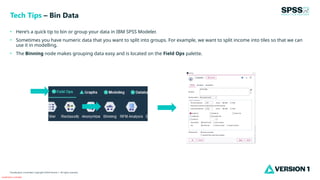
• Here’s a quick tip to bin or group your data in IBM SPSS Modeler.
• Sometimes you have numeric data that you want to split into groups. For example, we want to split income into tiles so that we can
use it in modelling.
• The Binning node makes grouping data easy and is located on the Field Ops palette.
Tech Tips – Bin Data
Classification: Controlled
Classification: Controlled. Copyright ©2024 Version 1. All rights reserved.
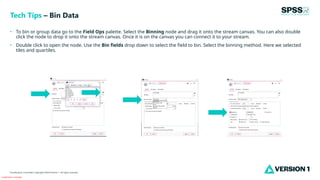
• To bin or group data go to the Field Ops palette. Select the Binning node and drag it onto the stream canvas. You can also double
click the node to drop it onto the stream canvas. Once it is on the canvas you can connect it to your stream.
• Double click to open the node. Use the Bin fields drop down to select the field to bin. Select the binning method. Here we selected
tiles and quartiles.
Tech Tips – Bin Data
Classification: Controlled
Classification: Controlled. Copyright ©2024 Version 1. All rights reserved.
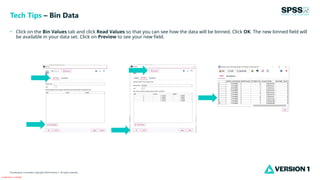
• Click on the Bin Values tab and click Read Values so that you can see how the data will be binned. Click OK. The new binned field will
be available in your data set. Click on Preview to see your new field.
Tech Tips – Bin Data
Classification: Controlled
Classification: Controlled. Copyright ©2024 Version 1. All rights reserved.
For more information
please visit spssanalyticspartner.com
Thank You

Tech Tips - Bin Data in IBM SPSS Modeler.pptx

  • 1.
    Classification: Controlled Classification: Controlled.Copyright ©2024 Version 1. All rights reserved. Bin Data Tech Tips – IBM SPSS Modeler
  • 2.
    Classification: Controlled Classification: Controlled.Copyright ©2024 Version 1. All rights reserved. • Here’s a quick tip to bin or group your data in IBM SPSS Modeler. • Sometimes you have numeric data that you want to split into groups. For example, we want to split income into tiles so that we can use it in modelling. • The Binning node makes grouping data easy and is located on the Field Ops palette. Tech Tips – Bin Data
  • 3.
    Classification: Controlled Classification: Controlled.Copyright ©2024 Version 1. All rights reserved. • To bin or group data go to the Field Ops palette. Select the Binning node and drag it onto the stream canvas. You can also double click the node to drop it onto the stream canvas. Once it is on the canvas you can connect it to your stream. • Double click to open the node. Use the Bin fields drop down to select the field to bin. Select the binning method. Here we selected tiles and quartiles. Tech Tips – Bin Data
  • 4.
    Classification: Controlled Classification: Controlled.Copyright ©2024 Version 1. All rights reserved. • Click on the Bin Values tab and click Read Values so that you can see how the data will be binned. Click OK. The new binned field will be available in your data set. Click on Preview to see your new field. Tech Tips – Bin Data
  • 5.
    Classification: Controlled Classification: Controlled.Copyright ©2024 Version 1. All rights reserved. For more information please visit spssanalyticspartner.com Thank You