-Mobile Devices in the Classroom- Susan McBride Teaching with Technology Summer 2011 I say yes! Or
Abstract: Stephen Downes of the  National Research Council of Canada  says that the  number one   sign of good technology  is that it is always available. Scheduling the computer lab for class use can be a teacher nightmare. You can not count on the lap top carts if you teach more than one period in a row, the batteries just can’t handle it.  Which is Downes’  number 6  rule for good technology- doesn’t require parts, and then take reason number 3- always connected. This is the purpose for my presentation. PDA’s, iPods, and cell phones provide a  one to one  ratio of technology to student. "That is necessary for true technological innovation in education,” says Darrell Walery. (Tech director of  Consolidated High School District 230 . Chicago, Illinois)
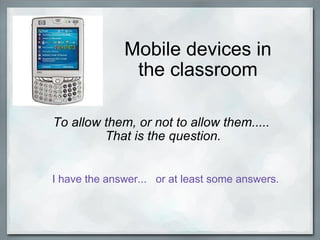
Mobile devices in the classroom To allow them, or not to allow them.....  That is the question.   I have the answer...   or at least some answers.
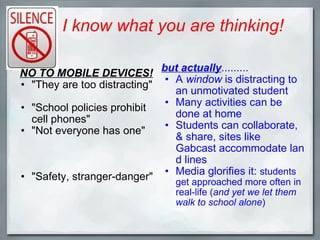
I know what you are thinking! NO TO MOBILE DEVICES!    "They are too distracting" "School policies prohibit cell phones" "Not everyone has one" "Safety, stranger-danger" but actually .........  A  window  is distracting to an unmotivated student Many activities can be done at home Students can collaborate, & share, sites like Gabcast accommodate land lines Media glorifies it:  students get approached more often in real-life ( and yet we let them walk to school alone )
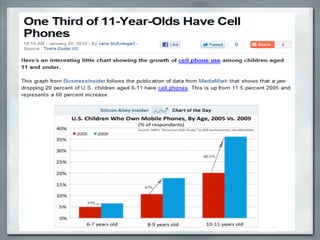
kk
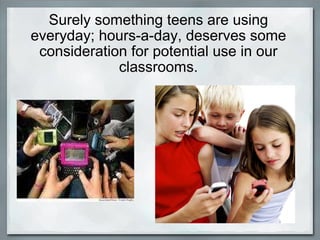
Surely something teens are using everyday; hours-a-day, deserves some consideration for potential use in our classrooms.
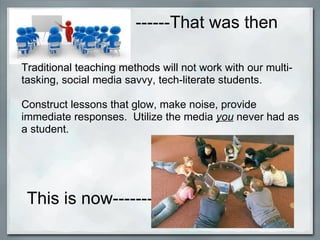
------That was then This is now-----------   Traditional teaching methods will not work with our multi-tasking, social media savvy, tech-literate students.    Construct lessons that glow, make noise, provide immediate responses.  Utilize the media  you  never had as a student.
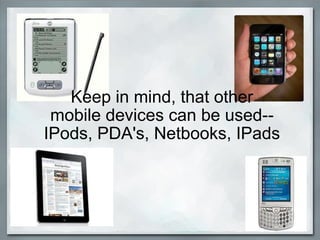
Keep in mind, that other mobile devices can be used-- IPods, PDA's, Netbooks, IPads
Structure, rules, consequences Implement consequences for violating the code.   Include the students in on designing the code. ( they will be more likely to follow it) Parent permission forms.   (they can help enforce the code and consequences) Have a  student code of conduct  for cell phone use,   (ie. leave in the front of the room, OFF- until needed) Getting  started :
So what can  we  do  with a mobile device in  education?      Activities out of class conduct interviews create radio broadcasts group texting books on tape speech presentations Assessment- record essay questions virtual conferences surveys with polling sites Activities in class scientific calculator apps, stop watch use calendar for assignments & reminders camera/video recorder  slide shows  sound & video clips from field trips  podcasts skype immediate response systems using twitter assistive technology uses
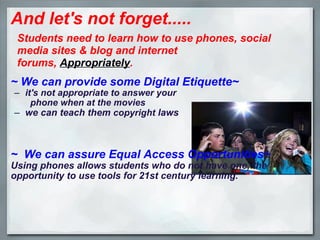
And let's not forget.....   ~ We can provide some Digital Etiquette~ it's not appropriate to answer your                                                     phone when at the movies we can teach them  copyright  laws ~  We can assure Equal Access Opportunities~ Using phones allows students who do not have one, the opportunity to use tools for 21st century learning. Students need to learn how to use phones, social media sites & blog and internet forums,  Appropriately .
teacher mobile friendly resources informational: toys to tools ,  rubric for evaluating Apps ,  Interesting ways.. ,  teaching with twitter ,  cell phones in class ,  ppt on cell phones ,  cybraryman's website ,  texting: wetxt ,  txtdrop  , Jott.com   1-866-JOTT-123 speech to text translation   Podcasting: gcast  tutorial,  evoca ,  podbean  & Picture, Video, Audio: animoto ,  jaycut ,    photopeach ,  audacity ,  slideshare Reference:   text a librarian , cha cha answers: text 242242, google, text 466453 Webquest:   zunal ,  webquest,org Surveys/polls:  Mobile polling ,  poll everywhere ,  twtpoll
One last chance to convince you.... .
In closing, the  fine print  at the end of every presentation........ Always ask your administrators how best to inform parents, make sure everyone agrees before setting up a new program FIREWALLS:  Talk to tech department coordinators to see if some can be removed for 'educational' purposes Consider financial restraints-- consider cell-phone recycling donations; for video and picture use on inactivated phones, check student calling plans- that is a lesson in itself! Parental permission- remember; you can always use them outside the classroom- Security; use pen-names,  pics with no names attached Always test the sites first, in my research quite a few links are no longer operating or are charging fees.
resources Photo credits: HP photo: Copyright © 2011  Living Richly on a Budget . All Rights Reserved. Magazine Basic theme designed by  Themes by bavotasan.com .  Powered by  WordPress .   Retrieved 7/20/11 from   livingrichlyonabudget.com silence photo    (Revised 8/28/2008).Wired.com © 2011 Condé Nast Digital. Retrieved 7/20/11 from   wired.com angry teacher photo  Copyright © Acclaim Images, LLC  Retrieved 7/20/11 from    computerclipart.com kids on cellphone  picture  Posted on  April 11, 2011  by  mobiledevicegroup  Retrieved 7/20/11 from  http://mobiledevicegroup.wordpress.com/ mult-iphone picture  Copyright © 2006-2011 The HealthCentral Network, Inc Retrieved 7/20/11 frin  wellsphere.com kids in a circle picture  September 03, 2008 Retrieved from http://pndblog.typepad.com/pndblog/2008/09/edutopias-ten-p.html movie theater picture © 2011  Khmer Bulk . All rights reserved. Sunnguon TAING. Preah Sihanouk Province, Cambodia Retrieved on 7/20/11 from  http://khmerbulk.com/is-it-ok-to-use-a-cell-phone-in-a-movie-theater-restaurant-and-street.html lawyer picture retrieved 7/20/11 from calbizlit.com Videos: Using cell phones to engage students in the classroom: Uploaded by  TeachTCI  on Apr 5, 2011 retrieved 7/29/11 from: http://www.youtube.com/watch?v=Mec1d1gMuTw&feature=related
video: Cell phones in the Classroom: U ploaded by  alslonski  on Jun 17, 2009 retrieved 7/29/11 from  http://www.youtube.com/watch?v=1MGRvtS-2ao&feature=related Informational credits: From toy to Tool    Kolb, Liz: copyright 2006: abstract retrieved from  ITSE (International Society for Technology in Education) retrieved 7/14/11 from:  http://www.iste.org/Store/Product.aspx?ID=976 Toys to Tools, Connecting Student Cellphones in Education     Kolb, Liz: copyright 2007:  ITSE: Excerpt from the book retrieved 7/14/11 from: http://www.iste.org/images/excerpts/TOYTUL-excerpt.pdf Webinar:   Communicatie, Collaborate, and Create: Building Dynamic Classroom Projects   Presented by STEM Academy:  (Science, Technology, Engineering, & Mathematics) speaker: Demian, Jannita July 19, 2011 "Handhelds in the Classroom"  Brown, Mary Daniels: 2001 Education World retrieved 7/8/11 from: http://www.educationworld.com/a_tech/tech083.shtml www.educationworld.com/a_tech/tech083.shtml  -- ADDITIONAL SITES TO VISIT!!!!!

Teaching with technology

  • 1.
    -Mobile Devices inthe Classroom- Susan McBride Teaching with Technology Summer 2011 I say yes! Or
  • 2.
    Abstract: Stephen Downesof the National Research Council of Canada says that the number one sign of good technology is that it is always available. Scheduling the computer lab for class use can be a teacher nightmare. You can not count on the lap top carts if you teach more than one period in a row, the batteries just can’t handle it.  Which is Downes’ number 6 rule for good technology- doesn’t require parts, and then take reason number 3- always connected. This is the purpose for my presentation. PDA’s, iPods, and cell phones provide a one to one ratio of technology to student. "That is necessary for true technological innovation in education,” says Darrell Walery. (Tech director of Consolidated High School District 230 . Chicago, Illinois)
  • 3.
    Mobile devices inthe classroom To allow them, or not to allow them.....  That is the question.   I have the answer...   or at least some answers.
  • 4.
    I know whatyou are thinking! NO TO MOBILE DEVICES!   "They are too distracting" "School policies prohibit cell phones" "Not everyone has one" "Safety, stranger-danger" but actually .........  A window is distracting to an unmotivated student Many activities can be done at home Students can collaborate, & share, sites like Gabcast accommodate land lines Media glorifies it: students get approached more often in real-life ( and yet we let them walk to school alone )
  • 5.
  • 6.
    Surely something teensare using everyday; hours-a-day, deserves some consideration for potential use in our classrooms.
  • 7.
    ------That was thenThis is now-----------   Traditional teaching methods will not work with our multi-tasking, social media savvy, tech-literate students.    Construct lessons that glow, make noise, provide immediate responses.  Utilize the media you never had as a student.
  • 8.
    Keep in mind,that other mobile devices can be used-- IPods, PDA's, Netbooks, IPads
  • 9.
    Structure, rules, consequencesImplement consequences for violating the code.   Include the students in on designing the code. ( they will be more likely to follow it) Parent permission forms.   (they can help enforce the code and consequences) Have a  student code of conduct  for cell phone use,   (ie. leave in the front of the room, OFF- until needed) Getting  started :
  • 10.
    So what can we do  with a mobile device in  education?     Activities out of class conduct interviews create radio broadcasts group texting books on tape speech presentations Assessment- record essay questions virtual conferences surveys with polling sites Activities in class scientific calculator apps, stop watch use calendar for assignments & reminders camera/video recorder  slide shows  sound & video clips from field trips  podcasts skype immediate response systems using twitter assistive technology uses
  • 11.
    And let's notforget.....   ~ We can provide some Digital Etiquette~ it's not appropriate to answer your                                                     phone when at the movies we can teach them  copyright  laws ~  We can assure Equal Access Opportunities~ Using phones allows students who do not have one, the opportunity to use tools for 21st century learning. Students need to learn how to use phones, social media sites & blog and internet forums,  Appropriately .
  • 12.
    teacher mobile friendlyresources informational: toys to tools ,  rubric for evaluating Apps , Interesting ways.. , teaching with twitter , cell phones in class , ppt on cell phones , cybraryman's website ,  texting: wetxt ,  txtdrop  , Jott.com   1-866-JOTT-123 speech to text translation   Podcasting: gcast  tutorial,  evoca ,  podbean  & Picture, Video, Audio: animoto ,  jaycut ,    photopeach ,  audacity ,  slideshare Reference:   text a librarian , cha cha answers: text 242242, google, text 466453 Webquest:   zunal ,  webquest,org Surveys/polls:  Mobile polling ,  poll everywhere ,  twtpoll
  • 13.
    One last chanceto convince you.... .
  • 14.
    In closing, the fine print at the end of every presentation........ Always ask your administrators how best to inform parents, make sure everyone agrees before setting up a new program FIREWALLS:  Talk to tech department coordinators to see if some can be removed for 'educational' purposes Consider financial restraints-- consider cell-phone recycling donations; for video and picture use on inactivated phones, check student calling plans- that is a lesson in itself! Parental permission- remember; you can always use them outside the classroom- Security; use pen-names, pics with no names attached Always test the sites first, in my research quite a few links are no longer operating or are charging fees.
  • 15.
    resources Photo credits:HP photo: Copyright © 2011  Living Richly on a Budget . All Rights Reserved. Magazine Basic theme designed by  Themes by bavotasan.com .  Powered by  WordPress .   Retrieved 7/20/11 from   livingrichlyonabudget.com silence photo    (Revised 8/28/2008).Wired.com © 2011 Condé Nast Digital. Retrieved 7/20/11 from   wired.com angry teacher photo  Copyright © Acclaim Images, LLC  Retrieved 7/20/11 from    computerclipart.com kids on cellphone  picture  Posted on  April 11, 2011  by  mobiledevicegroup  Retrieved 7/20/11 from  http://mobiledevicegroup.wordpress.com/ mult-iphone picture  Copyright © 2006-2011 The HealthCentral Network, Inc Retrieved 7/20/11 frin  wellsphere.com kids in a circle picture  September 03, 2008 Retrieved from http://pndblog.typepad.com/pndblog/2008/09/edutopias-ten-p.html movie theater picture © 2011  Khmer Bulk . All rights reserved. Sunnguon TAING. Preah Sihanouk Province, Cambodia Retrieved on 7/20/11 from  http://khmerbulk.com/is-it-ok-to-use-a-cell-phone-in-a-movie-theater-restaurant-and-street.html lawyer picture retrieved 7/20/11 from calbizlit.com Videos: Using cell phones to engage students in the classroom: Uploaded by  TeachTCI  on Apr 5, 2011 retrieved 7/29/11 from: http://www.youtube.com/watch?v=Mec1d1gMuTw&feature=related
  • 16.
    video: Cell phonesin the Classroom: U ploaded by  alslonski  on Jun 17, 2009 retrieved 7/29/11 from  http://www.youtube.com/watch?v=1MGRvtS-2ao&feature=related Informational credits: From toy to Tool   Kolb, Liz: copyright 2006: abstract retrieved from  ITSE (International Society for Technology in Education) retrieved 7/14/11 from:  http://www.iste.org/Store/Product.aspx?ID=976 Toys to Tools, Connecting Student Cellphones in Education     Kolb, Liz: copyright 2007:  ITSE: Excerpt from the book retrieved 7/14/11 from: http://www.iste.org/images/excerpts/TOYTUL-excerpt.pdf Webinar:   Communicatie, Collaborate, and Create: Building Dynamic Classroom Projects   Presented by STEM Academy:  (Science, Technology, Engineering, & Mathematics) speaker: Demian, Jannita July 19, 2011 "Handhelds in the Classroom" Brown, Mary Daniels: 2001 Education World retrieved 7/8/11 from: http://www.educationworld.com/a_tech/tech083.shtml www.educationworld.com/a_tech/tech083.shtml -- ADDITIONAL SITES TO VISIT!!!!!