Teaching Presentation

                CSS-Lesson: I
            Topic: Cascading Style
              Sheet (CSS) Basics
                           By Jakia Salam


12/9/2011
Lesson Objectives:
      Introduction to CSS

      Define a style rule or syntax

      The id and class Selectors

      Applying a style sheet to a Web Page

      Questions and Answers


12/9/2011
Introducing CSS
      CSS stands for Cascading Style Sheet. Web developers
       define the look and feel of their Web pages using CSS

      It allows developers and designers to separate content
       from design. CSS can be applied to any HTML and XHTML
       file to render HTML or XHTML document using a Browser

      CSS provides consistent look and feel to an entire website
       through precise control of web page elements

      Versions include CSS1, CSS2, CSS2.1 and CSS3 (current
       version)

      Compatibility issues with different versions of CSS and
       browsers need to be considered as part of web site design

12/9/2011
Introducing CSS


12/9/2011
Define style rule
      Basic syntax for CSS style is:
        Selector { Property 1: value1; Property 2: value2; Property 3:
          value 3;……}

      The selector is normally the HTML element you want to
       style

      Each declaration consists of a property and a value


12/9/2011
The id selector
      The id selector is used to specify a style for a single,
       unique element.

      The id selector uses the id attribute of the HTML
       element, and is defined with a “#”.

      The style rule below will be applied to the element with
       id=“header”:


     Result:


12/9/2011
The class selector
      The class selector is used to specify a style for a group
       of elements. Unlike the id selector, the class selector is
       most often used on several elements

      The class selector uses the HTML class attribute, and is
       defined with a “.” The style rule below will be applied
       to the element with class=“imageright”


                          Result


12/9/2011
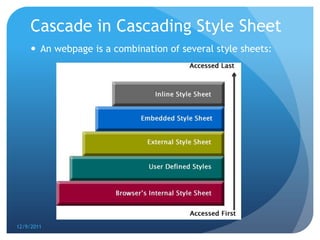
Cascade in Cascading Style Sheet
      An webpage is a combination of several style sheets:


12/9/2011
Three Ways to Insert CSS

      External style sheet
      Internal style sheet
      Inline style


12/9/2011
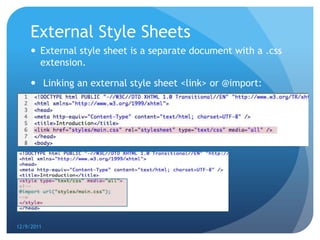
External Style Sheets
      External style sheet is a separate document with a .css
       extension.

      Linking an external style sheet <link> or @import:


12/9/2011
Why external CSS is always a
     better choice?

      It keeps your website design and content separate. It is
       much easier to reuse your CSS code if you have it in a
       separate file

      You can make any changes to your web pages with just a
       few changes in a single CSS file

      Clean code that is easy to understand


12/9/2011
Embedded Style Sheets
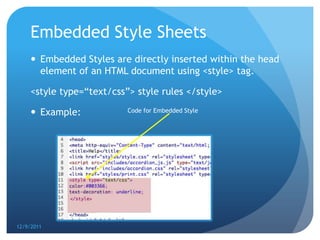
      Embedded Styles are directly inserted within the head
       element of an HTML document using <style> tag.

     <style type=“text/css”> style rules </style>

      Example:            Code for Embedded Style


12/9/2011
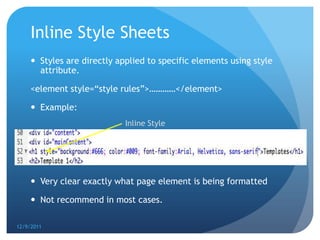
Inline Style Sheets
      Styles are directly applied to specific elements using style
       attribute.

     <element style=“style rules”>…………</element>

      Example:
                             Inline Style


      Very clear exactly what page element is being formatted

      Not recommend in most cases.

12/9/2011
CSS Demo
      http://www.w3schools.com/css/demo_default.htm


12/9/2011
Some of my sample web designs using CSS


12/9/2011
Cascading Style Sheet Resources:
      W3 School

      CSS Beginner Tutorial

      Web Style Sheets CSS tips & tricks

      Zen Garden


12/9/2011
Thank You


12/9/2011
Any Questions?


12/9/2011
Website:
      jakiasalam.com

      NCDLA 2009 Distance Learning Awards


12/9/2011
Website with and without CSS


      http://www.jakiasalam.com/portfolio/websites/links.p
       hp

      http://www.jakiasalam.com/portfolio/websites/linkste
       st.php


12/9/2011
User defined
      Almost all browsers allow users to modify the default
       setting of the internal style sheet.

      Example: using user defined CSS in safari browser


12/9/2011

Teaching presentation

  • 1.
    Teaching Presentation CSS-Lesson: I Topic: Cascading Style Sheet (CSS) Basics By Jakia Salam 12/9/2011
  • 2.
    Lesson Objectives:  Introduction to CSS  Define a style rule or syntax  The id and class Selectors  Applying a style sheet to a Web Page  Questions and Answers 12/9/2011
  • 3.
    Introducing CSS  CSS stands for Cascading Style Sheet. Web developers define the look and feel of their Web pages using CSS  It allows developers and designers to separate content from design. CSS can be applied to any HTML and XHTML file to render HTML or XHTML document using a Browser  CSS provides consistent look and feel to an entire website through precise control of web page elements  Versions include CSS1, CSS2, CSS2.1 and CSS3 (current version)  Compatibility issues with different versions of CSS and browsers need to be considered as part of web site design 12/9/2011
  • 4.
  • 5.
    Define style rule  Basic syntax for CSS style is: Selector { Property 1: value1; Property 2: value2; Property 3: value 3;……}  The selector is normally the HTML element you want to style  Each declaration consists of a property and a value 12/9/2011
  • 6.
    The id selector  The id selector is used to specify a style for a single, unique element.  The id selector uses the id attribute of the HTML element, and is defined with a “#”.  The style rule below will be applied to the element with id=“header”: Result: 12/9/2011
  • 7.
    The class selector  The class selector is used to specify a style for a group of elements. Unlike the id selector, the class selector is most often used on several elements  The class selector uses the HTML class attribute, and is defined with a “.” The style rule below will be applied to the element with class=“imageright” Result 12/9/2011
  • 8.
    Cascade in CascadingStyle Sheet  An webpage is a combination of several style sheets: 12/9/2011
  • 9.
    Three Ways toInsert CSS  External style sheet  Internal style sheet  Inline style 12/9/2011
  • 10.
    External Style Sheets  External style sheet is a separate document with a .css extension.  Linking an external style sheet <link> or @import: 12/9/2011
  • 11.
    Why external CSSis always a better choice?  It keeps your website design and content separate. It is much easier to reuse your CSS code if you have it in a separate file  You can make any changes to your web pages with just a few changes in a single CSS file  Clean code that is easy to understand 12/9/2011
  • 12.
    Embedded Style Sheets  Embedded Styles are directly inserted within the head element of an HTML document using <style> tag. <style type=“text/css”> style rules </style>  Example: Code for Embedded Style 12/9/2011
  • 13.
    Inline Style Sheets  Styles are directly applied to specific elements using style attribute. <element style=“style rules”>…………</element>  Example: Inline Style  Very clear exactly what page element is being formatted  Not recommend in most cases. 12/9/2011
  • 14.
    CSS Demo  http://www.w3schools.com/css/demo_default.htm 12/9/2011
  • 15.
    Some of mysample web designs using CSS 12/9/2011
  • 16.
    Cascading Style SheetResources:  W3 School  CSS Beginner Tutorial  Web Style Sheets CSS tips & tricks  Zen Garden 12/9/2011
  • 17.
  • 18.
  • 19.
    Website:  jakiasalam.com  NCDLA 2009 Distance Learning Awards 12/9/2011
  • 20.
    Website with andwithout CSS  http://www.jakiasalam.com/portfolio/websites/links.p hp  http://www.jakiasalam.com/portfolio/websites/linkste st.php 12/9/2011
  • 21.
    User defined  Almost all browsers allow users to modify the default setting of the internal style sheet.  Example: using user defined CSS in safari browser 12/9/2011