4stepsto evaluating
tax technology
TABLE OF CONTENTS
Introduction	 1
Step 1: Assess Your Processes And Technology Landscape	 3
Step 2: Map Relationships	 10
Step 3: Take It Global	 12
Step 4: Group Issues And Identify Patterns	 13
Your Goals, Risks And Roadblocks	 15
Reality Check	 20
Epilogue	 22
THE RISE OF THE TAXOLOGIST
Regulatory complexity, growing globalisation, increased scrutiny, and
internal pressures continue to burden tax departments worldwide. A new
type of tax professional is emerging at the center of this changing tax
environment: We call them Taxologists. Taxologists are tax professionals
that excel in the use of technology to maximise tax function effectiveness.
They are problem solvers. They challenge the status quo. They fearlessly
embrace technology. Empowered with the right knowledge and the right
technology, Taxologists improve data quality, automation, and efficiency.
They increase collaboration across business units and seize opportunities
to show tax as a value center. With Taxologists at the helm of business
operations, the tax process improves exponentially—positioning them as
unquestionable assets to their organisations.
1
INTRODUCTION
Technology is constantly in motion.
An ever-changing technology landscape presents both a boon and a
burden to businesses. New versions of the latest technology are released
quicker than you can buy the original, and organisations must adapt more
quickly than in the past. Technology has also enabled businesses to explode
across the globe. With the click of a button, we can instantly access the far
corners of the world. What is one result of this? Change at an exponential
rate—thereby requiring more planning around technology and greater
transparency into existing systems and processes.
Tax is also in constant motion and touches nearly every aspect of an
organisation. The quick-changing landscape for Tax continues to raise the
stakes for companies to ensure its operations and technology support
processes effectively, while simultaneously producing value and mitigating
global risk. Tax technology systems and tools are a necessary enabler to help
tax achieve these results.
The historical management of tax technology has been largely reactive—not
necessarily in the context of “crisis management,” but more as a department-
by-department response to risks and issues resulting in systems and
problems being resolved one system or issue at a time. This paradigm is
changing (albeit slowly), and technology planning for tax is starting to be
approached from a holistic point of view.
2
Whether you’re a tax manager, tax director, or other tax-operations
professional, this eBook will suggest techniques and leading practices to
guide you toward a stronger and more comprehensive approach to planning
for future tax systems before decisions are made and implementations
occur. Just as importantly, it will help you evaluate the current landscape
across broader aspects of the tax business. Your team will be empowered
to influence a more efficient operation and align more effectively with the
broader objectives of tax operations as a whole.
Whether you’re a tax manager, tax director, or other tax-operations
professional, this eBook will suggest techniques and leading practices to
guide you toward a stronger and more comprehensive approach to planning
for future tax systems before decisions are made and implementations
occur. Just as importantly, it will help you evaluate the current landscape
across broader aspects of the tax business. Your team will be empowered
to influence a more efficient operation and align more effectively with the
broader objectives of tax operations as a whole.
GENERAL QUESTIONS TO ASK
BEFORE YOU BEGIN
Each Tax department should answer these
questions:
What is your department’s tax technology
strategy?
Have you met with Tax leadership and your
colleagues to articulate and document that
strategy?
How are you prioritizing what is most
important to your department?
How does that translate into the world of
technology?
How is the strategy impacted by the
organization’s key risks and approach to risk
management? What are the strategic priorities
for the company and the most significant risks?
How is your department currently mitigating
those risks?
What are your relationships with IT and
Finance within the organization? Do you have
strong partnerships? If not, why?
How can these relationships be broadened?
We suggest starting at the top and engaging
leadership by informing them of the need and
asking them to cue it up with the respective
leaders of those areas as a first step.
Do you have a plan or roadmap for
managing your technology landscape over the
next five years? If you do not have a plan, why
not?
Who currently manages the technology
supporting Tax? What is that process?
Step1
3
ASSESS YOUR PROCESSES AND
TECHNOLOGY LANDSCAPE
Look. Listen. List.
What is an assessment? Tax managers are generally aware
of the landscape of systems and processes supporting
their daily activity. In addition to the systems utilised within
their own departments, they often know who and what
impacts data both upstream and downstream and who
manages the workload and content. They may also have
knowledge of tools and procedures other departments use
that are most relevant to Tax. If this is the case, what is left
to assess?
A proper assessment entails more than having a general
knowledge of your systems and a detailed understanding
of your tax processes. It involves drilling a layer deeper
to look at the world from different angles in an attempt
to capture the full picture of what truly exists. An
assessment must include both the macro and micro and
should be performed from several perspectives. Think
of a photographer taking pictures of a beautiful sunset.
Depending on a multitude of factors, including the
direction, distance, quality of lens, each photograph will
tell a different story of the process of the sun setting.
Step1
4
Your assessment is a critical component and is many times passed over casually under the belief that
we already know our own environment. Taking this a step further, additional mistakes are made when
we give an answer without fully defining the problem that we are trying to solve. These can be minor
mistakes that require simple course corrections, but are more likely much harder to reverse if there is
real effort and money already spent. A perfect example is selecting a system before the requirements
and process have been evaluated. In cases where the tool is not the right fit, tax departments will
either force the square peg into the round hole, or layer on inefficient manual processes to help bridge
the gap. You can prevent these situations by ensuring your focus includes an end-to-end review of the
processes, systems, and data, paying specific attention so that you document what is really happening
and expecting that it might be a little different than you may have thought.
So how do you start your assessment? It is always best to begin at the beginning, which is with what
we already know, and then seek the missing information. The goal of any assessment is to gather
data to identify risks, opportunities, and priorities; formulate a plan, gain approval, and implement
a change. Strong documentation will make a difference in your ability to support your results and
recommendations forward. It may not be necessary to start from scratch if there are existing lists
or documents that capture information you are looking to compile. Be mindful to validate any
information you receive as accurate and up-to-date.
Start by defining the problem you’re going to assess. For example, is the problem your tax compliance
process, or is it the overall tax department content management approach? Once you’ve defined the
problem, begin to sketch out the process from end-to-end to identify how you will need to go about
your assessment and who to include. Compile a list of stakeholders to meet with and consider those
who may benefit from your efforts.
Step1
5
Process Documentation
Process documentation is not something new for tax. Whether it has been prepared to document
controls, communicate desktop procedures, or support financial statement results, the likelihood is
you have some familiarity with documenting processes. Given there are multiple ways a process can
be captured, it is important to determine what level of granularity you will document at up-front. A
process walk-through should be narratively captured at a minimum. Thinking about each process end-
to-end will help you identify all the steps in your process, including the systems your team touches.
Focus on hand-offs within the process. These hand-offs can be between people, from a person to
a system, or from system to system. Depending on your expertise with flow-charting tools, process
and system diagrams—and data and document flows—are also beneficial. If you decide to include
diagrams or charts, this should be in addition to the narrative documentation. A process diagram or
flow chart without a narrative to provide context can be misinterpreted and may not give you the level
of detail needed to comprehend and assess.
Systems Inventory
Another component of your assessment should include taking an inventory of the systems and
tools your group is currently using or receiving information from, describing how they are generally
used and noting any issues you’re currently experiencing. The easiest approach is to make a list and
update it as you go along. It is also helpful to include the version of the system, hosting method, and
indication of any customisations, as well as the system owner or administrator. Remember to include
daily productivity tools such as email, Microsoft Office tools, and your network shared drives.
The forms, checklists, and diagrams in this eBook offer some basic inquiries you can make to get you
started, but they should not replace the guidance of experts. You are encouraged to expand or adapt
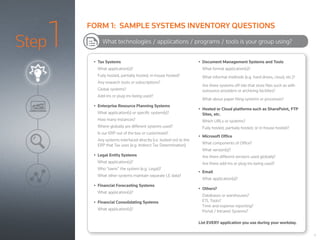
these tools as needed.
Step1 •	 Tax Systems
What application(s)?
Fully hosted, partially hosted, in-house hosted?
Any research tools or subscriptions?
Global systems?
Add-ins or plug-ins being used?
•	 Enterprise Resource Planning Systems
What application(s) or specific system(s)?
How many instances?
Where globally are different systems used?
Is our ERP out of the box or customized?
Any systems interfaced directly (i.e. bolted-on) to the
ERP that Tax uses (e.g. Indirect Tax Determination)
•	 Legal Entity Systems
What application(s)?
Who “owns” the system (e.g. Legal)?
What other systems maintain separate LE data?
•	 Financial Forecasting Systems
What application(s)?
•	 Financial Consolidating Systems
What application(s)?
•	 Document Management Systems and Tools
What formal application(s)?
What informal methods (e.g. hard drives, cloud, etc.)?
Are there systems off-site that store files such as with
outsource providers or archiving facilities?
What about paper filing systems or processes?
•	 Hosted or Cloud platforms such as SharePoint, FTP
Sites, etc.
Which URLs or systems?
Fully hosted, partially hosted, or in-house hosted?
•	 Microsoft Office
What components of Office?
What version(s)?
Are there different versions used globally?
Are there add-ins or plug-ins being used?
•	 Email
What application(s)?
•	 Others?
Databases or warehouses?
ETL Tools?
Time and expense reporting?
Portal / Intranet Systems?
List EVERY application you use during your workday.
What technologies / applications / programs / tools is your group using?
6
FORM 1: SAMPLE SYSTEMS INVENTORY QUESTIONS
Step1
7
In some cases you might not know exactly what a particular application or system is used for, or even
the system name; you may simply know what documents or pieces of information you receive from
someone else. Include these systems on your list as well and collaborate with your team and others
to gather whatever is missing. There is always someone in the organisation that will be able to help
you fill in any gaps.
IDENTIFY ISSUES
Once you’ve identified the tools and applications that your team employs, it’s time to troubleshoot.
This stage of the process isn’t about conducting root-cause analyses or determining solutions. The
purpose is to organise and document everything. Expand your systems inventory listing to add a
column to capture known issues. Document issues identified during your process walk-throughs in
a separate document. Attribute the person or trigger that brought the issue to light as you will need
to dive into specific details around these items later in your process. Expect to circle back around to
your master issue listing to prioritise your results at a later time.
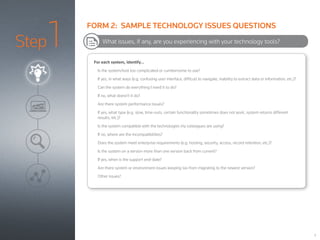
Form 2 provides some sample questions to ask that will help flush out existing technology issues.
Keep it simple, but include enough detail that an external reader can understand the general issue
without needing to research further.
Step1 For each system, identify…
Is the system/tool too complicated or cumbersome to use?
If yes, in what ways (e.g. confusing user interface, difficult to navigate, inability to extract data or information, etc.)?
Can the system do everything I need it to do?
If no, what doesn’t it do?
Are there system performance issues?
If yes, what type (e.g. slow, time-outs, certain functionality sometimes does not work, system returns different
results, etc.)?
Is the system compatible with the technologies my colleagues are using?
If no, where are the incompatibilities?
Does the system meet enterprise requirements (e.g. hosting, security, access, record retention, etc.)?
Is the system on a version more than one version back from current?
If yes, when is the support end-date?
Are there system or environment issues keeping tax from migrating to the newest version?
Other issues?
What issues, if any, are you experiencing with your technology tools?
8
FORM 2: SAMPLE TECHNOLOGY ISSUES QUESTIONS
Step1
9
TAKE STOCK OF THE REST OF YOUR DEPARTMENT
Now that you have a grip on the technology tools and issues within your specific group, engage
your colleagues across Tax. Consider providing your initial systems listing as a starting point and
have the remaining tax business units complete the exercise. Ask them to indicate where they use
the same systems and expand to add their systems, tools, processes, and issues. Provide copies
of the sample questions and talk about what you learned as you went through the exercises.
By performing the assessment step more broadly than a single business unit, you will better
identify flows between shared processes and locate gaps and duplications. From there, it will be
much easier to identify opportunities for synergies and pinpoint systems that are not being fully
leveraged. Expanding your assessment beyond your circle of influence is discussed in more detail
in Step 2.
Step2
10
MAP RELATIONSHIPS
No group is an island.
The sharing and processing of tax data and documents is rarely clean. Most handoffs are not
system-to-system, and information rarely goes from Lucy to Jane and then into a system without
some degree of manipulation. There are calculations, transformations, and new source data and
inputs along the way.
The results of your assessment may have already called out several relationships between people,
processes, or technologies, and it’s likely you are already brainstorming ways to utilise technologies
across teams. In Step 2 we take this to the next level to map the relationships to other areas of tax
and beyond tax.
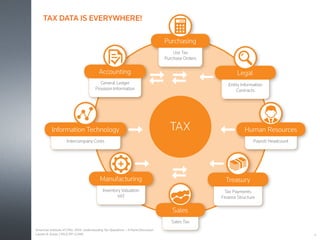
Exhibit 2 illustrates some typical connections between business units. Using a similar model,
put your department at the center of the diagram and begin to build out your connections to the
remaining areas of tax. Expand to include business units outside of tax with a focus on the handoff
of data and documents.
TAX
Inventory Valuation
VAT
Manufacturing
Sales Tax
Sales
Payroll Headcount
Human Resources
General Ledger
Provision Information
Accounting
Entity Information
Contracts
Legal
Intercompany Costs
Information Technology
Tax Payments
Finance Structure
Treasury
Use Tax
Purchase Orders
Purchasing
11
TAX DATA IS EVERYWHERE!
American Institute of CPAs. 2014. Understanding Tax Operations – A Panel Discussion
Lauren B. Kovar, CPA/CITP, CGMA
Step3
12
TAKE IT GLOBAL
Multinational organisations face many tax and financial reporting challenges as legislators and tax authorities
around the world pass new laws to regulate compliance. Gone are the days when local finance teams could
make local decisions as tax compliance is increasingly becoming an international process – often global,
frequently regional. New international legislation such as country-by-country reporting requires multinationals
to have a consistent process across multiple countries to manage source data and compliance reporting.
To meet these new challenges, many organisations are now looking to centralise compliance and reporting
across multiple jurisdictions in Shared Service Centres and Centres of Excellence. Tax systems play a vital role
in these projects, standardising control processes to eliminate risk, reduce costs, and allow for more flexibility
and better change management.
Even if your organisation is not undertaking a major project to centralise tax functions, it’s important to
consider how other parts of your organisation are managing Tax and how tax systems can work better to
improve processes across jurisdictions. Several factors will influence the extent of the work you need to do to
include global tax. Ask yourself:
•	 What are the tax reporting lines globally?
•	 Which of my tax processes are dependent on foreign-location data or systems (inputs or outputs)?
•	 Are there any foreign locations on tax systems that my group owns or administers?
The answers to these questions will help guide you, but it is also beneficial to enlist the help of others and
identify the expectations of tax leadership as to the extent of your approach globally. Depending on your
organisational structure, global risk, and issues, you might need more or less detail. The best way to find
opportunities to partner globally and work together is to first identify the connections between processes and
systems being used.
Regardless of the scale of your global relationships and mapping, it is not something you can ignore. Do not
be intimidated if others immediately default to the phrase, “It cannot be done.” You may be surprised to learn
that a tax manager in China is going about the same process you are to assess their current landscape and
develop a plan to improve. By combining efforts, you may find new channels of support.
Step4
13
GROUP ISSUES AND IDENTIFY PATTERNS
The proof is in the pattern.
Once you have completed your list of process and technology issues, begin to look for common
results and patterns. Issues can fall into several categories or types. For example, are you
experiencing issues because you aren’t fully familiar with the system and might need additional
training? Or are you experiencing infrastructure problems like bugs, error messages, time-outs,
and numbers that don’t tie out? Ask questions like, “Why is tax using different systems for time
management when there’s an opportunity to use the same system?”
Attempt to organise your issues into groups such as system performance, process gaps, source data,
training issues, and high-risk requiring immediate response. By completing this exercise, patterns
should begin to emerge. One example is the typical pattern involving too little training. Training
gaps can be correlated to not reading the instructions before using a new device. Everyone knows
they should read them, and read them carefully, but somehow we justify skipping this important
step and just hit the “on” switch. If the device actually turns on, we are in even more trouble as we
assume it is operating properly and will miss the fact that it is not functioning in the recommended
mode until real damage has been done.
In most cases, you will need help to analyse your issues. With the exception of minor process or
training issues, it is not recommended that you take on the burden to diagnose by yourself. Ask
for assistance from experts to who will be able to call upon their expertise to identify the potential
cause and eventually recommend a course of action.
From here, you have taken the initial steps to build an understanding of your processes, data,
systems, and tools that comprise your tax ecosystem.
Step4
14
COLLABORATE
There’s strength in numbers.
The most beneficial outcomes are achieved when all stakeholders are actively engaged, so it’s
important to be inclusive from the get-go. At this point, you have likely engaged your coworkers
and tax leadership. Perhaps you have spoken to IT, your system vendors, and even some of the
global teams. Now is the time to check on your collaboration efforts and reach beyond to validate
your understanding.
Revisit your list of initial stakeholders sure you’re talking to all the right people. Have others in
the organisation provide input—from other areas of Tax, as well as departments outside of Tax.
More often than not, they will have some insights and experiences they can share that will help
you. Look at business units that may be a little further ahead in their transformation and are
already optimising their processes. They may be able to troubleshoot your findings and identify
other connections and potential efficiencies. Even when you are comfortable with a process, don’t
presume you know what is done or how systems are used without asking.
Leveraging and optimising technology effectively is more holistic than just assessing the needs
of a single user or a single department. The technology landscape for tax will always consist of
multiple systems that will be used by Tax. From source data, tax, consolidation, and document
management systems, to shared drives, network drives, and each individual computer hard-drive
that stores files. Expect systems that support Sarbanes-Oxley (SOX) compliance, workflows, time
and expense, and more. Opportunities may be as small as single-department efficiency or indicate
a need for a more comprehensive analysis, such as whether to move a certain process elsewhere,
geographically or organisationally.
15
YOUR GOALS, RISKS, AND ROADBLOCKS
Identify Your Goals
Every department has milestones that it’s expected to reach in the course of a fiscal year. Leadership
generally has longer-term goals that they want or need to meet. Check with your tax leaders on their
short-term and long-term goals. Build your overall goals both short and long-term and in alignment
with the broader goals of tax and your organisation.
Ask about your organisation’s plan on a global scale. Is there an effort to achieve organic growth? Are
there plans to expand geographically or to a new line of business via merger or acquisition? Are there
global initiatives within the organisation that Tax can partner on? What are the organisational drivers
that Tax must respond to (e.g. Finance Transportation, ERP migration, etc.)? Collaborate on your goals
with others and don’t be afraid to be ambitious!
16
YOUR GOALS, RISKS, AND ROADBLOCKS
Identify Your Risks
There’s always risk involved when you attempt to change the status quo. Beyond simple process
efficiency risks, Tax has other important issues that must be managed, including meeting financial
reporting and compliance requirements, mitigating audit risks globally, and upholding the
organisation’s reputation.
One important risk that’s often overlooked is key man dependency—reliance on a single person
without a back-up plan. This is especially common in tax given resource constraints and results from
individuals who may have solely led the efforts to implement or configure a new technology, built a
solution such as a Microsoft Access database process on their own, or who serve as the primary (and
only) system administrator.
This risk could involve something as simple as an Excel workbook utilising macros, or be as
comprehensive as a single-source system that’s supporting all your tax processes. But what
happens if that person leaves your company? Where is the process documentation? How is that
technology tool configured? How does it need to be supported?
It’s vitally important that your tax technology plan includes a risk assessment, but often this activity
has already been performed by tax leadership. Ask to review any risk assessment or plan that may
be in place and trace the impact to your results. Call out any gaps and close them. This will also
assist you to prioritise your issues in alignment to the organisation’s priorities. If a risk assessment
hasn’t been completed, meet with your leaders and ask them to help you compile one.
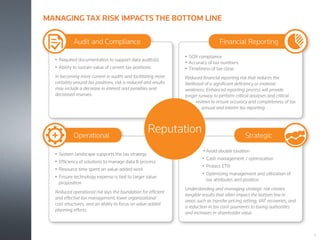
•	 Required documentation to support data audits(s)
•	 Ability to sustain value of current tax positions
In becoming more current in audits and facilitating more
certainty around tax positions, risk is reduced and results
may include a decrease in interest and penalties and
decreased reserves.
Audit and Compliance
•	Avoid double taxation
•	 Cash management / optimization
•	 Protect ETR
•	 Optimizing management and utilization of
tax attributes and position
Understanding and managing strategic risk creates
tangible results that often impact the bottom line in
areas such as transfer pricing setting, VAT recoveries, and
a reduction in tax cash payments to taxing authorities
and increases in shareholder value.
Strategic
•	 SOX compliance
•	 Accuracy of tax numbers
•	 Timeliness of tax close
Reduced financial reporting risk that reduces the
likelihood of a significant deficiency or material
weakness. Enhanced reporting process will provide
longer runway to perform critical analyses and critical
reviews to ensure accuracy and completeness of tax
annual and interim tax reporting.
Financial Reporting
•	 System landscape supports the tax strategy
•	 Efficiency of solutions to manage data & process
•	 Resource time spent on value-added work
•	 Ensure technology expense is tied to larger value
proposition
Reduced operational risk lays the foundation for efficient
and effective tax management, lower organizational
cost structures, and an ability to focus on value-added
planning efforts.
Operational
Reputation
17
MANAGING TAX RISK IMPACTS THE BOTTOM LINE
18
YOUR GOALS, RISKS, AND ROADBLOCKS
Identify Your Constraints
In addition to noting your risks, identify what could potentially hold you back from
being able to take action with your technology plan. Every group within every
department of every enterprise is limited at some point in their available resources,
time, and money, but be specific.
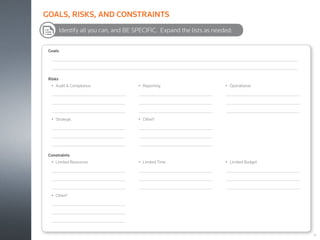
Identify all you can, and BE SPECIFIC. Expand the lists as needed:
Goals
	
	
Risks
•	 Audit & Compliance


•	 Strategic


•	 Reporting


•	 Other?


•	 Operational


Constraints
•	 Limited Resources


•	 Other?


•	 Limited Time


•	 Limited Budget


19
GOALS, RISKS, AND CONSTRAINTS
20
REALITY CHECK
We know there will always be new versions of the technology tools we’re using, and the frequency of
these updates is likely increasing. Moving to a new version may be a minor effort to ensure the system
has the latest security and bug fixes, or may involve comprehensive enhancements that require a
project to properly migrate the system and processes. It is important to remember that eventually the
versions of systems we’re currently using are at risk of becoming irrelevant or unsupported.
Announcements regarding systems are often made years in advance or may take you by surprise.
Either way, take the time now to evaluate and determine your policies around system upgrades and
engage your vendors to get the latest updates on the system roadmap and lifecycle.
Ask yourself:
• Do we want to be a beta adopter, fast follower, or late follower with every version that comes out?
• How will my policy on upgrades affect tax risks, constraints, and goals?
• How often will we upgrade to new versions and on what schedule? Every year? Every two years?
When and why?
• How will we approach system upgrades and who has ownership of the project to migrate the system?
• How will we collaborate with other departments?
Ensure your plan considers cross-training of team members and identifying support personnel for
every technology tool and system.
21
TIPS ON GETTING BUY-IN
Speak their language.
To obtain buy-in for your plan, you must relay a compelling story. The approach you take to achieve this
should be well thought out and consider different methods of communicating to different stakeholders.
Complaining or being vague is not an effective way to gain support from the decision makers.
Headcounts are low and budgets are tight everywhere. Remember that tax is competing with the rest
of the organisation for funding and the strongest business case always wins.
Finance has often built their business case around technology and process improvement from the
position of risk mitigation. While risk will continue to remain a key driver for any tax transformation,
Tax has an opportunity to evaluate and position itself to provide value via improvement. There are
costs associated with being inefficient or using more than one system to perform the same activity. In
addition, many companies have successfully identified direct tax savings opportunities from their efforts
to streamline and reform. Incorporate quantifiable data using estimates where needed.
Look for efficiencies across tax both domestically and internationally. Optimise your technology
footprint to benefit not just your silo, but also to benefit others. Sometimes all it takes is one group to
champion the cause.
Proving your case is where strong supporting documentation comes in. Tailor your deliverables and
presentations to speak the language of your audience. Prepare by understanding what they care about
and how your recommendation will help them. If you have collaborated from the beginning, you will
already know the answers to these questions.
Having completed your due diligence, documented your processes, identified gaps, and articulated the
potential risks to your enterprise, you will have reached a point where you can lead the discussion and
identify next steps. In many instances, the next step will involve seeking outside expertise to validate
your findings, call out anything that may have been overlooked, and develop budget data.
22
EPILOGUE
If You’re Not Moving Forward, You’re Moving Backward.
Businesses often assume that if they aren’t moving ahead, they’re
standing still. This is where the world is changing. In today’s world, where
business operates in a real-time, technology-dependent environment,
there is no longer an ability to stand still. And if they aren’t moving ahead,
they’re standing still.
Tax touches everything. Businesses have been evolving their approach to
technology for years but have yet to offer tax a seat at the table in many
cases. Do not wait for your invitation. Otherwise you will miss countless
opportunities to show tax as a value center. Engage in the development of
your own plan beginning with the steps outlined here and invite yourself
to the party.
tax.thomsonreuters.co.uk/onesource
LEARN MORE
facebook.com/ONESOURCE ONESOURCE
onesourceuk@thomsonreuters.com
SHARE THIS eBOOK WITH COLLEAGUES
+44 (0)203 285 7649
GIVE US A CALL
@yourONESOURCE
#taxologist
© 2015 Thomson Reuters/ONESOURCE. All rights reserved.
Written by
Lauren B. Kovar, CPA/CITP, CGMA
Director, Client Advisory and Strategy
Thomson Reuters ONESOURCE

Taxologist 4 steps to evaluating tax technology

  • 1.
  • 2.
    TABLE OF CONTENTS Introduction 1 Step 1: Assess Your Processes And Technology Landscape 3 Step 2: Map Relationships 10 Step 3: Take It Global 12 Step 4: Group Issues And Identify Patterns 13 Your Goals, Risks And Roadblocks 15 Reality Check 20 Epilogue 22
  • 3.
    THE RISE OFTHE TAXOLOGIST Regulatory complexity, growing globalisation, increased scrutiny, and internal pressures continue to burden tax departments worldwide. A new type of tax professional is emerging at the center of this changing tax environment: We call them Taxologists. Taxologists are tax professionals that excel in the use of technology to maximise tax function effectiveness. They are problem solvers. They challenge the status quo. They fearlessly embrace technology. Empowered with the right knowledge and the right technology, Taxologists improve data quality, automation, and efficiency. They increase collaboration across business units and seize opportunities to show tax as a value center. With Taxologists at the helm of business operations, the tax process improves exponentially—positioning them as unquestionable assets to their organisations.
  • 4.
    1 INTRODUCTION Technology is constantlyin motion. An ever-changing technology landscape presents both a boon and a burden to businesses. New versions of the latest technology are released quicker than you can buy the original, and organisations must adapt more quickly than in the past. Technology has also enabled businesses to explode across the globe. With the click of a button, we can instantly access the far corners of the world. What is one result of this? Change at an exponential rate—thereby requiring more planning around technology and greater transparency into existing systems and processes. Tax is also in constant motion and touches nearly every aspect of an organisation. The quick-changing landscape for Tax continues to raise the stakes for companies to ensure its operations and technology support processes effectively, while simultaneously producing value and mitigating global risk. Tax technology systems and tools are a necessary enabler to help tax achieve these results. The historical management of tax technology has been largely reactive—not necessarily in the context of “crisis management,” but more as a department- by-department response to risks and issues resulting in systems and problems being resolved one system or issue at a time. This paradigm is changing (albeit slowly), and technology planning for tax is starting to be approached from a holistic point of view.
  • 5.
    2 Whether you’re atax manager, tax director, or other tax-operations professional, this eBook will suggest techniques and leading practices to guide you toward a stronger and more comprehensive approach to planning for future tax systems before decisions are made and implementations occur. Just as importantly, it will help you evaluate the current landscape across broader aspects of the tax business. Your team will be empowered to influence a more efficient operation and align more effectively with the broader objectives of tax operations as a whole. Whether you’re a tax manager, tax director, or other tax-operations professional, this eBook will suggest techniques and leading practices to guide you toward a stronger and more comprehensive approach to planning for future tax systems before decisions are made and implementations occur. Just as importantly, it will help you evaluate the current landscape across broader aspects of the tax business. Your team will be empowered to influence a more efficient operation and align more effectively with the broader objectives of tax operations as a whole.
  • 6.
    GENERAL QUESTIONS TOASK BEFORE YOU BEGIN Each Tax department should answer these questions: What is your department’s tax technology strategy? Have you met with Tax leadership and your colleagues to articulate and document that strategy? How are you prioritizing what is most important to your department? How does that translate into the world of technology? How is the strategy impacted by the organization’s key risks and approach to risk management? What are the strategic priorities for the company and the most significant risks? How is your department currently mitigating those risks? What are your relationships with IT and Finance within the organization? Do you have strong partnerships? If not, why? How can these relationships be broadened? We suggest starting at the top and engaging leadership by informing them of the need and asking them to cue it up with the respective leaders of those areas as a first step. Do you have a plan or roadmap for managing your technology landscape over the next five years? If you do not have a plan, why not? Who currently manages the technology supporting Tax? What is that process? Step1 3 ASSESS YOUR PROCESSES AND TECHNOLOGY LANDSCAPE Look. Listen. List. What is an assessment? Tax managers are generally aware of the landscape of systems and processes supporting their daily activity. In addition to the systems utilised within their own departments, they often know who and what impacts data both upstream and downstream and who manages the workload and content. They may also have knowledge of tools and procedures other departments use that are most relevant to Tax. If this is the case, what is left to assess? A proper assessment entails more than having a general knowledge of your systems and a detailed understanding of your tax processes. It involves drilling a layer deeper to look at the world from different angles in an attempt to capture the full picture of what truly exists. An assessment must include both the macro and micro and should be performed from several perspectives. Think of a photographer taking pictures of a beautiful sunset. Depending on a multitude of factors, including the direction, distance, quality of lens, each photograph will tell a different story of the process of the sun setting.
  • 7.
    Step1 4 Your assessment isa critical component and is many times passed over casually under the belief that we already know our own environment. Taking this a step further, additional mistakes are made when we give an answer without fully defining the problem that we are trying to solve. These can be minor mistakes that require simple course corrections, but are more likely much harder to reverse if there is real effort and money already spent. A perfect example is selecting a system before the requirements and process have been evaluated. In cases where the tool is not the right fit, tax departments will either force the square peg into the round hole, or layer on inefficient manual processes to help bridge the gap. You can prevent these situations by ensuring your focus includes an end-to-end review of the processes, systems, and data, paying specific attention so that you document what is really happening and expecting that it might be a little different than you may have thought. So how do you start your assessment? It is always best to begin at the beginning, which is with what we already know, and then seek the missing information. The goal of any assessment is to gather data to identify risks, opportunities, and priorities; formulate a plan, gain approval, and implement a change. Strong documentation will make a difference in your ability to support your results and recommendations forward. It may not be necessary to start from scratch if there are existing lists or documents that capture information you are looking to compile. Be mindful to validate any information you receive as accurate and up-to-date. Start by defining the problem you’re going to assess. For example, is the problem your tax compliance process, or is it the overall tax department content management approach? Once you’ve defined the problem, begin to sketch out the process from end-to-end to identify how you will need to go about your assessment and who to include. Compile a list of stakeholders to meet with and consider those who may benefit from your efforts.
  • 8.
    Step1 5 Process Documentation Process documentationis not something new for tax. Whether it has been prepared to document controls, communicate desktop procedures, or support financial statement results, the likelihood is you have some familiarity with documenting processes. Given there are multiple ways a process can be captured, it is important to determine what level of granularity you will document at up-front. A process walk-through should be narratively captured at a minimum. Thinking about each process end- to-end will help you identify all the steps in your process, including the systems your team touches. Focus on hand-offs within the process. These hand-offs can be between people, from a person to a system, or from system to system. Depending on your expertise with flow-charting tools, process and system diagrams—and data and document flows—are also beneficial. If you decide to include diagrams or charts, this should be in addition to the narrative documentation. A process diagram or flow chart without a narrative to provide context can be misinterpreted and may not give you the level of detail needed to comprehend and assess. Systems Inventory Another component of your assessment should include taking an inventory of the systems and tools your group is currently using or receiving information from, describing how they are generally used and noting any issues you’re currently experiencing. The easiest approach is to make a list and update it as you go along. It is also helpful to include the version of the system, hosting method, and indication of any customisations, as well as the system owner or administrator. Remember to include daily productivity tools such as email, Microsoft Office tools, and your network shared drives. The forms, checklists, and diagrams in this eBook offer some basic inquiries you can make to get you started, but they should not replace the guidance of experts. You are encouraged to expand or adapt these tools as needed.
  • 9.
    Step1 • TaxSystems What application(s)? Fully hosted, partially hosted, in-house hosted? Any research tools or subscriptions? Global systems? Add-ins or plug-ins being used? • Enterprise Resource Planning Systems What application(s) or specific system(s)? How many instances? Where globally are different systems used? Is our ERP out of the box or customized? Any systems interfaced directly (i.e. bolted-on) to the ERP that Tax uses (e.g. Indirect Tax Determination) • Legal Entity Systems What application(s)? Who “owns” the system (e.g. Legal)? What other systems maintain separate LE data? • Financial Forecasting Systems What application(s)? • Financial Consolidating Systems What application(s)? • Document Management Systems and Tools What formal application(s)? What informal methods (e.g. hard drives, cloud, etc.)? Are there systems off-site that store files such as with outsource providers or archiving facilities? What about paper filing systems or processes? • Hosted or Cloud platforms such as SharePoint, FTP Sites, etc. Which URLs or systems? Fully hosted, partially hosted, or in-house hosted? • Microsoft Office What components of Office? What version(s)? Are there different versions used globally? Are there add-ins or plug-ins being used? • Email What application(s)? • Others? Databases or warehouses? ETL Tools? Time and expense reporting? Portal / Intranet Systems? List EVERY application you use during your workday. What technologies / applications / programs / tools is your group using? 6 FORM 1: SAMPLE SYSTEMS INVENTORY QUESTIONS
  • 10.
    Step1 7 In some casesyou might not know exactly what a particular application or system is used for, or even the system name; you may simply know what documents or pieces of information you receive from someone else. Include these systems on your list as well and collaborate with your team and others to gather whatever is missing. There is always someone in the organisation that will be able to help you fill in any gaps. IDENTIFY ISSUES Once you’ve identified the tools and applications that your team employs, it’s time to troubleshoot. This stage of the process isn’t about conducting root-cause analyses or determining solutions. The purpose is to organise and document everything. Expand your systems inventory listing to add a column to capture known issues. Document issues identified during your process walk-throughs in a separate document. Attribute the person or trigger that brought the issue to light as you will need to dive into specific details around these items later in your process. Expect to circle back around to your master issue listing to prioritise your results at a later time. Form 2 provides some sample questions to ask that will help flush out existing technology issues. Keep it simple, but include enough detail that an external reader can understand the general issue without needing to research further.
  • 11.
    Step1 For eachsystem, identify… Is the system/tool too complicated or cumbersome to use? If yes, in what ways (e.g. confusing user interface, difficult to navigate, inability to extract data or information, etc.)? Can the system do everything I need it to do? If no, what doesn’t it do? Are there system performance issues? If yes, what type (e.g. slow, time-outs, certain functionality sometimes does not work, system returns different results, etc.)? Is the system compatible with the technologies my colleagues are using? If no, where are the incompatibilities? Does the system meet enterprise requirements (e.g. hosting, security, access, record retention, etc.)? Is the system on a version more than one version back from current? If yes, when is the support end-date? Are there system or environment issues keeping tax from migrating to the newest version? Other issues? What issues, if any, are you experiencing with your technology tools? 8 FORM 2: SAMPLE TECHNOLOGY ISSUES QUESTIONS
  • 12.
    Step1 9 TAKE STOCK OFTHE REST OF YOUR DEPARTMENT Now that you have a grip on the technology tools and issues within your specific group, engage your colleagues across Tax. Consider providing your initial systems listing as a starting point and have the remaining tax business units complete the exercise. Ask them to indicate where they use the same systems and expand to add their systems, tools, processes, and issues. Provide copies of the sample questions and talk about what you learned as you went through the exercises. By performing the assessment step more broadly than a single business unit, you will better identify flows between shared processes and locate gaps and duplications. From there, it will be much easier to identify opportunities for synergies and pinpoint systems that are not being fully leveraged. Expanding your assessment beyond your circle of influence is discussed in more detail in Step 2.
  • 13.
    Step2 10 MAP RELATIONSHIPS No groupis an island. The sharing and processing of tax data and documents is rarely clean. Most handoffs are not system-to-system, and information rarely goes from Lucy to Jane and then into a system without some degree of manipulation. There are calculations, transformations, and new source data and inputs along the way. The results of your assessment may have already called out several relationships between people, processes, or technologies, and it’s likely you are already brainstorming ways to utilise technologies across teams. In Step 2 we take this to the next level to map the relationships to other areas of tax and beyond tax. Exhibit 2 illustrates some typical connections between business units. Using a similar model, put your department at the center of the diagram and begin to build out your connections to the remaining areas of tax. Expand to include business units outside of tax with a focus on the handoff of data and documents.
  • 14.
    TAX Inventory Valuation VAT Manufacturing Sales Tax Sales PayrollHeadcount Human Resources General Ledger Provision Information Accounting Entity Information Contracts Legal Intercompany Costs Information Technology Tax Payments Finance Structure Treasury Use Tax Purchase Orders Purchasing 11 TAX DATA IS EVERYWHERE! American Institute of CPAs. 2014. Understanding Tax Operations – A Panel Discussion Lauren B. Kovar, CPA/CITP, CGMA
  • 15.
    Step3 12 TAKE IT GLOBAL Multinationalorganisations face many tax and financial reporting challenges as legislators and tax authorities around the world pass new laws to regulate compliance. Gone are the days when local finance teams could make local decisions as tax compliance is increasingly becoming an international process – often global, frequently regional. New international legislation such as country-by-country reporting requires multinationals to have a consistent process across multiple countries to manage source data and compliance reporting. To meet these new challenges, many organisations are now looking to centralise compliance and reporting across multiple jurisdictions in Shared Service Centres and Centres of Excellence. Tax systems play a vital role in these projects, standardising control processes to eliminate risk, reduce costs, and allow for more flexibility and better change management. Even if your organisation is not undertaking a major project to centralise tax functions, it’s important to consider how other parts of your organisation are managing Tax and how tax systems can work better to improve processes across jurisdictions. Several factors will influence the extent of the work you need to do to include global tax. Ask yourself: • What are the tax reporting lines globally? • Which of my tax processes are dependent on foreign-location data or systems (inputs or outputs)? • Are there any foreign locations on tax systems that my group owns or administers? The answers to these questions will help guide you, but it is also beneficial to enlist the help of others and identify the expectations of tax leadership as to the extent of your approach globally. Depending on your organisational structure, global risk, and issues, you might need more or less detail. The best way to find opportunities to partner globally and work together is to first identify the connections between processes and systems being used. Regardless of the scale of your global relationships and mapping, it is not something you can ignore. Do not be intimidated if others immediately default to the phrase, “It cannot be done.” You may be surprised to learn that a tax manager in China is going about the same process you are to assess their current landscape and develop a plan to improve. By combining efforts, you may find new channels of support.
  • 16.
    Step4 13 GROUP ISSUES ANDIDENTIFY PATTERNS The proof is in the pattern. Once you have completed your list of process and technology issues, begin to look for common results and patterns. Issues can fall into several categories or types. For example, are you experiencing issues because you aren’t fully familiar with the system and might need additional training? Or are you experiencing infrastructure problems like bugs, error messages, time-outs, and numbers that don’t tie out? Ask questions like, “Why is tax using different systems for time management when there’s an opportunity to use the same system?” Attempt to organise your issues into groups such as system performance, process gaps, source data, training issues, and high-risk requiring immediate response. By completing this exercise, patterns should begin to emerge. One example is the typical pattern involving too little training. Training gaps can be correlated to not reading the instructions before using a new device. Everyone knows they should read them, and read them carefully, but somehow we justify skipping this important step and just hit the “on” switch. If the device actually turns on, we are in even more trouble as we assume it is operating properly and will miss the fact that it is not functioning in the recommended mode until real damage has been done. In most cases, you will need help to analyse your issues. With the exception of minor process or training issues, it is not recommended that you take on the burden to diagnose by yourself. Ask for assistance from experts to who will be able to call upon their expertise to identify the potential cause and eventually recommend a course of action. From here, you have taken the initial steps to build an understanding of your processes, data, systems, and tools that comprise your tax ecosystem.
  • 17.
    Step4 14 COLLABORATE There’s strength innumbers. The most beneficial outcomes are achieved when all stakeholders are actively engaged, so it’s important to be inclusive from the get-go. At this point, you have likely engaged your coworkers and tax leadership. Perhaps you have spoken to IT, your system vendors, and even some of the global teams. Now is the time to check on your collaboration efforts and reach beyond to validate your understanding. Revisit your list of initial stakeholders sure you’re talking to all the right people. Have others in the organisation provide input—from other areas of Tax, as well as departments outside of Tax. More often than not, they will have some insights and experiences they can share that will help you. Look at business units that may be a little further ahead in their transformation and are already optimising their processes. They may be able to troubleshoot your findings and identify other connections and potential efficiencies. Even when you are comfortable with a process, don’t presume you know what is done or how systems are used without asking. Leveraging and optimising technology effectively is more holistic than just assessing the needs of a single user or a single department. The technology landscape for tax will always consist of multiple systems that will be used by Tax. From source data, tax, consolidation, and document management systems, to shared drives, network drives, and each individual computer hard-drive that stores files. Expect systems that support Sarbanes-Oxley (SOX) compliance, workflows, time and expense, and more. Opportunities may be as small as single-department efficiency or indicate a need for a more comprehensive analysis, such as whether to move a certain process elsewhere, geographically or organisationally.
  • 18.
    15 YOUR GOALS, RISKS,AND ROADBLOCKS Identify Your Goals Every department has milestones that it’s expected to reach in the course of a fiscal year. Leadership generally has longer-term goals that they want or need to meet. Check with your tax leaders on their short-term and long-term goals. Build your overall goals both short and long-term and in alignment with the broader goals of tax and your organisation. Ask about your organisation’s plan on a global scale. Is there an effort to achieve organic growth? Are there plans to expand geographically or to a new line of business via merger or acquisition? Are there global initiatives within the organisation that Tax can partner on? What are the organisational drivers that Tax must respond to (e.g. Finance Transportation, ERP migration, etc.)? Collaborate on your goals with others and don’t be afraid to be ambitious!
  • 19.
    16 YOUR GOALS, RISKS,AND ROADBLOCKS Identify Your Risks There’s always risk involved when you attempt to change the status quo. Beyond simple process efficiency risks, Tax has other important issues that must be managed, including meeting financial reporting and compliance requirements, mitigating audit risks globally, and upholding the organisation’s reputation. One important risk that’s often overlooked is key man dependency—reliance on a single person without a back-up plan. This is especially common in tax given resource constraints and results from individuals who may have solely led the efforts to implement or configure a new technology, built a solution such as a Microsoft Access database process on their own, or who serve as the primary (and only) system administrator. This risk could involve something as simple as an Excel workbook utilising macros, or be as comprehensive as a single-source system that’s supporting all your tax processes. But what happens if that person leaves your company? Where is the process documentation? How is that technology tool configured? How does it need to be supported? It’s vitally important that your tax technology plan includes a risk assessment, but often this activity has already been performed by tax leadership. Ask to review any risk assessment or plan that may be in place and trace the impact to your results. Call out any gaps and close them. This will also assist you to prioritise your issues in alignment to the organisation’s priorities. If a risk assessment hasn’t been completed, meet with your leaders and ask them to help you compile one.
  • 20.
    • Required documentationto support data audits(s) • Ability to sustain value of current tax positions In becoming more current in audits and facilitating more certainty around tax positions, risk is reduced and results may include a decrease in interest and penalties and decreased reserves. Audit and Compliance • Avoid double taxation • Cash management / optimization • Protect ETR • Optimizing management and utilization of tax attributes and position Understanding and managing strategic risk creates tangible results that often impact the bottom line in areas such as transfer pricing setting, VAT recoveries, and a reduction in tax cash payments to taxing authorities and increases in shareholder value. Strategic • SOX compliance • Accuracy of tax numbers • Timeliness of tax close Reduced financial reporting risk that reduces the likelihood of a significant deficiency or material weakness. Enhanced reporting process will provide longer runway to perform critical analyses and critical reviews to ensure accuracy and completeness of tax annual and interim tax reporting. Financial Reporting • System landscape supports the tax strategy • Efficiency of solutions to manage data & process • Resource time spent on value-added work • Ensure technology expense is tied to larger value proposition Reduced operational risk lays the foundation for efficient and effective tax management, lower organizational cost structures, and an ability to focus on value-added planning efforts. Operational Reputation 17 MANAGING TAX RISK IMPACTS THE BOTTOM LINE
  • 21.
    18 YOUR GOALS, RISKS,AND ROADBLOCKS Identify Your Constraints In addition to noting your risks, identify what could potentially hold you back from being able to take action with your technology plan. Every group within every department of every enterprise is limited at some point in their available resources, time, and money, but be specific.
  • 22.
    Identify all youcan, and BE SPECIFIC. Expand the lists as needed: Goals Risks • Audit & Compliance • Strategic • Reporting • Other? • Operational Constraints • Limited Resources • Other? • Limited Time • Limited Budget 19 GOALS, RISKS, AND CONSTRAINTS
  • 23.
    20 REALITY CHECK We knowthere will always be new versions of the technology tools we’re using, and the frequency of these updates is likely increasing. Moving to a new version may be a minor effort to ensure the system has the latest security and bug fixes, or may involve comprehensive enhancements that require a project to properly migrate the system and processes. It is important to remember that eventually the versions of systems we’re currently using are at risk of becoming irrelevant or unsupported. Announcements regarding systems are often made years in advance or may take you by surprise. Either way, take the time now to evaluate and determine your policies around system upgrades and engage your vendors to get the latest updates on the system roadmap and lifecycle. Ask yourself: • Do we want to be a beta adopter, fast follower, or late follower with every version that comes out? • How will my policy on upgrades affect tax risks, constraints, and goals? • How often will we upgrade to new versions and on what schedule? Every year? Every two years? When and why? • How will we approach system upgrades and who has ownership of the project to migrate the system? • How will we collaborate with other departments? Ensure your plan considers cross-training of team members and identifying support personnel for every technology tool and system.
  • 24.
    21 TIPS ON GETTINGBUY-IN Speak their language. To obtain buy-in for your plan, you must relay a compelling story. The approach you take to achieve this should be well thought out and consider different methods of communicating to different stakeholders. Complaining or being vague is not an effective way to gain support from the decision makers. Headcounts are low and budgets are tight everywhere. Remember that tax is competing with the rest of the organisation for funding and the strongest business case always wins. Finance has often built their business case around technology and process improvement from the position of risk mitigation. While risk will continue to remain a key driver for any tax transformation, Tax has an opportunity to evaluate and position itself to provide value via improvement. There are costs associated with being inefficient or using more than one system to perform the same activity. In addition, many companies have successfully identified direct tax savings opportunities from their efforts to streamline and reform. Incorporate quantifiable data using estimates where needed. Look for efficiencies across tax both domestically and internationally. Optimise your technology footprint to benefit not just your silo, but also to benefit others. Sometimes all it takes is one group to champion the cause. Proving your case is where strong supporting documentation comes in. Tailor your deliverables and presentations to speak the language of your audience. Prepare by understanding what they care about and how your recommendation will help them. If you have collaborated from the beginning, you will already know the answers to these questions. Having completed your due diligence, documented your processes, identified gaps, and articulated the potential risks to your enterprise, you will have reached a point where you can lead the discussion and identify next steps. In many instances, the next step will involve seeking outside expertise to validate your findings, call out anything that may have been overlooked, and develop budget data.
  • 25.
    22 EPILOGUE If You’re NotMoving Forward, You’re Moving Backward. Businesses often assume that if they aren’t moving ahead, they’re standing still. This is where the world is changing. In today’s world, where business operates in a real-time, technology-dependent environment, there is no longer an ability to stand still. And if they aren’t moving ahead, they’re standing still. Tax touches everything. Businesses have been evolving their approach to technology for years but have yet to offer tax a seat at the table in many cases. Do not wait for your invitation. Otherwise you will miss countless opportunities to show tax as a value center. Engage in the development of your own plan beginning with the steps outlined here and invite yourself to the party.
  • 26.
    tax.thomsonreuters.co.uk/onesource LEARN MORE facebook.com/ONESOURCE ONESOURCE onesourceuk@thomsonreuters.com SHARETHIS eBOOK WITH COLLEAGUES +44 (0)203 285 7649 GIVE US A CALL @yourONESOURCE #taxologist © 2015 Thomson Reuters/ONESOURCE. All rights reserved. Written by Lauren B. Kovar, CPA/CITP, CGMA Director, Client Advisory and Strategy Thomson Reuters ONESOURCE