TALLY ERP 9
THE CONFIGURATION
Configurations in Tally ERP 9 (F12:
Configuration)
• Configurations in Tally ERP 9: The F12: Configuration in Tally.ERP 9 is
applicable for all the companies that located in Tally.ERP 9 data directory.
The F12:Configurations may vary from menu to menu, for example if you
press F12: Configuration from voucher screen the respective screen
displays on the screen.
How open Configurations in Tally ERP 9
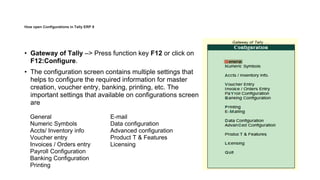
• Gateway of Tally –> Press function key F12 or click on
F12:Configure.
• The configuration screen contains multiple settings that
helps to configure the required information for master
creation, voucher entry, banking, printing, etc. The
important settings that available on configurations screen
are
General
Numeric Symbols
Accts/ Inventory info
Voucher entry
Invoices / Orders entry
Payroll Configuration
Banking Configuration
Printing
E-mail
Data configuration
Advanced configuration
Product T & Features
Licensing
General
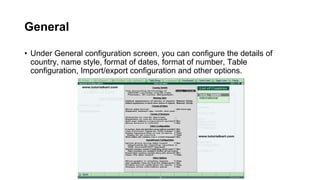
• Under General configuration screen, you can configure the details of
country, name style, format of dates, format of number, Table
configuration, Import/export configuration and other options.

TALLY THE CONFIGURATION.pptx

  • 1.
    TALLY ERP 9 THECONFIGURATION
  • 2.
    Configurations in TallyERP 9 (F12: Configuration) • Configurations in Tally ERP 9: The F12: Configuration in Tally.ERP 9 is applicable for all the companies that located in Tally.ERP 9 data directory. The F12:Configurations may vary from menu to menu, for example if you press F12: Configuration from voucher screen the respective screen displays on the screen.
  • 3.
    How open Configurationsin Tally ERP 9 • Gateway of Tally –> Press function key F12 or click on F12:Configure. • The configuration screen contains multiple settings that helps to configure the required information for master creation, voucher entry, banking, printing, etc. The important settings that available on configurations screen are General Numeric Symbols Accts/ Inventory info Voucher entry Invoices / Orders entry Payroll Configuration Banking Configuration Printing E-mail Data configuration Advanced configuration Product T & Features Licensing
  • 4.
    General • Under Generalconfiguration screen, you can configure the details of country, name style, format of dates, format of number, Table configuration, Import/export configuration and other options.