 Tally Accounting is financial software that helps in business financial
purposes.
 It is used for recording the daily business data of a particular company.
 The name of the business solution is derived from the word “tally”, which
means to count and keep the record.
 The latest version of the software is Tally Prime released in November
2020 & Tally ERP 9, which was released in 2009.
 This version is one acclaimed financial accounting system and inventory
management system with a powerful computer.
 Total Accounting Leading List Year.
 Transactions Allowed in a Linear Line Yards.
 Bharat Goenka developed an accounting software called 'The Accountant'
with no-codes. He and his father together started Peutronics in 1986 --
renamed as Tally from 1988.
 The latest version is Tally 9 is the world's first concurrent multi-lingual
business accounting and inventory software.
 Facility for auditing, with the Audit feature, you may review the vouchers that
have been recorded and make changes as needed.
 Tally ERP 9 is useful for calculating the costs of goods sold in a manufacturing
business.
 Calculating foreign gain and loss using the foreign currency is another use
of Tally ERP 9.
 Any specific data can be imported or exported from one company to another.
 Another essential aspect for unit-wise analysis is account analysis by cost
centre and cost category.
 Cash flow, funds flow and Ratio analysis & Budgeting
 Tally ERP 9 is a multi-lingual tally software since it accepts multiple
languages. Accounts can be kept in one language, while reports can be read in
another.
 You can add up to 99,999 companies in your account.
 You can automate personnel records administration with the payroll feature.
 Tally offers a synchronisation capability that allows transactions from several
offices to be updated automatically.
 Produce consolidated financial statements as per the company's needs.
 Tally's ability to manage single and numerous groups is crucial.
 Tally 4.5 was the very first edition, and it was published in the 1990s. It's
an MS-Dos-based program.
 Tally 5.4 was the second edition of Tally and it was published in 1996. It
was a version with a graphical user interface.
 Tally 6.3 was the next version to be produced, and it was released in 2001.
It is a window-based version that allows printing and is VAT-compliant
(Value Added Tax).
 Tally 7.2 was the following version, which was published in 2005. This
version included additional features such as a Statutory complementary
edition and VAT laws based on state.
 Tally 8.1 was the following version and it had a completely new data
structure. This edition included new POS (Point of Sale) and Payroll
functions.
 In 2006, the latest version of Tally 9 was launched due to faults and errors.
Payroll, TDS, FBT, E-TDS filing, and other features were included.
 Tally ERP 9 is the most recent version of Tally, which was launched in
2009. This newest Tally ERP 9 package has all of the capabilities that small
and large businesses want. It was also upgraded to include new GST
features (Goods & Services Tax).
 Institutions
 Transportation
 Business fields
 Service industries
 Doctors
 Charitable trust
 Enterprise
 Advocate
 Chartered
accountants
 Builders
 Gas station
 Supermarkets
 Individuals
 Pharmaceuticals
 Any dealings made between persons involving
exchange of values is called transactions. The
transactions which are-
 Money related
 Related to our firm
 Effect the financial position (or) profit or loss of the
firm is taken into books. There are 2 types.
 Cash transaction
 Credit transactions
 Cash Transactions
The transactions in which cash receipt (or) payment involved
in the exchange are called cash transaction.
 Credit Transactions
The transactions in which cash receipt (or) payment is not
involved in the exchange are called credit transactions.
 Accounts mean classified record of business transactions and types are
 Personal Accounts
 Real Accounts
 Nominal Accounts
Personal Account
Accounts which are related to names of persons and firms are called
personal accounts (Including debtors and creditors)
Rule: - Debit the receiver
Credit the giver
Examples: - SyamA/c, Bank A/c, Capital A/c, Drawings A/c, Debtors A/c,
Creditors A/c
 Real Account
Accounts which are related to Assets, Liabilities and Goods of a firm.
(Excluding Debtors and Creditors)
Rule : Debit what comes into the firm
Credit what goes out from the firm
Example
 Assets: Cash A/c, Building A/c, Furniture A/c, Investment A/c, Goodwill
A/c, Patent A/c, Trademark A/c, Copyright A/c
 Liabilities: Bills payable A/c, Loan A/c, Bank overdraft A/c
 Goods: Purchases A/c, Sales A/c, Purchases returns A/c, Sales returns A/
 Nominal Account
Accounts which are related to expenses, losses, incomes
and gains
Rule : Debit all Expenses and Losses
Credit all Incomes and Gains.
Examples
 Expenses: Salary paid A/c, Commission paid A/c
 Losses: Bad debts A/c, Charities A/c, Discount allowed
 Incomes: Rent received, Interest received A/c, and Allowance
received A/c
 Gains: Bad debts recovered A/c, Discount received A/c
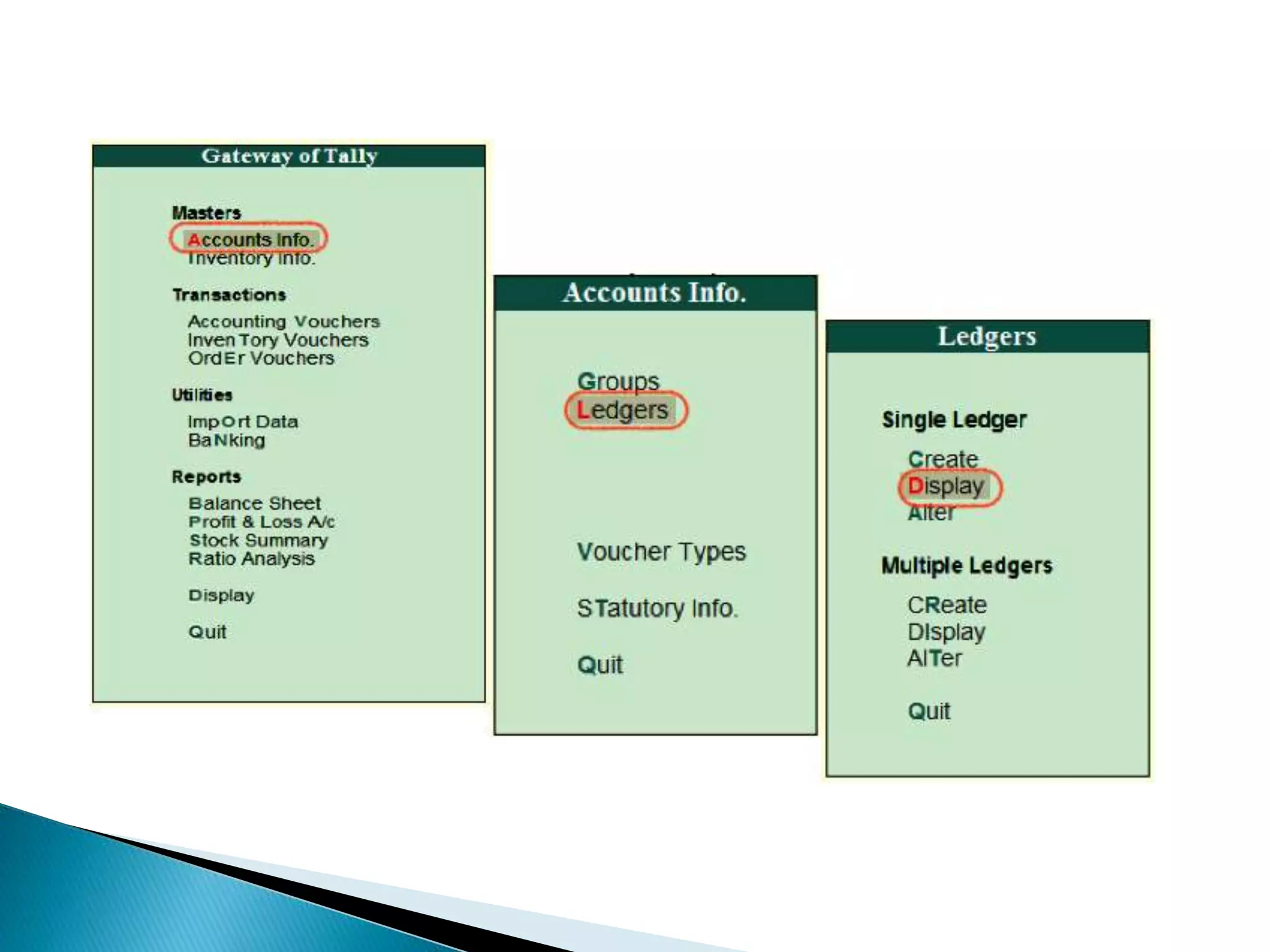
 Tally Erp 9 ledgers creation under proper group of
accounts is main part of Tally ERP 9 implementation.
 In every implementation of Group wise Tally ledger list
prepared first which affects Trading a/c, Profit and loss
a/c and Balance sheet. Here is the list of ledger head
and respected group of ledger
 Total Group 28 / 34
 Branch/Division
 Capital Accounts
 Loans
 Suspense Account
 Current Liabilities
 Current Assets
 Fixed Assets
 Investments
 Sales Accounts
 Indirect Expenses
 Indirect Income
 Misc. Expenses
 Purchase Accounts
 Direct Income
 Direct Expenses
 Sundry Creditors
 Secured Loans
 Bank Accounts
 Stock in Hand
 Deposits
 Cash in Hand
 Duties & Taxes
 Banks OD Accounts
 Loan & Advances
(Assets)
 Unsecured Loans
 Provisions
 Reserves & Surplus
 Sundry Debtors
Indirect Expenses
 Advertisement
 Bank charges
 Bill drawn
 Carriage
 Commission allowed
 Discount allowed
 Donation & charity
 Free sample
 Insurance premium
 Interest on loan
 Legal charge
 Loss by fire
 Office lighting
 Petty cashier
 Postage & courier
 Printing & stationery
 Rent (cr)
 Repair charge
 Salary
 Sale tax
 Taxi fire
 Telephone charge
 Trade account
 Travelling expenses
 Suspense expenses
 Miscellaneous Expenses
 Depreciation
Indirect Income
 Commission Received
 Bed Debts Recovered
 Interest on Drawing
 Discount Received
 Interest on Investment
 It is a document that contains the details of a financial transaction. These are
used for all aspects of a business, from sales to deposits
 Total voucher are 23 in tally 5.4 & 6.3.
21 in Tally7.2 18 in Tally8.1 & 9.0 22 in Tally ERP
 F4: Contra :For recording money deposited into or withdrawn from the bank,
or for recording any sum transferred between two accounts in the same
company.
Cash deposited in to bank Cash with drawn from bank for office use
Cash transfer Bank transfer
 F5: Payment: This voucher is used for payments made by the business.
 F6: Receipts: For recording any income earned by the company (sales,
rent, interest, etc.) and for recording the proceeds received from Sundry
debtors.
 F7: Journal: For recording all adjustment or due entries such as prepaid
expense, accrued income etc., For recording purchase of assets for
recording Input tax reversal entries, reverse charge entries under GST
Purchase / Sale of asset on credit basis Depreciation on asset
Outstanding / Prepaid expenses
 F8: Sales: This is used for recording all the sales made by the company
 F9: Purchase: This is used for recording all the inventories purchased by
the company in the course of business.
 Ctrl+F8 -- Credit Note (Sales Returns)
 Ctrl+F9 -- Debit Note (Purchase Returns)
 Inventory Vouchers (Alt+F1)
 Alt+F6 -- Rejection Out
 Ctrl+F6 -- Rejection In
 Alt+F7 -- Stock Journal
 Alt+F8 -- Delivery Note
 Alt+F9 -- Receipt Note
 Alt+F10 -- Physical Stock
 Alt + F4 -- Purchase order
 Alt + F5 -- Sales Order
 F1 Select Company
 Alt+F1 Shut Company
 F2 Current Date
 Alt+F2 Current Period
 F3 Present using Company
 Alt+F3 Company Information
 F11 Features (Company Operation Alteration)
 F12 Configuration
TALLY ERP 9.pptx
TALLY ERP 9.pptx
TALLY ERP 9.pptx
TALLY ERP 9.pptx
TALLY ERP 9.pptx
TALLY ERP 9.pptx

TALLY ERP 9.pptx

  • 2.
     Tally Accountingis financial software that helps in business financial purposes.  It is used for recording the daily business data of a particular company.  The name of the business solution is derived from the word “tally”, which means to count and keep the record.  The latest version of the software is Tally Prime released in November 2020 & Tally ERP 9, which was released in 2009.  This version is one acclaimed financial accounting system and inventory management system with a powerful computer.
  • 3.
     Total AccountingLeading List Year.  Transactions Allowed in a Linear Line Yards.  Bharat Goenka developed an accounting software called 'The Accountant' with no-codes. He and his father together started Peutronics in 1986 -- renamed as Tally from 1988.  The latest version is Tally 9 is the world's first concurrent multi-lingual business accounting and inventory software.
  • 4.
     Facility forauditing, with the Audit feature, you may review the vouchers that have been recorded and make changes as needed.  Tally ERP 9 is useful for calculating the costs of goods sold in a manufacturing business.  Calculating foreign gain and loss using the foreign currency is another use of Tally ERP 9.  Any specific data can be imported or exported from one company to another.  Another essential aspect for unit-wise analysis is account analysis by cost centre and cost category.  Cash flow, funds flow and Ratio analysis & Budgeting
  • 5.
     Tally ERP9 is a multi-lingual tally software since it accepts multiple languages. Accounts can be kept in one language, while reports can be read in another.  You can add up to 99,999 companies in your account.  You can automate personnel records administration with the payroll feature.  Tally offers a synchronisation capability that allows transactions from several offices to be updated automatically.  Produce consolidated financial statements as per the company's needs.  Tally's ability to manage single and numerous groups is crucial.
  • 6.
     Tally 4.5was the very first edition, and it was published in the 1990s. It's an MS-Dos-based program.  Tally 5.4 was the second edition of Tally and it was published in 1996. It was a version with a graphical user interface.  Tally 6.3 was the next version to be produced, and it was released in 2001. It is a window-based version that allows printing and is VAT-compliant (Value Added Tax).  Tally 7.2 was the following version, which was published in 2005. This version included additional features such as a Statutory complementary edition and VAT laws based on state.  Tally 8.1 was the following version and it had a completely new data structure. This edition included new POS (Point of Sale) and Payroll functions.  In 2006, the latest version of Tally 9 was launched due to faults and errors. Payroll, TDS, FBT, E-TDS filing, and other features were included.  Tally ERP 9 is the most recent version of Tally, which was launched in 2009. This newest Tally ERP 9 package has all of the capabilities that small and large businesses want. It was also upgraded to include new GST features (Goods & Services Tax).
  • 7.
     Institutions  Transportation Business fields  Service industries  Doctors  Charitable trust  Enterprise  Advocate  Chartered accountants  Builders  Gas station  Supermarkets  Individuals  Pharmaceuticals
  • 8.
     Any dealingsmade between persons involving exchange of values is called transactions. The transactions which are-  Money related  Related to our firm  Effect the financial position (or) profit or loss of the firm is taken into books. There are 2 types.  Cash transaction  Credit transactions
  • 9.
     Cash Transactions Thetransactions in which cash receipt (or) payment involved in the exchange are called cash transaction.  Credit Transactions The transactions in which cash receipt (or) payment is not involved in the exchange are called credit transactions.
  • 10.
     Accounts meanclassified record of business transactions and types are  Personal Accounts  Real Accounts  Nominal Accounts Personal Account Accounts which are related to names of persons and firms are called personal accounts (Including debtors and creditors) Rule: - Debit the receiver Credit the giver Examples: - SyamA/c, Bank A/c, Capital A/c, Drawings A/c, Debtors A/c, Creditors A/c
  • 11.
     Real Account Accountswhich are related to Assets, Liabilities and Goods of a firm. (Excluding Debtors and Creditors) Rule : Debit what comes into the firm Credit what goes out from the firm Example  Assets: Cash A/c, Building A/c, Furniture A/c, Investment A/c, Goodwill A/c, Patent A/c, Trademark A/c, Copyright A/c  Liabilities: Bills payable A/c, Loan A/c, Bank overdraft A/c  Goods: Purchases A/c, Sales A/c, Purchases returns A/c, Sales returns A/
  • 12.
     Nominal Account Accountswhich are related to expenses, losses, incomes and gains Rule : Debit all Expenses and Losses Credit all Incomes and Gains. Examples  Expenses: Salary paid A/c, Commission paid A/c  Losses: Bad debts A/c, Charities A/c, Discount allowed  Incomes: Rent received, Interest received A/c, and Allowance received A/c  Gains: Bad debts recovered A/c, Discount received A/c
  • 20.
     Tally Erp9 ledgers creation under proper group of accounts is main part of Tally ERP 9 implementation.  In every implementation of Group wise Tally ledger list prepared first which affects Trading a/c, Profit and loss a/c and Balance sheet. Here is the list of ledger head and respected group of ledger  Total Group 28 / 34
  • 21.
     Branch/Division  CapitalAccounts  Loans  Suspense Account  Current Liabilities  Current Assets  Fixed Assets  Investments  Sales Accounts  Indirect Expenses  Indirect Income  Misc. Expenses  Purchase Accounts  Direct Income  Direct Expenses
  • 22.
     Sundry Creditors Secured Loans  Bank Accounts  Stock in Hand  Deposits  Cash in Hand  Duties & Taxes  Banks OD Accounts  Loan & Advances (Assets)  Unsecured Loans  Provisions  Reserves & Surplus  Sundry Debtors
  • 23.
    Indirect Expenses  Advertisement Bank charges  Bill drawn  Carriage  Commission allowed  Discount allowed  Donation & charity  Free sample  Insurance premium  Interest on loan  Legal charge  Loss by fire  Office lighting  Petty cashier  Postage & courier  Printing & stationery  Rent (cr)  Repair charge  Salary  Sale tax  Taxi fire  Telephone charge  Trade account  Travelling expenses  Suspense expenses  Miscellaneous Expenses  Depreciation Indirect Income  Commission Received  Bed Debts Recovered  Interest on Drawing  Discount Received  Interest on Investment
  • 24.
     It isa document that contains the details of a financial transaction. These are used for all aspects of a business, from sales to deposits  Total voucher are 23 in tally 5.4 & 6.3. 21 in Tally7.2 18 in Tally8.1 & 9.0 22 in Tally ERP  F4: Contra :For recording money deposited into or withdrawn from the bank, or for recording any sum transferred between two accounts in the same company. Cash deposited in to bank Cash with drawn from bank for office use Cash transfer Bank transfer  F5: Payment: This voucher is used for payments made by the business.
  • 25.
     F6: Receipts:For recording any income earned by the company (sales, rent, interest, etc.) and for recording the proceeds received from Sundry debtors.  F7: Journal: For recording all adjustment or due entries such as prepaid expense, accrued income etc., For recording purchase of assets for recording Input tax reversal entries, reverse charge entries under GST Purchase / Sale of asset on credit basis Depreciation on asset Outstanding / Prepaid expenses  F8: Sales: This is used for recording all the sales made by the company  F9: Purchase: This is used for recording all the inventories purchased by the company in the course of business.
  • 26.
     Ctrl+F8 --Credit Note (Sales Returns)  Ctrl+F9 -- Debit Note (Purchase Returns)  Inventory Vouchers (Alt+F1)  Alt+F6 -- Rejection Out  Ctrl+F6 -- Rejection In  Alt+F7 -- Stock Journal  Alt+F8 -- Delivery Note  Alt+F9 -- Receipt Note  Alt+F10 -- Physical Stock  Alt + F4 -- Purchase order  Alt + F5 -- Sales Order
  • 27.
     F1 SelectCompany  Alt+F1 Shut Company  F2 Current Date  Alt+F2 Current Period  F3 Present using Company  Alt+F3 Company Information  F11 Features (Company Operation Alteration)  F12 Configuration