Tackling Disaster in a
 Sunrise Clinical
 Manager Environment …
 Disaster Restart OR
 Disaster Recovery?


Ziaul Mannan
-Sr. Technical DBA
Howard Goldberg
-Director, Clinical Systems and Support
Yale-New Haven Hospital
           New Haven, Connecticut

 944 Bed Tertiary Teaching Facility
 2600 Medical Staff
 7550 Employees
 100% CPOE
 Average 350,000 orders monthly
 Average Daily Census is 724
 7 Time “Most Wired” and 3 Time “Most Wireless”
  Hospital by Hospitals and Health Networks
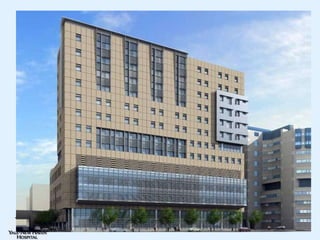
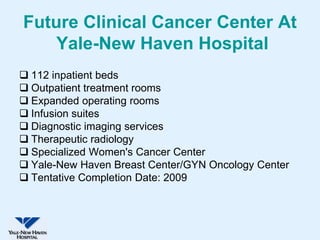
Future Clinical Cancer Center At
    Yale-New Haven Hospital
 112 inpatient beds
 Outpatient treatment rooms
 Expanded operating rooms
 Infusion suites
 Diagnostic imaging services
 Therapeutic radiology
 Specialized Women's Cancer Center
 Yale-New Haven Breast Center/GYN Oncology Center
 Tentative Completion Date: 2009
Problem
• After the events of 9/11, hospital realized that
  there needed to be redundant data centers with
  the ability to provide “zero” downtime.
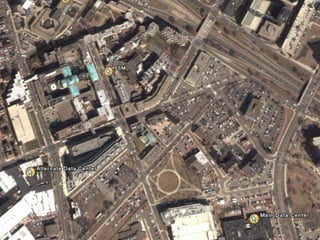
• Implemented SCM with server clusters and EMC
  SAN situated in data centers on opposite ends
  of the hospital campus.
Goals
•   Provide 24X7X365 uptime
•   Minimize downtime
•   Faster recovery in DR situation
•   Database must be consistent
     – Or it won’t come up

Challenges
• Build a redundant System over 2 KM apart Data centers
• Overcome the limitations of Clustering solutions
• Design a system for both redundancy and DR solution
YNHH Production Environment
• SCM 4.5 SP3 RU3 Migrating to SCM4.5 with
 SMM-10/03/06
  –   Total Users Defined – 10,000
  –   Users logged on at peak hours ~450
  –   SCM Reports, HL7 Interfaces,CDS,Multum
  –   No CDR
  –   Total disk for data 700GB (all servers)
  –   Total disk for Archive 500 GB
YNHH Production Environment
• MS SQL Server
  – SQL Server 2000 EE Build 2195: SP 4
  – Master and Enterprise on their own Servers and both
    clustered
  – MSCS and EMC SRDF/CE used as Clustering
    solution
• OS and Hardware
  – Window 2000 Advance Server SP4
  – Local SCSI and EMC Disks on Symmetrix
YNHH Production Environment
– Distributed SCM Environment
  • Master Server (MSCS Cluster using EMC
    SRDF/CE) ~ 125 GB DB
  • Enterprise Server (MSCS+EMC SRDF/CE)
  • HL7 Server (MSCS+EMC SRDF/CE)
  • Reports Server (MSCS+EMC SRDF/CE)
  • CDS Server (MSCS+EMC SRDF/CE)
  • Multum Server (MSCS+EMC SRDF/CE)
  • Compaq Servers - DL760G2,DL380G3,DL560
  • 2-8 CPUs, 3-8 GB RAM
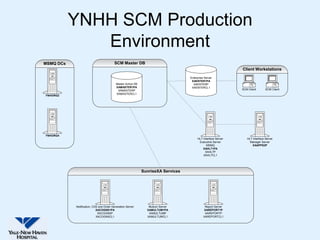
YNHH SCM Production
              Environment
MSMQ DCs                                SCM Master DB
                                                                                                              Client Workstations
                                                                                  Enterprise Server
                                                                                   XAENTER1PA
                                          Master Active DB                          XAENTERP
                                          XAMASTER1PA                              XAENTERCL1
                                           XAMASTERP                                                          SCM Client       SCM Client
                                          XAMASTERCL1
YNHORG2


YNHORG4
                                                                                       HL7 Interface Server      HL7 Interface Server
                                                                                        Executive Server           Manager Server
                                                                                              MSMQ                   XAAPPS2P
                                                                                           XAHL71PA
                                                                                             XAHL7P
                                                                                           XAHL7CL1


                                                             SunriseXA Services


           Notification, CDS and Order Generation Server        Multum Server                Report Server
                           XACOGNS1PA                          XAMULTUM1PA                  XAREPORT1P
                            XACOGNSP                            XAMULTUMP                    XAREPORTP
                           XACOGNSCL1                          XAMULTUMCL1                  XAREPORTCL1
Solutions/Tools
• Disaster Restart
• Microsoft Cluster Service (MSCS)
• EMC SRDF/CE
Disaster Recovery VS. Disaster
             Restart
• Disaster Recovery
  –   DR process restores database objects to last good backup
  –   Recovery process restores and recovers data
  –   Difficult to coordinate recoveries across database systems
  –   Long restart time and data loss could be high

• Disaster Restart
  –   Disaster Restart is inherent in all DBMS
  –   Remote disaster restart possible using remote mirroring (SRDF)
  –   Remote restart has no formal recovery
  –   Remote disaster similar to local system power failure
  –   Short restart time and low data loss
Microsoft Cluster Service (MSCS)
• MSCS is clustering extension to Windows Server
  Enterprise and Datacenter
• MSCS is a loosely coupled cluster system
• Provides H/W and OS redundancy, no disk redundancy
• On a failure it fails to the other node along with disks and
  resources
• Failover can occur due to manual failover, H/W failure or
  application failure.
• Relatively quicker uptime in event of failure
• MSCS provides improved availability,increased
  scalability, simplify management of groups of systems
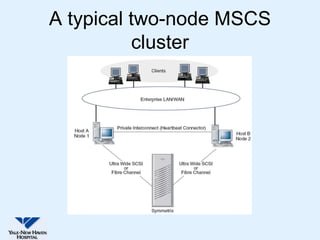
A typical two-node MSCS
          cluster
Limitations of MSCS
• With SCSI, all servers must be within 40 meters of one
  other
• Each must be less than 20 meters from the storage
• With Fiber Channel connections this distance can be
  increased
• Does not provide disk redundancy
• It is not a fault tolerant closely coupled system
• Not a solution for disaster recovery
SRDF
• Symmetrix Remote Data Facility/ Cluster Enabler is a
  disaster restart able business continuance solution
  based on Symmetrix from EMC corporation
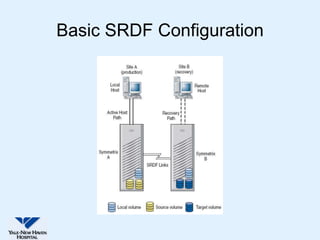
• SRDF is a configuration of multiple Symmetrix arrays
• SRDF duplicates data from production (source) site to a
  secondary recovery (target) site transparently to
  users, applications, databases and host processors
• If the primary site fails, data in the secondary site is
  current up to the I/O.
• Used for disaster recovery, remote back up, data center
  migration, datacenter decision solutions
Basic SRDF Configuration
SRDF/CE Overview
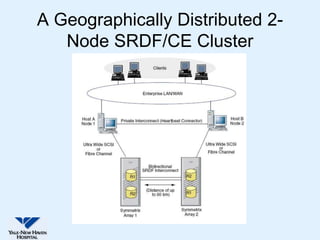
• Software extension for MSCS
• Cluster nodes can be geographically separated by
  distances of up to 60 KM
• provides fail over for MSCS-handled failures as well as
  site disasters, Symmetrix failures or Total
  Communication failures (IP + SRDF links lost).
• Up to 64 MSCS clusters per Symmetrix pair
• Protects data from following types of failure:
   – Storage failures
   – System failures
   – Site failures
A Geographically Distributed 2-
   Node SRDF/CE Cluster
SRDF/CE modes of operation
• Active/Passive
   – Cluster of 2 nodes or more
   – Processing is done on one node (active node)
   – Processing is picked up by a remaining node (or
     nodes) only when the active node fails
   – Half of the H/W is normally idle.
   – On failure the application restarts with full
     performance
• Active/Active
   – Cluster of 2 nodes or more
   – All nodes run application software.
• When a node fails, work is transferred to a remaining
  node (or nodes)
• The node that picks up, processes load of both systems
• Extra load may cause performance degradation

Other Generic type of Clusters:

• Shared-nothing: No common Cluster resources shared
                  between clusters.
• Shared-something: Some resource in each cluster node.
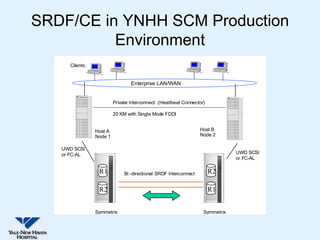
SRDF/CE in YNHH SCM Production
          Environment
      Clients:


                                  Enterprise LAN/WAN


                          Private Interconnect (Heartbeat Connector)

                          20 KM with Single Mode FDDI


                 Host A                                            Host B
                 Node 1                                            Node 2

   UWD SCSI
   or FC-AL                                                                     UWD SCSI
                                                                                or FC-AL

                  R1           Bi -directional SRDF Interconnect       R2

                  R2                                                   R1


                 Symmetrix                                          Symmetrix
SRDF/CE Over MSCS
• SRDF/CE protects against more failure scenarios than
  MSCS can.
• It overcomes the distance limitations of MSCS
• Cluster nodes can be geographically separated by
  distances of up to 60 KM (network round trip latency of
  less than 300 ms)
• An ideal solution for dealing with disaster
• Critical information available in minutes
• System restart not recovery when disaster happens
SRDF/CE and MSCS
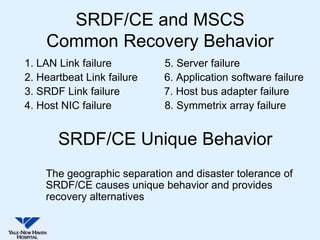
    Common Recovery Behavior
1. LAN Link failure         5. Server failure
2. Heartbeat Link failure   6. Application software failure
3. SRDF Link failure        7. Host bus adapter failure
4. Host NIC failure         8. Symmetrix array failure


       SRDF/CE Unique Behavior
    The geographic separation and disaster tolerance of
    SRDF/CE causes unique behavior and provides
    recovery alternatives
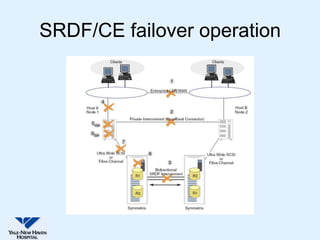
SRDF/CE failover operation
Complete Site Failure and
               Recovery
• Site (Server and Symmetrix) failure (5+8)
   – Site failure occurs when both the Server and Symmetrix fail from
     natural disaster and human error
• Total Communication Failure(1+2+3) - Split-Brain ?
   – Occurs when all communication between node1 and node2 is
     lost
   – In this type of failure, both nodes remain operational and is
     referred to as split-brain
   – Is a potential cause of logical data corruption as each side
     assumes the other side is dead and begin processing new
     transactions against their copy of data
   – Two separate and irreconcilable copies of data are created
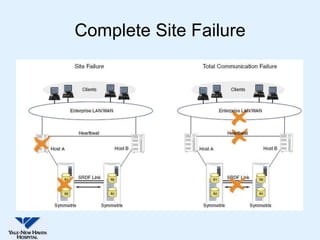
Complete Site Failure
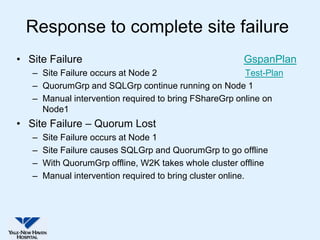
Response to complete site failure
• Site Failure                                          GspanPlan
   – Site Failure occurs at Node 2                     Test-Plan
   – QuorumGrp and SQLGrp continue running on Node 1
   – Manual intervention required to bring FShareGrp online on
     Node1
• Site Failure – Quorum Lost
   –   Site Failure occurs at Node 1
   –   Site Failure causes SQLGrp and QuorumGrp to go offline
   –   With QuorumGrp offline, W2K takes whole cluster offline
   –   Manual intervention required to bring cluster online.
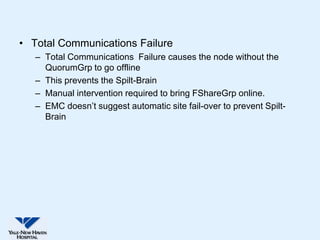
• Total Communications Failure
   – Total Communications Failure causes the node without the
     QuorumGrp to go offline
   – This prevents the Spilt-Brain
   – Manual intervention required to bring FShareGrp online.
   – EMC doesn’t suggest automatic site fail-over to prevent Spilt-
     Brain
Benefits
• Disaster recovery solution
• Disaster restart provides short restart time and low data
  loss
• Ensures data integrity
• SRDF/CE overcomes limitations in traditional cluster
  solutions like MSCS
Disadvantages
•   Cost
•   Complex Setup
•   Lots of Disks
•   Fail-back needs to be planned, takes longer than failover
•   Synchronous SRDF Disaster Restart
    – Data must be written to both Symmetrix
    – Consistent, reliable data
    – More I/O over head
• Asynchronous SRDF Disaster Restart
    – Data is written asynchronously to secondary Symmetrix
    – May incur data loss
    – Faster I/O
• Both sites in the same city, prone to regional disaster
Conclusions
• In our DR test following failure scenarios were tested:
   –   Server failure
   –   O/S Failure
   –   HBA/Channel failure
   –   Application failure
   –   Public LAN failure
   –   Private LAN failure
   –   Complete IP communication failure (public LAN and private LAN)
• All tests were passed
• We have achieved high uptime (non-scheduled outages)
  of almost 100% in last 3 years
• 2 unplanned fail overs so far due to windows fluctuation
References
• EMC SRDF/Cluster Enabler for MCSC v2.1 Product
  Guide P/N 300-001-286 REV A02 by Eclipsys
  Corporation, Hopkinton, MA 01748-9103, 2006
• GeopSpan Implementation by John Toner, EMC
  Corporation, 2003


           Contact Information
Ziaul Mannan : Ziaul.Mannan@ynhh.org
Howard Goldberg: Howard.Goldberg@ynhh.org
THANK YOU !


 Questions?

Tackling Disaster in a SCM Environment

  • 1.
    Tackling Disaster ina Sunrise Clinical Manager Environment … Disaster Restart OR Disaster Recovery? Ziaul Mannan -Sr. Technical DBA Howard Goldberg -Director, Clinical Systems and Support
  • 2.
    Yale-New Haven Hospital New Haven, Connecticut  944 Bed Tertiary Teaching Facility  2600 Medical Staff  7550 Employees  100% CPOE  Average 350,000 orders monthly  Average Daily Census is 724  7 Time “Most Wired” and 3 Time “Most Wireless” Hospital by Hospitals and Health Networks
  • 4.
    Future Clinical CancerCenter At Yale-New Haven Hospital  112 inpatient beds  Outpatient treatment rooms  Expanded operating rooms  Infusion suites  Diagnostic imaging services  Therapeutic radiology  Specialized Women's Cancer Center  Yale-New Haven Breast Center/GYN Oncology Center  Tentative Completion Date: 2009
  • 5.
    Problem • After theevents of 9/11, hospital realized that there needed to be redundant data centers with the ability to provide “zero” downtime. • Implemented SCM with server clusters and EMC SAN situated in data centers on opposite ends of the hospital campus.
  • 7.
    Goals • Provide 24X7X365 uptime • Minimize downtime • Faster recovery in DR situation • Database must be consistent – Or it won’t come up Challenges • Build a redundant System over 2 KM apart Data centers • Overcome the limitations of Clustering solutions • Design a system for both redundancy and DR solution
  • 8.
    YNHH Production Environment •SCM 4.5 SP3 RU3 Migrating to SCM4.5 with SMM-10/03/06 – Total Users Defined – 10,000 – Users logged on at peak hours ~450 – SCM Reports, HL7 Interfaces,CDS,Multum – No CDR – Total disk for data 700GB (all servers) – Total disk for Archive 500 GB
  • 9.
    YNHH Production Environment •MS SQL Server – SQL Server 2000 EE Build 2195: SP 4 – Master and Enterprise on their own Servers and both clustered – MSCS and EMC SRDF/CE used as Clustering solution • OS and Hardware – Window 2000 Advance Server SP4 – Local SCSI and EMC Disks on Symmetrix
  • 10.
    YNHH Production Environment –Distributed SCM Environment • Master Server (MSCS Cluster using EMC SRDF/CE) ~ 125 GB DB • Enterprise Server (MSCS+EMC SRDF/CE) • HL7 Server (MSCS+EMC SRDF/CE) • Reports Server (MSCS+EMC SRDF/CE) • CDS Server (MSCS+EMC SRDF/CE) • Multum Server (MSCS+EMC SRDF/CE) • Compaq Servers - DL760G2,DL380G3,DL560 • 2-8 CPUs, 3-8 GB RAM
  • 11.
    YNHH SCM Production Environment MSMQ DCs SCM Master DB Client Workstations Enterprise Server XAENTER1PA Master Active DB XAENTERP XAMASTER1PA XAENTERCL1 XAMASTERP SCM Client SCM Client XAMASTERCL1 YNHORG2 YNHORG4 HL7 Interface Server HL7 Interface Server Executive Server Manager Server MSMQ XAAPPS2P XAHL71PA XAHL7P XAHL7CL1 SunriseXA Services Notification, CDS and Order Generation Server Multum Server Report Server XACOGNS1PA XAMULTUM1PA XAREPORT1P XACOGNSP XAMULTUMP XAREPORTP XACOGNSCL1 XAMULTUMCL1 XAREPORTCL1
  • 12.
    Solutions/Tools • Disaster Restart •Microsoft Cluster Service (MSCS) • EMC SRDF/CE
  • 13.
    Disaster Recovery VS.Disaster Restart • Disaster Recovery – DR process restores database objects to last good backup – Recovery process restores and recovers data – Difficult to coordinate recoveries across database systems – Long restart time and data loss could be high • Disaster Restart – Disaster Restart is inherent in all DBMS – Remote disaster restart possible using remote mirroring (SRDF) – Remote restart has no formal recovery – Remote disaster similar to local system power failure – Short restart time and low data loss
  • 14.
    Microsoft Cluster Service(MSCS) • MSCS is clustering extension to Windows Server Enterprise and Datacenter • MSCS is a loosely coupled cluster system • Provides H/W and OS redundancy, no disk redundancy • On a failure it fails to the other node along with disks and resources • Failover can occur due to manual failover, H/W failure or application failure. • Relatively quicker uptime in event of failure • MSCS provides improved availability,increased scalability, simplify management of groups of systems
  • 15.
    A typical two-nodeMSCS cluster
  • 16.
    Limitations of MSCS •With SCSI, all servers must be within 40 meters of one other • Each must be less than 20 meters from the storage • With Fiber Channel connections this distance can be increased • Does not provide disk redundancy • It is not a fault tolerant closely coupled system • Not a solution for disaster recovery
  • 17.
    SRDF • Symmetrix RemoteData Facility/ Cluster Enabler is a disaster restart able business continuance solution based on Symmetrix from EMC corporation • SRDF is a configuration of multiple Symmetrix arrays • SRDF duplicates data from production (source) site to a secondary recovery (target) site transparently to users, applications, databases and host processors • If the primary site fails, data in the secondary site is current up to the I/O. • Used for disaster recovery, remote back up, data center migration, datacenter decision solutions
  • 18.
  • 19.
    SRDF/CE Overview • Softwareextension for MSCS • Cluster nodes can be geographically separated by distances of up to 60 KM • provides fail over for MSCS-handled failures as well as site disasters, Symmetrix failures or Total Communication failures (IP + SRDF links lost). • Up to 64 MSCS clusters per Symmetrix pair • Protects data from following types of failure: – Storage failures – System failures – Site failures
  • 20.
    A Geographically Distributed2- Node SRDF/CE Cluster
  • 21.
    SRDF/CE modes ofoperation • Active/Passive – Cluster of 2 nodes or more – Processing is done on one node (active node) – Processing is picked up by a remaining node (or nodes) only when the active node fails – Half of the H/W is normally idle. – On failure the application restarts with full performance • Active/Active – Cluster of 2 nodes or more – All nodes run application software.
  • 22.
    • When anode fails, work is transferred to a remaining node (or nodes) • The node that picks up, processes load of both systems • Extra load may cause performance degradation Other Generic type of Clusters: • Shared-nothing: No common Cluster resources shared between clusters. • Shared-something: Some resource in each cluster node.
  • 23.
    SRDF/CE in YNHHSCM Production Environment Clients: Enterprise LAN/WAN Private Interconnect (Heartbeat Connector) 20 KM with Single Mode FDDI Host A Host B Node 1 Node 2 UWD SCSI or FC-AL UWD SCSI or FC-AL R1 Bi -directional SRDF Interconnect R2 R2 R1 Symmetrix Symmetrix
  • 24.
    SRDF/CE Over MSCS •SRDF/CE protects against more failure scenarios than MSCS can. • It overcomes the distance limitations of MSCS • Cluster nodes can be geographically separated by distances of up to 60 KM (network round trip latency of less than 300 ms) • An ideal solution for dealing with disaster • Critical information available in minutes • System restart not recovery when disaster happens
  • 25.
    SRDF/CE and MSCS Common Recovery Behavior 1. LAN Link failure 5. Server failure 2. Heartbeat Link failure 6. Application software failure 3. SRDF Link failure 7. Host bus adapter failure 4. Host NIC failure 8. Symmetrix array failure SRDF/CE Unique Behavior The geographic separation and disaster tolerance of SRDF/CE causes unique behavior and provides recovery alternatives
  • 26.
  • 27.
    Complete Site Failureand Recovery • Site (Server and Symmetrix) failure (5+8) – Site failure occurs when both the Server and Symmetrix fail from natural disaster and human error • Total Communication Failure(1+2+3) - Split-Brain ? – Occurs when all communication between node1 and node2 is lost – In this type of failure, both nodes remain operational and is referred to as split-brain – Is a potential cause of logical data corruption as each side assumes the other side is dead and begin processing new transactions against their copy of data – Two separate and irreconcilable copies of data are created
  • 28.
  • 29.
    Response to completesite failure • Site Failure GspanPlan – Site Failure occurs at Node 2 Test-Plan – QuorumGrp and SQLGrp continue running on Node 1 – Manual intervention required to bring FShareGrp online on Node1 • Site Failure – Quorum Lost – Site Failure occurs at Node 1 – Site Failure causes SQLGrp and QuorumGrp to go offline – With QuorumGrp offline, W2K takes whole cluster offline – Manual intervention required to bring cluster online.
  • 30.
    • Total CommunicationsFailure – Total Communications Failure causes the node without the QuorumGrp to go offline – This prevents the Spilt-Brain – Manual intervention required to bring FShareGrp online. – EMC doesn’t suggest automatic site fail-over to prevent Spilt- Brain
  • 31.
    Benefits • Disaster recoverysolution • Disaster restart provides short restart time and low data loss • Ensures data integrity • SRDF/CE overcomes limitations in traditional cluster solutions like MSCS
  • 32.
    Disadvantages • Cost • Complex Setup • Lots of Disks • Fail-back needs to be planned, takes longer than failover • Synchronous SRDF Disaster Restart – Data must be written to both Symmetrix – Consistent, reliable data – More I/O over head • Asynchronous SRDF Disaster Restart – Data is written asynchronously to secondary Symmetrix – May incur data loss – Faster I/O • Both sites in the same city, prone to regional disaster
  • 33.
    Conclusions • In ourDR test following failure scenarios were tested: – Server failure – O/S Failure – HBA/Channel failure – Application failure – Public LAN failure – Private LAN failure – Complete IP communication failure (public LAN and private LAN) • All tests were passed • We have achieved high uptime (non-scheduled outages) of almost 100% in last 3 years • 2 unplanned fail overs so far due to windows fluctuation
  • 34.
    References • EMC SRDF/ClusterEnabler for MCSC v2.1 Product Guide P/N 300-001-286 REV A02 by Eclipsys Corporation, Hopkinton, MA 01748-9103, 2006 • GeopSpan Implementation by John Toner, EMC Corporation, 2003 Contact Information Ziaul Mannan : Ziaul.Mannan@ynhh.org Howard Goldberg: Howard.Goldberg@ynhh.org
  • 35.
    THANK YOU ! Questions?