Dr. Brij Kishore Prasad
Ph.D.
LNIPE, Gwalior (M.P.)
email:
kishore_brij@yahoo.com / brijhockey@gmail.com
M: 09300061055
Thomas Reuters ID: B-7267-2015
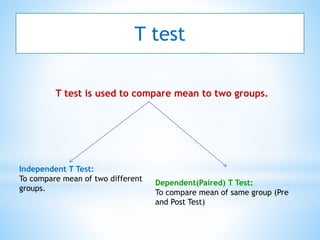
T test is used to compare mean to two groups.
T test
Independent T Test:
To compare mean of two different
groups.
Dependent(Paired) T Test:
To compare mean of same group (Pre
and Post Test)
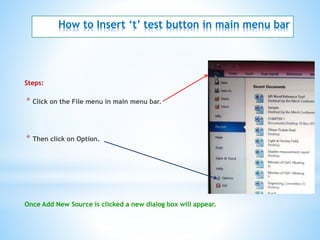
How to Insert ‘t’ test button in main menu bar
Steps:
* Click on the File menu in main menu bar.
* Then click on Option.
Once Add New Source is clicked a new dialog box will appear.
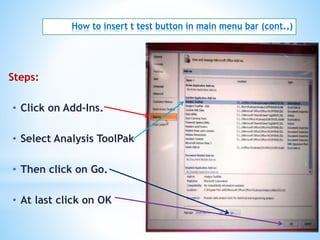
How to insert t test button in main menu bar (cont.,)
Steps:
• Click on Add-Ins.
• Select Analysis ToolPak
• Then click on Go.
• At last click on OK
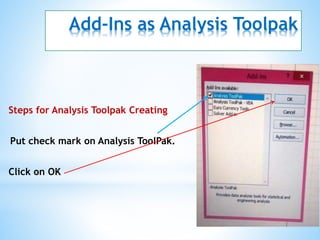
Add-Ins as Analysis Toolpak
Steps for Analysis Toolpak Creating
Put check mark on Analysis ToolPak.
Click on OK
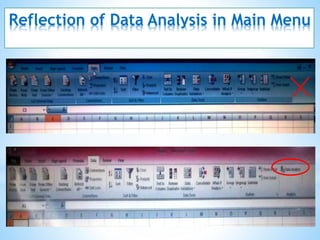
Reflection of Data Analysis in Main Menu
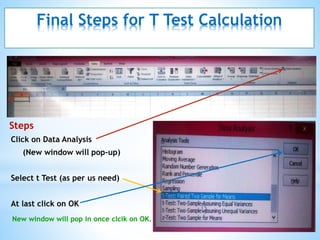
Final Steps for T Test Calculation
Steps
Click on Data Analysis
(New window will pop-up)
Select t Test (as per us need)
At last click on OK
New window will pop in once clcik on OK.
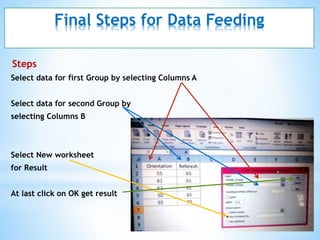
Final Steps for Data Feeding
Steps
Select data for first Group by selecting Columns A
Select data for second Group by
selecting Columns B
Select New worksheet
for Result
At last click on OK get result
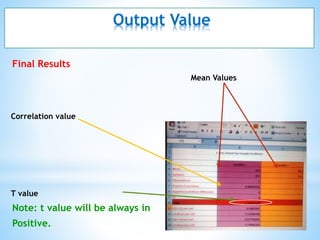
Output Value
Final Results
Mean Values
Correlation value
T value
Note: t value will be always in
Positive.
Thank you
Dr. Brij Kishore Prasad 10/4/2016

T ratio using MS Excel

  • 1.
    Dr. Brij KishorePrasad Ph.D. LNIPE, Gwalior (M.P.) email: kishore_brij@yahoo.com / brijhockey@gmail.com M: 09300061055 Thomas Reuters ID: B-7267-2015
  • 2.
    T test isused to compare mean to two groups. T test Independent T Test: To compare mean of two different groups. Dependent(Paired) T Test: To compare mean of same group (Pre and Post Test)
  • 3.
    How to Insert‘t’ test button in main menu bar Steps: * Click on the File menu in main menu bar. * Then click on Option. Once Add New Source is clicked a new dialog box will appear.
  • 4.
    How to insertt test button in main menu bar (cont.,) Steps: • Click on Add-Ins. • Select Analysis ToolPak • Then click on Go. • At last click on OK
  • 5.
    Add-Ins as AnalysisToolpak Steps for Analysis Toolpak Creating Put check mark on Analysis ToolPak. Click on OK
  • 6.
    Reflection of DataAnalysis in Main Menu
  • 7.
    Final Steps forT Test Calculation Steps Click on Data Analysis (New window will pop-up) Select t Test (as per us need) At last click on OK New window will pop in once clcik on OK.
  • 8.
    Final Steps forData Feeding Steps Select data for first Group by selecting Columns A Select data for second Group by selecting Columns B Select New worksheet for Result At last click on OK get result
  • 9.
    Output Value Final Results MeanValues Correlation value T value Note: t value will be always in Positive.
  • 10.
    Thank you Dr. BrijKishore Prasad 10/4/2016