ystem
Security
S
System
A system refers to a collection of interrelated components
that work together to achieve a specific goal or purpose.
It can be a physical or conceptual entity designed to perform
a set of functions or tasks.
System Security
System security refers to protect a computer system or an information
system from unauthorized access, misuse and damage.
Security is a pre-condition for confidentiality, integrity, and availability of
system resources, data, and services.
Security is one of most important as well as the major task in order to
keep all the threats or other malicious tasks or attacks or program away
from the computer’s software system.
Security threats
1
2
The security of a system can be threatened via two violations:
Threat:
A program that has the potential to cause serious damage to
the system.
Attack:
An attempt to break security and make unauthorized use of an
asset.
Threats
Program Threats:
A program was written by a cracker to break the security or to change
the behavior of a normal process. In other words, if a user made program
to perform some malicious unwanted tasks, then it is known as
Program Threats.
Threats can be classified into the following two categories:
System Threats:
These threats involve the abuse of system services.
They try to create a situation in which operating-system resources
and user files are misused.
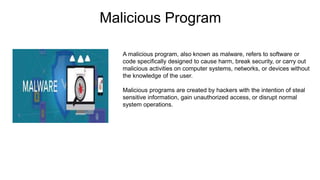
Malicious Program
A malicious program, also known as malware, refers to software or
code specifically designed to cause harm, break security, or carry out
malicious activities on computer systems, networks, or devices without
the knowledge of the user.
Malicious programs are created by hackers with the intention of steal
sensitive information, gain unauthorized access, or disrupt normal
system operations.
Malicious Program Types
Two most common known categories of malicious program
are virus and worms:
Viruses:
These program cannot run independently.
It requires the host program to run and active them.
It attaches itself to formal files or programs and
modify them to include a copy of itself.
Viruses can cause damage, modify or delete files.
Worms:
These program can run independently.
It can replicate themselves and spread across
networks without requiring a host file. Worms can
consume network resources, and infect multiple
systems rapidly.
Malicious Program Types
3
4
5
Trojans:
Trojans are malicious programs that perform some harmless activities
in addition to malicious activities. A Trojan horse is a program with some
known effects and some unexpected effects.
Trojans can perform various malicious actions, such as stealing sensitive
information, creating backdoors for unauthorized access, or launching other malware.
Spyware:
Spyware is a software that is used to monitor and collect
information about a user's activities, such as browsing habits, and passwords.
Spyware can transmit this information to third parties without the user's
knowledge or consent.
Adware:
This is the Malware that displays unwanted and intrusive advertisements on a
user's system, often bundled with software installations. Adware can track user
behavior and generate revenue for the attacker through advertising.
Worms
A worm virus refers to a malicious program that replicates itself,
automatically spreading through a network.
In this definition of computer worms, the worm virus exploits
vulnerabilities in your security software to steal sensitive information,
install backdoors that can be used to access the system, corrupt files,
and do other kinds of harm.
A worm is different from a virus, however, because a worm can operate
on its own while a virus needs a host computer.
Worms Types
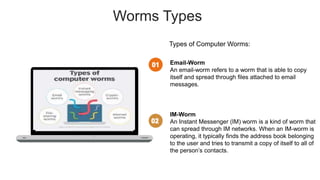
Types of Computer Worms:
Email-Worm
An email-worm refers to a worm that is able to copy
itself and spread through files attached to email
messages.
IM-Worm
An Instant Messenger (IM) worm is a kind of worm that
can spread through IM networks. When an IM-worm is
operating, it typically finds the address book belonging
to the user and tries to transmit a copy of itself to all of
the person’s contacts.
Worms Types
IRC-Worm
An IRC-worm makes use of Internet Relay Chat (IRC)
networks to send itself over to other host machines.
An IRC-worm drops a script into the IRC’s client
directory within the machine it infects.
Net-Worm
A net-worm refers to a kind of worm that can find new
hosts by using shares made over a network.
This is done using a server or hard drive that multiple
computers access via a local-area network (LAN).
Worms Types
P2P-Worm
A P2P-worm is spread through peer-to-peer (P2P)
networks. It uses the P2P connections to send copies
of itself to users.
Virus
Computer virus refers to a program which damages computer systems
and/or destroys or erases data files. A computer virus is a malicious
program that self-replicates by copying itself to another program.
In other words, the computer virus spreads by itself into other executable
code or documents. The purpose of creating a computer virus is to gain
admin control and steal user sensitive data.
Hackers design computer viruses and shoot on online users by
cheating them.
Symptoms
Letter looks like they are falling to
the bottom of the screen.
The computer system becomes slow.
The size of available free memory
reduces.
The hard disk runs out of space.
The computer does not boot.
Components of a Virus
1
3
Infection Mechanism:
Viruses have a mechanism to infect host files or
programs. They can attach themselves to executable
files, scripts, or other areas of the system.
Trigger:
Viruses have a trigger condition that determines when the
malicious code should execute. This trigger can be based
on a specific date, user action, system event, or other
conditions.
2
Payload:
The payload of a virus refers to the malicious code or
actions it performs on an infected system. Including
damaging files, stealing information, displaying messages,
or creating backdoors for unauthorized access.
Virus Types
Types of Computer Virus:
Executable File Infector –
These are the executable (.COM or .EXE execution
starts at first instruction). Propagated by attaching
itself to particular file or program. Generally resides
at the start (prepending) or at the end (appending)
of a file.
Boot Sector –
Spread with infected floppy or pen drives used to boot
the computers. During system boot, boot sector virus is
loaded into main memory and destroys data stored in
hard disk, e.g. Polyboot, Disk killer, Stone, AntiEXE.
Virus Types
Polymorphic –
Changes itself with each infection and creates multiple
copies. Multipartite: use more than one propagation
method. Difficult for antivirus to detect this virus.
Three major parts: Encrypted virus body, Decryption
routine varies from infection to infection, and Mutation
engine.
Overwrite viruses -
Some viruses are designed
specifically to destroy a file or application's data. After
infecting a system, an overwrite virus begins overwriting
files with its own code. These viruses can target specific
files or applications or systematically overwrite all files
on an infected device.
Virus Types
Macro –
Associated with application software like word and excel.
When opening the infected document, macro virus is
loaded into main memory and destroys the data stored in
hard disk.
Hybrids –
Features of various viruses are combined,
e.g. Happy99 (Email virus).
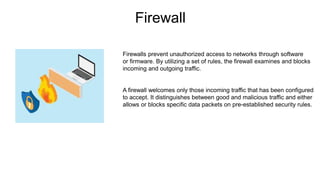
Firewall
Firewalls prevent unauthorized access to networks through software
or firmware. By utilizing a set of rules, the firewall examines and blocks
incoming and outgoing traffic.
A firewall welcomes only those incoming traffic that has been configured
to accept. It distinguishes between good and malicious traffic and either
allows or blocks specific data packets on pre-established security rules.
How does it works?
For example, the image depicted below shows how a firewall allows good traffic to pass to the user’s private
network.
Fig: Firewall allowing Good Traffic
How does it works?
However, in the example below, the firewall blocks malicious traffic from entering the private network, thereby
protecting the user’s network from being susceptible to a cyberattack.
Fig: Firewall blocking Bad Traffic
Firewall Types
1
2
There are different types of firewalls:
Packet Filtering Firewall:
Packet filtering firewalls examine individual packets of
network traffic based on predefined rules.
Circuit-Level Firewall:
Circuit-level firewalls operate at the transport layer of the
network stack and monitor network connections, rather
than individual packets.
Application Layer Firewall:
Application layer firewalls operate at the highest layer of the
network stack and can inspect and filter traffic based on
application-specific protocols.
3
Packet Filtering Firewall
Advantages:
Simple and efficient method for filtering traffic.
Low impact on network performance.
Can filter traffic based on source/destination IP
addresses, port numbers, and protocols.
Packet Filtering Firewall
Disadvantages:
Limited ability to inspect the contents of packets.
Vulnerable to certain types of attacks, such as IP
spoofing or tunneling through allowed ports.
Circuit level Firewall
Advantages:
Can authenticate and authorize connections based
on session-level information.
Offers enhanced security compared to packet filtering
by ensuring that connections are legitimate and valid.
Provides better protection against attacks targeting the
transport layer.
Circuit level Firewall
Disadvantages:
Lacks the ability to inspect packet contents.
Does not offer granular control over specific application
protocols.
Application Layer Firewall
Advantages:
Provides granular control and deep inspection of
application protocols and data.
Can detect and block specific application-level threats.
Offers advanced security features, such as content
filtering, intrusion prevention, and data loss prevention.
Application Layer Firewall
Disadvantages:
Higher resource requirements and potential impact on
network performance due to deep packet inspection.
May require more configuration and maintenance
compared to lower-level firewalls.
Susmita Rani Saha
ID-B180305047
CSE,JnU
THANK YOU

System_security.pptx

  • 1.
  • 2.
    System A system refersto a collection of interrelated components that work together to achieve a specific goal or purpose. It can be a physical or conceptual entity designed to perform a set of functions or tasks.
  • 3.
    System Security System securityrefers to protect a computer system or an information system from unauthorized access, misuse and damage. Security is a pre-condition for confidentiality, integrity, and availability of system resources, data, and services. Security is one of most important as well as the major task in order to keep all the threats or other malicious tasks or attacks or program away from the computer’s software system.
  • 4.
    Security threats 1 2 The securityof a system can be threatened via two violations: Threat: A program that has the potential to cause serious damage to the system. Attack: An attempt to break security and make unauthorized use of an asset.
  • 5.
    Threats Program Threats: A programwas written by a cracker to break the security or to change the behavior of a normal process. In other words, if a user made program to perform some malicious unwanted tasks, then it is known as Program Threats. Threats can be classified into the following two categories: System Threats: These threats involve the abuse of system services. They try to create a situation in which operating-system resources and user files are misused.
  • 6.
    Malicious Program A maliciousprogram, also known as malware, refers to software or code specifically designed to cause harm, break security, or carry out malicious activities on computer systems, networks, or devices without the knowledge of the user. Malicious programs are created by hackers with the intention of steal sensitive information, gain unauthorized access, or disrupt normal system operations.
  • 7.
    Malicious Program Types Twomost common known categories of malicious program are virus and worms: Viruses: These program cannot run independently. It requires the host program to run and active them. It attaches itself to formal files or programs and modify them to include a copy of itself. Viruses can cause damage, modify or delete files. Worms: These program can run independently. It can replicate themselves and spread across networks without requiring a host file. Worms can consume network resources, and infect multiple systems rapidly.
  • 8.
    Malicious Program Types 3 4 5 Trojans: Trojansare malicious programs that perform some harmless activities in addition to malicious activities. A Trojan horse is a program with some known effects and some unexpected effects. Trojans can perform various malicious actions, such as stealing sensitive information, creating backdoors for unauthorized access, or launching other malware. Spyware: Spyware is a software that is used to monitor and collect information about a user's activities, such as browsing habits, and passwords. Spyware can transmit this information to third parties without the user's knowledge or consent. Adware: This is the Malware that displays unwanted and intrusive advertisements on a user's system, often bundled with software installations. Adware can track user behavior and generate revenue for the attacker through advertising.
  • 9.
    Worms A worm virusrefers to a malicious program that replicates itself, automatically spreading through a network. In this definition of computer worms, the worm virus exploits vulnerabilities in your security software to steal sensitive information, install backdoors that can be used to access the system, corrupt files, and do other kinds of harm. A worm is different from a virus, however, because a worm can operate on its own while a virus needs a host computer.
  • 10.
    Worms Types Types ofComputer Worms: Email-Worm An email-worm refers to a worm that is able to copy itself and spread through files attached to email messages. IM-Worm An Instant Messenger (IM) worm is a kind of worm that can spread through IM networks. When an IM-worm is operating, it typically finds the address book belonging to the user and tries to transmit a copy of itself to all of the person’s contacts.
  • 11.
    Worms Types IRC-Worm An IRC-wormmakes use of Internet Relay Chat (IRC) networks to send itself over to other host machines. An IRC-worm drops a script into the IRC’s client directory within the machine it infects. Net-Worm A net-worm refers to a kind of worm that can find new hosts by using shares made over a network. This is done using a server or hard drive that multiple computers access via a local-area network (LAN).
  • 12.
    Worms Types P2P-Worm A P2P-wormis spread through peer-to-peer (P2P) networks. It uses the P2P connections to send copies of itself to users.
  • 13.
    Virus Computer virus refersto a program which damages computer systems and/or destroys or erases data files. A computer virus is a malicious program that self-replicates by copying itself to another program. In other words, the computer virus spreads by itself into other executable code or documents. The purpose of creating a computer virus is to gain admin control and steal user sensitive data. Hackers design computer viruses and shoot on online users by cheating them.
  • 14.
    Symptoms Letter looks likethey are falling to the bottom of the screen. The computer system becomes slow. The size of available free memory reduces. The hard disk runs out of space. The computer does not boot.
  • 15.
    Components of aVirus 1 3 Infection Mechanism: Viruses have a mechanism to infect host files or programs. They can attach themselves to executable files, scripts, or other areas of the system. Trigger: Viruses have a trigger condition that determines when the malicious code should execute. This trigger can be based on a specific date, user action, system event, or other conditions. 2 Payload: The payload of a virus refers to the malicious code or actions it performs on an infected system. Including damaging files, stealing information, displaying messages, or creating backdoors for unauthorized access.
  • 16.
    Virus Types Types ofComputer Virus: Executable File Infector – These are the executable (.COM or .EXE execution starts at first instruction). Propagated by attaching itself to particular file or program. Generally resides at the start (prepending) or at the end (appending) of a file. Boot Sector – Spread with infected floppy or pen drives used to boot the computers. During system boot, boot sector virus is loaded into main memory and destroys data stored in hard disk, e.g. Polyboot, Disk killer, Stone, AntiEXE.
  • 17.
    Virus Types Polymorphic – Changesitself with each infection and creates multiple copies. Multipartite: use more than one propagation method. Difficult for antivirus to detect this virus. Three major parts: Encrypted virus body, Decryption routine varies from infection to infection, and Mutation engine. Overwrite viruses - Some viruses are designed specifically to destroy a file or application's data. After infecting a system, an overwrite virus begins overwriting files with its own code. These viruses can target specific files or applications or systematically overwrite all files on an infected device.
  • 18.
    Virus Types Macro – Associatedwith application software like word and excel. When opening the infected document, macro virus is loaded into main memory and destroys the data stored in hard disk. Hybrids – Features of various viruses are combined, e.g. Happy99 (Email virus).
  • 19.
    Firewall Firewalls prevent unauthorizedaccess to networks through software or firmware. By utilizing a set of rules, the firewall examines and blocks incoming and outgoing traffic. A firewall welcomes only those incoming traffic that has been configured to accept. It distinguishes between good and malicious traffic and either allows or blocks specific data packets on pre-established security rules.
  • 20.
    How does itworks? For example, the image depicted below shows how a firewall allows good traffic to pass to the user’s private network. Fig: Firewall allowing Good Traffic
  • 21.
    How does itworks? However, in the example below, the firewall blocks malicious traffic from entering the private network, thereby protecting the user’s network from being susceptible to a cyberattack. Fig: Firewall blocking Bad Traffic
  • 22.
    Firewall Types 1 2 There aredifferent types of firewalls: Packet Filtering Firewall: Packet filtering firewalls examine individual packets of network traffic based on predefined rules. Circuit-Level Firewall: Circuit-level firewalls operate at the transport layer of the network stack and monitor network connections, rather than individual packets. Application Layer Firewall: Application layer firewalls operate at the highest layer of the network stack and can inspect and filter traffic based on application-specific protocols. 3
  • 23.
    Packet Filtering Firewall Advantages: Simpleand efficient method for filtering traffic. Low impact on network performance. Can filter traffic based on source/destination IP addresses, port numbers, and protocols.
  • 24.
    Packet Filtering Firewall Disadvantages: Limitedability to inspect the contents of packets. Vulnerable to certain types of attacks, such as IP spoofing or tunneling through allowed ports.
  • 25.
    Circuit level Firewall Advantages: Canauthenticate and authorize connections based on session-level information. Offers enhanced security compared to packet filtering by ensuring that connections are legitimate and valid. Provides better protection against attacks targeting the transport layer.
  • 26.
    Circuit level Firewall Disadvantages: Lacksthe ability to inspect packet contents. Does not offer granular control over specific application protocols.
  • 27.
    Application Layer Firewall Advantages: Providesgranular control and deep inspection of application protocols and data. Can detect and block specific application-level threats. Offers advanced security features, such as content filtering, intrusion prevention, and data loss prevention.
  • 28.
    Application Layer Firewall Disadvantages: Higherresource requirements and potential impact on network performance due to deep packet inspection. May require more configuration and maintenance compared to lower-level firewalls.
  • 29.
  • 30.