System
Design
Swipe
Level Up Your Career
ROADMAP FOR
BEGINNERS
2024 EDITION
Swipe
Systems design is the process of defining elements of a
system like modules, architecture, components and their
interfaces and data for a system based on the specified
requirements.
Following are the topics or pre-requisites:
Grasp core computer science concepts like data
structures, algorithms, and operating systems.
Understand different database types (relational vs.
NoSQL) and their functionalities.
Know in detail about the System Design.
Understand why System Design is important in
software development.
SYSTEM DESIGN ROADMAP FOR BEGINNERS
www.scholarhat.com
1What is System Design?
Swipe
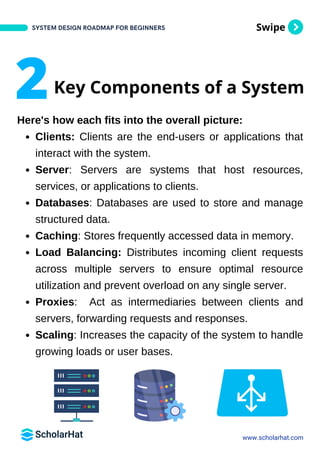
Here's how each fits into the overall picture:
Clients: Clients are the end-users or applications that
interact with the system.
Server: Servers are systems that host resources,
services, or applications to clients.
Databases: Databases are used to store and manage
structured data.
Caching: Stores frequently accessed data in memory.
Load Balancing: Distributes incoming client requests
across multiple servers to ensure optimal resource
utilization and prevent overload on any single server.
Proxies: Act as intermediaries between clients and
servers, forwarding requests and responses.
Scaling: Increases the capacity of the system to handle
growing loads or user bases.
SYSTEM DESIGN ROADMAP FOR BEGINNERS
www.scholarhat.com
Key Components of a System
2
Swipe
Reliability and availability ensures that systems are
dependable and accessible to users.
Here's a roadmap for beginners to understand and
achieve reliability and availability:
Reliability
1.
Availability
2.
MTBF (Mean Time Between Failures)
3.
MTTR (Mean Time To Repair/Recovery)
4.
High Availability Architecture
5.
SLA (Service-Level Argument)
6.
SYSTEM DESIGN ROADMAP FOR BEGINNERS
www.scholarhat.com
3 System Design Basics:
Reliability and Availability
Swipe
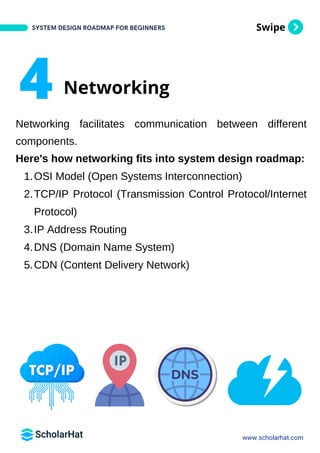
Networking facilitates communication between different
components.
Here's how networking fits into system design roadmap:
OSI Model (Open Systems Interconnection)
1.
TCP/IP Protocol (Transmission Control Protocol/Internet
Protocol)
2.
IP Address Routing
3.
DNS (Domain Name System)
4.
CDN (Content Delivery Network)
5.
SYSTEM DESIGN ROADMAP FOR BEGINNERS
www.scholarhat.com
4 Networking
Swipe
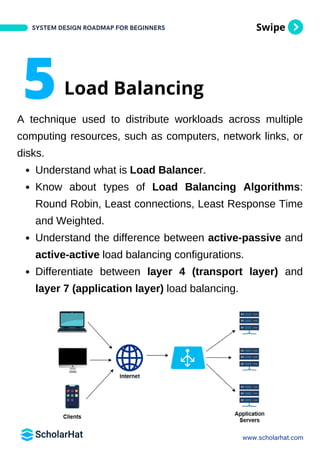
A technique used to distribute workloads across multiple
computing resources, such as computers, network links, or
disks.
Understand what is Load Balancer.
Know about types of Load Balancing Algorithms:
Round Robin, Least connections, Least Response Time
and Weighted.
Understand the difference between active-passive and
active-active load balancing configurations.
Differentiate between layer 4 (transport layer) and
layer 7 (application layer) load balancing.
SYSTEM DESIGN ROADMAP FOR BEGINNERS
www.scholarhat.com
5Load Balancing
Swipe
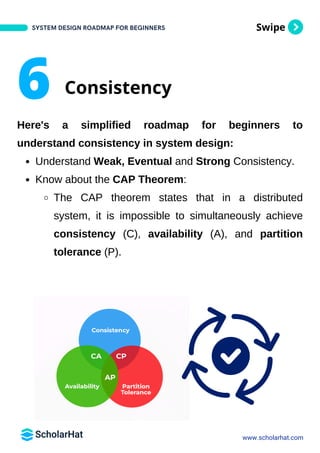
Here's a simplified roadmap for beginners to
understand consistency in system design:
Understand Weak, Eventual and Strong Consistency.
Know about the CAP Theorem:
The CAP theorem states that in a distributed
system, it is impossible to simultaneously achieve
consistency (C), availability (A), and partition
tolerance (P).
SYSTEM DESIGN ROADMAP FOR BEGINNERS
www.scholarhat.com
6 Consistency
Swipe
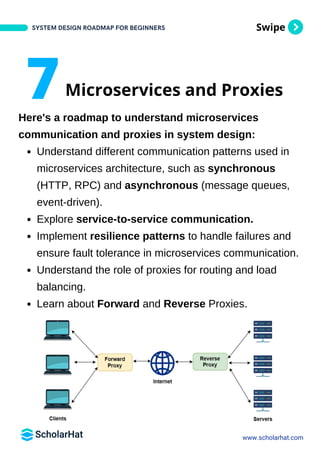
Here's a roadmap to understand microservices
communication and proxies in system design:
Understand different communication patterns used in
microservices architecture, such as synchronous
(HTTP, RPC) and asynchronous (message queues,
event-driven).
Explore service-to-service communication.
Implement resilience patterns to handle failures and
ensure fault tolerance in microservices communication.
Understand the role of proxies for routing and load
balancing.
Learn about Forward and Reverse Proxies.
SYSTEM DESIGN ROADMAP FOR BEGINNERS
www.scholarhat.com
7Microservices and Proxies
Swipe
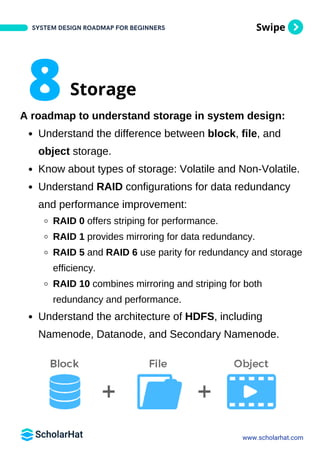
A roadmap to understand storage in system design:
Understand the difference between block, file, and
object storage.
Know about types of storage: Volatile and Non-Volatile.
Understand RAID configurations for data redundancy
and performance improvement:
RAID 0 offers striping for performance.
RAID 1 provides mirroring for data redundancy.
RAID 5 and RAID 6 use parity for redundancy and storage
efficiency.
RAID 10 combines mirroring and striping for both
redundancy and performance.
Understand the architecture of HDFS, including
Namenode, Datanode, and Secondary Namenode.
SYSTEM DESIGN ROADMAP FOR BEGINNERS
www.scholarhat.com
8Storage
Swipe
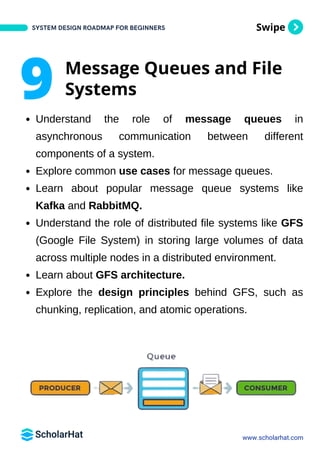
Understand the role of message queues in
asynchronous communication between different
components of a system.
Explore common use cases for message queues.
Learn about popular message queue systems like
Kafka and RabbitMQ.
Understand the role of distributed file systems like GFS
(Google File System) in storing large volumes of data
across multiple nodes in a distributed environment.
Learn about GFS architecture.
Explore the design principles behind GFS, such as
chunking, replication, and atomic operations.
SYSTEM DESIGN ROADMAP FOR BEGINNERS
www.scholarhat.com
9 Message Queues and File
Systems
Swipe
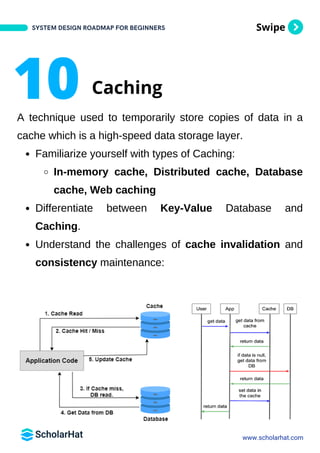
A technique used to temporarily store copies of data in a
cache which is a high-speed data storage layer.
Familiarize yourself with types of Caching:
In-memory cache, Distributed cache, Database
cache, Web caching
Differentiate between Key-Value Database and
Caching.
Understand the challenges of cache invalidation and
consistency maintenance:
SYSTEM DESIGN ROADMAP FOR BEGINNERS
www.scholarhat.com
10 Caching
Swipe
Understand the importance of choosing appropriate
data formats for API contracts - JSON, XML or
Protocol Buffers.
Implement authentication mechanisms to secure API
endpoints and control access to resources - Token-
based, API Keys or OAuth.
Implement rate limiting to prevent abuse and ensure
fair usage of API resources - Throttling, Quotas and
Dynamic Rate Limiting.
SYSTEM DESIGN ROADMAP FOR BEGINNERS
www.scholarhat.com
11API Contracts
Swipe
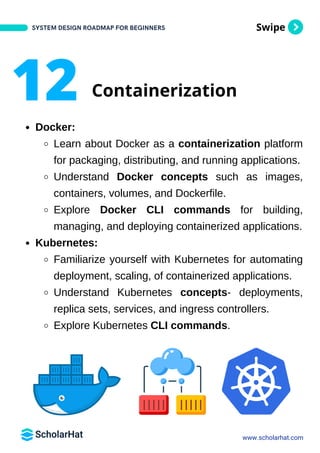
Docker:
Learn about Docker as a containerization platform
for packaging, distributing, and running applications.
Understand Docker concepts such as images,
containers, volumes, and Dockerfile.
Explore Docker CLI commands for building,
managing, and deploying containerized applications.
Kubernetes:
Familiarize yourself with Kubernetes for automating
deployment, scaling, of containerized applications.
Understand Kubernetes concepts- deployments,
replica sets, services, and ingress controllers.
Explore Kubernetes CLI commands.
SYSTEM DESIGN ROADMAP FOR BEGINNERS
www.scholarhat.com
12 Containerization
Swipe
SYSTEM DESIGN ROADMAP FOR BEGINNERS
www.scholarhat.com
13 Build System Design
Skills
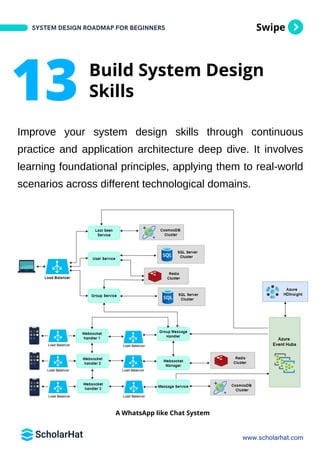
A WhatsApp like Chat System
Improve your system design skills through continuous
practice and application architecture deep dive. It involves
learning foundational principles, applying them to real-world
scenarios across different technological domains.
Swipe
Here are a list of tools to make diagrams for your systems:
Draw.io/Diagrams.net: A free, open-source tool for
creating various diagrams directly in your browser.
Excalidraw.com: An online whiteboard for sketch-style,
collaborative diagramming.
Lucidchart: A user-friendly, web-based diagramming
tool with extensive templates and integration
capabilities.
Microsoft Visio: A professional diagramming tool that
offers detailed and precise diagramming with Microsoft
Office integration.
Canva: Known for graphic design, Canva also provides
simple tools for creating diagrams and flowcharts.
SYSTEM DESIGN ROADMAP FOR BEGINNERS
www.scholarhat.com
14 Tools to Make Diagrams
Swipe
OTT Platform: Build a system to manage and deliver
video content efficiently to users across various devices.
ECommerce Platform: Develop a system to handle
product listings, inventory management, and online
transactions securely.
Social Media Platform: Create a platform for users to
connect, share posts, and interact.
Stock Dashboard: Design a dashboard that displays
real-time data such as stock prices or website traffic.
Taxi System: Construct an application to coordinate
ride-sharing services using real-time geospatial data.
Hotel Booking System: Develop a platform for users to
browse hotel options, make reservations, and manage
bookings with real-time availability updates.
SYSTEM DESIGN ROADMAP FOR BEGINNERS
www.scholarhat.com
15Real-World Projects
Swipe
Step1 - Learn Skills: You can learn System Designing
skill by tutorials on System Design, or through Videos
on YouTube or Videos based courses. For topic
revision and recalling make short notes. You can also
learn Live from Microsoft MVP at ScholarHat.
Step2 - Build Experience: You can build hands-on
experience by building real world applications like
Social Media Platform, Stock Price Monitoring, Fraud
Detection etc.
Step3 - Empower Yourself: Build your strong profile
by mentioning all the above skills with hands-on
experience on projects. Prepare yourself with interview
Q&A about System Design to crack your next job
interview.
SYSTEM DESIGN ROADMAP FOR BEGINNERS
www.scholarhat.com
How to follow this roadmap?
At ScholarHat, we believe mastering a technology
is a three-step process as mentioned below:
Swipe
SYSTEM DESIGN ROADMAP FOR BEGINNERS
www.scholarhat.com
Congrats!
You are just one interview away!
Share with your friend who needs it!
Learn. Build. Empower.
SYSTEM DESIGN ROADMAP FOR BEGINNERS
WAS THIS
HELPFUL?
Love. Like. Comment. Share.

System Designs Roadmap By ScholarHat PDF

  • 1.
    System Design Swipe Level Up YourCareer ROADMAP FOR BEGINNERS 2024 EDITION
  • 2.
    Swipe Systems design isthe process of defining elements of a system like modules, architecture, components and their interfaces and data for a system based on the specified requirements. Following are the topics or pre-requisites: Grasp core computer science concepts like data structures, algorithms, and operating systems. Understand different database types (relational vs. NoSQL) and their functionalities. Know in detail about the System Design. Understand why System Design is important in software development. SYSTEM DESIGN ROADMAP FOR BEGINNERS www.scholarhat.com 1What is System Design?
  • 3.
    Swipe Here's how eachfits into the overall picture: Clients: Clients are the end-users or applications that interact with the system. Server: Servers are systems that host resources, services, or applications to clients. Databases: Databases are used to store and manage structured data. Caching: Stores frequently accessed data in memory. Load Balancing: Distributes incoming client requests across multiple servers to ensure optimal resource utilization and prevent overload on any single server. Proxies: Act as intermediaries between clients and servers, forwarding requests and responses. Scaling: Increases the capacity of the system to handle growing loads or user bases. SYSTEM DESIGN ROADMAP FOR BEGINNERS www.scholarhat.com Key Components of a System 2
  • 4.
    Swipe Reliability and availabilityensures that systems are dependable and accessible to users. Here's a roadmap for beginners to understand and achieve reliability and availability: Reliability 1. Availability 2. MTBF (Mean Time Between Failures) 3. MTTR (Mean Time To Repair/Recovery) 4. High Availability Architecture 5. SLA (Service-Level Argument) 6. SYSTEM DESIGN ROADMAP FOR BEGINNERS www.scholarhat.com 3 System Design Basics: Reliability and Availability
  • 5.
    Swipe Networking facilitates communicationbetween different components. Here's how networking fits into system design roadmap: OSI Model (Open Systems Interconnection) 1. TCP/IP Protocol (Transmission Control Protocol/Internet Protocol) 2. IP Address Routing 3. DNS (Domain Name System) 4. CDN (Content Delivery Network) 5. SYSTEM DESIGN ROADMAP FOR BEGINNERS www.scholarhat.com 4 Networking
  • 6.
    Swipe A technique usedto distribute workloads across multiple computing resources, such as computers, network links, or disks. Understand what is Load Balancer. Know about types of Load Balancing Algorithms: Round Robin, Least connections, Least Response Time and Weighted. Understand the difference between active-passive and active-active load balancing configurations. Differentiate between layer 4 (transport layer) and layer 7 (application layer) load balancing. SYSTEM DESIGN ROADMAP FOR BEGINNERS www.scholarhat.com 5Load Balancing
  • 7.
    Swipe Here's a simplifiedroadmap for beginners to understand consistency in system design: Understand Weak, Eventual and Strong Consistency. Know about the CAP Theorem: The CAP theorem states that in a distributed system, it is impossible to simultaneously achieve consistency (C), availability (A), and partition tolerance (P). SYSTEM DESIGN ROADMAP FOR BEGINNERS www.scholarhat.com 6 Consistency
  • 8.
    Swipe Here's a roadmapto understand microservices communication and proxies in system design: Understand different communication patterns used in microservices architecture, such as synchronous (HTTP, RPC) and asynchronous (message queues, event-driven). Explore service-to-service communication. Implement resilience patterns to handle failures and ensure fault tolerance in microservices communication. Understand the role of proxies for routing and load balancing. Learn about Forward and Reverse Proxies. SYSTEM DESIGN ROADMAP FOR BEGINNERS www.scholarhat.com 7Microservices and Proxies
  • 9.
    Swipe A roadmap tounderstand storage in system design: Understand the difference between block, file, and object storage. Know about types of storage: Volatile and Non-Volatile. Understand RAID configurations for data redundancy and performance improvement: RAID 0 offers striping for performance. RAID 1 provides mirroring for data redundancy. RAID 5 and RAID 6 use parity for redundancy and storage efficiency. RAID 10 combines mirroring and striping for both redundancy and performance. Understand the architecture of HDFS, including Namenode, Datanode, and Secondary Namenode. SYSTEM DESIGN ROADMAP FOR BEGINNERS www.scholarhat.com 8Storage
  • 10.
    Swipe Understand the roleof message queues in asynchronous communication between different components of a system. Explore common use cases for message queues. Learn about popular message queue systems like Kafka and RabbitMQ. Understand the role of distributed file systems like GFS (Google File System) in storing large volumes of data across multiple nodes in a distributed environment. Learn about GFS architecture. Explore the design principles behind GFS, such as chunking, replication, and atomic operations. SYSTEM DESIGN ROADMAP FOR BEGINNERS www.scholarhat.com 9 Message Queues and File Systems
  • 11.
    Swipe A technique usedto temporarily store copies of data in a cache which is a high-speed data storage layer. Familiarize yourself with types of Caching: In-memory cache, Distributed cache, Database cache, Web caching Differentiate between Key-Value Database and Caching. Understand the challenges of cache invalidation and consistency maintenance: SYSTEM DESIGN ROADMAP FOR BEGINNERS www.scholarhat.com 10 Caching
  • 12.
    Swipe Understand the importanceof choosing appropriate data formats for API contracts - JSON, XML or Protocol Buffers. Implement authentication mechanisms to secure API endpoints and control access to resources - Token- based, API Keys or OAuth. Implement rate limiting to prevent abuse and ensure fair usage of API resources - Throttling, Quotas and Dynamic Rate Limiting. SYSTEM DESIGN ROADMAP FOR BEGINNERS www.scholarhat.com 11API Contracts
  • 13.
    Swipe Docker: Learn about Dockeras a containerization platform for packaging, distributing, and running applications. Understand Docker concepts such as images, containers, volumes, and Dockerfile. Explore Docker CLI commands for building, managing, and deploying containerized applications. Kubernetes: Familiarize yourself with Kubernetes for automating deployment, scaling, of containerized applications. Understand Kubernetes concepts- deployments, replica sets, services, and ingress controllers. Explore Kubernetes CLI commands. SYSTEM DESIGN ROADMAP FOR BEGINNERS www.scholarhat.com 12 Containerization
  • 14.
    Swipe SYSTEM DESIGN ROADMAPFOR BEGINNERS www.scholarhat.com 13 Build System Design Skills A WhatsApp like Chat System Improve your system design skills through continuous practice and application architecture deep dive. It involves learning foundational principles, applying them to real-world scenarios across different technological domains.
  • 15.
    Swipe Here are alist of tools to make diagrams for your systems: Draw.io/Diagrams.net: A free, open-source tool for creating various diagrams directly in your browser. Excalidraw.com: An online whiteboard for sketch-style, collaborative diagramming. Lucidchart: A user-friendly, web-based diagramming tool with extensive templates and integration capabilities. Microsoft Visio: A professional diagramming tool that offers detailed and precise diagramming with Microsoft Office integration. Canva: Known for graphic design, Canva also provides simple tools for creating diagrams and flowcharts. SYSTEM DESIGN ROADMAP FOR BEGINNERS www.scholarhat.com 14 Tools to Make Diagrams
  • 16.
    Swipe OTT Platform: Builda system to manage and deliver video content efficiently to users across various devices. ECommerce Platform: Develop a system to handle product listings, inventory management, and online transactions securely. Social Media Platform: Create a platform for users to connect, share posts, and interact. Stock Dashboard: Design a dashboard that displays real-time data such as stock prices or website traffic. Taxi System: Construct an application to coordinate ride-sharing services using real-time geospatial data. Hotel Booking System: Develop a platform for users to browse hotel options, make reservations, and manage bookings with real-time availability updates. SYSTEM DESIGN ROADMAP FOR BEGINNERS www.scholarhat.com 15Real-World Projects
  • 17.
    Swipe Step1 - LearnSkills: You can learn System Designing skill by tutorials on System Design, or through Videos on YouTube or Videos based courses. For topic revision and recalling make short notes. You can also learn Live from Microsoft MVP at ScholarHat. Step2 - Build Experience: You can build hands-on experience by building real world applications like Social Media Platform, Stock Price Monitoring, Fraud Detection etc. Step3 - Empower Yourself: Build your strong profile by mentioning all the above skills with hands-on experience on projects. Prepare yourself with interview Q&A about System Design to crack your next job interview. SYSTEM DESIGN ROADMAP FOR BEGINNERS www.scholarhat.com How to follow this roadmap? At ScholarHat, we believe mastering a technology is a three-step process as mentioned below:
  • 18.
    Swipe SYSTEM DESIGN ROADMAPFOR BEGINNERS www.scholarhat.com Congrats! You are just one interview away!
  • 19.
    Share with yourfriend who needs it! Learn. Build. Empower. SYSTEM DESIGN ROADMAP FOR BEGINNERS WAS THIS HELPFUL? Love. Like. Comment. Share.