CONNECT. TRANSFORM. AUTOMATE.
Synchronizing AutoCAD® Map 3D
Enterprise with ESRI® ArcSDE®
Drew Burgasser, P.E.
Vice-President, CAD Masters, Inc.
Summary
!  Sacramento Area Sewer District (SASD) chose
AutoCAD® Map 3D Enterprise as the front-end
GIS application for creating and editing sewer
assets.
!  However, SASD Enterprise GIS = ESRI® ArcSDE®.
!  And, SASD Asset Management = Maximo.
!  FME Desktop® was chosen as the solution for
synchronizing these disparate systems.
Synchronization Tasks
AutoCAD	
  Map	
  
3D	
  Enterprise	
  
(Oracle	
  DBMS)	
  
ESRI	
  ArcSDE	
  
(Sewer	
  Data)	
  
ESRI	
  ArcSDE	
  
(County	
  Base	
  
Data)	
  
Maximo	
  
Asset	
  
Management	
  
Parcels,Roads, Cities,
etc.
Sewer Data
1 2
3
Synchronization Task 1
!  Synchronize County Base data. Copy Edits
to AutoCAD® Map 3D Enterprise
!  What do we have to work with?
!  We neither know what has changed and
when it has changed
!  Not as critical as sewer data.
!  Full Table Comparison Required
Synchronization Task 1
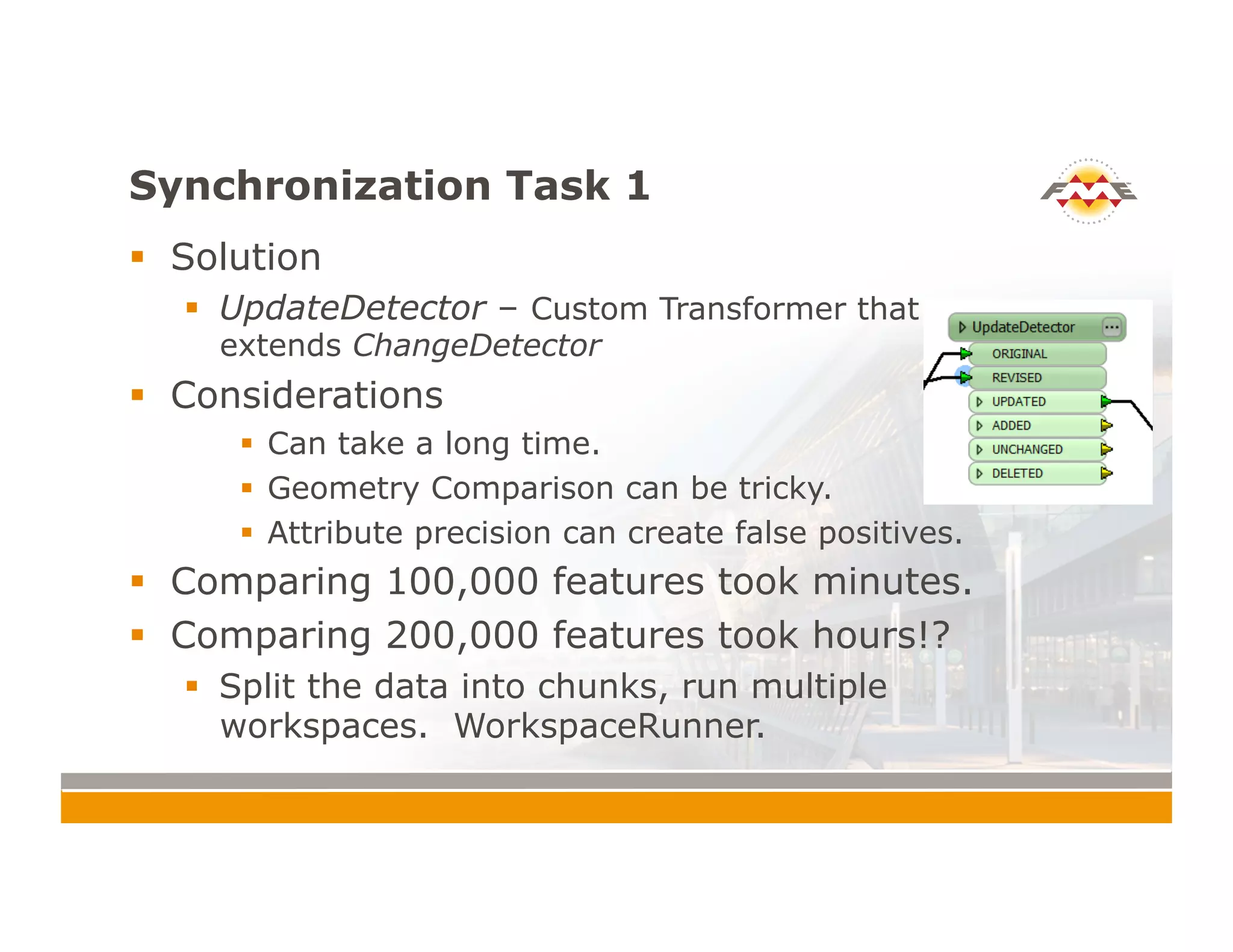
!  Solution
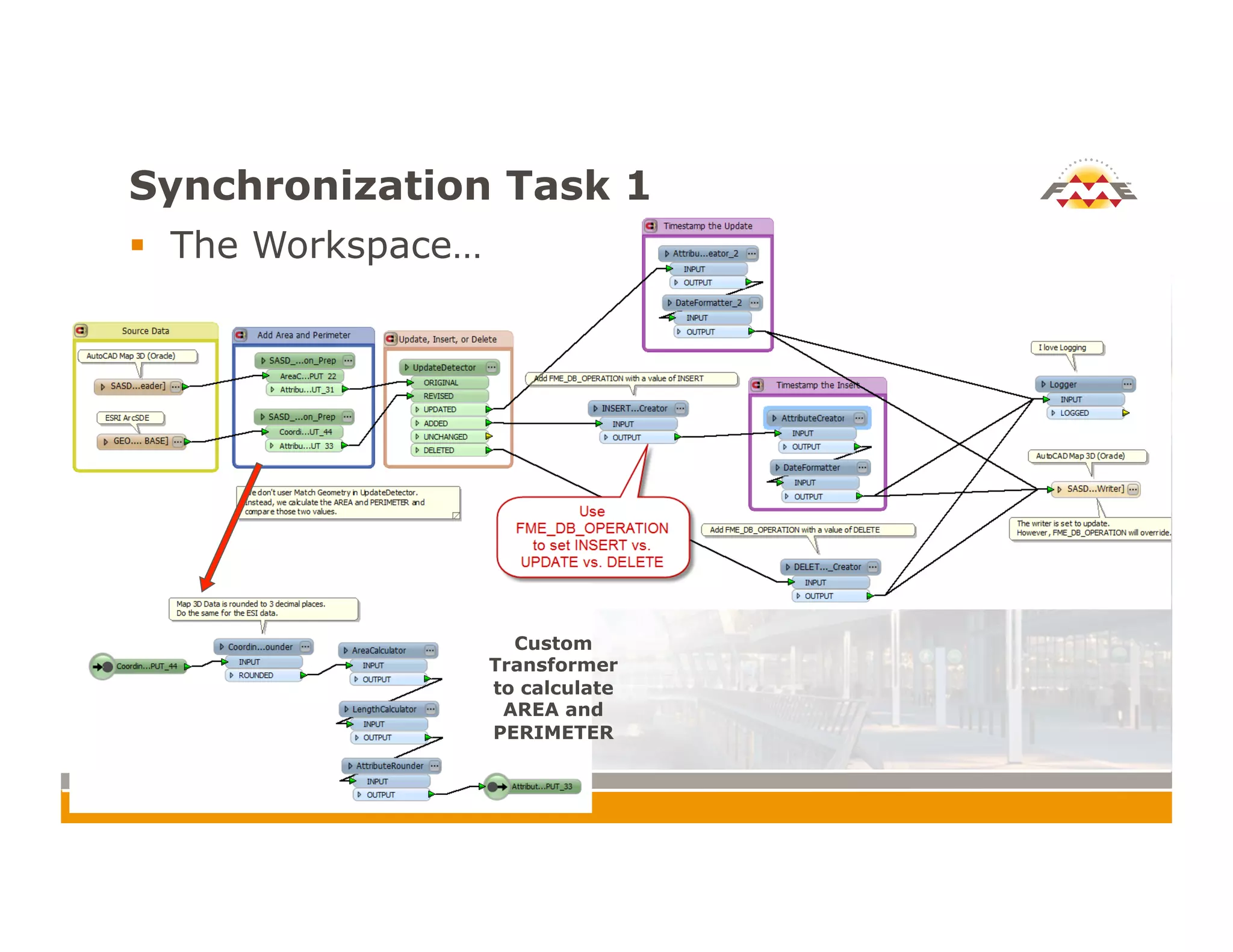
!  UpdateDetector – Custom Transformer that
extends ChangeDetector
!  Considerations
!  Can take a long time.
!  Geometry Comparison can be tricky.
!  Attribute precision can create false positives.
!  Comparing 100,000 features took minutes.
!  Comparing 200,000 features took hours!?
!  Split the data into chunks, run multiple
workspaces. WorkspaceRunner.
Synchronization Task 1
!  The Workspace…
Custom
Transformer
to calculate
AREA and
PERIMETER
Synchronization Task 1
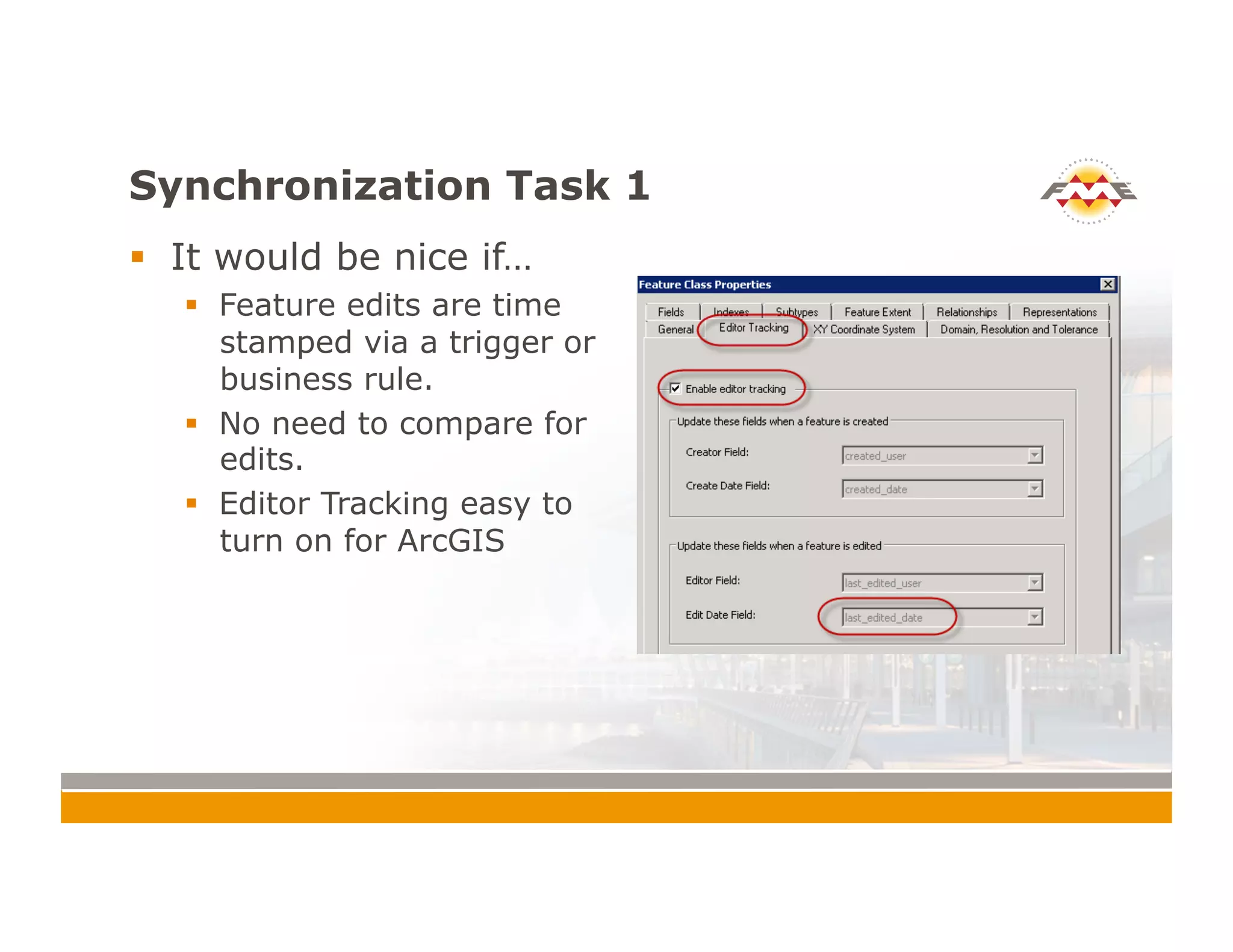
!  It would be nice if…
!  Feature edits are time
stamped via a trigger or
business rule.
!  No need to compare for
edits.
!  Editor Tracking easy to
turn on for ArcGIS
Synchronization Task 2
!  Edits made in AutoCAD® Map 3D Enterprise must
be copied to ESRI® ArcSDE®
!  Use Long Transaction Functionality
!  Examples
!  AutoCAD® Map 3D Jobs
!  ESRI® ArcSDE® Versioning
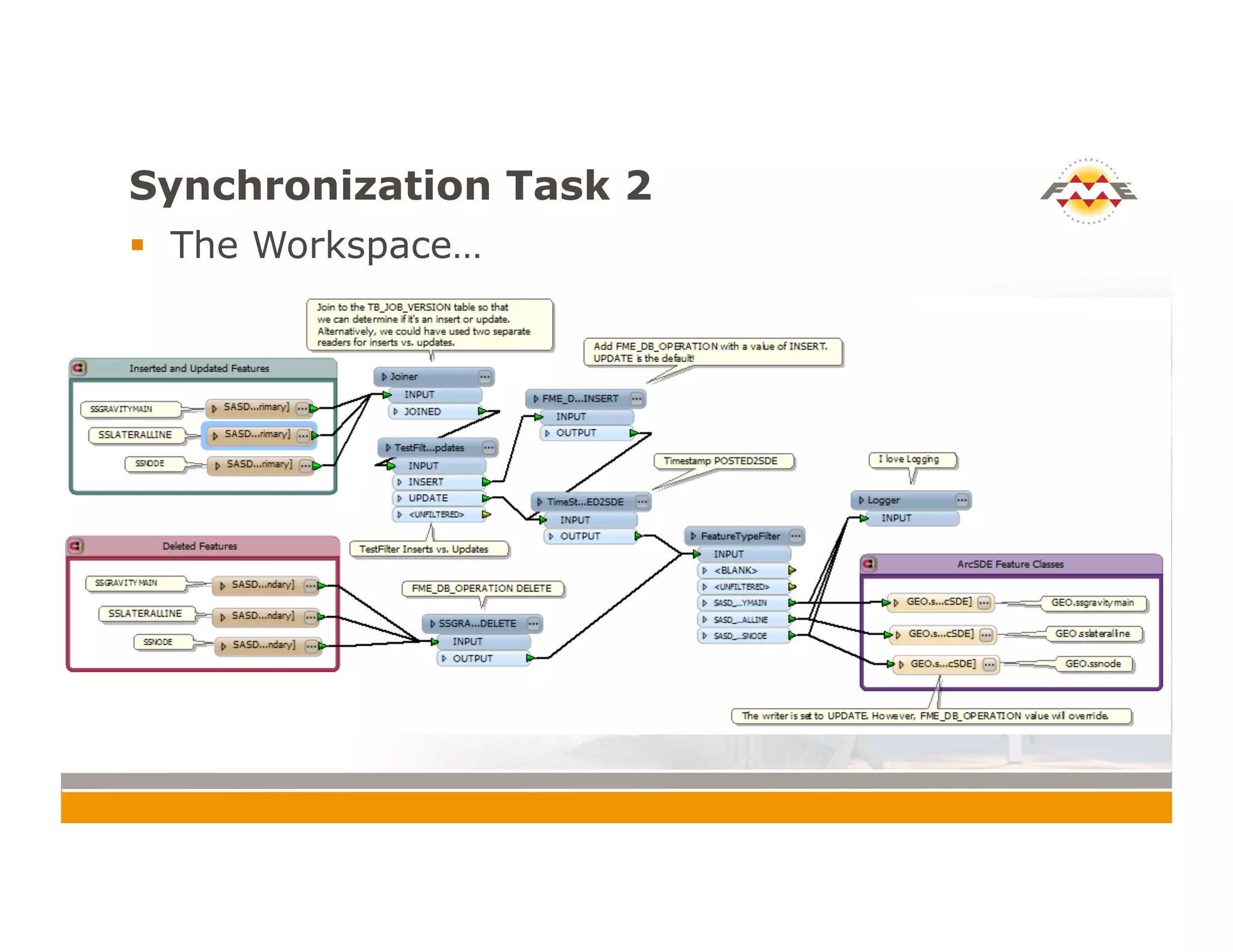
!  Using long transaction tables, we can query inserts,
deletes, and updates (IDU).
!  Very fast. We are only querying the IDU’s in the
long transaction. No need to compare: we know
what’s changed.
Synchronization Task 2
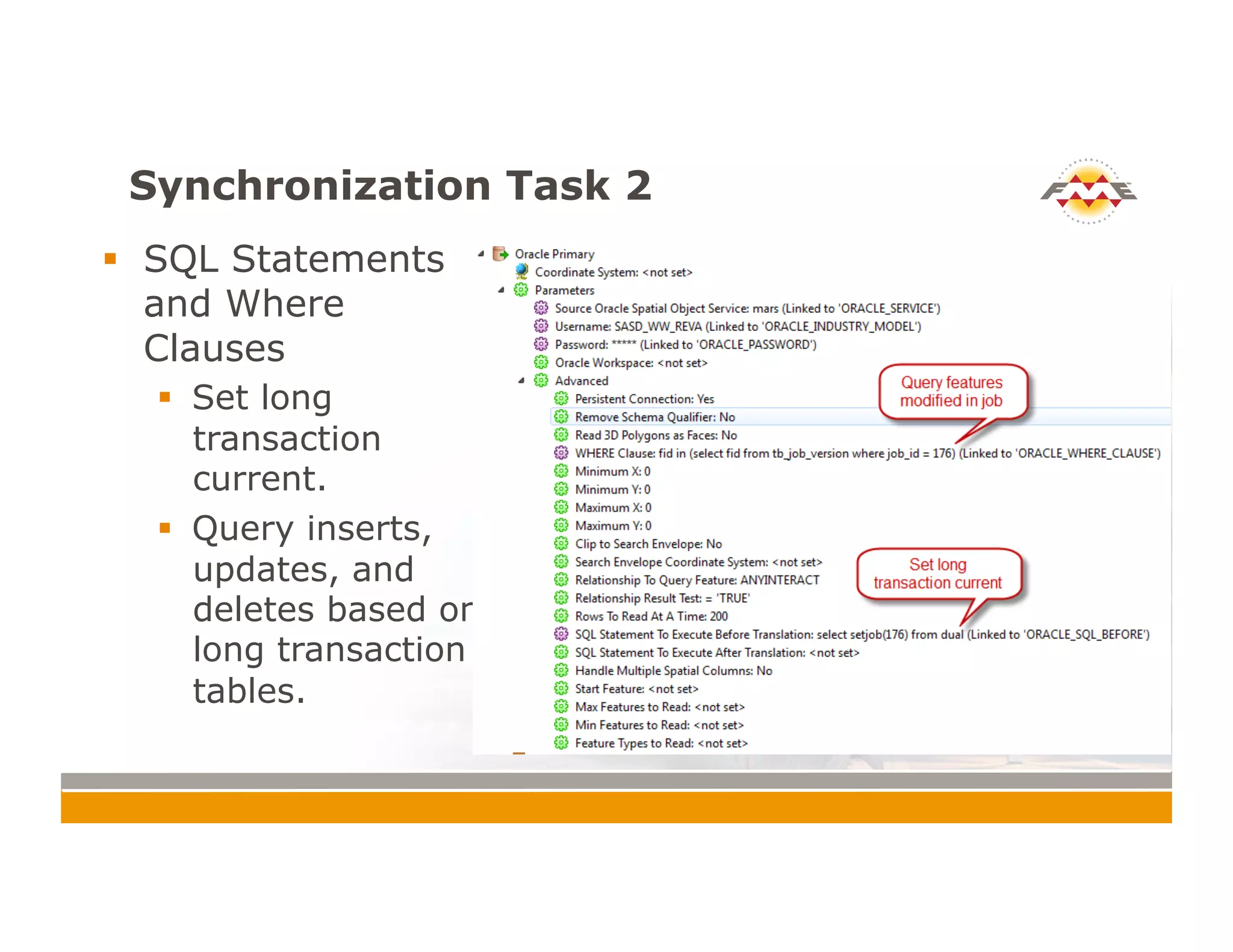
!  SQL Statements
and Where
Clauses
!  Set long
transaction
current.
!  Query inserts,
updates, and
deletes based on
long transaction
tables.
Synchronization Task 2
!  The Workspace…
Synchronization Task 3
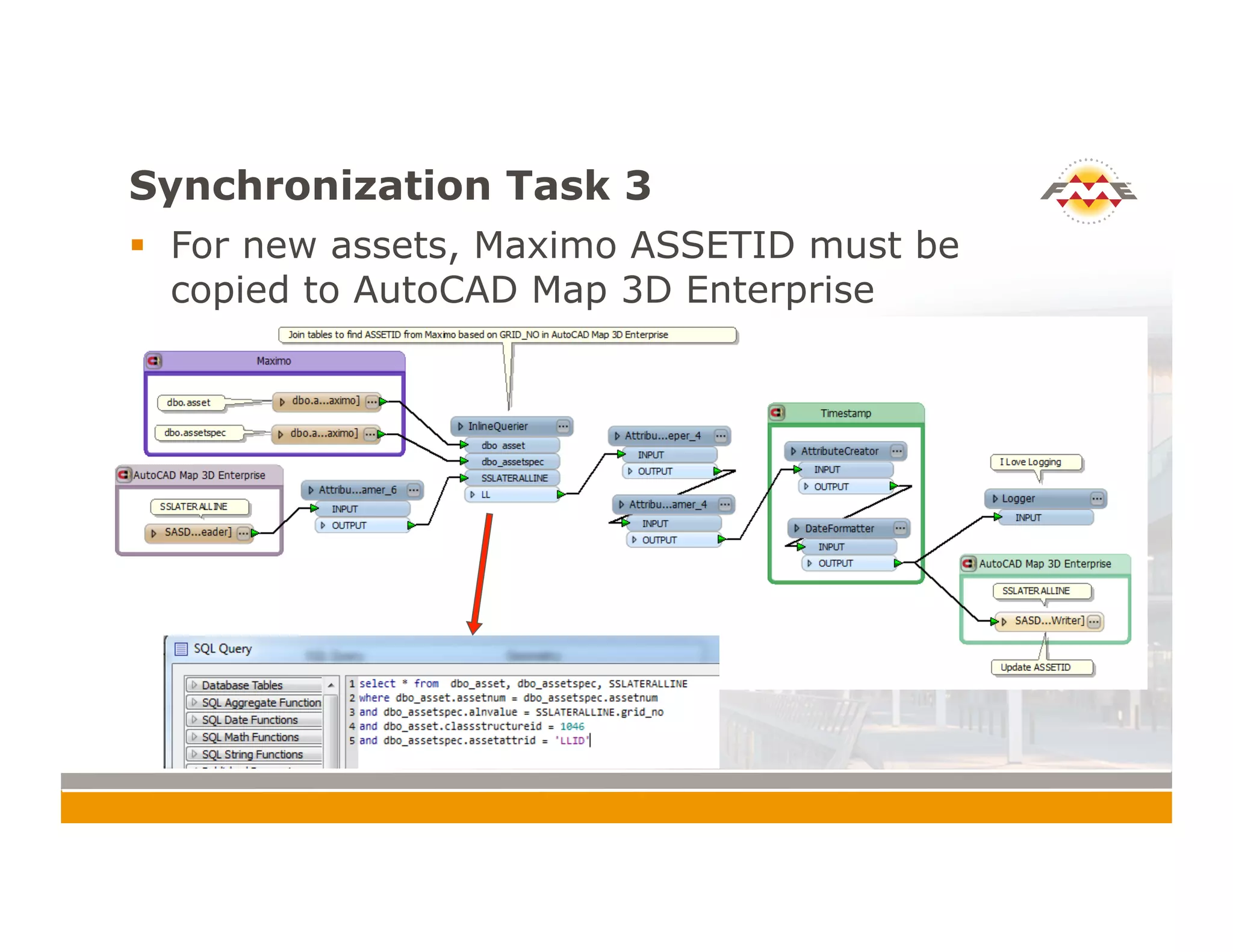
!  For new assets, Maximo ASSETID must be
copied to AutoCAD Map 3D Enterprise
General Themes
!  User Parameters
!  Batch Processing and Command Files
!  Null Attribute Values!
User Parameters
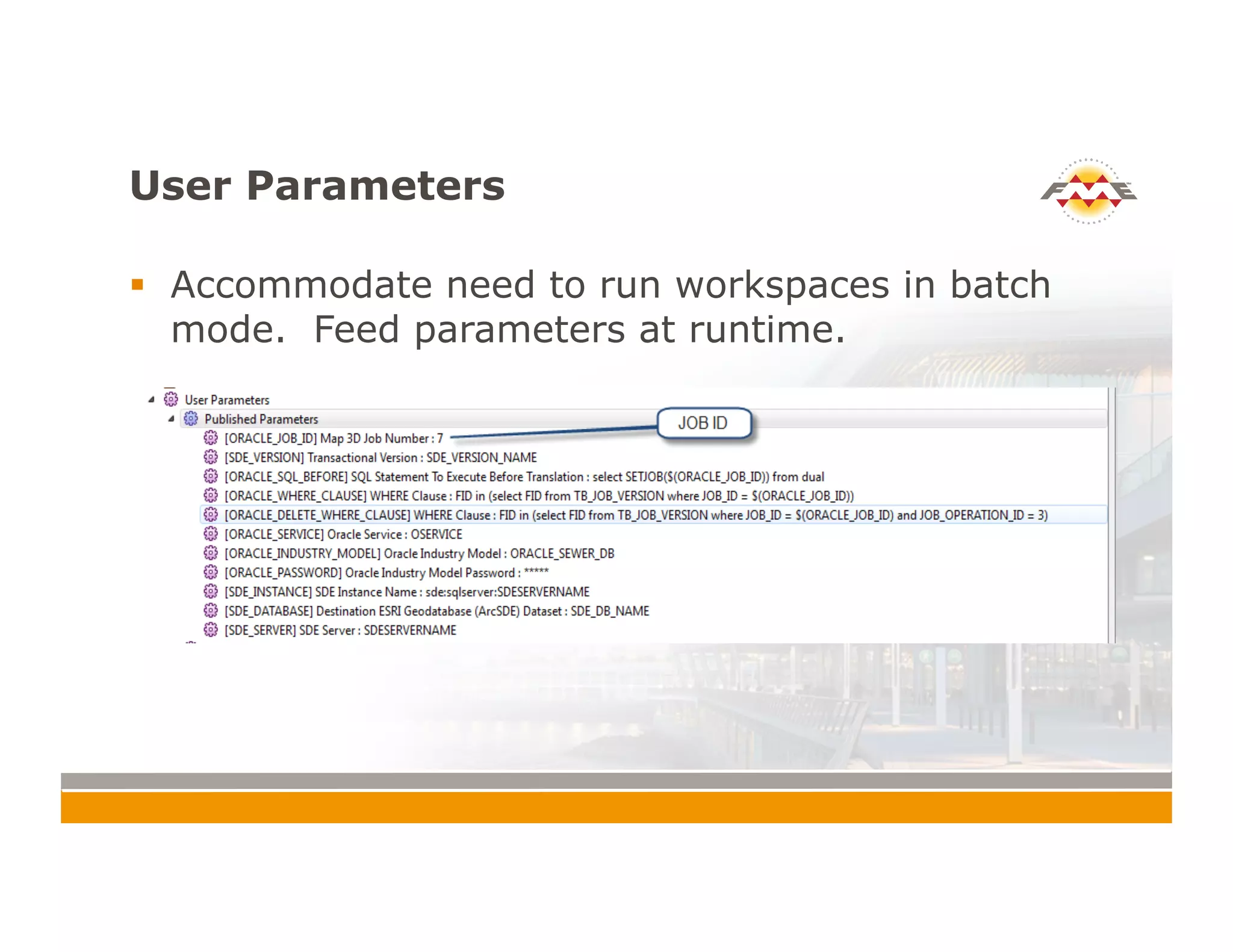
!  Accommodate need to run workspaces in batch
mode. Feed parameters at runtime.
Batch Processing and Command Files
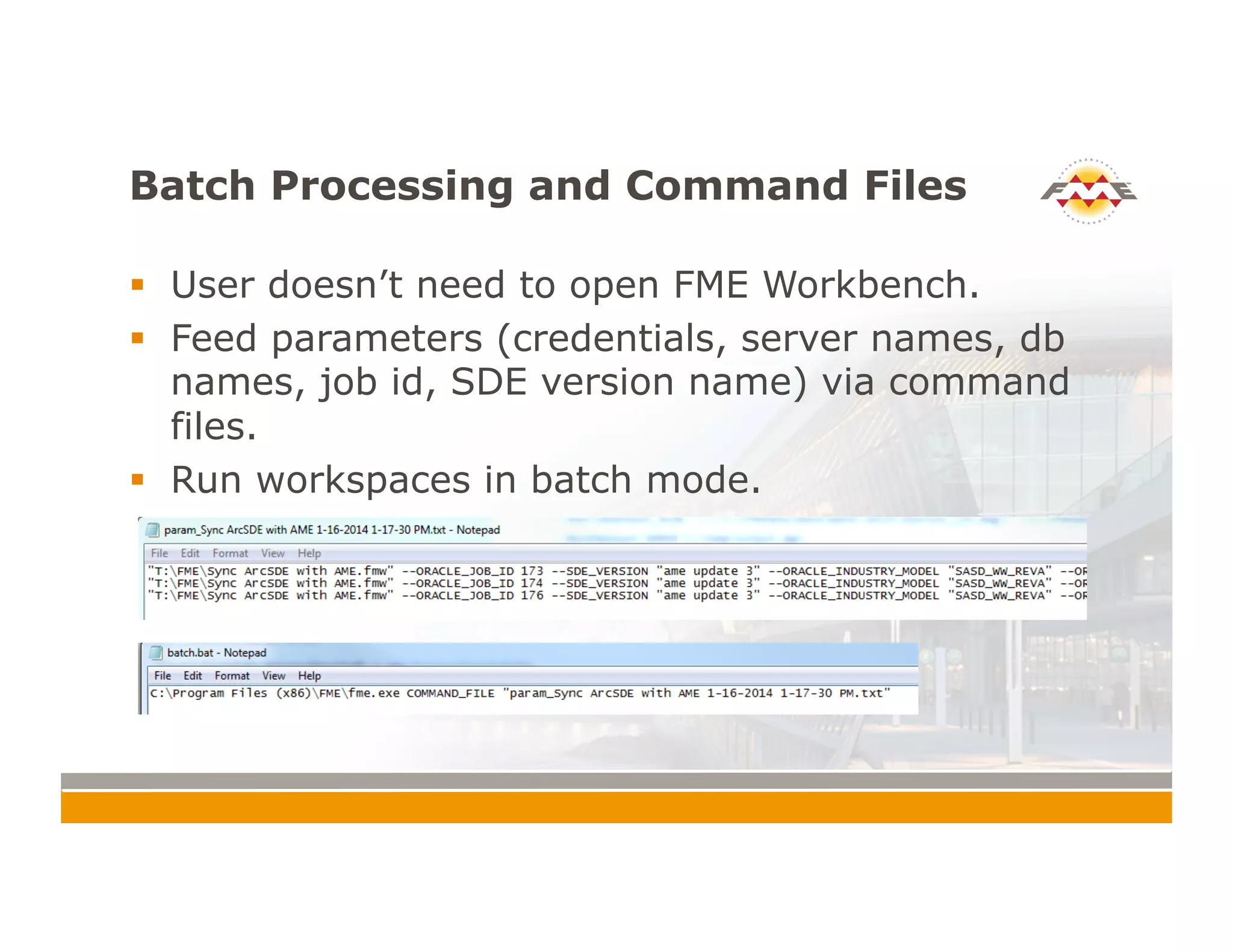
!  User doesn’t need to open FME Workbench.
!  Feed parameters (credentials, server names, db
names, job id, SDE version name) via command
files.
!  Run workspaces in batch mode.
Null Attributes
!  Prior to version 2014, FME Desktop® treated null
attribute values as non-existent attributes.
!  This is problematic for synchronization. If a user
sets an attribute value to null, that change will
not be synchronized for an updated feature.
!  My favorite new feature in FME Desktop® 2014?
Null Attribute Support!
Conclusion
!  Synchronization
!  Good – ChangeDetector
!  Better – Use long transactions or editor tracking/
time stamping to query what’s changed
!  Use 2014 for null attribute support
!  Use command and batch files or FME Server to run
your synchronization tasks
Thank You!
!  Questions?
!  For more information:
!  Drew Burgasser, P.E. (drew@cadmasters.com)
!  CAD Masters, Inc.
!  cadmasters.com (web site)
!  thecadmasters.com (blog)
CONNECT. TRANSFORM. AUTOMATE.
Q/A Support: What is AutoCAD® Map
3D Enterprise?
!  Product Name Evolution
!  Autodesk® TopobaseTM <2011
!  AutoCAD® Map 3D 2012 Enterprise
!  AutoCAD® Map 3D 2013/2014
!  Industry Model Functionality
!  Enterprise GIS
!  Uses FDO in AutoCAD®
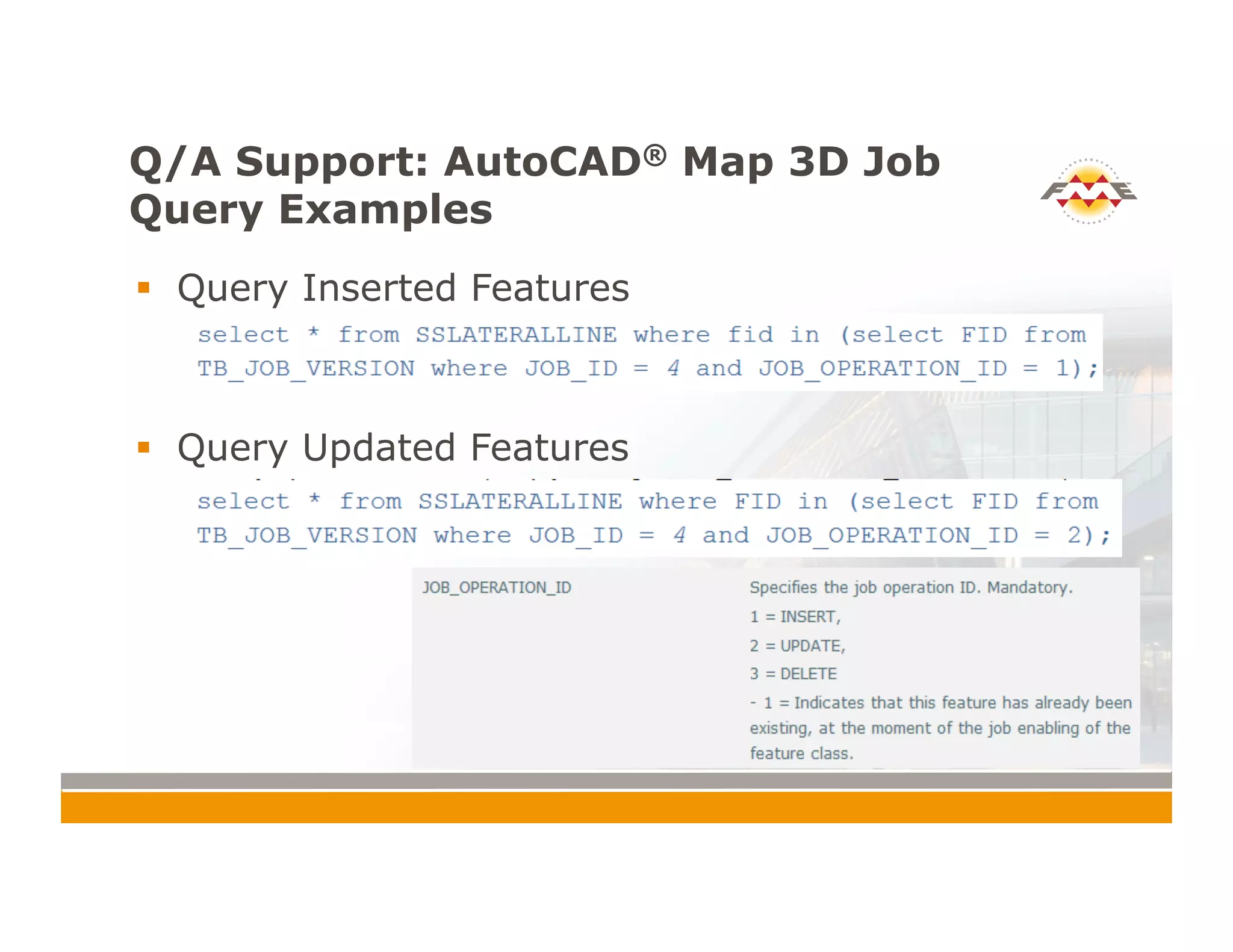
Q/A Support: AutoCAD® Map 3D Job
Query Examples
!  Query Inserted Features
!  Query Updated Features
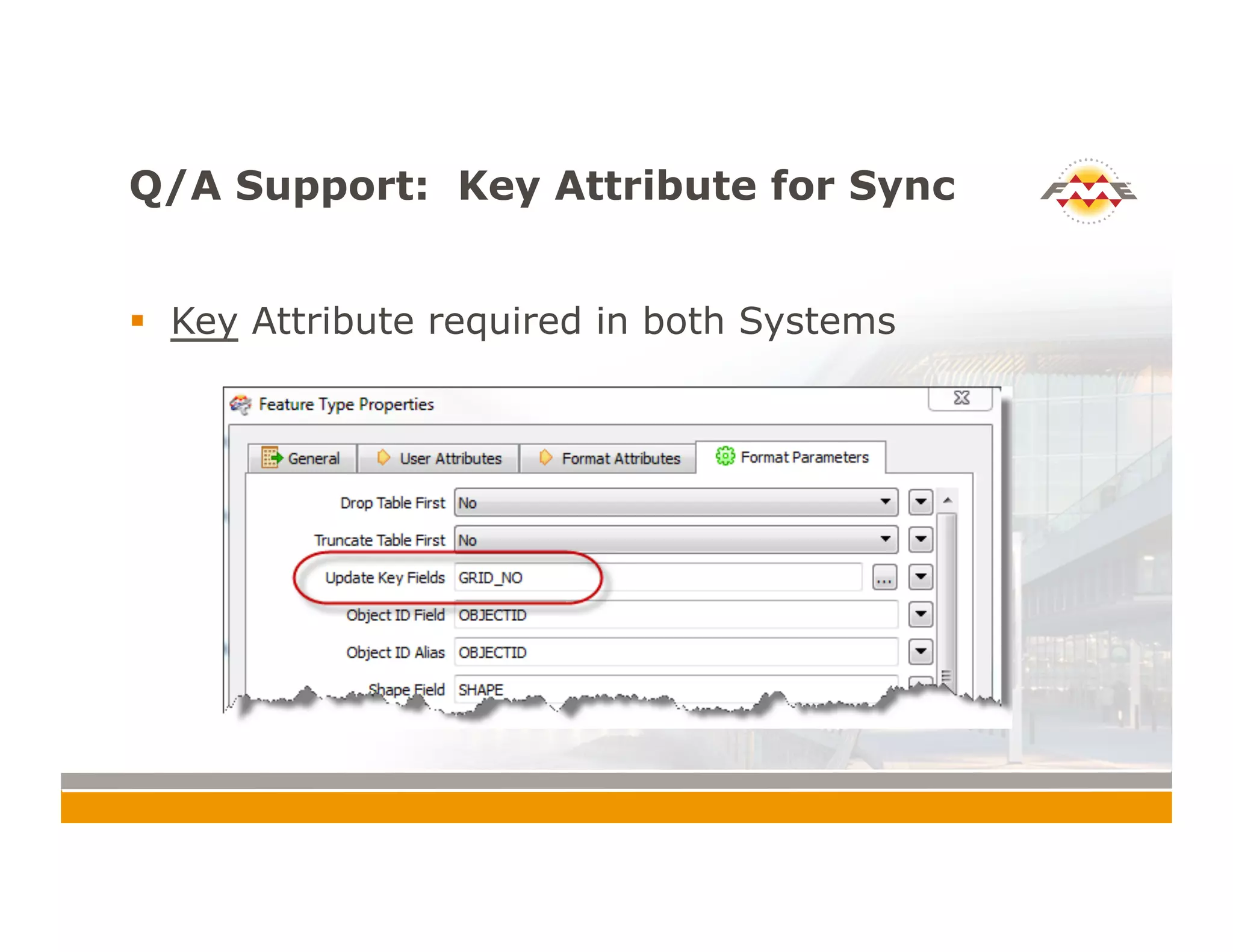
Q/A Support: Key Attribute for Sync
!  Key Attribute required in both Systems

Synchronizing AutoCAD Map 3D Enterprise and ESRI ArcSDE

  • 1.
    CONNECT. TRANSFORM. AUTOMATE. SynchronizingAutoCAD® Map 3D Enterprise with ESRI® ArcSDE® Drew Burgasser, P.E. Vice-President, CAD Masters, Inc.
  • 2.
    Summary !  Sacramento AreaSewer District (SASD) chose AutoCAD® Map 3D Enterprise as the front-end GIS application for creating and editing sewer assets. !  However, SASD Enterprise GIS = ESRI® ArcSDE®. !  And, SASD Asset Management = Maximo. !  FME Desktop® was chosen as the solution for synchronizing these disparate systems.
  • 3.
    Synchronization Tasks AutoCAD  Map   3D  Enterprise   (Oracle  DBMS)   ESRI  ArcSDE   (Sewer  Data)   ESRI  ArcSDE   (County  Base   Data)   Maximo   Asset   Management   Parcels,Roads, Cities, etc. Sewer Data 1 2 3
  • 4.
    Synchronization Task 1 ! Synchronize County Base data. Copy Edits to AutoCAD® Map 3D Enterprise !  What do we have to work with? !  We neither know what has changed and when it has changed !  Not as critical as sewer data. !  Full Table Comparison Required
  • 5.
    Synchronization Task 1 ! Solution !  UpdateDetector – Custom Transformer that extends ChangeDetector !  Considerations !  Can take a long time. !  Geometry Comparison can be tricky. !  Attribute precision can create false positives. !  Comparing 100,000 features took minutes. !  Comparing 200,000 features took hours!? !  Split the data into chunks, run multiple workspaces. WorkspaceRunner.
  • 6.
    Synchronization Task 1 ! The Workspace… Custom Transformer to calculate AREA and PERIMETER
  • 7.
    Synchronization Task 1 ! It would be nice if… !  Feature edits are time stamped via a trigger or business rule. !  No need to compare for edits. !  Editor Tracking easy to turn on for ArcGIS
  • 8.
    Synchronization Task 2 ! Edits made in AutoCAD® Map 3D Enterprise must be copied to ESRI® ArcSDE® !  Use Long Transaction Functionality !  Examples !  AutoCAD® Map 3D Jobs !  ESRI® ArcSDE® Versioning !  Using long transaction tables, we can query inserts, deletes, and updates (IDU). !  Very fast. We are only querying the IDU’s in the long transaction. No need to compare: we know what’s changed.
  • 9.
    Synchronization Task 2 ! SQL Statements and Where Clauses !  Set long transaction current. !  Query inserts, updates, and deletes based on long transaction tables.
  • 10.
  • 11.
    Synchronization Task 3 ! For new assets, Maximo ASSETID must be copied to AutoCAD Map 3D Enterprise
  • 12.
    General Themes !  UserParameters !  Batch Processing and Command Files !  Null Attribute Values!
  • 13.
    User Parameters !  Accommodateneed to run workspaces in batch mode. Feed parameters at runtime.
  • 14.
    Batch Processing andCommand Files !  User doesn’t need to open FME Workbench. !  Feed parameters (credentials, server names, db names, job id, SDE version name) via command files. !  Run workspaces in batch mode.
  • 15.
    Null Attributes !  Priorto version 2014, FME Desktop® treated null attribute values as non-existent attributes. !  This is problematic for synchronization. If a user sets an attribute value to null, that change will not be synchronized for an updated feature. !  My favorite new feature in FME Desktop® 2014? Null Attribute Support!
  • 16.
    Conclusion !  Synchronization !  Good– ChangeDetector !  Better – Use long transactions or editor tracking/ time stamping to query what’s changed !  Use 2014 for null attribute support !  Use command and batch files or FME Server to run your synchronization tasks
  • 17.
    Thank You! !  Questions? ! For more information: !  Drew Burgasser, P.E. (drew@cadmasters.com) !  CAD Masters, Inc. !  cadmasters.com (web site) !  thecadmasters.com (blog) CONNECT. TRANSFORM. AUTOMATE.
  • 18.
    Q/A Support: Whatis AutoCAD® Map 3D Enterprise? !  Product Name Evolution !  Autodesk® TopobaseTM <2011 !  AutoCAD® Map 3D 2012 Enterprise !  AutoCAD® Map 3D 2013/2014 !  Industry Model Functionality !  Enterprise GIS !  Uses FDO in AutoCAD®
  • 19.
    Q/A Support: AutoCAD®Map 3D Job Query Examples !  Query Inserted Features !  Query Updated Features
  • 20.
    Q/A Support: KeyAttribute for Sync !  Key Attribute required in both Systems