Swift extensions for Tape Storage
or other High Latency Media
Feb 29, 2016
Slavisa Sarafijanovic (IBM Research)
Harald Seipp (IBM Systems)
Swift API
Swift API extension
for archiving
HLM
Backend
POSIX
File System
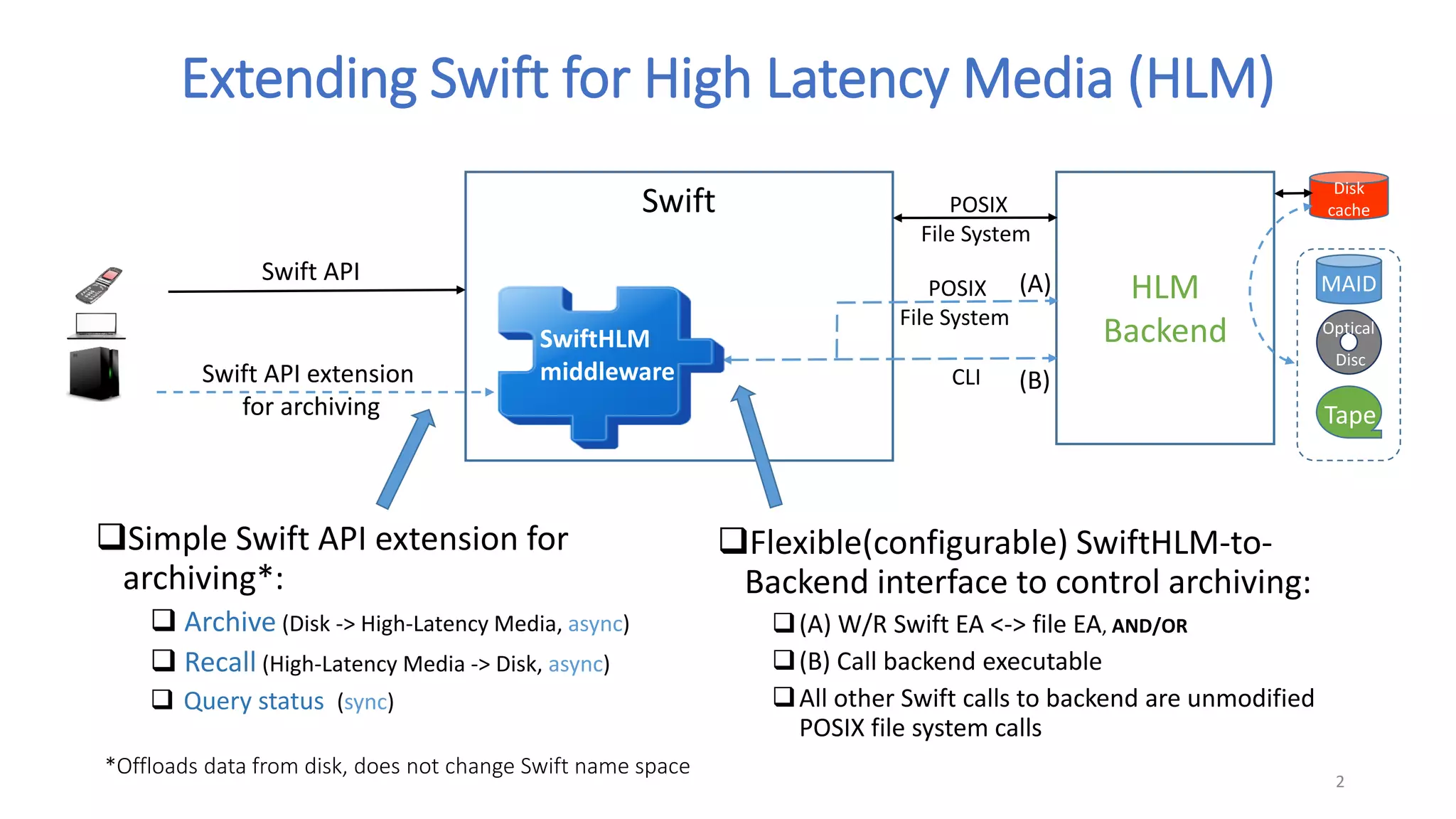
Extending Swift for High Latency Media (HLM)
Simple Swift API extension for
archiving*:
 Archive (Disk -> High-Latency Media, async)
 Recall (High-Latency Media -> Disk, async)
 Query status (sync)
Flexible(configurable) SwiftHLM-to-
Backend interface to control archiving:
(A) W/R Swift EA <-> file EA, AND/OR
(B) Call backend executable
All other Swift calls to backend are unmodified
POSIX file system calls
(A)
(B)
2
SwiftHLM
middleware
Swift
CLI
Disk
cache
Tape
MAID
Optical
Disc
*Offloads data from disk, does not change Swift name space
POSIX
File System
SwiftHLM middleware
 External Swift API
 A simple and generic Swift API extension for archiving operations
 We published a proposal [1] and an initial implementation[2]
 Goal: discuss/agree on Swift archiving API
 Amazon’s S3 and Glacier already have an archiving API/function
 Supports different archiving-capable backends
 CLI controlled: simplifies integration of existing HLM storage solutions
 … that already expose POSIX file interface plus CLI and/or policy based ILM
 EA controlled: flexibility for status reporting or developing new backends
 The middleware internals
 CLI controlled backend: the middleware converts requests to CLI calls [2]
 EA controlled backend: e.g. “cont/?MIGRATE” -> per object EA (=> file EA the backend can see/update)
3
[1] Swift/High Latance Media wiki page proposal: https://wiki.openstack.org/wiki/Swift/HighLatencyMedia
[2] SwiftHLM initial implementation: https://github.com/ibm-research/SwiftHLM
Swift API extension proposal
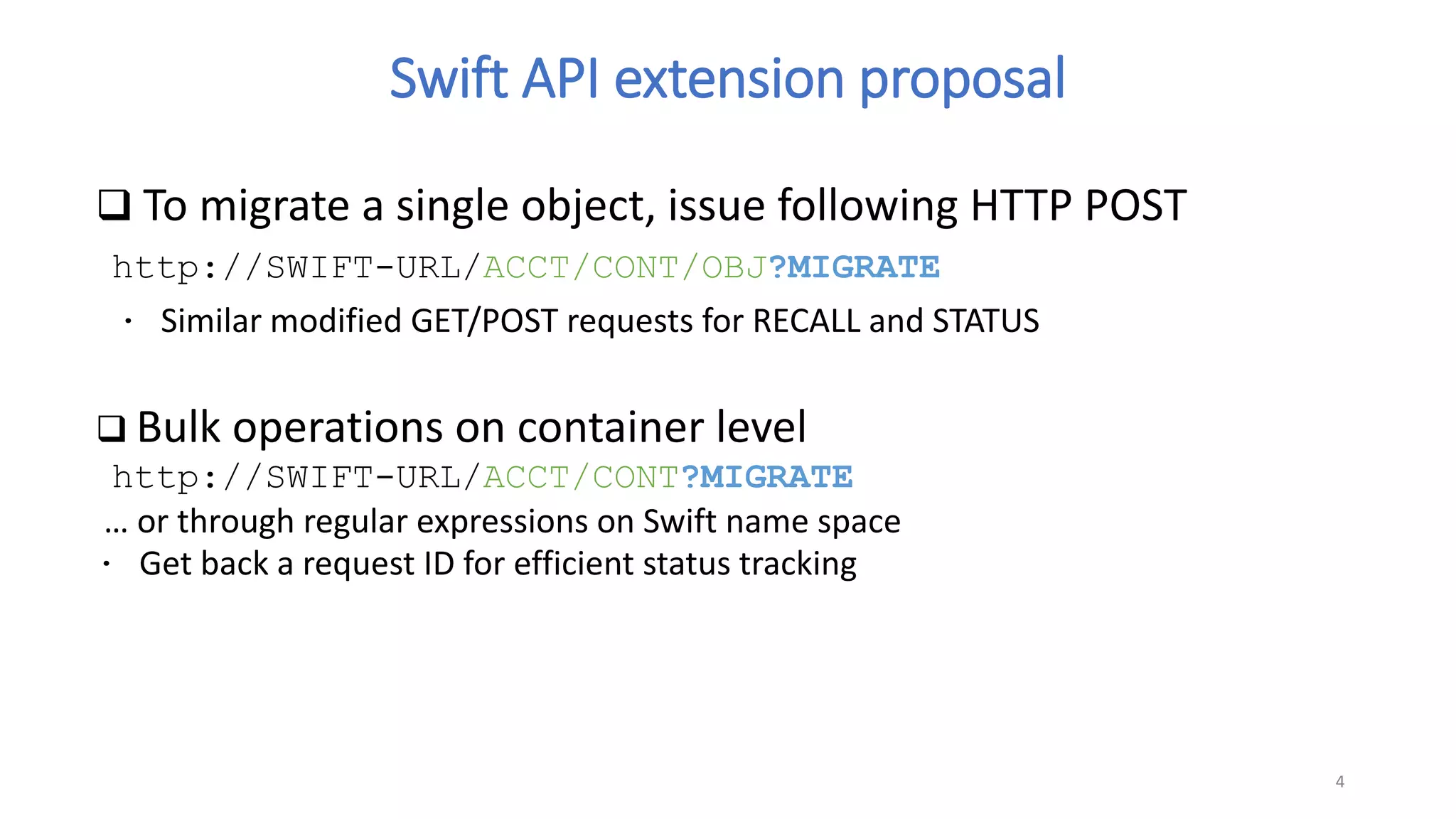
 To migrate a single object, issue following HTTP POST
http://SWIFT-URL/ACCT/CONT/OBJ?MIGRATE
∙ Similar modified GET/POST requests for RECALL and STATUS
 Bulk operations on container level
http://SWIFT-URL/ACCT/CONT?MIGRATE
… or through regular expressions on Swift name space
∙ Get back a request ID for efficient status tracking
4
HLM backend considerations
 Tape mount/seek/read take minutes
 .. or even 10s of minutes and longer when:
 Many file requests are queued to a single tape (sequential data access)
 Much more tapes are requested than drives available (drives cost..)
 .. which is typical way to use tape for performance/cost reasons
 Tape resources and data need to be managed
 Ordering and grouping files access (mounts/unmounts)
 Tape reconcile and reclaim
 => it is good to allow leveraging existing HLM solutions
 A free open source HLM backend ?
 A promising ongoing work by BDT:
 https://github.com/BDT-GER/SWIFT-TLC
 Based on XFS and open source LTFS file system for tape (single drive edition)
5
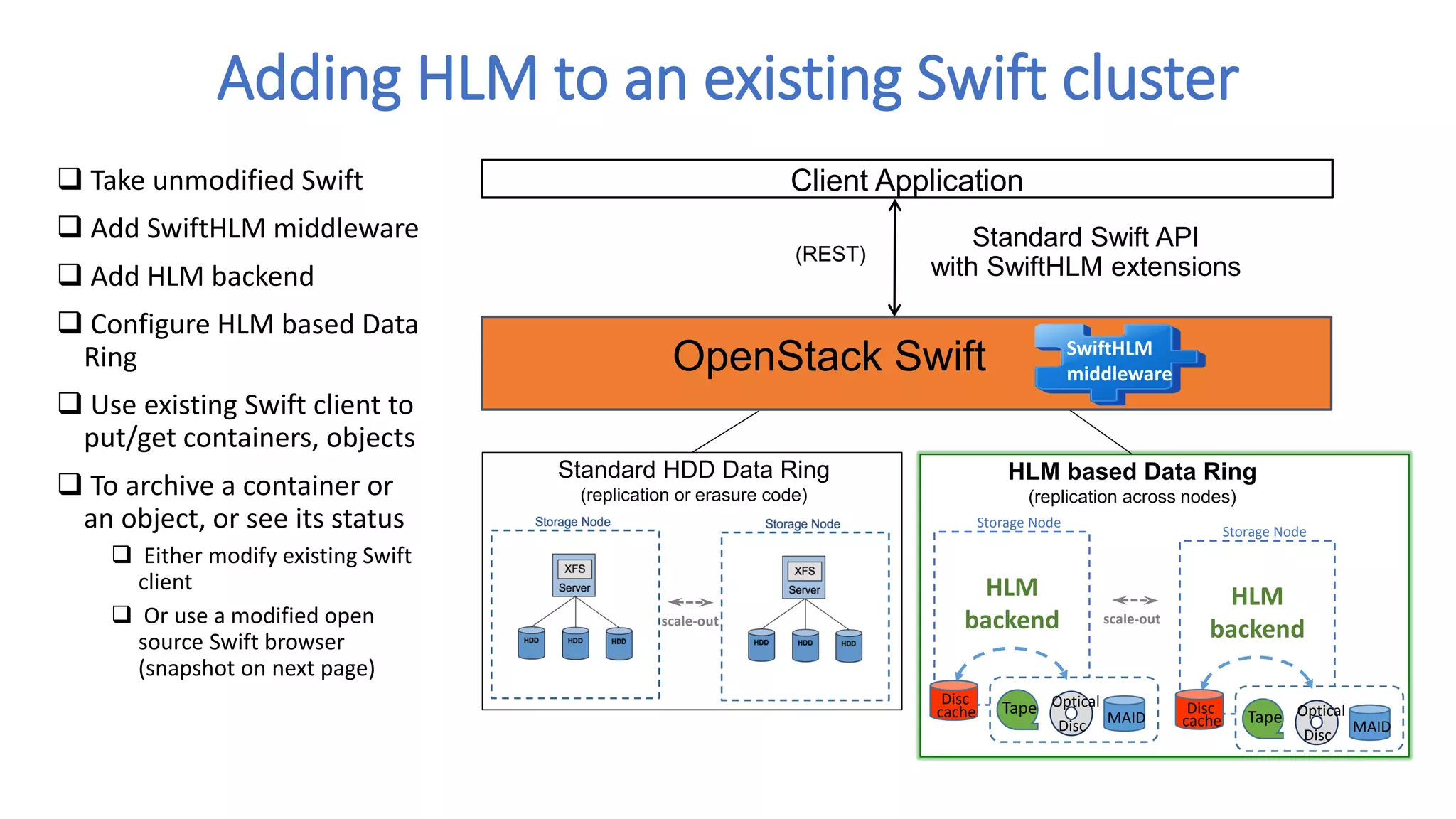
Adding HLM to an existing Swift cluster
6
Client Application
Standard Swift API
with SwiftHLM extensions
(REST)
Standard HDD Data Ring
(replication or erasure code)
scale-out
HLM based Data Ring
(replication across nodes)
scale-out
OpenStack Swift SwiftHLM
middleware
HLM
backend
Storage Node
Tape
MAID
Disc
cache
Optical
Disc
HLM
backend
Storage Node
Tape
MAID
Disc
cache
Optical
Disc
 Take unmodified Swift
 Add SwiftHLM middleware
 Add HLM backend
 Configure HLM based Data
Ring
 Use existing Swift client to
put/get containers, objects
 To archive a container or
an object, or see its status
 Either modify existing Swift
client
 Or use a modified open
source Swift browser
(snapshot on next page)
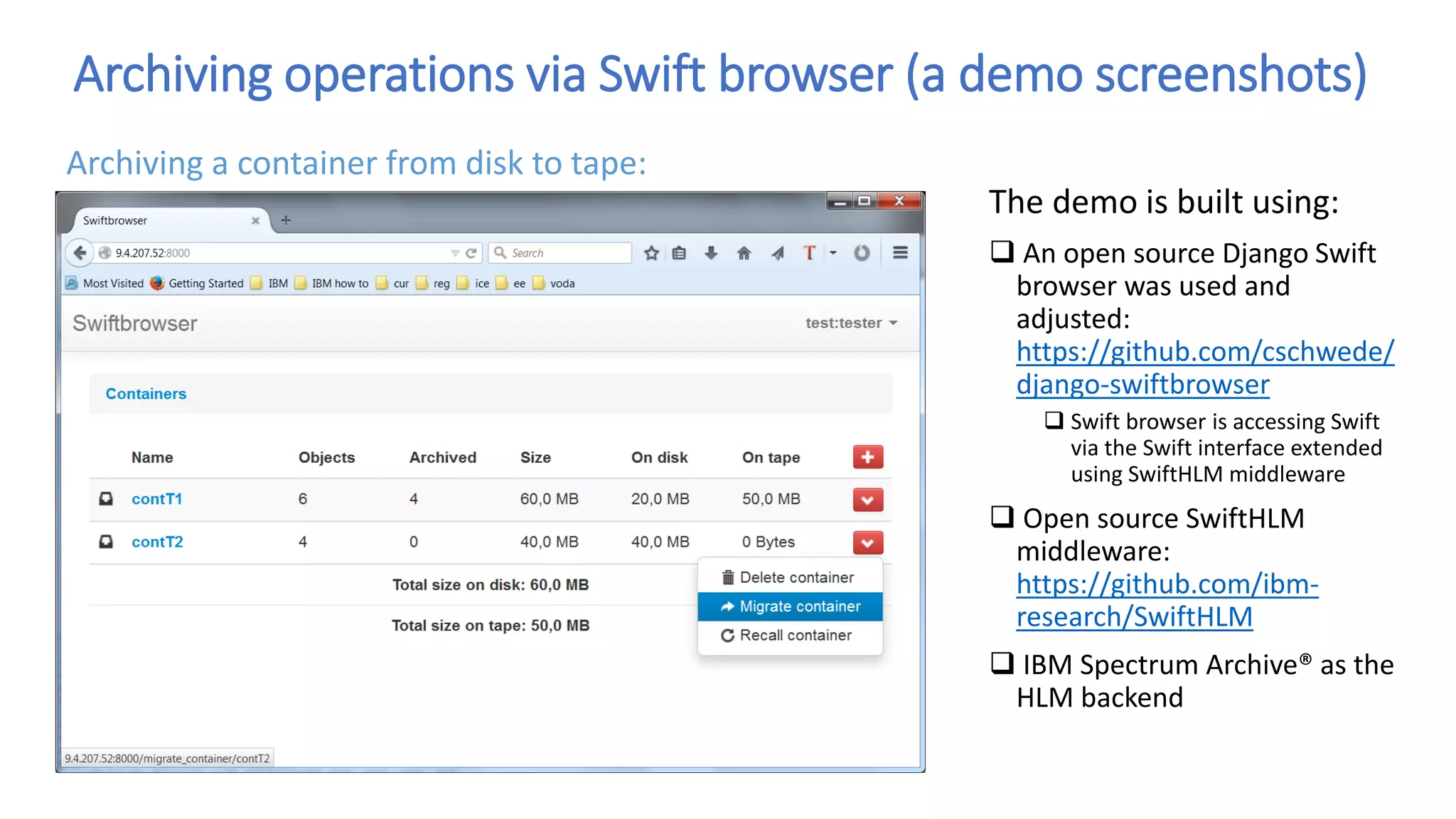
Archiving operations via Swift browser (a demo screenshots)
The demo is built using:
 An open source Django Swift
browser was used and
adjusted:
https://github.com/cschwede/
django-swiftbrowser
 Swift browser is accessing Swift
via the Swift interface extended
using SwiftHLM middleware
 Open source SwiftHLM
middleware:
https://github.com/ibm-
research/SwiftHLM
 IBM Spectrum Archive® as the
HLM backend
Archiving a container from disk to tape:
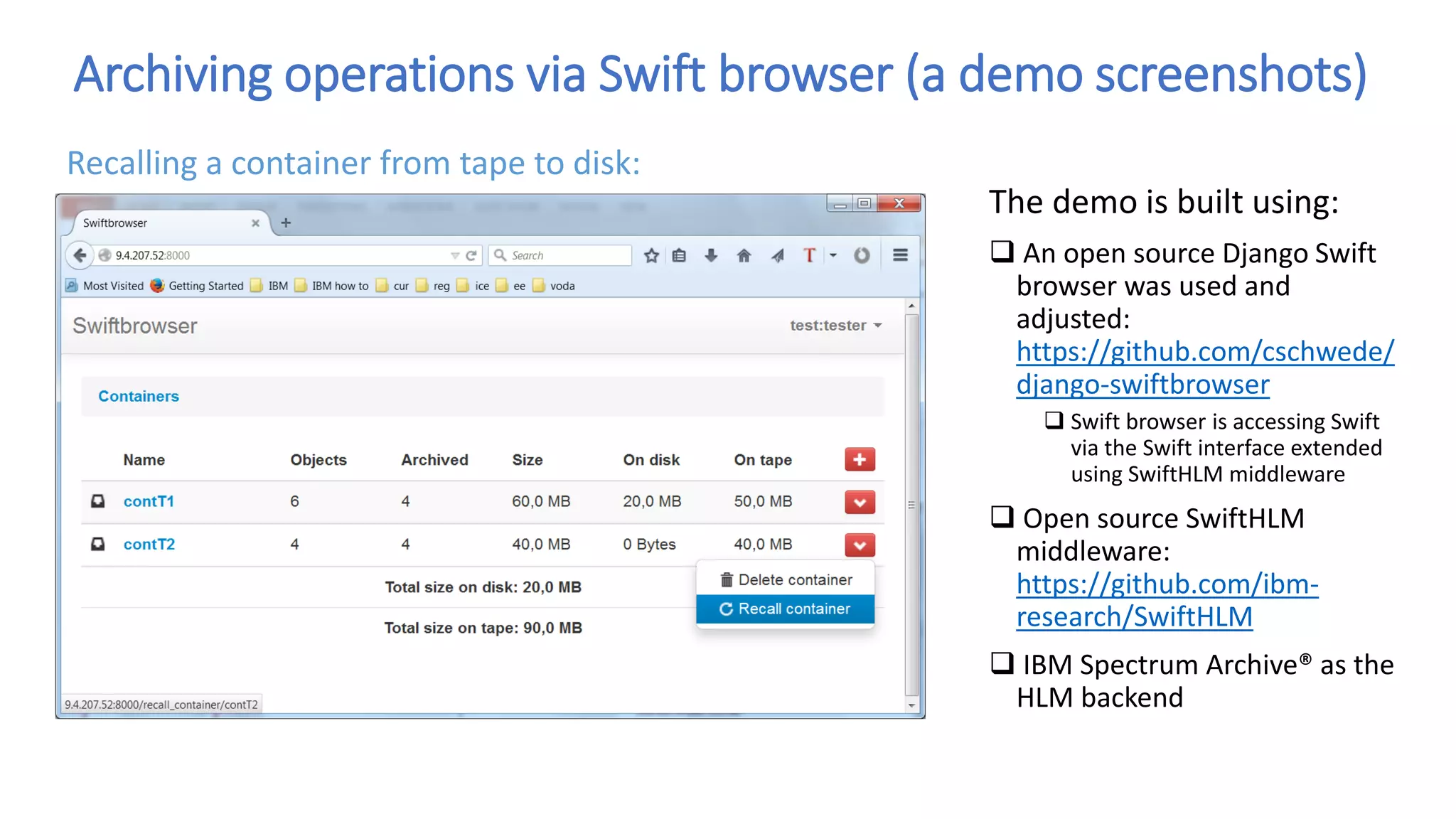
Archiving operations via Swift browser (a demo screenshots)
The demo is built using:
 An open source Django Swift
browser was used and
adjusted:
https://github.com/cschwede/
django-swiftbrowser
 Swift browser is accessing Swift
via the Swift interface extended
using SwiftHLM middleware
 Open source SwiftHLM
middleware:
https://github.com/ibm-
research/SwiftHLM
 IBM Spectrum Archive® as the
HLM backend
Recalling a container from tape to disk:
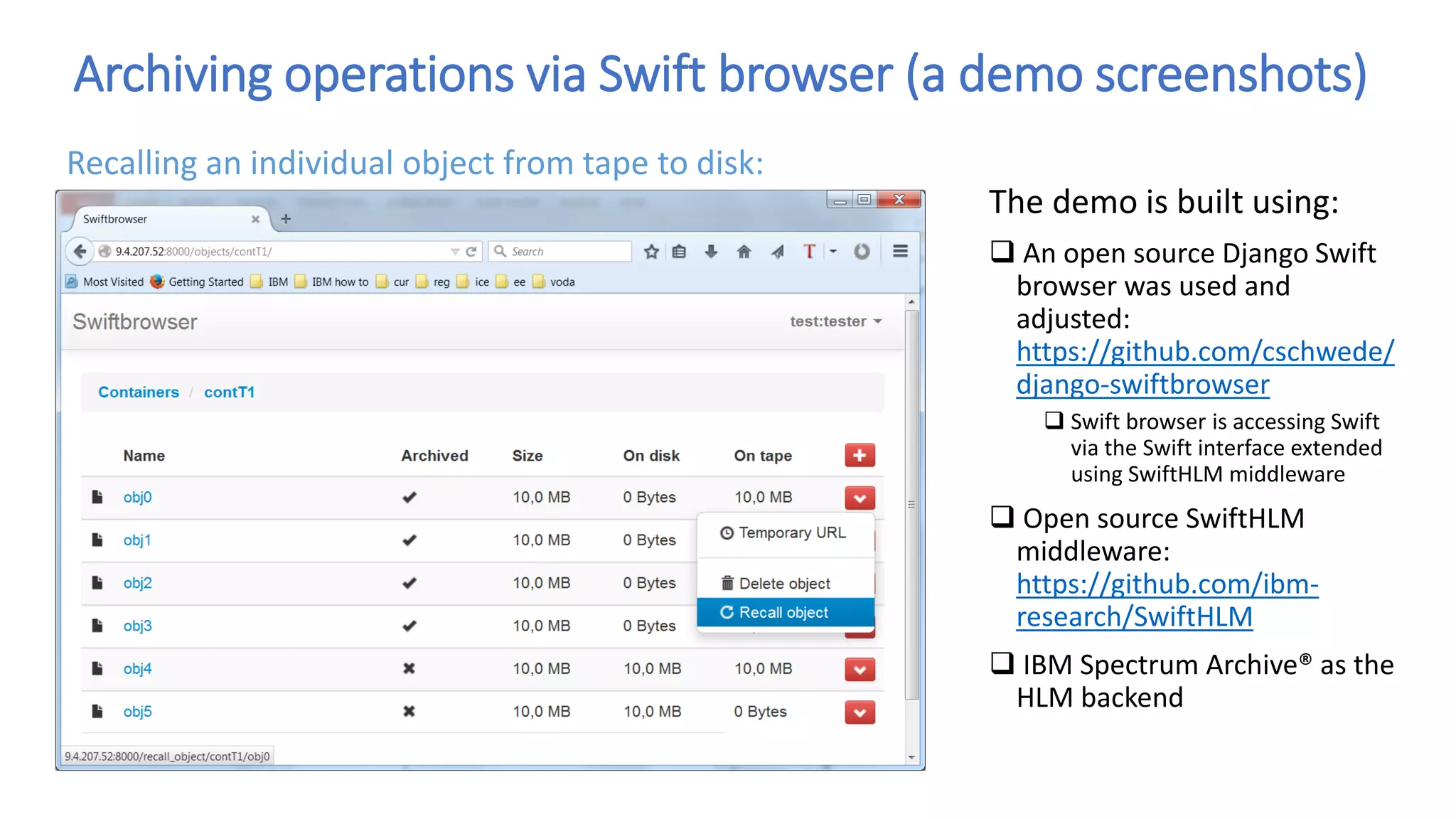
Archiving operations via Swift browser (a demo screenshots)
The demo is built using:
 An open source Django Swift
browser was used and
adjusted:
https://github.com/cschwede/
django-swiftbrowser
 Swift browser is accessing Swift
via the Swift interface extended
using SwiftHLM middleware
 Open source SwiftHLM
middleware:
https://github.com/ibm-
research/SwiftHLM
 IBM Spectrum Archive® as the
HLM backend
Recalling an individual object from tape to disk:
Backup slides
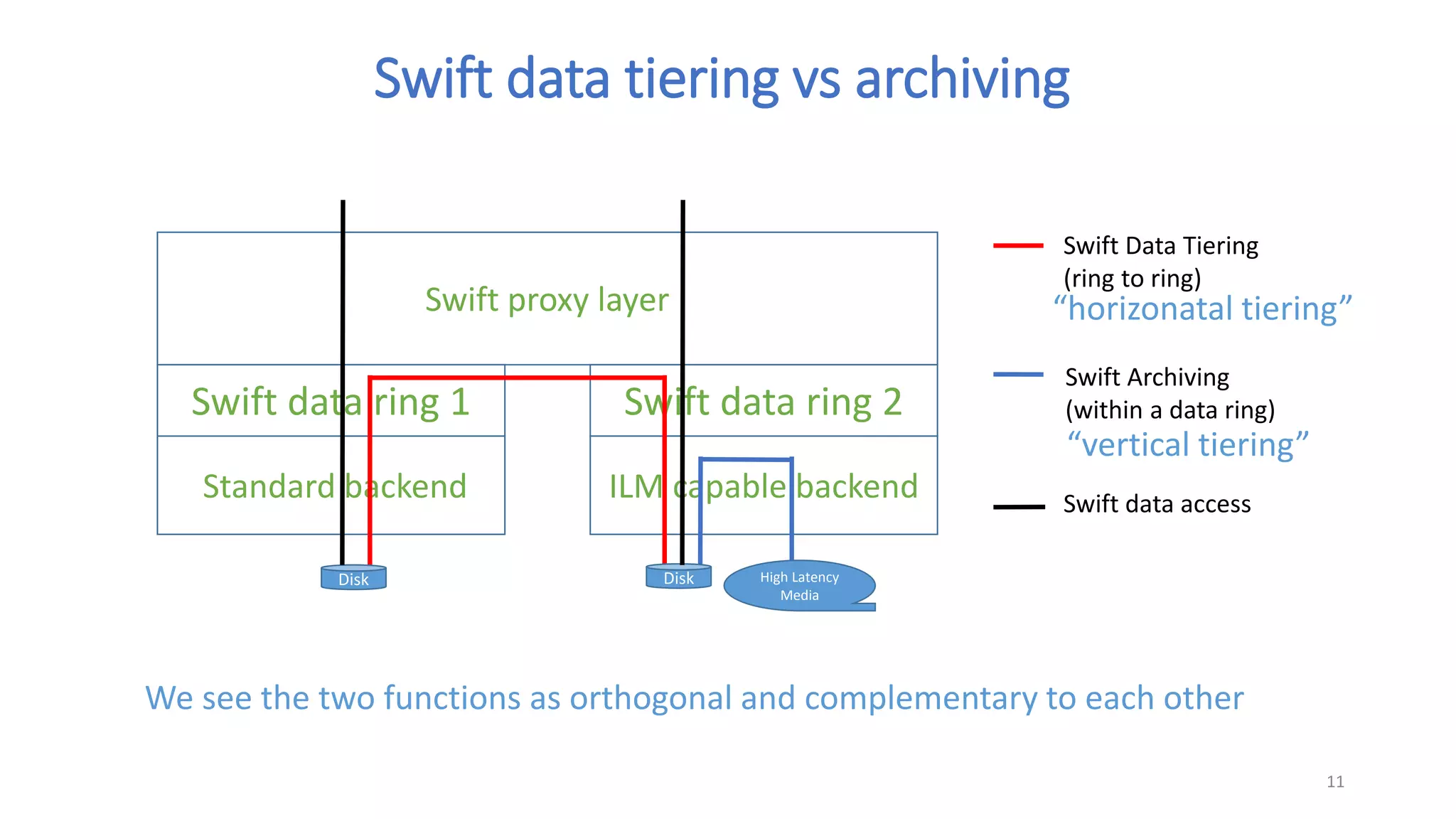
Swift proxy layer
Standard backend
11
Swift data ring 1 Swift data ring 2
ILM capable backend
Disk Disk High Latency
Media
Swift Data Tiering
(ring to ring)
Swift Archiving
(within a data ring)
Swift data access
We see the two functions as orthogonal and complementary to each other
Swift data tiering vs archiving
“horizonatal tiering”
“vertical tiering”
[root@zagreb objects]# curl -v -H 'X-Storage-Token: AUTH_tk32178b0f448f43f3808f33b48764002e' -X POST
http://127.0.0.1:8080/v1/AUTH_test/contT1/obj0?MIGRATE
* About to connect() to 127.0.0.1 port 8080 (#0)
* Trying 127.0.0.1... connected
* Connected to 127.0.0.1 (127.0.0.1) port 8080 (#0)
> POST /v1/AUTH_test/contT1/obj0?MIGRATE HTTP/1.1
> User-Agent: curl/7.19.7 (x86_64-redhat-linux-gnu) libcurl/7.19.7 NSS/3.18 Basic ECC zlib/1.2.3 libidn/1.18 libssh2/1.4.2
> Host: 127.0.0.1:8080
> Accept: */*
> X-Storage-Token: AUTH_tk32178b0f448f43f3808f33b48764002e
>
< HTTP/1.1 200 OK
< Content-Length: 28
< Content-Type: text/plain
< X-Trans-Id: tx444cd88875294f21bd703-0055c0a93f
< Date: Tue, 04 Aug 2015 12:00:00 GMT
<
Accepted migration request.
* Connection #0 to host 127.0.0.1 left intact
* Closing connection #0
[root@zagreb objects]#
• Curl is an existing Swift client (for remote Swift access)
12
SwiftHLM curl example

Swift extensions for Tape Storage or other High-Latency Media

  • 1.
    Swift extensions forTape Storage or other High Latency Media Feb 29, 2016 Slavisa Sarafijanovic (IBM Research) Harald Seipp (IBM Systems)
  • 2.
    Swift API Swift APIextension for archiving HLM Backend POSIX File System Extending Swift for High Latency Media (HLM) Simple Swift API extension for archiving*:  Archive (Disk -> High-Latency Media, async)  Recall (High-Latency Media -> Disk, async)  Query status (sync) Flexible(configurable) SwiftHLM-to- Backend interface to control archiving: (A) W/R Swift EA <-> file EA, AND/OR (B) Call backend executable All other Swift calls to backend are unmodified POSIX file system calls (A) (B) 2 SwiftHLM middleware Swift CLI Disk cache Tape MAID Optical Disc *Offloads data from disk, does not change Swift name space POSIX File System
  • 3.
    SwiftHLM middleware  ExternalSwift API  A simple and generic Swift API extension for archiving operations  We published a proposal [1] and an initial implementation[2]  Goal: discuss/agree on Swift archiving API  Amazon’s S3 and Glacier already have an archiving API/function  Supports different archiving-capable backends  CLI controlled: simplifies integration of existing HLM storage solutions  … that already expose POSIX file interface plus CLI and/or policy based ILM  EA controlled: flexibility for status reporting or developing new backends  The middleware internals  CLI controlled backend: the middleware converts requests to CLI calls [2]  EA controlled backend: e.g. “cont/?MIGRATE” -> per object EA (=> file EA the backend can see/update) 3 [1] Swift/High Latance Media wiki page proposal: https://wiki.openstack.org/wiki/Swift/HighLatencyMedia [2] SwiftHLM initial implementation: https://github.com/ibm-research/SwiftHLM
  • 4.
    Swift API extensionproposal  To migrate a single object, issue following HTTP POST http://SWIFT-URL/ACCT/CONT/OBJ?MIGRATE ∙ Similar modified GET/POST requests for RECALL and STATUS  Bulk operations on container level http://SWIFT-URL/ACCT/CONT?MIGRATE … or through regular expressions on Swift name space ∙ Get back a request ID for efficient status tracking 4
  • 5.
    HLM backend considerations Tape mount/seek/read take minutes  .. or even 10s of minutes and longer when:  Many file requests are queued to a single tape (sequential data access)  Much more tapes are requested than drives available (drives cost..)  .. which is typical way to use tape for performance/cost reasons  Tape resources and data need to be managed  Ordering and grouping files access (mounts/unmounts)  Tape reconcile and reclaim  => it is good to allow leveraging existing HLM solutions  A free open source HLM backend ?  A promising ongoing work by BDT:  https://github.com/BDT-GER/SWIFT-TLC  Based on XFS and open source LTFS file system for tape (single drive edition) 5
  • 6.
    Adding HLM toan existing Swift cluster 6 Client Application Standard Swift API with SwiftHLM extensions (REST) Standard HDD Data Ring (replication or erasure code) scale-out HLM based Data Ring (replication across nodes) scale-out OpenStack Swift SwiftHLM middleware HLM backend Storage Node Tape MAID Disc cache Optical Disc HLM backend Storage Node Tape MAID Disc cache Optical Disc  Take unmodified Swift  Add SwiftHLM middleware  Add HLM backend  Configure HLM based Data Ring  Use existing Swift client to put/get containers, objects  To archive a container or an object, or see its status  Either modify existing Swift client  Or use a modified open source Swift browser (snapshot on next page)
  • 7.
    Archiving operations viaSwift browser (a demo screenshots) The demo is built using:  An open source Django Swift browser was used and adjusted: https://github.com/cschwede/ django-swiftbrowser  Swift browser is accessing Swift via the Swift interface extended using SwiftHLM middleware  Open source SwiftHLM middleware: https://github.com/ibm- research/SwiftHLM  IBM Spectrum Archive® as the HLM backend Archiving a container from disk to tape:
  • 8.
    Archiving operations viaSwift browser (a demo screenshots) The demo is built using:  An open source Django Swift browser was used and adjusted: https://github.com/cschwede/ django-swiftbrowser  Swift browser is accessing Swift via the Swift interface extended using SwiftHLM middleware  Open source SwiftHLM middleware: https://github.com/ibm- research/SwiftHLM  IBM Spectrum Archive® as the HLM backend Recalling a container from tape to disk:
  • 9.
    Archiving operations viaSwift browser (a demo screenshots) The demo is built using:  An open source Django Swift browser was used and adjusted: https://github.com/cschwede/ django-swiftbrowser  Swift browser is accessing Swift via the Swift interface extended using SwiftHLM middleware  Open source SwiftHLM middleware: https://github.com/ibm- research/SwiftHLM  IBM Spectrum Archive® as the HLM backend Recalling an individual object from tape to disk:
  • 10.
  • 11.
    Swift proxy layer Standardbackend 11 Swift data ring 1 Swift data ring 2 ILM capable backend Disk Disk High Latency Media Swift Data Tiering (ring to ring) Swift Archiving (within a data ring) Swift data access We see the two functions as orthogonal and complementary to each other Swift data tiering vs archiving “horizonatal tiering” “vertical tiering”
  • 12.
    [root@zagreb objects]# curl-v -H 'X-Storage-Token: AUTH_tk32178b0f448f43f3808f33b48764002e' -X POST http://127.0.0.1:8080/v1/AUTH_test/contT1/obj0?MIGRATE * About to connect() to 127.0.0.1 port 8080 (#0) * Trying 127.0.0.1... connected * Connected to 127.0.0.1 (127.0.0.1) port 8080 (#0) > POST /v1/AUTH_test/contT1/obj0?MIGRATE HTTP/1.1 > User-Agent: curl/7.19.7 (x86_64-redhat-linux-gnu) libcurl/7.19.7 NSS/3.18 Basic ECC zlib/1.2.3 libidn/1.18 libssh2/1.4.2 > Host: 127.0.0.1:8080 > Accept: */* > X-Storage-Token: AUTH_tk32178b0f448f43f3808f33b48764002e > < HTTP/1.1 200 OK < Content-Length: 28 < Content-Type: text/plain < X-Trans-Id: tx444cd88875294f21bd703-0055c0a93f < Date: Tue, 04 Aug 2015 12:00:00 GMT < Accepted migration request. * Connection #0 to host 127.0.0.1 left intact * Closing connection #0 [root@zagreb objects]# • Curl is an existing Swift client (for remote Swift access) 12 SwiftHLM curl example