Supercharged Notes 10 Upgrade:
Turning the Worst Notes Deployments into the Best
—
Christoph Adler Jared Roberts
Senior Consultant Senior Software Engineer
panagenda ISW
Think 2019 / 1362 / Feb 13, 2019 / © 2019 IBM Corporation
Christoph Adler – Senior Consultant at panagenda
2Think 2019 / 1362 / Feb 13, 2019 / © 2019 IBM Corporation
About the speakers
18 years of IBM solutions experience
Focused on
• IBM Notes Client Management
• Analysis and Optimization of ICS Infrastructures
• Cloud onboarding
• Application Modernization
Good to know
• From Germany
• Bass player (for a ROCK band called DISCO !!)
• Husband, Geek, loves Football (Soccer) and Beer
• Don’t give energy drinks à squirrel mode
Jared Roberts – Senior Consultant & Software Engineer at ISW
3Think 2019 / 1362 / Feb 13, 2019 / © 2019 IBM Corporation
About the speakers
14 years of IBM solutions experience
Focused on
• Digital Transformation
• ICS Infrastructure Admin and Optimisation
• Systems & Applications Analysis
• Application Modernisation
Good to know
• From Australia
• Drummer for Desecrator (the best heavy metal band you’ve never heard of)
• Dad of 2, BBQ enthusiast, amateur beer brewer
• Terrible at most sports
Contents
4Think 2019 / 1362 / Feb 13, 2019 / © 2019 IBM Corporation
• What we see out there in Notes deployments
• Know your current environment
• Define target (version and more …)
• Choose Upgrade/Deployment Tool
• Create Upgrade Package
• Define post Upgrade actions
• Test, pilot, production
What we see out there in Notes deployments
5Think 2019 / 1362 / Feb 13, 2019 / © 2019 IBM Corporation
• Lack of visibility and control
• Many different versions and many different installation types
• Uncontrolled configurations (Data Dirs, Locations, Connections, Accounts, Settings, Eclipse preferences, …)
• Not secure (JVM vulnerabilities, Code Signers, ECL Management)
• Mixed functionality – things don’t work!
• The same end-user problems occur again and again (and again)
• Reluctance to upgrade
• Software deployment teams have little/no knowledge or “care factor” about Notes
• Administrators lack time and skill to utilize all available tools to effectively manage the Notes client
• Perception => it's too difficult and/or expensive / too risky for the business due to disruptions
2. Know your current environment
6Think 2019 / 1362 / Feb 13, 2019 / © 2019 IBM Corporation
• It’s fundamentally important that your know the details about your current
Notes Client Infrastructure to be able to make smart decisions for future deployments
- Which exact versions are deployed?
- Which Installation types and modes are used?
- Locations of Program-, Data and SharedData-Dir?
- Usage of Laptops, Desktops, Citrix and VDI in numbers/percentage?
- Which OS incl. version is used?
- Usage of Notes addons à Connections plugins, SwiftFile, CTI, … ?
• If you can’t answer the questions above 100% correctly, the following two slides will help you a lot!
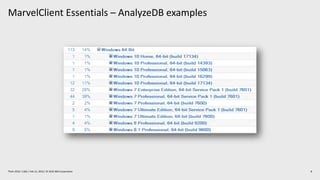
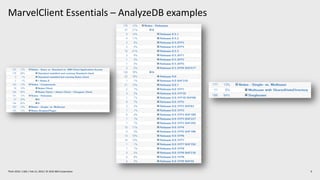
MarvelClient Essentials – included in IBM Notes/Domino 10.0.1
7Think 2019 / 1362 / Feb 13, 2019 / © 2019 IBM Corporation
• Makes it easier, faster and cheaper to upgrade to IBM Notes 10.x
• Provides valuable insights into Notes client landscapes for Notes 9.x and beyond
• Helps reduce helpdesk tickets, support, client maintenance and upgrade efforts
• Runs on all Notes client platforms supported by IBM (Intel Mac 64 bit, Windows, Citrix and VDI)
• Runs on all IBM Domino platforms supported by IBM
• Best of all: it’s FREE and included in IBM Notes and Domino 10.0.1
• If you are not on IBM Notes and/or Domino 10.0.1 now, you can get MarvelClient Essentials here:
https://www.panagenda.com/essentials/
More information:
https://www.ibm.com/support/knowledgecenter/en/SSKTMJ_10.0.1/admin/wn_marvelclient_essentials.html
https://www-01.ibm.com/support/docview.wss?uid=ibm10737079
https://www-01.ibm.com/support/docview.wss?uid=ibm10737079&aid=1
MarvelClient Essentials – AnalyzeDB examples
8Think 2019 / 1362 / Feb 13, 2019 / © 2019 IBM Corporation
MarvelClient Essentials – AnalyzeDB examples
9Think 2019 / 1362 / Feb 13, 2019 / © 2019 IBM Corporation
3. Define target (version and more …)
10Think 2019 / 1362 / Feb 13, 2019 / © 2019 IBM Corporation
• Version is very easy at the moment à 10.0.1
- Feature Pack 1 is planned for Q1 2019
http://www-10.lotus.com/ldd/fixlist.nsf/(Progress)/10.0.1%20FP1
- Our personal guess: Notes 11 will be shipped in Q4 2019 / Q1 2020
• Which Client Package?
- Standard, Basic and/or ICAA (IBM Client Application Access)
• Which Installation type?
- Single or MultiUser
3. Define target (version and more …) (2)
11Think 2019 / 1362 / Feb 13, 2019 / © 2019 IBM Corporation
• Adding languages using MUI-Pack installation(s)
- Multilingual User Interface
- Group1, 2a, 2b and 3 à Group1 was just released on 5th Feb 2019 *w00t*
• Where to deploy?
- Laptops, Desktops, Citrix and/or VDI
- Windows7, Windows10, macOS 10.13 and/or macOS 10.14
https://www-01.ibm.com/support/docview.wss?uid=ibm10737113
3. Define target (version and more …) (3)
12Think 2019 / 1362 / Feb 13, 2019 / © 2019 IBM Corporation
• Adding other functions/packages?
- Sametime embedded à not needed, 10.0.1 is up-to-date
- JVMPatch à not needed, 10.0.1 is up-to-date
- SwiftFile à use latest version 4.2.1 here:
http://www-01.ibm.com/support/docview.wss?uid=swg24035896
- IBM Connections Plugins for Notes à use latest version 5.5.0.20180813-1729 here:
https://xspy.mybluemix.net/nx
- Programs/Applications who interacts/communicates with Notes
- CTI, Instant Messengers, …
3. Define target (version and more …) (4)
13Think 2019 / 1362 / Feb 13, 2019 / © 2019 IBM Corporation
• Let’s assume (for this session) you want to Upgrade from Notes 9.0.1 FPx IFx to the following components:
- IBM Notes 10.0.1 Standard Client à MultiUser Installation on Windows10 64Bit
- Add French and Japanese (Multilingual User Interface = MUI)
- SwiftFile 4.2.1
- Connections Plugins for Notes 5.5.0.20180813-1729
- Use of default paths for
Program directory
C:Program Files(x86)IBMNotes
Shared data directory
C:ProgramDataIBMNotesDatashared
Data directory
C:Users<USERNAME>AppDataLocalIBMNotesData
4. Choose Upgrade/Deployment Tool
14Think 2019 / 1362 / Feb 13, 2019 / © 2019 IBM Corporation
• For many reasons – we do not recommend to use “Notes Smart Upgrade”
• “AUT – Notes Auto Update” is not available for this upgrade path
- Only IBM Notes 10.0.1 or later clients on Windows can be upgraded
- Execution based on DCC (using Desktop Policy)
- Uses the “IBM Auto Update Service” => system level
- Round-robin DNS used for distributing client update requests to multiple AUT servers in a Domino domain
- Configuration via AUT catalog database
- IBM Notes on Mac is currently not supported for upgrades
- See here for more details:
https://www.ibm.com/support/knowledgecenter/en/SSKTMJ_10.0.1/admin/inst_aut_overview.html
• Third-Party-Solution for Notes à Yes – but no advertising here!
• Third-Party-Solutions for Windows, like SCCM or others
5. Create Upgrade Package
15Think 2019 / 1362 / Feb 13, 2019 / © 2019 IBM Corporation
• No need to make changes to MSI package(s)
- Scripts can help here
- Differentiation between package and configuration (notes.ini, ConfigFile, etc.)
- That will help you a lot when it comes to package changes, new versions and testing
• Always include an Uninstall part in your package
- In-place upgrades are not recommended
- You can use the package also in cases of a new or re-install
5. Create Upgrade Package (2)
16Think 2019 / 1362 / Feb 13, 2019 / © 2019 IBM Corporation
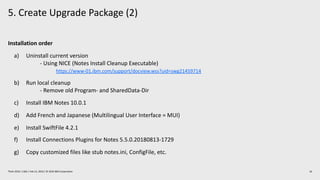
Installation order
a) Uninstall current version
- Using NICE (Notes Install Cleanup Executable)
https://www-01.ibm.com/support/docview.wss?uid=swg21459714
b) Run local cleanup
- Remove old Program- and SharedData-Dir
c) Install IBM Notes 10.0.1
d) Add French and Japanese (Multilingual User Interface = MUI)
e) Install SwiftFile 4.2.1
f) Install Connections Plugins for Notes 5.5.0.20180813-1729
g) Copy customized files like stub notes.ini, ConfigFile, etc.
4. Create Upgrade Package (3)
17Think 2019 / 1362 / Feb 13, 2019 / © 2019 IBM Corporation
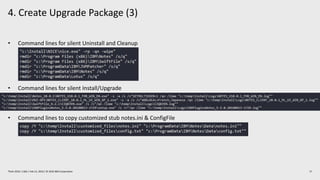
• Command lines for silent Uninstall and Cleanup
• Command lines for silent Install/Upgrade
• Command lines to copy customized stub notes.ini & ConfigFile
5. Create Upgrade Package (4)
18Think 2019 / 1362 / Feb 13, 2019 / © 2019 IBM Corporation
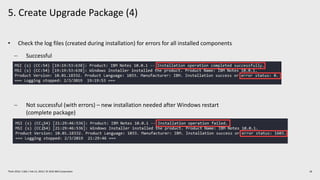
• Check the log files (created during installation) for errors for all installed components
- Successful
- Not successful (with errors) – new installation needed after Windows restart
(complete package)
5. Create Upgrade Package (5)
19Think 2019 / 1362 / Feb 13, 2019 / © 2019 IBM Corporation
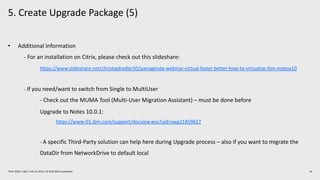
• Additional Information
- For an installation on Citrix, please check out this slideshare:
https://www.slideshare.net/christophadler50/panagenda-webinar-virtual-faster-better-how-to-virtualize-ibm-notesv10
- If you need/want to switch from Single to MultiUser
- Check out the MUMA Tool (Multi-User Migration Assistant) – must be done before
Upgrade to Notes 10.0.1:
https://www-01.ibm.com/support/docview.wss?uid=swg21459627
- A specific Third-Party solution can help here during Upgrade process – also if you want to migrate the
DataDir from NetworkDrive to default local
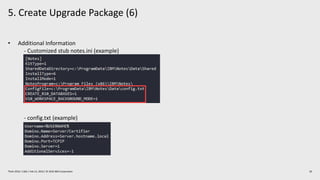
5. Create Upgrade Package (6)
20Think 2019 / 1362 / Feb 13, 2019 / © 2019 IBM Corporation
• Additional Information
- Customized stub notes.ini (example)
- config.txt (example)
6. Define post Upgrade actions
21Think 2019 / 1362 / Feb 13, 2019 / © 2019 IBM Corporation
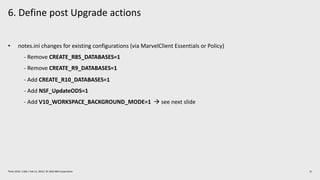
• notes.ini changes for existing configurations (via MarvelClient Essentials or Policy)
- Remove CREATE_R85_DATABASES=1
- Remove CREATE_R9_DATABASES=1
- Add CREATE_R10_DATABASES=1
- Add NSF_UpdateODS=1
- Add V10_WORKSPACE_BACKGROUND_MODE=1 à see next slide
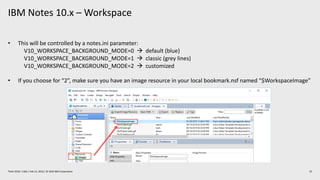
IBM Notes 10.x – Workspace
22Think 2019 / 1362 / Feb 13, 2019 / © 2019 IBM Corporation
• This will be controlled by a notes.ini parameter:
V10_WORKSPACE_BACKGROUND_MODE=0 à default (blue)
V10_WORKSPACE_BACKGROUND_MODE=1 à classic (grey lines)
V10_WORKSPACE_BACKGROUND_MODE=2 à customized
• If you choose for “2”, make sure you have an image resource in your local bookmark.nsf named “$WorkspaceImage”
7. Test, pilot, production
23Think 2019 / 1362 / Feb 13, 2019 / © 2019 IBM Corporation
• Test
- Try to use virtual machines with snapshots
- Use images, which is very close to your production configuration
- Desktops vs. Laptops vs. VDI
- ActiveDirectoy à GPOs (Group Policy Objects)
- No local Admin rights
- Enabled UAC (User Account Control)
- Installed AV (Anti-Virus) Software
7. Test, pilot, production (2)
24Think 2019 / 1362 / Feb 13, 2019 / © 2019 IBM Corporation
• Pilot
- Choose the members of the pilot group wisely and let them know
- 20 – 50 users from different departments and with different requirements on IBM Notes
• Production Deployment
- Inform your ServiceDesk and your users before you push the button
- Balance your deployment by upgrading e. g. 100-500 users at the same time – no more
Summary
25Think 2019 / 1362 / Feb 13, 2019 / © 2019 IBM Corporation
• You know your current environment
• You have a clear destination platform
• You have chosen your method and tools for the upgrade
• You have created your upgrade package(s)
• You have defined your settings on the new Notes platform
• You are ready to test, pilot, and roll out !
Q & A
28Think 2018 / 1362 / Feb XX, 2018 / © 2018 IBM Corporation
You can find the latest version of this slide deck here:
https://www.slideshare.net/christophadler50
29Think 2018 / 1362 / Feb xx, 2018 / © 2018 IBM Corporation
We’ll be available at the IBM Champion lounge to answer
questions about this session!
Date: TODAY !
Time: 3.30pm-4.30pm
30
IBM Champions at Think 2019
Meet an IBM Champion
Where:
IBM Champion & IBM Community Lounge, Moscone
South Lobby
When:
Tues 8-5
Weds & Thurs 8-6
Fri 8-12
Featuring:
• 30+ roundtable events
• Meet & Greet with IBM Champions, IBM
Community leaders, and special guests
Champion Chats
40-minute roundtable
discussions with IBM
Champions, IBMers, and
YOU
Find the schedule at
ibm.com/champion
IBM Champions are
experts, advocates, and
thought leaders.
The IBM Champions
program recognizes
external experts and
thought leaders for our
work with IBM products
and communities.
ibm.com/champion
Thank you!
31Think 2018 / 1362 / Feb XX, 2018 / © 2018 IBM Corporation
Christoph Adler
Senior Consultant
panagenda
—
christoph.adler@panagenda.com
+49 172 494 4141
@cadler80
panagenda.com
Jared Roberts
Senior Software Engineer
ISW
—
JRoberts@isw.net.au
+61 417 215 700
@jazzaroberts
isw.net.au
32https://www.ibm.com/legal/us/en/copytrade.shtml
®

Supercharged Notes 10 Upgrade: Turning the Worst Notes Deployments into the Best

  • 1.
    Supercharged Notes 10Upgrade: Turning the Worst Notes Deployments into the Best — Christoph Adler Jared Roberts Senior Consultant Senior Software Engineer panagenda ISW Think 2019 / 1362 / Feb 13, 2019 / © 2019 IBM Corporation
  • 2.
    Christoph Adler –Senior Consultant at panagenda 2Think 2019 / 1362 / Feb 13, 2019 / © 2019 IBM Corporation About the speakers 18 years of IBM solutions experience Focused on • IBM Notes Client Management • Analysis and Optimization of ICS Infrastructures • Cloud onboarding • Application Modernization Good to know • From Germany • Bass player (for a ROCK band called DISCO !!) • Husband, Geek, loves Football (Soccer) and Beer • Don’t give energy drinks à squirrel mode
  • 3.
    Jared Roberts –Senior Consultant & Software Engineer at ISW 3Think 2019 / 1362 / Feb 13, 2019 / © 2019 IBM Corporation About the speakers 14 years of IBM solutions experience Focused on • Digital Transformation • ICS Infrastructure Admin and Optimisation • Systems & Applications Analysis • Application Modernisation Good to know • From Australia • Drummer for Desecrator (the best heavy metal band you’ve never heard of) • Dad of 2, BBQ enthusiast, amateur beer brewer • Terrible at most sports
  • 4.
    Contents 4Think 2019 /1362 / Feb 13, 2019 / © 2019 IBM Corporation • What we see out there in Notes deployments • Know your current environment • Define target (version and more …) • Choose Upgrade/Deployment Tool • Create Upgrade Package • Define post Upgrade actions • Test, pilot, production
  • 5.
    What we seeout there in Notes deployments 5Think 2019 / 1362 / Feb 13, 2019 / © 2019 IBM Corporation • Lack of visibility and control • Many different versions and many different installation types • Uncontrolled configurations (Data Dirs, Locations, Connections, Accounts, Settings, Eclipse preferences, …) • Not secure (JVM vulnerabilities, Code Signers, ECL Management) • Mixed functionality – things don’t work! • The same end-user problems occur again and again (and again) • Reluctance to upgrade • Software deployment teams have little/no knowledge or “care factor” about Notes • Administrators lack time and skill to utilize all available tools to effectively manage the Notes client • Perception => it's too difficult and/or expensive / too risky for the business due to disruptions
  • 6.
    2. Know yourcurrent environment 6Think 2019 / 1362 / Feb 13, 2019 / © 2019 IBM Corporation • It’s fundamentally important that your know the details about your current Notes Client Infrastructure to be able to make smart decisions for future deployments - Which exact versions are deployed? - Which Installation types and modes are used? - Locations of Program-, Data and SharedData-Dir? - Usage of Laptops, Desktops, Citrix and VDI in numbers/percentage? - Which OS incl. version is used? - Usage of Notes addons à Connections plugins, SwiftFile, CTI, … ? • If you can’t answer the questions above 100% correctly, the following two slides will help you a lot!
  • 7.
    MarvelClient Essentials –included in IBM Notes/Domino 10.0.1 7Think 2019 / 1362 / Feb 13, 2019 / © 2019 IBM Corporation • Makes it easier, faster and cheaper to upgrade to IBM Notes 10.x • Provides valuable insights into Notes client landscapes for Notes 9.x and beyond • Helps reduce helpdesk tickets, support, client maintenance and upgrade efforts • Runs on all Notes client platforms supported by IBM (Intel Mac 64 bit, Windows, Citrix and VDI) • Runs on all IBM Domino platforms supported by IBM • Best of all: it’s FREE and included in IBM Notes and Domino 10.0.1 • If you are not on IBM Notes and/or Domino 10.0.1 now, you can get MarvelClient Essentials here: https://www.panagenda.com/essentials/ More information: https://www.ibm.com/support/knowledgecenter/en/SSKTMJ_10.0.1/admin/wn_marvelclient_essentials.html https://www-01.ibm.com/support/docview.wss?uid=ibm10737079 https://www-01.ibm.com/support/docview.wss?uid=ibm10737079&aid=1
  • 8.
    MarvelClient Essentials –AnalyzeDB examples 8Think 2019 / 1362 / Feb 13, 2019 / © 2019 IBM Corporation
  • 9.
    MarvelClient Essentials –AnalyzeDB examples 9Think 2019 / 1362 / Feb 13, 2019 / © 2019 IBM Corporation
  • 10.
    3. Define target(version and more …) 10Think 2019 / 1362 / Feb 13, 2019 / © 2019 IBM Corporation • Version is very easy at the moment à 10.0.1 - Feature Pack 1 is planned for Q1 2019 http://www-10.lotus.com/ldd/fixlist.nsf/(Progress)/10.0.1%20FP1 - Our personal guess: Notes 11 will be shipped in Q4 2019 / Q1 2020 • Which Client Package? - Standard, Basic and/or ICAA (IBM Client Application Access) • Which Installation type? - Single or MultiUser
  • 11.
    3. Define target(version and more …) (2) 11Think 2019 / 1362 / Feb 13, 2019 / © 2019 IBM Corporation • Adding languages using MUI-Pack installation(s) - Multilingual User Interface - Group1, 2a, 2b and 3 à Group1 was just released on 5th Feb 2019 *w00t* • Where to deploy? - Laptops, Desktops, Citrix and/or VDI - Windows7, Windows10, macOS 10.13 and/or macOS 10.14 https://www-01.ibm.com/support/docview.wss?uid=ibm10737113
  • 12.
    3. Define target(version and more …) (3) 12Think 2019 / 1362 / Feb 13, 2019 / © 2019 IBM Corporation • Adding other functions/packages? - Sametime embedded à not needed, 10.0.1 is up-to-date - JVMPatch à not needed, 10.0.1 is up-to-date - SwiftFile à use latest version 4.2.1 here: http://www-01.ibm.com/support/docview.wss?uid=swg24035896 - IBM Connections Plugins for Notes à use latest version 5.5.0.20180813-1729 here: https://xspy.mybluemix.net/nx - Programs/Applications who interacts/communicates with Notes - CTI, Instant Messengers, …
  • 13.
    3. Define target(version and more …) (4) 13Think 2019 / 1362 / Feb 13, 2019 / © 2019 IBM Corporation • Let’s assume (for this session) you want to Upgrade from Notes 9.0.1 FPx IFx to the following components: - IBM Notes 10.0.1 Standard Client à MultiUser Installation on Windows10 64Bit - Add French and Japanese (Multilingual User Interface = MUI) - SwiftFile 4.2.1 - Connections Plugins for Notes 5.5.0.20180813-1729 - Use of default paths for Program directory C:Program Files(x86)IBMNotes Shared data directory C:ProgramDataIBMNotesDatashared Data directory C:Users<USERNAME>AppDataLocalIBMNotesData
  • 14.
    4. Choose Upgrade/DeploymentTool 14Think 2019 / 1362 / Feb 13, 2019 / © 2019 IBM Corporation • For many reasons – we do not recommend to use “Notes Smart Upgrade” • “AUT – Notes Auto Update” is not available for this upgrade path - Only IBM Notes 10.0.1 or later clients on Windows can be upgraded - Execution based on DCC (using Desktop Policy) - Uses the “IBM Auto Update Service” => system level - Round-robin DNS used for distributing client update requests to multiple AUT servers in a Domino domain - Configuration via AUT catalog database - IBM Notes on Mac is currently not supported for upgrades - See here for more details: https://www.ibm.com/support/knowledgecenter/en/SSKTMJ_10.0.1/admin/inst_aut_overview.html • Third-Party-Solution for Notes à Yes – but no advertising here! • Third-Party-Solutions for Windows, like SCCM or others
  • 15.
    5. Create UpgradePackage 15Think 2019 / 1362 / Feb 13, 2019 / © 2019 IBM Corporation • No need to make changes to MSI package(s) - Scripts can help here - Differentiation between package and configuration (notes.ini, ConfigFile, etc.) - That will help you a lot when it comes to package changes, new versions and testing • Always include an Uninstall part in your package - In-place upgrades are not recommended - You can use the package also in cases of a new or re-install
  • 16.
    5. Create UpgradePackage (2) 16Think 2019 / 1362 / Feb 13, 2019 / © 2019 IBM Corporation Installation order a) Uninstall current version - Using NICE (Notes Install Cleanup Executable) https://www-01.ibm.com/support/docview.wss?uid=swg21459714 b) Run local cleanup - Remove old Program- and SharedData-Dir c) Install IBM Notes 10.0.1 d) Add French and Japanese (Multilingual User Interface = MUI) e) Install SwiftFile 4.2.1 f) Install Connections Plugins for Notes 5.5.0.20180813-1729 g) Copy customized files like stub notes.ini, ConfigFile, etc.
  • 17.
    4. Create UpgradePackage (3) 17Think 2019 / 1362 / Feb 13, 2019 / © 2019 IBM Corporation • Command lines for silent Uninstall and Cleanup • Command lines for silent Install/Upgrade • Command lines to copy customized stub notes.ini & ConfigFile
  • 18.
    5. Create UpgradePackage (4) 18Think 2019 / 1362 / Feb 13, 2019 / © 2019 IBM Corporation • Check the log files (created during installation) for errors for all installed components - Successful - Not successful (with errors) – new installation needed after Windows restart (complete package)
  • 19.
    5. Create UpgradePackage (5) 19Think 2019 / 1362 / Feb 13, 2019 / © 2019 IBM Corporation • Additional Information - For an installation on Citrix, please check out this slideshare: https://www.slideshare.net/christophadler50/panagenda-webinar-virtual-faster-better-how-to-virtualize-ibm-notesv10 - If you need/want to switch from Single to MultiUser - Check out the MUMA Tool (Multi-User Migration Assistant) – must be done before Upgrade to Notes 10.0.1: https://www-01.ibm.com/support/docview.wss?uid=swg21459627 - A specific Third-Party solution can help here during Upgrade process – also if you want to migrate the DataDir from NetworkDrive to default local
  • 20.
    5. Create UpgradePackage (6) 20Think 2019 / 1362 / Feb 13, 2019 / © 2019 IBM Corporation • Additional Information - Customized stub notes.ini (example) - config.txt (example)
  • 21.
    6. Define postUpgrade actions 21Think 2019 / 1362 / Feb 13, 2019 / © 2019 IBM Corporation • notes.ini changes for existing configurations (via MarvelClient Essentials or Policy) - Remove CREATE_R85_DATABASES=1 - Remove CREATE_R9_DATABASES=1 - Add CREATE_R10_DATABASES=1 - Add NSF_UpdateODS=1 - Add V10_WORKSPACE_BACKGROUND_MODE=1 à see next slide
  • 22.
    IBM Notes 10.x– Workspace 22Think 2019 / 1362 / Feb 13, 2019 / © 2019 IBM Corporation • This will be controlled by a notes.ini parameter: V10_WORKSPACE_BACKGROUND_MODE=0 à default (blue) V10_WORKSPACE_BACKGROUND_MODE=1 à classic (grey lines) V10_WORKSPACE_BACKGROUND_MODE=2 à customized • If you choose for “2”, make sure you have an image resource in your local bookmark.nsf named “$WorkspaceImage”
  • 23.
    7. Test, pilot,production 23Think 2019 / 1362 / Feb 13, 2019 / © 2019 IBM Corporation • Test - Try to use virtual machines with snapshots - Use images, which is very close to your production configuration - Desktops vs. Laptops vs. VDI - ActiveDirectoy à GPOs (Group Policy Objects) - No local Admin rights - Enabled UAC (User Account Control) - Installed AV (Anti-Virus) Software
  • 24.
    7. Test, pilot,production (2) 24Think 2019 / 1362 / Feb 13, 2019 / © 2019 IBM Corporation • Pilot - Choose the members of the pilot group wisely and let them know - 20 – 50 users from different departments and with different requirements on IBM Notes • Production Deployment - Inform your ServiceDesk and your users before you push the button - Balance your deployment by upgrading e. g. 100-500 users at the same time – no more
  • 25.
    Summary 25Think 2019 /1362 / Feb 13, 2019 / © 2019 IBM Corporation • You know your current environment • You have a clear destination platform • You have chosen your method and tools for the upgrade • You have created your upgrade package(s) • You have defined your settings on the new Notes platform • You are ready to test, pilot, and roll out !
  • 26.
    Q & A 28Think2018 / 1362 / Feb XX, 2018 / © 2018 IBM Corporation
  • 27.
    You can findthe latest version of this slide deck here: https://www.slideshare.net/christophadler50 29Think 2018 / 1362 / Feb xx, 2018 / © 2018 IBM Corporation
  • 28.
    We’ll be availableat the IBM Champion lounge to answer questions about this session! Date: TODAY ! Time: 3.30pm-4.30pm 30 IBM Champions at Think 2019 Meet an IBM Champion Where: IBM Champion & IBM Community Lounge, Moscone South Lobby When: Tues 8-5 Weds & Thurs 8-6 Fri 8-12 Featuring: • 30+ roundtable events • Meet & Greet with IBM Champions, IBM Community leaders, and special guests Champion Chats 40-minute roundtable discussions with IBM Champions, IBMers, and YOU Find the schedule at ibm.com/champion IBM Champions are experts, advocates, and thought leaders. The IBM Champions program recognizes external experts and thought leaders for our work with IBM products and communities. ibm.com/champion
  • 29.
    Thank you! 31Think 2018/ 1362 / Feb XX, 2018 / © 2018 IBM Corporation Christoph Adler Senior Consultant panagenda — christoph.adler@panagenda.com +49 172 494 4141 @cadler80 panagenda.com Jared Roberts Senior Software Engineer ISW — JRoberts@isw.net.au +61 417 215 700 @jazzaroberts isw.net.au
  • 30.