Command & Conquer
HCL Notes Client Upgrades
Christoph Adler
Senior Consultant - panagenda
christoph.adler@panagenda.com
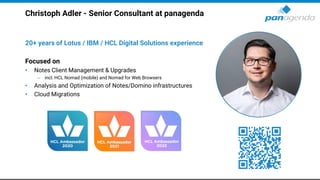
Christoph Adler - Senior Consultant at panagenda
20+ years of Lotus / IBM / HCL Digital Solutions experience
Focused on
• Notes Client Management & Upgrades
– incl. HCL Nomad (mobile) and Nomad for Web Browsers
• Analysis and Optimization of Notes/Domino infrastructures
• Cloud Migrations
Agenda
1. Why are we talking about Notes Upgrades?
2. HCL Notes Client Upgrade Challenges
3. Surprise Solution – which will make you happy ☺
4. Live Demo
Make Your Data Work For You
1. Why are we talking about
Notes Upgrades?
1. Stay current with (security) updates
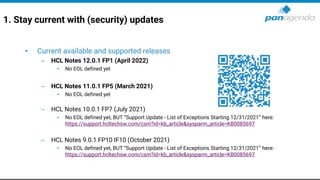
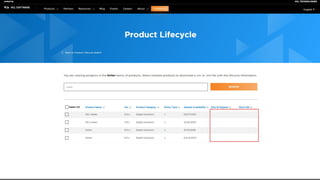
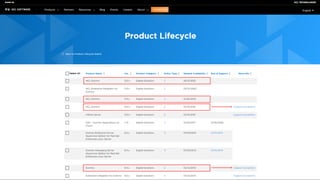
• Current available and supported releases
– HCL Notes 12.0.1 FP1 (April 2022)
• No EOL defined yet
– HCL Notes 11.0.1 FP5 (March 2021)
• No EOL defined yet
– HCL Notes 10.0.1 FP7 (July 2021)
• No EOL defined yet, BUT “Support Update - List of Exceptions Starting 12/31/2021” here:
https://support.hcltechsw.com/csm?id=kb_article&sysparm_article=KB0085697
– HCL Notes 9.0.1 FP10 IF10 (October 2021)
• No EOL defined yet, BUT “Support Update - List of Exceptions Starting 12/31/2021” here:
https://support.hcltechsw.com/csm?id=kb_article&sysparm_article=KB0085697
Make Your Data Work For You
2. HCL Notes Client
Upgrade Challenges
2. HCL Notes Client – Upgrade Challenges
• Package creation and standardization
– Initial Install == Upgrades
– One package fits it all → Laptops, Desktops, Citrix & VDI
– Include Uninstall → needed in case of re-install
– Command lines and parameters/switches
– Installation order → Client, Language Packs, Fix Packs, Add-Ons, etc.
– Notes Client preparation/optimization (see next slide)
• Package deployment
– Remote workers (with or without VPN)
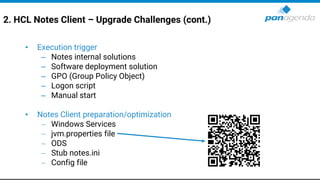
2. HCL Notes Client – Upgrade Challenges (cont.)
• Execution trigger
– Notes internal solutions
– Software deployment solution
– GPO (Group Policy Object)
– Logon script
– Manual start
• Notes Client preparation/optimization
− Windows Services
− jvm.properties file
− ODS
− Stub notes.ini
− Config file
Challenges for HCL Notes deployments/upgrades
• Migration
– Data folder
– SharedData folder
– Program folder
– notes.ini
– …
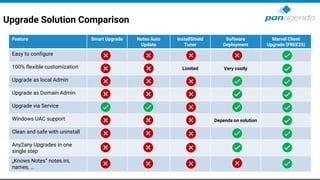
Upgrade Solution Comparison
Feature Smart Upgrade Notes Auto
Update
InstallShield
Tuner
Software
Deployment
Marvel Client
Upgrade (FREE25)
Easy to configure
100% flexible customization Limited Very costly
Upgrade as local Admin
Upgrade as Domain Admin
Upgrade via Service
Windows UAC support Depends on solution
Clean and safe with uninstall
Any2any Upgrades in one
single step
„Knows Notes“ notes.ini,
names, …
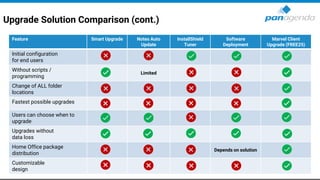
Upgrade Solution Comparison (cont.)
Feature Smart Upgrade Notes Auto
Update
InstallShield
Tuner
Software
Deployment
Marvel Client
Upgrade (FREE25)
Initial configuration
for end users
Without scripts /
programming
Limited
Change of ALL folder
locations
Fastest possible upgrades
Users can choose when to
upgrade
Upgrades without
data loss
Home Office package
distribution
Depends on solution
Customizable
design
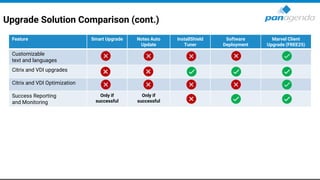
Upgrade Solution Comparison (cont.)
Feature Smart Upgrade Notes Auto
Update
InstallShield
Tuner
Software
Deployment
Marvel Client
Upgrade (FREE25)
Customizable
text and languages
Citrix and VDI upgrades
Citrix and VDI Optimization
Success Reporting
and Monitoring
Only if
successful
Only if
successful
The (only) Solution
MarvelClient Upgrade FREE25
Make Your Data Work For You
4. Live Demo
Fragen ?
Vielen Dank !
DNUG e.V.
Goldenbergstr. 1
50354 Hürth
Telefon: +49 30 20898805 0
Telefax: +49 30 20898805 1
E-Mail: info@dnug.de
Web: http://www.dnug.de

dachnug49 - Command & Conquer HCL Notes Client Upgrades

  • 1.
    Command & Conquer HCLNotes Client Upgrades Christoph Adler Senior Consultant - panagenda christoph.adler@panagenda.com
  • 2.
    Christoph Adler -Senior Consultant at panagenda 20+ years of Lotus / IBM / HCL Digital Solutions experience Focused on • Notes Client Management & Upgrades – incl. HCL Nomad (mobile) and Nomad for Web Browsers • Analysis and Optimization of Notes/Domino infrastructures • Cloud Migrations
  • 3.
    Agenda 1. Why arewe talking about Notes Upgrades? 2. HCL Notes Client Upgrade Challenges 3. Surprise Solution – which will make you happy ☺ 4. Live Demo
  • 4.
    Make Your DataWork For You 1. Why are we talking about Notes Upgrades?
  • 5.
    1. Stay currentwith (security) updates • Current available and supported releases – HCL Notes 12.0.1 FP1 (April 2022) • No EOL defined yet – HCL Notes 11.0.1 FP5 (March 2021) • No EOL defined yet – HCL Notes 10.0.1 FP7 (July 2021) • No EOL defined yet, BUT “Support Update - List of Exceptions Starting 12/31/2021” here: https://support.hcltechsw.com/csm?id=kb_article&sysparm_article=KB0085697 – HCL Notes 9.0.1 FP10 IF10 (October 2021) • No EOL defined yet, BUT “Support Update - List of Exceptions Starting 12/31/2021” here: https://support.hcltechsw.com/csm?id=kb_article&sysparm_article=KB0085697
  • 8.
    Make Your DataWork For You 2. HCL Notes Client Upgrade Challenges
  • 9.
    2. HCL NotesClient – Upgrade Challenges • Package creation and standardization – Initial Install == Upgrades – One package fits it all → Laptops, Desktops, Citrix & VDI – Include Uninstall → needed in case of re-install – Command lines and parameters/switches – Installation order → Client, Language Packs, Fix Packs, Add-Ons, etc. – Notes Client preparation/optimization (see next slide) • Package deployment – Remote workers (with or without VPN)
  • 10.
    2. HCL NotesClient – Upgrade Challenges (cont.) • Execution trigger – Notes internal solutions – Software deployment solution – GPO (Group Policy Object) – Logon script – Manual start • Notes Client preparation/optimization − Windows Services − jvm.properties file − ODS − Stub notes.ini − Config file
  • 11.
    Challenges for HCLNotes deployments/upgrades • Migration – Data folder – SharedData folder – Program folder – notes.ini – …
  • 12.
    Upgrade Solution Comparison FeatureSmart Upgrade Notes Auto Update InstallShield Tuner Software Deployment Marvel Client Upgrade (FREE25) Easy to configure 100% flexible customization Limited Very costly Upgrade as local Admin Upgrade as Domain Admin Upgrade via Service Windows UAC support Depends on solution Clean and safe with uninstall Any2any Upgrades in one single step „Knows Notes“ notes.ini, names, …
  • 13.
    Upgrade Solution Comparison(cont.) Feature Smart Upgrade Notes Auto Update InstallShield Tuner Software Deployment Marvel Client Upgrade (FREE25) Initial configuration for end users Without scripts / programming Limited Change of ALL folder locations Fastest possible upgrades Users can choose when to upgrade Upgrades without data loss Home Office package distribution Depends on solution Customizable design
  • 14.
    Upgrade Solution Comparison(cont.) Feature Smart Upgrade Notes Auto Update InstallShield Tuner Software Deployment Marvel Client Upgrade (FREE25) Customizable text and languages Citrix and VDI upgrades Citrix and VDI Optimization Success Reporting and Monitoring Only if successful Only if successful
  • 15.
  • 17.
    Make Your DataWork For You 4. Live Demo
  • 18.
  • 19.
  • 20.
    DNUG e.V. Goldenbergstr. 1 50354Hürth Telefon: +49 30 20898805 0 Telefax: +49 30 20898805 1 E-Mail: info@dnug.de Web: http://www.dnug.de