Docker
What, Why, How?
EnricoBocchi
Hugo González Labrador
CERN IT-Storage Group
Summer Student Lab
14 July 2017
CERN, Geneva
3.
What is Docker?
•Docker is a software providing the ability to deploy
applications in containers.
What is a container?
• It is an OS-level virtualization method in which the kernel
allows the existence of multiple user-space instances,
instead of just one.
Why do we need containers?
1. Isolate a process and it dependencies in a self-contained box
2. Set limits on the resources, e.g., CPU, RAM, I/O, …, that can
be leveraged by such process
4.
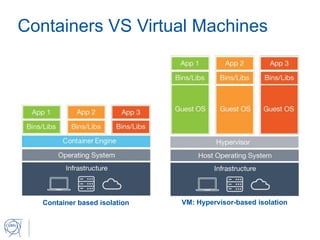
Containers VS VirtualMachines
VM: Hypervisor-based isolation
Container based isolation
5.
Containers VS VirtualMachines
• Provisioning:
• VM: Need to boot the guest OS. Can take seconds/minutes
• Container: No need to boot. Resources are reserved in
milliseconds
• Performance
• VM: Each instruction executed on the guest OS must be
translated by the hypervisor and executed on the host OS
• Containers: Isolation done at the kernel level. Resources for
containers are quasi-native.
6.
Advantages of containers
•One container, one task
• Each container can be used for a single task (e.g., httpd,
mysql, nodejs, redis, …) with predictable resources
requirements
• Containers can be limited in CPU and memory to limit their
resource usage
• Isolation of activities taking place within the container
• Isolation of processes – reduction of potential attacks
• Isolation of the file system – no IO operations on the host fs
• Control of network activities – IP, routing, firewall rules
replicated and fine-grained configurable for each container
7.
History of Containers
•1979: Introduction of chroot in Unix v7
• 2000: FreeBSD Jails – Introduction of subsystems, each equipped
with an independent IP layer
• 2001: Linux VServer – Partitioning of resources (filesystem,
memory, network) within a Linux host
• 2004: Solaris Containers (aka Solaris Zones)
• 2008: Linux Containers (lxc) – Isolation of processes via cgroup
and user namespaces
• 2013: Docker – Full-fledged ecosystem for containers
• 2016: rkt container engine for CoreOS – Implementation compliant
with Open Container Initiative directives
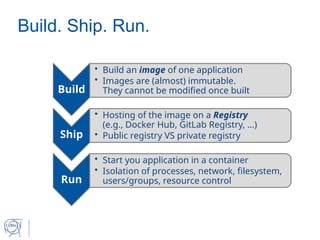
Build. Ship. Run.
Build
•Build an image of one application
• Images are (almost) immutable.
They cannot be modified once built
Ship
• Hosting of the image on a Registry
(e.g., Docker Hub, GitLab Registry, …)
• Public registry VS private registry
Run
• Start you application in a container
• Isolation of processes, network, filesystem,
users/groups, resource control
10.
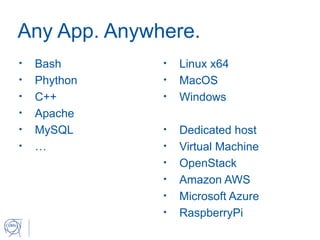
Any App. Anywhere.
•Bash
• Phython
• C++
• Apache
• MySQL
• …
• Linux x64
• MacOS
• Windows
• Dedicated host
• Virtual Machine
• OpenStack
• Amazon AWS
• Microsoft Azure
• RaspberryPi
11.
Boxed
Containerized EOS, CERNBox,SWAN
Enrico Bocchi
Hugo González Labrador
CERN IT-Storage Group
Summer Student Lab
14 July 2017
CERN, Geneva
Why a Docker-basedPackage
• Exact replica of the services in production
• Useful for testing and troubleshooting purposes
• Troubleshooting and testing with SmashBox
• New releases of eos and xroot clients
• Give the possibility to non-CERN users to try our services
• Docker images distributed via GitLab registry + GitHub for
setup scripts
• Runs on Amazon EC2!
• https://ec2-35-157-222-102.eu-central-1.compute.amazonaws.com
• Potential testing on Helix Nebula Cloud in future
• Successful deployment at the premises of Up2U technical
partners
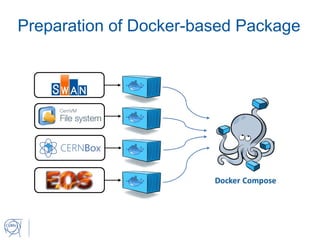
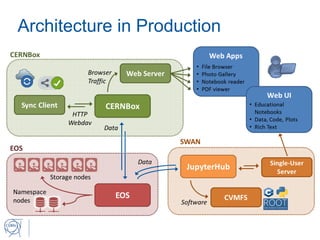
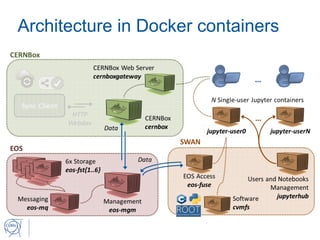
Architecture in Dockercontainers
• Deployment via Docker and Docker-compose
• Centralized identity management via (containerized) LDAP
server
• Persistent storage on Docker volumes
• User data stored through EOS
• User accounts on LDAP
• Full stack of CERN services in 14 Docker containers
• 1 for LDAP
• 8 for EOS storage (+1 for deployment orchestration)
• 2 for CERNBox
• 3 for SWAN (not counting Single-user Jupyter containers)
17.
Where to Download
•Documentation page:
https://cernbox.cern.ch/cernbox/doc/boxed
• GitHub repo:
https://github.com/cernbox/uboxed