twitter: @akrabat


Stress-free
Deployment
     Rob Allen


 ConFoo March 2011
Rob Allen?
•   PHP developer since 1999
•   Wrote Zend_Config
•   Tutorial at akrabat.com
•   Zend Framework in Action!

Next book!
 Zend Framework 2 in Action
 (with Ryan Mauger)
Why automate
deployment?
Getting your house in
        order
Source code control
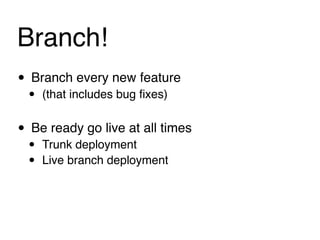
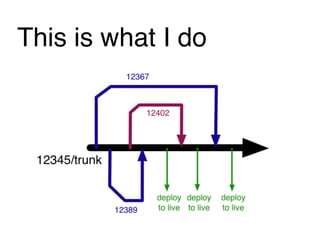
Branch!
• Branch every new feature
 •   (that includes bug fixes)


• Be ready go live at all times
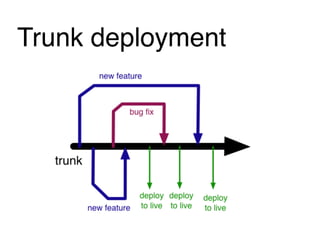
 •   Trunk deployment
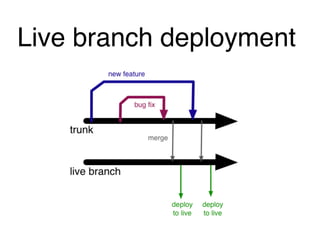
 •   Live branch deployment
Trunk deployment
Live branch deployment
This is what I do
Database
considerations
One master database
• Live database holds master structure
• Copy master to everywhere else
• Advantages:
 • Simple to implement
• Disadvantages:
 •   Backwards compatibility required
 •   Doesnʼt scale for multiple devs well
 •   Easy to make mistakes
Migrations
• Versioned schemas
• Use delta files with UP and DOWN functions
• Advantages:
 •   version controlled
 •   destructive changes possible (but donʼt do it!)
• Disadvantages:
 •   Canʼt think of any!
Migrations tools
• DbDeploy
• LiquiBase
• Framework specific
 •   Doctrine
 •   Akrabat_Db_Schema_Manager
 •   Cake migrations
 •   PEAR: MDB2_Schema
• Home-brew script
For more info
“Database version control without the pain”
by Harrie Verveer

http://slidesha.re/gwq0aw

Also read http://www.harrieverveer.com/?p=247
Code
considerations
Context awareness
•   Configuration based on where the code has been
    deployed
•   Automatic
    • Automatic detection based on URL?
    • Environment variable set in vhost defintion?
•   Local configuration file
So whatʼs deployment
     all about?
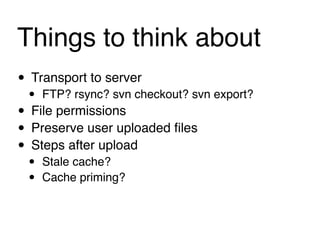
Things to think about
• Transport to server
 • FTP? rsync? svn checkout? svn export?
• File permissions
• Preserve user uploaded files
• Steps after upload
 •   Stale cache?
 •   Cache priming?
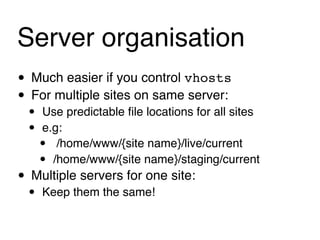
Server organisation
• Much easier if you control vhosts
• For multiple sites on same server:
 •   Use predictable file locations for all sites
 •   e.g:
     •  /home/www/{site name}/live/current
     • /home/www/{site name}/staging/current
• Multiple servers for one site:
 •   Keep them the same!
The deployment plan
Typical steps
• Tag this release
• Set “under maintenance” page
• Transfer files to server
• Set file permissions as required
• Delete old cache files
• Run database migrations if required
• Remove “under maintenance” page
Hereʼs mine:
1. Branch trunk to release-{yymmdd-hhmm}
2. ssh into server
3. Ensure staging is up to date (svn st -u)
  If not, stop here!
4. svn checkout new release branch to a new
   folder in live directory
5. Set permissions on the /tmp folder for cache
   files
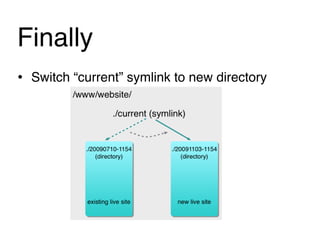
Finally
• Switch “current” symlink to new directory
Tools for automation
Simple scripts
• PHP, Bash or Bat files
• Simple to write and run
• Execute command line apps via exec()
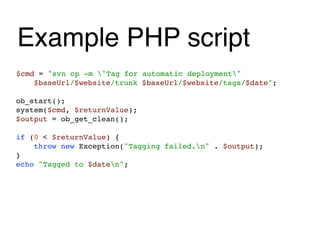
Example PHP script
$cmd = "svn cp -m "Tag for automatic deployment"
    $baseUrl/$website/trunk $baseUrl/$website/tags/$date";

ob_start();
system($cmd, $returnValue);
$output = ob_get_clean();

if (0 < $returnValue) {
    throw new Exception("Tagging failed.n" . $output);
}
echo "Tagged to $daten";
Phing
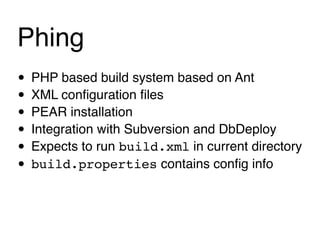
• PHP based build system based on Ant
• XML configuration files
• PEAR installation
• Integration with Subversion and DbDeploy
• Expects to run build.xml in current directory
• build.properties contains config info
Phing philosophy"
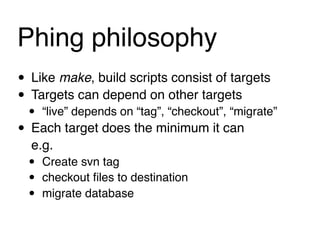
• Like make, build scripts consist of targets
• Targets can depend on other targets
 • “live” depends on “tag”, “checkout”, “migrate”
• Each target does the minimum it can
  e.g.
  •   Create svn tag
  •   checkout files to destination
  •   migrate database
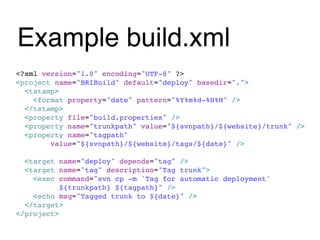
Example build.xml
<?xml version="1.0" encoding="UTF-8" ?>
<project name="BRIBuild" default="deploy" basedir=".">
  <tstamp>
    <format property="date" pattern="%Y%m%d-%H%M" />
  </tstamp>
  <property file="build.properties" />
  <property name="trunkpath" value="${svnpath}/${website}/trunk" />
  <property name="tagpath"
        value="${svnpath}/${website}/tags/${date}" />

  <target name="deploy" depends="tag" />
  <target name="tag" description="Tag trunk">
    <exec command="svn cp -m 'Tag for automatic deployment'
           ${trunkpath} ${tagpath}" />
    <echo msg="Tagged trunk to ${date}" />
  </target>
</project>
My deployment system
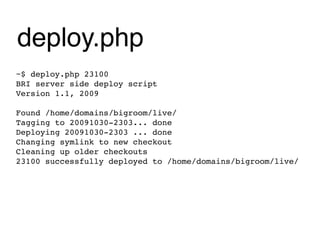
deploy.php
~$ deploy.php 23100
BRI server side deploy script
Version 1.1, 2009

Found /home/domains/bigroom/live/
Tagging to 20091030-2303... done
Deploying 20091030-2303 ... done
Changing symlink to new checkout
Cleaning up older checkouts
23100 successfully deployed to /home/domains/bigroom/live/
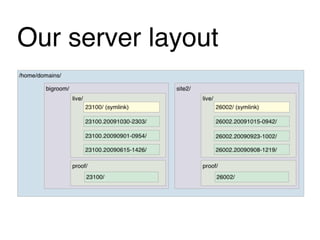
Our server layout
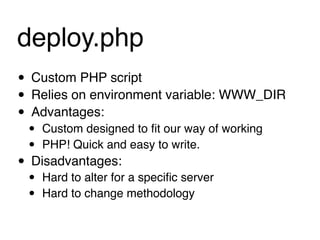
deploy.php
• Custom PHP script
• Relies on environment variable: WWW_DIR
• Advantages:
 •   Custom designed to fit our way of working
 •   PHP! Quick and easy to write.
• Disadvantages:
 •   Hard to alter for a specific server
 •   Hard to change methodology
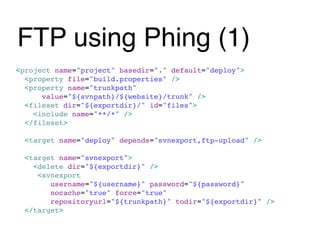
FTP using Phing (1)
<project name="project" basedir="." default="deploy">
  <property file="build.properties" />
  <property name="trunkpath"
      value="${svnpath}/${website}/trunk" />
  <fileset dir="${exportdir}/" id="files">
    <include name="**/*" />
  </fileset>

  <target name="deploy" depends="svnexport,ftp-upload" />

  <target name="svnexport">
    <delete dir="${exportdir}" />
     <svnexport
        username="${username}" password="${password}"
        nocache="true" force="true"
        repositoryurl="${trunkpath}" todir="${exportdir}" />
  </target>
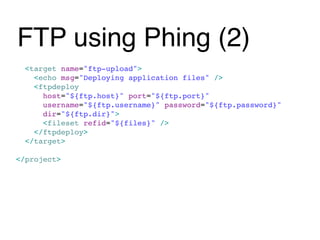
FTP using Phing (2)
  <target name="ftp-upload">
    <echo msg="Deploying application files" />
    <ftpdeploy
      host="${ftp.host}" port="${ftp.port}"
      username="${ftp.username}" password="${ftp.password}"
      dir="${ftp.dir}">
      <fileset refid="${files}" />
    </ftpdeploy>
  </target>

</project>
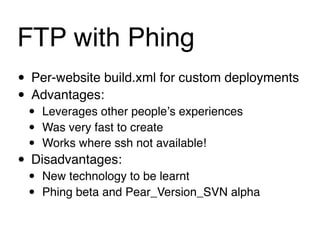
FTP with Phing
• Per-website build.xml for custom deployments
• Advantages:
 •   Leverages other peopleʼs experiences
 •   Was very fast to create
 •   Works where ssh not available!
• Disadvantages:
 •   New technology to be learnt
 •   Phing beta and Pear_Version_SVN alpha
Rollback
Emergency roll-back

Just change the symlink!
Complete roll-back
• Write rollback.php or create a Phing build
  task

• Put the server back to where it was before
 •   Change the symlink
 •   Delete the deployed directory
• Database rollback
 •   Run down() delta in your migration tool
To summarise

1. Automated deployment prevents mistakes
2. Itʼs not hard
3. Easy roll-back is priceless
Questions?
      feedback: http://joind.in/2842
          email: rob@akrabat.com
                  twitter: @akrabat
Thank you
      feedback: http://joind.in/2842
          email: rob@akrabat.com
                  twitter: @akrabat

Stress Free Deployment - Confoo 2011

  • 1.
    twitter: @akrabat Stress-free Deployment Rob Allen ConFoo March 2011
  • 2.
    Rob Allen? • PHP developer since 1999 • Wrote Zend_Config • Tutorial at akrabat.com • Zend Framework in Action! Next book! Zend Framework 2 in Action (with Ryan Mauger)
  • 3.
  • 4.
  • 5.
  • 6.
    Branch! • Branch everynew feature • (that includes bug fixes) • Be ready go live at all times • Trunk deployment • Live branch deployment
  • 7.
  • 8.
  • 9.
  • 10.
  • 11.
    One master database •Live database holds master structure • Copy master to everywhere else • Advantages: • Simple to implement • Disadvantages: • Backwards compatibility required • Doesnʼt scale for multiple devs well • Easy to make mistakes
  • 12.
    Migrations • Versioned schemas •Use delta files with UP and DOWN functions • Advantages: • version controlled • destructive changes possible (but donʼt do it!) • Disadvantages: • Canʼt think of any!
  • 13.
    Migrations tools • DbDeploy •LiquiBase • Framework specific • Doctrine • Akrabat_Db_Schema_Manager • Cake migrations • PEAR: MDB2_Schema • Home-brew script
  • 14.
    For more info “Databaseversion control without the pain” by Harrie Verveer http://slidesha.re/gwq0aw Also read http://www.harrieverveer.com/?p=247
  • 15.
  • 16.
    Context awareness • Configuration based on where the code has been deployed • Automatic • Automatic detection based on URL? • Environment variable set in vhost defintion? • Local configuration file
  • 17.
  • 18.
    Things to thinkabout • Transport to server • FTP? rsync? svn checkout? svn export? • File permissions • Preserve user uploaded files • Steps after upload • Stale cache? • Cache priming?
  • 19.
    Server organisation • Mucheasier if you control vhosts • For multiple sites on same server: • Use predictable file locations for all sites • e.g: • /home/www/{site name}/live/current • /home/www/{site name}/staging/current • Multiple servers for one site: • Keep them the same!
  • 20.
  • 21.
    Typical steps • Tagthis release • Set “under maintenance” page • Transfer files to server • Set file permissions as required • Delete old cache files • Run database migrations if required • Remove “under maintenance” page
  • 22.
    Hereʼs mine: 1. Branchtrunk to release-{yymmdd-hhmm} 2. ssh into server 3. Ensure staging is up to date (svn st -u) If not, stop here! 4. svn checkout new release branch to a new folder in live directory 5. Set permissions on the /tmp folder for cache files
  • 23.
    Finally • Switch “current”symlink to new directory
  • 24.
  • 25.
    Simple scripts • PHP,Bash or Bat files • Simple to write and run • Execute command line apps via exec()
  • 26.
    Example PHP script $cmd= "svn cp -m "Tag for automatic deployment" $baseUrl/$website/trunk $baseUrl/$website/tags/$date"; ob_start(); system($cmd, $returnValue); $output = ob_get_clean(); if (0 < $returnValue) { throw new Exception("Tagging failed.n" . $output); } echo "Tagged to $daten";
  • 27.
    Phing • PHP basedbuild system based on Ant • XML configuration files • PEAR installation • Integration with Subversion and DbDeploy • Expects to run build.xml in current directory • build.properties contains config info
  • 28.
    Phing philosophy" • Likemake, build scripts consist of targets • Targets can depend on other targets • “live” depends on “tag”, “checkout”, “migrate” • Each target does the minimum it can e.g. • Create svn tag • checkout files to destination • migrate database
  • 29.
    Example build.xml <?xml version="1.0"encoding="UTF-8" ?> <project name="BRIBuild" default="deploy" basedir="."> <tstamp> <format property="date" pattern="%Y%m%d-%H%M" /> </tstamp> <property file="build.properties" /> <property name="trunkpath" value="${svnpath}/${website}/trunk" /> <property name="tagpath" value="${svnpath}/${website}/tags/${date}" /> <target name="deploy" depends="tag" /> <target name="tag" description="Tag trunk"> <exec command="svn cp -m 'Tag for automatic deployment' ${trunkpath} ${tagpath}" /> <echo msg="Tagged trunk to ${date}" /> </target> </project>
  • 30.
  • 31.
    deploy.php ~$ deploy.php 23100 BRIserver side deploy script Version 1.1, 2009 Found /home/domains/bigroom/live/ Tagging to 20091030-2303... done Deploying 20091030-2303 ... done Changing symlink to new checkout Cleaning up older checkouts 23100 successfully deployed to /home/domains/bigroom/live/
  • 32.
  • 33.
    deploy.php • Custom PHPscript • Relies on environment variable: WWW_DIR • Advantages: • Custom designed to fit our way of working • PHP! Quick and easy to write. • Disadvantages: • Hard to alter for a specific server • Hard to change methodology
  • 34.
    FTP using Phing(1) <project name="project" basedir="." default="deploy"> <property file="build.properties" /> <property name="trunkpath" value="${svnpath}/${website}/trunk" /> <fileset dir="${exportdir}/" id="files"> <include name="**/*" /> </fileset> <target name="deploy" depends="svnexport,ftp-upload" /> <target name="svnexport"> <delete dir="${exportdir}" /> <svnexport username="${username}" password="${password}" nocache="true" force="true" repositoryurl="${trunkpath}" todir="${exportdir}" /> </target>
  • 35.
    FTP using Phing(2) <target name="ftp-upload"> <echo msg="Deploying application files" /> <ftpdeploy host="${ftp.host}" port="${ftp.port}" username="${ftp.username}" password="${ftp.password}" dir="${ftp.dir}"> <fileset refid="${files}" /> </ftpdeploy> </target> </project>
  • 36.
    FTP with Phing •Per-website build.xml for custom deployments • Advantages: • Leverages other peopleʼs experiences • Was very fast to create • Works where ssh not available! • Disadvantages: • New technology to be learnt • Phing beta and Pear_Version_SVN alpha
  • 37.
  • 38.
  • 39.
    Complete roll-back • Writerollback.php or create a Phing build task • Put the server back to where it was before • Change the symlink • Delete the deployed directory • Database rollback • Run down() delta in your migration tool
  • 40.
    To summarise 1. Automateddeployment prevents mistakes 2. Itʼs not hard 3. Easy roll-back is priceless
  • 41.
    Questions? feedback: http://joind.in/2842 email: rob@akrabat.com twitter: @akrabat
  • 42.
    Thank you feedback: http://joind.in/2842 email: rob@akrabat.com twitter: @akrabat