SSH COOKBOOK V2 
A SSH TOOLS SUITE PRESENTATION 
ENHANCED VERSION 
Created by Jean-Marie Renouard / @jmrenouard 
http://www.jmrenouard.fr/
WHAT'S SSH ? 
SSH is a secure TCP communication protocol. 
SSH v2 is base standard in all distributions. 
SSH allows you to connect securely to server. 
SSH avoid attack such man in the middle.
SSH BASIC USAGE 
Connect to server REF01.mynetwork as osuser 
$ ssh osuser@REF01.mynetwork
WHAT'S NEXT ? 
Password is asked. 
osuser@REF01.mynetwork's password : 
Password is checked based on system. 
Input password is crypted. 
Result is compared with /etc/shadow information. 
Comparaison failed : command fails, simple !
AND WHEN IT IS OK ... 
Comparaison successed 
SSH asks system for a new shell session. 
Shell session is based on /etc/passwd info. 
7th and last field of /etc/passwd is shell path. 
Default Welcome Message 
Last login: Thu Mar 20 23:26:46 2014 from 192.168.X.X 
Then, You've got a shell ( Bash for instance ) 
A shell as a local shell remotely / securely !
SHELL IS GREAT 
Ctrl-d : Kill the connection immediately. 
Ctrl-l : Clean your screen 
Ctrl-r : Search in bash history on the server 
Readline powered 
.bash_history : command history 
.bash_profile and .bashrc for personal shell customisation 
(alias, functions, ...)
BORING ASPECT OF SSH 
ONE CONNECTION MEANS ONE PASSWORD CHECK. 
Password typing 
No human error probe 
Ctrl-d, exit, kill -9 0, killall bash, ... 
Kill/terminate Shell session means : 
All processes launched from Shell session are also killed. 
You JUST have to REconnect and REtype your password. 
REtype your command even if it's long time taking.
AVOIDING PASSWORD TYPING 
Thanks God, it is possible to connect without passord typing. 
It is as secure as password typing. 
Maybe more secure: 
No password Excel File on network 
No Agile Access info Post-it on ScrumBoard :)
SSH KEY GENERATION 
2 FILES MUST BE GENERATED 
1. Red key : .ssh/id_rsa is your Private SSH key 
Keep it secret 
2. Blue key: .ssh/id_rsa.pub is your Public SSH key.
SSH KEY GENERATION COMMAND 
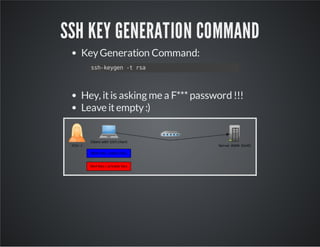
Key Generation Command: 
ssh-keygen -t rsa 
Hey, it is asking me a F*** password !!! 
Leave it empty :)
SSH KEY DEPLOYMENT 
Public Key Deployment Command: 
ssh-copy-id -i .ssh/id_rsa.pub ossuer@REF01.mynnetwork 
It is asking a password for a last time ....
AND ALL IS OK ? 
On the server, .ssh/authorized_keys contains the content of 
your public key. 
Try to connect one again. 
ssh osuser@REF01.mynetwork 
NO MORE PASSWORD .... 
Magic Simple, Easy and secure ....
IS IT ALL ? 
How to automate this process ? 
Library Expect : 
library interacting with shell programmaticaly. 
You can script an interactive scenario. 
And you can execute it automatically.
BETTER THAN A SHELL 
YOU CAN ALSO REMOTELY EXECUTE A COMMAND. 
Shutdown the server 
ssh root@REF01.mynetwork shutdown -h now 
Execute a remote python script 
ssh osuser@REF01.mynetwork  
"python remoteScript.py" 
Know load average on REF01 server 
ssh osuser@REF01.mynetwork uptime
PERL EXPECT 
#!/usr/bin/perl 
use strict; 
use Expect; 
my $timeout=1; 
my $command="ssh ".$ARGV[0]." ".$ARGV[2]; 
my $exp = Expect->spawn($command) or die "Cannot spawn $command: $!n"; 
$exp->raw_pty(1); 
LOGIN: 
$exp->expect($timeout, 
[ 'ogin: $' => sub { 
$exp->send("lusern"); 
exp_continue; } 
], 
[ 'yes/no)?s*$' => sub { 
$exp->send("yesn"); 
goto LOGIN; 
} 
], 
[ 'assword:s*$' => sub { 
$exp->send($ARGV[1]."n"); 
exp_continue; } 
], 
'-re', qr'[#>:] $' 
); 
$exp->soft_close();
REMOTE EXECUTE A LOCAL SCRIPT 
PYTHON, BASH, PHP, RYBY, JAVA, ALL INTERPRETERS 
Interpreter must be present on the remote server 
Simple Python Script: hello.py 
#!/usr/bin/python 
print "Hello World !" 
Remote execute script:ssh-exec 
#!/bin/sh 
INTERPRETER=$(head -n 1 $2 | sed -e 's/#!//') 
cat $2 | grep -v "#" | ssh -t $1 $INTERPRETER 
Usage 
ssh-exec osuser@REF01.mynetwork hello.py
FILE TRANSFERT OVER SSH 
Using the input/output redirection. 
cat myLocalFile |  
ssh osuser@REF01.mynetwork  
"cat > myRemoteFile" 
Compressing on fly. 
cat myLocalFile |  
gzip |  
ssh osuser@REF01.mynetwork  
"gzip > myRemoteFile" 
Compression by SSH himself. 
cat myLocalFile | 
ssh -C osuser@REF01.mynetwork  
"cat > myRemoteFile"
DIRECTORIES OVER SSH 
Commands using input/output for directory 
tar UNIX archiver command works with stdin and stdout 
tar -czf – myDir |  
ssh -C osuser@ref01.mynetwork  
"mkdir myDir;cd myDir ;tar -xzf -" 
Better solution 
A kind of cp based on SSHv2 protocol 
scp -rp mydir osuser@ref01.mynetwork:myDir 
Best solution 
Incremental copy 
rsync -avz myDir osuser@ref01.mynetwork:myDir
MULTIPLE HOST COMMANDS 
SIMPLE SHELL LOOP ON 3 SERVERS 
for host in server1 server2 server3; do 
echo "* Updating $host" 
ssh -C root@${host}.mynetwork "yum -y update" 
done 
SIMPLE SHELL LOOP ON SERVER1 TO SERVER100 
for i in `seq 1 100`; do 
host=server${i}.mynetwork 
echo "*Updating $host" 
ssh -C root@${host} "yum -y update" 
done
MULTIPLE HOST COMMANDS IN PARALLEL 
FORKING SUBSHELLS IN LOOP ON SERVER1 TO SERVER100 
for i in `seq 1 100`; do 
( 
host=server${i}.mynetwork 
echo "*Updating $host" 
ssh -C root@${host} "yum -y update" 2>&1 >> ${host}.update.log 
echo "* Updating $host ..DONE" 
)& 
done 
Output and Errors are stored in individual log file per host
MULTIPLE HOST COMMANDS IN PARALLEL 
FORKING SUBSHELLS IN LOOP FROM A FILE 
while read host; do 
( 
echo "*Updating $host" 
ssh -C root@${host} "yum -y update" 2>&1 >> ${host}.update.log 
echo "* Updating $host ..DONE" 
)& 
done < "${1:-/proc/${$}/fd/0}" 
Server are reading from a file or from stdin 
A file with one server name by line 
Output and Errors are stored in individual log file per host
PORT FORWARDING 
OPEN A LOCAL PORT AND REDIRECT IT THROUGHT SSH 
ssh -L2000:localhost:80 user@host1 
Open a local port 2000 and redirect I/O to server port 80 on 
host1 
ssh -L8080:host2:80 user@host1 
Open a local port 8080 and redirect I/O to server port 80 on 
host2 
Using SSH to host1 to access host2 server
REVERSE PORT FORWARDING 
OPEN A REMOTE PORT ON SERVER AND REDIRECT IT 
THROUGHT SSH TO CLIENT 
ssh -R 2000:localhost:80 user@host1 
Open a port 2000 on host1 
Redirect I/O ond this port to local port80 
ssh -R 8080:host2:80 user@host1 
Open a remote port 8080 on host1 
Redirect I/O to server host2 on port 80 from ssh client host 
Using SSH to host1 to access host2 server
USEFUL SCRIPTS 
ssh-installkeys, ssh key installer 
ssh-copy-id, included in openssh-clients in all distributions 
Fusefs, Filesystem over SSH 
MUSSH, Multihost SSH 
perl-Net-SSH-Expect, automate connection without ssh keys 
scanssh, scan hosts with SSH 
sshpass, password cracker for SSH
PROJECTS FOR MASSIVE REMOTE EXECUTION 
Ansible in Python 
Chef in Ruby 
Rex in Perl 
Rundeck in Java 
Envoy in PHP 
Shunt in PHP 
SSHKit 
DO It in Ruby
PROJECTS FOR SSH MANAGEMENT 
GateOne, Web SSH client 
Storm in Python, manage your SSH identities 
SSHRC, transport your config everywhere 
git deliver, deliver files from git and SSH 
SShuttle, the poor's man VPN Solution
STELLAR LINKS 
Code samples in Bash and Perl 
http://www.jmrenouard.fr 
Follow me on Twitter
THE END 
BY JEAN-MARIE RENOUARD / JMRENOUARD.FR

Ssh cookbook

  • 1.
    SSH COOKBOOK V2 A SSH TOOLS SUITE PRESENTATION ENHANCED VERSION Created by Jean-Marie Renouard / @jmrenouard http://www.jmrenouard.fr/
  • 2.
    WHAT'S SSH ? SSH is a secure TCP communication protocol. SSH v2 is base standard in all distributions. SSH allows you to connect securely to server. SSH avoid attack such man in the middle.
  • 3.
    SSH BASIC USAGE Connect to server REF01.mynetwork as osuser $ ssh osuser@REF01.mynetwork
  • 4.
    WHAT'S NEXT ? Password is asked. osuser@REF01.mynetwork's password : Password is checked based on system. Input password is crypted. Result is compared with /etc/shadow information. Comparaison failed : command fails, simple !
  • 5.
    AND WHEN ITIS OK ... Comparaison successed SSH asks system for a new shell session. Shell session is based on /etc/passwd info. 7th and last field of /etc/passwd is shell path. Default Welcome Message Last login: Thu Mar 20 23:26:46 2014 from 192.168.X.X Then, You've got a shell ( Bash for instance ) A shell as a local shell remotely / securely !
  • 6.
    SHELL IS GREAT Ctrl-d : Kill the connection immediately. Ctrl-l : Clean your screen Ctrl-r : Search in bash history on the server Readline powered .bash_history : command history .bash_profile and .bashrc for personal shell customisation (alias, functions, ...)
  • 7.
    BORING ASPECT OFSSH ONE CONNECTION MEANS ONE PASSWORD CHECK. Password typing No human error probe Ctrl-d, exit, kill -9 0, killall bash, ... Kill/terminate Shell session means : All processes launched from Shell session are also killed. You JUST have to REconnect and REtype your password. REtype your command even if it's long time taking.
  • 8.
    AVOIDING PASSWORD TYPING Thanks God, it is possible to connect without passord typing. It is as secure as password typing. Maybe more secure: No password Excel File on network No Agile Access info Post-it on ScrumBoard :)
  • 9.
    SSH KEY GENERATION 2 FILES MUST BE GENERATED 1. Red key : .ssh/id_rsa is your Private SSH key Keep it secret 2. Blue key: .ssh/id_rsa.pub is your Public SSH key.
  • 10.
    SSH KEY GENERATIONCOMMAND Key Generation Command: ssh-keygen -t rsa Hey, it is asking me a F*** password !!! Leave it empty :)
  • 11.
    SSH KEY DEPLOYMENT Public Key Deployment Command: ssh-copy-id -i .ssh/id_rsa.pub ossuer@REF01.mynnetwork It is asking a password for a last time ....
  • 12.
    AND ALL ISOK ? On the server, .ssh/authorized_keys contains the content of your public key. Try to connect one again. ssh osuser@REF01.mynetwork NO MORE PASSWORD .... Magic Simple, Easy and secure ....
  • 13.
    IS IT ALL? How to automate this process ? Library Expect : library interacting with shell programmaticaly. You can script an interactive scenario. And you can execute it automatically.
  • 14.
    BETTER THAN ASHELL YOU CAN ALSO REMOTELY EXECUTE A COMMAND. Shutdown the server ssh root@REF01.mynetwork shutdown -h now Execute a remote python script ssh osuser@REF01.mynetwork "python remoteScript.py" Know load average on REF01 server ssh osuser@REF01.mynetwork uptime
  • 15.
    PERL EXPECT #!/usr/bin/perl use strict; use Expect; my $timeout=1; my $command="ssh ".$ARGV[0]." ".$ARGV[2]; my $exp = Expect->spawn($command) or die "Cannot spawn $command: $!n"; $exp->raw_pty(1); LOGIN: $exp->expect($timeout, [ 'ogin: $' => sub { $exp->send("lusern"); exp_continue; } ], [ 'yes/no)?s*$' => sub { $exp->send("yesn"); goto LOGIN; } ], [ 'assword:s*$' => sub { $exp->send($ARGV[1]."n"); exp_continue; } ], '-re', qr'[#>:] $' ); $exp->soft_close();
  • 16.
    REMOTE EXECUTE ALOCAL SCRIPT PYTHON, BASH, PHP, RYBY, JAVA, ALL INTERPRETERS Interpreter must be present on the remote server Simple Python Script: hello.py #!/usr/bin/python print "Hello World !" Remote execute script:ssh-exec #!/bin/sh INTERPRETER=$(head -n 1 $2 | sed -e 's/#!//') cat $2 | grep -v "#" | ssh -t $1 $INTERPRETER Usage ssh-exec osuser@REF01.mynetwork hello.py
  • 17.
    FILE TRANSFERT OVERSSH Using the input/output redirection. cat myLocalFile | ssh osuser@REF01.mynetwork "cat > myRemoteFile" Compressing on fly. cat myLocalFile | gzip | ssh osuser@REF01.mynetwork "gzip > myRemoteFile" Compression by SSH himself. cat myLocalFile | ssh -C osuser@REF01.mynetwork "cat > myRemoteFile"
  • 18.
    DIRECTORIES OVER SSH Commands using input/output for directory tar UNIX archiver command works with stdin and stdout tar -czf – myDir | ssh -C osuser@ref01.mynetwork "mkdir myDir;cd myDir ;tar -xzf -" Better solution A kind of cp based on SSHv2 protocol scp -rp mydir osuser@ref01.mynetwork:myDir Best solution Incremental copy rsync -avz myDir osuser@ref01.mynetwork:myDir
  • 19.
    MULTIPLE HOST COMMANDS SIMPLE SHELL LOOP ON 3 SERVERS for host in server1 server2 server3; do echo "* Updating $host" ssh -C root@${host}.mynetwork "yum -y update" done SIMPLE SHELL LOOP ON SERVER1 TO SERVER100 for i in `seq 1 100`; do host=server${i}.mynetwork echo "*Updating $host" ssh -C root@${host} "yum -y update" done
  • 20.
    MULTIPLE HOST COMMANDSIN PARALLEL FORKING SUBSHELLS IN LOOP ON SERVER1 TO SERVER100 for i in `seq 1 100`; do ( host=server${i}.mynetwork echo "*Updating $host" ssh -C root@${host} "yum -y update" 2>&1 >> ${host}.update.log echo "* Updating $host ..DONE" )& done Output and Errors are stored in individual log file per host
  • 21.
    MULTIPLE HOST COMMANDSIN PARALLEL FORKING SUBSHELLS IN LOOP FROM A FILE while read host; do ( echo "*Updating $host" ssh -C root@${host} "yum -y update" 2>&1 >> ${host}.update.log echo "* Updating $host ..DONE" )& done < "${1:-/proc/${$}/fd/0}" Server are reading from a file or from stdin A file with one server name by line Output and Errors are stored in individual log file per host
  • 22.
    PORT FORWARDING OPENA LOCAL PORT AND REDIRECT IT THROUGHT SSH ssh -L2000:localhost:80 user@host1 Open a local port 2000 and redirect I/O to server port 80 on host1 ssh -L8080:host2:80 user@host1 Open a local port 8080 and redirect I/O to server port 80 on host2 Using SSH to host1 to access host2 server
  • 23.
    REVERSE PORT FORWARDING OPEN A REMOTE PORT ON SERVER AND REDIRECT IT THROUGHT SSH TO CLIENT ssh -R 2000:localhost:80 user@host1 Open a port 2000 on host1 Redirect I/O ond this port to local port80 ssh -R 8080:host2:80 user@host1 Open a remote port 8080 on host1 Redirect I/O to server host2 on port 80 from ssh client host Using SSH to host1 to access host2 server
  • 24.
    USEFUL SCRIPTS ssh-installkeys,ssh key installer ssh-copy-id, included in openssh-clients in all distributions Fusefs, Filesystem over SSH MUSSH, Multihost SSH perl-Net-SSH-Expect, automate connection without ssh keys scanssh, scan hosts with SSH sshpass, password cracker for SSH
  • 25.
    PROJECTS FOR MASSIVEREMOTE EXECUTION Ansible in Python Chef in Ruby Rex in Perl Rundeck in Java Envoy in PHP Shunt in PHP SSHKit DO It in Ruby
  • 26.
    PROJECTS FOR SSHMANAGEMENT GateOne, Web SSH client Storm in Python, manage your SSH identities SSHRC, transport your config everywhere git deliver, deliver files from git and SSH SShuttle, the poor's man VPN Solution
  • 27.
    STELLAR LINKS Codesamples in Bash and Perl http://www.jmrenouard.fr Follow me on Twitter
  • 28.
    THE END BYJEAN-MARIE RENOUARD / JMRENOUARD.FR