https://www.facebook.com/groups/sqlserverindonesia/
6/5/2018 3
https://www.facebook.com/idharmawan
Indra.Dharmawan@ag-it.com
https://www.linkedin.com/in/indra-
dharmawan-aabb4655/
6/5/2018 4
• What is the MAP toolkit?
• MAP Demos
• Q&A
What is the MAP toolkit?
• Agentless inventory and assessment tool
• Provide readiness assessment for Microsoft Technology
• Generates customizable report
• It is free
IT Migration Challenge
• Where can I find the SQL 2005/2008/2008R2/2012/2014 instances and
migrate to SQL 2016 or SQL Azure?
• Can my server can migrate to windows server 2016?
• Which server can be consolidate with Hyper-V?
• What about application virtualization?
• Can my PCs run windows 8, 10 and microsoft office?
MAP Automated Tool Abilities
• Quick Agentless Assesment of:
- Multiple product inventory
- Readiness
- Security
- Compatibility
- Power management
- Virtualization & consolidation candidates
- Server
- Application
• Enable:
- Planning
- Proposal generation
- Green IT
- Focus on the business
- Shorthened planning time
- Centralized perf, policy & resource management
- ROI Analysis
- Intelligent server placement
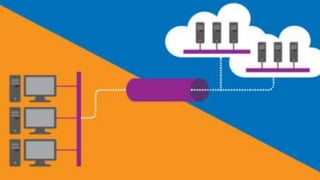
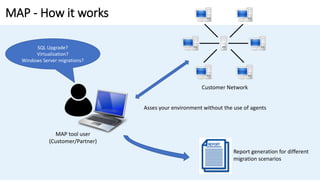
MAP - How it works
SQL Upgrade?
Virtualization?
Windows Server migrations?
Customer Network
Asses your environment without the use of agents
Report generation for different
migration scenarios
MAP tool user
(Customer/Partner)
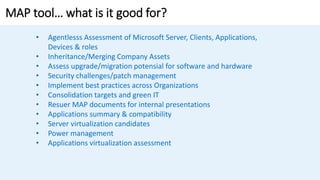
MAP tool… what is it good for?
• Agentlesss Assessment of Microsoft Server, Clients, Applications,
Devices & roles
• Inheritance/Merging Company Assets
• Assess upgrade/migration potensial for software and hardware
• Security challenges/patch management
• Implement best practices across Organizations
• Consolidation targets and green IT
• Resuer MAP documents for internal presentations
• Applications summary & compatibility
• Server virtualization candidates
• Power management
• Applications virtualization assessment
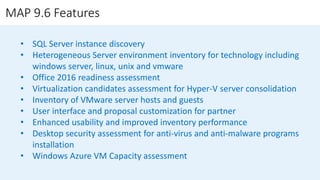
MAP 9.6 Features
• SQL Server instance discovery
• Heterogeneous Server environment inventory for technology including
windows server, linux, unix and vmware
• Office 2016 readiness assessment
• Virtualization candidates assessment for Hyper-V server consolidation
• Inventory of VMware server hosts and guests
• User interface and proposal customization for partner
• Enhanced usability and improved inventory performance
• Desktop security assessment for anti-virus and anti-malware programs
installation
• Windows Azure VM Capacity assessment
Top 3 Questions
• Is this tool secure?
- MAP requires the user to enter local admin credentials for the client machines
and servers, non-admin user cannot gain access to the machines and will get no
results from the MAP tool
- MAP encrypts the data traffic from the MAP machine to the assessed server and
client machines
- MAP does not persist or store any credentials required for WMI to remotely
gather information on the server and client machines
• How much data traffic do we get?
- A typical network of desktops would typically see 300kB to 1MB per PC of data
traffic generated by MAP
• What’s the impact on each computer?
- Very minimal. The MAP tool only ping about 30 machines at any given instance.
DEMO
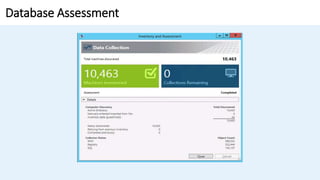
Database Assessment
Database Assessment
Q & A
SQL Modernization Workshop - MAP for SQL Server

SQL Modernization Workshop - MAP for SQL Server

  • 1.
  • 3.
  • 4.
    6/5/2018 4 • Whatis the MAP toolkit? • MAP Demos • Q&A
  • 6.
    What is theMAP toolkit? • Agentless inventory and assessment tool • Provide readiness assessment for Microsoft Technology • Generates customizable report • It is free
  • 7.
    IT Migration Challenge •Where can I find the SQL 2005/2008/2008R2/2012/2014 instances and migrate to SQL 2016 or SQL Azure? • Can my server can migrate to windows server 2016? • Which server can be consolidate with Hyper-V? • What about application virtualization? • Can my PCs run windows 8, 10 and microsoft office?
  • 8.
    MAP Automated ToolAbilities • Quick Agentless Assesment of: - Multiple product inventory - Readiness - Security - Compatibility - Power management - Virtualization & consolidation candidates - Server - Application • Enable: - Planning - Proposal generation - Green IT - Focus on the business - Shorthened planning time - Centralized perf, policy & resource management - ROI Analysis - Intelligent server placement
  • 9.
    MAP - Howit works SQL Upgrade? Virtualization? Windows Server migrations? Customer Network Asses your environment without the use of agents Report generation for different migration scenarios MAP tool user (Customer/Partner)
  • 10.
    MAP tool… whatis it good for? • Agentlesss Assessment of Microsoft Server, Clients, Applications, Devices & roles • Inheritance/Merging Company Assets • Assess upgrade/migration potensial for software and hardware • Security challenges/patch management • Implement best practices across Organizations • Consolidation targets and green IT • Resuer MAP documents for internal presentations • Applications summary & compatibility • Server virtualization candidates • Power management • Applications virtualization assessment
  • 11.
    MAP 9.6 Features •SQL Server instance discovery • Heterogeneous Server environment inventory for technology including windows server, linux, unix and vmware • Office 2016 readiness assessment • Virtualization candidates assessment for Hyper-V server consolidation • Inventory of VMware server hosts and guests • User interface and proposal customization for partner • Enhanced usability and improved inventory performance • Desktop security assessment for anti-virus and anti-malware programs installation • Windows Azure VM Capacity assessment
  • 12.
    Top 3 Questions •Is this tool secure? - MAP requires the user to enter local admin credentials for the client machines and servers, non-admin user cannot gain access to the machines and will get no results from the MAP tool - MAP encrypts the data traffic from the MAP machine to the assessed server and client machines - MAP does not persist or store any credentials required for WMI to remotely gather information on the server and client machines • How much data traffic do we get? - A typical network of desktops would typically see 300kB to 1MB per PC of data traffic generated by MAP • What’s the impact on each computer? - Very minimal. The MAP tool only ping about 30 machines at any given instance.
  • 13.
  • 14.
  • 15.
  • 16.

Editor's Notes

  • #14 1. Create a new SSMA project. 2. Connect to the Oracle database server. 3. Connect to an instance of SQL Server. 4. Map Oracle database schemas to SQL Server database schemas. 5. Optionally, Create assessment reports to assess database objects for conversion and estimate the conversion time. 6. Convert Oracle database schemas into SQL Server schemas. 7. Load the converted database objects into SQL Server. You can do this in one of the following ways: Save a script and run it in SQL Server. Synchronize the database objects. 8. Migrate data to SQL Server. 9. If necessary, update database applications.