BASEL BERN BRUGG DÜSSELDORF FRANKFURT A.M. FREIBURG I.BR. GENF
HAMBURG KOPENHAGEN LAUSANNE MÜNCHEN STUTTGART WIEN ZÜRICH
Field report
SQL Sever Consolidation / Optimization / Migration
Stephan.Hurni@trivadis.com
15.09.2017
TechEvent September 2017
1
AGENDA
TechEvent September 20172 15.09.2017
1. Getting started
2. Gather and Analyze Environments  the Tool
3. Output
4. Projects and Actions
5. Customer Cases
6. Conclusion
TechEvent September 20173 15.09.2017
Getting started
Intention
TechEvent September 20174 15.09.2017
Some suppose..
– They know what SQL Servers they have … almost
– Their operation is appropriate … until certain questions are asked
– Database Maintenance should be done … doing it with Maintenance Plans
But..
– Some things are not as good as it should be
– Performance ... Yes there are some Pain-Points
– Need to save Money and Resources so virtualization and consolidation is the Key … is it?
– New SQL Versions must come in because of Applications prerequisites (need new features)
– And what about the upcoming “General Data Protection Regulation”
 application 25. May 2018
What‘s the plan
TechEvent September 20175 15.09.2017
Customers ask Trivadis
– …best they can do 
Customers ask Microsoft
– …2nd best they can do, as long Mircosoft will engage Trivadis
What we do
TechEvent September 20176 15.09.2017
Start with initial Inventory of the whole (Database) Environment
Identify hot spots
– EOL Versions
– unknown Server and Instances
– not standardized Setups
– consolidation potential
– find Painpoints
Recommend optimal new Database Platform Systems
Guide Customers to SQL Server Standards
Plan, Setup and Configure POC or new Platforms
Coach the Customers DBAs, Support the DBAs and deliver SLA
Is it that easy
TechEvent September 20177 15.09.2017
Plan to change the Platform from physical to virtual
Consolidate SQL Servers increase risks when downtimes are planned or unplanned
Complexity is a concern
Are all Applications new SQL Version aware
 typically this is a mature issue
Get a good Overview on all Servers, Instances, Versions, Databases is not that easy
So we need a valuable Tool to help
TechEvent September 20178 15.09.2017
Gather and Analyze
Environments
The Tool
TechEvent September 20179 15.09.2017
Microsoft MAP (Microsoft Assessment and Planning) Toolkit
– Agentless inventory, assessment, and reporting
– Securely assess to
Windows 10 to Windows 7, Office (365, 2016, 2013),
Windows Server 2016 to Windows Server 2016,
SQL Server 2016 to SQL Server 2000,
Hyper-V and many more .. even Oracle
– Uses WMI, ADS, PerfMon to collect Data  no Agents
– Free to use
– Actual Version 9.6
https://technet.microsoft.com/en-us/solutionaccelerators/dd537566.aspx
https://social.technet.microsoft.com/wiki/contents/articles/1640.microsoft-assessment-and-planning-toolkit.aspx#GSG
Why MAP
TechEvent September 201710 15.09.2017
Helps to understand organization's IT infrastructures and determine the right
Microsoft technologies for the needs
Provides insight into ability to migrate to the latest versions of Microsoft products
Assessment and planning tool for:
– Discovery of computers and applications
– Hardware and software readiness migration
– Capacity planning for server, desktop and virtualization projects
– Public and Private Cloud capacity and migration planning
– Software usage tracking
Engage …
TechEvent September 201711 15.09.2017
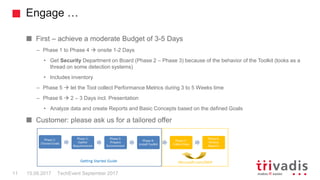
First – achieve a moderate Budget of 3-5 Days
– Phase 1 to Phase 4  onsite 1-2 Days
• Get Security Department on Board (Phase 2 – Phase 3) because of the behavior of the Toolkit (looks as a
thread on some detection systems)
• Includes inventory
– Phase 5  let the Tool collect Performance Metrics during 3 to 5 Weeks time
– Phase 6  2 – 3 Days incl. Presentation
• Analyze data and create Reports and Basic Concepts based on the defined Goals
Customer: please ask us for a tailored offer
TechEvent September 201712 15.09.2017
Output
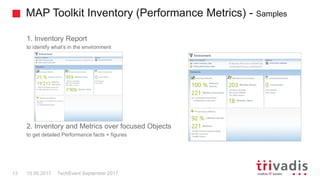
MAP Toolkit Inventory (Performance Metrics) - Samples
TechEvent September 201713 15.09.2017
1. Inventory Report
to identify what’s in the environment
2. Inventory and Metrics over focused Objects
to get detailed Performance facts + figures
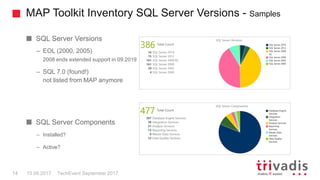
MAP Toolkit Inventory SQL Server Versions - Samples
TechEvent September 201714 15.09.2017
SQL Server Versions
– EOL (2000, 2005)
2008 ends extended support in 09.2019
– SQL 7.0 (found!)
not listed from MAP anymore
SQL Server Components
– Installed?
– Active?
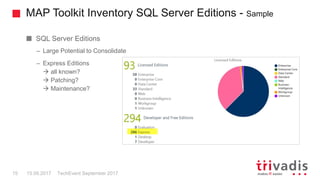
MAP Toolkit Inventory SQL Server Editions - Sample
TechEvent September 201715 15.09.2017
SQL Server Editions
– Large Potential to Consolidate
– Express Editions
 all known?
 Patching?
 Maintenance?
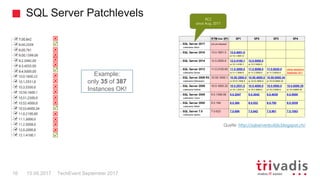
SQL Server Patchlevels
TechEvent September 201716 15.09.2017
Quelle: http://sqlserverbuilds.blogspot.ch/



















Example:
only 35 of 387
Instances OK!
RC2
since Aug. 2017
TechEvent September 201717 15.09.2017
Project and Action
Going on …
TechEvent September 201718 15.09.2017
Customer identified; Planning and Implementation is necessary
– Lot to do but Customer can’t typically do it self
– Specify next steps incl. Actions and Workforce the Customer has to deliver
– Nominate the Migration objects  see overall SQL Server environment picture
– Planning and Engineering of Resources, Systems and High Availability
– Implementation, Setup, Configuration incl. POC, Dev, Test and Production Environment
– Migrating Instances and DBs
– Checks / Tests / implement Standards and TVDTools
Follow up…
– Expand to more Tasks and Objects
– Define further Cooperation
– Know-how transfer
– SLA’s
Main Targets / Goals
TechEvent September 201719 15.09.2017
Standardized SQL Server Database Environment
– Essential Base
– Consolidating Instances and Databases by reducing the risk of interruptions
– Predictable Performance: CPU Usage, Disk waits, Disk throughput  DB Maintenance
– Organized, real DB operations  not only done by not DBA’s, e.g. System Engineers/Administrators
RPO
– Proofed TXLog Backup to save locations
– Low latency Backup
RTO
– HA for DB‘s as „Normal Case“ due to Standardized SQL Server in HADR AG
– Native SQL Backup in Low latency Network / Backup Location
Availability / Performance
TechEvent September 201720 15.09.2017
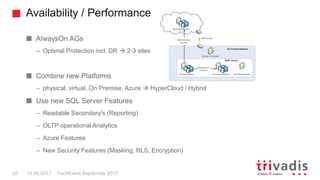
AlwaysOn AGs
– Optimal Protection incl. DR  2-3 sites
Combine new Platforms
– physical, virtual, On Premise, Azure  HyperCloud / Hybrid
Use new SQL Server Features
– Readable Secondary's (Reporting)
– OLTP operational Analytics
– Azure Features
– New Security Features (Masking, RLS, Encryption)
TechEvent September 201721 15.09.2017
Customer Cases
Customer Cases (1+2 of 4 samples)
TechEvent September 201722 15.09.2017
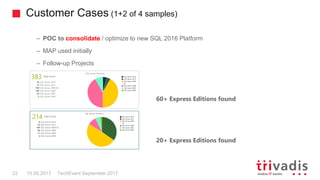
– POC to consolidate / optimize to new SQL 2016 Platform
– MAP used initially
– Follow-up Projects
60+ Express Editions found
20+ Express Editions found
Customer Cases (3+4 of 4 samples)
TechEvent September 201723 15.09.2017
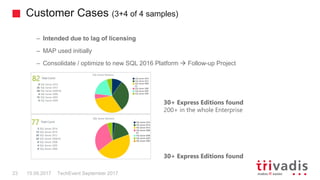
– Intended due to lag of licensing
– MAP used initially
– Consolidate / optimize to new SQL 2016 Platform  Follow-up Project
30+ Express Editions found
200+ in the whole Enterprise
30+ Express Editions found
TechEvent September 201724 15.09.2017
Conclusion
It is worth to engage …
TechEvent September 201725 15.09.2017
Initial MAP
– Get real knowledge about the SQL Server environments
– Get focused on:
Pain points, Misconfigurations, not proper licensing, compliance, GDPR
– Show optimization potential (costs, operations, availability)
Referred to the findings …
– Engineering / Implementing / Standardization
– Coaching
– TVDTools / SLA‘s
Ask MS-IC  Patrick Bucher, MS-IC Team-Member or your representativ
Thank you
15.09.2017 TechEvent September 201726
@Trivadis
 Please use the Trivadis Events mobile app to give feedback on each session
 Use "My schedule" if you have registered for a session
 Otherwise use "Agenda" and the search function
 If the mobile app does not work
(or if you have a Windows smartphone), use your smartphone browser
Session Feedback – now
URL: http://trivadis.quickmobileplatform.eu/
User name: <your_loginname> (such as “svv”)
Password: sent by e-mail...
Session Feedback – now
TechEvent September 201727 15.09.2017
Please use the Trivadis Events mobile app to give feedback on each session
Use "My schedule" if you have registered for a session
Otherwise use "Agenda" and the search function
If the mobile app does not work (or if you have a Windows smartphone), use your
smartphone browser
– URL: http://trivadis.quickmobileplatform.eu/
– User name: <your_loginname> (such as “svv”)
– Password: sent by e-mail...

Trivadis TechEvent 2017 Field report SQL Server by Stephan Hurni

  • 1.
    BASEL BERN BRUGGDÜSSELDORF FRANKFURT A.M. FREIBURG I.BR. GENF HAMBURG KOPENHAGEN LAUSANNE MÜNCHEN STUTTGART WIEN ZÜRICH Field report SQL Sever Consolidation / Optimization / Migration Stephan.Hurni@trivadis.com 15.09.2017 TechEvent September 2017 1
  • 2.
    AGENDA TechEvent September 2017215.09.2017 1. Getting started 2. Gather and Analyze Environments  the Tool 3. Output 4. Projects and Actions 5. Customer Cases 6. Conclusion
  • 3.
    TechEvent September 2017315.09.2017 Getting started
  • 4.
    Intention TechEvent September 2017415.09.2017 Some suppose.. – They know what SQL Servers they have … almost – Their operation is appropriate … until certain questions are asked – Database Maintenance should be done … doing it with Maintenance Plans But.. – Some things are not as good as it should be – Performance ... Yes there are some Pain-Points – Need to save Money and Resources so virtualization and consolidation is the Key … is it? – New SQL Versions must come in because of Applications prerequisites (need new features) – And what about the upcoming “General Data Protection Regulation”  application 25. May 2018
  • 5.
    What‘s the plan TechEventSeptember 20175 15.09.2017 Customers ask Trivadis – …best they can do  Customers ask Microsoft – …2nd best they can do, as long Mircosoft will engage Trivadis
  • 6.
    What we do TechEventSeptember 20176 15.09.2017 Start with initial Inventory of the whole (Database) Environment Identify hot spots – EOL Versions – unknown Server and Instances – not standardized Setups – consolidation potential – find Painpoints Recommend optimal new Database Platform Systems Guide Customers to SQL Server Standards Plan, Setup and Configure POC or new Platforms Coach the Customers DBAs, Support the DBAs and deliver SLA
  • 7.
    Is it thateasy TechEvent September 20177 15.09.2017 Plan to change the Platform from physical to virtual Consolidate SQL Servers increase risks when downtimes are planned or unplanned Complexity is a concern Are all Applications new SQL Version aware  typically this is a mature issue Get a good Overview on all Servers, Instances, Versions, Databases is not that easy So we need a valuable Tool to help
  • 8.
    TechEvent September 2017815.09.2017 Gather and Analyze Environments
  • 9.
    The Tool TechEvent September20179 15.09.2017 Microsoft MAP (Microsoft Assessment and Planning) Toolkit – Agentless inventory, assessment, and reporting – Securely assess to Windows 10 to Windows 7, Office (365, 2016, 2013), Windows Server 2016 to Windows Server 2016, SQL Server 2016 to SQL Server 2000, Hyper-V and many more .. even Oracle – Uses WMI, ADS, PerfMon to collect Data  no Agents – Free to use – Actual Version 9.6 https://technet.microsoft.com/en-us/solutionaccelerators/dd537566.aspx https://social.technet.microsoft.com/wiki/contents/articles/1640.microsoft-assessment-and-planning-toolkit.aspx#GSG
  • 10.
    Why MAP TechEvent September201710 15.09.2017 Helps to understand organization's IT infrastructures and determine the right Microsoft technologies for the needs Provides insight into ability to migrate to the latest versions of Microsoft products Assessment and planning tool for: – Discovery of computers and applications – Hardware and software readiness migration – Capacity planning for server, desktop and virtualization projects – Public and Private Cloud capacity and migration planning – Software usage tracking
  • 11.
    Engage … TechEvent September201711 15.09.2017 First – achieve a moderate Budget of 3-5 Days – Phase 1 to Phase 4  onsite 1-2 Days • Get Security Department on Board (Phase 2 – Phase 3) because of the behavior of the Toolkit (looks as a thread on some detection systems) • Includes inventory – Phase 5  let the Tool collect Performance Metrics during 3 to 5 Weeks time – Phase 6  2 – 3 Days incl. Presentation • Analyze data and create Reports and Basic Concepts based on the defined Goals Customer: please ask us for a tailored offer
  • 12.
    TechEvent September 20171215.09.2017 Output
  • 13.
    MAP Toolkit Inventory(Performance Metrics) - Samples TechEvent September 201713 15.09.2017 1. Inventory Report to identify what’s in the environment 2. Inventory and Metrics over focused Objects to get detailed Performance facts + figures
  • 14.
    MAP Toolkit InventorySQL Server Versions - Samples TechEvent September 201714 15.09.2017 SQL Server Versions – EOL (2000, 2005) 2008 ends extended support in 09.2019 – SQL 7.0 (found!) not listed from MAP anymore SQL Server Components – Installed? – Active?
  • 15.
    MAP Toolkit InventorySQL Server Editions - Sample TechEvent September 201715 15.09.2017 SQL Server Editions – Large Potential to Consolidate – Express Editions  all known?  Patching?  Maintenance?
  • 16.
    SQL Server Patchlevels TechEventSeptember 201716 15.09.2017 Quelle: http://sqlserverbuilds.blogspot.ch/                    Example: only 35 of 387 Instances OK! RC2 since Aug. 2017
  • 17.
    TechEvent September 20171715.09.2017 Project and Action
  • 18.
    Going on … TechEventSeptember 201718 15.09.2017 Customer identified; Planning and Implementation is necessary – Lot to do but Customer can’t typically do it self – Specify next steps incl. Actions and Workforce the Customer has to deliver – Nominate the Migration objects  see overall SQL Server environment picture – Planning and Engineering of Resources, Systems and High Availability – Implementation, Setup, Configuration incl. POC, Dev, Test and Production Environment – Migrating Instances and DBs – Checks / Tests / implement Standards and TVDTools Follow up… – Expand to more Tasks and Objects – Define further Cooperation – Know-how transfer – SLA’s
  • 19.
    Main Targets /Goals TechEvent September 201719 15.09.2017 Standardized SQL Server Database Environment – Essential Base – Consolidating Instances and Databases by reducing the risk of interruptions – Predictable Performance: CPU Usage, Disk waits, Disk throughput  DB Maintenance – Organized, real DB operations  not only done by not DBA’s, e.g. System Engineers/Administrators RPO – Proofed TXLog Backup to save locations – Low latency Backup RTO – HA for DB‘s as „Normal Case“ due to Standardized SQL Server in HADR AG – Native SQL Backup in Low latency Network / Backup Location
  • 20.
    Availability / Performance TechEventSeptember 201720 15.09.2017 AlwaysOn AGs – Optimal Protection incl. DR  2-3 sites Combine new Platforms – physical, virtual, On Premise, Azure  HyperCloud / Hybrid Use new SQL Server Features – Readable Secondary's (Reporting) – OLTP operational Analytics – Azure Features – New Security Features (Masking, RLS, Encryption)
  • 21.
    TechEvent September 20172115.09.2017 Customer Cases
  • 22.
    Customer Cases (1+2of 4 samples) TechEvent September 201722 15.09.2017 – POC to consolidate / optimize to new SQL 2016 Platform – MAP used initially – Follow-up Projects 60+ Express Editions found 20+ Express Editions found
  • 23.
    Customer Cases (3+4of 4 samples) TechEvent September 201723 15.09.2017 – Intended due to lag of licensing – MAP used initially – Consolidate / optimize to new SQL 2016 Platform  Follow-up Project 30+ Express Editions found 200+ in the whole Enterprise 30+ Express Editions found
  • 24.
    TechEvent September 20172415.09.2017 Conclusion
  • 25.
    It is worthto engage … TechEvent September 201725 15.09.2017 Initial MAP – Get real knowledge about the SQL Server environments – Get focused on: Pain points, Misconfigurations, not proper licensing, compliance, GDPR – Show optimization potential (costs, operations, availability) Referred to the findings … – Engineering / Implementing / Standardization – Coaching – TVDTools / SLA‘s Ask MS-IC  Patrick Bucher, MS-IC Team-Member or your representativ
  • 26.
    Thank you 15.09.2017 TechEventSeptember 201726 @Trivadis  Please use the Trivadis Events mobile app to give feedback on each session  Use "My schedule" if you have registered for a session  Otherwise use "Agenda" and the search function  If the mobile app does not work (or if you have a Windows smartphone), use your smartphone browser Session Feedback – now URL: http://trivadis.quickmobileplatform.eu/ User name: <your_loginname> (such as “svv”) Password: sent by e-mail...
  • 27.
    Session Feedback –now TechEvent September 201727 15.09.2017 Please use the Trivadis Events mobile app to give feedback on each session Use "My schedule" if you have registered for a session Otherwise use "Agenda" and the search function If the mobile app does not work (or if you have a Windows smartphone), use your smartphone browser – URL: http://trivadis.quickmobileplatform.eu/ – User name: <your_loginname> (such as “svv”) – Password: sent by e-mail...