IBM SPSS Statistics
Data Sheet
IBM Analytics


Highlights
•	 Explore, install and update extensions with
an online application store-like experience
•	 Create and share extensions more easily
•	 Redesigned experience while you import
and export most popular file types
•	 Take advantage of new enhancements
in the SPSS Custom Tables module
IBM SPSS Statistics:
What’s New
New and enhanced features to accelerate, optimize
and simplify data analysis
Analytics plays an increasingly important role in helping your
organization achieve its objectives. The IBM®
SPSS®
Statistics family
delivers the core capabilities needed for end-to-end analytics. To
ensure that the most advanced techniques are available to a broader
group of analysts and business users, enhancements have been made
to the features and capabilities of IBM SPSS Statistics Base and its
many specialized modules.
IBM SPSS Statistics 24 continues to offer advanced analytics through
improved access to programming extensions, smarter data management
and enhanced productivity. This release focuses on increasing the
analytic capabilities of the software through the following features:
•	 SPSS Statistics Extensions. An online application store-like
experience to explore, install and update extensions.
•	 Smarter data management. Redesigned experience for importing
and exporting of most popular file types.
•	 Enhanced productivity. Enhanced features within SPSS custom
tables, refreshed variable view and several other enhancements.
Our suite of SPSS Statistics software comes in three editions: standard,
professional and premium. These editions group essential features
and functionality, and are a convenient way to ensure you have the
capabilities you need to generate the insights your organization
requires for effective decision making.
IBM SPSS Statistics
2
Data Sheet
IBM Analytics
	 	 	
	 	 	
SPSS Statistics Extensions
In SPSS Statistics 24, you experience a new way to access
and work with open source and third party programming
extensions with the Statistics Extension Hub and the Statistics
Custom Dialog Builder for Extensions.
SPSS Statistics Extensions Hub
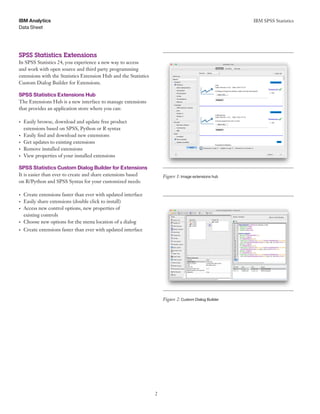
The Extensions Hub is a new interface to manage extensions
that provides an application store where you can:
•	 Easily browse, download and update free product
extensions based on SPSS, Python or R syntax
•	 Easily find and download new extensions
•	 Get updates to existing extensions
•	 Remove installed extensions
•	 View properties of your installed extensions
SPSS Statistics Custom Dialog Builder for Extensions
It is easier than ever to create and share extensions based Figure 1: Image extensions hub
on R/Python and SPSS Syntax for your customized needs:
•	 Create extensions faster than ever with updated interface
•	 Easily share extensions (double click to install)
•	 Access new control options, new properties of
existing controls
•	 Choose new options for the menu location of a dialog
•	 Create extensions faster than ever with updated interface
Figure 2: Custom Dialog Builder
IBM SPSS Statistics
3
Data Sheet
IBM Analytics
	 	 	
	 	 	
Smarter data management
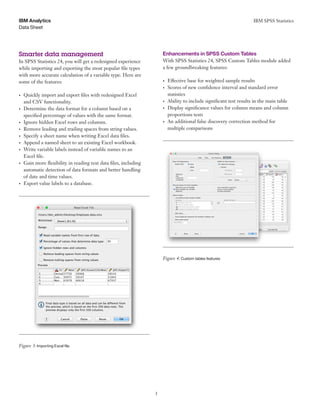
In SPSS Statistics 24, you will get a redesigned experience
while importing and exporting the most popular file types
with more accurate calculation of a variable type. Here are
some of the features:
•	 Quickly import and export files with redesigned Excel
and CSV functionality.
•	 Determine the data format for a column based on a
specified percentage of values with the same format.
•	 Ignore hidden Excel rows and columns.
•	 Remove leading and trailing spaces from string values.
•	 Specify a sheet name when writing Excel data files.
•	 Append a named sheet to an existing Excel workbook.
•	 Write variable labels instead of variable names to an
Excel file.
•	 Gain more flexibility in reading text data files, including
automatic detection of data formats and better handling
of date and time values.
•	 Export value labels to a database.
Figure 3: Importing Excel file
Enhancements in SPSS Custom Tables
With SPSS Statistics 24, SPSS Custom Tables module added
a few groundbreaking features:
•	 Effective base for weighted sample results
•	 Scores of new confidence interval and standard error
statistics
•	 Ability to include significant test results in the main table
•	 Display significance values for column means and column
proportions tests
•	 An additional false discovery correction method for
multiple comparisons
Figure 4: Custom tables features
IBM SPSS Statistics
4
Data Sheet
IBM Analytics
	 	 	
Reasons to upgrade your SPSS
Additional V24 enhancements include the following: Statistics software
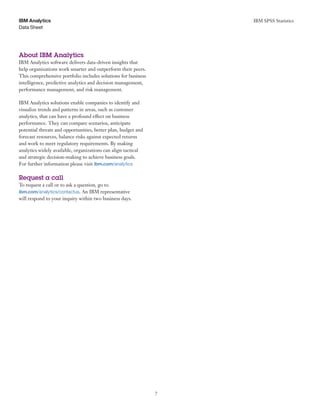
•	 SPSS community for extensions and forums
•	 Welcome screen with tie-ins to community and
license manager
•	 Multi-threading control on client screens
•	 New TableLooks
•	 “Revert to Saved” functionality
•	 Python 3 support
•	 Added NAÏVE BAYES and SELECT PREDICTORS
to base (formerly server only features)
•	 New date and time formats
•	 Ability to show leading zeros
•	 Variable icons in data editor
•	 Refreshed variable view
Figure 5: IBM SPSS Statistics
If you’re using an earlier version of IBM SPSS Statistics,
you’ll gain all of these time saving features, and many more,
when you upgrade to the newest version.
Features added in SPSS Statistics 23
Newer algorithms
•	 Uncover hidden causal relationships among a large number
of time series using temporal causal modeling (TCM)
Geospatial analytics
•	 Find trends over time and space using spatio-temporal
prediction (STP)
•	 Create association rules that incorporate geospatial
attributes using the generalized spatial association rule
(GSAR)
Improved productivity
•	 Improved categorical principal component analysis with
non-parametric bootstrapping, clustering of case and
new rotation options for better convergence
•	 Programmability enhancements for R with the ability
to test programs using features of the R integrated
development environment for easy debugging
•	 Next generation of web output with more interactivity
and functionality with web server support
•	 Improved accessibility with the ability to import, read
and write new version of Stata files
•	 Faster performance with bulk export/insert to database
•	 Support to authenticate with a badge reader
IBM SPSS Statistics
5
Data Sheet
IBM Analytics
Features added in IBM SPSS Statistics 22 	 •	 Easier model specification in IBM SPSS Statistics Amos
•	 Interactive output on smart devices
•	 Presentation-ready output
•	 More powerful Monte Carlo Simulation with support for
simulating strings, automatic linear modeling and heat
maps
•	 Integration with IBM®
Cognos®
TM1
•	 Improved performance and scalability using SPSS Statistics
server with SQL pushback
•	 Python plug-in as part of main installation
•	 Search for, download and install available programming
extensions from within extensions
•	 Use a simplified method to specify user-defined estimands
in SPSS Amos
•	 Benefit from improved logging support for Enterprise
Standard in the Platform Standards.
•	 Enable other applications to read/write encrypted statistics
data files with I/O .dll
•	 Generate pivot table output for non-parametric procedures
Features added in IBM SPSS Statistics 21
•	 Monte Carlo simulation for building better models to
uncertain inputs
•	 Ability to compare two data files or data sets to ensure
the data values and records are compatible
•	 Password protection of data and output files (encryption)
to prevent others from seeing confidential information
•	 Improved and faster file merging
•	 Enhanced pivot tables with new features such as easier
navigation and sorting operations
for structural equation modeling (SEM)
•	 Programming in SPSS Statistics with a Java plug-in
•	 Ability to import IBM Cognos Business Intelligence data
into SPSS Statistics for additional analysis
•	 Exporting of output to Microsoft Excel 2007/2010
•	 Better scalability and performance with load balancing
with IBM SPSS Collaboration and Deployment Services
•	 Single sign-on between SPSS Statistics client and server
•	 For security restricted environments, the option to run
SPSS Statistics server as a non-root user on UNIX/LINUX
•	 Compression of data files for increased storage space
•	 Version compatibility to support new clients with old
servers and vice versa, such as client V21 and server V20
OR client V20 and server V21
Features added in IBM SPSS Statistics 20
•	 Pre-built map templates and support for ESRI files in
SPSS Statistics Base
•	 Faster pivot table output
•	 GLMM procedure in IBM SPSS Advanced Statistics can
be run with ordinal values
•	 Non-graphical, programmatic method for specifying
models in SPSS Amos
•	 Run SPSS Statistics Server jobs offline by disconnecting
the SPSS Statistics client.
•	 Compress temporary files created by the sort procedure
within SPSS Statistics Server to save disk space when
sorting large files.
IBM SPSS Statistics
6
Data Sheet
IBM Analytics
Features added in IBM Statistics 19 	 Features added in IBM SPSS Statistics 18
•	 Automatic Linear Models (ALM) gives non-specialist users
the tools to build powerful linear models automatically
and predict numerical outcomes
•	 Generalized Linear Mixed Models (GLMM), in SPSS
Advanced Statistics, lets you create more accurate models
for predicting non-linear outcomes based on hierarchical/
nested data or data that includes repeated measures
•	 Several new capabilities in IBM SPSS Direct Marketing
•	 Faster performing tables in SPSS Statistics Base
•	 More than a dozen performance and ease-of-use
enhancements to the Syntax Editor, available in all products
in the SPSS Statistics family
•	 The Statistics portal provides internal or external users with
interactive online access to analysis (requires SPSS Statistics
Server and SPSS Collaboration and Deployment Services)
•	 Compiled transformations is a feature in SPSS Statistics
Server that improves the performance of SPSS Statistics
programs that execute a large number of data
transformations
•	 Analysts using SPSS Statistics Base can score customer data,
access pre-built models and interface directly with data in
Salesforce.com
•	 Pivot columns and cross tabulations in SPSS Statistics
Base and IBM SPSS Custom Tables
•	 Work with smaller and sparse datasets on Linux and
Mac operating systems in IBM SPSS Exact Tests
•	 Run SPSS Statistics Base Server on IBM®
System z®
(requires SuSE Linux)
•	 Prepare data in a single step using the new Automated
Data Preparation feature
•	 New Non-parametric tests in SPSS Statistics Base
•	 Post computed categories in SPSS Custom Tables
•	 SPSS Direct Marketing module
•	 SPSS Bootstrapping module
•	 Rule checking on Secondary SPC Charts
•	 IBM SPSS Statistics Developer
•	 Ability to view significance tests in the main results table
in SPSS Custom Tables
•	 Interactive Model Viewer on Two-Step Cluster Analysis
and Automated Data Preparation procedures
•	 Improved display of large pivot tables
•	 Improved performance on procedures within SPSS
Statistics Base Server for Frequencies, Descriptives,
Crosstabs
•	 Support for 64-bit hardware on desktop for Windows
and Mac
•	 Support for Snow Leopard on Mac OS X 10.6
For more information
To learn more about the IBM SPSS Statistics, please contact
your IBM representative or IBM Business Partner, or visit the
following website: ibm.com/marketplace/cloud/statistical-
analysis-and-reporting/us/en-us
IBM SPSS Statistics
7
Data Sheet
IBM Analytics
About IBM Analytics
IBM Analytics software delivers data-driven insights that
help organizations work smarter and outperform their peers.
This comprehensive portfolio includes solutions for business
intelligence, predictive analytics and decision management,
performance management, and risk management.
IBM Analytics solutions enable companies to identify and
visualize trends and patterns in areas, such as customer
analytics, that can have a profound effect on business
performance. They can compare scenarios, anticipate
potential threats and opportunities, better plan, budget and
forecast resources, balance risks against expected returns
and work to meet regulatory requirements. By making
analytics widely available, organizations can align tactical
and strategic decision-making to achieve business goals.
For further information please visit ibm.com/analytics
Request a call
To request a call or to ask a question, go to
ibm.com/analytics/contactus. An IBM representative
will respond to your inquiry within two business days.
© Copyright IBM Corporation 2016
IBM Analytics
Route 100
Somers, NY 10589
Produced in the United States of America
March 2016
IBM, the IBM logo, ibm.com, SPSS, Cognos and System z are trademarks
of International Business Machines Corp., registered in many jurisdictions
worldwide. Other product and service names might be trademarks
of IBM or other companies. A current list of IBM trademarks is
available on the Web at “Copyright and trademark information” at
www.ibm.com/legal/copytrade.shtml.
Microsoft, Windows, Windows NT, and the Windows logo are trademarks
of Microsoft Corporation in the United States, other countries, or both.
Linux is a registered trademark of Linus Torvalds in the United States,
other countries, or both.
UNIX is a registered trademark of The Open Group in the United States
and other countries.
Java and all Java-based trademarks and logos are trademarks or registered
trademarks of Oracle and/or its affiliates.
This document is current as of the initial date of publication and may
be changed by IBM at any time. Not all offerings are available in every
country in which IBM operates.
THE INFORMATION IN THIS DOCUMENT IS PROVIDED
“AS IS” WITHOUT ANY WARRANTY, EXPRESS OR IMPLIED,
INCLUDING WITHOUT ANY WARRANTIES OF MERCHANT­
ABILITY, FITNESS FOR A PARTICULAR PURPOSE AND ANY
WARRANTY OR CONDITION OF NON-INFRINGEMENT. IBM
products are warranted according to the terms and conditions of the
agreements under which they are provided.
Please Recycle
YTD03023-USEN-10

What's New in SPSS Statistics ?

  • 1.
    IBM SPSS Statistics DataSheet IBM Analytics Highlights • Explore, install and update extensions with an online application store-like experience • Create and share extensions more easily • Redesigned experience while you import and export most popular file types • Take advantage of new enhancements in the SPSS Custom Tables module IBM SPSS Statistics: What’s New New and enhanced features to accelerate, optimize and simplify data analysis Analytics plays an increasingly important role in helping your organization achieve its objectives. The IBM® SPSS® Statistics family delivers the core capabilities needed for end-to-end analytics. To ensure that the most advanced techniques are available to a broader group of analysts and business users, enhancements have been made to the features and capabilities of IBM SPSS Statistics Base and its many specialized modules. IBM SPSS Statistics 24 continues to offer advanced analytics through improved access to programming extensions, smarter data management and enhanced productivity. This release focuses on increasing the analytic capabilities of the software through the following features: • SPSS Statistics Extensions. An online application store-like experience to explore, install and update extensions. • Smarter data management. Redesigned experience for importing and exporting of most popular file types. • Enhanced productivity. Enhanced features within SPSS custom tables, refreshed variable view and several other enhancements. Our suite of SPSS Statistics software comes in three editions: standard, professional and premium. These editions group essential features and functionality, and are a convenient way to ensure you have the capabilities you need to generate the insights your organization requires for effective decision making.
  • 2.
    IBM SPSS Statistics 2 DataSheet IBM Analytics SPSS Statistics Extensions In SPSS Statistics 24, you experience a new way to access and work with open source and third party programming extensions with the Statistics Extension Hub and the Statistics Custom Dialog Builder for Extensions. SPSS Statistics Extensions Hub The Extensions Hub is a new interface to manage extensions that provides an application store where you can: • Easily browse, download and update free product extensions based on SPSS, Python or R syntax • Easily find and download new extensions • Get updates to existing extensions • Remove installed extensions • View properties of your installed extensions SPSS Statistics Custom Dialog Builder for Extensions It is easier than ever to create and share extensions based Figure 1: Image extensions hub on R/Python and SPSS Syntax for your customized needs: • Create extensions faster than ever with updated interface • Easily share extensions (double click to install) • Access new control options, new properties of existing controls • Choose new options for the menu location of a dialog • Create extensions faster than ever with updated interface Figure 2: Custom Dialog Builder
  • 3.
    IBM SPSS Statistics 3 DataSheet IBM Analytics Smarter data management In SPSS Statistics 24, you will get a redesigned experience while importing and exporting the most popular file types with more accurate calculation of a variable type. Here are some of the features: • Quickly import and export files with redesigned Excel and CSV functionality. • Determine the data format for a column based on a specified percentage of values with the same format. • Ignore hidden Excel rows and columns. • Remove leading and trailing spaces from string values. • Specify a sheet name when writing Excel data files. • Append a named sheet to an existing Excel workbook. • Write variable labels instead of variable names to an Excel file. • Gain more flexibility in reading text data files, including automatic detection of data formats and better handling of date and time values. • Export value labels to a database. Figure 3: Importing Excel file Enhancements in SPSS Custom Tables With SPSS Statistics 24, SPSS Custom Tables module added a few groundbreaking features: • Effective base for weighted sample results • Scores of new confidence interval and standard error statistics • Ability to include significant test results in the main table • Display significance values for column means and column proportions tests • An additional false discovery correction method for multiple comparisons Figure 4: Custom tables features
  • 4.
    IBM SPSS Statistics 4 DataSheet IBM Analytics Reasons to upgrade your SPSS Additional V24 enhancements include the following: Statistics software • SPSS community for extensions and forums • Welcome screen with tie-ins to community and license manager • Multi-threading control on client screens • New TableLooks • “Revert to Saved” functionality • Python 3 support • Added NAÏVE BAYES and SELECT PREDICTORS to base (formerly server only features) • New date and time formats • Ability to show leading zeros • Variable icons in data editor • Refreshed variable view Figure 5: IBM SPSS Statistics If you’re using an earlier version of IBM SPSS Statistics, you’ll gain all of these time saving features, and many more, when you upgrade to the newest version. Features added in SPSS Statistics 23 Newer algorithms • Uncover hidden causal relationships among a large number of time series using temporal causal modeling (TCM) Geospatial analytics • Find trends over time and space using spatio-temporal prediction (STP) • Create association rules that incorporate geospatial attributes using the generalized spatial association rule (GSAR) Improved productivity • Improved categorical principal component analysis with non-parametric bootstrapping, clustering of case and new rotation options for better convergence • Programmability enhancements for R with the ability to test programs using features of the R integrated development environment for easy debugging • Next generation of web output with more interactivity and functionality with web server support • Improved accessibility with the ability to import, read and write new version of Stata files • Faster performance with bulk export/insert to database • Support to authenticate with a badge reader
  • 5.
    IBM SPSS Statistics 5 DataSheet IBM Analytics Features added in IBM SPSS Statistics 22 • Easier model specification in IBM SPSS Statistics Amos • Interactive output on smart devices • Presentation-ready output • More powerful Monte Carlo Simulation with support for simulating strings, automatic linear modeling and heat maps • Integration with IBM® Cognos® TM1 • Improved performance and scalability using SPSS Statistics server with SQL pushback • Python plug-in as part of main installation • Search for, download and install available programming extensions from within extensions • Use a simplified method to specify user-defined estimands in SPSS Amos • Benefit from improved logging support for Enterprise Standard in the Platform Standards. • Enable other applications to read/write encrypted statistics data files with I/O .dll • Generate pivot table output for non-parametric procedures Features added in IBM SPSS Statistics 21 • Monte Carlo simulation for building better models to uncertain inputs • Ability to compare two data files or data sets to ensure the data values and records are compatible • Password protection of data and output files (encryption) to prevent others from seeing confidential information • Improved and faster file merging • Enhanced pivot tables with new features such as easier navigation and sorting operations for structural equation modeling (SEM) • Programming in SPSS Statistics with a Java plug-in • Ability to import IBM Cognos Business Intelligence data into SPSS Statistics for additional analysis • Exporting of output to Microsoft Excel 2007/2010 • Better scalability and performance with load balancing with IBM SPSS Collaboration and Deployment Services • Single sign-on between SPSS Statistics client and server • For security restricted environments, the option to run SPSS Statistics server as a non-root user on UNIX/LINUX • Compression of data files for increased storage space • Version compatibility to support new clients with old servers and vice versa, such as client V21 and server V20 OR client V20 and server V21 Features added in IBM SPSS Statistics 20 • Pre-built map templates and support for ESRI files in SPSS Statistics Base • Faster pivot table output • GLMM procedure in IBM SPSS Advanced Statistics can be run with ordinal values • Non-graphical, programmatic method for specifying models in SPSS Amos • Run SPSS Statistics Server jobs offline by disconnecting the SPSS Statistics client. • Compress temporary files created by the sort procedure within SPSS Statistics Server to save disk space when sorting large files.
  • 6.
    IBM SPSS Statistics 6 DataSheet IBM Analytics Features added in IBM Statistics 19 Features added in IBM SPSS Statistics 18 • Automatic Linear Models (ALM) gives non-specialist users the tools to build powerful linear models automatically and predict numerical outcomes • Generalized Linear Mixed Models (GLMM), in SPSS Advanced Statistics, lets you create more accurate models for predicting non-linear outcomes based on hierarchical/ nested data or data that includes repeated measures • Several new capabilities in IBM SPSS Direct Marketing • Faster performing tables in SPSS Statistics Base • More than a dozen performance and ease-of-use enhancements to the Syntax Editor, available in all products in the SPSS Statistics family • The Statistics portal provides internal or external users with interactive online access to analysis (requires SPSS Statistics Server and SPSS Collaboration and Deployment Services) • Compiled transformations is a feature in SPSS Statistics Server that improves the performance of SPSS Statistics programs that execute a large number of data transformations • Analysts using SPSS Statistics Base can score customer data, access pre-built models and interface directly with data in Salesforce.com • Pivot columns and cross tabulations in SPSS Statistics Base and IBM SPSS Custom Tables • Work with smaller and sparse datasets on Linux and Mac operating systems in IBM SPSS Exact Tests • Run SPSS Statistics Base Server on IBM® System z® (requires SuSE Linux) • Prepare data in a single step using the new Automated Data Preparation feature • New Non-parametric tests in SPSS Statistics Base • Post computed categories in SPSS Custom Tables • SPSS Direct Marketing module • SPSS Bootstrapping module • Rule checking on Secondary SPC Charts • IBM SPSS Statistics Developer • Ability to view significance tests in the main results table in SPSS Custom Tables • Interactive Model Viewer on Two-Step Cluster Analysis and Automated Data Preparation procedures • Improved display of large pivot tables • Improved performance on procedures within SPSS Statistics Base Server for Frequencies, Descriptives, Crosstabs • Support for 64-bit hardware on desktop for Windows and Mac • Support for Snow Leopard on Mac OS X 10.6 For more information To learn more about the IBM SPSS Statistics, please contact your IBM representative or IBM Business Partner, or visit the following website: ibm.com/marketplace/cloud/statistical- analysis-and-reporting/us/en-us
  • 7.
    IBM SPSS Statistics 7 DataSheet IBM Analytics About IBM Analytics IBM Analytics software delivers data-driven insights that help organizations work smarter and outperform their peers. This comprehensive portfolio includes solutions for business intelligence, predictive analytics and decision management, performance management, and risk management. IBM Analytics solutions enable companies to identify and visualize trends and patterns in areas, such as customer analytics, that can have a profound effect on business performance. They can compare scenarios, anticipate potential threats and opportunities, better plan, budget and forecast resources, balance risks against expected returns and work to meet regulatory requirements. By making analytics widely available, organizations can align tactical and strategic decision-making to achieve business goals. For further information please visit ibm.com/analytics Request a call To request a call or to ask a question, go to ibm.com/analytics/contactus. An IBM representative will respond to your inquiry within two business days.
  • 8.
    © Copyright IBMCorporation 2016 IBM Analytics Route 100 Somers, NY 10589 Produced in the United States of America March 2016 IBM, the IBM logo, ibm.com, SPSS, Cognos and System z are trademarks of International Business Machines Corp., registered in many jurisdictions worldwide. Other product and service names might be trademarks of IBM or other companies. A current list of IBM trademarks is available on the Web at “Copyright and trademark information” at www.ibm.com/legal/copytrade.shtml. Microsoft, Windows, Windows NT, and the Windows logo are trademarks of Microsoft Corporation in the United States, other countries, or both. Linux is a registered trademark of Linus Torvalds in the United States, other countries, or both. UNIX is a registered trademark of The Open Group in the United States and other countries. Java and all Java-based trademarks and logos are trademarks or registered trademarks of Oracle and/or its affiliates. This document is current as of the initial date of publication and may be changed by IBM at any time. Not all offerings are available in every country in which IBM operates. THE INFORMATION IN THIS DOCUMENT IS PROVIDED “AS IS” WITHOUT ANY WARRANTY, EXPRESS OR IMPLIED, INCLUDING WITHOUT ANY WARRANTIES OF MERCHANT­ ABILITY, FITNESS FOR A PARTICULAR PURPOSE AND ANY WARRANTY OR CONDITION OF NON-INFRINGEMENT. IBM products are warranted according to the terms and conditions of the agreements under which they are provided. Please Recycle YTD03023-USEN-10