




SharePoint Saturday Netherlands 2017 | @thomasvochten IT Pro • Level 200
Thomas Vochten
SharePoint architect. Microsoft MVP.
Speaker. Trainer. Involuntary DBA.
@thomasvochten
https://thomasvochten.com
mail@thomasvochten.com
1 | Introducing Hybrid Search
2 | Setup & Configuration
3 | Tips, Tricks & Considerations
4 | Architecture
5 | Additional use cases
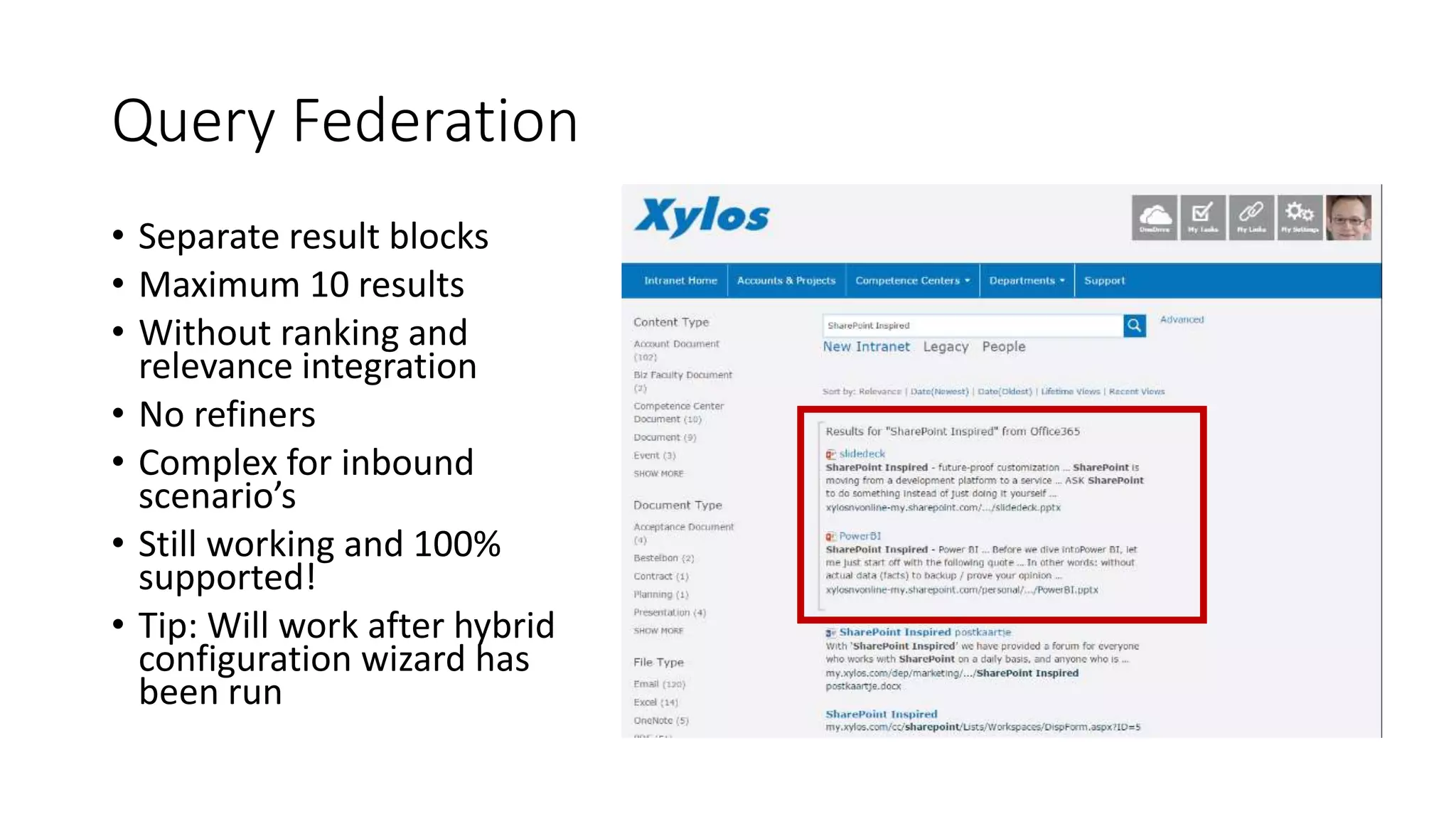
Query Federation
• Separate result blocks
• Maximum 10 results
• Without ranking and
relevance integration
• No refiners
• Complex for inbound
scenario’s
• Still working and 100%
supported!
• Tip: Will work after hybrid
configuration wizard has
been run
Cloud Hybrid Search
• Single unified index - in the cloud
• Crawling is done on-premises
• True relevance ranking and refiners
• Supports all existing on-premises content sources
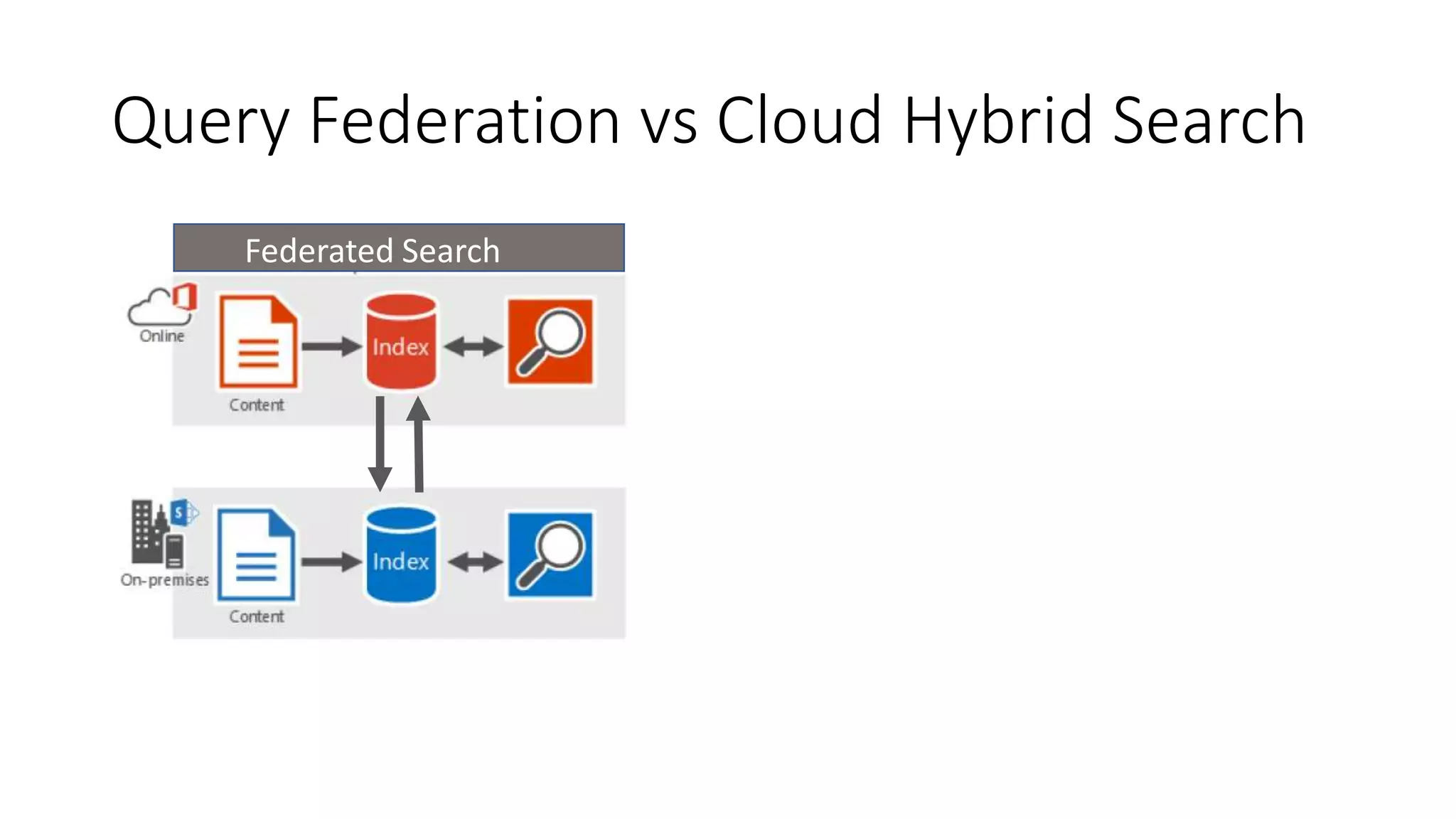
Query Federation vs Cloud Hybrid Search
Cloud Hybrid SearchFederated Search
Search Experience
Minimum Requirements for Hybrid
• Decent internet connectivity
• Office 365 Enterprise subscriptions
• SharePoint Server 2013/2016
• Identity Synchronization in place
• SharePoint Admin account for on-premises
• Tenant Admin account for Office 365
• Required service applications
• App Management Service
• Subscription Settings Service
• User Profile Service
Additional Prerequisites for Search
•Microsoft Online Services Sign-In Assistant
•Azure Active Directory Module for Windows
PowerShell (MSOnline)
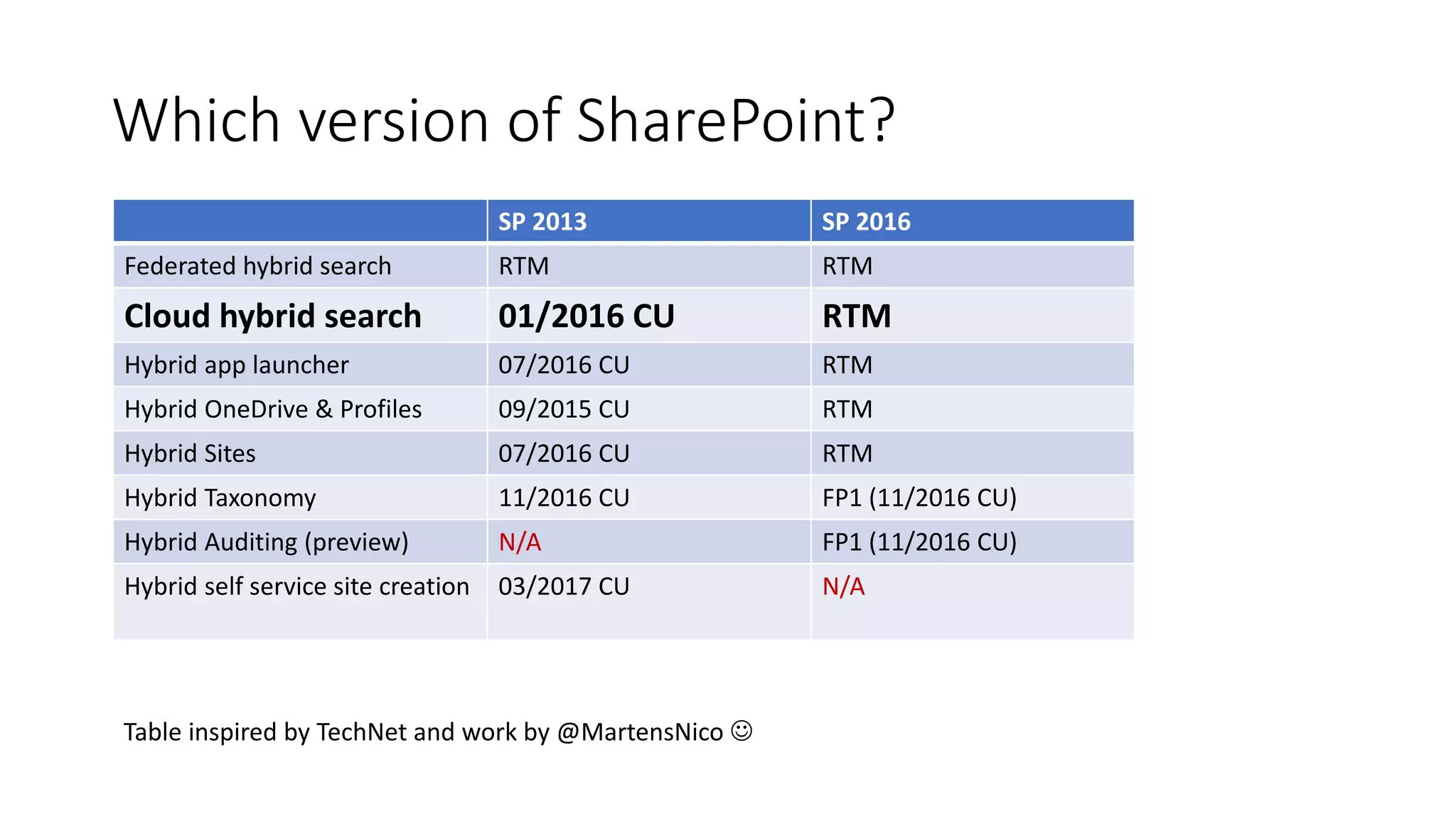
Which version of SharePoint?
Table inspired by work by Nico Martens
SP 2013 SP 2016
Federated hybrid search RTM RTM
Cloud hybrid search 01/2016 CU RTM
Hybrid app launcher 07/2016 CU RTM
Hybrid OneDrive & Profiles 09/2015 CU RTM
Hybrid Sites 07/2016 CU RTM
Hybrid Taxonomy 11/2016 CU FP1 (11/2016 CU)
Hybrid Auditing (preview) N/A FP1 (11/2016 CU)
Hybrid self service site creation 03/2017 CU N/A
Table inspired by TechNet and work by @MartensNico 
Setup Approach
• Create a new cloud search service application
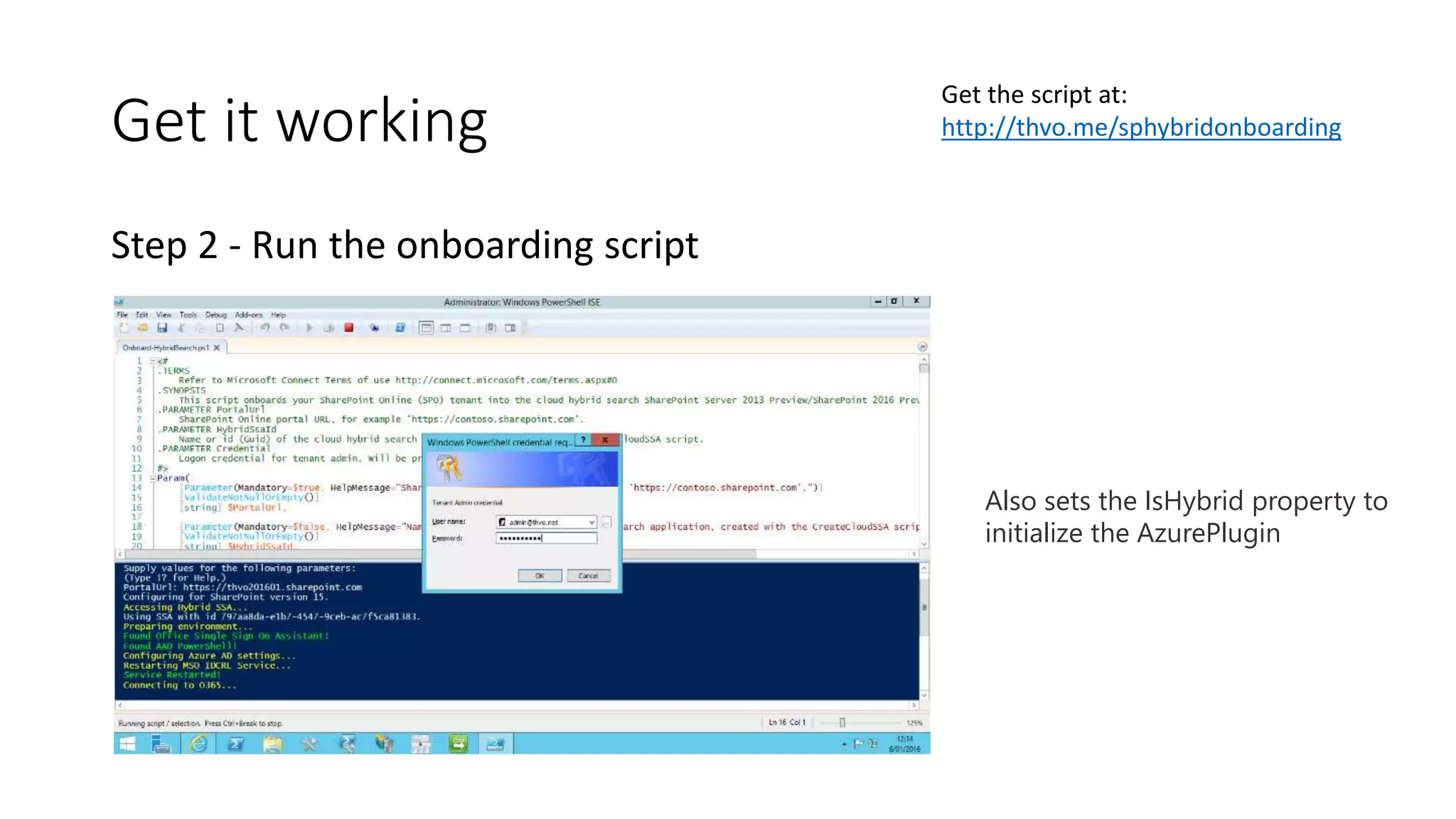
• Run the onboarding script
• Start a crawl
• Test your search in online
• Create result source(s) in on-premises
• Test your search in on-premises
Get it working
Step 1 - Create a new search service application
Disables the normal ContentPlugin
Get it working
Step 2 - Run the onboarding script
Also sets the IsHybrid property to
initialize the AzurePlugin
Get the script at:
http://thvo.me/sphybridonboarding
Get it working
Step 3 - Start a crawl
Get it working
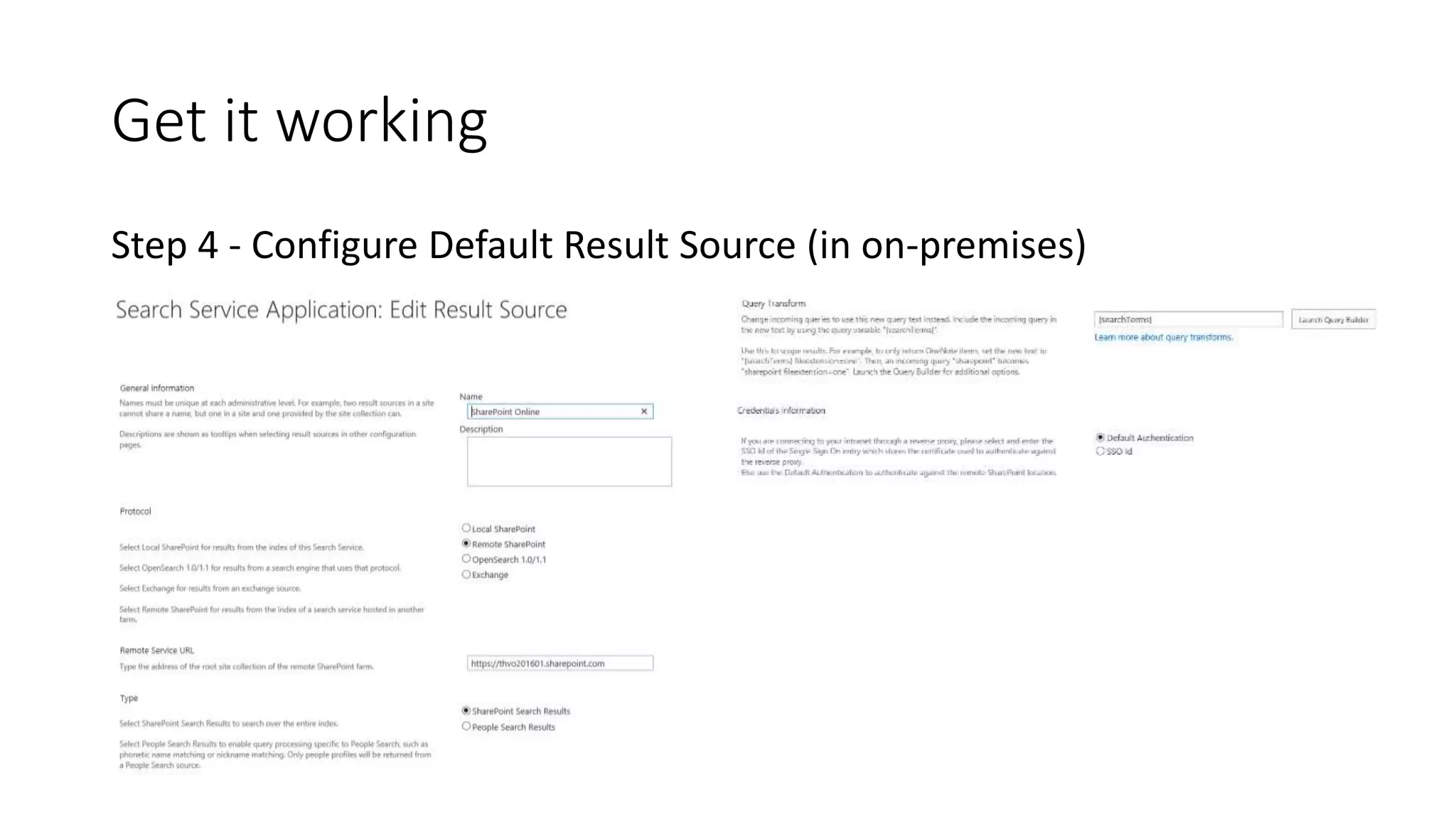
Step 4 - Configure Default Result Source (in on-premises)
Get it working
Get it working
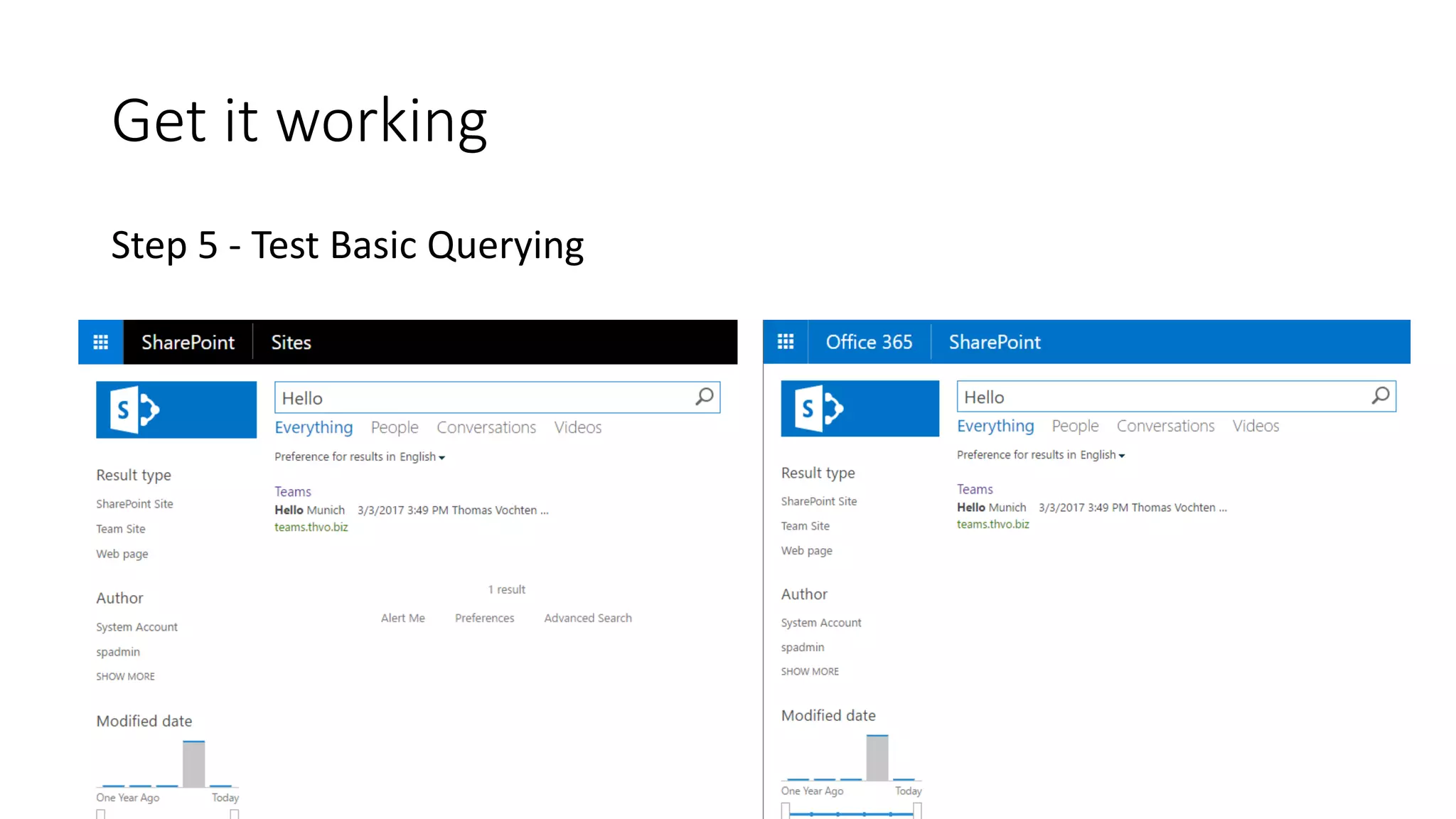
Step 5 - Test Basic Querying
Trust Creation
Trust Creation
On-Premises cmdlets:
Get-SPTrustedSecurityTokenIssuer
Get-SPTrustedRootAuthority
Azure cmdlets:
Get-MsolServicePrincipal
Impact on Topology and Sizing
Index component is still there, but not used anymore
Demo Environment
Machine Purpose
DC01 Domain Controller &
Identity Synchronization
SQL01 SQL Server 2016 for SharePoint databases
SP01 SharePoint Server 2016 environment (standalone)
OOS01 Office Online Server 2016
CL01 Windows 10 client with Office 365 ProPlus
All servers are running Windows Server 2016 Datacenter
Latest updates dd May 2016
Demo
Search service creation
Hybrid search onboarding
Additional configuration in on-premises
Tip | IsExternal managed property
All on-premises content is tagged with a new managed property:
IsExternalContent
Tip | Result sources & search verticals
{searchTerms} (IsExternalContent:1)
{searchTerms} ((IsExternalContent:1) AND Path:"file://archive")
Tip | People Search
Decide which user store you want to query:
• On-Premises
{?{searchTerms} ContentClass=urn:content-class:SPSPeople
IsExternalcontent:1}
• SharePoint Online
{?{searchTerms} ContentClass=urn:content-class:SPSPeople
IsExternalcontent:0}
Tip | People Search
SPO profile pictures don’t render on-premises by default
Workaround:
$wa = Get-SPWebapplication “Your Webapp”
$wa.CrossDomainPhotosEnabled = $true
$wa.Update()
Tip | Use a Display Template in SPO
Highlight on-premises content with a special icon
http://thvo.me/displaytemplatehybrid
Developed by Elio Struyf
Demo
People Search
Additional content sources
Display Templates
Tip | Document search previews
Reverse proxy is required
SPO will reach out to the internet-exposed endpoint to show previews
Tip | Index Reset
• Clear the content source
• Perform a full crawl
• Index will be emptied
Or… use a script!
http://thvo.me/clearhybridsearch
Tip | Logging
Boost your logging levels in case of problems with the Azure Plugin
SharePoint Server Search
Crawler:Azure Plugin
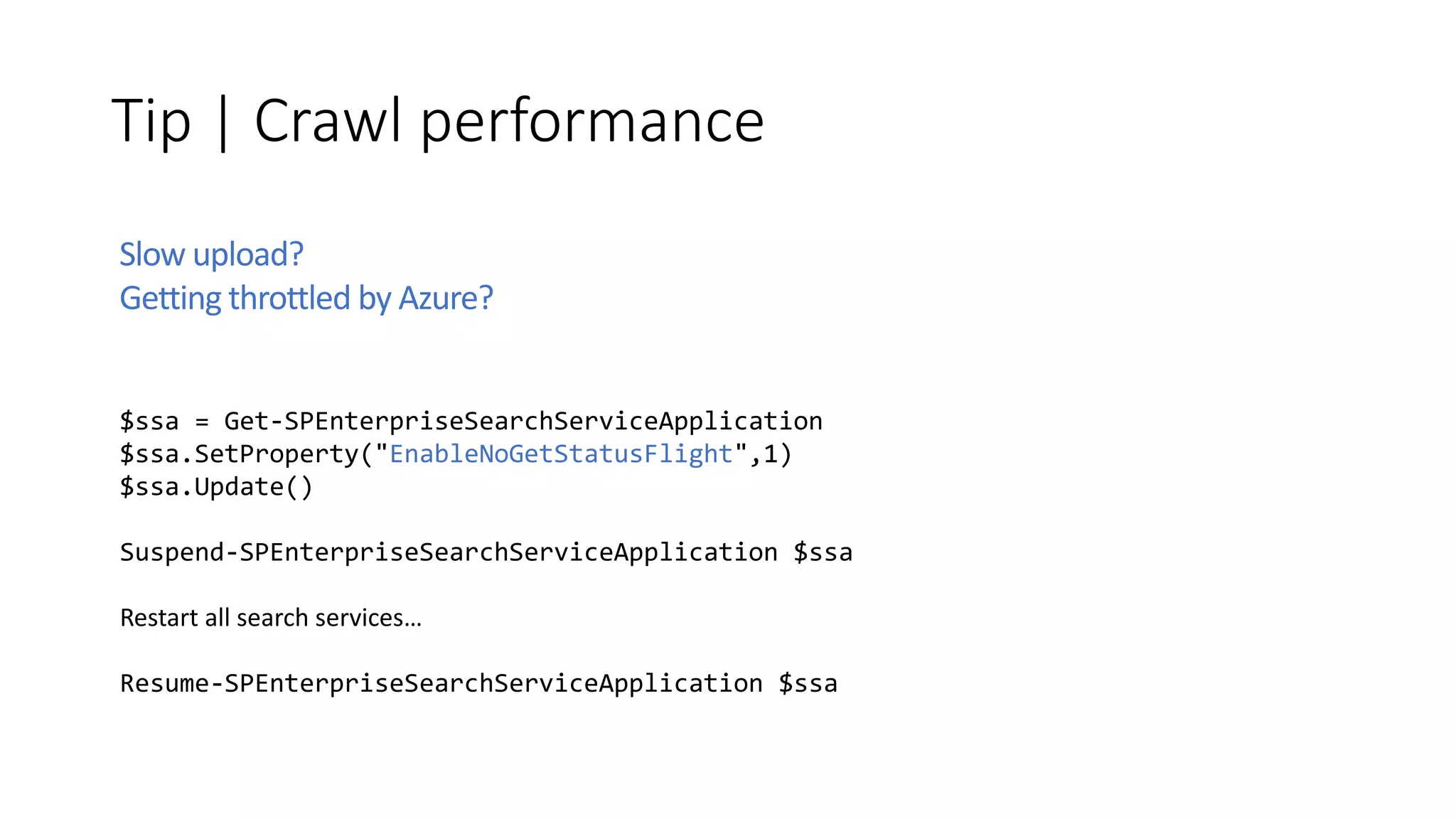
Tip | Crawl performance
$ssa = Get-SPEnterpriseSearchServiceApplication
$ssa.SetProperty("EnableNoGetStatusFlight",1)
$ssa.Update()
Suspend-SPEnterpriseSearchServiceApplication $ssa
Restart all search services…
Resume-SPEnterpriseSearchServiceApplication $ssa
Slow upload?
Getting throttled by Azure?
Limitations
• Limited customization options
No entity extraction
No content enrichment (announced)
No custom security trimming
No custom ifilters
No real Delve integration
…
• No internet, no search (be aware of proxy servers)
• Central administration integration
• No dashboard of your online index search health
What about the cost?
Hybrid search is free, …kind of
1 million on-premises items per 1 TB of pooled storage in SPO
Caution!
Enabling hybrid features can break
• Provider hosted add-ins
• Workflow Manager trust
Always use the latest scripts & wizards provided by MSFT!
Workaround: configure hybrid first, or re-establish trusts
http://thvo.me/hybridsearchfixtrust
Additional considerations
• Is my content in the online index encrypted?
• Do I need to open ports?
• What about my proxy server?
• Can hybrid search break my tenant?
• What about testing?
• Can I Search my Office 365 Groups documents?
• What is the story with Delve and the Graph API’s?
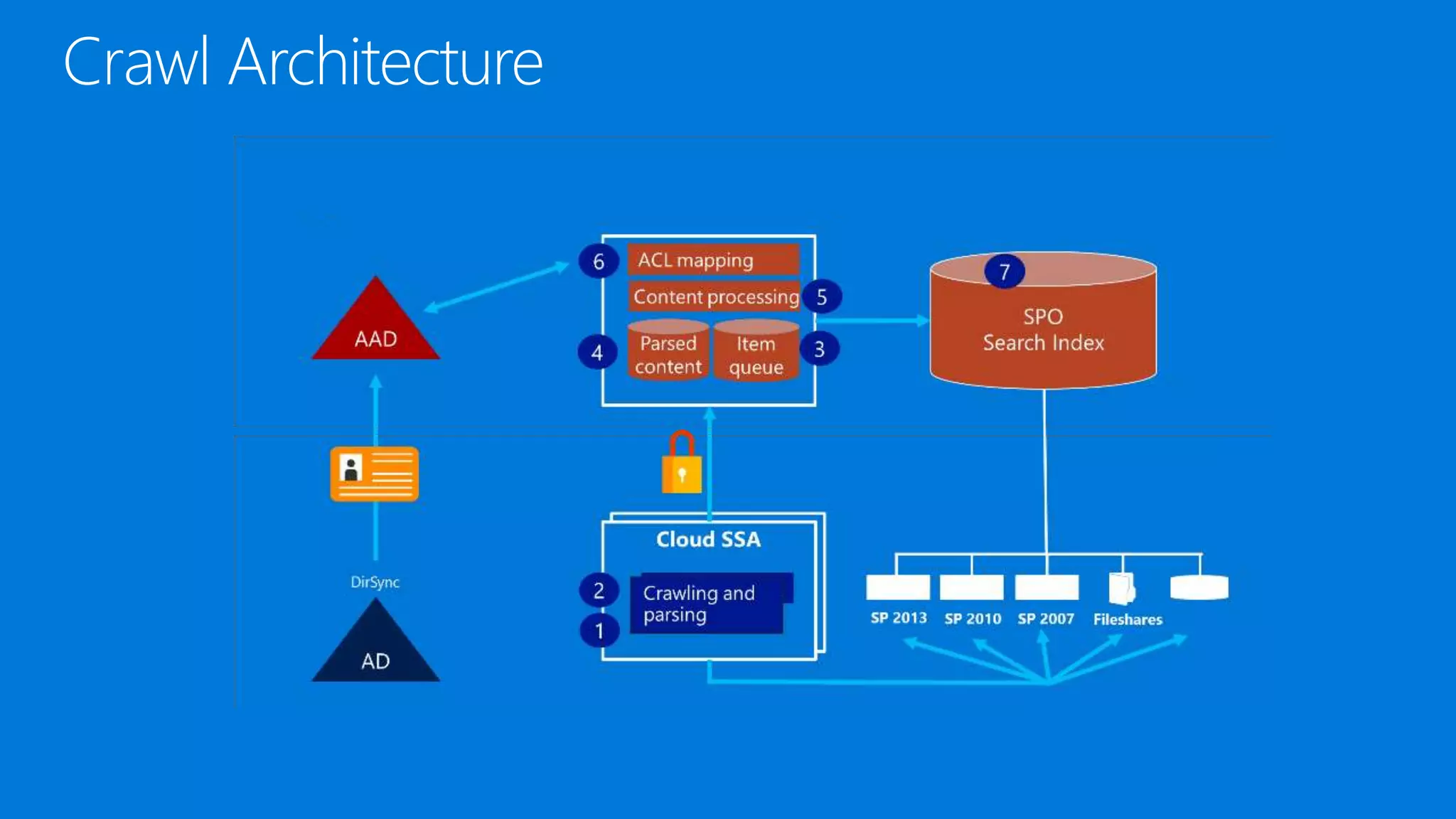
Crawl Architecture
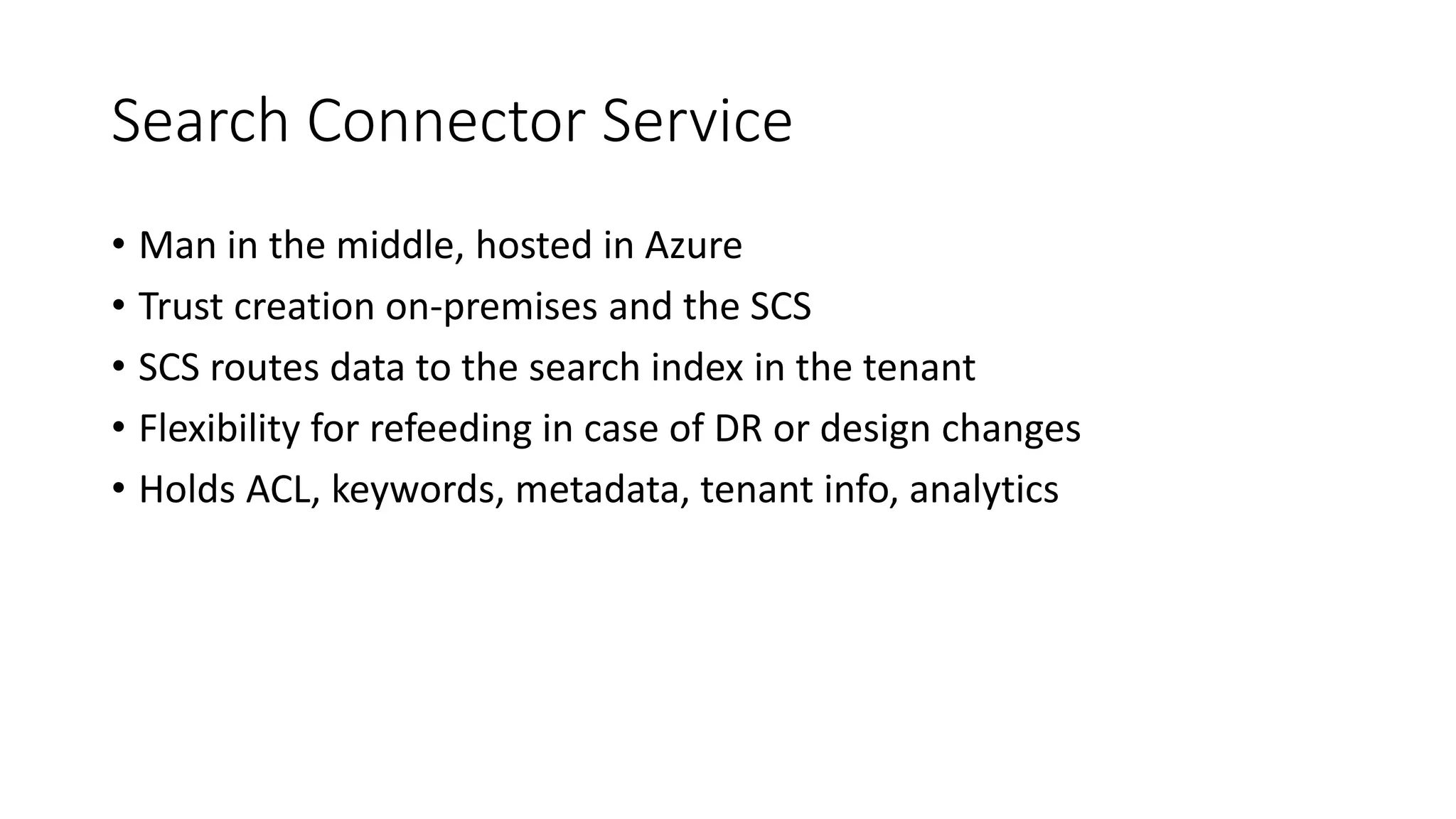
Search Connector Service
• Man in the middle, hosted in Azure
• Trust creation on-premises and the SCS
• SCS routes data to the search index in the tenant
• Flexibility for refeeding in case of DR or design changes
• Holds ACL, keywords, metadata, tenant info, analytics
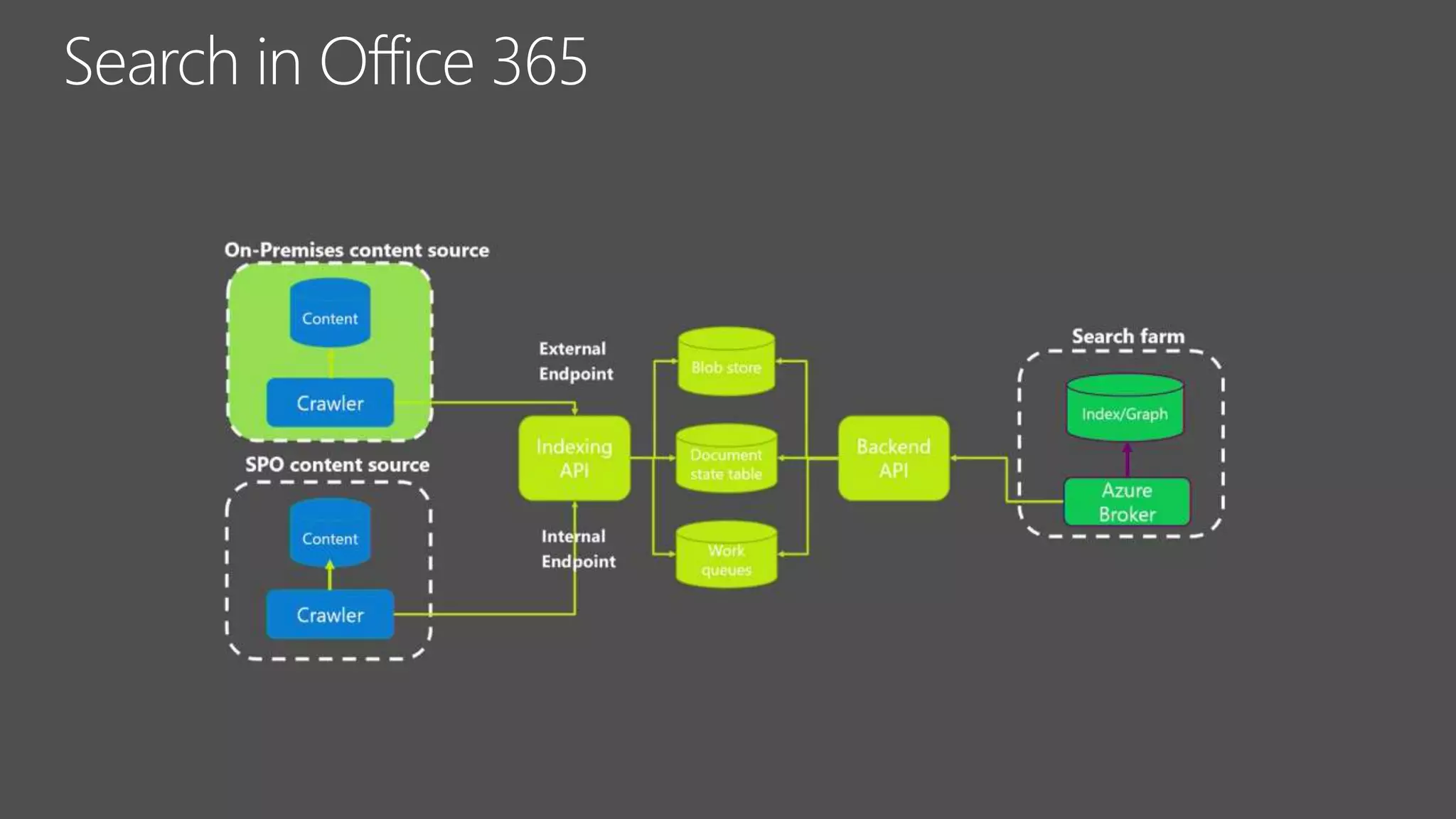
Search in Office 365
Query Architecture
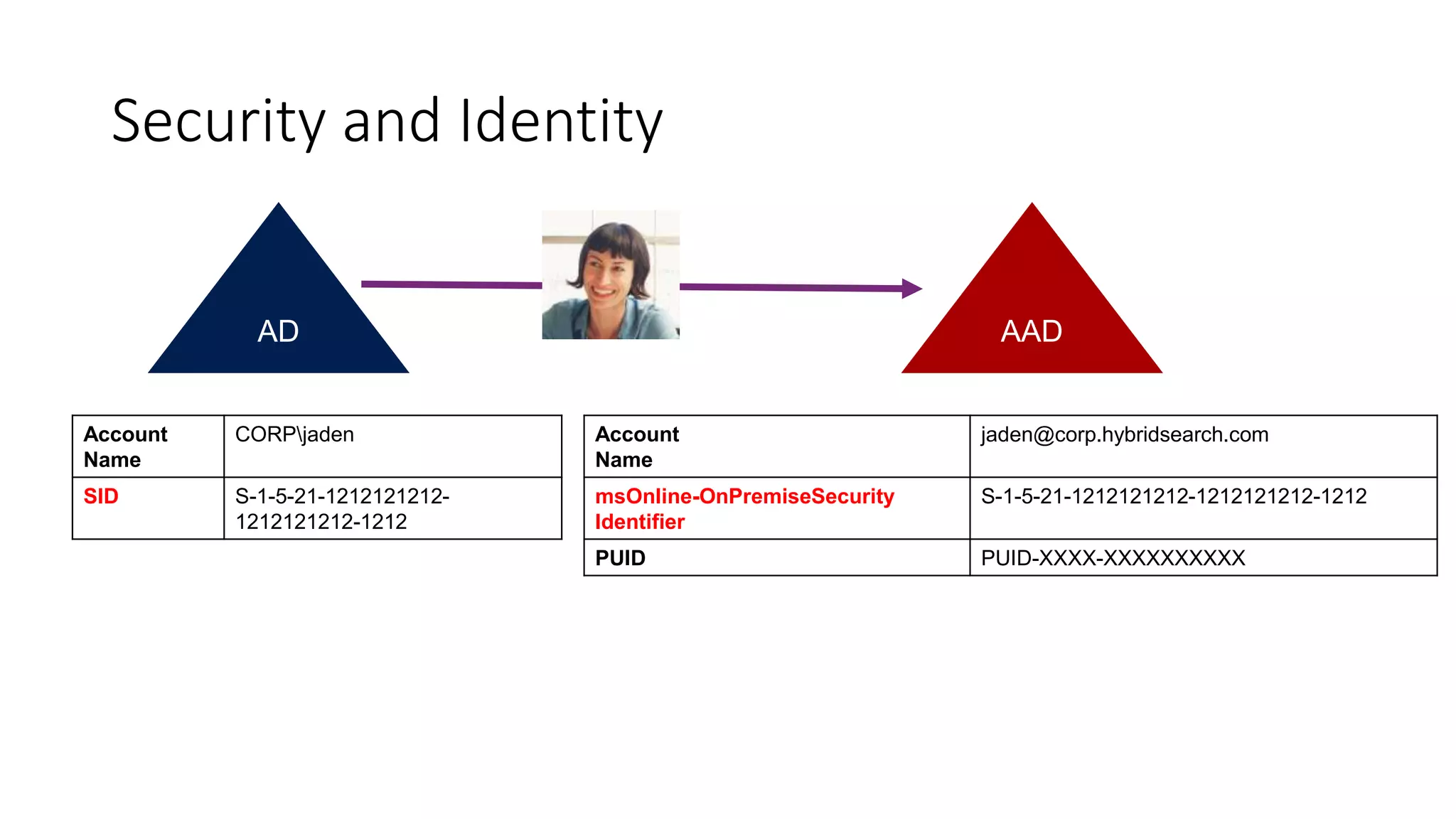
Security and Identity
SID S-1-5-21-1212121212-
1212121212-1212
jaden@corp.hybridsearch.com
msOnline-OnPremiseSecurity
Identifier
S-1-5-21-1212121212-1212121212-1212
PUID PUID-XXXX-XXXXXXXXXX
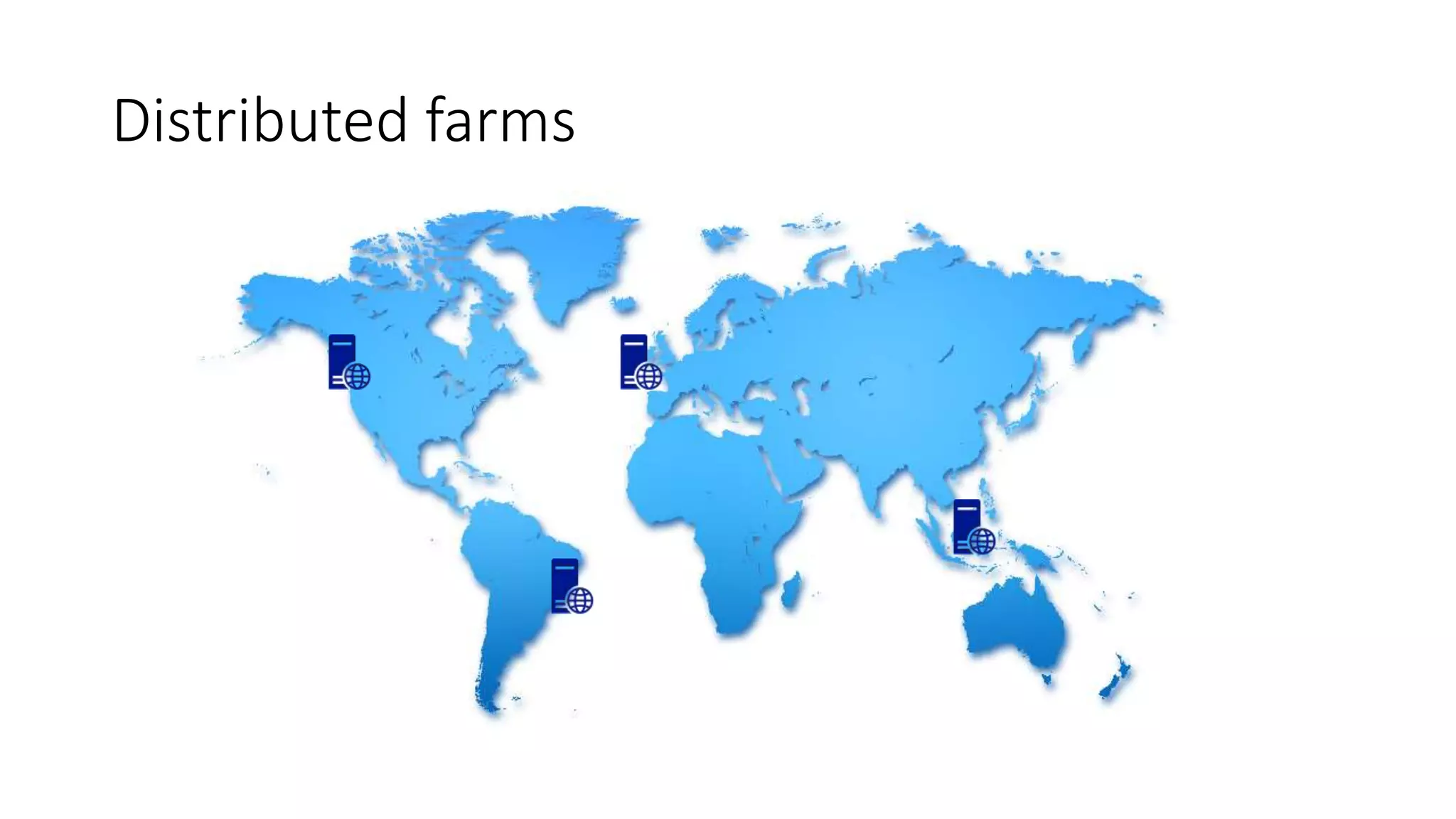
Distributed farms
Distributed farms connected to single tenant
Unified index: SharePoint Online & On-Premises
Office 365 Tenant
Amsterdam
SharePoint Farm
San Francisco
SharePoint Farm
Jakarta
SharePoint Farm
….
SharePoint Farm
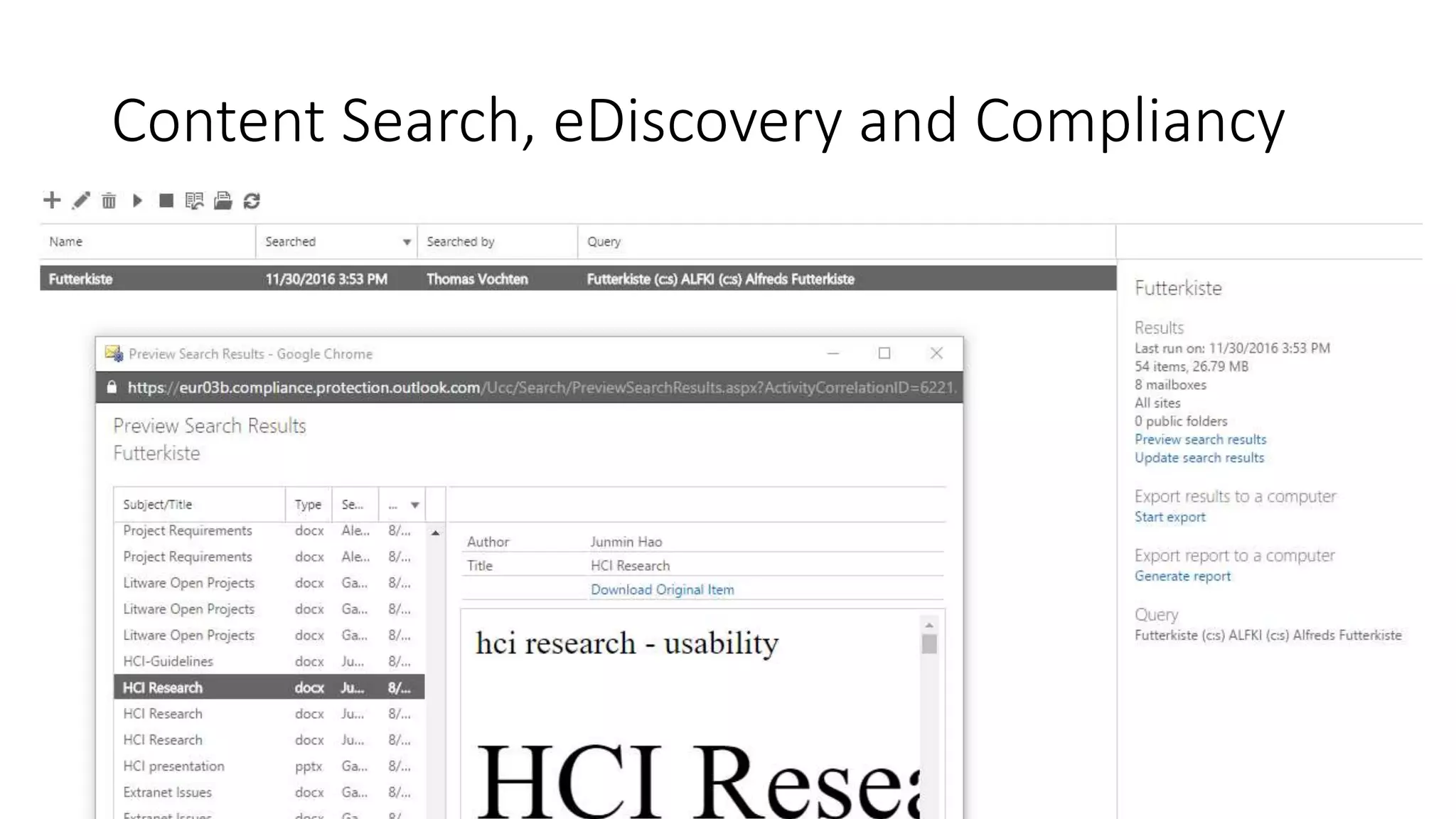
Content Search, eDiscovery and Compliancy
Hybrid Search - Takeaways
• Unified search index in SharePoint Online
• Crawl in on-premises, index lives in the cloud
• Identity synchronization needed for security trimming
• Creation of a new search service application is mandatory
• Be aware of your dependencies (e.g. add-ins, workflow mgr)
• It’s free, but be aware of limitations
• No internet connection, no search
• SharePoint 2013 & 2016 only
Bonus | eBook
Fundamental resource if you’re thinking about implementing hybrid
http://thvo.me/hybridebook
Thank you!
@thomasvochten
SPSNL17 - Implementing SharePoint hybrid search, start to finish - Thomas Vochten

SPSNL17 - Implementing SharePoint hybrid search, start to finish - Thomas Vochten

  • 1.
    SharePoint Saturday Netherlands2017 | @thomasvochten IT Pro • Level 200
  • 3.
    Thomas Vochten SharePoint architect.Microsoft MVP. Speaker. Trainer. Involuntary DBA. @thomasvochten https://thomasvochten.com mail@thomasvochten.com
  • 4.
    1 | IntroducingHybrid Search 2 | Setup & Configuration 3 | Tips, Tricks & Considerations 4 | Architecture 5 | Additional use cases
  • 6.
    Query Federation • Separateresult blocks • Maximum 10 results • Without ranking and relevance integration • No refiners • Complex for inbound scenario’s • Still working and 100% supported! • Tip: Will work after hybrid configuration wizard has been run
  • 7.
    Cloud Hybrid Search •Single unified index - in the cloud • Crawling is done on-premises • True relevance ranking and refiners • Supports all existing on-premises content sources
  • 8.
    Query Federation vsCloud Hybrid Search Cloud Hybrid SearchFederated Search
  • 9.
  • 11.
    Minimum Requirements forHybrid • Decent internet connectivity • Office 365 Enterprise subscriptions • SharePoint Server 2013/2016 • Identity Synchronization in place • SharePoint Admin account for on-premises • Tenant Admin account for Office 365 • Required service applications • App Management Service • Subscription Settings Service • User Profile Service
  • 12.
    Additional Prerequisites forSearch •Microsoft Online Services Sign-In Assistant •Azure Active Directory Module for Windows PowerShell (MSOnline)
  • 13.
    Which version ofSharePoint? Table inspired by work by Nico Martens SP 2013 SP 2016 Federated hybrid search RTM RTM Cloud hybrid search 01/2016 CU RTM Hybrid app launcher 07/2016 CU RTM Hybrid OneDrive & Profiles 09/2015 CU RTM Hybrid Sites 07/2016 CU RTM Hybrid Taxonomy 11/2016 CU FP1 (11/2016 CU) Hybrid Auditing (preview) N/A FP1 (11/2016 CU) Hybrid self service site creation 03/2017 CU N/A Table inspired by TechNet and work by @MartensNico 
  • 14.
    Setup Approach • Createa new cloud search service application • Run the onboarding script • Start a crawl • Test your search in online • Create result source(s) in on-premises • Test your search in on-premises
  • 15.
    Get it working Step1 - Create a new search service application Disables the normal ContentPlugin
  • 16.
    Get it working Step2 - Run the onboarding script Also sets the IsHybrid property to initialize the AzurePlugin Get the script at: http://thvo.me/sphybridonboarding
  • 17.
    Get it working Step3 - Start a crawl
  • 18.
    Get it working Step4 - Configure Default Result Source (in on-premises)
  • 19.
  • 20.
    Get it working Step5 - Test Basic Querying
  • 21.
  • 22.
  • 23.
    Impact on Topologyand Sizing Index component is still there, but not used anymore
  • 24.
    Demo Environment Machine Purpose DC01Domain Controller & Identity Synchronization SQL01 SQL Server 2016 for SharePoint databases SP01 SharePoint Server 2016 environment (standalone) OOS01 Office Online Server 2016 CL01 Windows 10 client with Office 365 ProPlus All servers are running Windows Server 2016 Datacenter Latest updates dd May 2016
  • 25.
    Demo Search service creation Hybridsearch onboarding Additional configuration in on-premises
  • 27.
    Tip | IsExternalmanaged property All on-premises content is tagged with a new managed property: IsExternalContent
  • 28.
    Tip | Resultsources & search verticals {searchTerms} (IsExternalContent:1) {searchTerms} ((IsExternalContent:1) AND Path:"file://archive")
  • 29.
    Tip | PeopleSearch Decide which user store you want to query: • On-Premises {?{searchTerms} ContentClass=urn:content-class:SPSPeople IsExternalcontent:1} • SharePoint Online {?{searchTerms} ContentClass=urn:content-class:SPSPeople IsExternalcontent:0}
  • 30.
    Tip | PeopleSearch SPO profile pictures don’t render on-premises by default Workaround: $wa = Get-SPWebapplication “Your Webapp” $wa.CrossDomainPhotosEnabled = $true $wa.Update()
  • 31.
    Tip | Usea Display Template in SPO Highlight on-premises content with a special icon http://thvo.me/displaytemplatehybrid Developed by Elio Struyf
  • 32.
    Demo People Search Additional contentsources Display Templates
  • 33.
    Tip | Documentsearch previews Reverse proxy is required SPO will reach out to the internet-exposed endpoint to show previews
  • 34.
    Tip | IndexReset • Clear the content source • Perform a full crawl • Index will be emptied Or… use a script! http://thvo.me/clearhybridsearch
  • 35.
    Tip | Logging Boostyour logging levels in case of problems with the Azure Plugin SharePoint Server Search Crawler:Azure Plugin
  • 36.
    Tip | Crawlperformance $ssa = Get-SPEnterpriseSearchServiceApplication $ssa.SetProperty("EnableNoGetStatusFlight",1) $ssa.Update() Suspend-SPEnterpriseSearchServiceApplication $ssa Restart all search services… Resume-SPEnterpriseSearchServiceApplication $ssa Slow upload? Getting throttled by Azure?
  • 37.
    Limitations • Limited customizationoptions No entity extraction No content enrichment (announced) No custom security trimming No custom ifilters No real Delve integration … • No internet, no search (be aware of proxy servers) • Central administration integration • No dashboard of your online index search health
  • 38.
    What about thecost? Hybrid search is free, …kind of 1 million on-premises items per 1 TB of pooled storage in SPO
  • 39.
    Caution! Enabling hybrid featurescan break • Provider hosted add-ins • Workflow Manager trust Always use the latest scripts & wizards provided by MSFT! Workaround: configure hybrid first, or re-establish trusts http://thvo.me/hybridsearchfixtrust
  • 40.
    Additional considerations • Ismy content in the online index encrypted? • Do I need to open ports? • What about my proxy server? • Can hybrid search break my tenant? • What about testing? • Can I Search my Office 365 Groups documents? • What is the story with Delve and the Graph API’s?
  • 42.
  • 43.
    Search Connector Service •Man in the middle, hosted in Azure • Trust creation on-premises and the SCS • SCS routes data to the search index in the tenant • Flexibility for refeeding in case of DR or design changes • Holds ACL, keywords, metadata, tenant info, analytics
  • 44.
  • 45.
  • 47.
    Security and Identity SIDS-1-5-21-1212121212- 1212121212-1212 jaden@corp.hybridsearch.com msOnline-OnPremiseSecurity Identifier S-1-5-21-1212121212-1212121212-1212 PUID PUID-XXXX-XXXXXXXXXX
  • 49.
  • 50.
    Distributed farms connectedto single tenant Unified index: SharePoint Online & On-Premises Office 365 Tenant Amsterdam SharePoint Farm San Francisco SharePoint Farm Jakarta SharePoint Farm …. SharePoint Farm
  • 51.
  • 52.
    Hybrid Search -Takeaways • Unified search index in SharePoint Online • Crawl in on-premises, index lives in the cloud • Identity synchronization needed for security trimming • Creation of a new search service application is mandatory • Be aware of your dependencies (e.g. add-ins, workflow mgr) • It’s free, but be aware of limitations • No internet connection, no search • SharePoint 2013 & 2016 only
  • 53.
    Bonus | eBook Fundamentalresource if you’re thinking about implementing hybrid http://thvo.me/hybridebook
  • 54.