Managing (O365) with PowerShell + CSOM
EVENT Sponsors
• Diamond, Platinum & Gold sponsors
have tables
• Please visit them and inquire about
their products & services
• Also they have lots of awesome
schwag that you can’t live without!

HELLO!My name is
Amit VasuSr. SharePoint Consultant, MVP
www.amitvasu.com
Twitter: @amitvasu
Session Objective
 Understand how to automate different SharePoint
Online (Office 365) tasks using PowerShell and CSOM
 This session is for Developers
 And IT Pro as well
……May be NOT 
History Lesson
Amit’s PowerShell + CSOM Journey
“FTC to CAM – Stop creating content types and site
columns declaratively”
http://blogs.msdn.com/b/vesku/archive/2013/11/06/ftc-to-cam-stop-creating-content-types-and-site-
columns-declaratively.aspx
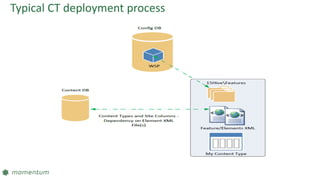
Typical CT deployment process
How do we overcome - On Premises
What are the challenges with O365
 Guidance to not use declarative code for CT
 You cannot use custom code in Sandbox solution.
 Farm solutions are out of question.
Remote Provisioning to Rescue
Remote Provisioning
 Write C# CSOM/REST Provider hosted App
 JSOM
 PowerShell + CSOM
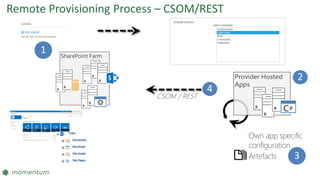
SharePoint Farm
1
Provider Hosted
Apps
Own app specific
configuration
Artefacts
2
4
CSOM / REST
3
Remote Provisioning Process – CSOM/REST
CSOM – Power Talk
Remote Provisioning
 Client side library for remotely communicating with SharePoint
 Introduced in SharePoint 2010
 Expanded upon in SharePoint 2013
CSOM in SharePoint 2010
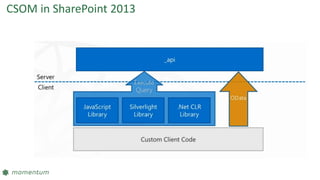
CSOM in SharePoint 2013
How CSOM Works
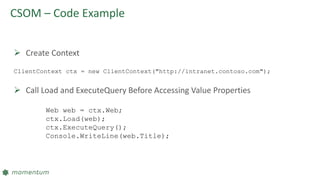
CSOM – Code Example
 Create Context
ClientContext ctx = new ClientContext("http://intranet.contoso.com");
 Call Load and ExecuteQuery Before Accessing Value Properties
Web web = ctx.Web;
ctx.Load(web);
ctx.ExecuteQuery();
Console.WriteLine(web.Title);
How do I start
Steps to start developing
 Pick your Development environment
 Local Machine
 SharePoint 2013 Environment
Local Machine
 Required copy of all SharePoint Client DLL
 Located at C:Program FilesCommon Filesmicrosoft sharedWeb Server
Extensions15ISAPI
 All DLLs that starts with Microsoft.SharePoint.Client
 Reference them in your code from the location you copied them
SharePoint Environment
 No need to do anything other than referencing DLLs
from ISAPI folder.
Optional – Download CSOM Assemblies
DEMO
PowerShell + CSOM
Summary
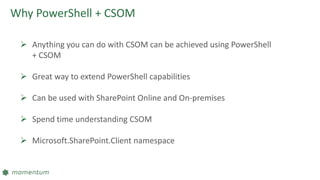
Why PowerShell + CSOM
 Anything you can do with CSOM can be achieved using PowerShell
+ CSOM
 Great way to extend PowerShell capabilities
 Can be used with SharePoint Online and On-premises
 Spend time understanding CSOM
 Microsoft.SharePoint.Client namespace
Resources
 https://sharepointpowershell.codeplex.com/
 https://sharepointonlineautomationcmdlets.codeplex.com/
 http://social.technet.microsoft.com/wiki/contents/articles/29518.c
som-sharepoint-powershell-reference-and-example-codes.aspx
Connecticut SharePoint users group
• Different SharePoint discussions
each month on various topics.
• Meets 3rd Thursday of every
month
• Microsoft Office (Hartford)
• 280 Trumbull St, Hartford CT
06103
• http://www.meetup.com/ctspug
Special October session!
• Michelle Caldwell (MVP) will be
making a stop at the CTSPUG
• Microsoft Store in West Farms
Mall
• Wednesday – October 14th
• Register today!
– http://www.meetup.com/ctspug
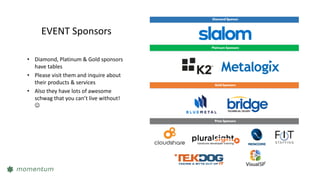
EVENT Sponsors
• Diamond, Platinum & Gold sponsors
have tables
• Please visit them and inquire about
their products & services
• Also they have lots of awesome
schwag that you can’t live without!

EVALS
THANK YOU

Spsct15 power shell_csom - amit vasu