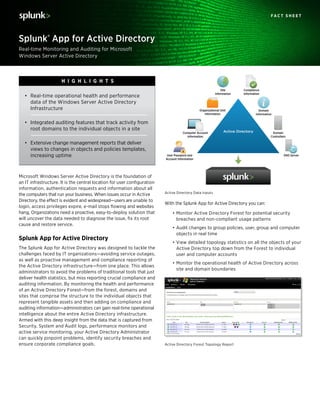
Computer Account
Information
Site
Information
User Password and
Account Information
Organizational Unit
Information
Compliance
Information
Domain
Information
Domain
Controllers
DNS Server
Active Directory
With the Splunk App for Active Directory you can:
•	Monitor Active Directory Forest for potential security
breaches and non-compliant usage patterns
•	Audit changes to group policies, user, group and computer
objects in real time
•	View detailed topology statistics on all the objects of your
Active Directory top down from the Forest to individual
user and computer accounts
•	Monitor the operational health of Active Directory across
site and domain boundaries
Microsoft Windows Server Active Directory is the foundation of
an IT infrastructure. It is the central location for user configuration
information, authentication requests and information about all
the computers that run your business. When issues occur in Active
Directory, the effect is evident and widespread—users are unable to
login, access privileges expire, e-mail stops flowing and websites
hang, Organizations need a proactive, easy-to-deploy solution that
will uncover the data needed to diagnose the issue, fix its root
cause and restore service.
Splunk App for Active Directory
The Splunk App for Active Directory was designed to tackle the
challenges faced by IT organizations—avoiding service outages,
as well as proactive management and compliance reporting of
the Active Directory infrastructure—from one place. This allows
administrators to avoid the problems of traditional tools that just
deliver health statistics, but miss reporting crucial compliance and
auditing information. By monitoring the health and performance
of an Active Directory Forest—from the forest, domains and
sites that comprise the structure to the individual objects that
represent tangible assets and then adding on compliance and
auditing information—administrators can gain real-time operational
intelligence about the entire Active Directory infrastructure.
Armed with this deep insight from the data that is captured from
Security, System and Audit logs, performance monitors and
active service monitoring, your Active Directory Administrator
can quickly pinpoint problems, identify security breaches and
ensure corporate compliance goals.
Real-time Monitoring and Auditing for Microsoft
Windows Server Active Directory
Splunk® App for Active Directory
F A C T S H E E T
Active Directory Data Inputs
Active Directory Forest Topology Report
•	 Real-time operational health and performance
data of the Windows Server Active Directory
Infrastructure
•	 Integrated auditing features that track activity from
root domains to the individual objects in a site
•	 Extensive change management reports that deliver
views to changes in objects and policies templates,
increasing uptime
H I G H L I G H T S
www.splunk.com
250 Brannan St, San Francisco, CA, 94107 info@splunk.com | sales@splunk.com 866-438-7758 | 415-848-8400 www.splunkbase.com
Copyright © 2012 Splunk Inc. All rights reserved. Splunk Enterprise is protected by U.S. and international copyright and intellectual property laws.
Splunk is a registered trademark or trademark of Splunk Inc. in the United States and/or other jurisdictions. All other marks and names mentioned
herein may be trademarks of their respective companies. Item # FS-Splunk-AppActiveDirectory-102
Product Requirements
Supported Windows Server Versions
The Splunk App for Active Directory supports Active Directory
Forests running on Windows Server 2003 R2, Windows Server
2008, Windows Server 2008 R2 and Windows Server 2012.
Splunk Requirements
All instances of Splunk in a Splunk App for Active Directory requires
Splunk Enterprise v4.3.2 or later and Sideview Utils v1.2.5 or later.
All universal forwarders in a Splunk App for Active Directory
deployment must run Splunk Enterprise v4.2.5 or later.
F A C T S H E E T
www.splunk.com
250 Brannan St, San Francisco, CA, 94107 info@splunk.com | sales@splunk.com 866-438-7758 | 415-848-8400 www.splunkbase.com
Try Out the App, it’s Free!
Go to www.splunk.com/microsoft to learn more.
Splunk App for Active Directory Features
The Splunk App for Active Directory provides several specialized
features to monitor Active Directory, including:
Topology Reports – Displays a complete view of the entire Active
Directory Forest and the underlying Domains, Sites and Domain
Controllers that are being monitored. This allows an Active Directory
administrator to view the entire Forest from one single view
rather then opening multiple consoles for information.
Domain Services – Displays information on the Domains, Sites and
Domain controllers that belong to the Active Directory Forest.
The information here delivers real-time statistics as to how the
individual components are operating and how they are working
together. Information gathered here is used to troubleshoot login
issues, account for missing object information due to replication
failures, and monitor performance of the directory service and
domain controller load.
DNS Services – Displays information about the health, configuration,
and performance of the DNS servers and DNS zones that host the
Active Directory domains. Due to the dependency that Active
Directory has on DNS, any changes made to DNS servers,
performance issues or outages can create service disruptions
on the Active Directory side. The information here allows Active
Directory Administrators to view information about the DNS
infrastructure that is usually administered by the networking
team to see if issues in DNS are impacting the Active Directory
Forest, producing faster resolution times.
User Logon Failures – Displays failed attempts by users to log onto
a specific domain in the Active Directory Forest. Information here
is used to protect the Active Forest from malicious unauthorized
login activities. From one console, administrators can then view
the multiple ways a security breach may be attempted across
the entire Forest.
Anomalous Logons – Displays information on uncharacteristic
usage patterns, such as a user logging in from multiple workstations.
The information gathered here can be used to monitor for attempted
security breaches across the Forest.
User Utilization – Displays the user and workstation load managed
by Active Directory Forest. Information here is used for monitoring
the load Domain Controllers are carrying and can then be used
to justify hardware and software acquisitions.
Change Management – Displays changes made to objects in
the Active Directory Forest. Helpdesk and admin staff can
track changes made to computer accounts, domain accounts,
organizational units and group policy objects to decrease
support calls and pinpoint user issues.
Free Download
Download Splunk. You’ll get a Splunk Enterprise license for 60
days and you can index up to 500 megabytes of data per day.
You can convert to a perpetual Free license or purchase an
Enterprise license by contacting sales@splunk.com.

Splunk for active_directory

  • 1.
    Computer Account Information Site Information User Passwordand Account Information Organizational Unit Information Compliance Information Domain Information Domain Controllers DNS Server Active Directory With the Splunk App for Active Directory you can: • Monitor Active Directory Forest for potential security breaches and non-compliant usage patterns • Audit changes to group policies, user, group and computer objects in real time • View detailed topology statistics on all the objects of your Active Directory top down from the Forest to individual user and computer accounts • Monitor the operational health of Active Directory across site and domain boundaries Microsoft Windows Server Active Directory is the foundation of an IT infrastructure. It is the central location for user configuration information, authentication requests and information about all the computers that run your business. When issues occur in Active Directory, the effect is evident and widespread—users are unable to login, access privileges expire, e-mail stops flowing and websites hang, Organizations need a proactive, easy-to-deploy solution that will uncover the data needed to diagnose the issue, fix its root cause and restore service. Splunk App for Active Directory The Splunk App for Active Directory was designed to tackle the challenges faced by IT organizations—avoiding service outages, as well as proactive management and compliance reporting of the Active Directory infrastructure—from one place. This allows administrators to avoid the problems of traditional tools that just deliver health statistics, but miss reporting crucial compliance and auditing information. By monitoring the health and performance of an Active Directory Forest—from the forest, domains and sites that comprise the structure to the individual objects that represent tangible assets and then adding on compliance and auditing information—administrators can gain real-time operational intelligence about the entire Active Directory infrastructure. Armed with this deep insight from the data that is captured from Security, System and Audit logs, performance monitors and active service monitoring, your Active Directory Administrator can quickly pinpoint problems, identify security breaches and ensure corporate compliance goals. Real-time Monitoring and Auditing for Microsoft Windows Server Active Directory Splunk® App for Active Directory F A C T S H E E T Active Directory Data Inputs Active Directory Forest Topology Report • Real-time operational health and performance data of the Windows Server Active Directory Infrastructure • Integrated auditing features that track activity from root domains to the individual objects in a site • Extensive change management reports that deliver views to changes in objects and policies templates, increasing uptime H I G H L I G H T S
  • 2.
    www.splunk.com 250 Brannan St,San Francisco, CA, 94107 info@splunk.com | sales@splunk.com 866-438-7758 | 415-848-8400 www.splunkbase.com Copyright © 2012 Splunk Inc. All rights reserved. Splunk Enterprise is protected by U.S. and international copyright and intellectual property laws. Splunk is a registered trademark or trademark of Splunk Inc. in the United States and/or other jurisdictions. All other marks and names mentioned herein may be trademarks of their respective companies. Item # FS-Splunk-AppActiveDirectory-102 Product Requirements Supported Windows Server Versions The Splunk App for Active Directory supports Active Directory Forests running on Windows Server 2003 R2, Windows Server 2008, Windows Server 2008 R2 and Windows Server 2012. Splunk Requirements All instances of Splunk in a Splunk App for Active Directory requires Splunk Enterprise v4.3.2 or later and Sideview Utils v1.2.5 or later. All universal forwarders in a Splunk App for Active Directory deployment must run Splunk Enterprise v4.2.5 or later. F A C T S H E E T www.splunk.com 250 Brannan St, San Francisco, CA, 94107 info@splunk.com | sales@splunk.com 866-438-7758 | 415-848-8400 www.splunkbase.com Try Out the App, it’s Free! Go to www.splunk.com/microsoft to learn more. Splunk App for Active Directory Features The Splunk App for Active Directory provides several specialized features to monitor Active Directory, including: Topology Reports – Displays a complete view of the entire Active Directory Forest and the underlying Domains, Sites and Domain Controllers that are being monitored. This allows an Active Directory administrator to view the entire Forest from one single view rather then opening multiple consoles for information. Domain Services – Displays information on the Domains, Sites and Domain controllers that belong to the Active Directory Forest. The information here delivers real-time statistics as to how the individual components are operating and how they are working together. Information gathered here is used to troubleshoot login issues, account for missing object information due to replication failures, and monitor performance of the directory service and domain controller load. DNS Services – Displays information about the health, configuration, and performance of the DNS servers and DNS zones that host the Active Directory domains. Due to the dependency that Active Directory has on DNS, any changes made to DNS servers, performance issues or outages can create service disruptions on the Active Directory side. The information here allows Active Directory Administrators to view information about the DNS infrastructure that is usually administered by the networking team to see if issues in DNS are impacting the Active Directory Forest, producing faster resolution times. User Logon Failures – Displays failed attempts by users to log onto a specific domain in the Active Directory Forest. Information here is used to protect the Active Forest from malicious unauthorized login activities. From one console, administrators can then view the multiple ways a security breach may be attempted across the entire Forest. Anomalous Logons – Displays information on uncharacteristic usage patterns, such as a user logging in from multiple workstations. The information gathered here can be used to monitor for attempted security breaches across the Forest. User Utilization – Displays the user and workstation load managed by Active Directory Forest. Information here is used for monitoring the load Domain Controllers are carrying and can then be used to justify hardware and software acquisitions. Change Management – Displays changes made to objects in the Active Directory Forest. Helpdesk and admin staff can track changes made to computer accounts, domain accounts, organizational units and group policy objects to decrease support calls and pinpoint user issues. Free Download Download Splunk. You’ll get a Splunk Enterprise license for 60 days and you can index up to 500 megabytes of data per day. You can convert to a perpetual Free license or purchase an Enterprise license by contacting sales@splunk.com.