F a c t S h e e t
Splunk® App for Windows
Monitoring the Foundation of the Enterprise Infrastructure
•	 Monitor Windows Update successful and failed packages,
application installations and application crashes on hosts
across your environment
•	 Monitor all Windows event logs across your environment,
including Application, System and Security
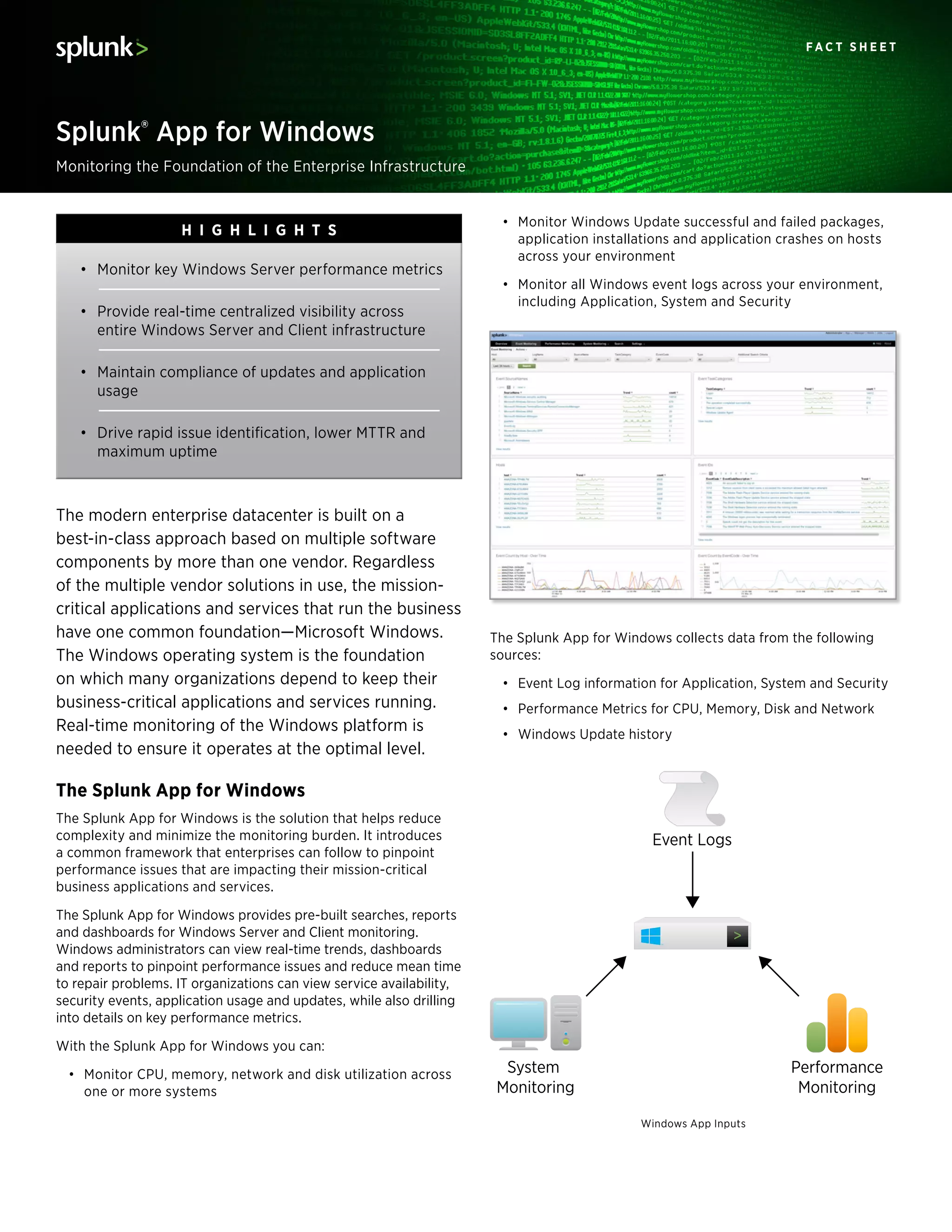
The Splunk App for Windows collects data from the following
sources:
•	 Event Log information for Application, System and Security
•	 Performance Metrics for CPU, Memory, Disk and Network
•	 Windows Update history
The modern enterprise datacenter is built on a
best-in-class approach based on multiple software
components by more than one vendor. Regardless
of the multiple vendor solutions in use, the mission-
critical applications and services that run the business
have one common foundation—Microsoft Windows.
The Windows operating system is the foundation
on which many organizations depend to keep their
business-critical applications and services running.
Real-time monitoring of the Windows platform is
needed to ensure it operates at the optimal level.
The Splunk App for Windows
The Splunk App for Windows is the solution that helps reduce
complexity and minimize the monitoring burden. It introduces
a common framework that enterprises can follow to pinpoint
performance issues that are impacting their mission-critical
business applications and services.
The Splunk App for Windows provides pre-built searches, reports
and dashboards for Windows Server and Client monitoring.
Windows administrators can view real-time trends, dashboards
and reports to pinpoint performance issues and reduce mean time
to repair problems. IT organizations can view service availability,
security events, application usage and updates, while also drilling
into details on key performance metrics.
With the Splunk App for Windows you can:
•	 Monitor CPU, memory, network and disk utilization across
one or more systems
•	 Monitor key Windows Server performance metrics
•	 Provide real-time centralized visibility across
entire Windows Server and Client infrastructure
•	 Maintain compliance of updates and application
usage
•	 Drive rapid issue identification, lower MTTR and
maximum uptime
H i g h l i g hts
Performance
Monitoring
System
Monitoring
Event Logs
Windows App Inputs
F a c t s h e e t
www.splunk.com
250 Brannan St, San Francisco, CA, 94107 info@splunk.com | sales@splunk.com 866-438-7758 | 415-848-8400 www.splunkbase.com
Copyright © 2013 Splunk Inc. All rights reserved. Splunk Enterprise is protected by U.S. and international copyright and intellectual property laws. Splunk is a registered trademark
or trademark of Splunk Inc. in the United States and/or other jurisdictions. All other marks and names mentioned herein may be trademarks of their respective companies. Microsoft
and Windows are registered trademarks of Microsoft Corporation in the United States and other countries.
Item # FS-Splunk-Windows-104
Splunk App for Windows Features
The Splunk App for Windows provides several specialized features
to monitor Windows Server and Client data. Dashboard views
include:
Overview – Intended to provide information about the data that is
being collected and reported on by the Splunk App for Windows
Events Monitoring – Contains information on all the events
generated by the event log channels being monitored—such as
Application, System and Security
Performance Monitoring – Contains information on CPU,
Memory, Physical Disk, LogicalDisk, Network Interface and System
System Monitoring – Contains information on Application
crashes, Application installs and Windows Updates
Correlation across your Enterprise
Infrastructure
Combine your Windows Infrastructure data from other technology
tiers such as applications, other operating systems, storage and
network devices to gain complete end-to-end service level insight.
App Requirements
The Splunk App for Windows supports Windows Server 2003,
2003 R2, Windows Server 2008, Windows Server 2008 R2,
Windows Server 2012, Windows Vista, Windows 7 and Windows 8.
Splunk Requirements
All instances of Splunk in a Splunk App for Windows deployment
must run version 4.3.5 or later.
Microsoft Certification
As a Microsoft Gold Certified Partner, Splunk is committed to
delivering innovative solutions and technologies that enable
organizations to be operationally aware of the Windows IT
infrastructure they manage. Splunk provides the tools to manage
the Windows foundation for customer success.
Splunk is listed on the Microsoft Pinpoint Marketplace.
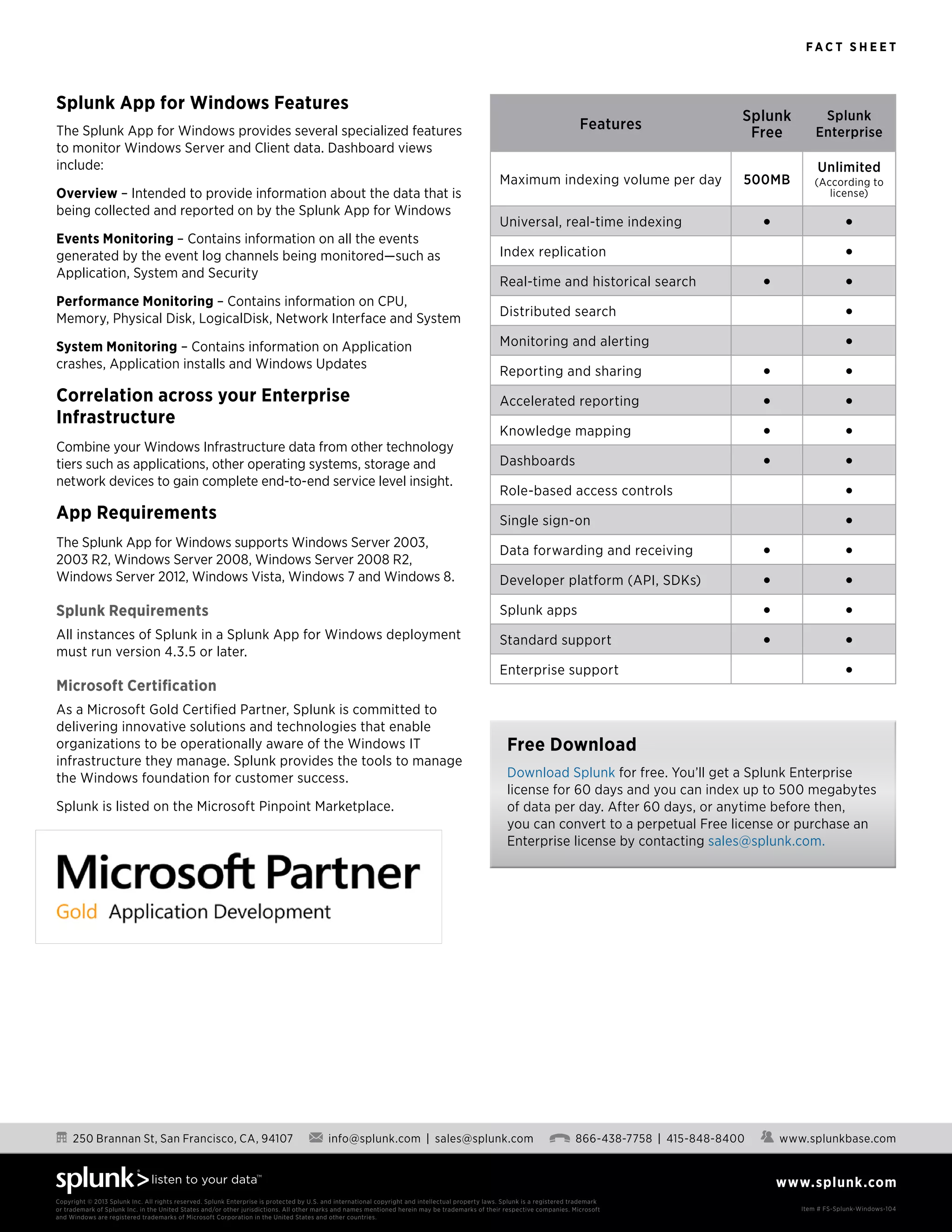
Features
Splunk
Free
Splunk
Enterprise
Maximum indexing volume per day 500MB
Unlimited
(According to
license)
Universal, real-time indexing • •
Index replication •
Real-time and historical search • •
Distributed search •
Monitoring and alerting •
Reporting and sharing • •
Accelerated reporting • •
Knowledge mapping • •
Dashboards • •
Role-based access controls •
Single sign-on •
Data forwarding and receiving • •
Developer platform (API, SDKs) • •
Splunk apps • •
Standard support • •
Enterprise support •
Free Download
Download Splunk for free. You’ll get a Splunk Enterprise
license for 60 days and you can index up to 500 megabytes
of data per day. After 60 days, or anytime before then,
you can convert to a perpetual Free license or purchase an
Enterprise license by contacting sales@splunk.com.

Splunk app for_windows

  • 1.
    F a ct S h e e t Splunk® App for Windows Monitoring the Foundation of the Enterprise Infrastructure • Monitor Windows Update successful and failed packages, application installations and application crashes on hosts across your environment • Monitor all Windows event logs across your environment, including Application, System and Security The Splunk App for Windows collects data from the following sources: • Event Log information for Application, System and Security • Performance Metrics for CPU, Memory, Disk and Network • Windows Update history The modern enterprise datacenter is built on a best-in-class approach based on multiple software components by more than one vendor. Regardless of the multiple vendor solutions in use, the mission- critical applications and services that run the business have one common foundation—Microsoft Windows. The Windows operating system is the foundation on which many organizations depend to keep their business-critical applications and services running. Real-time monitoring of the Windows platform is needed to ensure it operates at the optimal level. The Splunk App for Windows The Splunk App for Windows is the solution that helps reduce complexity and minimize the monitoring burden. It introduces a common framework that enterprises can follow to pinpoint performance issues that are impacting their mission-critical business applications and services. The Splunk App for Windows provides pre-built searches, reports and dashboards for Windows Server and Client monitoring. Windows administrators can view real-time trends, dashboards and reports to pinpoint performance issues and reduce mean time to repair problems. IT organizations can view service availability, security events, application usage and updates, while also drilling into details on key performance metrics. With the Splunk App for Windows you can: • Monitor CPU, memory, network and disk utilization across one or more systems • Monitor key Windows Server performance metrics • Provide real-time centralized visibility across entire Windows Server and Client infrastructure • Maintain compliance of updates and application usage • Drive rapid issue identification, lower MTTR and maximum uptime H i g h l i g hts Performance Monitoring System Monitoring Event Logs Windows App Inputs
  • 2.
    F a ct s h e e t www.splunk.com 250 Brannan St, San Francisco, CA, 94107 info@splunk.com | sales@splunk.com 866-438-7758 | 415-848-8400 www.splunkbase.com Copyright © 2013 Splunk Inc. All rights reserved. Splunk Enterprise is protected by U.S. and international copyright and intellectual property laws. Splunk is a registered trademark or trademark of Splunk Inc. in the United States and/or other jurisdictions. All other marks and names mentioned herein may be trademarks of their respective companies. Microsoft and Windows are registered trademarks of Microsoft Corporation in the United States and other countries. Item # FS-Splunk-Windows-104 Splunk App for Windows Features The Splunk App for Windows provides several specialized features to monitor Windows Server and Client data. Dashboard views include: Overview – Intended to provide information about the data that is being collected and reported on by the Splunk App for Windows Events Monitoring – Contains information on all the events generated by the event log channels being monitored—such as Application, System and Security Performance Monitoring – Contains information on CPU, Memory, Physical Disk, LogicalDisk, Network Interface and System System Monitoring – Contains information on Application crashes, Application installs and Windows Updates Correlation across your Enterprise Infrastructure Combine your Windows Infrastructure data from other technology tiers such as applications, other operating systems, storage and network devices to gain complete end-to-end service level insight. App Requirements The Splunk App for Windows supports Windows Server 2003, 2003 R2, Windows Server 2008, Windows Server 2008 R2, Windows Server 2012, Windows Vista, Windows 7 and Windows 8. Splunk Requirements All instances of Splunk in a Splunk App for Windows deployment must run version 4.3.5 or later. Microsoft Certification As a Microsoft Gold Certified Partner, Splunk is committed to delivering innovative solutions and technologies that enable organizations to be operationally aware of the Windows IT infrastructure they manage. Splunk provides the tools to manage the Windows foundation for customer success. Splunk is listed on the Microsoft Pinpoint Marketplace. Features Splunk Free Splunk Enterprise Maximum indexing volume per day 500MB Unlimited (According to license) Universal, real-time indexing • • Index replication • Real-time and historical search • • Distributed search • Monitoring and alerting • Reporting and sharing • • Accelerated reporting • • Knowledge mapping • • Dashboards • • Role-based access controls • Single sign-on • Data forwarding and receiving • • Developer platform (API, SDKs) • • Splunk apps • • Standard support • • Enterprise support • Free Download Download Splunk for free. You’ll get a Splunk Enterprise license for 60 days and you can index up to 500 megabytes of data per day. After 60 days, or anytime before then, you can convert to a perpetual Free license or purchase an Enterprise license by contacting sales@splunk.com.