Syntheway Virtual Musical Instruments
Email Contact: contact@syntheway.net
Email Support: support@syntheway.net
The information in this document is subject to change without notice and does not represent a commitment on the part
of Syntheway Software. The software described by this document is subject to a License Agreement and may not be
copied to other media except as specifically allowed in the License Agreement. No part of this publication may be
copied, reproduced or otherwise transmitted or recorded, without prior written permission by Syntheway. Other
company names, product names and logos are the trademarks or registered trademarks of their respective owners.
Table Of Contents:
 1. Description
 2. Preset Sounds
 3. System Requirements
 4. Installation Notes
 5. Technical Support and Contact
 6. Update and Upgrade Policy
 7. License
 8. Release Notes
 9. Plug-in Credits
 10. Acknowledgements
1. Description
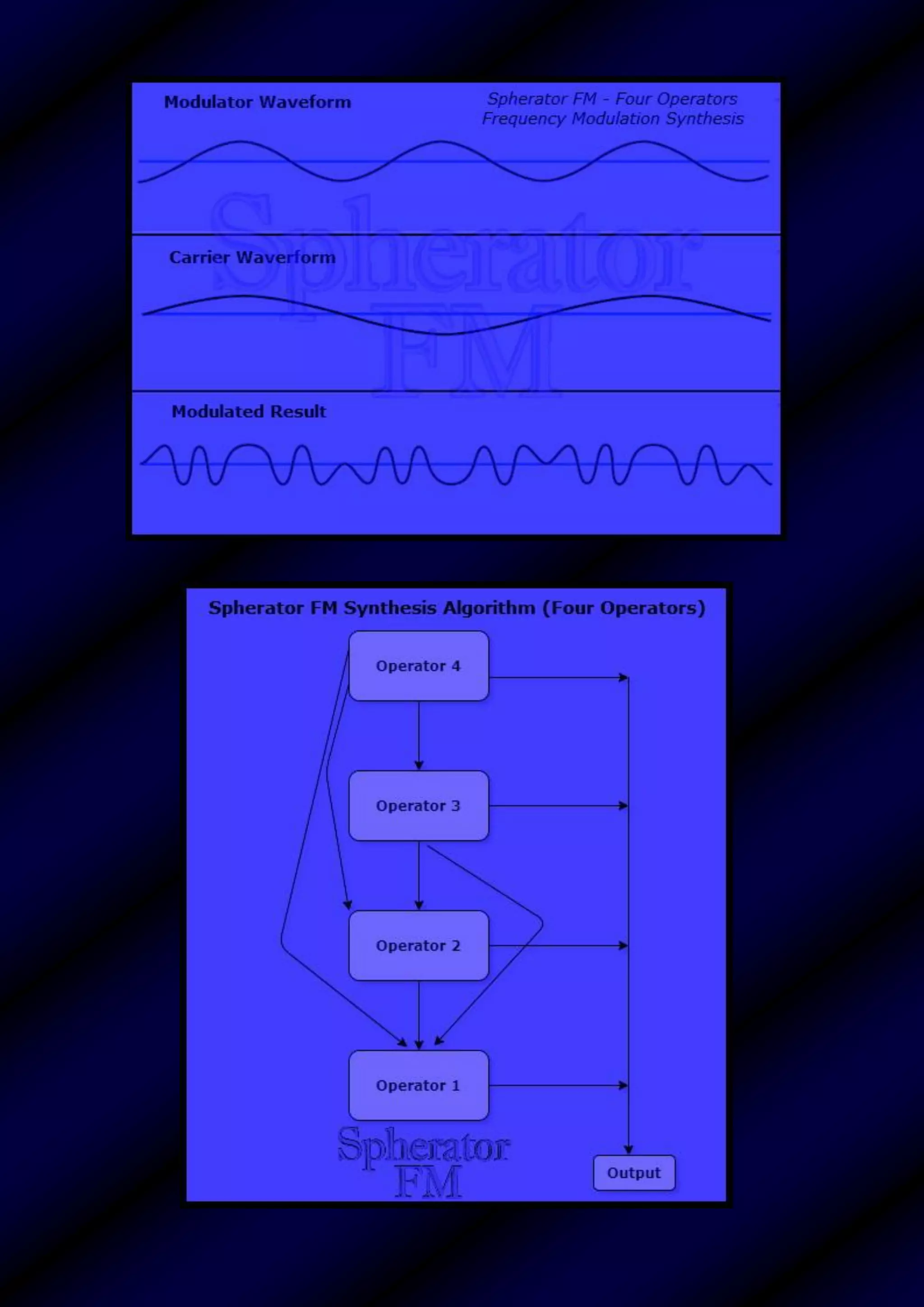
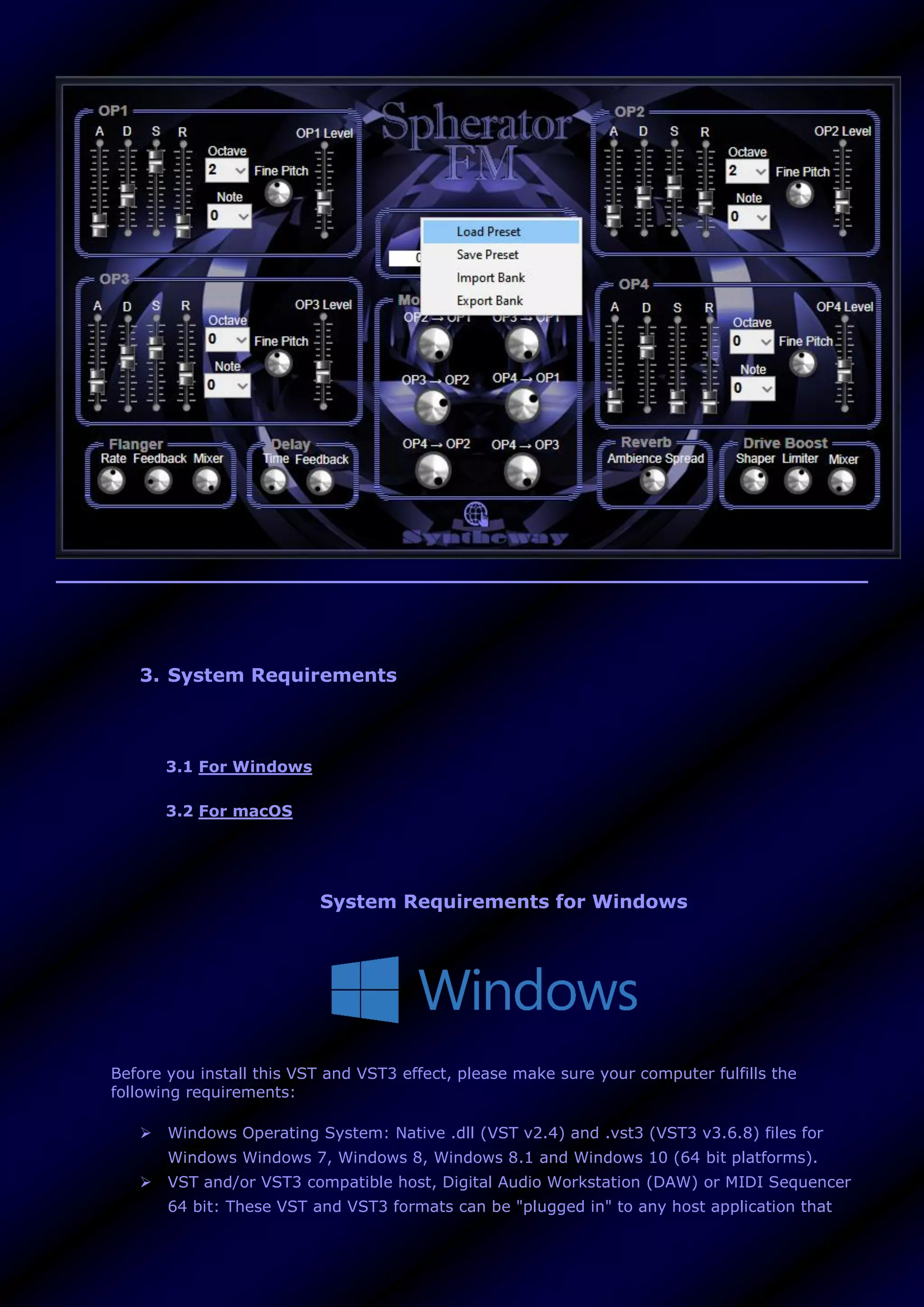
Spherator is a frequency modulation synthesizer to generate an eclectic spectrum of sounds,
through a sine wave modulator oscillator that modulates the frequency of a sine wave carrier
oscillator, by creating harmonic and inharmonic sounds.
It can be used to create spacey pads, synth leads, keys, basses, atmospheric textures and
ambient soundscapes. Features a collection of 40 presets suitable for many genres and styles of
music and flexibility to custom design over a diverse sonic palette. Available as a plugin in VST
and VST3 64 bit versions for Windows, as well as in Audio Unit for macOS.
Features
 Four FM Operators. Each 'Operator' is a group of components that interact with each
other. Features a sine wave oscillator that has its own ADSR envelope generator. In order
to synthesize harmonic sounds, known as sidebands, the modulating signal must have a
harmonic relationship to the original carrier signal. Using modulators with frequencies that
depart from whole multiples of the frequency of the carrier signal, can create inharmonic
sounds. The following parameters grows the sound progressively complex:
o ADSR Envelope Generator: A four stage envelope generator with independent
control over each stage:
- Attack: determines the time it takes for the note to get to the maximum level.
- Decay: determines the time it takes for the note to go from the maximum level
to the sustain level (controlled by sustain).
- Sustain: determines level the sound is played at while the note is held (after the
other envelope states, attack and decay, have been completed).
- Release: determines the time it takes for the note to fall from the sustain level to
zero (silence) level when it is released.
o Fine Pitch. Oscillator frequency pitch. Determines how each note will change in
pitch over time.
o Octave. Selector to specify octaves above or below the current octave.
o Note. Selector to switch between 0 to 11 semitones.
o Operator Level. Controls the output level of each operator.
 Modulation Matrix. Offers freely assignable modulations. The four operators can
modulate any operator below them with signals routed to the master output. To produce
subtle modulation changes, each operator depth value (modulator) is sent to operator
phase modulator (carrier) as following:
o OP2 → OP1: Operator 2 is acting as modulator for Operator 1 (a carrier)
o OP3 → OP1: Operator 3 is acting as modulator for Operator 1 (a carrier)
o OP3 → OP2: Operator 3 is acting as modulator for Operator 2 (a carrier)
o OP4 → OP1: Operator 4 is acting as modulator for Operator 1 (a carrier)
o OP4 → OP2: Operator 4 is acting as modulator for Operator 2 (a carrier)
o OP4 → OP3: Operator 4 is acting as modulator for Operator 3 (a carrier)
 Flanger effect: A stereo flanger that creates a mixing of two identical signals together,
one signal delayed by a small and gradually changing period, causing a ‘phase shift´
between the two signals. The length of this pause is gradually varied over time resulting in
a ‘sweeping´ effect.
o Rate: Defines the frequency or speed of the oscillator. Turn the knob clockwise to
increase the rate or counterclockwise to decrease the rate.
o Feedback: (Resonance, Regen): Determines the amount of the effect signal that is
routed back into the input. Turn the knob clockwise to increase the rate or
counterclockwise to decrease the regeneration.
o Mixer: Controls the volume of the processed signal output.
 Delay effect. A stereo delay that stores the input signal and plays it back after a certain
amount of time, creating from a subtle echo to a pronounced blending of previous sounds
with new sounds. Improves the stereo image by adding a slight delay to one of the
channels. Parameters include:
o Time. Modulation to vary the delay time dynamically.
o Feedback. Regeneration of delay.
 Reverb effect. Stereo ambience spread brings a sense of spatial depth and width to
sound, from small to huge sounding spaces.
 Drive Boost. A subtle overdriven effect with a gritty nuance.
o Shaper: Controls the overdrive. At lower settings, is cleaner with a smooth
breakup. Turn it clockwise for more overdrive / distortion effect or counterclockwise
to decrease it.
o Limiter: A limiter threshold. Adjusts the limiter sensitivity. Limits the peak level of
a sound to avoid harsh clipping distortion. Turn it clockwise to increase it and
anticlockwise to decrease it.
o Mixer: Controls the volume of the processed signal output.
 Preset Manager. Built-in browser to load and save presets and banks, enabling to export
to *.fxp (VST2 Preset), *.fxb (VST2 Bank), *.vstpreset (VST3 Preset), *.aupreset (Audio
Unit Preset) plus two generic formats (plain text): the *.xmlpreset (XML Preset) and the
*.xmlbank (XML Bank), providing cross-platform presets/banks. This allows to control over
the loading and saving of presets from disk as well as sharing presets between different
plugin formats using the generic *.xmlpreset (XML Preset) and the *.xmlbank (XML Bank).
 Preset Name Display: Text box to display the active preset name.
 40 Presets (Pre-programmed sounds)
2. Preset Sounds
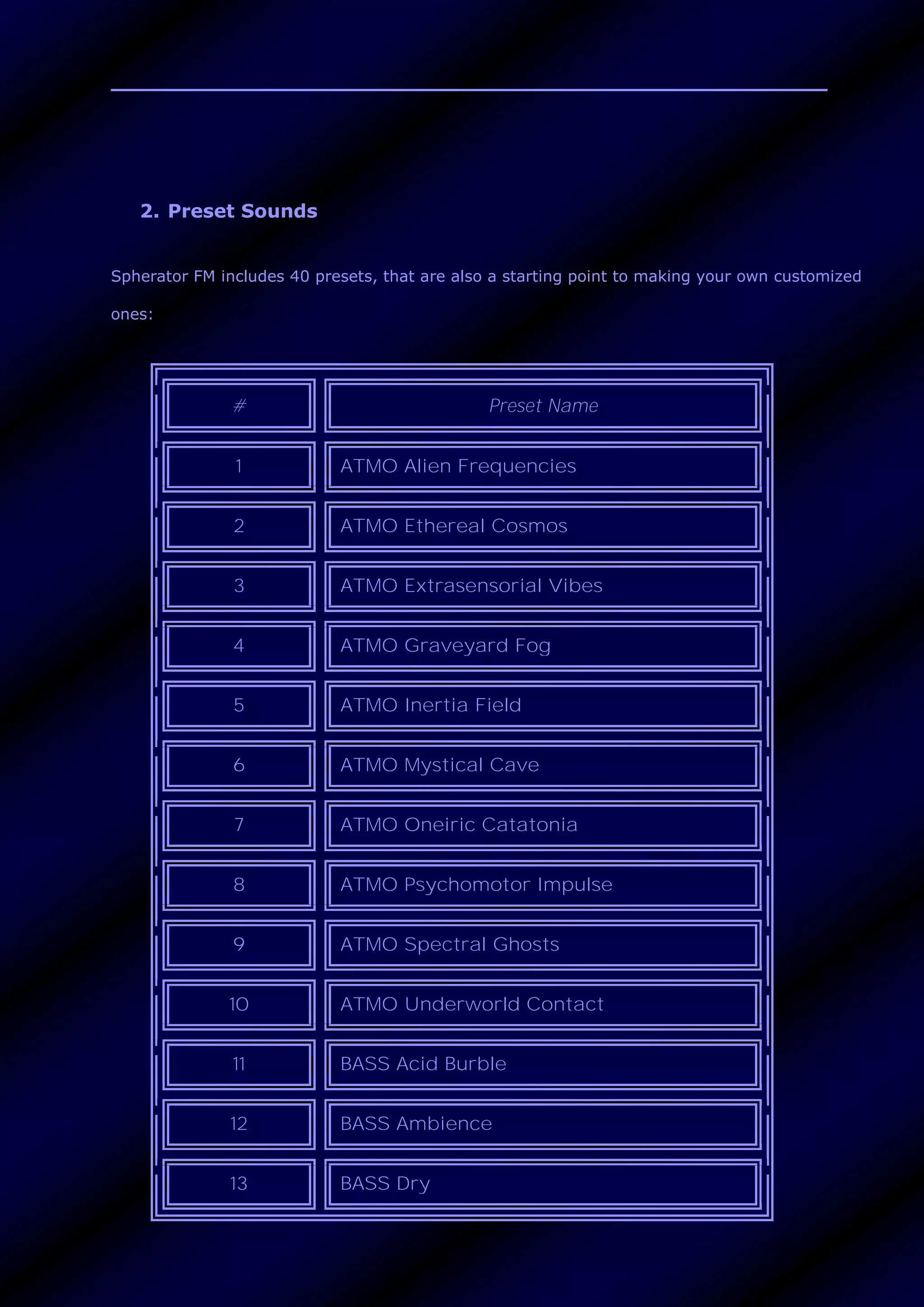
Spherator FM includes 40 presets, that are also a starting point to making your own customized
ones:
# Preset Name
1 ATMO Alien Frequencies
2 ATMO Ethereal Cosmos
3 ATMO Extrasensorial Vibes
4 ATMO Graveyard Fog
5 ATMO Inertia Field
6 ATMO Mystical Cave
7 ATMO Oneiric Catatonia
8 ATMO Psychomotor Impulse
9 ATMO Spectral Ghosts
10 ATMO Underworld Contact
11 BASS Acid Burble
12 BASS Ambience
13 BASS Dry
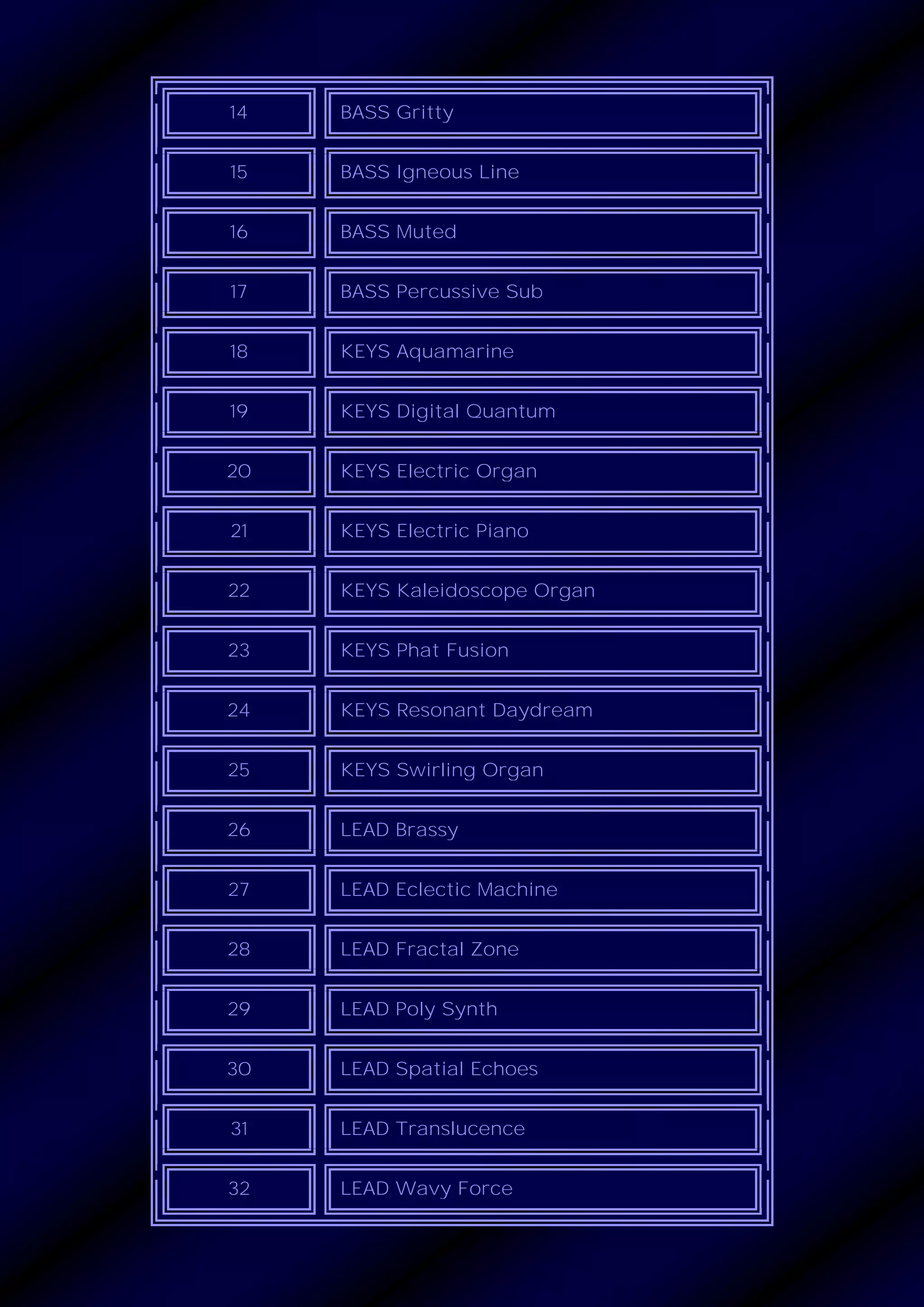
14 BASS Gritty
15 BASS Igneous Line
16 BASS Muted
17 BASS Percussive Sub
18 KEYS Aquamarine
19 KEYS Digital Quantum
20 KEYS Electric Organ
21 KEYS Electric Piano
22 KEYS Kaleidoscope Organ
23 KEYS Phat Fusion
24 KEYS Resonant Daydream
25 KEYS Swirling Organ
26 LEAD Brassy
27 LEAD Eclectic Machine
28 LEAD Fractal Zone
29 LEAD Poly Synth
30 LEAD Spatial Echoes
31 LEAD Translucence
32 LEAD Wavy Force
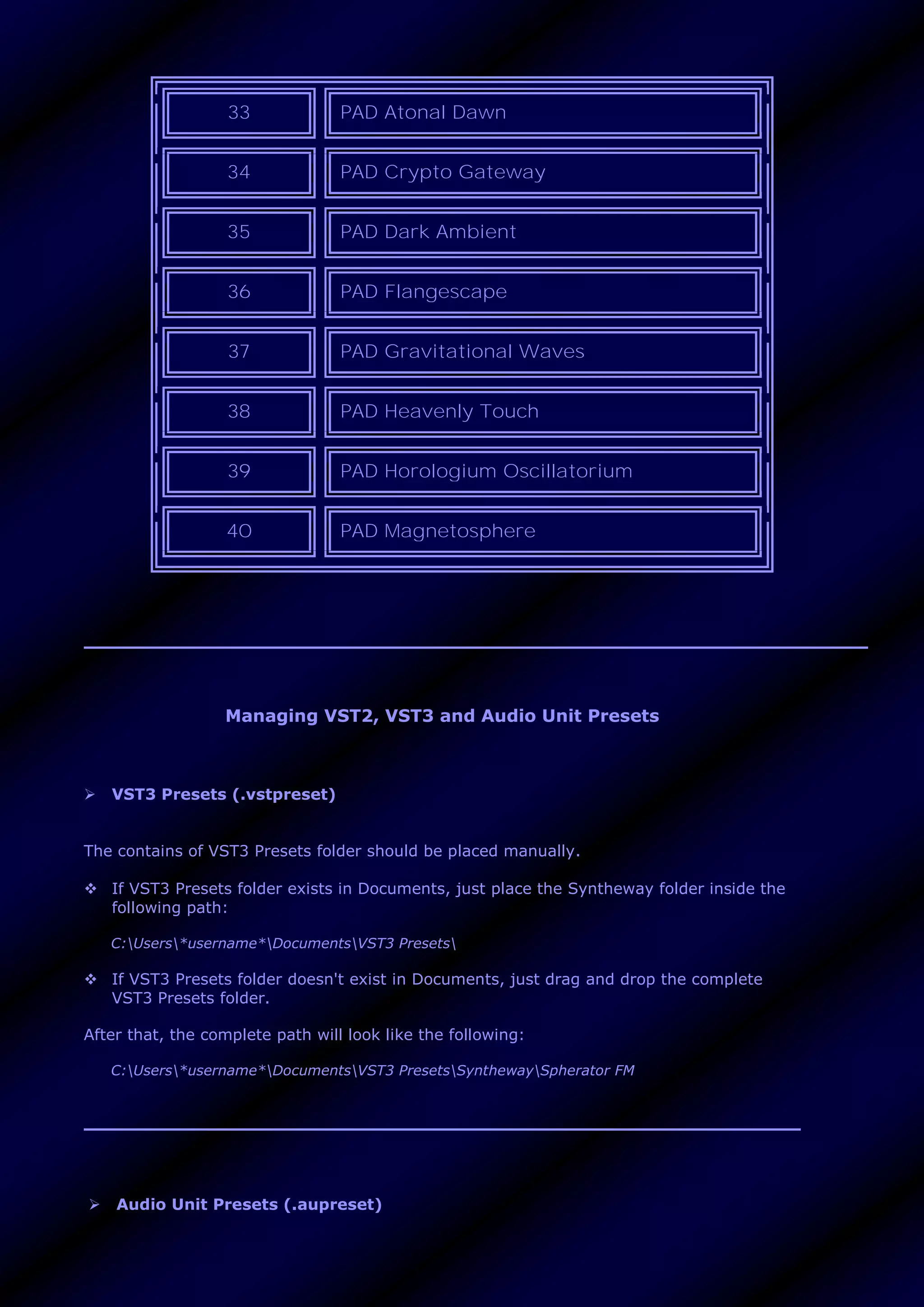
33 PAD Atonal Dawn
34 PAD Crypto Gateway
35 PAD Dark Ambient
36 PAD Flangescape
37 PAD Gravitational Waves
38 PAD Heavenly Touch
39 PAD Horologium Oscillatorium
40 PAD Magnetosphere
Managing VST2, VST3 and Audio Unit Presets
 VST3 Presets (.vstpreset)
The contains of VST3 Presets folder should be placed manually.
 If VST3 Presets folder exists in Documents, just place the Syntheway folder inside the
following path:
C:Users*username*DocumentsVST3 Presets
 If VST3 Presets folder doesn't exist in Documents, just drag and drop the complete
VST3 Presets folder.
After that, the complete path will look like the following:
C:Users*username*DocumentsVST3 PresetsSynthewaySpherator FM
 Audio Unit Presets (.aupreset)
Audio Unit Presets Handling: The Syntheway preset folder (with *.aupreset files) should be
placed manually.
Every Audio Unit preset is represented by a unique .aupreset file and stored under:
[Home]/Library/Audio/Presets/[manufacturer]/[plug-in]/
Macintosh HD/Library/Audio/Presets
Macintosh HD/Users/YourUserName/Library/Audio/Presets
Just move the ‘Syntheway’ folder inside the following path:
Mac System:
Macintosh HD/Library/Audio/Presets/
User:
Macintosh HD/Users/YourUserName/Library/Audio/Presets/
(that means either in your user home Library or the root Library)
After that, the complete path will look like the following:
Mac System:
Macintosh HD/Library/Audio/Presets/Syntheway/Spherator FM
User:
Macintosh HD/Users/YourUserName/Library/Audio/Presets/Syntheway/Spherator
FM
 Preset Manager (VST2, VST3 and Audio Unit Plugins):
• Preset Manager section features a ‘Preset Browser’ button to load and save presets and
banks, enabling to export to *.fxp (VST2 Preset), *.fxb (VST2 Bank), *.vstpreset (VST3 Preset),
*.aupreset (Audio Unit Preset) plus two generic formats (plain text): the *.xmlpreset (XML
Preset) and the *.xmlbank (XML Bank), providing cross-platform presets/banks.
This allows to control over the loading and saving of presets from disk as well as sharing presets
between different plugin formats using the generic *.xmlpreset (XML Preset) and the *.xmlbank
(XML Bank).
The 'Preset Name Display' text box will show the active preset name.
3. System Requirements
3.1 For Windows
3.2 For macOS
System Requirements for Windows
Before you install this VST and VST3 effect, please make sure your computer fulfills the
following requirements:
 Windows Operating System: Native .dll (VST v2.4) and .vst3 (VST3 v3.6.8) files for
Windows Windows 7, Windows 8, Windows 8.1 and Windows 10 (64 bit platforms).
 VST and/or VST3 compatible host, Digital Audio Workstation (DAW) or MIDI Sequencer
64 bit: These VST and VST3 formats can be "plugged in" to any host application that
supports VST and/or VST3 Technology like: Image-Line FL Studio, Steinberg Cubase,
Cakewalk by BandLab, Ableton Live, Cockos REAPER, PreSonus Studio One, Acoustica
Mixcraft, MakeMusic Finale, Avid Sibelius, Steinberg Nuendo, Magix Samplitude,
Cantabile, Reason, n-Track Studio, Tracktion Software Waveform, VSTHost, DarkWave
Studio, Bitwig Studio, SAVIHost and much more ...
 MIDI Controller Device: A MIDI Controller is required to play this VST instrument. The
most common type of device in this class is the keyboard controller. After launching the
Digital Audio Workstation or MIDI host application be sure to select the appropriate
MIDI device before attempting to play your MIDI controller.
 An ASIO® soundcard is recommended for low latency real-time play.
 Please be aware that we do not offer refunds. To determine whether the software meets
your requirements prior to purchase, we encourage you to test extensively the demo
version of this product in your host to make sure there are no misbehaviors before
purchasing.
System Requirements for macOS
 The Audio Unit Component requires of a compatible host, digital audio workstation
(DAW) or MIDI sequencer that supports Audio Units technology. They can be "plugged
in" to process audio effects by applications such as Logic Pro, GarageBand, Ableton
Live, REAPER, Studio One Professional, Ardour, MainStage and Digital Performer among
others.
 MIDI Controller Device: A MIDI Controller is required to play this VST instrument. The
most common type of device in this class is the keyboard controller. After launching the
Digital Audio Workstation or MIDI host application be sure to select the appropriate
MIDI device before attempting to play your MIDI controller.
 An ASIO® soundcard is recommended for low latency real-time play.
 The Audio Unit Component plug-in is distributed via Internet in an ZIP file and
compatible with macOS operating system.
4. Installation Notes
4.1 For Windows
4.2 For macOS
Installation Notes for Windows
To install the VST / VST3 plug-ins, follow these steps:
 The file must be in a directory where the VST / VST3 host is looking for VST or VST3
plug-ins.
 Unzip the file.
 To use the VST2 Plugin 64 bit (x64): Place the Spherator FM VST x64 folder into your
VST Plug-ins x64 folder of your DAW/host application 64 bit.
 To use the VST3 Plugin 64 bit (x64): Place the Spherator FM VST3 x64 into your VST3
Plug-ins x64 directory of your DAW/host application 64 bit that supports VST3 format.
To uninstall simply remove the respective folders from your 64 bit VST / VST3 Plugins
directories, as appropriate.
VST / VST3 64 bit plug-ins locations on Windows
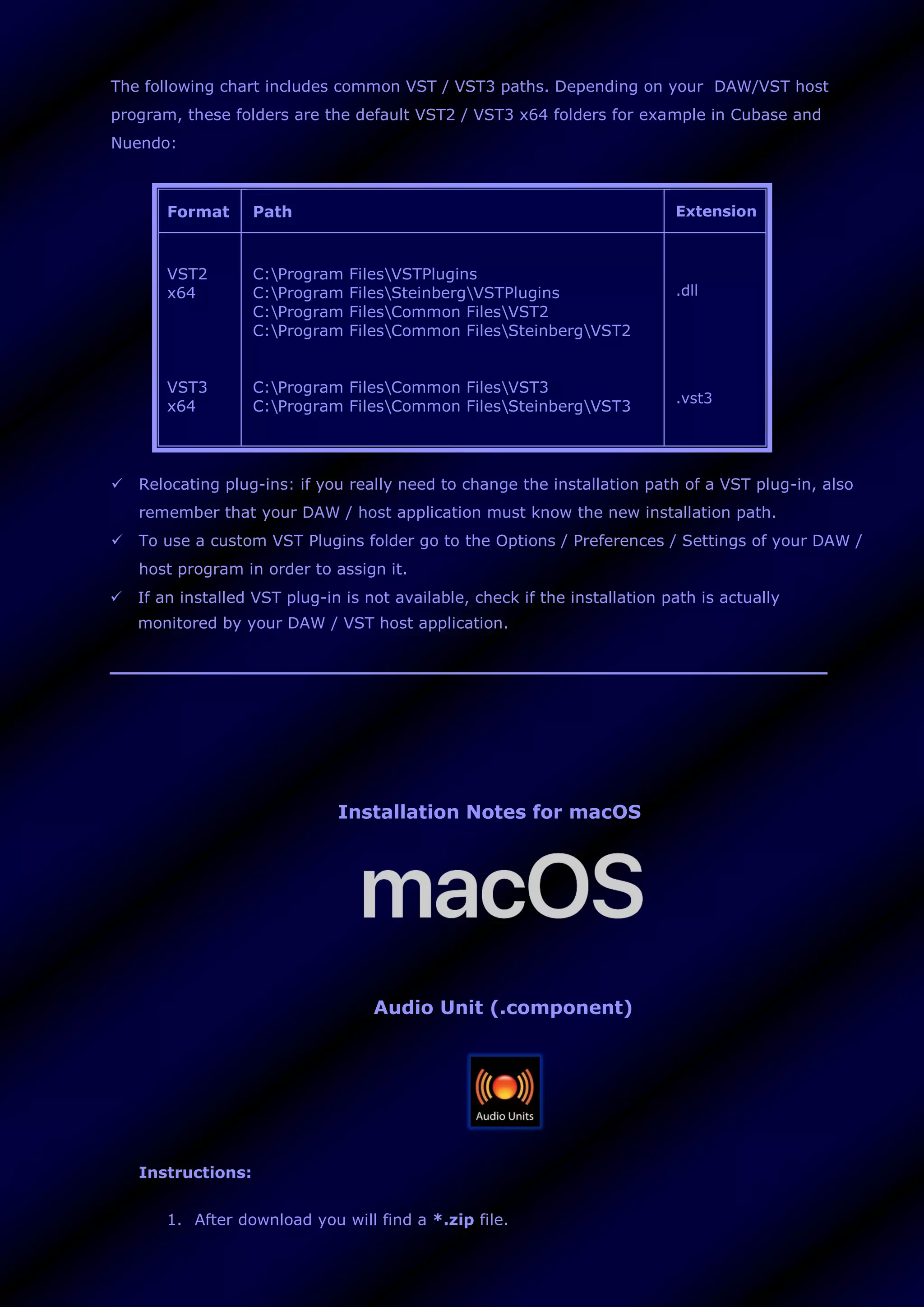
The following chart includes common VST / VST3 paths. Depending on your DAW/VST host
program, these folders are the default VST2 / VST3 x64 folders for example in Cubase and
Nuendo:
 VST plug-ins locations on Windows
The following chart includes common VST / VST3 paths. Depending on your DAW/VST host
program, these folders are the default VST2 / VST3 x64 folders for example in Cubase and
Nuendo:
Format Path Extension
VST2
x64
VST3
x64
C:Program FilesVSTPlugins
C:Program FilesSteinbergVSTPlugins
C:Program FilesCommon FilesVST2
C:Program FilesCommon FilesSteinbergVST2
C:Program FilesCommon FilesVST3
C:Program FilesCommon FilesSteinbergVST3
.dll
.vst3
 Relocating plug-ins: if you really need to change the installation path of a VST plug-in, also
remember that your DAW / host application must know the new installation path.
 To use a custom VST Plugins folder go to the Options / Preferences / Settings of your DAW /
host program in order to assign it.
 If an installed VST plug-in is not available, check if the installation path is actually
monitored by your DAW / VST host application.
Installation Notes for macOS
Audio Unit (.component)
Instructions:
1. After download you will find a *.zip file.
2. Unzip (extract) the *.zip file by double-clicking, so it will uncompress (expand) the
item.
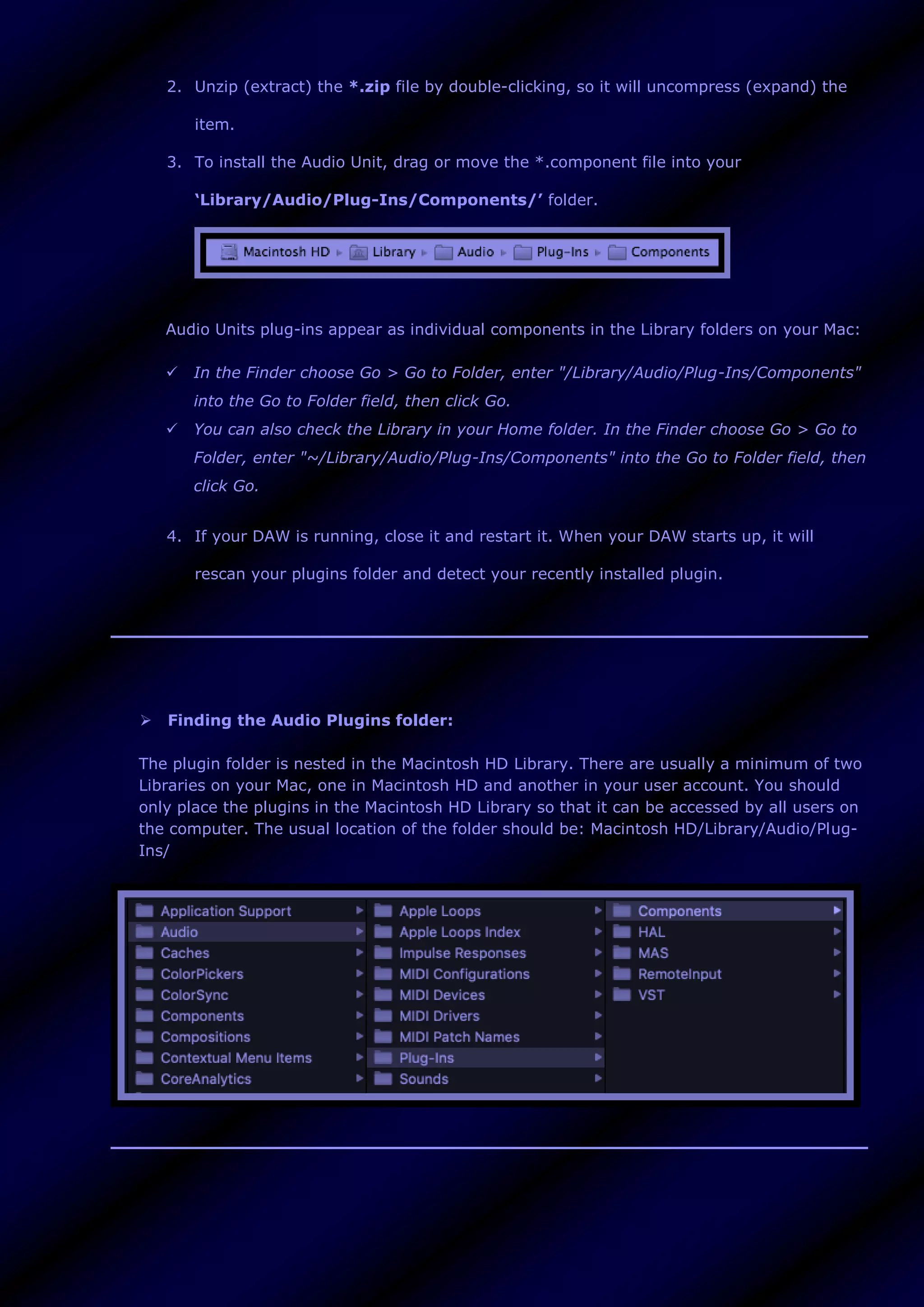
3. To install the Audio Unit, drag or move the *.component file into your
‘Library/Audio/Plug-Ins/Components/’ folder.
Audio Units plug-ins appear as individual components in the Library folders on your Mac:
 In the Finder choose Go > Go to Folder, enter "/Library/Audio/Plug-Ins/Components"
into the Go to Folder field, then click Go.
 You can also check the Library in your Home folder. In the Finder choose Go > Go to
Folder, enter "~/Library/Audio/Plug-Ins/Components" into the Go to Folder field, then
click Go.
4. If your DAW is running, close it and restart it. When your DAW starts up, it will
rescan your plugins folder and detect your recently installed plugin.
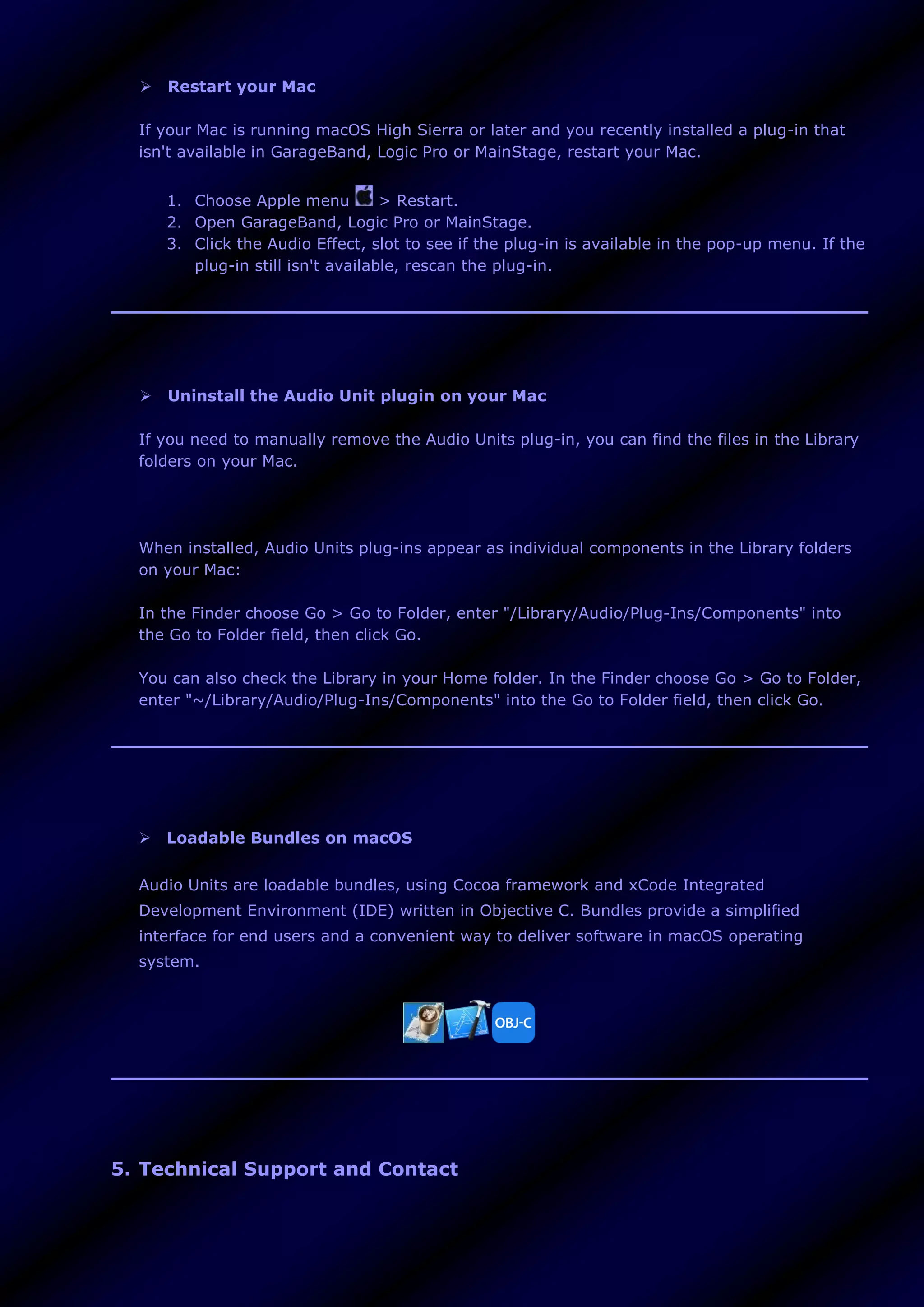
 Finding the Audio Plugins folder:
The plugin folder is nested in the Macintosh HD Library. There are usually a minimum of two
Libraries on your Mac, one in Macintosh HD and another in your user account. You should
only place the plugins in the Macintosh HD Library so that it can be accessed by all users on
the computer. The usual location of the folder should be: Macintosh HD/Library/Audio/Plug-
Ins/
 Restart your Mac
If your Mac is running macOS High Sierra or later and you recently installed a plug-in that
isn't available in GarageBand, Logic Pro or MainStage, restart your Mac.
1. Choose Apple menu > Restart.
2. Open GarageBand, Logic Pro or MainStage.
3. Click the Audio Effect, slot to see if the plug-in is available in the pop-up menu. If the
plug-in still isn't available, rescan the plug-in.
 Uninstall the Audio Unit plugin on your Mac
If you need to manually remove the Audio Units plug-in, you can find the files in the Library
folders on your Mac.
When installed, Audio Units plug-ins appear as individual components in the Library folders
on your Mac:
In the Finder choose Go > Go to Folder, enter "/Library/Audio/Plug-Ins/Components" into
the Go to Folder field, then click Go.
You can also check the Library in your Home folder. In the Finder choose Go > Go to Folder,
enter "~/Library/Audio/Plug-Ins/Components" into the Go to Folder field, then click Go.
 Loadable Bundles on macOS
Audio Units are loadable bundles, using Cocoa framework and xCode Integrated
Development Environment (IDE) written in Objective C. Bundles provide a simplified
interface for end users and a convenient way to deliver software in macOS operating
system.
5. Technical Support and Contact
If you have any problems with instruments, you can contact us by e-mail. Support requests are
answered as quickly as possible, if you send the following information:
 Syntheway Product
 Host Application and Operating System (Name & Version number)
 A detailed description of the problem
Your inquiry will be answered in the order in which it is received. Due to the volume of e-mail,
sometimes, these may not be able to respond immediately.
Contact Information
General Information info@syntheway.net
Contact contact@syntheway.net
Sales sales@syntheway.net
Customer Support support@syntheway.net
Legal Department legal@syntheway.net
PR Contact pressrelease@syntheway.net
Webmaster webmaster@syntheway.net
6. Update and Upgrade Policy
As a general policy, Updates between minor Syntheway product versions are free. Upgrades
between major Syntheway product versions are paid.
Updates:
An update is an interim release that fixes bugs, enhances usability, updates data, or adds a new
feature to an existing version. For example, you would update Spherator FM v4.00 to v4.1.
They get distributed electronically after their release. If you have already registered, and you
will not get the email with a link to download the update within a reasonable time, send us an
email contact@syntheway.net. Please, include in the subject the name of your registered
VSTi/VST from the email account that was used with your registration. If your email address
changes, please notify us to support@syntheway.net, so that we can update our database.
Upgrades:
Upgrades are changes in the major version number of the product (containing major new
functionality, improves performance, and enhances usability). When we release a major new
release, we change the first number in the version number. So you switch to a higher version of
a program within the same VST or VST3 product family. For example, you would upgrade
Spherator FM v3.00 to v4.00. Any release containing major new functionality, an upgrade fee
will probably be chargeable.
Specially discounted upgrade pricing is available to registered users of the immediately prior
version of Syntheway Product. That is, if you are a registered user of v3.0, you are eligible to
upgrade to v4.0 at the special discounted upgrade price.
How often are updates and upgrades released?
We create product updates and upgrades when:
 New features or functionality have been added.
 Bugs and problems have been corrected.
 New features have been added or supported.
 New optimizations have been integrated into the VST architecture.
Notes:
 Make sure your email account can accept emails coming from us (domain:
@syntheway.net). Also take a look to your SPAM folder.
 Personal details are kept private and are never spammed. For Updates Syntheway uses
"BCC" to protect your email address privacy.
7. License Agreement
PLEASE READ THIS LEGAL AGREEMENT CAREFULLY.
The use and redistribution of ‘Spherator FM VST for Windows 64 bit, Spherator FM VST3
for Windows 64 bit’, ‘Spherator FM Audio Unit for macOS’ ("Software") is subject to the
following conditions:
1. All copyrights to the Software are exclusively owned by the Author: Daniel Alberto
Laiseca.
2. You (the user) have the right to evaluate this Software with trial limitations, provided
the Software is not used for profit, including but not limited to creating patch libraries and
sounds for any pieces you are profiting from. Should you continue use of the Software
after your evaluation period expires, or use it for any profit, you shall pay the registration
fee.
3. Release To Web (RTW): Syntheway utilizes the Internet for distribution for demos and
registered versions. No physical media are produced in this type of release mechanism.
The unregistered demo version of the Software may be freely distributed, with exceptions
noted below, provided the distribution package is not modified in any way. No person or
company may charge a fee for the distribution of the Software without written permission
from the Author. The unregistered demo version of the Software may not be bundled or
distributed with any other product without written permission of the Author.
4. Once registered your copy will grant you the personal license to use one or more
versions of this product to its full extent, including the royalty-free use of Syntheway
software in your productions, recordings and / or performances. The user is granted a non-
exclusive license to use the Software on one or several computers, for any legal purpose,
at a time. The registered Software may not be rented or leased, or given away to the third
person.
The Syntheway software License is non-transferable and fees are non-refundable. This
software license (including update, upgrade and crossgrade) is an intangible good for the
life of the holder.
You may not use, copy, emulate, clone, rent, lease, sell, sampling, modify, decompile,
disassemble, otherwise reverse engineer, or transfer the licensed program, or any subset
of the licensed program, except as provided for in this License Agreement. Any such
unauthorized use shall result in immediate and automatic termination of this license and
may result in criminal and/or civil prosecution.
5. THIS SOFTWARE IS PROVIDED "AS IS" WITHOUT WARRANTY OF ANY KIND, EITHER
EXPRESS OR IMPLIED, INCLUDING BUT NOT LIMITED TO, THE IMPLIED WARRANTIES OF
MERCHANTABILITY, FITNESS FOR A PARTICULAR PURPOSE, NON-INFRINGEMENT OR
ARISING FROM A COURSE OF DEALING, USAGE, TRADE OR PRACTICE.
IN NO EVENT SHALL THE AUTHOR BE LIABLE FOR ANY SPECIAL, DIRECT, INDIRECT, OR
CONSEQUENTIAL DAMAGES OR ANY DAMAGES WHATSOEVER RESULTING FROM LOSS OF
USE, DATA OR PROFITS, WHETHER IN AN ACTION OF CONTRACT, NEGLIGENCE OR OTHER
TORTIOUS ACTION, ARISING OUT OF OR IN CONNECTION WITH THE USE OR
PERFORMANCE OF THIS SOFTWARE.
6. Installing and using the Software signifies acceptance of these terms and conditions of
this License Agreement.
7. If you do not agree with the terms of this License Agreement you must remove the
Software files from your storage devices and cease to use the product.
8. Acknowledgements: VST is a trademark of Steinberg Soft- und Hardware GmbH. All
other trademarks and trade names are the properties of their respective owners, and do
not imply owner's endorsement of this product, or guarantee full compliance with owner's
standards.
9. All questions concerning this License Agreement (EULA) shall be directed to: e-mail:
contact@syntheway.net
8. Release Notes
The latest release note is a terse summary of recent changes, enhancements and bug fixes in
this particular software release in Windows and macOS.
Windows v1.0:
 First public release.
macOS v1.0:
 First public release.
9. Plug-in Credits
Synthesizer Programming and Sound Design by Daniel Alberto Laiseca.
Spherator FM ™ is a trademark of Syntheway Virtual Musical Instruments.
10. Acknowledgements:
 VST™ and VST3™ are a trademark of Steinberg Soft- und Hardware GmbH. All other
trademarks and trade names are the properties of their respective owners, and do not imply
owner's endorsement of this product, or guarantee full compliance with owner's standards.
 Windows 7™, Windows 8™, Windows 10™ 32 bit and 64 bit are either a registered
trademark or a trademark of Microsoft Corporation in the United States and/or other countries.
 Audio Units™, macOS™ and Mac™ are a trademark of Apple Inc., registered in the U.S. and
other countries.
 AMD64® is a registered trademark of Advanced Micro Devices, Inc.
 Intel® is a registered trademark of Intel Corporation or its subsidiaries in the U.S. and/or other
countries.
VST and VST3 are a trademark of Steinberg Soft- und Hardware GmbH.
Audio Units™, macOS™ and Mac™ are a trademark of Apple Inc., registered in the U.S. and other countries.
Windows 7™, Windows 8™, Windows 10™ 64 bit are either a registered trademark or a trademark of Microsoft
Corporation in the United States and/or other countries.
AMD64® is a registered trademark of Advanced Micro Devices, Inc.
Intel® is a registered trademark of Intel Corporation or its subsidiaries in the U.S. and/or other countries.
All other trademarks and trade names are the properties of their respective owners,
and do not imply owner's endorsement of this product, or guarantee full compliance with owner's standards.
Syntheway Virtual Musical Instruments
Email Contact: contact@syntheway.net | Email Support: support@syntheway.net
© 2004-2020 Daniel Laiseca | Buenos Aires - Argentina
www.syntheway.net | www.syntheway.com

Spherator FM VST VST3 Audio Unit: 4 Operator Frequency Modulation Synthesizer: Leads, Pads, Basses, Keys, Atmos Textures, Ambient Soundscapes

  • 1.
    Syntheway Virtual MusicalInstruments Email Contact: contact@syntheway.net Email Support: support@syntheway.net The information in this document is subject to change without notice and does not represent a commitment on the part of Syntheway Software. The software described by this document is subject to a License Agreement and may not be copied to other media except as specifically allowed in the License Agreement. No part of this publication may be copied, reproduced or otherwise transmitted or recorded, without prior written permission by Syntheway. Other company names, product names and logos are the trademarks or registered trademarks of their respective owners. Table Of Contents:  1. Description  2. Preset Sounds  3. System Requirements  4. Installation Notes  5. Technical Support and Contact  6. Update and Upgrade Policy  7. License  8. Release Notes  9. Plug-in Credits  10. Acknowledgements
  • 2.
    1. Description Spherator isa frequency modulation synthesizer to generate an eclectic spectrum of sounds, through a sine wave modulator oscillator that modulates the frequency of a sine wave carrier oscillator, by creating harmonic and inharmonic sounds. It can be used to create spacey pads, synth leads, keys, basses, atmospheric textures and ambient soundscapes. Features a collection of 40 presets suitable for many genres and styles of music and flexibility to custom design over a diverse sonic palette. Available as a plugin in VST and VST3 64 bit versions for Windows, as well as in Audio Unit for macOS. Features  Four FM Operators. Each 'Operator' is a group of components that interact with each other. Features a sine wave oscillator that has its own ADSR envelope generator. In order to synthesize harmonic sounds, known as sidebands, the modulating signal must have a harmonic relationship to the original carrier signal. Using modulators with frequencies that depart from whole multiples of the frequency of the carrier signal, can create inharmonic sounds. The following parameters grows the sound progressively complex: o ADSR Envelope Generator: A four stage envelope generator with independent control over each stage: - Attack: determines the time it takes for the note to get to the maximum level. - Decay: determines the time it takes for the note to go from the maximum level to the sustain level (controlled by sustain). - Sustain: determines level the sound is played at while the note is held (after the other envelope states, attack and decay, have been completed). - Release: determines the time it takes for the note to fall from the sustain level to zero (silence) level when it is released. o Fine Pitch. Oscillator frequency pitch. Determines how each note will change in pitch over time. o Octave. Selector to specify octaves above or below the current octave. o Note. Selector to switch between 0 to 11 semitones.
  • 3.
    o Operator Level.Controls the output level of each operator.  Modulation Matrix. Offers freely assignable modulations. The four operators can modulate any operator below them with signals routed to the master output. To produce subtle modulation changes, each operator depth value (modulator) is sent to operator phase modulator (carrier) as following: o OP2 → OP1: Operator 2 is acting as modulator for Operator 1 (a carrier) o OP3 → OP1: Operator 3 is acting as modulator for Operator 1 (a carrier) o OP3 → OP2: Operator 3 is acting as modulator for Operator 2 (a carrier) o OP4 → OP1: Operator 4 is acting as modulator for Operator 1 (a carrier) o OP4 → OP2: Operator 4 is acting as modulator for Operator 2 (a carrier) o OP4 → OP3: Operator 4 is acting as modulator for Operator 3 (a carrier)  Flanger effect: A stereo flanger that creates a mixing of two identical signals together, one signal delayed by a small and gradually changing period, causing a ‘phase shift´ between the two signals. The length of this pause is gradually varied over time resulting in a ‘sweeping´ effect. o Rate: Defines the frequency or speed of the oscillator. Turn the knob clockwise to increase the rate or counterclockwise to decrease the rate. o Feedback: (Resonance, Regen): Determines the amount of the effect signal that is routed back into the input. Turn the knob clockwise to increase the rate or counterclockwise to decrease the regeneration. o Mixer: Controls the volume of the processed signal output.  Delay effect. A stereo delay that stores the input signal and plays it back after a certain amount of time, creating from a subtle echo to a pronounced blending of previous sounds with new sounds. Improves the stereo image by adding a slight delay to one of the channels. Parameters include: o Time. Modulation to vary the delay time dynamically. o Feedback. Regeneration of delay.  Reverb effect. Stereo ambience spread brings a sense of spatial depth and width to sound, from small to huge sounding spaces.  Drive Boost. A subtle overdriven effect with a gritty nuance.
  • 4.
    o Shaper: Controlsthe overdrive. At lower settings, is cleaner with a smooth breakup. Turn it clockwise for more overdrive / distortion effect or counterclockwise to decrease it. o Limiter: A limiter threshold. Adjusts the limiter sensitivity. Limits the peak level of a sound to avoid harsh clipping distortion. Turn it clockwise to increase it and anticlockwise to decrease it. o Mixer: Controls the volume of the processed signal output.  Preset Manager. Built-in browser to load and save presets and banks, enabling to export to *.fxp (VST2 Preset), *.fxb (VST2 Bank), *.vstpreset (VST3 Preset), *.aupreset (Audio Unit Preset) plus two generic formats (plain text): the *.xmlpreset (XML Preset) and the *.xmlbank (XML Bank), providing cross-platform presets/banks. This allows to control over the loading and saving of presets from disk as well as sharing presets between different plugin formats using the generic *.xmlpreset (XML Preset) and the *.xmlbank (XML Bank).  Preset Name Display: Text box to display the active preset name.  40 Presets (Pre-programmed sounds)
  • 6.
    2. Preset Sounds SpheratorFM includes 40 presets, that are also a starting point to making your own customized ones: # Preset Name 1 ATMO Alien Frequencies 2 ATMO Ethereal Cosmos 3 ATMO Extrasensorial Vibes 4 ATMO Graveyard Fog 5 ATMO Inertia Field 6 ATMO Mystical Cave 7 ATMO Oneiric Catatonia 8 ATMO Psychomotor Impulse 9 ATMO Spectral Ghosts 10 ATMO Underworld Contact 11 BASS Acid Burble 12 BASS Ambience 13 BASS Dry
  • 7.
    14 BASS Gritty 15BASS Igneous Line 16 BASS Muted 17 BASS Percussive Sub 18 KEYS Aquamarine 19 KEYS Digital Quantum 20 KEYS Electric Organ 21 KEYS Electric Piano 22 KEYS Kaleidoscope Organ 23 KEYS Phat Fusion 24 KEYS Resonant Daydream 25 KEYS Swirling Organ 26 LEAD Brassy 27 LEAD Eclectic Machine 28 LEAD Fractal Zone 29 LEAD Poly Synth 30 LEAD Spatial Echoes 31 LEAD Translucence 32 LEAD Wavy Force
  • 8.
    33 PAD AtonalDawn 34 PAD Crypto Gateway 35 PAD Dark Ambient 36 PAD Flangescape 37 PAD Gravitational Waves 38 PAD Heavenly Touch 39 PAD Horologium Oscillatorium 40 PAD Magnetosphere Managing VST2, VST3 and Audio Unit Presets  VST3 Presets (.vstpreset) The contains of VST3 Presets folder should be placed manually.  If VST3 Presets folder exists in Documents, just place the Syntheway folder inside the following path: C:Users*username*DocumentsVST3 Presets  If VST3 Presets folder doesn't exist in Documents, just drag and drop the complete VST3 Presets folder. After that, the complete path will look like the following: C:Users*username*DocumentsVST3 PresetsSynthewaySpherator FM  Audio Unit Presets (.aupreset)
  • 9.
    Audio Unit PresetsHandling: The Syntheway preset folder (with *.aupreset files) should be placed manually. Every Audio Unit preset is represented by a unique .aupreset file and stored under: [Home]/Library/Audio/Presets/[manufacturer]/[plug-in]/ Macintosh HD/Library/Audio/Presets Macintosh HD/Users/YourUserName/Library/Audio/Presets Just move the ‘Syntheway’ folder inside the following path: Mac System: Macintosh HD/Library/Audio/Presets/ User: Macintosh HD/Users/YourUserName/Library/Audio/Presets/ (that means either in your user home Library or the root Library) After that, the complete path will look like the following: Mac System: Macintosh HD/Library/Audio/Presets/Syntheway/Spherator FM User: Macintosh HD/Users/YourUserName/Library/Audio/Presets/Syntheway/Spherator FM  Preset Manager (VST2, VST3 and Audio Unit Plugins): • Preset Manager section features a ‘Preset Browser’ button to load and save presets and banks, enabling to export to *.fxp (VST2 Preset), *.fxb (VST2 Bank), *.vstpreset (VST3 Preset), *.aupreset (Audio Unit Preset) plus two generic formats (plain text): the *.xmlpreset (XML Preset) and the *.xmlbank (XML Bank), providing cross-platform presets/banks. This allows to control over the loading and saving of presets from disk as well as sharing presets between different plugin formats using the generic *.xmlpreset (XML Preset) and the *.xmlbank (XML Bank). The 'Preset Name Display' text box will show the active preset name.
  • 10.
    3. System Requirements 3.1For Windows 3.2 For macOS System Requirements for Windows Before you install this VST and VST3 effect, please make sure your computer fulfills the following requirements:  Windows Operating System: Native .dll (VST v2.4) and .vst3 (VST3 v3.6.8) files for Windows Windows 7, Windows 8, Windows 8.1 and Windows 10 (64 bit platforms).  VST and/or VST3 compatible host, Digital Audio Workstation (DAW) or MIDI Sequencer 64 bit: These VST and VST3 formats can be "plugged in" to any host application that
  • 11.
    supports VST and/orVST3 Technology like: Image-Line FL Studio, Steinberg Cubase, Cakewalk by BandLab, Ableton Live, Cockos REAPER, PreSonus Studio One, Acoustica Mixcraft, MakeMusic Finale, Avid Sibelius, Steinberg Nuendo, Magix Samplitude, Cantabile, Reason, n-Track Studio, Tracktion Software Waveform, VSTHost, DarkWave Studio, Bitwig Studio, SAVIHost and much more ...  MIDI Controller Device: A MIDI Controller is required to play this VST instrument. The most common type of device in this class is the keyboard controller. After launching the Digital Audio Workstation or MIDI host application be sure to select the appropriate MIDI device before attempting to play your MIDI controller.  An ASIO® soundcard is recommended for low latency real-time play.  Please be aware that we do not offer refunds. To determine whether the software meets your requirements prior to purchase, we encourage you to test extensively the demo version of this product in your host to make sure there are no misbehaviors before purchasing. System Requirements for macOS  The Audio Unit Component requires of a compatible host, digital audio workstation (DAW) or MIDI sequencer that supports Audio Units technology. They can be "plugged in" to process audio effects by applications such as Logic Pro, GarageBand, Ableton Live, REAPER, Studio One Professional, Ardour, MainStage and Digital Performer among others.  MIDI Controller Device: A MIDI Controller is required to play this VST instrument. The most common type of device in this class is the keyboard controller. After launching the Digital Audio Workstation or MIDI host application be sure to select the appropriate MIDI device before attempting to play your MIDI controller.  An ASIO® soundcard is recommended for low latency real-time play.  The Audio Unit Component plug-in is distributed via Internet in an ZIP file and compatible with macOS operating system.
  • 12.
    4. Installation Notes 4.1For Windows 4.2 For macOS Installation Notes for Windows To install the VST / VST3 plug-ins, follow these steps:  The file must be in a directory where the VST / VST3 host is looking for VST or VST3 plug-ins.  Unzip the file.  To use the VST2 Plugin 64 bit (x64): Place the Spherator FM VST x64 folder into your VST Plug-ins x64 folder of your DAW/host application 64 bit.  To use the VST3 Plugin 64 bit (x64): Place the Spherator FM VST3 x64 into your VST3 Plug-ins x64 directory of your DAW/host application 64 bit that supports VST3 format. To uninstall simply remove the respective folders from your 64 bit VST / VST3 Plugins directories, as appropriate. VST / VST3 64 bit plug-ins locations on Windows The following chart includes common VST / VST3 paths. Depending on your DAW/VST host program, these folders are the default VST2 / VST3 x64 folders for example in Cubase and Nuendo:  VST plug-ins locations on Windows
  • 13.
    The following chartincludes common VST / VST3 paths. Depending on your DAW/VST host program, these folders are the default VST2 / VST3 x64 folders for example in Cubase and Nuendo: Format Path Extension VST2 x64 VST3 x64 C:Program FilesVSTPlugins C:Program FilesSteinbergVSTPlugins C:Program FilesCommon FilesVST2 C:Program FilesCommon FilesSteinbergVST2 C:Program FilesCommon FilesVST3 C:Program FilesCommon FilesSteinbergVST3 .dll .vst3  Relocating plug-ins: if you really need to change the installation path of a VST plug-in, also remember that your DAW / host application must know the new installation path.  To use a custom VST Plugins folder go to the Options / Preferences / Settings of your DAW / host program in order to assign it.  If an installed VST plug-in is not available, check if the installation path is actually monitored by your DAW / VST host application. Installation Notes for macOS Audio Unit (.component) Instructions: 1. After download you will find a *.zip file.
  • 14.
    2. Unzip (extract)the *.zip file by double-clicking, so it will uncompress (expand) the item. 3. To install the Audio Unit, drag or move the *.component file into your ‘Library/Audio/Plug-Ins/Components/’ folder. Audio Units plug-ins appear as individual components in the Library folders on your Mac:  In the Finder choose Go > Go to Folder, enter "/Library/Audio/Plug-Ins/Components" into the Go to Folder field, then click Go.  You can also check the Library in your Home folder. In the Finder choose Go > Go to Folder, enter "~/Library/Audio/Plug-Ins/Components" into the Go to Folder field, then click Go. 4. If your DAW is running, close it and restart it. When your DAW starts up, it will rescan your plugins folder and detect your recently installed plugin.  Finding the Audio Plugins folder: The plugin folder is nested in the Macintosh HD Library. There are usually a minimum of two Libraries on your Mac, one in Macintosh HD and another in your user account. You should only place the plugins in the Macintosh HD Library so that it can be accessed by all users on the computer. The usual location of the folder should be: Macintosh HD/Library/Audio/Plug- Ins/
  • 15.
     Restart yourMac If your Mac is running macOS High Sierra or later and you recently installed a plug-in that isn't available in GarageBand, Logic Pro or MainStage, restart your Mac. 1. Choose Apple menu > Restart. 2. Open GarageBand, Logic Pro or MainStage. 3. Click the Audio Effect, slot to see if the plug-in is available in the pop-up menu. If the plug-in still isn't available, rescan the plug-in.  Uninstall the Audio Unit plugin on your Mac If you need to manually remove the Audio Units plug-in, you can find the files in the Library folders on your Mac. When installed, Audio Units plug-ins appear as individual components in the Library folders on your Mac: In the Finder choose Go > Go to Folder, enter "/Library/Audio/Plug-Ins/Components" into the Go to Folder field, then click Go. You can also check the Library in your Home folder. In the Finder choose Go > Go to Folder, enter "~/Library/Audio/Plug-Ins/Components" into the Go to Folder field, then click Go.  Loadable Bundles on macOS Audio Units are loadable bundles, using Cocoa framework and xCode Integrated Development Environment (IDE) written in Objective C. Bundles provide a simplified interface for end users and a convenient way to deliver software in macOS operating system. 5. Technical Support and Contact
  • 16.
    If you haveany problems with instruments, you can contact us by e-mail. Support requests are answered as quickly as possible, if you send the following information:  Syntheway Product  Host Application and Operating System (Name & Version number)  A detailed description of the problem Your inquiry will be answered in the order in which it is received. Due to the volume of e-mail, sometimes, these may not be able to respond immediately. Contact Information General Information info@syntheway.net Contact contact@syntheway.net Sales sales@syntheway.net Customer Support support@syntheway.net Legal Department legal@syntheway.net PR Contact pressrelease@syntheway.net Webmaster webmaster@syntheway.net 6. Update and Upgrade Policy As a general policy, Updates between minor Syntheway product versions are free. Upgrades between major Syntheway product versions are paid. Updates: An update is an interim release that fixes bugs, enhances usability, updates data, or adds a new feature to an existing version. For example, you would update Spherator FM v4.00 to v4.1. They get distributed electronically after their release. If you have already registered, and you will not get the email with a link to download the update within a reasonable time, send us an email contact@syntheway.net. Please, include in the subject the name of your registered VSTi/VST from the email account that was used with your registration. If your email address changes, please notify us to support@syntheway.net, so that we can update our database. Upgrades: Upgrades are changes in the major version number of the product (containing major new
  • 17.
    functionality, improves performance,and enhances usability). When we release a major new release, we change the first number in the version number. So you switch to a higher version of a program within the same VST or VST3 product family. For example, you would upgrade Spherator FM v3.00 to v4.00. Any release containing major new functionality, an upgrade fee will probably be chargeable. Specially discounted upgrade pricing is available to registered users of the immediately prior version of Syntheway Product. That is, if you are a registered user of v3.0, you are eligible to upgrade to v4.0 at the special discounted upgrade price. How often are updates and upgrades released? We create product updates and upgrades when:  New features or functionality have been added.  Bugs and problems have been corrected.  New features have been added or supported.  New optimizations have been integrated into the VST architecture. Notes:  Make sure your email account can accept emails coming from us (domain: @syntheway.net). Also take a look to your SPAM folder.  Personal details are kept private and are never spammed. For Updates Syntheway uses "BCC" to protect your email address privacy. 7. License Agreement PLEASE READ THIS LEGAL AGREEMENT CAREFULLY. The use and redistribution of ‘Spherator FM VST for Windows 64 bit, Spherator FM VST3 for Windows 64 bit’, ‘Spherator FM Audio Unit for macOS’ ("Software") is subject to the following conditions: 1. All copyrights to the Software are exclusively owned by the Author: Daniel Alberto Laiseca. 2. You (the user) have the right to evaluate this Software with trial limitations, provided the Software is not used for profit, including but not limited to creating patch libraries and sounds for any pieces you are profiting from. Should you continue use of the Software after your evaluation period expires, or use it for any profit, you shall pay the registration fee. 3. Release To Web (RTW): Syntheway utilizes the Internet for distribution for demos and registered versions. No physical media are produced in this type of release mechanism.
  • 18.
    The unregistered demoversion of the Software may be freely distributed, with exceptions noted below, provided the distribution package is not modified in any way. No person or company may charge a fee for the distribution of the Software without written permission from the Author. The unregistered demo version of the Software may not be bundled or distributed with any other product without written permission of the Author. 4. Once registered your copy will grant you the personal license to use one or more versions of this product to its full extent, including the royalty-free use of Syntheway software in your productions, recordings and / or performances. The user is granted a non- exclusive license to use the Software on one or several computers, for any legal purpose, at a time. The registered Software may not be rented or leased, or given away to the third person. The Syntheway software License is non-transferable and fees are non-refundable. This software license (including update, upgrade and crossgrade) is an intangible good for the life of the holder. You may not use, copy, emulate, clone, rent, lease, sell, sampling, modify, decompile, disassemble, otherwise reverse engineer, or transfer the licensed program, or any subset of the licensed program, except as provided for in this License Agreement. Any such unauthorized use shall result in immediate and automatic termination of this license and may result in criminal and/or civil prosecution. 5. THIS SOFTWARE IS PROVIDED "AS IS" WITHOUT WARRANTY OF ANY KIND, EITHER EXPRESS OR IMPLIED, INCLUDING BUT NOT LIMITED TO, THE IMPLIED WARRANTIES OF MERCHANTABILITY, FITNESS FOR A PARTICULAR PURPOSE, NON-INFRINGEMENT OR ARISING FROM A COURSE OF DEALING, USAGE, TRADE OR PRACTICE. IN NO EVENT SHALL THE AUTHOR BE LIABLE FOR ANY SPECIAL, DIRECT, INDIRECT, OR CONSEQUENTIAL DAMAGES OR ANY DAMAGES WHATSOEVER RESULTING FROM LOSS OF USE, DATA OR PROFITS, WHETHER IN AN ACTION OF CONTRACT, NEGLIGENCE OR OTHER TORTIOUS ACTION, ARISING OUT OF OR IN CONNECTION WITH THE USE OR PERFORMANCE OF THIS SOFTWARE. 6. Installing and using the Software signifies acceptance of these terms and conditions of this License Agreement. 7. If you do not agree with the terms of this License Agreement you must remove the Software files from your storage devices and cease to use the product. 8. Acknowledgements: VST is a trademark of Steinberg Soft- und Hardware GmbH. All other trademarks and trade names are the properties of their respective owners, and do not imply owner's endorsement of this product, or guarantee full compliance with owner's standards. 9. All questions concerning this License Agreement (EULA) shall be directed to: e-mail: contact@syntheway.net
  • 19.
    8. Release Notes Thelatest release note is a terse summary of recent changes, enhancements and bug fixes in this particular software release in Windows and macOS. Windows v1.0:  First public release. macOS v1.0:  First public release. 9. Plug-in Credits Synthesizer Programming and Sound Design by Daniel Alberto Laiseca. Spherator FM ™ is a trademark of Syntheway Virtual Musical Instruments.
  • 20.
    10. Acknowledgements:  VST™and VST3™ are a trademark of Steinberg Soft- und Hardware GmbH. All other trademarks and trade names are the properties of their respective owners, and do not imply owner's endorsement of this product, or guarantee full compliance with owner's standards.  Windows 7™, Windows 8™, Windows 10™ 32 bit and 64 bit are either a registered trademark or a trademark of Microsoft Corporation in the United States and/or other countries.  Audio Units™, macOS™ and Mac™ are a trademark of Apple Inc., registered in the U.S. and other countries.  AMD64® is a registered trademark of Advanced Micro Devices, Inc.  Intel® is a registered trademark of Intel Corporation or its subsidiaries in the U.S. and/or other countries. VST and VST3 are a trademark of Steinberg Soft- und Hardware GmbH. Audio Units™, macOS™ and Mac™ are a trademark of Apple Inc., registered in the U.S. and other countries. Windows 7™, Windows 8™, Windows 10™ 64 bit are either a registered trademark or a trademark of Microsoft Corporation in the United States and/or other countries. AMD64® is a registered trademark of Advanced Micro Devices, Inc. Intel® is a registered trademark of Intel Corporation or its subsidiaries in the U.S. and/or other countries. All other trademarks and trade names are the properties of their respective owners, and do not imply owner's endorsement of this product, or guarantee full compliance with owner's standards. Syntheway Virtual Musical Instruments Email Contact: contact@syntheway.net | Email Support: support@syntheway.net © 2004-2020 Daniel Laiseca | Buenos Aires - Argentina www.syntheway.net | www.syntheway.com