Syntheway Virtual Musical Instruments
Email Contact: contact@syntheway.net
Email Support: support@syntheway.net
The information in this document is subject to change without notice and does not represent a commitment on the part of
Syntheway Software. The software described by this document is subject to a License Agreement and may not be copied to other
media except as specifically allowed in the License Agreement. No part of this publication may be copied, reproduced or
otherwise transmitted or recorded, without prior written permission by Syntheway.
Table Of Contents:
 1. Description
 2. System Requirements
 3. Installation and Uninstallation
 4. Release Notes
 5. Technical Support and Contact
 6. FAQ - Frequently Asked Questions
 7. Update and Upgrade Policy
 8. End User License Agreement (EULA)
 9. Evaluation and Registration
 10. Plug-in Credits
 11. Acknowledgements
1. Description
Echo Chamber is a stereo Reverb and Delay plug-in effect, used to create psychoacoustic models to
simulate sounds reflecting from surfaces in a room or space. Optionally a delay can be added to yield a
spacious and open sound of a repeating, decaying echo to complete a sense of space and depth to a
'dry' input signal.
A highly tweakable, versatile, and inspiring solution for ambience effects, that produces a natural
sounding room reverberation and delay effect giving a true room perception, from small rooms to large
caverns as well as generates a doubling echo, slapback echo, ping-pong delay and analog tape delay.
Offers multiple controls for modifying one or both channels to produce a rich array of time-based
effects.
These VST and VST3 plug-ins are perfectly suited for any type of audio production when acoustic space
simulation is needed from recording to post production in 64 bit platforms. Small rooms have a high
percentage of early reflections (the first feedback from the closest objects) that can give more body to
tracks. It is also good with acoustic guitars and voices. Larger rooms presets are better with strings, or
wind instruments and synthesizer pads.
Features
 Reverb and delay algorithms that delivers a rich reverberation and echoes by providing a
spaciousness and depth to simulate the sound reflections from walls, floors and ceilings in an
acoustically reflective environment.
 Flexibility to control Left and Right channels separately in Reverb and Delay units as well as in
'dry' signal output.
 Reverb unit works as a Stereo enhancer and mono-to-stereo creator, to produce a wide stereo
image or stereoize a mono sound source. In Delay unit, improves the stereo image by adding
a slight delay to one of the channels.
 Delay Time manual or synced to host (Tempo Sync BPM).
 12 Reverb Presets: Predefined space types, giving a virtually infinite number of possible
shapes and sizes. These presets consist of some parameters to determine apparent room size,
reverberation time, distance from you to the performer, etc.
 4 Delay Presets: Doubling Echo, Slapback Echo, Ping-Pong Delay and Analog Tape Delay.
01 • Room Reverb
02 • Hall Reverb
03 • Chamber Reverb
04 • Plate Reverb
05 • Spring Reverb
06 • Ambience Reverb
07 • Church Reverb
08 • Arena Reverb
09 • Opera Reverb
10 • Theater Reverb
11 • Cathedral Reverb
12 • Cave Reverb
13 • Doubling Echo
14 • Slapback Echo
15 • Ping-Pong Delay
16 • Analog Tape Delay
Note: In each predefined reverb or delay these parameters are preset with values precisely calculated by Syntheway
to create the sound field unique for the program. Each preset has a set of parameters that allow you to change the
characteristics of the acoustic environment to precisely create the effect you want and contribute to your personal
sound field, allowing you to essentially 'redesign' the spaces and echoes, provided to create custom-tailored listening
environments that ideally match your mood and music.
PARAMETERS:
- DRY Signal Output (Left and Right): It independently controls the left and right channels 'dry'
(unaffected) signals. Turn the knob clockwise to increase the dry signal or counterclockwise to
decrease it. Default:0. Input signal is fully processed according to the reverb / delay stereo
shaping wet assignments.
REVERB UNIT:
- WET Reverb Stereo Shaping (Left and Right): It independently controls the left and right
channels wet signals. Turn the knob clockwise to increase the wet signal or counterclockwise to
decrease it.
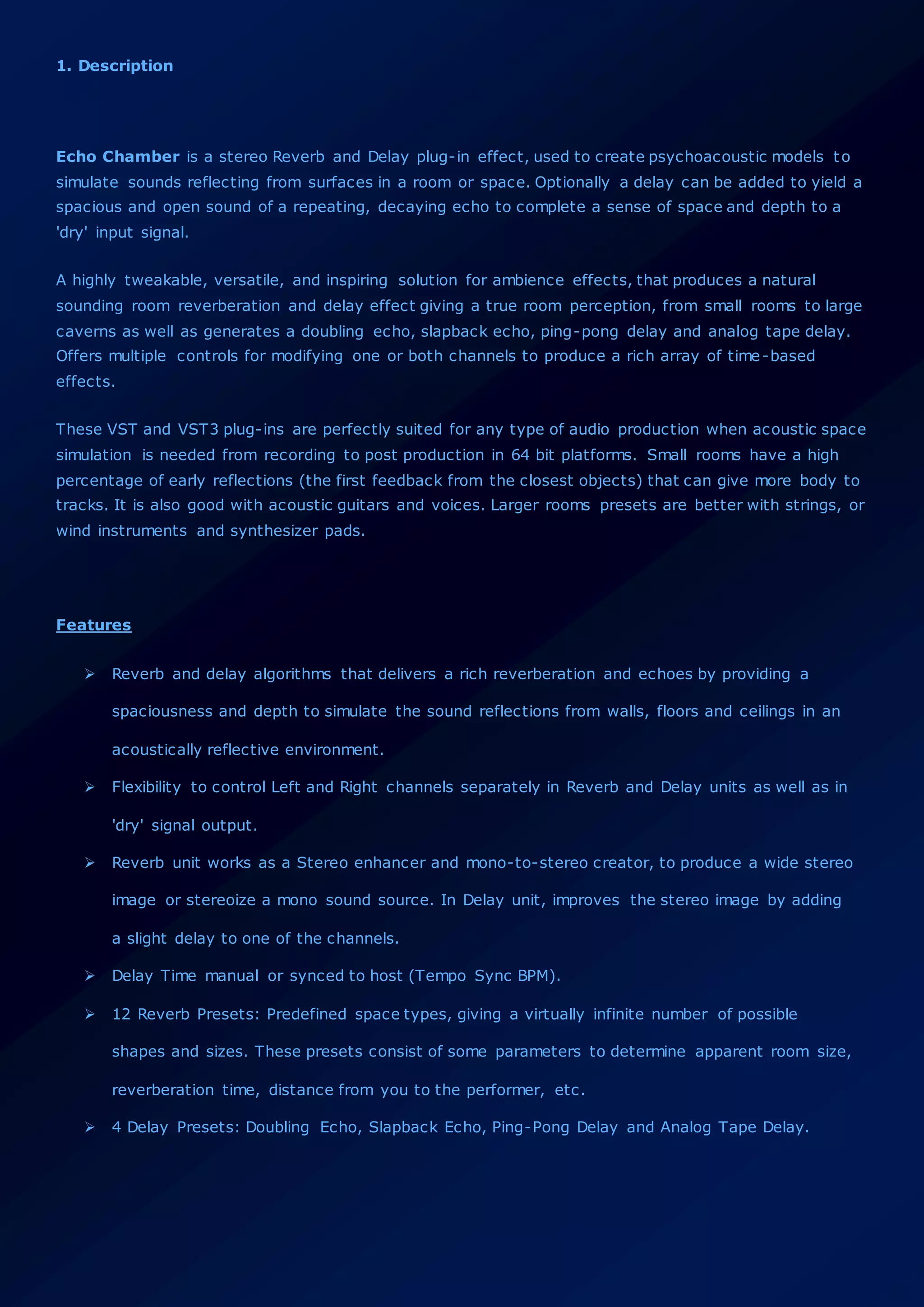
• SPACE Controls: Consist of size, width and depth knobs. These parameters determine the
nature of the space and its properties such as its abstract geometry and determine its
complexity.
• Size: This knob varies the apparent size of the simulated acoustic space by
controlling the density of the early reflections as well as the slope of the buildup. Turn
the knob clockwise to increase the size or counterclockwise to decrease the size.
• Width: This knob adjusts the stereo separation of the wet reverb signal. Turn the
knob clockwise to widen the stereo image or counterclockwise to reduce the stereo
effect.
• Depth: Adjusts the depth of the environment by controlling the apparent distance
from the listener to the input source. It Ranges 0 (near) to 10 (deepest). Turn the knob
clockwise to increase the depth or counterclockwise to decrease the depth.
• COLOR Control: Turning the control up, provides additional high-end presence in the effect.
• TONE Control: Changes the tone of the reverb by taking over high frequencies. At
times subtle, these changes can alter the timbre or quality of auditory sensations
produced by the tone of a sound of reverb, from dark to bright and everywhere in
between.
• Bright: A shimmering tone. Overbearing high frequencies. Treble emphasis
(Fully clockwise rotation).
• Warm: Well balanced, flat, neutral. Pleasantly spacious, with adequate
reverberation (Tuning around the center position of the knob).
• Dark: A tonal balance that tilts to tones of low (deep) frequency. Weak high
frequencies (Fully counterclockwise rotation).
• PRESENCE Combo Box: Makes subtle changes to the reverb character:
• Stage 1: Tone reverb is slightly attenuated. Provides a warmness tone.
• Stage 2: Tone reverb is slightly amplified. Something brighter in character.
DELAY UNIT
- WET Delay Stereo Shaping (Left and Right): It independently controls the left and right
channels wet signals. Turn the knob clockwise to increase the wet signal or counterclockwise to
decrease it.
• FEEDBACK (Left and Right Channels): Regeneration of delay. By increasing the amount of
signal sent back through (or fed back, or regenerated) the number of repeats is increased
Individually for left and right channels. Turn the knob clockwise to increase the rate or
counterclockwise to decrease the regeneration. Also feedback can be entered by typing in the
desired amount in the text box of each left or right channel.
• TIME (Left and Right Channels): Controls the delay time. The value can either be in
milliseconds or in bar divisions if the Tempo Sync (BPM) is switched ON.
• Manual Time (Left and Right Channels): This knob sets the delay time manually.
Controls the speed of the effect when not synchronized to host tempo. Improves the
stereo image by adding a slight delay to one of the channels. Time can be entered by
typing in the desired amount in the text box of each left or right channel in
milliseconds.
• Tempo Sync (BPM) ON/OFF:
- OFF (Default) makes no synchronisation. Time is set by the user by 'Manual
Time' knob.
- ON allows to sync the delay tempo to the host. Controls the speed of the
synchronized effect to the project tempo, including tempo changes. Also is
mapped to control the delay subdivisions for some tempo synced delay changes.
Switch options have programmed subdivision, it goes from 1/1 to 1/16 triplet.
• Bar Divisions (Combo Box. Left and right channels): Used with ‘Sync Time
(BPM)=ON’ makes the Delay time sync to the host BPM and allows specifying delay
times in musical note durations. Independently control the left and right channel
signals. Default 1/1 in both L/R channels.
• Range: 1/1, 1/2, 1/2D, 1/2T, 1/4, 1/4D, 1/4T, 1/8, 1/8D, 1/8T, 1/16, 1/16D,
1/16T. Improve the stereo image by adding a slight delay to one of the channels.
T = Triplet: Delay time equal to 2/3 of the duration of the selected vote value.
D = Dotted: Delay time equal to 3/2 of the duration of the selected note value.
• COLOR Control: Turning the control up, provides additional high-end presence in the delay
effect.
• TONE Control: Changes the tone of the delay by taking over high frequencies. At times
subtle, these changes can alter the timbre or quality of auditory sensations produced by the
tone of a sound of reverb, from dark to bright and everywhere in between.
• Bright: A shimmering tone. Overbearing high frequencies. Treble emphasis (Fully
clockwise rotation).
• Warm: Well balanced, flat, neutral. Pleasantly spacious, with adequate reverberation
(Tuning around the center position of the knob).
• Dark: A tonal balance that tilts to tones of low (deep) frequency. Weak high
frequencies (Fully counterclockwise rotation).
• PRESENCE Combo Box: Makes subtle changes to the delay character:
• Stage 1: Tone delay is slightly attenuated. Provides a warmness tone.
• Stage 2: Tone delay is slightly amplified. Something brighter in character.
* Note: Setting different delay time in left and right channels allow to create the 'Precedence effect', a
binaural psychoacoustic effect, when a sound is followed by another sound separated by a sufficiently
short time delay (below the listener's echo threshold). The Haas effect, also a psychoacoustic effect
(by Helmut Haas) is often equated with the underlying precedence effect. The precedence effect
appears if the subsequent wave fronts arrive between 10 ms and about 50 ms later than the first wave
front. For speech the precedence effect disappears for delays above 50 ms, but for music the
precedence effect can also appear for delays of some 100 ms. It causes a listener to perceive a space
and direction of a sound when there is a slight delay between stereo channels.
Reverb and Delay Presets Description
• 1. Room Reverb: This reverb effect simulates the acoustics of a small room with a low
ceiling and a quick decay. The sound is very close and intimate.
• 2. Hall Reverb: Bright classical concert hall with strong room impression. This is a dense
hall reverb In this program, the center will appear to be deep behind the main speakers,
creating an expansive large hall ambience. Orchestra and opera music are suited for this
sound field.
• 3. Chamber Reverb: Ambient natural sound of a small chamber. A smaller physical space
than a hall that results in more clarity yet still provides a blend of harmonic content and
dispersion of sound.
• 4. Plate Reverb: Straight and bright reverberation plate sound. Reverb emulation that
utilizes transducers that send and receive a signal through a sheet of metal.
• 5. Spring Reverb: Natural, metallic spring reverb. Similar in design to the plate,
however, it uses a metal spring instead of a sheet.
• 6. Ambience Reverb: Large enclosure ambience sound. This effect adds a perfect match
for pure synthetic sounds.
• 7. Church Reverb: Smooth and clear big church reverb. This program recreates the
acoustic environment of a big church with a high pointed dome and columns along the sides.
This interior produces very long reverberations.
• 8. Arena Reverb: This reverb effect simulates the acoustics of a large enclosure such as a
sports arena.
• 9. Opera Reverb: Typical sound of a classical bright opera house.
• 10. Theater Reverb: Natural sounding audience hall of a theater.
• 11. Cathedral Reverb: Big cathedral with characteristic echoes.
• 12. Cave Reverb: Stereo Echo Delay and Reverb. This effect simulates the reverberations
of a cave.
• 13. Doubling Echo: Is produced by adding short-range delay to a recorded sound. Delays
of 30 to 50 milliseconds are the most common; longer delay times become slapback echo.
Mixing the original and delayed sounds creates an effect similar to doubletracking and can
help greatly thicken up a vocal recording. It’s also often used for recording guitar with a
stereo effect.
• 14. Slapback Echo: Uses a longer delay time (75 to 250 milliseconds), with little or no
feedback, often used on electric guitar, but can also be applied to drums or vocals. Most
often heard in rockabilly and country.
• 15. Ping-Pong Delay: This type of delay 'pings' audio back and forth between the left
and right channels, creating a wide stereo rhythmic effect. Useful to create syncopated
rhythm lines that bounce from left to right.
• 16. Analog/Tape Delay: Is inspired by classic analog delays using reel-to-reel tape
loops, earliest delay types in the budding Rock and Roll era of the 1950s.
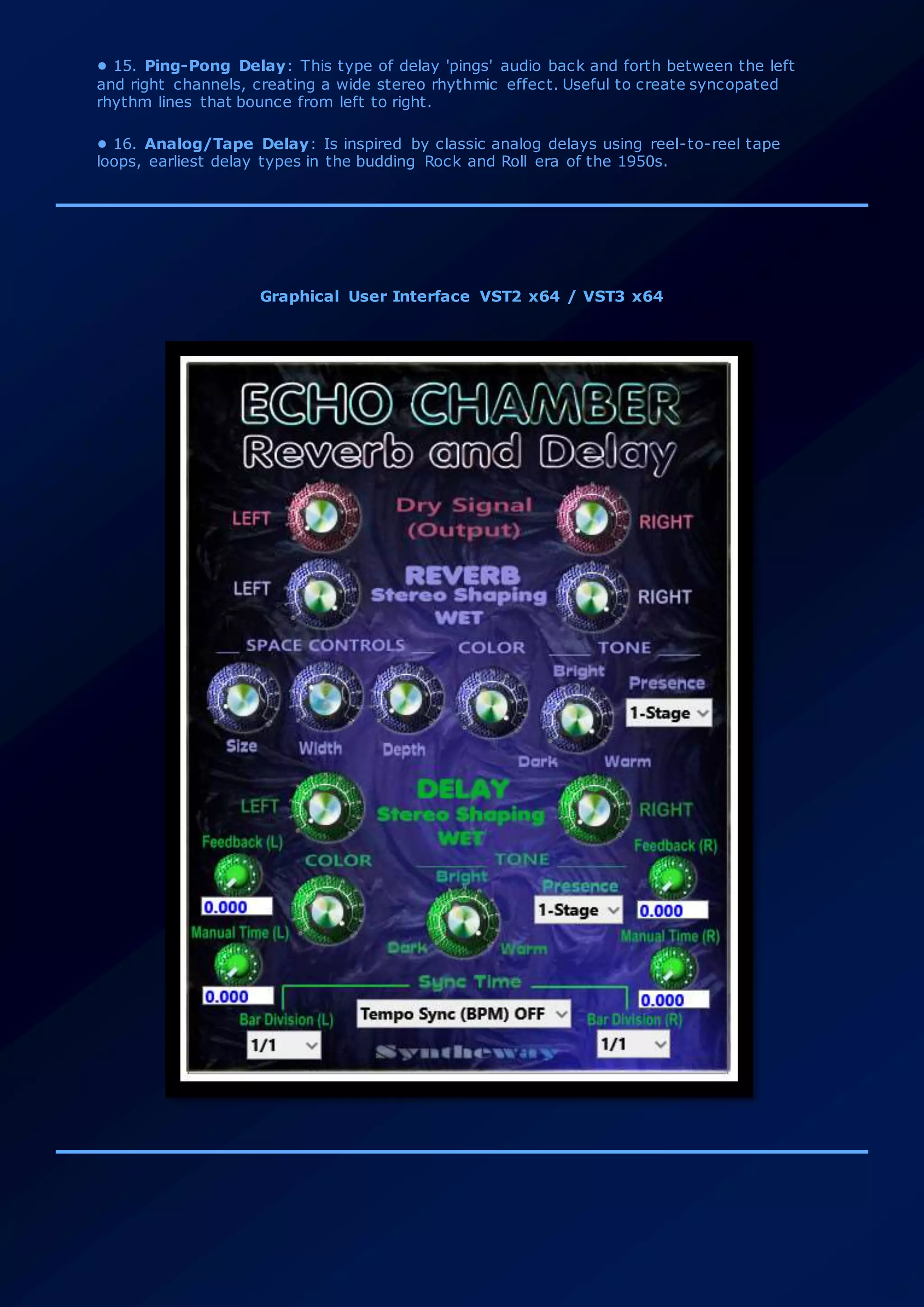
Graphical User Interface VST2 x64 / VST3 x64
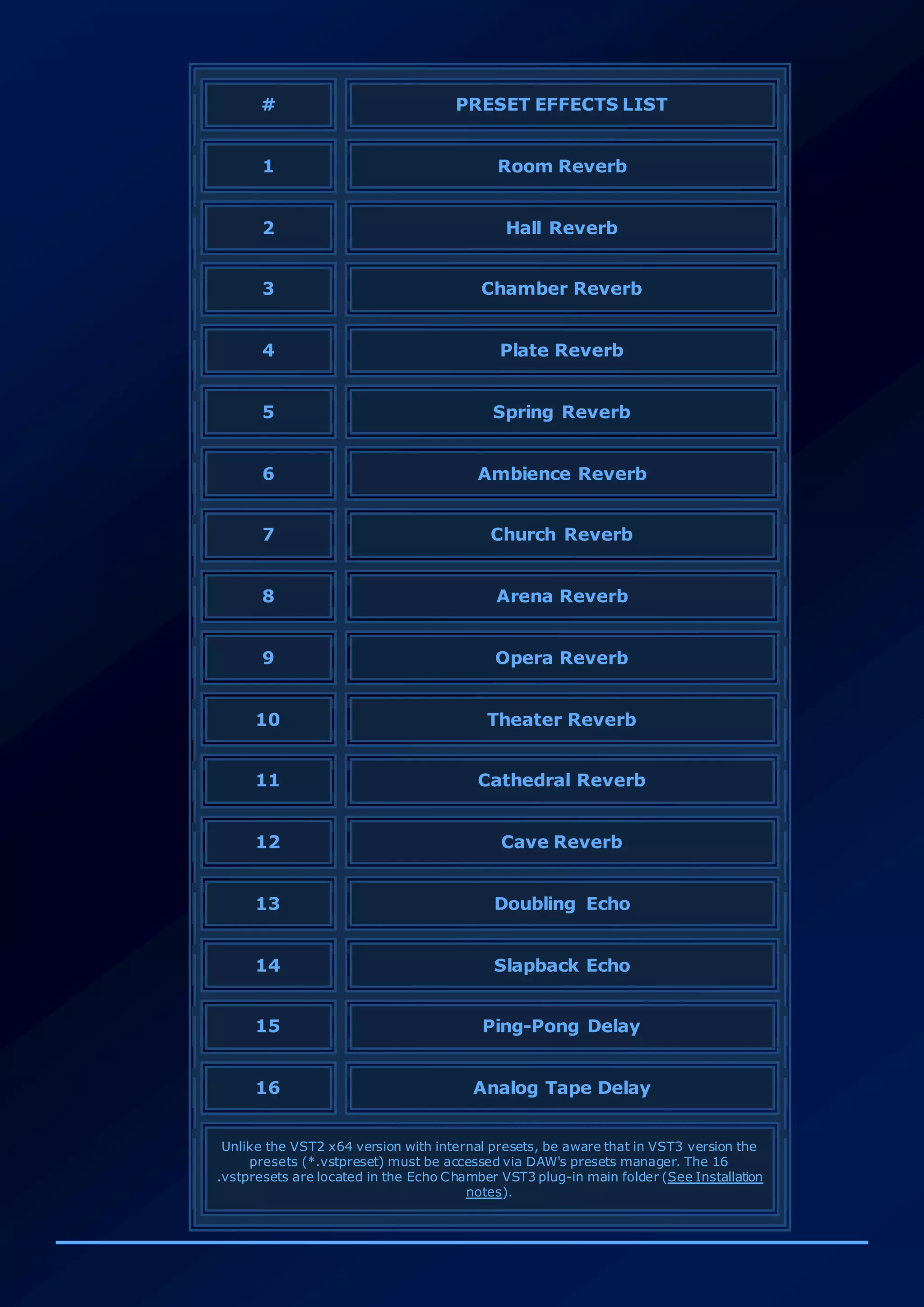
# PRESET EFFECTS LIST
1 Room Reverb
2 Hall Reverb
3 Chamber Reverb
4 Plate Reverb
5 Spring Reverb
6 Ambience Reverb
7 Church Reverb
8 Arena Reverb
9 Opera Reverb
10 Theater Reverb
11 Cathedral Reverb
12 Cave Reverb
13 Doubling Echo
14 Slapback Echo
15 Ping-Pong Delay
16 Analog Tape Delay
Unlike the VST2 x64 version with internal presets, be aware that in VST3 version the
presets (*.vstpreset) must be accessed via DAW's presets manager. The 16
.vstpresets are located in the Echo Chamber VST3 plug-in main folder (See Installation
notes).
2. System Requirements
Before you install this VST effect, please make sure your computer fulfills the following requirements:
 Windows Operating System: Windows 7, Windows 8, Windows 8.1, Windows 10 x64 (64 bit).
 1 GHz or faster Processor (Pentium®, Celeron® AMD® or equivalent) minimum.
 RAM: 1 GB or higher recommended.
 VST compatible host / Digital Audio Workstation DAW/ MIDI Sequencer x64 (64 bit): This VST
software can be "plugged in" to any host application that supports VST Technology like:
Image-Line FL Studio, Steinberg Cubase Pro, Artist and Elements, Cakewalk by BandLab,
Ableton Live, Cockos REAPER, PreSonus Studio One, Acoustica Mixcraft, MAGIX Acid
Pro, MakeMusic Finale, Avid Sibelius, Mackie Tracktion, AudioMulch, Steinberg Nuendo, Magix
Samplitude, Magix Music Maker, Cantabile (Lite, Solo, Performer), n-Track Studio, VSTHost,
DarkWave Studio, Propellerhead Reason, SAVIHost, Making Waves and much more ...
 An ASIO® soundcard is recommended for low latency real-time play.
 Please test extensively the demo version of your selected product (s) in your host to make
sure there are no misbehaviors before purchasing.
3. Installing and Uninstalling VST Plug-in
To install VST plug-in, follow these steps:
 Unzip the file.
 The main file must be in a directory where the VST host is looking for VST plug-ins.
 Place the following files / folders into your plugins folder:
 Echo Chamber Reverb and Delay VST folder in your VST2 Plugins x64 folder.
 Echo Chamber Reverb and Delay VST3 folder in your VST3 Plugins x64 folder.
To uninstall simply remove:
 Echo Chamber Reverb and Delay VST folder from VST2 x64 Plugins.
 Echo Chamber Reverb and Delay VST3 folder of your VST3 x64 Plugins folder.
 VST3 Presets (.vstpreset)
The contains of VST3 Presets folder should be placed manually.
 If VST3 Presets folder exists in Documents, just place the Syntheway folder inside the
following path:
C:Users*username*DocumentsVST3 Presets
 If VST3 Presets folder doesn't exists in Documents, just drag and drop the complete
VST3 Presets folder.
After that, the complete path will look like the following:
C:Users*username*DocumentsVST3 PresetsSynthewayEcho Chamber Reverb and Delay
with the *.vstpreset inside. FL Studio, Cubase, Nuendo, REAPER and Bitwig Studio will
display automatically on preset manager.
 Alternatively .vstpreset can be loaded from Echo Chamber Reverb and Delay VST3
main folder (currently included) for PreSonus Studio One and Cakewalk by BandLab via
preset manager option.
 Note: MAGIX Samplitude and Acoustica Mixcraft till the date doesn’t supports VST3
presets (.vstpreset) loading yet.
VST plug-ins locations on Windows
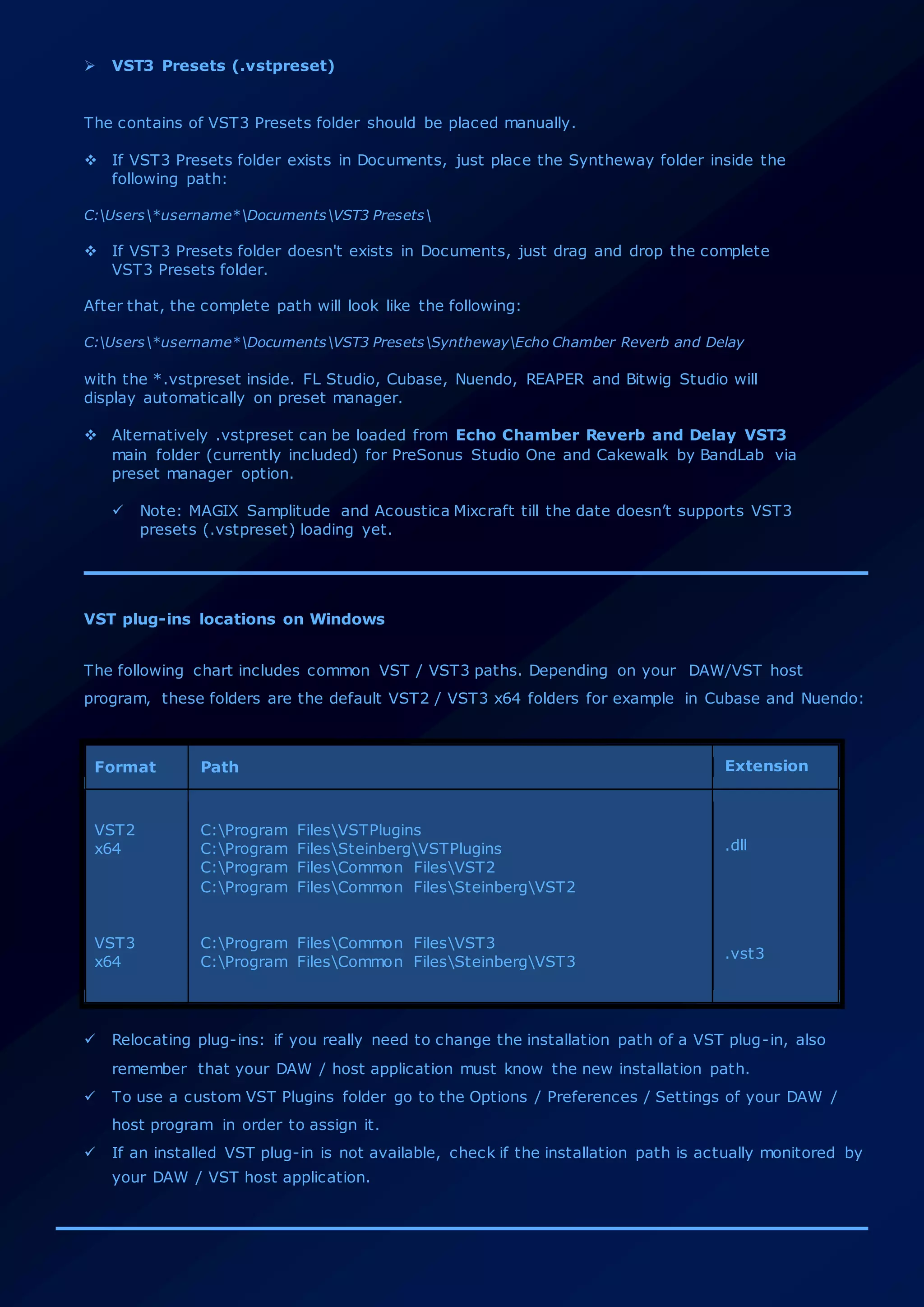
The following chart includes common VST / VST3 paths. Depending on your DAW/VST host
program, these folders are the default VST2 / VST3 x64 folders for example in Cubase and Nuendo:
Format Path Extension
VST2
x64
VST3
x64
C:Program FilesVSTPlugins
C:Program FilesSteinbergVSTPlugins
C:Program FilesCommon FilesVST2
C:Program FilesCommon FilesSteinbergVST2
C:Program FilesCommon FilesVST3
C:Program FilesCommon FilesSteinbergVST3
.dll
.vst3
 Relocating plug-ins: if you really need to change the installation path of a VST plug-in, also
remember that your DAW / host application must know the new installation path.
 To use a custom VST Plugins folder go to the Options / Preferences / Settings of your DAW /
host program in order to assign it.
 If an installed VST plug-in is not available, check if the installation path is actually monitored by
your DAW / VST host application.
4. Release Notes
This section outlines revisions between Echo Chamber Reverb and Delay releases. The most recent
changes are at the top.
 v1.0: Initial version.
5. Technical Support and Contact
Please take a look at the FAQ (Frequently Asked Questions) before you contact customer support. If
you have any problems with instruments and effects, you can contact us by e-mail. Support requests
are answered as quickly as possible, if you send the following information:
 Syntheway Product
 Host Application (Name & Version number)
 A very detailed description of the problem
Your inquiry will be answered in the order in which it is received. Due to the volume of e-mail,
sometimes, these may not be able to respond immediately.
Contact Information
General Information info@syntheway.net
Contact contact@syntheway.net
Sales sales@syntheway.net
Customer Support support@syntheway.net
Legal Department legal@syntheway.net
PR Contact pressrelease@syntheway.net
Webmaster webmaster@syntheway.net
6. FAQ (Frequently Asked Questions)
Here you will find answers to the most frequently asked questions: please take a look at the FAQ
webpage:
http://faq.syntheway.net
7. Update and Upgrade Policy:
As a general policy, Updates between minor Syntheway product versions are free. Upgrades between
major Syntheway product versions are paid.
 Updates:
An update is an interim release that fixes bugs, enhances usability, updates data, or adds a new
feature to an existing version. For example, you would update Echo Chamber Reverb and Delay
v1.00 to v1.1.
They get distributed electronically after their release. If you have already registered, and you
will not get the email with a link to download the update within a reasonable time, send us an
email contact@syntheway.net. Please, include in the subject the name of your registered
VSTi/VST from the email account that was used with your registration. If your email address
changes, please notify us to support@syntheway.net, so that we can update our database.
 Upgrades:
Upgrades are changes in the major version number of the product (containing major new
functionality, improves performance, and enhances usability). When we release a major new
release, we change the first number in the version number. So you switch to a higher version of
a program within the same VST product family. For example, you would upgrade a VST v1.00 to
v2.00. Upgrades are free when... you purchase Syntheway product and we introduce a major
new release (e.g. moving from VST 1.1 to 2.0) within 60 days of your purchase date. Any
release containing major new functionality, an upgrade fee will probably be chargeable.
Specially discounted upgrade pricing is available to registered users of the immediately prior version of
Syntheway Product. That is, if you are a registered user of v1.0, you are eligible to upgrade to v2.0 at
the special discounted upgrade price.
How often are updates and upgrades released?
We create product updates and upgrades when:
 New features or functionality have been added.
 Bugs and problems have been corrected.
 New features have been added or supported.
 New optimizations have been integrated into the VST architecture.
Notes:
 Make sure your email account can accept emails coming from us (domain: @syntheway.net).
Also take a look to your SPAM folder.
 Personal details are kept private and are never spammed. For Updates Syntheway uses "BCC"
to protect your email address privacy.
8. End User License Agreement (EULA)
Echo Chamber Reverb and Delay VST2 / VST3 - License Agreement
PLEASE READ THIS LEGAL AGREEMENT CAREFULLY.
The use and redistribution of ‘Echo Chamber Reverb and Delay VST x64’ and ‘Echo Chamber
Reverb and Delay VST3 x64’ (‘Software’) is subject to the following conditions:
1. All copyrights to the Software are exclusively owned by the Author: Daniel Alberto
Laiseca.
2. You (the user) have the right to evaluate this Software with trial limitations, provided
the Software is not used for profit, including but not limited to creating patch libraries and
sounds for any pieces you are profiting from. Should you continue use of the Software
after your evaluation period expires, or use it for any profit, you shall pay the registration
fee.
3. Release To Web (RTW): Syntheway utilizes the Internet for distribution for demos and
registered versions. No physical media are produced in this type of release mechanism.
The unregistered demo version of the Software may be freely distributed, with exceptions
noted below, provided the distribution package is not modified in any way. No person or
company may charge a fee for the distribution of the Software without written permission
from the Author. The unregistered demo version of the Software may not be bundled or
distributed with any other product without written permission of the Author.
4. Once registered your copy will grant you the personal license to use one or more
versions of this product to its full extent, including the royalty-free use of Syntheway
software in your productions, recordings and / or performances. The user is granted a non-
exclusive license to use the Software on one or several computers, for any legal purpose,
at a time. The registered Software may not be rented or leased, or given away to the third
person.
The Syntheway software License is non-transferable and fees are non-refundable. This
software license (including update, upgrade and crossgrade) is an intangible good for the
life of the holder.
You may not use, copy, emulate, clone, rent, lease, sell, sampling, modify, decompile,
disassemble, otherwise reverse engineer, or transfer the licensed program, or any subset
of the licensed program, except as provided for in this License Agreement. Any such
unauthorized use shall result in immediate and automatic termination of this license and
may result in criminal and/or civil prosecution.
5. THIS SOFTWARE IS PROVIDED "AS IS" WITHOUT WARRANTY OF ANY KIND, EITHER
EXPRESS OR IMPLIED, INCLUDING BUT NOT LIMITED TO, THE IMPLIED WARRANTIES OF
MERCHANTABILITY, FITNESS FOR A PARTICULAR PURPOSE, NON-INFRINGEMENT OR
ARISING FROM A COURSE OF DEALING, USAGE, TRADE OR PRACTICE.
IN NO EVENT SHALL THE AUTHOR BE LIABLE FOR ANY SPECIAL, DIRECT, INDIRECT, OR
CONSEQUENTIAL DAMAGES OR ANY DAMAGES WHATSOEVER RESULTING FROM LOSS OF
USE, DATA OR PROFITS, WHETHER IN AN ACTION OF CONTRACT, NEGLIGENCE OR OTHER
TORTIOUS ACTION, ARISING OUT OF OR IN CONNECTION WITH THE USE OR
PERFORMANCE OF THIS SOFTWARE.
6. Installing and using the Software signifies acceptance of these terms and conditions of
this License Agreement.
7. If you do not agree with the terms of this License Agreement you must remove the
Software files from your storage devices and cease to use the product.
8. Acknowledgements: VST is a trademark of Steinberg Soft- und Hardware GmbH. All
other trademarks and trade names are the properties of their respective owners, and do
not imply owner's endorsement of this product, or guarantee full compliance with owner's
standards.
9. All questions concerning this License Agreement (EULA) shall be directed to: e-mail:
contact@syntheway.net
9. Evaluation & Registration
The demo have same sound quality than the full version. It generates a short beep in all output
channels every 10 seconds.
In developing software we have embraced "try before you buy" shareware concept that allows you to
evaluate a product in action and decide on real performance prior to taking out your wallet. As
additional benefits there are free upgrade policy (within version numbers -e.g. 1.0 to 1.xx) and
technical support via e-mail.
 The full version is delivered by email and available for direct download through internet. We
DO NOT send out CDs, DVDs, neither printed manuals.
 Please allow less than 24 hours to receive the download to registered version of your
software, as this is a manual process. Usually we are much faster, but if you order from
outside America, please keep the different time zones in mind.
 Provide a valid email address in your PayPal account before ordering, so we will send to this
email a link in order to download the registered version and login credentials or key to
unlock the file.
For details on ordering through the Web, please visit us at: http://shop.syntheway.net
 Note that by registering the software, you enable us to improve it and design new features as
well as automatically you also support our development for upcoming products.
10. Plug-in Credits
Concept and sound design by Daniel Alberto Laiseca
Echo Chamber Reverb and Delay™ is a trademark of Syntheway Virtual Musical Instruments.
11. Acknowledgements:
VST is a trademark of Steinberg Soft- und Hardware GmbH. All other trademarks and trade names are
the properties of their respective owners, and do not imply owner's endorsement of this product, or
guarantee full compliance with owner's standards.
Syntheway Virtual Musical Instruments
Email Contact: contact@syntheway.net | Email Support: support@syntheway.net
© 2004-2018 Daniel Laiseca | Buenos Aires – Argentina
www.syntheway.net | www.syntheway.com

Echo Chamber Reverb and Delay Effect VST + VST3 Plugins for Windows 64 bit, Plate, Spring, Church, Opera, Theater, Cave, Cathedral, Chamber, Ambience, Arena, Hall and Room Reverbs plus Doubling Echo and Slapback Echo, Ping-Pong and Analog Tape Delays

  • 1.
    Syntheway Virtual MusicalInstruments Email Contact: contact@syntheway.net Email Support: support@syntheway.net The information in this document is subject to change without notice and does not represent a commitment on the part of Syntheway Software. The software described by this document is subject to a License Agreement and may not be copied to other media except as specifically allowed in the License Agreement. No part of this publication may be copied, reproduced or otherwise transmitted or recorded, without prior written permission by Syntheway. Table Of Contents:  1. Description  2. System Requirements  3. Installation and Uninstallation  4. Release Notes  5. Technical Support and Contact  6. FAQ - Frequently Asked Questions  7. Update and Upgrade Policy  8. End User License Agreement (EULA)  9. Evaluation and Registration  10. Plug-in Credits  11. Acknowledgements
  • 2.
    1. Description Echo Chamberis a stereo Reverb and Delay plug-in effect, used to create psychoacoustic models to simulate sounds reflecting from surfaces in a room or space. Optionally a delay can be added to yield a spacious and open sound of a repeating, decaying echo to complete a sense of space and depth to a 'dry' input signal. A highly tweakable, versatile, and inspiring solution for ambience effects, that produces a natural sounding room reverberation and delay effect giving a true room perception, from small rooms to large caverns as well as generates a doubling echo, slapback echo, ping-pong delay and analog tape delay. Offers multiple controls for modifying one or both channels to produce a rich array of time-based effects. These VST and VST3 plug-ins are perfectly suited for any type of audio production when acoustic space simulation is needed from recording to post production in 64 bit platforms. Small rooms have a high percentage of early reflections (the first feedback from the closest objects) that can give more body to tracks. It is also good with acoustic guitars and voices. Larger rooms presets are better with strings, or wind instruments and synthesizer pads. Features  Reverb and delay algorithms that delivers a rich reverberation and echoes by providing a spaciousness and depth to simulate the sound reflections from walls, floors and ceilings in an acoustically reflective environment.  Flexibility to control Left and Right channels separately in Reverb and Delay units as well as in 'dry' signal output.  Reverb unit works as a Stereo enhancer and mono-to-stereo creator, to produce a wide stereo image or stereoize a mono sound source. In Delay unit, improves the stereo image by adding a slight delay to one of the channels.  Delay Time manual or synced to host (Tempo Sync BPM).  12 Reverb Presets: Predefined space types, giving a virtually infinite number of possible shapes and sizes. These presets consist of some parameters to determine apparent room size, reverberation time, distance from you to the performer, etc.  4 Delay Presets: Doubling Echo, Slapback Echo, Ping-Pong Delay and Analog Tape Delay.
  • 3.
    01 • RoomReverb 02 • Hall Reverb 03 • Chamber Reverb 04 • Plate Reverb 05 • Spring Reverb 06 • Ambience Reverb 07 • Church Reverb 08 • Arena Reverb 09 • Opera Reverb 10 • Theater Reverb 11 • Cathedral Reverb 12 • Cave Reverb 13 • Doubling Echo 14 • Slapback Echo 15 • Ping-Pong Delay 16 • Analog Tape Delay Note: In each predefined reverb or delay these parameters are preset with values precisely calculated by Syntheway to create the sound field unique for the program. Each preset has a set of parameters that allow you to change the characteristics of the acoustic environment to precisely create the effect you want and contribute to your personal sound field, allowing you to essentially 'redesign' the spaces and echoes, provided to create custom-tailored listening environments that ideally match your mood and music. PARAMETERS: - DRY Signal Output (Left and Right): It independently controls the left and right channels 'dry' (unaffected) signals. Turn the knob clockwise to increase the dry signal or counterclockwise to decrease it. Default:0. Input signal is fully processed according to the reverb / delay stereo shaping wet assignments. REVERB UNIT: - WET Reverb Stereo Shaping (Left and Right): It independently controls the left and right channels wet signals. Turn the knob clockwise to increase the wet signal or counterclockwise to decrease it. • SPACE Controls: Consist of size, width and depth knobs. These parameters determine the nature of the space and its properties such as its abstract geometry and determine its complexity.
  • 4.
    • Size: Thisknob varies the apparent size of the simulated acoustic space by controlling the density of the early reflections as well as the slope of the buildup. Turn the knob clockwise to increase the size or counterclockwise to decrease the size. • Width: This knob adjusts the stereo separation of the wet reverb signal. Turn the knob clockwise to widen the stereo image or counterclockwise to reduce the stereo effect. • Depth: Adjusts the depth of the environment by controlling the apparent distance from the listener to the input source. It Ranges 0 (near) to 10 (deepest). Turn the knob clockwise to increase the depth or counterclockwise to decrease the depth. • COLOR Control: Turning the control up, provides additional high-end presence in the effect. • TONE Control: Changes the tone of the reverb by taking over high frequencies. At times subtle, these changes can alter the timbre or quality of auditory sensations produced by the tone of a sound of reverb, from dark to bright and everywhere in between. • Bright: A shimmering tone. Overbearing high frequencies. Treble emphasis (Fully clockwise rotation). • Warm: Well balanced, flat, neutral. Pleasantly spacious, with adequate reverberation (Tuning around the center position of the knob). • Dark: A tonal balance that tilts to tones of low (deep) frequency. Weak high frequencies (Fully counterclockwise rotation). • PRESENCE Combo Box: Makes subtle changes to the reverb character: • Stage 1: Tone reverb is slightly attenuated. Provides a warmness tone. • Stage 2: Tone reverb is slightly amplified. Something brighter in character. DELAY UNIT - WET Delay Stereo Shaping (Left and Right): It independently controls the left and right channels wet signals. Turn the knob clockwise to increase the wet signal or counterclockwise to decrease it. • FEEDBACK (Left and Right Channels): Regeneration of delay. By increasing the amount of signal sent back through (or fed back, or regenerated) the number of repeats is increased Individually for left and right channels. Turn the knob clockwise to increase the rate or counterclockwise to decrease the regeneration. Also feedback can be entered by typing in the desired amount in the text box of each left or right channel. • TIME (Left and Right Channels): Controls the delay time. The value can either be in milliseconds or in bar divisions if the Tempo Sync (BPM) is switched ON.
  • 5.
    • Manual Time(Left and Right Channels): This knob sets the delay time manually. Controls the speed of the effect when not synchronized to host tempo. Improves the stereo image by adding a slight delay to one of the channels. Time can be entered by typing in the desired amount in the text box of each left or right channel in milliseconds. • Tempo Sync (BPM) ON/OFF: - OFF (Default) makes no synchronisation. Time is set by the user by 'Manual Time' knob. - ON allows to sync the delay tempo to the host. Controls the speed of the synchronized effect to the project tempo, including tempo changes. Also is mapped to control the delay subdivisions for some tempo synced delay changes. Switch options have programmed subdivision, it goes from 1/1 to 1/16 triplet. • Bar Divisions (Combo Box. Left and right channels): Used with ‘Sync Time (BPM)=ON’ makes the Delay time sync to the host BPM and allows specifying delay times in musical note durations. Independently control the left and right channel signals. Default 1/1 in both L/R channels. • Range: 1/1, 1/2, 1/2D, 1/2T, 1/4, 1/4D, 1/4T, 1/8, 1/8D, 1/8T, 1/16, 1/16D, 1/16T. Improve the stereo image by adding a slight delay to one of the channels. T = Triplet: Delay time equal to 2/3 of the duration of the selected vote value. D = Dotted: Delay time equal to 3/2 of the duration of the selected note value. • COLOR Control: Turning the control up, provides additional high-end presence in the delay effect. • TONE Control: Changes the tone of the delay by taking over high frequencies. At times subtle, these changes can alter the timbre or quality of auditory sensations produced by the tone of a sound of reverb, from dark to bright and everywhere in between. • Bright: A shimmering tone. Overbearing high frequencies. Treble emphasis (Fully clockwise rotation). • Warm: Well balanced, flat, neutral. Pleasantly spacious, with adequate reverberation (Tuning around the center position of the knob). • Dark: A tonal balance that tilts to tones of low (deep) frequency. Weak high frequencies (Fully counterclockwise rotation). • PRESENCE Combo Box: Makes subtle changes to the delay character: • Stage 1: Tone delay is slightly attenuated. Provides a warmness tone. • Stage 2: Tone delay is slightly amplified. Something brighter in character.
  • 6.
    * Note: Settingdifferent delay time in left and right channels allow to create the 'Precedence effect', a binaural psychoacoustic effect, when a sound is followed by another sound separated by a sufficiently short time delay (below the listener's echo threshold). The Haas effect, also a psychoacoustic effect (by Helmut Haas) is often equated with the underlying precedence effect. The precedence effect appears if the subsequent wave fronts arrive between 10 ms and about 50 ms later than the first wave front. For speech the precedence effect disappears for delays above 50 ms, but for music the precedence effect can also appear for delays of some 100 ms. It causes a listener to perceive a space and direction of a sound when there is a slight delay between stereo channels. Reverb and Delay Presets Description • 1. Room Reverb: This reverb effect simulates the acoustics of a small room with a low ceiling and a quick decay. The sound is very close and intimate. • 2. Hall Reverb: Bright classical concert hall with strong room impression. This is a dense hall reverb In this program, the center will appear to be deep behind the main speakers, creating an expansive large hall ambience. Orchestra and opera music are suited for this sound field. • 3. Chamber Reverb: Ambient natural sound of a small chamber. A smaller physical space than a hall that results in more clarity yet still provides a blend of harmonic content and dispersion of sound. • 4. Plate Reverb: Straight and bright reverberation plate sound. Reverb emulation that utilizes transducers that send and receive a signal through a sheet of metal. • 5. Spring Reverb: Natural, metallic spring reverb. Similar in design to the plate, however, it uses a metal spring instead of a sheet. • 6. Ambience Reverb: Large enclosure ambience sound. This effect adds a perfect match for pure synthetic sounds. • 7. Church Reverb: Smooth and clear big church reverb. This program recreates the acoustic environment of a big church with a high pointed dome and columns along the sides. This interior produces very long reverberations. • 8. Arena Reverb: This reverb effect simulates the acoustics of a large enclosure such as a sports arena. • 9. Opera Reverb: Typical sound of a classical bright opera house. • 10. Theater Reverb: Natural sounding audience hall of a theater. • 11. Cathedral Reverb: Big cathedral with characteristic echoes. • 12. Cave Reverb: Stereo Echo Delay and Reverb. This effect simulates the reverberations of a cave. • 13. Doubling Echo: Is produced by adding short-range delay to a recorded sound. Delays of 30 to 50 milliseconds are the most common; longer delay times become slapback echo. Mixing the original and delayed sounds creates an effect similar to doubletracking and can help greatly thicken up a vocal recording. It’s also often used for recording guitar with a stereo effect. • 14. Slapback Echo: Uses a longer delay time (75 to 250 milliseconds), with little or no feedback, often used on electric guitar, but can also be applied to drums or vocals. Most often heard in rockabilly and country.
  • 7.
    • 15. Ping-PongDelay: This type of delay 'pings' audio back and forth between the left and right channels, creating a wide stereo rhythmic effect. Useful to create syncopated rhythm lines that bounce from left to right. • 16. Analog/Tape Delay: Is inspired by classic analog delays using reel-to-reel tape loops, earliest delay types in the budding Rock and Roll era of the 1950s. Graphical User Interface VST2 x64 / VST3 x64
  • 8.
    # PRESET EFFECTSLIST 1 Room Reverb 2 Hall Reverb 3 Chamber Reverb 4 Plate Reverb 5 Spring Reverb 6 Ambience Reverb 7 Church Reverb 8 Arena Reverb 9 Opera Reverb 10 Theater Reverb 11 Cathedral Reverb 12 Cave Reverb 13 Doubling Echo 14 Slapback Echo 15 Ping-Pong Delay 16 Analog Tape Delay Unlike the VST2 x64 version with internal presets, be aware that in VST3 version the presets (*.vstpreset) must be accessed via DAW's presets manager. The 16 .vstpresets are located in the Echo Chamber VST3 plug-in main folder (See Installation notes).
  • 9.
    2. System Requirements Beforeyou install this VST effect, please make sure your computer fulfills the following requirements:  Windows Operating System: Windows 7, Windows 8, Windows 8.1, Windows 10 x64 (64 bit).  1 GHz or faster Processor (Pentium®, Celeron® AMD® or equivalent) minimum.  RAM: 1 GB or higher recommended.  VST compatible host / Digital Audio Workstation DAW/ MIDI Sequencer x64 (64 bit): This VST software can be "plugged in" to any host application that supports VST Technology like: Image-Line FL Studio, Steinberg Cubase Pro, Artist and Elements, Cakewalk by BandLab, Ableton Live, Cockos REAPER, PreSonus Studio One, Acoustica Mixcraft, MAGIX Acid Pro, MakeMusic Finale, Avid Sibelius, Mackie Tracktion, AudioMulch, Steinberg Nuendo, Magix Samplitude, Magix Music Maker, Cantabile (Lite, Solo, Performer), n-Track Studio, VSTHost, DarkWave Studio, Propellerhead Reason, SAVIHost, Making Waves and much more ...  An ASIO® soundcard is recommended for low latency real-time play.  Please test extensively the demo version of your selected product (s) in your host to make sure there are no misbehaviors before purchasing. 3. Installing and Uninstalling VST Plug-in To install VST plug-in, follow these steps:  Unzip the file.  The main file must be in a directory where the VST host is looking for VST plug-ins.  Place the following files / folders into your plugins folder:  Echo Chamber Reverb and Delay VST folder in your VST2 Plugins x64 folder.  Echo Chamber Reverb and Delay VST3 folder in your VST3 Plugins x64 folder. To uninstall simply remove:  Echo Chamber Reverb and Delay VST folder from VST2 x64 Plugins.  Echo Chamber Reverb and Delay VST3 folder of your VST3 x64 Plugins folder.
  • 10.
     VST3 Presets(.vstpreset) The contains of VST3 Presets folder should be placed manually.  If VST3 Presets folder exists in Documents, just place the Syntheway folder inside the following path: C:Users*username*DocumentsVST3 Presets  If VST3 Presets folder doesn't exists in Documents, just drag and drop the complete VST3 Presets folder. After that, the complete path will look like the following: C:Users*username*DocumentsVST3 PresetsSynthewayEcho Chamber Reverb and Delay with the *.vstpreset inside. FL Studio, Cubase, Nuendo, REAPER and Bitwig Studio will display automatically on preset manager.  Alternatively .vstpreset can be loaded from Echo Chamber Reverb and Delay VST3 main folder (currently included) for PreSonus Studio One and Cakewalk by BandLab via preset manager option.  Note: MAGIX Samplitude and Acoustica Mixcraft till the date doesn’t supports VST3 presets (.vstpreset) loading yet. VST plug-ins locations on Windows The following chart includes common VST / VST3 paths. Depending on your DAW/VST host program, these folders are the default VST2 / VST3 x64 folders for example in Cubase and Nuendo: Format Path Extension VST2 x64 VST3 x64 C:Program FilesVSTPlugins C:Program FilesSteinbergVSTPlugins C:Program FilesCommon FilesVST2 C:Program FilesCommon FilesSteinbergVST2 C:Program FilesCommon FilesVST3 C:Program FilesCommon FilesSteinbergVST3 .dll .vst3  Relocating plug-ins: if you really need to change the installation path of a VST plug-in, also remember that your DAW / host application must know the new installation path.  To use a custom VST Plugins folder go to the Options / Preferences / Settings of your DAW / host program in order to assign it.  If an installed VST plug-in is not available, check if the installation path is actually monitored by your DAW / VST host application.
  • 11.
    4. Release Notes Thissection outlines revisions between Echo Chamber Reverb and Delay releases. The most recent changes are at the top.  v1.0: Initial version. 5. Technical Support and Contact Please take a look at the FAQ (Frequently Asked Questions) before you contact customer support. If you have any problems with instruments and effects, you can contact us by e-mail. Support requests are answered as quickly as possible, if you send the following information:  Syntheway Product  Host Application (Name & Version number)  A very detailed description of the problem Your inquiry will be answered in the order in which it is received. Due to the volume of e-mail, sometimes, these may not be able to respond immediately. Contact Information General Information info@syntheway.net Contact contact@syntheway.net Sales sales@syntheway.net Customer Support support@syntheway.net Legal Department legal@syntheway.net PR Contact pressrelease@syntheway.net Webmaster webmaster@syntheway.net
  • 12.
    6. FAQ (FrequentlyAsked Questions) Here you will find answers to the most frequently asked questions: please take a look at the FAQ webpage: http://faq.syntheway.net 7. Update and Upgrade Policy: As a general policy, Updates between minor Syntheway product versions are free. Upgrades between major Syntheway product versions are paid.  Updates: An update is an interim release that fixes bugs, enhances usability, updates data, or adds a new feature to an existing version. For example, you would update Echo Chamber Reverb and Delay v1.00 to v1.1. They get distributed electronically after their release. If you have already registered, and you will not get the email with a link to download the update within a reasonable time, send us an email contact@syntheway.net. Please, include in the subject the name of your registered VSTi/VST from the email account that was used with your registration. If your email address changes, please notify us to support@syntheway.net, so that we can update our database.  Upgrades: Upgrades are changes in the major version number of the product (containing major new functionality, improves performance, and enhances usability). When we release a major new release, we change the first number in the version number. So you switch to a higher version of a program within the same VST product family. For example, you would upgrade a VST v1.00 to v2.00. Upgrades are free when... you purchase Syntheway product and we introduce a major new release (e.g. moving from VST 1.1 to 2.0) within 60 days of your purchase date. Any release containing major new functionality, an upgrade fee will probably be chargeable. Specially discounted upgrade pricing is available to registered users of the immediately prior version of Syntheway Product. That is, if you are a registered user of v1.0, you are eligible to upgrade to v2.0 at the special discounted upgrade price. How often are updates and upgrades released? We create product updates and upgrades when:  New features or functionality have been added.  Bugs and problems have been corrected.  New features have been added or supported.  New optimizations have been integrated into the VST architecture. Notes:
  • 13.
     Make sureyour email account can accept emails coming from us (domain: @syntheway.net). Also take a look to your SPAM folder.  Personal details are kept private and are never spammed. For Updates Syntheway uses "BCC" to protect your email address privacy. 8. End User License Agreement (EULA) Echo Chamber Reverb and Delay VST2 / VST3 - License Agreement PLEASE READ THIS LEGAL AGREEMENT CAREFULLY. The use and redistribution of ‘Echo Chamber Reverb and Delay VST x64’ and ‘Echo Chamber Reverb and Delay VST3 x64’ (‘Software’) is subject to the following conditions: 1. All copyrights to the Software are exclusively owned by the Author: Daniel Alberto Laiseca. 2. You (the user) have the right to evaluate this Software with trial limitations, provided the Software is not used for profit, including but not limited to creating patch libraries and sounds for any pieces you are profiting from. Should you continue use of the Software after your evaluation period expires, or use it for any profit, you shall pay the registration fee. 3. Release To Web (RTW): Syntheway utilizes the Internet for distribution for demos and registered versions. No physical media are produced in this type of release mechanism. The unregistered demo version of the Software may be freely distributed, with exceptions noted below, provided the distribution package is not modified in any way. No person or company may charge a fee for the distribution of the Software without written permission from the Author. The unregistered demo version of the Software may not be bundled or distributed with any other product without written permission of the Author. 4. Once registered your copy will grant you the personal license to use one or more versions of this product to its full extent, including the royalty-free use of Syntheway software in your productions, recordings and / or performances. The user is granted a non- exclusive license to use the Software on one or several computers, for any legal purpose, at a time. The registered Software may not be rented or leased, or given away to the third person. The Syntheway software License is non-transferable and fees are non-refundable. This software license (including update, upgrade and crossgrade) is an intangible good for the life of the holder. You may not use, copy, emulate, clone, rent, lease, sell, sampling, modify, decompile, disassemble, otherwise reverse engineer, or transfer the licensed program, or any subset of the licensed program, except as provided for in this License Agreement. Any such unauthorized use shall result in immediate and automatic termination of this license and may result in criminal and/or civil prosecution.
  • 14.
    5. THIS SOFTWAREIS PROVIDED "AS IS" WITHOUT WARRANTY OF ANY KIND, EITHER EXPRESS OR IMPLIED, INCLUDING BUT NOT LIMITED TO, THE IMPLIED WARRANTIES OF MERCHANTABILITY, FITNESS FOR A PARTICULAR PURPOSE, NON-INFRINGEMENT OR ARISING FROM A COURSE OF DEALING, USAGE, TRADE OR PRACTICE. IN NO EVENT SHALL THE AUTHOR BE LIABLE FOR ANY SPECIAL, DIRECT, INDIRECT, OR CONSEQUENTIAL DAMAGES OR ANY DAMAGES WHATSOEVER RESULTING FROM LOSS OF USE, DATA OR PROFITS, WHETHER IN AN ACTION OF CONTRACT, NEGLIGENCE OR OTHER TORTIOUS ACTION, ARISING OUT OF OR IN CONNECTION WITH THE USE OR PERFORMANCE OF THIS SOFTWARE. 6. Installing and using the Software signifies acceptance of these terms and conditions of this License Agreement. 7. If you do not agree with the terms of this License Agreement you must remove the Software files from your storage devices and cease to use the product. 8. Acknowledgements: VST is a trademark of Steinberg Soft- und Hardware GmbH. All other trademarks and trade names are the properties of their respective owners, and do not imply owner's endorsement of this product, or guarantee full compliance with owner's standards. 9. All questions concerning this License Agreement (EULA) shall be directed to: e-mail: contact@syntheway.net 9. Evaluation & Registration The demo have same sound quality than the full version. It generates a short beep in all output channels every 10 seconds. In developing software we have embraced "try before you buy" shareware concept that allows you to evaluate a product in action and decide on real performance prior to taking out your wallet. As additional benefits there are free upgrade policy (within version numbers -e.g. 1.0 to 1.xx) and technical support via e-mail.  The full version is delivered by email and available for direct download through internet. We DO NOT send out CDs, DVDs, neither printed manuals.  Please allow less than 24 hours to receive the download to registered version of your software, as this is a manual process. Usually we are much faster, but if you order from outside America, please keep the different time zones in mind.  Provide a valid email address in your PayPal account before ordering, so we will send to this email a link in order to download the registered version and login credentials or key to unlock the file. For details on ordering through the Web, please visit us at: http://shop.syntheway.net
  • 15.
     Note thatby registering the software, you enable us to improve it and design new features as well as automatically you also support our development for upcoming products. 10. Plug-in Credits Concept and sound design by Daniel Alberto Laiseca Echo Chamber Reverb and Delay™ is a trademark of Syntheway Virtual Musical Instruments. 11. Acknowledgements: VST is a trademark of Steinberg Soft- und Hardware GmbH. All other trademarks and trade names are the properties of their respective owners, and do not imply owner's endorsement of this product, or guarantee full compliance with owner's standards. Syntheway Virtual Musical Instruments Email Contact: contact@syntheway.net | Email Support: support@syntheway.net © 2004-2018 Daniel Laiseca | Buenos Aires – Argentina www.syntheway.net | www.syntheway.com