







Spectrum Scale Memory
Usage
Tomer Perry
Spectrum Scale Development
<tomp@il.ibm.com>
Outline
●
Relevant Scale Basics
●
Scale Memory Pools
●
Memory Calculations
●
Is that all?
●
Others
Outline
●
Relevant Scale Basics
●
Scale Memory Pools
●
Memory Calculations
●
Is that all?
●
Others
Some relevant Scale Basics
”The Cluster”
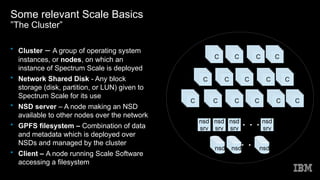
• Cluster – A group of operating system
instances, or nodes, on which an
instance of Spectrum Scale is deployed
• Network Shared Disk - Any block
storage (disk, partition, or LUN) given to
Spectrum Scale for its use
• NSD server – A node making an NSD
available to other nodes over the network
• GPFS filesystem – Combination of data
and metadata which is deployed over
NSDs and managed by the cluster
• Client – A node running Scale Software
accessing a filesystem
nsd
nsd
srv
nsd nsd
nsd
srv
nsd
srv
nsd
srv
CCCCC
CCCCC
CCCCC
CCCCC
CCCCC
CCCCC
CCCCC
CCCCC
CCCCC
CCCCC
CCCCC
CCCCC
CCCCC
CCCCC
CCCCC
Some relevant Scale Basics
MultiCluster
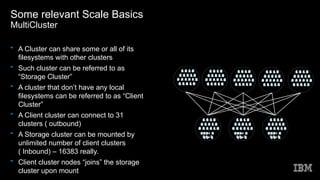
• A Cluster can share some or all of its
filesystems with other clusters
• Such cluster can be referred to as
“Storage Cluster”
• A cluster that don’t have any local
filesystems can be referred to as “Client
Cluster”
• A Client cluster can connect to 31
clusters ( outbound)
• A Storage cluster can be mounted by
unlimited number of client clusters
( Inbound) – 16383 really.
• Client cluster nodes “joins” the storage
cluster upon mount
CCCCCCCCCCCCCCCCCCCCCCCCCCCCCC
CCCCCCCCCCCCCCCCCCCC
CCCCCCCCCCCCCCCCCCCCCCCCC
CCCCCCCCCCCCCCCCCCCCCCCCCCCCCC
CCCCCCCCCCCCCCCCCCCC
CCCCCCCCCCCCCCCCCCCCCCCCC
CCCCCCCCCCCCCCCCCCCCCCCCCCCCCC
CCCCCCCCCCCCCCCCCCCC
CCCCCCCCCCCCCCCCCCCCCCCCC
CCCCCCCCCCCCCCCCCCCCCCCCCCCCCC
CCCCCCCCCCCCCCCCCCCC
CCCCCCCCCCCCCCCCCCCCCCCCC
CCCCCCCCCCCCCCCCCCCCCCCCCCCCCC
CCCCCCCCCCCCCCCCCCCC
CCCCCCCCCCCCCCCCCCCCCCCCC
CCCCCCCCCCCCCCCCCCCCCCCCCCCCCC
CCCCCCCCCCCCCCCCCCCC
CCCCCCCCCCCCCCCCCCCCCCCCC
CCCCCCCCCCCCCCCCCCCCCCCCCCCCCC
CCCCCCCCCCCCCCCCCCCC
CCCCCCCCCCCCCCCCCCCCCCCCC
CCCCCCCCCCCCCCCCCCCCCCCCCCCCCC
CCCCCCCCCCCCCCCCCCCC
CCCCCCCCCCCCCCCCCCCCCCCCC
Some relevant Scale Basics
Node Roles
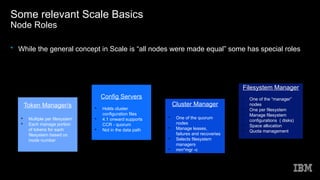
• While the general concept in Scale is “all nodes were made equal” some has special roles
Config Servers

Holds cluster
configuration files

4.1 onward supports
CCR - quorum

Not in the data path
Cluster Manager

One of the quorum
nodes

Manage leases,
failures and recoveries

Selects filesystem
managers

mm*mgr -c
Filesystem Manager

One of the “manager”
nodes

One per filesystem

Manage filesystem
configurations ( disks)

Space allocation

Quota management
Token Manager/s

Multiple per filesystem

Each manage portion
of tokens for each
filesystem based on
inode number
Some relevant Scale Basics
Node Internal Structure
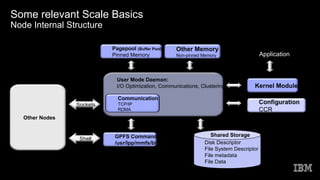
User Mode Daemon:
I/O Optimization, Communications, Clustering Kernel Module
Pagepool (Buffer Pool)
Pinned Memory
Disk Descriptor
File System Descriptor
File metadata
File Data
Application
Shared Storage
Communication
TCP/IP
RDMA
Sockets
GPFS Commands
/usr/lpp/mmfs/bin
Configuration
CCR
Other Memory
Non-pinned Memory
Other Nodes
Shell
Outline
●
Relevant Scale Basics
●
Scale Memory Pools
●
Memory Calculations
●
Is that all?
●
Others
Scale Memory Pools
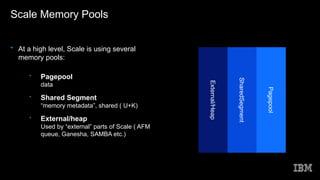
• At a high level, Scale is using several
memory pools:
• Pagepool
data
• Shared Segment
“memory metadata”, shared ( U+K)
• External/heap
Used by “external” parts of Scale ( AFM
queue, Ganesha, SAMBA etc.)
External/Heap
SharedSegment
Pagepool
Scale Memory Pools
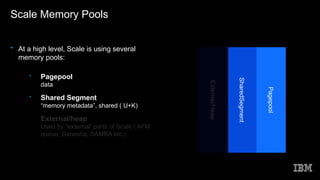
• At a high level, Scale is using several
memory pools:
• Pagepool
data
• Shared Segment
“memory metadata”, shared ( U+K)
• External/heap
Used by “external” parts of Scale ( AFM
queue, Ganesha, SAMBA etc.)
External/Heap
SharedSegment
Pagepool
Scale Memory Pools
Pagepool
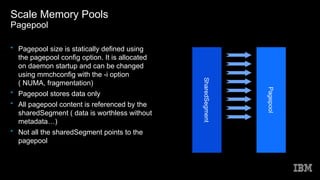
• Pagepool size is statically defined using
the pagepool config option. It is allocated
on daemon startup and can be changed
using mmchconfig with the -i option
( NUMA, fragmentation)
• Pagepool stores data only
• All pagepool content is referenced by the
sharedSegment ( data is worthless without
metadata…)
• Not all the sharedSegment points to the
pagepool
SharedSegment
Pagepool
Scale Memory Pools
SharedSegment
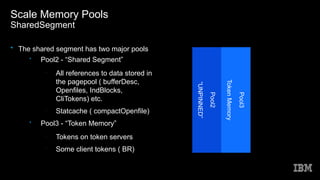
• The shared segment has two major pools
• Pool2 - “Shared Segment”
-
All references to data stored in
the pagepool ( bufferDesc,
Openfiles, IndBlocks,
CliTokens) etc.
-
Statcache ( compactOpenfile)
• Pool3 - “Token Memory”
-
Tokens on token servers
-
Some client tokens ( BR)
Pool2
“UNPINNED”
Pool3
TokenMemory
Scale Memory Pools
SharedSegment
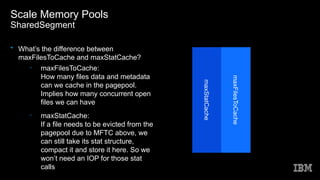
• What’s the difference between
maxFilesToCache and maxStatCache?
– maxFilesToCache:
How many files data and metadata
can we cache in the pagepool.
Implies how many concurrent open
files we can have
– maxStatCache:
If a file needs to be evicted from the
pagepool due to MFTC above, we
can still take its stat structure,
compact it and store it here. So we
won’t need an IOP for those stat
calls
maxStatCache
maxFilesToCache
Outline
●
Relevant Scale Basics
●
Scale Memory Pools
●
Memory Calculations
●
Is that all?
●
Others
Memory Calculations
”So how much memory do I need?”
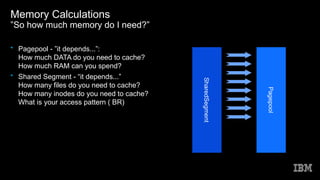
• Pagepool - ”it depends...”:
How much DATA do you need to cache?
How much RAM can you spend?
• Shared Segment - “it depends...”
How many files do you need to cache?
How many inodes do you need to cache?
What is your access pattern ( BR)
SharedSegment
Pagepool
Memory Calculations
SharedSegment
0 10000 20000 30000 40000 50000 60000
100
200
300
400
500
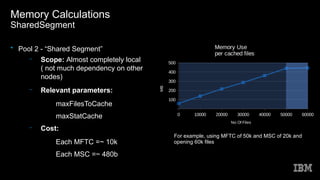
Memory Use
per cached files
No Of Files
MB
• Pool 2 - “Shared Segment”
– Scope: Almost completely local
( not much dependency on other
nodes)
– Relevant parameters:
●
maxFilesToCache
●
maxStatCache
– Cost:
●
Each MFTC =~ 10k
●
Each MSC =~ 480b
For example, using MFTC of 50k and MSC of 20k and
opening 60k files
Memory Calculations
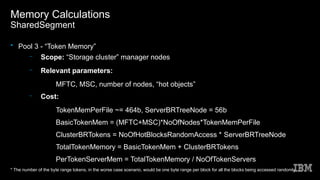
SharedSegment
• Pool 3 - “Token Memory”
– Scope: “Storage cluster” manager nodes
– Relevant parameters:
●
MFTC, MSC, number of nodes, “hot objects”
– Cost:
●
TokenMemPerFile ~= 464b, ServerBRTreeNode = 56b
●
BasicTokenMem = (MFTC+MSC)*NoOfNodes*TokenMemPerFile
●
ClusterBRTokens = NoOfHotBlocksRandomAccess * ServerBRTreeNode
●
TotalTokenMemory = BasicTokenMem + ClusterBRTokens
●
PerTokenServerMem = TotalTokenMemory / NoOfTokenServers
* The number of the byte range tokens, in the worse case scenario, would be one byte range per block for all the blocks being accessed randomly
Memory Calculations
SharedSegment
• Pool 3 - “Token Memory”
– Scope: “Storage cluster” manager nodes
– Relevant parameters:
●
MFTC, MSC, number of nodes, “hot objects”
– Cost:
●
TokenMemPerFile ~= 464b, ServerBRTreeNode = 56b
●
BasicTokenMem = (MFTC+MSC)*NoOfNodes*TokenMemPerFile
●
ClusterBRTokens = NoOfHotBlocksRandomAccess * ServerBRTreeNode
●
TotalTokenMemory = BasicTokenMem + ClusterBRTokens
●
PerTokenServerMem = TotalTokenMemory / NoOfTokenServers
* The number of the byte range tokens, in the worse case scenario, would be one byte range per block for all the blocks being accessed randomly
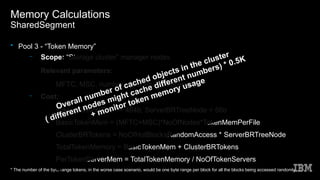
Overall number of cached objects in the cluster
( different nodes might cache different numbers) * 0.5K
+ monitor token memory usage
Memory Calculations
SharedSegment
0 10000 20000 30000 40000 50000 60000
200
400
600
800
1000
1200
Token Server Memory Use
Per cached file
SrvTM SrvTM*25
NoOfFiles
MB
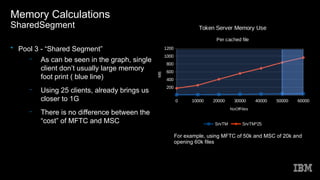
• Pool 3 - “Shared Segment”
– As can be seen in the graph, single
client don’t usually large memory
foot print ( blue line)
– Using 25 clients, already brings us
closer to 1G
– There is no difference between the
“cost” of MFTC and MSC
For example, using MFTC of 50k and MSC of 20k and
opening 60k files
Memory Calculations
SharedSegment
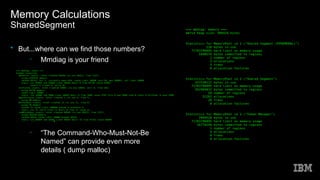
• But...where can we find those numbers?
– Mmdiag is your friend
– “The Command-Who-Must-Not-Be
Named” can provide even more
details ( dump malloc)
Outline
●
Relevant Scale Basics
●
Scale Memory Pools
●
Memory Calculations
●
Is that all?
●
Others
Is that all?
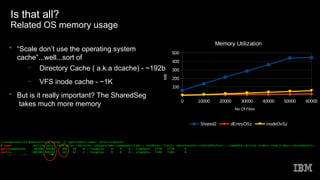
Related OS memory usage
0 10000 20000 30000 40000 50000 60000
100
200
300
400
500
Memory Utilization
Shared2 dEntryOSz inodeOvSz
No Of Files
MB
• “Scale don’t use the operating system
cache”...well...sort of
– Directory Cache ( a.k.a dcache) - ~192b
– VFS inode cache - ~1K
• But is it really important? The SharedSeg
takes much more memory
Outline
●
Relevant Scale Basics
●
Scale Memory Pools
●
Memory Calculations
●
Is that all?( Linux memory)
●
Others
Others
Out of scope here
• TCP Memory
• AFM queue memory
• Policy ( and its affect on cached objects)
• Ganesha (MDCache)
• SAMBA
• Sysmon, zimon
• GUI
• TCT, Archive
• fsck, other maintenance commands
Thank
You

Spectrum Scale Memory Usage

  • 1.
    Spectrum Scale Memory Usage TomerPerry Spectrum Scale Development <tomp@il.ibm.com>
  • 2.
    Outline ● Relevant Scale Basics ● ScaleMemory Pools ● Memory Calculations ● Is that all? ● Others
  • 3.
    Outline ● Relevant Scale Basics ● ScaleMemory Pools ● Memory Calculations ● Is that all? ● Others
  • 4.
    Some relevant ScaleBasics ”The Cluster” • Cluster – A group of operating system instances, or nodes, on which an instance of Spectrum Scale is deployed • Network Shared Disk - Any block storage (disk, partition, or LUN) given to Spectrum Scale for its use • NSD server – A node making an NSD available to other nodes over the network • GPFS filesystem – Combination of data and metadata which is deployed over NSDs and managed by the cluster • Client – A node running Scale Software accessing a filesystem nsd nsd srv nsd nsd nsd srv nsd srv nsd srv CCCCC CCCCC CCCCC CCCCC CCCCC CCCCC CCCCC CCCCC CCCCC CCCCC CCCCC CCCCC CCCCC CCCCC CCCCC
  • 5.
    Some relevant ScaleBasics MultiCluster • A Cluster can share some or all of its filesystems with other clusters • Such cluster can be referred to as “Storage Cluster” • A cluster that don’t have any local filesystems can be referred to as “Client Cluster” • A Client cluster can connect to 31 clusters ( outbound) • A Storage cluster can be mounted by unlimited number of client clusters ( Inbound) – 16383 really. • Client cluster nodes “joins” the storage cluster upon mount CCCCCCCCCCCCCCCCCCCCCCCCCCCCCC CCCCCCCCCCCCCCCCCCCC CCCCCCCCCCCCCCCCCCCCCCCCC CCCCCCCCCCCCCCCCCCCCCCCCCCCCCC CCCCCCCCCCCCCCCCCCCC CCCCCCCCCCCCCCCCCCCCCCCCC CCCCCCCCCCCCCCCCCCCCCCCCCCCCCC CCCCCCCCCCCCCCCCCCCC CCCCCCCCCCCCCCCCCCCCCCCCC CCCCCCCCCCCCCCCCCCCCCCCCCCCCCC CCCCCCCCCCCCCCCCCCCC CCCCCCCCCCCCCCCCCCCCCCCCC CCCCCCCCCCCCCCCCCCCCCCCCC CCCCCCCCCCCCCCCCCCCCCCCCCCCCCC CCCCCCCCCCCCCCCCCCCC CCCCCCCCCCCCCCCCCCCCCCCCC CCCCCCCCCCCCCCCCCCCCCCCCC CCCCCCCCCCCCCCCCCCCCCCCCCCCCCC CCCCCCCCCCCCCCCCCCCC CCCCCCCCCCCCCCCCCCCCCCCCC CCCCCCCCCCCCCCCCCCCCCCCCC CCCCCCCCCCCCCCCCCCCCCCCCCCCCCC CCCCCCCCCCCCCCCCCCCC CCCCCCCCCCCCCCCCCCCCCCCCC CCCCCCCCCCCCCCCCCCCCCCCCC CCCCCCCCCCCCCCCCCCCCCCCCCCCCCC CCCCCCCCCCCCCCCCCCCC CCCCCCCCCCCCCCCCCCCCCCCCC CCCCCCCCCCCCCCCCCCCCCCCCC
  • 6.
    Some relevant ScaleBasics Node Roles • While the general concept in Scale is “all nodes were made equal” some has special roles Config Servers  Holds cluster configuration files  4.1 onward supports CCR - quorum  Not in the data path Cluster Manager  One of the quorum nodes  Manage leases, failures and recoveries  Selects filesystem managers  mm*mgr -c Filesystem Manager  One of the “manager” nodes  One per filesystem  Manage filesystem configurations ( disks)  Space allocation  Quota management Token Manager/s  Multiple per filesystem  Each manage portion of tokens for each filesystem based on inode number
  • 7.
    Some relevant ScaleBasics Node Internal Structure User Mode Daemon: I/O Optimization, Communications, Clustering Kernel Module Pagepool (Buffer Pool) Pinned Memory Disk Descriptor File System Descriptor File metadata File Data Application Shared Storage Communication TCP/IP RDMA Sockets GPFS Commands /usr/lpp/mmfs/bin Configuration CCR Other Memory Non-pinned Memory Other Nodes Shell
  • 8.
    Outline ● Relevant Scale Basics ● ScaleMemory Pools ● Memory Calculations ● Is that all? ● Others
  • 9.
    Scale Memory Pools •At a high level, Scale is using several memory pools: • Pagepool data • Shared Segment “memory metadata”, shared ( U+K) • External/heap Used by “external” parts of Scale ( AFM queue, Ganesha, SAMBA etc.) External/Heap SharedSegment Pagepool
  • 10.
    Scale Memory Pools •At a high level, Scale is using several memory pools: • Pagepool data • Shared Segment “memory metadata”, shared ( U+K) • External/heap Used by “external” parts of Scale ( AFM queue, Ganesha, SAMBA etc.) External/Heap SharedSegment Pagepool
  • 11.
    Scale Memory Pools Pagepool •Pagepool size is statically defined using the pagepool config option. It is allocated on daemon startup and can be changed using mmchconfig with the -i option ( NUMA, fragmentation) • Pagepool stores data only • All pagepool content is referenced by the sharedSegment ( data is worthless without metadata…) • Not all the sharedSegment points to the pagepool SharedSegment Pagepool
  • 12.
    Scale Memory Pools SharedSegment •The shared segment has two major pools • Pool2 - “Shared Segment” - All references to data stored in the pagepool ( bufferDesc, Openfiles, IndBlocks, CliTokens) etc. - Statcache ( compactOpenfile) • Pool3 - “Token Memory” - Tokens on token servers - Some client tokens ( BR) Pool2 “UNPINNED” Pool3 TokenMemory
  • 13.
    Scale Memory Pools SharedSegment •What’s the difference between maxFilesToCache and maxStatCache? – maxFilesToCache: How many files data and metadata can we cache in the pagepool. Implies how many concurrent open files we can have – maxStatCache: If a file needs to be evicted from the pagepool due to MFTC above, we can still take its stat structure, compact it and store it here. So we won’t need an IOP for those stat calls maxStatCache maxFilesToCache
  • 14.
    Outline ● Relevant Scale Basics ● ScaleMemory Pools ● Memory Calculations ● Is that all? ● Others
  • 15.
    Memory Calculations ”So howmuch memory do I need?” • Pagepool - ”it depends...”: How much DATA do you need to cache? How much RAM can you spend? • Shared Segment - “it depends...” How many files do you need to cache? How many inodes do you need to cache? What is your access pattern ( BR) SharedSegment Pagepool
  • 16.
    Memory Calculations SharedSegment 0 1000020000 30000 40000 50000 60000 100 200 300 400 500 Memory Use per cached files No Of Files MB • Pool 2 - “Shared Segment” – Scope: Almost completely local ( not much dependency on other nodes) – Relevant parameters: ● maxFilesToCache ● maxStatCache – Cost: ● Each MFTC =~ 10k ● Each MSC =~ 480b For example, using MFTC of 50k and MSC of 20k and opening 60k files
  • 17.
    Memory Calculations SharedSegment • Pool3 - “Token Memory” – Scope: “Storage cluster” manager nodes – Relevant parameters: ● MFTC, MSC, number of nodes, “hot objects” – Cost: ● TokenMemPerFile ~= 464b, ServerBRTreeNode = 56b ● BasicTokenMem = (MFTC+MSC)*NoOfNodes*TokenMemPerFile ● ClusterBRTokens = NoOfHotBlocksRandomAccess * ServerBRTreeNode ● TotalTokenMemory = BasicTokenMem + ClusterBRTokens ● PerTokenServerMem = TotalTokenMemory / NoOfTokenServers * The number of the byte range tokens, in the worse case scenario, would be one byte range per block for all the blocks being accessed randomly
  • 18.
    Memory Calculations SharedSegment • Pool3 - “Token Memory” – Scope: “Storage cluster” manager nodes – Relevant parameters: ● MFTC, MSC, number of nodes, “hot objects” – Cost: ● TokenMemPerFile ~= 464b, ServerBRTreeNode = 56b ● BasicTokenMem = (MFTC+MSC)*NoOfNodes*TokenMemPerFile ● ClusterBRTokens = NoOfHotBlocksRandomAccess * ServerBRTreeNode ● TotalTokenMemory = BasicTokenMem + ClusterBRTokens ● PerTokenServerMem = TotalTokenMemory / NoOfTokenServers * The number of the byte range tokens, in the worse case scenario, would be one byte range per block for all the blocks being accessed randomly Overall number of cached objects in the cluster ( different nodes might cache different numbers) * 0.5K + monitor token memory usage
  • 19.
    Memory Calculations SharedSegment 0 1000020000 30000 40000 50000 60000 200 400 600 800 1000 1200 Token Server Memory Use Per cached file SrvTM SrvTM*25 NoOfFiles MB • Pool 3 - “Shared Segment” – As can be seen in the graph, single client don’t usually large memory foot print ( blue line) – Using 25 clients, already brings us closer to 1G – There is no difference between the “cost” of MFTC and MSC For example, using MFTC of 50k and MSC of 20k and opening 60k files
  • 20.
    Memory Calculations SharedSegment • But...wherecan we find those numbers? – Mmdiag is your friend – “The Command-Who-Must-Not-Be Named” can provide even more details ( dump malloc)
  • 21.
    Outline ● Relevant Scale Basics ● ScaleMemory Pools ● Memory Calculations ● Is that all? ● Others
  • 22.
    Is that all? RelatedOS memory usage 0 10000 20000 30000 40000 50000 60000 100 200 300 400 500 Memory Utilization Shared2 dEntryOSz inodeOvSz No Of Files MB • “Scale don’t use the operating system cache”...well...sort of – Directory Cache ( a.k.a dcache) - ~192b – VFS inode cache - ~1K • But is it really important? The SharedSeg takes much more memory
  • 23.
    Outline ● Relevant Scale Basics ● ScaleMemory Pools ● Memory Calculations ● Is that all?( Linux memory) ● Others
  • 24.
    Others Out of scopehere • TCP Memory • AFM queue memory • Policy ( and its affect on cached objects) • Ganesha (MDCache) • SAMBA • Sysmon, zimon • GUI • TCT, Archive • fsck, other maintenance commands
  • 25.