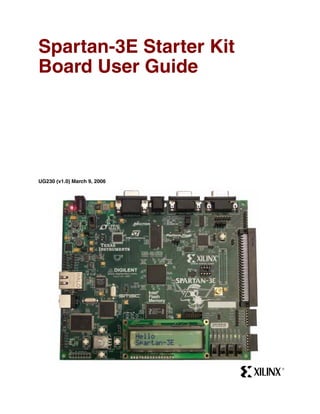
Spartan-3E Starter Kit
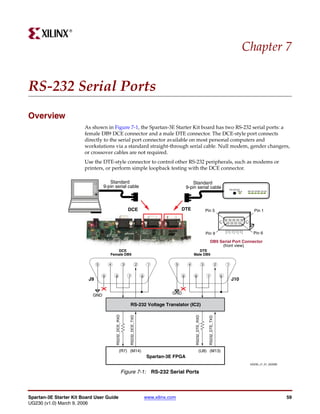
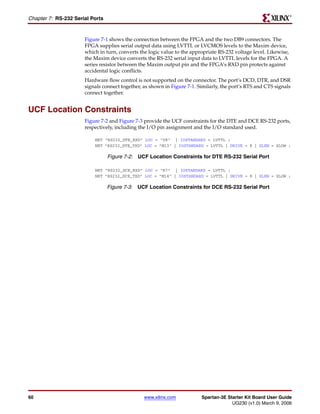
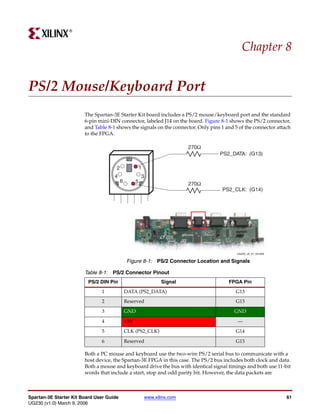
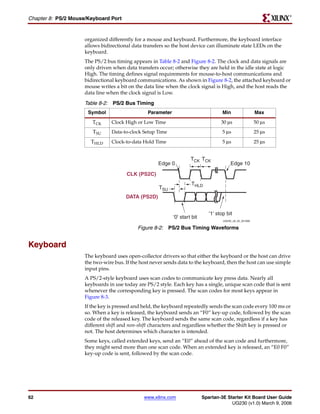
Board User Guide


                             Click a component to jump to the
                             related documentation. Not all
UG230 (v1.0) March 9, 2006   components have active links.


                                                                R
R


Xilinx is disclosing this Document and Intellectual Property (hereinafter “the Design”) to you for use in the development of designs to operate
on, or interface with Xilinx FPGAs. Except as stated herein, none of the Design may be copied, reproduced, distributed, republished,
downloaded, displayed, posted, or transmitted in any form or by any means including, but not limited to, electronic, mechanical,
photocopying, recording, or otherwise, without the prior written consent of Xilinx. Any unauthorized use of the Design may violate copyright
laws, trademark laws, the laws of privacy and publicity, and communications regulations and statutes.
Xilinx does not assume any liability arising out of the application or use of the Design; nor does Xilinx convey any license under its patents,
copyrights, or any rights of others. You are responsible for obtaining any rights you may require for your use or implementation of the Design.
Xilinx reserves the right to make changes, at any time, to the Design as deemed desirable in the sole discretion of Xilinx. Xilinx assumes no
obligation to correct any errors contained herein or to advise you of any correction if such be made. Xilinx will not assume any liability for the
accuracy or correctness of any engineering or technical support or assistance provided to you in connection with the Design.
THE DESIGN IS PROVIDED “AS IS” WITH ALL FAULTS, AND THE ENTIRE RISK AS TO ITS FUNCTION AND IMPLEMENTATION IS
WITH YOU. YOU ACKNOWLEDGE AND AGREE THAT YOU HAVE NOT RELIED ON ANY ORAL OR WRITTEN INFORMATION OR
ADVICE, WHETHER GIVEN BY XILINX, OR ITS AGENTS OR EMPLOYEES. XILINX MAKES NO OTHER WARRANTIES, WHETHER
EXPRESS, IMPLIED, OR STATUTORY, REGARDING THE DESIGN, INCLUDING ANY WARRANTIES OF MERCHANTABILITY, FITNESS
FOR A PARTICULAR PURPOSE, TITLE, AND NONINFRINGEMENT OF THIRD-PARTY RIGHTS.
IN NO EVENT WILL XILINX BE LIABLE FOR ANY CONSEQUENTIAL, INDIRECT, EXEMPLARY, SPECIAL, OR INCIDENTAL DAMAGES,
INCLUDING ANY LOST DATA AND LOST PROFITS, ARISING FROM OR RELATING TO YOUR USE OF THE DESIGN, EVEN IF YOU
HAVE BEEN ADVISED OF THE POSSIBILITY OF SUCH DAMAGES. THE TOTAL CUMULATIVE LIABILITY OF XILINX IN CONNECTION
WITH YOUR USE OF THE DESIGN, WHETHER IN CONTRACT OR TORT OR OTHERWISE, WILL IN NO EVENT EXCEED THE
AMOUNT OF FEES PAID BY YOU TO XILINX HEREUNDER FOR USE OF THE DESIGN. YOU ACKNOWLEDGE THAT THE FEES, IF
ANY, REFLECT THE ALLOCATION OF RISK SET FORTH IN THIS AGREEMENT AND THAT XILINX WOULD NOT MAKE AVAILABLE
THE DESIGN TO YOU WITHOUT THESE LIMITATIONS OF LIABILITY.
The Design is not designed or intended for use in the development of on-line control equipment in hazardous environments requiring fail-
safe controls, such as in the operation of nuclear facilities, aircraft navigation or communications systems, air traffic control, life support, or
weapons systems (“High-Risk Applications”). Xilinx specifically disclaims any express or implied warranties of fitness for such High-Risk
Applications. You represent that use of the Design in such High-Risk Applications is fully at your risk.
© 2002-2006 Xilinx, Inc. All rights reserved. XILINX, the Xilinx logo, and other designated brands included herein are trademarks of Xilinx,
Inc. All other trademarks are the property of their respective owners.


Revision History
The following table shows the revision history for this document.

      Date             Version                                                         Revision
   03/09/06               1.0a          Initial release.


Spartan-3E Starter Kit Board User Guide                         www.xilinx.com                                    UG230 (v1.0) March 9, 2006
Table of Contents

        Preface: About This Guide
               Acknowledgements . . . . . . . . . . . . . . . . . . . . . . . . . . . . . . . . . . . . . . . . . . . . . . . . . . . . . . . . . . 9
               Guide Contents . . . . . . . . . . . . . . . . . . . . . . . . . . . . . . . . . . . . . . . . . . . . . . . . . . . . . . . . . . . . . . 9
               Additional Resources . . . . . . . . . . . . . . . . . . . . . . . . . . . . . . . . . . . . . . . . . . . . . . . . . . . . . . . 10

        Chapter 1: Introduction and Overview
               Choose the Starter Kit Board for Your Needs. . . . . . . . . . . . . . . . . . . . . . . . . . . . . . . . . 11
                       Spartan-3E FPGA Features and Embedded Processing Functions . . . . . . . . . . . . . . . . 11
                       Learning Xilinx FPGA, CPLD, and ISE Development Software Basics . . . . . . . . . . . . 11
                       Advanced Spartan-3 Generation Development Boards . . . . . . . . . . . . . . . . . . . . . . . . . 11
               Key Components and Features . . . . . . . . . . . . . . . . . . . . . . . . . . . . . . . . . . . . . . . . . . . . . . 12
               Design Trade-Offs . . . . . . . . . . . . . . . . . . . . . . . . . . . . . . . . . . . . . . . . . . . . . . . . . . . . . . . . . . 13
                       Configuration Methods Galore! . . . . . . . . . . . . . . . . . . . . . . . . . . . . . . . . . . . . . . . . . . . . . 13
                       Voltages for all Applications . . . . . . . . . . . . . . . . . . . . . . . . . . . . . . . . . . . . . . . . . . . . . . . 13
               Related Resources . . . . . . . . . . . . . . . . . . . . . . . . . . . . . . . . . . . . . . . . . . . . . . . . . . . . . . . . . . . 13

        Chapter 2: Switches, Buttons, and Knob
               Slide Switches . . . . . . . . . . . . . . . . . . . . . . . . . . . . . . . . . . . . . . . . . . . . . . . . . . . . . . . . . . . . . . 15
                       Locations and Labels . . . . . . . . . . . . . . . . . . . . . . . . . . . . . . . . . . . . . . . . . . . . . . . . . . . . . . 15
                       Operation. . . . . . . . . . . . . . . . . . . . . . . . . . . . . . . . . . . . . . . . . . . . . . . . . . . . . . . . . . . . . . . . 15
                       UCF Location Constraints. . . . . . . . . . . . . . . . . . . . . . . . . . . . . . . . . . . . . . . . . . . . . . . . . . 15
               Push-Button Switches . . . . . . . . . . . . . . . . . . . . . . . . . . . . . . . . . . . . . . . . . . . . . . . . . . . . . . . 16
                       Locations and Labels . . . . . . . . . . . . . . . . . . . . . . . . . . . . . . . . . . . . . . . . . . . . . . . . . . . . . . 16
                       Operation. . . . . . . . . . . . . . . . . . . . . . . . . . . . . . . . . . . . . . . . . . . . . . . . . . . . . . . . . . . . . . . . 16
                       UCF Location Constraints. . . . . . . . . . . . . . . . . . . . . . . . . . . . . . . . . . . . . . . . . . . . . . . . . . 17
               Rotary Push-Button Switch . . . . . . . . . . . . . . . . . . . . . . . . . . . . . . . . . . . . . . . . . . . . . . . . . . 17
                       Locations and Labels . . . . . . . . . . . . . . . . . . . . . . . . . . . . . . . . . . . . . . . . . . . . . . . . . . . . . .           17
                       Operation. . . . . . . . . . . . . . . . . . . . . . . . . . . . . . . . . . . . . . . . . . . . . . . . . . . . . . . . . . . . . . . .   17
                           Push-Button Switch . . . . . . . . . . . . . . . . . . . . . . . . . . . . . . . . . . . . . . . . . . . . . . . . . . . .             17
                           Rotary Shaft Encoder . . . . . . . . . . . . . . . . . . . . . . . . . . . . . . . . . . . . . . . . . . . . . . . . . . .             18
                       UCF Location Constraints. . . . . . . . . . . . . . . . . . . . . . . . . . . . . . . . . . . . . . . . . . . . . . . . . .                19
               Discrete LEDs . . . . . . . . . . . . . . . . . . . . . . . . . . . . . . . . . . . . . . . . . . . . . . . . . . . . . . . . . . . . . . . 19
                       Locations and Labels . . . . . . . . . . . . . . . . . . . . . . . . . . . . . . . . . . . . . . . . . . . . . . . . . . . . . . 19
                       Operation. . . . . . . . . . . . . . . . . . . . . . . . . . . . . . . . . . . . . . . . . . . . . . . . . . . . . . . . . . . . . . . . 20
                       UCF Location Constraints. . . . . . . . . . . . . . . . . . . . . . . . . . . . . . . . . . . . . . . . . . . . . . . . . . 20
               Related Resources . . . . . . . . . . . . . . . . . . . . . . . . . . . . . . . . . . . . . . . . . . . . . . . . . . . . . . . . . . . 20

        Chapter 3: Clock Sources
               Overview . . . . . . . . . . . . . . . . . . . . . . . . . . . . . . . . . . . . . . . . . . . . . . . . . . . . . . . . . . . . . . . . . . .     21
               Clock Connections . . . . . . . . . . . . . . . . . . . . . . . . . . . . . . . . . . . . . . . . . . . . . . . . . . . . . . . . . .              22
               Voltage Control . . . . . . . . . . . . . . . . . . . . . . . . . . . . . . . . . . . . . . . . . . . . . . . . . . . . . . . . . . . . .          22
               50 MHz On-Board Oscillator . . . . . . . . . . . . . . . . . . . . . . . . . . . . . . . . . . . . . . . . . . . . . . . .                         22


Spartan-3E Starter Kit Board User Guide                                 www.xilinx.com                                                                                 3
UG230 (v1.0) March 9, 2006
R


        Auxiliary Clock Oscillator Socket . . . . . . . . . . . . . . . . . . . . . . . . . . . . . . . . . . . . . . . . . . . 22
        SMA Clock Input or Output Connector . . . . . . . . . . . . . . . . . . . . . . . . . . . . . . . . . . . . . . 22
        UCF Constraints . . . . . . . . . . . . . . . . . . . . . . . . . . . . . . . . . . . . . . . . . . . . . . . . . . . . . . . . . . . . 22
                Location . . . . . . . . . . . . . . . . . . . . . . . . . . . . . . . . . . . . . . . . . . . . . . . . . . . . . . . . . . . . . . . . . 22
                Clock Period Constraints . . . . . . . . . . . . . . . . . . . . . . . . . . . . . . . . . . . . . . . . . . . . . . . . . . 23
        Related Resources . . . . . . . . . . . . . . . . . . . . . . . . . . . . . . . . . . . . . . . . . . . . . . . . . . . . . . . . . . . 23

    Chapter 4: FPGA Configuration Options
        Configuration Mode Jumpers . . . . . . . . . . . . . . . . . . . . . . . . . . . . . . . . . . . . . . . . . . . . . . .                         26
        PROG Push Button. . . . . . . . . . . . . . . . . . . . . . . . . . . . . . . . . . . . . . . . . . . . . . . . . . . . . . . . . .              27
        DONE Pin LED . . . . . . . . . . . . . . . . . . . . . . . . . . . . . . . . . . . . . . . . . . . . . . . . . . . . . . . . . . . . .           27
        Programming the FPGA, CPLD, or Platform Flash PROM via USB . . . . . . . . . . .                                                                 28
                Connecting the USB Cable . . . . . . . . . . . . . . . . . . . . . . . . . . . . . . . . . . . . . . . . . . . . . . . . .               28
                Programming via iMPACT . . . . . . . . . . . . . . . . . . . . . . . . . . . . . . . . . . . . . . . . . . . . . . . . .                 29
                Programming Platform Flash PROM via USB . . . . . . . . . . . . . . . . . . . . . . . . . . . . . . . . .                                31
                    Generating the FPGA Configuration Bitstream File . . . . . . . . . . . . . . . . . . . . . . . . . . . .                             31
                    Generating the PROM File . . . . . . . . . . . . . . . . . . . . . . . . . . . . . . . . . . . . . . . . . . . . . . .               33
                    Programming the Platform Flash PROM . . . . . . . . . . . . . . . . . . . . . . . . . . . . . . . . . . . .                          37

    Chapter 5: Character LCD Screen
        Overview . . . . . . . . . . . . . . . . . . . . . . . . . . . . . . . . . . . . . . . . . . . . . . . . . . . . . . . . . . . . . . . . . . .   41
        Character LCD Interface Signals . . . . . . . . . . . . . . . . . . . . . . . . . . . . . . . . . . . . . . . . . . . . .                        42
        Voltage Compatibility. . . . . . . . . . . . . . . . . . . . . . . . . . . . . . . . . . . . . . . . . . . . . . . . . . . . . . .               42
        Interaction with Intel StrataFlash . . . . . . . . . . . . . . . . . . . . . . . . . . . . . . . . . . . . . . . . . . . .                       42
        UCF Location Constraints . . . . . . . . . . . . . . . . . . . . . . . . . . . . . . . . . . . . . . . . . . . . . . . . . . .                   43
        LCD Controller . . . . . . . . . . . . . . . . . . . . . . . . . . . . . . . . . . . . . . . . . . . . . . . . . . . . . . . . . . . . .         43
                Memory Map . . . . . . . . . . . . . . . . . . . . . . . . . . . . . . . . . . . . . . . . . . . . . . . . . . . . . . . . . . . .       43
                   DD RAM . . . . . . . . . . . . . . . . . . . . . . . . . . . . . . . . . . . . . . . . . . . . . . . . . . . . . . . . . . . . .      43
                   CG ROM . . . . . . . . . . . . . . . . . . . . . . . . . . . . . . . . . . . . . . . . . . . . . . . . . . . . . . . . . . . . .      44
                   CG RAM . . . . . . . . . . . . . . . . . . . . . . . . . . . . . . . . . . . . . . . . . . . . . . . . . . . . . . . . . . . . .      45
                Command Set . . . . . . . . . . . . . . . . . . . . . . . . . . . . . . . . . . . . . . . . . . . . . . . . . . . . . . . . . . . .      46
                   Disabled . . . . . . . . . . . . . . . . . . . . . . . . . . . . . . . . . . . . . . . . . . . . . . . . . . . . . . . . . . . . .    47
                   Clear Display . . . . . . . . . . . . . . . . . . . . . . . . . . . . . . . . . . . . . . . . . . . . . . . . . . . . . . . . .       47
                   Return Cursor Home . . . . . . . . . . . . . . . . . . . . . . . . . . . . . . . . . . . . . . . . . . . . . . . . . . .              47
                   Entry Mode Set . . . . . . . . . . . . . . . . . . . . . . . . . . . . . . . . . . . . . . . . . . . . . . . . . . . . . . .          47
                   Display On/Off . . . . . . . . . . . . . . . . . . . . . . . . . . . . . . . . . . . . . . . . . . . . . . . . . . . . . . .          48
                   Cursor and Display Shift . . . . . . . . . . . . . . . . . . . . . . . . . . . . . . . . . . . . . . . . . . . . . . . .              48
                   Function Set . . . . . . . . . . . . . . . . . . . . . . . . . . . . . . . . . . . . . . . . . . . . . . . . . . . . . . . . . .      49
                   Set CG RAM Address . . . . . . . . . . . . . . . . . . . . . . . . . . . . . . . . . . . . . . . . . . . . . . . . . . .              49
                   Set DD RAM Address . . . . . . . . . . . . . . . . . . . . . . . . . . . . . . . . . . . . . . . . . . . . . . . . . . .              49
                   Read Busy Flag and Address . . . . . . . . . . . . . . . . . . . . . . . . . . . . . . . . . . . . . . . . . . . . .                  49
                   Write Data to CG RAM or DD RAM . . . . . . . . . . . . . . . . . . . . . . . . . . . . . . . . . . . . . . . .                        49
                   Read Data from CG RAM or DD RAM . . . . . . . . . . . . . . . . . . . . . . . . . . . . . . . . . . . . .                             50
        Operation . . . . . . . . . . . . . . . . . . . . . . . . . . . . . . . . . . . . . . . . . . . . . . . . . . . . . . . . . . . . . . . . . . . 50
                Four-Bit Data Interface . . . . . . . . . . . . . . . . . . . . . . . . . . . . . . . . . . . . . . . . . . . . . . . . . . . .          50
                Transferring 8-Bit Data over the 4-Bit Interface . . . . . . . . . . . . . . . . . . . . . . . . . . . . . . .                           51
                Initializing the Display . . . . . . . . . . . . . . . . . . . . . . . . . . . . . . . . . . . . . . . . . . . . . . . . . . . .         51
                      Power-On Initialization . . . . . . . . . . . . . . . . . . . . . . . . . . . . . . . . . . . . . . . . . . . . . . . . .          51
                      Display Configuration . . . . . . . . . . . . . . . . . . . . . . . . . . . . . . . . . . . . . . . . . . . . . . . . . .          51


4                                                                www.xilinx.com                           Spartan-3E Starter Kit Board User Guide
                                                                                                                       UG230 (v1.0) March 9, 2006
R


                        Writing Data to the Display . . . . . . . . . . . . . . . . . . . . . . . . . . . . . . . . . . . . . . . . . . . . . . . . 52
                        Disabling the Unused LCD . . . . . . . . . . . . . . . . . . . . . . . . . . . . . . . . . . . . . . . . . . . . . . . . . 52
                Related Resources . . . . . . . . . . . . . . . . . . . . . . . . . . . . . . . . . . . . . . . . . . . . . . . . . . . . . . . . . . . 52

        Chapter 6: VGA Display Port
                Signal Timing for a 60 Hz, 640x480 VGA Display . . . . . . . . . . . . . . . . . . . . . . . . . . . .                                                54
                VGA Signal Timing . . . . . . . . . . . . . . . . . . . . . . . . . . . . . . . . . . . . . . . . . . . . . . . . . . . . . . . .                     56
                UCF Location Constraints . . . . . . . . . . . . . . . . . . . . . . . . . . . . . . . . . . . . . . . . . . . . . . . . . . .                        57
                Related Resources . . . . . . . . . . . . . . . . . . . . . . . . . . . . . . . . . . . . . . . . . . . . . . . . . . . . . . . . . . .               57

        Chapter 7: RS-232 Serial Ports
                Overview . . . . . . . . . . . . . . . . . . . . . . . . . . . . . . . . . . . . . . . . . . . . . . . . . . . . . . . . . . . . . . . . . . . 59
                UCF Location Constraints . . . . . . . . . . . . . . . . . . . . . . . . . . . . . . . . . . . . . . . . . . . . . . . . . . . 60

        Chapter 8: PS/2 Mouse/Keyboard Port
                Keyboard . . . . . . . . . . . . . . . . . . . . . . . . . . . . . . . . . . . . . . . . . . . . . . . . . . . . . . . . . . . . . . . . . . .        62
                Mouse . . . . . . . . . . . . . . . . . . . . . . . . . . . . . . . . . . . . . . . . . . . . . . . . . . . . . . . . . . . . . . . . . . . . . .     64
                Voltage Supply . . . . . . . . . . . . . . . . . . . . . . . . . . . . . . . . . . . . . . . . . . . . . . . . . . . . . . . . . . . . .              65
                UCF Location Constraints . . . . . . . . . . . . . . . . . . . . . . . . . . . . . . . . . . . . . . . . . . . . . . . . . . .                        65
                Related Resources . . . . . . . . . . . . . . . . . . . . . . . . . . . . . . . . . . . . . . . . . . . . . . . . . . . . . . . . . . .               65

        Chapter 9: Digital to Analog Converter (DAC)
                SPI Communication . . . . . . . . . . . . . . . . . . . . . . . . . . . . . . . . . . . . . . . . . . . . . . . . . . . . . . . . . 67
                        Interface Signals . . . . . . . . . . . . . . . . . . . . . . . . . . . . . . . . . . . . . . . . . . . . . . . . . . . . . . . . . .         68
                        Disable Other Devices on the SPI Bus to Avoid Contention . . . . . . . . . . . . . . . . . . . . .                                            68
                        SPI Communication Details . . . . . . . . . . . . . . . . . . . . . . . . . . . . . . . . . . . . . . . . . . . . . . . .                     69
                        Communication Protocol . . . . . . . . . . . . . . . . . . . . . . . . . . . . . . . . . . . . . . . . . . . . . . . . . .                    69
                Specifying the DAC Output Voltage . . . . . . . . . . . . . . . . . . . . . . . . . . . . . . . . . . . . . . . . . 70
                        DAC Outputs A and B . . . . . . . . . . . . . . . . . . . . . . . . . . . . . . . . . . . . . . . . . . . . . . . . . . . . 70
                        DAC Outputs C and D . . . . . . . . . . . . . . . . . . . . . . . . . . . . . . . . . . . . . . . . . . . . . . . . . . . . 70
                UCF Location Constraints . . . . . . . . . . . . . . . . . . . . . . . . . . . . . . . . . . . . . . . . . . . . . . . . . . . 71
                Related Resources . . . . . . . . . . . . . . . . . . . . . . . . . . . . . . . . . . . . . . . . . . . . . . . . . . . . . . . . . . . 71

        Chapter 10: Analog Capture Circuit
                Digital Outputs from Analog Inputs . . . . . . . . . . . . . . . . . . . . . . . . . . . . . . . . . . . . . . . . . 74
                Programmable Pre-Amplifier . . . . . . . . . . . . . . . . . . . . . . . . . . . . . . . . . . . . . . . . . . . . . . . . 75
                        Interface . . . . . . . . . . . . . . . . . . . . . . . . . . . . . . . . . . . . . . . . . . . . . . . . . . . . . . . . . . . . . . . . .   75
                        Programmable Gain . . . . . . . . . . . . . . . . . . . . . . . . . . . . . . . . . . . . . . . . . . . . . . . . . . . . . . .               75
                        SPI Control Interface . . . . . . . . . . . . . . . . . . . . . . . . . . . . . . . . . . . . . . . . . . . . . . . . . . . . . .             76
                        UCF Location Constraints. . . . . . . . . . . . . . . . . . . . . . . . . . . . . . . . . . . . . . . . . . . . . . . . . .                   77
                Analog to Digital Converter (ADC) . . . . . . . . . . . . . . . . . . . . . . . . . . . . . . . . . . . . . . . . . . 77
                        Interface . . . . . . . . . . . . . . . . . . . . . . . . . . . . . . . . . . . . . . . . . . . . . . . . . . . . . . . . . . . . . . . . . 77
                        SPI Control Interface . . . . . . . . . . . . . . . . . . . . . . . . . . . . . . . . . . . . . . . . . . . . . . . . . . . . . . 77
                        UCF Location Constraints. . . . . . . . . . . . . . . . . . . . . . . . . . . . . . . . . . . . . . . . . . . . . . . . . . 78
                Disable Other Devices on the SPI Bus to Avoid Contention . . . . . . . . . . . . . . . . . . 79


Spartan-3E Starter Kit Board User Guide                                   www.xilinx.com                                                                                   5
UG230 (v1.0) March 9, 2006
R


        Connecting Analog Inputs . . . . . . . . . . . . . . . . . . . . . . . . . . . . . . . . . . . . . . . . . . . . . . . . . . 79
        Related Resources . . . . . . . . . . . . . . . . . . . . . . . . . . . . . . . . . . . . . . . . . . . . . . . . . . . . . . . . . . . 79

    Chapter 11: Intel StrataFlash Parallel NOR Flash PROM
        StrataFlash Connections . . . . . . . . . . . . . . . . . . . . . . . . . . . . . . . . . . . . . . . . . . . . . . . . . . . . . 82
        Shared Connections . . . . . . . . . . . . . . . . . . . . . . . . . . . . . . . . . . . . . . . . . . . . . . . . . . . . . . . . . 85
               Character LCD . . . . . . . . . . . . . . . . . . . . . . . . . . . . . . . . . . . . . . . . . . . . . . . . . . . . . . . . . . . 85
               Xilinx XC2C64A CPLD . . . . . . . . . . . . . . . . . . . . . . . . . . . . . . . . . . . . . . . . . . . . . . . . . . . . 85
               SPI Data Line . . . . . . . . . . . . . . . . . . . . . . . . . . . . . . . . . . . . . . . . . . . . . . . . . . . . . . . . . . . . 85
        UCF Location Constraints . . . . . . . . . . . . . . . . . . . . . . . . . . . . . . . . . . . . . . . . . . . . . . . . . . . 86
               Address . . . . . . . . . . . . . . . . . . . . . . . . . . . . . . . . . . . . . . . . . . . . . . . . . . . . . . . . . . . . . . . . . 86
               Data . . . . . . . . . . . . . . . . . . . . . . . . . . . . . . . . . . . . . . . . . . . . . . . . . . . . . . . . . . . . . . . . . . . . 86
               Control . . . . . . . . . . . . . . . . . . . . . . . . . . . . . . . . . . . . . . . . . . . . . . . . . . . . . . . . . . . . . . . . . . 87
        Setting the FPGA Mode Select Pins . . . . . . . . . . . . . . . . . . . . . . . . . . . . . . . . . . . . . . . . . . 87
        Related Resources . . . . . . . . . . . . . . . . . . . . . . . . . . . . . . . . . . . . . . . . . . . . . . . . . . . . . . . . . . . 87

    Chapter 12: SPI Serial Flash
        UCF Location Constraints . . . . . . . . . . . . . . . . . . . . . . . . . . . . . . . . . . . . . . . . . . . . . . . . . . . 89
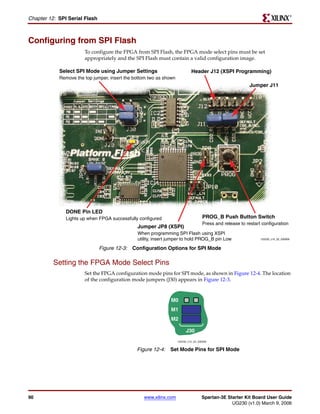
        Configuring from SPI Flash . . . . . . . . . . . . . . . . . . . . . . . . . . . . . . . . . . . . . . . . . . . . . . . . . 90
               Setting the FPGA Mode Select Pins . . . . . . . . . . . . . . . . . . . . . . . . . . . . . . . . . . . . . . . . . .                        90
               Creating an SPI Serial Flash PROM File . . . . . . . . . . . . . . . . . . . . . . . . . . . . . . . . . . . . . .                           91
                    Setting the Configuration Clock Rate . . . . . . . . . . . . . . . . . . . . . . . . . . . . . . . . . . . . . . .                      91
                    Formatting an SPI Flash PROM File . . . . . . . . . . . . . . . . . . . . . . . . . . . . . . . . . . . . . . . .                       92
               Downloading the Design to SPI Flash . . . . . . . . . . . . . . . . . . . . . . . . . . . . . . . . . . . . . . .                            96
               Downloading the SPI Flash using XSPI . . . . . . . . . . . . . . . . . . . . . . . . . . . . . . . . . . . . . .                             96
                    Download and Install the XSPI Programming Utility. . . . . . . . . . . . . . . . . . . . . . . . . . .                                  96
                    Attach a JTAG Parallel Programming Cable . . . . . . . . . . . . . . . . . . . . . . . . . . . . . . . . . .                            96
                    Insert Jumper on JP8 and Hold PROG_B Low . . . . . . . . . . . . . . . . . . . . . . . . . . . . . . . .                                97
                    Programming the SPI Flash with the XSPI Software . . . . . . . . . . . . . . . . . . . . . . . . . . . .                                98
        Additional Design Details . . . . . . . . . . . . . . . . . . . . . . . . . . . . . . . . . . . . . . . . . . . . . . . . . . . 99
               Shared SPI Bus with Peripherals . . . . . . . . . . . . . . . . . . . . . . . . . . . . . . . . . . . . . . . . . . . . 99
               Other SPI Flash Control Signals . . . . . . . . . . . . . . . . . . . . . . . . . . . . . . . . . . . . . . . . . . . . 100
               Variant Select Pins, VS[2:0] . . . . . . . . . . . . . . . . . . . . . . . . . . . . . . . . . . . . . . . . . . . . . . . . 100
               Jumper Block J11 . . . . . . . . . . . . . . . . . . . . . . . . . . . . . . . . . . . . . . . . . . . . . . . . . . . . . . . . 100
               Programming Header J12 . . . . . . . . . . . . . . . . . . . . . . . . . . . . . . . . . . . . . . . . . . . . . . . . . 100
               Multi-Package Layout . . . . . . . . . . . . . . . . . . . . . . . . . . . . . . . . . . . . . . . . . . . . . . . . . . . . 100
        Related Resources . . . . . . . . . . . . . . . . . . . . . . . . . . . . . . . . . . . . . . . . . . . . . . . . . . . . . . . . . . 102

    Chapter 13: DDR SDRAM
        DDR SDRAM Connections . . . . . . . . . . . . . . . . . . . . . . . . . . . . . . . . . . . . . . . . . . . . . . . . 104
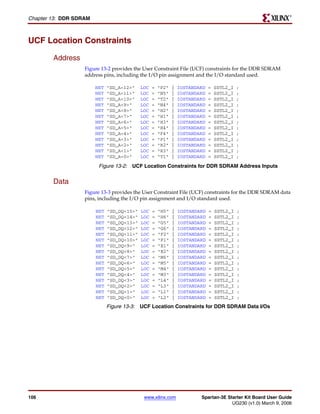
        UCF Location Constraints . . . . . . . . . . . . . . . . . . . . . . . . . . . . . . . . . . . . . . . . . . . . . . . . . . 106
               Address . . . . . . . . . . . . . . . . . . . . . . . . . . . . . . . . . . . . . . . . . . . . . . . . . . . . . . . . . . . . . . . .      106
               Data . . . . . . . . . . . . . . . . . . . . . . . . . . . . . . . . . . . . . . . . . . . . . . . . . . . . . . . . . . . . . . . . . . .   106
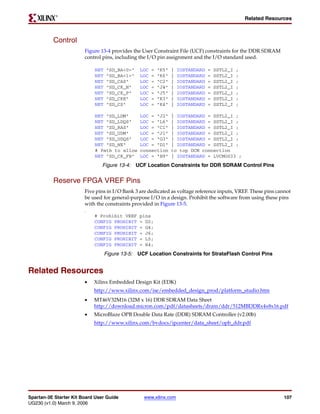
               Control . . . . . . . . . . . . . . . . . . . . . . . . . . . . . . . . . . . . . . . . . . . . . . . . . . . . . . . . . . . . . . . . .    107
               Reserve FPGA VREF Pins . . . . . . . . . . . . . . . . . . . . . . . . . . . . . . . . . . . . . . . . . . . . . . . . .                     107
        Related Resources . . . . . . . . . . . . . . . . . . . . . . . . . . . . . . . . . . . . . . . . . . . . . . . . . . . . . . . . . . 107


6                                                                www.xilinx.com                             Spartan-3E Starter Kit Board User Guide
                                                                                                                         UG230 (v1.0) March 9, 2006
R


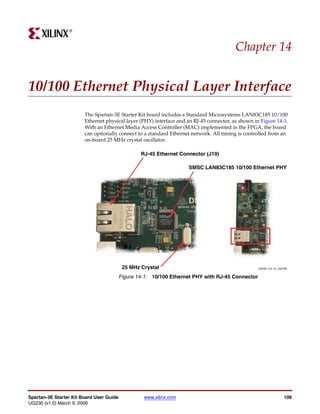
        Chapter 14: 10/100 Ethernet Physical Layer Interface
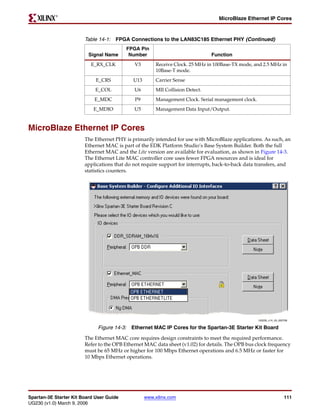
                Ethernet PHY Connections . . . . . . . . . . . . . . . . . . . . . . . . . . . . . . . . . . . . . . . . . . . . . . . . .                   110
                MicroBlaze Ethernet IP Cores . . . . . . . . . . . . . . . . . . . . . . . . . . . . . . . . . . . . . . . . . . . . . .                     111
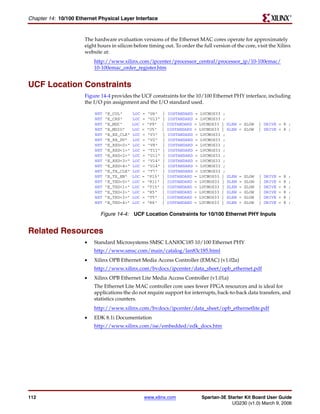
                UCF Location Constraints . . . . . . . . . . . . . . . . . . . . . . . . . . . . . . . . . . . . . . . . . . . . . . . . . .                 112
                Related Resources . . . . . . . . . . . . . . . . . . . . . . . . . . . . . . . . . . . . . . . . . . . . . . . . . . . . . . . . . .        112

        Chapter 15: Expansion Connectors
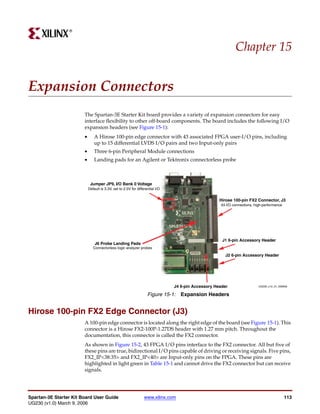
                Hirose 100-pin FX2 Edge Connector (J3) . . . . . . . . . . . . . . . . . . . . . . . . . . . . . . . . . . . . . 113
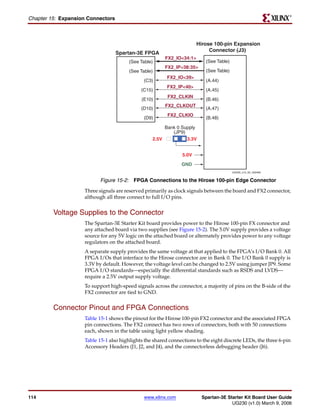
                       Voltage Supplies to the Connector . . . . . . . . . . . . . . . . . . . . . . . . . . . . . . . . . . . . . . . . .                   114
                       Connector Pinout and FPGA Connections . . . . . . . . . . . . . . . . . . . . . . . . . . . . . . . . . . .                           114
                       Compatible Board . . . . . . . . . . . . . . . . . . . . . . . . . . . . . . . . . . . . . . . . . . . . . . . . . . . . . . .        116
                       Mating Receptacle Connectors . . . . . . . . . . . . . . . . . . . . . . . . . . . . . . . . . . . . . . . . . . . . .                116
                       Differential I/O . . . . . . . . . . . . . . . . . . . . . . . . . . . . . . . . . . . . . . . . . . . . . . . . . . . . . . . . .    116
                            Using Differential Inputs . . . . . . . . . . . . . . . . . . . . . . . . . . . . . . . . . . . . . . . . . . . . . . .          118
                            Using Differential Outputs . . . . . . . . . . . . . . . . . . . . . . . . . . . . . . . . . . . . . . . . . . . . . .           119
                       UCF Location Constraints. . . . . . . . . . . . . . . . . . . . . . . . . . . . . . . . . . . . . . . . . . . . . . . . .             119
                Six-Pin Accessory Headers . . . . . . . . . . . . . . . . . . . . . . . . . . . . . . . . . . . . . . . . . . . . . . . . . 121
                       Header J1 . . . . . . . . . . . . . . . . . . . . . . . . . . . . . . . . . . . . . . . . . . . . . . . . . . . . . . . . . . . . . . . 121
                       Header J2 . . . . . . . . . . . . . . . . . . . . . . . . . . . . . . . . . . . . . . . . . . . . . . . . . . . . . . . . . . . . . . . 121
                       Header J4 . . . . . . . . . . . . . . . . . . . . . . . . . . . . . . . . . . . . . . . . . . . . . . . . . . . . . . . . . . . . . . . 122
                UCF Location Constraints . . . . . . . . . . . . . . . . . . . . . . . . . . . . . . . . . . . . . . . . . . . . . . . . . . 122
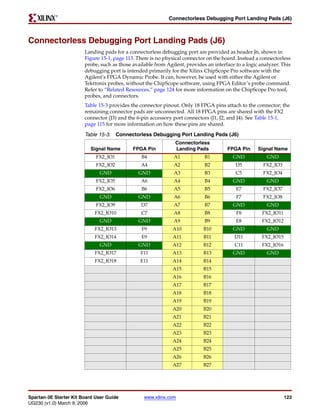
                Connectorless Debugging Port Landing Pads (J6) . . . . . . . . . . . . . . . . . . . . . . . . . . . 123
                Related Resources . . . . . . . . . . . . . . . . . . . . . . . . . . . . . . . . . . . . . . . . . . . . . . . . . . . . . . . . . . 124

        Chapter 16: XC2C64A CoolRunner-II CPLD
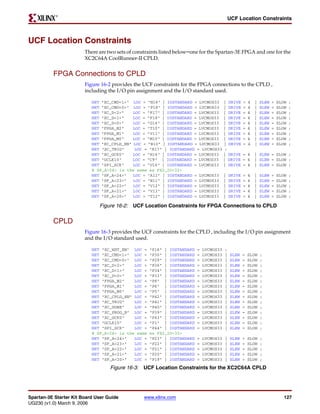
                UCF Location Constraints . . . . . . . . . . . . . . . . . . . . . . . . . . . . . . . . . . . . . . . . . . . . . . . . . . 127
                       FPGA Connections to CPLD . . . . . . . . . . . . . . . . . . . . . . . . . . . . . . . . . . . . . . . . . . . . . . 127
                       CPLD . . . . . . . . . . . . . . . . . . . . . . . . . . . . . . . . . . . . . . . . . . . . . . . . . . . . . . . . . . . . . . . . . . 127
                Related Resources . . . . . . . . . . . . . . . . . . . . . . . . . . . . . . . . . . . . . . . . . . . . . . . . . . . . . . . . . . 128

        Chapter 17: DS2432 1-Wire SHA-1 EEPROM
                UCF Location Constraints . . . . . . . . . . . . . . . . . . . . . . . . . . . . . . . . . . . . . . . . . . . . . . . . . . 129
                Related Resources . . . . . . . . . . . . . . . . . . . . . . . . . . . . . . . . . . . . . . . . . . . . . . . . . . . . . . . . . . 129

        Appendix A: Schematics
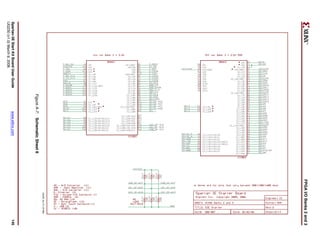
                FX2 Expansion Header, 6-pin Headers, and Connectorless Probe Header . . . . 132
                RS-232 Ports, VGA Port, and PS/2 Port . . . . . . . . . . . . . . . . . . . . . . . . . . . . . . . . . . . . . . 134
                Ethernet PHY, Magnetics, and RJ-11 Connector . . . . . . . . . . . . . . . . . . . . . . . . . . . . . 136
                Voltage Regulators . . . . . . . . . . . . . . . . . . . . . . . . . . . . . . . . . . . . . . . . . . . . . . . . . . . . . . . . . 138
                FPGA Configurations Settings, Platform Flash PROM, SPI Serial Flash, JTAG
                  Connections . . . . . . . . . . . . . . . . . . . . . . . . . . . . . . . . . . . . . . . . . . . . . . . . . . . . . . . . . . . . . 140
                FPGA I/O Banks 0 and 1, Oscillators . . . . . . . . . . . . . . . . . . . . . . . . . . . . . . . . . . . . . . . . 142
                FPGA I/O Banks 2 and 3 . . . . . . . . . . . . . . . . . . . . . . . . . . . . . . . . . . . . . . . . . . . . . . . . . . . . 144
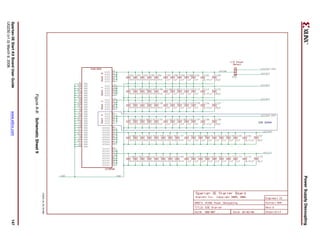
                Power Supply Decoupling . . . . . . . . . . . . . . . . . . . . . . . . . . . . . . . . . . . . . . . . . . . . . . . . . 146
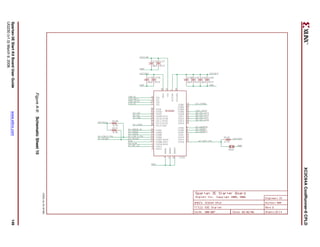
                XC2C64A CoolRunner-II CPLD . . . . . . . . . . . . . . . . . . . . . . . . . . . . . . . . . . . . . . . . . . . . 148


Spartan-3E Starter Kit Board User Guide                                www.xilinx.com                                                                                 7
UG230 (v1.0) March 9, 2006
R


        Linear Technology ADC and DAC . . . . . . . . . . . . . . . . . . . . . . . . . . . . . . . . . . . . . . . . . 150
        Intel StrataFlash Parallel NOR Flash Memory and Micron DDR SDRAM . . . 152
        Buttons, Switches, Rotary Encoder, and Character LCD . . . . . . . . . . . . . . . . . . . . . 154
        DDR SDRAM Series Termination and FX2 Connector Differential Termination 156

    Appendix B: Example User Constraints File (UCF)


8                                                 www.xilinx.com                 Spartan-3E Starter Kit Board User Guide
                                                                                              UG230 (v1.0) March 9, 2006
R


                                                                                                   Preface


About This Guide
                        This user guide provides basic information on the Spartan-3E Starter Kit board
                        capabilities, functions, and design. It includes general information on how to use the
                        various peripheral functions included on the board. For detailed reference designs,
                        including VHDL or Verilog source code, please visit the following web link.
                        •   Spartan™-3E Starter Kit Board Reference Page
                            http://www.xilinx.com/s3estarter


Acknowledgements
                        Xilinx wishes to thank the following companies for their support of the Spartan-3E Starter
                        Kit board:
                        •   Intel Corporation for the 128 Mbit StrataFlash memory
                        •   Linear Technology for the SPI-compatible A/D and D/A converters, the
                            programmable pre-amplifier, and the power regulators for the non-FPGA
                            components
                        •   Micron Technology, Inc. for the 32M x 16 DDR SDRAM
                        •   SMSC for the 10/100 Ethernet PHY
                        •   STMicroelectronics for the 16M x 1 SPI serial Flash PROM
                        •   Texas Instruments Incorporated for the three-rail TPS75003 regulator supplying most
                            of the FPGA supply voltages
                        •   Xilinx, Inc. Configuration Solutions Division for the XCF04S Platform Flash PROM
                            and their support for the embedded USB programmer
                        •   Xilinx, Inc. CPLD Division for the XC2C64A CoolRunner™-II CPLD


Guide Contents
                        This manual contains the following chapters:
                        •   Chapter 1, “Introduction and Overview,” provides an overview of the key features of
                            the Spartan-3E Starter Kit board.
                        •   Chapter 2, “Switches, Buttons, and Knob,” defines the switches, buttons, and knobs
                            present on the Spartan-3E Starter Kit board.
                        •   Chapter 3, “Clock Sources,” describes the various clock sources available on the
                            Spartan-3E Starter Kit board.
                        •   Chapter 4, “FPGA Configuration Options,” describes the configuration options for
                            the FPGA on the Spartan-3E Starter Kit board.


Spartan-3E Start Kit Board User Guide             www.xilinx.com                                                 9
UG230 (v1.0) March 9, 2006
R

Preface: About This Guide


                     •      Chapter 5, “Character LCD Screen,” describes the functionality of the character LCD
                            screen.
                     •      Chapter 6, “VGA Display Port,” describes the functionality of the VGA port.
                     •      Chapter 7, “RS-232 Serial Ports,” describes the functionality of the RS-232 serial ports.
                     •      Chapter 8, “PS/2 Mouse/Keyboard Port,” describes the functionality of the PS/2
                            mouse and keyboard port.
                     •      Chapter 9, “Digital to Analog Converter (DAC),” describes the functionality of the
                            DAC.
                     •      Chapter 10, “Analog Capture Circuit,” describes the functionality of the A/D
                            converter with a programmable gain pre-amplifier.
                     •      Chapter 11, “Intel StrataFlash Parallel NOR Flash PROM,” describes the functionality
                            of the StrataFlash PROM.
                     •      Chapter 12, “SPI Serial Flash,” describes the functionality of the SPI Serial Flash
                            memory.
                     •      Chapter 13, “DDR SDRAM,” describes the functionality of the DDR SDRAM.
                     •      Chapter 14, “10/100 Ethernet Physical Layer Interface,” describes the functionality of
                            the 10/100Base-T Ethernet physical layer interface.
                     •      Chapter 15, “Expansion Connectors,” describes the various connectors available on
                            the Spartan-3E Starter Kit board.
                     •      Chapter 16, “XC2C64A CoolRunner-II CPLD” describes how the CPLD is involved in
                            FPGA configuration when using Master Serial and BPI mode.
                     •      Chapter 17, “DS2432 1-Wire SHA-1 EEPROM” provides a brief introduction to the
                            SHA-1 secure EEPROM for authenticating or copy-protecting FPGA configuration
                            bitstreams.
                     •      Appendix A, “Schematics,” lists the schematics for the Spartan-3E Starter Kit board.
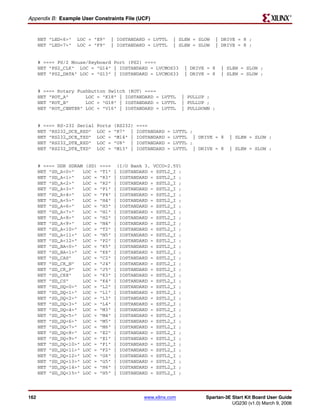
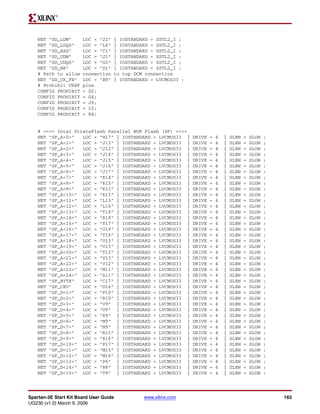
                     •      Appendix B, “Example User Constraints File (UCF),” provides example code from a
                            UCF.


Additional Resources
                     To find additional documentation, see the Xilinx website at:
                            http://www.xilinx.com/literature.
                     To search the Answer Database of silicon, software, and IP questions and answers, or to
                     create a technical support WebCase, see the Xilinx website at:
                            http://www.xilinx.com/support.


10                                                www.xilinx.com              Spartan-3E Start Kit Board User Guide
                                                                                         UG230 (v1.0) March 9, 2006
R


                                                                                            Chapter 1


Introduction and Overview
                        Thank you for purchasing the Xilinx Spartan™-3E Starter Kit. You will find it useful in
                        developing your Spartan-3E FPGA application.


Choose the Starter Kit Board for Your Needs
                        Depending on specific requirements, choose the Xilinx development board that best suits
                        your needs.


          Spartan-3E FPGA Features and Embedded Processing Functions
                        The Spartan-3E Starter Kit board highlights the unique features of the Spartan-3E FPGA
                        family and provides a convenient development board for embedded processing
                        applications. The board highlights these features:
                        •   Spartan-3E specific features
                            ♦   Parallel NOR Flash configuration
                            ♦   MultiBoot FPGA configuration from Parallel NOR Flash PROM
                            ♦   SPI serial Flash configuration
                        •   Embedded development
                            ♦   MicroBlaze™ 32-bit embedded RISC processor
                            ♦   PicoBlaze™ 8-bit embedded controller
                            ♦   DDR memory interfaces


          Learning Xilinx FPGA, CPLD, and ISE Development Software Basics
                        The Spartan-3E Starter Kit board is more advanced and complex compared to other
                        Spartan development boards. To learn the basics of Xilinx FPGA or CPLD design and how
                        to use the Xilinx ISE development software, consider using the High Volume Starter Kit
                        Bundle, which includes both a Spartan-3 FPGA development board and a Xilinx
                        CoolRunner™-II/XC9500XL CPLD development board at a very affordable price.
                        •   High Volume Starter Kit Bundle (HW-SPAR3-CPLD-DK)
                            http://www.xilinx.com/xlnx/xebiz/designResources/ip_product_details.jsp?
                            key=HW-SPAR3-CPLD-DK


          Advanced Spartan-3 Generation Development Boards
                        The Spartan-3E Starter Kit board demonstrates the basic capabilities of the MicroBlaze
                        embedded processor and the Xilinx Embedded Development Kit (EDK). For more


Spartan-3E Starter Kit Board User Guide          www.xilinx.com                                                   11
UG230 (v1.0) March 9, 2006
R

Chapter 1: Introduction and Overview


                     advanced development on a board with additional peripherals and FPGA logic, consider
                     the SP-305 Development Board:
                     •   Spartan-3 SP-305 Development Board (HW-SP305-xx)
                         http://www.xilinx.com/xlnx/xebiz/designResources/ip_product_details.jsp?key=
                         HW-SP305-US
                     Also consider the capable boards offered by Xilinx partners:
                     •   Spartan-3 and Spartan-3E Board Interactive Search
                         http://www.xilinx.com/products/devboards/index.htm


Key Components and Features
                     The key features of the Spartan-3E Starter Kit board are:
                     •   Xilinx XC3S500E Spartan-3E FPGA
                         ♦   Up to 232 user-I/O pins
                         ♦   320-pin FBGA package
                         ♦   Over 10,000 logic cells
                     •   Xilinx 4 Mbit Platform Flash configuration PROM
                     •   Xilinx 64-macrocell XC2C64A CoolRunner CPLD
                     •   64 MByte (512 Mbit) of DDR SDRAM, x16 data interface, 100+ MHz
                     •   16 MByte (128 Mbit) of parallel NOR Flash (Intel StrataFlash)
                         ♦   FPGA configuration storage
                         ♦   MicroBlaze code storage/shadowing
                     •   16 Mbits of SPI serial Flash (STMicro)
                         ♦   FPGA configuration storage
                         ♦   MicroBlaze code shadowing
                     •   2-line, 16-character LCD screen
                     •   PS/2 mouse or keyboard port
                     •   VGA display port
                     •   10/100 Ethernet PHY (requires Ethernet MAC in FPGA)
                     •   Two 9-pin RS-232 ports (DTE- and DCE-style)
                     •   On-board USB-based FPGA/CPLD download/debug interface
                     •   50 MHz clock oscillator
                     •   SHA-1 1-wire serial EEPROM for bitstream copy protection
                     •   Hirose FX2 expansion connector
                     •   Three Digilent 6-pin expansion connectors
                     •   Four-output, SPI-based Digital-to-Analog Converter (DAC)
                     •   Two-input, SPI-based Analog-to-Digital Converter (ADC) with programmable-gain
                         pre-amplifier
                     •   ChipScope™ SoftTouch debugging port
                     •   Rotary-encoder with push-button shaft
                     •   Eight discrete LEDs
                     •   Four slide switches


12                                             www.xilinx.com           Spartan-3E Starter Kit Board User Guide
                                                                                     UG230 (v1.0) March 9, 2006
R

                                                                                              Design Trade-Offs


                        •   Four push-button switches
                        •   SMA clock input
                        •   8-pin DIP socket for auxiliary clock oscillator


Design Trade-Offs
                        A few system-level design trade-offs were required in order to provide the Spartan-3E
                        Starter Kit board with the most functionality.


          Configuration Methods Galore!
                        A typical FPGA application uses a single non-volatile memory to store configuration
                        images. To demonstrate new Spartan-3E capabilities, the starter kit board has three
                        different configuration memory sources that all need to function well together. The extra
                        configuration functions make the starter kit board more complex than typicalSpartan-3E
                        applications.
                        The starter kit board also includes an on-board USB-based JTAG programming interface.
                        The on-chip circuitry simplifies the device programming experience. In typical
                        applications, the JTAG programming hardware resides off-board or in a separate
                        programming module, such as the Xilinx Platform USB cable.


          Voltages for all Applications
                        The Spartan-3E Starter Kit board showcases a triple-output regulator developed by Texas
                        Instruments, the TPS75003 specifically to power Spartan-3 and Spartan-3E FPGAs. This
                        regulator is sufficient for most stand-alone FPGA applications. However, the starter kit
                        board includes DDR SDRAM, which requires its own high-current supply. Similarly, the
                        USB-based JTAG download solution requires a separate 1.8V supply.


Related Resources
                        •   Xilinx MicroBlaze Soft Processor
                            http://www.xilinx.com/microblaze
                        •   Xilinx PicoBlaze Soft Processor
                            http://www.xilinx.com/picoblaze
                        •   Xilinx Embedded Development Kit
                            http://www.xilinx.com/ise/embedded_design_prod/platform_studio.htm
                        •   Xilinx software tutorials
                            http://www.xilinx.com/support/techsup/tutorials/
                        •   Texas Instruments TPS75003
                            http://focus.ti.com/docs/prod/folders/print/tps75003.html


Spartan-3E Starter Kit Board User Guide           www.xilinx.com                                                13
UG230 (v1.0) March 9, 2006
R

Chapter 1: Introduction and Overview


14                                     www.xilinx.com   Spartan-3E Starter Kit Board User Guide
                                                                     UG230 (v1.0) March 9, 2006
R


                                                                                             Chapter 2


Switches, Buttons, and Knob
Slide Switches

          Locations and Labels
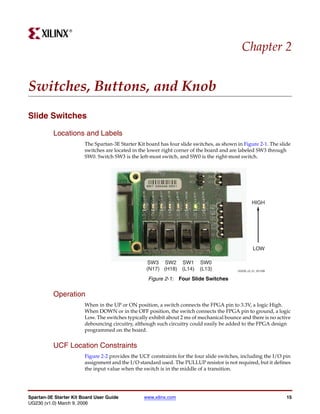
                        The Spartan-3E Starter Kit board has four slide switches, as shown in Figure 2-1. The slide
                        switches are located in the lower right corner of the board and are labeled SW3 through
                        SW0. Switch SW3 is the left-most switch, and SW0 is the right-most switch.


                                                                                                    HIGH


                                                                                                    LOW

                                                    SW3 SW2 SW1           SW0
                                                   (N17) (H18) (L14)      (L13)            UG230_c2_01_021206


                                                    Figure 2-1: Four Slide Switches


          Operation
                        When in the UP or ON position, a switch connects the FPGA pin to 3.3V, a logic High.
                        When DOWN or in the OFF position, the switch connects the FPGA pin to ground, a logic
                        Low. The switches typically exhibit about 2 ms of mechanical bounce and there is no active
                        debouncing circuitry, although such circuitry could easily be added to the FPGA design
                        programmed on the board.


          UCF Location Constraints
                        Figure 2-2 provides the UCF constraints for the four slide switches, including the I/O pin
                        assignment and the I/O standard used. The PULLUP resistor is not required, but it defines
                        the input value when the switch is in the middle of a transition.


Spartan-3E Starter Kit Board User Guide           www.xilinx.com                                                 15
UG230 (v1.0) March 9, 2006
R

Chapter 2: Switches, Buttons, and Knob


                         NET   "SW<0>"    LOC   =   "L13"   |   IOSTANDARD   =   LVTTL   |   PULLUP    ;
                         NET   "SW<1>"    LOC   =   "L14"   |   IOSTANDARD   =   LVTTL   |   PULLUP    ;
                         NET   "SW<2>"    LOC   =   "H18"   |   IOSTANDARD   =   LVTTL   |   PULLUP    ;
                         NET   "SW<3>"    LOC   =   "N17"   |   IOSTANDARD   =   LVTTL   |   PULLUP    ;

                                          Figure 2-2: UCF Constraints for Slide Switches


Push-Button Switches

         Locations and Labels
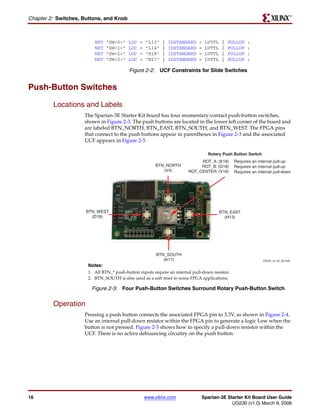
                     The Spartan-3E Starter Kit board has four momentary-contact push-button switches,
                     shown in Figure 2-3. The push buttons are located in the lower left corner of the board and
                     are labeled BTN_NORTH, BTN_EAST, BTN_SOUTH, and BTN_WEST. The FPGA pins
                     that connect to the push buttons appear in parentheses in Figure 2-3 and the associated
                     UCF appears in Figure 2-5.

                                                                                  Rotary Push Button Switch
                                                                             ROT_A: (K18)       Requires an internal pull-up
                                                         BTN_NORTH           ROT_B: (G18)       Requires an internal pull-up
                                                            (V4)        ROT_CENTER: (V16)       Requires an internal pull-down


                      BTN_WEST                                                           BTN_EAST
                        (D18)                                                              (H13)


                                                         BTN_SOUTH
                                                            (K17)                                              UG230_c2_02_021206
                      Notes:
                      1. All BTN_* push-button inputs require an internal pull-down resistor.
                      2. BTN_SOUTH is also used as a soft reset in some FPGA applications.

                        Figure 2-3: Four Push-Button Switches Surround Rotary Push-Button Switch


         Operation
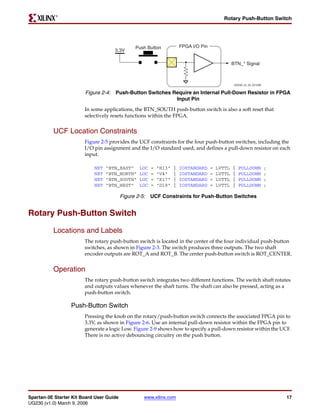
                     Pressing a push button connects the associated FPGA pin to 3.3V, as shown in Figure 2-4.
                     Use an internal pull-down resistor within the FPGA pin to generate a logic Low when the
                     button is not pressed. Figure 2-5 shows how to specify a pull-down resistor within the
                     UCF. There is no active debouncing circuitry on the push button.


16                                                  www.xilinx.com            Spartan-3E Starter Kit Board User Guide
                                                                                           UG230 (v1.0) March 9, 2006
R

                                                                                            Rotary Push-Button Switch


                                               Push Button             FPGA I/O Pin
                                     3.3V

                                                                                                  BTN_* Signal


                                                                                                   UG230_c2_03_021206


                        Figure 2-4: Push-Button Switches Require an Internal Pull-Down Resistor in FPGA
                                                          Input Pin
                        In some applications, the BTN_SOUTH push-button switch is also a soft reset that
                        selectively resets functions within the FPGA.


          UCF Location Constraints
                        Figure 2-5 provides the UCF constraints for the four push-button switches, including the
                        I/O pin assignment and the I/O standard used, and defines a pull-down resistor on each
                        input.

                            NET   "BTN_EAST"     LOC   =   "H13"   |   IOSTANDARD     =   LVTTL   |   PULLDOWN          ;
                            NET   "BTN_NORTH"    LOC   =   "V4"    |   IOSTANDARD     =   LVTTL   |   PULLDOWN          ;
                            NET   "BTN_SOUTH"    LOC   =   "K17"   |   IOSTANDARD     =   LVTTL   |   PULLDOWN          ;
                            NET   "BTN_WEST"     LOC   =   "D18"   |   IOSTANDARD     =   LVTTL   |   PULLDOWN          ;

                                          Figure 2-5: UCF Constraints for Push-Button Switches


Rotary Push-Button Switch

          Locations and Labels
                        The rotary push-button switch is located in the center of the four individual push-button
                        switches, as shown in Figure 2-3. The switch produces three outputs. The two shaft
                        encoder outputs are ROT_A and ROT_B. The center push-button switch is ROT_CENTER.


          Operation
                        The rotary push-button switch integrates two different functions. The switch shaft rotates
                        and outputs values whenever the shaft turns. The shaft can also be pressed, acting as a
                        push-button switch.

                  Push-Button Switch
                        Pressing the knob on the rotary/push-button switch connects the associated FPGA pin to
                        3.3V, as shown in Figure 2-6. Use an internal pull-down resistor within the FPGA pin to
                        generate a logic Low. Figure 2-9 shows how to specify a pull-down resistor within the UCF.
                        There is no active debouncing circuitry on the push button.


Spartan-3E Starter Kit Board User Guide            www.xilinx.com                                                           17
UG230 (v1.0) March 9, 2006
R

Chapter 2: Switches, Buttons, and Knob


                                     Rotary / Push Button


                                                            FPGA I/O Pin
                              3.3V

                                                                                    ROT_CENTER Signal


                                                                                            UG230_c2_05_021206


                      Figure 2-6: Push-Button Switches Require Internal Pull-up Resistor in FPGA Input
                                                          Pin

                Rotary Shaft Encoder
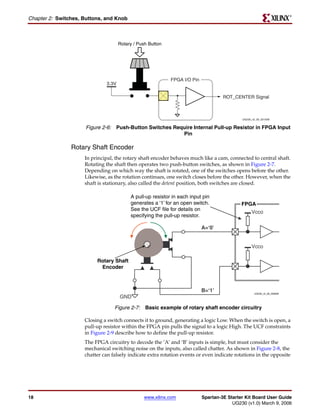
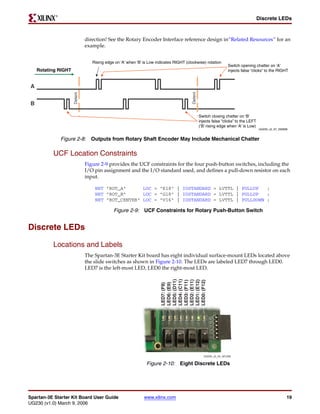
                     In principal, the rotary shaft encoder behaves much like a cam, connected to central shaft.
                     Rotating the shaft then operates two push-button switches, as shown in Figure 2-7.
                     Depending on which way the shaft is rotated, one of the switches opens before the other.
                     Likewise, as the rotation continues, one switch closes before the other. However, when the
                     shaft is stationary, also called the detent position, both switches are closed.

                                          A pull-up resistor in each input pin
                                          generates a ‘1’ for an open switch.               FPGA
                                          See the UCF file for details on
                                                                                                  Vcco
                                          specifying the pull-up resistor.

                                                                           A=‘0’


                                                                                                  Vcco

                          Rotary Shaft
                           Encoder


                                                                           B=‘1’                   UG230_c2_06_030606
                                     GND

                                  Figure 2-7: Basic example of rotary shaft encoder circuitry

                     Closing a switch connects it to ground, generating a logic Low. When the switch is open, a
                     pull-up resistor within the FPGA pin pulls the signal to a logic High. The UCF constraints
                     in Figure 2-9 describe how to define the pull-up resistor.
                     The FPGA circuitry to decode the ‘A’ and ‘B’ inputs is simple, but must consider the
                     mechanical switching noise on the inputs, also called chatter. As shown in Figure 2-8, the
                     chatter can falsely indicate extra rotation events or even indicate rotations in the opposite


18                                              www.xilinx.com             Spartan-3E Starter Kit Board User Guide
                                                                                        UG230 (v1.0) March 9, 2006
R

                                                                                                                                       Discrete LEDs


                               direction! See the Rotary Encoder Interface reference design in“Related Resources” for an
                               example.


                                  Rising edge on ‘A’ when ‘B’ is Low indicates RIGHT (clockwise) rotation
                                                                                                                    Switch opening chatter on ‘A’
     Rotating RIGHT                                                                                                 injects false “clicks” to the RIGHT


 A


                                                                                         Detent
                      Detent


 B

                                                                                                  Switch closing chatter on ‘B’
                                                                                                  injects false “clicks” to the LEFT
                                                                                                  (’B’ rising edge when ‘A’ is Low)
                                                                                                                                       UG230_c2_07_030606


                 Figure 2-8: Outputs from Rotary Shaft Encoder May Include Mechanical Chatter

           UCF Location Constraints
                               Figure 2-9 provides the UCF constraints for the four push-button switches, including the
                               I/O pin assignment and the I/O standard used, and defines a pull-down resistor on each
                               input.

                                   NET "ROT_A"      LOC = "K18" | IOSTANDARD = LVTTL | PULLUP   ;
                                   NET "ROT_B"      LOC = "G18" | IOSTANDARD = LVTTL | PULLUP   ;
                                   NET "ROT_CENTER" LOC = "V16" | IOSTANDARD = LVTTL | PULLDOWN ;

                                             Figure 2-9: UCF Constraints for Rotary Push-Button Switch


Discrete LEDs

           Locations and Labels
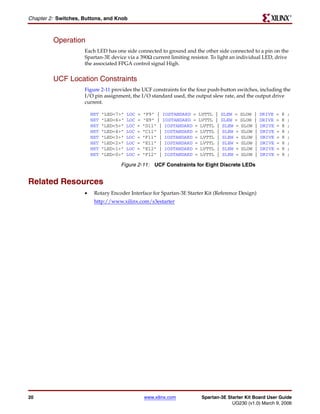
                               The Spartan-3E Starter Kit board has eight individual surface-mount LEDs located above
                               the slide switches as shown in Figure 2-10. The LEDs are labeled LED7 through LED0.
                               LED7 is the left-most LED, LED0 the right-most LED.
                                                                       LED5: (D11)
                                                                       LED4: (C11)

                                                                       LED2: (E11)
                                                                       LED1: (E12)
                                                                       LED3: (F11)


                                                                       LED0: (F12)
                                                                       LED6: (E9)
                                                                       LED7: (F9)


                                                                                                    UG230_c2_04_021206


                                                               Figure 2-10: Eight Discrete LEDs


Spartan-3E Starter Kit Board User Guide                       www.xilinx.com                                                                            19
UG230 (v1.0) March 9, 2006
R

Chapter 2: Switches, Buttons, and Knob


         Operation
                     Each LED has one side connected to ground and the other side connected to a pin on the
                     Spartan-3E device via a 390Ω current limiting resistor. To light an individual LED, drive
                     the associated FPGA control signal High.


         UCF Location Constraints
                     Figure 2-11 provides the UCF constraints for the four push-button switches, including the
                     I/O pin assignment, the I/O standard used, the output slew rate, and the output drive
                     current.

                         NET   "LED<7>"   LOC   =   "F9" | IOSTANDARD = LVTTL | SLEW =    SLOW   |   DRIVE   =   8   ;
                         NET   "LED<6>"   LOC   =   "E9" | IOSTANDARD = LVTTL | SLEW =    SLOW   |   DRIVE   =   8   ;
                         NET   "LED<5>"   LOC   =   "D11" | IOSTANDARD = LVTTL | SLEW =   SLOW   |   DRIVE   =   8   ;
                         NET   "LED<4>"   LOC   =   "C11" | IOSTANDARD = LVTTL | SLEW =   SLOW   |   DRIVE   =   8   ;
                         NET   "LED<3>"   LOC   =   "F11" | IOSTANDARD = LVTTL | SLEW =   SLOW   |   DRIVE   =   8   ;
                         NET   "LED<2>"   LOC   =   "E11" | IOSTANDARD = LVTTL | SLEW =   SLOW   |   DRIVE   =   8   ;
                         NET   "LED<1>"   LOC   =   "E12" | IOSTANDARD = LVTTL | SLEW =   SLOW   |   DRIVE   =   8   ;
                         NET   "LED<0>"   LOC   =   "F12" | IOSTANDARD = LVTTL | SLEW =   SLOW   |   DRIVE   =   8   ;

                                     Figure 2-11: UCF Constraints for Eight Discrete LEDs


Related Resources
                     •    Rotary Encoder Interface for Spartan-3E Starter Kit (Reference Design)
                          http://www.xilinx.com/s3estarter


20                                                  www.xilinx.com       Spartan-3E Starter Kit Board User Guide
                                                                                      UG230 (v1.0) March 9, 2006
R


                                                                                              Chapter 3


Clock Sources
Overview
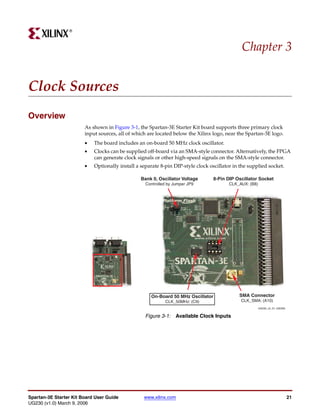
                        As shown in Figure 3-1, the Spartan-3E Starter Kit board supports three primary clock
                        input sources, all of which are located below the Xilinx logo, near the Spartan-3E logo.
                        •   The board includes an on-board 50 MHz clock oscillator.
                        •   Clocks can be supplied off-board via an SMA-style connector. Alternatively, the FPGA
                            can generate clock signals or other high-speed signals on the SMA-style connector.
                        •   Optionally install a separate 8-pin DIP-style clock oscillator in the supplied socket.

                                                 Bank 0, Oscillator Voltage      8-Pin DIP Oscillator Socket
                                                   Controlled by Jumper JP9              CLK_AUX: (B8)


                                                     On-Board 50 MHz Oscillator              SMA Connector
                                                            CLK_50MHz: (C9)                   CLK_SMA: (A10)
                                                                                                         UG230_c3_01_030306


                                                   Figure 3-1: Available Clock Inputs


Spartan-3E Starter Kit Board User Guide           www.xilinx.com                                                              21
UG230 (v1.0) March 9, 2006
R

Chapter 3: Clock Sources


Clock Connections
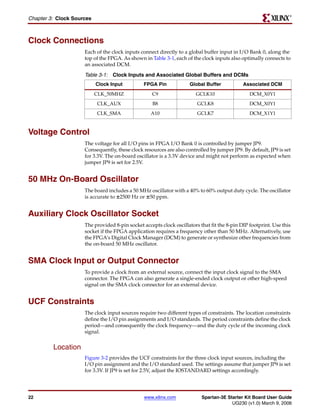
                     Each of the clock inputs connect directly to a global buffer input in I/O Bank 0, along the
                     top of the FPGA. As shown in Table 3-1, each of the clock inputs also optimally connects to
                     an associated DCM.

                     Table 3-1: Clock Inputs and Associated Global Buffers and DCMs
                           Clock Input         FPGA Pin             Global Buffer            Associated DCM
                           CLK_50MHZ               C9                  GCLK10                   DCM_X0Y1
                           CLK_AUX                 B8                   GCLK8                   DCM_X0Y1
                           CLK_SMA                 A10                  GCLK7                   DCM_X1Y1


Voltage Control
                     The voltage for all I/O pins in FPGA I/O Bank 0 is controlled by jumper JP9.
                     Consequently, these clock resources are also controlled by jumper JP9. By default, JP9 is set
                     for 3.3V. The on-board oscillator is a 3.3V device and might not perform as expected when
                     jumper JP9 is set for 2.5V.


50 MHz On-Board Oscillator
                     The board includes a 50 MHz oscillator with a 40% to 60% output duty cycle. The oscillator
                     is accurate to ±2500 Hz or ±50 ppm.


Auxiliary Clock Oscillator Socket
                     The provided 8-pin socket accepts clock oscillators that fit the 8-pin DIP footprint. Use this
                     socket if the FPGA application requires a frequency other than 50 MHz. Alternatively, use
                     the FPGA’s Digital Clock Manager (DCM) to generate or synthesize other frequencies from
                     the on-board 50 MHz oscillator.


SMA Clock Input or Output Connector
                     To provide a clock from an external source, connect the input clock signal to the SMA
                     connector. The FPGA can also generate a single-ended clock output or other high-speed
                     signal on the SMA clock connector for an external device.


UCF Constraints
                     The clock input sources require two different types of constraints. The location constraints
                     define the I/O pin assignments and I/O standards. The period constraints define the clock
                     period—and consequently the clock frequency—and the duty cycle of the incoming clock
                     signal.


         Location
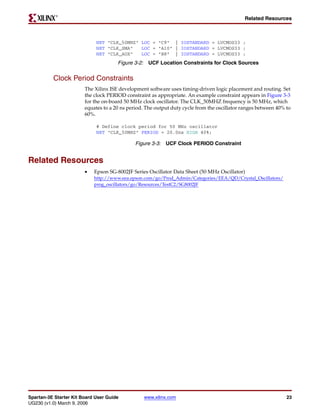
                     Figure 3-2 provides the UCF constraints for the three clock input sources, including the
                     I/O pin assignment and the I/O standard used. The settings assume that jumper JP9 is set
                     for 3.3V. If JP9 is set for 2.5V, adjust the IOSTANDARD settings accordingly.


22                                              www.xilinx.com            Spartan-3E Starter Kit Board User Guide
                                                                                       UG230 (v1.0) March 9, 2006
R

                                                                                             Related Resources


                             NET "CLK_50MHZ" LOC = "C9" | IOSTANDARD = LVCMOS33 ;
                             NET "CLK_SMA"   LOC = "A10" | IOSTANDARD = LVCMOS33 ;
                             NET "CLK_AUX"   LOC = "B8" | IOSTANDARD = LVCMOS33 ;
                                      Figure 3-2: UCF Location Constraints for Clock Sources


          Clock Period Constraints
                        The Xilinx ISE development software uses timing-driven logic placement and routing. Set
                        the clock PERIOD constraint as appropriate. An example constraint appears in Figure 3-3
                        for the on-board 50 MHz clock oscillator. The CLK_50MHZ frequency is 50 MHz, which
                        equates to a 20 ns period. The output duty cycle from the oscillator ranges between 40% to
                        60%.

                             # Define clock period for 50 MHz oscillator
                             NET "CLK_50MHZ" PERIOD = 20.0ns HIGH 40%;

                                              Figure 3-3: UCF Clock PERIOD Constraint


Related Resources
                        •   Epson SG-8002JF Series Oscillator Data Sheet (50 MHz Oscillator)
                            http://www.eea.epson.com/go/Prod_Admin/Categories/EEA/QD/Crystal_Oscillators/
                            prog_oscillators/go/Resources/TestC2/SG8002JF


Spartan-3E Starter Kit Board User Guide          www.xilinx.com                                                 23
UG230 (v1.0) March 9, 2006
R

Chapter 3: Clock Sources


24                         www.xilinx.com   Spartan-3E Starter Kit Board User Guide
                                                         UG230 (v1.0) March 9, 2006
R


                                                                                                       Chapter 4


FPGA Configuration Options
                          The Spartan-3E Starter Kit board supports a variety of FPGA configuration options:
                          •   Download FPGA designs directly to the Spartan-3E FPGA via JTAG, using the on-
                              board USB interface. The on-board USB-JTAG logic also provides in-system
                              programming for the on-board Platform Flash PROM and the Xilinx XC2C64A CPLD.
                              SPI serial Flash and StrataFlash programming are performed separately.
                          •   Program the on-board 4 Mbit Xilinx XCF04S serial Platform Flash PROM, then
                              configure the FPGA from the image stored in the Platform Flash PROM using Master
                              Serial mode.
                          •   Program the on-board 16 Mbit ST Microelectronics SPI serial Flash PROM, then
                              configure the FPGA from the image stored in the SPI serial Flash PROM using SPI
                              mode.
                          •   Program the on-board 128 Mbit Intel StrataFlash parallel NOR Flash PROM, then
                              configure the FPGA from the image stored in the Flash PROM using BPI Up or BPI
                              Down configuration modes. Further, an FPGA application can dynamically load two
                              different FPGA configurations using the Spartan-3E FPGA’s MultiBoot mode. See the
                              Spartan-3E data sheet (DS312) for additional details on the MultiBoot feature.
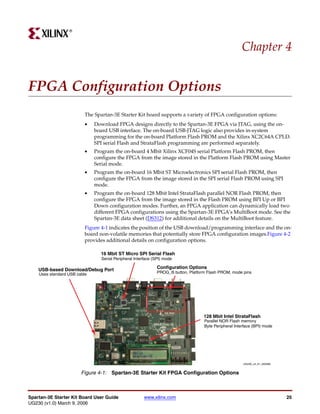
                          Figure 4-1 indicates the position of the USB download/programming interface and the on-
                          board non-volatile memories that potentially store FPGA configuration images.Figure 4-2
                          provides additional details on configuration options.

                                16 Mbit ST Micro SPI Serial Flash
                                 Serial Peripheral Interface (SPI) mode

    USB-based Download/Debug Port                             Configuration Options
    Uses standard USB cable                                   PROG_B button, Platform Flash PROM, mode pins


                                                                                    128 Mbit Intel StrataFlash
                                                                                    Parallel NOR Flash memory
                                                                                    Byte Peripheral Interface (BPI) mode


                                                                                                        UG230_c4_01_022006


                        Figure 4-1: Spartan-3E Starter Kit FPGA Configuration Options


Spartan-3E Starter Kit Board User Guide                 www.xilinx.com                                                       25
UG230 (v1.0) March 9, 2006
R

Chapter 4: FPGA Configuration Options


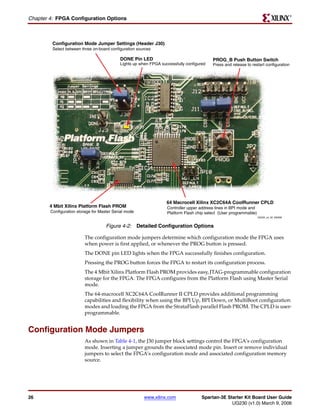
         Configuration Mode Jumper Settings (Header J30)
         Select between three on-board configuration sources

                                            DONE Pin LED                                  PROG_B Push Button Switch
                                            Lights up when FPGA successfully configured   Press and release to restart configuration


                                                                   64 Macrocell Xilinx XC2C64A CoolRunner CPLD
        4 Mbit Xilinx Platform Flash PROM                          Controller upper address lines in BPI mode and
        Configuration storage for Master Serial mode               Platform Flash chip select (User programmable)
                                                                                                                    UG230_c4_02_030906


                                     Figure 4-2: Detailed Configuration Options

                          The configuration mode jumpers determine which configuration mode the FPGA uses
                          when power is first applied, or whenever the PROG button is pressed.
                          The DONE pin LED lights when the FPGA successfully finishes configuration.
                          Pressing the PROG button forces the FPGA to restart its configuration process.
                          The 4 Mbit Xilinx Platform Flash PROM provides easy, JTAG-programmable configuration
                          storage for the FPGA. The FPGA configures from the Platform Flash using Master Serial
                          mode.
                          The 64-macrocell XC2C64A CoolRunner II CPLD provides additional programming
                          capabilities and flexibility when using the BPI Up, BPI Down, or MultiBoot configuration
                          modes and loading the FPGA from the StrataFlash parallel Flash PROM. The CPLD is user-
                          programmable.


Configuration Mode Jumpers
                          As shown in Table 4-1, the J30 jumper block settings control the FPGA’s configuration
                          mode. Inserting a jumper grounds the associated mode pin. Insert or remove individual
                          jumpers to select the FPGA’s configuration mode and associated configuration memory
                          source.


26                                                      www.xilinx.com               Spartan-3E Starter Kit Board User Guide
                                                                                                  UG230 (v1.0) March 9, 2006
R

                                                                                               PROG Push Button


                        Table 4-1: Spartan-3E Configuration Mode Jumper Settings (Header J30 in
                        Figure 4-2)
                         Configuration    Mode Pins
                            Mode          M2:M1:M0        FPGA Configuration Image Source      Jumper Settings
                         Master Serial       0:0:0        Platform Flash PROM
                                                                                                 M0
                                                                                                 M1
                                                                                                 M2
                                                                                                      J30

                         SPI                 1:1:0        SPI Serial Flash PROM starting at
                         (see                             address 0                              M0
                         Chapter 12,                                                             M1
                         “SPI Serial                                                             M2
                         Flash”)
                                                                                                      J30

                         BPI Up              0:1:0        StrataFlash parallel Flash PROM,
                         (see                             starting at address 0 and              M0
                         Chapter 11,                      incrementing through address           M1
                         “Intel                           space. The CPLD controls address       M2
                         StrataFlash                      lines A[24:20] during BPI
                                                          configuration.                              J30
                         Parallel NOR
                         Flash
                         PROM”)
                         BPI Down            0:1:1        StrataFlash parallel Flash PROM,
                         (see                             starting at address 0x1FF_FFFF and     M0
                         Chapter 11,                      decrementing through address           M1
                         “Intel                           space. The CPLD controls address       M2
                         StrataFlash                      lines A[24:20] during BPI
                                                          configuration.                              J30
                         Parallel NOR
                         Flash
                         PROM”)
                         JTAG                0:1:0        Downloaded from host via USB-
                                                          JTAG port                              M0
                                                                                                 M1
                                                                                                 M2
                                                                                                      J30


PROG Push Button
                        The PROG push button, shown in Figure 4-2, page 26, forces the FPGA to reconfigure from
                        the selected configuration memory source. Press and release this button to restart the
                        FPGA configuration process at any time.


DONE Pin LED
                        The DONE pin LED, shown in Figure 4-2, page 26, lights whenever the FPGA is
                        successfully configured. If this LED is not lit, then the FPGA is not configured.


Spartan-3E Starter Kit Board User Guide              www.xilinx.com                                              27
UG230 (v1.0) March 9, 2006
R

Chapter 4: FPGA Configuration Options


Programming the FPGA, CPLD, or Platform Flash PROM via USB
                     As shown in Figure 4-1, page 25, the Spartan-3E Starter Kit includes embedded USB-based
                     programming logic and an USB endpoint with a Type B connector. Via a USB cable
                     connection with the host PC, the iMPACT programming software directly programs the
                     FPGA, the Platform Flash PROM, or the on-board CPLD. Direct programming of the
                     parallel or serial Flash PROMs is not presently supported.


         Connecting the USB Cable
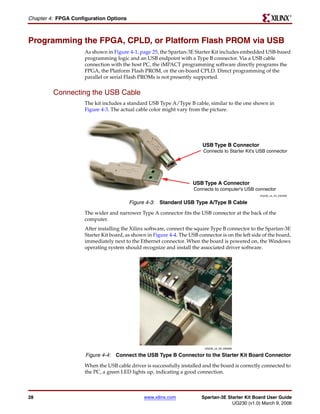
                     The kit includes a standard USB Type A/Type B cable, similar to the one shown in
                     Figure 4-3. The actual cable color might vary from the picture.


                                                                          USB Type B Connector
                                                                           Connects to Starter Kit's USB connector


                                                                      USB Type A Connector
                                                                      Connects to computer's USB connector
                                                                                                     UG230_c4_04_030306

                                         Figure 4-3: Standard USB Type A/Type B Cable
                     The wider and narrower Type A connector fits the USB connector at the back of the
                     computer.
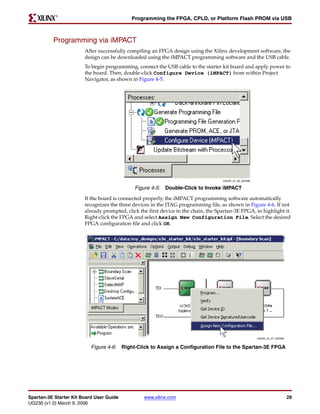
                     After installing the Xilinx software, connect the square Type B connector to the Spartan-3E
                     Starter Kit board, as shown in Figure 4-4. The USB connector is on the left side of the board,
                     immediately next to the Ethernet connector. When the board is powered on, the Windows
                     operating system should recognize and install the associated driver software.


                                                                           UG230_c4_05_030306

                     Figure 4-4: Connect the USB Type B Connector to the Starter Kit Board Connector
                     When the USB cable driver is successfully installed and the board is correctly connected to
                     the PC, a green LED lights up, indicating a good connection.


28                                              www.xilinx.com            Spartan-3E Starter Kit Board User Guide
                                                                                       UG230 (v1.0) March 9, 2006
R

                                            Programming the FPGA, CPLD, or Platform Flash PROM via USB


          Programming via iMPACT
                        After successfully compiling an FPGA design using the Xilinx development software, the
                        design can be downloaded using the iMPACT programming software and the USB cable.
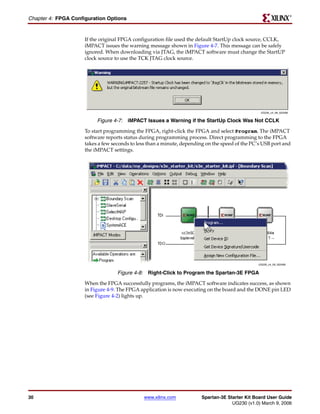
                        To begin programming, connect the USB cable to the starter kit board and apply power to
                        the board. Then, double-click Configure Device (iMPACT) from within Project
                        Navigator, as shown in Figure 4-5.


                                                                                     UG230_c4_06_022406

                                              Figure 4-5: Double-Click to Invoke iMPACT
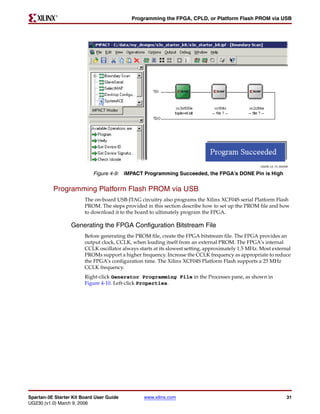
                        If the board is connected properly, the iMPACT programming software automatically
                        recognizes the three devices in the JTAG programming file, as shown in Figure 4-6. If not
                        already prompted, click the first device in the chain, the Spartan-3E FPGA, to highlight it.
                        Right-click the FPGA and select Assign New Configuration File. Select the desired
                        FPGA configuration file and click OK.


                                                                                                          UG230_c4_07_022406


                           Figure 4-6: Right-Click to Assign a Configuration File to the Spartan-3E FPGA


Spartan-3E Starter Kit Board User Guide           www.xilinx.com                                                               29
UG230 (v1.0) March 9, 2006
R

Chapter 4: FPGA Configuration Options


                     If the original FPGA configuration file used the default StartUp clock source, CCLK,
                     iMPACT issues the warning message shown in Figure 4-7. This message can be safely
                     ignored. When downloading via JTAG, the iMPACT software must change the StartUP
                     clock source to use the TCK JTAG clock source.


                                                                                                 UG230_c4_08_022406


                          Figure 4-7: iMPACT Issues a Warning if the StartUp Clock Was Not CCLK
                     To start programming the FPGA, right-click the FPGA and select Program. The iMPACT
                     software reports status during programming process. Direct programming to the FPGA
                     takes a few seconds to less than a minute, depending on the speed of the PC’s USB port and
                     the iMPACT settings.


                                                                                                UG230_c4_09_022406


                                   Figure 4-8: Right-Click to Program the Spartan-3E FPGA
                     When the FPGA successfully programs, the iMPACT software indicates success, as shown
                     in Figure 4-9. The FPGA application is now executing on the board and the DONE pin LED
                     (see Figure 4-2) lights up.


30                                            www.xilinx.com            Spartan-3E Starter Kit Board User Guide
                                                                                     UG230 (v1.0) March 9, 2006
R

                                            Programming the FPGA, CPLD, or Platform Flash PROM via USB


                                                                                                    UG230_c4_10_022406

                            Figure 4-9: iMPACT Programming Succeeded, the FPGA’s DONE Pin is High


          Programming Platform Flash PROM via USB
                        The on-board USB-JTAG circuitry also programs the Xilinx XCF04S serial Platform Flash
                        PROM. The steps provided in this section describe how to set up the PROM file and how
                        to download it to the board to ultimately program the FPGA.

                  Generating the FPGA Configuration Bitstream File
                        Before generating the PROM file, create the FPGA bitstream file. The FPGA provides an
                        output clock, CCLK, when loading itself from an external PROM. The FPGA’s internal
                        CCLK oscillator always starts at its slowest setting, approximately 1.5 MHz. Most external
                        PROMs support a higher frequency. Increase the CCLK frequency as appropriate to reduce
                        the FPGA’s configuration time. The Xilinx XCF04S Platform Flash supports a 25 MHz
                        CCLK frequency.
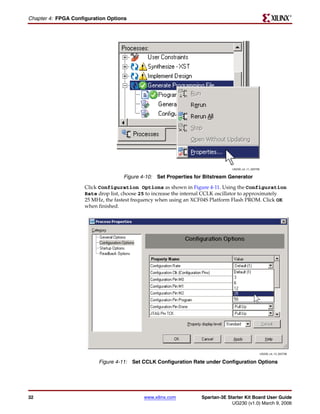
                        Right-click Generator Programming File in the Processes pane, as shown in
                        Figure 4-10. Left-click Properties.


Spartan-3E Starter Kit Board User Guide          www.xilinx.com                                                      31
UG230 (v1.0) March 9, 2006
R

Chapter 4: FPGA Configuration Options


                                                                                  UG230_c4_11_022706


                                     Figure 4-10: Set Properties for Bitstream Generator
                     Click Configuration Options as shown in Figure 4-11. Using the Configuration
                     Rate drop list, choose 25 to increase the internal CCLK oscillator to approximately
                     25 MHz, the fastest frequency when using an XCF04S Platform Flash PROM. Click OK
                     when finished.


                                                                                                       UG230_c4_12_022706


                          Figure 4-11: Set CCLK Configuration Rate under Configuration Options


32                                           www.xilinx.com          Spartan-3E Starter Kit Board User Guide
                                                                                  UG230 (v1.0) March 9, 2006
R

                                              Programming the FPGA, CPLD, or Platform Flash PROM via USB


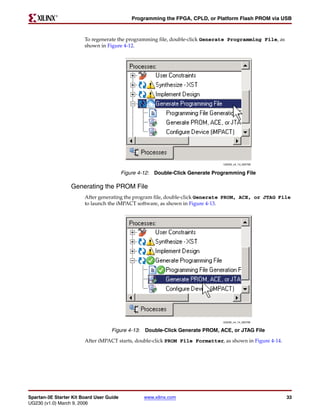
                        To regenerate the programming file, double-click Generate Programming File, as
                        shown in Figure 4-12.


                                                                                UG230_c4_13_022706


                                          Figure 4-12: Double-Click Generate Programming File

                  Generating the PROM File
                        After generating the program file, double-click Generate PROM, ACE, or JTAG File
                        to launch the iMPACT software, as shown in Figure 4-13.


                                                                                UG230_c4_14_022706


                                    Figure 4-13: Double-Click Generate PROM, ACE, or JTAG File
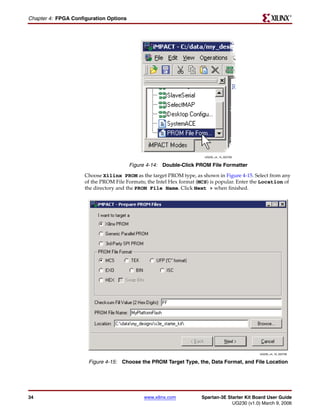
                        After iMPACT starts, double-click PROM File Formatter, as shown in Figure 4-14.


Spartan-3E Starter Kit Board User Guide           www.xilinx.com                                          33
UG230 (v1.0) March 9, 2006
R

Chapter 4: FPGA Configuration Options


                                                                       UG230_c4_15_022706


                                        Figure 4-14: Double-Click PROM File Formatter
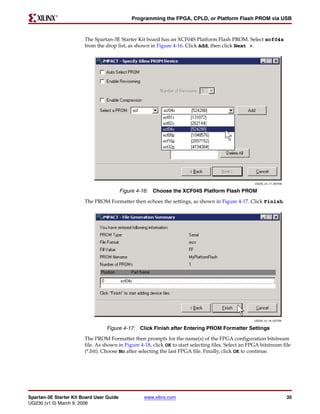
                     Choose Xilinx PROM as the target PROM type, as shown in Figure 4-15. Select from any
                     of the PROM File Formats; the Intel Hex format (MCS) is popular. Enter the Location of
                     the directory and the PROM File Name. Click Next > when finished.


                                                                                              UG230_c4_16_022706


                      Figure 4-15: Choose the PROM Target Type, the, Data Format, and File Location


34                                           www.xilinx.com          Spartan-3E Starter Kit Board User Guide
                                                                                  UG230 (v1.0) March 9, 2006
R

                                              Programming the FPGA, CPLD, or Platform Flash PROM via USB


                        The Spartan-3E Starter Kit board has an XCF04S Platform Flash PROM. Select xcf04s
                        from the drop list, as shown in Figure 4-16. Click Add, then click Next >.


                                                                                                      UG230_c4_17_022706


                                          Figure 4-16: Choose the XCF04S Platform Flash PROM
                        The PROM Formatter then echoes the settings, as shown in Figure 4-17. Click Finish.


                                                                                                      UG230_c4_18_022706


                                  Figure 4-17: Click Finish after Entering PROM Formatter Settings
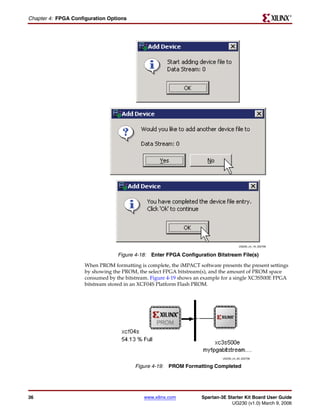
                        The PROM Formatter then prompts for the name(s) of the FPGA configuration bitstream
                        file. As shown in Figure 4-18, click OK to start selecting files. Select an FPGA bitstream file
                        (*.bit). Choose No after selecting the last FPGA file. Finally, click OK to continue.


Spartan-3E Starter Kit Board User Guide            www.xilinx.com                                                          35
UG230 (v1.0) March 9, 2006
R

Chapter 4: FPGA Configuration Options


                                                                                       UG230_c4_19_022706


                                  Figure 4-18: Enter FPGA Configuration Bitstream File(s)
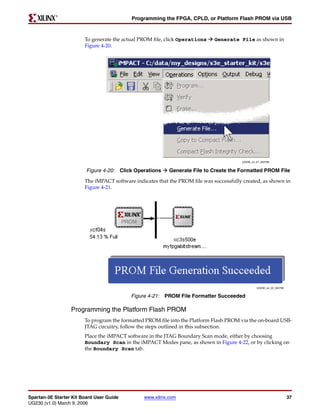
                     When PROM formatting is complete, the iMPACT software presents the present settings
                     by showing the PROM, the select FPGA bitstream(s), and the amount of PROM space
                     consumed by the bitstream. Figure 4-19 shows an example for a single XC3S500E FPGA
                     bitstream stored in an XCF04S Platform Flash PROM.


                                                                             UG230_c4_20_022706


                                         Figure 4-19: PROM Formatting Completed


36                                           www.xilinx.com         Spartan-3E Starter Kit Board User Guide
                                                                                 UG230 (v1.0) March 9, 2006
R

                                           Programming the FPGA, CPLD, or Platform Flash PROM via USB


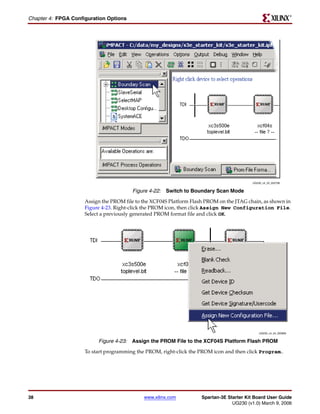
                        To generate the actual PROM file, click Operations    Generate File as shown in
                        Figure 4-20.


                                                                                         UG230_c4_21_022706


                         Figure 4-20: Click Operations     Generate File to Create the Formatted PROM File

                        The iMPACT software indicates that the PROM file was successfully created, as shown in
                        Figure 4-21.


                                                                                                  UG230_c4_22_022706


                                           Figure 4-21: PROM File Formatter Succeeded

                  Programming the Platform Flash PROM
                        To program the formatted PROM file into the Platform Flash PROM via the on-board USB-
                        JTAG circuitry, follow the steps outlined in this subsection.
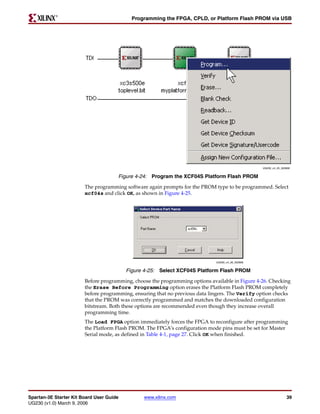
                        Place the iMPACT software in the JTAG Boundary Scan mode, either by choosing
                        Boundary Scan in the iMPACT Modes pane, as shown in Figure 4-22, or by clicking on
                        the Boundary Scan tab.


Spartan-3E Starter Kit Board User Guide         www.xilinx.com                                                         37
UG230 (v1.0) March 9, 2006
R

Chapter 4: FPGA Configuration Options


                                                                                           UG230_c4_23_022706


                                        Figure 4-22: Switch to Boundary Scan Mode
                     Assign the PROM file to the XCF04S Platform Flash PROM on the JTAG chain, as shown in
                     Figure 4-23. Right-click the PROM icon, then click Assign New Configuration File.
                     Select a previously generated PROM format file and click OK.


                                                                                               UG230_c4_24_022806


                          Figure 4-23: Assign the PROM File to the XCF04S Platform Flash PROM
                     To start programming the PROM, right-click the PROM icon and then click Program..


38                                           www.xilinx.com          Spartan-3E Starter Kit Board User Guide
                                                                                  UG230 (v1.0) March 9, 2006
R

                                            Programming the FPGA, CPLD, or Platform Flash PROM via USB


                                                                                                   UG230_c4_25_022806


                                      Figure 4-24: Program the XCF04S Platform Flash PROM
                        The programming software again prompts for the PROM type to be programmed. Select
                        xcf04s and click OK, as shown in Figure 4-25.


                                                                              UG230_c4_26_022806


                                          Figure 4-25: Select XCF04S Platform Flash PROM
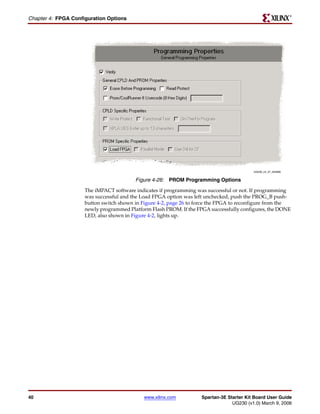
                        Before programming, choose the programming options available in Figure 4-26. Checking
                        the Erase Before Programming option erases the Platform Flash PROM completely
                        before programming, ensuring that no previous data lingers. The Verify option checks
                        that the PROM was correctly programmed and matches the downloaded configuration
                        bitstream. Both these options are recommended even though they increase overall
                        programming time.
                        The Load FPGA option immediately forces the FPGA to reconfigure after programming
                        the Platform Flash PROM. The FPGA’s configuration mode pins must be set for Master
                        Serial mode, as defined in Table 4-1, page 27. Click OK when finished.


Spartan-3E Starter Kit Board User Guide         www.xilinx.com                                                    39
UG230 (v1.0) March 9, 2006
R

Chapter 4: FPGA Configuration Options


                                                                                          UG230_c4_27_022806


                                         Figure 4-26: PROM Programming Options
                     The iMPACT software indicates if programming was successful or not. If programming
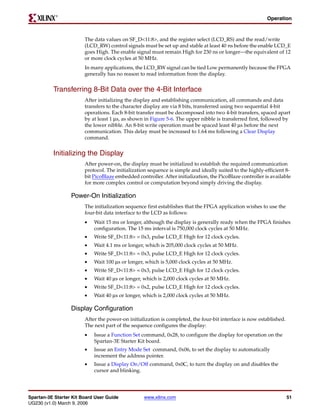
                     was successful and the Load FPGA option was left unchecked, push the PROG_B push-
                     button switch shown in Figure 4-2, page 26 to force the FPGA to reconfigure from the
                     newly programmed Platform Flash PROM. If the FPGA successfully configures, the DONE
                     LED, also shown in Figure 4-2, lights up.


40                                           www.xilinx.com         Spartan-3E Starter Kit Board User Guide
                                                                                 UG230 (v1.0) March 9, 2006
R


                                                                                                 Chapter 5


Character LCD Screen
Overview
                        The Spartan-3E Starter Kit board prominently features a 2-line by 16-character liquid
                        crystal display (LCD). The FPGA controls the LCD via the 4-bit data interface shown in
                        Figure 5-1. Although the LCD supports an 8-bit data interface, the Starter Kit board uses a
                        4-bit data interface to remain compatible with other Xilinx development boards and to
                        minimize total pin count.

                                   Spartan-3E FPGA                                Character LCD

                                                             SF_D<11> 390Ω
                                                 (M15)                           DB7
                                                             SF_D<10> 390Ω
                                                 (P17)                           DB6       Four-bit data
                                                             SF_D<9> 390Ω                   interface
                                                 (R16)                           DB5
                                                             SF_D<8> 390Ω
                                                 (R15)                           DB4

                                                                                 DB[3:0] Unused
                                                                   LCD_E
                                                 (M18)                           E
                                                                LCD_RS
                                                 (L18)                           RS
                                                               LCD_RW
                                                 (L17)                           R/W


                                                                                 Intel StrataFlash

                                                                                 D[11:8]
                                                                           ‘1’
                                                               SF_CE0            CE0

                                                                                                UG230_c5_01_022006


                                                 Figure 5-1: Character LCD Interface
                        Once mastered, the LCD is a practical way to display a variety of information using
                        standard ASCII and custom characters. However, these displays are not fast. Scrolling the
                        display at half-second intervals tests the practical limit for clarity. Compared with the
                        50 MHz clock available on the board, the display is slow. A PicoBlaze processor efficiently
                        controls display timing plus the actual content of the display.


Spartan-3E Starter Kit Board User Guide           www.xilinx.com                                                     41
UG230 (v1.0) March 9, 2006
R

Chapter 5: Character LCD Screen


Character LCD Interface Signals
                     Table 5-1 shows the interface character LCD interface signals.

                     Table 5-1: Character LCD Interface
                         Signal Name              FPGA Pin                                Function
                           SF_D<11>                   M15            Data bit DB7          Shared with StrataFlash pins
                           SF_D<10>                    P17           Data bit DB6          SF_D<11:8>
                           SF_D<9>                     R16           Data bit DB5
                           SF_D<8>                     R15           Data bit DB4
                               LCD_E                  M18            Read/Write Enable Pulse
                                                                     0: Disabled
                                                                     1: Read/Write operation enabled
                            LCD_RS                     L18           Register Select
                                                                     0: Instruction register during write operations. Busy
                                                                     Flash during read operations
                                                                     1: Data for read or write operations
                           LCD_RW                      L17           Read/Write Control
                                                                     0: WRITE, LCD accepts data
                                                                     1: READ, LCD presents data


Voltage Compatibility
                     The character LCD is power by +5V. The FPGA I/O signals are powered by 3.3V.
                     However, the FPGA’s output levels are recognized as valid Low or High logic levels by the
                     LCD. The LCD controller accepts 5V TTL signal levels and the 3.3V LVCMOS outputs
                     provided by the FPGA meet the 5V TTL voltage level requirements.
                     The 390Ω series resistors on the data lines prevent overstressing on the FPGA and
                     StrataFlash I/O pins when the character LCD drives a High logic value. The character LCD
                     drives the data lines when LCD_RW is High. Most applications treat the LCD as a write-
                     only peripheral and never read from from the display.


Interaction with Intel StrataFlash
                     As shown in Figure 5-1, the four LCD data signals are also shared with StrataFlash data
                     lines SF_D<11:8>. As shown in Table 5-2, the LCD/StrataFlash interaction depends on the
                     application usage in the design. When the StrataFlash memory is disabled (SF_CE0 =
                     High), then the FPGA application has full read/write access to the LCD. Conversely, when
                     LCD read operations are disabled (LCD_RW = Low), then the FPGA application has full
                     read/write access to the StrataFlash memory

                     Table 5-2: LCD/StrataFlash Control Interaction
                      SF_CE0        SF_BYTE LCD_RW                                      Operation
                           1             X             X         StrataFlash disabled. Full read/write access to LCD.
                          X              X              0        LCD write access only. Full access to StrataFlash.
                          X              0             X         StrataFlash in byte-wide (x8) mode. Upper data lines
                                                                 are not used. Full access to both LCD and StrataFlash.
                     Notes:
                     1. ‘X’ indicates a don’t care, can be either 0 or 1.


42                                                   www.xilinx.com               Spartan-3E Starter Kit Board User Guide
                                                                                               UG230 (v1.0) March 9, 2006
R

                                                                                         UCF Location Constraints


                        If the StrataFlash memory is in byte-wide (x8) mode (SF_BYTE = Low), the FPGA
                        application has full simultaneous read/write access to both the LCD and the StrataFlash
                        memory. In byte-wide mode, the StrataFlash memory does not use the SF_D<15:8> data
                        lines.


UCF Location Constraints
                        Figure 5-2 provides the UCF constraints for the Character LCD, including the I/O pin
                        assignment and the I/O standard used.

                             NET "LCD_E"       LOC = "M18" | IOSTANDARD = LVCMOS33 | DRIVE = 4 | SLEW = SLOW ;
                             NET "LCD_RS"      LOC = "L18" | IOSTANDARD = LVCMOS33 | DRIVE = 4 | SLEW = SLOW ;
                             NET "LCD_RW"      LOC = "L17" | IOSTANDARD = LVCMOS33 | DRIVE = 4 | SLEW = SLOW ;

                             # The LCD four-bit      data interface is shared with the   StrataFlash.
                             NET "SF_D<8>" LOC       = "R15" | IOSTANDARD = LVCMOS33 |   DRIVE = 4 | SLEW   =   SLOW   ;
                             NET "SF_D<9>" LOC       = "R16" | IOSTANDARD = LVCMOS33 |   DRIVE = 4 | SLEW   =   SLOW   ;
                             NET "SF_D<10>" LOC      = "P17" | IOSTANDARD = LVCMOS33 |   DRIVE = 4 | SLEW   =   SLOW   ;
                             NET "SF_D<11>" LOC      = "M15" | IOSTANDARD = LVCMOS33 |   DRIVE = 4 | SLEW   =   SLOW   ;

                                       Figure 5-2: UCF Location Constraints for the Character LCD


LCD Controller
                        The 2 x 16 character LCD has an internal Sitronix ST7066U graphics controller that is
                        functionally equivalent with the following devices.
                        •   Samsung S6A0069X or KS0066U
                        •   Hitachi HD44780
                        •   SMOS SED1278


          Memory Map
                        The controller has three internal memory regions, each with a specific purpose. The
                        display must be initialized before accessing any of these memory regions.

                  DD RAM
                        The Display Data RAM (DD RAM) stores the character code to be displayed on the screen.
                        Most applications interact primarily with DD RAM. The character code stored in a DD
                        RAM location references a specific character bitmap stored either in the predefined CG
                        ROM character set or in the user-defined CG RAM character set.
                        Figure 5-3shows the default address for the 32 character locations on the display. The
                        upper line of characters is stored between addresses 0x00 and 0x0F. The second line of
                        characters is stored between addresses 0x40 and 0x4F.

                                                                                                    Undisplayed
                                   Character Display Addresses
                                                                                                     Addresses
 1   00    01    02    03   04    05      06    07     08   09    0A   0B   0C   0D      0E   0F   10       …     27
 2   40    41    42    43   44    45      46    47     48   49    4A   4B   4C   4D      4E   4F   50       …     67
      1     2    3      4    5     6      7      8     9    10    11   12   13   14      15   16   17       …     40

                      Figure 5-3: DD RAM Hexadecimal Addresses (No Display Shifting)
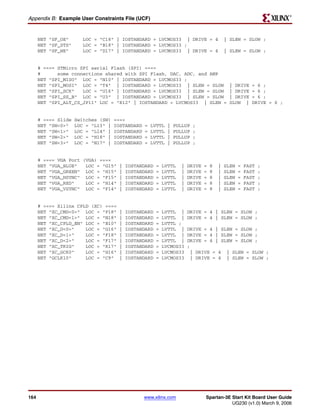


Spartan-3E Starter Kit Board User Guide              www.xilinx.com                                                    43
UG230 (v1.0) March 9, 2006
R

Chapter 5: Character LCD Screen


                     Physically, there are 80 total character locations in DD RAM with 40 characters available
                     per line. Locations 0x10 through 0x27 and 0x50 through 0x67 can be used to store other
                     non-display data. Alternatively, these locations can also store characters that can only
                     displayed using controller’s display shifting functions.
                     The Set DD RAM Address command initializes the address counter before reading or
                     writing to DD RAM. Write DD RAM data using the Write Data to CG RAM or DD RAM
                     command, and read DD RAM using the Read Data from CG RAM or DD RAM command.
                     The DD RAM address counter either remains constant after read or write operations, or
                     auto-increments or auto-decrements by one location, as defined by the I/D set by the Entry
                     Mode Set command.

                CG ROM
                     The Character Generator ROM (CG ROM) contains the font bitmap for each of the
                     predefined characters that the LCD screen can display, shown in Figure 5-4. The character
                     code stored in DD RAM for each character location subsequently references a position with
                     the CG ROM. For example, a hexadecimal character code of 0x53 stored in a DD RAM
                     location displays the character ‘S’. The upper nibble of 0x53 equates to DB[7:4]=”0101”
                     binary and the lower nibble equates to DB[3:0] = “0011” binary. As shown in Figure 5-4, the
                     character ‘S’ appears on the screen.
                     English/Roman characters are stored in CG ROM at their equivalent ASCII code address.


44                                             www.xilinx.com           Spartan-3E Starter Kit Board User Guide
                                                                                     UG230 (v1.0) March 9, 2006
R

                                                                                                          LCD Controller


                                                                         Upper Data Nibble
                                                        DB7
                                                        DB6
                                                        DB5
                                                        DB4


                                    Lower Data Nibble


                                                        DB3
                                                        DB2
                                                        DB1
                                                        DB0


                                                                                             UG230_c5_02_030306


                                                          Figure 5-4: LCD Character Set
                        The character ROM contains the ASCII English character set and Japanese kana characters.
                        The controller also provides for eight custom character bitmaps, stored in CG RAM. These
                        eight custom characters are displayed by storing character codes 0x00 through 0x07 in a
                        DD RAM location.

                  CG RAM
                        The Character Generator RAM (CG RAM) provides space to create eight custom character
                        bitmaps. Each custom character location consists of a 5-dot by 8-line bitmap, as shown in
                        Figure 5-5.
                        The Set CG RAM Address command initializes the address counter before reading or
                        writing to CG RAM. Write CG RAM data using the Write Data to CG RAM or DD RAM
                        command, and read CG RAM using the Read Data from CG RAM or DD RAM command.


Spartan-3E Starter Kit Board User Guide                 www.xilinx.com                                                45
UG230 (v1.0) March 9, 2006
R

Chapter 5: Character LCD Screen


                       The CG RAM address counter can either remain constant after read or write operations, or
                       auto-increments or auto-decrements by one location, as defined by the I/D set by the Entry
                       Mode Set command.
                       Figure 5-5 provides an example, creating a special checkerboard character. The custom
                       character is stored in the fourth CG RAM character location, which is displayed when a
                       DD RAM location is 0x03. To write the custom character, the CG RAM address is first
                       initialized using the Set CG RAM Address command. The upper three address bits point to
                       the custom character location. The lower three address bits point to the row address for the
                       character bitmap. The Write Data to CG RAM or DD RAM command is used to write each
                       character bitmap row. A ‘1’ lights a bit on the display. A ‘0’ leaves the bit unlit. Only the
                       lower five data bits are used; the upper three data bits are don’t care positions. The eighth
                       row of bitmap data is usually left as all zeros to accommodate the cursor.

                                                                                 Upper Nibble                    Lower Nibble
                                                                                  Write Data to CG RAM or DD RAM
                            A5    A4      A3      A2      A1       A0     D7       D6     D5       D4       D3         D2    D1      D0
                           Character Address       Row Address                  Don’t Care                 Character Bitmap
                            0      1       1        0        0      0       -       -        -     0         1         0         1    0
                            0      1       1        0        0      1       -       -        -     1         0         1         0    1
                            0      1       1        0        1      0       -       -        -     0         1         0         1    0
                            0      1       1        0        1      1       -       -        -     1         0         1         0    1
                            0      1       1        1        0      0       -       -        -     0         1         0         1    0
                            0      1       1        1        0      1       -       -        -     1         0         1         0    1
                            0      1       1        1        1      0       -       -        -     0         1         0         1    0
                            0      1       1        1        1      1       -       -        -     0         0         0         0    0
                           Figure 5-5: Example Custom Checkerboard Character with Character Code 0x03


         Command Set
                       Table 5-3 summarizes the available LCD controller commands and bit definitions. Because
                       the display is set up for 4-bit operation, each 8-bit command is sent as two 4-bit nibbles.
                       The upper nibble is transferred first, followed by the lower nibble.

Table 5-3: LCD Character Display Command Set
                                                                         Upper Nibble                        Lower Nibble
                                                          LCD_RW
                                                 LCD_RS


                  Function
                                                                   DB7

                                                                           DB6

                                                                                    DB5

                                                                                             DB4


                                                                                                    DB3


                                                                                                                 DB2


                                                                                                                            DB1


                                                                                                                                     DB0


Clear Display                                     0        0       0       0        0        0         0          0          0       1
Return Cursor Home                                0        0       0       0        0        0         0          0          1        -
Entry Mode Set                                    0        0       0       0        0        0         0          1         I/D      S
Display On/Off                                    0        0       0       0        0        0         1         D          C        B
Cursor and Display Shift                          0        0       0       0        0        1     S/C           R/L         -        -


46                                                 www.xilinx.com                    Spartan-3E Starter Kit Board User Guide
                                                                                                  UG230 (v1.0) March 9, 2006
R

                                                                                                             LCD Controller


Table 5-3: LCD Character Display Command Set (Continued)
                                                                          Upper Nibble               Lower Nibble


                                                           LCD_RW
                                                  LCD_RS
                   Function


                                                                    DB7

                                                                            DB6

                                                                                  DB5

                                                                                         DB4


                                                                                               DB3


                                                                                                       DB2


                                                                                                                 DB1


                                                                                                                       DB0
 Function Set                                      0        0       0       0     1      0     1       0          -     -
 Set CG RAM Address                                0        0       0       1     A5     A4    A3      A2       A1     A0
 Set DD RAM Address                                0        0       1      A6     A5     A4    A3      A2       A1     A0
 Read Busy Flag and Address                        0        1       BF     A6     A5     A4    A3      A2       A1     A0
 Write Data to CG RAM or DD RAM                    1        0       D7     D6     D5     D4    D3      D2       D1     D0
 Read Data from CG RAM or DD RAM                   1        1       D7     D6     D5     D4    D3      D2       D1     D0

                  Disabled
                        If the LCD_E enable signal is Low, all other inputs to the LCD are ignored.

                  Clear Display
                        Clear the display and return the cursor to the home position, the top-left corner.
                        This command writes a blank space (ASCII/ANSI character code 0x20) into all DD RAM
                        addresses. The address counter is reset to 0, location 0x00 in DD RAM. Clears all option
                        settings. The I/D control bit is set to 1 (increment address counter mode) in the Entry Mode
                        Set command.
                        Execution Time: 82 μs – 1.64 ms

                  Return Cursor Home
                        Return the cursor to the home position, the top-left corner. DD RAM contents are
                        unaffected. Also returns the display being shifted to the original position, shown in
                        Figure 5-3.
                        The address counter is reset to 0, location 0x00 in DD RAM. The display is returned to its
                        original status if it was shifted. The cursor or blink move to the top-left character location.
                        Execution Time: 40 μs – 1.6 ms

                  Entry Mode Set
                        Sets the cursor move direction and specifies whether or not to shift the display.
                        These operations are performed during data reads and writes.
                        Execution Time: 40 μs

                        Bit DB1: (I/D) Increment/Decrement

                          0   Auto-decrement address counter. Cursor/blink moves to left.
                          1   Auto-increment address counter. Cursor/blink moves to right.


Spartan-3E Starter Kit Board User Guide             www.xilinx.com                                                           47
UG230 (v1.0) March 9, 2006
R

Chapter 5: Character LCD Screen


                     This bit either auto-increments or auto-decrements the DD RAM and CG RAM address
                     counter by one location after each Write Data to CG RAM or DD RAM or Read Data from
                     CG RAM or DD RAM command. The cursor or blink position moves accordingly.

                     Bit DB0: (S) Shift

                       0   Shifting disabled
                       1   During a DD RAM write operation, shift the entire display value in the direction
                           controlled by Bit DB1 (I/D). Appears as though the cursor position remains constant
                           and the display moves.


                Display On/Off
                     Display is turned on or off, controlling all characters, cursor and cursor position character
                     (underscore) blink.
                     Execution Time: 40 μs

                     Bit DB2: (D) Display On/Off

                       0   No characters displayed. However, data stored in DD RAM is retained
                       1   Display characters stored in DD RAM

                     Bit DB1: (C) Cursor On/Off
                     The cursor uses the five dots on the bottom line of the character. The cursor appears as a
                     line under the displayed character.

                       0   No cursor
                       1   Display cursor

                     Bit DB0: (B) Cursor Blink On/Off

                       0   No cursor blinking
                       1   Cursor blinks on and off approximately every half second


                Cursor and Display Shift
                     Moves the cursor and shifts the display without changing DD RAM contents. Shift cursor
                     position or display to the right or left without writing or reading display data.
                     This function positions the cursor in order to modify an individual character, or to scroll
                     the display window left or right to reveal additional data stored in the DD RAM, beyond
                     the 16th character on a line. The cursor automatically moves to the second line when it
                     shifts beyond the 40th character location of the first line. The first and second line displays
                     shift at the same time.
                     When the displayed data is shifted repeatedly, both lines move horizontally. The second
                     display line does not shift into the first display line.
                     Execution Time: 40 μs


48                                              www.xilinx.com            Spartan-3E Starter Kit Board User Guide
                                                                                       UG230 (v1.0) March 9, 2006
R

                                                                                                          LCD Controller


                        Table 5-4: Shift Patterns According to S/C and R/L Bits
                        DB3 DB2
                                                                          Operation
                        (S/C) (R/L)
                          0     0     Shift the cursor position to the left. The address counter is decremented by one.
                          0     1     Shift the cursor position to the right. The address counter is incremented by one.
                                      Shift the entire display to the left. The cursor follows the display shift. The
                          1     0
                                      address counter is unchanged.
                                      Shift the entire display to the right. The cursor follows the display shift. The
                          1     1
                                      address counter is unchanged.


                  Function Set
                        Sets interface data length, number of display lines, and character font.
                        The Starter Kit board supports a single function set with value 0x28.
                        Execution Time: 40 μs

                  Set CG RAM Address
                        Set the initial CG RAM address.
                        After this command, all subsequent read or write operations to the display are to or from
                        CG RAM.
                        Execution Time: 40 μs

                  Set DD RAM Address
                        Set the initial DD RAM address.
                        After this command, all subsequentsubsequent read or write operations to the display are
                        to or from DD RAM. The addresses for displayed characters appear in Figure 5-3.
                        Execution Time: 40 μs

                  Read Busy Flag and Address
                        Read the Busy flag (BF) to determine if an internal operation is in progress, and read the
                        current address counter contents.
                        BF = 1 indicates that an internal operation is in progress. The next instruction is not
                        accepted until BF is cleared or until the current instruction is allowed the maximum time to
                        execute.
                        This command also returns the present value of address counter. The address counter is
                        used for both CG RAM and DD RAM addresses. The specific context depends on the most
                        recent Set CG RAM Address or Set DD RAM Address command issued.
                        Execution Time: 1 μs

                  Write Data to CG RAM or DD RAM
                        Write data into DD RAM if the command follows a previous Set DD RAM Address
                        command, or write data into CG RAM if the command follows a previous Set CG RAM
                        Address command.


Spartan-3E Starter Kit Board User Guide             www.xilinx.com                                                       49
UG230 (v1.0) March 9, 2006
R

Chapter 5: Character LCD Screen


                        After the write operation, the address is automatically incremented or decremented by 1
                        according to the Entry Mode Set command. The entry mode also determines display shift.
                        Execution Time: 40 μs

                  Read Data from CG RAM or DD RAM
                        Read data from DD RAM if the command follows a previous Set DD RAM Address
                        command, or read data from CG RAM if the command follows a previous Set CG RAM
                        Address command.
                        After the read operation, the address is automatically incremented or decremented by 1
                        according to the Entry Mode Set command. However, a display shift is not executed
                        during read operations.
                        Execution Time: 40 μs


Operation

             Four-Bit Data Interface
                        The board uses a 4-bit data interface to the character LCD.
                        Figure 5-6 illustrates a write operation to the LCD, showing the minimum times allowed
                        for setup, hold, and enable pulse length relative to the 50 MHz clock (20 ns period)
                        provided on the board.


                                                    CLOCK


                                                   LCD_RS                    0 = Command, 1 = Data


                                                 SF_D[11:8]                       Valid Data


                                                  LCD_RW


                                                    LCD_E

                                                                                      230 ns


                                                                   40 ns                               10 ns


                   Upper            Lower
                   4 bits           4 bits
       LCD_RS
     SF_D[11:8]
      LCD_RW
        LCD_E

                            1 μs                     40 μs
                                                                                                     UG230_c5_03_022006


                                   Figure 5-6: Character LCD Interface Timing


50                                                www.xilinx.com           Spartan-3E Starter Kit Board User Guide
                                                                                        UG230 (v1.0) March 9, 2006
R

                                                                                                           Operation


                        The data values on SF_D<11:8>, and the register select (LCD_RS) and the read/write
                        (LCD_RW) control signals must be set up and stable at least 40 ns before the enable LCD_E
                        goes High. The enable signal must remain High for 230 ns or longer—the equivalent of 12
                        or more clock cycles at 50 MHz.
                        In many applications, the LCD_RW signal can be tied Low permanently because the FPGA
                        generally has no reason to read information from the display.


          Transferring 8-Bit Data over the 4-Bit Interface
                        After initializing the display and establishing communication, all commands and data
                        transfers to the character display are via 8 bits, transferred using two sequential 4-bit
                        operations. Each 8-bit transfer must be decomposed into two 4-bit transfers, spaced apart
                        by at least 1 μs, as shown in Figure 5-6. The upper nibble is transferred first, followed by
                        the lower nibble. An 8-bit write operation must be spaced least 40 μs before the next
                        communication. This delay must be increased to 1.64 ms following a Clear Display
                        command.


          Initializing the Display
                        After power-on, the display must be initialized to establish the required communication
                        protocol. The initialization sequence is simple and ideally suited to the highly-efficient 8-
                        bit PicoBlaze embedded controller. After initialization, the PicoBlaze controller is available
                        for more complex control or computation beyond simply driving the display.

                  Power-On Initialization
                        The initialization sequence first establishes that the FPGA application wishes to use the
                        four-bit data interface to the LCD as follows:
                        •   Wait 15 ms or longer, although the display is generally ready when the FPGA finishes
                            configuration. The 15 ms interval is 750,000 clock cycles at 50 MHz.
                        •   Write SF_D<11:8> = 0x3, pulse LCD_E High for 12 clock cycles.
                        •   Wait 4.1 ms or longer, which is 205,000 clock cycles at 50 MHz.
                        •   Write SF_D<11:8> = 0x3, pulse LCD_E High for 12 clock cycles.
                        •   Wait 100 μs or longer, which is 5,000 clock cycles at 50 MHz.
                        •   Write SF_D<11:8> = 0x3, pulse LCD_E High for 12 clock cycles.
                        •   Wait 40 μs or longer, which is 2,000 clock cycles at 50 MHz.
                        •   Write SF_D<11:8> = 0x2, pulse LCD_E High for 12 clock cycles.
                        •   Wait 40 μs or longer, which is 2,000 clock cycles at 50 MHz.

                  Display Configuration
                        After the power-on initialization is completed, the four-bit interface is now established.
                        The next part of the sequence configures the display:
                        •   Issue a Function Set command, 0x28, to configure the display for operation on the
                            Spartan-3E Starter Kit board.
                        •   Issue an Entry Mode Set command, 0x06, to set the display to automatically
                            increment the address pointer.
                        •   Issue a Display On/Off command, 0x0C, to turn the display on and disables the
                            cursor and blinking.


Spartan-3E Starter Kit Board User Guide            www.xilinx.com                                                    51
UG230 (v1.0) March 9, 2006
R

Chapter 5: Character LCD Screen


                     •   Finally, issue a Clear Display command. Allow at least 1.64 ms (82,000 clock cycles)
                         after issuing this command.


         Writing Data to the Display
                     To write data to the display, specify the start address, followed by one or more data values.
                     Before writing any data, issue a Set DD RAM Address command to specify the initial 7-bit
                     address in the DD RAM. See Figure 5-3 for DD RAM locations.
                     Write data to the display using a Write Data to CG RAM or DD RAM command. The 8-bit
                     data value represents the look-up address into the CG ROM or CG RAM, shown in
                     Figure 5-4. The stored bitmap in the CG ROM or CG RAM drives the 5 x 8 dot matrix to
                     represent the associated character.
                     If the address counter is configured to auto-increment, as described earlier, the application
                     can sequentially write multiple character codes and each character is automatically stored
                     and displayed in the next available location.
                     Continuing to write characters, however, eventually falls off the end of the first display
                     line. The additional characters do not automatically appear on the second line because the
                     DD RAM map is not consecutive from the first line to the second.


         Disabling the Unused LCD
                     If the FPGA application does not use the character LCD screen, drive the LCD_E pin Low
                     to disable it. Also drive the LCD_RW pin Low to prevent the LCD screen from presenting
                     data.


Related Resources
                     •   Initial Design for Spartan-3E Starter Kit (Reference Design)
                         http://www.xilinx.com/s3estarter
                     •   PowerTip PC1602-D Character LCD (Basic Electrical and Mechanical Data)
                         http://www.powertipusa.com/pdf/pc1602d.pdf
                     •   Sitronix ST7066U Character LCD Controller
                         http://www.sitronix.com.tw/sitronix/product.nsf/Doc/ST7066U?OpenDocument
                     •   Detailed Data Sheet on PowerTip Character LCD
                         http://www.rapidelectronics.co.uk/images/siteimg/57-0910e.PDF
                     •   Samsung S6A0069X Character LCD Controller
                         http://www.samsung.com/Products/Semiconductor/DisplayDriverIC/MobileDDI/BWSTN
                         /S6A0069X/S6A0069X.htm


52                                             www.xilinx.com            Spartan-3E Starter Kit Board User Guide
                                                                                      UG230 (v1.0) March 9, 2006
R


                                                                                                      Chapter 6


VGA Display Port
                                 The Spartan-3E Starter Kit board includes a VGA display port via a DB15 connector.
                                 Connect this port directly to most PC monitors or flat-panel LCDs using a standard
                                 monitor cable. As shown in Figure 6-1, the VGA connector is the left-most connector along
                                 the top of the board.

                         Pin 5                                Pin 1
                     Pin 10
                                                              Pin 6


                     Pin 15                                   Pin 11
                                 DB15 VGA Connector
                                       (front view)
                DB15
                Connector
                                                                                  270Ω
                                         Red
       1                                                                                          (H14) VGA_RED
           6                                                                      270Ω
                11                       Green
       2                                                                                          (H15) VGA_GREEN
           7
                12                                                                270Ω
                                         Blue
       3                                                                                          (G15) VGA_BLUE
           8                             Horizontal Sync                         82.5Ω
                13                                                                                (F15) VGA_HSYNC
       4
           9                             Vertical Sync                           82.5Ω
                14                                                                                (F14) VGA_VSYNC
       5
           10                                                                              (xx) = FPGA pin number
                15

                                   GND                                                                     UG230_c6_01_021706


                            Figure 6-1: VGA Connections from Spartan-3E Starter Kit Board

                                 The Spartan-3E FPGA directly drives the five VGA signals via resistors. Each color line has
                                 a series resistor, with one bit each for VGA_RED, VGA_GREEN, and VGA_BLUE. The
                                 series resistor, in combination with the 75Ω termination built into the VGA cable, ensures
                                 that the color signals remain in the VGA-specified 0V to 0.7V range. The VGA_HSYNC
                                 and VGA_VSYNC signals using LVTTL or LVCMOS33 I/O standard drive levels. Drive
                                 the VGA_RED, VGA_GREEN, and VGA_BLUE signals High or Low to generate the eight
                                 colors shown in Table 6-1.


Spartan-3E Starter Kit Board User Guide                    www.xilinx.com                                                       53
UG230 (v1.0) March 9, 2006
R

Chapter 6: VGA Display Port


                     Table 6-1: 3-Bit Display Color Codes
                          VGA_RED             VGA_GREEN             VGA_BLUE                 Resulting Color
                               0                    0                     0                       Black
                               0                    0                     1                        Blue

                               0                    1                     0                       Green

                               0                    1                     1                       Cyan

                               1                    0                     0                        Red

                               1                    0                     1                      Magenta

                               1                    1                     0                       Yellow

                               1                    1                     1                       White

                     VGA signal timing is specified, published, copyrighted, and sold by the Video Electronics
                     Standards Association (VESA). The following VGA system and timing information is
                     provided as an example of how the FPGA might drive VGA monitor in 640 by 480 mode.
                     For more precise information or for information on higher VGA frequencies, refer to
                     documents available on the VESA website or other electronics websites (see “Related
                     Resources,” page 57).


Signal Timing for a 60 Hz, 640x480 VGA Display
                     CRT-based VGA displays use amplitude-modulated, moving electron beams (or cathode
                     rays) to display information on a phosphor-coated screen. LCDs use an array of switches
                     that can impose a voltage across a small amount of liquid crystal, thereby changing light
                     permittivity through the crystal on a pixel-by-pixel basis. Although the following
                     description is limited to CRT displays, LCDs have evolved to use the same signal timings
                     as CRT displays. Consequently, the following discussion pertains to both CRTs and LCDs.
                     Within a CRT display, current waveforms pass through the coils to produce magnetic fields
                     that deflect electron beams to transverse the display surface in a raster pattern, horizontally
                     from left to right and vertically from top to bottom. As shown in Figure 6-2, information is
                     only displayed when the beam is moving in the forward direction—left to right and top to
                     bottom—and not during the time the beam returns back to the left or top edge of the
                     display. Much of the potential display time is therefore lost in blanking periods when the
                     beam is reset and stabilized to begin a new horizontal or vertical display pass.


54                                              www.xilinx.com            Spartan-3E Starter Kit Board User Guide
                                                                                       UG230 (v1.0) March 9, 2006
R

                                                                 Signal Timing for a 60 Hz, 640x480 VGA Display


                               pixel 0,0                              pixel 0,639


                                        640 pixels are displayed each
                                        time the beam traverses the screen


                                                 VGA Display

                                                                                              Retrace: No
          Current                                                                             information
          through the          pixel 479,0                      pixel 479,639                 is displayed
          horizontal                                                                          during
          deflection                                                                          this time
          coil

                                     Stable current ramp: Information is
                                     displayed during this time


                                                      Total horizontal time

                                           Horizontal display time                  retrace time
        time
                     "front porch"                                                            "front porch"

        HS

                                                 Horizontal sync signal                 "back porch"
                                                 sets the retrace frequency
                                                                                                UG230_c6_02_021706


                                     Figure 6-2: CRT Display Timing Example

                        The display resolution defines the size of the beams, the frequency at which the beam
                        traces across the display, and the frequency at which the electron beam is modulated.
                        Modern VGA displays support multiple display resolutions, and the VGA controller
                        dictates the resolution by producing timing signals to control the raster patterns. The
                        controller produces TTL-level synchronizing pulses that set the frequency at which current
                        flows through the deflection coils, and it ensures that pixel or video data is applied to the
                        electron guns at the correct time.
                        Video data typically comes from a video refresh memory with one or more bytes assigned
                        to each pixel location. The Spartan-3E Starter Kit board uses three bits per pixel, producing
                        one of the eight possible colors shown in Table 6-1. The controller indexes into the video
                        data buffer as the beams move across the display. The controller then retrieves and applies
                        video data to the display at precisely the time the electron beam is moving across a given
                        pixel.


Spartan-3E Starter Kit Board User Guide              www.xilinx.com                                                  55
UG230 (v1.0) March 9, 2006
R

Chapter 6: VGA Display Port


                     As shown in Figure 6-2, the VGA controller generates the horizontal sync (HS) and vertical
                     sync (VS) timings signals and coordinates the delivery of video data on each pixel clock.
                     The pixel clock defines the time available to display one pixel of information. The VS signal
                     defines the refresh frequency of the display, or the frequency at which all information on the
                     display is redrawn. The minimum refresh frequency is a function of the display’s phosphor
                     and electron beam intensity, with practical refresh frequencies in the 60 Hz to 120 Hz
                     range. The number of horizontal lines displayed at a given refresh frequency defines the
                     horizontal retrace frequency.


VGA Signal Timing
                     The signal timings in Table 6-2 are derived for a 640-pixel by 480-row display using a
                     25 MHz pixel clock and 60 Hz ± 1 refresh. Figure 6-3 shows the relation between each of
                     the timing symbols. The timing for the sync pulse width (TPW) and front and back porch
                     intervals (TFP and TBP) are based on observations from various VGA displays. The front
                     and back porch intervals are the pre- and post-sync pulse times. Information cannot be
                     displayed during these times.
                     Table 6-2: 640x480 Mode VGA Timing
                                                                 Vertical Sync                  Horizontal Sync
                       Symbol       Parameter
                                                       Time          Clocks       Lines        Time              Clocks
                         TS      Sync pulse time      16.7 ms        416,800        521        32 µs               800
                        TDISP    Display time         15.36 ms       384,000        480       25.6 µs              640
                        TPW      Pulse width           64 µs          1,600          2        3.84 µs               96
                         TFP     Front porch           320 µs         8,000         10         640 ns               16
                         TBP     Back porch            928 µs        23,200         29        1.92 µs               48


                                                                TS

                                                                                                        Tfp
                                                                 Tdisp


                                         Tpw                                                                        Tbp
                                                                                                        UG230_c6_03_021706


                                                   Figure 6-3: VGA Control Timing
                     Generally, a counter clocked by the pixel clock controls the horizontal timing. Decoded
                     counter values generate the HS signal. This counter tracks the current pixel display
                     location on a given row.
                     A separate counter tracks the vertical timing. The vertical-sync counter increments with
                     each HS pulse and decoded values generate the VS signal. This counter tracks the current
                     display row. These two continuously running counters form the address into a video
                     display buffer. For example, the on-board DDR SDRAM provides an ideal display buffer.
                     No time relationship is specified between the onset of the HS pulse and the onset of the VS
                     pulse. Consequently, the counters can be arranged to easily form video RAM addresses, or
                     to minimize decoding logic for sync pulse generation.


56                                              www.xilinx.com                 Spartan-3E Starter Kit Board User Guide
                                                                                            UG230 (v1.0) March 9, 2006
R

                                                                                                    UCF Location Constraints


UCF Location Constraints
                        Figure 6-4 provides the UCF constraints for the VGA display port, including the I/O pin
                        assignment, the I/O standard used, the output slew rate, and the output drive current.

                            NET   "VGA_RED"     LOC   =   "H14"   |   IOSTANDARD   =   LVTTL   |   DRIVE   =   8   |   SLEW   =   FAST   ;
                            NET   "VGA_GREEN"   LOC   =   "H15"   |   IOSTANDARD   =   LVTTL   |   DRIVE   =   8   |   SLEW   =   FAST   ;
                            NET   "VGA_BLUE"    LOC   =   "G15"   |   IOSTANDARD   =   LVTTL   |   DRIVE   =   8   |   SLEW   =   FAST   ;
                            NET   "VGA_HSYNC"   LOC   =   "F15"   |   IOSTANDARD   =   LVTTL   |   DRIVE   =   8   |   SLEW   =   FAST   ;
                            NET   "VGA_VSYNC"   LOC   =   "F14"   |   IOSTANDARD   =   LVTTL   |   DRIVE   =   8   |   SLEW   =   FAST   ;

                                          Figure 6-4: UCF Constraints for VGA Display Port


Related Resources
                        •   VESA
                            http://www.vesa.org
                        •   VGA timing information
                            http://www.epanorama.net/documents/pc/vga_timing.html


Spartan-3E Starter Kit Board User Guide               www.xilinx.com                                                                         57
UG230 (v1.0) March 9, 2006
R

Chapter 6: VGA Display Port


58                            www.xilinx.com   Spartan-3E Starter Kit Board User Guide
                                                            UG230 (v1.0) March 9, 2006
R


                                                                                                                                                                                                      Chapter 7


RS-232 Serial Ports
Overview
                        As shown in Figure 7-1, the Spartan-3E Starter Kit board has two RS-232 serial ports: a
                        female DB9 DCE connector and a male DTE connector. The DCE-style port connects
                        directly to the serial port connector available on most personal computers and
                        workstations via a standard straight-through serial cable. Null modem, gender changers,
                        or crossover cables are not required.
                        Use the DTE-style connector to control other RS-232 peripherals, such as modems or
                        printers, or perform simple loopback testing with the DCE connector.

                                      Standard                                                                          Standard                                        RS-232 Peripheral


                                   9-pin serial cable                                                               9-pin serial cable                                                      TALK/DATA
                                                                                                                                                                                                   TALK   RS CS TR RD TD CD


                                                               DCE                                              DTE                           Pin 5                                                            Pin 1


                                                                                                                                              Pin 9                                                            Pin 6

                                                                                                                                                   DB9 Serial Port Connector
                                                                                                                                                        (front view)
                                          DCE                                                                               DTE
                                       Female DB9                                                                        Male DB9

                               5       4                   3                       2        1               5        4                    3                     2                     1


                                   9       8                   7                       6                        9        8                     7                    6
                          J9                                                                                                                                                                 J10


                           GND                                                                         GND

                                                               RS-232 Voltage Translator (IC2)
                                           RS232_DCE_RXD


                                                                   RS232_DCE_TXD


                                                                                                                          RS232_DTE_RXD


                                                                                                                                                RS232_DTE_TXD


                                                   (R7) (M14)                                                                     (U8) (M13)
                                                                                            Spartan-3E FPGA
                                                                                                                                                                                                           UG230_c7_01_022006


                                                           Figure 7-1: RS-232 Serial Ports


Spartan-3E Starter Kit Board User Guide                                                    www.xilinx.com                                                                                                                       59
UG230 (v1.0) March 9, 2006
R

Chapter 7: RS-232 Serial Ports


                      Figure 7-1 shows the connection between the FPGA and the two DB9 connectors. The
                      FPGA supplies serial output data using LVTTL or LVCMOS levels to the Maxim device,
                      which in turn, converts the logic value to the appropriate RS-232 voltage level. Likewise,
                      the Maxim device converts the RS-232 serial input data to LVTTL levels for the FPGA. A
                      series resistor between the Maxim output pin and the FPGA’s RXD pin protects against
                      accidental logic conflicts.
                      Hardware flow control is not supported on the connector. The port’s DCD, DTR, and DSR
                      signals connect together, as shown in Figure 7-1. Similarly, the port’s RTS and CTS signals
                      connect together.


UCF Location Constraints
                      Figure 7-2 and Figure 7-3 provide the UCF constraints for the DTE and DCE RS-232 ports,
                      respectively, including the I/O pin assignment and the I/O standard used.

                          NET "RS232_DTE_RXD" LOC = "U8" | IOSTANDARD = LVTTL ;
                          NET "RS232_DTE_TXD" LOC = "M13" | IOSTANDARD = LVTTL | DRIVE = 8 | SLEW = SLOW ;

                                 Figure 7-2: UCF Location Constraints for DTE RS-232 Serial Port

                          NET "RS232_DCE_RXD" LOC = "R7" | IOSTANDARD = LVTTL ;
                          NET "RS232_DCE_TXD" LOC = "M14" | IOSTANDARD = LVTTL | DRIVE = 8 | SLEW = SLOW ;

                                 Figure 7-3: UCF Location Constraints for DCE RS-232 Serial Port


60                                              www.xilinx.com           Spartan-3E Starter Kit Board User Guide
                                                                                      UG230 (v1.0) March 9, 2006
R


                                                                                              Chapter 8


PS/2 Mouse/Keyboard Port
                        The Spartan-3E Starter Kit board includes a PS/2 mouse/keyboard port and the standard
                        6-pin mini-DIN connector, labeled J14 on the board. Figure 8-1 shows the PS/2 connector,
                        and Table 8-1 shows the signals on the connector. Only pins 1 and 5 of the connector attach
                        to the FPGA.

                                                                             270Ω
                                                                                    PS2_DATA: (G13)

                                      2                 1
                                     4                  3
                                          6         5                        270Ω
                                                                                    PS2_CLK: (G14)


                                                                                           UG230_c8_01_021806


                                               Figure 8-1: PS/2 Connector Location and Signals

                        Table 8-1: PS/2 Connector Pinout
                         PS/2 DIN Pin                              Signal              FPGA Pin
                               1              DATA (PS2_DATA)                             G13
                               2              Reserved                                    G13

                               3              GND                                         GND

                               4              +5V                                          —

                               5              CLK (PS2_CLK)                               G14

                               6              Reserved                                    G13

                        Both a PC mouse and keyboard use the two-wire PS/2 serial bus to communicate with a
                        host device, the Spartan-3E FPGA in this case. The PS/2 bus includes both clock and data.
                        Both a mouse and keyboard drive the bus with identical signal timings and both use 11-bit
                        words that include a start, stop and odd parity bit. However, the data packets are


Spartan-3E Starter Kit Board User Guide                     www.xilinx.com                                       61
UG230 (v1.0) March 9, 2006
R

Chapter 8: PS/2 Mouse/Keyboard Port


                     organized differently for a mouse and keyboard. Furthermore, the keyboard interface
                     allows bidirectional data transfers so the host device can illuminate state LEDs on the
                     keyboard.
                     The PS/2 bus timing appears in Table 8-2 and Figure 8-2. The clock and data signals are
                     only driven when data transfers occur; otherwise they are held in the idle state at logic
                     High. The timing defines signal requirements for mouse-to-host communications and
                     bidirectional keyboard communications. As shown in Figure 8-2, the attached keyboard or
                     mouse writes a bit on the data line when the clock signal is High, and the host reads the
                     data line when the clock signal is Low.

                     Table 8-2: PS/2 Bus Timing
                      Symbol                     Parameter                             Min                  Max
                        TCK      Clock High or Low Time                               30 μs                 50 μs
                        TSU      Data-to-clock Setup Time                             5 μs                  25 μs
                       THLD      Clock-to-data Hold Time                               5 μs                 25 μs


                                                                      TCK TCK
                                                     Edge 0                                 Edge 10

                                       CLK (PS2C)
                                                                      THLD
                                                      TSU
                                       DATA (PS2D)


                                                                                '1' stop bit
                                                             '0' start bit
                                                                                       UG230_c8_02_021806

                                            Figure 8-2: PS/2 Bus Timing Waveforms


Keyboard
                     The keyboard uses open-collector drivers so that either the keyboard or the host can drive
                     the two-wire bus. If the host never sends data to the keyboard, then the host can use simple
                     input pins.
                     A PS/2-style keyboard uses scan codes to communicate key press data. Nearly all
                     keyboards in use today are PS/2 style. Each key has a single, unique scan code that is sent
                     whenever the corresponding key is pressed. The scan codes for most keys appear in
                     Figure 8-3.
                     If the key is pressed and held, the keyboard repeatedly sends the scan code every 100 ms or
                     so. When a key is released, the keyboard sends an “F0” key-up code, followed by the scan
                     code of the released key. The keyboard sends the same scan code, regardless if a key has
                     different shift and non-shift characters and regardless whether the Shift key is pressed or
                     not. The host determines which character is intended.
                     Some keys, called extended keys, send an “E0” ahead of the scan code and furthermore,
                     they might send more than one scan code. When an extended key is released, an “E0 F0”
                     key-up code is sent, followed by the scan code.


62                                             www.xilinx.com                Spartan-3E Starter Kit Board User Guide
                                                                                          UG230 (v1.0) March 9, 2006
R

                                                                                                                                                          Keyboard


    ESC              F1        F2        F3     F4                 F5        F6        F7         F8             F9       F10    F11         F12
     76              05        06        04     0C                 03        0B        83         0A             01        09     78         07           E0 75

     `~        1!     2@       3#         4$        5%        6^        7&        8*         9(        0)        -_        =+    Back Space
     0E        16     1E       26         25        2E        36        3D        3E         46        45        4E        55           66                E0 74
     TA B           Q     W          E          R        T         Y         U           I        O          P        [{        ]}           |
      0D            15    1D         24        2D        2C        35        3C         43        44        4D        54        5B           5D           E0 6B
    Caps Lock        A         S         D       F         G            H          J        K          L     ;:           '"          Enter
          58         1C       1B         23     2B         34           33        3B        42         4B    4C           52           5A
                                                                                                                                                          E0 72
           Shift          Z         X      C         V            B      N            M       ,<        >.         /?                Shift
            12           1Z         22     21        2A           32     31           3A      41        49         4A                 59
      Ctrl                    Alt                                      Space                                      Alt                    Ctrl
      14                      11                                        29                                       E0 11                  E0 14
                                                                                                                                                  UG230_c8_03_021806


                                               Figure 8-3: PS/2 Keyboard Scan Codes

                               The host can also send commands and data to the keyboard. Table 8-3 provides a short list
                               of some often-used commands.

Table 8-3: Common PS/2 Keyboard Commands
  Command                                                                             Description
     ED             Turn on/off Num Lock, Caps Lock, and Scroll Lock LEDs. The keyboard acknowledges receipt of an
                    “ED” command by replying with an “FA”, after which the host sends another byte to set LED status. The
                    bit positions for the keyboard LEDs are shown below. Write a ‘1’ to the specific bit to illuminate the
                    associated keyboard LED.

                          7               6                   5                   4                3                  2                 1                    0
                                                         Ignored                                                 Caps Lock       Num Lock             Scroll Lock

      EE            Echo. Upon receiving an echo command, the keyboard replies with the same scan code “EE”.

      F3            Set scan code repeat rate. The keyboard acknowledges receipt of an “F3” by returning an “FA”, after
                    which the host sends a second byte to set the repeat rate.

      FE            Resend. Upon receiving a resend command, the keyboard resends the last scan code sent.
      FF            Reset. Resets the keyboard.

                               The keyboard sends commands or data to the host only when both the data and clock lines
                               are High, the Idle state.
                               Because the host is the bus master, the keyboard checks whether the host is sending data
                               before driving the bus. The clock line can be used as a clear to send signal. If the host pulls
                               the clock line Low, the keyboard must not send any data until the clock is released.
                               The keyboard sends data to the host in 11-bit words that contain a ‘0’ start bit, followed by
                               eight bits of scan code (LSB first), followed by an odd parity bit and terminated with a ‘1’
                               stop bit. When the keyboard sends data, it generates 11 clock transitions at around 20 to
                               30 kHz, and data is valid on the falling edge of the clock as shown in Figure 8-2.


Spartan-3E Starter Kit Board User Guide                                www.xilinx.com                                                                                  63
UG230 (v1.0) March 9, 2006
R

Chapter 8: PS/2 Mouse/Keyboard Port


Mouse
                             A mouse generates a clock and data signal when moved; otherwise, these signals remain
                             High, indicating the Idle state. Each time the mouse is moved, the mouse sends three 11-bit
                             words to the host. Each of the 11-bit words contains a ‘0’ start bit, followed by 8 data bits
                             (LSB first), followed by an odd parity bit, and terminated with a ‘1’ stop bit. Each data
                             transmission contains 33 total bits, where bits 0, 11, and 22 are ‘0’ start bits, and bits 10, 21,
                             and 32 are ‘1’ stop bits. The three 8-bit data fields contain movement data as shown in
                             Figure 8-4. Data is valid at the falling edge of the clock, and the clock period is 20 to 30 kHz.

                  Mouse status byte                           X direction byte                              Y direction byte

     1   0    L   R   0   1 XS YS XV YV P    1     0 X0 X1 X2 X3 X4 X5 X6 X7 P             1     0 Y0 Y1 Y2 Y3 Y4 Y5 Y6 Y7 P                 1

              Start bit                Stop bit                                      Stop bit                                Stop bit
 Idle state                                       Start bit                                     Start bit                               Idle state
                                                                                                                                  UG230_c8_04_021806

                                            Figure 8-4: PS/2 Mouse Transaction

                             A PS/2-style mouse employs a relative coordinate system (see Figure 8-5), wherein
                             moving the mouse to the right generates a positive value in the X field, and moving to the
                             left generates a negative value. Likewise, moving the mouse up generates a positive value
                             in the Y field, and moving it down represents a negative value. The XS and YS bits in the
                             status byte define the sign of each value, where a ‘1’ indicates a negative value.

                                                                             +Y values (YS=0)


                                          -X values                                                                  +X values
                                            (XS=1)                                                                    (XS=0)


                                                                                 -Y values (YS=1)                 UG230_c8_05_021806

                                Figure 8-5: The Mouse Uses a Relative Coordinate System to Track Movement
                             The magnitude of the X and Y values represent the rate of mouse movement. The larger the
                             value, the faster the mouse is moving. The XV and YV bits in the status byte indicate when
                             the X or Y values exceed their maximum value, an overflow condition. A ‘1’ indicates
                             when an overflow occurs. If the mouse moves continuously, the 33-bit transmissions repeat
                             every 50 ms or so.
                             The L and R fields in the status byte indicate Left and Right button presses. A ‘1’ indicates
                             that the associated mouse button is being pressed.


64                                                            www.xilinx.com                    Spartan-3E Starter Kit Board User Guide
                                                                                                             UG230 (v1.0) March 9, 2006
R

                                                                                                Voltage Supply


Voltage Supply
                        The PS/2 port on the Spartan-3E Starter Kit board is powered by 5V. Although the
                        Spartan-3E FPGA is not a 5V-tolerant device, it can communicate with a 5V device using
                        series current-limiting resistors, as shown in Figure 8-1.


UCF Location Constraints
                        Figure 8-6 provides the UCF constraints for the PS/2 port connecting, including the I/O
                        pin assignment and the I/O standard used.

                             NET "PS2_CLK" LOC = "G14" | IOSTANDARD = LVCMOS33 | DRIVE = 8 | SLEW = SLOW ;
                             NET "PS2_DATA" LOC = "G13" | IOSTANDARD = LVCMOS33 | DRIVE = 8 | SLEW = SLOW ;

                                          Figure 8-6: UCF Location Constraints for PS/2 Port


Related Resources
                        •   PS/2 Mouse/Keyboard Protocol
                            http://www.computer-engineering.org/ps2protocol/
                        •   PS/2 Keyboard Interface
                            http://www.computer-engineering.org/ps2keyboard/
                        •   PS/2 Mouse Interface
                            http://www.computer-engineering.org/ps2mouse/


Spartan-3E Starter Kit Board User Guide          www.xilinx.com                                               65
UG230 (v1.0) March 9, 2006
R

Chapter 8: PS/2 Mouse/Keyboard Port


66                                    www.xilinx.com   Spartan-3E Starter Kit Board User Guide
                                                                    UG230 (v1.0) March 9, 2006
R


                                                                                             Chapter 9


Digital to Analog Converter (DAC)
                        The Spartan-3E Starter Kit board includes an SPI-compatible, four-channel, serial Digital-
                        to-Analog Converter (DAC). The DAC device is a Linear Technology LTC2624 quad DAC
                        with 12-bit unsigned resolution. The four outputs from the DAC appear on the J5 header,
                        which uses the Digilent 6-pin Peripheral Module format. The DAC and the header are
                        located immediately above the Ethernet RJ-45 connector, as shown in Figure 9-1.

                                                                       Linear Tech LTC2624 Quad DAC
                             6-pin DAC Header (J5)                            SPI_MOSI: (T4)
                                                                              SPI_MISO: (N10)
                                                                              SPI_SCK: (U16)
                                                                              DAC_CS: (N8)
                                                                              DAC_CLR: (P8)


                                                                                                     UG230_c9_01_030906


                                   Figure 9-1: Digital-to-Analog Converter and Associated Header


SPI Communication
                        As shown in Figure 9-2, the FPGA uses a Serial Peripheral Interface (SPI) to communicate
                        digital values to each of the four DAC channels. The SPI bus is a full-duplex, synchronous,
                        character-oriented channel employing a simple four-wire interface. A bus master—the
                        FPGA in this example—drives the bus clock signal (SPI_SCK) and transmits serial data
                        (SPI_MOSI) to the selected bus slave—the DAC in this example. At the same time, the bus
                        slave provides serial data (SPI_MISO) back to the bus master.


Spartan-3E Starter Kit Board User Guide           www.xilinx.com                                                      67
UG230 (v1.0) March 9, 2006
R

Chapter 9: Digital to Analog Converter (DAC)


                                                               LTC 2624 DAC
                                                                                                           Header J5
                                                             REF A
                                                                                    DAC A       VOUTA
                                                                                                                      A
                                               3.3V
                                                                             12
                                                             REF B
                                                                                    DAC B       VOUTB
                                                                                                                      B
                                                                             12
                                                             REF C
                                                                                    DAC C       VOUTC
                                                                                                                      C
                                               2.5V
                                                                             12
                                                             REF D
                                                                                                VOUTD
                                                                                    DAC D                             D
                                                                             12
                            Spartan-3E FPGA
                                                  SPI_MOSI                                                            GND
                           (N10)           (T4)                 SDI                             SDO
                                                   DAC_CS
                                          (N8)                  CS/LD
                                                   SPI_SCK
                                          (U16)                 SCK     SPI Control Interface                         VCC
                                                                                                                      (3.3V)
                                                  DAC_CLR
                                           (P8)                 CLR


                                                  SPI_MISO
                                                                                                           UG230_c9_02_021806

                                      Figure 9-2: Digital-to-Analog Connection Schematics


          Interface Signals
                      Table 9-1 lists the interface signals between the FPGA and the DAC. The SPI_MOSI,
                      SPI_MISO, and SPI_SCK signals are shared with other devices on the SPI bus. The
                      DAC_CS signal is the active-Low slave select input to the DAC. The DAC_CLR signal is
                      the active-Low, asynchronous reset input to the DAC.
                      Table 9-1: DAC Interface Signals
                          Signal      FPGA Pin           Direction                           Description
                       SPI_MOSI           T4           FPGA DAC            Serial data: Master Output, Slave Input
                       DAC_CS             N8           FPGA DAC            Active-Low chip-select. Digital-to-analog
                                                                           conversion starts when signal returns High.
                       SPI_SCK           U16           FPGA DAC            Clock
                       DAC_CLR            P8           FPGA DAC            Asynchronous, active-Low reset input
                       SPI_MISO          N10           FPGA DAC            Serial data: Master Input, Slave Output

                      The serial data output from the DAC is primarily used to cascade multiple DACs. This
                      signal can be ignored in most applications although it does demonstrate full-duplex
                      communication over the SPI bus.


          Disable Other Devices on the SPI Bus to Avoid Contention
                      The SPI bus signals are shared by other devices on the board. It is vital that other devices
                      are disabled when the FPGA communicates with the DAC to avoid bus contention.
                      Table 9-2 provides the signals and logic values required to disable the other devices.
                      Although the StrataFlash PROM is a parallel device, its least-significant data bit is shared
                      with the SPI_MISO signal.


68                                                 www.xilinx.com                 Spartan-3E Starter Kit Board User Guide
                                                                                               UG230 (v1.0) March 9, 2006
R

                                                                                                 SPI Communication


                        Table 9-2: Disabled Devices on the SPI Bus
                               Signal                     Disabled Device                 Disable Value
                         SPI_SS_B              SPI serial Flash                                  1
                         AMP_CS                Programmable pre-amplifier                        1
                         AD_CONV               Analog-to-Digital Converter (ADC)                 0
                         SF_CE0                StrataFlash Parallel Flash PROM                   1
                         FPGA_INIT_B           Platform Flash PROM                               1


          SPI Communication Details
                        Figure 9-3 shows a detailed example of the SPI bus timing. Each bit is transmitted or
                        received relative to the SPI_SCK clock signal. The bus is fully static and supports clocks
                        rate up to the maximum of 50 MHz. However, check all timing parameters using the
                        LTC2624 data sheet if operating at or close to the maximum speed.


                                  DAC_CS


                               SPI_MOSI             31                  30                  29


                                  SPI_SCK

                                SPI_MISO             Previous 31        Previous 30         Previous 29
                                                                                                  UG230_c9_03_021806


                                              Figure 9-3: SPI Communication Waveforms
                        After driving the DAC_CS slave select signal Low, the FPGA transmits data on the
                        SPI_MOSI signal, MSB first. The LTC2624 captures input data (SPI_MOSI) on the rising
                        edge of SPI_SCK; the data must be valid for at least 4 ns relative to the rising clock edge.
                        The LTC2624 DAC transmits its data on the SPI_MISO signal on the falling edge of
                        SPI_SCK. The FPGA captures this data on the next rising SPI_SCK edge. The FPGA must
                        read the first SPI_MISO value on the first rising SPI_SCK edge after DAC_CS goes Low.
                        Otherwise, bit 31 is missed.
                        After transmitting all 32 data bits, the FPGA completes the SPI bus transaction by
                        returning the DAC_CS slave select signal High. The High-going edge starts the actual
                        digital-to-analog conversion process within the DAC.


          Communication Protocol
                        Figure 9-4 shows the communications protocol required to interface with the LTC2624
                        DAC. The DAC supports both a 24-bit and 32-bit protocol. The 32-bit protocol is shown.
                        Inside the D/A converter, the SPI interface is formed by a 32-bit shift register. Each 32-bit
                        command word consists of a command, an address, followed by data value. As a new
                        command enters the DAC, the previous 32-bit command word is echoed back to the
                        master. The response from the DAC can be ignored although it is a useful to confirm
                        correct communication.


Spartan-3E Starter Kit Board User Guide           www.xilinx.com                                                       69
UG230 (v1.0) March 9, 2006
R

Chapter 9: Digital to Analog Converter (DAC)


                SPI_MISO

                            0                  Slave: LTC2624 DAC                                   31
                SPI_MOSI
                            x x x x 0 1 2 3 4 5 6 7 8 9 10 11 a0 a1 a2 a3 c0 c1 c2 c3 x x x x x x x x
                DAC_CS                   lsb                                 msb
       Master
     Spartan-3E SPI_SCK
                            Don’t Care                                                                   Don’t Care
       FPGA                                       12-bit Unsigned
                                                       DATA
                                                                                               COMMAND
                                                      a3   a2   a1   a0   ADDRESS
                                                      0    0    0    0    DAC A
                                                      0    0    0    1    DAC B
                                                      0    0    1    0    DAC C
                                                      0    0    1    1    DAC D
                                                      1    1    1    1    All                                   UG230_c9_04_021806


                       Figure 9-4: SPI Communications Protocol to LTC2624 DAC

                      The FPGA first sends eight dummy or “don’t care” bits, followed by a 4-bit command. The
                      most commonly used command with the board is COMMAND[3:0] = “0011”, which
                      immediately updates the selected DAC output with the specified data value. Following the
                      command, the FPGA selects one or all the DAC output channels via a 4-bit address field.
                      Following the address field, the FPGA sends a 12-bit unsigned data value that the DAC
                      converts to an analog value on the selected output(s). Finally, four additional dummy or
                      don’t care bits pad the 32-bit command word.


Specifying the DAC Output Voltage
                      As shown in Figure 9-2, each DAC output level is the analog equivalent of a 12-bit
                      unsigned digital value, D[11:0], written by the FPGA to the DAC via the SPI interface.
                      The voltage on a specific output is generally described in Equation 9-1. The reference
                      voltage, VREFERENCE, is different between the four DAC outputs. Channels A and B use a
                      3.3V reference voltage and Channels C and D use a 2.5V reference. The reference voltages
                      themselves have a ±5% tolerance, so there will be slight corresponding variances in the
                      output voltage.

                                                       D [ 11:0 ]
                                               V OUT = -------------------- × V REFERENCE
                                                                          -                                    Equation 9-1
                                                             ,
                                                          4096

          DAC Outputs A and B
                      Equation 9-2 provides the output voltage equation for DAC outputs A and B. The
                      reference voltage associated with DAC outputs A and B is 3.3V ± 5%.

                                                        D [ 11:0 ]
                                               V OUTA = -------------------- × ( 3.3V ± 5% )
                                                                           -                                   Equation 9-2
                                                              ,
                                                           4096

          DAC Outputs C and D
                      Equation 9-3 provides the output voltage equation for DAC outputs A and B. The
                      reference voltage associated with DAC outputs A and B is 2.5V ± 5%.

                                                        D [ 11:0 ]
                                               V OUTC = -------------------- × ( 2.5V ± 5% )
                                                                           -                                   Equation 9-3
                                                              ,
                                                           4096


70                                                   www.xilinx.com                   Spartan-3E Starter Kit Board User Guide
                                                                                                   UG230 (v1.0) March 9, 2006
R

                                                                                                     UCF Location Constraints


UCF Location Constraints
                        Figure 9-5 provides the UCF constraints for the DAC interface, including the I/O pin
                        assignment and the I/O standard used.

                            NET   "SPI_MISO"   LOC   =   "N10"   |   IOSTANDARD   =   LVCMOS33   ;
                            NET   "SPI_MOSI"   LOC   =   "T4"    |   IOSTANDARD   =   LVCMOS33   |   SLEW   =   SLOW   |   DRIVE   =   8   ;
                            NET   "SPI_SCK"    LOC   =   "U16"   |   IOSTANDARD   =   LVCMOS33   |   SLEW   =   SLOW   |   DRIVE   =   8   ;
                            NET   "DAC_CS"     LOC   =   "N8"    |   IOSTANDARD   =   LVCMOS33   |   SLEW   =   SLOW   |   DRIVE   =   8   ;
                            NET   "DAC_CLR"    LOC   =   "P8"    |   IOSTANDARD   =   LVCMOS33   |   SLEW   =   SLOW   |   DRIVE   =   8   ;

                                     Figure 9-5: UCF Location Constraints for the DAC Interface


Related Resources
                        •   LTC2624 Quad DAC Data Sheet
                            http://www.linear.com/pc/downloadDocument.do?navId=H0,C1,C1155,C1005,C1156,P2048,D2170

                        •   PicoBlaze Based D/A Converter Control for the Spartan-3E Starter Kit (Reference
                            Design)
                            http://www.xilinx.com/s3estarter
                        •   Xilinx PicoBlaze Soft Processor
                            http://www.xilinx.com/picoblaze
                        •   Digilent, Inc. Peripheral Modules
                            http://www.digilentinc.com/Products/Catalog.cfm?Nav1=Products&Nav2=Peripheral&Cat=Peripheral


Spartan-3E Starter Kit Board User Guide              www.xilinx.com                                                                        71
UG230 (v1.0) March 9, 2006
R

Chapter 9: Digital to Analog Converter (DAC)


72                                             www.xilinx.com   Spartan-3E Starter Kit Board User Guide
                                                                             UG230 (v1.0) March 9, 2006
R


                                                                                          Chapter 10


Analog Capture Circuit
                        The Spartan-3E Starter Kit board includes a two-channel analog capture circuit, consisting
                        of a programmable scaling pre-amplifier and an analog-to-digital converter (ADC), as
                        shown in Figure 10-1. Analog inputs are supplied on the J7 header.


                               6-pin ADC Header (J7)           Linear Tech LTC1407A-1 Dual A/D
                                                                   SPI_SCK: (U16)
                                                                   AD_CONV: (P11)
                                                                   SPI_MISO: (N10)

                                                                              Linear Tech LTC6912-1 Dual Amp
                                                                                     SPI_MOSI: (T4)
                                                                                     AMP_CS: (N7)
                                                                                     SPI_SCK: (U16)
                                                                                     AMP_SHDN: (P7)
                                                                                     AMP_DOUT: (E18)


                                                                                                      UG230_c10_01_030306


                                          Figure 10-1: Two-Channel Analog Capture Circuit
                        The analog capture circuit consists of a Linear Technology LTC6912-1 programmable pre-
                        amplifier that scales the incoming analog signal on header J7 (see Figure 10-2). The output
                        of pre-amplifier connects to a Linear Technology LTC1407A-1 ADC. Both the pre-amplifier
                        and the ADC are serially programmed or controlled by the FPGA.


Spartan-3E Starter Kit Board User Guide           www.xilinx.com                                                      73
UG230 (v1.0) March 9, 2006
R

Chapter 10: Analog Capture Circuit


                 Header J7

       REFAB
        (3.3V)


       REFCD
        (2.5V)
                                                  LTC 6912-1 AMP                         LTC 1407A-1 ADC

        VINA
                                                          A                                 A/D
                                                                                          Channel 0
                                                                                                            14
        VINB
                                                                    B                       A/D
                                                                                          Channel 1
         GND


         VCC
         (3.3V)
                                                                                                       14
                                    REF = 1.65V


         Spartan-3E FPGA
                                    SPI_MOSI
       (N10)                 (T4)                 DIN  0 1 2 3 0 1 2 3    DOUT              0   ...   13    0    ...     13   SDO
       (E18)                 (N7)    AMP_CS       CS/LD A GAIN  B GAIN                     CHANNEL 1 CHANNEL 0
                         (U16)      SPI_SCK       SCK SPI Control Interface              SCK SPI Control Interface

                                    AMP_SHDN
                             (P7)                 SHDN                                   CONV


                                    AD_CONV
                         (P11)


                                    AMP_DOUT
                                    SPI_MISO
                                                                                                                       UG230_c10_02_022306

                                     Figure 10-2: Detailed View of Analog Capture Circuit


Digital Outputs from Analog Inputs
                              The analog capture circuit converts the analog voltage on VINA or VINB and converts it to
                              a 14-bit digital representation, D[13:0], as expressed by Equation 10-1.

                                                                   ( V IN – 1.65V )
                                               D [ 13:0 ] = GAIN × ----------------------------------- × 8192
                                                                                                     -        Equation 10-1
                                                                             1.25V
                              The GAIN is the current setting loaded into the programmable pre-amplifier. The various
                              allowable settings for GAIN and allowable voltages applied to the VINA and VINB inputs
                              appear in Table 10-2.
                              The reference voltage for the amplifier and the ADC is 1.65V, generated via a voltage
                              divider shown in Figure 10-2. Consequently, 1.65V is subtracted from the input voltage on
                              VINA or VINB.
                              The maximum range of the ADC is ±1.25V, centered around the reference voltage, 1.65V.
                              Hence, 1.25V appears in the denominator to scale the analog input accordingly.


74                                                         www.xilinx.com         Spartan-3E Starter Kit Board User Guide
                                                                                               UG230 (v1.0) March 9, 2006
R

                                                                                      Programmable Pre-Amplifier


                        Finally, the ADC presents a 14-bit, two’s complement digital output. A 14-bit, two’s
                        complement number represents values between -213 and 213-1. Therefore, the quantity is
                        scaled by 8192, or 213.
                        See “Programmable Pre-Amplifier” to control the GAIN settings on the programmable
                        pre-amplifier.
                        The reference design files provide more information on converting the voltage applied on
                        VINA or VINB to a digital representation (see “Related Resources,” page 79).


Programmable Pre-Amplifier
                        The LTC6912-1 provides two independent inverting amplifiers with programmable gain.
                        The purpose of the amplifier is to scale the incoming voltage on VINA or VINB so that it
                        maximizes the conversion range of the DAC, namely 1.65 ± 1.25V.


          Interface
                        Table 10-1 lists the interface signals between the FPGA and the amplifier. The SPI_MOSI,
                        SPI_MISO, and SPI_SCK signals are shared with other devices on the SPI bus. The
                        AMP_CS signal is the active-Low slave select input to the amplifier.

                        Table 10-1: AMP Interface Signals
                             Signal       FPGA Pin       Direction                     Description
                         SPI_MOSI              T4       FPGA AD      Serial data: Master Output, Slave Input.
                                                                     Presents 8-bit programmable gain settings, as
                                                                     defined in Table 10-2.
                         AMP_CS             N7          FPGA AMP     Active-Low chip-select. The amplifier gain is
                                                                     set when signal returns High.
                         SPI_SCK            U16         FPGA AMP     Clock
                         AMP_SHDN              P7       FPGA AMP     Active-High shutdown, reset
                         AMP_DOUT           E18         FPGA AMP     Serial data. Echoes previous amplifier gain
                                                                     settings. Can be ignored in most applications.


          Programmable Gain
                        Each analog channel has an associated programmable gain amplifier (see Figure 10-2).
                        Analog signals presented on the VINA or VINB inputs on header J7 are amplified relative
                        to 1.65V. The 1.65V reference is generated using a voltage divider of the 3.3V voltage
                        supply.
                        The gain of each amplifier is programmable from -1 to -100, as shown in Table 10-2.

                        Table 10-2: Programmable Gain Settings for Pre-Amplifier
                                           A3            A2          A1          A0         Input Voltage Range
                            Gain
                                           B3            B2          B1          B0        Minimum      Maximum
                              0            0              0          0            0
                              -1           0              0          0            1           0.4          2.9
                              -2           0              0          1            0          1.025        2.275


Spartan-3E Starter Kit Board User Guide             www.xilinx.com                                                75
UG230 (v1.0) March 9, 2006
R

Chapter 10: Analog Capture Circuit


                         Table 10-2: Programmable Gain Settings for Pre-Amplifier (Continued)
                                                   A3                  A2               A1              A0           Input Voltage Range
                             Gain
                                                   B3                  B2               B1              B0          Minimum               Maximum
                                 -5                    0               0                1                  1             1.4                1.9
                                -10                    0               1                0                  0            1.525              1.775
                                -20                    0               1                0                  1           1.5875              1.7125
                                -50                    0               1                1                  0            1.625              1.675
                                -100                   0               1                1                  1           1.6375              1.6625


            SPI Control Interface
                         Figure 10-3 highlights the SPI-based communications interface with the amplifier. The gain
                         for each amplifier is sent as an 8-bit command word, consisting of two 4-bit fields. The
                         most-significant bit, B3, is sent first.

                                                                    AMP_DOUT


                                                                                    0            Slave: LTC2624-1           7
                                                                    SPI_MOSI
                                                                                    A0 A1 A2 A3 B0 B1 B2 B3
                                              Spartan-3E            AMP_CS
                                                FPGA                SPI_SCK
                                                Master                                      A Gain              B Gain

                                                                                                                    UG230_c10_03_030306


                                                           Figure 10-3: SPI Serial Interface to Amplifier
                         The AMP_DOUT output from the amplifier echoes the previous gain settings. These
                         values can be ignored for most applications.
                         The SPI bus transaction starts when the FPGA asserts AMP_CS Low (see Figure 10-4). The
                         amplifier captures serial data on SPI_MOSI on the rising edge of the SPI_SCK clock signal.
                         The amplifier presents serial data on AMP_DOUT on the falling edge of SPI_SCK.


       AMP_CS
                   30                                                          50                              50


      SPI_SCK
                                       30


      SPI_MOSI       7                  6                       5                   4                  3                    2
     (from FPGA)
                                                              85 max


     AMP_DOUT      Previous 7                      6                    5                    4                  3                    2
     (from AMP)
                                            All timing is minimum in nanoseconds unless otherwise noted.                          UG230_c10_04_022306

                         Figure 10-4: SPI Timing When Communicating with Amplifier


76                                                             www.xilinx.com                     Spartan-3E Starter Kit Board User Guide
                                                                                                               UG230 (v1.0) March 9, 2006
R

                                                                                          Analog to Digital Converter (ADC)


                        The amplifier interface is relatively slow, supporting only about a 10 MHz clock frequency.


          UCF Location Constraints
                        Figure 10-5 provides the User Constraint File (UCF) constraints for the amplifier interface,
                        including the I/O pin assignment and I/O standard used.

                            NET   "SPI_MOSI"    LOC   =   "T4"    |   IOSTANDARD   =   LVCMOS33   |   SLEW   =   SLOW   |   DRIVE   =   6   ;
                            NET   "AMP_CS"      LOC   =   "N7"    |   IOSTANDARD   =   LVCMOS33   |   SLEW   =   SLOW   |   DRIVE   =   6   ;
                            NET   "SPI_SCK"     LOC   =   "U16"   |   IOSTANDARD   =   LVCMOS33   |   SLEW   =   SLOW   |   DRIVE   =   8   ;
                            NET   "AMP_SHDN"    LOC   =   "P7"    |   IOSTANDARD   =   LVCMOS33   |   SLEW   =   SLOW   |   DRIVE   =   6   ;
                            NET   "AMP_DOUT"    LOC   =   "E18"   |   IOSTANDARD   =   LVCMOS33   ;

                                     Figure 10-5: UCF Location Constraints for the DAC Interface


Analog to Digital Converter (ADC)
                        The LTC1407A-1 provides two ADCs. Both analog inputs are sampled simultaneously
                        when the AD_CONV signal is applied.


          Interface
                        Table 10-3 lists the interface signals between the FPGA and the ADC. The SPI_MOSI,
                        SPI_MISO, and SPI_SCK signals are shared with other devices on the SPI bus. The
                        DAC_CS signal is the active-Low slave select input to the DAC. The DAC_CLR signal is
                        the active-Low, asynchronous reset input to the DAC.

                        Table 10-3: ADC Interface Signals
                           Signal     FPGA Pin            Direction                           Description
                         SPI_SCK          U16         FPGA ADC Clock
                         AD_CONV          P11         FPGA ADC Active-High shutdown and reset.
                         SPI_MISO         N10         FPGA ADC Serial data: Master Input, Serial Output. Presents
                                                               the digital representation of the sample analog
                                                               values as two 14-bit two’s complement binary
                                                               values.


          SPI Control Interface
                        Figure 10-6 provides an example SPI bus transaction to the ADC.
                        When the AD_CONV signal goes High, the ADC simultaneously samples both analog
                        channels. The results of this conversion are not presented until the next time AD_CONV is
                        asserted, a latency of one sample. The maxim sample rate is approximately 1.5 MHz.
                        The ADC presents the digital representation of the sampled analog values as a 14-bit, two’s
                        complement binary value.


Spartan-3E Starter Kit Board User Guide               www.xilinx.com                                                                        77
UG230 (v1.0) March 9, 2006
R

Chapter 10: Analog Capture Circuit


                    SPI_MISO
                                                                              Slave: LTC1407A-1 A/D Converter
                                    D0 D1 D2 D3 D4 D5 D6 D7 D8 D9 D10 D11 D12 D13                     D0 D1 D2 D3 D4 D5 D6 D7 D8 D9 D10 D11 D12 D13
                    AD_CONV
       Spartan-3E
                                Z                                                                 Z                                                          Z
         FPGA       SPI_SCK
                                                          Channel 1                                                           Channel 0
        Master
                                     Converted data is presented with a latency of one sample.
                                     The sampled analog value is converted to digital data 32 SPI_SCK cycles after asserting AD_CONV.
                       Sample        The converted values is then presented after the next AD_CONV pulse.                        Sample
                        point                                                                                                              point
 AD_CONV

     SPI_SCK
                                      Channel 0                                     Channel 1                                                          Channel 0
     SPI_MISO                        13                                   0        13                                         0                       13

                                                                                                                                               UG230_c10_05_030306


                                        Figure 10-6: Analog-to-Digital Conversion Interface

                                Figure 10-7 shows detailed transaction timing. The AD_CONV signal is not a traditional
                                SPI slave select enable. Be sure to provide enough SPI_SCK clock cycles so that the ADC
                                leaves the SPI_MISO signal in the high-impedance state. Otherwise, the ADC blocks
                                communication to the other SPI peripherals. As shown in Figure 10-6, use a 34-cycle
                                communications sequence. The ADC 3-states its data output for two clock cycles before
                                and after each 14-bit data transfer.

                      4ns min


      AD_CONV
                                                                                                                 19.6ns min
                          3ns

       SPI_SCK                        1               2               3                     4                5                    6
                                                                                            8ns

                                                                          Channel 0
      SPI_MISO                            High-Z
                                                                                   13                 12                11


                                    AD_CONV
                                                                                                                        45ns min


                                    SPI_SCK               30                  31                32                 33                 34
                                                                                                                   6ns

                                             Channel 1
                                                                                                                                             High-Z
                                    SPI_MISO    3                   2                   1                   0

                                                  The A/D converter sets its SDO output line to high impedance after 33 SPI_SCK clock cycles
                                                                                                                                              UG230_c10_06_022306

                                                  Figure 10-7: Detailed SPI Timing to ADC

             UCF Location Constraints
                                Figure 10-8 provides the User Constraint File (UCF) constraints for the amplifier interface,
                                including the I/O pin assignment and I/O standard used.

                                       NET "AD_CONV" LOC = "P11" | IOSTANDARD = LVCMOS33 | SLEW = SLOW | DRIVE = 6 ;
                                       NET "SPI_SCK" LOC = "U16" | IOSTANDARD = LVCMOS33 | SLEW = SLOW | DRIVE = 8 ;
                                       NET "SPI_MISO" LOC = "N10" | IOSTANDARD = LVCMOS33 ;

                                                   Figure 10-8: UCF Location Constraints for the ADC Interface


78                                                                  www.xilinx.com                               Spartan-3E Starter Kit Board User Guide
                                                                                                                              UG230 (v1.0) March 9, 2006
R

                                                    Disable Other Devices on the SPI Bus to Avoid Contention


Disable Other Devices on the SPI Bus to Avoid Contention
                        The SPI bus signals are shared by other devices on the board. It is vital that other devices
                        are disabled when the FPGA communicates with the AMP or ADC to avoid bus
                        contention. Table 10-4 provides the signals and logic values required to disable the other
                        devices. Although the StrataFlash PROM is a parallel device, its least-significant data bit is
                        shared with the SPI_MISO signal. The Platform Flash PROM is only potentially enabled if
                        the FPGA is set up for Master Serial mode configuration.

                        Table 10-4: Disable Other Devices on SPI Bus
                                  Signal                         Disabled Device                     Disable Value
                         SPI_SS_B                  SPI Serial Flash                                         1
                         AMP_CS                    Programmable Pre-Amplifier                               1
                         DAC_CS                    DAC                                                      1
                         SF_CE0                    StrataFlash Parallel Flash PROM                          1
                         FPGA_INIT_B              Platform Flash PROM                                       1


Connecting Analog Inputs
                        Connect AC signals to VINA or VINB via a DC blocking capacitor.


Related Resources
                        •   Amplifier and A/D Converter Control for the Spartan-3E Starter Kit (Reference
                            Design)
                            http://www.xilinx.com/s3estarter
                        •   Xilinx PicoBlaze Soft Processor
                            http://www.xilinx.com/picoblaze
                        •   LTC6912 Dual Programmable Gain Amplifiers with Serial Digital Interface
                            http://www.linear.com/pc/downloadDocument.do?navId=H0,C1,C1154,C1009,C1121,P7596,D5359

                        •   LTC1407A-1 Serial 14-bit Simultaneous Sampling ADCs with Shutdown
                            http://www.linear.com/pc/downloadDocument.do?navId=H0,C1,C1155,C1001,C1158,P2420,D1295


Spartan-3E Starter Kit Board User Guide            www.xilinx.com                                                    79
UG230 (v1.0) March 9, 2006
R

Chapter 10: Analog Capture Circuit


80                                   www.xilinx.com   Spartan-3E Starter Kit Board User Guide
                                                                   UG230 (v1.0) March 9, 2006
R


                                                                                              Chapter 11


Intel StrataFlash Parallel NOR Flash
PROM
                        As shown in Figure 11-1, the Spartan-3E Starter Kit boards includes a 128 Mbit (16 Mbyte)
                        Intel StrataFlash parallel NOR Flash PROM. As indicated, some of the StrataFlash
                        connections are shared with other components on the board.

                                                                       Intel StrataFlash
                                                                                              SPI Serial Flash
                                                                       CE2
                             Spartan-3E FPGA
                                                                       CE1                                 Q
                                                       SF_CE0
                                          LDC0                         CE0
                                                       SF_OE
                                          LDC1                         OE#                         ADC
                                                       SF_WE
                                           HDC                         WE#
                                                      SF_BYTE                                          SDO
                                          LDC2                         BYTE#
                                                       SF_STS
                                      User I/O                         STS
                                                     SF_D<15:12>                                   DAC
                                      User I/O                         D[15:12]
                                                     SF_D<11:8>
                                      User I/O                         D[11:8]                         SDO
                                                      SF_D<7:1>
                                          D[7:1]                       D[7:1]
                                                      SPI_MISO
                                           D[0]                        D[0]
                                                     SF_A<24:20>                               Platform Flash
                                      User I/O                         A[24:20]
                                                     SF_A<19:0>
                                       A[19:0]                         A[19:0]                           D0
                                      A[23:20]


                            CoolRunner-II CPLD                          Character LCD
                                                             [7:4]
                                                                       DB[7:4]
                                                                                                     UG230_c11_01_030206


                                      Figure 11-1: Connections to Intel StrataFlash Flash Memory
                        The StrataFlash PROM provides various functions:
                        •     Stores a single FPGA configuration in the StrataFlash device.
                        •     Stores two different FPGA configurations in the StrataFlash device and dynamically
                              switch between the two using the Spartan-3E FPGA’s MultiBoot feature.
                        •     Stores and executes MicroBlaze processor code directly from the StrataFlash device.


Spartan-3E Starter Kit Board User Guide            www.xilinx.com                                                     81
UG230 (v1.0) March 9, 2006
R

Chapter 11: Intel StrataFlash Parallel NOR Flash PROM


                      •   Stores MicroBlaze processor code in the StrataFlash device and shadows the code into
                          the DDR memory before executing the code.
                      •   Stores non-volatile data from the FPGA.


StrataFlash Connections
                      Table 11-1 shows the connections between the FPGA and the StrataFlash device.
                      Although the XC3S500E FPGA only requires just slightly over 2 Mbits per configuration
                      image, the FPGA-to-StrataFlash interface on the board support up to a 256 Mbit
                      StrataFlash. The Spartan-3E Starter Kit board ships with a 128 Mbit device. Address line
                      SF_A24 is not used.
                      In general, the StrataFlash device connects to the XC3S500E to support Byte Peripheral
                      Interface (BPI) configuration. The upper four address bits from the FPGA, A[23:19] do not
                      connect directly to the StrataFlash device. Instead, the XC2C64 CPLD controls the pins
                      during configuration. As described in Table 11-1 and Shared Connections, some of the
                      StrataFlash connections are shared with other components on the board.


82                                             www.xilinx.com           Spartan-3E Starter Kit Board User Guide
                                                                                     UG230 (v1.0) March 9, 2006
R

                                                                                       StrataFlash Connections


                        Table 11-1: FPGA-to-StrataFlash Connections
                                       StrataFlash      FPGA Pin
                         Category      Signal Name       Number                       Function
                                          SF_A24           A11      Shared with XC2C64A CPLD. The CPLD
                                                                    actively drives these pins during FPGA
                                          SF_A23           N11
                                                                    configuration, as described in Chapter 16,
                                          SF_A22           V12      “XC2C64A CoolRunner-II CPLD”. Also
                                                                    connects to FPGA user-I/O pins. SF_A24 is the
                                          SF_A21           V13
                                                                    same as FX2 connector signal FX2_IO<32>.
                                          SF_A20           T12
                                          SF_A19           V15      Connects to FPGA pins A[19:0] to support the
                                                                    BPI configuration.
                                          SF_A18           U15
                                          SF_A17           T16
                                          SF_A16           U18
                                          SF_A15           T17
                                          SF_A14           R18
                                          SF_A13           T18
                             Address


                                          SF_A12           L16
                                          SF_A11           L15
                                          SF_A10           K13
                                          SF_A9            K12
                                          SF_A8            K15
                                          SF_A7            K14
                                          SF_A6            J17
                                          SF_A5            J16
                                          SF_A4            J15
                                          SF_A3            J14
                                          SF_A2            J12
                                          SF_A1            J13
                                          SF_A0            H17


Spartan-3E Starter Kit Board User Guide            www.xilinx.com                                               83
UG230 (v1.0) March 9, 2006
R

Chapter 11: Intel StrataFlash Parallel NOR Flash PROM


                      Table 11-1: FPGA-to-StrataFlash Connections
                                    StrataFlash      FPGA Pin
                       Category     Signal Name       Number                         Function
                                      SF_D15             T8      Upper 8 bits of a 16-bit
                                                                 halfword when
                                      SF_D14             R8
                                                                 StrataFlash is                       -
                                      SF_D13             P6      configured for x16
                                                                 data
                                      SF_D12            M16
                                                                 (SF_BYTE=High).
                                      SF_D11            M15      Connects to FPGA           Signals SF_D<11:8>
                                                                 user I/O.                  connect to character
                                      SF_D10            P17
                                                                                            LCD pins DB[7:4].
                                      SF_D9             R16
                                      SF_D8             R15
                                      SF_D7             N9       Upper 7 bits of a data byte or lower 8 bits of a
                          Data


                                                                 16-bit halfword. Connects to FPGA pins D[7:1]
                                      SF_D6             M9
                                                                 to support the BPI configuration.
                                      SF_D5              R9
                                      SF_D4             U9
                                      SF_D3              V9
                                      SF_D2             R10
                                      SF_D1             P10
                                     SPI_MISO           N10      Bit 0 of data byte and 16-bit halfword.
                                                                 Connects to FPGA pin D0/DIN to support the
                                                                 BPI configuration. Shared with other SPI
                                                                 peripherals and Platform Flash PROM.
                                      SF_CE0            D16      StrataFlash Chip Enable. Connects to FPGA
                                                                 pin LDC0 to support the BPI configuration.
                                      SF_WE             D17      StrataFlash Write Enable. Connects to FPGA
                                                                 pin HDC to support the BPI configuration.
                                      SF_OE             C18      StrataFlash Chip Enable. Connects to FPGA
                          Control


                                                                 pin LDC1 to support the BPI configuration.
                                     SF_BYTE            C17      StrataFlash Byte Enable. Connects to FPGA pin
                                                                 LDC2 to support the BPI configuration.
                                                                    0: x8 data
                                                                    1: x16 data
                                      SF_STS            B18      StrataFlash Status signal. Connects to FPGA
                                                                 user-I/O pin.


84                                              www.xilinx.com          Spartan-3E Starter Kit Board User Guide
                                                                                     UG230 (v1.0) March 9, 2006
R

                                                                                                Shared Connections


Shared Connections
                        Besides the connections to the FPGA, the StrataFlash memory shares some connections to
                        other components.


          Character LCD
                        The character LCD uses a four-bit data interface. The display data connections are also
                        shared with the SF_D<11:8> signals on the StrataFlash PROM. As shown in Table 11-2, the
                        FPGA controls access to the StrataFlash PROM or the character LCD using the SF_CE0 and
                        LCD_RW signals.

                        Table 11-2: FPGA Control for StrataFlash and LCD
                            SF_CE0         LCD_RW                               Function
                               1               1          The FPGA reads from the character LCD.
                               0               0          The FPGA accesses the StrataFlash PROM.


          Xilinx XC2C64A CPLD
                        The Xilinx XC2C64A CoolRunner CPLD controls the five upper StrataFlash address lines,
                        SF_A<24:20> during configuration. The four upper BPI-mode address lines from the
                        FPGA, A<23:20> are not connected. Instead, four FPGA user-I/O pins connect to the
                        StrataFlash PROM upper address lines SF_A<23:0>. See Chapter 16, “XC2C64A
                        CoolRunner-II CPLD” for more information.
                        The most-significant address line, SF_A<24>, is not physically used on the 16 Mbyte
                        StrataFlash PROM. It is provided for upward migration to a larger StrataFlash PROM in
                        the same package footprint. Likewsie, the SF_A<24> signal is also connected to the
                        FX2_IO<32> signal on the FX2 expansion connector.


          SPI Data Line
                        The least-significant StrataFlash data line, SF_D<0>, is shared with data output signals
                        from serial SPI peripherals, SPI_MISO, and the serial output from the Platform Flash
                        PROM as shown in Table 11-3. To avoid contention, the FPGA application must ensure that
                        only one data source is active at any time.
                        Table 11-3: Possible Contention on SPI_MISO (SF_D<0>) Data
                              Condition                                    Function
                         FPGA_M2 = Low        Platform Flash outputs data on D0.
                         FPGA_M1 = Low
                         FPGA_M0 = Low
                         INIT_B = High
                         SF_CE0 = Low         StrataFlash outputs data.
                         SF_OE = Low
                         AD_CONV = High       Serial data is clocked out of the A/D converter
                         SPI_SCK
                         DAC_CS = Low         DAC outputs previous command in response to SPI_SCK transitions.
                         SPI_SCK


Spartan-3E Starter Kit Board User Guide            www.xilinx.com                                               85
UG230 (v1.0) March 9, 2006
R

Chapter 11: Intel StrataFlash Parallel NOR Flash PROM


UCF Location Constraints

         Address
                      Figure 11-2 provides the UCF constraints for the StrataFlash address pins, including the
                      I/O pin assignment and the I/O standard used.

                          NET   "SF_A<24>"   LOC   =   "A11"   |   IOSTANDARD   =   LVCMOS33   |   DRIVE   =   4   |   SLEW   =   SLOW   ;
                          NET   "SF_A<23>"   LOC   =   "N11"   |   IOSTANDARD   =   LVCMOS33   |   DRIVE   =   4   |   SLEW   =   SLOW   ;
                          NET   "SF_A<22>"   LOC   =   "V12"   |   IOSTANDARD   =   LVCMOS33   |   DRIVE   =   4   |   SLEW   =   SLOW   ;
                          NET   "SF_A<21>"   LOC   =   "V13"   |   IOSTANDARD   =   LVCMOS33   |   DRIVE   =   4   |   SLEW   =   SLOW   ;
                          NET   "SF_A<20>"   LOC   =   "T12"   |   IOSTANDARD   =   LVCMOS33   |   DRIVE   =   4   |   SLEW   =   SLOW   ;
                          NET   "SF_A<19>"   LOC   =   "V15"   |   IOSTANDARD   =   LVCMOS33   |   DRIVE   =   4   |   SLEW   =   SLOW   ;
                          NET   "SF_A<18>"   LOC   =   "U15"   |   IOSTANDARD   =   LVCMOS33   |   DRIVE   =   4   |   SLEW   =   SLOW   ;
                          NET   "SF_A<17>"   LOC   =   "T16"   |   IOSTANDARD   =   LVCMOS33   |   DRIVE   =   4   |   SLEW   =   SLOW   ;
                          NET   "SF_A<16>"   LOC   =   "U18"   |   IOSTANDARD   =   LVCMOS33   |   DRIVE   =   4   |   SLEW   =   SLOW   ;
                          NET   "SF_A<15>"   LOC   =   "T17"   |   IOSTANDARD   =   LVCMOS33   |   DRIVE   =   4   |   SLEW   =   SLOW   ;
                          NET   "SF_A<14>"   LOC   =   "R18"   |   IOSTANDARD   =   LVCMOS33   |   DRIVE   =   4   |   SLEW   =   SLOW   ;
                          NET   "SF_A<13>"   LOC   =   "T18"   |   IOSTANDARD   =   LVCMOS33   |   DRIVE   =   4   |   SLEW   =   SLOW   ;
                          NET   "SF_A<12>"   LOC   =   "L16"   |   IOSTANDARD   =   LVCMOS33   |   DRIVE   =   4   |   SLEW   =   SLOW   ;
                          NET   "SF_A<11>"   LOC   =   "L15"   |   IOSTANDARD   =   LVCMOS33   |   DRIVE   =   4   |   SLEW   =   SLOW   ;
                          NET   "SF_A<10>"   LOC   =   "K13"   |   IOSTANDARD   =   LVCMOS33   |   DRIVE   =   4   |   SLEW   =   SLOW   ;
                          NET   "SF_A<9>"    LOC   =   "K12"   |   IOSTANDARD   =   LVCMOS33   |   DRIVE   =   4   |   SLEW   =   SLOW   ;
                          NET   "SF_A<8>"    LOC   =   "K15"   |   IOSTANDARD   =   LVCMOS33   |   DRIVE   =   4   |   SLEW   =   SLOW   ;
                          NET   "SF_A<7>"    LOC   =   "K14"   |   IOSTANDARD   =   LVCMOS33   |   DRIVE   =   4   |   SLEW   =   SLOW   ;
                          NET   "SF_A<6>"    LOC   =   "J17"   |   IOSTANDARD   =   LVCMOS33   |   DRIVE   =   4   |   SLEW   =   SLOW   ;
                          NET   "SF_A<5>"    LOC   =   "J16"   |   IOSTANDARD   =   LVCMOS33   |   DRIVE   =   4   |   SLEW   =   SLOW   ;
                          NET   "SF_A<4>"    LOC   =   "J15"   |   IOSTANDARD   =   LVCMOS33   |   DRIVE   =   4   |   SLEW   =   SLOW   ;
                          NET   "SF_A<3>"    LOC   =   "J14"   |   IOSTANDARD   =   LVCMOS33   |   DRIVE   =   4   |   SLEW   =   SLOW   ;
                          NET   "SF_A<2>"    LOC   =   "J12"   |   IOSTANDARD   =   LVCMOS33   |   DRIVE   =   4   |   SLEW   =   SLOW   ;
                          NET   "SF_A<1>"    LOC   =   "J13"   |   IOSTANDARD   =   LVCMOS33   |   DRIVE   =   4   |   SLEW   =   SLOW   ;
                          NET   "SF_A<0>"    LOC   =   "H17"   |   IOSTANDARD   =   LVCMOS33   |   DRIVE   =   4   |   SLEW   =   SLOW   ;

                            Figure 11-2: UCF Location Constraints for StrataFlash Address Inputs


         Data
                      Figure 11-3 provides the UCF constraints for the StrataFlash data pins, including the I/O
                      pin assignment and the I/O standard used.

                          NET   "SF_D<15>"   LOC = "T8" | IOSTANDARD = LVCMOS33 | DRIVE                    =   4   |   SLEW   =   SLOW   ;
                          NET   "SF_D<14>"   LOC = "R8" | IOSTANDARD = LVCMOS33 | DRIVE                    =   4   |   SLEW   =   SLOW   ;
                          NET   "SF_D<13>"   LOC = "P6" | IOSTANDARD = LVCMOS33 | DRIVE                    =   4   |   SLEW   =   SLOW   ;
                          NET   "SF_D<12>"   LOC = "M16" | IOSTANDARD = LVCMOS33 | DRIVE                   =   4   |   SLEW   =   SLOW   ;
                          NET   "SF_D<11>"   LOC = "M15" | IOSTANDARD = LVCMOS33 | DRIVE                   =   4   |   SLEW   =   SLOW   ;
                          NET   "SF_D<10>"   LOC = "P17" | IOSTANDARD = LVCMOS33 | DRIVE                   =   4   |   SLEW   =   SLOW   ;
                          NET   "SF_D<9>"    LOC = "R16" | IOSTANDARD = LVCMOS33 | DRIVE                   =   4   |   SLEW   =   SLOW   ;
                          NET   "SF_D<8>"    LOC = "R15" | IOSTANDARD = LVCMOS33 | DRIVE                   =   4   |   SLEW   =   SLOW   ;
                          NET   "SF_D<7>"    LOC = "N9" | IOSTANDARD = LVCMOS33 | DRIVE                    =   4   |   SLEW   =   SLOW   ;
                          NET   "SF_D<6>"    LOC = "M9" | IOSTANDARD = LVCMOS33 | DRIVE                    =   4   |   SLEW   =   SLOW   ;
                          NET   "SF_D<5>"    LOC = "R9" | IOSTANDARD = LVCMOS33 | DRIVE                    =   4   |   SLEW   =   SLOW   ;
                          NET   "SF_D<4>"    LOC = "U9" | IOSTANDARD = LVCMOS33 | DRIVE                    =   4   |   SLEW   =   SLOW   ;
                          NET   "SF_D<3>"    LOC = "V9" | IOSTANDARD = LVCMOS33 | DRIVE                    =   4   |   SLEW   =   SLOW   ;
                          NET   "SF_D<2>"    LOC = "R10" | IOSTANDARD = LVCMOS33 | DRIVE                   =   4   |   SLEW   =   SLOW   ;
                          NET   "SF_D<1>"    LOC = "P10" | IOSTANDARD = LVCMOS33 | DRIVE                   =   4   |   SLEW   =   SLOW   ;
                          NET   "SPI_MISO"    LOC = "N10" | IOSTANDARD = LVCMOS33 | DRIVE                  =   6   |   SLEW   =   SLOW   ;

                                 Figure 11-3: UCF Location Constraints for StrataFlash Data I/Os


86                                                 www.xilinx.com                   Spartan-3E Starter Kit Board User Guide
                                                                                                 UG230 (v1.0) March 9, 2006
R

                                                                                       Setting the FPGA Mode Select Pins


          Control
                        Figure 11-4 provides the UCF constraints for the StrataFlash control pins, including the
                        I/O pin assignment and the I/O standard used.

                            NET   "SF_BYTE"   LOC   =   "C17"   |   IOSTANDARD   =   LVCMOS33   |   DRIVE   =   4   |   SLEW   =   SLOW   ;
                            NET   "SF_CE0"    LOC   =   "D16"   |   IOSTANDARD   =   LVCMOS33   |   DRIVE   =   4   |   SLEW   =   SLOW   ;
                            NET   "SF_OE"     LOC   =   "C18"   |   IOSTANDARD   =   LVCMOS33   |   DRIVE   =   4   |   SLEW   =   SLOW   ;
                            NET   "SF_STS"    LOC   =   "B18"   |   IOSTANDARD   =   LVCMOS33   |   DRIVE   =   4   |   SLEW   =   SLOW   ;
                            NET   "SF_WE"     LOC   =   "D17"   |   IOSTANDARD   =   LVCMOS33   |   DRIVE   =   4   |   SLEW   =   SLOW   ;

                                  Figure 11-4: UCF Location Constraints for StrataFlash Control Pins


Setting the FPGA Mode Select Pins
                        Set the FPGA configuration mode pins for either BPI Up or BPI down mode, as shown in
                        Table 11-4. See
                        Table 11-4: Selecting BPI-Up or BPI-Down Configuration Modes (Header J30 in
                        Figure 4-2)
                         Configuration    Mode Pins             FPGA Configuration Image in
                            Mode          M2:M1:M0                     StrataFlash                              Jumper Settings
                         BPI Up                0:1:0         FPGA starts at address 0 and
                                                             increments through address space.                      M0
                                                             The CPLD controls address lines                        M1
                                                             A[24:20] during BPI configuration.                     M2
                                                                                                                           J30

                         BPI Down              0:1:1         FPGA starts at address 0xFF_FFFF
                                                             and decrements through address                         M0
                                                             space. The CPLD controls address                       M1
                                                             lines A[24:20] during BPI                              M2
                                                             configuration.
                                                                                                                           J30


Related Resources
                        •   Intel J3 StrataFlash Data Sheet
                            http://www.intel.com/design/flcomp/products/j3/techdocs.htm#datasheets
                        •   Application Note 827, Intel StrataFlash® Memory (J3) to Xilinx Spartan-3E FPGA
                            Design Guide
                            http://www.intel.com/design/flcomp/applnots/307257.htm


Spartan-3E Starter Kit Board User Guide                 www.xilinx.com                                                                    87
UG230 (v1.0) March 9, 2006
R

Chapter 11: Intel StrataFlash Parallel NOR Flash PROM


88                                           www.xilinx.com   Spartan-3E Starter Kit Board User Guide
                                                                           UG230 (v1.0) March 9, 2006
R


                                                                                                     Chapter 12


SPI Serial Flash
                        The Spartan-3E Starter Kit board includes a STMicroelectronics M25P16 16 Mbit SPI serial
                        Flash, useful in a variety of applications. The SPI Flash provides an alternative means to
                        configure the FPGA—a new feature of Spartan-3E FPGAs as shown in Figure 12-1. The SPI
                        Flash is also available to the FPGA after configuration for a variety of purposes, such as:
                        •     Simple non-volatile data storage
                        •     Storage for identifier codes, serial numbers, IP addresses, etc.
                        •     Storage of MicroBlaze processor code that can be shadowed into DDR SDRAM.

                                                                                        STMicro M25P16
                                                  Spartan-3E FPGA                       SPI Serial Flash
                                                                          SPI_MOSI
                                                  MOSI/CSI_B    (T4)                    D
                                                                          SPI_MISO
                                                      DIN/D0 (N10)                      Q
                                                                          SPI_SCK
                                                       CCLK (U16)                       C
                                                                          SPI_SS_B
                                                      CSO_B    (U3)                     S
                                                                                             UG230_c15_01_030206


                        Figure 12-1: Spartan-3E FPGAs Have an Optional SPI Flash Configuration Interface

                        Table 12-1: SPI Flash Interface Signals
                             Signal      FPGA Pin      Direction                            Description
                         SPI_MOSI           T4        FPGA SPI         Serial data: Master Output, Slave Input
                         SPI_MISO           N10       FPGA SPI         Serial data: Master Input, Slave Output
                         SPI_SCK            U16       FPGA SPI         Clock
                         SPI_SS_B           U3        FPGA SPI         Asynchronous, active-Low slave select input


UCF Location Constraints
                        Figure 12-2 provides the UCF constraints for the SPI serial Flash PROM, including the I/O
                        pin assignment and the I/O standard used.

                            # some connections shared with SPI Flash, DAC, ADC, and AMP
                            NET "SPI_MISO" LOC = "N10" | IOSTANDARD = LVCMOS33 ;
                            NET "SPI_MOSI" LOC = "T4" | IOSTANDARD = LVCMOS33 | SLEW = SLOW                        | DRIVE = 6 ;
                            NET "SPI_SCK"   LOC = "U16" | IOSTANDARD = LVCMOS33 | SLEW = SLOW                      | DRIVE = 6 ;
                            NET "SPI_SS_B" LOC = "U3" | IOSTANDARD = LVCMOS33 | SLEW = SLOW                        | DRIVE = 6 ;
                            NET "SPI_ALT_CS_JP11" LOC = "R12" | IOSTANDARD = LVCMOS33         | SLEW = SLOW        | DRIVE = 6 ;

                                      Figure 12-2: UCF Location Constraints for SPI Flash Connections


Spartan-3E Starter Kit Board User Guide               www.xilinx.com                                                          89
UG230 (v1.0) March 9, 2006
R

Chapter 12: SPI Serial Flash


Configuring from SPI Flash
                       To configure the FPGA from SPI Flash, the FPGA mode select pins must be set
                       appropriately and the SPI Flash must contain a valid configuration image.

            Select SPI Mode using Jumper Settings                           Header J12 (XSPI Programming)
            Remove the top jumper, insert the bottom two as shown
                                                                                                           Jumper J11


               DONE Pin LED
               Lights up when FPGA successfully configured                          PROG_B Push Button Switch
                                                                                    Press and release to restart configuration
                                               Jumper JP8 (XSPI)
                                               When programming SPI Flash using XSPI
                                               utility, insert jumper to hold PROG_B pin Low                    UG230_c15_02_030906


                               Figure 12-3: Configuration Options for SPI Mode

          Setting the FPGA Mode Select Pins
                       Set the FPGA configuration mode pins for SPI mode, as shown in Figure 12-4. The location
                       of the configuration mode jumpers (J30) appears in Figure 12-3.


                                                               M0
                                                               M1
                                                               M2

                                                                         J30
                                                                    UG230_c15_03_030206


                                               Figure 12-4: Set Mode Pins for SPI Mode


90                                                www.xilinx.com                   Spartan-3E Starter Kit Board User Guide
                                                                                                UG230 (v1.0) March 9, 2006
R

                                                                                   Configuring from SPI Flash


          Creating an SPI Serial Flash PROM File
                        The following steps describe how to format an FPGA bitstream for an SPI Serial Flash
                        PROM.

                  Setting the Configuration Clock Rate
                        The FPGA supports a 12 MHz configuration clock rate when connected to an M25P16 SPI
                        serial Flash. Set the Properties for Generate Programming File so that the
                        Configuration Rate is 12, as shown in Figure 12-5. See “Generating the FPGA
                        Configuration Bitstream File” in the FPGA Configuration Options chapter for a
                        more detailed description.
                        Regenerate the FPGA bitstream programming file with the new settings.


                                                                                                  UG230_c15_04_030206


                         Figure 12-5: Set Configuration Rate to 12 MHz When Using the M25P16 SPI Flash


Spartan-3E Starter Kit Board User Guide          www.xilinx.com                                                    91
UG230 (v1.0) March 9, 2006
R

Chapter 12: SPI Serial Flash


                 Formatting an SPI Flash PROM File
                      After generating the program file, double-click Generate PROM, ACE, or JTAG File
                      to launch the iMPACT software, as shown in Figure 12-6.


                                                                                    UG230_c15_05_030206


                                 Figure 12-6: Double-Click Generate PROM, ACE, or JTAG File
                      After iMPACT starts, double-click PROM File Formatter, as shown in Figure 12-7.


                                                                          UG230_c15_06_030206


                                        Figure 12-7: Double-Click PROM File Formatter
                      Choose 3rd Party SPI PROM as the target PROM type, as shown in Figure 12-8. Select
                      from any of the PROM File Formats; the Intel Hex format (MCS) is popular. The PROM
                      Formatter automatically swaps the bit direction as SPI Flash PROMs shift out the most-
                      significant bit (MSB) first. Enter the Location of the directory and the PROM File Name.
                      Click Next > when finished.


92                                             www.xilinx.com          Spartan-3E Starter Kit Board User Guide
                                                                                    UG230 (v1.0) March 9, 2006
R

                                                                                    Configuring from SPI Flash


                                                                                                        UG230_c15_07_030206


                          Figure 12-8: Choose the PROM Target Type, the, Data Format, and File Location
                        The Spartan-3E Starter Kit board has a 16 Mbit SPI serial Flash PROM. Select 16M from the
                        drop list, as shown in Figure 12-9. Click Next >.


                                                                                       UG230_c15_08_030206


                                                      Figure 12-9: Choose 16M


Spartan-3E Starter Kit Board User Guide          www.xilinx.com                                                           93
UG230 (v1.0) March 9, 2006
R

Chapter 12: SPI Serial Flash


                      The PROM Formatter then echoes the settings, as shown in Figure 12-10. Click Finish.


                                                                                                              UG230_c15_09_030206


                               Figure 12-10: Click Finish after Entering PROM Formatter Settings
                      The PROM Formatter then prompts for the name(s) of the FPGA configuration bitstream
                      file. As shown in Figure 12-11, click OK to start selecting files. Select an FPGA bitstream file
                      (*.bit). Choose No after selecting the last FPGA file. Finally, click OK to continue.


                                                                                        UG230_c15_10_030206


                                    Figure 12-11: Enter FPGA Configuration Bitstream File(s)
                      When PROM formatting is complete, the iMPACT software presents the present settings
                      by showing the PROM, the select FPGA bitstream(s), and the amount of PROM space
                      consumed by the bitstream. Figure 12-12 shows an example for a single XC3S500E FPGA
                      bitstream stored in an XCF04S Platform Flash PROM.


94                                               www.xilinx.com             Spartan-3E Starter Kit Board User Guide
                                                                                         UG230 (v1.0) March 9, 2006
R

                                                                                   Configuring from SPI Flash


                                                                                    UG230_c15_11_030206

                                             Figure 12-12: PROM Formatting Completed
                        To generate the actual PROM file, click Operations     Generate File as shown in
                        Figure 12-13.


                                                                                              UG230_c15_12_030206


                        Figure 12-13: Click Operations      Generate File to Create the Formatted PROM File

                        As shown in Figure 12-14, the iMPACT software indicates that the PROM file was
                        successfully created. The PROM Formatter creates an output file based on the settings
                        shown in Figure 12-8. In this example, the output file is called MySPIFlash.mcs.


                                                                                                          UG230_c15_13_030206

                                           Figure 12-14: PROM File Formatter Succeeded


Spartan-3E Starter Kit Board User Guide          www.xilinx.com                                                             95
UG230 (v1.0) March 9, 2006
R

Chapter 12: SPI Serial Flash


          Downloading the Design to SPI Flash
                      There multiple methods to program the SPI Flash, as listed below.
                      •   Use the XSPI programming software provided with XAPP445. Download the SPI
                          Flash via the parallel port using a JTAG parallel programming cable (not provided
                          with the kit).
                      •   Use the PicoBlaze based SPI Flash programmer reference designs. Use a terminal
                          emulator, such as Hyperlink, to download SPI Flash programming data via the PC’s
                          serial port to the FPGA. The embedded PicoBlaze processor then programs the
                          attached SPI serial Flash. See “Related Resources,” page 102.
                      •   Via the FPGA’s JTAG chain, use a JTAG tool to program the SPI Flash connected to the
                          FPGA. See the link to the Universal Scan SPI Flash programming tutorial in “Related
                          Resources,” page 102.
                      •   Additional programming support will be provided in the ISE 8.2i software.


          Downloading the SPI Flash using XSPI
                      The following steps describe how to download the SPI Flash PROM using the XSPI
                      programming utility.

                 Download and Install the XSPI Programming Utility
                      Download application note XAPP445 and the associated XSPI programming software (see
                      “Related Resources,” page 102). Unzip the XSPI software onto the PC.

                 Attach a JTAG Parallel Programming Cable
                      The XSPI programming utility uses a JTAG parallel programming cable, such as:
                      •   Xilinx Parallel Cable IV with flying leads
                      •   Digilent JTAG3 programming cable
                      These cables are not provided with the Spartan-3E Starter Kit board but can be purchased
                      separately, either from the Xilinx Online Store or from Digilent, Inc. (see “Related
                      Resources,” page 102).
                      First, turn off the power on the Spartan-3E Starter Kit board.
                      If the USB cable is attached to the board, disconnect it. Simultaneously connecting both the
                      USB cable and the parallel cable to the PC confuses the iMPACT software.
                      Connect one end of the JTAG parallel programming cable to the parallel printer port of the
                      PC.
                      Connect the JTAG end of the cable to Header J12, as shown in Figure 12-15a. The physical
                      location of Header J12 is more clearly shown in Figure 12-3, page 90. The J12 header
                      connects directly to the SPI Flash pins; it is not connected to the JTAG chain.
                      The JTAG3 cable directly mounts to Header J12. The labels on the JTAG3 cable face toward
                      the J11 jumpers. If using flying leads, they must be connected as shown in Figure 12-15b
                      and Table 12-2. Note the color coding for the leads. The gray INIT lead is left unconnected.


96                                              www.xilinx.com            Spartan-3E Starter Kit Board User Guide
                                                                                       UG230 (v1.0) March 9, 2006
R

                                                                                                 Configuring from SPI Flash


                              a) JTAG3 Parallel Connector                         b) Parallel Cable III or Parallel Cable IV
                                                                                     with Flying Leads
                                                                                                                      UG230_c15_14_030206


                             Figure 12-15: Attaching a JTAG Parallel Programming Cable to the Board

                        Table 12-2: Cable Connections to J12 Header
                            Cable and Labels                                           Connections
                         J12 Header Label                      SEL       SDI         SDO         SCK               GND            VCC
                         JTAG3 Cable Label                     TMS       TDI        TDO          TCK               GND            VCC
                         Flying Leads Label                   TMS/       TDI/       TDO/         TCK/              GND/         VREF/
                                                              PROG       DIN        DONE         CCLK              GND          VREF


                  Insert Jumper on JP8 and Hold PROG_B Low
                        The JTAG parallel programming cable directly accesses the SPI Flash pins. To avoid signal
                        contention with the FPGA, ensure that the connecting FPGA pins are high-impedance.
                        Force the FPGA’s PROG_B pin Low by installing a jumper on JP8, next to the PROG push
                        button, as shown in Figure 12-16. See Figure 12-3, page 90 to locate jumper JP8 and
                        surrounding landmarks.


                                          JP8                                                    JP8
                                                NO JUMPER


                                                                                                       NO JUMPER
                                                 DEFAULT


                                                                                                        DEFAULT


                                PROG                                                    PROG
                                 GND                                                       GND
                                                            PROG                                                   PROG


                         a) No Jumper: FPGA Operational (default)               b) Jumper Installed: FPGA Held in
                                                                                   Configuration State, I/Os in High Impedance
                                                                                                                          UG230_c15_15_030206


                          Figure 12-16: Installing the JP8 Jumper Holds the FPGA in Configuration State
                        Re-apply power to the Spartan-3E Starter Kit board.


Spartan-3E Starter Kit Board User Guide                     www.xilinx.com                                                                  97
UG230 (v1.0) March 9, 2006
R

Chapter 12: SPI Serial Flash


                 Programming the SPI Flash with the XSPI Software
                      Open a command prompt or DOS box and change to the XSPI installation directory.
                      The XSPI installation software also includes a short user guide, in addition to XAPP445.
                      Type xspi at the prompt to view quick help.
                      Type the following command at the prompt to program the SPI Flash using the SPI-
                      formatted Flash file generated earlier. This verifies that the SPI Flash is indeed an M25P16
                      SPI Flash and then erases, programs, and finally verifies the Flash.
                          C:xspi>xspi -spi_dev m25p16 -spi_epv -mcs -i MySPIFlash.mcs -o output.txt

                      A disclaimer notice appears on the screen. Press the Enter key to continue. The entire
                      programming process takes slightly longer than a minute, as shown in Figure 12-17.

                          -==< Press ENTER to accept notice and continue >==-

                          Start    : Mon Feb 27 13:37:07 2006

                          ==> Checking SPI device [STMicro_M25P16_ver_00100] ID code(s)
                              - density = [2097152] bytes
                                        = [16777216] bits
                              - mfg_code = [0x20]
                              - memory_type = [0x20]
                              - density_code = [0x15]
                          +-----------------------------------------+
                          | Device ID code(s) check ====>   [ OK ] |
                          +-----------------------------------------+
                          => Operation: Erase
                          => Operation: Program and Verify using file [MySPIFlash.mcs]
                          Programmed [283776] of [283776] bytes (w/ polling)
                          Verified   [283776] of [283776] bytes (0 errors)

                          --> Total byte mismatches [0] (see [temp.txt])
                          Finish : Mon Feb 27 13:38:22 2006
                          Elapsed clock time (00:01:15) = 75 seconds

                         Figure 12-17: Programming the M25P16 SPI Flash with the XSPI Programming
                                                          Utility

                      After programming the SPI Flash, remove jumper JP8, as shown in Figure 12-16a. If
                      properly programmed, the FPGA then configures itself from the SPI Flash PROM and the
                      DONE LED lights. The DONE LED is shown in Figure 12-3.


98                                              www.xilinx.com            Spartan-3E Starter Kit Board User Guide
                                                                                       UG230 (v1.0) March 9, 2006
R

                                                                                                     Additional Design Details


Additional Design Details
                        Figure 12-18 provides additional details of the SPI Flash interface used on the Spartan-3E
                        Starter Kit board. In most applications, this interface is as simple as that shown in
                        Figure 12-1. The Spartan-3E Starter Kit board, however, supports of variety of
                        configuration options and demonstrates additional Spartan-3E capabilities.

                                                                                                                                                            3.3V


                                                                                                       STMicro M25P16
                         Spartan-3E FPGA                                                               SPI Serial Flash
                                                         SPI_MOSI
                                  MOSI/CSI_B    (T4)                                                   D
  SF_A<17>                                               SPI_MISO
                     (T16) VS2/A17    DIN/D0 (N10)                                                     Q
  SF_A<18>                                               SPI_SCK
                     (U15) VS1/A18        CCLK (U16)                                                   C                 W
  SF_A<19>                                               SPI_SS_B
                     (V15) VS0/A19    CSO_B     (U3)                                                   S               HLD
                                                         SPI_ALT_CS_JP11
                                     User-I/O (R12)

                                                                                                           DAC


                                                                                                                              Other devices share SPI bus
                                                             Jumper J11
                                                                                                           AMP


                                                                                    ROM_CS
                                                                            CSO_B
                                                                              SEL


                                                                                             CSO_B
                                                                                                           ADC

                                                                                                        Platform
                                                                                                         Flash
                                                                                                           Strata-
                                                                                                           Flash


                                                       Programming
                                                         Header J12
                                                                      SEL
                                                                      SDI
                                                                            SDO
                                                                            SCK
                                                                            GND
                                                                                             3.3V


                                                                                                                      UG230_c15_17_030306


                         Figure 12-18: Additional SPI Flash Interface Design Details

          Shared SPI Bus with Peripherals
                        After configuration, the SPI Flash configuration pins are available to the application. On
                        the Spartan-3E Starter Kit board, the SPI bus is shared by other SPI-capable peripheral
                        devices, as shown in Figure 12-18. To access the SPI Flash memory after configuration, the
                        FPGA application must disable the other devices on the shared PCI bus. Table 12-3 shows
                        the signal names and disable values for the other devices.
                        Table 12-3: Disable Other Devices on SPI Bus
                                  Signal                              Disabled Device                                Disable Value
                         DAC_CS                        Digital-to-Analog Converter (DAC)                                     1
                         AMP_CS                        Programmable Pre-Amplifier                                            1
                         AD_CONV                       Analog-to-Digital Converter (ADC)                                     0
                         SF_CE0                        StrataFlash Parallel Flash PROM                                       1
                         FPGA_INIT_B                   Platform Flash PROM                                                   1


Spartan-3E Starter Kit Board User Guide                www.xilinx.com                                                                                              99
UG230 (v1.0) March 9, 2006
R

Chapter 12: SPI Serial Flash


          Other SPI Flash Control Signals
                      The M25P16 SPI Flash has two additional control inputs. The active-Low write protect
                      input (W) and the active-Low bus hold input (HLD) are unused and pulled High via an
                      external pull-up resistor.


          Variant Select Pins, VS[2:0]
                      When in SPI configuration mode, the FPGA samples the value on three pins, labeled
                      VS[2:0], to determine which SPI read command to issue to the SPI Flash. For the M25P16
                      Flash, VS[2:0]=<1:1:1> issues the correct command sequence. The VS[2:0] pins are pulled
                      High externally via pull-up resistors to 3.3V. The VS[2:0] pins are also parallel NOR Flash
                      address lines A[19:17] in the FPGA’s BPI configuration mode and these signals also
                      connect to the StrataFlash parallel Flash PROM. After SPI configuration, the VS[2:0] pins
                      become user-programmable I/O pins, allowing full access to the StrataFlash PROM,
                      despite that the FPGA configured from SPI Flash.


          Jumper Block J11
                      In SPI configuration mode, the FPGA selects the attached SPI Flash by asserting the CSO_B
                      pin Low. On the Spartan-3E Starter Kit board, the CSO_B pin drives into the jumper J11
                      block. This jumper block provides the option to move the on-board SPI Flash to a different
                      select line (SPI_ALT_CS_JP11). This way, a different SPI Flash device can be tested by
                      changing the JP11 jumper settings and connecting the alternate SPI Flash on Header JP12.
                      By default, both jumpers are inserted on jumper block header J11.


          Programming Header J12
                      As shown in Figure 12-15, page 97, Header J12 accepts a JTAG parallel programming cable
                      to program the on-board SPI Flash.


          Multi-Package Layout
                      STMicroelectronics was rather clever when they defined the package layout for the
                      M25Pxx SPI serial Flash family. The Spartan-3E Starter Kit board supports all three of the
                      package types used for the 16 Mbit device, as shown in Figure 12-19. By default, the board
                      ships with the 8-lead, 8x6 mm MLP package. The multi-package layout also supports the 8-
                      pin SOIC package and the 16-pin SOIC package. Pin 1 for the 8-pin SOIC and MLP
                      packages is located in the top-left corner. However, pin 1 for the 16-pin SOIC package is
                      located in the top-right corner, because the package is rotated 90°. The 16-pin SOIC
                      package also have four pins on each side that do not connect on the board. These pins must
                      be left floating. Why support multiple packages? In a word, flexibility. The multi-package
                      layout provides ...
                      •   Density migration between smaller- and larger-density SPI Flash PROMs. Not all
                          SPI Flash densities are available in all packages. The SPI Flash migration strategy
                          follows nicely with the pinout migration provided by Xilinx FPGAs.
                      •   Consistent configuration PROM layout when migrating between FPGA densities.
                          The Spartan-3E FPGA’s FG320 package footprint supports the XC3S500E, the
                          XC3S1200E, and the XC3S1600E FPGA devices without modification. The SPI Flash
                          multi-package layout allows comparable flexibility in the associated configuration
                          PROM. Ship the optimally-sized SPI Flash memory for the FPGA mounted on the
                          board.


100                                             www.xilinx.com           Spartan-3E Starter Kit Board User Guide
                                                                                      UG230 (v1.0) March 9, 2006
R

                                                                                         Additional Design Details


                        •    Supply security. If a certain SPI Flash density is not available in the desired package,
                             switch to a different package style or to a different density to secure availability.


                                                                                 HOLD
                                                                                  VCC
                                                    Q
                                                         S
                                                                                                 Pin 1:
                                                                                                 16-pin SOIC
                                      Pin 1:
                                 8-pin SOIC                   (Do not connect)
                                 8-lead MLP
                                            S                                                       VCC
                                            Q                                                       HOLD
                                            W                                                       C
                                          GND                                                       D
                                                     GND      (Do not connect)


                                                                                 D
                                                                                 C
                                                     W


                                                                                               UG230_c15_18_030606


                            Figure 12-19: Multi-Package Layout for the STMicroelectronics M25Pxx Family


Spartan-3E Starter Kit Board User Guide            www.xilinx.com                                                    101
UG230 (v1.0) March 9, 2006
R

Chapter 12: SPI Serial Flash


Related Resources
                      •   XAPP445: Configuring Spartan-3E Xilinx FPGAs with SPI Flash Memories
                          http://www.xilinx.com/xlnx/xweb/xil_publications_display.jsp?category=
                          Application+Notes/FPGA+Features+and+Design/Configuration&show=xapp445.pdf
                      •   XSPI SPI Flash Programming Utility
                          http://www.xilinx.com/xlnx/xweb/xil_publications_display.jsp?category=
                          Application+Notes/FPGA+Features+and+Design/Configuration&show=xapp445.pdf
                      •   Xilinx Parallel Cable IV with Flying Leads
                          http://www.xilinx.com/xlnx/xebiz/productview.jsp?sGlobalNavPick=&category=-19314

                      •   Digilent JTAG3 Programming Cable
                          http://www.digilentinc.com/Products/Catalog.cfm?Nav1=Products&Nav2=Cables&Cat=Cable

                      •   STMicroelectronics M25P16 SPI Serial Flash Data Sheet
                          http://www.st.com/stonline/books/pdf/docs/10027.pdf
                      •   AN1579: Compatibility between the SO8 Package and the MLP Package for the
                          M25Pxx in Your Application
                          http://www.st.com/stonline/products/literature/an/9540.pdf
                      •   PicoBlaze SPI Serial Flash Programmer, via RS-232 (Reference Design)
                          http://www.xilinx.com/s3estarter
                      •   Using Serial Flash on the Spartan-3E Starter Kit Board (Reference Design)
                          http://www.xilinx.com/s3estarter
                      •   Universal Scan SPI Flash Programming via JTAG Training Video
                          http://www.ricreations.com/JTAG-Software-Downloads.htm


102                                              www.xilinx.com              Spartan-3E Starter Kit Board User Guide
                                                                                          UG230 (v1.0) March 9, 2006
R


                                                                                          Chapter 13


DDR SDRAM
                        The Spartan-3E Starter Kit boards includes a 512 Mbit (32M x 16) Micron Technology DDR
                        SDRAM (MT46V32M16) with a 16-bit data interface, as shown in Figure 13-1. All DDR
                        SDRAM interface pins connect to the FPGA’s I/O Bank 3 on the FPGA. I/O Bank 3 and the
                        DDR SDRAM are both powered by 2.5V, generated by an LTC3412 regulator from the
                        board’s 5V supply input. The 1.25V reference voltage, common to the FPGA and DDR
                        SDRAM, is generated using a resistor voltage divider from the 2.5V rail.

     5.0V

                                2.5V
  LTC3412

                                1.25V
                                 Spartan-3E FPGA                              Micron 512 Mb DDR SDRAM
                                                         SD_A<12:0>
                                           See Table                            A[12:0]
                                                         SD_DQ<15:0>
                              VREF         See Table                            DQ[15:0]        VREF
                                                         SD_BA<1:0>
                              VCCO_3       See Table                            BA[1:0]          VDD
                                                         SD_RAS
                                                (C1)                            RAS#            VDDQ
                                                         SD_CAS
                                                (C2)                            CAS#
                                                         SD_WE
                                                (D1)                            WE#
                                                         SD_UDM
                                                (J1)                            UQM MT46V32M16
                                                         SD_LDM                            (32Mx16)
                                                (J2)                            LQM
                                                         SD_UDQS
                                                (G3)                            UDQS
                                                         SD_LDQS
                                                (L6)                            LDQS
                                                         SD_CS
                                                (K4)                            CS#
                                                         SD_CKE
                                                (K3)                            CKE
                                                         SD_CK_N
                                                (J4)                            CK#
                                                         SD_CK_P
                              (B9) GCLK9        (J5)                            CK


                              SD_CK_FB
                                                                                                  UG230_c13_01_022406


                        Figure 13-1: FPGA Interface to Micron 512 Mbit DDR SDRAM

                        All DDR SDRAM interface signals are terminated.


Spartan-3E Starter Kit Board User Guide          www.xilinx.com                                                  103
UG230 (v1.0) March 9, 2006
R

Chapter 13: DDR SDRAM


                   The differential clock pin SD_CK_P is fed back into FPGA pin B9 in I/O Bank 0 to have best
                   access to one of the FPGA’s Digital Clock Managers (DCMs). This path is required when
                   using the MicroBlaze OPB DDR controller. The MicroBlaze OPB DDR SDRAM controller
                   IP core documentation is also available from within the EDK 8.1i development software
                   (see “Related Resources,” page 107).


DDR SDRAM Connections
                   Table 13-1 shows the connections between the FPGA and the DDR SDRAM.

                   Table 13-1: FPGA-to-DDR SDRAM Connections
                                  DDR SDRAM        FPGA Pin
                    Category      Signal Name       Number                        Function
                                    SD_A12             P2        Address inputs
                                    SD_A11            N5
                                    SD_A10             T2
                                    SD_A9             N4
                                    SD_A8             H2
                                    SD_A7             H1
                        Address


                                    SD_A6             H3
                                    SD_A5             H4
                                    SD_A4              F4
                                    SD_A3              P1
                                    SD_A2              R2
                                    SD_A1              R3
                                    SD_A0              T1


104                                          www.xilinx.com           Spartan-3E Starter Kit Board User Guide
                                                                                   UG230 (v1.0) March 9, 2006
R

                                                                                     DDR SDRAM Connections


                        Table 13-1: FPGA-to-DDR SDRAM Connections (Continued)
                                       DDR SDRAM          FPGA Pin
                         Category      Signal Name         Number                      Function
                                          SD_DQ15            H5      Data input/output
                                          SD_DQ14            H6
                                          SD_DQ13            G5
                                          SD_DQ12            G6
                                          SD_DQ11             F2
                                          SD_DQ10             F1
                                          SD_DQ9              E1
                                          SD_DQ8              E2
                             Data


                                          SD_DQ7             M6
                                          SD_DQ6             M5
                                          SD_DQ5             M4
                                          SD_DQ4             M3
                                          SD_DQ3              L4
                                          SD_DQ2              L3
                                          SD_DQ1              L1
                                          SD_DQ0              L2
                                          SD_BA1             K6      Bank address inputs
                                          SD_BA0             K5
                                          SD_RAS              C1     Command inputs
                                          SD_CAS              C2
                                           SD_WE             D1
                                          SD_CK_N             J4     Differential clock input
                                          SD_CK_P             J5
                             Control


                                          SD_CKE             K3      Active-High clock enable input
                                           SD_CS             K4      Active-Low chip select input
                                          SD_UDM              J1     Data Mask. Upper and Lower data masks
                                          SD_LDM              J2
                                          SD_UDQS            G3      Data Strobe. Upper and Lower data strobes
                                          SD_LDQS             L6
                                          SD_CK_FB            B9     SDRAM clock feedback into top DCM
                                                                     within FPGA. Used by some DDR SDRAM
                                                                     controller cores


Spartan-3E Starter Kit Board User Guide             www.xilinx.com                                           105
UG230 (v1.0) March 9, 2006
R

Chapter 13: DDR SDRAM


UCF Location Constraints

        Address
                   Figure 13-2 provides the User Constraint File (UCF) constraints for the DDR SDRAM
                   address pins, including the I/O pin assignment and the I/O standard used.

                        NET   "SD_A<12>"    LOC   =   "P2"   |   IOSTANDARD   =   SSTL2_I   ;
                        NET   "SD_A<11>"    LOC   =   "N5"   |   IOSTANDARD   =   SSTL2_I   ;
                        NET   "SD_A<10>"    LOC   =   "T2"   |   IOSTANDARD   =   SSTL2_I   ;
                        NET   "SD_A<9>"     LOC   =   "N4"   |   IOSTANDARD   =   SSTL2_I   ;
                        NET   "SD_A<8>"     LOC   =   "H2"   |   IOSTANDARD   =   SSTL2_I   ;
                        NET   "SD_A<7>"     LOC   =   "H1"   |   IOSTANDARD   =   SSTL2_I   ;
                        NET   "SD_A<6>"     LOC   =   "H3"   |   IOSTANDARD   =   SSTL2_I   ;
                        NET   "SD_A<5>"     LOC   =   "H4"   |   IOSTANDARD   =   SSTL2_I   ;
                        NET   "SD_A<4>"     LOC   =   "F4"   |   IOSTANDARD   =   SSTL2_I   ;
                        NET   "SD_A<3>"     LOC   =   "P1"   |   IOSTANDARD   =   SSTL2_I   ;
                        NET   "SD_A<2>"     LOC   =   "R2"   |   IOSTANDARD   =   SSTL2_I   ;
                        NET   "SD_A<1>"     LOC   =   "R3"   |   IOSTANDARD   =   SSTL2_I   ;
                        NET   "SD_A<0>"     LOC   =   "T1"   |   IOSTANDARD   =   SSTL2_I   ;

                         Figure 13-2: UCF Location Constraints for DDR SDRAM Address Inputs


        Data
                   Figure 13-3 provides the User Constraint File (UCF) constraints for the DDR SDRAM data
                   pins, including the I/O pin assignment and I/O standard used.

                        NET   "SD_DQ<15>"   LOC   =   "H5"   |   IOSTANDARD   =   SSTL2_I   ;
                        NET   "SD_DQ<14>"   LOC   =   "H6"   |   IOSTANDARD   =   SSTL2_I   ;
                        NET   "SD_DQ<13>"   LOC   =   "G5"   |   IOSTANDARD   =   SSTL2_I   ;
                        NET   "SD_DQ<12>"   LOC   =   "G6"   |   IOSTANDARD   =   SSTL2_I   ;
                        NET   "SD_DQ<11>"   LOC   =   "F2"   |   IOSTANDARD   =   SSTL2_I   ;
                        NET   "SD_DQ<10>"   LOC   =   "F1"   |   IOSTANDARD   =   SSTL2_I   ;
                        NET   "SD_DQ<9>"    LOC   =   "E1"   |   IOSTANDARD   =   SSTL2_I   ;
                        NET   "SD_DQ<8>"    LOC   =   "E2"   |   IOSTANDARD   =   SSTL2_I   ;
                        NET   "SD_DQ<7>"    LOC   =   "M6"   |   IOSTANDARD   =   SSTL2_I   ;
                        NET   "SD_DQ<6>"    LOC   =   "M5"   |   IOSTANDARD   =   SSTL2_I   ;
                        NET   "SD_DQ<5>"    LOC   =   "M4"   |   IOSTANDARD   =   SSTL2_I   ;
                        NET   "SD_DQ<4>"    LOC   =   "M3"   |   IOSTANDARD   =   SSTL2_I   ;
                        NET   "SD_DQ<3>"    LOC   =   "L4"   |   IOSTANDARD   =   SSTL2_I   ;
                        NET   "SD_DQ<2>"    LOC   =   "L3"   |   IOSTANDARD   =   SSTL2_I   ;
                        NET   "SD_DQ<1>"    LOC   =   "L1"   |   IOSTANDARD   =   SSTL2_I   ;
                        NET   "SD_DQ<0>"    LOC   =   "L2"   |   IOSTANDARD   =   SSTL2_I   ;
                              Figure 13-3: UCF Location Constraints for DDR SDRAM Data I/Os


106                                          www.xilinx.com              Spartan-3E Starter Kit Board User Guide
                                                                                      UG230 (v1.0) March 9, 2006
R

                                                                                                     Related Resources


          Control
                        Figure 13-4 provides the User Constraint File (UCF) constraints for the DDR SDRAM
                        control pins, including the I/O pin assignment and the I/O standard used.

                             NET   "SD_BA<0>"    LOC   =   "K5"   |   IOSTANDARD   =   SSTL2_I   ;
                             NET   "SD_BA<1>"    LOC   =   "K6"   |   IOSTANDARD   =   SSTL2_I   ;
                             NET   "SD_CAS"      LOC   =   "C2"   |   IOSTANDARD   =   SSTL2_I   ;
                             NET   "SD_CK_N"     LOC   =   "J4"   |   IOSTANDARD   =   SSTL2_I   ;
                             NET   "SD_CK_P"     LOC   =   "J5"   |   IOSTANDARD   =   SSTL2_I   ;
                             NET   "SD_CKE"      LOC   =   "K3"   |   IOSTANDARD   =   SSTL2_I   ;
                             NET   "SD_CS"       LOC   =   "K4"   |   IOSTANDARD   =   SSTL2_I   ;

                             NET "SD_LDM"        LOC = "J2"       | IOSTANDARD = SSTL2_I ;
                             NET "SD_LDQS"       LOC = "L6"       | IOSTANDARD = SSTL2_I ;
                             NET "SD_RAS"        LOC = "C1"       | IOSTANDARD = SSTL2_I ;
                             NET "SD_UDM"        LOC = "J1"       | IOSTANDARD = SSTL2_I ;
                             NET "SD_UDQS"       LOC = "G3"       | IOSTANDARD = SSTL2_I ;
                             NET "SD_WE"         LOC = "D1"       | IOSTANDARD = SSTL2_I ;
                             # Path to allow     connection       to top DCM connection
                             NET "SD_CK_FB"      LOC = "B9"       | IOSTANDARD = LVCMOS33 ;
                                Figure 13-4: UCF Location Constraints for DDR SDRAM Control Pins


          Reserve FPGA VREF Pins
                        Five pins in I/O Bank 3 are dedicated as voltage reference inputs, VREF. These pins cannot
                        be used for general-purpose I/O in a design. Prohibit the software from using these pins
                        with the constraints provided in Figure 13-5.
                        5i


                             # Prohibit VREF    pins
                             CONFIG PROHIBIT    = D2;
                             CONFIG PROHIBIT    = G4;
                             CONFIG PROHIBIT    = J6;
                             CONFIG PROHIBIT    = L5;
                             CONFIG PROHIBIT    = R4;
                                   Figure 13-5: UCF Location Constraints for StrataFlash Control Pins


Related Resources
                        •    Xilinx Embedded Design Kit (EDK)
                             http://www.xilinx.com/ise/embedded_design_prod/platform_studio.htm
                        •    MT46V32M16 (32M x 16) DDR SDRAM Data Sheet
                             http://download.micron.com/pdf/datasheets/dram/ddr/512MBDDRx4x8x16.pdf
                        •    MicroBlaze OPB Double Data Rate (DDR) SDRAM Controller (v2.00b)
                             http://www.xilinx.com/bvdocs/ipcenter/data_sheet/opb_ddr.pdf


Spartan-3E Starter Kit Board User Guide           www.xilinx.com                                                   107
UG230 (v1.0) March 9, 2006
R

Chapter 13: DDR SDRAM


108                     www.xilinx.com   Spartan-3E Starter Kit Board User Guide
                                                      UG230 (v1.0) March 9, 2006
R


                                                                                         Chapter 14


10/100 Ethernet Physical Layer Interface
                        The Spartan-3E Starter Kit board includes a Standard Microsystems LAN83C185 10/100
                        Ethernet physical layer (PHY) interface and an RJ-45 connector, as shown in Figure 14-1.
                        With an Ethernet Media Access Controller (MAC) implemented in the FPGA, the board
                        can optionally connect to a standard Ethernet network. All timing is controlled from an
                        on-board 25 MHz crystal oscillator.

                                                  RJ-45 Ethernet Connector (J19)

                                                                     SMSC LAN83C185 10/100 Ethernet PHY


                                           25 MHz Crystal                                          UG230_c14_01_022706


                                          Figure 14-1: 10/100 Ethernet PHY with RJ-45 Connector


Spartan-3E Starter Kit Board User Guide            www.xilinx.com                                                   109
UG230 (v1.0) March 9, 2006
R

Chapter 14: 10/100 Ethernet Physical Layer Interface


Ethernet PHY Connections
                      The FPGA connects to the LAN83C185 Ethernet PHY using a standard Media Independent
                      Interface (MII), as shown in Figure 14-2. A more detailed description of the interface
                      signals, including the FPGA pin number, appears in Table 14-1.

                                                                              SMSC LAN83C185
                           Spartan-3E FPGA                                   10/100 Ethernet PHY
                                                      E_TXD<3:0>
                                      See Table                           TXD[3:0]
                                                      E_TX_EN
                                          (P15)                           TX_EN
                                                      E_TXD<4>
                                           (R4)                           TXD4/TX_ER
                                                      E_TX_CLK
                                           (T7)                           TX_CLK
                                                      E_RXD<3:0>                                             RJ-45
                                      See Table                           RXD[3:0]
                                                                                                           Connector
                                                      E_RX_DV
                                           (V2)                           RX_DV
                                                      E_RXD<4>
                                          (U14)                           RXD4/RX_ER
                                                      E_RX_CLK
                                           (V3)                           RX_CLK
                                                      E_CRS
                                          (U13)                           CRS
                                                                                                          25.000 MHz
                                                      E_COL
                                           (U6)                           COL
                                                      E_MDC
                                           (P9)                           MDC

                                           (U5)       E_MDIO              MDIO
                                                                                                        UG230_c14_02_022706


                                      Figure 14-2: FPGA Connects to Ethernet PHY via MII

                      Table 14-1: FPGA Connections to the LAN83C185 Ethernet PHY
                                        FPGA Pin
                        Signal Name      Number                                   Function
                         E_TXD<4>           R6         Transmit Data to the PHY. E_TXD<4> is also the MII
                                                       Transmit Error.
                         E_TXD<3>           T5
                         E_TXD<2>           R5
                         E_TXD<1>          T15
                         E_TXD<0>          R11
                         E_TX_EN           P15         Transmit Enable.
                         E_TX_CLK           T7         Transmit Clock. 25 MHz in 100Base-TX mode, and 2.5 MHz
                                                       in 10Base-T mode.
                         E_RXD<4>          U14         Receive Data from PHY.
                         E_RXD<3>          V14
                         E_RXD<2>          U11
                         E_RXD<1>          T11
                         E_RXD<0>           V8
                         E_RX_DV            V2         Receive Data Valid.


110                                               www.xilinx.com              Spartan-3E Starter Kit Board User Guide
                                                                                           UG230 (v1.0) March 9, 2006
R

                                                                                  MicroBlaze Ethernet IP Cores


                        Table 14-1: FPGA Connections to the LAN83C185 Ethernet PHY (Continued)
                                          FPGA Pin
                          Signal Name      Number                               Function
                           E_RX_CLK          V3         Receive Clock. 25 MHz in 100Base-TX mode, and 2.5 MHz in
                                                        10Base-T mode.
                             E_CRS           U13        Carrier Sense
                             E_COL           U6         MII Collision Detect.
                            E_MDC            P9         Management Clock. Serial management clock.
                            E_MDIO           U5         Management Data Input/Output.


MicroBlaze Ethernet IP Cores
                        The Ethernet PHY is primarily intended for use with MicroBlaze applications. As such, an
                        Ethernet MAC is part of the EDK Platform Studio’s Base System Builder. Both the full
                        Ethernet MAC and the Lite version are available for evaluation, as shown in Figure 14-3.
                        The Ethernet Lite MAC controller core uses fewer FPGA resources and is ideal for
                        applications that do not require support for interrupts, back-to-back data transfers, and
                        statistics counters.


                                                                                                     UG230_c14_03_022706


                              Figure 14-3: Ethernet MAC IP Cores for the Spartan-3E Starter Kit Board
                        The Ethernet MAC core requires design constraints to meet the required performance.
                        Refer to the OPB Ethernet MAC data sheet (v1.02) for details. The OPB bus clock frequency
                        must be 65 MHz or higher for 100 Mbps Ethernet operations and 6.5 MHz or faster for
                        10 Mbps Ethernet operations.


Spartan-3E Starter Kit Board User Guide            www.xilinx.com                                                    111
UG230 (v1.0) March 9, 2006
R

Chapter 14: 10/100 Ethernet Physical Layer Interface


                      The hardware evaluation versions of the Ethernet MAC cores operate for approximately
                      eight hours in silicon before timing out. To order the full version of the core, visit the Xilinx
                      website at:
                          http://www.xilinx.com/ipcenter/processor_central/processor_ip/10-100emac/
                          10-100emac_order_register.htm


UCF Location Constraints
                      Figure 14-4 provides the UCF constraints for the 10/100 Ethernet PHY interface, including
                      the I/O pin assignment and the I/O standard used.

                          NET   "E_COL"      LOC   =   "U6"    |   IOSTANDARD   =   LVCMOS33    ;
                          NET   "E_CRS"      LOC   =   "U13"   |   IOSTANDARD   =   LVCMOS33    ;
                          NET   "E_MDC"      LOC   =   "P9"    |   IOSTANDARD   =   LVCMOS33   | SLEW   = SLOW     | DRIVE = 8 ;
                          NET   "E_MDIO"     LOC   =   "U5"    |   IOSTANDARD   =   LVCMOS33   | SLEW   = SLOW     | DRIVE = 8 ;
                          NET   "E_RX_CLK"   LOC   =   "V3"    |   IOSTANDARD   =   LVCMOS33    ;
                          NET   "E_RX_DV"    LOC   =   "V2"    |   IOSTANDARD   =   LVCMOS33    ;
                          NET   "E_RXD<0>"   LOC   =   "V8"    |   IOSTANDARD   =   LVCMOS33    ;
                          NET   "E_RXD<1>"   LOC   =   "T11"   |   IOSTANDARD   =   LVCMOS33    ;
                          NET   "E_RXD<2>"   LOC   =   "U11"   |   IOSTANDARD   =   LVCMOS33    ;
                          NET   "E_RXD<3>"   LOC   =   "V14"   |   IOSTANDARD   =   LVCMOS33    ;
                          NET   "E_RXD<4>"   LOC   =   "U14"   |   IOSTANDARD   =   LVCMOS33    ;
                          NET   "E_TX_CLK"   LOC   =   "T7"    |   IOSTANDARD   =   LVCMOS33    ;
                          NET   "E_TX_EN"    LOC   =   "P15"   |   IOSTANDARD   =   LVCMOS33   | SLEW   =   SLOW   |   DRIVE   =   8   ;
                          NET   "E_TXD<0>"   LOC   =   "R11"   |   IOSTANDARD   =   LVCMOS33   | SLEW   =   SLOW   |   DRIVE   =   8   ;
                          NET   "E_TXD<1>"   LOC   =   "T15"   |   IOSTANDARD   =   LVCMOS33   | SLEW   =   SLOW   |   DRIVE   =   8   ;
                          NET   "E_TXD<2>"   LOC   =   "R5"    |   IOSTANDARD   =   LVCMOS33   | SLEW   =   SLOW   |   DRIVE   =   8   ;
                          NET   "E_TXD<3>"   LOC   =   "T5"    |   IOSTANDARD   =   LVCMOS33   | SLEW   =   SLOW   |   DRIVE   =   8   ;
                          NET   "E_TXD<4>"   LOC   =   "R6"    |   IOSTANDARD   =   LVCMOS33   | SLEW   =   SLOW   |   DRIVE   =   8   ;

                             Figure 14-4: UCF Location Constraints for 10/100 Ethernet PHY Inputs


Related Resources
                      •   Standard Microsystems SMSC LAN83C185 10/100 Ethernet PHY
                          http://www.smsc.com/main/catalog/lan83c185.html
                      •   Xilinx OPB Ethernet Media Access Controller (EMAC) (v1.02a)
                          http://www.xilinx.com/bvdocs/ipcenter/data_sheet/opb_ethernet.pdf
                      •   Xilinx OPB Ethernet Lite Media Access Controller (v1.01a)
                          The Ethernet Lite MAC controller core uses fewer FPGA resources and is ideal for
                          applications the do not require support for interrupts, back-to-back data transfers, and
                          statistics counters.
                          http://www.xilinx.com/bvdocs/ipcenter/data_sheet/opb_ethernetlite.pdf
                      •   EDK 8.1i Documentation
                          http://www.xilinx.com/ise/embedded/edk_docs.htm


112                                                www.xilinx.com                   Spartan-3E Starter Kit Board User Guide
                                                                                                 UG230 (v1.0) March 9, 2006
R


                                                                                                             Chapter 15


Expansion Connectors
                        The Spartan-3E Starter Kit board provides a variety of expansion connectors for easy
                        interface flexibility to other off-board components. The board includes the following I/O
                        expansion headers (see Figure 15-1):
                        •       A Hirose 100-pin edge connector with 43 associated FPGA user-I/O pins, including
                                up to 15 differential LVDS I/O pairs and two Input-only pairs
                        •       Three 6-pin Peripheral Module connections
                        •       Landing pads for an Agilent or Tektronix connectorless probe


                             Jumper JP9, I/O Bank 0 Voltage
                            Default is 3.3V, set to 2.5V for differential I/O


                                                                                                     Hirose 100-pin FX2 Connector, J3
                                                                                                     43 I/O connections, high-performance


                                                                                                      J1 6-pin Accessory Header
                                J6 Probe Landing Pads
                               Connectorless logic analyzer probes

                                                                                                        J2 6-pin Accessory Header


                                                                                J4 6-pin Accessory Header                  UG230_c12_01_030606


                                                                    Figure 15-1: Expansion Headers


Hirose 100-pin FX2 Edge Connector (J3)
                        A 100-pin edge connector is located along the right edge of the board (see Figure 15-1). This
                        connector is a Hirose FX2-100P-1.27DS header with 1.27 mm pitch. Throughout the
                        documentation, this connector is called the FX2 connector.
                        As shown in Figure 15-2, 43 FPGA I/O pins interface to the FX2 connector. All but five of
                        these pins are true, bidirectional I/O pins capable of driving or receiving signals. Five pins,
                        FX2_IP<38:35> and FX2_IP<40> are Input-only pins on the FPGA. These pins are
                        highlighted in light green in Table 15-1 and cannot drive the FX2 connector but can receive
                        signals.


Spartan-3E Starter Kit Board User Guide                           www.xilinx.com                                                            113
UG230 (v1.0) March 9, 2006
R

Chapter 15: Expansion Connectors


                                                                       Hirose 100-pin Expansion
                                                                            Connector (J3)
                                   Spartan-3E FPGA
                                                        FX2_IO<34:1>
                                        (See Table)                       (See Table)
                                                        FX2_IP<38:35>
                                        (See Table)                       (See Table)
                                                         FX2_IO<39>
                                              (C3)                        (A.44)
                                                         FX2_IP<40>
                                             (C15)                        (A.45)
                                                         FX2_CLKIN
                                             (E10)                        (B.46)
                                                        FX2_CLKOUT
                                             (D10)                        (A.47)
                                                         FX2_CLKIO
                                              (D9)                        (B.48)

                                                       Bank 0 Supply
                                                          (JP9)
                                                  2.5V          3.3V


                                                                5.0V
                                                               GND
                                                                                        UG230_c12_02_022406


                           Figure 15-2: FPGA Connections to the Hirose 100-pin Edge Connector
                    Three signals are reserved primarily as clock signals between the board and FX2 connector,
                    although all three connect to full I/O pins.


         Voltage Supplies to the Connector
                    The Spartan-3E Starter Kit board provides power to the Hirose 100-pin FX connector and
                    any attached board via two supplies (see Figure 15-2). The 5.0V supply provides a voltage
                    source for any 5V logic on the attached board or alternately provides power to any voltage
                    regulators on the attached board.
                    A separate supply provides the same voltage at that applied to the FPGA’s I/O Bank 0. All
                    FPGA I/Os that interface to the Hirose connector are in Bank 0. The I/O Bank 0 supply is
                    3.3V by default. However, the voltage level can be changed to 2.5V using jumper JP9. Some
                    FPGA I/O standards—especially the differential standards such as RSDS and LVDS—
                    require a 2.5V output supply voltage.
                    To support high-speed signals across the connector, a majority of pins on the B-side of the
                    FX2 connector are tied to GND.


         Connector Pinout and FPGA Connections
                    Table 15-1 shows the pinout for the Hirose 100-pin FX2 connector and the associated FPGA
                    pin connections. The FX2 connect has two rows of connectors, both with 50 connections
                    each, shown in the table using light yellow shading.
                    Table 15-1 also highlights the shared connections to the eight discrete LEDs, the three 6-pin
                    Accessory Headers (J1, J2, and J4), and the connectorless debugging header (J6).


114                                           www.xilinx.com            Spartan-3E Starter Kit Board User Guide
                                                                                     UG230 (v1.0) March 9, 2006
R

                                                                       Hirose 100-pin FX2 Edge Connector (J3)


Table 15-1: Hirose 100-pin FX2 Connector Pinout and FPGA Connections (J3)
                                  Shared Header Connections      FX2 Connector
                                                                   A          B
   Signal Name       FPGA Pin      LED    J1   J2   JP4   J6     (top)     (bottom) FPGA Pin   Signal Name
                      VCCO_0                                      1           1                  SHIELD
                      VCCO_0                                      2           2       GND         GND
      TMS_B                                                       3           3                TDO_XC2C
      JTSEL                                                       4           4                  TCK_B
     TDO_FX2                                                      5           5       GND         GND
     FX2_IO1             B4                                       6           6       GND         GND
     FX2_IO2             A4                                       7           7       GND         GND
     FX2_IO3             D5                                       8           8       GND         GND
     FX2_IO4             C5                                       9           9       GND         GND
     FX2_IO5             A6                                       10         10       GND         GND
     FX2_IO6             B6                                       11         11       GND         GND
     FX2_IO7             E7                                       12         12       GND         GND
     FX2_IO8             F7                                       13         13       GND         GND
     FX2_IO9             D7                                       14         14       GND         GND
     FX2_IO10            C7                                       15         15       GND         GND
     FX2_IO11            F8                                       16         16       GND         GND
     FX2_IO12            E8                                       17         17       GND         GND
     FX2_IO13            F9        LD7                            18         18       GND         GND
     FX2_IO14            E9        LD6                            19         19       GND         GND
     FX2_IO15           D11        LD5                            20         20       GND         GND
     FX2_IO16           C11        LD4                            21         21       GND         GND
     FX2_IO17           F11        LD3                            22         22       GND         GND
     FX2_IO18           E11        LD2                            23         23       GND         GND
     FX2_IO19           E12        LD1                            24         24       GND         GND
     FX2_IO20           F12        LD0                            25         25       GND         GND
     FX2_IO21           A13                                       26         26       GND         GND
     FX2_IO22           B13                                       27         27       GND         GND
     FX2_IO23           A14                                       28         28       GND         GND
     FX2_IO24           B14                                       29         29       GND         GND
     FX2_IO25           C14                                       30         30       GND         GND
     FX2_IO26           D14                                       31         31       GND         GND
     FX2_IO27           A16                                       32         32       GND         GND
     FX2_IO28           B16                                       33         33       GND         GND
     FX2_IO29           E13                                       34         34       GND         GND


Spartan-3E Starter Kit Board User Guide         www.xilinx.com                                            115
UG230 (v1.0) March 9, 2006
R

Chapter 15: Expansion Connectors


Table 15-1: Hirose 100-pin FX2 Connector Pinout and FPGA Connections (J3) (Continued)
                                  Shared Header Connections      FX2 Connector
                                                                   A        B
      Signal Name   FPGA Pin      LED    J1   J2   JP4    J6     (top)   (bottom) FPGA Pin      Signal Name
       FX2_IO30        C4                                         35        35        GND           GND
       FX2_IO31        B11                                        36        36        GND           GND
       FX2_IO32        A11                                        37        37        GND           GND
       FX2_IO33        A8                                         38        38        GND           GND
       FX2_IO34        G9                                         39        39        GND           GND
       FX2_IP35       D12                                         40        40        GND           GND
       FX2_IP36        C12                                        41        41        GND           GND
       FX2_IP37       A15                                         42        42        GND           GND
       FX2_IP38        B15                                        43        43        GND           GND
       FX2_IO39        C3                                         44        44        GND           GND
       FX2_IP40        C15                                        45        45        GND           GND
         GND          GND                                         46        46         E10       FX2_CLKIN
  FX2_CLKOUT          D10                                         47        47        GND           GND
         GND          GND                                         48        48         D9        FX2_CLKIO
         5.0V                                                     49        49                       5.0V
         5.0V                                                     50        50                     SHIELD


            Compatible Board
                      The following board is compatible with the FX2 connector on the Spartan-3E Starter Kit
                      board:
                      •      VDEC1 Video Decoder Board from Digilent, Inc.
                             http://www.digilentinc.com/Products/Detail.cfm?Prod=VDEC1


            Mating Receptacle Connectors
                      The Spartan-3E Starter Kit board uses a Hirose FX2-100P-1.27DS header connector. The
                      header mates with any compatible 100-pin receptacle connector, including board-mounted
                      and non-locking cable connectors.


            Differential I/O
                      The Hirose FX2 connector, header J3, supports up to 15 differential I/O pairs and two
                      input-only pairs using either the LVDS or RSDS I/O standards, as listed in Table 15-2. All
                      I/O pairs support differential input termination (DIFF_TERM) as described in the
                      Spartan-3E data sheet. Select pairs have optional landing pads for external termination
                      resistors.
                      These signals are not routed with matched differential impedance, as would be required
                      for ultimate performance. However, all traces have similar lengths to minimize skew.


116                                            www.xilinx.com            Spartan-3E Starter Kit Board User Guide
                                                                                      UG230 (v1.0) March 9, 2006
R

                                                                  Hirose 100-pin FX2 Edge Connector (J3)


Table 15-2: Differential I/O Pairs
                                                                                            External
                                                                                            Resistor
Differential Pair   Signal Name      FPGA Pins FPGA Pin Name     Direction   DIFF_TERM     Designator
                      FX2_IO1             B4      IO_L24N_0        I/O          Yes
       1
                      FX2_IO2             A4      IO_L24P_0        I/O          Yes
                      FX2_IO3             D5      IO_L23N_0        I/O          Yes
       2
                      FX2_IO4             C5      IO_L23P_0        I/O          Yes
                      FX2_IO5             A6      IO_L20N_0        I/O          Yes
       3
                      FX2_IO6             B6      IO_L20P_0        I/O          Yes
                      FX2_IO7             E7      IO_L19N_0        I/O          Yes
       4
                      FX2_IO8             F7      IO_L19P_0        I/O          Yes
                      FX2_IO9             D7      IO_L18N_0        I/O          Yes
       5
                      FX2_IO10            C7      IO_L18P_0        I/O          Yes
                      FX2_IO11            F8      IO_L17N_0        I/O          Yes
       6
                      FX2_IO12            E8      IO_L17P_0        I/O          Yes
                      FX2_IO13            F9      IP_L15N_0        I/O          Yes
       7
                      FX2_IO14            E9      IP_L15P_0        I/O          Yes
                      FX2_IO15            D11     IP_L09N_0        I/O          Yes
       8
                      FX2_IO16            C11     IP_L09P_0        I/O          Yes
                      FX2_IO17            F11     IO_L08N_0        I/O          Yes
       9                                                                                      R202
                      FX2_IO18            E11     IO_L08P_0        I/O          Yes
                      FX2_IO19            E12     IO_L06N_0        I/O          Yes
       10                                                                                     R203
                      FX2_IO20            F12     IO_L06P_0        I/O          Yes
                      FX2_IO21            A13     IO_L05P_0        I/O          Yes
       11                                                                                     R204
                      FX2_IO22            B13     IO_L05N_0        I/O          Yes
                      FX2_IO23            A14     IO_L04N_0        I/O          Yes
       12                                                                                     R205
                      FX2_IO24            B14     IO_L04P_0        I/O          Yes
                      FX2_IO25            C14     IO_L03N_0        I/O          Yes
       13                                                                                     R206
                      FX2_IO26            D14     IO_L03P_0        I/O          Yes
                      FX2_IO27            A16     IO_L01N_0        I/O          Yes
       14                                                                                     R207
                      FX2_IO28            B16     IO_L01P_0        I/O          Yes
                      FX2_IP35            D12     IP_L07N_0       Input
       15                                                                                     R208
                      FX2_IP36            C12     IP_L07P_0       Input
                      FX2_IP37            A15     IP_L02N_0       Input
       16                                                                                     R209
                      FX2_IP38            B15     IP_L02P_0       Input
                                                 IO_L11N_0/
                    FX2_CLKIN             E10                      I/O          Yes
                                                   GCLK5
       17                                                                                     R210
                                                  IO_L11P_0/
                    FX2_CLKOUT            D10                      I/O          Yes
                                                    GCLK4


Spartan-3E Starter Kit Board User Guide         www.xilinx.com                                       117
UG230 (v1.0) March 9, 2006
R

Chapter 15: Expansion Connectors


               Using Differential Inputs
                    LVDS and RSDS differential inputs require input termination. Two options are available.
                    The first option is to use external termination resistors, as shown in Figure 15-3a. The
                    board provides landing pads for external 100Ω termination resistors. The resistors are not
                    loaded on the board as shipped. The resistor reference designators are labeled on the
                    silkscreen, as listed in Table 15-2. The landing pads are located on both the top- and
                    bottom-side of the board, between the FPGA and the FX2 connector. The resistors are not
                    loaded on the board as shipped. External termination is always required when using
                    differential input pairs 15 and 16.
                    The second option, shown in Figure 15-3b, is a Spartan-3E feature called on-chip
                    differential termination, which uses the DIFF_TERM attribute available on differential I/O
                    signals. Each differential I/O pin includes a circuit that behaves like an internal
                    termination resistor of approximately 120Ω . On-chip differential termination is only
                    available on I/O pairs, not on Input-only pairs like pairs 15 and 16 in Table 15-2.

                                   Pads for 100Ω                                              Differential termination
                                   surface-mount resistor                                     (~120Ω)
                                        FPGA                                                               FPGA
                                   PAD                                          PAD
                      LxxN_0                                         LxxN_0
                                                            Signal                                           Signal
                      LxxP_0                                         LxxP_0


                        a) External 100Ω termination resistor         b) On-chip differential termination
                                                                                                         UG230_c12_03_022406


                                      Figure 15-3: Differential Input Termination Options
                    Figure 15-4 and Figure 15-5 show the locations of the differential input termination resistor
                    landing pads on the top and bottom side of the board. Table 15-2 indicates which resistor is
                    associated with a specific differential pair.


                                                                                   UG230_c12_04_022406


                         Figure 15-4: Location of Termination Resistor Pads on Top Side of Board


118                                           www.xilinx.com             Spartan-3E Starter Kit Board User Guide
                                                                                      UG230 (v1.0) March 9, 2006
R

                                                                          Hirose 100-pin FX2 Edge Connector (J3)


                                                                     UG230_c12_05_022406


                           Figure 15-5: Location of Termination Resistor Pads on Bottom Side of Board

                  Using Differential Outputs
                        Differential input signals do not require any special voltage. LVDS and RSDS differential
                        outputs signals, on the other hand, require a 2.5V supply on I/O Bank 0. The board
                        provides the option to power I/O Bank 0 with either 3.3V or 2.5V. Figure 15-1, page 113
                        highlights the location of jumper JP9.
                        If using differential outputs on the FX2 connector, set jumper JP9 to 2.5V. If the jumper is
                        not set correctly, the outputs switch correctly but the signal levels are out of specification.

                                                       FPGA
                                                                               PAD
                                                                                       LxxN_0
                                                     Signal
                                                                                       LxxP_0


                                                                                  UG230_c12_06_022406


                                                    Figure 15-6: Differential Outputs


          UCF Location Constraints
                        Figure 15-7 provides the UCF constraints for the FX2 connector, including the I/O pin
                        assignment and the I/O standard used, assuming that all connections use single-ended
                        I/O standards. These header connections are shared with the 6-pin accessory headers, as
                        shown in Figure 15-11, page 122.


Spartan-3E Starter Kit Board User Guide            www.xilinx.com                                                   119
UG230 (v1.0) March 9, 2006
R

Chapter 15: Expansion Connectors


                        # ==== FX2 Connector (FX2) ====
                        NET "FX2_CLKIN" LOC = "E10" | IOSTANDARD = LVCMOS33 ;
                        NET "FX2_CLKIO" LOC = "D9" | IOSTANDARD = LVCMOS33 | SLEW = FAST | DRIVE = 8 ;
                        NET "FX2_CLKOUT" LOC = "D10" | IOSTANDARD = LVCMOS33 | SLEW = FAST | DRIVE = 8 ;
                        # These four connections are shared with the J1 6-pin accessory header
                        NET "FX2_IO<1>" LOC = "B4" | IOSTANDARD = LVCMOS33 | SLEW = FAST | DRIVE = 8 ;
                        NET "FX2_IO<2>" LOC = "A4" | IOSTANDARD = LVCMOS33 | SLEW = FAST | DRIVE = 8 ;
                        NET "FX2_IO<3>" LOC = "D5" | IOSTANDARD = LVCMOS33 | SLEW = FAST | DRIVE = 8 ;
                        NET "FX2_IO<4>" LOC = "C5" | IOSTANDARD = LVCMOS33 | SLEW = FAST | DRIVE = 8 ;
                        # These four connections are shared with the J2 6-pin accessory header
                        NET "FX2_IO<5>" LOC = "A6" | IOSTANDARD = LVCMOS33 | SLEW = FAST | DRIVE = 8 ;
                        NET "FX2_IO<6>" LOC = "B6" | IOSTANDARD = LVCMOS33 | SLEW = FAST | DRIVE = 8 ;
                        NET "FX2_IO<7>" LOC = "E7" | IOSTANDARD = LVCMOS33 | SLEW = FAST | DRIVE = 8 ;
                        NET "FX2_IO<8>" LOC = "F7" | IOSTANDARD = LVCMOS33 | SLEW = FAST | DRIVE = 8 ;
                        # These four connections are shared with the J4 6-pin accessory header
                        NET "FX2_IO<9>" LOC = "D7" | IOSTANDARD = LVCMOS33 | SLEW = FAST | DRIVE = 8 ;
                        NET "FX2_IO<10>" LOC = "C7" | IOSTANDARD = LVCMOS33 | SLEW = FAST | DRIVE = 8 ;
                        NET "FX2_IO<11>" LOC = "F8" | IOSTANDARD = LVCMOS33 | SLEW = FAST | DRIVE = 8 ;
                        NET "FX2_IO<12>" LOC = "E8" | IOSTANDARD = LVCMOS33 | SLEW = FAST | DRIVE = 8 ;
                        # The discrete LEDs are shared with the following 8 FX2 connections
                        #NET "FX2_IO<13>" LOC = "F9" | IOSTANDARD = LVCMOS33 | SLEW = FAST | DRIVE = 8 ;
                        #NET "FX2_IO<14>" LOC = "E9" | IOSTANDARD = LVCMOS33 | SLEW = FAST | DRIVE = 8 ;
                        #NET "FX2_IO<15>" LOC = "D11" | IOSTANDARD = LVCMOS33 | SLEW = FAST | DRIVE = 8 ;
                        #NET "FX2_IO<16>" LOC = "C11" | IOSTANDARD = LVCMOS33 | SLEW = FAST | DRIVE = 8 ;
                        #NET "FX2_IO<17>" LOC = "F11" | IOSTANDARD = LVCMOS33 | SLEW = FAST | DRIVE = 8 ;
                        #NET "FX2_IO<18>" LOC = "E11" | IOSTANDARD = LVCMOS33 | SLEW = FAST | DRIVE = 8 ;
                        #NET "FX2_IO<19>" LOC = "E12" | IOSTANDARD = LVCMOS33 | SLEW = FAST | DRIVE = 8 ;
                        #NET "FX2_IO<20>" LOC = "F12" | IOSTANDARD = LVCMOS33 | SLEW = FAST | DRIVE = 8 ;
                        NET "FX2_IO<21>" LOC = "A13" | IOSTANDARD = LVCMOS33 | SLEW = FAST | DRIVE = 8 ;
                        NET "FX2_IO<22>" LOC = "B13" | IOSTANDARD = LVCMOS33 | SLEW = FAST | DRIVE = 8 ;
                        NET "FX2_IO<23>" LOC = "A14" | IOSTANDARD = LVCMOS33 | SLEW = FAST | DRIVE = 8 ;
                        NET "FX2_IO<24>" LOC = "B14" | IOSTANDARD = LVCMOS33 | SLEW = FAST | DRIVE = 8 ;
                        NET "FX2_IO<25>" LOC = "C14" | IOSTANDARD = LVCMOS33 | SLEW = FAST | DRIVE = 8 ;
                        NET "FX2_IO<26>" LOC = "D14" | IOSTANDARD = LVCMOS33 | SLEW = FAST | DRIVE = 8 ;
                        NET "FX2_IO<27>" LOC = "A16" | IOSTANDARD = LVCMOS33 | SLEW = FAST | DRIVE = 8 ;
                        NET "FX2_IO<28>" LOC = "B16" | IOSTANDARD = LVCMOS33 | SLEW = FAST | DRIVE = 8 ;
                        NET "FX2_IO<29>" LOC = "E13" | IOSTANDARD = LVCMOS33 | SLEW = FAST | DRIVE = 8 ;
                        NET "FX2_IO<30>" LOC = "C4" | IOSTANDARD = LVCMOS33 | SLEW = FAST | DRIVE = 8 ;
                        NET "FX2_IO<31>" LOC = "B11" | IOSTANDARD = LVCMOS33 | SLEW = FAST | DRIVE = 8 ;
                        NET "FX2_IO<32>" LOC = "A11" | IOSTANDARD = LVCMOS33 | SLEW = FAST | DRIVE = 8 ;
                        NET "FX2_IO<33>" LOC = "A8" | IOSTANDARD = LVCMOS33 | SLEW = FAST | DRIVE = 8 ;
                        NET "FX2_IO<34>" LOC = "G9" | IOSTANDARD = LVCMOS33 | SLEW = FAST | DRIVE = 8 ;
                        NET "FX2_IP<35>" LOC = "D12" | IOSTANDARD = LVCMOS33 | SLEW = FAST | DRIVE = 8 ;
                        NET "FX2_IP<36>" LOC = "C12" | IOSTANDARD = LVCMOS33 | SLEW = FAST | DRIVE = 8 ;
                        NET "FX2_IP<37>" LOC = "A15" | IOSTANDARD = LVCMOS33 | SLEW = FAST | DRIVE = 8 ;
                        NET "FX2_IP<38>" LOC = "B15" | IOSTANDARD = LVCMOS33 | SLEW = FAST | DRIVE = 8 ;
                        NET "FX2_IO<39>" LOC = "C3" | IOSTANDARD = LVCMOS33 | SLEW = FAST | DRIVE = 8 ;
                        NET "FX2_IP<40>" LOC = "C15" | IOSTANDARD = LVCMOS33 | SLEW = FAST | DRIVE = 8 ;

                              Figure 15-7: UCF Location Constraints for Accessory Headers


120                                         www.xilinx.com          Spartan-3E Starter Kit Board User Guide
                                                                                 UG230 (v1.0) March 9, 2006
R

                                                                                              Six-Pin Accessory Headers


Six-Pin Accessory Headers
                        The 6-pin accessory headers provide easy I/O interface expansion using the various
                        Digilent Peripheral Modules (see “Related Resources,” page 124). The location of the 6-pin
                        headers is provided in Figure 15-1, page 113.


          Header J1
                        The J1 header, shown in Figure 15-8, is the top-most 6-pin connector along the right edge of
                        the board. It uses a female 6-pin 90° socket. Four FPGA pins connect to the J1 header,
                        FX2_IO<4:1>. These four signals are also shared with the Hirose FX2 connector. The board
                        supplies 3.3V to the accessory board mounted in the J1 socket on the bottom pin.

                                                    Spartan-3E FPGA                      J1
                                                                          FX2_IO1
                                                                   (B4)
                                                                          FX2_IO2
                                                                   (A4)
                                                                          FX2_IO3
                                                                   (D5)
                                                                          FX2_IO4
                                                                   (C5)

                                                                          GND
                                                                          3.3V
                                                                            UG230_c12_07_022406

                                    Figure 15-8: FPGA Connections to the J1 Accessory Header


          Header J2
                        The J2 header, shown in Figure 15-9, is the bottom-most 6-pin connector along the right
                        edge of the board. It uses a female 6-pin 90° socket. Four FPGA pins connect to the J2
                        header, FX2_IO<8:5>. These four signals are also shared with the Hirose FX2 connector.
                        The board supplies 3.3V to the accessory board mounted in the J2 socket on the bottom pin.

                                                     Spartan-3E FPGA                    J2
                                                                          FX2_IO5
                                                                   (A6)
                                                                          FX2_IO6
                                                                   (B6)
                                                                          FX2_IO7
                                                                   (E7)
                                                                   (F7)   FX2_IO8

                                                                          GND
                                                                           3.3V
                                                                            UG230_c12_08_022406

                                    Figure 15-9: FPGA Connections to the J2 Accessory Header


Spartan-3E Starter Kit Board User Guide           www.xilinx.com                                                    121
UG230 (v1.0) March 9, 2006
R

Chapter 15: Expansion Connectors


         Header J4
                    The J4 header, shown in Figure 15-10, is located immediately to the left of the J1 header. It
                    uses a 6-pin header consisting of 0.1-inch centered stake pins. Four FPGA pins connect to
                    the J4 header, FX2_IO<12:9>. These four signals are also shared with the Hirose FX2
                    connector. The board supplies 3.3V to the accessory board mounted in the J4 socket on the
                    bottom pin.

                                                Spartan-3E FPGA                     J4
                                                                      FX2_IO9
                                                               (D7)
                                                                      FX2_IO10
                                                               (C7)
                                                               (F8)   FX2_IO11

                                                               (E8)   FX2_IO12

                                                                       GND
                                                                       3.3V
                                                                        UG230_c12_09_022406


                               Figure 15-10: FPGA Connections to the J4 Accessory Header


UCF Location Constraints
                    Figure 15-11 provides the User Constraint File (UCF) constraints for accessory headers,
                    including the I/O pin assignment and the I/O standard used. These header connections
                    are shared with the FX2 connector, as shown in Figure 15-7, page 120.

                        # ==== 6-pin header J1 ====
                        # These four connections are shared with the FX2            connector
                        #NET "J1<0>" LOC = "B4" | IOSTANDARD = LVTTL |              SLEW = SLOW   |   DRIVE   =   6   ;
                        #NET "J1<1>" LOC = "A4" | IOSTANDARD = LVTTL |              SLEW = SLOW   |   DRIVE   =   6   ;
                        #NET "J1<2>" LOC = "D5" | IOSTANDARD = LVTTL |              SLEW = SLOW   |   DRIVE   =   6   ;
                        #NET "J1<3>" LOC = "C5" | IOSTANDARD = LVTTL |              SLEW = SLOW   |   DRIVE   =   6   ;

                        # ==== 6-pin header J2 ====
                        # These four connections are shared with the FX2            connector
                        #NET "J2<0>" LOC = "A6" | IOSTANDARD = LVTTL |              SLEW = SLOW   |   DRIVE   =   6   ;
                        #NET "J2<1>" LOC = "B6" | IOSTANDARD = LVTTL |              SLEW = SLOW   |   DRIVE   =   6   ;
                        #NET "J2<2>" LOC = "E7" | IOSTANDARD = LVTTL |              SLEW = SLOW   |   DRIVE   =   6   ;
                        #NET "J2<3>" LOC = "F7" | IOSTANDARD = LVTTL |              SLEW = SLOW   |   DRIVE   =   6   ;

                        # ==== 6-pin header J4 ====
                        # These four connections are shared with the FX2            connector
                        #NET "J4<0>" LOC = "D7" | IOSTANDARD = LVTTL |              SLEW = SLOW   |   DRIVE   =   6   ;
                        #NET "J4<1>" LOC = "C7" | IOSTANDARD = LVTTL |              SLEW = SLOW   |   DRIVE   =   6   ;
                        #NET "J4<2>" LOC = "F8" | IOSTANDARD = LVTTL |              SLEW = SLOW   |   DRIVE   =   6   ;
                        #NET "J4<3>" LOC = "E8" | IOSTANDARD = LVTTL |              SLEW = SLOW   |   DRIVE   =   6   ;

                              Figure 15-11: UCF Location Constraints for Accessory Headers


122                                           www.xilinx.com             Spartan-3E Starter Kit Board User Guide
                                                                                      UG230 (v1.0) March 9, 2006
R

                                                             Connectorless Debugging Port Landing Pads (J6)


Connectorless Debugging Port Landing Pads (J6)
                        Landing pads for a connectorless debugging port are provided as header J6, shown in
                        Figure 15-1, page 113. There is no physical connector on the board. Instead a connectorless
                        probe, such as those available from Agilent, provides an interface to a logic analyzer. This
                        debugging port is intended primarily for the Xilinx ChipScope Pro software with the
                        Agilent’s FPGA Dynamic Probe. It can, however, be used with either the Agilent or
                        Tektronix probes, without the ChipScope software, using FPGA Editor’s probe command.
                        Refer to “Related Resources,” page 124 for more information on the ChipScope Pro tool,
                        probes, and connectors.
                        Table 15-3 provides the connector pinout. Only 18 FPGA pins attach to the connector; the
                        remaining connector pads are unconnected. All 18 FPGA pins are shared with the FX2
                        connector (J3) and the 6-pin accessory port connectors (J1, J2, and J4). See Table 15-1,
                        page 115 for more information on how these pins are shared.

                        Table 15-3: Connectorless Debugging Port Landing Pads (J6)
                                                                Connectorless
                           Signal Name       FPGA Pin           Landing Pads           FPGA Pin      Signal Name
                             FX2_IO1             B4            A1            B1           GND            GND
                             FX2_IO2             A4            A2            B2            D5          FX2_IO3
                              GND               GND            A3            B3            C5          FX2_IO4
                             FX2_IO5             A6            A4            B4           GND            GND
                             FX2_IO6             B6            A5            B5            E7          FX2_IO7
                              GND               GND            A6            B6            F7          FX2_IO8
                             FX2_IO9             D7            A7            B7           GND            GND
                            FX2_IO10             C7            A8            B8            F8          FX2_IO11
                              GND               GND            A9            B9            E8          FX2_IO12
                            FX2_IO13             F9            A10           B10          GND            GND
                            FX2_IO14             E9            A11           B11          D11          FX2_IO15
                              GND               GND            A12           B12           C11         FX2_IO16
                            FX2_IO17            F11            A13           B13          GND            GND
                            FX2_IO18            E11            A14           B14
                                                               A15           B15
                                                               A16           B16
                                                               A17           B17
                                                               A18           B18
                                                               A19           B19
                                                               A20           B20
                                                               A21           B21
                                                               A22           B22
                                                               A23           B23
                                                               A24           B24
                                                               A25           B25
                                                               A26           B26
                                                               A27           B27


Spartan-3E Starter Kit Board User Guide           www.xilinx.com                                                  123
UG230 (v1.0) March 9, 2006
R

Chapter 15: Expansion Connectors


Related Resources
                    •   Hirose connectors
                        http://www.hirose-connectors.com/
                    •   FX2 Series Connector Data Sheet
                        http://www.hirose.co.jp/cataloge_hp/e57220088.pdf
                    •   Digilent, Inc. Peripheral Modules
                        http://www.digilentinc.com/Products/Catalog.cfm?Nav1=Products&Nav2=Peripheral&Cat=Peripheral
                    •   Xilinx ChipScope Pro Tool
                        http://www.xilinx.com/ise/optional_prod/cspro.htm
                    •   Agilent B4655A FPGA Dynamic Probe for Logic Analyzer
                        http://www.home.agilent.com/USeng/nav/-536898189.536883660/pd.html?cmpid=92641
                    •   Agilent 5404A/6A Pro Series Soft Touch Connector
                        http://www.home.agilent.com/cgi-bin/pub/agilent/Product/cp_Product.jsp?NAV_ID=-536898227.0.00

                    •   Tektronix P69xx Probe Module s with D-Max Technology
                        http://www.tek.com/products/accessories/logic_analyzers/p6800_p6900.html


124                                            www.xilinx.com              Spartan-3E Starter Kit Board User Guide
                                                                                        UG230 (v1.0) March 9, 2006
R


                                                                                            Chapter 16


XC2C64A CoolRunner-II CPLD
                        The Spartan-3E Starter Kit board includes a Xilinx XC2C64A CoolRunner-II CPLD. The
                        CPLD is user programmable and available for customer applications. Portions of the
                        CPLD are reserved to coordinate behavior between the various FPGA configuration
                        memories, namely the Xilinx Platform Flash PROM and the Intel StrataFlash PROM.
                        Consequently, the CPLD must provide the following functions in addition to the user
                        application.
                        •   When the FPGA is in the Master Serial configuration mode (FPGA_M<2:0>=000),
                            generate an active-Low enable signal for the XCF04S Platform Flash PROM. The
                            Platform Flash PROM is disabled in all other configuration modes. The CPLD helps
                            reduce the number of jumpers on the board and simplifies the interaction of all the
                            possible FPGA configuration memory sources.
                        •   When the FPGA is actively in the BPI-Up configuration mode (FPGA_M<2:0>=010,
                            DONE=0), set the upper five StrataFlash PROM address lines, A[24:20], to 00000
                            binary. When the FPGA is actively in the BPI-Down configuration mode
                            (FPGA_M<2:0>=011, DONE=0), set the upper five StrataFlash PROM address lines,
                            A[24:20], to 11111 binary. Set the upper five address lines to ZZZZZ for all non-BPI
                            configuration modes or whenever the FPGA’s DONE pin is High. This behavior is
                            identifical to the way the FPGA’s upper address lines function during BPI mode. So
                            why add a CPLD to mimic this behavior? A future reference design demonstrates
                            unique configuration capabilities. In a typical BPI-mode application, the CPLD is not
                            required.
                        Other than the required CPLD functionality, there are between 13 to 21 user-I/O pins and
                        58 remaining macrocells available to the user application.
                        Jumper JP10 (WDT_EN) defines the state on the CPLD’s XC_WDT_EN signal. By default,
                        this jumper is empty and the signal is pulled to a logic High.
                        The XC_PROG_B output from the CPLD, if used, must be configured as an open-drain out
                        (i.e., either actively drives Low or floats to Hi-Z, never drives High). This signal connects
                        directly to the FPGA’s PROG_B programming pin.
                        The most-siginficant StrataFlash PROM address bit, SF_A<24>, is the same as the FX2
                        connector signal called FX2_IO<32>. The 16 Mbyte StrataFlash PROM only physically uses
                        the lower 24 bits, SF_A<23:0>. The extra address bit, SF_A<24>, is provided for upward
                        density migration for the StrataFlash PROM.


Spartan-3E Starter Kit Board User Guide           www.xilinx.com                                                 125
UG230 (v1.0) March 9, 2006
R

Chapter 16: XC2C64A CoolRunner-II CPLD


                                                3.3V
 JP10                                                    XC2C64A VQ44
WDT_EN                                                 CoolRunner-II CPLD
                                 XC_WDT_EN
                                                       (P16)

             Spartan-3E FPGA
                                 XC_CMD<1>
                        (N18)                          (P30)
                                 XC_CMD<0>
                        (P18)                          (P29)
                                                                                      Required for Master Serial Mode
                                 XC_D<2>                                              Enable Platform Flash PROM when
                        (F17)                          (P36)
                                                                                      M[2:0]=000
                                 XC_D<1>
                        (F18)                          (P34)                                      XCF04S
                                 XC_D<0>                                                    Platform Flash PROM
                        (G16)                          (P33)
                                 FPGA_M2
                        (T10)                          (P8)
                                 FPGA_M1                                           XC_PF_CE
                        (V11)                          (P6)                 (P2)                CE
                                 FPGA_M0
                        (M10)                          (P5)
                                 XC_CPLD_EN
                        (D10)                          (P42)
                                 XC_TRIG
                        (R17)                          (P41)
                                 XC_DONE
                       DONE                            (P40)
                                 XC_PROG_B
                     PROG_B                            (P39)
                                 XC_GCK0
                        (H16)                          (P43)
                                 GCLK10
                         (C9)                          (P1)
                                                                                      During Configuration:
                                 SPI_SCK                                               BPI Up:    A[24:20]=00000
                        (U16)    (FX2_IO<32>)
                                                       (P44)
                                                                                       BPI Down: A[24:20]=11111
                                 SF_A<24>                                             After Configuration or Other Modes:
                        (A11)                          (P23)
                                                               Upper Ad dress
                                                               Control During


                                                                                        A[24:20]=ZZZZ
                                                               Con figuration


                                 SF_A<23>
                        (N11)                          (P22)
                                 SF_A<22>
                        (V12)                          (P21)
                                                                                              Intel StrataFlash
                                 SF_A<21>
                        (V13)                          (P20)
                                 SF_A<20>
                        (T12)                          (P19)

                      A[23:20]                                                                  A[24:20]
                                                  SF_A<19:0>
                       A[19:0]                                                                  A[19:0]

                                        A[23:20] Unconnected                                                 UG230_c16_01_030906


      Figure 16-1: XC2C64A CoolRunner-II CPLD Controls Master Serial and BPI Configuration Modes


126                                               www.xilinx.com                    Spartan-3E Starter Kit Board User Guide
                                                                                                 UG230 (v1.0) March 9, 2006
R

                                                                                            UCF Location Constraints


UCF Location Constraints
                        There are two sets of constraints listed below–one for the Spartan-3E FPGA and one for the
                        XC2C64A CoolRunner-II CPLD.


          FPGA Connections to CPLD
                        Figure 16-2 provides the UCF constraints for the FPGA connections to the CPLD ,
                        including the I/O pin assignment and the I/O standard used.

                           NET "XC_CMD<1>" LOC = "N18" | IOSTANDARD = LVCMOS33 | DRIVE             =   4   |   SLEW   =   SLOW   ;
                           NET "XC_CMD<0>" LOC = "P18" | IOSTANDARD = LVCMOS33 | DRIVE             =   4   |   SLEW   =   SLOW   ;
                           NET "XC_D<2>"    LOC = "F17" | IOSTANDARD = LVCMOS33 | DRIVE            =   4   |   SLEW   =   SLOW   ;
                           NET "XC_D<1>"    LOC = "F18" | IOSTANDARD = LVCMOS33 | DRIVE            =   4   |   SLEW   =   SLOW   ;
                           NET "XC_D<0>"    LOC = "G16" | IOSTANDARD = LVCMOS33 | DRIVE            =   4   |   SLEW   =   SLOW   ;
                           NET "FPGA_M2"    LOC = "T10" | IOSTANDARD = LVCMOS33 | DRIVE            =   4   |   SLEW   =   SLOW   ;
                           NET "FPGA_M1"    LOC = "V11" | IOSTANDARD = LVCMOS33 | DRIVE            =   4   |   SLEW   =   SLOW   ;
                           NET "FPGA_M0"    LOC = "M10" | IOSTANDARD = LVCMOS33 | DRIVE            =   4   |   SLEW   =   SLOW   ;
                           NET "XC_CPLD_EN" LOC = "B10" | IOSTANDARD = LVCMOS33 | DRIVE            =   4   |   SLEW   =   SLOW   ;
                           NET "XC_TRIG"     LOC = "R17" | IOSTANDARD = LVCMOS33 ;
                           NET "XC_GCK0"    LOC = "H16" | IOSTANDARD = LVCMOS33 | DRIVE            = 4     | SLEW = SLOW ;
                           NET "GCLK10"     LOC = "C9" | IOSTANDARD = LVCMOS33 | DRIVE             = 4     | SLEW = SLOW ;
                           NET "SPI_SCK"    LOC = "U16" | IOSTANDARD = LVCMOS33 | DRIVE            = 4     | SLEW = SLOW ;
                           # SF_A<24> is the same as FX2_IO<32>
                           NET "SF_A<24>"   LOC = "A11" | IOSTANDARD = LVCMOS33 | DRIVE            =   4   |   SLEW   =   SLOW   ;
                           NET "SF_A<23>"   LOC = "N11" | IOSTANDARD = LVCMOS33 | DRIVE            =   4   |   SLEW   =   SLOW   ;
                           NET "SF_A<22>"   LOC = "V12" | IOSTANDARD = LVCMOS33 | DRIVE            =   4   |   SLEW   =   SLOW   ;
                           NET "SF_A<21>"   LOC = "V13" | IOSTANDARD = LVCMOS33 | DRIVE            =   4   |   SLEW   =   SLOW   ;
                           NET "SF_A<20>"   LOC = "T12" | IOSTANDARD = LVCMOS33 | DRIVE            =   4   |   SLEW   =   SLOW   ;

                              Figure 16-2: UCF Location Constraints for FPGA Connections to CPLD


          CPLD
                        Figure 16-3 provides the UCF constraints for the CPLD , including the I/O pin assignment
                        and the I/O standard used.

                           NET "XC_WDT_EN" LOC =    "P16" | IOSTANDARD   =   LVCMOS33   ;
                           NET "XC_CMD<1>" LOC =    "P30" | IOSTANDARD   =   LVCMOS33   |   SLEW   =   SLOW    ;
                           NET "XC_CMD<0>" LOC =    "P29" | IOSTANDARD   =   LVCMOS33   |   SLEW   =   SLOW    ;
                           NET "XC_D<2>"    LOC =   "P36" | IOSTANDARD   =   LVCMOS33   |   SLEW   =   SLOW    ;
                           NET "XC_D<1>"    LOC =   "P34" | IOSTANDARD   =   LVCMOS33   |   SLEW   =   SLOW    ;
                           NET "XC_D<0>"    LOC =   "P33" | IOSTANDARD   =   LVCMOS33   |   SLEW   =   SLOW    ;
                           NET "FPGA_M2"    LOC =   "P8" | IOSTANDARD    =   LVCMOS33   |   SLEW   =   SLOW    ;
                           NET "FPGA_M1"    LOC =   "P6" | IOSTANDARD    =   LVCMOS33   |   SLEW   =   SLOW    ;
                           NET "FPGA_M0"    LOC =   "P5" | IOSTANDARD    =   LVCMOS33   |   SLEW   =   SLOW    ;
                           NET "XC_CPLD_EN" LOC =   "P42" | IOSTANDARD   =   LVCMOS33   |   SLEW   =   SLOW    ;
                           NET "XC_TRIG"    LOC =   "P41" | IOSTANDARD   =   LVCMOS33   |   SLEW   =   SLOW    ;
                           NET "XC_DONE"    LOC =   "P40" | IOSTANDARD   =   LVCMOS33   |   SLEW   =   SLOW    ;
                           NET "XC_PROG_B" LOC =    "P39" | IOSTANDARD   =   LVCMOS33   |   SLEW   =   SLOW    ;
                           NET "XC_GCK0"    LOC =   "P43" | IOSTANDARD   =   LVCMOS33   |   SLEW   =   SLOW    ;
                           NET "GCLK10"     LOC =   "P1" | IOSTANDARD    =   LVCMOS33   |   SLEW   =   SLOW    ;
                           NET "SPI_SCK"    LOC =   "P44" | IOSTANDARD   =   LVCMOS33   |   SLEW   =   SLOW    ;
                           # SF_A<24> is the same   as FX2_IO<32>
                           NET "SF_A<24>"   LOC =   "P23" | IOSTANDARD   =   LVCMOS33   |   SLEW   =   SLOW    ;
                           NET "SF_A<23>"   LOC =   "P22" | IOSTANDARD   =   LVCMOS33   |   SLEW   =   SLOW    ;
                           NET "SF_A<22>"   LOC =   "P21" | IOSTANDARD   =   LVCMOS33   |   SLEW   =   SLOW    ;
                           NET "SF_A<21>"   LOC =   "P20" | IOSTANDARD   =   LVCMOS33   |   SLEW   =   SLOW    ;
                           NET "SF_A<20>"   LOC =   "P19" | IOSTANDARD   =   LVCMOS33   |   SLEW   =   SLOW    ;

                                   Figure 16-3: UCF Location Constraints for the XC2C64A CPLD


Spartan-3E Starter Kit Board User Guide          www.xilinx.com                                                              127
UG230 (v1.0) March 9, 2006
R

Chapter 16: XC2C64A CoolRunner-II CPLD


Related Resources
                    •   CoolRunner-II CPLD Family Data Sheet
                        http://direct.xilinx.com/bvdocs/publications/ds090.pdf
                    •   XC2C64A CoolRunner-II CPLD Data Sheet
                        http://direct.xilinx.com/bvdocs/publications/ds311.pdf
                    •   Default XC2C64A CPLD Design for Spartan-3E Starter Kit Board
                        http://www.xilinx.com/s3estarter


128                                         www.xilinx.com         Spartan-3E Starter Kit Board User Guide
                                                                                UG230 (v1.0) March 9, 2006
R


                                                                                              Chapter 17


DS2432 1-Wire SHA-1 EEPROM
                        The Spartan-3E Starter Kit board includes a Maxim DS2432 serial EEPROM with an
                        integrated SHA-1 engine. As shown in Figure 17-1, the DS2432 EEPROM uses the Maxim
                        1-Wire interface, which as the name implies, cleverly uses a single wire for power and
                        serial communication.
                        The DS2432 EEPROM offers one of many possible means to copy-protect the FPGA
                        configuration bitstream, making cloning difficult. Xilinx application note XAPP780, listed
                        under “Related Resources” provides one possible implementation method.

                                                                        3.3V
                                                                               Maxim DS2432
                                             Spartan-3E FPGA                   SHA-1 EEPROM
                                                        (U4)   DS_WIRE


                                                                                   GND

                                                                                 UG230_c17_01_030906


                                                     Figure 17-1: SHA-1 EEPROM


UCF Location Constraints
                        Figure 17-2 provides the UCF constraints for the FPGA connections to the DS2432 SHA-1
                        EEPROM, including the I/O pin assignment and the I/O standard used.

                            NET "DS_WIRE"   LOC = "U4" | IOSTANDARD = LVCMOS33 | SLEW = SLOW           | DRIVE = 8 ;

                                 Figure 17-2: UCF Location Constraints for DS2432 SHA-1 EEPROM


Related Resources
                        •   Maxim DS2432 1-Wire EEPROM with SHA-1 Engine
                            http://www.maxim-ic.com/quick_view2.cfm/qv_pk/2914
                        •   XAPP780: FPGA IFF Copy Protection Using Dallas Semiconductor/Maxim DS2432 Secure
                            EEPROMs
                            http://www.xilinx.com/bvdocs/appnotes/xapp780.pdf


Spartan-3E Starter Kit Board User Guide          www.xilinx.com                                                   129
UG230 (v1.0) March 9, 2006
R

Chapter 17: DS2432 1-Wire SHA-1 EEPROM


130                                      www.xilinx.com   Spartan-3E Starter Kit Board User Guide
                                                                       UG230 (v1.0) March 9, 2006
R


                                                                                         Appendix A


Schematics
                        This appendix provides the following circuit board schematics:
                        •   “FX2 Expansion Header, 6-pin Headers, and Connectorless Probe Header”
                        •   “RS-232 Ports, VGA Port, and PS/2 Port”
                        •   “Ethernet PHY, Magnetics, and RJ-11 Connector”
                        •   “Voltage Regulators”
                        •   “FPGA Configurations Settings, Platform Flash PROM, SPI Serial Flash, JTAG
                            Connections”
                        •   “FPGA I/O Banks 0 and 1, Oscillators”
                        •   “FPGA I/O Banks 2 and 3”
                        •   “Power Supply Decoupling”
                        •   “XC2C64A CoolRunner-II CPLD”
                        •   “Linear Technology ADC and DAC ”
                        •   “Intel StrataFlash Parallel NOR Flash Memory and Micron DDR SDRAM ”
                        •   “Buttons, Switches, Rotary Encoder, and Character LCD ”
                        •   “DDR SDRAM Series Termination and FX2 Connector Differential Termination”


Spartan-3E Start Kit Board User Guide              www.xilinx.com                                        131
UG230 (v1.0) March 9, 2006
R

Appendix A: Schematics


FX2 Expansion Header, 6-pin Headers, and Connectorless Probe
Header
                    Headers J1, J2, and J4 are six-pin connectors compatible with the Digilent Accessory board
                    format.
                    Headers J3A and J3B are the connections to the FX2 expansion connector located along the
                    right edge of the board.
                    Header J5 provides the four analog outputs from the Digital-to-Analog Converter (DAC).
                    Header J6 is the landing pad for an Agilent or Tektronix connectorless probe.
                    Header J7 provides the two analog inputs to the programmable pre-amplifier (AMP) and
                    two-channel Analog-to-Digital Converter (ADC).
                    The diagram in the lower left corner shows the JTAG chain.
                    See Chapter 15, “Expansion Connectors,” for additional information.


132                                          www.xilinx.com              Spartan-3E Start Kit Board User Guide
                                                                                    UG230 (v1.0) March 9, 2006
R
                                    FX2 Expansion Header, 6-pin Headers, and Connectorless Probe Header
                                                                                       UG230_Aa_01_021806
                                        Figure A-1: Schematic Sheet 1
Spartan-3E Start Kit Board User Guide           www.xilinx.com                                              133
UG230 (v1.0) March 9, 2006
R

Appendix A: Schematics


RS-232 Ports, VGA Port, and PS/2 Port
                    IC2 is the Maxim LVTTL to RS-232 level converter. One of the serial channels connects to a
                    female DB9 DCE connector (J9) and the other connects to a male DB9 DTE connector (J10).
                    See Chapter 7, “RS-232 Serial Ports,” for additional information.
                    Connector J14 is a PS/2-style mouse/keyboard connector, powered from 5 volts. See
                    Chapter 8, “PS/2 Mouse/Keyboard Port,” for additional information.
                    Connector J15 is a VGA connector, suitable for driving most VGA-compatible monitors
                    and flat-screen displays. See Chapter 6, “VGA Display Port,” for additional information.
                    Header J12 provides programming support for the SPI serial Flash. Jumper J11 controls
                    how the SPI serial Flash is enabled in the application. See Chapter 12, “SPI Serial Flash,”
                    for additional information.
                    The SMA connector allows an external clock source to drive one of the FPGA’s global clock
                    inputs. Alternatively, the FPGA can provide a high-performance clock to another board via
                    the SMA connector. See Chapter 3, “Clock Sources,” for additional information.


134                                           www.xilinx.com              Spartan-3E Start Kit Board User Guide
                                                                                     UG230 (v1.0) March 9, 2006
R
                                                                    RS-232 Ports, VGA Port, and PS/2 Port
                                                                                        UG230_Aa_02_021806
                                        Figure A-2: Schematic Sheet 2
Spartan-3E Start Kit Board User Guide           www.xilinx.com                                               135
UG230 (v1.0) March 9, 2006
R

Appendix A: Schematics


Ethernet PHY, Magnetics, and RJ-11 Connector
                    IC6 is an SMSC 10/100 Ethernet PHY, with its associated 25 MHz oscillator. The PHY
                    requires an Ethernet MAC implemented within the FPGA.
                    J19 is the RJ-11 Ethernet connector associated with the 10/100 Ethernet PHY.
                    See Chapter 14, “10/100 Ethernet Physical Layer Interface,” for additional information.


136                                          www.xilinx.com             Spartan-3E Start Kit Board User Guide
                                                                                   UG230 (v1.0) March 9, 2006
R
                                                             Ethernet PHY, Magnetics, and RJ-11 Connector
                                                                                         UG230_Aa_03_021806
                                        Figure A-3: Schematic Sheet 4
Spartan-3E Start Kit Board User Guide           www.xilinx.com                                                137
UG230 (v1.0) March 9, 2006
R

Appendix A: Schematics


Voltage Regulators
                    IC7 is a Texas Instruments TPS75003 triple-output regulator. The regulator provides 1.2V
                    to the FPGA’s VCCINT supply input, 2.5V to the FPGA’s VCCAUX supply input, and 3.3V
                    to other components on the board and to the FPGA’s VCCO supply inputs on I/O Banks 0,
                    1, and 2.
                    Jumpers JP6 and JP7 provide a means to measure current across the FPGA’s VCCAUX and
                    VCCINT supplies respectively.
                    IC8 is a Linear Technology LT3412 regulator, providing 2.5V to the on-board DDR SDRAM.
                    Resistors R65 and R67 create a voltage divider to create the termination voltage required
                    for the DDR SDRAM interface.
                    IC9 is a 1.8V supply to the Embedded USB download/debug circuit and to the CPLD’s
                    VCCINT supply input.


138                                          www.xilinx.com             Spartan-3E Start Kit Board User Guide
                                                                                   UG230 (v1.0) March 9, 2006
R
                                                                        Voltage Regulators
                                                                         UG230_Aa_04_021806
                                        Figure A-4: Schematic Sheet 5
Spartan-3E Start Kit Board User Guide           www.xilinx.com                                139
UG230 (v1.0) March 9, 2006
R

Appendix A: Schematics


FPGA Configurations Settings, Platform Flash PROM, SPI Serial
Flash, JTAG Connections
                    IC10MISC represents the various FPGA configuration connections.
                    IC11 is a 4 Mbit XCF04S Platform Flash PROM. Landing pads for a second XCF04S PROM
                    is shown as IC13, although the second PROM is not mounted on the XC3S500E version of
                    the board. Resistor R100 jumpers over the JTAG chain, bypassing the second XCF04S
                    PROM.
                    Jumper header J30 selects the FPGA’s configuration mode. See Table 4-1, page 27 for
                    additional information.
                    Header J28 is an alternate JTAG header.
                    IC12 is a Maxim/Dallas Semiconductor DS2432 SHA-1 EEPROM. See Chapter 17, “DS2432
                    1-Wire SHA-1 EEPROM,” for more information.
                    IC14 and IC15 are alternate landing pads for the STMicro SPI serial Flash. IC14 accepts the
                    16-pin SOIC package option, while IC15 accepts either the 8-pin SOIC or MLP package
                    option. See Figure 12-19, page 101 for additional informaton.


140                                           www.xilinx.com             Spartan-3E Start Kit Board User Guide
                                                                                    UG230 (v1.0) March 9, 2006
R
                 FPGA Configurations Settings, Platform Flash PROM, SPI Serial Flash, JTAG Connections
                                                                                      UG230_Aa_05_021806
                                        Figure A-5: Schematic Sheet 6
Spartan-3E Start Kit Board User Guide           www.xilinx.com                                             141
UG230 (v1.0) March 9, 2006
R

Appendix A: Schematics


FPGA I/O Banks 0 and 1, Oscillators
                    IC10B0 represents the connections to I/O Bank 0 on the FPGA. The VCCO input to Bank 0
                    is 3.3V by default, but can be set to 2.5V using jumper JP9.
                    IC10B1 represents the connections to I/O Bank 1 on the FPGA.
                    IC17 is the 50 MHz clock oscillator. Chapter 3, “Clock Sources,” for additional information.
                    IC16 is an 8-pin DIP socket to insert an alternate clock oscillator with a different frequency.


142                                            www.xilinx.com              Spartan-3E Start Kit Board User Guide
                                                                                      UG230 (v1.0) March 9, 2006
R
                                                                        FPGA I/O Banks 0 and 1, Oscillators
                                                                                          UG230_Aa_06_021806
                                        Figure A-6: Schematic Sheet 7
Spartan-3E Start Kit Board User Guide           www.xilinx.com                                                 143
UG230 (v1.0) March 9, 2006
R

Appendix A: Schematics


FPGA I/O Banks 2 and 3
                    IC10B2 represents the connections to I/O Bank 2 on the FPGA. Some of the I/O Bank 2
                    connections are used for FPGA configuration and are listed as IC10MISC.
                    IC10B3 represents the connections to I/O Bank 3 on the FPGA. Bank 3 is dedicated to the
                    DDR SDRAM interface and is consequently powered by 2.5V. See Chapter 13, “DDR
                    SDRAM,” for additional information.


144                                          www.xilinx.com            Spartan-3E Start Kit Board User Guide
                                                                                  UG230 (v1.0) March 9, 2006
R
                                                                        FPGA I/O Banks 2 and 3
                                                                              UG230_Aa_07_021806
                                        Figure A-7: Schematic Sheet 8
Spartan-3E Start Kit Board User Guide           www.xilinx.com                                     145
UG230 (v1.0) March 9, 2006
R

Appendix A: Schematics


Power Supply Decoupling
                    IC10PWR represents the various voltage supply inputs to the FPGA and shows the power
                    decoupling network.
                    Jumper JP9 defines the voltage applied to VCCO on I/O Bank 0. The default setting is 3.3V.
                    See “Voltage Control,” page 22 and “Voltage Supplies to the Connector,” page 114 for
                    additional details.


146                                          www.xilinx.com             Spartan-3E Start Kit Board User Guide
                                                                                   UG230 (v1.0) March 9, 2006
R
                                                                        Power Supply Decoupling
                                                                               UG230_Aa_08_021806
                                        Figure A-8: Schematic Sheet 9
Spartan-3E Start Kit Board User Guide           www.xilinx.com                                      147
UG230 (v1.0) March 9, 2006
R

Appendix A: Schematics


XC2C64A CoolRunner-II CPLD
                    IC18 is a Xilinx XC2C64A CoolRunner-II CPLD. The CPLD primarily provides additional
                    flexibility when configuring the FPGA from parallel NOR Flash and during MultiBoot
                    configurations.
                    When the CPLD is loaded with the appropriate design, JP10 enables a watchdog timer in
                    the CPLD used during fail-safe MultiBoot configurations.
                    See Chapter 16, “XC2C64A CoolRunner-II CPLD,” for more information.


148                                         www.xilinx.com            Spartan-3E Start Kit Board User Guide
                                                                                 UG230 (v1.0) March 9, 2006
R
                                                                         XC2C64A CoolRunner-II CPLD
                                                                                    UG230_Aa_09_021806
                                        Figure A-9: Schematic Sheet 10
Spartan-3E Start Kit Board User Guide            www.xilinx.com                                          149
UG230 (v1.0) March 9, 2006
R

Appendix A: Schematics


Linear Technology ADC and DAC
                    IC19 is a Linear Technology LTC1407A-1 two-channel ADC. IC20 is a Linear Technology
                    LTC6912 programmable pre-amplifier (AMP) to condition the analog inputs to the ADC.
                    See Chapter 10, “Analog Capture Circuit,” for additional information.
                    IC21 is a Linear Technology LTC2624 four-channel DAC. See Chapter 9, “Digital to Analog
                    Converter (DAC),” for additional information.


150                                          www.xilinx.com            Spartan-3E Start Kit Board User Guide
                                                                                  UG230 (v1.0) March 9, 2006
R
                                                                          Linear Technology ADC and DAC
                                                                                        UG230_Aa_10_021806
                                        Figure A-10: Schematic Sheet 11
Spartan-3E Start Kit Board User Guide            www.xilinx.com                                              151
UG230 (v1.0) March 9, 2006
R

Appendix A: Schematics


Intel StrataFlash Parallel NOR Flash Memory and Micron DDR
SDRAM
                    IC22 is a 128 Mbit (16 Mbyte) Intel StrataFlash parallel NOR Flash PROM. See Chapter 11,
                    “Intel StrataFlash Parallel NOR Flash PROM,” for additional information.
                    IC23 is a 512 Mbit (64 Mbyte) Micron DDR SDRAM. See Chapter 13, “DDR SDRAM,” for
                    additional information.


152                                          www.xilinx.com            Spartan-3E Start Kit Board User Guide
                                                                                  UG230 (v1.0) March 9, 2006
R
                                        Intel StrataFlash Parallel NOR Flash Memory and Micron DDR SDRAM
                                                                                        UG230_Aa_11_021806
                                        Figure A-11: Schematic Sheet 12
Spartan-3E Start Kit Board User Guide            www.xilinx.com                                              153
UG230 (v1.0) March 9, 2006
R

Appendix A: Schematics


Buttons, Switches, Rotary Encoder, and Character LCD
                    SW0, SW1, SW2, and SW3 are slide switches.
                    Push-button switches W, E, S, and N are located around the ROT1 push-button
                    switch/rotary encoder.
                    LD0 through LD7 are discrete LEDs.
                    See Chapter 2, “Switches, Buttons, and Knob,” for additional information.
                    DISP1 is a 2x16 character LCD screen. See Chapter 5, “Character LCD Screen,” for
                    additional information.


154                                          www.xilinx.com            Spartan-3E Start Kit Board User Guide
                                                                                  UG230 (v1.0) March 9, 2006
R
                                                     Buttons, Switches, Rotary Encoder, and Character LCD
                                                                                         UG230_Aa_12_021806
                                        Figure A-12: Schematic Sheet 13
Spartan-3E Start Kit Board User Guide            www.xilinx.com                                               155
UG230 (v1.0) March 9, 2006
R

Appendix A: Schematics


DDR SDRAM Series Termination and FX2 Connector Differential
Termination
                    Resistors R160 through R201 represent the series termination resistors for the DDR
                    SDRAM. See Chapter 13, “DDR SDRAM,” for additional information.
                    Resistors R202 through R210 are not loaded on the board. These landing pads provide
                    optional connections for 100Ω differential termination resistors. See “Using Differential
                    Inputs,” page 118 for additional information.


156                                           www.xilinx.com             Spartan-3E Start Kit Board User Guide
                                                                                    UG230 (v1.0) March 9, 2006
R
                                DDR SDRAM Series Termination and FX2 Connector Differential Termination
                                                                                       UG230_Aa_13_021806
                                        Figure A-13: Schematic Sheet 14
Spartan-3E Start Kit Board User Guide            www.xilinx.com                                             157
UG230 (v1.0) March 9, 2006
R

Appendix A: Schematics


158                      www.xilinx.com   Spartan-3E Start Kit Board User Guide
                                                     UG230 (v1.0) March 9, 2006
R


                                                                                         Appendix B


Example User Constraints File (UCF)
    #####################################################
    ### SPARTAN-3E STARTER KIT BOARD CONSTRAINTS FILE
    #####################################################

    # ==== Analog-to-Digital Converter (ADC) ====
    #      some connections shared with SPI Flash, DAC, ADC, and AMP
    NET "AD_CONV"   LOC = "P11" | IOSTANDARD = LVCMOS33 | SLEW = SLOW                   | DRIVE = 6 ;


    # ==== Programmable Gain Amplifier (AMP) ====
    #      some connections shared with SPI Flash, DAC,              ADC, and AMP
    NET "AMP_CS"    LOC = "N7" | IOSTANDARD = LVCMOS33               | SLEW = SLOW      | DRIVE = 6 ;
    NET "AMP_DOUT" LOC = "E18" | IOSTANDARD = LVCMOS33               ;
    NET "AMP_SHDN" LOC = "P7" | IOSTANDARD = LVCMOS33                | SLEW = SLOW      | DRIVE = 6 ;


    # ==== Pushbuttons (BTN) ====
    NET "BTN_EAST" LOC = "H13" |        IOSTANDARD   =   LVTTL   |   PULLDOWN   ;
    NET "BTN_NORTH" LOC = "V4" |        IOSTANDARD   =   LVTTL   |   PULLDOWN   ;
    NET "BTN_SOUTH" LOC = "K17" |       IOSTANDARD   =   LVTTL   |   PULLDOWN   ;
    NET "BTN_WEST" LOC = "D18" |        IOSTANDARD   =   LVTTL   |   PULLDOWN   ;


    # ==== Clock inputs (CLK) ====
    NET "CLK_50MHZ" LOC = "C9" | IOSTANDARD = LVCMOS33 ;
    #      Define clock period for 50 MHz oscillator (40%/60% duty-cycle)
    NET "CLK_50MHZ" PERIOD = 20.0ns HIGH 40%;
    NET "CLK_AUX"   LOC = "B8" | IOSTANDARD = LVCMOS33 ;
    NET "CLK_SMA"   LOC = "A10" | IOSTANDARD = LVCMOS33 ;


    # ==== Digital-to-Analog Converter (DAC) ====
    #      some connections shared with SPI Flash, DAC, ADC, and AMP
    NET "DAC_CLR" LOC = "P8" | IOSTANDARD = LVCMOS33 | SLEW = SLOW | DRIVE = 8 ;
    NET "DAC_CS"   LOC = "N8" | IOSTANDARD = LVCMOS33 | SLEW = SLOW | DRIVE = 8 ;


    # ==== 1-Wire Secure EEPROM (DS)
    NET "DS_WIRE" LOC = "U4" | IOSTANDARD = LVTTL             | SLEW = SLOW         | DRIVE = 8 ;


    # ==== Ethernet PHY (E) ====
    NET "E_COL"    LOC = "U6" | IOSTANDARD = LVCMOS33 ;
    NET "E_CRS"    LOC = "U13" | IOSTANDARD = LVCMOS33 ;
    NET "E_MDC"    LOC = "P9" | IOSTANDARD = LVCMOS33 | SLEW = SLOW                    | DRIVE = 8 ;


Spartan-3E Start Kit Board User Guide          www.xilinx.com                                           159
UG230 (v1.0) March 9, 2006
R

Appendix B: Example User Constraints File (UCF)


      NET   "E_MDIO"     LOC   =   "U5"    |   IOSTANDARD   =   LVCMOS33   |   SLEW = SLOW        | DRIVE = 8 ;
      NET   "E_RX_CLK"   LOC   =   "V3"    |   IOSTANDARD   =   LVCMOS33   ;
      NET   "E_RX_DV"    LOC   =   "V2"    |   IOSTANDARD   =   LVCMOS33   ;
      NET   "E_RXD<0>"   LOC   =   "V8"    |   IOSTANDARD   =   LVCMOS33   ;
      NET   "E_RXD<1>"   LOC   =   "T11"   |   IOSTANDARD   =   LVCMOS33   ;
      NET   "E_RXD<2>"   LOC   =   "U11"   |   IOSTANDARD   =   LVCMOS33   ;
      NET   "E_RXD<3>"   LOC   =   "V14"   |   IOSTANDARD   =   LVCMOS33   ;
      NET   "E_RXD<4>"   LOC   =   "U14"   |   IOSTANDARD   =   LVCMOS33   ;
      NET   "E_TX_CLK"   LOC   =   "T7"    |   IOSTANDARD   =   LVCMOS33   ;
      NET   "E_TX_EN"    LOC   =   "P15"   |   IOSTANDARD   =   LVCMOS33   |   SLEW   =   SLOW    |   DRIVE   =   8   ;
      NET   "E_TXD<0>"   LOC   =   "R11"   |   IOSTANDARD   =   LVCMOS33   |   SLEW   =   SLOW    |   DRIVE   =   8   ;
      NET   "E_TXD<1>"   LOC   =   "T15"   |   IOSTANDARD   =   LVCMOS33   |   SLEW   =   SLOW    |   DRIVE   =   8   ;
      NET   "E_TXD<2>"   LOC   =   "R5"    |   IOSTANDARD   =   LVCMOS33   |   SLEW   =   SLOW    |   DRIVE   =   8   ;
      NET   "E_TXD<3>"   LOC   =   "T5"    |   IOSTANDARD   =   LVCMOS33   |   SLEW   =   SLOW    |   DRIVE   =   8   ;
      NET   "E_TXD<4>"   LOC   =   "R6"    |   IOSTANDARD   =   LVCMOS33   |   SLEW   =   SLOW    |   DRIVE   =   8   ;


      # ==== FPGA Configuration Mode,             INIT_B Pins (FPGA) ====
      NET "FPGA_M0"     LOC = "M10" |             IOSTANDARD = LVCMOS33 |        SLEW      =   SLOW    |   DRIVE   =   8   ;
      NET "FPGA_M1"     LOC = "V11" |             IOSTANDARD = LVCMOS33 |        SLEW      =   SLOW    |   DRIVE   =   8   ;
      NET "FPGA_M2"     LOC = "T10" |             IOSTANDARD = LVCMOS33 |        SLEW      =   SLOW    |   DRIVE   =   8   ;
      NET "FPGA_INIT_B" LOC = "T3" |              IOSTANDARD = LVCMOS33 |        SLEW      =   SLOW    |   DRIVE   =   4   ;
      NET "FPGA_RDWR_B" LOC = "U10" |             IOSTANDARD = LVCMOS33 |        SLEW      =   SLOW    |   DRIVE   =   4   ;
      NET "FPGA_HSWAP" LOC = "B3" |               IOSTANDARD = LVCMOS33 ;

      # ==== FX2 Connector (FX2) ====
      NET "FX2_CLKIN" LOC = "E10" | IOSTANDARD = LVCMOS33 ;
      NET "FX2_CLKIO" LOC = "D9" | IOSTANDARD = LVCMOS33 | SLEW = FAST | DRIVE = 8 ;
      NET "FX2_CLKOUT" LOC = "D10" | IOSTANDARD = LVCMOS33 | SLEW = FAST | DRIVE = 8 ;
      # These four connections are shared with the J1 6-pin accessory header
      NET "FX2_IO<1>" LOC = "B4" | IOSTANDARD = LVCMOS33 | SLEW = FAST | DRIVE = 8 ;
      NET "FX2_IO<2>" LOC = "A4" | IOSTANDARD = LVCMOS33 | SLEW = FAST | DRIVE = 8 ;
      NET "FX2_IO<3>" LOC = "D5" | IOSTANDARD = LVCMOS33 | SLEW = FAST | DRIVE = 8 ;
      NET "FX2_IO<4>" LOC = "C5" | IOSTANDARD = LVCMOS33 | SLEW = FAST | DRIVE = 8 ;
      # These four connections are shared with the J2 6-pin accessory header
      NET "FX2_IO<5>" LOC = "A6" | IOSTANDARD = LVCMOS33 | SLEW = FAST | DRIVE = 8 ;
      NET "FX2_IO<6>" LOC = "B6" | IOSTANDARD = LVCMOS33 | SLEW = FAST | DRIVE = 8 ;
      NET "FX2_IO<7>" LOC = "E7" | IOSTANDARD = LVCMOS33 | SLEW = FAST | DRIVE = 8 ;
      NET "FX2_IO<8>" LOC = "F7" | IOSTANDARD = LVCMOS33 | SLEW = FAST | DRIVE = 8 ;
      # These four connections are shared with the J4 6-pin accessory header
      NET "FX2_IO<9>" LOC = "D7" | IOSTANDARD = LVCMOS33 | SLEW = FAST | DRIVE = 8 ;
      NET "FX2_IO<10>" LOC = "C7" | IOSTANDARD = LVCMOS33 | SLEW = FAST | DRIVE = 8 ;
      NET "FX2_IO<11>" LOC = "F8" | IOSTANDARD = LVCMOS33 | SLEW = FAST | DRIVE = 8 ;
      NET "FX2_IO<12>" LOC = "E8" | IOSTANDARD = LVCMOS33 | SLEW = FAST | DRIVE = 8 ;
      # The discrete LEDs are shared with the following 8 FX2 connections
      #NET "FX2_IO<13>" LOC = "F9" | IOSTANDARD = LVCMOS33 | SLEW = FAST | DRIVE = 8 ;
      #NET "FX2_IO<14>" LOC = "E9" | IOSTANDARD = LVCMOS33 | SLEW = FAST | DRIVE = 8 ;
      #NET "FX2_IO<15>" LOC = "D11" | IOSTANDARD = LVCMOS33 | SLEW = FAST | DRIVE = 8 ;
      #NET "FX2_IO<16>" LOC = "C11" | IOSTANDARD = LVCMOS33 | SLEW = FAST | DRIVE = 8 ;
      #NET "FX2_IO<17>" LOC = "F11" | IOSTANDARD = LVCMOS33 | SLEW = FAST | DRIVE = 8 ;
      #NET "FX2_IO<18>" LOC = "E11" | IOSTANDARD = LVCMOS33 | SLEW = FAST | DRIVE = 8 ;
      #NET "FX2_IO<19>" LOC = "E12" | IOSTANDARD = LVCMOS33 | SLEW = FAST | DRIVE = 8 ;
      #NET "FX2_IO<20>" LOC = "F12" | IOSTANDARD = LVCMOS33 | SLEW = FAST | DRIVE = 8 ;
      NET "FX2_IO<21>" LOC = "A13" | IOSTANDARD = LVCMOS33 | SLEW = FAST | DRIVE = 8 ;
      NET "FX2_IO<22>" LOC = "B13" | IOSTANDARD = LVCMOS33 | SLEW = FAST | DRIVE = 8 ;
      NET "FX2_IO<23>" LOC = "A14" | IOSTANDARD = LVCMOS33 | SLEW = FAST | DRIVE = 8 ;
      NET "FX2_IO<24>" LOC = "B14" | IOSTANDARD = LVCMOS33 | SLEW = FAST | DRIVE = 8 ;
      NET "FX2_IO<25>" LOC = "C14" | IOSTANDARD = LVCMOS33 | SLEW = FAST | DRIVE = 8 ;
      NET "FX2_IO<26>" LOC = "D14" | IOSTANDARD = LVCMOS33 | SLEW = FAST | DRIVE = 8 ;


160                                                    www.xilinx.com                     Spartan-3E Start Kit Board User Guide
                                                                                                     UG230 (v1.0) March 9, 2006
R


    NET   "FX2_IO<27>"   LOC   =   "A16"   |   IOSTANDARD   =   LVCMOS33   |   SLEW   =   FAST    |   DRIVE       =   8   ;
    NET   "FX2_IO<28>"   LOC   =   "B16"   |   IOSTANDARD   =   LVCMOS33   |   SLEW   =   FAST    |   DRIVE       =   8   ;
    NET   "FX2_IO<29>"   LOC   =   "E13"   |   IOSTANDARD   =   LVCMOS33   |   SLEW   =   FAST    |   DRIVE       =   8   ;
    NET   "FX2_IO<30>"   LOC   =   "C4"    |   IOSTANDARD   =   LVCMOS33   |   SLEW   =   FAST    |   DRIVE       =   8   ;
    NET   "FX2_IO<31>"   LOC   =   "B11"   |   IOSTANDARD   =   LVCMOS33   |   SLEW   =   FAST    |   DRIVE       =   8   ;
    NET   "FX2_IO<32>"   LOC   =   "A11"   |   IOSTANDARD   =   LVCMOS33   |   SLEW   =   FAST    |   DRIVE       =   8   ;
    NET   "FX2_IO<33>"   LOC   =   "A8"    |   IOSTANDARD   =   LVCMOS33   |   SLEW   =   FAST    |   DRIVE       =   8   ;
    NET   "FX2_IO<34>"   LOC   =   "G9"    |   IOSTANDARD   =   LVCMOS33   |   SLEW   =   FAST    |   DRIVE       =   8   ;
    NET   "FX2_IP<35>"   LOC   =   "D12"   |   IOSTANDARD   =   LVCMOS33   |   SLEW   =   FAST    |   DRIVE       =   8   ;
    NET   "FX2_IP<36>"   LOC   =   "C12"   |   IOSTANDARD   =   LVCMOS33   |   SLEW   =   FAST    |   DRIVE       =   8   ;
    NET   "FX2_IP<37>"   LOC   =   "A15"   |   IOSTANDARD   =   LVCMOS33   |   SLEW   =   FAST    |   DRIVE       =   8   ;
    NET   "FX2_IP<38>"   LOC   =   "B15"   |   IOSTANDARD   =   LVCMOS33   |   SLEW   =   FAST    |   DRIVE       =   8   ;
    NET   "FX2_IO<39>"   LOC   =   "C3"    |   IOSTANDARD   =   LVCMOS33   |   SLEW   =   FAST    |   DRIVE       =   8   ;
    NET   "FX2_IP<40>"   LOC   =   "C15"   |   IOSTANDARD   =   LVCMOS33   |   SLEW   =   FAST    |   DRIVE       =   8   ;


    # ==== 6-pin header J1 ====
    # These are shared connections with the            FX2 connector
    #NET "J1<0>" LOC = "B4" | IOSTANDARD =             LVTTL | SLEW        =   SLOW    |   DRIVE   =   6   ;
    #NET "J1<1>" LOC = "A4" | IOSTANDARD =             LVTTL | SLEW        =   SLOW    |   DRIVE   =   6   ;
    #NET "J1<2>" LOC = "D5" | IOSTANDARD =             LVTTL | SLEW        =   SLOW    |   DRIVE   =   6   ;
    #NET "J1<3>" LOC = "C5" | IOSTANDARD =             LVTTL | SLEW        =   SLOW    |   DRIVE   =   6   ;


    # ==== 6-pin header J2 ====
    # These are shared connections with the            FX2 connector
    #NET "J2<0>" LOC = "A6" | IOSTANDARD =             LVTTL | SLEW        =   SLOW    |   DRIVE   =   6   ;
    #NET "J2<1>" LOC = "B6" | IOSTANDARD =             LVTTL | SLEW        =   SLOW    |   DRIVE   =   6   ;
    #NET "J2<2>" LOC = "E7" | IOSTANDARD =             LVTTL | SLEW        =   SLOW    |   DRIVE   =   6   ;
    #NET "J2<3>" LOC = "F7" | IOSTANDARD =             LVTTL | SLEW        =   SLOW    |   DRIVE   =   6   ;


    # ==== 6-pin header J4 ====
    # These are shared connections with the            FX2 connector
    #NET "J4<0>" LOC = "D7" | IOSTANDARD =             LVTTL | SLEW        =   SLOW    |   DRIVE   =   6   ;
    #NET "J4<1>" LOC = "C7" | IOSTANDARD =             LVTTL | SLEW        =   SLOW    |   DRIVE   =   6   ;
    #NET "J4<2>" LOC = "F8" | IOSTANDARD =             LVTTL | SLEW        =   SLOW    |   DRIVE   =   6   ;
    #NET "J4<3>" LOC = "E8" | IOSTANDARD =             LVTTL | SLEW        =   SLOW    |   DRIVE   =   6   ;


    # ==== Character LCD (LCD) ====
    NET "LCD_E" LOC = "M18" | IOSTANDARD = LVCMOS33 | DRIVE = 4 | SLEW = SLOW ;
    NET "LCD_RS" LOC = "L18" | IOSTANDARD = LVCMOS33 | DRIVE = 4 | SLEW = SLOW ;
    NET "LCD_RW" LOC = "L17" | IOSTANDARD = LVCMOS33 | DRIVE = 4 | SLEW = SLOW ;
    # LCD data connections are shared with StrataFlash connections SF_D<11:8>
    #NET "SF_D<8>"   LOC = "R15" | IOSTANDARD = LVCMOS33 | DRIVE = 4 | SLEW = SLOW                                        ;
    #NET "SF_D<9>"   LOC = "R16" | IOSTANDARD = LVCMOS33 | DRIVE = 4 | SLEW = SLOW                                        ;
    #NET "SF_D<10>" LOC = "P17" | IOSTANDARD = LVCMOS33 | DRIVE = 4 | SLEW = SLOW                                         ;
    #NET "SF_D<11>" LOC = "M15" | IOSTANDARD = LVCMOS33 | DRIVE = 4 | SLEW = SLOW                                         ;


    # ==== Discrete LEDs (LED) ====
    # These are shared connections with the FX2 connector
    NET "LED<0>" LOC = "F12" | IOSTANDARD = LVTTL | SLEW                    =   SLOW      |   DRIVE   =   8   ;
    NET "LED<1>" LOC = "E12" | IOSTANDARD = LVTTL | SLEW                    =   SLOW      |   DRIVE   =   8   ;
    NET "LED<2>" LOC = "E11" | IOSTANDARD = LVTTL | SLEW                    =   SLOW      |   DRIVE   =   8   ;
    NET "LED<3>" LOC = "F11" | IOSTANDARD = LVTTL | SLEW                    =   SLOW      |   DRIVE   =   8   ;
    NET "LED<4>" LOC = "C11" | IOSTANDARD = LVTTL | SLEW                    =   SLOW      |   DRIVE   =   8   ;
    NET "LED<5>" LOC = "D11" | IOSTANDARD = LVTTL | SLEW                    =   SLOW      |   DRIVE   =   8   ;


Spartan-3E Start Kit Board User Guide                www.xilinx.com                                                           161
UG230 (v1.0) March 9, 2006
R

Appendix B: Example User Constraints File (UCF)


      NET "LED<6>"   LOC = "E9"   | IOSTANDARD = LVTTL          | SLEW = SLOW   | DRIVE = 8 ;
      NET "LED<7>"   LOC = "F9"   | IOSTANDARD = LVTTL          | SLEW = SLOW   | DRIVE = 8 ;


      # ==== PS/2 Mouse/Keyboard Port (PS2) ====
      NET "PS2_CLK" LOC = "G14" | IOSTANDARD = LVCMOS33             | DRIVE = 8   | SLEW = SLOW ;
      NET "PS2_DATA" LOC = "G13" | IOSTANDARD = LVCMOS33            | DRIVE = 8   | SLEW = SLOW ;


      # ==== Rotary Pushbutton Switch (ROT) ====
      NET "ROT_A"      LOC = "K18" | IOSTANDARD = LVTTL            | PULLUP ;
      NET "ROT_B"      LOC = "G18" | IOSTANDARD = LVTTL            | PULLUP ;
      NET "ROT_CENTER" LOC = "V16" | IOSTANDARD = LVTTL            | PULLDOWN ;


      # ==== RS-232 Serial   Ports   (RS232)   ====
      NET "RS232_DCE_RXD"    LOC =   "R7" |    IOSTANDARD   =   LVTTL ;
      NET "RS232_DCE_TXD"    LOC =   "M14" |   IOSTANDARD   =   LVTTL | DRIVE = 8    | SLEW = SLOW ;
      NET "RS232_DTE_RXD"    LOC =   "U8" |    IOSTANDARD   =   LVTTL ;
      NET "RS232_DTE_TXD"    LOC =   "M13" |   IOSTANDARD   =   LVTTL | DRIVE = 8    | SLEW = SLOW ;


      # ==== DDR SDRAM (SD)   ====    (I/O Bank 3, VCCO=2.5V)
      NET "SD_A<0>"   LOC =   "T1"   | IOSTANDARD = SSTL2_I ;
      NET "SD_A<1>"   LOC =   "R3"   | IOSTANDARD = SSTL2_I ;
      NET "SD_A<2>"   LOC =   "R2"   | IOSTANDARD = SSTL2_I ;
      NET "SD_A<3>"   LOC =   "P1"   | IOSTANDARD = SSTL2_I ;
      NET "SD_A<4>"   LOC =   "F4"   | IOSTANDARD = SSTL2_I ;
      NET "SD_A<5>"   LOC =   "H4"   | IOSTANDARD = SSTL2_I ;
      NET "SD_A<6>"   LOC =   "H3"   | IOSTANDARD = SSTL2_I ;
      NET "SD_A<7>"   LOC =   "H1"   | IOSTANDARD = SSTL2_I ;
      NET "SD_A<8>"   LOC =   "H2"   | IOSTANDARD = SSTL2_I ;
      NET "SD_A<9>"   LOC =   "N4"   | IOSTANDARD = SSTL2_I ;
      NET "SD_A<10>" LOC =    "T2"   | IOSTANDARD = SSTL2_I ;
      NET "SD_A<11>" LOC =    "N5"   | IOSTANDARD = SSTL2_I ;
      NET "SD_A<12>" LOC =    "P2"   | IOSTANDARD = SSTL2_I ;
      NET "SD_BA<0>" LOC =    "K5"   | IOSTANDARD = SSTL2_I ;
      NET "SD_BA<1>" LOC =    "K6"   | IOSTANDARD = SSTL2_I ;
      NET "SD_CAS"    LOC =   "C2"   | IOSTANDARD = SSTL2_I ;
      NET "SD_CK_N"   LOC =   "J4"   | IOSTANDARD = SSTL2_I ;
      NET "SD_CK_P"   LOC =   "J5"   | IOSTANDARD = SSTL2_I ;
      NET "SD_CKE"    LOC =   "K3"   | IOSTANDARD = SSTL2_I ;
      NET "SD_CS"     LOC =   "K4"   | IOSTANDARD = SSTL2_I ;
      NET "SD_DQ<0>" LOC =    "L2"   | IOSTANDARD = SSTL2_I ;
      NET "SD_DQ<1>" LOC =    "L1"   | IOSTANDARD = SSTL2_I ;
      NET "SD_DQ<2>" LOC =    "L3"   | IOSTANDARD = SSTL2_I ;
      NET "SD_DQ<3>" LOC =    "L4"   | IOSTANDARD = SSTL2_I ;
      NET "SD_DQ<4>" LOC =    "M3"   | IOSTANDARD = SSTL2_I ;
      NET "SD_DQ<5>" LOC =    "M4"   | IOSTANDARD = SSTL2_I ;
      NET "SD_DQ<6>" LOC =    "M5"   | IOSTANDARD = SSTL2_I ;
      NET "SD_DQ<7>" LOC =    "M6"   | IOSTANDARD = SSTL2_I ;
      NET "SD_DQ<8>" LOC =    "E2"   | IOSTANDARD = SSTL2_I ;
      NET "SD_DQ<9>" LOC =    "E1"   | IOSTANDARD = SSTL2_I ;
      NET "SD_DQ<10>" LOC =   "F1"   | IOSTANDARD = SSTL2_I ;
      NET "SD_DQ<11>" LOC =   "F2"   | IOSTANDARD = SSTL2_I ;
      NET "SD_DQ<12>" LOC =   "G6"   | IOSTANDARD = SSTL2_I ;
      NET "SD_DQ<13>" LOC =   "G5"   | IOSTANDARD = SSTL2_I ;
      NET "SD_DQ<14>" LOC =   "H6"   | IOSTANDARD = SSTL2_I ;
      NET "SD_DQ<15>" LOC =   "H5"   | IOSTANDARD = SSTL2_I ;


162                                              www.xilinx.com            Spartan-3E Start Kit Board User Guide
                                                                                      UG230 (v1.0) March 9, 2006
R


    NET "SD_LDM"       LOC = "J2"   | IOSTANDARD = SSTL2_I ;
    NET "SD_LDQS"      LOC = "L6"   | IOSTANDARD = SSTL2_I ;
    NET "SD_RAS"       LOC = "C1"   | IOSTANDARD = SSTL2_I ;
    NET "SD_UDM"       LOC = "J1"   | IOSTANDARD = SSTL2_I ;
    NET "SD_UDQS"      LOC = "G3"   | IOSTANDARD = SSTL2_I ;
    NET "SD_WE"        LOC = "D1"   | IOSTANDARD = SSTL2_I ;
    # Path to allow    connection   to top DCM connection
    NET "SD_CK_FB"     LOC = "B9"   | IOSTANDARD = LVCMOS33 ;
    # Prohibit VREF    pins
    CONFIG PROHIBIT    = D2;
    CONFIG PROHIBIT    = G4;
    CONFIG PROHIBIT    = J6;
    CONFIG PROHIBIT    = L5;
    CONFIG PROHIBIT    = R4;


    # ==== Intel StrataFlash Parallel NOR Flash (SF) ====
    NET "SF_A<0>"   LOC = "H17" | IOSTANDARD = LVCMOS33 |       DRIVE   =   4   |   SLEW   =   SLOW   ;
    NET "SF_A<1>"   LOC = "J13" | IOSTANDARD = LVCMOS33 |       DRIVE   =   4   |   SLEW   =   SLOW   ;
    NET "SF_A<2>"   LOC = "J12" | IOSTANDARD = LVCMOS33 |       DRIVE   =   4   |   SLEW   =   SLOW   ;
    NET "SF_A<3>"   LOC = "J14" | IOSTANDARD = LVCMOS33 |       DRIVE   =   4   |   SLEW   =   SLOW   ;
    NET "SF_A<4>"   LOC = "J15" | IOSTANDARD = LVCMOS33 |       DRIVE   =   4   |   SLEW   =   SLOW   ;
    NET "SF_A<5>"   LOC = "J16" | IOSTANDARD = LVCMOS33 |       DRIVE   =   4   |   SLEW   =   SLOW   ;
    NET "SF_A<6>"   LOC = "J17" | IOSTANDARD = LVCMOS33 |       DRIVE   =   4   |   SLEW   =   SLOW   ;
    NET "SF_A<7>"   LOC = "K14" | IOSTANDARD = LVCMOS33 |       DRIVE   =   4   |   SLEW   =   SLOW   ;
    NET "SF_A<8>"   LOC = "K15" | IOSTANDARD = LVCMOS33 |       DRIVE   =   4   |   SLEW   =   SLOW   ;
    NET "SF_A<9>"   LOC = "K12" | IOSTANDARD = LVCMOS33 |       DRIVE   =   4   |   SLEW   =   SLOW   ;
    NET "SF_A<10>" LOC = "K13" | IOSTANDARD = LVCMOS33 |        DRIVE   =   4   |   SLEW   =   SLOW   ;
    NET "SF_A<11>" LOC = "L15" | IOSTANDARD = LVCMOS33 |        DRIVE   =   4   |   SLEW   =   SLOW   ;
    NET "SF_A<12>" LOC = "L16" | IOSTANDARD = LVCMOS33 |        DRIVE   =   4   |   SLEW   =   SLOW   ;
    NET "SF_A<13>" LOC = "T18" | IOSTANDARD = LVCMOS33 |        DRIVE   =   4   |   SLEW   =   SLOW   ;
    NET "SF_A<14>" LOC = "R18" | IOSTANDARD = LVCMOS33 |        DRIVE   =   4   |   SLEW   =   SLOW   ;
    NET "SF_A<15>" LOC = "T17" | IOSTANDARD = LVCMOS33 |        DRIVE   =   4   |   SLEW   =   SLOW   ;
    NET "SF_A<16>" LOC = "U18" | IOSTANDARD = LVCMOS33 |        DRIVE   =   4   |   SLEW   =   SLOW   ;
    NET "SF_A<17>" LOC = "T16" | IOSTANDARD = LVCMOS33 |        DRIVE   =   4   |   SLEW   =   SLOW   ;
    NET "SF_A<18>" LOC = "U15" | IOSTANDARD = LVCMOS33 |        DRIVE   =   4   |   SLEW   =   SLOW   ;
    NET "SF_A<19>" LOC = "V15" | IOSTANDARD = LVCMOS33 |        DRIVE   =   4   |   SLEW   =   SLOW   ;
    NET "SF_A<20>" LOC = "T12" | IOSTANDARD = LVCMOS33 |        DRIVE   =   4   |   SLEW   =   SLOW   ;
    NET "SF_A<21>" LOC = "V13" | IOSTANDARD = LVCMOS33 |        DRIVE   =   4   |   SLEW   =   SLOW   ;
    NET "SF_A<22>" LOC = "V12" | IOSTANDARD = LVCMOS33 |        DRIVE   =   4   |   SLEW   =   SLOW   ;
    NET "SF_A<23>" LOC = "N11" | IOSTANDARD = LVCMOS33 |        DRIVE   =   4   |   SLEW   =   SLOW   ;
    NET "SF_A<24>" LOC = "A11" | IOSTANDARD = LVCMOS33 |        DRIVE   =   4   |   SLEW   =   SLOW   ;
    NET "SF_BYTE"   LOC = "C17" | IOSTANDARD = LVCMOS33 |       DRIVE   =   4   |   SLEW   =   SLOW   ;
    NET "SF_CE0"    LOC = "D16" | IOSTANDARD = LVCMOS33 |       DRIVE   =   4   |   SLEW   =   SLOW   ;
    NET "SF_D<1>"   LOC = "P10" | IOSTANDARD = LVCMOS33 |       DRIVE   =   4   |   SLEW   =   SLOW   ;
    NET "SF_D<2>"   LOC = "R10" | IOSTANDARD = LVCMOS33 |       DRIVE   =   4   |   SLEW   =   SLOW   ;
    NET "SF_D<3>"   LOC = "V9" | IOSTANDARD = LVCMOS33 |        DRIVE   =   4   |   SLEW   =   SLOW   ;
    NET "SF_D<4>"   LOC = "U9" | IOSTANDARD = LVCMOS33 |        DRIVE   =   4   |   SLEW   =   SLOW   ;
    NET "SF_D<5>"   LOC = "R9" | IOSTANDARD = LVCMOS33 |        DRIVE   =   4   |   SLEW   =   SLOW   ;
    NET "SF_D<6>"   LOC = "M9" | IOSTANDARD = LVCMOS33 |        DRIVE   =   4   |   SLEW   =   SLOW   ;
    NET "SF_D<7>"   LOC = "N9" | IOSTANDARD = LVCMOS33 |        DRIVE   =   4   |   SLEW   =   SLOW   ;
    NET "SF_D<8>"   LOC = "R15" | IOSTANDARD = LVCMOS33 |       DRIVE   =   4   |   SLEW   =   SLOW   ;
    NET "SF_D<9>"   LOC = "R16" | IOSTANDARD = LVCMOS33 |       DRIVE   =   4   |   SLEW   =   SLOW   ;
    NET "SF_D<10>" LOC = "P17" | IOSTANDARD = LVCMOS33 |        DRIVE   =   4   |   SLEW   =   SLOW   ;
    NET "SF_D<11>" LOC = "M15" | IOSTANDARD = LVCMOS33 |        DRIVE   =   4   |   SLEW   =   SLOW   ;
    NET "SF_D<12>" LOC = "M16" | IOSTANDARD = LVCMOS33 |        DRIVE   =   4   |   SLEW   =   SLOW   ;
    NET "SF_D<13>" LOC = "P6" | IOSTANDARD = LVCMOS33 |         DRIVE   =   4   |   SLEW   =   SLOW   ;
    NET "SF_D<14>" LOC = "R8" | IOSTANDARD = LVCMOS33 |         DRIVE   =   4   |   SLEW   =   SLOW   ;
    NET "SF_D<15>" LOC = "T8" | IOSTANDARD = LVCMOS33 |         DRIVE   =   4   |   SLEW   =   SLOW   ;


Spartan-3E Start Kit Board User Guide         www.xilinx.com                                              163
UG230 (v1.0) March 9, 2006
R

Appendix B: Example User Constraints File (UCF)


      NET "SF_OE"       LOC = "C18" | IOSTANDARD = LVCMOS33 | DRIVE = 4                      | SLEW = SLOW ;
      NET "SF_STS"      LOC = "B18" | IOSTANDARD = LVCMOS33 ;
      NET "SF_WE"       LOC = "D17" | IOSTANDARD = LVCMOS33 | DRIVE = 4                      | SLEW = SLOW ;


      # ==== STMicro SPI serial Flash (SPI) ====
      #      some connections shared with SPI Flash, DAC, ADC, and AMP
      NET "SPI_MISO" LOC = "N10" | IOSTANDARD = LVCMOS33 ;
      NET "SPI_MOSI" LOC = "T4" | IOSTANDARD = LVCMOS33 | SLEW = SLOW                          | DRIVE     = 6 ;
      NET "SPI_SCK"   LOC = "U16" | IOSTANDARD = LVCMOS33 | SLEW = SLOW                        | DRIVE     = 6 ;
      NET "SPI_SS_B" LOC = "U3" | IOSTANDARD = LVCMOS33 | SLEW = SLOW                          | DRIVE     = 6 ;
      NET "SPI_ALT_CS_JP11" LOC = "R12" | IOSTANDARD = LVCMOS33 | SLEW =                       SLOW |      DRIVE = 6 ;


      # ==== Slide   Switches (SW)   ====
      NET "SW<0>"    LOC = "L13" |   IOSTANDARD   =   LVTTL   |   PULLUP   ;
      NET "SW<1>"    LOC = "L14" |   IOSTANDARD   =   LVTTL   |   PULLUP   ;
      NET "SW<2>"    LOC = "H18" |   IOSTANDARD   =   LVTTL   |   PULLUP   ;
      NET "SW<3>"    LOC = "N17" |   IOSTANDARD   =   LVTTL   |   PULLUP   ;


      # ==== VGA Port (VGA) ====
      NET "VGA_BLUE"   LOC = "G15"     |   IOSTANDARD   =   LVTTL    |   DRIVE   =   8   |   SLEW   =   FAST   ;
      NET "VGA_GREEN" LOC = "H15"      |   IOSTANDARD   =   LVTTL    |   DRIVE   =   8   |   SLEW   =   FAST   ;
      NET "VGA_HSYNC" LOC = "F15"      |   IOSTANDARD   =   LVTTL    |   DRIVE   =   8   |   SLEW   =   FAST   ;
      NET "VGA_RED"    LOC = "H14"     |   IOSTANDARD   =   LVTTL    |   DRIVE   =   8   |   SLEW   =   FAST   ;
      NET "VGA_VSYNC" LOC = "F14"      |   IOSTANDARD   =   LVTTL    |   DRIVE   =   8   |   SLEW   =   FAST   ;


      # ==== Xilinx CPLD (XC) ====
      NET "XC_CMD<0>" LOC = "P18"      |   IOSTANDARD   =   LVTTL |      DRIVE = 4 | SLEW = SLOW ;
      NET "XC_CMD<1>" LOC = "N18"      |   IOSTANDARD   =   LVTTL |      DRIVE = 4 | SLEW = SLOW ;
      NET "XC_CPLD_EN" LOC = "B10"     |   IOSTANDARD   =   LVTTL ;
      NET "XC_D<0>"    LOC = "G16"     |   IOSTANDARD   =   LVTTL |      DRIVE = 4 | SLEW = SLOW ;
      NET "XC_D<1>"    LOC = "F18"     |   IOSTANDARD   =   LVTTL |      DRIVE = 4 | SLEW = SLOW ;
      NET "XC_D<2>"    LOC = "F17"     |   IOSTANDARD   =   LVTTL |      DRIVE = 4 | SLEW = SLOW ;
      NET "XC_TRIG"    LOC = "R17"     |   IOSTANDARD   =   LVCMOS33     ;
      NET "XC_GCK0"    LOC = "H16"     |   IOSTANDARD   =   LVCMOS33      | DRIVE = 4 | SLEW = SLOW ;
      NET "GCLK10"     LOC = "C9"      |   IOSTANDARD   =   LVCMOS33      | DRIVE = 4 | SLEW = SLOW ;


164                                               www.xilinx.com                 Spartan-3E Start Kit Board User Guide
                                                                                            UG230 (v1.0) March 9, 2006

Spartan 3e用户手册

  • 1.
    Spartan-3E Starter Kit BoardUser Guide Click a component to jump to the related documentation. Not all UG230 (v1.0) March 9, 2006 components have active links. R
  • 2.
    R Xilinx is disclosingthis Document and Intellectual Property (hereinafter “the Design”) to you for use in the development of designs to operate on, or interface with Xilinx FPGAs. Except as stated herein, none of the Design may be copied, reproduced, distributed, republished, downloaded, displayed, posted, or transmitted in any form or by any means including, but not limited to, electronic, mechanical, photocopying, recording, or otherwise, without the prior written consent of Xilinx. Any unauthorized use of the Design may violate copyright laws, trademark laws, the laws of privacy and publicity, and communications regulations and statutes. Xilinx does not assume any liability arising out of the application or use of the Design; nor does Xilinx convey any license under its patents, copyrights, or any rights of others. You are responsible for obtaining any rights you may require for your use or implementation of the Design. Xilinx reserves the right to make changes, at any time, to the Design as deemed desirable in the sole discretion of Xilinx. Xilinx assumes no obligation to correct any errors contained herein or to advise you of any correction if such be made. Xilinx will not assume any liability for the accuracy or correctness of any engineering or technical support or assistance provided to you in connection with the Design. THE DESIGN IS PROVIDED “AS IS” WITH ALL FAULTS, AND THE ENTIRE RISK AS TO ITS FUNCTION AND IMPLEMENTATION IS WITH YOU. YOU ACKNOWLEDGE AND AGREE THAT YOU HAVE NOT RELIED ON ANY ORAL OR WRITTEN INFORMATION OR ADVICE, WHETHER GIVEN BY XILINX, OR ITS AGENTS OR EMPLOYEES. XILINX MAKES NO OTHER WARRANTIES, WHETHER EXPRESS, IMPLIED, OR STATUTORY, REGARDING THE DESIGN, INCLUDING ANY WARRANTIES OF MERCHANTABILITY, FITNESS FOR A PARTICULAR PURPOSE, TITLE, AND NONINFRINGEMENT OF THIRD-PARTY RIGHTS. IN NO EVENT WILL XILINX BE LIABLE FOR ANY CONSEQUENTIAL, INDIRECT, EXEMPLARY, SPECIAL, OR INCIDENTAL DAMAGES, INCLUDING ANY LOST DATA AND LOST PROFITS, ARISING FROM OR RELATING TO YOUR USE OF THE DESIGN, EVEN IF YOU HAVE BEEN ADVISED OF THE POSSIBILITY OF SUCH DAMAGES. THE TOTAL CUMULATIVE LIABILITY OF XILINX IN CONNECTION WITH YOUR USE OF THE DESIGN, WHETHER IN CONTRACT OR TORT OR OTHERWISE, WILL IN NO EVENT EXCEED THE AMOUNT OF FEES PAID BY YOU TO XILINX HEREUNDER FOR USE OF THE DESIGN. YOU ACKNOWLEDGE THAT THE FEES, IF ANY, REFLECT THE ALLOCATION OF RISK SET FORTH IN THIS AGREEMENT AND THAT XILINX WOULD NOT MAKE AVAILABLE THE DESIGN TO YOU WITHOUT THESE LIMITATIONS OF LIABILITY. The Design is not designed or intended for use in the development of on-line control equipment in hazardous environments requiring fail- safe controls, such as in the operation of nuclear facilities, aircraft navigation or communications systems, air traffic control, life support, or weapons systems (“High-Risk Applications”). Xilinx specifically disclaims any express or implied warranties of fitness for such High-Risk Applications. You represent that use of the Design in such High-Risk Applications is fully at your risk. © 2002-2006 Xilinx, Inc. All rights reserved. XILINX, the Xilinx logo, and other designated brands included herein are trademarks of Xilinx, Inc. All other trademarks are the property of their respective owners. Revision History The following table shows the revision history for this document. Date Version Revision 03/09/06 1.0a Initial release. Spartan-3E Starter Kit Board User Guide www.xilinx.com UG230 (v1.0) March 9, 2006
  • 3.
    Table of Contents Preface: About This Guide Acknowledgements . . . . . . . . . . . . . . . . . . . . . . . . . . . . . . . . . . . . . . . . . . . . . . . . . . . . . . . . . . 9 Guide Contents . . . . . . . . . . . . . . . . . . . . . . . . . . . . . . . . . . . . . . . . . . . . . . . . . . . . . . . . . . . . . . 9 Additional Resources . . . . . . . . . . . . . . . . . . . . . . . . . . . . . . . . . . . . . . . . . . . . . . . . . . . . . . . 10 Chapter 1: Introduction and Overview Choose the Starter Kit Board for Your Needs. . . . . . . . . . . . . . . . . . . . . . . . . . . . . . . . . 11 Spartan-3E FPGA Features and Embedded Processing Functions . . . . . . . . . . . . . . . . 11 Learning Xilinx FPGA, CPLD, and ISE Development Software Basics . . . . . . . . . . . . 11 Advanced Spartan-3 Generation Development Boards . . . . . . . . . . . . . . . . . . . . . . . . . 11 Key Components and Features . . . . . . . . . . . . . . . . . . . . . . . . . . . . . . . . . . . . . . . . . . . . . . 12 Design Trade-Offs . . . . . . . . . . . . . . . . . . . . . . . . . . . . . . . . . . . . . . . . . . . . . . . . . . . . . . . . . . 13 Configuration Methods Galore! . . . . . . . . . . . . . . . . . . . . . . . . . . . . . . . . . . . . . . . . . . . . . 13 Voltages for all Applications . . . . . . . . . . . . . . . . . . . . . . . . . . . . . . . . . . . . . . . . . . . . . . . 13 Related Resources . . . . . . . . . . . . . . . . . . . . . . . . . . . . . . . . . . . . . . . . . . . . . . . . . . . . . . . . . . . 13 Chapter 2: Switches, Buttons, and Knob Slide Switches . . . . . . . . . . . . . . . . . . . . . . . . . . . . . . . . . . . . . . . . . . . . . . . . . . . . . . . . . . . . . . 15 Locations and Labels . . . . . . . . . . . . . . . . . . . . . . . . . . . . . . . . . . . . . . . . . . . . . . . . . . . . . . 15 Operation. . . . . . . . . . . . . . . . . . . . . . . . . . . . . . . . . . . . . . . . . . . . . . . . . . . . . . . . . . . . . . . . 15 UCF Location Constraints. . . . . . . . . . . . . . . . . . . . . . . . . . . . . . . . . . . . . . . . . . . . . . . . . . 15 Push-Button Switches . . . . . . . . . . . . . . . . . . . . . . . . . . . . . . . . . . . . . . . . . . . . . . . . . . . . . . . 16 Locations and Labels . . . . . . . . . . . . . . . . . . . . . . . . . . . . . . . . . . . . . . . . . . . . . . . . . . . . . . 16 Operation. . . . . . . . . . . . . . . . . . . . . . . . . . . . . . . . . . . . . . . . . . . . . . . . . . . . . . . . . . . . . . . . 16 UCF Location Constraints. . . . . . . . . . . . . . . . . . . . . . . . . . . . . . . . . . . . . . . . . . . . . . . . . . 17 Rotary Push-Button Switch . . . . . . . . . . . . . . . . . . . . . . . . . . . . . . . . . . . . . . . . . . . . . . . . . . 17 Locations and Labels . . . . . . . . . . . . . . . . . . . . . . . . . . . . . . . . . . . . . . . . . . . . . . . . . . . . . . 17 Operation. . . . . . . . . . . . . . . . . . . . . . . . . . . . . . . . . . . . . . . . . . . . . . . . . . . . . . . . . . . . . . . . 17 Push-Button Switch . . . . . . . . . . . . . . . . . . . . . . . . . . . . . . . . . . . . . . . . . . . . . . . . . . . . 17 Rotary Shaft Encoder . . . . . . . . . . . . . . . . . . . . . . . . . . . . . . . . . . . . . . . . . . . . . . . . . . . 18 UCF Location Constraints. . . . . . . . . . . . . . . . . . . . . . . . . . . . . . . . . . . . . . . . . . . . . . . . . . 19 Discrete LEDs . . . . . . . . . . . . . . . . . . . . . . . . . . . . . . . . . . . . . . . . . . . . . . . . . . . . . . . . . . . . . . . 19 Locations and Labels . . . . . . . . . . . . . . . . . . . . . . . . . . . . . . . . . . . . . . . . . . . . . . . . . . . . . . 19 Operation. . . . . . . . . . . . . . . . . . . . . . . . . . . . . . . . . . . . . . . . . . . . . . . . . . . . . . . . . . . . . . . . 20 UCF Location Constraints. . . . . . . . . . . . . . . . . . . . . . . . . . . . . . . . . . . . . . . . . . . . . . . . . . 20 Related Resources . . . . . . . . . . . . . . . . . . . . . . . . . . . . . . . . . . . . . . . . . . . . . . . . . . . . . . . . . . . 20 Chapter 3: Clock Sources Overview . . . . . . . . . . . . . . . . . . . . . . . . . . . . . . . . . . . . . . . . . . . . . . . . . . . . . . . . . . . . . . . . . . . 21 Clock Connections . . . . . . . . . . . . . . . . . . . . . . . . . . . . . . . . . . . . . . . . . . . . . . . . . . . . . . . . . . 22 Voltage Control . . . . . . . . . . . . . . . . . . . . . . . . . . . . . . . . . . . . . . . . . . . . . . . . . . . . . . . . . . . . . 22 50 MHz On-Board Oscillator . . . . . . . . . . . . . . . . . . . . . . . . . . . . . . . . . . . . . . . . . . . . . . . . 22 Spartan-3E Starter Kit Board User Guide www.xilinx.com 3 UG230 (v1.0) March 9, 2006
  • 4.
    R Auxiliary Clock Oscillator Socket . . . . . . . . . . . . . . . . . . . . . . . . . . . . . . . . . . . . . . . . . . . 22 SMA Clock Input or Output Connector . . . . . . . . . . . . . . . . . . . . . . . . . . . . . . . . . . . . . . 22 UCF Constraints . . . . . . . . . . . . . . . . . . . . . . . . . . . . . . . . . . . . . . . . . . . . . . . . . . . . . . . . . . . . 22 Location . . . . . . . . . . . . . . . . . . . . . . . . . . . . . . . . . . . . . . . . . . . . . . . . . . . . . . . . . . . . . . . . . 22 Clock Period Constraints . . . . . . . . . . . . . . . . . . . . . . . . . . . . . . . . . . . . . . . . . . . . . . . . . . 23 Related Resources . . . . . . . . . . . . . . . . . . . . . . . . . . . . . . . . . . . . . . . . . . . . . . . . . . . . . . . . . . . 23 Chapter 4: FPGA Configuration Options Configuration Mode Jumpers . . . . . . . . . . . . . . . . . . . . . . . . . . . . . . . . . . . . . . . . . . . . . . . 26 PROG Push Button. . . . . . . . . . . . . . . . . . . . . . . . . . . . . . . . . . . . . . . . . . . . . . . . . . . . . . . . . . 27 DONE Pin LED . . . . . . . . . . . . . . . . . . . . . . . . . . . . . . . . . . . . . . . . . . . . . . . . . . . . . . . . . . . . . 27 Programming the FPGA, CPLD, or Platform Flash PROM via USB . . . . . . . . . . . 28 Connecting the USB Cable . . . . . . . . . . . . . . . . . . . . . . . . . . . . . . . . . . . . . . . . . . . . . . . . . 28 Programming via iMPACT . . . . . . . . . . . . . . . . . . . . . . . . . . . . . . . . . . . . . . . . . . . . . . . . . 29 Programming Platform Flash PROM via USB . . . . . . . . . . . . . . . . . . . . . . . . . . . . . . . . . 31 Generating the FPGA Configuration Bitstream File . . . . . . . . . . . . . . . . . . . . . . . . . . . . 31 Generating the PROM File . . . . . . . . . . . . . . . . . . . . . . . . . . . . . . . . . . . . . . . . . . . . . . . 33 Programming the Platform Flash PROM . . . . . . . . . . . . . . . . . . . . . . . . . . . . . . . . . . . . 37 Chapter 5: Character LCD Screen Overview . . . . . . . . . . . . . . . . . . . . . . . . . . . . . . . . . . . . . . . . . . . . . . . . . . . . . . . . . . . . . . . . . . . 41 Character LCD Interface Signals . . . . . . . . . . . . . . . . . . . . . . . . . . . . . . . . . . . . . . . . . . . . . 42 Voltage Compatibility. . . . . . . . . . . . . . . . . . . . . . . . . . . . . . . . . . . . . . . . . . . . . . . . . . . . . . . 42 Interaction with Intel StrataFlash . . . . . . . . . . . . . . . . . . . . . . . . . . . . . . . . . . . . . . . . . . . . 42 UCF Location Constraints . . . . . . . . . . . . . . . . . . . . . . . . . . . . . . . . . . . . . . . . . . . . . . . . . . . 43 LCD Controller . . . . . . . . . . . . . . . . . . . . . . . . . . . . . . . . . . . . . . . . . . . . . . . . . . . . . . . . . . . . . 43 Memory Map . . . . . . . . . . . . . . . . . . . . . . . . . . . . . . . . . . . . . . . . . . . . . . . . . . . . . . . . . . . . 43 DD RAM . . . . . . . . . . . . . . . . . . . . . . . . . . . . . . . . . . . . . . . . . . . . . . . . . . . . . . . . . . . . . 43 CG ROM . . . . . . . . . . . . . . . . . . . . . . . . . . . . . . . . . . . . . . . . . . . . . . . . . . . . . . . . . . . . . 44 CG RAM . . . . . . . . . . . . . . . . . . . . . . . . . . . . . . . . . . . . . . . . . . . . . . . . . . . . . . . . . . . . . 45 Command Set . . . . . . . . . . . . . . . . . . . . . . . . . . . . . . . . . . . . . . . . . . . . . . . . . . . . . . . . . . . . 46 Disabled . . . . . . . . . . . . . . . . . . . . . . . . . . . . . . . . . . . . . . . . . . . . . . . . . . . . . . . . . . . . . 47 Clear Display . . . . . . . . . . . . . . . . . . . . . . . . . . . . . . . . . . . . . . . . . . . . . . . . . . . . . . . . . 47 Return Cursor Home . . . . . . . . . . . . . . . . . . . . . . . . . . . . . . . . . . . . . . . . . . . . . . . . . . . 47 Entry Mode Set . . . . . . . . . . . . . . . . . . . . . . . . . . . . . . . . . . . . . . . . . . . . . . . . . . . . . . . 47 Display On/Off . . . . . . . . . . . . . . . . . . . . . . . . . . . . . . . . . . . . . . . . . . . . . . . . . . . . . . . 48 Cursor and Display Shift . . . . . . . . . . . . . . . . . . . . . . . . . . . . . . . . . . . . . . . . . . . . . . . . 48 Function Set . . . . . . . . . . . . . . . . . . . . . . . . . . . . . . . . . . . . . . . . . . . . . . . . . . . . . . . . . . 49 Set CG RAM Address . . . . . . . . . . . . . . . . . . . . . . . . . . . . . . . . . . . . . . . . . . . . . . . . . . . 49 Set DD RAM Address . . . . . . . . . . . . . . . . . . . . . . . . . . . . . . . . . . . . . . . . . . . . . . . . . . . 49 Read Busy Flag and Address . . . . . . . . . . . . . . . . . . . . . . . . . . . . . . . . . . . . . . . . . . . . . 49 Write Data to CG RAM or DD RAM . . . . . . . . . . . . . . . . . . . . . . . . . . . . . . . . . . . . . . . . 49 Read Data from CG RAM or DD RAM . . . . . . . . . . . . . . . . . . . . . . . . . . . . . . . . . . . . . 50 Operation . . . . . . . . . . . . . . . . . . . . . . . . . . . . . . . . . . . . . . . . . . . . . . . . . . . . . . . . . . . . . . . . . . . 50 Four-Bit Data Interface . . . . . . . . . . . . . . . . . . . . . . . . . . . . . . . . . . . . . . . . . . . . . . . . . . . . 50 Transferring 8-Bit Data over the 4-Bit Interface . . . . . . . . . . . . . . . . . . . . . . . . . . . . . . . 51 Initializing the Display . . . . . . . . . . . . . . . . . . . . . . . . . . . . . . . . . . . . . . . . . . . . . . . . . . . . 51 Power-On Initialization . . . . . . . . . . . . . . . . . . . . . . . . . . . . . . . . . . . . . . . . . . . . . . . . . 51 Display Configuration . . . . . . . . . . . . . . . . . . . . . . . . . . . . . . . . . . . . . . . . . . . . . . . . . . 51 4 www.xilinx.com Spartan-3E Starter Kit Board User Guide UG230 (v1.0) March 9, 2006
  • 5.
    R Writing Data to the Display . . . . . . . . . . . . . . . . . . . . . . . . . . . . . . . . . . . . . . . . . . . . . . . . 52 Disabling the Unused LCD . . . . . . . . . . . . . . . . . . . . . . . . . . . . . . . . . . . . . . . . . . . . . . . . . 52 Related Resources . . . . . . . . . . . . . . . . . . . . . . . . . . . . . . . . . . . . . . . . . . . . . . . . . . . . . . . . . . . 52 Chapter 6: VGA Display Port Signal Timing for a 60 Hz, 640x480 VGA Display . . . . . . . . . . . . . . . . . . . . . . . . . . . . 54 VGA Signal Timing . . . . . . . . . . . . . . . . . . . . . . . . . . . . . . . . . . . . . . . . . . . . . . . . . . . . . . . . 56 UCF Location Constraints . . . . . . . . . . . . . . . . . . . . . . . . . . . . . . . . . . . . . . . . . . . . . . . . . . . 57 Related Resources . . . . . . . . . . . . . . . . . . . . . . . . . . . . . . . . . . . . . . . . . . . . . . . . . . . . . . . . . . . 57 Chapter 7: RS-232 Serial Ports Overview . . . . . . . . . . . . . . . . . . . . . . . . . . . . . . . . . . . . . . . . . . . . . . . . . . . . . . . . . . . . . . . . . . . 59 UCF Location Constraints . . . . . . . . . . . . . . . . . . . . . . . . . . . . . . . . . . . . . . . . . . . . . . . . . . . 60 Chapter 8: PS/2 Mouse/Keyboard Port Keyboard . . . . . . . . . . . . . . . . . . . . . . . . . . . . . . . . . . . . . . . . . . . . . . . . . . . . . . . . . . . . . . . . . . . 62 Mouse . . . . . . . . . . . . . . . . . . . . . . . . . . . . . . . . . . . . . . . . . . . . . . . . . . . . . . . . . . . . . . . . . . . . . . 64 Voltage Supply . . . . . . . . . . . . . . . . . . . . . . . . . . . . . . . . . . . . . . . . . . . . . . . . . . . . . . . . . . . . . 65 UCF Location Constraints . . . . . . . . . . . . . . . . . . . . . . . . . . . . . . . . . . . . . . . . . . . . . . . . . . . 65 Related Resources . . . . . . . . . . . . . . . . . . . . . . . . . . . . . . . . . . . . . . . . . . . . . . . . . . . . . . . . . . . 65 Chapter 9: Digital to Analog Converter (DAC) SPI Communication . . . . . . . . . . . . . . . . . . . . . . . . . . . . . . . . . . . . . . . . . . . . . . . . . . . . . . . . . 67 Interface Signals . . . . . . . . . . . . . . . . . . . . . . . . . . . . . . . . . . . . . . . . . . . . . . . . . . . . . . . . . . 68 Disable Other Devices on the SPI Bus to Avoid Contention . . . . . . . . . . . . . . . . . . . . . 68 SPI Communication Details . . . . . . . . . . . . . . . . . . . . . . . . . . . . . . . . . . . . . . . . . . . . . . . . 69 Communication Protocol . . . . . . . . . . . . . . . . . . . . . . . . . . . . . . . . . . . . . . . . . . . . . . . . . . 69 Specifying the DAC Output Voltage . . . . . . . . . . . . . . . . . . . . . . . . . . . . . . . . . . . . . . . . . 70 DAC Outputs A and B . . . . . . . . . . . . . . . . . . . . . . . . . . . . . . . . . . . . . . . . . . . . . . . . . . . . 70 DAC Outputs C and D . . . . . . . . . . . . . . . . . . . . . . . . . . . . . . . . . . . . . . . . . . . . . . . . . . . . 70 UCF Location Constraints . . . . . . . . . . . . . . . . . . . . . . . . . . . . . . . . . . . . . . . . . . . . . . . . . . . 71 Related Resources . . . . . . . . . . . . . . . . . . . . . . . . . . . . . . . . . . . . . . . . . . . . . . . . . . . . . . . . . . . 71 Chapter 10: Analog Capture Circuit Digital Outputs from Analog Inputs . . . . . . . . . . . . . . . . . . . . . . . . . . . . . . . . . . . . . . . . . 74 Programmable Pre-Amplifier . . . . . . . . . . . . . . . . . . . . . . . . . . . . . . . . . . . . . . . . . . . . . . . . 75 Interface . . . . . . . . . . . . . . . . . . . . . . . . . . . . . . . . . . . . . . . . . . . . . . . . . . . . . . . . . . . . . . . . . 75 Programmable Gain . . . . . . . . . . . . . . . . . . . . . . . . . . . . . . . . . . . . . . . . . . . . . . . . . . . . . . . 75 SPI Control Interface . . . . . . . . . . . . . . . . . . . . . . . . . . . . . . . . . . . . . . . . . . . . . . . . . . . . . . 76 UCF Location Constraints. . . . . . . . . . . . . . . . . . . . . . . . . . . . . . . . . . . . . . . . . . . . . . . . . . 77 Analog to Digital Converter (ADC) . . . . . . . . . . . . . . . . . . . . . . . . . . . . . . . . . . . . . . . . . . 77 Interface . . . . . . . . . . . . . . . . . . . . . . . . . . . . . . . . . . . . . . . . . . . . . . . . . . . . . . . . . . . . . . . . . 77 SPI Control Interface . . . . . . . . . . . . . . . . . . . . . . . . . . . . . . . . . . . . . . . . . . . . . . . . . . . . . . 77 UCF Location Constraints. . . . . . . . . . . . . . . . . . . . . . . . . . . . . . . . . . . . . . . . . . . . . . . . . . 78 Disable Other Devices on the SPI Bus to Avoid Contention . . . . . . . . . . . . . . . . . . 79 Spartan-3E Starter Kit Board User Guide www.xilinx.com 5 UG230 (v1.0) March 9, 2006
  • 6.
    R Connecting Analog Inputs . . . . . . . . . . . . . . . . . . . . . . . . . . . . . . . . . . . . . . . . . . . . . . . . . . 79 Related Resources . . . . . . . . . . . . . . . . . . . . . . . . . . . . . . . . . . . . . . . . . . . . . . . . . . . . . . . . . . . 79 Chapter 11: Intel StrataFlash Parallel NOR Flash PROM StrataFlash Connections . . . . . . . . . . . . . . . . . . . . . . . . . . . . . . . . . . . . . . . . . . . . . . . . . . . . . 82 Shared Connections . . . . . . . . . . . . . . . . . . . . . . . . . . . . . . . . . . . . . . . . . . . . . . . . . . . . . . . . . 85 Character LCD . . . . . . . . . . . . . . . . . . . . . . . . . . . . . . . . . . . . . . . . . . . . . . . . . . . . . . . . . . . 85 Xilinx XC2C64A CPLD . . . . . . . . . . . . . . . . . . . . . . . . . . . . . . . . . . . . . . . . . . . . . . . . . . . . 85 SPI Data Line . . . . . . . . . . . . . . . . . . . . . . . . . . . . . . . . . . . . . . . . . . . . . . . . . . . . . . . . . . . . 85 UCF Location Constraints . . . . . . . . . . . . . . . . . . . . . . . . . . . . . . . . . . . . . . . . . . . . . . . . . . . 86 Address . . . . . . . . . . . . . . . . . . . . . . . . . . . . . . . . . . . . . . . . . . . . . . . . . . . . . . . . . . . . . . . . . 86 Data . . . . . . . . . . . . . . . . . . . . . . . . . . . . . . . . . . . . . . . . . . . . . . . . . . . . . . . . . . . . . . . . . . . . 86 Control . . . . . . . . . . . . . . . . . . . . . . . . . . . . . . . . . . . . . . . . . . . . . . . . . . . . . . . . . . . . . . . . . . 87 Setting the FPGA Mode Select Pins . . . . . . . . . . . . . . . . . . . . . . . . . . . . . . . . . . . . . . . . . . 87 Related Resources . . . . . . . . . . . . . . . . . . . . . . . . . . . . . . . . . . . . . . . . . . . . . . . . . . . . . . . . . . . 87 Chapter 12: SPI Serial Flash UCF Location Constraints . . . . . . . . . . . . . . . . . . . . . . . . . . . . . . . . . . . . . . . . . . . . . . . . . . . 89 Configuring from SPI Flash . . . . . . . . . . . . . . . . . . . . . . . . . . . . . . . . . . . . . . . . . . . . . . . . . 90 Setting the FPGA Mode Select Pins . . . . . . . . . . . . . . . . . . . . . . . . . . . . . . . . . . . . . . . . . . 90 Creating an SPI Serial Flash PROM File . . . . . . . . . . . . . . . . . . . . . . . . . . . . . . . . . . . . . . 91 Setting the Configuration Clock Rate . . . . . . . . . . . . . . . . . . . . . . . . . . . . . . . . . . . . . . . 91 Formatting an SPI Flash PROM File . . . . . . . . . . . . . . . . . . . . . . . . . . . . . . . . . . . . . . . . 92 Downloading the Design to SPI Flash . . . . . . . . . . . . . . . . . . . . . . . . . . . . . . . . . . . . . . . 96 Downloading the SPI Flash using XSPI . . . . . . . . . . . . . . . . . . . . . . . . . . . . . . . . . . . . . . 96 Download and Install the XSPI Programming Utility. . . . . . . . . . . . . . . . . . . . . . . . . . . 96 Attach a JTAG Parallel Programming Cable . . . . . . . . . . . . . . . . . . . . . . . . . . . . . . . . . . 96 Insert Jumper on JP8 and Hold PROG_B Low . . . . . . . . . . . . . . . . . . . . . . . . . . . . . . . . 97 Programming the SPI Flash with the XSPI Software . . . . . . . . . . . . . . . . . . . . . . . . . . . . 98 Additional Design Details . . . . . . . . . . . . . . . . . . . . . . . . . . . . . . . . . . . . . . . . . . . . . . . . . . . 99 Shared SPI Bus with Peripherals . . . . . . . . . . . . . . . . . . . . . . . . . . . . . . . . . . . . . . . . . . . . 99 Other SPI Flash Control Signals . . . . . . . . . . . . . . . . . . . . . . . . . . . . . . . . . . . . . . . . . . . . 100 Variant Select Pins, VS[2:0] . . . . . . . . . . . . . . . . . . . . . . . . . . . . . . . . . . . . . . . . . . . . . . . . 100 Jumper Block J11 . . . . . . . . . . . . . . . . . . . . . . . . . . . . . . . . . . . . . . . . . . . . . . . . . . . . . . . . 100 Programming Header J12 . . . . . . . . . . . . . . . . . . . . . . . . . . . . . . . . . . . . . . . . . . . . . . . . . 100 Multi-Package Layout . . . . . . . . . . . . . . . . . . . . . . . . . . . . . . . . . . . . . . . . . . . . . . . . . . . . 100 Related Resources . . . . . . . . . . . . . . . . . . . . . . . . . . . . . . . . . . . . . . . . . . . . . . . . . . . . . . . . . . 102 Chapter 13: DDR SDRAM DDR SDRAM Connections . . . . . . . . . . . . . . . . . . . . . . . . . . . . . . . . . . . . . . . . . . . . . . . . 104 UCF Location Constraints . . . . . . . . . . . . . . . . . . . . . . . . . . . . . . . . . . . . . . . . . . . . . . . . . . 106 Address . . . . . . . . . . . . . . . . . . . . . . . . . . . . . . . . . . . . . . . . . . . . . . . . . . . . . . . . . . . . . . . . 106 Data . . . . . . . . . . . . . . . . . . . . . . . . . . . . . . . . . . . . . . . . . . . . . . . . . . . . . . . . . . . . . . . . . . . 106 Control . . . . . . . . . . . . . . . . . . . . . . . . . . . . . . . . . . . . . . . . . . . . . . . . . . . . . . . . . . . . . . . . . 107 Reserve FPGA VREF Pins . . . . . . . . . . . . . . . . . . . . . . . . . . . . . . . . . . . . . . . . . . . . . . . . . 107 Related Resources . . . . . . . . . . . . . . . . . . . . . . . . . . . . . . . . . . . . . . . . . . . . . . . . . . . . . . . . . . 107 6 www.xilinx.com Spartan-3E Starter Kit Board User Guide UG230 (v1.0) March 9, 2006
  • 7.
    R Chapter 14: 10/100 Ethernet Physical Layer Interface Ethernet PHY Connections . . . . . . . . . . . . . . . . . . . . . . . . . . . . . . . . . . . . . . . . . . . . . . . . . 110 MicroBlaze Ethernet IP Cores . . . . . . . . . . . . . . . . . . . . . . . . . . . . . . . . . . . . . . . . . . . . . . 111 UCF Location Constraints . . . . . . . . . . . . . . . . . . . . . . . . . . . . . . . . . . . . . . . . . . . . . . . . . . 112 Related Resources . . . . . . . . . . . . . . . . . . . . . . . . . . . . . . . . . . . . . . . . . . . . . . . . . . . . . . . . . . 112 Chapter 15: Expansion Connectors Hirose 100-pin FX2 Edge Connector (J3) . . . . . . . . . . . . . . . . . . . . . . . . . . . . . . . . . . . . . 113 Voltage Supplies to the Connector . . . . . . . . . . . . . . . . . . . . . . . . . . . . . . . . . . . . . . . . . 114 Connector Pinout and FPGA Connections . . . . . . . . . . . . . . . . . . . . . . . . . . . . . . . . . . . 114 Compatible Board . . . . . . . . . . . . . . . . . . . . . . . . . . . . . . . . . . . . . . . . . . . . . . . . . . . . . . . 116 Mating Receptacle Connectors . . . . . . . . . . . . . . . . . . . . . . . . . . . . . . . . . . . . . . . . . . . . . 116 Differential I/O . . . . . . . . . . . . . . . . . . . . . . . . . . . . . . . . . . . . . . . . . . . . . . . . . . . . . . . . . 116 Using Differential Inputs . . . . . . . . . . . . . . . . . . . . . . . . . . . . . . . . . . . . . . . . . . . . . . . 118 Using Differential Outputs . . . . . . . . . . . . . . . . . . . . . . . . . . . . . . . . . . . . . . . . . . . . . . 119 UCF Location Constraints. . . . . . . . . . . . . . . . . . . . . . . . . . . . . . . . . . . . . . . . . . . . . . . . . 119 Six-Pin Accessory Headers . . . . . . . . . . . . . . . . . . . . . . . . . . . . . . . . . . . . . . . . . . . . . . . . . 121 Header J1 . . . . . . . . . . . . . . . . . . . . . . . . . . . . . . . . . . . . . . . . . . . . . . . . . . . . . . . . . . . . . . . 121 Header J2 . . . . . . . . . . . . . . . . . . . . . . . . . . . . . . . . . . . . . . . . . . . . . . . . . . . . . . . . . . . . . . . 121 Header J4 . . . . . . . . . . . . . . . . . . . . . . . . . . . . . . . . . . . . . . . . . . . . . . . . . . . . . . . . . . . . . . . 122 UCF Location Constraints . . . . . . . . . . . . . . . . . . . . . . . . . . . . . . . . . . . . . . . . . . . . . . . . . . 122 Connectorless Debugging Port Landing Pads (J6) . . . . . . . . . . . . . . . . . . . . . . . . . . . 123 Related Resources . . . . . . . . . . . . . . . . . . . . . . . . . . . . . . . . . . . . . . . . . . . . . . . . . . . . . . . . . . 124 Chapter 16: XC2C64A CoolRunner-II CPLD UCF Location Constraints . . . . . . . . . . . . . . . . . . . . . . . . . . . . . . . . . . . . . . . . . . . . . . . . . . 127 FPGA Connections to CPLD . . . . . . . . . . . . . . . . . . . . . . . . . . . . . . . . . . . . . . . . . . . . . . 127 CPLD . . . . . . . . . . . . . . . . . . . . . . . . . . . . . . . . . . . . . . . . . . . . . . . . . . . . . . . . . . . . . . . . . . 127 Related Resources . . . . . . . . . . . . . . . . . . . . . . . . . . . . . . . . . . . . . . . . . . . . . . . . . . . . . . . . . . 128 Chapter 17: DS2432 1-Wire SHA-1 EEPROM UCF Location Constraints . . . . . . . . . . . . . . . . . . . . . . . . . . . . . . . . . . . . . . . . . . . . . . . . . . 129 Related Resources . . . . . . . . . . . . . . . . . . . . . . . . . . . . . . . . . . . . . . . . . . . . . . . . . . . . . . . . . . 129 Appendix A: Schematics FX2 Expansion Header, 6-pin Headers, and Connectorless Probe Header . . . . 132 RS-232 Ports, VGA Port, and PS/2 Port . . . . . . . . . . . . . . . . . . . . . . . . . . . . . . . . . . . . . . 134 Ethernet PHY, Magnetics, and RJ-11 Connector . . . . . . . . . . . . . . . . . . . . . . . . . . . . . 136 Voltage Regulators . . . . . . . . . . . . . . . . . . . . . . . . . . . . . . . . . . . . . . . . . . . . . . . . . . . . . . . . . 138 FPGA Configurations Settings, Platform Flash PROM, SPI Serial Flash, JTAG Connections . . . . . . . . . . . . . . . . . . . . . . . . . . . . . . . . . . . . . . . . . . . . . . . . . . . . . . . . . . . . . 140 FPGA I/O Banks 0 and 1, Oscillators . . . . . . . . . . . . . . . . . . . . . . . . . . . . . . . . . . . . . . . . 142 FPGA I/O Banks 2 and 3 . . . . . . . . . . . . . . . . . . . . . . . . . . . . . . . . . . . . . . . . . . . . . . . . . . . . 144 Power Supply Decoupling . . . . . . . . . . . . . . . . . . . . . . . . . . . . . . . . . . . . . . . . . . . . . . . . . 146 XC2C64A CoolRunner-II CPLD . . . . . . . . . . . . . . . . . . . . . . . . . . . . . . . . . . . . . . . . . . . . 148 Spartan-3E Starter Kit Board User Guide www.xilinx.com 7 UG230 (v1.0) March 9, 2006
  • 8.
    R Linear Technology ADC and DAC . . . . . . . . . . . . . . . . . . . . . . . . . . . . . . . . . . . . . . . . . 150 Intel StrataFlash Parallel NOR Flash Memory and Micron DDR SDRAM . . . 152 Buttons, Switches, Rotary Encoder, and Character LCD . . . . . . . . . . . . . . . . . . . . . 154 DDR SDRAM Series Termination and FX2 Connector Differential Termination 156 Appendix B: Example User Constraints File (UCF) 8 www.xilinx.com Spartan-3E Starter Kit Board User Guide UG230 (v1.0) March 9, 2006
  • 9.
    R Preface About This Guide This user guide provides basic information on the Spartan-3E Starter Kit board capabilities, functions, and design. It includes general information on how to use the various peripheral functions included on the board. For detailed reference designs, including VHDL or Verilog source code, please visit the following web link. • Spartan™-3E Starter Kit Board Reference Page http://www.xilinx.com/s3estarter Acknowledgements Xilinx wishes to thank the following companies for their support of the Spartan-3E Starter Kit board: • Intel Corporation for the 128 Mbit StrataFlash memory • Linear Technology for the SPI-compatible A/D and D/A converters, the programmable pre-amplifier, and the power regulators for the non-FPGA components • Micron Technology, Inc. for the 32M x 16 DDR SDRAM • SMSC for the 10/100 Ethernet PHY • STMicroelectronics for the 16M x 1 SPI serial Flash PROM • Texas Instruments Incorporated for the three-rail TPS75003 regulator supplying most of the FPGA supply voltages • Xilinx, Inc. Configuration Solutions Division for the XCF04S Platform Flash PROM and their support for the embedded USB programmer • Xilinx, Inc. CPLD Division for the XC2C64A CoolRunner™-II CPLD Guide Contents This manual contains the following chapters: • Chapter 1, “Introduction and Overview,” provides an overview of the key features of the Spartan-3E Starter Kit board. • Chapter 2, “Switches, Buttons, and Knob,” defines the switches, buttons, and knobs present on the Spartan-3E Starter Kit board. • Chapter 3, “Clock Sources,” describes the various clock sources available on the Spartan-3E Starter Kit board. • Chapter 4, “FPGA Configuration Options,” describes the configuration options for the FPGA on the Spartan-3E Starter Kit board. Spartan-3E Start Kit Board User Guide www.xilinx.com 9 UG230 (v1.0) March 9, 2006
  • 10.
    R Preface: About ThisGuide • Chapter 5, “Character LCD Screen,” describes the functionality of the character LCD screen. • Chapter 6, “VGA Display Port,” describes the functionality of the VGA port. • Chapter 7, “RS-232 Serial Ports,” describes the functionality of the RS-232 serial ports. • Chapter 8, “PS/2 Mouse/Keyboard Port,” describes the functionality of the PS/2 mouse and keyboard port. • Chapter 9, “Digital to Analog Converter (DAC),” describes the functionality of the DAC. • Chapter 10, “Analog Capture Circuit,” describes the functionality of the A/D converter with a programmable gain pre-amplifier. • Chapter 11, “Intel StrataFlash Parallel NOR Flash PROM,” describes the functionality of the StrataFlash PROM. • Chapter 12, “SPI Serial Flash,” describes the functionality of the SPI Serial Flash memory. • Chapter 13, “DDR SDRAM,” describes the functionality of the DDR SDRAM. • Chapter 14, “10/100 Ethernet Physical Layer Interface,” describes the functionality of the 10/100Base-T Ethernet physical layer interface. • Chapter 15, “Expansion Connectors,” describes the various connectors available on the Spartan-3E Starter Kit board. • Chapter 16, “XC2C64A CoolRunner-II CPLD” describes how the CPLD is involved in FPGA configuration when using Master Serial and BPI mode. • Chapter 17, “DS2432 1-Wire SHA-1 EEPROM” provides a brief introduction to the SHA-1 secure EEPROM for authenticating or copy-protecting FPGA configuration bitstreams. • Appendix A, “Schematics,” lists the schematics for the Spartan-3E Starter Kit board. • Appendix B, “Example User Constraints File (UCF),” provides example code from a UCF. Additional Resources To find additional documentation, see the Xilinx website at: http://www.xilinx.com/literature. To search the Answer Database of silicon, software, and IP questions and answers, or to create a technical support WebCase, see the Xilinx website at: http://www.xilinx.com/support. 10 www.xilinx.com Spartan-3E Start Kit Board User Guide UG230 (v1.0) March 9, 2006
  • 11.
    R Chapter 1 Introduction and Overview Thank you for purchasing the Xilinx Spartan™-3E Starter Kit. You will find it useful in developing your Spartan-3E FPGA application. Choose the Starter Kit Board for Your Needs Depending on specific requirements, choose the Xilinx development board that best suits your needs. Spartan-3E FPGA Features and Embedded Processing Functions The Spartan-3E Starter Kit board highlights the unique features of the Spartan-3E FPGA family and provides a convenient development board for embedded processing applications. The board highlights these features: • Spartan-3E specific features ♦ Parallel NOR Flash configuration ♦ MultiBoot FPGA configuration from Parallel NOR Flash PROM ♦ SPI serial Flash configuration • Embedded development ♦ MicroBlaze™ 32-bit embedded RISC processor ♦ PicoBlaze™ 8-bit embedded controller ♦ DDR memory interfaces Learning Xilinx FPGA, CPLD, and ISE Development Software Basics The Spartan-3E Starter Kit board is more advanced and complex compared to other Spartan development boards. To learn the basics of Xilinx FPGA or CPLD design and how to use the Xilinx ISE development software, consider using the High Volume Starter Kit Bundle, which includes both a Spartan-3 FPGA development board and a Xilinx CoolRunner™-II/XC9500XL CPLD development board at a very affordable price. • High Volume Starter Kit Bundle (HW-SPAR3-CPLD-DK) http://www.xilinx.com/xlnx/xebiz/designResources/ip_product_details.jsp? key=HW-SPAR3-CPLD-DK Advanced Spartan-3 Generation Development Boards The Spartan-3E Starter Kit board demonstrates the basic capabilities of the MicroBlaze embedded processor and the Xilinx Embedded Development Kit (EDK). For more Spartan-3E Starter Kit Board User Guide www.xilinx.com 11 UG230 (v1.0) March 9, 2006
  • 12.
    R Chapter 1: Introductionand Overview advanced development on a board with additional peripherals and FPGA logic, consider the SP-305 Development Board: • Spartan-3 SP-305 Development Board (HW-SP305-xx) http://www.xilinx.com/xlnx/xebiz/designResources/ip_product_details.jsp?key= HW-SP305-US Also consider the capable boards offered by Xilinx partners: • Spartan-3 and Spartan-3E Board Interactive Search http://www.xilinx.com/products/devboards/index.htm Key Components and Features The key features of the Spartan-3E Starter Kit board are: • Xilinx XC3S500E Spartan-3E FPGA ♦ Up to 232 user-I/O pins ♦ 320-pin FBGA package ♦ Over 10,000 logic cells • Xilinx 4 Mbit Platform Flash configuration PROM • Xilinx 64-macrocell XC2C64A CoolRunner CPLD • 64 MByte (512 Mbit) of DDR SDRAM, x16 data interface, 100+ MHz • 16 MByte (128 Mbit) of parallel NOR Flash (Intel StrataFlash) ♦ FPGA configuration storage ♦ MicroBlaze code storage/shadowing • 16 Mbits of SPI serial Flash (STMicro) ♦ FPGA configuration storage ♦ MicroBlaze code shadowing • 2-line, 16-character LCD screen • PS/2 mouse or keyboard port • VGA display port • 10/100 Ethernet PHY (requires Ethernet MAC in FPGA) • Two 9-pin RS-232 ports (DTE- and DCE-style) • On-board USB-based FPGA/CPLD download/debug interface • 50 MHz clock oscillator • SHA-1 1-wire serial EEPROM for bitstream copy protection • Hirose FX2 expansion connector • Three Digilent 6-pin expansion connectors • Four-output, SPI-based Digital-to-Analog Converter (DAC) • Two-input, SPI-based Analog-to-Digital Converter (ADC) with programmable-gain pre-amplifier • ChipScope™ SoftTouch debugging port • Rotary-encoder with push-button shaft • Eight discrete LEDs • Four slide switches 12 www.xilinx.com Spartan-3E Starter Kit Board User Guide UG230 (v1.0) March 9, 2006
  • 13.
    R Design Trade-Offs • Four push-button switches • SMA clock input • 8-pin DIP socket for auxiliary clock oscillator Design Trade-Offs A few system-level design trade-offs were required in order to provide the Spartan-3E Starter Kit board with the most functionality. Configuration Methods Galore! A typical FPGA application uses a single non-volatile memory to store configuration images. To demonstrate new Spartan-3E capabilities, the starter kit board has three different configuration memory sources that all need to function well together. The extra configuration functions make the starter kit board more complex than typicalSpartan-3E applications. The starter kit board also includes an on-board USB-based JTAG programming interface. The on-chip circuitry simplifies the device programming experience. In typical applications, the JTAG programming hardware resides off-board or in a separate programming module, such as the Xilinx Platform USB cable. Voltages for all Applications The Spartan-3E Starter Kit board showcases a triple-output regulator developed by Texas Instruments, the TPS75003 specifically to power Spartan-3 and Spartan-3E FPGAs. This regulator is sufficient for most stand-alone FPGA applications. However, the starter kit board includes DDR SDRAM, which requires its own high-current supply. Similarly, the USB-based JTAG download solution requires a separate 1.8V supply. Related Resources • Xilinx MicroBlaze Soft Processor http://www.xilinx.com/microblaze • Xilinx PicoBlaze Soft Processor http://www.xilinx.com/picoblaze • Xilinx Embedded Development Kit http://www.xilinx.com/ise/embedded_design_prod/platform_studio.htm • Xilinx software tutorials http://www.xilinx.com/support/techsup/tutorials/ • Texas Instruments TPS75003 http://focus.ti.com/docs/prod/folders/print/tps75003.html Spartan-3E Starter Kit Board User Guide www.xilinx.com 13 UG230 (v1.0) March 9, 2006
  • 14.
    R Chapter 1: Introductionand Overview 14 www.xilinx.com Spartan-3E Starter Kit Board User Guide UG230 (v1.0) March 9, 2006
  • 15.
    R Chapter 2 Switches, Buttons, and Knob Slide Switches Locations and Labels The Spartan-3E Starter Kit board has four slide switches, as shown in Figure 2-1. The slide switches are located in the lower right corner of the board and are labeled SW3 through SW0. Switch SW3 is the left-most switch, and SW0 is the right-most switch. HIGH LOW SW3 SW2 SW1 SW0 (N17) (H18) (L14) (L13) UG230_c2_01_021206 Figure 2-1: Four Slide Switches Operation When in the UP or ON position, a switch connects the FPGA pin to 3.3V, a logic High. When DOWN or in the OFF position, the switch connects the FPGA pin to ground, a logic Low. The switches typically exhibit about 2 ms of mechanical bounce and there is no active debouncing circuitry, although such circuitry could easily be added to the FPGA design programmed on the board. UCF Location Constraints Figure 2-2 provides the UCF constraints for the four slide switches, including the I/O pin assignment and the I/O standard used. The PULLUP resistor is not required, but it defines the input value when the switch is in the middle of a transition. Spartan-3E Starter Kit Board User Guide www.xilinx.com 15 UG230 (v1.0) March 9, 2006
  • 16.
    R Chapter 2: Switches,Buttons, and Knob NET "SW<0>" LOC = "L13" | IOSTANDARD = LVTTL | PULLUP ; NET "SW<1>" LOC = "L14" | IOSTANDARD = LVTTL | PULLUP ; NET "SW<2>" LOC = "H18" | IOSTANDARD = LVTTL | PULLUP ; NET "SW<3>" LOC = "N17" | IOSTANDARD = LVTTL | PULLUP ; Figure 2-2: UCF Constraints for Slide Switches Push-Button Switches Locations and Labels The Spartan-3E Starter Kit board has four momentary-contact push-button switches, shown in Figure 2-3. The push buttons are located in the lower left corner of the board and are labeled BTN_NORTH, BTN_EAST, BTN_SOUTH, and BTN_WEST. The FPGA pins that connect to the push buttons appear in parentheses in Figure 2-3 and the associated UCF appears in Figure 2-5. Rotary Push Button Switch ROT_A: (K18) Requires an internal pull-up BTN_NORTH ROT_B: (G18) Requires an internal pull-up (V4) ROT_CENTER: (V16) Requires an internal pull-down BTN_WEST BTN_EAST (D18) (H13) BTN_SOUTH (K17) UG230_c2_02_021206 Notes: 1. All BTN_* push-button inputs require an internal pull-down resistor. 2. BTN_SOUTH is also used as a soft reset in some FPGA applications. Figure 2-3: Four Push-Button Switches Surround Rotary Push-Button Switch Operation Pressing a push button connects the associated FPGA pin to 3.3V, as shown in Figure 2-4. Use an internal pull-down resistor within the FPGA pin to generate a logic Low when the button is not pressed. Figure 2-5 shows how to specify a pull-down resistor within the UCF. There is no active debouncing circuitry on the push button. 16 www.xilinx.com Spartan-3E Starter Kit Board User Guide UG230 (v1.0) March 9, 2006
  • 17.
    R Rotary Push-Button Switch Push Button FPGA I/O Pin 3.3V BTN_* Signal UG230_c2_03_021206 Figure 2-4: Push-Button Switches Require an Internal Pull-Down Resistor in FPGA Input Pin In some applications, the BTN_SOUTH push-button switch is also a soft reset that selectively resets functions within the FPGA. UCF Location Constraints Figure 2-5 provides the UCF constraints for the four push-button switches, including the I/O pin assignment and the I/O standard used, and defines a pull-down resistor on each input. NET "BTN_EAST" LOC = "H13" | IOSTANDARD = LVTTL | PULLDOWN ; NET "BTN_NORTH" LOC = "V4" | IOSTANDARD = LVTTL | PULLDOWN ; NET "BTN_SOUTH" LOC = "K17" | IOSTANDARD = LVTTL | PULLDOWN ; NET "BTN_WEST" LOC = "D18" | IOSTANDARD = LVTTL | PULLDOWN ; Figure 2-5: UCF Constraints for Push-Button Switches Rotary Push-Button Switch Locations and Labels The rotary push-button switch is located in the center of the four individual push-button switches, as shown in Figure 2-3. The switch produces three outputs. The two shaft encoder outputs are ROT_A and ROT_B. The center push-button switch is ROT_CENTER. Operation The rotary push-button switch integrates two different functions. The switch shaft rotates and outputs values whenever the shaft turns. The shaft can also be pressed, acting as a push-button switch. Push-Button Switch Pressing the knob on the rotary/push-button switch connects the associated FPGA pin to 3.3V, as shown in Figure 2-6. Use an internal pull-down resistor within the FPGA pin to generate a logic Low. Figure 2-9 shows how to specify a pull-down resistor within the UCF. There is no active debouncing circuitry on the push button. Spartan-3E Starter Kit Board User Guide www.xilinx.com 17 UG230 (v1.0) March 9, 2006
  • 18.
    R Chapter 2: Switches,Buttons, and Knob Rotary / Push Button FPGA I/O Pin 3.3V ROT_CENTER Signal UG230_c2_05_021206 Figure 2-6: Push-Button Switches Require Internal Pull-up Resistor in FPGA Input Pin Rotary Shaft Encoder In principal, the rotary shaft encoder behaves much like a cam, connected to central shaft. Rotating the shaft then operates two push-button switches, as shown in Figure 2-7. Depending on which way the shaft is rotated, one of the switches opens before the other. Likewise, as the rotation continues, one switch closes before the other. However, when the shaft is stationary, also called the detent position, both switches are closed. A pull-up resistor in each input pin generates a ‘1’ for an open switch. FPGA See the UCF file for details on Vcco specifying the pull-up resistor. A=‘0’ Vcco Rotary Shaft Encoder B=‘1’ UG230_c2_06_030606 GND Figure 2-7: Basic example of rotary shaft encoder circuitry Closing a switch connects it to ground, generating a logic Low. When the switch is open, a pull-up resistor within the FPGA pin pulls the signal to a logic High. The UCF constraints in Figure 2-9 describe how to define the pull-up resistor. The FPGA circuitry to decode the ‘A’ and ‘B’ inputs is simple, but must consider the mechanical switching noise on the inputs, also called chatter. As shown in Figure 2-8, the chatter can falsely indicate extra rotation events or even indicate rotations in the opposite 18 www.xilinx.com Spartan-3E Starter Kit Board User Guide UG230 (v1.0) March 9, 2006
  • 19.
    R Discrete LEDs direction! See the Rotary Encoder Interface reference design in“Related Resources” for an example. Rising edge on ‘A’ when ‘B’ is Low indicates RIGHT (clockwise) rotation Switch opening chatter on ‘A’ Rotating RIGHT injects false “clicks” to the RIGHT A Detent Detent B Switch closing chatter on ‘B’ injects false “clicks” to the LEFT (’B’ rising edge when ‘A’ is Low) UG230_c2_07_030606 Figure 2-8: Outputs from Rotary Shaft Encoder May Include Mechanical Chatter UCF Location Constraints Figure 2-9 provides the UCF constraints for the four push-button switches, including the I/O pin assignment and the I/O standard used, and defines a pull-down resistor on each input. NET "ROT_A" LOC = "K18" | IOSTANDARD = LVTTL | PULLUP ; NET "ROT_B" LOC = "G18" | IOSTANDARD = LVTTL | PULLUP ; NET "ROT_CENTER" LOC = "V16" | IOSTANDARD = LVTTL | PULLDOWN ; Figure 2-9: UCF Constraints for Rotary Push-Button Switch Discrete LEDs Locations and Labels The Spartan-3E Starter Kit board has eight individual surface-mount LEDs located above the slide switches as shown in Figure 2-10. The LEDs are labeled LED7 through LED0. LED7 is the left-most LED, LED0 the right-most LED. LED5: (D11) LED4: (C11) LED2: (E11) LED1: (E12) LED3: (F11) LED0: (F12) LED6: (E9) LED7: (F9) UG230_c2_04_021206 Figure 2-10: Eight Discrete LEDs Spartan-3E Starter Kit Board User Guide www.xilinx.com 19 UG230 (v1.0) March 9, 2006
  • 20.
    R Chapter 2: Switches,Buttons, and Knob Operation Each LED has one side connected to ground and the other side connected to a pin on the Spartan-3E device via a 390Ω current limiting resistor. To light an individual LED, drive the associated FPGA control signal High. UCF Location Constraints Figure 2-11 provides the UCF constraints for the four push-button switches, including the I/O pin assignment, the I/O standard used, the output slew rate, and the output drive current. NET "LED<7>" LOC = "F9" | IOSTANDARD = LVTTL | SLEW = SLOW | DRIVE = 8 ; NET "LED<6>" LOC = "E9" | IOSTANDARD = LVTTL | SLEW = SLOW | DRIVE = 8 ; NET "LED<5>" LOC = "D11" | IOSTANDARD = LVTTL | SLEW = SLOW | DRIVE = 8 ; NET "LED<4>" LOC = "C11" | IOSTANDARD = LVTTL | SLEW = SLOW | DRIVE = 8 ; NET "LED<3>" LOC = "F11" | IOSTANDARD = LVTTL | SLEW = SLOW | DRIVE = 8 ; NET "LED<2>" LOC = "E11" | IOSTANDARD = LVTTL | SLEW = SLOW | DRIVE = 8 ; NET "LED<1>" LOC = "E12" | IOSTANDARD = LVTTL | SLEW = SLOW | DRIVE = 8 ; NET "LED<0>" LOC = "F12" | IOSTANDARD = LVTTL | SLEW = SLOW | DRIVE = 8 ; Figure 2-11: UCF Constraints for Eight Discrete LEDs Related Resources • Rotary Encoder Interface for Spartan-3E Starter Kit (Reference Design) http://www.xilinx.com/s3estarter 20 www.xilinx.com Spartan-3E Starter Kit Board User Guide UG230 (v1.0) March 9, 2006
  • 21.
    R Chapter 3 Clock Sources Overview As shown in Figure 3-1, the Spartan-3E Starter Kit board supports three primary clock input sources, all of which are located below the Xilinx logo, near the Spartan-3E logo. • The board includes an on-board 50 MHz clock oscillator. • Clocks can be supplied off-board via an SMA-style connector. Alternatively, the FPGA can generate clock signals or other high-speed signals on the SMA-style connector. • Optionally install a separate 8-pin DIP-style clock oscillator in the supplied socket. Bank 0, Oscillator Voltage 8-Pin DIP Oscillator Socket Controlled by Jumper JP9 CLK_AUX: (B8) On-Board 50 MHz Oscillator SMA Connector CLK_50MHz: (C9) CLK_SMA: (A10) UG230_c3_01_030306 Figure 3-1: Available Clock Inputs Spartan-3E Starter Kit Board User Guide www.xilinx.com 21 UG230 (v1.0) March 9, 2006
  • 22.
    R Chapter 3: ClockSources Clock Connections Each of the clock inputs connect directly to a global buffer input in I/O Bank 0, along the top of the FPGA. As shown in Table 3-1, each of the clock inputs also optimally connects to an associated DCM. Table 3-1: Clock Inputs and Associated Global Buffers and DCMs Clock Input FPGA Pin Global Buffer Associated DCM CLK_50MHZ C9 GCLK10 DCM_X0Y1 CLK_AUX B8 GCLK8 DCM_X0Y1 CLK_SMA A10 GCLK7 DCM_X1Y1 Voltage Control The voltage for all I/O pins in FPGA I/O Bank 0 is controlled by jumper JP9. Consequently, these clock resources are also controlled by jumper JP9. By default, JP9 is set for 3.3V. The on-board oscillator is a 3.3V device and might not perform as expected when jumper JP9 is set for 2.5V. 50 MHz On-Board Oscillator The board includes a 50 MHz oscillator with a 40% to 60% output duty cycle. The oscillator is accurate to ±2500 Hz or ±50 ppm. Auxiliary Clock Oscillator Socket The provided 8-pin socket accepts clock oscillators that fit the 8-pin DIP footprint. Use this socket if the FPGA application requires a frequency other than 50 MHz. Alternatively, use the FPGA’s Digital Clock Manager (DCM) to generate or synthesize other frequencies from the on-board 50 MHz oscillator. SMA Clock Input or Output Connector To provide a clock from an external source, connect the input clock signal to the SMA connector. The FPGA can also generate a single-ended clock output or other high-speed signal on the SMA clock connector for an external device. UCF Constraints The clock input sources require two different types of constraints. The location constraints define the I/O pin assignments and I/O standards. The period constraints define the clock period—and consequently the clock frequency—and the duty cycle of the incoming clock signal. Location Figure 3-2 provides the UCF constraints for the three clock input sources, including the I/O pin assignment and the I/O standard used. The settings assume that jumper JP9 is set for 3.3V. If JP9 is set for 2.5V, adjust the IOSTANDARD settings accordingly. 22 www.xilinx.com Spartan-3E Starter Kit Board User Guide UG230 (v1.0) March 9, 2006
  • 23.
    R Related Resources NET "CLK_50MHZ" LOC = "C9" | IOSTANDARD = LVCMOS33 ; NET "CLK_SMA" LOC = "A10" | IOSTANDARD = LVCMOS33 ; NET "CLK_AUX" LOC = "B8" | IOSTANDARD = LVCMOS33 ; Figure 3-2: UCF Location Constraints for Clock Sources Clock Period Constraints The Xilinx ISE development software uses timing-driven logic placement and routing. Set the clock PERIOD constraint as appropriate. An example constraint appears in Figure 3-3 for the on-board 50 MHz clock oscillator. The CLK_50MHZ frequency is 50 MHz, which equates to a 20 ns period. The output duty cycle from the oscillator ranges between 40% to 60%. # Define clock period for 50 MHz oscillator NET "CLK_50MHZ" PERIOD = 20.0ns HIGH 40%; Figure 3-3: UCF Clock PERIOD Constraint Related Resources • Epson SG-8002JF Series Oscillator Data Sheet (50 MHz Oscillator) http://www.eea.epson.com/go/Prod_Admin/Categories/EEA/QD/Crystal_Oscillators/ prog_oscillators/go/Resources/TestC2/SG8002JF Spartan-3E Starter Kit Board User Guide www.xilinx.com 23 UG230 (v1.0) March 9, 2006
  • 24.
    R Chapter 3: ClockSources 24 www.xilinx.com Spartan-3E Starter Kit Board User Guide UG230 (v1.0) March 9, 2006
  • 25.
    R Chapter 4 FPGA Configuration Options The Spartan-3E Starter Kit board supports a variety of FPGA configuration options: • Download FPGA designs directly to the Spartan-3E FPGA via JTAG, using the on- board USB interface. The on-board USB-JTAG logic also provides in-system programming for the on-board Platform Flash PROM and the Xilinx XC2C64A CPLD. SPI serial Flash and StrataFlash programming are performed separately. • Program the on-board 4 Mbit Xilinx XCF04S serial Platform Flash PROM, then configure the FPGA from the image stored in the Platform Flash PROM using Master Serial mode. • Program the on-board 16 Mbit ST Microelectronics SPI serial Flash PROM, then configure the FPGA from the image stored in the SPI serial Flash PROM using SPI mode. • Program the on-board 128 Mbit Intel StrataFlash parallel NOR Flash PROM, then configure the FPGA from the image stored in the Flash PROM using BPI Up or BPI Down configuration modes. Further, an FPGA application can dynamically load two different FPGA configurations using the Spartan-3E FPGA’s MultiBoot mode. See the Spartan-3E data sheet (DS312) for additional details on the MultiBoot feature. Figure 4-1 indicates the position of the USB download/programming interface and the on- board non-volatile memories that potentially store FPGA configuration images.Figure 4-2 provides additional details on configuration options. 16 Mbit ST Micro SPI Serial Flash Serial Peripheral Interface (SPI) mode USB-based Download/Debug Port Configuration Options Uses standard USB cable PROG_B button, Platform Flash PROM, mode pins 128 Mbit Intel StrataFlash Parallel NOR Flash memory Byte Peripheral Interface (BPI) mode UG230_c4_01_022006 Figure 4-1: Spartan-3E Starter Kit FPGA Configuration Options Spartan-3E Starter Kit Board User Guide www.xilinx.com 25 UG230 (v1.0) March 9, 2006
  • 26.
    R Chapter 4: FPGAConfiguration Options Configuration Mode Jumper Settings (Header J30) Select between three on-board configuration sources DONE Pin LED PROG_B Push Button Switch Lights up when FPGA successfully configured Press and release to restart configuration 64 Macrocell Xilinx XC2C64A CoolRunner CPLD 4 Mbit Xilinx Platform Flash PROM Controller upper address lines in BPI mode and Configuration storage for Master Serial mode Platform Flash chip select (User programmable) UG230_c4_02_030906 Figure 4-2: Detailed Configuration Options The configuration mode jumpers determine which configuration mode the FPGA uses when power is first applied, or whenever the PROG button is pressed. The DONE pin LED lights when the FPGA successfully finishes configuration. Pressing the PROG button forces the FPGA to restart its configuration process. The 4 Mbit Xilinx Platform Flash PROM provides easy, JTAG-programmable configuration storage for the FPGA. The FPGA configures from the Platform Flash using Master Serial mode. The 64-macrocell XC2C64A CoolRunner II CPLD provides additional programming capabilities and flexibility when using the BPI Up, BPI Down, or MultiBoot configuration modes and loading the FPGA from the StrataFlash parallel Flash PROM. The CPLD is user- programmable. Configuration Mode Jumpers As shown in Table 4-1, the J30 jumper block settings control the FPGA’s configuration mode. Inserting a jumper grounds the associated mode pin. Insert or remove individual jumpers to select the FPGA’s configuration mode and associated configuration memory source. 26 www.xilinx.com Spartan-3E Starter Kit Board User Guide UG230 (v1.0) March 9, 2006
  • 27.
    R PROG Push Button Table 4-1: Spartan-3E Configuration Mode Jumper Settings (Header J30 in Figure 4-2) Configuration Mode Pins Mode M2:M1:M0 FPGA Configuration Image Source Jumper Settings Master Serial 0:0:0 Platform Flash PROM M0 M1 M2 J30 SPI 1:1:0 SPI Serial Flash PROM starting at (see address 0 M0 Chapter 12, M1 “SPI Serial M2 Flash”) J30 BPI Up 0:1:0 StrataFlash parallel Flash PROM, (see starting at address 0 and M0 Chapter 11, incrementing through address M1 “Intel space. The CPLD controls address M2 StrataFlash lines A[24:20] during BPI configuration. J30 Parallel NOR Flash PROM”) BPI Down 0:1:1 StrataFlash parallel Flash PROM, (see starting at address 0x1FF_FFFF and M0 Chapter 11, decrementing through address M1 “Intel space. The CPLD controls address M2 StrataFlash lines A[24:20] during BPI configuration. J30 Parallel NOR Flash PROM”) JTAG 0:1:0 Downloaded from host via USB- JTAG port M0 M1 M2 J30 PROG Push Button The PROG push button, shown in Figure 4-2, page 26, forces the FPGA to reconfigure from the selected configuration memory source. Press and release this button to restart the FPGA configuration process at any time. DONE Pin LED The DONE pin LED, shown in Figure 4-2, page 26, lights whenever the FPGA is successfully configured. If this LED is not lit, then the FPGA is not configured. Spartan-3E Starter Kit Board User Guide www.xilinx.com 27 UG230 (v1.0) March 9, 2006
  • 28.
    R Chapter 4: FPGAConfiguration Options Programming the FPGA, CPLD, or Platform Flash PROM via USB As shown in Figure 4-1, page 25, the Spartan-3E Starter Kit includes embedded USB-based programming logic and an USB endpoint with a Type B connector. Via a USB cable connection with the host PC, the iMPACT programming software directly programs the FPGA, the Platform Flash PROM, or the on-board CPLD. Direct programming of the parallel or serial Flash PROMs is not presently supported. Connecting the USB Cable The kit includes a standard USB Type A/Type B cable, similar to the one shown in Figure 4-3. The actual cable color might vary from the picture. USB Type B Connector Connects to Starter Kit's USB connector USB Type A Connector Connects to computer's USB connector UG230_c4_04_030306 Figure 4-3: Standard USB Type A/Type B Cable The wider and narrower Type A connector fits the USB connector at the back of the computer. After installing the Xilinx software, connect the square Type B connector to the Spartan-3E Starter Kit board, as shown in Figure 4-4. The USB connector is on the left side of the board, immediately next to the Ethernet connector. When the board is powered on, the Windows operating system should recognize and install the associated driver software. UG230_c4_05_030306 Figure 4-4: Connect the USB Type B Connector to the Starter Kit Board Connector When the USB cable driver is successfully installed and the board is correctly connected to the PC, a green LED lights up, indicating a good connection. 28 www.xilinx.com Spartan-3E Starter Kit Board User Guide UG230 (v1.0) March 9, 2006
  • 29.
    R Programming the FPGA, CPLD, or Platform Flash PROM via USB Programming via iMPACT After successfully compiling an FPGA design using the Xilinx development software, the design can be downloaded using the iMPACT programming software and the USB cable. To begin programming, connect the USB cable to the starter kit board and apply power to the board. Then, double-click Configure Device (iMPACT) from within Project Navigator, as shown in Figure 4-5. UG230_c4_06_022406 Figure 4-5: Double-Click to Invoke iMPACT If the board is connected properly, the iMPACT programming software automatically recognizes the three devices in the JTAG programming file, as shown in Figure 4-6. If not already prompted, click the first device in the chain, the Spartan-3E FPGA, to highlight it. Right-click the FPGA and select Assign New Configuration File. Select the desired FPGA configuration file and click OK. UG230_c4_07_022406 Figure 4-6: Right-Click to Assign a Configuration File to the Spartan-3E FPGA Spartan-3E Starter Kit Board User Guide www.xilinx.com 29 UG230 (v1.0) March 9, 2006
  • 30.
    R Chapter 4: FPGAConfiguration Options If the original FPGA configuration file used the default StartUp clock source, CCLK, iMPACT issues the warning message shown in Figure 4-7. This message can be safely ignored. When downloading via JTAG, the iMPACT software must change the StartUP clock source to use the TCK JTAG clock source. UG230_c4_08_022406 Figure 4-7: iMPACT Issues a Warning if the StartUp Clock Was Not CCLK To start programming the FPGA, right-click the FPGA and select Program. The iMPACT software reports status during programming process. Direct programming to the FPGA takes a few seconds to less than a minute, depending on the speed of the PC’s USB port and the iMPACT settings. UG230_c4_09_022406 Figure 4-8: Right-Click to Program the Spartan-3E FPGA When the FPGA successfully programs, the iMPACT software indicates success, as shown in Figure 4-9. The FPGA application is now executing on the board and the DONE pin LED (see Figure 4-2) lights up. 30 www.xilinx.com Spartan-3E Starter Kit Board User Guide UG230 (v1.0) March 9, 2006
  • 31.
    R Programming the FPGA, CPLD, or Platform Flash PROM via USB UG230_c4_10_022406 Figure 4-9: iMPACT Programming Succeeded, the FPGA’s DONE Pin is High Programming Platform Flash PROM via USB The on-board USB-JTAG circuitry also programs the Xilinx XCF04S serial Platform Flash PROM. The steps provided in this section describe how to set up the PROM file and how to download it to the board to ultimately program the FPGA. Generating the FPGA Configuration Bitstream File Before generating the PROM file, create the FPGA bitstream file. The FPGA provides an output clock, CCLK, when loading itself from an external PROM. The FPGA’s internal CCLK oscillator always starts at its slowest setting, approximately 1.5 MHz. Most external PROMs support a higher frequency. Increase the CCLK frequency as appropriate to reduce the FPGA’s configuration time. The Xilinx XCF04S Platform Flash supports a 25 MHz CCLK frequency. Right-click Generator Programming File in the Processes pane, as shown in Figure 4-10. Left-click Properties. Spartan-3E Starter Kit Board User Guide www.xilinx.com 31 UG230 (v1.0) March 9, 2006
  • 32.
    R Chapter 4: FPGAConfiguration Options UG230_c4_11_022706 Figure 4-10: Set Properties for Bitstream Generator Click Configuration Options as shown in Figure 4-11. Using the Configuration Rate drop list, choose 25 to increase the internal CCLK oscillator to approximately 25 MHz, the fastest frequency when using an XCF04S Platform Flash PROM. Click OK when finished. UG230_c4_12_022706 Figure 4-11: Set CCLK Configuration Rate under Configuration Options 32 www.xilinx.com Spartan-3E Starter Kit Board User Guide UG230 (v1.0) March 9, 2006
  • 33.
    R Programming the FPGA, CPLD, or Platform Flash PROM via USB To regenerate the programming file, double-click Generate Programming File, as shown in Figure 4-12. UG230_c4_13_022706 Figure 4-12: Double-Click Generate Programming File Generating the PROM File After generating the program file, double-click Generate PROM, ACE, or JTAG File to launch the iMPACT software, as shown in Figure 4-13. UG230_c4_14_022706 Figure 4-13: Double-Click Generate PROM, ACE, or JTAG File After iMPACT starts, double-click PROM File Formatter, as shown in Figure 4-14. Spartan-3E Starter Kit Board User Guide www.xilinx.com 33 UG230 (v1.0) March 9, 2006
  • 34.
    R Chapter 4: FPGAConfiguration Options UG230_c4_15_022706 Figure 4-14: Double-Click PROM File Formatter Choose Xilinx PROM as the target PROM type, as shown in Figure 4-15. Select from any of the PROM File Formats; the Intel Hex format (MCS) is popular. Enter the Location of the directory and the PROM File Name. Click Next > when finished. UG230_c4_16_022706 Figure 4-15: Choose the PROM Target Type, the, Data Format, and File Location 34 www.xilinx.com Spartan-3E Starter Kit Board User Guide UG230 (v1.0) March 9, 2006
  • 35.
    R Programming the FPGA, CPLD, or Platform Flash PROM via USB The Spartan-3E Starter Kit board has an XCF04S Platform Flash PROM. Select xcf04s from the drop list, as shown in Figure 4-16. Click Add, then click Next >. UG230_c4_17_022706 Figure 4-16: Choose the XCF04S Platform Flash PROM The PROM Formatter then echoes the settings, as shown in Figure 4-17. Click Finish. UG230_c4_18_022706 Figure 4-17: Click Finish after Entering PROM Formatter Settings The PROM Formatter then prompts for the name(s) of the FPGA configuration bitstream file. As shown in Figure 4-18, click OK to start selecting files. Select an FPGA bitstream file (*.bit). Choose No after selecting the last FPGA file. Finally, click OK to continue. Spartan-3E Starter Kit Board User Guide www.xilinx.com 35 UG230 (v1.0) March 9, 2006
  • 36.
    R Chapter 4: FPGAConfiguration Options UG230_c4_19_022706 Figure 4-18: Enter FPGA Configuration Bitstream File(s) When PROM formatting is complete, the iMPACT software presents the present settings by showing the PROM, the select FPGA bitstream(s), and the amount of PROM space consumed by the bitstream. Figure 4-19 shows an example for a single XC3S500E FPGA bitstream stored in an XCF04S Platform Flash PROM. UG230_c4_20_022706 Figure 4-19: PROM Formatting Completed 36 www.xilinx.com Spartan-3E Starter Kit Board User Guide UG230 (v1.0) March 9, 2006
  • 37.
    R Programming the FPGA, CPLD, or Platform Flash PROM via USB To generate the actual PROM file, click Operations Generate File as shown in Figure 4-20. UG230_c4_21_022706 Figure 4-20: Click Operations Generate File to Create the Formatted PROM File The iMPACT software indicates that the PROM file was successfully created, as shown in Figure 4-21. UG230_c4_22_022706 Figure 4-21: PROM File Formatter Succeeded Programming the Platform Flash PROM To program the formatted PROM file into the Platform Flash PROM via the on-board USB- JTAG circuitry, follow the steps outlined in this subsection. Place the iMPACT software in the JTAG Boundary Scan mode, either by choosing Boundary Scan in the iMPACT Modes pane, as shown in Figure 4-22, or by clicking on the Boundary Scan tab. Spartan-3E Starter Kit Board User Guide www.xilinx.com 37 UG230 (v1.0) March 9, 2006
  • 38.
    R Chapter 4: FPGAConfiguration Options UG230_c4_23_022706 Figure 4-22: Switch to Boundary Scan Mode Assign the PROM file to the XCF04S Platform Flash PROM on the JTAG chain, as shown in Figure 4-23. Right-click the PROM icon, then click Assign New Configuration File. Select a previously generated PROM format file and click OK. UG230_c4_24_022806 Figure 4-23: Assign the PROM File to the XCF04S Platform Flash PROM To start programming the PROM, right-click the PROM icon and then click Program.. 38 www.xilinx.com Spartan-3E Starter Kit Board User Guide UG230 (v1.0) March 9, 2006
  • 39.
    R Programming the FPGA, CPLD, or Platform Flash PROM via USB UG230_c4_25_022806 Figure 4-24: Program the XCF04S Platform Flash PROM The programming software again prompts for the PROM type to be programmed. Select xcf04s and click OK, as shown in Figure 4-25. UG230_c4_26_022806 Figure 4-25: Select XCF04S Platform Flash PROM Before programming, choose the programming options available in Figure 4-26. Checking the Erase Before Programming option erases the Platform Flash PROM completely before programming, ensuring that no previous data lingers. The Verify option checks that the PROM was correctly programmed and matches the downloaded configuration bitstream. Both these options are recommended even though they increase overall programming time. The Load FPGA option immediately forces the FPGA to reconfigure after programming the Platform Flash PROM. The FPGA’s configuration mode pins must be set for Master Serial mode, as defined in Table 4-1, page 27. Click OK when finished. Spartan-3E Starter Kit Board User Guide www.xilinx.com 39 UG230 (v1.0) March 9, 2006
  • 40.
    R Chapter 4: FPGAConfiguration Options UG230_c4_27_022806 Figure 4-26: PROM Programming Options The iMPACT software indicates if programming was successful or not. If programming was successful and the Load FPGA option was left unchecked, push the PROG_B push- button switch shown in Figure 4-2, page 26 to force the FPGA to reconfigure from the newly programmed Platform Flash PROM. If the FPGA successfully configures, the DONE LED, also shown in Figure 4-2, lights up. 40 www.xilinx.com Spartan-3E Starter Kit Board User Guide UG230 (v1.0) March 9, 2006
  • 41.
    R Chapter 5 Character LCD Screen Overview The Spartan-3E Starter Kit board prominently features a 2-line by 16-character liquid crystal display (LCD). The FPGA controls the LCD via the 4-bit data interface shown in Figure 5-1. Although the LCD supports an 8-bit data interface, the Starter Kit board uses a 4-bit data interface to remain compatible with other Xilinx development boards and to minimize total pin count. Spartan-3E FPGA Character LCD SF_D<11> 390Ω (M15) DB7 SF_D<10> 390Ω (P17) DB6 Four-bit data SF_D<9> 390Ω interface (R16) DB5 SF_D<8> 390Ω (R15) DB4 DB[3:0] Unused LCD_E (M18) E LCD_RS (L18) RS LCD_RW (L17) R/W Intel StrataFlash D[11:8] ‘1’ SF_CE0 CE0 UG230_c5_01_022006 Figure 5-1: Character LCD Interface Once mastered, the LCD is a practical way to display a variety of information using standard ASCII and custom characters. However, these displays are not fast. Scrolling the display at half-second intervals tests the practical limit for clarity. Compared with the 50 MHz clock available on the board, the display is slow. A PicoBlaze processor efficiently controls display timing plus the actual content of the display. Spartan-3E Starter Kit Board User Guide www.xilinx.com 41 UG230 (v1.0) March 9, 2006
  • 42.
    R Chapter 5: CharacterLCD Screen Character LCD Interface Signals Table 5-1 shows the interface character LCD interface signals. Table 5-1: Character LCD Interface Signal Name FPGA Pin Function SF_D<11> M15 Data bit DB7 Shared with StrataFlash pins SF_D<10> P17 Data bit DB6 SF_D<11:8> SF_D<9> R16 Data bit DB5 SF_D<8> R15 Data bit DB4 LCD_E M18 Read/Write Enable Pulse 0: Disabled 1: Read/Write operation enabled LCD_RS L18 Register Select 0: Instruction register during write operations. Busy Flash during read operations 1: Data for read or write operations LCD_RW L17 Read/Write Control 0: WRITE, LCD accepts data 1: READ, LCD presents data Voltage Compatibility The character LCD is power by +5V. The FPGA I/O signals are powered by 3.3V. However, the FPGA’s output levels are recognized as valid Low or High logic levels by the LCD. The LCD controller accepts 5V TTL signal levels and the 3.3V LVCMOS outputs provided by the FPGA meet the 5V TTL voltage level requirements. The 390Ω series resistors on the data lines prevent overstressing on the FPGA and StrataFlash I/O pins when the character LCD drives a High logic value. The character LCD drives the data lines when LCD_RW is High. Most applications treat the LCD as a write- only peripheral and never read from from the display. Interaction with Intel StrataFlash As shown in Figure 5-1, the four LCD data signals are also shared with StrataFlash data lines SF_D<11:8>. As shown in Table 5-2, the LCD/StrataFlash interaction depends on the application usage in the design. When the StrataFlash memory is disabled (SF_CE0 = High), then the FPGA application has full read/write access to the LCD. Conversely, when LCD read operations are disabled (LCD_RW = Low), then the FPGA application has full read/write access to the StrataFlash memory Table 5-2: LCD/StrataFlash Control Interaction SF_CE0 SF_BYTE LCD_RW Operation 1 X X StrataFlash disabled. Full read/write access to LCD. X X 0 LCD write access only. Full access to StrataFlash. X 0 X StrataFlash in byte-wide (x8) mode. Upper data lines are not used. Full access to both LCD and StrataFlash. Notes: 1. ‘X’ indicates a don’t care, can be either 0 or 1. 42 www.xilinx.com Spartan-3E Starter Kit Board User Guide UG230 (v1.0) March 9, 2006
  • 43.
    R UCF Location Constraints If the StrataFlash memory is in byte-wide (x8) mode (SF_BYTE = Low), the FPGA application has full simultaneous read/write access to both the LCD and the StrataFlash memory. In byte-wide mode, the StrataFlash memory does not use the SF_D<15:8> data lines. UCF Location Constraints Figure 5-2 provides the UCF constraints for the Character LCD, including the I/O pin assignment and the I/O standard used. NET "LCD_E" LOC = "M18" | IOSTANDARD = LVCMOS33 | DRIVE = 4 | SLEW = SLOW ; NET "LCD_RS" LOC = "L18" | IOSTANDARD = LVCMOS33 | DRIVE = 4 | SLEW = SLOW ; NET "LCD_RW" LOC = "L17" | IOSTANDARD = LVCMOS33 | DRIVE = 4 | SLEW = SLOW ; # The LCD four-bit data interface is shared with the StrataFlash. NET "SF_D<8>" LOC = "R15" | IOSTANDARD = LVCMOS33 | DRIVE = 4 | SLEW = SLOW ; NET "SF_D<9>" LOC = "R16" | IOSTANDARD = LVCMOS33 | DRIVE = 4 | SLEW = SLOW ; NET "SF_D<10>" LOC = "P17" | IOSTANDARD = LVCMOS33 | DRIVE = 4 | SLEW = SLOW ; NET "SF_D<11>" LOC = "M15" | IOSTANDARD = LVCMOS33 | DRIVE = 4 | SLEW = SLOW ; Figure 5-2: UCF Location Constraints for the Character LCD LCD Controller The 2 x 16 character LCD has an internal Sitronix ST7066U graphics controller that is functionally equivalent with the following devices. • Samsung S6A0069X or KS0066U • Hitachi HD44780 • SMOS SED1278 Memory Map The controller has three internal memory regions, each with a specific purpose. The display must be initialized before accessing any of these memory regions. DD RAM The Display Data RAM (DD RAM) stores the character code to be displayed on the screen. Most applications interact primarily with DD RAM. The character code stored in a DD RAM location references a specific character bitmap stored either in the predefined CG ROM character set or in the user-defined CG RAM character set. Figure 5-3shows the default address for the 32 character locations on the display. The upper line of characters is stored between addresses 0x00 and 0x0F. The second line of characters is stored between addresses 0x40 and 0x4F. Undisplayed Character Display Addresses Addresses 1 00 01 02 03 04 05 06 07 08 09 0A 0B 0C 0D 0E 0F 10 … 27 2 40 41 42 43 44 45 46 47 48 49 4A 4B 4C 4D 4E 4F 50 … 67 1 2 3 4 5 6 7 8 9 10 11 12 13 14 15 16 17 … 40 Figure 5-3: DD RAM Hexadecimal Addresses (No Display Shifting) Spartan-3E Starter Kit Board User Guide www.xilinx.com 43 UG230 (v1.0) March 9, 2006
  • 44.
    R Chapter 5: CharacterLCD Screen Physically, there are 80 total character locations in DD RAM with 40 characters available per line. Locations 0x10 through 0x27 and 0x50 through 0x67 can be used to store other non-display data. Alternatively, these locations can also store characters that can only displayed using controller’s display shifting functions. The Set DD RAM Address command initializes the address counter before reading or writing to DD RAM. Write DD RAM data using the Write Data to CG RAM or DD RAM command, and read DD RAM using the Read Data from CG RAM or DD RAM command. The DD RAM address counter either remains constant after read or write operations, or auto-increments or auto-decrements by one location, as defined by the I/D set by the Entry Mode Set command. CG ROM The Character Generator ROM (CG ROM) contains the font bitmap for each of the predefined characters that the LCD screen can display, shown in Figure 5-4. The character code stored in DD RAM for each character location subsequently references a position with the CG ROM. For example, a hexadecimal character code of 0x53 stored in a DD RAM location displays the character ‘S’. The upper nibble of 0x53 equates to DB[7:4]=”0101” binary and the lower nibble equates to DB[3:0] = “0011” binary. As shown in Figure 5-4, the character ‘S’ appears on the screen. English/Roman characters are stored in CG ROM at their equivalent ASCII code address. 44 www.xilinx.com Spartan-3E Starter Kit Board User Guide UG230 (v1.0) March 9, 2006
  • 45.
    R LCD Controller Upper Data Nibble DB7 DB6 DB5 DB4 Lower Data Nibble DB3 DB2 DB1 DB0 UG230_c5_02_030306 Figure 5-4: LCD Character Set The character ROM contains the ASCII English character set and Japanese kana characters. The controller also provides for eight custom character bitmaps, stored in CG RAM. These eight custom characters are displayed by storing character codes 0x00 through 0x07 in a DD RAM location. CG RAM The Character Generator RAM (CG RAM) provides space to create eight custom character bitmaps. Each custom character location consists of a 5-dot by 8-line bitmap, as shown in Figure 5-5. The Set CG RAM Address command initializes the address counter before reading or writing to CG RAM. Write CG RAM data using the Write Data to CG RAM or DD RAM command, and read CG RAM using the Read Data from CG RAM or DD RAM command. Spartan-3E Starter Kit Board User Guide www.xilinx.com 45 UG230 (v1.0) March 9, 2006
  • 46.
    R Chapter 5: CharacterLCD Screen The CG RAM address counter can either remain constant after read or write operations, or auto-increments or auto-decrements by one location, as defined by the I/D set by the Entry Mode Set command. Figure 5-5 provides an example, creating a special checkerboard character. The custom character is stored in the fourth CG RAM character location, which is displayed when a DD RAM location is 0x03. To write the custom character, the CG RAM address is first initialized using the Set CG RAM Address command. The upper three address bits point to the custom character location. The lower three address bits point to the row address for the character bitmap. The Write Data to CG RAM or DD RAM command is used to write each character bitmap row. A ‘1’ lights a bit on the display. A ‘0’ leaves the bit unlit. Only the lower five data bits are used; the upper three data bits are don’t care positions. The eighth row of bitmap data is usually left as all zeros to accommodate the cursor. Upper Nibble Lower Nibble Write Data to CG RAM or DD RAM A5 A4 A3 A2 A1 A0 D7 D6 D5 D4 D3 D2 D1 D0 Character Address Row Address Don’t Care Character Bitmap 0 1 1 0 0 0 - - - 0 1 0 1 0 0 1 1 0 0 1 - - - 1 0 1 0 1 0 1 1 0 1 0 - - - 0 1 0 1 0 0 1 1 0 1 1 - - - 1 0 1 0 1 0 1 1 1 0 0 - - - 0 1 0 1 0 0 1 1 1 0 1 - - - 1 0 1 0 1 0 1 1 1 1 0 - - - 0 1 0 1 0 0 1 1 1 1 1 - - - 0 0 0 0 0 Figure 5-5: Example Custom Checkerboard Character with Character Code 0x03 Command Set Table 5-3 summarizes the available LCD controller commands and bit definitions. Because the display is set up for 4-bit operation, each 8-bit command is sent as two 4-bit nibbles. The upper nibble is transferred first, followed by the lower nibble. Table 5-3: LCD Character Display Command Set Upper Nibble Lower Nibble LCD_RW LCD_RS Function DB7 DB6 DB5 DB4 DB3 DB2 DB1 DB0 Clear Display 0 0 0 0 0 0 0 0 0 1 Return Cursor Home 0 0 0 0 0 0 0 0 1 - Entry Mode Set 0 0 0 0 0 0 0 1 I/D S Display On/Off 0 0 0 0 0 0 1 D C B Cursor and Display Shift 0 0 0 0 0 1 S/C R/L - - 46 www.xilinx.com Spartan-3E Starter Kit Board User Guide UG230 (v1.0) March 9, 2006
  • 47.
    R LCD Controller Table 5-3: LCD Character Display Command Set (Continued) Upper Nibble Lower Nibble LCD_RW LCD_RS Function DB7 DB6 DB5 DB4 DB3 DB2 DB1 DB0 Function Set 0 0 0 0 1 0 1 0 - - Set CG RAM Address 0 0 0 1 A5 A4 A3 A2 A1 A0 Set DD RAM Address 0 0 1 A6 A5 A4 A3 A2 A1 A0 Read Busy Flag and Address 0 1 BF A6 A5 A4 A3 A2 A1 A0 Write Data to CG RAM or DD RAM 1 0 D7 D6 D5 D4 D3 D2 D1 D0 Read Data from CG RAM or DD RAM 1 1 D7 D6 D5 D4 D3 D2 D1 D0 Disabled If the LCD_E enable signal is Low, all other inputs to the LCD are ignored. Clear Display Clear the display and return the cursor to the home position, the top-left corner. This command writes a blank space (ASCII/ANSI character code 0x20) into all DD RAM addresses. The address counter is reset to 0, location 0x00 in DD RAM. Clears all option settings. The I/D control bit is set to 1 (increment address counter mode) in the Entry Mode Set command. Execution Time: 82 μs – 1.64 ms Return Cursor Home Return the cursor to the home position, the top-left corner. DD RAM contents are unaffected. Also returns the display being shifted to the original position, shown in Figure 5-3. The address counter is reset to 0, location 0x00 in DD RAM. The display is returned to its original status if it was shifted. The cursor or blink move to the top-left character location. Execution Time: 40 μs – 1.6 ms Entry Mode Set Sets the cursor move direction and specifies whether or not to shift the display. These operations are performed during data reads and writes. Execution Time: 40 μs Bit DB1: (I/D) Increment/Decrement 0 Auto-decrement address counter. Cursor/blink moves to left. 1 Auto-increment address counter. Cursor/blink moves to right. Spartan-3E Starter Kit Board User Guide www.xilinx.com 47 UG230 (v1.0) March 9, 2006
  • 48.
    R Chapter 5: CharacterLCD Screen This bit either auto-increments or auto-decrements the DD RAM and CG RAM address counter by one location after each Write Data to CG RAM or DD RAM or Read Data from CG RAM or DD RAM command. The cursor or blink position moves accordingly. Bit DB0: (S) Shift 0 Shifting disabled 1 During a DD RAM write operation, shift the entire display value in the direction controlled by Bit DB1 (I/D). Appears as though the cursor position remains constant and the display moves. Display On/Off Display is turned on or off, controlling all characters, cursor and cursor position character (underscore) blink. Execution Time: 40 μs Bit DB2: (D) Display On/Off 0 No characters displayed. However, data stored in DD RAM is retained 1 Display characters stored in DD RAM Bit DB1: (C) Cursor On/Off The cursor uses the five dots on the bottom line of the character. The cursor appears as a line under the displayed character. 0 No cursor 1 Display cursor Bit DB0: (B) Cursor Blink On/Off 0 No cursor blinking 1 Cursor blinks on and off approximately every half second Cursor and Display Shift Moves the cursor and shifts the display without changing DD RAM contents. Shift cursor position or display to the right or left without writing or reading display data. This function positions the cursor in order to modify an individual character, or to scroll the display window left or right to reveal additional data stored in the DD RAM, beyond the 16th character on a line. The cursor automatically moves to the second line when it shifts beyond the 40th character location of the first line. The first and second line displays shift at the same time. When the displayed data is shifted repeatedly, both lines move horizontally. The second display line does not shift into the first display line. Execution Time: 40 μs 48 www.xilinx.com Spartan-3E Starter Kit Board User Guide UG230 (v1.0) March 9, 2006
  • 49.
    R LCD Controller Table 5-4: Shift Patterns According to S/C and R/L Bits DB3 DB2 Operation (S/C) (R/L) 0 0 Shift the cursor position to the left. The address counter is decremented by one. 0 1 Shift the cursor position to the right. The address counter is incremented by one. Shift the entire display to the left. The cursor follows the display shift. The 1 0 address counter is unchanged. Shift the entire display to the right. The cursor follows the display shift. The 1 1 address counter is unchanged. Function Set Sets interface data length, number of display lines, and character font. The Starter Kit board supports a single function set with value 0x28. Execution Time: 40 μs Set CG RAM Address Set the initial CG RAM address. After this command, all subsequent read or write operations to the display are to or from CG RAM. Execution Time: 40 μs Set DD RAM Address Set the initial DD RAM address. After this command, all subsequentsubsequent read or write operations to the display are to or from DD RAM. The addresses for displayed characters appear in Figure 5-3. Execution Time: 40 μs Read Busy Flag and Address Read the Busy flag (BF) to determine if an internal operation is in progress, and read the current address counter contents. BF = 1 indicates that an internal operation is in progress. The next instruction is not accepted until BF is cleared or until the current instruction is allowed the maximum time to execute. This command also returns the present value of address counter. The address counter is used for both CG RAM and DD RAM addresses. The specific context depends on the most recent Set CG RAM Address or Set DD RAM Address command issued. Execution Time: 1 μs Write Data to CG RAM or DD RAM Write data into DD RAM if the command follows a previous Set DD RAM Address command, or write data into CG RAM if the command follows a previous Set CG RAM Address command. Spartan-3E Starter Kit Board User Guide www.xilinx.com 49 UG230 (v1.0) March 9, 2006
  • 50.
    R Chapter 5: CharacterLCD Screen After the write operation, the address is automatically incremented or decremented by 1 according to the Entry Mode Set command. The entry mode also determines display shift. Execution Time: 40 μs Read Data from CG RAM or DD RAM Read data from DD RAM if the command follows a previous Set DD RAM Address command, or read data from CG RAM if the command follows a previous Set CG RAM Address command. After the read operation, the address is automatically incremented or decremented by 1 according to the Entry Mode Set command. However, a display shift is not executed during read operations. Execution Time: 40 μs Operation Four-Bit Data Interface The board uses a 4-bit data interface to the character LCD. Figure 5-6 illustrates a write operation to the LCD, showing the minimum times allowed for setup, hold, and enable pulse length relative to the 50 MHz clock (20 ns period) provided on the board. CLOCK LCD_RS 0 = Command, 1 = Data SF_D[11:8] Valid Data LCD_RW LCD_E 230 ns 40 ns 10 ns Upper Lower 4 bits 4 bits LCD_RS SF_D[11:8] LCD_RW LCD_E 1 μs 40 μs UG230_c5_03_022006 Figure 5-6: Character LCD Interface Timing 50 www.xilinx.com Spartan-3E Starter Kit Board User Guide UG230 (v1.0) March 9, 2006
  • 51.
    R Operation The data values on SF_D<11:8>, and the register select (LCD_RS) and the read/write (LCD_RW) control signals must be set up and stable at least 40 ns before the enable LCD_E goes High. The enable signal must remain High for 230 ns or longer—the equivalent of 12 or more clock cycles at 50 MHz. In many applications, the LCD_RW signal can be tied Low permanently because the FPGA generally has no reason to read information from the display. Transferring 8-Bit Data over the 4-Bit Interface After initializing the display and establishing communication, all commands and data transfers to the character display are via 8 bits, transferred using two sequential 4-bit operations. Each 8-bit transfer must be decomposed into two 4-bit transfers, spaced apart by at least 1 μs, as shown in Figure 5-6. The upper nibble is transferred first, followed by the lower nibble. An 8-bit write operation must be spaced least 40 μs before the next communication. This delay must be increased to 1.64 ms following a Clear Display command. Initializing the Display After power-on, the display must be initialized to establish the required communication protocol. The initialization sequence is simple and ideally suited to the highly-efficient 8- bit PicoBlaze embedded controller. After initialization, the PicoBlaze controller is available for more complex control or computation beyond simply driving the display. Power-On Initialization The initialization sequence first establishes that the FPGA application wishes to use the four-bit data interface to the LCD as follows: • Wait 15 ms or longer, although the display is generally ready when the FPGA finishes configuration. The 15 ms interval is 750,000 clock cycles at 50 MHz. • Write SF_D<11:8> = 0x3, pulse LCD_E High for 12 clock cycles. • Wait 4.1 ms or longer, which is 205,000 clock cycles at 50 MHz. • Write SF_D<11:8> = 0x3, pulse LCD_E High for 12 clock cycles. • Wait 100 μs or longer, which is 5,000 clock cycles at 50 MHz. • Write SF_D<11:8> = 0x3, pulse LCD_E High for 12 clock cycles. • Wait 40 μs or longer, which is 2,000 clock cycles at 50 MHz. • Write SF_D<11:8> = 0x2, pulse LCD_E High for 12 clock cycles. • Wait 40 μs or longer, which is 2,000 clock cycles at 50 MHz. Display Configuration After the power-on initialization is completed, the four-bit interface is now established. The next part of the sequence configures the display: • Issue a Function Set command, 0x28, to configure the display for operation on the Spartan-3E Starter Kit board. • Issue an Entry Mode Set command, 0x06, to set the display to automatically increment the address pointer. • Issue a Display On/Off command, 0x0C, to turn the display on and disables the cursor and blinking. Spartan-3E Starter Kit Board User Guide www.xilinx.com 51 UG230 (v1.0) March 9, 2006
  • 52.
    R Chapter 5: CharacterLCD Screen • Finally, issue a Clear Display command. Allow at least 1.64 ms (82,000 clock cycles) after issuing this command. Writing Data to the Display To write data to the display, specify the start address, followed by one or more data values. Before writing any data, issue a Set DD RAM Address command to specify the initial 7-bit address in the DD RAM. See Figure 5-3 for DD RAM locations. Write data to the display using a Write Data to CG RAM or DD RAM command. The 8-bit data value represents the look-up address into the CG ROM or CG RAM, shown in Figure 5-4. The stored bitmap in the CG ROM or CG RAM drives the 5 x 8 dot matrix to represent the associated character. If the address counter is configured to auto-increment, as described earlier, the application can sequentially write multiple character codes and each character is automatically stored and displayed in the next available location. Continuing to write characters, however, eventually falls off the end of the first display line. The additional characters do not automatically appear on the second line because the DD RAM map is not consecutive from the first line to the second. Disabling the Unused LCD If the FPGA application does not use the character LCD screen, drive the LCD_E pin Low to disable it. Also drive the LCD_RW pin Low to prevent the LCD screen from presenting data. Related Resources • Initial Design for Spartan-3E Starter Kit (Reference Design) http://www.xilinx.com/s3estarter • PowerTip PC1602-D Character LCD (Basic Electrical and Mechanical Data) http://www.powertipusa.com/pdf/pc1602d.pdf • Sitronix ST7066U Character LCD Controller http://www.sitronix.com.tw/sitronix/product.nsf/Doc/ST7066U?OpenDocument • Detailed Data Sheet on PowerTip Character LCD http://www.rapidelectronics.co.uk/images/siteimg/57-0910e.PDF • Samsung S6A0069X Character LCD Controller http://www.samsung.com/Products/Semiconductor/DisplayDriverIC/MobileDDI/BWSTN /S6A0069X/S6A0069X.htm 52 www.xilinx.com Spartan-3E Starter Kit Board User Guide UG230 (v1.0) March 9, 2006
  • 53.
    R Chapter 6 VGA Display Port The Spartan-3E Starter Kit board includes a VGA display port via a DB15 connector. Connect this port directly to most PC monitors or flat-panel LCDs using a standard monitor cable. As shown in Figure 6-1, the VGA connector is the left-most connector along the top of the board. Pin 5 Pin 1 Pin 10 Pin 6 Pin 15 Pin 11 DB15 VGA Connector (front view) DB15 Connector 270Ω Red 1 (H14) VGA_RED 6 270Ω 11 Green 2 (H15) VGA_GREEN 7 12 270Ω Blue 3 (G15) VGA_BLUE 8 Horizontal Sync 82.5Ω 13 (F15) VGA_HSYNC 4 9 Vertical Sync 82.5Ω 14 (F14) VGA_VSYNC 5 10 (xx) = FPGA pin number 15 GND UG230_c6_01_021706 Figure 6-1: VGA Connections from Spartan-3E Starter Kit Board The Spartan-3E FPGA directly drives the five VGA signals via resistors. Each color line has a series resistor, with one bit each for VGA_RED, VGA_GREEN, and VGA_BLUE. The series resistor, in combination with the 75Ω termination built into the VGA cable, ensures that the color signals remain in the VGA-specified 0V to 0.7V range. The VGA_HSYNC and VGA_VSYNC signals using LVTTL or LVCMOS33 I/O standard drive levels. Drive the VGA_RED, VGA_GREEN, and VGA_BLUE signals High or Low to generate the eight colors shown in Table 6-1. Spartan-3E Starter Kit Board User Guide www.xilinx.com 53 UG230 (v1.0) March 9, 2006
  • 54.
    R Chapter 6: VGADisplay Port Table 6-1: 3-Bit Display Color Codes VGA_RED VGA_GREEN VGA_BLUE Resulting Color 0 0 0 Black 0 0 1 Blue 0 1 0 Green 0 1 1 Cyan 1 0 0 Red 1 0 1 Magenta 1 1 0 Yellow 1 1 1 White VGA signal timing is specified, published, copyrighted, and sold by the Video Electronics Standards Association (VESA). The following VGA system and timing information is provided as an example of how the FPGA might drive VGA monitor in 640 by 480 mode. For more precise information or for information on higher VGA frequencies, refer to documents available on the VESA website or other electronics websites (see “Related Resources,” page 57). Signal Timing for a 60 Hz, 640x480 VGA Display CRT-based VGA displays use amplitude-modulated, moving electron beams (or cathode rays) to display information on a phosphor-coated screen. LCDs use an array of switches that can impose a voltage across a small amount of liquid crystal, thereby changing light permittivity through the crystal on a pixel-by-pixel basis. Although the following description is limited to CRT displays, LCDs have evolved to use the same signal timings as CRT displays. Consequently, the following discussion pertains to both CRTs and LCDs. Within a CRT display, current waveforms pass through the coils to produce magnetic fields that deflect electron beams to transverse the display surface in a raster pattern, horizontally from left to right and vertically from top to bottom. As shown in Figure 6-2, information is only displayed when the beam is moving in the forward direction—left to right and top to bottom—and not during the time the beam returns back to the left or top edge of the display. Much of the potential display time is therefore lost in blanking periods when the beam is reset and stabilized to begin a new horizontal or vertical display pass. 54 www.xilinx.com Spartan-3E Starter Kit Board User Guide UG230 (v1.0) March 9, 2006
  • 55.
    R Signal Timing for a 60 Hz, 640x480 VGA Display pixel 0,0 pixel 0,639 640 pixels are displayed each time the beam traverses the screen VGA Display Retrace: No Current information through the pixel 479,0 pixel 479,639 is displayed horizontal during deflection this time coil Stable current ramp: Information is displayed during this time Total horizontal time Horizontal display time retrace time time "front porch" "front porch" HS Horizontal sync signal "back porch" sets the retrace frequency UG230_c6_02_021706 Figure 6-2: CRT Display Timing Example The display resolution defines the size of the beams, the frequency at which the beam traces across the display, and the frequency at which the electron beam is modulated. Modern VGA displays support multiple display resolutions, and the VGA controller dictates the resolution by producing timing signals to control the raster patterns. The controller produces TTL-level synchronizing pulses that set the frequency at which current flows through the deflection coils, and it ensures that pixel or video data is applied to the electron guns at the correct time. Video data typically comes from a video refresh memory with one or more bytes assigned to each pixel location. The Spartan-3E Starter Kit board uses three bits per pixel, producing one of the eight possible colors shown in Table 6-1. The controller indexes into the video data buffer as the beams move across the display. The controller then retrieves and applies video data to the display at precisely the time the electron beam is moving across a given pixel. Spartan-3E Starter Kit Board User Guide www.xilinx.com 55 UG230 (v1.0) March 9, 2006
  • 56.
    R Chapter 6: VGADisplay Port As shown in Figure 6-2, the VGA controller generates the horizontal sync (HS) and vertical sync (VS) timings signals and coordinates the delivery of video data on each pixel clock. The pixel clock defines the time available to display one pixel of information. The VS signal defines the refresh frequency of the display, or the frequency at which all information on the display is redrawn. The minimum refresh frequency is a function of the display’s phosphor and electron beam intensity, with practical refresh frequencies in the 60 Hz to 120 Hz range. The number of horizontal lines displayed at a given refresh frequency defines the horizontal retrace frequency. VGA Signal Timing The signal timings in Table 6-2 are derived for a 640-pixel by 480-row display using a 25 MHz pixel clock and 60 Hz ± 1 refresh. Figure 6-3 shows the relation between each of the timing symbols. The timing for the sync pulse width (TPW) and front and back porch intervals (TFP and TBP) are based on observations from various VGA displays. The front and back porch intervals are the pre- and post-sync pulse times. Information cannot be displayed during these times. Table 6-2: 640x480 Mode VGA Timing Vertical Sync Horizontal Sync Symbol Parameter Time Clocks Lines Time Clocks TS Sync pulse time 16.7 ms 416,800 521 32 µs 800 TDISP Display time 15.36 ms 384,000 480 25.6 µs 640 TPW Pulse width 64 µs 1,600 2 3.84 µs 96 TFP Front porch 320 µs 8,000 10 640 ns 16 TBP Back porch 928 µs 23,200 29 1.92 µs 48 TS Tfp Tdisp Tpw Tbp UG230_c6_03_021706 Figure 6-3: VGA Control Timing Generally, a counter clocked by the pixel clock controls the horizontal timing. Decoded counter values generate the HS signal. This counter tracks the current pixel display location on a given row. A separate counter tracks the vertical timing. The vertical-sync counter increments with each HS pulse and decoded values generate the VS signal. This counter tracks the current display row. These two continuously running counters form the address into a video display buffer. For example, the on-board DDR SDRAM provides an ideal display buffer. No time relationship is specified between the onset of the HS pulse and the onset of the VS pulse. Consequently, the counters can be arranged to easily form video RAM addresses, or to minimize decoding logic for sync pulse generation. 56 www.xilinx.com Spartan-3E Starter Kit Board User Guide UG230 (v1.0) March 9, 2006
  • 57.
    R UCF Location Constraints UCF Location Constraints Figure 6-4 provides the UCF constraints for the VGA display port, including the I/O pin assignment, the I/O standard used, the output slew rate, and the output drive current. NET "VGA_RED" LOC = "H14" | IOSTANDARD = LVTTL | DRIVE = 8 | SLEW = FAST ; NET "VGA_GREEN" LOC = "H15" | IOSTANDARD = LVTTL | DRIVE = 8 | SLEW = FAST ; NET "VGA_BLUE" LOC = "G15" | IOSTANDARD = LVTTL | DRIVE = 8 | SLEW = FAST ; NET "VGA_HSYNC" LOC = "F15" | IOSTANDARD = LVTTL | DRIVE = 8 | SLEW = FAST ; NET "VGA_VSYNC" LOC = "F14" | IOSTANDARD = LVTTL | DRIVE = 8 | SLEW = FAST ; Figure 6-4: UCF Constraints for VGA Display Port Related Resources • VESA http://www.vesa.org • VGA timing information http://www.epanorama.net/documents/pc/vga_timing.html Spartan-3E Starter Kit Board User Guide www.xilinx.com 57 UG230 (v1.0) March 9, 2006
  • 58.
    R Chapter 6: VGADisplay Port 58 www.xilinx.com Spartan-3E Starter Kit Board User Guide UG230 (v1.0) March 9, 2006
  • 59.
    R Chapter 7 RS-232 Serial Ports Overview As shown in Figure 7-1, the Spartan-3E Starter Kit board has two RS-232 serial ports: a female DB9 DCE connector and a male DTE connector. The DCE-style port connects directly to the serial port connector available on most personal computers and workstations via a standard straight-through serial cable. Null modem, gender changers, or crossover cables are not required. Use the DTE-style connector to control other RS-232 peripherals, such as modems or printers, or perform simple loopback testing with the DCE connector. Standard Standard RS-232 Peripheral 9-pin serial cable 9-pin serial cable TALK/DATA TALK RS CS TR RD TD CD DCE DTE Pin 5 Pin 1 Pin 9 Pin 6 DB9 Serial Port Connector (front view) DCE DTE Female DB9 Male DB9 5 4 3 2 1 5 4 3 2 1 9 8 7 6 9 8 7 6 J9 J10 GND GND RS-232 Voltage Translator (IC2) RS232_DCE_RXD RS232_DCE_TXD RS232_DTE_RXD RS232_DTE_TXD (R7) (M14) (U8) (M13) Spartan-3E FPGA UG230_c7_01_022006 Figure 7-1: RS-232 Serial Ports Spartan-3E Starter Kit Board User Guide www.xilinx.com 59 UG230 (v1.0) March 9, 2006
  • 60.
    R Chapter 7: RS-232Serial Ports Figure 7-1 shows the connection between the FPGA and the two DB9 connectors. The FPGA supplies serial output data using LVTTL or LVCMOS levels to the Maxim device, which in turn, converts the logic value to the appropriate RS-232 voltage level. Likewise, the Maxim device converts the RS-232 serial input data to LVTTL levels for the FPGA. A series resistor between the Maxim output pin and the FPGA’s RXD pin protects against accidental logic conflicts. Hardware flow control is not supported on the connector. The port’s DCD, DTR, and DSR signals connect together, as shown in Figure 7-1. Similarly, the port’s RTS and CTS signals connect together. UCF Location Constraints Figure 7-2 and Figure 7-3 provide the UCF constraints for the DTE and DCE RS-232 ports, respectively, including the I/O pin assignment and the I/O standard used. NET "RS232_DTE_RXD" LOC = "U8" | IOSTANDARD = LVTTL ; NET "RS232_DTE_TXD" LOC = "M13" | IOSTANDARD = LVTTL | DRIVE = 8 | SLEW = SLOW ; Figure 7-2: UCF Location Constraints for DTE RS-232 Serial Port NET "RS232_DCE_RXD" LOC = "R7" | IOSTANDARD = LVTTL ; NET "RS232_DCE_TXD" LOC = "M14" | IOSTANDARD = LVTTL | DRIVE = 8 | SLEW = SLOW ; Figure 7-3: UCF Location Constraints for DCE RS-232 Serial Port 60 www.xilinx.com Spartan-3E Starter Kit Board User Guide UG230 (v1.0) March 9, 2006
  • 61.
    R Chapter 8 PS/2 Mouse/Keyboard Port The Spartan-3E Starter Kit board includes a PS/2 mouse/keyboard port and the standard 6-pin mini-DIN connector, labeled J14 on the board. Figure 8-1 shows the PS/2 connector, and Table 8-1 shows the signals on the connector. Only pins 1 and 5 of the connector attach to the FPGA. 270Ω PS2_DATA: (G13) 2 1 4 3 6 5 270Ω PS2_CLK: (G14) UG230_c8_01_021806 Figure 8-1: PS/2 Connector Location and Signals Table 8-1: PS/2 Connector Pinout PS/2 DIN Pin Signal FPGA Pin 1 DATA (PS2_DATA) G13 2 Reserved G13 3 GND GND 4 +5V — 5 CLK (PS2_CLK) G14 6 Reserved G13 Both a PC mouse and keyboard use the two-wire PS/2 serial bus to communicate with a host device, the Spartan-3E FPGA in this case. The PS/2 bus includes both clock and data. Both a mouse and keyboard drive the bus with identical signal timings and both use 11-bit words that include a start, stop and odd parity bit. However, the data packets are Spartan-3E Starter Kit Board User Guide www.xilinx.com 61 UG230 (v1.0) March 9, 2006
  • 62.
    R Chapter 8: PS/2Mouse/Keyboard Port organized differently for a mouse and keyboard. Furthermore, the keyboard interface allows bidirectional data transfers so the host device can illuminate state LEDs on the keyboard. The PS/2 bus timing appears in Table 8-2 and Figure 8-2. The clock and data signals are only driven when data transfers occur; otherwise they are held in the idle state at logic High. The timing defines signal requirements for mouse-to-host communications and bidirectional keyboard communications. As shown in Figure 8-2, the attached keyboard or mouse writes a bit on the data line when the clock signal is High, and the host reads the data line when the clock signal is Low. Table 8-2: PS/2 Bus Timing Symbol Parameter Min Max TCK Clock High or Low Time 30 μs 50 μs TSU Data-to-clock Setup Time 5 μs 25 μs THLD Clock-to-data Hold Time 5 μs 25 μs TCK TCK Edge 0 Edge 10 CLK (PS2C) THLD TSU DATA (PS2D) '1' stop bit '0' start bit UG230_c8_02_021806 Figure 8-2: PS/2 Bus Timing Waveforms Keyboard The keyboard uses open-collector drivers so that either the keyboard or the host can drive the two-wire bus. If the host never sends data to the keyboard, then the host can use simple input pins. A PS/2-style keyboard uses scan codes to communicate key press data. Nearly all keyboards in use today are PS/2 style. Each key has a single, unique scan code that is sent whenever the corresponding key is pressed. The scan codes for most keys appear in Figure 8-3. If the key is pressed and held, the keyboard repeatedly sends the scan code every 100 ms or so. When a key is released, the keyboard sends an “F0” key-up code, followed by the scan code of the released key. The keyboard sends the same scan code, regardless if a key has different shift and non-shift characters and regardless whether the Shift key is pressed or not. The host determines which character is intended. Some keys, called extended keys, send an “E0” ahead of the scan code and furthermore, they might send more than one scan code. When an extended key is released, an “E0 F0” key-up code is sent, followed by the scan code. 62 www.xilinx.com Spartan-3E Starter Kit Board User Guide UG230 (v1.0) March 9, 2006
  • 63.
    R Keyboard ESC F1 F2 F3 F4 F5 F6 F7 F8 F9 F10 F11 F12 76 05 06 04 0C 03 0B 83 0A 01 09 78 07 E0 75 `~ 1! 2@ 3# 4$ 5% 6^ 7& 8* 9( 0) -_ =+ Back Space 0E 16 1E 26 25 2E 36 3D 3E 46 45 4E 55 66 E0 74 TA B Q W E R T Y U I O P [{ ]} | 0D 15 1D 24 2D 2C 35 3C 43 44 4D 54 5B 5D E0 6B Caps Lock A S D F G H J K L ;: '" Enter 58 1C 1B 23 2B 34 33 3B 42 4B 4C 52 5A E0 72 Shift Z X C V B N M ,< >. /? Shift 12 1Z 22 21 2A 32 31 3A 41 49 4A 59 Ctrl Alt Space Alt Ctrl 14 11 29 E0 11 E0 14 UG230_c8_03_021806 Figure 8-3: PS/2 Keyboard Scan Codes The host can also send commands and data to the keyboard. Table 8-3 provides a short list of some often-used commands. Table 8-3: Common PS/2 Keyboard Commands Command Description ED Turn on/off Num Lock, Caps Lock, and Scroll Lock LEDs. The keyboard acknowledges receipt of an “ED” command by replying with an “FA”, after which the host sends another byte to set LED status. The bit positions for the keyboard LEDs are shown below. Write a ‘1’ to the specific bit to illuminate the associated keyboard LED. 7 6 5 4 3 2 1 0 Ignored Caps Lock Num Lock Scroll Lock EE Echo. Upon receiving an echo command, the keyboard replies with the same scan code “EE”. F3 Set scan code repeat rate. The keyboard acknowledges receipt of an “F3” by returning an “FA”, after which the host sends a second byte to set the repeat rate. FE Resend. Upon receiving a resend command, the keyboard resends the last scan code sent. FF Reset. Resets the keyboard. The keyboard sends commands or data to the host only when both the data and clock lines are High, the Idle state. Because the host is the bus master, the keyboard checks whether the host is sending data before driving the bus. The clock line can be used as a clear to send signal. If the host pulls the clock line Low, the keyboard must not send any data until the clock is released. The keyboard sends data to the host in 11-bit words that contain a ‘0’ start bit, followed by eight bits of scan code (LSB first), followed by an odd parity bit and terminated with a ‘1’ stop bit. When the keyboard sends data, it generates 11 clock transitions at around 20 to 30 kHz, and data is valid on the falling edge of the clock as shown in Figure 8-2. Spartan-3E Starter Kit Board User Guide www.xilinx.com 63 UG230 (v1.0) March 9, 2006
  • 64.
    R Chapter 8: PS/2Mouse/Keyboard Port Mouse A mouse generates a clock and data signal when moved; otherwise, these signals remain High, indicating the Idle state. Each time the mouse is moved, the mouse sends three 11-bit words to the host. Each of the 11-bit words contains a ‘0’ start bit, followed by 8 data bits (LSB first), followed by an odd parity bit, and terminated with a ‘1’ stop bit. Each data transmission contains 33 total bits, where bits 0, 11, and 22 are ‘0’ start bits, and bits 10, 21, and 32 are ‘1’ stop bits. The three 8-bit data fields contain movement data as shown in Figure 8-4. Data is valid at the falling edge of the clock, and the clock period is 20 to 30 kHz. Mouse status byte X direction byte Y direction byte 1 0 L R 0 1 XS YS XV YV P 1 0 X0 X1 X2 X3 X4 X5 X6 X7 P 1 0 Y0 Y1 Y2 Y3 Y4 Y5 Y6 Y7 P 1 Start bit Stop bit Stop bit Stop bit Idle state Start bit Start bit Idle state UG230_c8_04_021806 Figure 8-4: PS/2 Mouse Transaction A PS/2-style mouse employs a relative coordinate system (see Figure 8-5), wherein moving the mouse to the right generates a positive value in the X field, and moving to the left generates a negative value. Likewise, moving the mouse up generates a positive value in the Y field, and moving it down represents a negative value. The XS and YS bits in the status byte define the sign of each value, where a ‘1’ indicates a negative value. +Y values (YS=0) -X values +X values (XS=1) (XS=0) -Y values (YS=1) UG230_c8_05_021806 Figure 8-5: The Mouse Uses a Relative Coordinate System to Track Movement The magnitude of the X and Y values represent the rate of mouse movement. The larger the value, the faster the mouse is moving. The XV and YV bits in the status byte indicate when the X or Y values exceed their maximum value, an overflow condition. A ‘1’ indicates when an overflow occurs. If the mouse moves continuously, the 33-bit transmissions repeat every 50 ms or so. The L and R fields in the status byte indicate Left and Right button presses. A ‘1’ indicates that the associated mouse button is being pressed. 64 www.xilinx.com Spartan-3E Starter Kit Board User Guide UG230 (v1.0) March 9, 2006
  • 65.
    R Voltage Supply Voltage Supply The PS/2 port on the Spartan-3E Starter Kit board is powered by 5V. Although the Spartan-3E FPGA is not a 5V-tolerant device, it can communicate with a 5V device using series current-limiting resistors, as shown in Figure 8-1. UCF Location Constraints Figure 8-6 provides the UCF constraints for the PS/2 port connecting, including the I/O pin assignment and the I/O standard used. NET "PS2_CLK" LOC = "G14" | IOSTANDARD = LVCMOS33 | DRIVE = 8 | SLEW = SLOW ; NET "PS2_DATA" LOC = "G13" | IOSTANDARD = LVCMOS33 | DRIVE = 8 | SLEW = SLOW ; Figure 8-6: UCF Location Constraints for PS/2 Port Related Resources • PS/2 Mouse/Keyboard Protocol http://www.computer-engineering.org/ps2protocol/ • PS/2 Keyboard Interface http://www.computer-engineering.org/ps2keyboard/ • PS/2 Mouse Interface http://www.computer-engineering.org/ps2mouse/ Spartan-3E Starter Kit Board User Guide www.xilinx.com 65 UG230 (v1.0) March 9, 2006
  • 66.
    R Chapter 8: PS/2Mouse/Keyboard Port 66 www.xilinx.com Spartan-3E Starter Kit Board User Guide UG230 (v1.0) March 9, 2006
  • 67.
    R Chapter 9 Digital to Analog Converter (DAC) The Spartan-3E Starter Kit board includes an SPI-compatible, four-channel, serial Digital- to-Analog Converter (DAC). The DAC device is a Linear Technology LTC2624 quad DAC with 12-bit unsigned resolution. The four outputs from the DAC appear on the J5 header, which uses the Digilent 6-pin Peripheral Module format. The DAC and the header are located immediately above the Ethernet RJ-45 connector, as shown in Figure 9-1. Linear Tech LTC2624 Quad DAC 6-pin DAC Header (J5) SPI_MOSI: (T4) SPI_MISO: (N10) SPI_SCK: (U16) DAC_CS: (N8) DAC_CLR: (P8) UG230_c9_01_030906 Figure 9-1: Digital-to-Analog Converter and Associated Header SPI Communication As shown in Figure 9-2, the FPGA uses a Serial Peripheral Interface (SPI) to communicate digital values to each of the four DAC channels. The SPI bus is a full-duplex, synchronous, character-oriented channel employing a simple four-wire interface. A bus master—the FPGA in this example—drives the bus clock signal (SPI_SCK) and transmits serial data (SPI_MOSI) to the selected bus slave—the DAC in this example. At the same time, the bus slave provides serial data (SPI_MISO) back to the bus master. Spartan-3E Starter Kit Board User Guide www.xilinx.com 67 UG230 (v1.0) March 9, 2006
  • 68.
    R Chapter 9: Digitalto Analog Converter (DAC) LTC 2624 DAC Header J5 REF A DAC A VOUTA A 3.3V 12 REF B DAC B VOUTB B 12 REF C DAC C VOUTC C 2.5V 12 REF D VOUTD DAC D D 12 Spartan-3E FPGA SPI_MOSI GND (N10) (T4) SDI SDO DAC_CS (N8) CS/LD SPI_SCK (U16) SCK SPI Control Interface VCC (3.3V) DAC_CLR (P8) CLR SPI_MISO UG230_c9_02_021806 Figure 9-2: Digital-to-Analog Connection Schematics Interface Signals Table 9-1 lists the interface signals between the FPGA and the DAC. The SPI_MOSI, SPI_MISO, and SPI_SCK signals are shared with other devices on the SPI bus. The DAC_CS signal is the active-Low slave select input to the DAC. The DAC_CLR signal is the active-Low, asynchronous reset input to the DAC. Table 9-1: DAC Interface Signals Signal FPGA Pin Direction Description SPI_MOSI T4 FPGA DAC Serial data: Master Output, Slave Input DAC_CS N8 FPGA DAC Active-Low chip-select. Digital-to-analog conversion starts when signal returns High. SPI_SCK U16 FPGA DAC Clock DAC_CLR P8 FPGA DAC Asynchronous, active-Low reset input SPI_MISO N10 FPGA DAC Serial data: Master Input, Slave Output The serial data output from the DAC is primarily used to cascade multiple DACs. This signal can be ignored in most applications although it does demonstrate full-duplex communication over the SPI bus. Disable Other Devices on the SPI Bus to Avoid Contention The SPI bus signals are shared by other devices on the board. It is vital that other devices are disabled when the FPGA communicates with the DAC to avoid bus contention. Table 9-2 provides the signals and logic values required to disable the other devices. Although the StrataFlash PROM is a parallel device, its least-significant data bit is shared with the SPI_MISO signal. 68 www.xilinx.com Spartan-3E Starter Kit Board User Guide UG230 (v1.0) March 9, 2006
  • 69.
    R SPI Communication Table 9-2: Disabled Devices on the SPI Bus Signal Disabled Device Disable Value SPI_SS_B SPI serial Flash 1 AMP_CS Programmable pre-amplifier 1 AD_CONV Analog-to-Digital Converter (ADC) 0 SF_CE0 StrataFlash Parallel Flash PROM 1 FPGA_INIT_B Platform Flash PROM 1 SPI Communication Details Figure 9-3 shows a detailed example of the SPI bus timing. Each bit is transmitted or received relative to the SPI_SCK clock signal. The bus is fully static and supports clocks rate up to the maximum of 50 MHz. However, check all timing parameters using the LTC2624 data sheet if operating at or close to the maximum speed. DAC_CS SPI_MOSI 31 30 29 SPI_SCK SPI_MISO Previous 31 Previous 30 Previous 29 UG230_c9_03_021806 Figure 9-3: SPI Communication Waveforms After driving the DAC_CS slave select signal Low, the FPGA transmits data on the SPI_MOSI signal, MSB first. The LTC2624 captures input data (SPI_MOSI) on the rising edge of SPI_SCK; the data must be valid for at least 4 ns relative to the rising clock edge. The LTC2624 DAC transmits its data on the SPI_MISO signal on the falling edge of SPI_SCK. The FPGA captures this data on the next rising SPI_SCK edge. The FPGA must read the first SPI_MISO value on the first rising SPI_SCK edge after DAC_CS goes Low. Otherwise, bit 31 is missed. After transmitting all 32 data bits, the FPGA completes the SPI bus transaction by returning the DAC_CS slave select signal High. The High-going edge starts the actual digital-to-analog conversion process within the DAC. Communication Protocol Figure 9-4 shows the communications protocol required to interface with the LTC2624 DAC. The DAC supports both a 24-bit and 32-bit protocol. The 32-bit protocol is shown. Inside the D/A converter, the SPI interface is formed by a 32-bit shift register. Each 32-bit command word consists of a command, an address, followed by data value. As a new command enters the DAC, the previous 32-bit command word is echoed back to the master. The response from the DAC can be ignored although it is a useful to confirm correct communication. Spartan-3E Starter Kit Board User Guide www.xilinx.com 69 UG230 (v1.0) March 9, 2006
  • 70.
    R Chapter 9: Digitalto Analog Converter (DAC) SPI_MISO 0 Slave: LTC2624 DAC 31 SPI_MOSI x x x x 0 1 2 3 4 5 6 7 8 9 10 11 a0 a1 a2 a3 c0 c1 c2 c3 x x x x x x x x DAC_CS lsb msb Master Spartan-3E SPI_SCK Don’t Care Don’t Care FPGA 12-bit Unsigned DATA COMMAND a3 a2 a1 a0 ADDRESS 0 0 0 0 DAC A 0 0 0 1 DAC B 0 0 1 0 DAC C 0 0 1 1 DAC D 1 1 1 1 All UG230_c9_04_021806 Figure 9-4: SPI Communications Protocol to LTC2624 DAC The FPGA first sends eight dummy or “don’t care” bits, followed by a 4-bit command. The most commonly used command with the board is COMMAND[3:0] = “0011”, which immediately updates the selected DAC output with the specified data value. Following the command, the FPGA selects one or all the DAC output channels via a 4-bit address field. Following the address field, the FPGA sends a 12-bit unsigned data value that the DAC converts to an analog value on the selected output(s). Finally, four additional dummy or don’t care bits pad the 32-bit command word. Specifying the DAC Output Voltage As shown in Figure 9-2, each DAC output level is the analog equivalent of a 12-bit unsigned digital value, D[11:0], written by the FPGA to the DAC via the SPI interface. The voltage on a specific output is generally described in Equation 9-1. The reference voltage, VREFERENCE, is different between the four DAC outputs. Channels A and B use a 3.3V reference voltage and Channels C and D use a 2.5V reference. The reference voltages themselves have a ±5% tolerance, so there will be slight corresponding variances in the output voltage. D [ 11:0 ] V OUT = -------------------- × V REFERENCE - Equation 9-1 , 4096 DAC Outputs A and B Equation 9-2 provides the output voltage equation for DAC outputs A and B. The reference voltage associated with DAC outputs A and B is 3.3V ± 5%. D [ 11:0 ] V OUTA = -------------------- × ( 3.3V ± 5% ) - Equation 9-2 , 4096 DAC Outputs C and D Equation 9-3 provides the output voltage equation for DAC outputs A and B. The reference voltage associated with DAC outputs A and B is 2.5V ± 5%. D [ 11:0 ] V OUTC = -------------------- × ( 2.5V ± 5% ) - Equation 9-3 , 4096 70 www.xilinx.com Spartan-3E Starter Kit Board User Guide UG230 (v1.0) March 9, 2006
  • 71.
    R UCF Location Constraints UCF Location Constraints Figure 9-5 provides the UCF constraints for the DAC interface, including the I/O pin assignment and the I/O standard used. NET "SPI_MISO" LOC = "N10" | IOSTANDARD = LVCMOS33 ; NET "SPI_MOSI" LOC = "T4" | IOSTANDARD = LVCMOS33 | SLEW = SLOW | DRIVE = 8 ; NET "SPI_SCK" LOC = "U16" | IOSTANDARD = LVCMOS33 | SLEW = SLOW | DRIVE = 8 ; NET "DAC_CS" LOC = "N8" | IOSTANDARD = LVCMOS33 | SLEW = SLOW | DRIVE = 8 ; NET "DAC_CLR" LOC = "P8" | IOSTANDARD = LVCMOS33 | SLEW = SLOW | DRIVE = 8 ; Figure 9-5: UCF Location Constraints for the DAC Interface Related Resources • LTC2624 Quad DAC Data Sheet http://www.linear.com/pc/downloadDocument.do?navId=H0,C1,C1155,C1005,C1156,P2048,D2170 • PicoBlaze Based D/A Converter Control for the Spartan-3E Starter Kit (Reference Design) http://www.xilinx.com/s3estarter • Xilinx PicoBlaze Soft Processor http://www.xilinx.com/picoblaze • Digilent, Inc. Peripheral Modules http://www.digilentinc.com/Products/Catalog.cfm?Nav1=Products&Nav2=Peripheral&Cat=Peripheral Spartan-3E Starter Kit Board User Guide www.xilinx.com 71 UG230 (v1.0) March 9, 2006
  • 72.
    R Chapter 9: Digitalto Analog Converter (DAC) 72 www.xilinx.com Spartan-3E Starter Kit Board User Guide UG230 (v1.0) March 9, 2006
  • 73.
    R Chapter 10 Analog Capture Circuit The Spartan-3E Starter Kit board includes a two-channel analog capture circuit, consisting of a programmable scaling pre-amplifier and an analog-to-digital converter (ADC), as shown in Figure 10-1. Analog inputs are supplied on the J7 header. 6-pin ADC Header (J7) Linear Tech LTC1407A-1 Dual A/D SPI_SCK: (U16) AD_CONV: (P11) SPI_MISO: (N10) Linear Tech LTC6912-1 Dual Amp SPI_MOSI: (T4) AMP_CS: (N7) SPI_SCK: (U16) AMP_SHDN: (P7) AMP_DOUT: (E18) UG230_c10_01_030306 Figure 10-1: Two-Channel Analog Capture Circuit The analog capture circuit consists of a Linear Technology LTC6912-1 programmable pre- amplifier that scales the incoming analog signal on header J7 (see Figure 10-2). The output of pre-amplifier connects to a Linear Technology LTC1407A-1 ADC. Both the pre-amplifier and the ADC are serially programmed or controlled by the FPGA. Spartan-3E Starter Kit Board User Guide www.xilinx.com 73 UG230 (v1.0) March 9, 2006
  • 74.
    R Chapter 10: AnalogCapture Circuit Header J7 REFAB (3.3V) REFCD (2.5V) LTC 6912-1 AMP LTC 1407A-1 ADC VINA A A/D Channel 0 14 VINB B A/D Channel 1 GND VCC (3.3V) 14 REF = 1.65V Spartan-3E FPGA SPI_MOSI (N10) (T4) DIN 0 1 2 3 0 1 2 3 DOUT 0 ... 13 0 ... 13 SDO (E18) (N7) AMP_CS CS/LD A GAIN B GAIN CHANNEL 1 CHANNEL 0 (U16) SPI_SCK SCK SPI Control Interface SCK SPI Control Interface AMP_SHDN (P7) SHDN CONV AD_CONV (P11) AMP_DOUT SPI_MISO UG230_c10_02_022306 Figure 10-2: Detailed View of Analog Capture Circuit Digital Outputs from Analog Inputs The analog capture circuit converts the analog voltage on VINA or VINB and converts it to a 14-bit digital representation, D[13:0], as expressed by Equation 10-1. ( V IN – 1.65V ) D [ 13:0 ] = GAIN × ----------------------------------- × 8192 - Equation 10-1 1.25V The GAIN is the current setting loaded into the programmable pre-amplifier. The various allowable settings for GAIN and allowable voltages applied to the VINA and VINB inputs appear in Table 10-2. The reference voltage for the amplifier and the ADC is 1.65V, generated via a voltage divider shown in Figure 10-2. Consequently, 1.65V is subtracted from the input voltage on VINA or VINB. The maximum range of the ADC is ±1.25V, centered around the reference voltage, 1.65V. Hence, 1.25V appears in the denominator to scale the analog input accordingly. 74 www.xilinx.com Spartan-3E Starter Kit Board User Guide UG230 (v1.0) March 9, 2006
  • 75.
    R Programmable Pre-Amplifier Finally, the ADC presents a 14-bit, two’s complement digital output. A 14-bit, two’s complement number represents values between -213 and 213-1. Therefore, the quantity is scaled by 8192, or 213. See “Programmable Pre-Amplifier” to control the GAIN settings on the programmable pre-amplifier. The reference design files provide more information on converting the voltage applied on VINA or VINB to a digital representation (see “Related Resources,” page 79). Programmable Pre-Amplifier The LTC6912-1 provides two independent inverting amplifiers with programmable gain. The purpose of the amplifier is to scale the incoming voltage on VINA or VINB so that it maximizes the conversion range of the DAC, namely 1.65 ± 1.25V. Interface Table 10-1 lists the interface signals between the FPGA and the amplifier. The SPI_MOSI, SPI_MISO, and SPI_SCK signals are shared with other devices on the SPI bus. The AMP_CS signal is the active-Low slave select input to the amplifier. Table 10-1: AMP Interface Signals Signal FPGA Pin Direction Description SPI_MOSI T4 FPGA AD Serial data: Master Output, Slave Input. Presents 8-bit programmable gain settings, as defined in Table 10-2. AMP_CS N7 FPGA AMP Active-Low chip-select. The amplifier gain is set when signal returns High. SPI_SCK U16 FPGA AMP Clock AMP_SHDN P7 FPGA AMP Active-High shutdown, reset AMP_DOUT E18 FPGA AMP Serial data. Echoes previous amplifier gain settings. Can be ignored in most applications. Programmable Gain Each analog channel has an associated programmable gain amplifier (see Figure 10-2). Analog signals presented on the VINA or VINB inputs on header J7 are amplified relative to 1.65V. The 1.65V reference is generated using a voltage divider of the 3.3V voltage supply. The gain of each amplifier is programmable from -1 to -100, as shown in Table 10-2. Table 10-2: Programmable Gain Settings for Pre-Amplifier A3 A2 A1 A0 Input Voltage Range Gain B3 B2 B1 B0 Minimum Maximum 0 0 0 0 0 -1 0 0 0 1 0.4 2.9 -2 0 0 1 0 1.025 2.275 Spartan-3E Starter Kit Board User Guide www.xilinx.com 75 UG230 (v1.0) March 9, 2006
  • 76.
    R Chapter 10: AnalogCapture Circuit Table 10-2: Programmable Gain Settings for Pre-Amplifier (Continued) A3 A2 A1 A0 Input Voltage Range Gain B3 B2 B1 B0 Minimum Maximum -5 0 0 1 1 1.4 1.9 -10 0 1 0 0 1.525 1.775 -20 0 1 0 1 1.5875 1.7125 -50 0 1 1 0 1.625 1.675 -100 0 1 1 1 1.6375 1.6625 SPI Control Interface Figure 10-3 highlights the SPI-based communications interface with the amplifier. The gain for each amplifier is sent as an 8-bit command word, consisting of two 4-bit fields. The most-significant bit, B3, is sent first. AMP_DOUT 0 Slave: LTC2624-1 7 SPI_MOSI A0 A1 A2 A3 B0 B1 B2 B3 Spartan-3E AMP_CS FPGA SPI_SCK Master A Gain B Gain UG230_c10_03_030306 Figure 10-3: SPI Serial Interface to Amplifier The AMP_DOUT output from the amplifier echoes the previous gain settings. These values can be ignored for most applications. The SPI bus transaction starts when the FPGA asserts AMP_CS Low (see Figure 10-4). The amplifier captures serial data on SPI_MOSI on the rising edge of the SPI_SCK clock signal. The amplifier presents serial data on AMP_DOUT on the falling edge of SPI_SCK. AMP_CS 30 50 50 SPI_SCK 30 SPI_MOSI 7 6 5 4 3 2 (from FPGA) 85 max AMP_DOUT Previous 7 6 5 4 3 2 (from AMP) All timing is minimum in nanoseconds unless otherwise noted. UG230_c10_04_022306 Figure 10-4: SPI Timing When Communicating with Amplifier 76 www.xilinx.com Spartan-3E Starter Kit Board User Guide UG230 (v1.0) March 9, 2006
  • 77.
    R Analog to Digital Converter (ADC) The amplifier interface is relatively slow, supporting only about a 10 MHz clock frequency. UCF Location Constraints Figure 10-5 provides the User Constraint File (UCF) constraints for the amplifier interface, including the I/O pin assignment and I/O standard used. NET "SPI_MOSI" LOC = "T4" | IOSTANDARD = LVCMOS33 | SLEW = SLOW | DRIVE = 6 ; NET "AMP_CS" LOC = "N7" | IOSTANDARD = LVCMOS33 | SLEW = SLOW | DRIVE = 6 ; NET "SPI_SCK" LOC = "U16" | IOSTANDARD = LVCMOS33 | SLEW = SLOW | DRIVE = 8 ; NET "AMP_SHDN" LOC = "P7" | IOSTANDARD = LVCMOS33 | SLEW = SLOW | DRIVE = 6 ; NET "AMP_DOUT" LOC = "E18" | IOSTANDARD = LVCMOS33 ; Figure 10-5: UCF Location Constraints for the DAC Interface Analog to Digital Converter (ADC) The LTC1407A-1 provides two ADCs. Both analog inputs are sampled simultaneously when the AD_CONV signal is applied. Interface Table 10-3 lists the interface signals between the FPGA and the ADC. The SPI_MOSI, SPI_MISO, and SPI_SCK signals are shared with other devices on the SPI bus. The DAC_CS signal is the active-Low slave select input to the DAC. The DAC_CLR signal is the active-Low, asynchronous reset input to the DAC. Table 10-3: ADC Interface Signals Signal FPGA Pin Direction Description SPI_SCK U16 FPGA ADC Clock AD_CONV P11 FPGA ADC Active-High shutdown and reset. SPI_MISO N10 FPGA ADC Serial data: Master Input, Serial Output. Presents the digital representation of the sample analog values as two 14-bit two’s complement binary values. SPI Control Interface Figure 10-6 provides an example SPI bus transaction to the ADC. When the AD_CONV signal goes High, the ADC simultaneously samples both analog channels. The results of this conversion are not presented until the next time AD_CONV is asserted, a latency of one sample. The maxim sample rate is approximately 1.5 MHz. The ADC presents the digital representation of the sampled analog values as a 14-bit, two’s complement binary value. Spartan-3E Starter Kit Board User Guide www.xilinx.com 77 UG230 (v1.0) March 9, 2006
  • 78.
    R Chapter 10: AnalogCapture Circuit SPI_MISO Slave: LTC1407A-1 A/D Converter D0 D1 D2 D3 D4 D5 D6 D7 D8 D9 D10 D11 D12 D13 D0 D1 D2 D3 D4 D5 D6 D7 D8 D9 D10 D11 D12 D13 AD_CONV Spartan-3E Z Z Z FPGA SPI_SCK Channel 1 Channel 0 Master Converted data is presented with a latency of one sample. The sampled analog value is converted to digital data 32 SPI_SCK cycles after asserting AD_CONV. Sample The converted values is then presented after the next AD_CONV pulse. Sample point point AD_CONV SPI_SCK Channel 0 Channel 1 Channel 0 SPI_MISO 13 0 13 0 13 UG230_c10_05_030306 Figure 10-6: Analog-to-Digital Conversion Interface Figure 10-7 shows detailed transaction timing. The AD_CONV signal is not a traditional SPI slave select enable. Be sure to provide enough SPI_SCK clock cycles so that the ADC leaves the SPI_MISO signal in the high-impedance state. Otherwise, the ADC blocks communication to the other SPI peripherals. As shown in Figure 10-6, use a 34-cycle communications sequence. The ADC 3-states its data output for two clock cycles before and after each 14-bit data transfer. 4ns min AD_CONV 19.6ns min 3ns SPI_SCK 1 2 3 4 5 6 8ns Channel 0 SPI_MISO High-Z 13 12 11 AD_CONV 45ns min SPI_SCK 30 31 32 33 34 6ns Channel 1 High-Z SPI_MISO 3 2 1 0 The A/D converter sets its SDO output line to high impedance after 33 SPI_SCK clock cycles UG230_c10_06_022306 Figure 10-7: Detailed SPI Timing to ADC UCF Location Constraints Figure 10-8 provides the User Constraint File (UCF) constraints for the amplifier interface, including the I/O pin assignment and I/O standard used. NET "AD_CONV" LOC = "P11" | IOSTANDARD = LVCMOS33 | SLEW = SLOW | DRIVE = 6 ; NET "SPI_SCK" LOC = "U16" | IOSTANDARD = LVCMOS33 | SLEW = SLOW | DRIVE = 8 ; NET "SPI_MISO" LOC = "N10" | IOSTANDARD = LVCMOS33 ; Figure 10-8: UCF Location Constraints for the ADC Interface 78 www.xilinx.com Spartan-3E Starter Kit Board User Guide UG230 (v1.0) March 9, 2006
  • 79.
    R Disable Other Devices on the SPI Bus to Avoid Contention Disable Other Devices on the SPI Bus to Avoid Contention The SPI bus signals are shared by other devices on the board. It is vital that other devices are disabled when the FPGA communicates with the AMP or ADC to avoid bus contention. Table 10-4 provides the signals and logic values required to disable the other devices. Although the StrataFlash PROM is a parallel device, its least-significant data bit is shared with the SPI_MISO signal. The Platform Flash PROM is only potentially enabled if the FPGA is set up for Master Serial mode configuration. Table 10-4: Disable Other Devices on SPI Bus Signal Disabled Device Disable Value SPI_SS_B SPI Serial Flash 1 AMP_CS Programmable Pre-Amplifier 1 DAC_CS DAC 1 SF_CE0 StrataFlash Parallel Flash PROM 1 FPGA_INIT_B Platform Flash PROM 1 Connecting Analog Inputs Connect AC signals to VINA or VINB via a DC blocking capacitor. Related Resources • Amplifier and A/D Converter Control for the Spartan-3E Starter Kit (Reference Design) http://www.xilinx.com/s3estarter • Xilinx PicoBlaze Soft Processor http://www.xilinx.com/picoblaze • LTC6912 Dual Programmable Gain Amplifiers with Serial Digital Interface http://www.linear.com/pc/downloadDocument.do?navId=H0,C1,C1154,C1009,C1121,P7596,D5359 • LTC1407A-1 Serial 14-bit Simultaneous Sampling ADCs with Shutdown http://www.linear.com/pc/downloadDocument.do?navId=H0,C1,C1155,C1001,C1158,P2420,D1295 Spartan-3E Starter Kit Board User Guide www.xilinx.com 79 UG230 (v1.0) March 9, 2006
  • 80.
    R Chapter 10: AnalogCapture Circuit 80 www.xilinx.com Spartan-3E Starter Kit Board User Guide UG230 (v1.0) March 9, 2006
  • 81.
    R Chapter 11 Intel StrataFlash Parallel NOR Flash PROM As shown in Figure 11-1, the Spartan-3E Starter Kit boards includes a 128 Mbit (16 Mbyte) Intel StrataFlash parallel NOR Flash PROM. As indicated, some of the StrataFlash connections are shared with other components on the board. Intel StrataFlash SPI Serial Flash CE2 Spartan-3E FPGA CE1 Q SF_CE0 LDC0 CE0 SF_OE LDC1 OE# ADC SF_WE HDC WE# SF_BYTE SDO LDC2 BYTE# SF_STS User I/O STS SF_D<15:12> DAC User I/O D[15:12] SF_D<11:8> User I/O D[11:8] SDO SF_D<7:1> D[7:1] D[7:1] SPI_MISO D[0] D[0] SF_A<24:20> Platform Flash User I/O A[24:20] SF_A<19:0> A[19:0] A[19:0] D0 A[23:20] CoolRunner-II CPLD Character LCD [7:4] DB[7:4] UG230_c11_01_030206 Figure 11-1: Connections to Intel StrataFlash Flash Memory The StrataFlash PROM provides various functions: • Stores a single FPGA configuration in the StrataFlash device. • Stores two different FPGA configurations in the StrataFlash device and dynamically switch between the two using the Spartan-3E FPGA’s MultiBoot feature. • Stores and executes MicroBlaze processor code directly from the StrataFlash device. Spartan-3E Starter Kit Board User Guide www.xilinx.com 81 UG230 (v1.0) March 9, 2006
  • 82.
    R Chapter 11: IntelStrataFlash Parallel NOR Flash PROM • Stores MicroBlaze processor code in the StrataFlash device and shadows the code into the DDR memory before executing the code. • Stores non-volatile data from the FPGA. StrataFlash Connections Table 11-1 shows the connections between the FPGA and the StrataFlash device. Although the XC3S500E FPGA only requires just slightly over 2 Mbits per configuration image, the FPGA-to-StrataFlash interface on the board support up to a 256 Mbit StrataFlash. The Spartan-3E Starter Kit board ships with a 128 Mbit device. Address line SF_A24 is not used. In general, the StrataFlash device connects to the XC3S500E to support Byte Peripheral Interface (BPI) configuration. The upper four address bits from the FPGA, A[23:19] do not connect directly to the StrataFlash device. Instead, the XC2C64 CPLD controls the pins during configuration. As described in Table 11-1 and Shared Connections, some of the StrataFlash connections are shared with other components on the board. 82 www.xilinx.com Spartan-3E Starter Kit Board User Guide UG230 (v1.0) March 9, 2006
  • 83.
    R StrataFlash Connections Table 11-1: FPGA-to-StrataFlash Connections StrataFlash FPGA Pin Category Signal Name Number Function SF_A24 A11 Shared with XC2C64A CPLD. The CPLD actively drives these pins during FPGA SF_A23 N11 configuration, as described in Chapter 16, SF_A22 V12 “XC2C64A CoolRunner-II CPLD”. Also connects to FPGA user-I/O pins. SF_A24 is the SF_A21 V13 same as FX2 connector signal FX2_IO<32>. SF_A20 T12 SF_A19 V15 Connects to FPGA pins A[19:0] to support the BPI configuration. SF_A18 U15 SF_A17 T16 SF_A16 U18 SF_A15 T17 SF_A14 R18 SF_A13 T18 Address SF_A12 L16 SF_A11 L15 SF_A10 K13 SF_A9 K12 SF_A8 K15 SF_A7 K14 SF_A6 J17 SF_A5 J16 SF_A4 J15 SF_A3 J14 SF_A2 J12 SF_A1 J13 SF_A0 H17 Spartan-3E Starter Kit Board User Guide www.xilinx.com 83 UG230 (v1.0) March 9, 2006
  • 84.
    R Chapter 11: IntelStrataFlash Parallel NOR Flash PROM Table 11-1: FPGA-to-StrataFlash Connections StrataFlash FPGA Pin Category Signal Name Number Function SF_D15 T8 Upper 8 bits of a 16-bit halfword when SF_D14 R8 StrataFlash is - SF_D13 P6 configured for x16 data SF_D12 M16 (SF_BYTE=High). SF_D11 M15 Connects to FPGA Signals SF_D<11:8> user I/O. connect to character SF_D10 P17 LCD pins DB[7:4]. SF_D9 R16 SF_D8 R15 SF_D7 N9 Upper 7 bits of a data byte or lower 8 bits of a Data 16-bit halfword. Connects to FPGA pins D[7:1] SF_D6 M9 to support the BPI configuration. SF_D5 R9 SF_D4 U9 SF_D3 V9 SF_D2 R10 SF_D1 P10 SPI_MISO N10 Bit 0 of data byte and 16-bit halfword. Connects to FPGA pin D0/DIN to support the BPI configuration. Shared with other SPI peripherals and Platform Flash PROM. SF_CE0 D16 StrataFlash Chip Enable. Connects to FPGA pin LDC0 to support the BPI configuration. SF_WE D17 StrataFlash Write Enable. Connects to FPGA pin HDC to support the BPI configuration. SF_OE C18 StrataFlash Chip Enable. Connects to FPGA Control pin LDC1 to support the BPI configuration. SF_BYTE C17 StrataFlash Byte Enable. Connects to FPGA pin LDC2 to support the BPI configuration. 0: x8 data 1: x16 data SF_STS B18 StrataFlash Status signal. Connects to FPGA user-I/O pin. 84 www.xilinx.com Spartan-3E Starter Kit Board User Guide UG230 (v1.0) March 9, 2006
  • 85.
    R Shared Connections Shared Connections Besides the connections to the FPGA, the StrataFlash memory shares some connections to other components. Character LCD The character LCD uses a four-bit data interface. The display data connections are also shared with the SF_D<11:8> signals on the StrataFlash PROM. As shown in Table 11-2, the FPGA controls access to the StrataFlash PROM or the character LCD using the SF_CE0 and LCD_RW signals. Table 11-2: FPGA Control for StrataFlash and LCD SF_CE0 LCD_RW Function 1 1 The FPGA reads from the character LCD. 0 0 The FPGA accesses the StrataFlash PROM. Xilinx XC2C64A CPLD The Xilinx XC2C64A CoolRunner CPLD controls the five upper StrataFlash address lines, SF_A<24:20> during configuration. The four upper BPI-mode address lines from the FPGA, A<23:20> are not connected. Instead, four FPGA user-I/O pins connect to the StrataFlash PROM upper address lines SF_A<23:0>. See Chapter 16, “XC2C64A CoolRunner-II CPLD” for more information. The most-significant address line, SF_A<24>, is not physically used on the 16 Mbyte StrataFlash PROM. It is provided for upward migration to a larger StrataFlash PROM in the same package footprint. Likewsie, the SF_A<24> signal is also connected to the FX2_IO<32> signal on the FX2 expansion connector. SPI Data Line The least-significant StrataFlash data line, SF_D<0>, is shared with data output signals from serial SPI peripherals, SPI_MISO, and the serial output from the Platform Flash PROM as shown in Table 11-3. To avoid contention, the FPGA application must ensure that only one data source is active at any time. Table 11-3: Possible Contention on SPI_MISO (SF_D<0>) Data Condition Function FPGA_M2 = Low Platform Flash outputs data on D0. FPGA_M1 = Low FPGA_M0 = Low INIT_B = High SF_CE0 = Low StrataFlash outputs data. SF_OE = Low AD_CONV = High Serial data is clocked out of the A/D converter SPI_SCK DAC_CS = Low DAC outputs previous command in response to SPI_SCK transitions. SPI_SCK Spartan-3E Starter Kit Board User Guide www.xilinx.com 85 UG230 (v1.0) March 9, 2006
  • 86.
    R Chapter 11: IntelStrataFlash Parallel NOR Flash PROM UCF Location Constraints Address Figure 11-2 provides the UCF constraints for the StrataFlash address pins, including the I/O pin assignment and the I/O standard used. NET "SF_A<24>" LOC = "A11" | IOSTANDARD = LVCMOS33 | DRIVE = 4 | SLEW = SLOW ; NET "SF_A<23>" LOC = "N11" | IOSTANDARD = LVCMOS33 | DRIVE = 4 | SLEW = SLOW ; NET "SF_A<22>" LOC = "V12" | IOSTANDARD = LVCMOS33 | DRIVE = 4 | SLEW = SLOW ; NET "SF_A<21>" LOC = "V13" | IOSTANDARD = LVCMOS33 | DRIVE = 4 | SLEW = SLOW ; NET "SF_A<20>" LOC = "T12" | IOSTANDARD = LVCMOS33 | DRIVE = 4 | SLEW = SLOW ; NET "SF_A<19>" LOC = "V15" | IOSTANDARD = LVCMOS33 | DRIVE = 4 | SLEW = SLOW ; NET "SF_A<18>" LOC = "U15" | IOSTANDARD = LVCMOS33 | DRIVE = 4 | SLEW = SLOW ; NET "SF_A<17>" LOC = "T16" | IOSTANDARD = LVCMOS33 | DRIVE = 4 | SLEW = SLOW ; NET "SF_A<16>" LOC = "U18" | IOSTANDARD = LVCMOS33 | DRIVE = 4 | SLEW = SLOW ; NET "SF_A<15>" LOC = "T17" | IOSTANDARD = LVCMOS33 | DRIVE = 4 | SLEW = SLOW ; NET "SF_A<14>" LOC = "R18" | IOSTANDARD = LVCMOS33 | DRIVE = 4 | SLEW = SLOW ; NET "SF_A<13>" LOC = "T18" | IOSTANDARD = LVCMOS33 | DRIVE = 4 | SLEW = SLOW ; NET "SF_A<12>" LOC = "L16" | IOSTANDARD = LVCMOS33 | DRIVE = 4 | SLEW = SLOW ; NET "SF_A<11>" LOC = "L15" | IOSTANDARD = LVCMOS33 | DRIVE = 4 | SLEW = SLOW ; NET "SF_A<10>" LOC = "K13" | IOSTANDARD = LVCMOS33 | DRIVE = 4 | SLEW = SLOW ; NET "SF_A<9>" LOC = "K12" | IOSTANDARD = LVCMOS33 | DRIVE = 4 | SLEW = SLOW ; NET "SF_A<8>" LOC = "K15" | IOSTANDARD = LVCMOS33 | DRIVE = 4 | SLEW = SLOW ; NET "SF_A<7>" LOC = "K14" | IOSTANDARD = LVCMOS33 | DRIVE = 4 | SLEW = SLOW ; NET "SF_A<6>" LOC = "J17" | IOSTANDARD = LVCMOS33 | DRIVE = 4 | SLEW = SLOW ; NET "SF_A<5>" LOC = "J16" | IOSTANDARD = LVCMOS33 | DRIVE = 4 | SLEW = SLOW ; NET "SF_A<4>" LOC = "J15" | IOSTANDARD = LVCMOS33 | DRIVE = 4 | SLEW = SLOW ; NET "SF_A<3>" LOC = "J14" | IOSTANDARD = LVCMOS33 | DRIVE = 4 | SLEW = SLOW ; NET "SF_A<2>" LOC = "J12" | IOSTANDARD = LVCMOS33 | DRIVE = 4 | SLEW = SLOW ; NET "SF_A<1>" LOC = "J13" | IOSTANDARD = LVCMOS33 | DRIVE = 4 | SLEW = SLOW ; NET "SF_A<0>" LOC = "H17" | IOSTANDARD = LVCMOS33 | DRIVE = 4 | SLEW = SLOW ; Figure 11-2: UCF Location Constraints for StrataFlash Address Inputs Data Figure 11-3 provides the UCF constraints for the StrataFlash data pins, including the I/O pin assignment and the I/O standard used. NET "SF_D<15>" LOC = "T8" | IOSTANDARD = LVCMOS33 | DRIVE = 4 | SLEW = SLOW ; NET "SF_D<14>" LOC = "R8" | IOSTANDARD = LVCMOS33 | DRIVE = 4 | SLEW = SLOW ; NET "SF_D<13>" LOC = "P6" | IOSTANDARD = LVCMOS33 | DRIVE = 4 | SLEW = SLOW ; NET "SF_D<12>" LOC = "M16" | IOSTANDARD = LVCMOS33 | DRIVE = 4 | SLEW = SLOW ; NET "SF_D<11>" LOC = "M15" | IOSTANDARD = LVCMOS33 | DRIVE = 4 | SLEW = SLOW ; NET "SF_D<10>" LOC = "P17" | IOSTANDARD = LVCMOS33 | DRIVE = 4 | SLEW = SLOW ; NET "SF_D<9>" LOC = "R16" | IOSTANDARD = LVCMOS33 | DRIVE = 4 | SLEW = SLOW ; NET "SF_D<8>" LOC = "R15" | IOSTANDARD = LVCMOS33 | DRIVE = 4 | SLEW = SLOW ; NET "SF_D<7>" LOC = "N9" | IOSTANDARD = LVCMOS33 | DRIVE = 4 | SLEW = SLOW ; NET "SF_D<6>" LOC = "M9" | IOSTANDARD = LVCMOS33 | DRIVE = 4 | SLEW = SLOW ; NET "SF_D<5>" LOC = "R9" | IOSTANDARD = LVCMOS33 | DRIVE = 4 | SLEW = SLOW ; NET "SF_D<4>" LOC = "U9" | IOSTANDARD = LVCMOS33 | DRIVE = 4 | SLEW = SLOW ; NET "SF_D<3>" LOC = "V9" | IOSTANDARD = LVCMOS33 | DRIVE = 4 | SLEW = SLOW ; NET "SF_D<2>" LOC = "R10" | IOSTANDARD = LVCMOS33 | DRIVE = 4 | SLEW = SLOW ; NET "SF_D<1>" LOC = "P10" | IOSTANDARD = LVCMOS33 | DRIVE = 4 | SLEW = SLOW ; NET "SPI_MISO" LOC = "N10" | IOSTANDARD = LVCMOS33 | DRIVE = 6 | SLEW = SLOW ; Figure 11-3: UCF Location Constraints for StrataFlash Data I/Os 86 www.xilinx.com Spartan-3E Starter Kit Board User Guide UG230 (v1.0) March 9, 2006
  • 87.
    R Setting the FPGA Mode Select Pins Control Figure 11-4 provides the UCF constraints for the StrataFlash control pins, including the I/O pin assignment and the I/O standard used. NET "SF_BYTE" LOC = "C17" | IOSTANDARD = LVCMOS33 | DRIVE = 4 | SLEW = SLOW ; NET "SF_CE0" LOC = "D16" | IOSTANDARD = LVCMOS33 | DRIVE = 4 | SLEW = SLOW ; NET "SF_OE" LOC = "C18" | IOSTANDARD = LVCMOS33 | DRIVE = 4 | SLEW = SLOW ; NET "SF_STS" LOC = "B18" | IOSTANDARD = LVCMOS33 | DRIVE = 4 | SLEW = SLOW ; NET "SF_WE" LOC = "D17" | IOSTANDARD = LVCMOS33 | DRIVE = 4 | SLEW = SLOW ; Figure 11-4: UCF Location Constraints for StrataFlash Control Pins Setting the FPGA Mode Select Pins Set the FPGA configuration mode pins for either BPI Up or BPI down mode, as shown in Table 11-4. See Table 11-4: Selecting BPI-Up or BPI-Down Configuration Modes (Header J30 in Figure 4-2) Configuration Mode Pins FPGA Configuration Image in Mode M2:M1:M0 StrataFlash Jumper Settings BPI Up 0:1:0 FPGA starts at address 0 and increments through address space. M0 The CPLD controls address lines M1 A[24:20] during BPI configuration. M2 J30 BPI Down 0:1:1 FPGA starts at address 0xFF_FFFF and decrements through address M0 space. The CPLD controls address M1 lines A[24:20] during BPI M2 configuration. J30 Related Resources • Intel J3 StrataFlash Data Sheet http://www.intel.com/design/flcomp/products/j3/techdocs.htm#datasheets • Application Note 827, Intel StrataFlash® Memory (J3) to Xilinx Spartan-3E FPGA Design Guide http://www.intel.com/design/flcomp/applnots/307257.htm Spartan-3E Starter Kit Board User Guide www.xilinx.com 87 UG230 (v1.0) March 9, 2006
  • 88.
    R Chapter 11: IntelStrataFlash Parallel NOR Flash PROM 88 www.xilinx.com Spartan-3E Starter Kit Board User Guide UG230 (v1.0) March 9, 2006
  • 89.
    R Chapter 12 SPI Serial Flash The Spartan-3E Starter Kit board includes a STMicroelectronics M25P16 16 Mbit SPI serial Flash, useful in a variety of applications. The SPI Flash provides an alternative means to configure the FPGA—a new feature of Spartan-3E FPGAs as shown in Figure 12-1. The SPI Flash is also available to the FPGA after configuration for a variety of purposes, such as: • Simple non-volatile data storage • Storage for identifier codes, serial numbers, IP addresses, etc. • Storage of MicroBlaze processor code that can be shadowed into DDR SDRAM. STMicro M25P16 Spartan-3E FPGA SPI Serial Flash SPI_MOSI MOSI/CSI_B (T4) D SPI_MISO DIN/D0 (N10) Q SPI_SCK CCLK (U16) C SPI_SS_B CSO_B (U3) S UG230_c15_01_030206 Figure 12-1: Spartan-3E FPGAs Have an Optional SPI Flash Configuration Interface Table 12-1: SPI Flash Interface Signals Signal FPGA Pin Direction Description SPI_MOSI T4 FPGA SPI Serial data: Master Output, Slave Input SPI_MISO N10 FPGA SPI Serial data: Master Input, Slave Output SPI_SCK U16 FPGA SPI Clock SPI_SS_B U3 FPGA SPI Asynchronous, active-Low slave select input UCF Location Constraints Figure 12-2 provides the UCF constraints for the SPI serial Flash PROM, including the I/O pin assignment and the I/O standard used. # some connections shared with SPI Flash, DAC, ADC, and AMP NET "SPI_MISO" LOC = "N10" | IOSTANDARD = LVCMOS33 ; NET "SPI_MOSI" LOC = "T4" | IOSTANDARD = LVCMOS33 | SLEW = SLOW | DRIVE = 6 ; NET "SPI_SCK" LOC = "U16" | IOSTANDARD = LVCMOS33 | SLEW = SLOW | DRIVE = 6 ; NET "SPI_SS_B" LOC = "U3" | IOSTANDARD = LVCMOS33 | SLEW = SLOW | DRIVE = 6 ; NET "SPI_ALT_CS_JP11" LOC = "R12" | IOSTANDARD = LVCMOS33 | SLEW = SLOW | DRIVE = 6 ; Figure 12-2: UCF Location Constraints for SPI Flash Connections Spartan-3E Starter Kit Board User Guide www.xilinx.com 89 UG230 (v1.0) March 9, 2006
  • 90.
    R Chapter 12: SPISerial Flash Configuring from SPI Flash To configure the FPGA from SPI Flash, the FPGA mode select pins must be set appropriately and the SPI Flash must contain a valid configuration image. Select SPI Mode using Jumper Settings Header J12 (XSPI Programming) Remove the top jumper, insert the bottom two as shown Jumper J11 DONE Pin LED Lights up when FPGA successfully configured PROG_B Push Button Switch Press and release to restart configuration Jumper JP8 (XSPI) When programming SPI Flash using XSPI utility, insert jumper to hold PROG_B pin Low UG230_c15_02_030906 Figure 12-3: Configuration Options for SPI Mode Setting the FPGA Mode Select Pins Set the FPGA configuration mode pins for SPI mode, as shown in Figure 12-4. The location of the configuration mode jumpers (J30) appears in Figure 12-3. M0 M1 M2 J30 UG230_c15_03_030206 Figure 12-4: Set Mode Pins for SPI Mode 90 www.xilinx.com Spartan-3E Starter Kit Board User Guide UG230 (v1.0) March 9, 2006
  • 91.
    R Configuring from SPI Flash Creating an SPI Serial Flash PROM File The following steps describe how to format an FPGA bitstream for an SPI Serial Flash PROM. Setting the Configuration Clock Rate The FPGA supports a 12 MHz configuration clock rate when connected to an M25P16 SPI serial Flash. Set the Properties for Generate Programming File so that the Configuration Rate is 12, as shown in Figure 12-5. See “Generating the FPGA Configuration Bitstream File” in the FPGA Configuration Options chapter for a more detailed description. Regenerate the FPGA bitstream programming file with the new settings. UG230_c15_04_030206 Figure 12-5: Set Configuration Rate to 12 MHz When Using the M25P16 SPI Flash Spartan-3E Starter Kit Board User Guide www.xilinx.com 91 UG230 (v1.0) March 9, 2006
  • 92.
    R Chapter 12: SPISerial Flash Formatting an SPI Flash PROM File After generating the program file, double-click Generate PROM, ACE, or JTAG File to launch the iMPACT software, as shown in Figure 12-6. UG230_c15_05_030206 Figure 12-6: Double-Click Generate PROM, ACE, or JTAG File After iMPACT starts, double-click PROM File Formatter, as shown in Figure 12-7. UG230_c15_06_030206 Figure 12-7: Double-Click PROM File Formatter Choose 3rd Party SPI PROM as the target PROM type, as shown in Figure 12-8. Select from any of the PROM File Formats; the Intel Hex format (MCS) is popular. The PROM Formatter automatically swaps the bit direction as SPI Flash PROMs shift out the most- significant bit (MSB) first. Enter the Location of the directory and the PROM File Name. Click Next > when finished. 92 www.xilinx.com Spartan-3E Starter Kit Board User Guide UG230 (v1.0) March 9, 2006
  • 93.
    R Configuring from SPI Flash UG230_c15_07_030206 Figure 12-8: Choose the PROM Target Type, the, Data Format, and File Location The Spartan-3E Starter Kit board has a 16 Mbit SPI serial Flash PROM. Select 16M from the drop list, as shown in Figure 12-9. Click Next >. UG230_c15_08_030206 Figure 12-9: Choose 16M Spartan-3E Starter Kit Board User Guide www.xilinx.com 93 UG230 (v1.0) March 9, 2006
  • 94.
    R Chapter 12: SPISerial Flash The PROM Formatter then echoes the settings, as shown in Figure 12-10. Click Finish. UG230_c15_09_030206 Figure 12-10: Click Finish after Entering PROM Formatter Settings The PROM Formatter then prompts for the name(s) of the FPGA configuration bitstream file. As shown in Figure 12-11, click OK to start selecting files. Select an FPGA bitstream file (*.bit). Choose No after selecting the last FPGA file. Finally, click OK to continue. UG230_c15_10_030206 Figure 12-11: Enter FPGA Configuration Bitstream File(s) When PROM formatting is complete, the iMPACT software presents the present settings by showing the PROM, the select FPGA bitstream(s), and the amount of PROM space consumed by the bitstream. Figure 12-12 shows an example for a single XC3S500E FPGA bitstream stored in an XCF04S Platform Flash PROM. 94 www.xilinx.com Spartan-3E Starter Kit Board User Guide UG230 (v1.0) March 9, 2006
  • 95.
    R Configuring from SPI Flash UG230_c15_11_030206 Figure 12-12: PROM Formatting Completed To generate the actual PROM file, click Operations Generate File as shown in Figure 12-13. UG230_c15_12_030206 Figure 12-13: Click Operations Generate File to Create the Formatted PROM File As shown in Figure 12-14, the iMPACT software indicates that the PROM file was successfully created. The PROM Formatter creates an output file based on the settings shown in Figure 12-8. In this example, the output file is called MySPIFlash.mcs. UG230_c15_13_030206 Figure 12-14: PROM File Formatter Succeeded Spartan-3E Starter Kit Board User Guide www.xilinx.com 95 UG230 (v1.0) March 9, 2006
  • 96.
    R Chapter 12: SPISerial Flash Downloading the Design to SPI Flash There multiple methods to program the SPI Flash, as listed below. • Use the XSPI programming software provided with XAPP445. Download the SPI Flash via the parallel port using a JTAG parallel programming cable (not provided with the kit). • Use the PicoBlaze based SPI Flash programmer reference designs. Use a terminal emulator, such as Hyperlink, to download SPI Flash programming data via the PC’s serial port to the FPGA. The embedded PicoBlaze processor then programs the attached SPI serial Flash. See “Related Resources,” page 102. • Via the FPGA’s JTAG chain, use a JTAG tool to program the SPI Flash connected to the FPGA. See the link to the Universal Scan SPI Flash programming tutorial in “Related Resources,” page 102. • Additional programming support will be provided in the ISE 8.2i software. Downloading the SPI Flash using XSPI The following steps describe how to download the SPI Flash PROM using the XSPI programming utility. Download and Install the XSPI Programming Utility Download application note XAPP445 and the associated XSPI programming software (see “Related Resources,” page 102). Unzip the XSPI software onto the PC. Attach a JTAG Parallel Programming Cable The XSPI programming utility uses a JTAG parallel programming cable, such as: • Xilinx Parallel Cable IV with flying leads • Digilent JTAG3 programming cable These cables are not provided with the Spartan-3E Starter Kit board but can be purchased separately, either from the Xilinx Online Store or from Digilent, Inc. (see “Related Resources,” page 102). First, turn off the power on the Spartan-3E Starter Kit board. If the USB cable is attached to the board, disconnect it. Simultaneously connecting both the USB cable and the parallel cable to the PC confuses the iMPACT software. Connect one end of the JTAG parallel programming cable to the parallel printer port of the PC. Connect the JTAG end of the cable to Header J12, as shown in Figure 12-15a. The physical location of Header J12 is more clearly shown in Figure 12-3, page 90. The J12 header connects directly to the SPI Flash pins; it is not connected to the JTAG chain. The JTAG3 cable directly mounts to Header J12. The labels on the JTAG3 cable face toward the J11 jumpers. If using flying leads, they must be connected as shown in Figure 12-15b and Table 12-2. Note the color coding for the leads. The gray INIT lead is left unconnected. 96 www.xilinx.com Spartan-3E Starter Kit Board User Guide UG230 (v1.0) March 9, 2006
  • 97.
    R Configuring from SPI Flash a) JTAG3 Parallel Connector b) Parallel Cable III or Parallel Cable IV with Flying Leads UG230_c15_14_030206 Figure 12-15: Attaching a JTAG Parallel Programming Cable to the Board Table 12-2: Cable Connections to J12 Header Cable and Labels Connections J12 Header Label SEL SDI SDO SCK GND VCC JTAG3 Cable Label TMS TDI TDO TCK GND VCC Flying Leads Label TMS/ TDI/ TDO/ TCK/ GND/ VREF/ PROG DIN DONE CCLK GND VREF Insert Jumper on JP8 and Hold PROG_B Low The JTAG parallel programming cable directly accesses the SPI Flash pins. To avoid signal contention with the FPGA, ensure that the connecting FPGA pins are high-impedance. Force the FPGA’s PROG_B pin Low by installing a jumper on JP8, next to the PROG push button, as shown in Figure 12-16. See Figure 12-3, page 90 to locate jumper JP8 and surrounding landmarks. JP8 JP8 NO JUMPER NO JUMPER DEFAULT DEFAULT PROG PROG GND GND PROG PROG a) No Jumper: FPGA Operational (default) b) Jumper Installed: FPGA Held in Configuration State, I/Os in High Impedance UG230_c15_15_030206 Figure 12-16: Installing the JP8 Jumper Holds the FPGA in Configuration State Re-apply power to the Spartan-3E Starter Kit board. Spartan-3E Starter Kit Board User Guide www.xilinx.com 97 UG230 (v1.0) March 9, 2006
  • 98.
    R Chapter 12: SPISerial Flash Programming the SPI Flash with the XSPI Software Open a command prompt or DOS box and change to the XSPI installation directory. The XSPI installation software also includes a short user guide, in addition to XAPP445. Type xspi at the prompt to view quick help. Type the following command at the prompt to program the SPI Flash using the SPI- formatted Flash file generated earlier. This verifies that the SPI Flash is indeed an M25P16 SPI Flash and then erases, programs, and finally verifies the Flash. C:xspi>xspi -spi_dev m25p16 -spi_epv -mcs -i MySPIFlash.mcs -o output.txt A disclaimer notice appears on the screen. Press the Enter key to continue. The entire programming process takes slightly longer than a minute, as shown in Figure 12-17. -==< Press ENTER to accept notice and continue >==- Start : Mon Feb 27 13:37:07 2006 ==> Checking SPI device [STMicro_M25P16_ver_00100] ID code(s) - density = [2097152] bytes = [16777216] bits - mfg_code = [0x20] - memory_type = [0x20] - density_code = [0x15] +-----------------------------------------+ | Device ID code(s) check ====> [ OK ] | +-----------------------------------------+ => Operation: Erase => Operation: Program and Verify using file [MySPIFlash.mcs] Programmed [283776] of [283776] bytes (w/ polling) Verified [283776] of [283776] bytes (0 errors) --> Total byte mismatches [0] (see [temp.txt]) Finish : Mon Feb 27 13:38:22 2006 Elapsed clock time (00:01:15) = 75 seconds Figure 12-17: Programming the M25P16 SPI Flash with the XSPI Programming Utility After programming the SPI Flash, remove jumper JP8, as shown in Figure 12-16a. If properly programmed, the FPGA then configures itself from the SPI Flash PROM and the DONE LED lights. The DONE LED is shown in Figure 12-3. 98 www.xilinx.com Spartan-3E Starter Kit Board User Guide UG230 (v1.0) March 9, 2006
  • 99.
    R Additional Design Details Additional Design Details Figure 12-18 provides additional details of the SPI Flash interface used on the Spartan-3E Starter Kit board. In most applications, this interface is as simple as that shown in Figure 12-1. The Spartan-3E Starter Kit board, however, supports of variety of configuration options and demonstrates additional Spartan-3E capabilities. 3.3V STMicro M25P16 Spartan-3E FPGA SPI Serial Flash SPI_MOSI MOSI/CSI_B (T4) D SF_A<17> SPI_MISO (T16) VS2/A17 DIN/D0 (N10) Q SF_A<18> SPI_SCK (U15) VS1/A18 CCLK (U16) C W SF_A<19> SPI_SS_B (V15) VS0/A19 CSO_B (U3) S HLD SPI_ALT_CS_JP11 User-I/O (R12) DAC Other devices share SPI bus Jumper J11 AMP ROM_CS CSO_B SEL CSO_B ADC Platform Flash Strata- Flash Programming Header J12 SEL SDI SDO SCK GND 3.3V UG230_c15_17_030306 Figure 12-18: Additional SPI Flash Interface Design Details Shared SPI Bus with Peripherals After configuration, the SPI Flash configuration pins are available to the application. On the Spartan-3E Starter Kit board, the SPI bus is shared by other SPI-capable peripheral devices, as shown in Figure 12-18. To access the SPI Flash memory after configuration, the FPGA application must disable the other devices on the shared PCI bus. Table 12-3 shows the signal names and disable values for the other devices. Table 12-3: Disable Other Devices on SPI Bus Signal Disabled Device Disable Value DAC_CS Digital-to-Analog Converter (DAC) 1 AMP_CS Programmable Pre-Amplifier 1 AD_CONV Analog-to-Digital Converter (ADC) 0 SF_CE0 StrataFlash Parallel Flash PROM 1 FPGA_INIT_B Platform Flash PROM 1 Spartan-3E Starter Kit Board User Guide www.xilinx.com 99 UG230 (v1.0) March 9, 2006
  • 100.
    R Chapter 12: SPISerial Flash Other SPI Flash Control Signals The M25P16 SPI Flash has two additional control inputs. The active-Low write protect input (W) and the active-Low bus hold input (HLD) are unused and pulled High via an external pull-up resistor. Variant Select Pins, VS[2:0] When in SPI configuration mode, the FPGA samples the value on three pins, labeled VS[2:0], to determine which SPI read command to issue to the SPI Flash. For the M25P16 Flash, VS[2:0]=<1:1:1> issues the correct command sequence. The VS[2:0] pins are pulled High externally via pull-up resistors to 3.3V. The VS[2:0] pins are also parallel NOR Flash address lines A[19:17] in the FPGA’s BPI configuration mode and these signals also connect to the StrataFlash parallel Flash PROM. After SPI configuration, the VS[2:0] pins become user-programmable I/O pins, allowing full access to the StrataFlash PROM, despite that the FPGA configured from SPI Flash. Jumper Block J11 In SPI configuration mode, the FPGA selects the attached SPI Flash by asserting the CSO_B pin Low. On the Spartan-3E Starter Kit board, the CSO_B pin drives into the jumper J11 block. This jumper block provides the option to move the on-board SPI Flash to a different select line (SPI_ALT_CS_JP11). This way, a different SPI Flash device can be tested by changing the JP11 jumper settings and connecting the alternate SPI Flash on Header JP12. By default, both jumpers are inserted on jumper block header J11. Programming Header J12 As shown in Figure 12-15, page 97, Header J12 accepts a JTAG parallel programming cable to program the on-board SPI Flash. Multi-Package Layout STMicroelectronics was rather clever when they defined the package layout for the M25Pxx SPI serial Flash family. The Spartan-3E Starter Kit board supports all three of the package types used for the 16 Mbit device, as shown in Figure 12-19. By default, the board ships with the 8-lead, 8x6 mm MLP package. The multi-package layout also supports the 8- pin SOIC package and the 16-pin SOIC package. Pin 1 for the 8-pin SOIC and MLP packages is located in the top-left corner. However, pin 1 for the 16-pin SOIC package is located in the top-right corner, because the package is rotated 90°. The 16-pin SOIC package also have four pins on each side that do not connect on the board. These pins must be left floating. Why support multiple packages? In a word, flexibility. The multi-package layout provides ... • Density migration between smaller- and larger-density SPI Flash PROMs. Not all SPI Flash densities are available in all packages. The SPI Flash migration strategy follows nicely with the pinout migration provided by Xilinx FPGAs. • Consistent configuration PROM layout when migrating between FPGA densities. The Spartan-3E FPGA’s FG320 package footprint supports the XC3S500E, the XC3S1200E, and the XC3S1600E FPGA devices without modification. The SPI Flash multi-package layout allows comparable flexibility in the associated configuration PROM. Ship the optimally-sized SPI Flash memory for the FPGA mounted on the board. 100 www.xilinx.com Spartan-3E Starter Kit Board User Guide UG230 (v1.0) March 9, 2006
  • 101.
    R Additional Design Details • Supply security. If a certain SPI Flash density is not available in the desired package, switch to a different package style or to a different density to secure availability. HOLD VCC Q S Pin 1: 16-pin SOIC Pin 1: 8-pin SOIC (Do not connect) 8-lead MLP S VCC Q HOLD W C GND D GND (Do not connect) D C W UG230_c15_18_030606 Figure 12-19: Multi-Package Layout for the STMicroelectronics M25Pxx Family Spartan-3E Starter Kit Board User Guide www.xilinx.com 101 UG230 (v1.0) March 9, 2006
  • 102.
    R Chapter 12: SPISerial Flash Related Resources • XAPP445: Configuring Spartan-3E Xilinx FPGAs with SPI Flash Memories http://www.xilinx.com/xlnx/xweb/xil_publications_display.jsp?category= Application+Notes/FPGA+Features+and+Design/Configuration&show=xapp445.pdf • XSPI SPI Flash Programming Utility http://www.xilinx.com/xlnx/xweb/xil_publications_display.jsp?category= Application+Notes/FPGA+Features+and+Design/Configuration&show=xapp445.pdf • Xilinx Parallel Cable IV with Flying Leads http://www.xilinx.com/xlnx/xebiz/productview.jsp?sGlobalNavPick=&category=-19314 • Digilent JTAG3 Programming Cable http://www.digilentinc.com/Products/Catalog.cfm?Nav1=Products&Nav2=Cables&Cat=Cable • STMicroelectronics M25P16 SPI Serial Flash Data Sheet http://www.st.com/stonline/books/pdf/docs/10027.pdf • AN1579: Compatibility between the SO8 Package and the MLP Package for the M25Pxx in Your Application http://www.st.com/stonline/products/literature/an/9540.pdf • PicoBlaze SPI Serial Flash Programmer, via RS-232 (Reference Design) http://www.xilinx.com/s3estarter • Using Serial Flash on the Spartan-3E Starter Kit Board (Reference Design) http://www.xilinx.com/s3estarter • Universal Scan SPI Flash Programming via JTAG Training Video http://www.ricreations.com/JTAG-Software-Downloads.htm 102 www.xilinx.com Spartan-3E Starter Kit Board User Guide UG230 (v1.0) March 9, 2006
  • 103.
    R Chapter 13 DDR SDRAM The Spartan-3E Starter Kit boards includes a 512 Mbit (32M x 16) Micron Technology DDR SDRAM (MT46V32M16) with a 16-bit data interface, as shown in Figure 13-1. All DDR SDRAM interface pins connect to the FPGA’s I/O Bank 3 on the FPGA. I/O Bank 3 and the DDR SDRAM are both powered by 2.5V, generated by an LTC3412 regulator from the board’s 5V supply input. The 1.25V reference voltage, common to the FPGA and DDR SDRAM, is generated using a resistor voltage divider from the 2.5V rail. 5.0V 2.5V LTC3412 1.25V Spartan-3E FPGA Micron 512 Mb DDR SDRAM SD_A<12:0> See Table A[12:0] SD_DQ<15:0> VREF See Table DQ[15:0] VREF SD_BA<1:0> VCCO_3 See Table BA[1:0] VDD SD_RAS (C1) RAS# VDDQ SD_CAS (C2) CAS# SD_WE (D1) WE# SD_UDM (J1) UQM MT46V32M16 SD_LDM (32Mx16) (J2) LQM SD_UDQS (G3) UDQS SD_LDQS (L6) LDQS SD_CS (K4) CS# SD_CKE (K3) CKE SD_CK_N (J4) CK# SD_CK_P (B9) GCLK9 (J5) CK SD_CK_FB UG230_c13_01_022406 Figure 13-1: FPGA Interface to Micron 512 Mbit DDR SDRAM All DDR SDRAM interface signals are terminated. Spartan-3E Starter Kit Board User Guide www.xilinx.com 103 UG230 (v1.0) March 9, 2006
  • 104.
    R Chapter 13: DDRSDRAM The differential clock pin SD_CK_P is fed back into FPGA pin B9 in I/O Bank 0 to have best access to one of the FPGA’s Digital Clock Managers (DCMs). This path is required when using the MicroBlaze OPB DDR controller. The MicroBlaze OPB DDR SDRAM controller IP core documentation is also available from within the EDK 8.1i development software (see “Related Resources,” page 107). DDR SDRAM Connections Table 13-1 shows the connections between the FPGA and the DDR SDRAM. Table 13-1: FPGA-to-DDR SDRAM Connections DDR SDRAM FPGA Pin Category Signal Name Number Function SD_A12 P2 Address inputs SD_A11 N5 SD_A10 T2 SD_A9 N4 SD_A8 H2 SD_A7 H1 Address SD_A6 H3 SD_A5 H4 SD_A4 F4 SD_A3 P1 SD_A2 R2 SD_A1 R3 SD_A0 T1 104 www.xilinx.com Spartan-3E Starter Kit Board User Guide UG230 (v1.0) March 9, 2006
  • 105.
    R DDR SDRAM Connections Table 13-1: FPGA-to-DDR SDRAM Connections (Continued) DDR SDRAM FPGA Pin Category Signal Name Number Function SD_DQ15 H5 Data input/output SD_DQ14 H6 SD_DQ13 G5 SD_DQ12 G6 SD_DQ11 F2 SD_DQ10 F1 SD_DQ9 E1 SD_DQ8 E2 Data SD_DQ7 M6 SD_DQ6 M5 SD_DQ5 M4 SD_DQ4 M3 SD_DQ3 L4 SD_DQ2 L3 SD_DQ1 L1 SD_DQ0 L2 SD_BA1 K6 Bank address inputs SD_BA0 K5 SD_RAS C1 Command inputs SD_CAS C2 SD_WE D1 SD_CK_N J4 Differential clock input SD_CK_P J5 Control SD_CKE K3 Active-High clock enable input SD_CS K4 Active-Low chip select input SD_UDM J1 Data Mask. Upper and Lower data masks SD_LDM J2 SD_UDQS G3 Data Strobe. Upper and Lower data strobes SD_LDQS L6 SD_CK_FB B9 SDRAM clock feedback into top DCM within FPGA. Used by some DDR SDRAM controller cores Spartan-3E Starter Kit Board User Guide www.xilinx.com 105 UG230 (v1.0) March 9, 2006
  • 106.
    R Chapter 13: DDRSDRAM UCF Location Constraints Address Figure 13-2 provides the User Constraint File (UCF) constraints for the DDR SDRAM address pins, including the I/O pin assignment and the I/O standard used. NET "SD_A<12>" LOC = "P2" | IOSTANDARD = SSTL2_I ; NET "SD_A<11>" LOC = "N5" | IOSTANDARD = SSTL2_I ; NET "SD_A<10>" LOC = "T2" | IOSTANDARD = SSTL2_I ; NET "SD_A<9>" LOC = "N4" | IOSTANDARD = SSTL2_I ; NET "SD_A<8>" LOC = "H2" | IOSTANDARD = SSTL2_I ; NET "SD_A<7>" LOC = "H1" | IOSTANDARD = SSTL2_I ; NET "SD_A<6>" LOC = "H3" | IOSTANDARD = SSTL2_I ; NET "SD_A<5>" LOC = "H4" | IOSTANDARD = SSTL2_I ; NET "SD_A<4>" LOC = "F4" | IOSTANDARD = SSTL2_I ; NET "SD_A<3>" LOC = "P1" | IOSTANDARD = SSTL2_I ; NET "SD_A<2>" LOC = "R2" | IOSTANDARD = SSTL2_I ; NET "SD_A<1>" LOC = "R3" | IOSTANDARD = SSTL2_I ; NET "SD_A<0>" LOC = "T1" | IOSTANDARD = SSTL2_I ; Figure 13-2: UCF Location Constraints for DDR SDRAM Address Inputs Data Figure 13-3 provides the User Constraint File (UCF) constraints for the DDR SDRAM data pins, including the I/O pin assignment and I/O standard used. NET "SD_DQ<15>" LOC = "H5" | IOSTANDARD = SSTL2_I ; NET "SD_DQ<14>" LOC = "H6" | IOSTANDARD = SSTL2_I ; NET "SD_DQ<13>" LOC = "G5" | IOSTANDARD = SSTL2_I ; NET "SD_DQ<12>" LOC = "G6" | IOSTANDARD = SSTL2_I ; NET "SD_DQ<11>" LOC = "F2" | IOSTANDARD = SSTL2_I ; NET "SD_DQ<10>" LOC = "F1" | IOSTANDARD = SSTL2_I ; NET "SD_DQ<9>" LOC = "E1" | IOSTANDARD = SSTL2_I ; NET "SD_DQ<8>" LOC = "E2" | IOSTANDARD = SSTL2_I ; NET "SD_DQ<7>" LOC = "M6" | IOSTANDARD = SSTL2_I ; NET "SD_DQ<6>" LOC = "M5" | IOSTANDARD = SSTL2_I ; NET "SD_DQ<5>" LOC = "M4" | IOSTANDARD = SSTL2_I ; NET "SD_DQ<4>" LOC = "M3" | IOSTANDARD = SSTL2_I ; NET "SD_DQ<3>" LOC = "L4" | IOSTANDARD = SSTL2_I ; NET "SD_DQ<2>" LOC = "L3" | IOSTANDARD = SSTL2_I ; NET "SD_DQ<1>" LOC = "L1" | IOSTANDARD = SSTL2_I ; NET "SD_DQ<0>" LOC = "L2" | IOSTANDARD = SSTL2_I ; Figure 13-3: UCF Location Constraints for DDR SDRAM Data I/Os 106 www.xilinx.com Spartan-3E Starter Kit Board User Guide UG230 (v1.0) March 9, 2006
  • 107.
    R Related Resources Control Figure 13-4 provides the User Constraint File (UCF) constraints for the DDR SDRAM control pins, including the I/O pin assignment and the I/O standard used. NET "SD_BA<0>" LOC = "K5" | IOSTANDARD = SSTL2_I ; NET "SD_BA<1>" LOC = "K6" | IOSTANDARD = SSTL2_I ; NET "SD_CAS" LOC = "C2" | IOSTANDARD = SSTL2_I ; NET "SD_CK_N" LOC = "J4" | IOSTANDARD = SSTL2_I ; NET "SD_CK_P" LOC = "J5" | IOSTANDARD = SSTL2_I ; NET "SD_CKE" LOC = "K3" | IOSTANDARD = SSTL2_I ; NET "SD_CS" LOC = "K4" | IOSTANDARD = SSTL2_I ; NET "SD_LDM" LOC = "J2" | IOSTANDARD = SSTL2_I ; NET "SD_LDQS" LOC = "L6" | IOSTANDARD = SSTL2_I ; NET "SD_RAS" LOC = "C1" | IOSTANDARD = SSTL2_I ; NET "SD_UDM" LOC = "J1" | IOSTANDARD = SSTL2_I ; NET "SD_UDQS" LOC = "G3" | IOSTANDARD = SSTL2_I ; NET "SD_WE" LOC = "D1" | IOSTANDARD = SSTL2_I ; # Path to allow connection to top DCM connection NET "SD_CK_FB" LOC = "B9" | IOSTANDARD = LVCMOS33 ; Figure 13-4: UCF Location Constraints for DDR SDRAM Control Pins Reserve FPGA VREF Pins Five pins in I/O Bank 3 are dedicated as voltage reference inputs, VREF. These pins cannot be used for general-purpose I/O in a design. Prohibit the software from using these pins with the constraints provided in Figure 13-5. 5i # Prohibit VREF pins CONFIG PROHIBIT = D2; CONFIG PROHIBIT = G4; CONFIG PROHIBIT = J6; CONFIG PROHIBIT = L5; CONFIG PROHIBIT = R4; Figure 13-5: UCF Location Constraints for StrataFlash Control Pins Related Resources • Xilinx Embedded Design Kit (EDK) http://www.xilinx.com/ise/embedded_design_prod/platform_studio.htm • MT46V32M16 (32M x 16) DDR SDRAM Data Sheet http://download.micron.com/pdf/datasheets/dram/ddr/512MBDDRx4x8x16.pdf • MicroBlaze OPB Double Data Rate (DDR) SDRAM Controller (v2.00b) http://www.xilinx.com/bvdocs/ipcenter/data_sheet/opb_ddr.pdf Spartan-3E Starter Kit Board User Guide www.xilinx.com 107 UG230 (v1.0) March 9, 2006
  • 108.
    R Chapter 13: DDRSDRAM 108 www.xilinx.com Spartan-3E Starter Kit Board User Guide UG230 (v1.0) March 9, 2006
  • 109.
    R Chapter 14 10/100 Ethernet Physical Layer Interface The Spartan-3E Starter Kit board includes a Standard Microsystems LAN83C185 10/100 Ethernet physical layer (PHY) interface and an RJ-45 connector, as shown in Figure 14-1. With an Ethernet Media Access Controller (MAC) implemented in the FPGA, the board can optionally connect to a standard Ethernet network. All timing is controlled from an on-board 25 MHz crystal oscillator. RJ-45 Ethernet Connector (J19) SMSC LAN83C185 10/100 Ethernet PHY 25 MHz Crystal UG230_c14_01_022706 Figure 14-1: 10/100 Ethernet PHY with RJ-45 Connector Spartan-3E Starter Kit Board User Guide www.xilinx.com 109 UG230 (v1.0) March 9, 2006
  • 110.
    R Chapter 14: 10/100Ethernet Physical Layer Interface Ethernet PHY Connections The FPGA connects to the LAN83C185 Ethernet PHY using a standard Media Independent Interface (MII), as shown in Figure 14-2. A more detailed description of the interface signals, including the FPGA pin number, appears in Table 14-1. SMSC LAN83C185 Spartan-3E FPGA 10/100 Ethernet PHY E_TXD<3:0> See Table TXD[3:0] E_TX_EN (P15) TX_EN E_TXD<4> (R4) TXD4/TX_ER E_TX_CLK (T7) TX_CLK E_RXD<3:0> RJ-45 See Table RXD[3:0] Connector E_RX_DV (V2) RX_DV E_RXD<4> (U14) RXD4/RX_ER E_RX_CLK (V3) RX_CLK E_CRS (U13) CRS 25.000 MHz E_COL (U6) COL E_MDC (P9) MDC (U5) E_MDIO MDIO UG230_c14_02_022706 Figure 14-2: FPGA Connects to Ethernet PHY via MII Table 14-1: FPGA Connections to the LAN83C185 Ethernet PHY FPGA Pin Signal Name Number Function E_TXD<4> R6 Transmit Data to the PHY. E_TXD<4> is also the MII Transmit Error. E_TXD<3> T5 E_TXD<2> R5 E_TXD<1> T15 E_TXD<0> R11 E_TX_EN P15 Transmit Enable. E_TX_CLK T7 Transmit Clock. 25 MHz in 100Base-TX mode, and 2.5 MHz in 10Base-T mode. E_RXD<4> U14 Receive Data from PHY. E_RXD<3> V14 E_RXD<2> U11 E_RXD<1> T11 E_RXD<0> V8 E_RX_DV V2 Receive Data Valid. 110 www.xilinx.com Spartan-3E Starter Kit Board User Guide UG230 (v1.0) March 9, 2006
  • 111.
    R MicroBlaze Ethernet IP Cores Table 14-1: FPGA Connections to the LAN83C185 Ethernet PHY (Continued) FPGA Pin Signal Name Number Function E_RX_CLK V3 Receive Clock. 25 MHz in 100Base-TX mode, and 2.5 MHz in 10Base-T mode. E_CRS U13 Carrier Sense E_COL U6 MII Collision Detect. E_MDC P9 Management Clock. Serial management clock. E_MDIO U5 Management Data Input/Output. MicroBlaze Ethernet IP Cores The Ethernet PHY is primarily intended for use with MicroBlaze applications. As such, an Ethernet MAC is part of the EDK Platform Studio’s Base System Builder. Both the full Ethernet MAC and the Lite version are available for evaluation, as shown in Figure 14-3. The Ethernet Lite MAC controller core uses fewer FPGA resources and is ideal for applications that do not require support for interrupts, back-to-back data transfers, and statistics counters. UG230_c14_03_022706 Figure 14-3: Ethernet MAC IP Cores for the Spartan-3E Starter Kit Board The Ethernet MAC core requires design constraints to meet the required performance. Refer to the OPB Ethernet MAC data sheet (v1.02) for details. The OPB bus clock frequency must be 65 MHz or higher for 100 Mbps Ethernet operations and 6.5 MHz or faster for 10 Mbps Ethernet operations. Spartan-3E Starter Kit Board User Guide www.xilinx.com 111 UG230 (v1.0) March 9, 2006
  • 112.
    R Chapter 14: 10/100Ethernet Physical Layer Interface The hardware evaluation versions of the Ethernet MAC cores operate for approximately eight hours in silicon before timing out. To order the full version of the core, visit the Xilinx website at: http://www.xilinx.com/ipcenter/processor_central/processor_ip/10-100emac/ 10-100emac_order_register.htm UCF Location Constraints Figure 14-4 provides the UCF constraints for the 10/100 Ethernet PHY interface, including the I/O pin assignment and the I/O standard used. NET "E_COL" LOC = "U6" | IOSTANDARD = LVCMOS33 ; NET "E_CRS" LOC = "U13" | IOSTANDARD = LVCMOS33 ; NET "E_MDC" LOC = "P9" | IOSTANDARD = LVCMOS33 | SLEW = SLOW | DRIVE = 8 ; NET "E_MDIO" LOC = "U5" | IOSTANDARD = LVCMOS33 | SLEW = SLOW | DRIVE = 8 ; NET "E_RX_CLK" LOC = "V3" | IOSTANDARD = LVCMOS33 ; NET "E_RX_DV" LOC = "V2" | IOSTANDARD = LVCMOS33 ; NET "E_RXD<0>" LOC = "V8" | IOSTANDARD = LVCMOS33 ; NET "E_RXD<1>" LOC = "T11" | IOSTANDARD = LVCMOS33 ; NET "E_RXD<2>" LOC = "U11" | IOSTANDARD = LVCMOS33 ; NET "E_RXD<3>" LOC = "V14" | IOSTANDARD = LVCMOS33 ; NET "E_RXD<4>" LOC = "U14" | IOSTANDARD = LVCMOS33 ; NET "E_TX_CLK" LOC = "T7" | IOSTANDARD = LVCMOS33 ; NET "E_TX_EN" LOC = "P15" | IOSTANDARD = LVCMOS33 | SLEW = SLOW | DRIVE = 8 ; NET "E_TXD<0>" LOC = "R11" | IOSTANDARD = LVCMOS33 | SLEW = SLOW | DRIVE = 8 ; NET "E_TXD<1>" LOC = "T15" | IOSTANDARD = LVCMOS33 | SLEW = SLOW | DRIVE = 8 ; NET "E_TXD<2>" LOC = "R5" | IOSTANDARD = LVCMOS33 | SLEW = SLOW | DRIVE = 8 ; NET "E_TXD<3>" LOC = "T5" | IOSTANDARD = LVCMOS33 | SLEW = SLOW | DRIVE = 8 ; NET "E_TXD<4>" LOC = "R6" | IOSTANDARD = LVCMOS33 | SLEW = SLOW | DRIVE = 8 ; Figure 14-4: UCF Location Constraints for 10/100 Ethernet PHY Inputs Related Resources • Standard Microsystems SMSC LAN83C185 10/100 Ethernet PHY http://www.smsc.com/main/catalog/lan83c185.html • Xilinx OPB Ethernet Media Access Controller (EMAC) (v1.02a) http://www.xilinx.com/bvdocs/ipcenter/data_sheet/opb_ethernet.pdf • Xilinx OPB Ethernet Lite Media Access Controller (v1.01a) The Ethernet Lite MAC controller core uses fewer FPGA resources and is ideal for applications the do not require support for interrupts, back-to-back data transfers, and statistics counters. http://www.xilinx.com/bvdocs/ipcenter/data_sheet/opb_ethernetlite.pdf • EDK 8.1i Documentation http://www.xilinx.com/ise/embedded/edk_docs.htm 112 www.xilinx.com Spartan-3E Starter Kit Board User Guide UG230 (v1.0) March 9, 2006
  • 113.
    R Chapter 15 Expansion Connectors The Spartan-3E Starter Kit board provides a variety of expansion connectors for easy interface flexibility to other off-board components. The board includes the following I/O expansion headers (see Figure 15-1): • A Hirose 100-pin edge connector with 43 associated FPGA user-I/O pins, including up to 15 differential LVDS I/O pairs and two Input-only pairs • Three 6-pin Peripheral Module connections • Landing pads for an Agilent or Tektronix connectorless probe Jumper JP9, I/O Bank 0 Voltage Default is 3.3V, set to 2.5V for differential I/O Hirose 100-pin FX2 Connector, J3 43 I/O connections, high-performance J1 6-pin Accessory Header J6 Probe Landing Pads Connectorless logic analyzer probes J2 6-pin Accessory Header J4 6-pin Accessory Header UG230_c12_01_030606 Figure 15-1: Expansion Headers Hirose 100-pin FX2 Edge Connector (J3) A 100-pin edge connector is located along the right edge of the board (see Figure 15-1). This connector is a Hirose FX2-100P-1.27DS header with 1.27 mm pitch. Throughout the documentation, this connector is called the FX2 connector. As shown in Figure 15-2, 43 FPGA I/O pins interface to the FX2 connector. All but five of these pins are true, bidirectional I/O pins capable of driving or receiving signals. Five pins, FX2_IP<38:35> and FX2_IP<40> are Input-only pins on the FPGA. These pins are highlighted in light green in Table 15-1 and cannot drive the FX2 connector but can receive signals. Spartan-3E Starter Kit Board User Guide www.xilinx.com 113 UG230 (v1.0) March 9, 2006
  • 114.
    R Chapter 15: ExpansionConnectors Hirose 100-pin Expansion Connector (J3) Spartan-3E FPGA FX2_IO<34:1> (See Table) (See Table) FX2_IP<38:35> (See Table) (See Table) FX2_IO<39> (C3) (A.44) FX2_IP<40> (C15) (A.45) FX2_CLKIN (E10) (B.46) FX2_CLKOUT (D10) (A.47) FX2_CLKIO (D9) (B.48) Bank 0 Supply (JP9) 2.5V 3.3V 5.0V GND UG230_c12_02_022406 Figure 15-2: FPGA Connections to the Hirose 100-pin Edge Connector Three signals are reserved primarily as clock signals between the board and FX2 connector, although all three connect to full I/O pins. Voltage Supplies to the Connector The Spartan-3E Starter Kit board provides power to the Hirose 100-pin FX connector and any attached board via two supplies (see Figure 15-2). The 5.0V supply provides a voltage source for any 5V logic on the attached board or alternately provides power to any voltage regulators on the attached board. A separate supply provides the same voltage at that applied to the FPGA’s I/O Bank 0. All FPGA I/Os that interface to the Hirose connector are in Bank 0. The I/O Bank 0 supply is 3.3V by default. However, the voltage level can be changed to 2.5V using jumper JP9. Some FPGA I/O standards—especially the differential standards such as RSDS and LVDS— require a 2.5V output supply voltage. To support high-speed signals across the connector, a majority of pins on the B-side of the FX2 connector are tied to GND. Connector Pinout and FPGA Connections Table 15-1 shows the pinout for the Hirose 100-pin FX2 connector and the associated FPGA pin connections. The FX2 connect has two rows of connectors, both with 50 connections each, shown in the table using light yellow shading. Table 15-1 also highlights the shared connections to the eight discrete LEDs, the three 6-pin Accessory Headers (J1, J2, and J4), and the connectorless debugging header (J6). 114 www.xilinx.com Spartan-3E Starter Kit Board User Guide UG230 (v1.0) March 9, 2006
  • 115.
    R Hirose 100-pin FX2 Edge Connector (J3) Table 15-1: Hirose 100-pin FX2 Connector Pinout and FPGA Connections (J3) Shared Header Connections FX2 Connector A B Signal Name FPGA Pin LED J1 J2 JP4 J6 (top) (bottom) FPGA Pin Signal Name VCCO_0 1 1 SHIELD VCCO_0 2 2 GND GND TMS_B 3 3 TDO_XC2C JTSEL 4 4 TCK_B TDO_FX2 5 5 GND GND FX2_IO1 B4 6 6 GND GND FX2_IO2 A4 7 7 GND GND FX2_IO3 D5 8 8 GND GND FX2_IO4 C5 9 9 GND GND FX2_IO5 A6 10 10 GND GND FX2_IO6 B6 11 11 GND GND FX2_IO7 E7 12 12 GND GND FX2_IO8 F7 13 13 GND GND FX2_IO9 D7 14 14 GND GND FX2_IO10 C7 15 15 GND GND FX2_IO11 F8 16 16 GND GND FX2_IO12 E8 17 17 GND GND FX2_IO13 F9 LD7 18 18 GND GND FX2_IO14 E9 LD6 19 19 GND GND FX2_IO15 D11 LD5 20 20 GND GND FX2_IO16 C11 LD4 21 21 GND GND FX2_IO17 F11 LD3 22 22 GND GND FX2_IO18 E11 LD2 23 23 GND GND FX2_IO19 E12 LD1 24 24 GND GND FX2_IO20 F12 LD0 25 25 GND GND FX2_IO21 A13 26 26 GND GND FX2_IO22 B13 27 27 GND GND FX2_IO23 A14 28 28 GND GND FX2_IO24 B14 29 29 GND GND FX2_IO25 C14 30 30 GND GND FX2_IO26 D14 31 31 GND GND FX2_IO27 A16 32 32 GND GND FX2_IO28 B16 33 33 GND GND FX2_IO29 E13 34 34 GND GND Spartan-3E Starter Kit Board User Guide www.xilinx.com 115 UG230 (v1.0) March 9, 2006
  • 116.
    R Chapter 15: ExpansionConnectors Table 15-1: Hirose 100-pin FX2 Connector Pinout and FPGA Connections (J3) (Continued) Shared Header Connections FX2 Connector A B Signal Name FPGA Pin LED J1 J2 JP4 J6 (top) (bottom) FPGA Pin Signal Name FX2_IO30 C4 35 35 GND GND FX2_IO31 B11 36 36 GND GND FX2_IO32 A11 37 37 GND GND FX2_IO33 A8 38 38 GND GND FX2_IO34 G9 39 39 GND GND FX2_IP35 D12 40 40 GND GND FX2_IP36 C12 41 41 GND GND FX2_IP37 A15 42 42 GND GND FX2_IP38 B15 43 43 GND GND FX2_IO39 C3 44 44 GND GND FX2_IP40 C15 45 45 GND GND GND GND 46 46 E10 FX2_CLKIN FX2_CLKOUT D10 47 47 GND GND GND GND 48 48 D9 FX2_CLKIO 5.0V 49 49 5.0V 5.0V 50 50 SHIELD Compatible Board The following board is compatible with the FX2 connector on the Spartan-3E Starter Kit board: • VDEC1 Video Decoder Board from Digilent, Inc. http://www.digilentinc.com/Products/Detail.cfm?Prod=VDEC1 Mating Receptacle Connectors The Spartan-3E Starter Kit board uses a Hirose FX2-100P-1.27DS header connector. The header mates with any compatible 100-pin receptacle connector, including board-mounted and non-locking cable connectors. Differential I/O The Hirose FX2 connector, header J3, supports up to 15 differential I/O pairs and two input-only pairs using either the LVDS or RSDS I/O standards, as listed in Table 15-2. All I/O pairs support differential input termination (DIFF_TERM) as described in the Spartan-3E data sheet. Select pairs have optional landing pads for external termination resistors. These signals are not routed with matched differential impedance, as would be required for ultimate performance. However, all traces have similar lengths to minimize skew. 116 www.xilinx.com Spartan-3E Starter Kit Board User Guide UG230 (v1.0) March 9, 2006
  • 117.
    R Hirose 100-pin FX2 Edge Connector (J3) Table 15-2: Differential I/O Pairs External Resistor Differential Pair Signal Name FPGA Pins FPGA Pin Name Direction DIFF_TERM Designator FX2_IO1 B4 IO_L24N_0 I/O Yes 1 FX2_IO2 A4 IO_L24P_0 I/O Yes FX2_IO3 D5 IO_L23N_0 I/O Yes 2 FX2_IO4 C5 IO_L23P_0 I/O Yes FX2_IO5 A6 IO_L20N_0 I/O Yes 3 FX2_IO6 B6 IO_L20P_0 I/O Yes FX2_IO7 E7 IO_L19N_0 I/O Yes 4 FX2_IO8 F7 IO_L19P_0 I/O Yes FX2_IO9 D7 IO_L18N_0 I/O Yes 5 FX2_IO10 C7 IO_L18P_0 I/O Yes FX2_IO11 F8 IO_L17N_0 I/O Yes 6 FX2_IO12 E8 IO_L17P_0 I/O Yes FX2_IO13 F9 IP_L15N_0 I/O Yes 7 FX2_IO14 E9 IP_L15P_0 I/O Yes FX2_IO15 D11 IP_L09N_0 I/O Yes 8 FX2_IO16 C11 IP_L09P_0 I/O Yes FX2_IO17 F11 IO_L08N_0 I/O Yes 9 R202 FX2_IO18 E11 IO_L08P_0 I/O Yes FX2_IO19 E12 IO_L06N_0 I/O Yes 10 R203 FX2_IO20 F12 IO_L06P_0 I/O Yes FX2_IO21 A13 IO_L05P_0 I/O Yes 11 R204 FX2_IO22 B13 IO_L05N_0 I/O Yes FX2_IO23 A14 IO_L04N_0 I/O Yes 12 R205 FX2_IO24 B14 IO_L04P_0 I/O Yes FX2_IO25 C14 IO_L03N_0 I/O Yes 13 R206 FX2_IO26 D14 IO_L03P_0 I/O Yes FX2_IO27 A16 IO_L01N_0 I/O Yes 14 R207 FX2_IO28 B16 IO_L01P_0 I/O Yes FX2_IP35 D12 IP_L07N_0 Input 15 R208 FX2_IP36 C12 IP_L07P_0 Input FX2_IP37 A15 IP_L02N_0 Input 16 R209 FX2_IP38 B15 IP_L02P_0 Input IO_L11N_0/ FX2_CLKIN E10 I/O Yes GCLK5 17 R210 IO_L11P_0/ FX2_CLKOUT D10 I/O Yes GCLK4 Spartan-3E Starter Kit Board User Guide www.xilinx.com 117 UG230 (v1.0) March 9, 2006
  • 118.
    R Chapter 15: ExpansionConnectors Using Differential Inputs LVDS and RSDS differential inputs require input termination. Two options are available. The first option is to use external termination resistors, as shown in Figure 15-3a. The board provides landing pads for external 100Ω termination resistors. The resistors are not loaded on the board as shipped. The resistor reference designators are labeled on the silkscreen, as listed in Table 15-2. The landing pads are located on both the top- and bottom-side of the board, between the FPGA and the FX2 connector. The resistors are not loaded on the board as shipped. External termination is always required when using differential input pairs 15 and 16. The second option, shown in Figure 15-3b, is a Spartan-3E feature called on-chip differential termination, which uses the DIFF_TERM attribute available on differential I/O signals. Each differential I/O pin includes a circuit that behaves like an internal termination resistor of approximately 120Ω . On-chip differential termination is only available on I/O pairs, not on Input-only pairs like pairs 15 and 16 in Table 15-2. Pads for 100Ω Differential termination surface-mount resistor (~120Ω) FPGA FPGA PAD PAD LxxN_0 LxxN_0 Signal Signal LxxP_0 LxxP_0 a) External 100Ω termination resistor b) On-chip differential termination UG230_c12_03_022406 Figure 15-3: Differential Input Termination Options Figure 15-4 and Figure 15-5 show the locations of the differential input termination resistor landing pads on the top and bottom side of the board. Table 15-2 indicates which resistor is associated with a specific differential pair. UG230_c12_04_022406 Figure 15-4: Location of Termination Resistor Pads on Top Side of Board 118 www.xilinx.com Spartan-3E Starter Kit Board User Guide UG230 (v1.0) March 9, 2006
  • 119.
    R Hirose 100-pin FX2 Edge Connector (J3) UG230_c12_05_022406 Figure 15-5: Location of Termination Resistor Pads on Bottom Side of Board Using Differential Outputs Differential input signals do not require any special voltage. LVDS and RSDS differential outputs signals, on the other hand, require a 2.5V supply on I/O Bank 0. The board provides the option to power I/O Bank 0 with either 3.3V or 2.5V. Figure 15-1, page 113 highlights the location of jumper JP9. If using differential outputs on the FX2 connector, set jumper JP9 to 2.5V. If the jumper is not set correctly, the outputs switch correctly but the signal levels are out of specification. FPGA PAD LxxN_0 Signal LxxP_0 UG230_c12_06_022406 Figure 15-6: Differential Outputs UCF Location Constraints Figure 15-7 provides the UCF constraints for the FX2 connector, including the I/O pin assignment and the I/O standard used, assuming that all connections use single-ended I/O standards. These header connections are shared with the 6-pin accessory headers, as shown in Figure 15-11, page 122. Spartan-3E Starter Kit Board User Guide www.xilinx.com 119 UG230 (v1.0) March 9, 2006
  • 120.
    R Chapter 15: ExpansionConnectors # ==== FX2 Connector (FX2) ==== NET "FX2_CLKIN" LOC = "E10" | IOSTANDARD = LVCMOS33 ; NET "FX2_CLKIO" LOC = "D9" | IOSTANDARD = LVCMOS33 | SLEW = FAST | DRIVE = 8 ; NET "FX2_CLKOUT" LOC = "D10" | IOSTANDARD = LVCMOS33 | SLEW = FAST | DRIVE = 8 ; # These four connections are shared with the J1 6-pin accessory header NET "FX2_IO<1>" LOC = "B4" | IOSTANDARD = LVCMOS33 | SLEW = FAST | DRIVE = 8 ; NET "FX2_IO<2>" LOC = "A4" | IOSTANDARD = LVCMOS33 | SLEW = FAST | DRIVE = 8 ; NET "FX2_IO<3>" LOC = "D5" | IOSTANDARD = LVCMOS33 | SLEW = FAST | DRIVE = 8 ; NET "FX2_IO<4>" LOC = "C5" | IOSTANDARD = LVCMOS33 | SLEW = FAST | DRIVE = 8 ; # These four connections are shared with the J2 6-pin accessory header NET "FX2_IO<5>" LOC = "A6" | IOSTANDARD = LVCMOS33 | SLEW = FAST | DRIVE = 8 ; NET "FX2_IO<6>" LOC = "B6" | IOSTANDARD = LVCMOS33 | SLEW = FAST | DRIVE = 8 ; NET "FX2_IO<7>" LOC = "E7" | IOSTANDARD = LVCMOS33 | SLEW = FAST | DRIVE = 8 ; NET "FX2_IO<8>" LOC = "F7" | IOSTANDARD = LVCMOS33 | SLEW = FAST | DRIVE = 8 ; # These four connections are shared with the J4 6-pin accessory header NET "FX2_IO<9>" LOC = "D7" | IOSTANDARD = LVCMOS33 | SLEW = FAST | DRIVE = 8 ; NET "FX2_IO<10>" LOC = "C7" | IOSTANDARD = LVCMOS33 | SLEW = FAST | DRIVE = 8 ; NET "FX2_IO<11>" LOC = "F8" | IOSTANDARD = LVCMOS33 | SLEW = FAST | DRIVE = 8 ; NET "FX2_IO<12>" LOC = "E8" | IOSTANDARD = LVCMOS33 | SLEW = FAST | DRIVE = 8 ; # The discrete LEDs are shared with the following 8 FX2 connections #NET "FX2_IO<13>" LOC = "F9" | IOSTANDARD = LVCMOS33 | SLEW = FAST | DRIVE = 8 ; #NET "FX2_IO<14>" LOC = "E9" | IOSTANDARD = LVCMOS33 | SLEW = FAST | DRIVE = 8 ; #NET "FX2_IO<15>" LOC = "D11" | IOSTANDARD = LVCMOS33 | SLEW = FAST | DRIVE = 8 ; #NET "FX2_IO<16>" LOC = "C11" | IOSTANDARD = LVCMOS33 | SLEW = FAST | DRIVE = 8 ; #NET "FX2_IO<17>" LOC = "F11" | IOSTANDARD = LVCMOS33 | SLEW = FAST | DRIVE = 8 ; #NET "FX2_IO<18>" LOC = "E11" | IOSTANDARD = LVCMOS33 | SLEW = FAST | DRIVE = 8 ; #NET "FX2_IO<19>" LOC = "E12" | IOSTANDARD = LVCMOS33 | SLEW = FAST | DRIVE = 8 ; #NET "FX2_IO<20>" LOC = "F12" | IOSTANDARD = LVCMOS33 | SLEW = FAST | DRIVE = 8 ; NET "FX2_IO<21>" LOC = "A13" | IOSTANDARD = LVCMOS33 | SLEW = FAST | DRIVE = 8 ; NET "FX2_IO<22>" LOC = "B13" | IOSTANDARD = LVCMOS33 | SLEW = FAST | DRIVE = 8 ; NET "FX2_IO<23>" LOC = "A14" | IOSTANDARD = LVCMOS33 | SLEW = FAST | DRIVE = 8 ; NET "FX2_IO<24>" LOC = "B14" | IOSTANDARD = LVCMOS33 | SLEW = FAST | DRIVE = 8 ; NET "FX2_IO<25>" LOC = "C14" | IOSTANDARD = LVCMOS33 | SLEW = FAST | DRIVE = 8 ; NET "FX2_IO<26>" LOC = "D14" | IOSTANDARD = LVCMOS33 | SLEW = FAST | DRIVE = 8 ; NET "FX2_IO<27>" LOC = "A16" | IOSTANDARD = LVCMOS33 | SLEW = FAST | DRIVE = 8 ; NET "FX2_IO<28>" LOC = "B16" | IOSTANDARD = LVCMOS33 | SLEW = FAST | DRIVE = 8 ; NET "FX2_IO<29>" LOC = "E13" | IOSTANDARD = LVCMOS33 | SLEW = FAST | DRIVE = 8 ; NET "FX2_IO<30>" LOC = "C4" | IOSTANDARD = LVCMOS33 | SLEW = FAST | DRIVE = 8 ; NET "FX2_IO<31>" LOC = "B11" | IOSTANDARD = LVCMOS33 | SLEW = FAST | DRIVE = 8 ; NET "FX2_IO<32>" LOC = "A11" | IOSTANDARD = LVCMOS33 | SLEW = FAST | DRIVE = 8 ; NET "FX2_IO<33>" LOC = "A8" | IOSTANDARD = LVCMOS33 | SLEW = FAST | DRIVE = 8 ; NET "FX2_IO<34>" LOC = "G9" | IOSTANDARD = LVCMOS33 | SLEW = FAST | DRIVE = 8 ; NET "FX2_IP<35>" LOC = "D12" | IOSTANDARD = LVCMOS33 | SLEW = FAST | DRIVE = 8 ; NET "FX2_IP<36>" LOC = "C12" | IOSTANDARD = LVCMOS33 | SLEW = FAST | DRIVE = 8 ; NET "FX2_IP<37>" LOC = "A15" | IOSTANDARD = LVCMOS33 | SLEW = FAST | DRIVE = 8 ; NET "FX2_IP<38>" LOC = "B15" | IOSTANDARD = LVCMOS33 | SLEW = FAST | DRIVE = 8 ; NET "FX2_IO<39>" LOC = "C3" | IOSTANDARD = LVCMOS33 | SLEW = FAST | DRIVE = 8 ; NET "FX2_IP<40>" LOC = "C15" | IOSTANDARD = LVCMOS33 | SLEW = FAST | DRIVE = 8 ; Figure 15-7: UCF Location Constraints for Accessory Headers 120 www.xilinx.com Spartan-3E Starter Kit Board User Guide UG230 (v1.0) March 9, 2006
  • 121.
    R Six-Pin Accessory Headers Six-Pin Accessory Headers The 6-pin accessory headers provide easy I/O interface expansion using the various Digilent Peripheral Modules (see “Related Resources,” page 124). The location of the 6-pin headers is provided in Figure 15-1, page 113. Header J1 The J1 header, shown in Figure 15-8, is the top-most 6-pin connector along the right edge of the board. It uses a female 6-pin 90° socket. Four FPGA pins connect to the J1 header, FX2_IO<4:1>. These four signals are also shared with the Hirose FX2 connector. The board supplies 3.3V to the accessory board mounted in the J1 socket on the bottom pin. Spartan-3E FPGA J1 FX2_IO1 (B4) FX2_IO2 (A4) FX2_IO3 (D5) FX2_IO4 (C5) GND 3.3V UG230_c12_07_022406 Figure 15-8: FPGA Connections to the J1 Accessory Header Header J2 The J2 header, shown in Figure 15-9, is the bottom-most 6-pin connector along the right edge of the board. It uses a female 6-pin 90° socket. Four FPGA pins connect to the J2 header, FX2_IO<8:5>. These four signals are also shared with the Hirose FX2 connector. The board supplies 3.3V to the accessory board mounted in the J2 socket on the bottom pin. Spartan-3E FPGA J2 FX2_IO5 (A6) FX2_IO6 (B6) FX2_IO7 (E7) (F7) FX2_IO8 GND 3.3V UG230_c12_08_022406 Figure 15-9: FPGA Connections to the J2 Accessory Header Spartan-3E Starter Kit Board User Guide www.xilinx.com 121 UG230 (v1.0) March 9, 2006
  • 122.
    R Chapter 15: ExpansionConnectors Header J4 The J4 header, shown in Figure 15-10, is located immediately to the left of the J1 header. It uses a 6-pin header consisting of 0.1-inch centered stake pins. Four FPGA pins connect to the J4 header, FX2_IO<12:9>. These four signals are also shared with the Hirose FX2 connector. The board supplies 3.3V to the accessory board mounted in the J4 socket on the bottom pin. Spartan-3E FPGA J4 FX2_IO9 (D7) FX2_IO10 (C7) (F8) FX2_IO11 (E8) FX2_IO12 GND 3.3V UG230_c12_09_022406 Figure 15-10: FPGA Connections to the J4 Accessory Header UCF Location Constraints Figure 15-11 provides the User Constraint File (UCF) constraints for accessory headers, including the I/O pin assignment and the I/O standard used. These header connections are shared with the FX2 connector, as shown in Figure 15-7, page 120. # ==== 6-pin header J1 ==== # These four connections are shared with the FX2 connector #NET "J1<0>" LOC = "B4" | IOSTANDARD = LVTTL | SLEW = SLOW | DRIVE = 6 ; #NET "J1<1>" LOC = "A4" | IOSTANDARD = LVTTL | SLEW = SLOW | DRIVE = 6 ; #NET "J1<2>" LOC = "D5" | IOSTANDARD = LVTTL | SLEW = SLOW | DRIVE = 6 ; #NET "J1<3>" LOC = "C5" | IOSTANDARD = LVTTL | SLEW = SLOW | DRIVE = 6 ; # ==== 6-pin header J2 ==== # These four connections are shared with the FX2 connector #NET "J2<0>" LOC = "A6" | IOSTANDARD = LVTTL | SLEW = SLOW | DRIVE = 6 ; #NET "J2<1>" LOC = "B6" | IOSTANDARD = LVTTL | SLEW = SLOW | DRIVE = 6 ; #NET "J2<2>" LOC = "E7" | IOSTANDARD = LVTTL | SLEW = SLOW | DRIVE = 6 ; #NET "J2<3>" LOC = "F7" | IOSTANDARD = LVTTL | SLEW = SLOW | DRIVE = 6 ; # ==== 6-pin header J4 ==== # These four connections are shared with the FX2 connector #NET "J4<0>" LOC = "D7" | IOSTANDARD = LVTTL | SLEW = SLOW | DRIVE = 6 ; #NET "J4<1>" LOC = "C7" | IOSTANDARD = LVTTL | SLEW = SLOW | DRIVE = 6 ; #NET "J4<2>" LOC = "F8" | IOSTANDARD = LVTTL | SLEW = SLOW | DRIVE = 6 ; #NET "J4<3>" LOC = "E8" | IOSTANDARD = LVTTL | SLEW = SLOW | DRIVE = 6 ; Figure 15-11: UCF Location Constraints for Accessory Headers 122 www.xilinx.com Spartan-3E Starter Kit Board User Guide UG230 (v1.0) March 9, 2006
  • 123.
    R Connectorless Debugging Port Landing Pads (J6) Connectorless Debugging Port Landing Pads (J6) Landing pads for a connectorless debugging port are provided as header J6, shown in Figure 15-1, page 113. There is no physical connector on the board. Instead a connectorless probe, such as those available from Agilent, provides an interface to a logic analyzer. This debugging port is intended primarily for the Xilinx ChipScope Pro software with the Agilent’s FPGA Dynamic Probe. It can, however, be used with either the Agilent or Tektronix probes, without the ChipScope software, using FPGA Editor’s probe command. Refer to “Related Resources,” page 124 for more information on the ChipScope Pro tool, probes, and connectors. Table 15-3 provides the connector pinout. Only 18 FPGA pins attach to the connector; the remaining connector pads are unconnected. All 18 FPGA pins are shared with the FX2 connector (J3) and the 6-pin accessory port connectors (J1, J2, and J4). See Table 15-1, page 115 for more information on how these pins are shared. Table 15-3: Connectorless Debugging Port Landing Pads (J6) Connectorless Signal Name FPGA Pin Landing Pads FPGA Pin Signal Name FX2_IO1 B4 A1 B1 GND GND FX2_IO2 A4 A2 B2 D5 FX2_IO3 GND GND A3 B3 C5 FX2_IO4 FX2_IO5 A6 A4 B4 GND GND FX2_IO6 B6 A5 B5 E7 FX2_IO7 GND GND A6 B6 F7 FX2_IO8 FX2_IO9 D7 A7 B7 GND GND FX2_IO10 C7 A8 B8 F8 FX2_IO11 GND GND A9 B9 E8 FX2_IO12 FX2_IO13 F9 A10 B10 GND GND FX2_IO14 E9 A11 B11 D11 FX2_IO15 GND GND A12 B12 C11 FX2_IO16 FX2_IO17 F11 A13 B13 GND GND FX2_IO18 E11 A14 B14 A15 B15 A16 B16 A17 B17 A18 B18 A19 B19 A20 B20 A21 B21 A22 B22 A23 B23 A24 B24 A25 B25 A26 B26 A27 B27 Spartan-3E Starter Kit Board User Guide www.xilinx.com 123 UG230 (v1.0) March 9, 2006
  • 124.
    R Chapter 15: ExpansionConnectors Related Resources • Hirose connectors http://www.hirose-connectors.com/ • FX2 Series Connector Data Sheet http://www.hirose.co.jp/cataloge_hp/e57220088.pdf • Digilent, Inc. Peripheral Modules http://www.digilentinc.com/Products/Catalog.cfm?Nav1=Products&Nav2=Peripheral&Cat=Peripheral • Xilinx ChipScope Pro Tool http://www.xilinx.com/ise/optional_prod/cspro.htm • Agilent B4655A FPGA Dynamic Probe for Logic Analyzer http://www.home.agilent.com/USeng/nav/-536898189.536883660/pd.html?cmpid=92641 • Agilent 5404A/6A Pro Series Soft Touch Connector http://www.home.agilent.com/cgi-bin/pub/agilent/Product/cp_Product.jsp?NAV_ID=-536898227.0.00 • Tektronix P69xx Probe Module s with D-Max Technology http://www.tek.com/products/accessories/logic_analyzers/p6800_p6900.html 124 www.xilinx.com Spartan-3E Starter Kit Board User Guide UG230 (v1.0) March 9, 2006
  • 125.
    R Chapter 16 XC2C64A CoolRunner-II CPLD The Spartan-3E Starter Kit board includes a Xilinx XC2C64A CoolRunner-II CPLD. The CPLD is user programmable and available for customer applications. Portions of the CPLD are reserved to coordinate behavior between the various FPGA configuration memories, namely the Xilinx Platform Flash PROM and the Intel StrataFlash PROM. Consequently, the CPLD must provide the following functions in addition to the user application. • When the FPGA is in the Master Serial configuration mode (FPGA_M<2:0>=000), generate an active-Low enable signal for the XCF04S Platform Flash PROM. The Platform Flash PROM is disabled in all other configuration modes. The CPLD helps reduce the number of jumpers on the board and simplifies the interaction of all the possible FPGA configuration memory sources. • When the FPGA is actively in the BPI-Up configuration mode (FPGA_M<2:0>=010, DONE=0), set the upper five StrataFlash PROM address lines, A[24:20], to 00000 binary. When the FPGA is actively in the BPI-Down configuration mode (FPGA_M<2:0>=011, DONE=0), set the upper five StrataFlash PROM address lines, A[24:20], to 11111 binary. Set the upper five address lines to ZZZZZ for all non-BPI configuration modes or whenever the FPGA’s DONE pin is High. This behavior is identifical to the way the FPGA’s upper address lines function during BPI mode. So why add a CPLD to mimic this behavior? A future reference design demonstrates unique configuration capabilities. In a typical BPI-mode application, the CPLD is not required. Other than the required CPLD functionality, there are between 13 to 21 user-I/O pins and 58 remaining macrocells available to the user application. Jumper JP10 (WDT_EN) defines the state on the CPLD’s XC_WDT_EN signal. By default, this jumper is empty and the signal is pulled to a logic High. The XC_PROG_B output from the CPLD, if used, must be configured as an open-drain out (i.e., either actively drives Low or floats to Hi-Z, never drives High). This signal connects directly to the FPGA’s PROG_B programming pin. The most-siginficant StrataFlash PROM address bit, SF_A<24>, is the same as the FX2 connector signal called FX2_IO<32>. The 16 Mbyte StrataFlash PROM only physically uses the lower 24 bits, SF_A<23:0>. The extra address bit, SF_A<24>, is provided for upward density migration for the StrataFlash PROM. Spartan-3E Starter Kit Board User Guide www.xilinx.com 125 UG230 (v1.0) March 9, 2006
  • 126.
    R Chapter 16: XC2C64ACoolRunner-II CPLD 3.3V JP10 XC2C64A VQ44 WDT_EN CoolRunner-II CPLD XC_WDT_EN (P16) Spartan-3E FPGA XC_CMD<1> (N18) (P30) XC_CMD<0> (P18) (P29) Required for Master Serial Mode XC_D<2> Enable Platform Flash PROM when (F17) (P36) M[2:0]=000 XC_D<1> (F18) (P34) XCF04S XC_D<0> Platform Flash PROM (G16) (P33) FPGA_M2 (T10) (P8) FPGA_M1 XC_PF_CE (V11) (P6) (P2) CE FPGA_M0 (M10) (P5) XC_CPLD_EN (D10) (P42) XC_TRIG (R17) (P41) XC_DONE DONE (P40) XC_PROG_B PROG_B (P39) XC_GCK0 (H16) (P43) GCLK10 (C9) (P1) During Configuration: SPI_SCK BPI Up: A[24:20]=00000 (U16) (FX2_IO<32>) (P44) BPI Down: A[24:20]=11111 SF_A<24> After Configuration or Other Modes: (A11) (P23) Upper Ad dress Control During A[24:20]=ZZZZ Con figuration SF_A<23> (N11) (P22) SF_A<22> (V12) (P21) Intel StrataFlash SF_A<21> (V13) (P20) SF_A<20> (T12) (P19) A[23:20] A[24:20] SF_A<19:0> A[19:0] A[19:0] A[23:20] Unconnected UG230_c16_01_030906 Figure 16-1: XC2C64A CoolRunner-II CPLD Controls Master Serial and BPI Configuration Modes 126 www.xilinx.com Spartan-3E Starter Kit Board User Guide UG230 (v1.0) March 9, 2006
  • 127.
    R UCF Location Constraints UCF Location Constraints There are two sets of constraints listed below–one for the Spartan-3E FPGA and one for the XC2C64A CoolRunner-II CPLD. FPGA Connections to CPLD Figure 16-2 provides the UCF constraints for the FPGA connections to the CPLD , including the I/O pin assignment and the I/O standard used. NET "XC_CMD<1>" LOC = "N18" | IOSTANDARD = LVCMOS33 | DRIVE = 4 | SLEW = SLOW ; NET "XC_CMD<0>" LOC = "P18" | IOSTANDARD = LVCMOS33 | DRIVE = 4 | SLEW = SLOW ; NET "XC_D<2>" LOC = "F17" | IOSTANDARD = LVCMOS33 | DRIVE = 4 | SLEW = SLOW ; NET "XC_D<1>" LOC = "F18" | IOSTANDARD = LVCMOS33 | DRIVE = 4 | SLEW = SLOW ; NET "XC_D<0>" LOC = "G16" | IOSTANDARD = LVCMOS33 | DRIVE = 4 | SLEW = SLOW ; NET "FPGA_M2" LOC = "T10" | IOSTANDARD = LVCMOS33 | DRIVE = 4 | SLEW = SLOW ; NET "FPGA_M1" LOC = "V11" | IOSTANDARD = LVCMOS33 | DRIVE = 4 | SLEW = SLOW ; NET "FPGA_M0" LOC = "M10" | IOSTANDARD = LVCMOS33 | DRIVE = 4 | SLEW = SLOW ; NET "XC_CPLD_EN" LOC = "B10" | IOSTANDARD = LVCMOS33 | DRIVE = 4 | SLEW = SLOW ; NET "XC_TRIG" LOC = "R17" | IOSTANDARD = LVCMOS33 ; NET "XC_GCK0" LOC = "H16" | IOSTANDARD = LVCMOS33 | DRIVE = 4 | SLEW = SLOW ; NET "GCLK10" LOC = "C9" | IOSTANDARD = LVCMOS33 | DRIVE = 4 | SLEW = SLOW ; NET "SPI_SCK" LOC = "U16" | IOSTANDARD = LVCMOS33 | DRIVE = 4 | SLEW = SLOW ; # SF_A<24> is the same as FX2_IO<32> NET "SF_A<24>" LOC = "A11" | IOSTANDARD = LVCMOS33 | DRIVE = 4 | SLEW = SLOW ; NET "SF_A<23>" LOC = "N11" | IOSTANDARD = LVCMOS33 | DRIVE = 4 | SLEW = SLOW ; NET "SF_A<22>" LOC = "V12" | IOSTANDARD = LVCMOS33 | DRIVE = 4 | SLEW = SLOW ; NET "SF_A<21>" LOC = "V13" | IOSTANDARD = LVCMOS33 | DRIVE = 4 | SLEW = SLOW ; NET "SF_A<20>" LOC = "T12" | IOSTANDARD = LVCMOS33 | DRIVE = 4 | SLEW = SLOW ; Figure 16-2: UCF Location Constraints for FPGA Connections to CPLD CPLD Figure 16-3 provides the UCF constraints for the CPLD , including the I/O pin assignment and the I/O standard used. NET "XC_WDT_EN" LOC = "P16" | IOSTANDARD = LVCMOS33 ; NET "XC_CMD<1>" LOC = "P30" | IOSTANDARD = LVCMOS33 | SLEW = SLOW ; NET "XC_CMD<0>" LOC = "P29" | IOSTANDARD = LVCMOS33 | SLEW = SLOW ; NET "XC_D<2>" LOC = "P36" | IOSTANDARD = LVCMOS33 | SLEW = SLOW ; NET "XC_D<1>" LOC = "P34" | IOSTANDARD = LVCMOS33 | SLEW = SLOW ; NET "XC_D<0>" LOC = "P33" | IOSTANDARD = LVCMOS33 | SLEW = SLOW ; NET "FPGA_M2" LOC = "P8" | IOSTANDARD = LVCMOS33 | SLEW = SLOW ; NET "FPGA_M1" LOC = "P6" | IOSTANDARD = LVCMOS33 | SLEW = SLOW ; NET "FPGA_M0" LOC = "P5" | IOSTANDARD = LVCMOS33 | SLEW = SLOW ; NET "XC_CPLD_EN" LOC = "P42" | IOSTANDARD = LVCMOS33 | SLEW = SLOW ; NET "XC_TRIG" LOC = "P41" | IOSTANDARD = LVCMOS33 | SLEW = SLOW ; NET "XC_DONE" LOC = "P40" | IOSTANDARD = LVCMOS33 | SLEW = SLOW ; NET "XC_PROG_B" LOC = "P39" | IOSTANDARD = LVCMOS33 | SLEW = SLOW ; NET "XC_GCK0" LOC = "P43" | IOSTANDARD = LVCMOS33 | SLEW = SLOW ; NET "GCLK10" LOC = "P1" | IOSTANDARD = LVCMOS33 | SLEW = SLOW ; NET "SPI_SCK" LOC = "P44" | IOSTANDARD = LVCMOS33 | SLEW = SLOW ; # SF_A<24> is the same as FX2_IO<32> NET "SF_A<24>" LOC = "P23" | IOSTANDARD = LVCMOS33 | SLEW = SLOW ; NET "SF_A<23>" LOC = "P22" | IOSTANDARD = LVCMOS33 | SLEW = SLOW ; NET "SF_A<22>" LOC = "P21" | IOSTANDARD = LVCMOS33 | SLEW = SLOW ; NET "SF_A<21>" LOC = "P20" | IOSTANDARD = LVCMOS33 | SLEW = SLOW ; NET "SF_A<20>" LOC = "P19" | IOSTANDARD = LVCMOS33 | SLEW = SLOW ; Figure 16-3: UCF Location Constraints for the XC2C64A CPLD Spartan-3E Starter Kit Board User Guide www.xilinx.com 127 UG230 (v1.0) March 9, 2006
  • 128.
    R Chapter 16: XC2C64ACoolRunner-II CPLD Related Resources • CoolRunner-II CPLD Family Data Sheet http://direct.xilinx.com/bvdocs/publications/ds090.pdf • XC2C64A CoolRunner-II CPLD Data Sheet http://direct.xilinx.com/bvdocs/publications/ds311.pdf • Default XC2C64A CPLD Design for Spartan-3E Starter Kit Board http://www.xilinx.com/s3estarter 128 www.xilinx.com Spartan-3E Starter Kit Board User Guide UG230 (v1.0) March 9, 2006
  • 129.
    R Chapter 17 DS2432 1-Wire SHA-1 EEPROM The Spartan-3E Starter Kit board includes a Maxim DS2432 serial EEPROM with an integrated SHA-1 engine. As shown in Figure 17-1, the DS2432 EEPROM uses the Maxim 1-Wire interface, which as the name implies, cleverly uses a single wire for power and serial communication. The DS2432 EEPROM offers one of many possible means to copy-protect the FPGA configuration bitstream, making cloning difficult. Xilinx application note XAPP780, listed under “Related Resources” provides one possible implementation method. 3.3V Maxim DS2432 Spartan-3E FPGA SHA-1 EEPROM (U4) DS_WIRE GND UG230_c17_01_030906 Figure 17-1: SHA-1 EEPROM UCF Location Constraints Figure 17-2 provides the UCF constraints for the FPGA connections to the DS2432 SHA-1 EEPROM, including the I/O pin assignment and the I/O standard used. NET "DS_WIRE" LOC = "U4" | IOSTANDARD = LVCMOS33 | SLEW = SLOW | DRIVE = 8 ; Figure 17-2: UCF Location Constraints for DS2432 SHA-1 EEPROM Related Resources • Maxim DS2432 1-Wire EEPROM with SHA-1 Engine http://www.maxim-ic.com/quick_view2.cfm/qv_pk/2914 • XAPP780: FPGA IFF Copy Protection Using Dallas Semiconductor/Maxim DS2432 Secure EEPROMs http://www.xilinx.com/bvdocs/appnotes/xapp780.pdf Spartan-3E Starter Kit Board User Guide www.xilinx.com 129 UG230 (v1.0) March 9, 2006
  • 130.
    R Chapter 17: DS24321-Wire SHA-1 EEPROM 130 www.xilinx.com Spartan-3E Starter Kit Board User Guide UG230 (v1.0) March 9, 2006
  • 131.
    R Appendix A Schematics This appendix provides the following circuit board schematics: • “FX2 Expansion Header, 6-pin Headers, and Connectorless Probe Header” • “RS-232 Ports, VGA Port, and PS/2 Port” • “Ethernet PHY, Magnetics, and RJ-11 Connector” • “Voltage Regulators” • “FPGA Configurations Settings, Platform Flash PROM, SPI Serial Flash, JTAG Connections” • “FPGA I/O Banks 0 and 1, Oscillators” • “FPGA I/O Banks 2 and 3” • “Power Supply Decoupling” • “XC2C64A CoolRunner-II CPLD” • “Linear Technology ADC and DAC ” • “Intel StrataFlash Parallel NOR Flash Memory and Micron DDR SDRAM ” • “Buttons, Switches, Rotary Encoder, and Character LCD ” • “DDR SDRAM Series Termination and FX2 Connector Differential Termination” Spartan-3E Start Kit Board User Guide www.xilinx.com 131 UG230 (v1.0) March 9, 2006
  • 132.
    R Appendix A: Schematics FX2Expansion Header, 6-pin Headers, and Connectorless Probe Header Headers J1, J2, and J4 are six-pin connectors compatible with the Digilent Accessory board format. Headers J3A and J3B are the connections to the FX2 expansion connector located along the right edge of the board. Header J5 provides the four analog outputs from the Digital-to-Analog Converter (DAC). Header J6 is the landing pad for an Agilent or Tektronix connectorless probe. Header J7 provides the two analog inputs to the programmable pre-amplifier (AMP) and two-channel Analog-to-Digital Converter (ADC). The diagram in the lower left corner shows the JTAG chain. See Chapter 15, “Expansion Connectors,” for additional information. 132 www.xilinx.com Spartan-3E Start Kit Board User Guide UG230 (v1.0) March 9, 2006
  • 133.
    R FX2 Expansion Header, 6-pin Headers, and Connectorless Probe Header UG230_Aa_01_021806 Figure A-1: Schematic Sheet 1 Spartan-3E Start Kit Board User Guide www.xilinx.com 133 UG230 (v1.0) March 9, 2006
  • 134.
    R Appendix A: Schematics RS-232Ports, VGA Port, and PS/2 Port IC2 is the Maxim LVTTL to RS-232 level converter. One of the serial channels connects to a female DB9 DCE connector (J9) and the other connects to a male DB9 DTE connector (J10). See Chapter 7, “RS-232 Serial Ports,” for additional information. Connector J14 is a PS/2-style mouse/keyboard connector, powered from 5 volts. See Chapter 8, “PS/2 Mouse/Keyboard Port,” for additional information. Connector J15 is a VGA connector, suitable for driving most VGA-compatible monitors and flat-screen displays. See Chapter 6, “VGA Display Port,” for additional information. Header J12 provides programming support for the SPI serial Flash. Jumper J11 controls how the SPI serial Flash is enabled in the application. See Chapter 12, “SPI Serial Flash,” for additional information. The SMA connector allows an external clock source to drive one of the FPGA’s global clock inputs. Alternatively, the FPGA can provide a high-performance clock to another board via the SMA connector. See Chapter 3, “Clock Sources,” for additional information. 134 www.xilinx.com Spartan-3E Start Kit Board User Guide UG230 (v1.0) March 9, 2006
  • 135.
    R RS-232 Ports, VGA Port, and PS/2 Port UG230_Aa_02_021806 Figure A-2: Schematic Sheet 2 Spartan-3E Start Kit Board User Guide www.xilinx.com 135 UG230 (v1.0) March 9, 2006
  • 136.
    R Appendix A: Schematics EthernetPHY, Magnetics, and RJ-11 Connector IC6 is an SMSC 10/100 Ethernet PHY, with its associated 25 MHz oscillator. The PHY requires an Ethernet MAC implemented within the FPGA. J19 is the RJ-11 Ethernet connector associated with the 10/100 Ethernet PHY. See Chapter 14, “10/100 Ethernet Physical Layer Interface,” for additional information. 136 www.xilinx.com Spartan-3E Start Kit Board User Guide UG230 (v1.0) March 9, 2006
  • 137.
    R Ethernet PHY, Magnetics, and RJ-11 Connector UG230_Aa_03_021806 Figure A-3: Schematic Sheet 4 Spartan-3E Start Kit Board User Guide www.xilinx.com 137 UG230 (v1.0) March 9, 2006
  • 138.
    R Appendix A: Schematics VoltageRegulators IC7 is a Texas Instruments TPS75003 triple-output regulator. The regulator provides 1.2V to the FPGA’s VCCINT supply input, 2.5V to the FPGA’s VCCAUX supply input, and 3.3V to other components on the board and to the FPGA’s VCCO supply inputs on I/O Banks 0, 1, and 2. Jumpers JP6 and JP7 provide a means to measure current across the FPGA’s VCCAUX and VCCINT supplies respectively. IC8 is a Linear Technology LT3412 regulator, providing 2.5V to the on-board DDR SDRAM. Resistors R65 and R67 create a voltage divider to create the termination voltage required for the DDR SDRAM interface. IC9 is a 1.8V supply to the Embedded USB download/debug circuit and to the CPLD’s VCCINT supply input. 138 www.xilinx.com Spartan-3E Start Kit Board User Guide UG230 (v1.0) March 9, 2006
  • 139.
    R Voltage Regulators UG230_Aa_04_021806 Figure A-4: Schematic Sheet 5 Spartan-3E Start Kit Board User Guide www.xilinx.com 139 UG230 (v1.0) March 9, 2006
  • 140.
    R Appendix A: Schematics FPGAConfigurations Settings, Platform Flash PROM, SPI Serial Flash, JTAG Connections IC10MISC represents the various FPGA configuration connections. IC11 is a 4 Mbit XCF04S Platform Flash PROM. Landing pads for a second XCF04S PROM is shown as IC13, although the second PROM is not mounted on the XC3S500E version of the board. Resistor R100 jumpers over the JTAG chain, bypassing the second XCF04S PROM. Jumper header J30 selects the FPGA’s configuration mode. See Table 4-1, page 27 for additional information. Header J28 is an alternate JTAG header. IC12 is a Maxim/Dallas Semiconductor DS2432 SHA-1 EEPROM. See Chapter 17, “DS2432 1-Wire SHA-1 EEPROM,” for more information. IC14 and IC15 are alternate landing pads for the STMicro SPI serial Flash. IC14 accepts the 16-pin SOIC package option, while IC15 accepts either the 8-pin SOIC or MLP package option. See Figure 12-19, page 101 for additional informaton. 140 www.xilinx.com Spartan-3E Start Kit Board User Guide UG230 (v1.0) March 9, 2006
  • 141.
    R FPGA Configurations Settings, Platform Flash PROM, SPI Serial Flash, JTAG Connections UG230_Aa_05_021806 Figure A-5: Schematic Sheet 6 Spartan-3E Start Kit Board User Guide www.xilinx.com 141 UG230 (v1.0) March 9, 2006
  • 142.
    R Appendix A: Schematics FPGAI/O Banks 0 and 1, Oscillators IC10B0 represents the connections to I/O Bank 0 on the FPGA. The VCCO input to Bank 0 is 3.3V by default, but can be set to 2.5V using jumper JP9. IC10B1 represents the connections to I/O Bank 1 on the FPGA. IC17 is the 50 MHz clock oscillator. Chapter 3, “Clock Sources,” for additional information. IC16 is an 8-pin DIP socket to insert an alternate clock oscillator with a different frequency. 142 www.xilinx.com Spartan-3E Start Kit Board User Guide UG230 (v1.0) March 9, 2006
  • 143.
    R FPGA I/O Banks 0 and 1, Oscillators UG230_Aa_06_021806 Figure A-6: Schematic Sheet 7 Spartan-3E Start Kit Board User Guide www.xilinx.com 143 UG230 (v1.0) March 9, 2006
  • 144.
    R Appendix A: Schematics FPGAI/O Banks 2 and 3 IC10B2 represents the connections to I/O Bank 2 on the FPGA. Some of the I/O Bank 2 connections are used for FPGA configuration and are listed as IC10MISC. IC10B3 represents the connections to I/O Bank 3 on the FPGA. Bank 3 is dedicated to the DDR SDRAM interface and is consequently powered by 2.5V. See Chapter 13, “DDR SDRAM,” for additional information. 144 www.xilinx.com Spartan-3E Start Kit Board User Guide UG230 (v1.0) March 9, 2006
  • 145.
    R FPGA I/O Banks 2 and 3 UG230_Aa_07_021806 Figure A-7: Schematic Sheet 8 Spartan-3E Start Kit Board User Guide www.xilinx.com 145 UG230 (v1.0) March 9, 2006
  • 146.
    R Appendix A: Schematics PowerSupply Decoupling IC10PWR represents the various voltage supply inputs to the FPGA and shows the power decoupling network. Jumper JP9 defines the voltage applied to VCCO on I/O Bank 0. The default setting is 3.3V. See “Voltage Control,” page 22 and “Voltage Supplies to the Connector,” page 114 for additional details. 146 www.xilinx.com Spartan-3E Start Kit Board User Guide UG230 (v1.0) March 9, 2006
  • 147.
    R Power Supply Decoupling UG230_Aa_08_021806 Figure A-8: Schematic Sheet 9 Spartan-3E Start Kit Board User Guide www.xilinx.com 147 UG230 (v1.0) March 9, 2006
  • 148.
    R Appendix A: Schematics XC2C64ACoolRunner-II CPLD IC18 is a Xilinx XC2C64A CoolRunner-II CPLD. The CPLD primarily provides additional flexibility when configuring the FPGA from parallel NOR Flash and during MultiBoot configurations. When the CPLD is loaded with the appropriate design, JP10 enables a watchdog timer in the CPLD used during fail-safe MultiBoot configurations. See Chapter 16, “XC2C64A CoolRunner-II CPLD,” for more information. 148 www.xilinx.com Spartan-3E Start Kit Board User Guide UG230 (v1.0) March 9, 2006
  • 149.
    R XC2C64A CoolRunner-II CPLD UG230_Aa_09_021806 Figure A-9: Schematic Sheet 10 Spartan-3E Start Kit Board User Guide www.xilinx.com 149 UG230 (v1.0) March 9, 2006
  • 150.
    R Appendix A: Schematics LinearTechnology ADC and DAC IC19 is a Linear Technology LTC1407A-1 two-channel ADC. IC20 is a Linear Technology LTC6912 programmable pre-amplifier (AMP) to condition the analog inputs to the ADC. See Chapter 10, “Analog Capture Circuit,” for additional information. IC21 is a Linear Technology LTC2624 four-channel DAC. See Chapter 9, “Digital to Analog Converter (DAC),” for additional information. 150 www.xilinx.com Spartan-3E Start Kit Board User Guide UG230 (v1.0) March 9, 2006
  • 151.
    R Linear Technology ADC and DAC UG230_Aa_10_021806 Figure A-10: Schematic Sheet 11 Spartan-3E Start Kit Board User Guide www.xilinx.com 151 UG230 (v1.0) March 9, 2006
  • 152.
    R Appendix A: Schematics IntelStrataFlash Parallel NOR Flash Memory and Micron DDR SDRAM IC22 is a 128 Mbit (16 Mbyte) Intel StrataFlash parallel NOR Flash PROM. See Chapter 11, “Intel StrataFlash Parallel NOR Flash PROM,” for additional information. IC23 is a 512 Mbit (64 Mbyte) Micron DDR SDRAM. See Chapter 13, “DDR SDRAM,” for additional information. 152 www.xilinx.com Spartan-3E Start Kit Board User Guide UG230 (v1.0) March 9, 2006
  • 153.
    R Intel StrataFlash Parallel NOR Flash Memory and Micron DDR SDRAM UG230_Aa_11_021806 Figure A-11: Schematic Sheet 12 Spartan-3E Start Kit Board User Guide www.xilinx.com 153 UG230 (v1.0) March 9, 2006
  • 154.
    R Appendix A: Schematics Buttons,Switches, Rotary Encoder, and Character LCD SW0, SW1, SW2, and SW3 are slide switches. Push-button switches W, E, S, and N are located around the ROT1 push-button switch/rotary encoder. LD0 through LD7 are discrete LEDs. See Chapter 2, “Switches, Buttons, and Knob,” for additional information. DISP1 is a 2x16 character LCD screen. See Chapter 5, “Character LCD Screen,” for additional information. 154 www.xilinx.com Spartan-3E Start Kit Board User Guide UG230 (v1.0) March 9, 2006
  • 155.
    R Buttons, Switches, Rotary Encoder, and Character LCD UG230_Aa_12_021806 Figure A-12: Schematic Sheet 13 Spartan-3E Start Kit Board User Guide www.xilinx.com 155 UG230 (v1.0) March 9, 2006
  • 156.
    R Appendix A: Schematics DDRSDRAM Series Termination and FX2 Connector Differential Termination Resistors R160 through R201 represent the series termination resistors for the DDR SDRAM. See Chapter 13, “DDR SDRAM,” for additional information. Resistors R202 through R210 are not loaded on the board. These landing pads provide optional connections for 100Ω differential termination resistors. See “Using Differential Inputs,” page 118 for additional information. 156 www.xilinx.com Spartan-3E Start Kit Board User Guide UG230 (v1.0) March 9, 2006
  • 157.
    R DDR SDRAM Series Termination and FX2 Connector Differential Termination UG230_Aa_13_021806 Figure A-13: Schematic Sheet 14 Spartan-3E Start Kit Board User Guide www.xilinx.com 157 UG230 (v1.0) March 9, 2006
  • 158.
    R Appendix A: Schematics 158 www.xilinx.com Spartan-3E Start Kit Board User Guide UG230 (v1.0) March 9, 2006
  • 159.
    R Appendix B Example User Constraints File (UCF) ##################################################### ### SPARTAN-3E STARTER KIT BOARD CONSTRAINTS FILE ##################################################### # ==== Analog-to-Digital Converter (ADC) ==== # some connections shared with SPI Flash, DAC, ADC, and AMP NET "AD_CONV" LOC = "P11" | IOSTANDARD = LVCMOS33 | SLEW = SLOW | DRIVE = 6 ; # ==== Programmable Gain Amplifier (AMP) ==== # some connections shared with SPI Flash, DAC, ADC, and AMP NET "AMP_CS" LOC = "N7" | IOSTANDARD = LVCMOS33 | SLEW = SLOW | DRIVE = 6 ; NET "AMP_DOUT" LOC = "E18" | IOSTANDARD = LVCMOS33 ; NET "AMP_SHDN" LOC = "P7" | IOSTANDARD = LVCMOS33 | SLEW = SLOW | DRIVE = 6 ; # ==== Pushbuttons (BTN) ==== NET "BTN_EAST" LOC = "H13" | IOSTANDARD = LVTTL | PULLDOWN ; NET "BTN_NORTH" LOC = "V4" | IOSTANDARD = LVTTL | PULLDOWN ; NET "BTN_SOUTH" LOC = "K17" | IOSTANDARD = LVTTL | PULLDOWN ; NET "BTN_WEST" LOC = "D18" | IOSTANDARD = LVTTL | PULLDOWN ; # ==== Clock inputs (CLK) ==== NET "CLK_50MHZ" LOC = "C9" | IOSTANDARD = LVCMOS33 ; # Define clock period for 50 MHz oscillator (40%/60% duty-cycle) NET "CLK_50MHZ" PERIOD = 20.0ns HIGH 40%; NET "CLK_AUX" LOC = "B8" | IOSTANDARD = LVCMOS33 ; NET "CLK_SMA" LOC = "A10" | IOSTANDARD = LVCMOS33 ; # ==== Digital-to-Analog Converter (DAC) ==== # some connections shared with SPI Flash, DAC, ADC, and AMP NET "DAC_CLR" LOC = "P8" | IOSTANDARD = LVCMOS33 | SLEW = SLOW | DRIVE = 8 ; NET "DAC_CS" LOC = "N8" | IOSTANDARD = LVCMOS33 | SLEW = SLOW | DRIVE = 8 ; # ==== 1-Wire Secure EEPROM (DS) NET "DS_WIRE" LOC = "U4" | IOSTANDARD = LVTTL | SLEW = SLOW | DRIVE = 8 ; # ==== Ethernet PHY (E) ==== NET "E_COL" LOC = "U6" | IOSTANDARD = LVCMOS33 ; NET "E_CRS" LOC = "U13" | IOSTANDARD = LVCMOS33 ; NET "E_MDC" LOC = "P9" | IOSTANDARD = LVCMOS33 | SLEW = SLOW | DRIVE = 8 ; Spartan-3E Start Kit Board User Guide www.xilinx.com 159 UG230 (v1.0) March 9, 2006
  • 160.
    R Appendix B: ExampleUser Constraints File (UCF) NET "E_MDIO" LOC = "U5" | IOSTANDARD = LVCMOS33 | SLEW = SLOW | DRIVE = 8 ; NET "E_RX_CLK" LOC = "V3" | IOSTANDARD = LVCMOS33 ; NET "E_RX_DV" LOC = "V2" | IOSTANDARD = LVCMOS33 ; NET "E_RXD<0>" LOC = "V8" | IOSTANDARD = LVCMOS33 ; NET "E_RXD<1>" LOC = "T11" | IOSTANDARD = LVCMOS33 ; NET "E_RXD<2>" LOC = "U11" | IOSTANDARD = LVCMOS33 ; NET "E_RXD<3>" LOC = "V14" | IOSTANDARD = LVCMOS33 ; NET "E_RXD<4>" LOC = "U14" | IOSTANDARD = LVCMOS33 ; NET "E_TX_CLK" LOC = "T7" | IOSTANDARD = LVCMOS33 ; NET "E_TX_EN" LOC = "P15" | IOSTANDARD = LVCMOS33 | SLEW = SLOW | DRIVE = 8 ; NET "E_TXD<0>" LOC = "R11" | IOSTANDARD = LVCMOS33 | SLEW = SLOW | DRIVE = 8 ; NET "E_TXD<1>" LOC = "T15" | IOSTANDARD = LVCMOS33 | SLEW = SLOW | DRIVE = 8 ; NET "E_TXD<2>" LOC = "R5" | IOSTANDARD = LVCMOS33 | SLEW = SLOW | DRIVE = 8 ; NET "E_TXD<3>" LOC = "T5" | IOSTANDARD = LVCMOS33 | SLEW = SLOW | DRIVE = 8 ; NET "E_TXD<4>" LOC = "R6" | IOSTANDARD = LVCMOS33 | SLEW = SLOW | DRIVE = 8 ; # ==== FPGA Configuration Mode, INIT_B Pins (FPGA) ==== NET "FPGA_M0" LOC = "M10" | IOSTANDARD = LVCMOS33 | SLEW = SLOW | DRIVE = 8 ; NET "FPGA_M1" LOC = "V11" | IOSTANDARD = LVCMOS33 | SLEW = SLOW | DRIVE = 8 ; NET "FPGA_M2" LOC = "T10" | IOSTANDARD = LVCMOS33 | SLEW = SLOW | DRIVE = 8 ; NET "FPGA_INIT_B" LOC = "T3" | IOSTANDARD = LVCMOS33 | SLEW = SLOW | DRIVE = 4 ; NET "FPGA_RDWR_B" LOC = "U10" | IOSTANDARD = LVCMOS33 | SLEW = SLOW | DRIVE = 4 ; NET "FPGA_HSWAP" LOC = "B3" | IOSTANDARD = LVCMOS33 ; # ==== FX2 Connector (FX2) ==== NET "FX2_CLKIN" LOC = "E10" | IOSTANDARD = LVCMOS33 ; NET "FX2_CLKIO" LOC = "D9" | IOSTANDARD = LVCMOS33 | SLEW = FAST | DRIVE = 8 ; NET "FX2_CLKOUT" LOC = "D10" | IOSTANDARD = LVCMOS33 | SLEW = FAST | DRIVE = 8 ; # These four connections are shared with the J1 6-pin accessory header NET "FX2_IO<1>" LOC = "B4" | IOSTANDARD = LVCMOS33 | SLEW = FAST | DRIVE = 8 ; NET "FX2_IO<2>" LOC = "A4" | IOSTANDARD = LVCMOS33 | SLEW = FAST | DRIVE = 8 ; NET "FX2_IO<3>" LOC = "D5" | IOSTANDARD = LVCMOS33 | SLEW = FAST | DRIVE = 8 ; NET "FX2_IO<4>" LOC = "C5" | IOSTANDARD = LVCMOS33 | SLEW = FAST | DRIVE = 8 ; # These four connections are shared with the J2 6-pin accessory header NET "FX2_IO<5>" LOC = "A6" | IOSTANDARD = LVCMOS33 | SLEW = FAST | DRIVE = 8 ; NET "FX2_IO<6>" LOC = "B6" | IOSTANDARD = LVCMOS33 | SLEW = FAST | DRIVE = 8 ; NET "FX2_IO<7>" LOC = "E7" | IOSTANDARD = LVCMOS33 | SLEW = FAST | DRIVE = 8 ; NET "FX2_IO<8>" LOC = "F7" | IOSTANDARD = LVCMOS33 | SLEW = FAST | DRIVE = 8 ; # These four connections are shared with the J4 6-pin accessory header NET "FX2_IO<9>" LOC = "D7" | IOSTANDARD = LVCMOS33 | SLEW = FAST | DRIVE = 8 ; NET "FX2_IO<10>" LOC = "C7" | IOSTANDARD = LVCMOS33 | SLEW = FAST | DRIVE = 8 ; NET "FX2_IO<11>" LOC = "F8" | IOSTANDARD = LVCMOS33 | SLEW = FAST | DRIVE = 8 ; NET "FX2_IO<12>" LOC = "E8" | IOSTANDARD = LVCMOS33 | SLEW = FAST | DRIVE = 8 ; # The discrete LEDs are shared with the following 8 FX2 connections #NET "FX2_IO<13>" LOC = "F9" | IOSTANDARD = LVCMOS33 | SLEW = FAST | DRIVE = 8 ; #NET "FX2_IO<14>" LOC = "E9" | IOSTANDARD = LVCMOS33 | SLEW = FAST | DRIVE = 8 ; #NET "FX2_IO<15>" LOC = "D11" | IOSTANDARD = LVCMOS33 | SLEW = FAST | DRIVE = 8 ; #NET "FX2_IO<16>" LOC = "C11" | IOSTANDARD = LVCMOS33 | SLEW = FAST | DRIVE = 8 ; #NET "FX2_IO<17>" LOC = "F11" | IOSTANDARD = LVCMOS33 | SLEW = FAST | DRIVE = 8 ; #NET "FX2_IO<18>" LOC = "E11" | IOSTANDARD = LVCMOS33 | SLEW = FAST | DRIVE = 8 ; #NET "FX2_IO<19>" LOC = "E12" | IOSTANDARD = LVCMOS33 | SLEW = FAST | DRIVE = 8 ; #NET "FX2_IO<20>" LOC = "F12" | IOSTANDARD = LVCMOS33 | SLEW = FAST | DRIVE = 8 ; NET "FX2_IO<21>" LOC = "A13" | IOSTANDARD = LVCMOS33 | SLEW = FAST | DRIVE = 8 ; NET "FX2_IO<22>" LOC = "B13" | IOSTANDARD = LVCMOS33 | SLEW = FAST | DRIVE = 8 ; NET "FX2_IO<23>" LOC = "A14" | IOSTANDARD = LVCMOS33 | SLEW = FAST | DRIVE = 8 ; NET "FX2_IO<24>" LOC = "B14" | IOSTANDARD = LVCMOS33 | SLEW = FAST | DRIVE = 8 ; NET "FX2_IO<25>" LOC = "C14" | IOSTANDARD = LVCMOS33 | SLEW = FAST | DRIVE = 8 ; NET "FX2_IO<26>" LOC = "D14" | IOSTANDARD = LVCMOS33 | SLEW = FAST | DRIVE = 8 ; 160 www.xilinx.com Spartan-3E Start Kit Board User Guide UG230 (v1.0) March 9, 2006
  • 161.
    R NET "FX2_IO<27>" LOC = "A16" | IOSTANDARD = LVCMOS33 | SLEW = FAST | DRIVE = 8 ; NET "FX2_IO<28>" LOC = "B16" | IOSTANDARD = LVCMOS33 | SLEW = FAST | DRIVE = 8 ; NET "FX2_IO<29>" LOC = "E13" | IOSTANDARD = LVCMOS33 | SLEW = FAST | DRIVE = 8 ; NET "FX2_IO<30>" LOC = "C4" | IOSTANDARD = LVCMOS33 | SLEW = FAST | DRIVE = 8 ; NET "FX2_IO<31>" LOC = "B11" | IOSTANDARD = LVCMOS33 | SLEW = FAST | DRIVE = 8 ; NET "FX2_IO<32>" LOC = "A11" | IOSTANDARD = LVCMOS33 | SLEW = FAST | DRIVE = 8 ; NET "FX2_IO<33>" LOC = "A8" | IOSTANDARD = LVCMOS33 | SLEW = FAST | DRIVE = 8 ; NET "FX2_IO<34>" LOC = "G9" | IOSTANDARD = LVCMOS33 | SLEW = FAST | DRIVE = 8 ; NET "FX2_IP<35>" LOC = "D12" | IOSTANDARD = LVCMOS33 | SLEW = FAST | DRIVE = 8 ; NET "FX2_IP<36>" LOC = "C12" | IOSTANDARD = LVCMOS33 | SLEW = FAST | DRIVE = 8 ; NET "FX2_IP<37>" LOC = "A15" | IOSTANDARD = LVCMOS33 | SLEW = FAST | DRIVE = 8 ; NET "FX2_IP<38>" LOC = "B15" | IOSTANDARD = LVCMOS33 | SLEW = FAST | DRIVE = 8 ; NET "FX2_IO<39>" LOC = "C3" | IOSTANDARD = LVCMOS33 | SLEW = FAST | DRIVE = 8 ; NET "FX2_IP<40>" LOC = "C15" | IOSTANDARD = LVCMOS33 | SLEW = FAST | DRIVE = 8 ; # ==== 6-pin header J1 ==== # These are shared connections with the FX2 connector #NET "J1<0>" LOC = "B4" | IOSTANDARD = LVTTL | SLEW = SLOW | DRIVE = 6 ; #NET "J1<1>" LOC = "A4" | IOSTANDARD = LVTTL | SLEW = SLOW | DRIVE = 6 ; #NET "J1<2>" LOC = "D5" | IOSTANDARD = LVTTL | SLEW = SLOW | DRIVE = 6 ; #NET "J1<3>" LOC = "C5" | IOSTANDARD = LVTTL | SLEW = SLOW | DRIVE = 6 ; # ==== 6-pin header J2 ==== # These are shared connections with the FX2 connector #NET "J2<0>" LOC = "A6" | IOSTANDARD = LVTTL | SLEW = SLOW | DRIVE = 6 ; #NET "J2<1>" LOC = "B6" | IOSTANDARD = LVTTL | SLEW = SLOW | DRIVE = 6 ; #NET "J2<2>" LOC = "E7" | IOSTANDARD = LVTTL | SLEW = SLOW | DRIVE = 6 ; #NET "J2<3>" LOC = "F7" | IOSTANDARD = LVTTL | SLEW = SLOW | DRIVE = 6 ; # ==== 6-pin header J4 ==== # These are shared connections with the FX2 connector #NET "J4<0>" LOC = "D7" | IOSTANDARD = LVTTL | SLEW = SLOW | DRIVE = 6 ; #NET "J4<1>" LOC = "C7" | IOSTANDARD = LVTTL | SLEW = SLOW | DRIVE = 6 ; #NET "J4<2>" LOC = "F8" | IOSTANDARD = LVTTL | SLEW = SLOW | DRIVE = 6 ; #NET "J4<3>" LOC = "E8" | IOSTANDARD = LVTTL | SLEW = SLOW | DRIVE = 6 ; # ==== Character LCD (LCD) ==== NET "LCD_E" LOC = "M18" | IOSTANDARD = LVCMOS33 | DRIVE = 4 | SLEW = SLOW ; NET "LCD_RS" LOC = "L18" | IOSTANDARD = LVCMOS33 | DRIVE = 4 | SLEW = SLOW ; NET "LCD_RW" LOC = "L17" | IOSTANDARD = LVCMOS33 | DRIVE = 4 | SLEW = SLOW ; # LCD data connections are shared with StrataFlash connections SF_D<11:8> #NET "SF_D<8>" LOC = "R15" | IOSTANDARD = LVCMOS33 | DRIVE = 4 | SLEW = SLOW ; #NET "SF_D<9>" LOC = "R16" | IOSTANDARD = LVCMOS33 | DRIVE = 4 | SLEW = SLOW ; #NET "SF_D<10>" LOC = "P17" | IOSTANDARD = LVCMOS33 | DRIVE = 4 | SLEW = SLOW ; #NET "SF_D<11>" LOC = "M15" | IOSTANDARD = LVCMOS33 | DRIVE = 4 | SLEW = SLOW ; # ==== Discrete LEDs (LED) ==== # These are shared connections with the FX2 connector NET "LED<0>" LOC = "F12" | IOSTANDARD = LVTTL | SLEW = SLOW | DRIVE = 8 ; NET "LED<1>" LOC = "E12" | IOSTANDARD = LVTTL | SLEW = SLOW | DRIVE = 8 ; NET "LED<2>" LOC = "E11" | IOSTANDARD = LVTTL | SLEW = SLOW | DRIVE = 8 ; NET "LED<3>" LOC = "F11" | IOSTANDARD = LVTTL | SLEW = SLOW | DRIVE = 8 ; NET "LED<4>" LOC = "C11" | IOSTANDARD = LVTTL | SLEW = SLOW | DRIVE = 8 ; NET "LED<5>" LOC = "D11" | IOSTANDARD = LVTTL | SLEW = SLOW | DRIVE = 8 ; Spartan-3E Start Kit Board User Guide www.xilinx.com 161 UG230 (v1.0) March 9, 2006
  • 162.
    R Appendix B: ExampleUser Constraints File (UCF) NET "LED<6>" LOC = "E9" | IOSTANDARD = LVTTL | SLEW = SLOW | DRIVE = 8 ; NET "LED<7>" LOC = "F9" | IOSTANDARD = LVTTL | SLEW = SLOW | DRIVE = 8 ; # ==== PS/2 Mouse/Keyboard Port (PS2) ==== NET "PS2_CLK" LOC = "G14" | IOSTANDARD = LVCMOS33 | DRIVE = 8 | SLEW = SLOW ; NET "PS2_DATA" LOC = "G13" | IOSTANDARD = LVCMOS33 | DRIVE = 8 | SLEW = SLOW ; # ==== Rotary Pushbutton Switch (ROT) ==== NET "ROT_A" LOC = "K18" | IOSTANDARD = LVTTL | PULLUP ; NET "ROT_B" LOC = "G18" | IOSTANDARD = LVTTL | PULLUP ; NET "ROT_CENTER" LOC = "V16" | IOSTANDARD = LVTTL | PULLDOWN ; # ==== RS-232 Serial Ports (RS232) ==== NET "RS232_DCE_RXD" LOC = "R7" | IOSTANDARD = LVTTL ; NET "RS232_DCE_TXD" LOC = "M14" | IOSTANDARD = LVTTL | DRIVE = 8 | SLEW = SLOW ; NET "RS232_DTE_RXD" LOC = "U8" | IOSTANDARD = LVTTL ; NET "RS232_DTE_TXD" LOC = "M13" | IOSTANDARD = LVTTL | DRIVE = 8 | SLEW = SLOW ; # ==== DDR SDRAM (SD) ==== (I/O Bank 3, VCCO=2.5V) NET "SD_A<0>" LOC = "T1" | IOSTANDARD = SSTL2_I ; NET "SD_A<1>" LOC = "R3" | IOSTANDARD = SSTL2_I ; NET "SD_A<2>" LOC = "R2" | IOSTANDARD = SSTL2_I ; NET "SD_A<3>" LOC = "P1" | IOSTANDARD = SSTL2_I ; NET "SD_A<4>" LOC = "F4" | IOSTANDARD = SSTL2_I ; NET "SD_A<5>" LOC = "H4" | IOSTANDARD = SSTL2_I ; NET "SD_A<6>" LOC = "H3" | IOSTANDARD = SSTL2_I ; NET "SD_A<7>" LOC = "H1" | IOSTANDARD = SSTL2_I ; NET "SD_A<8>" LOC = "H2" | IOSTANDARD = SSTL2_I ; NET "SD_A<9>" LOC = "N4" | IOSTANDARD = SSTL2_I ; NET "SD_A<10>" LOC = "T2" | IOSTANDARD = SSTL2_I ; NET "SD_A<11>" LOC = "N5" | IOSTANDARD = SSTL2_I ; NET "SD_A<12>" LOC = "P2" | IOSTANDARD = SSTL2_I ; NET "SD_BA<0>" LOC = "K5" | IOSTANDARD = SSTL2_I ; NET "SD_BA<1>" LOC = "K6" | IOSTANDARD = SSTL2_I ; NET "SD_CAS" LOC = "C2" | IOSTANDARD = SSTL2_I ; NET "SD_CK_N" LOC = "J4" | IOSTANDARD = SSTL2_I ; NET "SD_CK_P" LOC = "J5" | IOSTANDARD = SSTL2_I ; NET "SD_CKE" LOC = "K3" | IOSTANDARD = SSTL2_I ; NET "SD_CS" LOC = "K4" | IOSTANDARD = SSTL2_I ; NET "SD_DQ<0>" LOC = "L2" | IOSTANDARD = SSTL2_I ; NET "SD_DQ<1>" LOC = "L1" | IOSTANDARD = SSTL2_I ; NET "SD_DQ<2>" LOC = "L3" | IOSTANDARD = SSTL2_I ; NET "SD_DQ<3>" LOC = "L4" | IOSTANDARD = SSTL2_I ; NET "SD_DQ<4>" LOC = "M3" | IOSTANDARD = SSTL2_I ; NET "SD_DQ<5>" LOC = "M4" | IOSTANDARD = SSTL2_I ; NET "SD_DQ<6>" LOC = "M5" | IOSTANDARD = SSTL2_I ; NET "SD_DQ<7>" LOC = "M6" | IOSTANDARD = SSTL2_I ; NET "SD_DQ<8>" LOC = "E2" | IOSTANDARD = SSTL2_I ; NET "SD_DQ<9>" LOC = "E1" | IOSTANDARD = SSTL2_I ; NET "SD_DQ<10>" LOC = "F1" | IOSTANDARD = SSTL2_I ; NET "SD_DQ<11>" LOC = "F2" | IOSTANDARD = SSTL2_I ; NET "SD_DQ<12>" LOC = "G6" | IOSTANDARD = SSTL2_I ; NET "SD_DQ<13>" LOC = "G5" | IOSTANDARD = SSTL2_I ; NET "SD_DQ<14>" LOC = "H6" | IOSTANDARD = SSTL2_I ; NET "SD_DQ<15>" LOC = "H5" | IOSTANDARD = SSTL2_I ; 162 www.xilinx.com Spartan-3E Start Kit Board User Guide UG230 (v1.0) March 9, 2006
  • 163.
    R NET "SD_LDM" LOC = "J2" | IOSTANDARD = SSTL2_I ; NET "SD_LDQS" LOC = "L6" | IOSTANDARD = SSTL2_I ; NET "SD_RAS" LOC = "C1" | IOSTANDARD = SSTL2_I ; NET "SD_UDM" LOC = "J1" | IOSTANDARD = SSTL2_I ; NET "SD_UDQS" LOC = "G3" | IOSTANDARD = SSTL2_I ; NET "SD_WE" LOC = "D1" | IOSTANDARD = SSTL2_I ; # Path to allow connection to top DCM connection NET "SD_CK_FB" LOC = "B9" | IOSTANDARD = LVCMOS33 ; # Prohibit VREF pins CONFIG PROHIBIT = D2; CONFIG PROHIBIT = G4; CONFIG PROHIBIT = J6; CONFIG PROHIBIT = L5; CONFIG PROHIBIT = R4; # ==== Intel StrataFlash Parallel NOR Flash (SF) ==== NET "SF_A<0>" LOC = "H17" | IOSTANDARD = LVCMOS33 | DRIVE = 4 | SLEW = SLOW ; NET "SF_A<1>" LOC = "J13" | IOSTANDARD = LVCMOS33 | DRIVE = 4 | SLEW = SLOW ; NET "SF_A<2>" LOC = "J12" | IOSTANDARD = LVCMOS33 | DRIVE = 4 | SLEW = SLOW ; NET "SF_A<3>" LOC = "J14" | IOSTANDARD = LVCMOS33 | DRIVE = 4 | SLEW = SLOW ; NET "SF_A<4>" LOC = "J15" | IOSTANDARD = LVCMOS33 | DRIVE = 4 | SLEW = SLOW ; NET "SF_A<5>" LOC = "J16" | IOSTANDARD = LVCMOS33 | DRIVE = 4 | SLEW = SLOW ; NET "SF_A<6>" LOC = "J17" | IOSTANDARD = LVCMOS33 | DRIVE = 4 | SLEW = SLOW ; NET "SF_A<7>" LOC = "K14" | IOSTANDARD = LVCMOS33 | DRIVE = 4 | SLEW = SLOW ; NET "SF_A<8>" LOC = "K15" | IOSTANDARD = LVCMOS33 | DRIVE = 4 | SLEW = SLOW ; NET "SF_A<9>" LOC = "K12" | IOSTANDARD = LVCMOS33 | DRIVE = 4 | SLEW = SLOW ; NET "SF_A<10>" LOC = "K13" | IOSTANDARD = LVCMOS33 | DRIVE = 4 | SLEW = SLOW ; NET "SF_A<11>" LOC = "L15" | IOSTANDARD = LVCMOS33 | DRIVE = 4 | SLEW = SLOW ; NET "SF_A<12>" LOC = "L16" | IOSTANDARD = LVCMOS33 | DRIVE = 4 | SLEW = SLOW ; NET "SF_A<13>" LOC = "T18" | IOSTANDARD = LVCMOS33 | DRIVE = 4 | SLEW = SLOW ; NET "SF_A<14>" LOC = "R18" | IOSTANDARD = LVCMOS33 | DRIVE = 4 | SLEW = SLOW ; NET "SF_A<15>" LOC = "T17" | IOSTANDARD = LVCMOS33 | DRIVE = 4 | SLEW = SLOW ; NET "SF_A<16>" LOC = "U18" | IOSTANDARD = LVCMOS33 | DRIVE = 4 | SLEW = SLOW ; NET "SF_A<17>" LOC = "T16" | IOSTANDARD = LVCMOS33 | DRIVE = 4 | SLEW = SLOW ; NET "SF_A<18>" LOC = "U15" | IOSTANDARD = LVCMOS33 | DRIVE = 4 | SLEW = SLOW ; NET "SF_A<19>" LOC = "V15" | IOSTANDARD = LVCMOS33 | DRIVE = 4 | SLEW = SLOW ; NET "SF_A<20>" LOC = "T12" | IOSTANDARD = LVCMOS33 | DRIVE = 4 | SLEW = SLOW ; NET "SF_A<21>" LOC = "V13" | IOSTANDARD = LVCMOS33 | DRIVE = 4 | SLEW = SLOW ; NET "SF_A<22>" LOC = "V12" | IOSTANDARD = LVCMOS33 | DRIVE = 4 | SLEW = SLOW ; NET "SF_A<23>" LOC = "N11" | IOSTANDARD = LVCMOS33 | DRIVE = 4 | SLEW = SLOW ; NET "SF_A<24>" LOC = "A11" | IOSTANDARD = LVCMOS33 | DRIVE = 4 | SLEW = SLOW ; NET "SF_BYTE" LOC = "C17" | IOSTANDARD = LVCMOS33 | DRIVE = 4 | SLEW = SLOW ; NET "SF_CE0" LOC = "D16" | IOSTANDARD = LVCMOS33 | DRIVE = 4 | SLEW = SLOW ; NET "SF_D<1>" LOC = "P10" | IOSTANDARD = LVCMOS33 | DRIVE = 4 | SLEW = SLOW ; NET "SF_D<2>" LOC = "R10" | IOSTANDARD = LVCMOS33 | DRIVE = 4 | SLEW = SLOW ; NET "SF_D<3>" LOC = "V9" | IOSTANDARD = LVCMOS33 | DRIVE = 4 | SLEW = SLOW ; NET "SF_D<4>" LOC = "U9" | IOSTANDARD = LVCMOS33 | DRIVE = 4 | SLEW = SLOW ; NET "SF_D<5>" LOC = "R9" | IOSTANDARD = LVCMOS33 | DRIVE = 4 | SLEW = SLOW ; NET "SF_D<6>" LOC = "M9" | IOSTANDARD = LVCMOS33 | DRIVE = 4 | SLEW = SLOW ; NET "SF_D<7>" LOC = "N9" | IOSTANDARD = LVCMOS33 | DRIVE = 4 | SLEW = SLOW ; NET "SF_D<8>" LOC = "R15" | IOSTANDARD = LVCMOS33 | DRIVE = 4 | SLEW = SLOW ; NET "SF_D<9>" LOC = "R16" | IOSTANDARD = LVCMOS33 | DRIVE = 4 | SLEW = SLOW ; NET "SF_D<10>" LOC = "P17" | IOSTANDARD = LVCMOS33 | DRIVE = 4 | SLEW = SLOW ; NET "SF_D<11>" LOC = "M15" | IOSTANDARD = LVCMOS33 | DRIVE = 4 | SLEW = SLOW ; NET "SF_D<12>" LOC = "M16" | IOSTANDARD = LVCMOS33 | DRIVE = 4 | SLEW = SLOW ; NET "SF_D<13>" LOC = "P6" | IOSTANDARD = LVCMOS33 | DRIVE = 4 | SLEW = SLOW ; NET "SF_D<14>" LOC = "R8" | IOSTANDARD = LVCMOS33 | DRIVE = 4 | SLEW = SLOW ; NET "SF_D<15>" LOC = "T8" | IOSTANDARD = LVCMOS33 | DRIVE = 4 | SLEW = SLOW ; Spartan-3E Start Kit Board User Guide www.xilinx.com 163 UG230 (v1.0) March 9, 2006
  • 164.
    R Appendix B: ExampleUser Constraints File (UCF) NET "SF_OE" LOC = "C18" | IOSTANDARD = LVCMOS33 | DRIVE = 4 | SLEW = SLOW ; NET "SF_STS" LOC = "B18" | IOSTANDARD = LVCMOS33 ; NET "SF_WE" LOC = "D17" | IOSTANDARD = LVCMOS33 | DRIVE = 4 | SLEW = SLOW ; # ==== STMicro SPI serial Flash (SPI) ==== # some connections shared with SPI Flash, DAC, ADC, and AMP NET "SPI_MISO" LOC = "N10" | IOSTANDARD = LVCMOS33 ; NET "SPI_MOSI" LOC = "T4" | IOSTANDARD = LVCMOS33 | SLEW = SLOW | DRIVE = 6 ; NET "SPI_SCK" LOC = "U16" | IOSTANDARD = LVCMOS33 | SLEW = SLOW | DRIVE = 6 ; NET "SPI_SS_B" LOC = "U3" | IOSTANDARD = LVCMOS33 | SLEW = SLOW | DRIVE = 6 ; NET "SPI_ALT_CS_JP11" LOC = "R12" | IOSTANDARD = LVCMOS33 | SLEW = SLOW | DRIVE = 6 ; # ==== Slide Switches (SW) ==== NET "SW<0>" LOC = "L13" | IOSTANDARD = LVTTL | PULLUP ; NET "SW<1>" LOC = "L14" | IOSTANDARD = LVTTL | PULLUP ; NET "SW<2>" LOC = "H18" | IOSTANDARD = LVTTL | PULLUP ; NET "SW<3>" LOC = "N17" | IOSTANDARD = LVTTL | PULLUP ; # ==== VGA Port (VGA) ==== NET "VGA_BLUE" LOC = "G15" | IOSTANDARD = LVTTL | DRIVE = 8 | SLEW = FAST ; NET "VGA_GREEN" LOC = "H15" | IOSTANDARD = LVTTL | DRIVE = 8 | SLEW = FAST ; NET "VGA_HSYNC" LOC = "F15" | IOSTANDARD = LVTTL | DRIVE = 8 | SLEW = FAST ; NET "VGA_RED" LOC = "H14" | IOSTANDARD = LVTTL | DRIVE = 8 | SLEW = FAST ; NET "VGA_VSYNC" LOC = "F14" | IOSTANDARD = LVTTL | DRIVE = 8 | SLEW = FAST ; # ==== Xilinx CPLD (XC) ==== NET "XC_CMD<0>" LOC = "P18" | IOSTANDARD = LVTTL | DRIVE = 4 | SLEW = SLOW ; NET "XC_CMD<1>" LOC = "N18" | IOSTANDARD = LVTTL | DRIVE = 4 | SLEW = SLOW ; NET "XC_CPLD_EN" LOC = "B10" | IOSTANDARD = LVTTL ; NET "XC_D<0>" LOC = "G16" | IOSTANDARD = LVTTL | DRIVE = 4 | SLEW = SLOW ; NET "XC_D<1>" LOC = "F18" | IOSTANDARD = LVTTL | DRIVE = 4 | SLEW = SLOW ; NET "XC_D<2>" LOC = "F17" | IOSTANDARD = LVTTL | DRIVE = 4 | SLEW = SLOW ; NET "XC_TRIG" LOC = "R17" | IOSTANDARD = LVCMOS33 ; NET "XC_GCK0" LOC = "H16" | IOSTANDARD = LVCMOS33 | DRIVE = 4 | SLEW = SLOW ; NET "GCLK10" LOC = "C9" | IOSTANDARD = LVCMOS33 | DRIVE = 4 | SLEW = SLOW ; 164 www.xilinx.com Spartan-3E Start Kit Board User Guide UG230 (v1.0) March 9, 2006