
SharePoint 2010 – High Availability


Thierry Gasser
Technical Specialist Collaboration Platform
Thierryg@microsoft.com
Agenda
 High Availability versus High Scalability
 SharePoint classic architecture for High Scalability
 SharePoint High Availability Architecture
 Virtualization info.
 Q&A
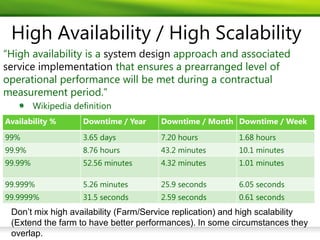
High Availability / High Scalability
“High availability is a system design approach and associated
service implementation that ensures a prearranged level of
operational performance will be met during a contractual
measurement period.”
         Wikipedia definition
Availability %       Downtime / Year   Downtime / Month Downtime / Week

99%                  3.65 days         7.20 hours         1.68 hours
99.9%                8.76 hours        43.2 minutes       10.1 minutes
99.99%               52.56 minutes     4.32 minutes       1.01 minutes

99.999%              5.26 minutes      25.9 seconds       6.05 seconds
99.9999%             31.5 seconds      2.59 seconds       0.61 seconds
 Don’t mix high availability (Farm/Service replication) and high scalability
 (Extend the farm to have better performances). In some circumstances they
 overlap.
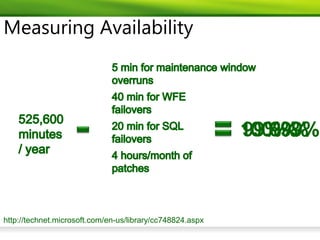
Measuring Availability


http://technet.microsoft.com/en-us/library/cc748824.aspx
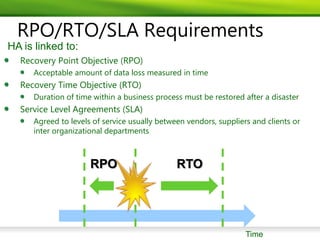
RPO/RTO/SLA Requirements
HA is linked to:
  Recovery Point Objective (RPO)
     Acceptable amount of data loss measured in time
  Recovery Time Objective (RTO)
     Duration of time within a business process must be restored after a disaster
  Service Level Agreements (SLA)
     Agreed to levels of service usually between vendors, suppliers and clients or
     inter organizational departments


                     RPO                      RTO


                                                                  Time
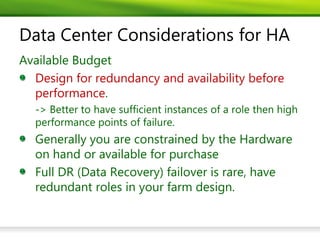
Data Center Considerations for HA

 Design for redundancy and availability before
 performance


 Generally you are constrained by the Hardware
 on hand or available for purchase
 Full DR (Data Recovery) failover is rare, have
 redundant roles in your farm design.
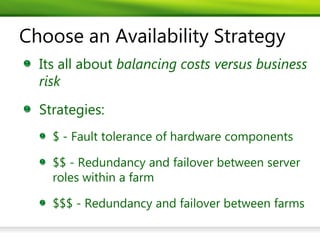
Choose an Availability Strategy
  Its all about balancing costs versus business
  risk
  Strategies:
    $ - Fault tolerance of hardware components

    $$ - Redundancy and failover between server
    roles within a farm

    $$$ - Redundancy and failover between farms
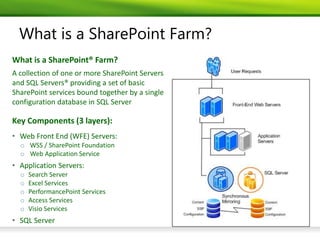
What is a SharePoint Farm?
What is a SharePoint® Farm?
A collection of one or more SharePoint Servers
and SQL Servers® providing a set of basic
SharePoint services bound together by a single
configuration database in SQL Server

Key Components (3 layers):
• Web Front End (WFE) Servers:
  o WSS / SharePoint Foundation
  o Web Application Service
• Application Servers:
  o   Search Server
  o   Excel Services
  o   PerformancePoint Services
  o   Access Services
  o   Visio Services
• SQL Server
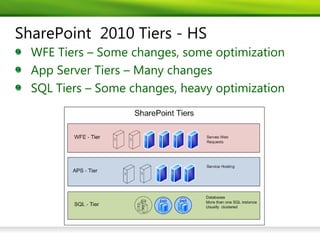
SharePoint 2010 Tiers - HS
  WFE Tiers – Some changes, some optimization
  App Server Tiers – Many changes
  SQL Tiers – Some changes, heavy optimization
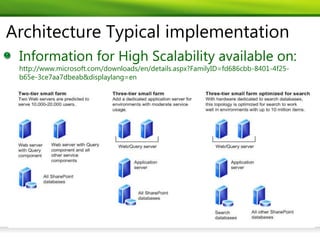
Architecture Typical implementation
 Information for High Scalability available on:
 http://www.microsoft.com/downloads/en/details.aspx?FamilyID=fd686cbb-8401-4f25-
 b65e-3ce7aa7dbeab&displaylang=en
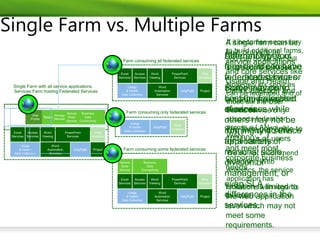
Single Farm vs. Multiple Farms
Architecture tips for High Scalability (HS)
    Sharepoint can easily scale (recommended max 8
    WFE/farm)
    Antivirus do not activate on temp file and Search
    index
    Service can be started and dispatch on mostly
    each farm machine.
    Some services can be shared over farms to scale
    Monitoring is necessary for production to
    validate architecture choices.
    http://www.learningsharepoint.com/2010/10/16/monitoring-
    sharepoint-2010-%e2%80%93-tutorial/
    Infra size must not be underestimated, info on:
 http://technet.microsoft.com/en-us/library/cc261700.aspx
 http://technet.microsoft.com/en-us/library/cc263199.aspx
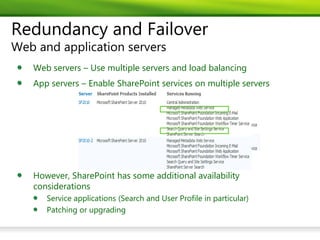
Redundancy and Failover
Web and application servers
   Web servers – Use multiple servers and load balancing
   App servers – Enable SharePoint services on multiple servers


   However, SharePoint has some additional availability
   considerations
      Service applications (Search and User Profile in particular)
      Patching or upgrading
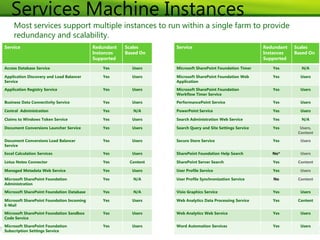
Services Machine Instances
     Most services support multiple instances to run within a single farm to provide
     redundancy and scalability.
Service                                    Redundant   Scales     Service                                  Redundant   Scales
                                           Instances   Based On                                            Instances   Based On
                                           Supported                                                       Supported

Access Database Service                       Yes        Users    Microsoft SharePoint Foundation Timer       Yes        N/A

Application Discovery and Load Balancer       Yes        Users    Microsoft SharePoint Foundation Web         Yes        Users
Service                                                           Application
Application Registry Service                  Yes        Users    Microsoft SharePoint Foundation             Yes        Users
                                                                  Workflow Timer Service

Business Data Connectivity Service            Yes        Users    PerformancePoint Service                    Yes        Users

Central Administration                        Yes         N/A     PowerPoint Service                          Yes        Users

Claims to Windows Token Service               Yes        Users    Search Administration Web Service           Yes        N/A

Document Conversions Launcher Service         Yes        Users    Search Query and Site Settings Service      Yes        Users,
                                                                                                                        Content

Document Conversions Load Balancer            Yes        Users    Secure Store Service                        Yes        Users
Service

Excel Calculation Services                    Yes        Users    SharePoint Foundation Help Search           No*        Users

Lotus Notes Connector                         Yes       Content   SharePoint Server Search                    Yes       Content

Managed Metadata Web Service                  Yes        Users    User Profile Service                        Yes        Users

Microsoft SharePoint Foundation               Yes         N/A     User Profile Synchronization Service        No        Content
Administration

Microsoft SharePoint Foundation Database      Yes         N/A     Visio Graphics Service                      Yes        Users

Microsoft SharePoint Foundation Incoming      Yes        Users    Web Analytics Data Processing Service       Yes       Content
E-Mail

Microsoft SharePoint Foundation Sandbox       Yes        Users    Web Analytics Web Service                   Yes        Users
Code Service

Microsoft SharePoint Foundation               Yes        Users    Word Automation Services                    Yes        Users
Subscription Settings Service
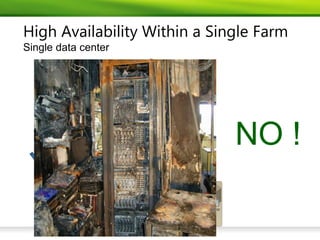
High Availability Within a Single Farm
Single data center


                              NO !
SP2010 HA means especially:
 SP2010 service distribution and full redundancy.
 SQL 2008 HA: http://technet.microsoft.com/en-us/library/cc678868.aspx
 Backup / Restore strategy.
 Disaster Recovery strategy
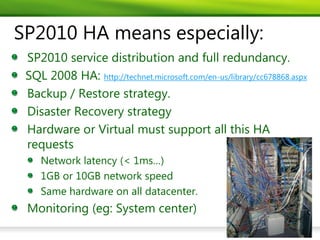
 Hardware or Virtual must support all this HA
 requests
    Network latency (< 1ms…)
    1GB or 10GB network speed
    Same hardware on all datacenter.
 Monitoring (eg: System center)
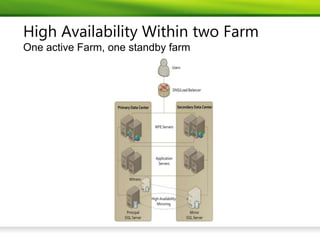
High Availability Within two Farm
One active Farm, one standby farm
Workaround: Redundancy and Failover
Service application drill-down – User Profile over 2 Farms.
   2 Options:
      1. Restore a backup in secondary farm (not
          feasible for most)
      2. Maintain separate UPA and use the User
          Profile Replication Engine (UPRE)
            Replicate user profiles and social data every 5
            seconds by default
            User Profile Replication Engine overview (SharePoint
            Server 2010) http://technet.microsoft.com/en-
            us/library/cc663011.aspx
Redundancy and Failover
Service application drill-down – Standard Search over 2 farms
      3 Options:
      1.   Restore a backup in secondary farm (not feasible
           for most)
      2.   Dual-crawl the live farm from the failover farm (not
           sensible for most)
      3.   Maintain separate Search SA and crawl content
           locally
             Requires read-only access to all content databases for the
             duration of a crawl
             Requires an up to date SiteMap in the Config DB for new
             site collections to be crawled and accessed after failover
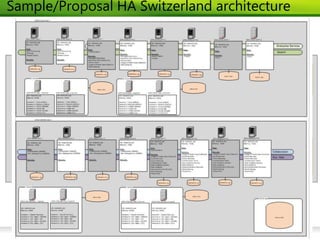
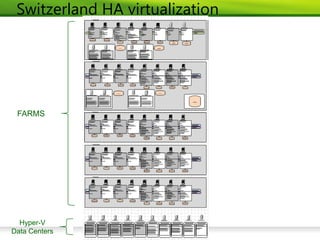
Sample/Proposal HA Switzerland architecture
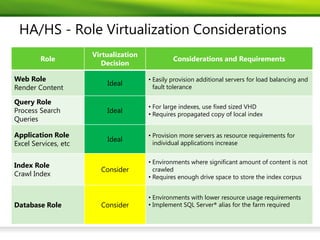
HA/HS - Role Virtualization Considerations
                      Virtualization
        Role                                    Considerations and Requirements
                         Decision

Web Role                               • Easily provision additional servers for load balancing and
                          Ideal
Render Content                           fault tolerance

Query Role
                                       • For large indexes, use fixed sized VHD
Process Search            Ideal        • Requires propagated copy of local index
Queries

Application Role                       • Provision more servers as resource requirements for
                          Ideal
Excel Services, etc                      individual applications increase


                                       • Environments where significant amount of content is not
Index Role
                        Consider         crawled
Crawl Index                            • Requires enough drive space to store the index corpus


                                       • Environments with lower resource usage requirements
Database Role           Consider       • Implement SQL Server® alias for the farm required
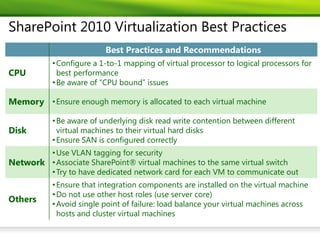
SharePoint 2010 Virtualization Best Practices
                          Best Practices and Recommendations
           • Configure a 1-to-1 mapping of virtual processor to logical processors for
CPU          best performance
           • Be aware of “CPU bound” issues

Memory • Ensure enough memory is allocated to each virtual machine

           • Be aware of underlying disk read write contention between different
Disk         virtual machines to their virtual hard disks
           • Ensure SAN is configured correctly
        • Use VLAN tagging for security
Network • Associate SharePoint® virtual machines to the same virtual switch
        • Try to have dedicated network card for each VM to communicate out
           • Ensure that integration components are installed on the virtual machine
           • Do not use other host roles (use server core)
Others
           • Avoid single point of failure: load balance your virtual machines across
             hosts and cluster virtual machines
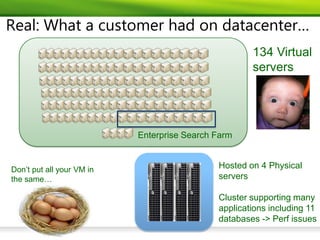
Real: What a customer had on datacenter…
                                                     134 Virtual
                                                     servers


                           Enterprise Search Farm


Don’t put all your VM in                     Hosted on 4 Physical
the same…                                    servers

                                             Cluster supporting many
                                             applications including 11
                                             databases -> Perf issues
Switzerland HA virtualization


 FARMS


  Hyper-V
Data Centers
Additional Resources
  Plan for availability (SharePoint Server 2010):
  http://technet.microsoft.com/en-us/library/cc748824.aspx
  Plan for disaster recovery (SharePoint Server 2010):
  http://technet.microsoft.com/en-us/library/ff628971.aspx
  User Profile Replication Engine overview (SharePoint Server
  2010): http://technet.microsoft.com/en-
  us/library/cc663011.aspx
  Virtualization for SharePoint Server 2010:
  http://technet.microsoft.com/en-
  ca/sharepoint/ff602849.aspx
  Boundaries and Limits Document:
  http://technet.microsoft.com/en-us/library/cc262787.aspx
  RAP Program:
  http://download.microsoft.com/download/1/C/1/1C15BA51
  -840E-498D-86C6-4BD35D33C79E/Datasheet_SPRAP.pdf
© 2010 Microsoft Corporation. All rights reserved. This presentation is for informational purposes only. Microsoft makes no warranties, express or implied, in this summary.

Sp2010 high availlability

  • 1.
    SharePoint 2010 –High Availability Thierry Gasser Technical Specialist Collaboration Platform Thierryg@microsoft.com
  • 2.
    Agenda High Availabilityversus High Scalability SharePoint classic architecture for High Scalability SharePoint High Availability Architecture Virtualization info. Q&A
  • 3.
    High Availability /High Scalability “High availability is a system design approach and associated service implementation that ensures a prearranged level of operational performance will be met during a contractual measurement period.” Wikipedia definition Availability % Downtime / Year Downtime / Month Downtime / Week 99% 3.65 days 7.20 hours 1.68 hours 99.9% 8.76 hours 43.2 minutes 10.1 minutes 99.99% 52.56 minutes 4.32 minutes 1.01 minutes 99.999% 5.26 minutes 25.9 seconds 6.05 seconds 99.9999% 31.5 seconds 2.59 seconds 0.61 seconds Don’t mix high availability (Farm/Service replication) and high scalability (Extend the farm to have better performances). In some circumstances they overlap.
  • 4.
  • 5.
    RPO/RTO/SLA Requirements HA islinked to: Recovery Point Objective (RPO) Acceptable amount of data loss measured in time Recovery Time Objective (RTO) Duration of time within a business process must be restored after a disaster Service Level Agreements (SLA) Agreed to levels of service usually between vendors, suppliers and clients or inter organizational departments RPO RTO Time
  • 6.
    Data Center Considerationsfor HA Design for redundancy and availability before performance Generally you are constrained by the Hardware on hand or available for purchase Full DR (Data Recovery) failover is rare, have redundant roles in your farm design.
  • 7.
    Choose an AvailabilityStrategy Its all about balancing costs versus business risk Strategies: $ - Fault tolerance of hardware components $$ - Redundancy and failover between server roles within a farm $$$ - Redundancy and failover between farms
  • 8.
    What is aSharePoint Farm? What is a SharePoint® Farm? A collection of one or more SharePoint Servers and SQL Servers® providing a set of basic SharePoint services bound together by a single configuration database in SQL Server Key Components (3 layers): • Web Front End (WFE) Servers: o WSS / SharePoint Foundation o Web Application Service • Application Servers: o Search Server o Excel Services o PerformancePoint Services o Access Services o Visio Services • SQL Server
  • 9.
    SharePoint 2010 Tiers- HS WFE Tiers – Some changes, some optimization App Server Tiers – Many changes SQL Tiers – Some changes, heavy optimization
  • 10.
    Architecture Typical implementation Information for High Scalability available on: http://www.microsoft.com/downloads/en/details.aspx?FamilyID=fd686cbb-8401-4f25- b65e-3ce7aa7dbeab&displaylang=en
  • 11.
    Single Farm vs.Multiple Farms
  • 12.
    Architecture tips forHigh Scalability (HS) Sharepoint can easily scale (recommended max 8 WFE/farm) Antivirus do not activate on temp file and Search index Service can be started and dispatch on mostly each farm machine. Some services can be shared over farms to scale Monitoring is necessary for production to validate architecture choices. http://www.learningsharepoint.com/2010/10/16/monitoring- sharepoint-2010-%e2%80%93-tutorial/ Infra size must not be underestimated, info on: http://technet.microsoft.com/en-us/library/cc261700.aspx http://technet.microsoft.com/en-us/library/cc263199.aspx
  • 13.
    Redundancy and Failover Weband application servers Web servers – Use multiple servers and load balancing App servers – Enable SharePoint services on multiple servers However, SharePoint has some additional availability considerations Service applications (Search and User Profile in particular) Patching or upgrading
  • 14.
    Services Machine Instances Most services support multiple instances to run within a single farm to provide redundancy and scalability. Service Redundant Scales Service Redundant Scales Instances Based On Instances Based On Supported Supported Access Database Service Yes Users Microsoft SharePoint Foundation Timer Yes N/A Application Discovery and Load Balancer Yes Users Microsoft SharePoint Foundation Web Yes Users Service Application Application Registry Service Yes Users Microsoft SharePoint Foundation Yes Users Workflow Timer Service Business Data Connectivity Service Yes Users PerformancePoint Service Yes Users Central Administration Yes N/A PowerPoint Service Yes Users Claims to Windows Token Service Yes Users Search Administration Web Service Yes N/A Document Conversions Launcher Service Yes Users Search Query and Site Settings Service Yes Users, Content Document Conversions Load Balancer Yes Users Secure Store Service Yes Users Service Excel Calculation Services Yes Users SharePoint Foundation Help Search No* Users Lotus Notes Connector Yes Content SharePoint Server Search Yes Content Managed Metadata Web Service Yes Users User Profile Service Yes Users Microsoft SharePoint Foundation Yes N/A User Profile Synchronization Service No Content Administration Microsoft SharePoint Foundation Database Yes N/A Visio Graphics Service Yes Users Microsoft SharePoint Foundation Incoming Yes Users Web Analytics Data Processing Service Yes Content E-Mail Microsoft SharePoint Foundation Sandbox Yes Users Web Analytics Web Service Yes Users Code Service Microsoft SharePoint Foundation Yes Users Word Automation Services Yes Users Subscription Settings Service
  • 15.
    High Availability Withina Single Farm Single data center NO !
  • 16.
    SP2010 HA meansespecially: SP2010 service distribution and full redundancy. SQL 2008 HA: http://technet.microsoft.com/en-us/library/cc678868.aspx Backup / Restore strategy. Disaster Recovery strategy Hardware or Virtual must support all this HA requests Network latency (< 1ms…) 1GB or 10GB network speed Same hardware on all datacenter. Monitoring (eg: System center)
  • 17.
    High Availability Withintwo Farm One active Farm, one standby farm
  • 18.
    Workaround: Redundancy andFailover Service application drill-down – User Profile over 2 Farms. 2 Options: 1. Restore a backup in secondary farm (not feasible for most) 2. Maintain separate UPA and use the User Profile Replication Engine (UPRE) Replicate user profiles and social data every 5 seconds by default User Profile Replication Engine overview (SharePoint Server 2010) http://technet.microsoft.com/en- us/library/cc663011.aspx
  • 19.
    Redundancy and Failover Serviceapplication drill-down – Standard Search over 2 farms 3 Options: 1. Restore a backup in secondary farm (not feasible for most) 2. Dual-crawl the live farm from the failover farm (not sensible for most) 3. Maintain separate Search SA and crawl content locally Requires read-only access to all content databases for the duration of a crawl Requires an up to date SiteMap in the Config DB for new site collections to be crawled and accessed after failover
  • 20.
  • 21.
    HA/HS - RoleVirtualization Considerations Virtualization Role Considerations and Requirements Decision Web Role • Easily provision additional servers for load balancing and Ideal Render Content fault tolerance Query Role • For large indexes, use fixed sized VHD Process Search Ideal • Requires propagated copy of local index Queries Application Role • Provision more servers as resource requirements for Ideal Excel Services, etc individual applications increase • Environments where significant amount of content is not Index Role Consider crawled Crawl Index • Requires enough drive space to store the index corpus • Environments with lower resource usage requirements Database Role Consider • Implement SQL Server® alias for the farm required
  • 22.
    SharePoint 2010 VirtualizationBest Practices Best Practices and Recommendations • Configure a 1-to-1 mapping of virtual processor to logical processors for CPU best performance • Be aware of “CPU bound” issues Memory • Ensure enough memory is allocated to each virtual machine • Be aware of underlying disk read write contention between different Disk virtual machines to their virtual hard disks • Ensure SAN is configured correctly • Use VLAN tagging for security Network • Associate SharePoint® virtual machines to the same virtual switch • Try to have dedicated network card for each VM to communicate out • Ensure that integration components are installed on the virtual machine • Do not use other host roles (use server core) Others • Avoid single point of failure: load balance your virtual machines across hosts and cluster virtual machines
  • 23.
    Real: What acustomer had on datacenter… 134 Virtual servers Enterprise Search Farm Don’t put all your VM in Hosted on 4 Physical the same… servers Cluster supporting many applications including 11 databases -> Perf issues
  • 24.
    Switzerland HA virtualization FARMS Hyper-V Data Centers
  • 25.
    Additional Resources Plan for availability (SharePoint Server 2010): http://technet.microsoft.com/en-us/library/cc748824.aspx Plan for disaster recovery (SharePoint Server 2010): http://technet.microsoft.com/en-us/library/ff628971.aspx User Profile Replication Engine overview (SharePoint Server 2010): http://technet.microsoft.com/en- us/library/cc663011.aspx Virtualization for SharePoint Server 2010: http://technet.microsoft.com/en- ca/sharepoint/ff602849.aspx Boundaries and Limits Document: http://technet.microsoft.com/en-us/library/cc262787.aspx RAP Program: http://download.microsoft.com/download/1/C/1/1C15BA51 -840E-498D-86C6-4BD35D33C79E/Datasheet_SPRAP.pdf
  • 26.
    © 2010 MicrosoftCorporation. All rights reserved. This presentation is for informational purposes only. Microsoft makes no warranties, express or implied, in this summary.

Editor's Notes

  • #11 | BI – Busines Intelligence | BPM – Business Process Management | API – Application Programming Interface | SP1 – Service Pack 1 | LDAP – Light Directory Access Protocol for products like Active Directory |
  • #25 CPU Bound -&gt; Allocation of correct memory to each core.