Solution Architecture Review
Review Template
Project Description
In Scope
Out of Scope
Business Architecture: Capability Map
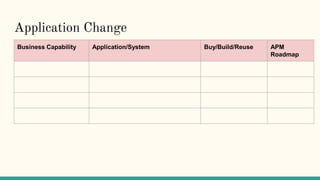
Application Change
Business Capability Application/System Buy/Build/Reuse APM
Roadmap
AS-IS Context Diagram
TO-BE Context Diagram
Use Case View
<<This includes several use case views of the business requirements. Business requirements
are usually completed by elicitation session between business users, business analysts and some
other IT stakeholders>>
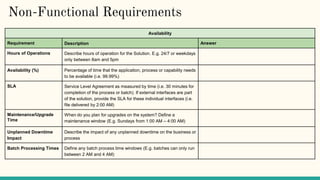
Availability
Requirement Description Answer
Hours of Operations Describe hours of operation for the Solution. E.g. 24/7 or weekdays
only between 8am and 5pm
Availability (%) Percentage of time that the application, process or capability needs
to be available (i.e. 99.99%)
SLA Service Level Agreement as measured by time (i.e. 30 minutes for
completion of the process or batch). If external interfaces are part
of the solution, provide the SLA for these individual interfaces (i.e.
file delivered by 2:00 AM)
Maintenance/Upgrade
Time
When do you plan for upgrades on the system? Define a
maintenance window (E.g. Sundays from 1:00 AM – 4:00 AM)
Unplanned Downtime
Impact
Describe the impact of any unplanned downtime on the business or
process
Batch Processing Times Define any batch process time windows (E.g. batches can only run
between 2 AM and 4 AM)
Non-Functional Requirements
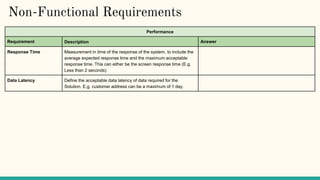
Performance
Requirement Description Answer
Response Time Measurement in time of the response of the system, to include the
average expected response time and the maximum acceptable
response time. This can either be the screen response time (E.g.
Less than 2 seconds)
Data Latency Define the acceptable data latency of data required for the
Solution. E.g. customer address can be a maximum of 1 day.
Non-Functional Requirements
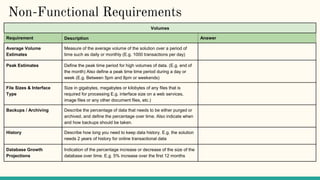
Volumes
Requirement Description Answer
Average Volume
Estimates
Measure of the average volume of the solution over a period of
time such as daily or monthly (E.g. 1000 transactions per day)
Peak Estimates Define the peak time period for high volumes of data. (E.g. end of
the month) Also define a peak time time period during a day or
week (E.g. Between 5pm and 8pm or weekends)
File Sizes & Interface
Type
Size in gigabytes, megabytes or kilobytes of any files that is
required for processing E.g. interface size on a web services,
image files or any other document files, etc.)
Backups / Archiving Describe the percentage of data that needs to be either purged or
archived, and define the percentage over time. Also indicate when
and how backups should be taken.
History Describe how long you need to keep data history. E.g. the solution
needs 2 years of history for online transactional data
Database Growth
Projections
Indication of the percentage increase or decrease of the size of the
database over time. E.g. 5% increase over the first 12 months
Non-Functional Requirements
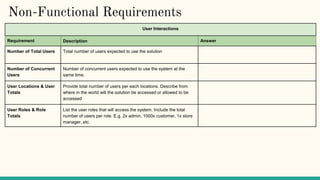
User Interactions
Requirement Description Answer
Number of Total Users Total number of users expected to use the solution
Number of Concurrent
Users
Number of concurrent users expected to use the system at the
same time.
User Locations & User
Totals
Provide total number of users per each locations. Describe from
where in the world will the solution be accessed or allowed to be
accessed
User Roles & Role
Totals
List the user roles that will access the system. Include the total
number of users per role. E.g. 2x admin, 1000x customer, 1x store
manager, etc.
Non-Functional Requirements
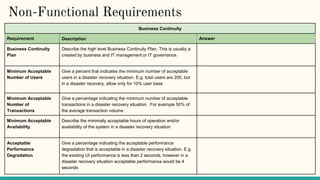
Business Continuity
Requirement Description Answer
Business Continuity
Plan
Describe the high level Business Continuity Plan. This is usually a
created by business and IT management or IT governance.
Minimum Acceptable
Number of Users
Give a percent that indicates the minimum number of acceptable
users in a disaster recovery situation. E.g. total users are 200, but
in a disaster recovery, allow only for 10% user base
Minimum Acceptable
Number of
Transactions
Give a percentage indicating the minimum number of acceptable
transactions in a disaster recovery situation. For example 50% of
the average transaction volume
Minimum Acceptable
Availability
Describe the minimally acceptable hours of operation and/or
availability of the system in a disaster recovery situation
Acceptable
Performance
Degradation
Give a percentage indicating the acceptable performance
degradation that is acceptable in a disaster recovery situation. E.g.
the existing UI performance is less than 2 seconds, however in a
disaster recovery situation acceptable performance would be 4
seconds
Non-Functional Requirements
Security
Requirement Description Answer
Authentication Describe what authentication is required, and if required additional details
should be provided to further clarify the authentication requirements (for
example):
• Username / Password Requirements (Complexity, Length, Numerical
Numbers, etc)
• Password change requirements (initial login, every 30 days, etc.)
• Password Storage
Authorization Details on the authorization requirements for the system. E.g. is the user or
system authorized to access the database or API’s
Attestation Details on the attestation requirements for the solution. E.g. managers need
to review or approve user access, or process owner needs to review or
approve user access
Audit Controls Details on any audit controls that are required for the solution
Confidentiality of Data Details on the confidentiality of the data for the solution. E.g. is it customer
personal information, secret information or public information
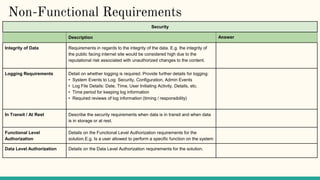
Non-Functional Requirements
Security
Description Answer
Integrity of Data Requirements in regards to the integrity of the data. E.g. the integrity of
the public facing internet site would be considered high due to the
reputational risk associated with unauthorized changes to the content.
Logging Requirements Detail on whether logging is required. Provide further details for logging:
• System Events to Log: Security, Configuration, Admin Events
• Log File Details: Date, Time, User Initiating Activity, Details, etc.
• Time period for keeping log information
• Required reviews of log information (timing / responsibility)
In Transit / At Rest Describe the security requirements when data is in transit and when data
is in storage or at rest.
Functional Level
Authorization
Details on the Functional Level Authorization requirements for the
solution.E.g. Is a user allowed to perform a specific function on the system
Data Level Authorization Details on the Data Level Authorization requirements for the solution.
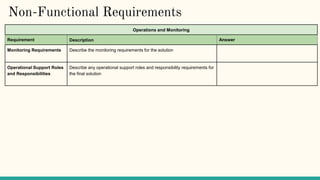
Non-Functional Requirements
Operations and Monitoring
Requirement Description Answer
Monitoring Requirements Describe the monitoring requirements for the solution
Operational Support Roles
and Responsibilities
Describe any operational support roles and responsibility requirements for
the final solution
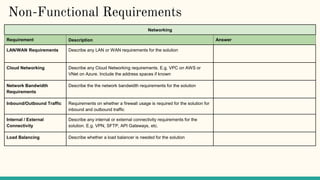
Networking
Requirement Description Answer
LAN/WAN Requirements Describe any LAN or WAN requirements for the solution
Cloud Networking Describe any Cloud Networking requirements. E.g. VPC on AWS or
VNet on Azure. Include the address spaces if known
Network Bandwidth
Requirements
Describe the the network bandwidth requirements for the solution
Inbound/Outbound Traffic Requirements on whether a firewall usage is required for the solution for
inbound and outbound traffic
Internal / External
Connectivity
Describe any internal or external connectivity requirements for the
solution. E.g. VPN, SFTP, API Gateways, etc.
Load Balancing Describe whether a load balancer is needed for the solution
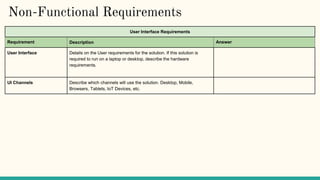
Non-Functional Requirements
User Interface Requirements
Requirement Description Answer
User Interface Details on the User requirements for the solution. If this solution is
required to run on a laptop or desktop, describe the hardware
requirements.
UI Channels Describe which channels will use the solution. Desktop, Mobile,
Browsers, Tablets, IoT Devices, etc.
Non-Functional Requirements
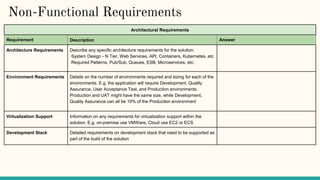
Architectural Requirements
Requirement Description Answer
Architecture Requirements Describe any specific architecture requirements for the solution:
·System Design - N Tier, Web Services, API, Containers, Kubernetes, etc
·Required Patterns, Pub/Sub, Queues, ESB, Microservices, etc.
Environment Requirements Details on the number of environments required and sizing for each of the
environments. E.g. the application will require Development, Quality
Assurance, User Acceptance Test, and Production environments.
Production and UAT might have the same size, while Development,
Quality Assurance can all be 10% of the Production environment
Virtualization Support Information on any requirements for virtualization support within the
solution. E.g. on-premise use VMWare, Cloud use EC2 or ECS
Development Stack Detailed requirements on development stack that need to be supported as
part of the build of the solution
Current State Solution Architecture Diagram
Target State Solution Architecture Diagram
Architecture Objectives
Detail out the goals to be achieved from an architecture point of view with the
target state solution architecture.
Architecture Constraints
Detail out the constraints under which the new solution will be designed, built and
maintained. E.g. The solution will use the AWS cloud platform to implement the
solution.
Architectural Risks
Describe the potential risks in relation to the architecture and the overall project of
the target state solution architecture.
Integration Architecture
Data Architecture Diagram
Logical Deployment Model
Security Architecture
Networking
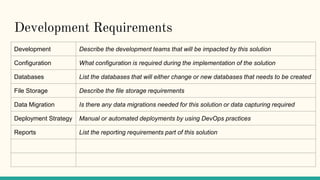
Development Requirements
Development Describe the development teams that will be impacted by this solution
Configuration What configuration is required during the implementation of the solution
Databases List the databases that will either change or new databases that needs to be created
File Storage Describe the file storage requirements
Data Migration Is there any data migrations needed for this solution or data capturing required
Deployment Strategy Manual or automated deployments by using DevOps practices
Reports List the reporting requirements part of this solution

Solution+Architecture+Review+Template.pptx

  • 1.
  • 2.
  • 3.
  • 4.
  • 5.
  • 6.
    Application Change Business CapabilityApplication/System Buy/Build/Reuse APM Roadmap
  • 7.
  • 8.
  • 9.
    Use Case View <<Thisincludes several use case views of the business requirements. Business requirements are usually completed by elicitation session between business users, business analysts and some other IT stakeholders>>
  • 10.
    Availability Requirement Description Answer Hoursof Operations Describe hours of operation for the Solution. E.g. 24/7 or weekdays only between 8am and 5pm Availability (%) Percentage of time that the application, process or capability needs to be available (i.e. 99.99%) SLA Service Level Agreement as measured by time (i.e. 30 minutes for completion of the process or batch). If external interfaces are part of the solution, provide the SLA for these individual interfaces (i.e. file delivered by 2:00 AM) Maintenance/Upgrade Time When do you plan for upgrades on the system? Define a maintenance window (E.g. Sundays from 1:00 AM – 4:00 AM) Unplanned Downtime Impact Describe the impact of any unplanned downtime on the business or process Batch Processing Times Define any batch process time windows (E.g. batches can only run between 2 AM and 4 AM) Non-Functional Requirements
  • 11.
    Non-Functional Requirements Performance Requirement DescriptionAnswer Response Time Measurement in time of the response of the system, to include the average expected response time and the maximum acceptable response time. This can either be the screen response time (E.g. Less than 2 seconds) Data Latency Define the acceptable data latency of data required for the Solution. E.g. customer address can be a maximum of 1 day.
  • 12.
    Non-Functional Requirements Volumes Requirement DescriptionAnswer Average Volume Estimates Measure of the average volume of the solution over a period of time such as daily or monthly (E.g. 1000 transactions per day) Peak Estimates Define the peak time period for high volumes of data. (E.g. end of the month) Also define a peak time time period during a day or week (E.g. Between 5pm and 8pm or weekends) File Sizes & Interface Type Size in gigabytes, megabytes or kilobytes of any files that is required for processing E.g. interface size on a web services, image files or any other document files, etc.) Backups / Archiving Describe the percentage of data that needs to be either purged or archived, and define the percentage over time. Also indicate when and how backups should be taken. History Describe how long you need to keep data history. E.g. the solution needs 2 years of history for online transactional data Database Growth Projections Indication of the percentage increase or decrease of the size of the database over time. E.g. 5% increase over the first 12 months
  • 13.
    Non-Functional Requirements User Interactions RequirementDescription Answer Number of Total Users Total number of users expected to use the solution Number of Concurrent Users Number of concurrent users expected to use the system at the same time. User Locations & User Totals Provide total number of users per each locations. Describe from where in the world will the solution be accessed or allowed to be accessed User Roles & Role Totals List the user roles that will access the system. Include the total number of users per role. E.g. 2x admin, 1000x customer, 1x store manager, etc.
  • 14.
    Non-Functional Requirements Business Continuity RequirementDescription Answer Business Continuity Plan Describe the high level Business Continuity Plan. This is usually a created by business and IT management or IT governance. Minimum Acceptable Number of Users Give a percent that indicates the minimum number of acceptable users in a disaster recovery situation. E.g. total users are 200, but in a disaster recovery, allow only for 10% user base Minimum Acceptable Number of Transactions Give a percentage indicating the minimum number of acceptable transactions in a disaster recovery situation. For example 50% of the average transaction volume Minimum Acceptable Availability Describe the minimally acceptable hours of operation and/or availability of the system in a disaster recovery situation Acceptable Performance Degradation Give a percentage indicating the acceptable performance degradation that is acceptable in a disaster recovery situation. E.g. the existing UI performance is less than 2 seconds, however in a disaster recovery situation acceptable performance would be 4 seconds
  • 15.
    Non-Functional Requirements Security Requirement DescriptionAnswer Authentication Describe what authentication is required, and if required additional details should be provided to further clarify the authentication requirements (for example): • Username / Password Requirements (Complexity, Length, Numerical Numbers, etc) • Password change requirements (initial login, every 30 days, etc.) • Password Storage Authorization Details on the authorization requirements for the system. E.g. is the user or system authorized to access the database or API’s Attestation Details on the attestation requirements for the solution. E.g. managers need to review or approve user access, or process owner needs to review or approve user access Audit Controls Details on any audit controls that are required for the solution Confidentiality of Data Details on the confidentiality of the data for the solution. E.g. is it customer personal information, secret information or public information
  • 16.
    Non-Functional Requirements Security Description Answer Integrityof Data Requirements in regards to the integrity of the data. E.g. the integrity of the public facing internet site would be considered high due to the reputational risk associated with unauthorized changes to the content. Logging Requirements Detail on whether logging is required. Provide further details for logging: • System Events to Log: Security, Configuration, Admin Events • Log File Details: Date, Time, User Initiating Activity, Details, etc. • Time period for keeping log information • Required reviews of log information (timing / responsibility) In Transit / At Rest Describe the security requirements when data is in transit and when data is in storage or at rest. Functional Level Authorization Details on the Functional Level Authorization requirements for the solution.E.g. Is a user allowed to perform a specific function on the system Data Level Authorization Details on the Data Level Authorization requirements for the solution.
  • 17.
    Non-Functional Requirements Operations andMonitoring Requirement Description Answer Monitoring Requirements Describe the monitoring requirements for the solution Operational Support Roles and Responsibilities Describe any operational support roles and responsibility requirements for the final solution
  • 18.
    Networking Requirement Description Answer LAN/WANRequirements Describe any LAN or WAN requirements for the solution Cloud Networking Describe any Cloud Networking requirements. E.g. VPC on AWS or VNet on Azure. Include the address spaces if known Network Bandwidth Requirements Describe the the network bandwidth requirements for the solution Inbound/Outbound Traffic Requirements on whether a firewall usage is required for the solution for inbound and outbound traffic Internal / External Connectivity Describe any internal or external connectivity requirements for the solution. E.g. VPN, SFTP, API Gateways, etc. Load Balancing Describe whether a load balancer is needed for the solution Non-Functional Requirements
  • 19.
    User Interface Requirements RequirementDescription Answer User Interface Details on the User requirements for the solution. If this solution is required to run on a laptop or desktop, describe the hardware requirements. UI Channels Describe which channels will use the solution. Desktop, Mobile, Browsers, Tablets, IoT Devices, etc. Non-Functional Requirements
  • 20.
    Non-Functional Requirements Architectural Requirements RequirementDescription Answer Architecture Requirements Describe any specific architecture requirements for the solution: ·System Design - N Tier, Web Services, API, Containers, Kubernetes, etc ·Required Patterns, Pub/Sub, Queues, ESB, Microservices, etc. Environment Requirements Details on the number of environments required and sizing for each of the environments. E.g. the application will require Development, Quality Assurance, User Acceptance Test, and Production environments. Production and UAT might have the same size, while Development, Quality Assurance can all be 10% of the Production environment Virtualization Support Information on any requirements for virtualization support within the solution. E.g. on-premise use VMWare, Cloud use EC2 or ECS Development Stack Detailed requirements on development stack that need to be supported as part of the build of the solution
  • 21.
    Current State SolutionArchitecture Diagram
  • 22.
    Target State SolutionArchitecture Diagram
  • 23.
    Architecture Objectives Detail outthe goals to be achieved from an architecture point of view with the target state solution architecture.
  • 24.
    Architecture Constraints Detail outthe constraints under which the new solution will be designed, built and maintained. E.g. The solution will use the AWS cloud platform to implement the solution.
  • 25.
    Architectural Risks Describe thepotential risks in relation to the architecture and the overall project of the target state solution architecture.
  • 26.
  • 27.
  • 28.
  • 29.
  • 30.
  • 31.
    Development Requirements Development Describethe development teams that will be impacted by this solution Configuration What configuration is required during the implementation of the solution Databases List the databases that will either change or new databases that needs to be created File Storage Describe the file storage requirements Data Migration Is there any data migrations needed for this solution or data capturing required Deployment Strategy Manual or automated deployments by using DevOps practices Reports List the reporting requirements part of this solution