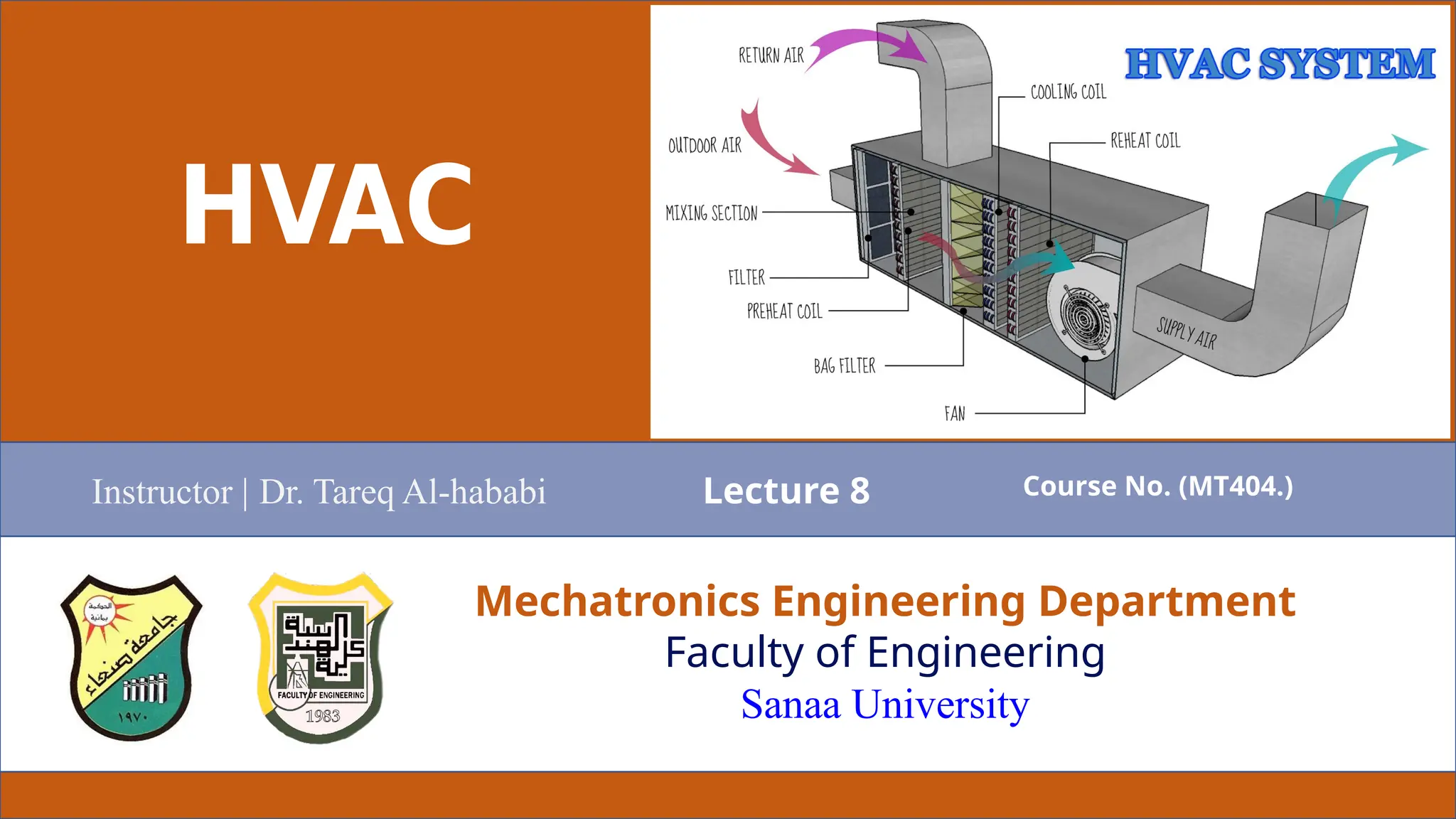
HVAC
Mechatronics Engineering Department
Faculty of Engineering
Sanaa University
Instructor | Dr. Tareq Al-hababi Course No. (MT404.)
Lecture 8
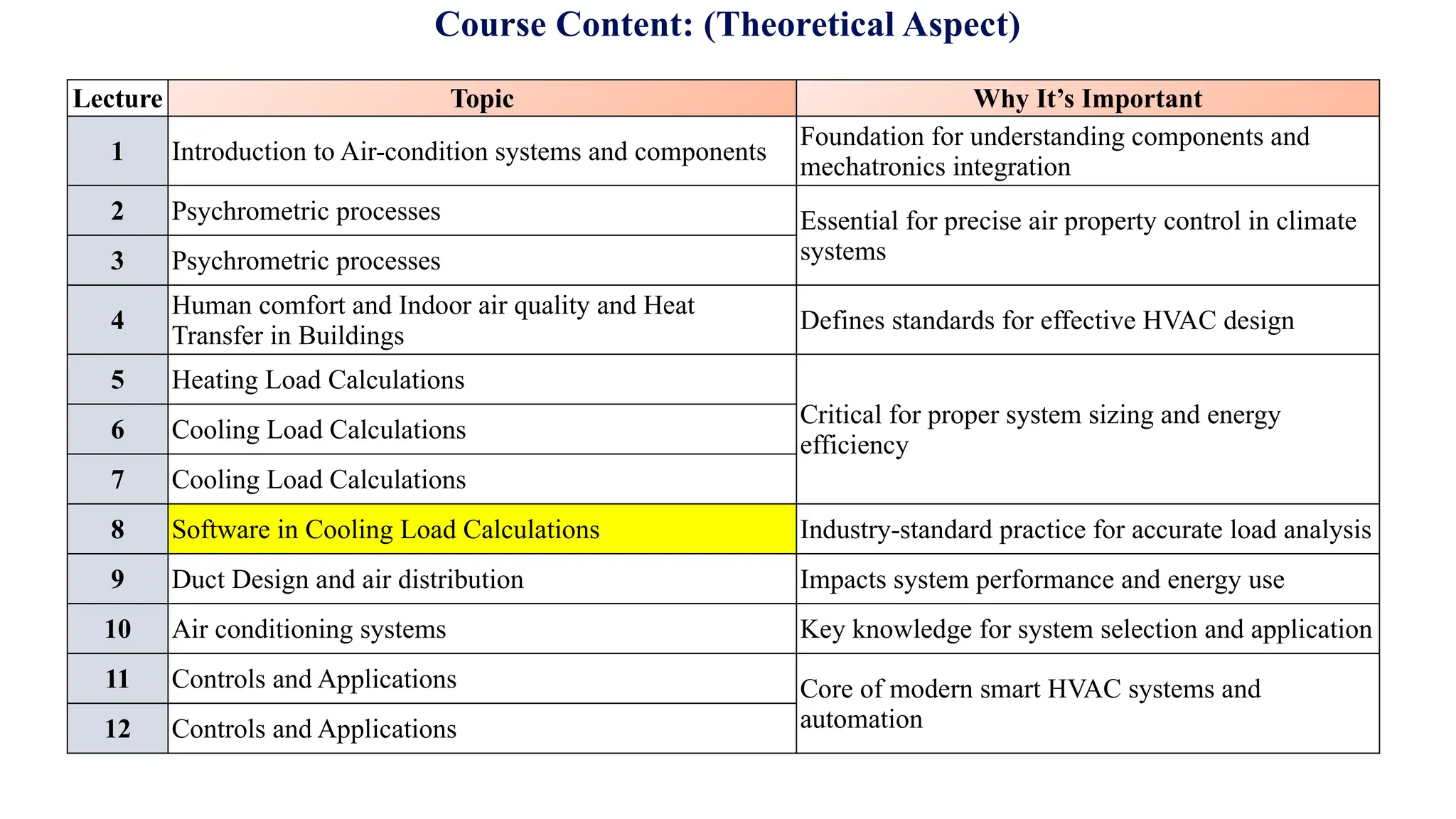
Course Content: (Theoretical Aspect)
Lecture Topic Why It’s Important
1 Introduction to Air-condition systems and components
Foundation for understanding components and
mechatronics integration
2 Psychrometric processes Essential for precise air property control in climate
systems
3 Psychrometric processes
4
Human comfort and Indoor air quality and Heat
Transfer in Buildings
Defines standards for effective HVAC design
5 Heating Load Calculations
Critical for proper system sizing and energy
efficiency
6 Cooling Load Calculations
7 Cooling Load Calculations
8 Software in Cooling Load Calculations Industry-standard practice for accurate load analysis
9 Duct Design and air distribution Impacts system performance and energy use
10 Air conditioning systems Key knowledge for system selection and application
11 Controls and Applications Core of modern smart HVAC systems and
automation
12 Controls and Applications
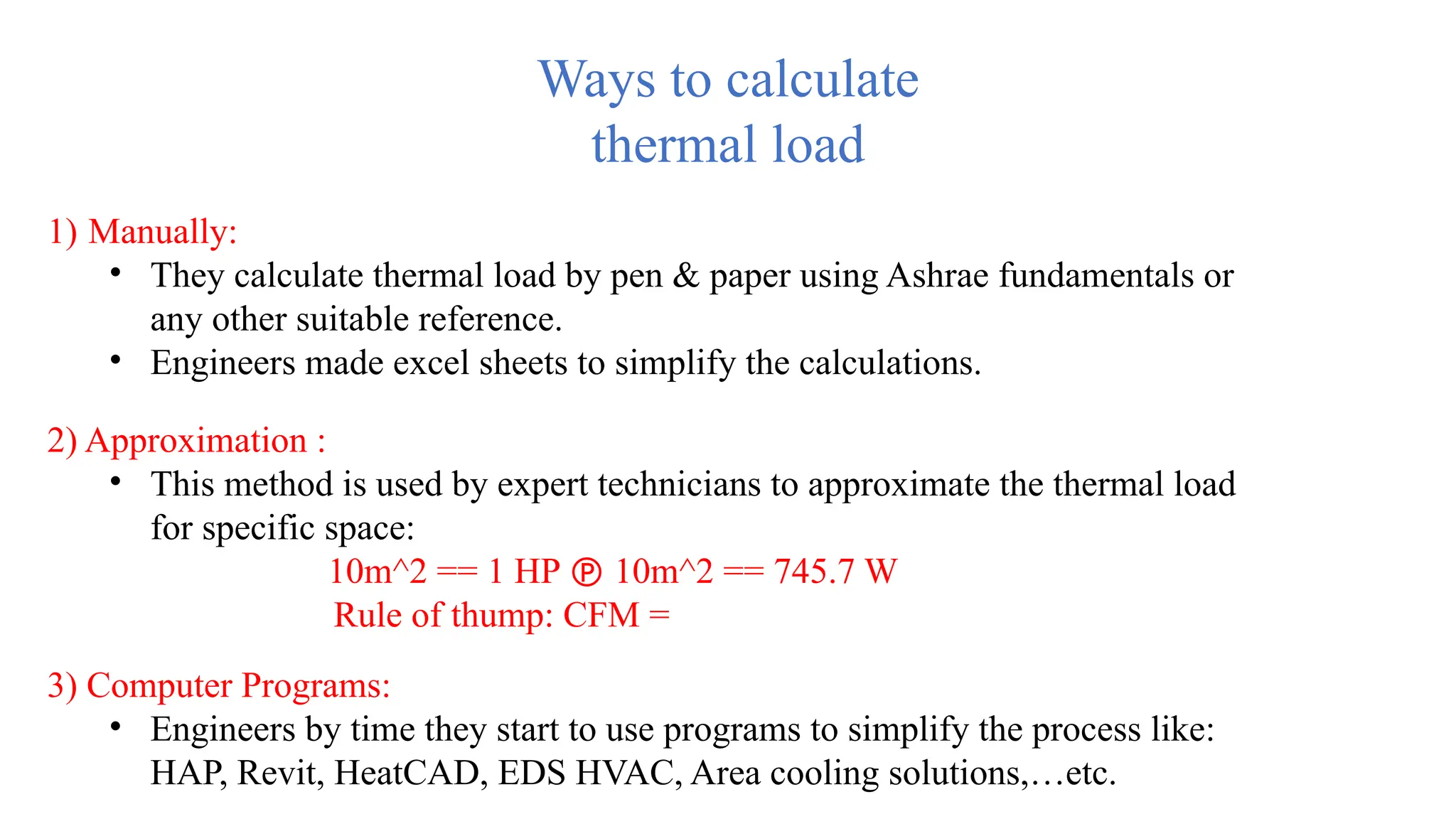
Ways to calculate
thermal load
1) Manually:
• They calculate thermal load by pen & paper using Ashrae fundamentals or
any other suitable reference.
• Engineers made excel sheets to simplify the calculations.
2) Approximation :
• This method is used by expert technicians to approximate the thermal load
for specific space:
10m^2 == 1 HP  10m^2 == 745.7 W
Rule of thump: CFM =
3) Computer Programs:
• Engineers by time they start to use programs to simplify the process like:
HAP, Revit, HeatCAD, EDS HVAC, Area cooling solutions,…etc.
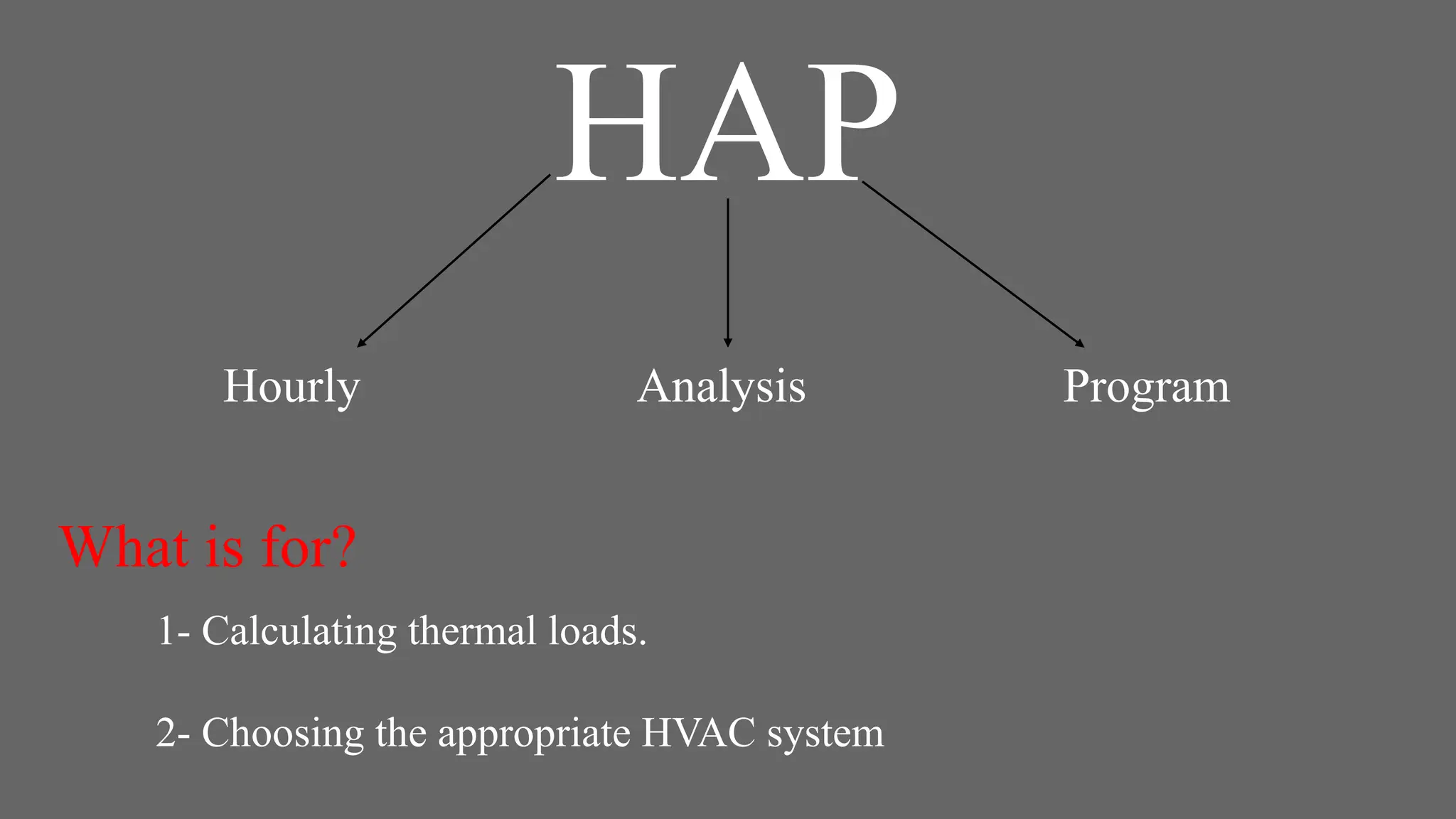
HAP
HAP
Hourly Analysis Program
What is for?
1- Calculating thermal loads.
2- Choosing the appropriate HVAC system
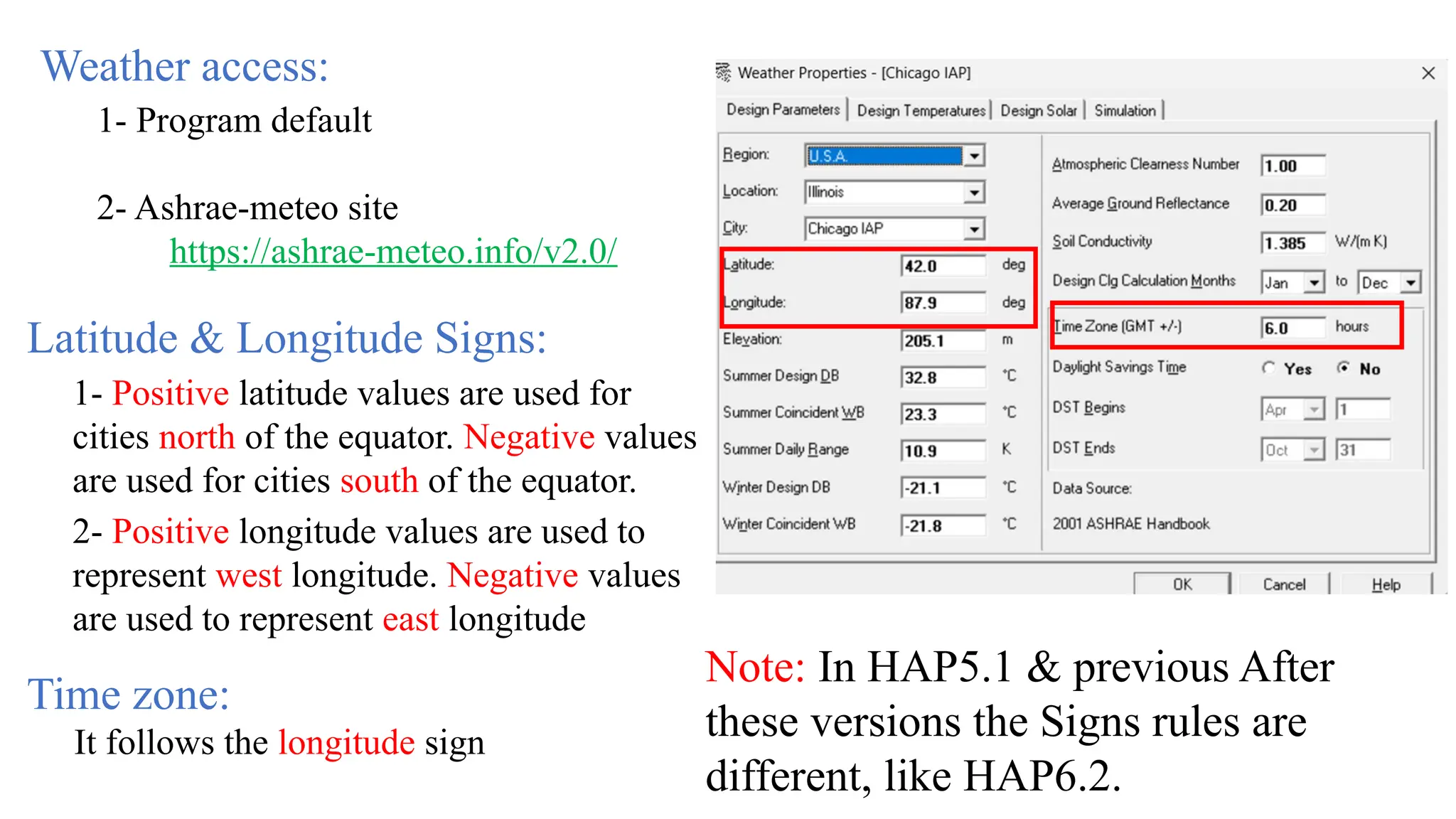
2- Positive longitude values are used to
represent west longitude. Negative values
are used to represent east longitude
1- Positive latitude values are used for
cities north of the equator. Negative values
are used for cities south of the equator.
Latitude & Longitude Signs:
Weather access:
1- Program default
2- Ashrae-meteo site
https://ashrae-meteo.info/v2.0/
Time zone:
It follows the longitude sign
Note: In HAP5.1 & previous After
these versions the Signs rules are
different, like HAP6.2.
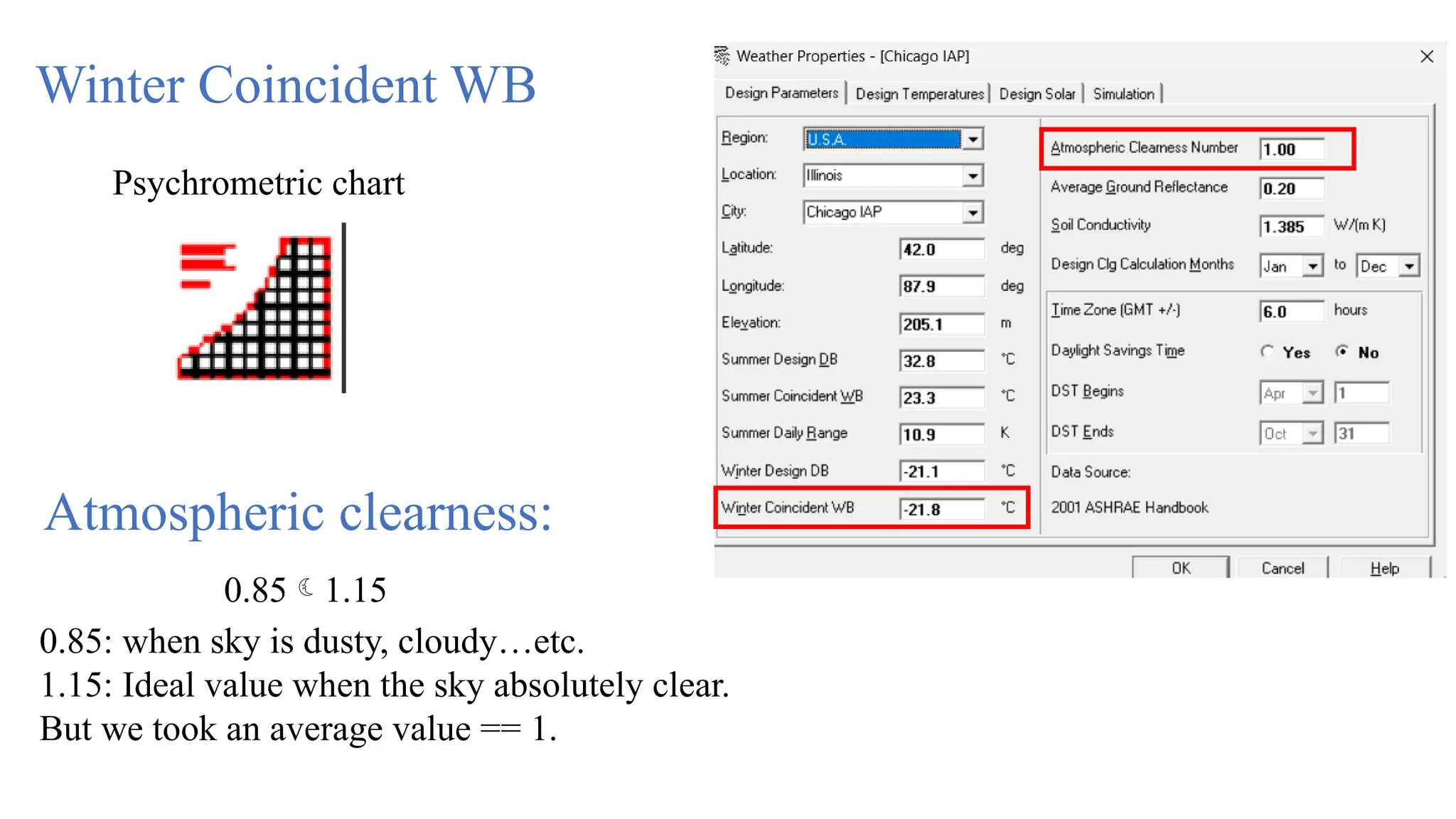
Atmospheric clearness:
0.85: when sky is dusty, cloudy…etc.
1.15: Ideal value when the sky absolutely clear.
But we took an average value == 1.
0.851.15
Winter Coincident WB
Psychrometric chart
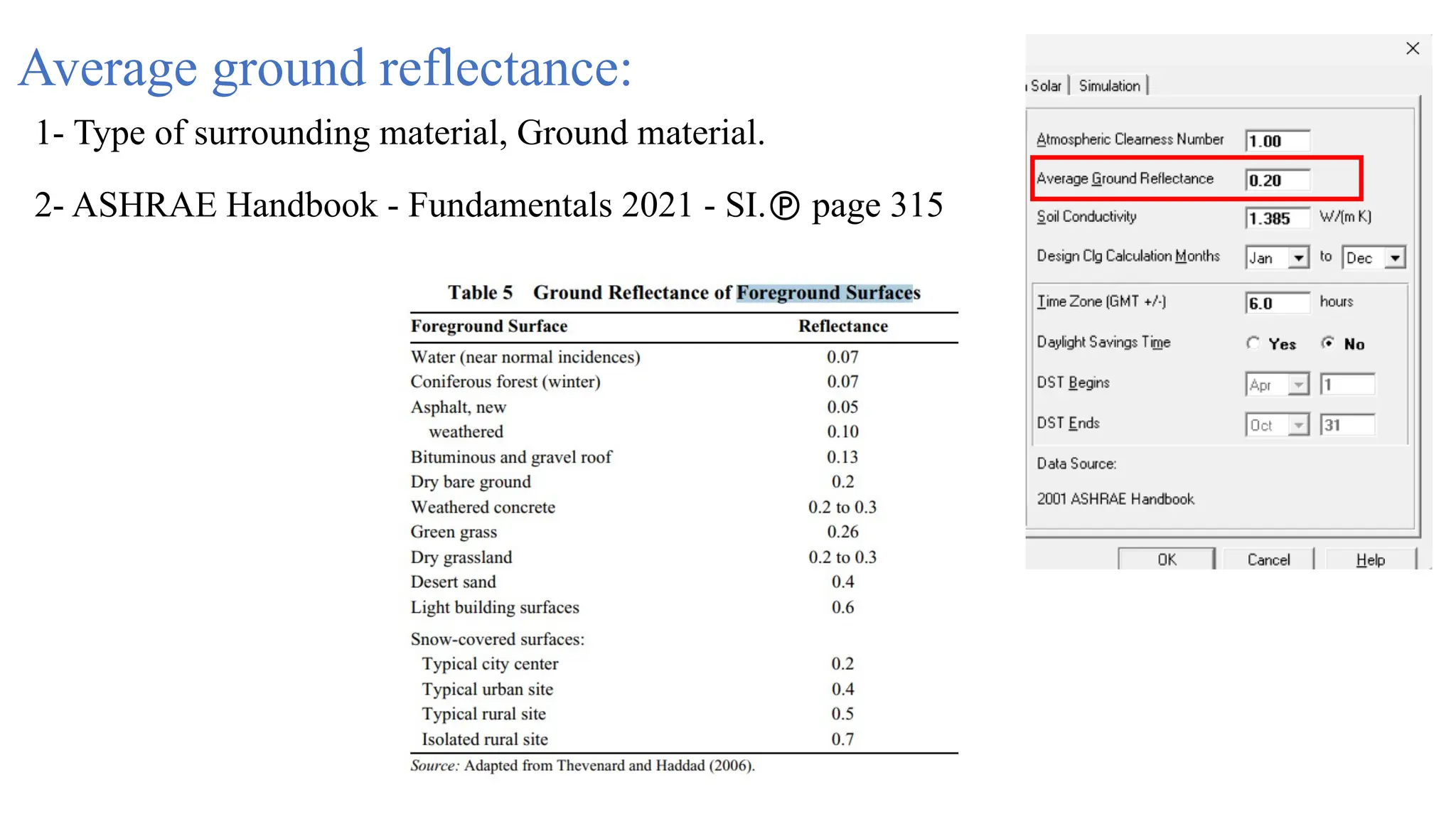
Average ground reflectance:
1- Type of surrounding material, Ground material.
2- ASHRAE Handbook - Fundamentals 2021 - SI. page 315
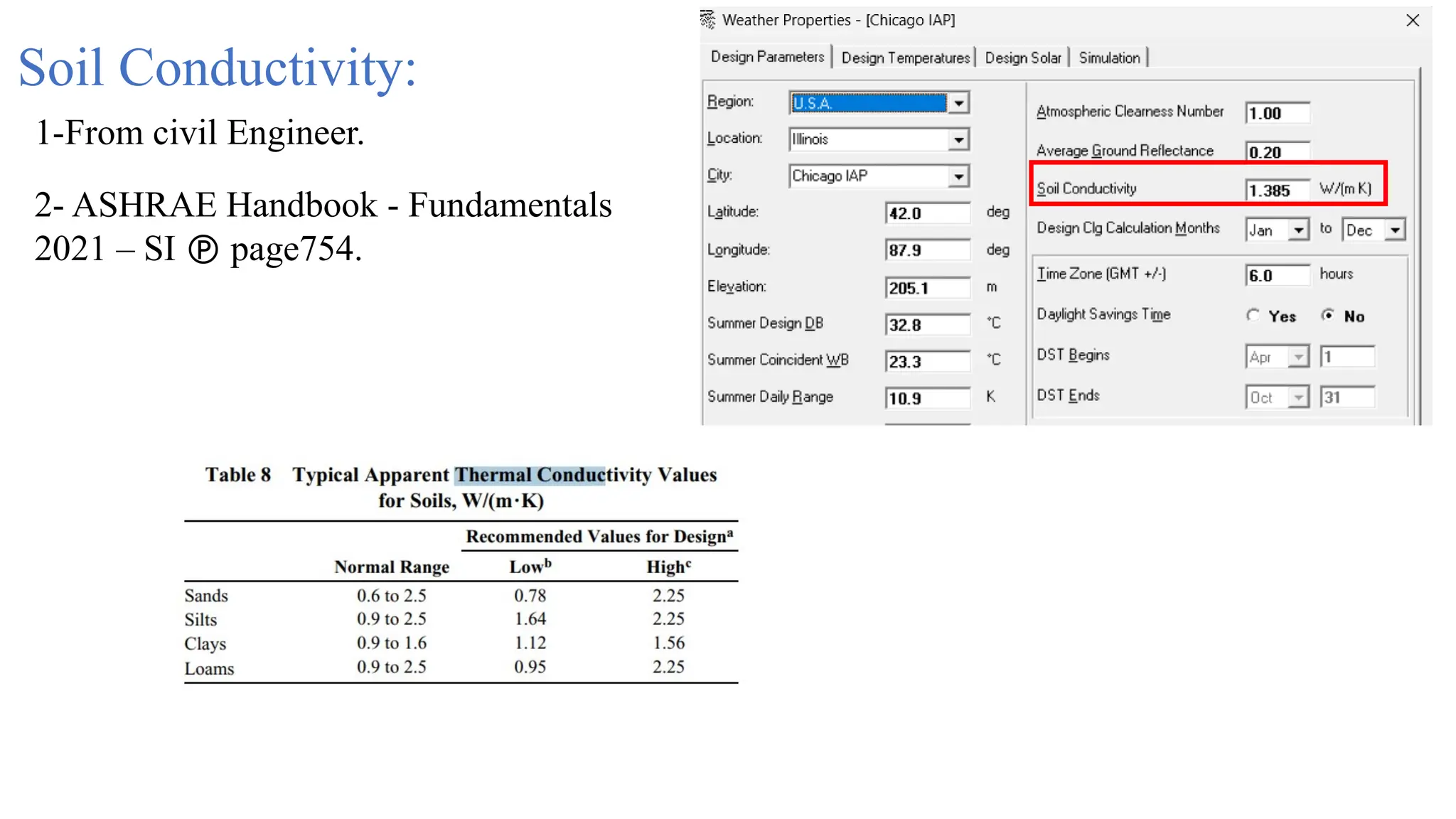
Soil Conductivity:
1-From civil Engineer.
2- ASHRAE Handbook - Fundamentals
2021 – SI  page754.
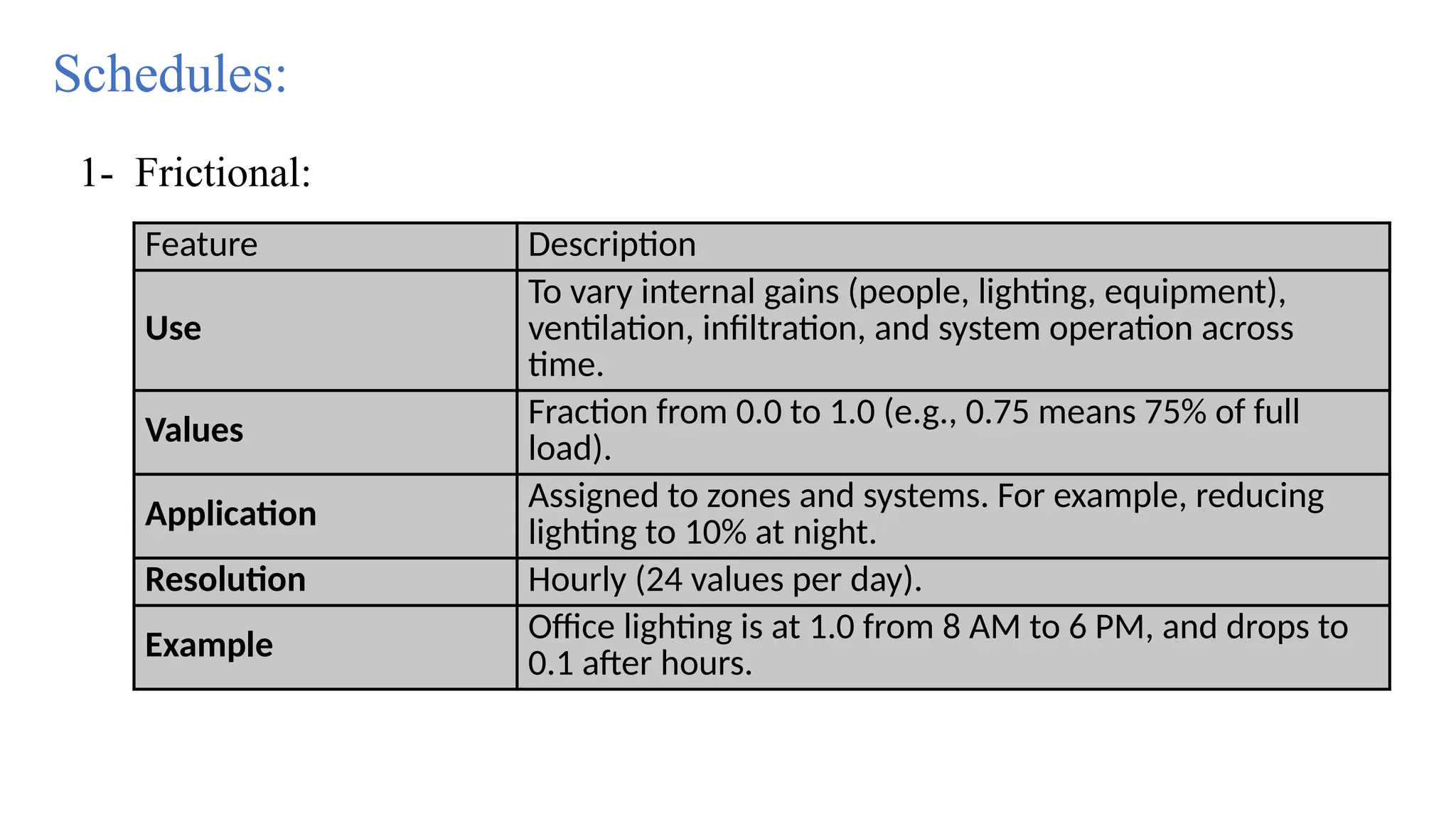
Feature Description
Use
To vary internal gains (people, lighting, equipment),
ventilation, infiltration, and system operation across
time.
Values Fraction from 0.0 to 1.0 (e.g., 0.75 means 75% of full
load).
Application
Assigned to zones and systems. For example, reducing
lighting to 10% at night.
Resolution Hourly (24 values per day).
Example Office lighting is at 1.0 from 8 AM to 6 PM, and drops to
0.1 after hours.
Schedules:
1- Frictional:
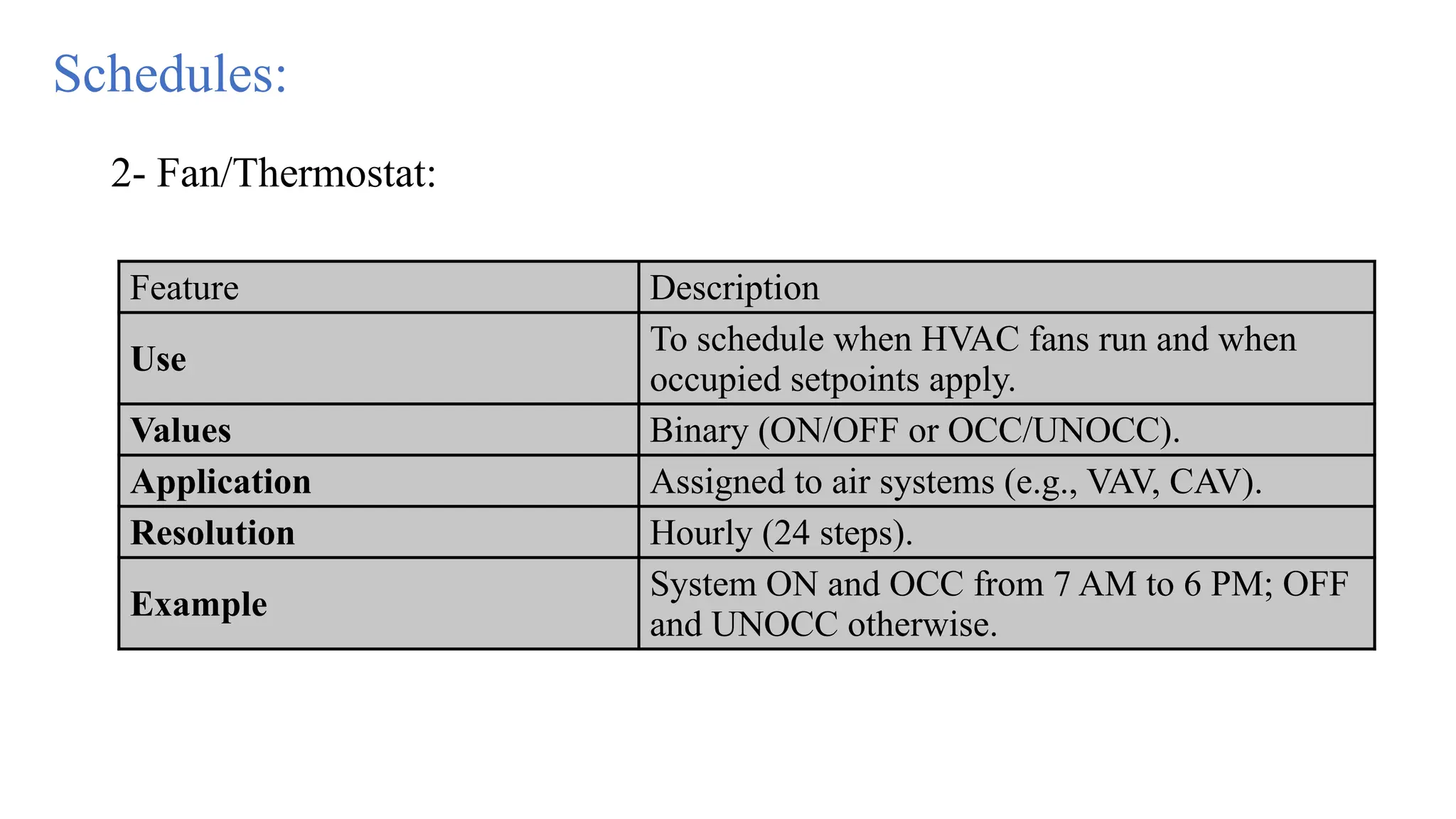
Feature Description
Use
To schedule when HVAC fans run and when
occupied setpoints apply.
Values Binary (ON/OFF or OCC/UNOCC).
Application Assigned to air systems (e.g., VAV, CAV).
Resolution Hourly (24 steps).
Example
System ON and OCC from 7 AM to 6 PM; OFF
and UNOCC otherwise.
2- Fan/Thermostat:
Schedules:
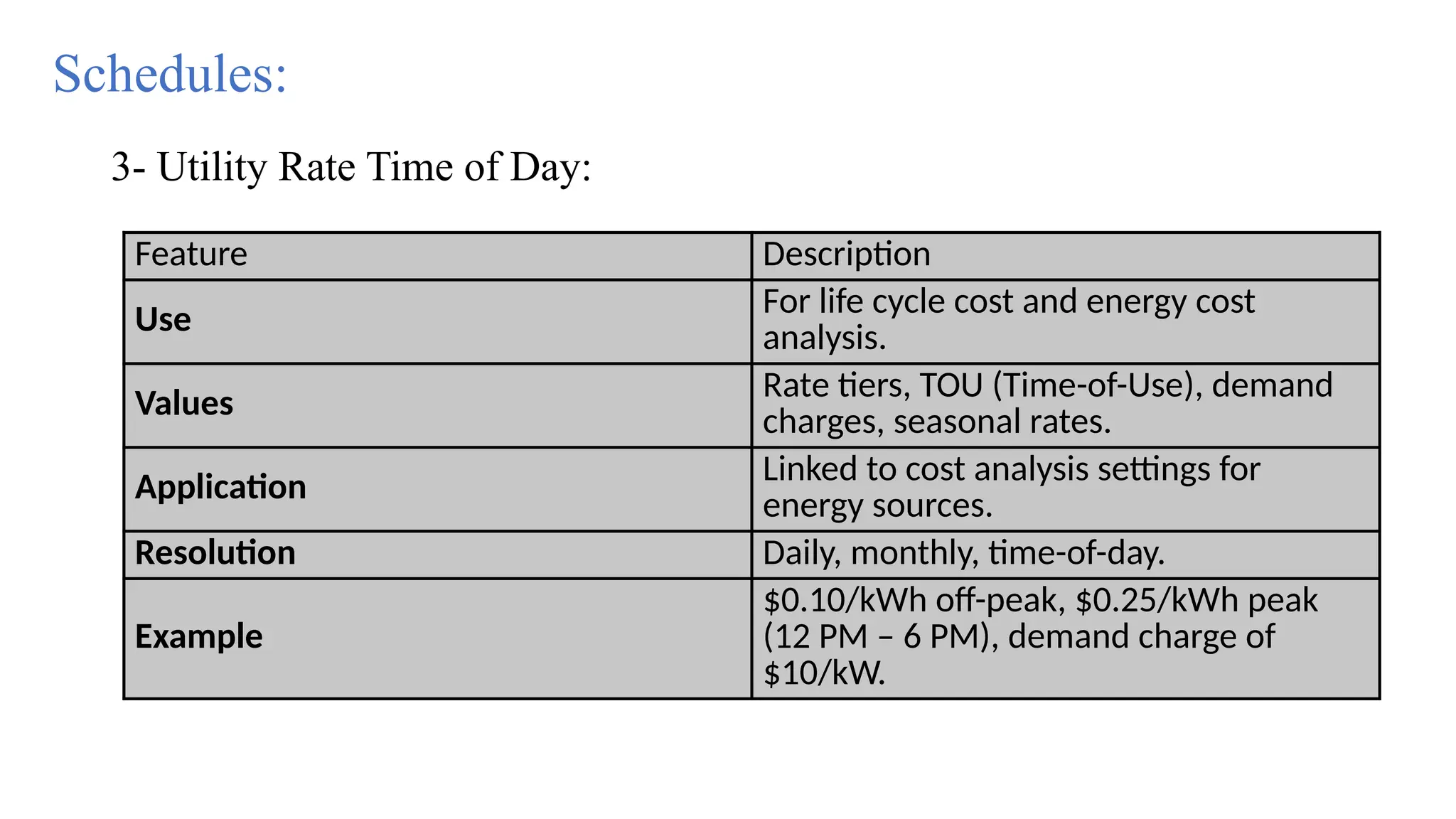
Feature Description
Use For life cycle cost and energy cost
analysis.
Values Rate tiers, TOU (Time-of-Use), demand
charges, seasonal rates.
Application Linked to cost analysis settings for
energy sources.
Resolution Daily, monthly, time-of-day.
Example
$0.10/kWh off-peak, $0.25/kWh peak
(12 PM – 6 PM), demand charge of
$10/kW.
Schedules:
3- Utility Rate Time of Day:
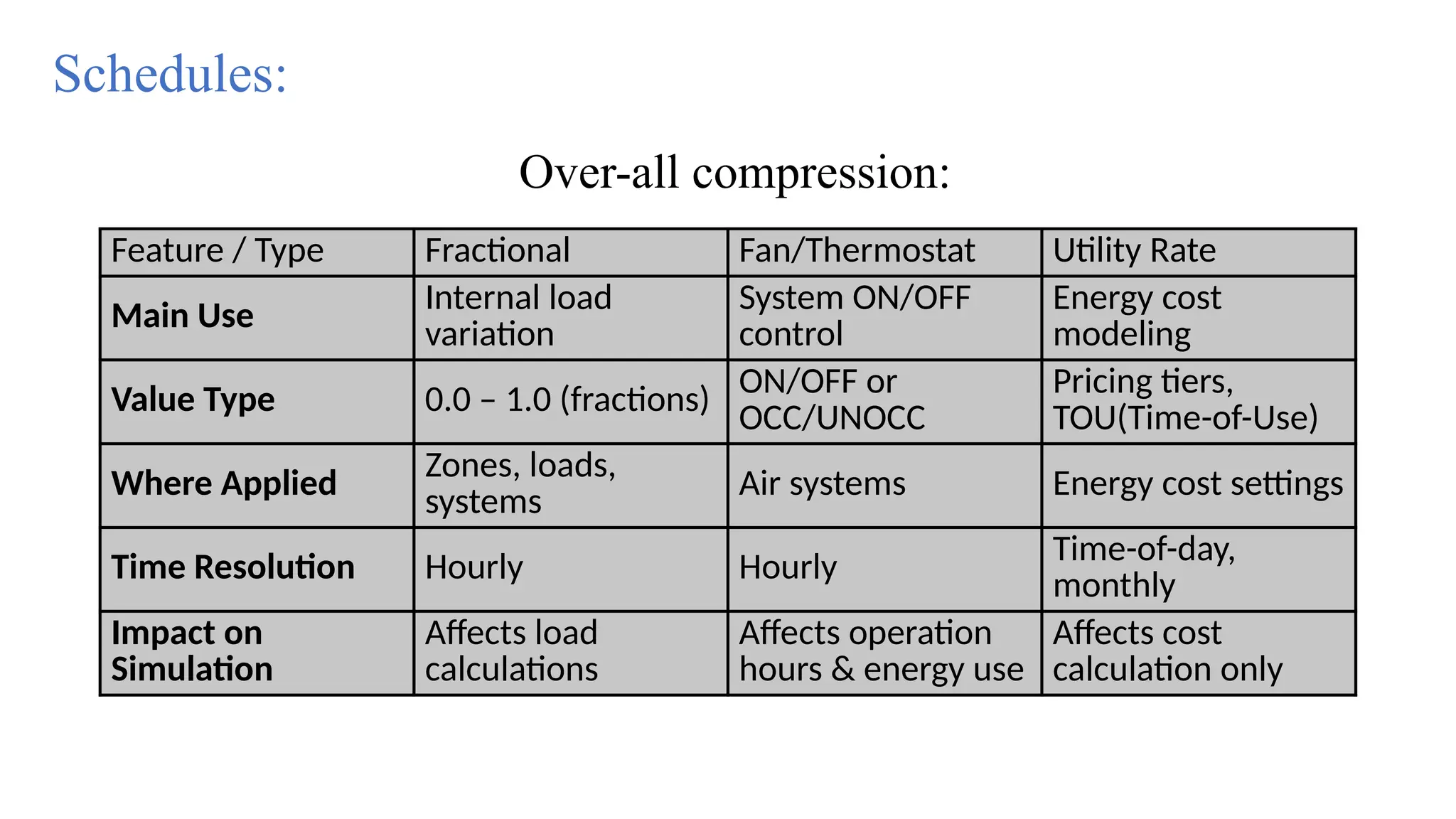
Feature / Type Fractional Fan/Thermostat Utility Rate
Main Use Internal load
variation
System ON/OFF
control
Energy cost
modeling
Value Type 0.0 – 1.0 (fractions)
ON/OFF or
OCC/UNOCC
Pricing tiers,
TOU(Time-of-Use)
Where Applied
Zones, loads,
systems Air systems Energy cost settings
Time Resolution Hourly Hourly Time-of-day,
monthly
Impact on
Simulation
Affects load
calculations
Affects operation
hours & energy use
Affects cost
calculation only
Schedules:
Over-all compression:
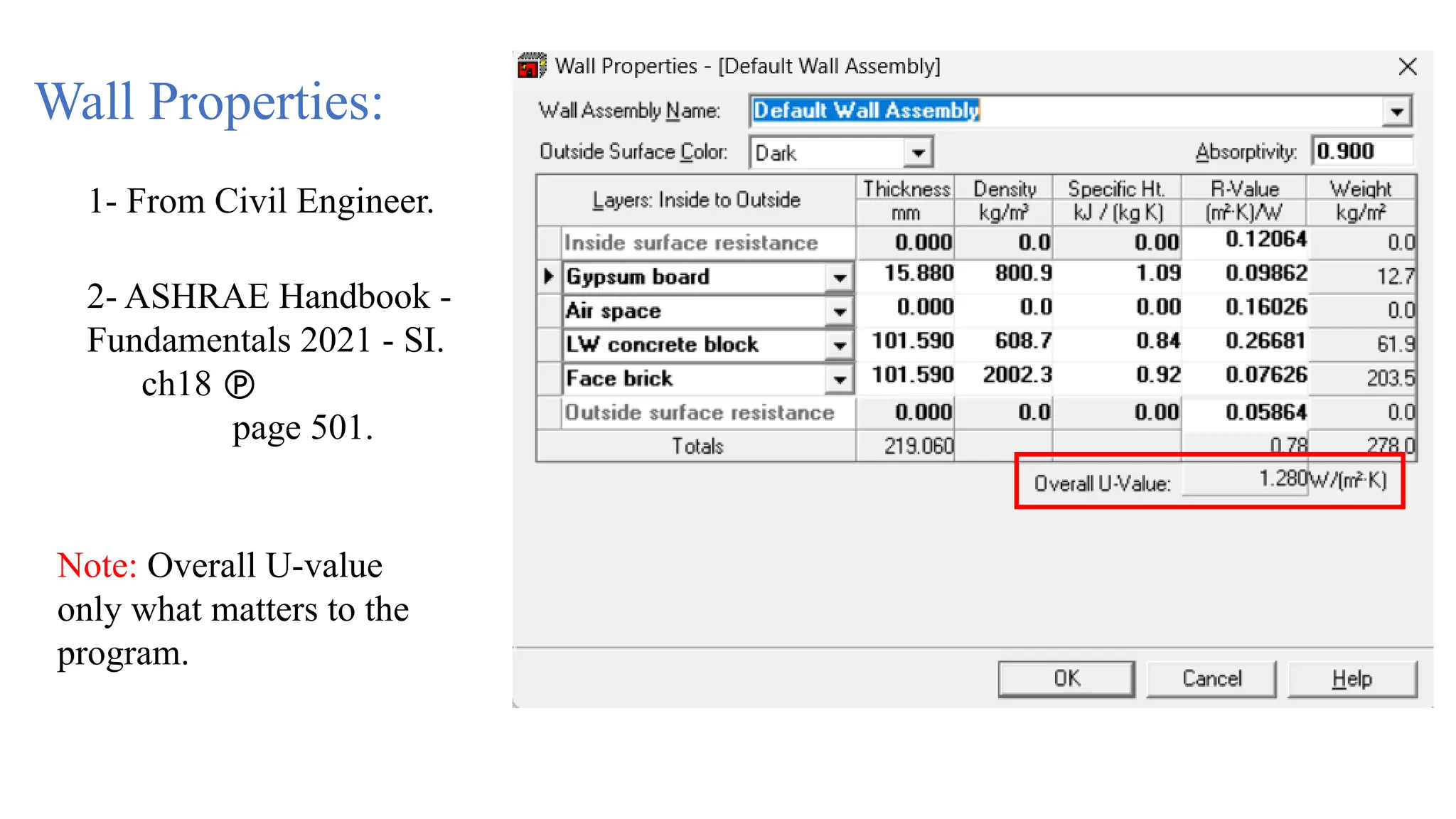
Wall Properties:
1- From Civil Engineer.
2- ASHRAE Handbook -
Fundamentals 2021 - SI.
ch18 
page 501.
Note: Overall U-value
only what matters to the
program.
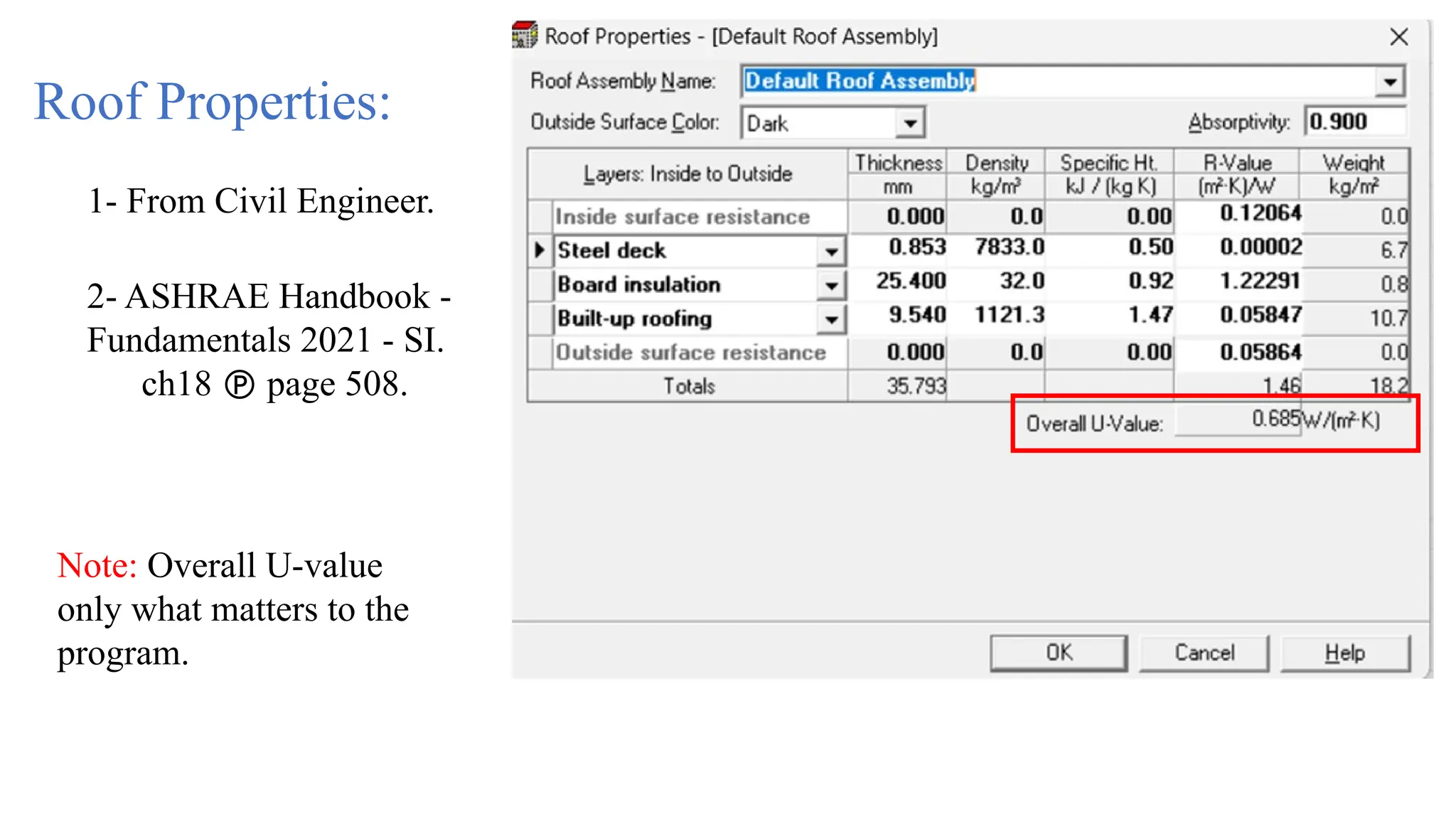
Roof Properties:
1- From Civil Engineer.
2- ASHRAE Handbook -
Fundamentals 2021 - SI.
ch18  page 508.
Note: Overall U-value
only what matters to the
program.
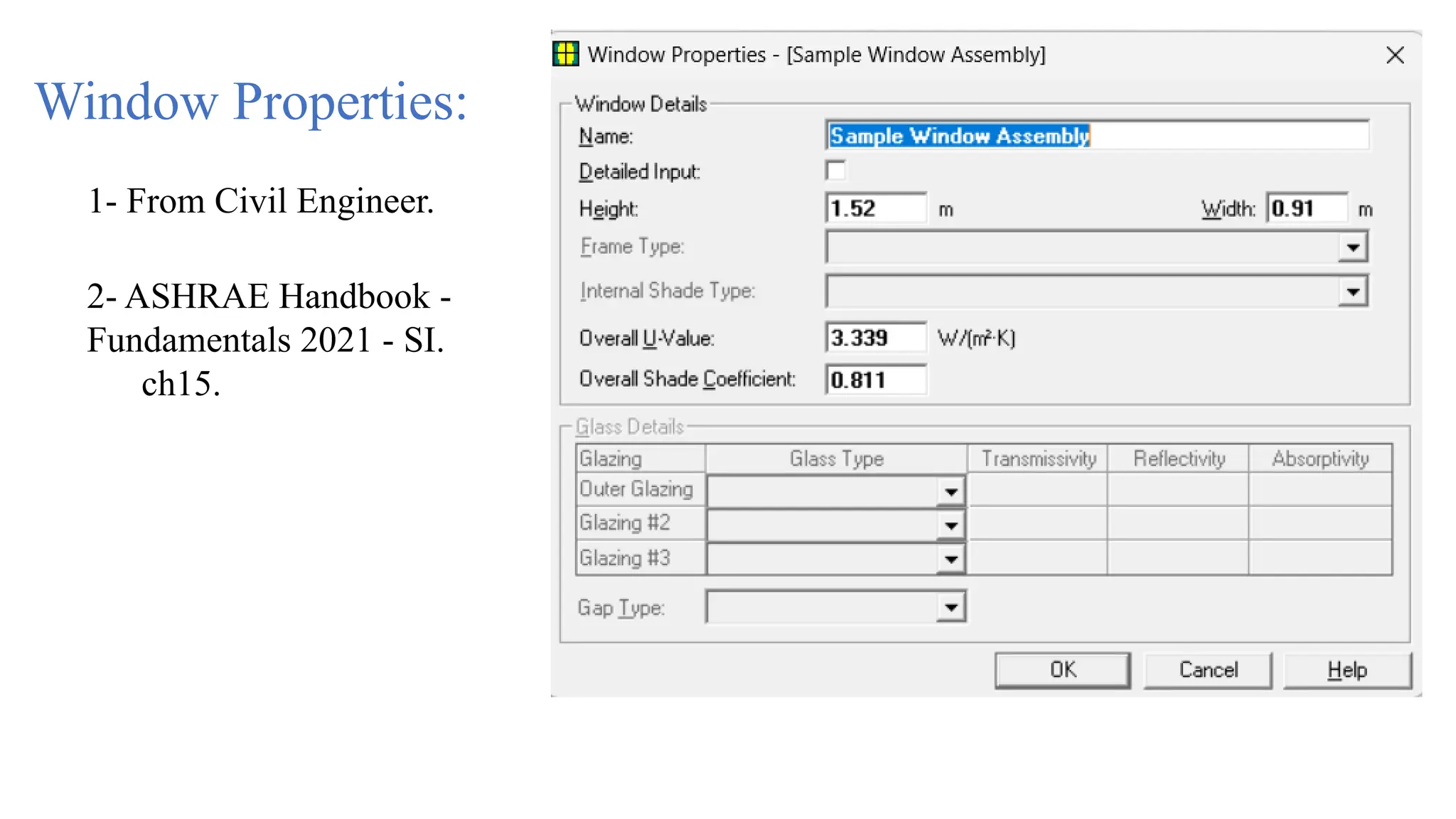
Window Properties:
1- From Civil Engineer.
2- ASHRAE Handbook -
Fundamentals 2021 - SI.
ch15.
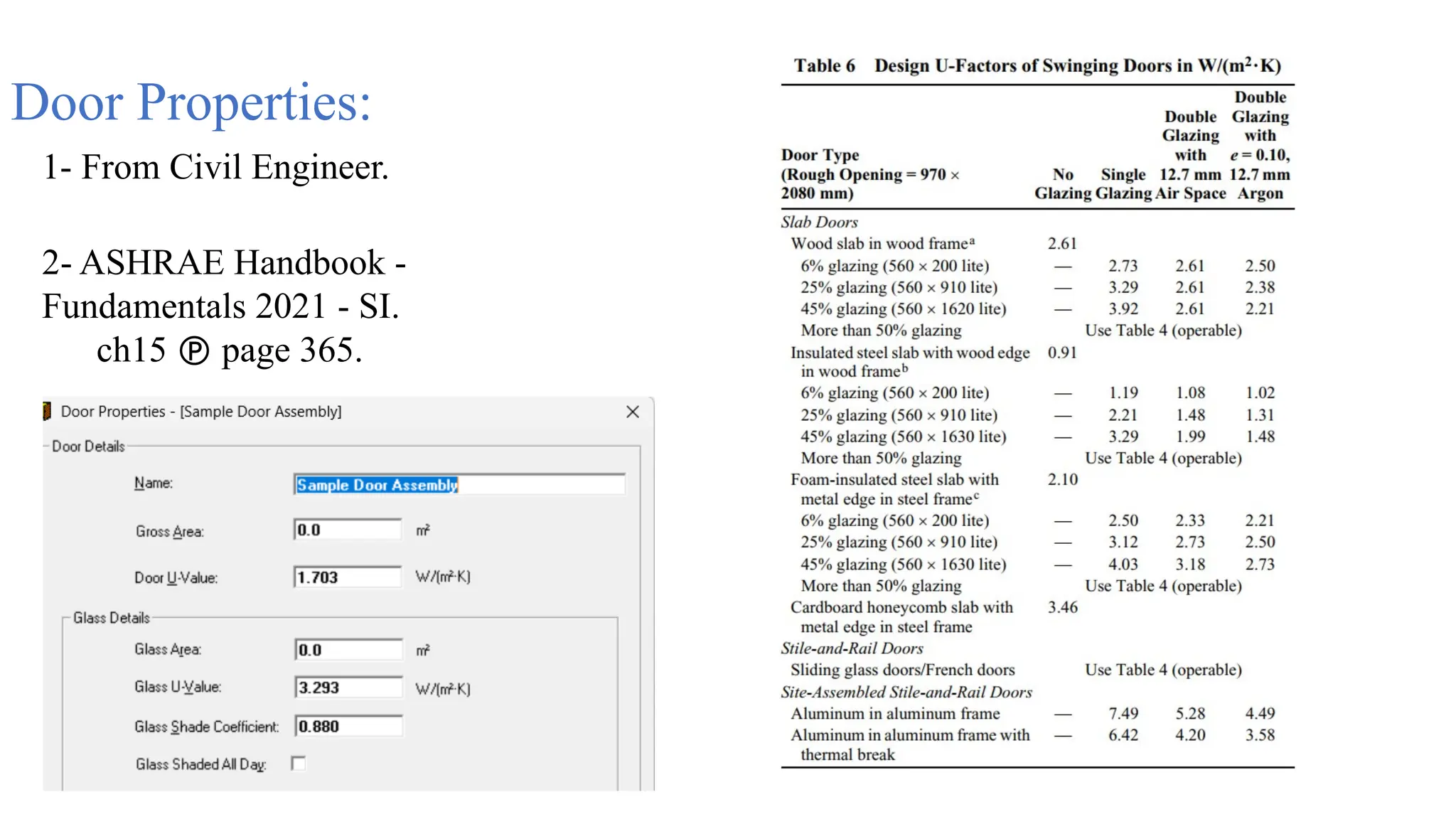
Door Properties:
1- From Civil Engineer.
2- ASHRAE Handbook -
Fundamentals 2021 - SI.
ch15  page 365.
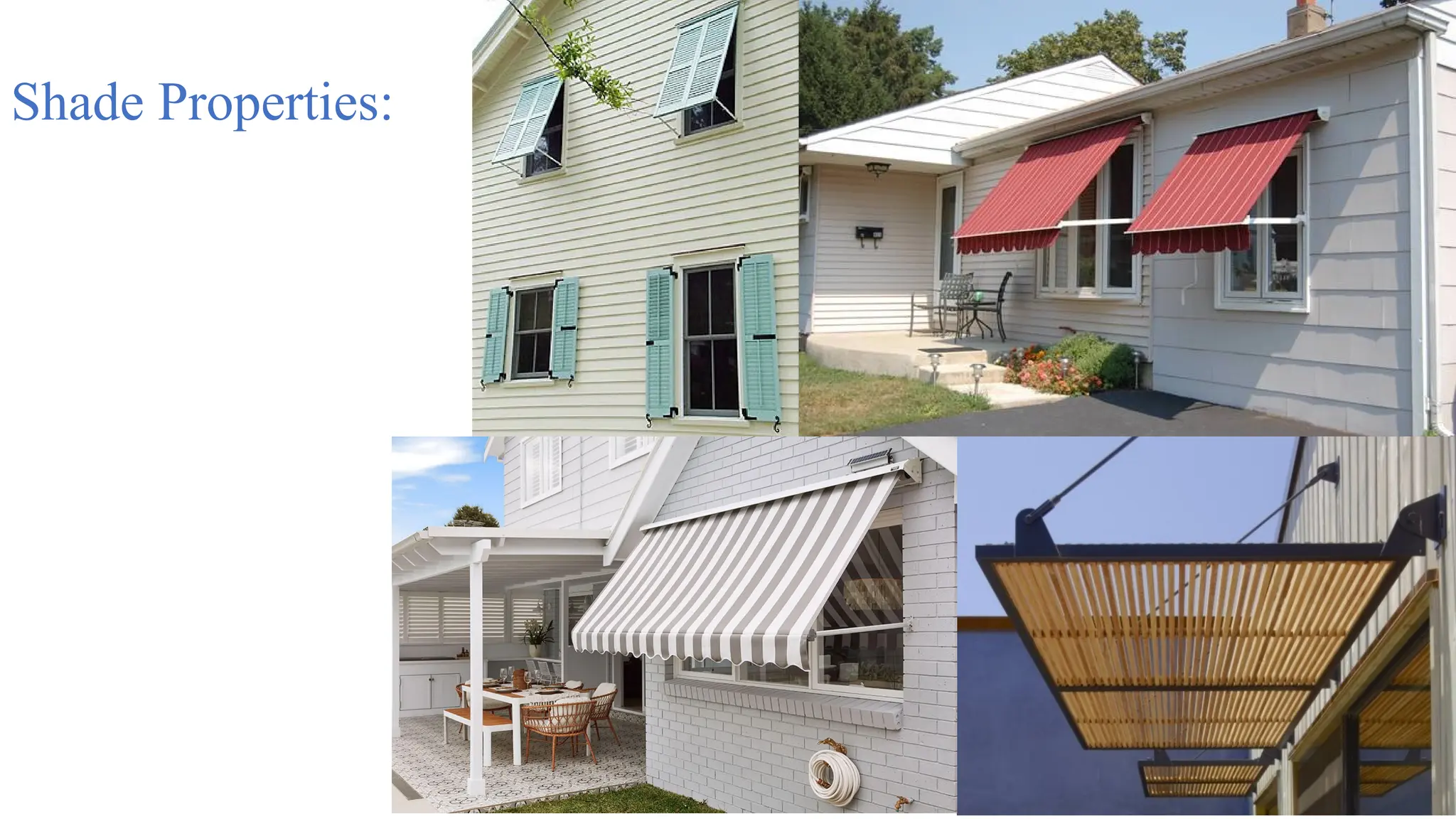
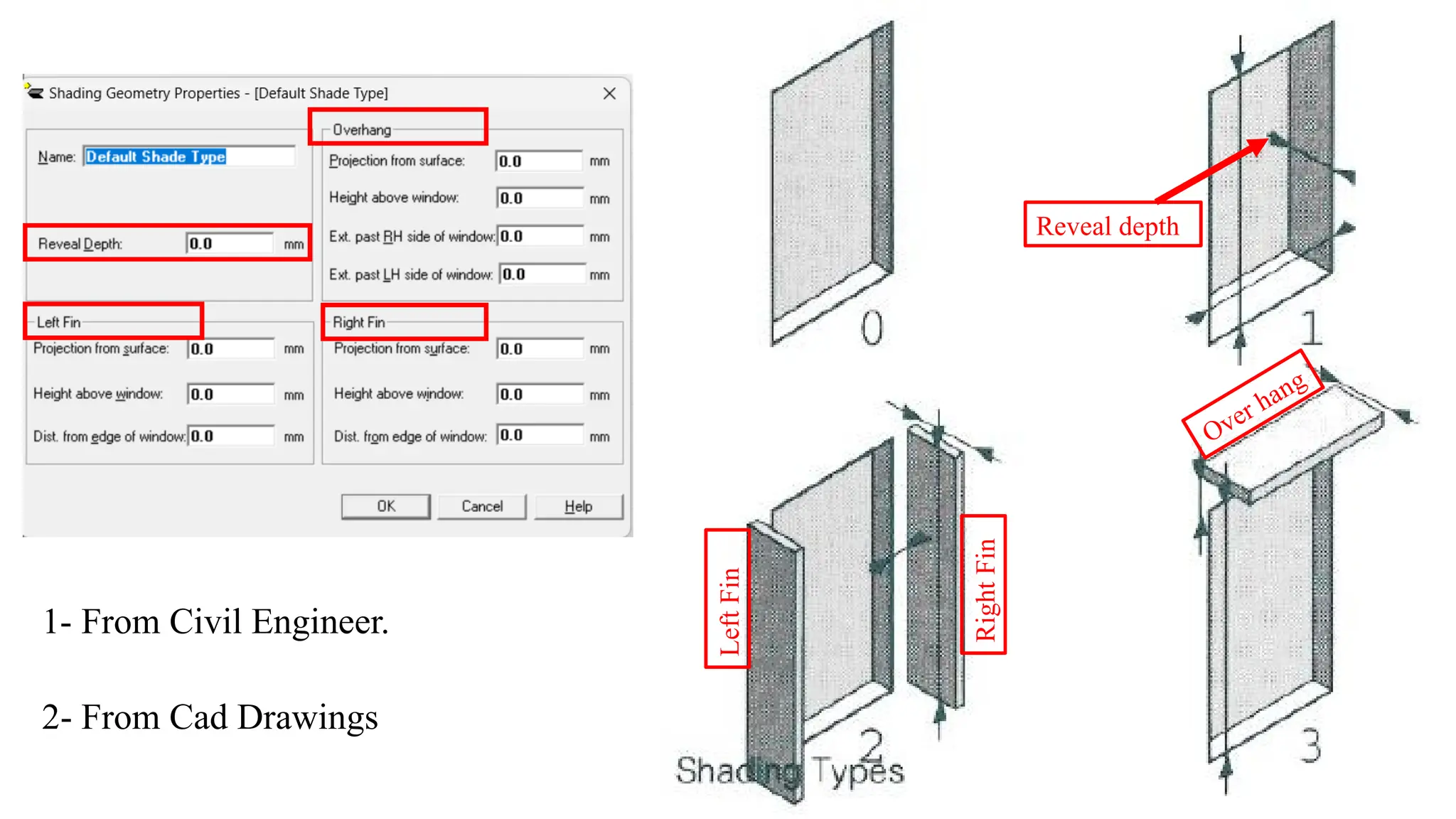
Shade Properties:
Reveal depth
Over hang
Right
Fin
Left
Fin
1- From Civil Engineer.
2- From Cad Drawings
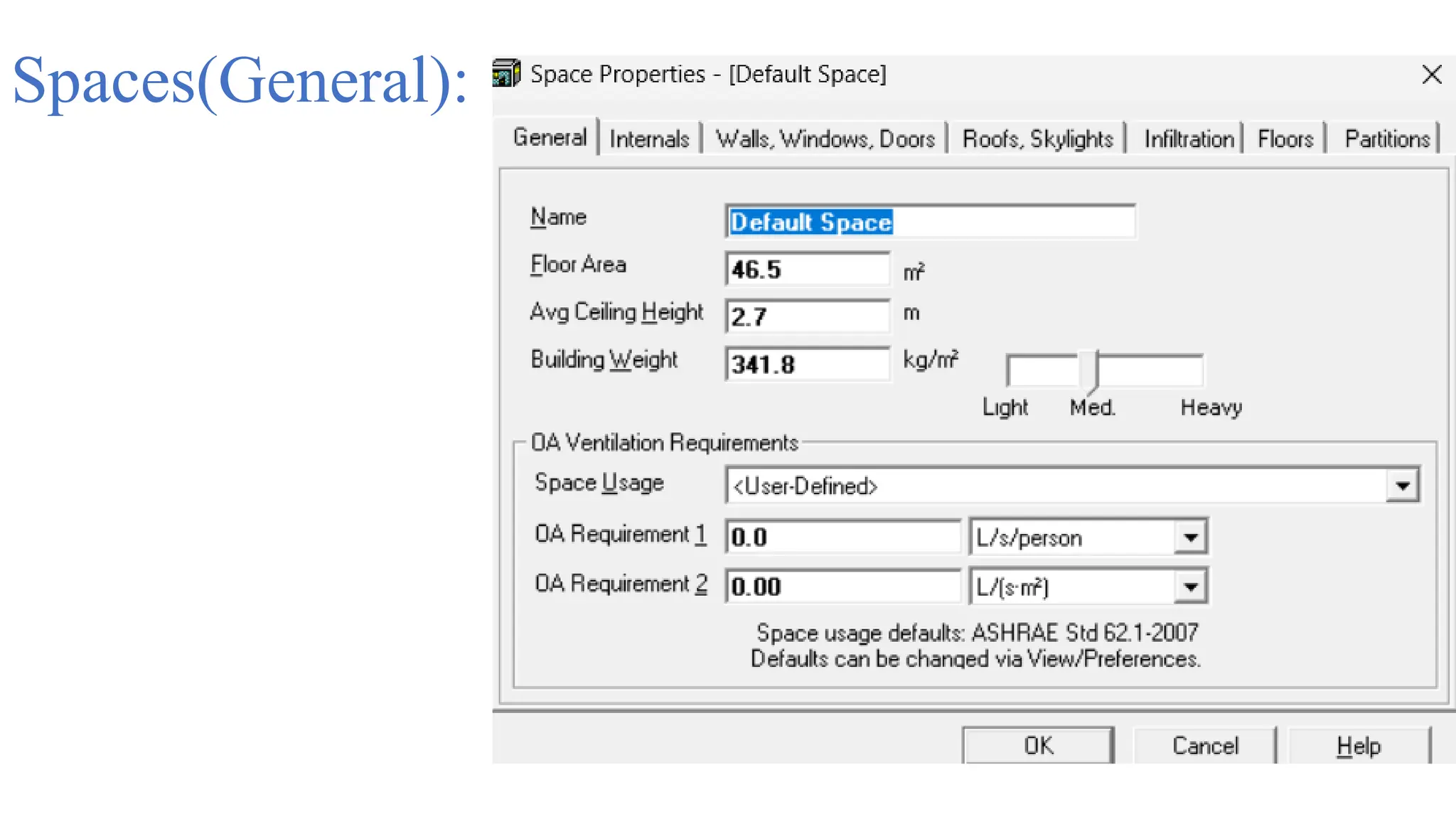
Spaces(General):
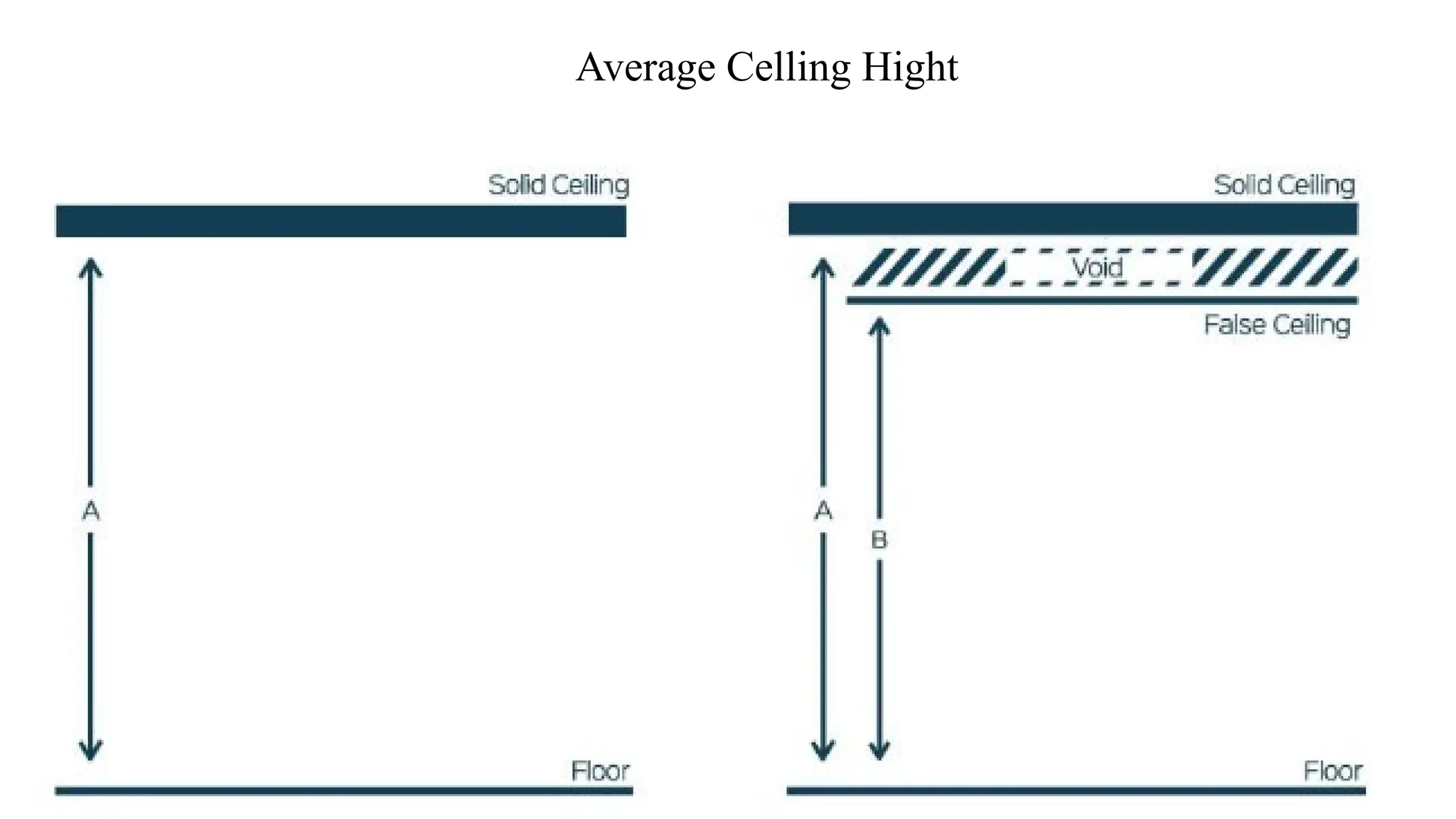
Average Celling Hight
Building weight
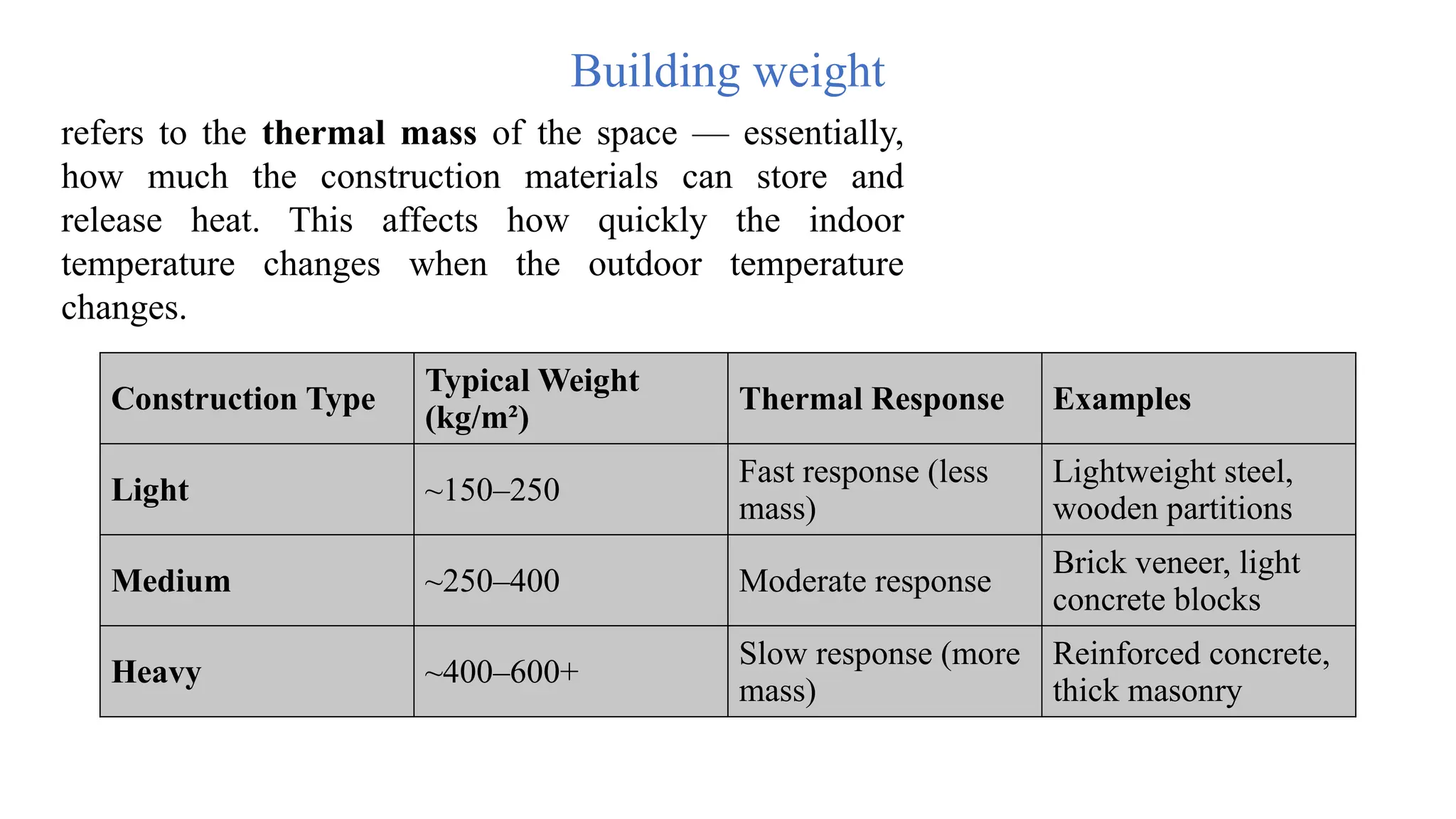
refers to the thermal mass of the space — essentially,
how much the construction materials can store and
release heat. This affects how quickly the indoor
temperature changes when the outdoor temperature
changes.
Construction Type
Typical Weight
(kg/m²)
Thermal Response Examples
Light ~150–250
Fast response (less
mass)
Lightweight steel,
wooden partitions
Medium ~250–400 Moderate response
Brick veneer, light
concrete blocks
Heavy ~400–600+
Slow response (more
mass)
Reinforced concrete,
thick masonry
OA Ventilation requirements:
1- From the program itself if it exist.
2- User-defined From ASHRAE_62.1-
2016_and_User's_Manual_Set[1]
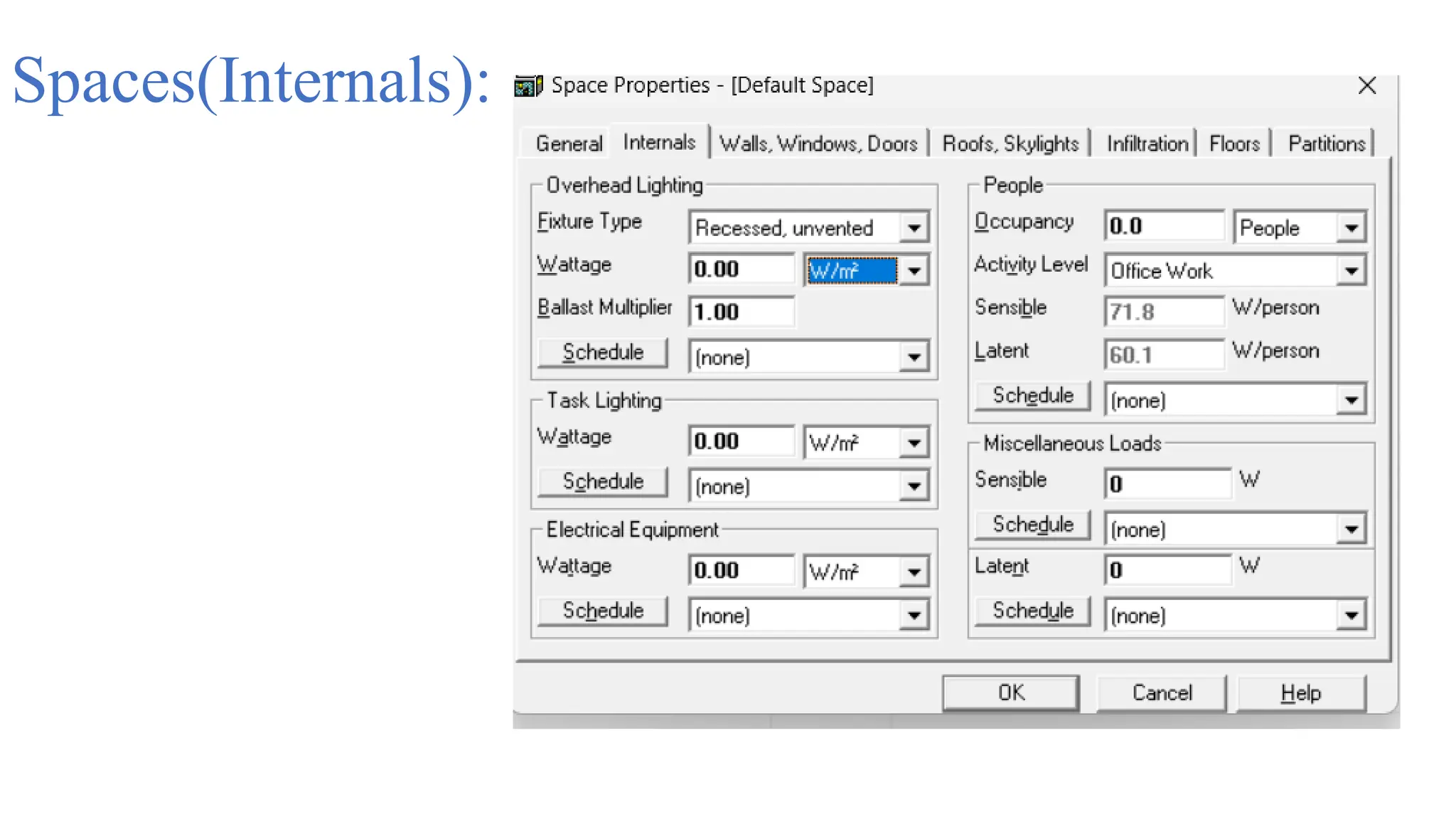
Spaces(Internals):
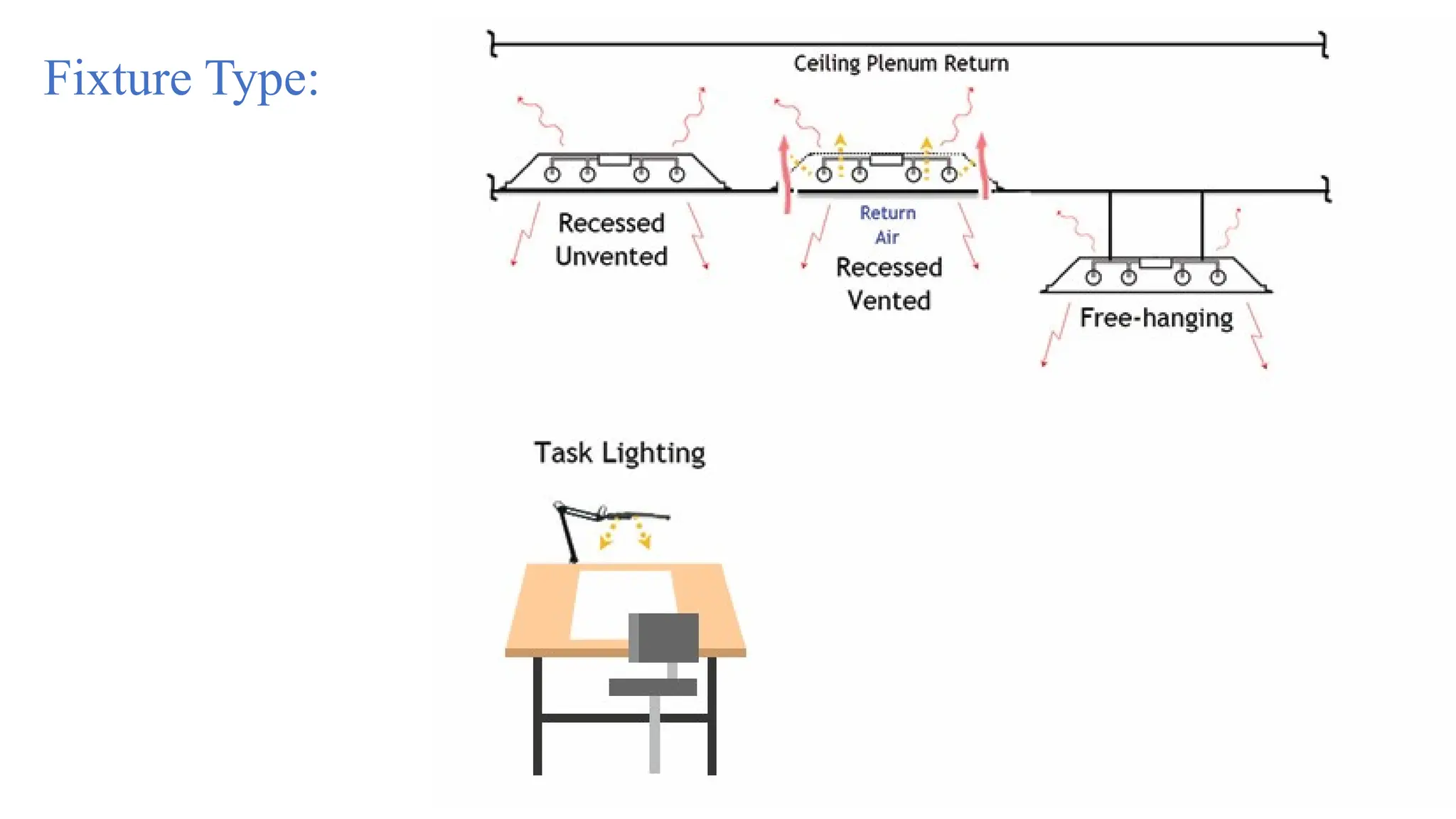
Fixture Type:
1- From Electrical Engineer.
2- ASHRAE Handbook -
Fundamentals 2021 - SI.
ch18  page 480.
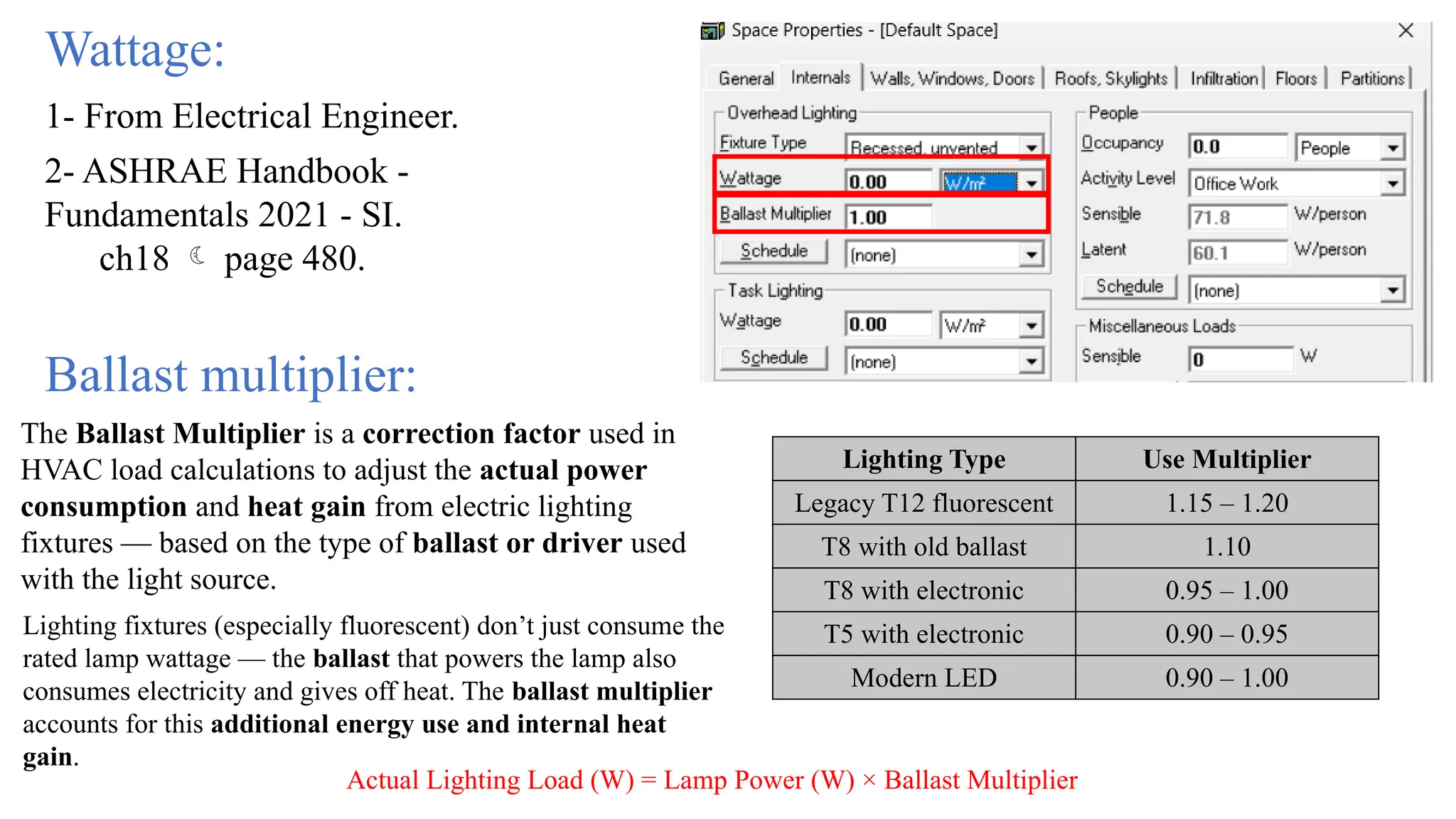
Wattage:
Lighting Type Use Multiplier
Legacy T12 fluorescent 1.15 – 1.20
T8 with old ballast 1.10
T8 with electronic 0.95 – 1.00
T5 with electronic 0.90 – 0.95
Modern LED 0.90 – 1.00
Ballast multiplier:
The Ballast Multiplier is a correction factor used in
HVAC load calculations to adjust the actual power
consumption and heat gain from electric lighting
fixtures — based on the type of ballast or driver used
with the light source.
Lighting fixtures (especially fluorescent) don’t just consume the
rated lamp wattage — the ballast that powers the lamp also
consumes electricity and gives off heat. The ballast multiplier
accounts for this additional energy use and internal heat
gain.
Actual Lighting Load (W) = Lamp Power (W) × Ballast Multiplier
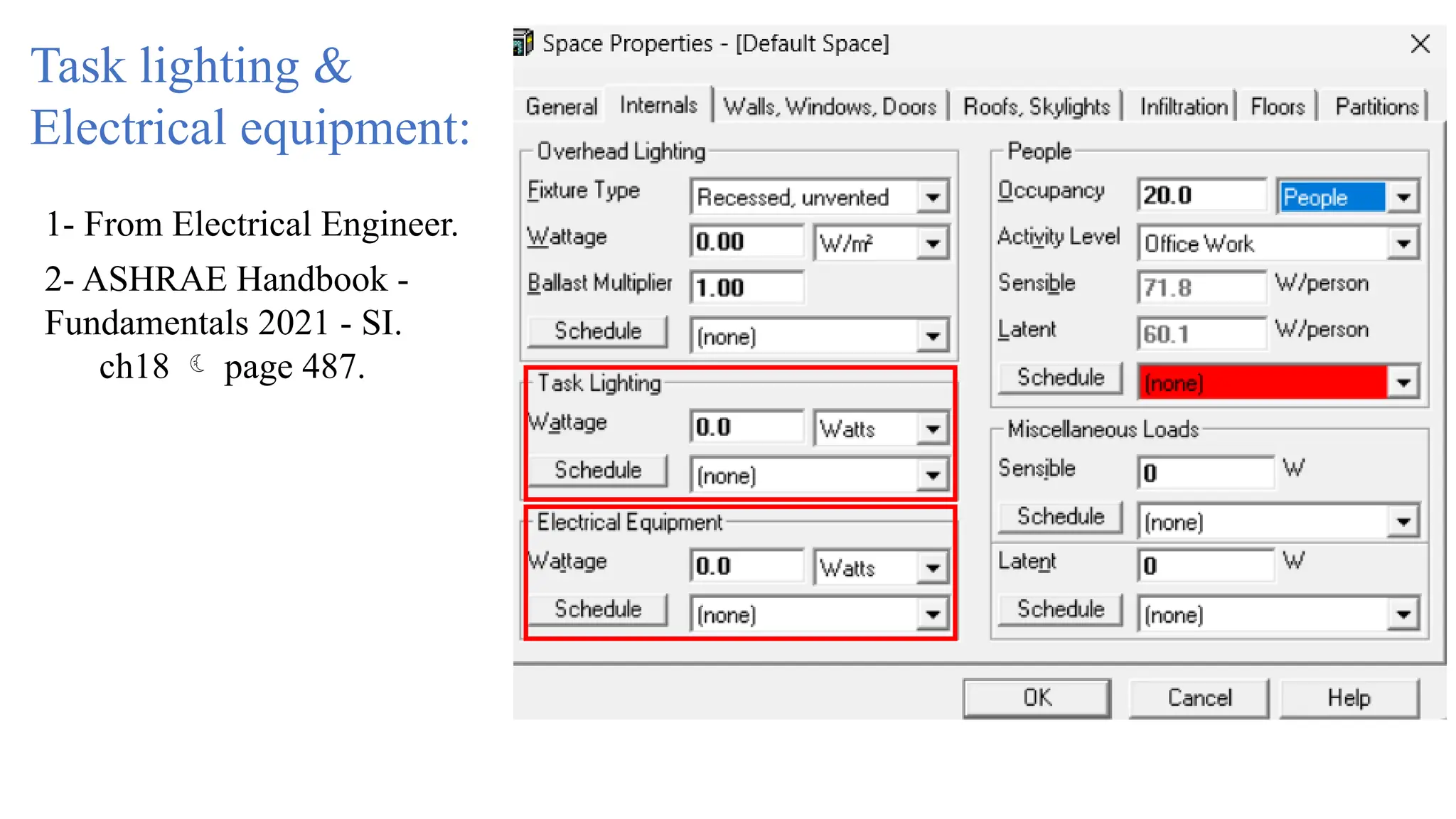
Task lighting &
Electrical equipment:
1- From Electrical Engineer.
2- ASHRAE Handbook -
Fundamentals 2021 - SI.
ch18  page 487.
People:
Activity level:
1- From the architect or from
CAD drawing (Furniture).
2- User-defined From
ASHRAE_62.1-
2016_and_User's_Manual_S
et[1]
Occupancy:
1- From the program itself if
it exist.
2-User-defined -ASHRAE
Handbook - Fundamentals
2021 - SI.
ch18  page 479.
Miscellaneous & latent loads:
User-defined -ASHRAE Handbook - Fundamentals
2021 - SI.
ch18  page 483.
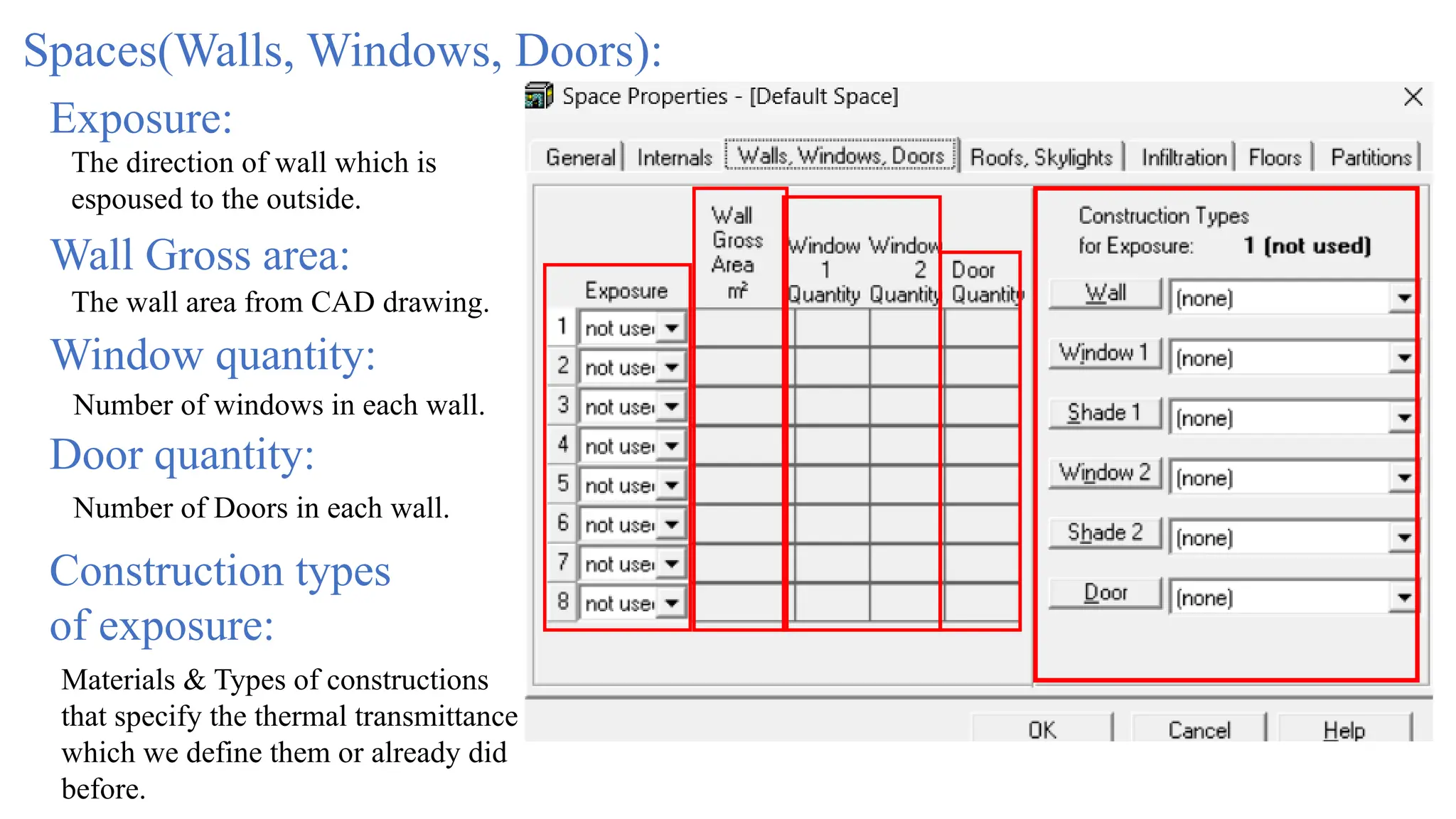
Spaces(Walls, Windows, Doors):
Exposure:
The direction of wall which is
espoused to the outside.
Wall Gross area:
The wall area from CAD drawing.
Window quantity:
Number of windows in each wall.
Door quantity:
Number of Doors in each wall.
Construction types
of exposure:
Materials & Types of constructions
that specify the thermal transmittance
which we define them or already did
before.
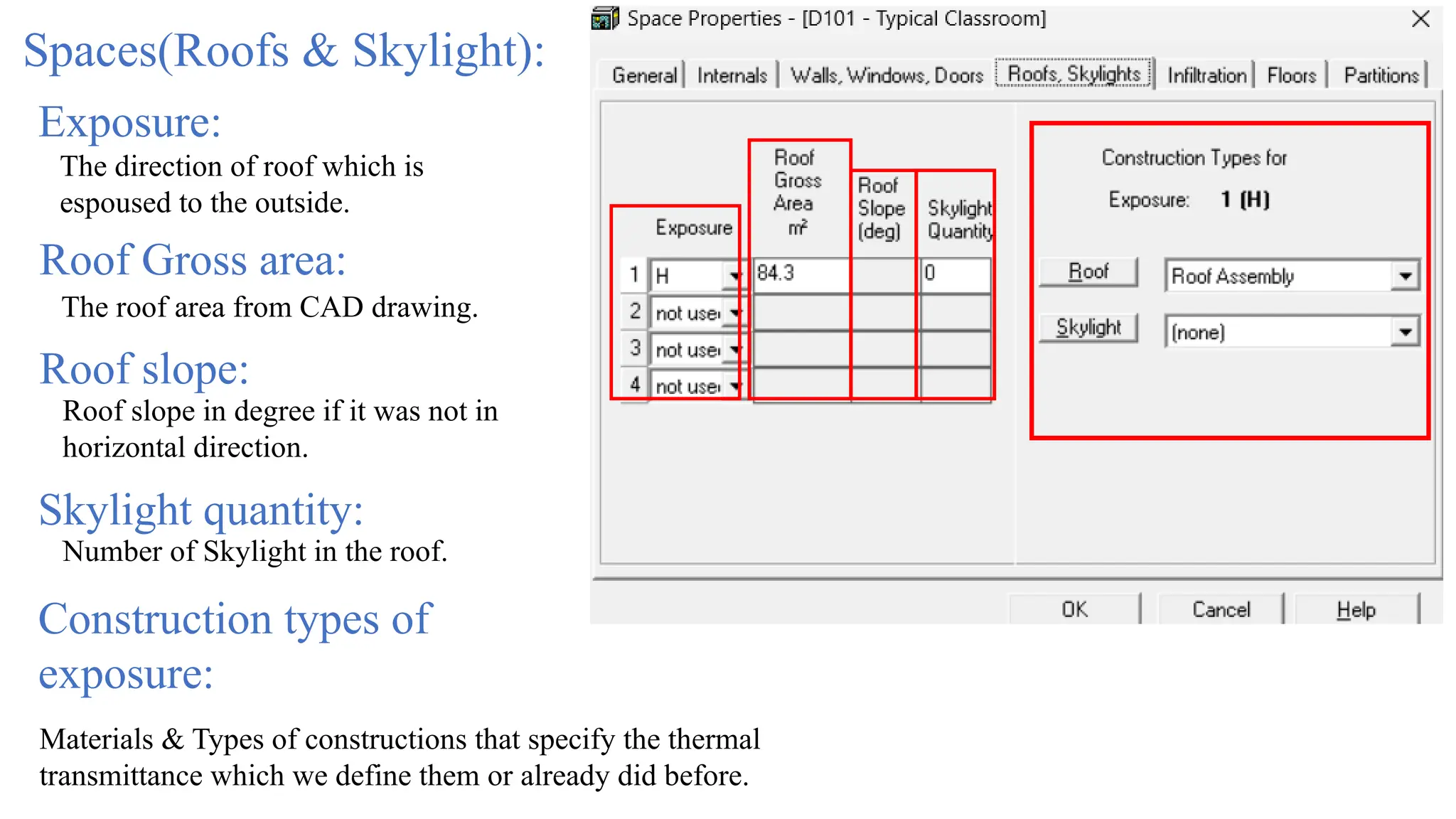
Spaces(Roofs & Skylight):
Exposure:
The direction of roof which is
espoused to the outside.
Roof Gross area:
The roof area from CAD drawing.
Roof slope:
Roof slope in degree if it was not in
horizontal direction.
Skylight quantity:
Number of Skylight in the roof.
Construction types of
exposure:
Materials & Types of constructions that specify the thermal
transmittance which we define them or already did before.
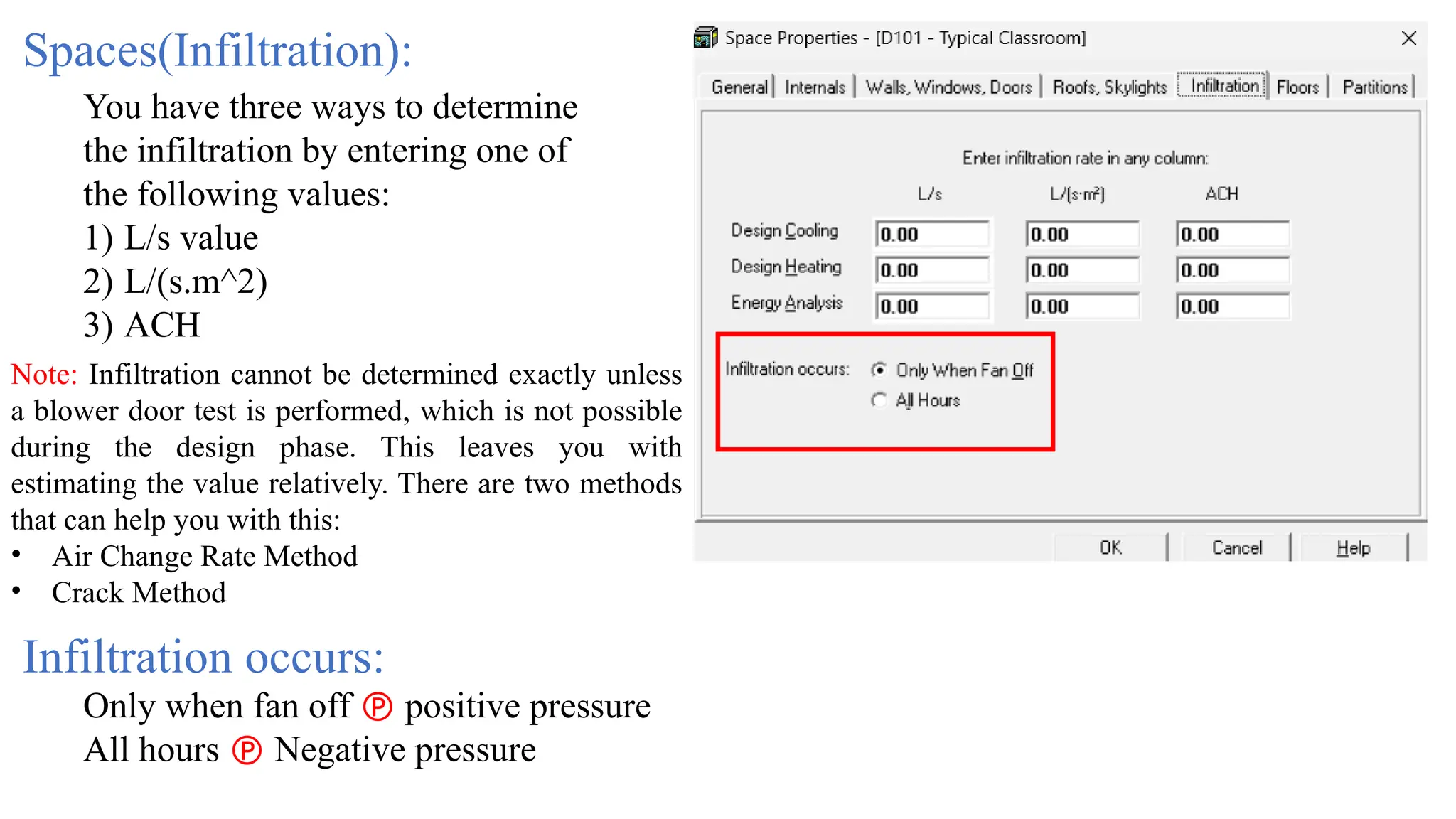
Spaces(Infiltration):
You have three ways to determine
the infiltration by entering one of
the following values:
1) L/s value
2) L/(s.m^2)
3) ACH
Note: Infiltration cannot be determined exactly unless
a blower door test is performed, which is not possible
during the design phase. This leaves you with
estimating the value relatively. There are two methods
that can help you with this:
• Air Change Rate Method
• Crack Method
Only when fan off  positive pressure
All hours  Negative pressure
Infiltration occurs:
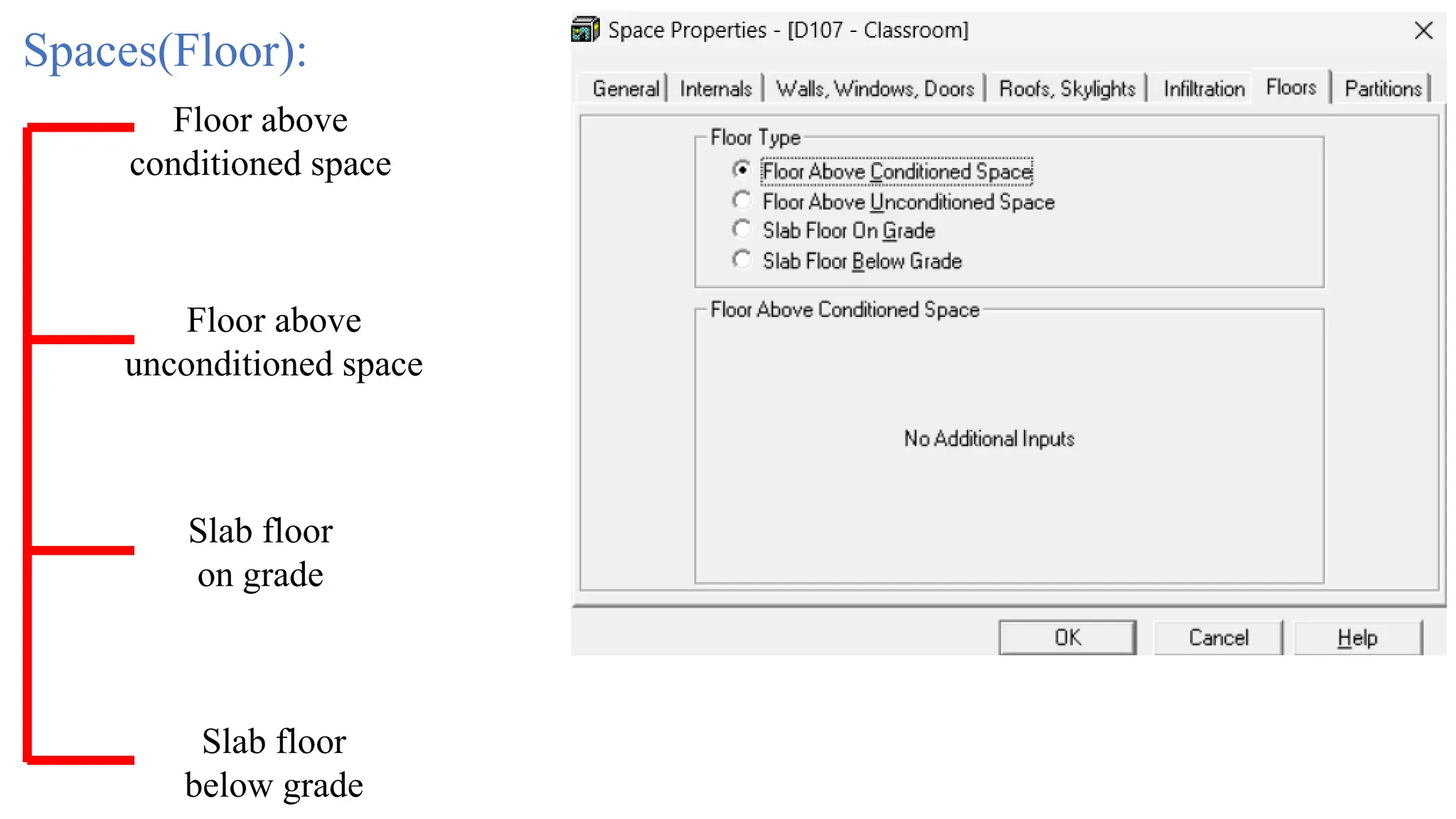
Spaces(Floor):
Floor above
conditioned space
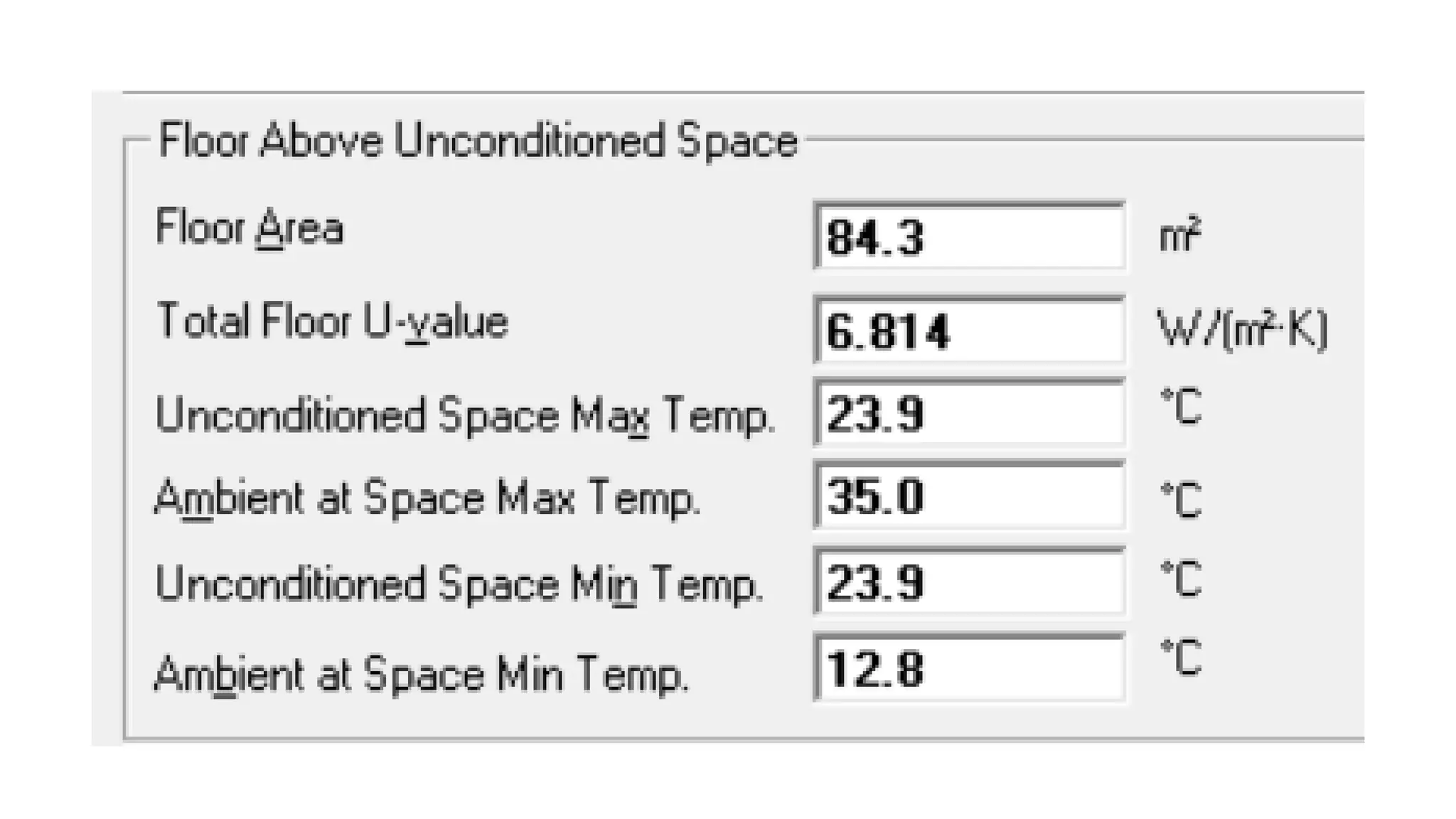
Floor above
unconditioned space
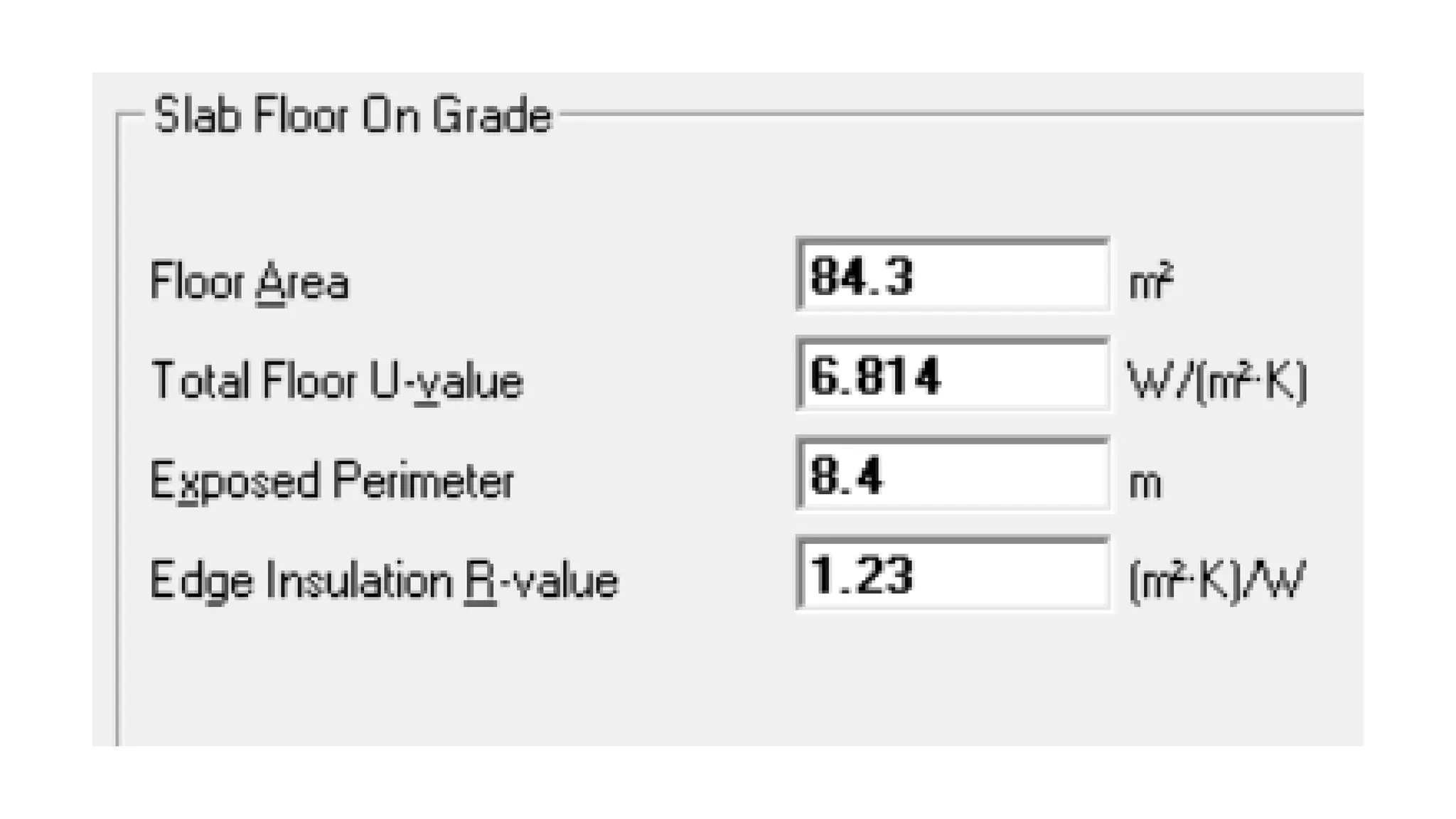
Slab floor
on grade
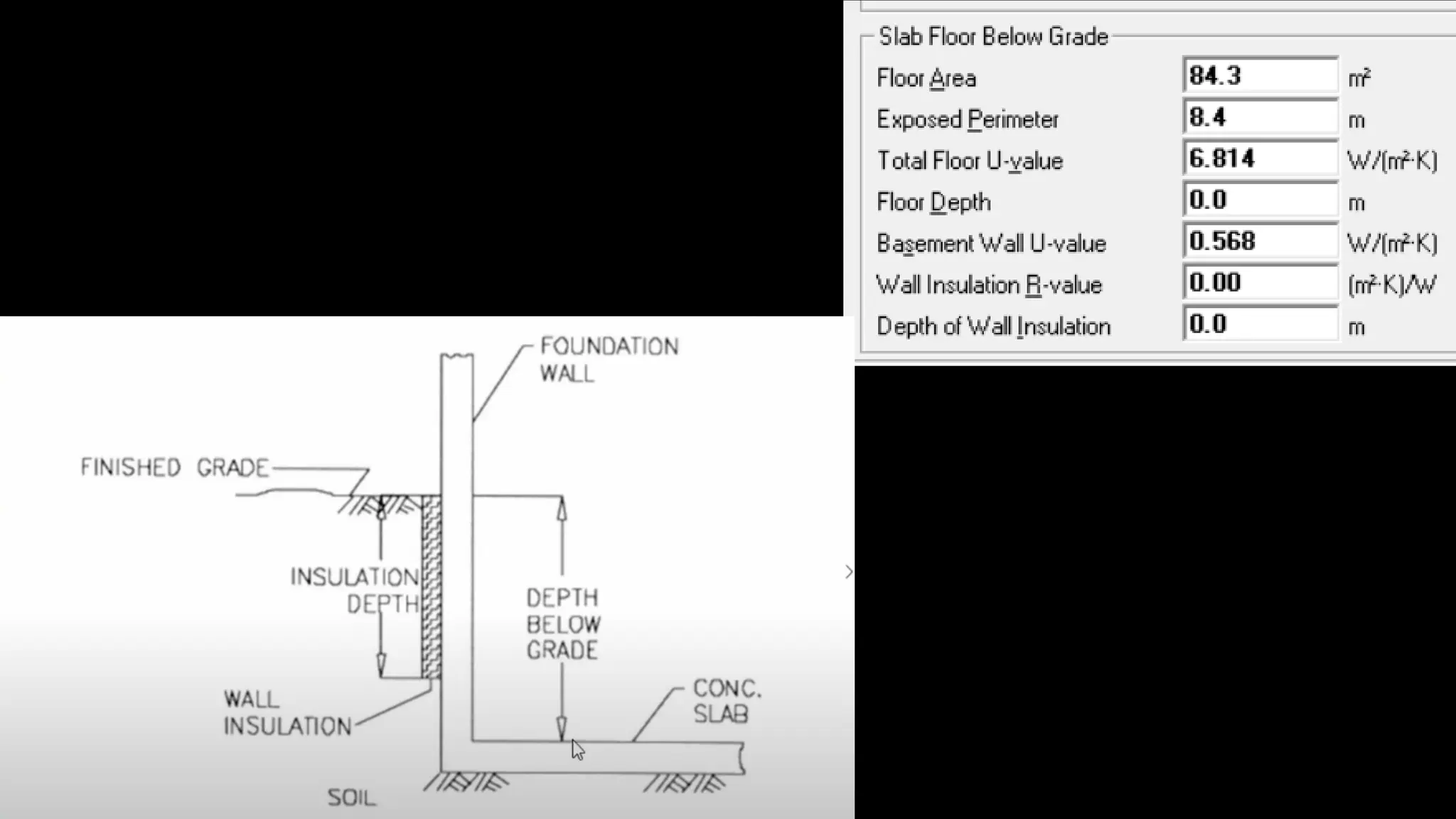
Slab floor
below grade
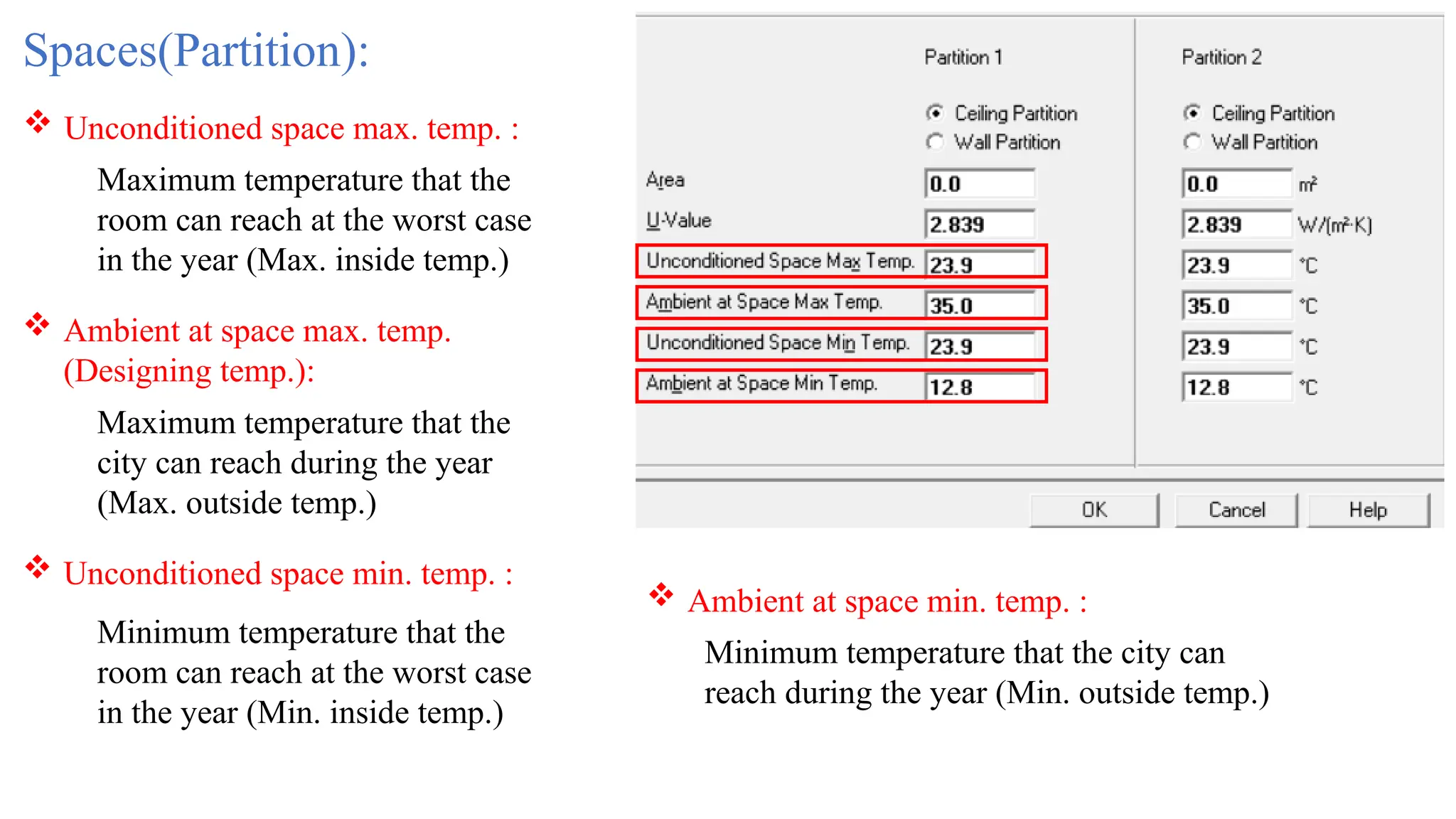
Spaces(Partition):
 Unconditioned space max. temp. :
 Ambient at space max. temp.
(Designing temp.):
 Ambient at space min. temp. :
 Unconditioned space min. temp. :
Maximum temperature that the
room can reach at the worst case
in the year (Max. inside temp.)
Maximum temperature that the
city can reach during the year
(Max. outside temp.)
Minimum temperature that the
room can reach at the worst case
in the year (Min. inside temp.)
Minimum temperature that the city can
reach during the year (Min. outside temp.)
Thank you!
Done by:
Ahmed M. Al-Duais
Supervised by:
Dr. Tareq Al-hababi

Software in cooling load calculation HVAC

  • 1.
    HVAC Mechatronics Engineering Department Facultyof Engineering Sanaa University Instructor | Dr. Tareq Al-hababi Course No. (MT404.) Lecture 8
  • 2.
    Course Content: (TheoreticalAspect) Lecture Topic Why It’s Important 1 Introduction to Air-condition systems and components Foundation for understanding components and mechatronics integration 2 Psychrometric processes Essential for precise air property control in climate systems 3 Psychrometric processes 4 Human comfort and Indoor air quality and Heat Transfer in Buildings Defines standards for effective HVAC design 5 Heating Load Calculations Critical for proper system sizing and energy efficiency 6 Cooling Load Calculations 7 Cooling Load Calculations 8 Software in Cooling Load Calculations Industry-standard practice for accurate load analysis 9 Duct Design and air distribution Impacts system performance and energy use 10 Air conditioning systems Key knowledge for system selection and application 11 Controls and Applications Core of modern smart HVAC systems and automation 12 Controls and Applications
  • 3.
    Ways to calculate thermalload 1) Manually: • They calculate thermal load by pen & paper using Ashrae fundamentals or any other suitable reference. • Engineers made excel sheets to simplify the calculations. 2) Approximation : • This method is used by expert technicians to approximate the thermal load for specific space: 10m^2 == 1 HP  10m^2 == 745.7 W Rule of thump: CFM = 3) Computer Programs: • Engineers by time they start to use programs to simplify the process like: HAP, Revit, HeatCAD, EDS HVAC, Area cooling solutions,…etc.
  • 4.
  • 5.
    HAP Hourly Analysis Program Whatis for? 1- Calculating thermal loads. 2- Choosing the appropriate HVAC system
  • 7.
    2- Positive longitudevalues are used to represent west longitude. Negative values are used to represent east longitude 1- Positive latitude values are used for cities north of the equator. Negative values are used for cities south of the equator. Latitude & Longitude Signs: Weather access: 1- Program default 2- Ashrae-meteo site https://ashrae-meteo.info/v2.0/ Time zone: It follows the longitude sign Note: In HAP5.1 & previous After these versions the Signs rules are different, like HAP6.2.
  • 8.
    Atmospheric clearness: 0.85: whensky is dusty, cloudy…etc. 1.15: Ideal value when the sky absolutely clear. But we took an average value == 1. 0.851.15 Winter Coincident WB Psychrometric chart
  • 9.
    Average ground reflectance: 1-Type of surrounding material, Ground material. 2- ASHRAE Handbook - Fundamentals 2021 - SI. page 315
  • 10.
    Soil Conductivity: 1-From civilEngineer. 2- ASHRAE Handbook - Fundamentals 2021 – SI  page754.
  • 11.
    Feature Description Use To varyinternal gains (people, lighting, equipment), ventilation, infiltration, and system operation across time. Values Fraction from 0.0 to 1.0 (e.g., 0.75 means 75% of full load). Application Assigned to zones and systems. For example, reducing lighting to 10% at night. Resolution Hourly (24 values per day). Example Office lighting is at 1.0 from 8 AM to 6 PM, and drops to 0.1 after hours. Schedules: 1- Frictional:
  • 12.
    Feature Description Use To schedulewhen HVAC fans run and when occupied setpoints apply. Values Binary (ON/OFF or OCC/UNOCC). Application Assigned to air systems (e.g., VAV, CAV). Resolution Hourly (24 steps). Example System ON and OCC from 7 AM to 6 PM; OFF and UNOCC otherwise. 2- Fan/Thermostat: Schedules:
  • 13.
    Feature Description Use Forlife cycle cost and energy cost analysis. Values Rate tiers, TOU (Time-of-Use), demand charges, seasonal rates. Application Linked to cost analysis settings for energy sources. Resolution Daily, monthly, time-of-day. Example $0.10/kWh off-peak, $0.25/kWh peak (12 PM – 6 PM), demand charge of $10/kW. Schedules: 3- Utility Rate Time of Day:
  • 14.
    Feature / TypeFractional Fan/Thermostat Utility Rate Main Use Internal load variation System ON/OFF control Energy cost modeling Value Type 0.0 – 1.0 (fractions) ON/OFF or OCC/UNOCC Pricing tiers, TOU(Time-of-Use) Where Applied Zones, loads, systems Air systems Energy cost settings Time Resolution Hourly Hourly Time-of-day, monthly Impact on Simulation Affects load calculations Affects operation hours & energy use Affects cost calculation only Schedules: Over-all compression:
  • 15.
    Wall Properties: 1- FromCivil Engineer. 2- ASHRAE Handbook - Fundamentals 2021 - SI. ch18  page 501. Note: Overall U-value only what matters to the program.
  • 16.
    Roof Properties: 1- FromCivil Engineer. 2- ASHRAE Handbook - Fundamentals 2021 - SI. ch18  page 508. Note: Overall U-value only what matters to the program.
  • 17.
    Window Properties: 1- FromCivil Engineer. 2- ASHRAE Handbook - Fundamentals 2021 - SI. ch15.
  • 18.
    Door Properties: 1- FromCivil Engineer. 2- ASHRAE Handbook - Fundamentals 2021 - SI. ch15  page 365.
  • 19.
  • 20.
    Reveal depth Over hang Right Fin Left Fin 1-From Civil Engineer. 2- From Cad Drawings
  • 21.
  • 22.
  • 23.
    Building weight refers tothe thermal mass of the space — essentially, how much the construction materials can store and release heat. This affects how quickly the indoor temperature changes when the outdoor temperature changes. Construction Type Typical Weight (kg/m²) Thermal Response Examples Light ~150–250 Fast response (less mass) Lightweight steel, wooden partitions Medium ~250–400 Moderate response Brick veneer, light concrete blocks Heavy ~400–600+ Slow response (more mass) Reinforced concrete, thick masonry
  • 24.
    OA Ventilation requirements: 1-From the program itself if it exist. 2- User-defined From ASHRAE_62.1- 2016_and_User's_Manual_Set[1]
  • 25.
  • 26.
  • 27.
    1- From ElectricalEngineer. 2- ASHRAE Handbook - Fundamentals 2021 - SI. ch18  page 480. Wattage: Lighting Type Use Multiplier Legacy T12 fluorescent 1.15 – 1.20 T8 with old ballast 1.10 T8 with electronic 0.95 – 1.00 T5 with electronic 0.90 – 0.95 Modern LED 0.90 – 1.00 Ballast multiplier: The Ballast Multiplier is a correction factor used in HVAC load calculations to adjust the actual power consumption and heat gain from electric lighting fixtures — based on the type of ballast or driver used with the light source. Lighting fixtures (especially fluorescent) don’t just consume the rated lamp wattage — the ballast that powers the lamp also consumes electricity and gives off heat. The ballast multiplier accounts for this additional energy use and internal heat gain. Actual Lighting Load (W) = Lamp Power (W) × Ballast Multiplier
  • 28.
    Task lighting & Electricalequipment: 1- From Electrical Engineer. 2- ASHRAE Handbook - Fundamentals 2021 - SI. ch18  page 487.
  • 29.
    People: Activity level: 1- Fromthe architect or from CAD drawing (Furniture). 2- User-defined From ASHRAE_62.1- 2016_and_User's_Manual_S et[1] Occupancy: 1- From the program itself if it exist. 2-User-defined -ASHRAE Handbook - Fundamentals 2021 - SI. ch18  page 479. Miscellaneous & latent loads: User-defined -ASHRAE Handbook - Fundamentals 2021 - SI. ch18  page 483.
  • 30.
    Spaces(Walls, Windows, Doors): Exposure: Thedirection of wall which is espoused to the outside. Wall Gross area: The wall area from CAD drawing. Window quantity: Number of windows in each wall. Door quantity: Number of Doors in each wall. Construction types of exposure: Materials & Types of constructions that specify the thermal transmittance which we define them or already did before.
  • 31.
    Spaces(Roofs & Skylight): Exposure: Thedirection of roof which is espoused to the outside. Roof Gross area: The roof area from CAD drawing. Roof slope: Roof slope in degree if it was not in horizontal direction. Skylight quantity: Number of Skylight in the roof. Construction types of exposure: Materials & Types of constructions that specify the thermal transmittance which we define them or already did before.
  • 32.
    Spaces(Infiltration): You have threeways to determine the infiltration by entering one of the following values: 1) L/s value 2) L/(s.m^2) 3) ACH Note: Infiltration cannot be determined exactly unless a blower door test is performed, which is not possible during the design phase. This leaves you with estimating the value relatively. There are two methods that can help you with this: • Air Change Rate Method • Crack Method Only when fan off  positive pressure All hours  Negative pressure Infiltration occurs:
  • 33.
    Spaces(Floor): Floor above conditioned space Floorabove unconditioned space Slab floor on grade Slab floor below grade
  • 37.
    Spaces(Partition):  Unconditioned spacemax. temp. :  Ambient at space max. temp. (Designing temp.):  Ambient at space min. temp. :  Unconditioned space min. temp. : Maximum temperature that the room can reach at the worst case in the year (Max. inside temp.) Maximum temperature that the city can reach during the year (Max. outside temp.) Minimum temperature that the room can reach at the worst case in the year (Min. inside temp.) Minimum temperature that the city can reach during the year (Min. outside temp.)
  • 38.
    Thank you! Done by: AhmedM. Al-Duais Supervised by: Dr. Tareq Al-hababi