Page 1Classification: Restricted
Business Analysis
Training
SDLC
Page 2Classification: Restricted
Agenda
SDLC
• Waterfall-Sequential
• Prototyping
• Spiral-Evolutionary
• Rational Unified Process (RUP)-Iterative
Page 3Classification: Restricted
Software Development Life Cycle
• SDLC is a framework defining tasks performed at each step in the software
development process.
• SDLC is a structure followed by a development team within the software
organization.
• A Life Cycle Model defines phases , milestone, deliverables and evaluation
criteria for software development process.
• Various SDLC methodologies have been developed to guide the process
involved.
Page 4Classification: Restricted
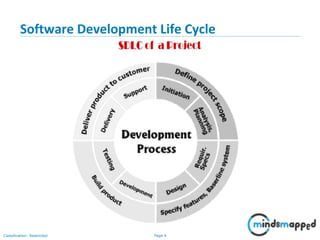
Software Development Life Cycle
Page 5Classification: Restricted
Requirement Analysis
From deliverables such as Feasibility Report, Cost Benefit Analysis, Risk
Assessment, Business Use Cases, Vision Document the Requirement Analysis
phase is carried out which includes :
Elicitation,
Validation,
Specification and
Verification
Deliverables of Requirement Analysis Phase:
• Functional Specification Document
• Software Specification Document
• User Requirement Document
• Use Case Specification
• Addendum
Page 6Classification: Restricted
Role of BA in Requirement Analysis
• Requirements Gathering - Workshop Facilitation, Interviews, Observation,
Research.
• Requirements Documentation - Business Requirements document,
Requirements Traceability document, Functional & Non Functional
Requirements documents.
• This is where the BA will also use their modeling skills to document business
requirements.
• Requirements Validation & Prioritization activities.
• Stakeholder Engagement.
Page 7Classification: Restricted
Design Phase
In this phase the detailed functional requirements created will be
transformed into complex detailed system design including screen layouts,
business rules, process diagrams and other documents.
Deliverables of Design Phase:
• Design Document
• Technical Design Specification
Page 8Classification: Restricted
Role of BA in Design Phase
• Review the solution documents.
• Work closely with solution designer and architects to ensure requirements
are clear.
• Keep the stakeholder engaged to reassure them their requirements are
implemented as specified in the business requirement artifacts. In some
projects, such as Agile projects, this part of the iteration will have close
involvement of stakeholders right through the SDLC.
• Manage the changes to requirements both from the business and from your
solution designer’s point of view through a change control process. It is a
great time to actively start using the Requirements Traceability Matrix.
Page 9Classification: Restricted
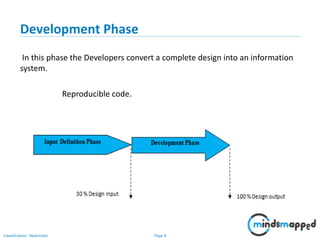
Development Phase
In this phase the Developers convert a complete design into an information
system.
Reproducible code.
Page 10Classification: Restricted
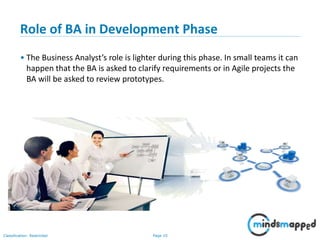
Role of BA in Development Phase
• The Business Analyst’s role is lighter during this phase. In small teams it can
happen that the BA is asked to clarify requirements or in Agile projects the
BA will be asked to review prototypes.
Page 11Classification: Restricted
Testing Phase
Demonstrates that the developed system confirm to requirements as
specified in the Functional Specification Document. Conducted by QA team
and BA support, if needed.
Deliverables of Testing Phase:
• Test Plan
• Test Strategy
• Test Scripts
• Test Cases
Page 12Classification: Restricted
Role of BA in Testing Phase
• During the testing phase the Business Analyst can assist with reviewing test
scripts to ensure all functional requirements are being tested.
• A business analyst will also get involved with defect prioritization in some
projects.
Page 13Classification: Restricted
Release and Maintenance
• Includes the preparation of the system into a production environment and
resolution of problems identified in the test phases and ready to be
released at client site.
• Training manuals.
• Maintenance includes post implementation problems and add on request
by the client.
Deliverables :
• The Software Application.
• Test Case and Reports.
Page 14Classification: Restricted
Current Trends in Business Analysis
• Don’t expect to get all the requirements upfront.
• Focus more on Business Analysis
• Focus on adding the business value
• Adoption of professional BA approach
• More communication
• Building better business cases
• Its always plus to be bit technical
Page 15Classification: Restricted
What is a Business Process Modeling?
15
A business Process:
• Has a goal
• Has specific inputs
• Has specific outputs
• User Resources
• Has a number of activities that are
performed in some order
• Creates value of some kind for the customer
• The customer may be internal or external
Page 16Classification: Restricted
Benefits of Automated Business Process
16
• Reduce costs/more efficient use of resources
• Improved communication
• Better accountability
• Smarter decision-making from more accurate data
Page 17Classification: Restricted
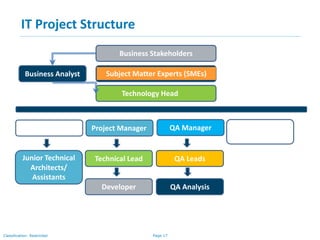
IT Project Structure
Business Stakeholders
Subject Matter Experts (SMEs)
Technology Head
Technical Architect Project Manager QA Manager Production
Support
Junior Technical
Architects/
Assistants
Technical Lead
Developer
QA Leads
QA Analysis
Business Analyst
Page 18Classification: Restricted
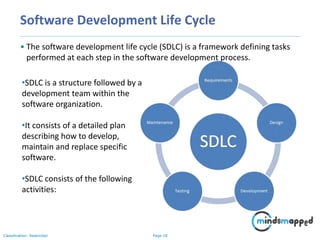
Software Development Life Cycle
• The software development life cycle (SDLC) is a framework defining tasks
performed at each step in the software development process.
•SDLC is a structure followed by a
development team within the
software organization.
•It consists of a detailed plan
describing how to develop,
maintain and replace specific
software.
•SDLC consists of the following
activities:
Page 19Classification: Restricted
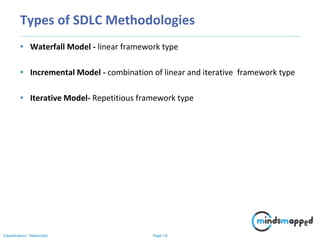
Types of SDLC Methodologies
• Waterfall Model - linear framework type
• Incremental Model - combination of linear and iterative framework type
• Iterative Model- Repetitious framework type
Page 20Classification: Restricted
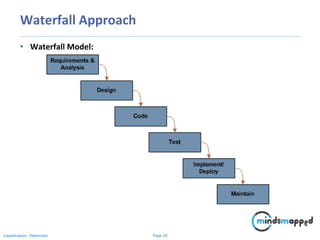
Waterfall Approach
• Waterfall Model:
Page 21Classification: Restricted
Waterfall Approach
• The waterfall model is documentation-intensive, with earlier phases
documenting what must be done and subsequent phases adding greater
detail and defining how it should be done.
• The output from one phase serves as the input to the next phase, with the
project flowing from one step to the next in a waterfall fashion.
• An important consideration for the Waterfall model is that fixes or
modifications are often put off until the maintenance phase.
• This can be very costly, as the cost to correct a problem gets higher with
each successive phase.
Page 22Classification: Restricted
Waterfall Approach - Advantages
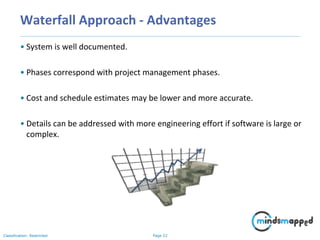
• System is well documented.
• Phases correspond with project management phases.
• Cost and schedule estimates may be lower and more accurate.
• Details can be addressed with more engineering effort if software is large or
complex.
Page 23Classification: Restricted
Waterfall Approach - Disadvantages
• All risks must be dealt with in a single software development effort.
• Because the model is sequential, there is only local feedback at the
transition between phases.
• A working product is not available until late in the project.
• Progress and success are not observable until the later stages. If a mistake
or deficiency exists in the documentation of earlier phases, it may not be
discovered until the product is delivered.
• Corrections must often wait for the maintenance phase.
Application
• The Waterfall model can be successfully used when requirements are well
understood in the beginning and are not expected to change or evolve over
the life of the project. Project risks should be relatively low.
Page 24Classification: Restricted
Prototype Approach
What is Prototyping?
• Software prototyping, can be defined as incomplete versions of the
software program being developed.
• A prototype typically simulates only a few aspects of the features of the
eventual program, and may be completely different from the eventual
implementation.
Purpose of Prototyping?
• To allow users of the software to evaluate developers' proposals for the
design of the eventual product by actually trying them out, rather than
having to interpret and evaluate the design based on descriptions.
• The software designer and implementer can obtain feedback from the
users early in the project. They may be able to refine them early in the
development of the software.
Page 25Classification: Restricted
Prototyping
Throwaway prototyping:
• Creation of a model that will eventually be discarded rather than becoming
part of the final delivered software.
• After preliminary requirements gathering is accomplished, a simple
working model of the system is constructed to visually show the users
what their requirements may look like when they are implemented into a
finished system.
• Making changes early in the development lifecycle is extremely cost
effective since there is nothing at that point to redo.
• If a project is changed after a considerable work has been done then small
changes could require large efforts to implement since software systems
have many dependencies
• Another strength of Throwaway Prototyping is its ability to construct
interfaces that the users can test. The user interface is what the user sees
as the system, and by seeing it in front of them, it is much easier to grasp
how the system will work
Page 26Classification: Restricted
Type of Prototyping
One method of creating a Throwaway Prototype is Paper Prototyping. The
prototype is implemented using paper and pencil, and thus mimics the
function of the actual product, but does not look at all like it
Another method to easily build high fidelity Throwaway Prototypes is to use a
GUI Builder and create a click dummy, a prototype that looks like the goal
system, but does not provide any functionality
Page 27Classification: Restricted
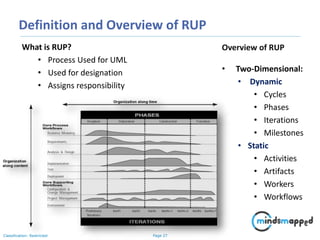
Definition and Overview of RUP
What is RUP?
• Process Used for UML
• Used for designation
• Assigns responsibility
Overview of RUP
• Two-Dimensional:
• Dynamic
• Cycles
• Phases
• Iterations
• Milestones
• Static
• Activities
• Artifacts
• Workers
• Workflows
Page 28Classification: Restricted
Inception Phase
What Happens at this Phase?
• Creation of:
• Business Case
• Preliminary Use Cases
• Vision Document
• Possible Prototypes of the
Product/Software
Outcomes of Inception Phase
• Agreement between
stakeholders on scope and
cost estimates
• Understanding of requirements
• Initial exposure to estimates,
priorities, risks and the
overall development process
Page 29Classification: Restricted
Elaboration Phase
What Happens at this Phase?
Analysis of:
• Domain
• Requirements
• Project Plan
• Project Stability & Flexibility
Outcomes of the Elaboration
Phase
•More complete Use-Case
Model with detailed
descriptions
• Description of the Software
Architecture
• Development plan for overall
project and any projected
iterations/evaluations
Page 30Classification: Restricted
Construction Phase
What Happens at this Phase?
• Development of:
• The Final Product
• Test Cases to test the final
product
• Management Tools
• Resource Management
• Quality Management
• Schedule Management
Outcomes of the Construction Phase
• A fully functional product or
software
• User Manuals
• Description of a release or
current product
Page 31Classification: Restricted
Transition Phase and Iterations
What Happens in the Transition
Phase?
Release of the Final Product
• Provide:
• Product
• Post-Release
debugging/troubleshooting
• End-User Support & Training
Outcome of the Transition
Phase
• Rollout of final product
• User feedback may be
available
• Comparison of cost & time
forecasts to actual costs &
time
Outcome of Iterations
• Risk Mitigation
• Better Change Management
• Continuous Learning
• Better Overall Quality
Page 32Classification: Restricted
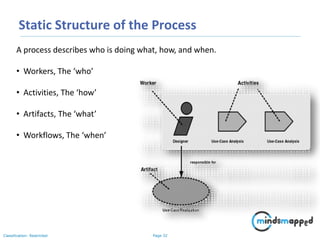
Static Structure of the Process
A process describes who is doing what, how, and when.
• Workers, The ‘who’
• Activities, The ‘how’
• Artifacts, The ‘what’
• Workflows, The ‘when’
Page 33Classification: Restricted
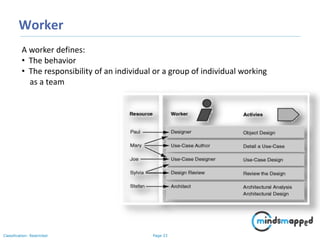
Worker
A worker defines:
• The behavior
• The responsibility of an individual or a group of individual working
as a team
Page 34Classification: Restricted
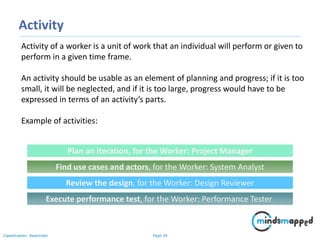
Activity
Activity of a worker is a unit of work that an individual will perform or given to
perform in a given time frame.
An activity should be usable as an element of planning and progress; if it is too
small, it will be neglected, and if it is too large, progress would have to be
expressed in terms of an activity’s parts.
Example of activities:
Plan an iteration, for the Worker: Project Manager
Find use cases and actors, for the Worker: System Analyst
Review the design, for the Worker: Design Reviewer
Execute performance test, for the Worker: Performance Tester
Page 35Classification: Restricted
Artifacts
An artifact is a piece of information that is
Produced
Modified
or used by a process
Artifacts are used as input by workers to perform an activity
Parameters of activities
Artifacts may take various shapes or forms:
• A model, such as the Use-Case Model or the Design Model
• A model element, i.e. an element within a model, such as a class, a use
case or a subsystem
• A document, such as Business Case or Software Architecture Document
• Source code
• Executables
Page 36Classification: Restricted
Workflow
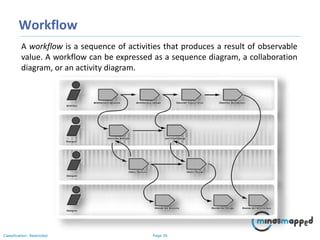
A workflow is a sequence of activities that produces a result of observable
value. A workflow can be expressed as a sequence diagram, a collaboration
diagram, or an activity diagram.
Page 37Classification: Restricted
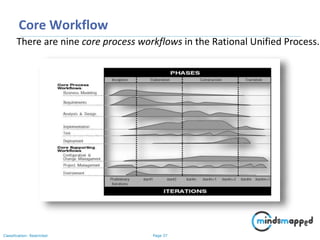
Core Workflow
There are nine core process workflows in the Rational Unified Process.
Page 38Classification: Restricted
Topics to be covered in next session
• Enterprise Analysis
• What is Enterprise Analysis
• Why Enterprise Analysis
• Different Architectures
• Enterprise Analysis Activities
• Techniques Used to Define a Business Need
• Techniques Used to assess Capability Gaps
• Techniques Used to Determine Solution Approach
• Techniques Used to Define Solution Scope
• Techniques Used to Define a Business Case
• SWOT Analysis
• GAP Analysis
• Feasibility Study
• Root Cause Analysis
Page 39Classification: Restricted
Thank you!

Software Development Life Cycle - SDLC

  • 1.
  • 2.
    Page 2Classification: Restricted Agenda SDLC •Waterfall-Sequential • Prototyping • Spiral-Evolutionary • Rational Unified Process (RUP)-Iterative
  • 3.
    Page 3Classification: Restricted SoftwareDevelopment Life Cycle • SDLC is a framework defining tasks performed at each step in the software development process. • SDLC is a structure followed by a development team within the software organization. • A Life Cycle Model defines phases , milestone, deliverables and evaluation criteria for software development process. • Various SDLC methodologies have been developed to guide the process involved.
  • 4.
  • 5.
    Page 5Classification: Restricted RequirementAnalysis From deliverables such as Feasibility Report, Cost Benefit Analysis, Risk Assessment, Business Use Cases, Vision Document the Requirement Analysis phase is carried out which includes : Elicitation, Validation, Specification and Verification Deliverables of Requirement Analysis Phase: • Functional Specification Document • Software Specification Document • User Requirement Document • Use Case Specification • Addendum
  • 6.
    Page 6Classification: Restricted Roleof BA in Requirement Analysis • Requirements Gathering - Workshop Facilitation, Interviews, Observation, Research. • Requirements Documentation - Business Requirements document, Requirements Traceability document, Functional & Non Functional Requirements documents. • This is where the BA will also use their modeling skills to document business requirements. • Requirements Validation & Prioritization activities. • Stakeholder Engagement.
  • 7.
    Page 7Classification: Restricted DesignPhase In this phase the detailed functional requirements created will be transformed into complex detailed system design including screen layouts, business rules, process diagrams and other documents. Deliverables of Design Phase: • Design Document • Technical Design Specification
  • 8.
    Page 8Classification: Restricted Roleof BA in Design Phase • Review the solution documents. • Work closely with solution designer and architects to ensure requirements are clear. • Keep the stakeholder engaged to reassure them their requirements are implemented as specified in the business requirement artifacts. In some projects, such as Agile projects, this part of the iteration will have close involvement of stakeholders right through the SDLC. • Manage the changes to requirements both from the business and from your solution designer’s point of view through a change control process. It is a great time to actively start using the Requirements Traceability Matrix.
  • 9.
    Page 9Classification: Restricted DevelopmentPhase In this phase the Developers convert a complete design into an information system. Reproducible code.
  • 10.
    Page 10Classification: Restricted Roleof BA in Development Phase • The Business Analyst’s role is lighter during this phase. In small teams it can happen that the BA is asked to clarify requirements or in Agile projects the BA will be asked to review prototypes.
  • 11.
    Page 11Classification: Restricted TestingPhase Demonstrates that the developed system confirm to requirements as specified in the Functional Specification Document. Conducted by QA team and BA support, if needed. Deliverables of Testing Phase: • Test Plan • Test Strategy • Test Scripts • Test Cases
  • 12.
    Page 12Classification: Restricted Roleof BA in Testing Phase • During the testing phase the Business Analyst can assist with reviewing test scripts to ensure all functional requirements are being tested. • A business analyst will also get involved with defect prioritization in some projects.
  • 13.
    Page 13Classification: Restricted Releaseand Maintenance • Includes the preparation of the system into a production environment and resolution of problems identified in the test phases and ready to be released at client site. • Training manuals. • Maintenance includes post implementation problems and add on request by the client. Deliverables : • The Software Application. • Test Case and Reports.
  • 14.
    Page 14Classification: Restricted CurrentTrends in Business Analysis • Don’t expect to get all the requirements upfront. • Focus more on Business Analysis • Focus on adding the business value • Adoption of professional BA approach • More communication • Building better business cases • Its always plus to be bit technical
  • 15.
    Page 15Classification: Restricted Whatis a Business Process Modeling? 15 A business Process: • Has a goal • Has specific inputs • Has specific outputs • User Resources • Has a number of activities that are performed in some order • Creates value of some kind for the customer • The customer may be internal or external
  • 16.
    Page 16Classification: Restricted Benefitsof Automated Business Process 16 • Reduce costs/more efficient use of resources • Improved communication • Better accountability • Smarter decision-making from more accurate data
  • 17.
    Page 17Classification: Restricted ITProject Structure Business Stakeholders Subject Matter Experts (SMEs) Technology Head Technical Architect Project Manager QA Manager Production Support Junior Technical Architects/ Assistants Technical Lead Developer QA Leads QA Analysis Business Analyst
  • 18.
    Page 18Classification: Restricted SoftwareDevelopment Life Cycle • The software development life cycle (SDLC) is a framework defining tasks performed at each step in the software development process. •SDLC is a structure followed by a development team within the software organization. •It consists of a detailed plan describing how to develop, maintain and replace specific software. •SDLC consists of the following activities:
  • 19.
    Page 19Classification: Restricted Typesof SDLC Methodologies • Waterfall Model - linear framework type • Incremental Model - combination of linear and iterative framework type • Iterative Model- Repetitious framework type
  • 20.
    Page 20Classification: Restricted WaterfallApproach • Waterfall Model:
  • 21.
    Page 21Classification: Restricted WaterfallApproach • The waterfall model is documentation-intensive, with earlier phases documenting what must be done and subsequent phases adding greater detail and defining how it should be done. • The output from one phase serves as the input to the next phase, with the project flowing from one step to the next in a waterfall fashion. • An important consideration for the Waterfall model is that fixes or modifications are often put off until the maintenance phase. • This can be very costly, as the cost to correct a problem gets higher with each successive phase.
  • 22.
    Page 22Classification: Restricted WaterfallApproach - Advantages • System is well documented. • Phases correspond with project management phases. • Cost and schedule estimates may be lower and more accurate. • Details can be addressed with more engineering effort if software is large or complex.
  • 23.
    Page 23Classification: Restricted WaterfallApproach - Disadvantages • All risks must be dealt with in a single software development effort. • Because the model is sequential, there is only local feedback at the transition between phases. • A working product is not available until late in the project. • Progress and success are not observable until the later stages. If a mistake or deficiency exists in the documentation of earlier phases, it may not be discovered until the product is delivered. • Corrections must often wait for the maintenance phase. Application • The Waterfall model can be successfully used when requirements are well understood in the beginning and are not expected to change or evolve over the life of the project. Project risks should be relatively low.
  • 24.
    Page 24Classification: Restricted PrototypeApproach What is Prototyping? • Software prototyping, can be defined as incomplete versions of the software program being developed. • A prototype typically simulates only a few aspects of the features of the eventual program, and may be completely different from the eventual implementation. Purpose of Prototyping? • To allow users of the software to evaluate developers' proposals for the design of the eventual product by actually trying them out, rather than having to interpret and evaluate the design based on descriptions. • The software designer and implementer can obtain feedback from the users early in the project. They may be able to refine them early in the development of the software.
  • 25.
    Page 25Classification: Restricted Prototyping Throwawayprototyping: • Creation of a model that will eventually be discarded rather than becoming part of the final delivered software. • After preliminary requirements gathering is accomplished, a simple working model of the system is constructed to visually show the users what their requirements may look like when they are implemented into a finished system. • Making changes early in the development lifecycle is extremely cost effective since there is nothing at that point to redo. • If a project is changed after a considerable work has been done then small changes could require large efforts to implement since software systems have many dependencies • Another strength of Throwaway Prototyping is its ability to construct interfaces that the users can test. The user interface is what the user sees as the system, and by seeing it in front of them, it is much easier to grasp how the system will work
  • 26.
    Page 26Classification: Restricted Typeof Prototyping One method of creating a Throwaway Prototype is Paper Prototyping. The prototype is implemented using paper and pencil, and thus mimics the function of the actual product, but does not look at all like it Another method to easily build high fidelity Throwaway Prototypes is to use a GUI Builder and create a click dummy, a prototype that looks like the goal system, but does not provide any functionality
  • 27.
    Page 27Classification: Restricted Definitionand Overview of RUP What is RUP? • Process Used for UML • Used for designation • Assigns responsibility Overview of RUP • Two-Dimensional: • Dynamic • Cycles • Phases • Iterations • Milestones • Static • Activities • Artifacts • Workers • Workflows
  • 28.
    Page 28Classification: Restricted InceptionPhase What Happens at this Phase? • Creation of: • Business Case • Preliminary Use Cases • Vision Document • Possible Prototypes of the Product/Software Outcomes of Inception Phase • Agreement between stakeholders on scope and cost estimates • Understanding of requirements • Initial exposure to estimates, priorities, risks and the overall development process
  • 29.
    Page 29Classification: Restricted ElaborationPhase What Happens at this Phase? Analysis of: • Domain • Requirements • Project Plan • Project Stability & Flexibility Outcomes of the Elaboration Phase •More complete Use-Case Model with detailed descriptions • Description of the Software Architecture • Development plan for overall project and any projected iterations/evaluations
  • 30.
    Page 30Classification: Restricted ConstructionPhase What Happens at this Phase? • Development of: • The Final Product • Test Cases to test the final product • Management Tools • Resource Management • Quality Management • Schedule Management Outcomes of the Construction Phase • A fully functional product or software • User Manuals • Description of a release or current product
  • 31.
    Page 31Classification: Restricted TransitionPhase and Iterations What Happens in the Transition Phase? Release of the Final Product • Provide: • Product • Post-Release debugging/troubleshooting • End-User Support & Training Outcome of the Transition Phase • Rollout of final product • User feedback may be available • Comparison of cost & time forecasts to actual costs & time Outcome of Iterations • Risk Mitigation • Better Change Management • Continuous Learning • Better Overall Quality
  • 32.
    Page 32Classification: Restricted StaticStructure of the Process A process describes who is doing what, how, and when. • Workers, The ‘who’ • Activities, The ‘how’ • Artifacts, The ‘what’ • Workflows, The ‘when’
  • 33.
    Page 33Classification: Restricted Worker Aworker defines: • The behavior • The responsibility of an individual or a group of individual working as a team
  • 34.
    Page 34Classification: Restricted Activity Activityof a worker is a unit of work that an individual will perform or given to perform in a given time frame. An activity should be usable as an element of planning and progress; if it is too small, it will be neglected, and if it is too large, progress would have to be expressed in terms of an activity’s parts. Example of activities: Plan an iteration, for the Worker: Project Manager Find use cases and actors, for the Worker: System Analyst Review the design, for the Worker: Design Reviewer Execute performance test, for the Worker: Performance Tester
  • 35.
    Page 35Classification: Restricted Artifacts Anartifact is a piece of information that is Produced Modified or used by a process Artifacts are used as input by workers to perform an activity Parameters of activities Artifacts may take various shapes or forms: • A model, such as the Use-Case Model or the Design Model • A model element, i.e. an element within a model, such as a class, a use case or a subsystem • A document, such as Business Case or Software Architecture Document • Source code • Executables
  • 36.
    Page 36Classification: Restricted Workflow Aworkflow is a sequence of activities that produces a result of observable value. A workflow can be expressed as a sequence diagram, a collaboration diagram, or an activity diagram.
  • 37.
    Page 37Classification: Restricted CoreWorkflow There are nine core process workflows in the Rational Unified Process.
  • 38.
    Page 38Classification: Restricted Topicsto be covered in next session • Enterprise Analysis • What is Enterprise Analysis • Why Enterprise Analysis • Different Architectures • Enterprise Analysis Activities • Techniques Used to Define a Business Need • Techniques Used to assess Capability Gaps • Techniques Used to Determine Solution Approach • Techniques Used to Define Solution Scope • Techniques Used to Define a Business Case • SWOT Analysis • GAP Analysis • Feasibility Study • Root Cause Analysis
  • 39.