Social Media:
Coping with the
Risks
TechTalk for JCCC
Retirees Association
March 27, 2019
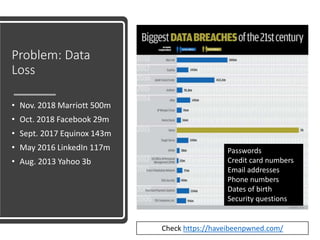
Problem: Data
Loss
• Nov. 2018 Marriott 500m
• Oct. 2018 Facebook 29m
• Sept. 2017 Equinox 143m
• May 2016 LinkedIn 117m
• Aug. 2013 Yahoo 3b
Passwords
Credit card numbers
Email addresses
Phone numbers
Dates of birth
Security questions
Check https://haveibeenpwned.com/
Problem: Identity
Theft
• Unsolicited phone
calls and scams
• IRS money due
phone calls (not
legit)
• Unsolicited calls or
email offering a
technical fix
• Unsolicited calls
offering medical
equipment for
Medicare or
Medicaid
recipients
Problem: Fake
Requests From
Spam Profiles
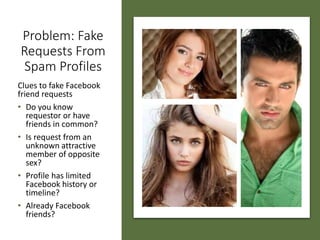
Clues to fake Facebook
friend requests
• Do you know
requestor or have
friends in common?
• Is request from an
unknown attractive
member of opposite
sex?
• Profile has limited
Facebook history or
timeline?
• Already Facebook
friends?
Suspect a Fake
Facebook Request?
• Process to report
face Facebook friend
request:
https://www.socme
dsean.com/answere
d-how-do-i-report-a-
fake-facebook-
friend-request/
Problem: Risks in
Social Sharing
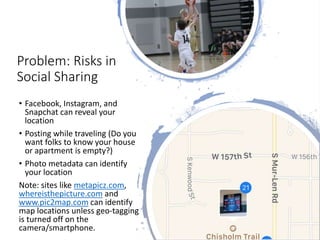
• Facebook, Instagram, and
Snapchat can reveal your
location
• Posting while traveling (Do you
want folks to know your house
or apartment is empty?)
• Photo metadata can identify
your location
Note: sites like metapicz.com,
whereisthepicture.com and
www.pic2map.com can identify
map locations unless geo-tagging
is turned off on the
camera/smartphone.
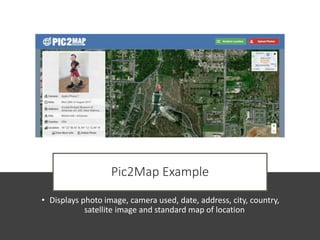
Pic2Map Example
• Displays photo image, camera used, date, address, city, country,
satellite image and standard map of location
Problem: Profile Hacking
• Cracking social
media user account
passwords: most
common way to
hack one’s profile
• Solution: Use
complex and
frequently changed
passwords
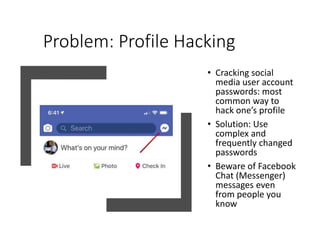
• Beware of Facebook
Chat (Messenger)
messages even
from people you
know
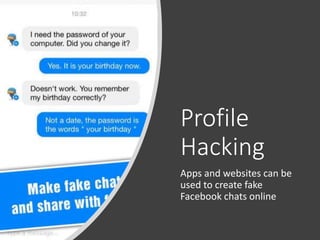
Profile
Hacking
Apps and websites can be
used to create fake
Facebook chats online
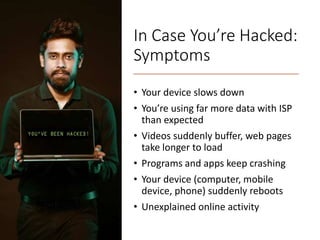
In Case You’re Hacked:
Symptoms
• Your device slows down
• You’re using far more data with ISP
than expected
• Videos suddenly buffer, web pages
take longer to load
• Programs and apps keep crashing
• Your device (computer, mobile
device, phone) suddenly reboots
• Unexplained online activity
In Case You’re
Hacked: Solutions
• Run your antivirus
software
• Install any Operating
System upgrades
• Check Task Manager
(Windows) or
Activity Manager
(Mac) – unknown
apps
• Check ISP data
usage for unusual
spikes
• Reboot system see if
problem persists
• Constantly check
your accounts for
unauthorized
activity
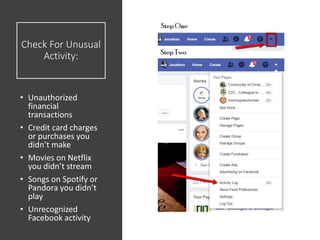
Check For Unusual
Activity:
• Unauthorized
financial
transactions
• Credit card charges
or purchases you
didn’t make
• Movies on Netflix
you didn’t stream
• Songs on Spotify or
Pandora you didn’t
play
• Unrecognized
Facebook activity
Think Your Account Is
Hacked?
• Change your passwords, even for old
accounts that may use a common password
• Stop using the hacked
password…everywhere!
• Monitor statements (credit cards and
financial institutions) for charges you don’t
recognize.
• Alert financial institutions that you’ve been
hacked, if you find any evidence.
• Use distinctive passwords, especially for
accounts with personal, health and
financial data.
• Use a cross-platform password manager to
store passwords. Some apps generate
complex passwords for you.
Your Facebook
Account Hacked?
• Check out
m.facebook.com/help/20330589
3040179/
• Explore link to Step by step guide
m.facebook.com/help/13067254
09382822
• If someone tried to change email
associated with a Facebook
account, Facebook sends a
message to the previous email
account with a special link. You
can click the link to reverse the
email change and secure your
account.
Google Account
Hacked?
Report suspicious mail to
Google
productforums.google.co
m/forum/#!msg/gmail/RI
yIm0v-
xnA/py_QQyH4BwAJ
Twitter Account
Hacked?
If you think your Twitter
account has been hacked
help.twitter.com/en/safet
y-and-security/twitter-
account-compromised
Problem: Malicious Links
and Attachments
• Email with fake embedded email
addresses or links
• Email with unsolicited images or video
attached
• If you receive unexpected email or text
attachment (photo, video, link), always
check with sender to verify
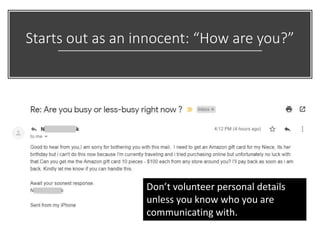
Starts out as an innocent: “How are you?”
Don’t volunteer personal details
unless you know who you are
communicating with.
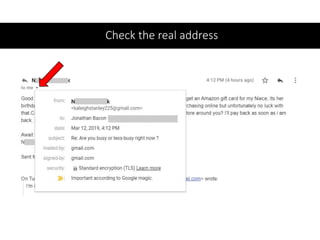
Check the real address
Your Best Defense
• Use strong, complex
passwords or pass
phrases
• Use two-factor
authentication for
important accounts
(Google, Apple,
financial, health)
• Don’t accept requests
from unknown
individuals
• Beware unexpected
links or attachments
• Download apps from
recognized safe sites
(App Store, Google
Play, Microsoft Store)
Be Safe, Be Proactive
• Think before you
share anything!
• Don't include birthday,
address, phone on
your profile
www.facebook.com/h
elp/101765758165199
4/
• Review and update
social media privacy
settings
www.facebook.com/h
elp/115450405225661
• Use Facebook Privacy
Checkup
www.facebook.com/a
bout/basics/manage-
your-privacy/posts#16
Resources
10 Worst Social Media Hacks
https://www.infosecurity-
magazine.com/blogs/top-10-worst-
social-media-cyber/
18 Biggest Data Breaches of 20th
Century
https://www.csoonline.com/article/213
0877/the-biggest-data-breaches-of-the-
21st-century.html
Has Your Phone Been Hacked?
https://www.usatoday.com/story/tech/
columnist/komando/2018/05/04/has-
your-computer-phone-been-hacked-
heres-how-tell/559136002/
Privacy/Security Risks of Social Media
https://www.rswebsols.com/tutorials/in
ternet/privacy-security-risks-social-
media
Resources
How do I spot and Report a Fake
Facebook Friend Request?
https://www.socmedsean.com/ans
wered-how-do-i-report-a-fake-
facebook-friend-request/
Find Location from Photo
https://www.guidingtech.com/find
-location-from-photo/
How to Spot a Fake Friend Request
https://www.lifewire.com/how-to-
spot-a-fake-friend-request-
2487747
Assembled by Jonathan
Bacon for the Johnson
County Community
College Retirees
Association, March 2019
Questions or Comments?

Social Media Risks

  • 1.
    Social Media: Coping withthe Risks TechTalk for JCCC Retirees Association March 27, 2019
  • 2.
    Problem: Data Loss • Nov.2018 Marriott 500m • Oct. 2018 Facebook 29m • Sept. 2017 Equinox 143m • May 2016 LinkedIn 117m • Aug. 2013 Yahoo 3b Passwords Credit card numbers Email addresses Phone numbers Dates of birth Security questions Check https://haveibeenpwned.com/
  • 3.
    Problem: Identity Theft • Unsolicitedphone calls and scams • IRS money due phone calls (not legit) • Unsolicited calls or email offering a technical fix • Unsolicited calls offering medical equipment for Medicare or Medicaid recipients
  • 4.
    Problem: Fake Requests From SpamProfiles Clues to fake Facebook friend requests • Do you know requestor or have friends in common? • Is request from an unknown attractive member of opposite sex? • Profile has limited Facebook history or timeline? • Already Facebook friends?
  • 5.
    Suspect a Fake FacebookRequest? • Process to report face Facebook friend request: https://www.socme dsean.com/answere d-how-do-i-report-a- fake-facebook- friend-request/
  • 6.
    Problem: Risks in SocialSharing • Facebook, Instagram, and Snapchat can reveal your location • Posting while traveling (Do you want folks to know your house or apartment is empty?) • Photo metadata can identify your location Note: sites like metapicz.com, whereisthepicture.com and www.pic2map.com can identify map locations unless geo-tagging is turned off on the camera/smartphone.
  • 7.
    Pic2Map Example • Displaysphoto image, camera used, date, address, city, country, satellite image and standard map of location
  • 8.
    Problem: Profile Hacking •Cracking social media user account passwords: most common way to hack one’s profile • Solution: Use complex and frequently changed passwords • Beware of Facebook Chat (Messenger) messages even from people you know
  • 9.
    Profile Hacking Apps and websitescan be used to create fake Facebook chats online
  • 10.
    In Case You’reHacked: Symptoms • Your device slows down • You’re using far more data with ISP than expected • Videos suddenly buffer, web pages take longer to load • Programs and apps keep crashing • Your device (computer, mobile device, phone) suddenly reboots • Unexplained online activity
  • 11.
    In Case You’re Hacked:Solutions • Run your antivirus software • Install any Operating System upgrades • Check Task Manager (Windows) or Activity Manager (Mac) – unknown apps • Check ISP data usage for unusual spikes • Reboot system see if problem persists • Constantly check your accounts for unauthorized activity
  • 12.
    Check For Unusual Activity: •Unauthorized financial transactions • Credit card charges or purchases you didn’t make • Movies on Netflix you didn’t stream • Songs on Spotify or Pandora you didn’t play • Unrecognized Facebook activity
  • 13.
    Think Your AccountIs Hacked? • Change your passwords, even for old accounts that may use a common password • Stop using the hacked password…everywhere! • Monitor statements (credit cards and financial institutions) for charges you don’t recognize. • Alert financial institutions that you’ve been hacked, if you find any evidence. • Use distinctive passwords, especially for accounts with personal, health and financial data. • Use a cross-platform password manager to store passwords. Some apps generate complex passwords for you.
  • 14.
    Your Facebook Account Hacked? •Check out m.facebook.com/help/20330589 3040179/ • Explore link to Step by step guide m.facebook.com/help/13067254 09382822 • If someone tried to change email associated with a Facebook account, Facebook sends a message to the previous email account with a special link. You can click the link to reverse the email change and secure your account.
  • 15.
    Google Account Hacked? Report suspiciousmail to Google productforums.google.co m/forum/#!msg/gmail/RI yIm0v- xnA/py_QQyH4BwAJ
  • 16.
    Twitter Account Hacked? If youthink your Twitter account has been hacked help.twitter.com/en/safet y-and-security/twitter- account-compromised
  • 17.
    Problem: Malicious Links andAttachments • Email with fake embedded email addresses or links • Email with unsolicited images or video attached • If you receive unexpected email or text attachment (photo, video, link), always check with sender to verify
  • 18.
    Starts out asan innocent: “How are you?” Don’t volunteer personal details unless you know who you are communicating with.
  • 19.
  • 20.
    Your Best Defense •Use strong, complex passwords or pass phrases • Use two-factor authentication for important accounts (Google, Apple, financial, health) • Don’t accept requests from unknown individuals • Beware unexpected links or attachments • Download apps from recognized safe sites (App Store, Google Play, Microsoft Store)
  • 21.
    Be Safe, BeProactive • Think before you share anything! • Don't include birthday, address, phone on your profile www.facebook.com/h elp/101765758165199 4/ • Review and update social media privacy settings www.facebook.com/h elp/115450405225661 • Use Facebook Privacy Checkup www.facebook.com/a bout/basics/manage- your-privacy/posts#16
  • 22.
    Resources 10 Worst SocialMedia Hacks https://www.infosecurity- magazine.com/blogs/top-10-worst- social-media-cyber/ 18 Biggest Data Breaches of 20th Century https://www.csoonline.com/article/213 0877/the-biggest-data-breaches-of-the- 21st-century.html Has Your Phone Been Hacked? https://www.usatoday.com/story/tech/ columnist/komando/2018/05/04/has- your-computer-phone-been-hacked- heres-how-tell/559136002/ Privacy/Security Risks of Social Media https://www.rswebsols.com/tutorials/in ternet/privacy-security-risks-social- media
  • 23.
    Resources How do Ispot and Report a Fake Facebook Friend Request? https://www.socmedsean.com/ans wered-how-do-i-report-a-fake- facebook-friend-request/ Find Location from Photo https://www.guidingtech.com/find -location-from-photo/ How to Spot a Fake Friend Request https://www.lifewire.com/how-to- spot-a-fake-friend-request- 2487747 Assembled by Jonathan Bacon for the Johnson County Community College Retirees Association, March 2019
  • 24.