What every physician
needs to know:
how to detect email fraud
? phishing
•	 Email fraud is also known as phishing or spear
phishing.
•	 Phishing – an attempt by cyber criminals who use an
email message that appears to come from a trustworthy
source to get a recipient to provide sensitive or private
information, such as a username, password, credit card
number, or other secure data.
1 spelling & bad
grammar
•	 If you notice spelling or grammar mistakes in an
email, it might be a scam – especially if the email
appears to come from an organization you do business
with. Legitimate businesses have communication
departments or staff who review and edit email before
sending it to customers.
1 spelling & bad
grammar
•	 Check for proper spelling in web addresses as well.
Cyber criminals use web addresses that resemble
the names of well-known companies but are slightly
altered.
threats
2•	 Email scams will entice you to respond to the message
by threatening to close an account or by threatening
another type of action. Legitimate institutions,
particularly banks, do not typically communicate this
way or ask you to click on a link in an email. Do not
reply, click on links, or call phone numbers provided in
the message.
threats
2•	 Contact the institution directly using contact
information you know to be correct if you have any
doubts or questions.
•	 This also applies to emails with requests for urgent
responses.
links
•	 You can preview a link in an email message, without
having to click on it, by hovering your cursor over the
link. Either a small text box will appear with the full web
address or it will appear in the lower left corner of your
browser window.
3
links
•	 If the link appears suspicious or does not match the
link in the message, do not click on it. These links can
direct you to spoofing sites or lead you to .exe files,
which can spread malicious software.
3
4•	 If the email message is asking you to confirm or provide
personal information, do not reply. Email is not a secure
method for sharing sensitive information, and legitimate
businesses do not ask you to send information this way.
asking for
personal
information
5•	 Files attached in an email could contain viruses or other
malware that can weaken your computer’s security. If
you think you received a phishing email do not open or
download any attachments.
suspicious
attachments
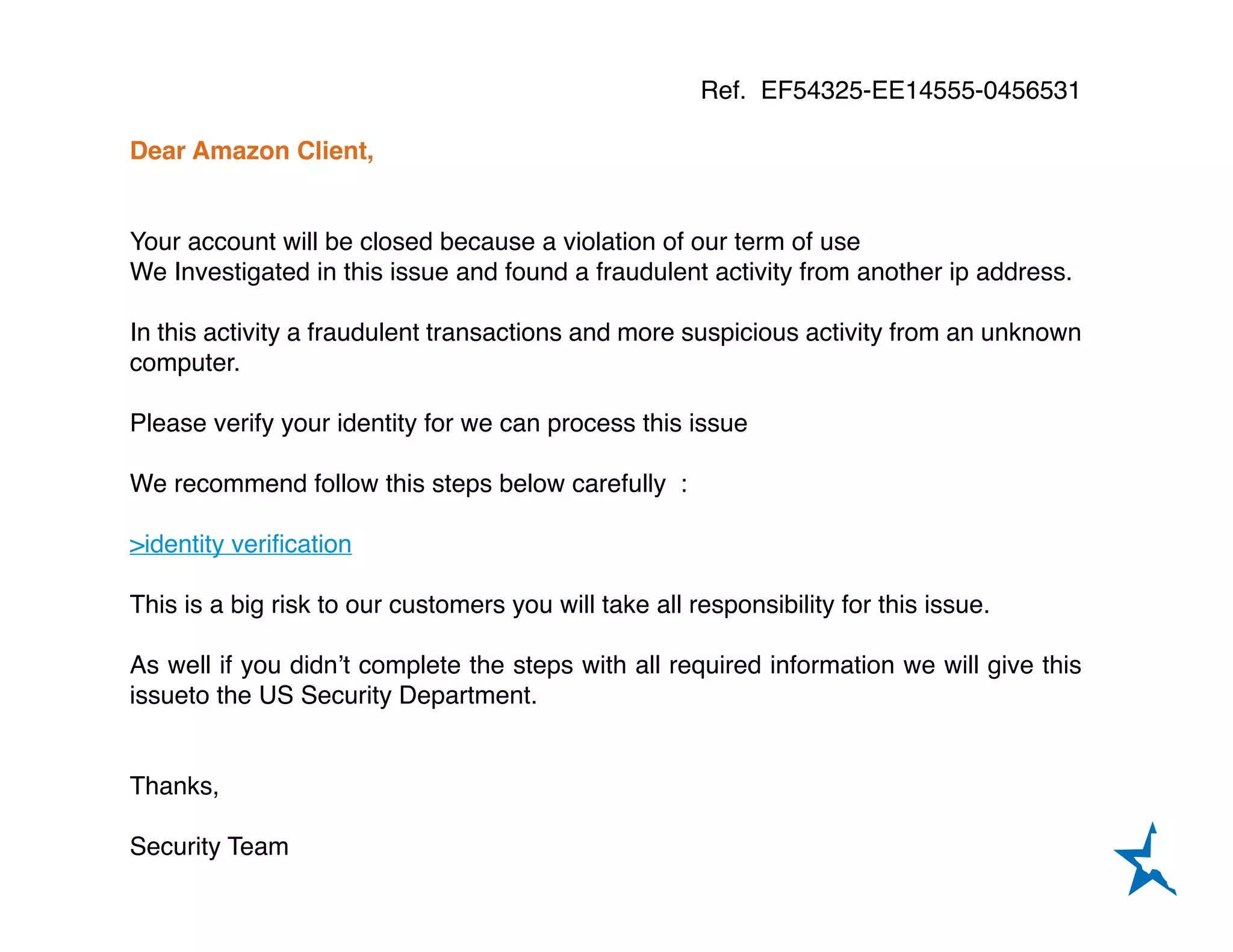
6•	 The next slide demonstrates a real-life example of a
phishing attempt.
email fraud
example
Ref. EF54325-EE14555-0456531
Dear Amazon Client,
Your account will be closed because a violation of our term of use
We Investigated in this issue and found a fraudulent activity from another ip address.
In this activity a fraudulent transactions and more suspicious activity from an unknown
computer.
Please verify your identity for we can process this issue
We recommend follow this steps below carefully :
>identity verification
This is a big risk to our customers you will take all responsibility for this issue.
As well if you didn’t complete the steps with all required information we will give this
issueto the US Security Department.
Thanks,
Security Team
7•	 Look for these signs if you receive a suspicious email:
•	 Generic greeting (not your name)
•	 Bad spelling or grammar
•	 Requests for personal information
•	 Threats and/or requests for an urgent response
•	 Spoofed links
•	 When you’re unsure about the legitmacy of an email
either call the sender or contact your security officer, IT
staff, or consultant.
email fraud
check list
protection for
a new era of
medicine
about tmlt:
With more than 18,000 physicians in its care, Texas Medical
Liability Trust (TMLT) provides malpractice insurance and related
products to physicians. Our purpose is to make a positive impact
on the quality of health care for patients by educating, protecting,
and defending physicians. www.tmlt.org
8
Find us on:

How to Detect Email Fraud

  • 1.
    What every physician needsto know: how to detect email fraud
  • 2.
    ? phishing • Emailfraud is also known as phishing or spear phishing. • Phishing – an attempt by cyber criminals who use an email message that appears to come from a trustworthy source to get a recipient to provide sensitive or private information, such as a username, password, credit card number, or other secure data.
  • 3.
    1 spelling &bad grammar • If you notice spelling or grammar mistakes in an email, it might be a scam – especially if the email appears to come from an organization you do business with. Legitimate businesses have communication departments or staff who review and edit email before sending it to customers.
  • 4.
    1 spelling &bad grammar • Check for proper spelling in web addresses as well. Cyber criminals use web addresses that resemble the names of well-known companies but are slightly altered.
  • 5.
    threats 2• Email scamswill entice you to respond to the message by threatening to close an account or by threatening another type of action. Legitimate institutions, particularly banks, do not typically communicate this way or ask you to click on a link in an email. Do not reply, click on links, or call phone numbers provided in the message.
  • 6.
    threats 2• Contact theinstitution directly using contact information you know to be correct if you have any doubts or questions. • This also applies to emails with requests for urgent responses.
  • 7.
    links • You canpreview a link in an email message, without having to click on it, by hovering your cursor over the link. Either a small text box will appear with the full web address or it will appear in the lower left corner of your browser window. 3
  • 8.
    links • If thelink appears suspicious or does not match the link in the message, do not click on it. These links can direct you to spoofing sites or lead you to .exe files, which can spread malicious software. 3
  • 9.
    4• If theemail message is asking you to confirm or provide personal information, do not reply. Email is not a secure method for sharing sensitive information, and legitimate businesses do not ask you to send information this way. asking for personal information
  • 10.
    5• Files attachedin an email could contain viruses or other malware that can weaken your computer’s security. If you think you received a phishing email do not open or download any attachments. suspicious attachments
  • 11.
    6• The nextslide demonstrates a real-life example of a phishing attempt. email fraud example
  • 12.
    Ref. EF54325-EE14555-0456531 Dear AmazonClient, Your account will be closed because a violation of our term of use We Investigated in this issue and found a fraudulent activity from another ip address. In this activity a fraudulent transactions and more suspicious activity from an unknown computer. Please verify your identity for we can process this issue We recommend follow this steps below carefully : >identity verification This is a big risk to our customers you will take all responsibility for this issue. As well if you didn’t complete the steps with all required information we will give this issueto the US Security Department. Thanks, Security Team
  • 13.
    7• Look forthese signs if you receive a suspicious email: • Generic greeting (not your name) • Bad spelling or grammar • Requests for personal information • Threats and/or requests for an urgent response • Spoofed links • When you’re unsure about the legitmacy of an email either call the sender or contact your security officer, IT staff, or consultant. email fraud check list
  • 14.
    protection for a newera of medicine about tmlt: With more than 18,000 physicians in its care, Texas Medical Liability Trust (TMLT) provides malpractice insurance and related products to physicians. Our purpose is to make a positive impact on the quality of health care for patients by educating, protecting, and defending physicians. www.tmlt.org 8 Find us on: