AN
INTERNSHIP REPORT
ON
SOCIAL MEDIA MANAGEMENT SYSTEM
PROJECT
BY
KAMAL ACHARYA
(Tribhuvan University)
Date: 2022/01/01
ABSTRACT
The project "Social Media Platform in Object-Oriented Modeling" aims to design
and model a robust and scalable social media platform using object-oriented
modeling principles. In the age of digital communication, social media platforms
have become indispensable for connecting people, sharing content, and fostering
online communities. However, their complex nature requires meticulous planning
and organization.This project addresses the challenge of creating a feature-rich and
user-friendly social media platform by applying key object-oriented modeling
concepts. It entails the identification and definition of essential objects such as
"User," "Post," "Comment," and "Notification," each encapsulating specific
attributes and behaviors. Relationships between these objects, such as friendships,
content interactions, and notifications, are meticulously established.The project
emphasizes encapsulation to maintain data integrity, inheritance for shared behaviors
among objects, and polymorphism for flexible content handling. Use case diagrams
depict user interactions, while sequence diagrams showcase the flow of interactions
during critical scenarios. Class diagrams provide an overarching view of the system's
architecture, including classes, attributes, and methods .By undertaking this project,
we aim to create a modular, maintainable, and user-centric social media platform that
adheres to best practices in object-oriented modeling. Such a platform will offer users
a seamless and secure online social experience while facilitating future enhancements
and adaptability to changing user needs.
1
Chapter – 1
INTRODUCTION
2
1. INTRODUCTION
UNIFIED MODELING LANGUAGE:
The Unified Modeling Language (UML) is a graphical language for visualizing, specifying,
constructing and documenting the artifacts of a software intensive system.
A successful software organization is one that consistently deploys a quality software that
meets the needs of its users . An organization that can deploy that software in a timely and
predictable fashion, with an effective use of resources, is one that has a sustainable business.
Modeling is a central part of all the activities that lead up to the deployment of good software.
We build models to communicate the desired structure and behavior of our system.
Unsuccessful software projects fail in their unique way, but all successful projects are alike in
many ways. There are many elements that contribute to a successful software organization;
one common thread is the use of modeling.
The UML gives us the standard way to write system’s blue prints that covers the conceptual
things, such as business processes and system functions as well as concrete things, such as
classes written in a specific programming language, database schemas, and reusable software
components.
The UML addresses the documentation of a system’s architecture and all of its details. The
UML also provides a language for expressing requirements and for tests.
The UML is appropriate for modeling systems ranging from enterprise information systems
to distributed web-based applications and even to the hard real time embedded systems. UML
also provides a language for modeling the activities of project planning and release
management.
3
Models consist of objects that interact by sending message. Think an object as alive. Objects
have things they know (attributes) and the things they can do (methods or operations). The
values of an object’s attributes determine its state.
Classes are the blue prints for objects. A class wraps attributes and methods into a single
distinct entity. Objects are instances of classes. UML is process independent, although it
should be used in a process that is use case driven, architecture-centric and iterative and
incremental.
The vocabulary of UML encompasses three kinds of building blocks:
1. Things
2. Relationships
3. Diagrams
THINGS:
Things are abstractions that are first-class citizens in a model; relationships tie these things
together; diagram group interesting collections of things. There are four kinds of things in
UML. They are:
1. Structural things
2. Behavioral things
3. Grouping things
4. Annotational things
RELATIONSHIPS:
A Relationship is a connection among things. In object-oriented modeling, the four most
important relationships are dependencies, generalizations, associations and realizations. These
relationships are the basic relational building blocks of the UML. We use them to write well-
formed models.
DEPENDENCY:
A Dependency is a using relationship specifying that a change in the
specification of one thing may affect another thing that uses it, but not necessarily the reverse.
4
Fig: Dependency
GENERALIZATION:
A Generalization is a relationship between a general thing (super class or parent)
and a more specific kind of that thing (subclass or child).
▷
Fig: Generalization
ASSOCIATION:
An Association is a structural relationship, specifying that objects of one thing are
connected to objects of another.
0…1 *
Employer Employee
Fig: Association
REALIZATION:
A Realization is a semantic relationship between classifiers in which one classifier
specifies a contract that another classifier guarantees to carry out. We will encounter these
relationships in two places: between interfaces and the classes or components that realize them.
Fig: Realization
DIAGRAMS:
A Diagram is the graphical presentation of a set of elements, most often rendered as a
connected graph of vertices (things) and arcs (relationships). We draw diagrams to visualize
a system from different perspectives, so a diagram is a projection into a system.
5
UML includes 9 such diagrams. They are:
1. Use Case diagram
2. Class diagram
3. Object diagram
4. Sequence diagram
5. Collaboration diagram
6. Activity diagram
7. State Chart diagram
8. Component diagram
9. Deployment diagram
Each diagram is described in the project regarding “SOCIAL MEDIA PLATFORM”
6
Chapter – 2
UML VIEWS AND
DIAGRAMS
7
2. UML VIEWS AND DIAGRAMS
Major area View Diagrams Main concepts
Structural
Static view Class diagram
Class, association,
Generalization,
dependency,
realization,
interface
Use case view Use case
diagram
Use case, actor,
association, extend,
include, use case
generalization
Deployment view Deployment
diagram
Node, component,
dependency, location
Implementation
View
Component
diagram
Component, interface,
dependency, realization
Behaviour
Dynamic view Statechart
diagram
State, event, transition,
action
Dynamic view Activity diagram State, activity, completion
transition, fort, join, swim
lanes
Interaction view Sequence
diagram
Interaction, object,
message, activation
Collaboration
diagram
Collaboration, interaction,
object, message,
collaboration role,
activation
Model
Management
Model
management
View
Class diagram Package, subsystem,
model
Table 2.1: UML VIEWS AND DIAGRAMS
8
Chapter – 3
PROJECT DESCRIPTION
9
3.PROBLEM STATEMENT
PROBLEM STATEMENT:
Problem Statement:
In today's interconnected world, there is a growing need for a social media platform that addresses
various shortcomings and concerns that users and society as a whole face in the current landscape.
To create a successful and socially responsible social media platform, the following problem
statement is outlined:
"The existing social media platforms suffer from a range of issues, including but not limited to
privacy breaches, cyberbullying, misinformation, echo chambers, and addiction-driven designs. To
address these challenges, there is a need for a new social media platform that fosters genuine
connections, prioritizes user privacy, promotes accurate information, and provides a healthier
digital environment while ensuring a sustainable business model."
This problem statement highlights the key problems in existing social media platforms and the
need for a new platform that can serve as a better alternative, emphasizing responsible and ethical
practices.
OBJECTIVES:
Creating effective objectives for your social media platform can help guide your strategy and
measure your success. When setting objectives, it's often helpful to use the SMART criteria, which
stands for Specific, Measurable, Achievable, Relevant, and Time-bound. Here are some sample
social media objectives:
1. Increase Brand Awareness:
- Specific: Increase brand recognition and reach.
- Measurable: Achieve a 20% increase in followers within six months.
- Achievable: Create engaging content and increase posting frequency.
- Relevant: Building brand awareness is crucial for a new business.
- Time-bound: Achieve the goal within six months.
10
2. Drive Website Traffic:
- Specific: Drive more visitors to your website.
- Measurable: Increase website referral traffic from social media by 30%.
- Achievable: Share more links to your site and optimize content.
- Relevant: Boosting website traffic can lead to more sales or leads.
- Time-bound: Achieve the goal within three months.
3. Generate Leads:
- Specific: Collect contact information from potential customers.
- Measurable: Obtain 100 new email leads per month through social media.
- Achievable: Run targeted lead generation campaigns.
- Relevant: Building a customer database for email marketing.
- Time-bound: Achieve the goal ongoing for the next 12 months.
4. Enhance Customer Engagement:
- Specific: Increase interaction with your followers.
- Measurable: Boost engagement rate by 15% in the next quarter.
- Achievable: Respond to comments, run contests, and create polls.
- Relevant: Engaged customers are more likely to be loyal.
- Time-bound: Achieve the goal within the next three months.
5. Monitor Brand Sentiment:
- Specific: Track how your brand is perceived on social media.
- Measurable: Use sentiment analysis tools to measure positive/negative mentions.
- Achievable: Set up social media listening and monitoring tools.
- Relevant: Understanding brand sentiment can inform strategy.
- Time-bound: Ongoing monitoring and reporting.
6. Boost Sales:
- Specific: Increase product or service sales through social media.
- Measurable: Achieve a 10% increase in monthly sales directly attributed to social media.
- Achievable: Run targeted promotions and optimize your e-commerce process.
11
- Relevant: Increasing revenue is a core business goal.
- Time-bound: Achieve the goal within the next six months.
7. Improve Customer Support:
- Specific: Enhance customer support through social channels.
- Measurable: Decrease response time to customer inquiries by 30%.
- Achievable: Implement chatbots and a responsive support team.
- Relevant: Providing excellent support can improve customer satisfaction.
- Time-bound: Achieve the goal within three months.
8. Establish Thought Leadership:
- Specific: Become a recognized industry expert.
- Measurable: Share industry insights through blog posts and whitepapers.
- Achievable: Consistently post thought-provoking content.
- Relevant: Building industry authority can attract clients and partners.
- Time-bound: Ongoing goal with regular content sharing.
Remember to adapt these objectives to your specific business goals, target audience, and social media
platforms. Regularly assess your progress and adjust your strategy as needed to achieve your
objectives.
12
Chapter – 4
USE CASE DIAGRAM
13
4. USE CASE DIAGRAM
A Use Case Diagram shows a set of use cases and actors and their relationships. Use case
diagrams address the static use case view of a system. For the most part, this involves modeling
the context of a system, subsystem, or class, or modeling the requirements of the behavior of
these elements. These diagrams are especially important in organizing and modeling the
behaviors of a system. These diagrams are important for visualizing, specifying and
documenting the behavior of an element.
COMMON PROPERTIES:
A Use Case Diagram is a just a special kind of diagram and shares the same common
properties as do all other diagrams. A use case diagram differs from all other kinds of diagrams
in its particular content.
CONTENTS:
Use case diagram commonly contains the following things:
♦ Use Case
♦ Actor
♦ Relationships
USE CASE:
Use Case is a description of set of sequence of actions that a system performs that yields an
observable result of value to a particular actor. A use case is used to structure the behavioral
things in a model. A use case is realized by collaboration. Graphically a Use Case is rendered
as an ellipse with solid lines, usually including only its name, as shown below.
Fig: Use case
Place order
14
ACTOR:
Actor is the user of the system, who performs action on the system and to whom the
system yields an observable result of value. Graphically, Actor is rendered as Stick Figure.
Fig: Actor
RELATIONSHIPS:
Dependency is a semantic relationship between two things in which a change to one
thing may affect the semantics of the other thing. Graphically, a Dependency is rendered
as a dashed line, possibly directed, and occasionally including a label.
Fig: Dependency
An Association is a structural relationship that describes a set of links, a link being
a connection among objects. Aggregation is a special kind of association, representing a
structural relationship between a whole and its parts. Graphically, an Association is
rendered as a solid line, possibly directed, occasionally including a label.
0….1 *
Employer Employee
Fig: Association
A Generalization is a specialization / generalization relationship in which objects
of the specialized element (child) are substitutable for objects of the generalized element
(parent). Graphically, a Generalization relationship is rendered as a solid line with a
hollow arrow head pointing to the parent.
▷
Fig: Generalization
15
● Like all other diagrams, use case diagram may contain notes and constraints. Use case
diagram may also contain packages, which are used to group elements of your model into
larger chunks.
COMMON USES:
TO MODEL THE CONTEXT OF A SYSTEM:
Modeling the context of a system involves drawing a line around the whole system and
asserting which actor lie outside the system and interacts with it. Here, use case diagrams are
used to specify the actors and the meaning of their roles.
TO MODEL THE REQUIREMENTS OF A SYSTEM:
Modeling the requirements of a system involves specifying what that system should do
independent of how that system should do it. Here, use case diagrams are used to specify the
desired behavior of the system.
COMMON MODELING TECHNIQUES
MODELING THE CONTEXT OF A SYSTEM:
To model the contents of a system,
⮚ Identify the actors that surround the system by considering the system by considering
which groups require help from the system to perform their tasks; which groups are needed to
execute the system’s functions; which groups interact with external hardware or other software
systems; and which groups perform secondary functions for administration and maintenance.
⮚ Organize actors that are similar to one another in a generalization/specialization
hierarchy.
⮚ Where it aids understandability, provide a stereotype for each such actor.
⮚ Populate a use case diagram with these actors and specify the paths of communication
from each actor to the systems use cases.
MODELING THE REQUIREMENT OF A SYSTEM:
16
To model the requirements of a system,
⮚ Establish the context of the system by identifying the actors that surround it.
⮚ For each actor, consider the behavior that each expects or requires the system to
provide.
⮚ Name this common behavior as use cases.
⮚ Factor common behavior into new use cases that are used by others.
⮚ Model these use cases, actors, and their relationships in a use case diagram.
FORWARD AND REVERSE ENGINEERING:
Forward engineering is the process of transforming a model into a code through a mapping
to an implementation language. A use case diagram can be forward engineered to form tests
for the elements o which it applies.
To forward engineer a use case diagram:
❖ For each use case in the diagram, identify its flow of events and its exceptional flow of
events.
❖ Depending on how deeply you choose to test, generate a test script for each flow, using
the flow’s preconditions as the test’s initial state and its post conditions as its success criteria.
❖ As necessary, generate test scaffolding to represent each actor that interacts with the
use case. Actors that push information to the element or are acted on by the element may either
be simulated or substituted by its real-world equivalent.
❖ Use case tools to run these tests each time you release the element to which the use case
diagram applies.
Reverse engineering is the process of transforming code into a model through a mapping from
a specific implementation language.
To reverse engineer a use case diagram:
❖ Identify each actor that interacts with the system.
❖ For each actor consider the manner in which that actor interacts with the system,
changes the state of the system or its environment, or responds to some event.
❖ Trace the flow of events in the executable system relative to each actor. Start with
primary flows and only later consider alternative paths.
17
❖ Cluster related flows by declaring a corresponding use case. Consider modeling
common flows by applying include relationships.
❖ Render these actors and use cases in a use case diagram, and establish their
relationships.
18
USE CASE DIAGRAM
Fig 4.5: Use Case Diagram for SOCIAL MEDIA PLATFORM
19
USE CASE DIAGRAM DESCRIPTION FOR SOCIAL MEDIA
PLATFORM:
ACTORS:
♦ User
♦ Admin.
USECASES:
♦ Register
♦ Login.
♦ Create Post
♦ Edit Post
♦ Delete Post
♦ View Feed
♦ Manage Users
♦ Manage Posts
USE CASES DESCRIPTION:
Table 4.6.3.1: Description for the use case Register.
Use Case Register
Actors user
Purpose The purpose of the Register use case is to enable individuals to create
new user accounts on the social media platform.
Description The Register use case involves the following steps and interactions.
Table 4.6.3.2: Description for the use case Login
Use case Login
Actors User
Purpose This use case outlines the interactions and activities of a typical user
on a social media platform.
Description The use case involves the primary actor, who is a registered user of a
social media platform, interacting with the platform to manage their
profile information, privacy settings, and content sharing.
20
Table 4.6.3.3: Description for the use case Create post.
Use case Create post
Actors User
Purpose It's a fundamental and central feature of social media platforms,
facilitating communication, information sharing, and social interaction.
Description The "Create Post" use case involves several key.
Table 4.6.3.4: Description for the use case Edit post.
Use case Edit post
Actors User
Purpose The purpose of the Edit Post is to empower users to make revisions or
corrections to their previously shared content, enhancing the user
experience and content accuracy.
Description The "Edit Post" use case enables users on a social media platform to
modify and improve the content of their previously published posts.
Table 4.6.3.5: Description for the use case Delete post
Use case Delete post
Actors User
Purpose The platform allows users to remove a post they have previously
created from their profile or the platform.
Description The "Delete Post" use case is a critical feature on social media
platforms, providing users with the ability to manage their digital
presence and control the content they share.
Table 4.6.3.6: Description for the use case View Feed
Use case View Feed
Actors User
Purpose The View Feed is to enable users to access and interact with a
customized stream of content, such as posts, updates, and media,
shared by other users and entities they follow or are connected to.
Description The view Feed use case is a fundamental interaction on a that allows
users to access and engage with content shared by other users within
their network.
Table 4.6.3.7: Description for the use case Manage Users
Use case Manage Users
Actors Admin
Purpose The purpose of this use case is to describe how a social media platform
manages its users.
Description This use case involves the actions and functionalities related to the
management of users on a social media platform. It includes user
registration, user profiles, user search, user roles, and user interactions.
21
Table 4.6.3.8: Description for the use case Manage Posts
Use case Manage Posts
Actors Admin
Purpose The purpose of the Manage Post is to enable users to create, edit, and
delete posts on their profiles.
Description The Manage Post use case is a fundamental aspect of social media
platforms, empowering users to express themselves, interact with
others, and control their online presence.
22
Chapter – 5
CLASS DIAGRAM
23
5. CLASS DIAGRAM
A Class Diagram shows a set of classes, interfaces and collaborations and their relationships.
These diagrams are the most common diagram found in modeling object-oriented systems.
COMMON PROPERTIES:
A Class Diagram is just like as special kind of diagram and shares the same properties as all
other diagrams. But it differs from all other diagrams in its contents.
CONTENTS:
Class diagram commonly contains the following things
♦ Classes
♦ Interfaces
♦ Collaborations
♦ Dependency, generalization and association relationships.
CLASSES:
Class is a description of a set of objects that share the same attributes, operations, relationships
and semantics. A class implements one or more interfaces. Graphically, a Class is rendered as
a rectangle, usually including its name, attributes and operations.
Window
Origin: char
Size: int
close()
move()
display()
Fig: Class
24
The above class name is Window which is represented at the top segment in the rectangle and
its attributes in the middle compartment and its operations in the last compartment.
INTERFACES:
Interface is a collection of operations that specify a service of a class or component. An
interface describes the externally visible behavior of that element. An interface might represent
the complete behavior of a class or component. Graphically, an Interface is rendered as a
circle together with its name.
ISpelling
Fig: Interface
COLLABORATION:
Collaboration defines an interaction and is a society of roles and other elements that work
together to provide some cooperative behavior. So collaborations have structural as well as
behavioral, dimensions. Graphically, Collaboration is rendered as an ellipse with dashed
lines, usually including only its name.
Fig: Collaboration
DEPENDENCY:
Dependency is a semantic relationship between two things in which a change to one
thing may affect the semantics of the other thing. Graphically, a Dependency is rendered as a
dashed line, possibly directed, and occasionally including a label.
Fig: Dependency
Chain of
responsibility
25
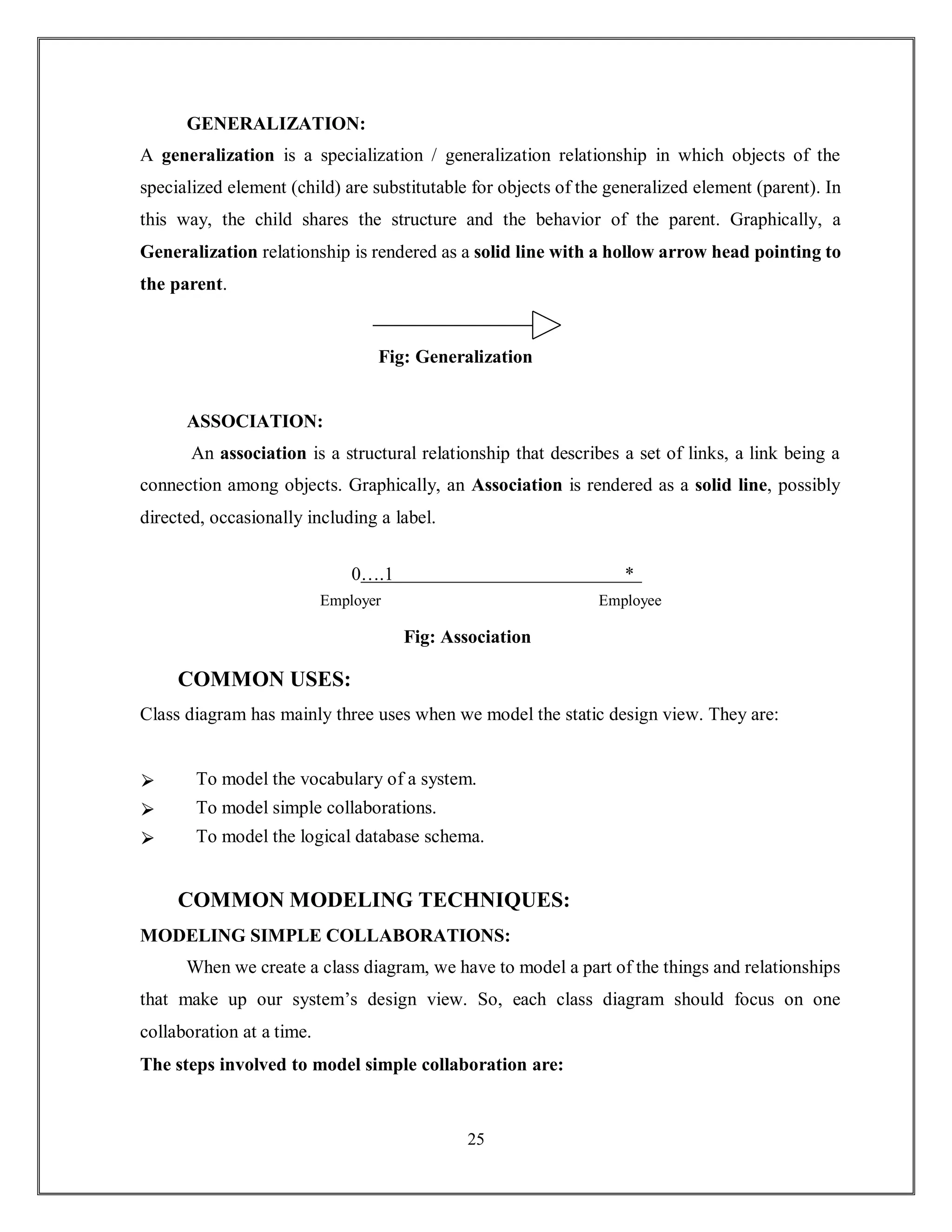
GENERALIZATION:
A generalization is a specialization / generalization relationship in which objects of the
specialized element (child) are substitutable for objects of the generalized element (parent). In
this way, the child shares the structure and the behavior of the parent. Graphically, a
Generalization relationship is rendered as a solid line with a hollow arrow head pointing to
the parent.
Fig: Generalization
ASSOCIATION:
An association is a structural relationship that describes a set of links, a link being a
connection among objects. Graphically, an Association is rendered as a solid line, possibly
directed, occasionally including a label.
0….1 *
Employer Employee
Fig: Association
COMMON USES:
Class diagram has mainly three uses when we model the static design view. They are:
⮚ To model the vocabulary of a system.
⮚ To model simple collaborations.
⮚ To model the logical database schema.
COMMON MODELING TECHNIQUES:
MODELING SIMPLE COLLABORATIONS:
When we create a class diagram, we have to model a part of the things and relationships
that make up our system’s design view. So, each class diagram should focus on one
collaboration at a time.
The steps involved to model simple collaboration are:
26
Driver
♦ Identify the mechanism we would like to model. A mechanism represents some
function or behavior of the part of the system.
♦ For each mechanism identify the classes, interfaces and other collaborations that
participate in this collaboration. Also, identify the relationship among these things.
♦ Use scenarios to walk through these things to discover the missing parts of our model
and parts that are semantically wrong.
♦ Be sure to populate these elements with their contents.
For example the following diagram shows the set of classes drawn for the implementation of
an autonomous robot. The figure focuses on the classes involved in the mechanism for moving
robot along the path. We will find an abstract class (motor) with two concrete children, Steering
motor and Main motor. Both of these classes inherit the five operations of their parent,Motor.
The two classes are in turn shown as parts of another class, Driver.
1 1
Fig: Modeling simple collaborations
Motor
move(d:Direction;s:speed)
stop() resetCount()
Status status()
SterringMotor MainMotor
Responsibilities
--seek path
CollisionSensor
PathAgent
27
name: Name
courseID : Number
Course
{persistent}
name: Name
Instructor
{persistent}
addInstructor()
removeInstructor ()
name: Name
Department
{Persistent}
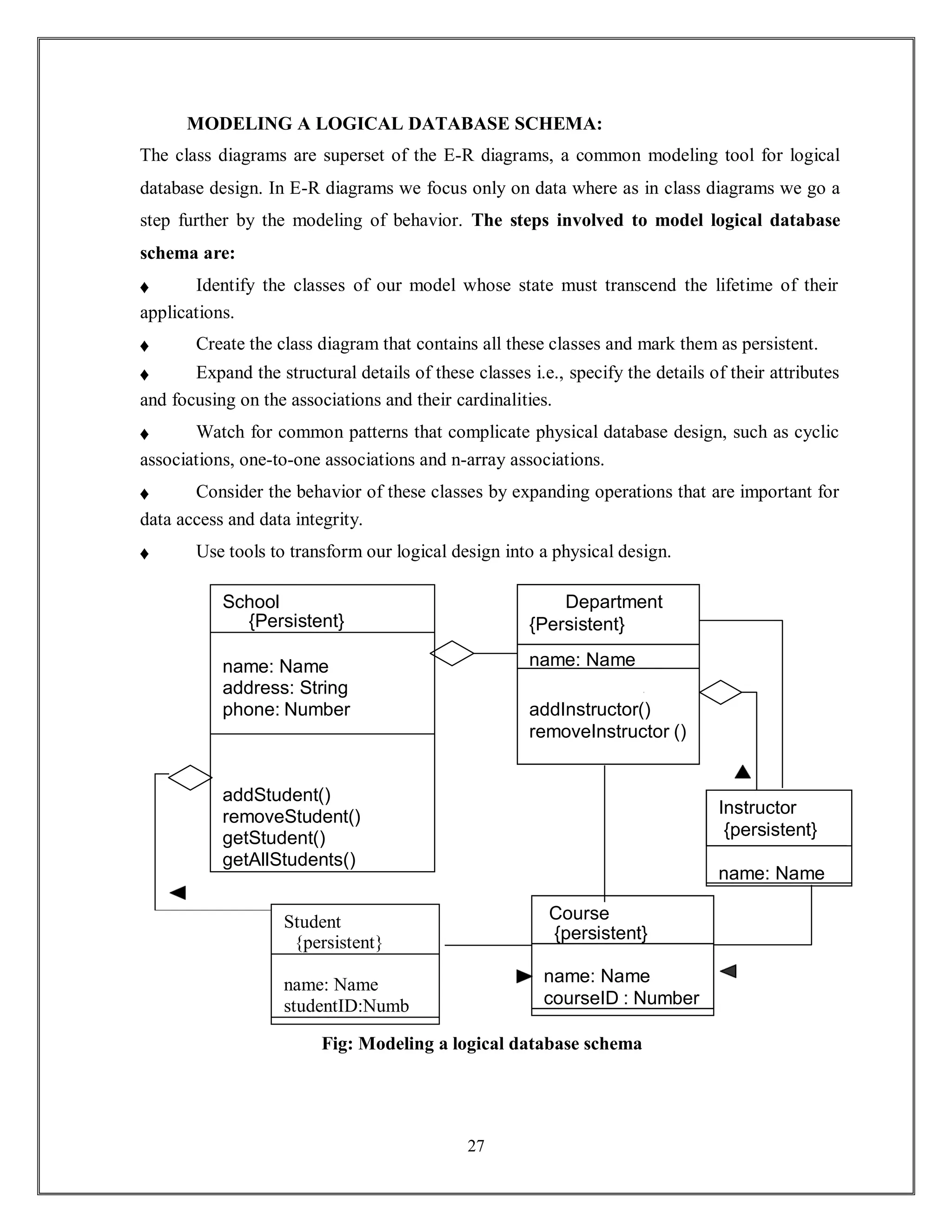
MODELING A LOGICAL DATABASE SCHEMA:
The class diagrams are superset of the E-R diagrams, a common modeling tool for logical
database design. In E-R diagrams we focus only on data where as in class diagrams we go a
step further by the modeling of behavior. The steps involved to model logical database
schema are:
♦ Identify the classes of our model whose state must transcend the lifetime of their
applications.
♦ Create the class diagram that contains all these classes and mark them as persistent.
♦ Expand the structural details of these classes i.e., specify the details of their attributes
and focusing on the associations and their cardinalities.
♦ Watch for common patterns that complicate physical database design, such as cyclic
associations, one-to-one associations and n-array associations.
♦ Consider the behavior of these classes by expanding operations that are important for
data access and data integrity.
♦ Use tools to transform our logical design into a physical design.
Student
{persistent}
name: Name
studentID:Numb
Fig: Modeling a logical database schema
School
{Persistent}
name: Name
address: String
phone: Number
addStudent()
removeStudent()
getStudent()
getAllStudents()
28
For example, the above figure shows a set of classes drawn from an information system of a
school .The classes Student and Course are related to one another by association, specifying
that every student may attend any number of courses and every courses may have any number
of students. Similarly, the classes Course and Instructor are related by association. All six of
these classes are marked as persistent, indicating that their instances are intended to live in a
database or in some other form of persistent store. This diagram also exposes the attributes of
all six of these classes. Two of these classes expose operations for manipulating their parts.
These operations are included because they are important to maintain data integrity.
FORWARD AND REVERSE ENGINEERING:
Forward Engineering is the process of transforming a model into code through a mapping to
an implementation language. Forward engineering results in the loss of Information because
models written in the UML are semantically richer than any other object-oriented
programming Language.
The steps involved to forward engineer a class diagram are:
♦ Identify the rules for mapping to our implementation language or language of our
choice.
♦ Depending on the semantics of the languages we choose, we may have to constrain our
use of certain UML features.
♦ Use tagged values to specify our target language.
♦ Use tools to forward engineer our models.
29
For example the following diagram illustrates a simple class diagram specifying an
instantiation of the chain of responsibility pattern. This particular instantiation involves three
classes Client, Event Handler and GUI Event Handler. Client and Event Handler are abstract
classes, whereas GUI Event Handler is concrete.
Fig: Forward Engineer
Reverse Engineering is the process of transforming code into a model through a mapping
from a specific implementation language. It is an incomplete process. It results in a flood of
information which is at lower level of detail.
The steps involved to reverse engineer a class diagram are:
♦ Identify the rules for mapping from our implementation language or languages of
choice.
♦ Using a tool, point to the code for which we would like to reverse engineer.
♦ Using our tool create a class diagram by querying the model.
GUIEventHandler
{java}
Succes
EventHandler
{java}
-currentEventID:Integer
-source:Strings
handleRequest():void
Client
{java}
30
CLASS DIAGRAM
Class Diagram for SOCIAL MEDIA PLATFORM
31
CLASS DIAGRAM DESCRIPTION FOR SOCIAL
MEDIA PLATFORM:
CLASSES:
♦ Social media platform.
♦ Page.
♦ Group.
♦ Post.
♦ User.
RELATIONSHIPS:
♦ Association
♦ Generalization
CLASSES DESCRIPTION:
Table 5.6.3.1: Attributes and Operations for the class SOCIAL MEDIA PLATFORM
Class: SOCIAL MEDIA PLATFORM
Description: This manages the social media platform system.
32
Attribute1:
Format:
Description:
STRING NAME
String
The "social media platforms attribute string name" seems to be a
request for a description of an attribute related to social media
platforms.
Attribute2:
Format:
Description:
LISTUS
ER
String
it seems like you're looking for a description of an attribute related
to social media platforms, specifically a list related to users.
Attribute3:
Format:
Description:
LIST
PAGES
string
These pages are separate from individual user profiles and are
often used for promotional, marketing, or informational purposes..
Attribute4:
Format:
Description:
LIST
GROUPS
string
"List Groups" is a feature on social media platforms that enables
users to create, discover, and participate in specialized online
communities or groups.
Attribute5:
Format:
Description
LIST POSTS
String
Posts are one of the core components of social media platforms, and
this attribute is used to store and manage the posts made by users.
Operation1:
Significance:
Description:
Create user()
Void
Creating a user account on a social media platform is a
fundamental operation that allows individuals to join and
participate in the platform's online community.
Operation2:
Significance:
Description:
Create page()
Void
Creating a page on a social media platform typically involves the
following steps and operations.
Operation3:
Significance:
Description:
Create group()
Void
The operation "create group()" in the context of social media
platforms typically refers to the action of creating a new group or
community within the platform.
33
Table 5.6.3.2: Attributes and Operations for the class pages.
Operation4:
Significance:
Description:
CREATE POST()
void
allows users to publish content, such as text, images, videos, or links, to
share with their followers or connections.
Class: Pages
Description: They use social media page services.
Attribute1:
Format:
Description:
String
name
String
The "social media platforms attribute string name" seems to
be a request for a description of an attribute related to social
media platforms.
Attribute2:
Format:
Description:
String
descripti
on string
In the context of social media platforms, such an attribute
might be used to provide a brief description of the platform.
Attribute3:
Format:
Description:
List
follower
s string
specifically those related to followers or people who follow a
user.
Attribute4:
Format:
Description:
List posts
String
Social media platforms typically involve various attributes
associated with posts.
Operation1:
Significance:
Description:
Follow page()
void
follow or subscribe to a particular page, profile, or account on the
social media platform.
Operation2:
Significance:
Description:
Create post()
void
that allows users to create and publish new content, such as text,
images, videos, or links, to their profiles or feeds.
34
Table 5.6.3.3: Attributes and Operations for the class group.
Class: group
Description: Contains the social media group details.
Attribute1:
Format:
Description:
String
name
String
The "social media platforms attribute string name" seems to
be a request for a description of an attribute related to social
media platforms.
Attribute2:
Format:
Description:
String
descrip
tion
string
In the context of social media platforms, such an attribute
might be used to provide a brief description of the platform.
Attribute3:
Format:
Description:
List members
string
refers to the individuals or users who are part of a particular
group, community, or organization within the platform.
Attribute4:
Format:
Description:
List posts
string
Social media platforms typically involve various attributes
associated with posts
Operation1:
Significance:
Description:
Join groups()
Void
membership or join various groups, communities,
or organizations within the platform
Operation2:
Significance:
Description:
Createpost()
void
generate and publish new content on their profiles
or feeds.
Table 5.6.3.4: Attributes and Operations for the class post
35
Class: post
Description: The Contains the social media post details.
Attribute1:
Format:
Description:
String content
String
that contains the actual textual or multimedia content of a post,
message, comment, or any other user-generated contribution..
Attribute2:
Format:
Description:
User author
String
that has authored or created a specific piece of content, such as
a post, comment, or message.
Attribute3:
Format:
Description:
List likes
Strings
the users who have expressed their approval or positive
feedback for a specific post, comment, or piece of content.
Operation1:
Significance:
Description:
like()
void
social media platforms typically refers to the action of
expressing approval, appreciation, or interest in a piece of
content, such as a post, photo, video, or comment.
Table 5.6.3.5: Attributes and Operations for the class user
Class: user
Description: The Contains the social media post details.
Attribute1:
Format:
Description:
String username
String
String username" is a text-based attribute that serves as a user's
distinctive identifier on a social media platform.
36
Attribute2:
Format:
Description:
String email
string
The attribute "String email" in the context of social media
platforms doesn't have a standard meaning, and it's not a
common attribute associated with social media platforms.
Attribute3:
Format:
Description:
String password
string
A text or character string that represents a user's password on a
social media platform.
Attribute4:
Format:
Description:
List friends
string
These connections can be used for various purposes, such as
showing mutual connections, suggesting new friends, or
enabling social interactions within the platform.
Attribute5:
Format:
Description:
List posts
String
Social media platforms typically involve various attributes
associated with posts.
Operation1:
Significance:
Description:
Create post()
Void
Generate and publish new content on their profiles or feeds.
Operation2:
Significance:
Description:
Add friend()
Void
The "Add friend" operation is a feature on social media
platforms that allows a user to send a friend request or
connection request to another user.
37
Chapter – 6
OBJECT DIAGRAM
38
6. OBJECT DIAGRAM
An Object Diagram is a diagram that shows a set of objects and their relationships at a point
in time. Graphically, an Object Diagram is a collection of vertices and arcs.
Object Diagrams are not only important for visualizing, specifying, and documenting
structural models, but also for constructing the static aspects of systems through forward and
reverse engineering.
STATIC VIEW: An aspect of a system that emphasizes its structure.
COMMON PROPERTIES:
An Object Diagram is a special kind of diagram and shares the same common properties as
all other diagrams-that is, a name and graphical contents that are a projection into a model.
What distinguishes an object diagram from all other kinds of diagrams is its particular content.
CONTENTS:
Object diagrams commonly contain
♦ Objects
♦ Links
Like all other diagrams, object diagrams may contain notes and constraints. Object diagrams
may also contain packages or subsystems, both of which are used to group elements of your
model into larger chunks.
COMMON USES:
You use object diagrams to model the static design view or static process view of a system just
as you do with class diagrams. This view primarily supports the functional requirements of a
system. Object diagram has one use to model the static view of a system. That is:
TO MODEL OBJECT STRUCTURES:
39
Modeling object structures involves taking a snapshot of the objects in a system at a given
moment in time. An object diagram represents one static frame in the dynamic storyboard
represented by an interaction diagram. You use object diagrams to visualizing, specify,
construct, and documenting the existence of certain instances in your system, together with
their relationships to one another.
COMMON MODELING TECHNIQUES:
MODELING OBJECT STRUCTURES:
If you freeze a running system or just imagine a moment of time in a modeled system, you’ll
find a set of objects, each in a specific state, and each in a particular relationship to other
objects. You can use object diagrams to visualize, specify, construct, and documenting the
structure of these objects. Object diagram are especially useful for modeling complex data
structures.
To model an object structure,
♦ Identify the mechanism you'd like to model. A mechanism represents some function or
behavior of the part of the system you are modeling that results from the interaction of a society
of classes, interfaces, and other things.
♦ For each mechanism, identify the classes, interfaces, and other elements that participate
in this collaboration; identify the relationships among these things, as well.
♦ Consider one scenario that walks through this mechanism. Freeze that scenario at a
moment in time, and render each object that participates in the mechanism.
♦ Expose the state and attribute values of each object, as necessary, to understand the
scenario.
♦ Similarly, expose the links among these objects, representing instances of associations
among them.
For example, below figure shows a set of objects drawn from the implementation of an
autonomous robot. This figure focuses on some of the objects involved in the mechanism used
by robot to calculate a model of the world in which it moves.
40
As this figure indicates, one object represents the robot itself(r, an instance of Robot), and r is
currently in the state marked moving. This object has a link to w, an instance of world, which
represents an abstraction of the robot's world model. This object has a link to a multi object
that consists of instances of Element, which represent entities that the robot has identified but
not yet assigned in its world view. These elements are marked as part of robot's global state.
At this moment in time, w is linked to two instances of Area. One of them (a2) is shown with
its own links to wall and one Door object. Each of these walls is marked with its current width,
and each is shown linked to its neighboring walls. As this object diagram suggests, the robot
has recognized this enclosed area, which has walls on three sides and a door on the fourth.
Fig: Modeling an Object Structure
41
FORWARD AND REVERSE ENGINEERING:
Forward engineering (the creation of code from a model) an object diagram is theoretically
possible but pragmatically of limited value. In an object-oriented system, instances are things
that are created and destroyed by the application during run time. Therefore, you can't exactly
instantiate these objects from the outside.
Reverse engineering (the creation of a model from code) an object diagram is a very different
thing. In fact, while you are debugging your system, this is something that you or your tools
will do all the time.
To reverse engineering an object diagram,
♦ Choose the target you want to reverse engineer. Typically, you'll set your context inside
an operation or relative to instance of one particular class
♦ Using a tool or simply walking through a scenario, stop execution at a certain moment
in time.
♦ Identify the set of interesting objects that collaborate in that context and render them in
an object diagram.
♦ As necessary to understand their semantics, expose these object's states
♦ A necessary to understand their semantics, identify the links that exist among these
objects.
♦ If your diagram ends up overly complicated, prune it by eliminating objects that are not
germane to the questions about the scenario you need answered. If your diagram is too
simplistic, expand the neighbors of certain interesting objects and expose each object's more
deeply.
42
OBJECT DIAGRAM
Fig 6.5: Object Diagram for SOCIAL MEDIA PLATFORM
43
OBJECT DIAGRAM DESCRIPTION FOR SOCIAL MEDIA
PLATFORM:
OBJECTS:
♦ User
♦ Admin.
♦ Social media platform.
♦ Register.
♦ Login.
♦ Create post.
♦ Edit post.
♦ Delete post.
♦ View feed.
♦ Manage users.
♦ Manage posts.
44
Chapter – 7
SEQUENCE DIAGRAM
45
7. SEQUENCE DIAGRAM
The Sequence Diagram is an interaction diagram that emphasizes the time ordering of
messages. Graphically, a Sequence Diagram is a table that shows objects arranged along
the X axis and messages, ordered in increasing time, along the Y axis.
Interaction Diagram describes sequences of messages exchanged among roles that
implement behavior of a system. A Classifier role is the description of an object that plays a
particular part within an interaction, as distinguished from other objects of the same class. This
diagram provides a holistic view of behavior in a system that is; it shows the flow of control
across many objects. The interaction diagram is of two types: Sequence Diagram and
Collaboration Diagram.
COMMON PROPERTIES:
The Sequence Diagram is just like as special kind of diagram and shares the same properties
as all other diagrams. But it differs from all other diagrams in its contents.
CONTENTS:
Sequence Diagram commonly contains the following things:
1. Objects
2. Links
3. Messages
OBJECTS:
Objects are typically named or anonymous instances of class. But may also represent instances
of other things such as components, collaboration and nodes. Graphically, Object is rendered
as a rectangle with underlining its name.
Fig: Object
c: company
46
LINKS:
A Link is a semantic connection among objects i.e., an object of an association is called
as a link. A Link is rendered as a line.
Fig: Link
MESSAGE:
A Message is a specification of a communication between objects that conveys the information
with the expectation that the activity will ensue.
COMMON USES:
Sequence Diagram has mainly one use when we model the dynamic aspects of a system.
That is:
7.3.1: TO MODEL FLOWS OF CONTROL BY TIME ORDERING:
Modeling a flow of control by time ordering emphasizes the passing of messages as they
unfold over time, which is a particularly useful way to visualize dynamic behaviour in the
context of a use case scenario. Sequence diagrams do a better job of visualizing simple
iteration and branching than do collaboration diagrams.
COMMON MODELING TECHNIQUES:
MODELING FLOWS OF CONTROL BY TIME ORDERING:To
model flows of control by time ordering,
⮚ Set the context for the interaction, whether it is a system, subsystem, operation, or class,
or one scenario of a use case or collaboration.
⮚ Set the stage for the interaction by identifying which objects play a role in the
interaction. Lay them out on the sequence diagram from left to right.
⮚ Set the lifeline for each object. In most of the cases, object will persist through the
entire interaction.
⮚ Starting with the message that initiates the interaction, lay out each subsequent message
from top to bottom between the lifelines, showing each message’s properties.
47
⮚ If we need to visualize the nesting of messages or the points in time when actual
computation is taking place, adorn each object’s lifeline with its focus of control.
⮚ If we need to specify time or space constraints, adorn each message with a timing mark
and attach suitable time or space constraints.
⮚ If we need to specify this flow of control more formally, attach pre and post conditions
to each message.
FORWARD AND REVERSE ENGINEERING:
Forward Engineering is the process of transforming a model into code through a mapping to
an implementation language. It is possible for both sequence and collaboration diagrams,
especially in the context of the diagram are an operation. It is straightforward.
Reversing Engineering is the process of transforming code into a model through a mapping
from a specific implementation language. It is possible for both sequence and collaboration
diagrams, especially if the context of code is the body of operation. It is hard.
48
SEQUENCE DIAGRAM
Fig 7.5: Sequence Diagram for SOCIAL MEDIA PLATFORM
49
SEQUENCE DIAGRAM DESCRIPTION FOR RESTAURANT
MANAGEMENT SYSTEM:
7.6.1. INTERACTIONS:
♦ Register.
♦ Login.
♦ Welcome message.
♦ Create post.
♦ Post created successfully.
♦ Like post.
♦ Post liked.
♦ Comment on post.
♦ Comment added.
♦ Share post.
♦ Post shared.
♦ Notifications.
♦ Logout.
♦ Logout successful.
50
Chapter – 8
COLLABORATION
DIAGRAM
51
8. COLLABORATION DIAGRAM
The Collaboration Diagram is an interaction diagram that emphasizes the structural
organization of objects that send and receive messages. Graphically, a Collaboration
Diagram is a collection of vertices and arcs.
Interaction Diagram describes sequences of messages exchanged among roles that
implement behavior of a system. A Classifier role is the description of an object that plays a
particular part within an interaction, as distinguished from other objects of the same class. This
diagram provides a holistic view of behavior in a system that is; it shows the flow of control
across many objects. The interaction diagram is of two types: Sequence Diagram and
Collaboration Diagram.
COMMON PROPERTIES:
The Collaboration Diagram is just like as special kind of diagram and shares the same
properties as all other diagrams. But it differs from all other diagrams in its contents.
CONTENTS:
Collaboration Diagram commonly contains the following things
1. Objects
2. Links
3. Messages
OBJECTS:
Objects are typically named or anonymous instances of class. But may also represent instances
of other things such as components, collaboration and nodes. Graphically, Object is rendered
as a rectangle with underlining its name.
Fig: object
c: company
52
LINKS:
A Link is a semantic connection among objects i.e., an object of an association is called
as a link. A Link is rendered as a line.
Fig: Link
MESSAGES:
A Message is a specification of a communication between objects that conveys the information
with the expectation that the activity will ensue.
COMMON USES:
Collaboration Diagram has mainly one use when we model the dynamic aspects of a system.
That is,
8.3.1: TO MODEL FLOWS OF CONTROL BY ORGANIZATION:
Modeling a flow of control by organization emphasizes the structural relationships among the
instances in the interaction, along which messages may be passed. Collaboration diagram do a
better job of visualizing complex iteration and branching and of visualizing multiple
concurrent flows of control than do sequence diagram.
COMMON MODELING TECHNIQUES:
MODELING FLOWS OF CONTROL BY ORGANIZATION:To
model flows of control by organization,
♦ Set the context for the interaction, whether it is a system, subsystem, operation, or class,
or one scenario of a use case or collaboration.
♦ Set the stage for the interaction by identifying which objects play a role in the
interaction. Lay them out on the collaboration diagram as vertices.
♦ Set the initial properties of each of these objects such as attribute values, tagged values,
state, or role of any object, which change over the duration of interaction.
♦ Specify the links among these objects, along which messages may pass.
✔ Lay out the association links first.
53
✔ Lay out other links next, and adorn them with suitable path stereotypes.
♦ Starting with the message that initiates the interaction, attach each subsequent message
to the appropriate link, setting its sequence number.
♦ If we need to specify time or space constraints, adorn each message with a timing mark
and attach suitable time or space constraints.
♦ If we need to specify this flow of control more formally, attach preconditions and post
conditions to each message.
FORWARD AND REVERSE ENGINEERING:
Forward Engineering is the process of transforming a model into code through a mapping to
an implementation language. It is possible for both sequence and collaboration diagrams,
especially in the context of the diagram are an operation. It is straightforward.
Reversing Engineering is the process of transforming code into a model through a mapping
from a specific implementation language. It is possible for both sequence and collaboration
diagrams, especially if the context of code is the body of operation. It is hard.
54
COLLABORATION DIAGRAM
Fig 8.5: Collaboration Diagram for SOCIAL MEDIA PLATFORM
55
COLLABORATION DIAGRAM DESCRIPTION FOR
SOCIAL MEDIA PLATFORM:
INTERACTIONS:
♦ Enter registration details.
♦ Store user data.
♦ User data stored.
♦ Registration complete.
56
Chapter – 9
ACTIVITY DIAGRAM
57
9. ACTIVITY DIAGRAM
An Activity Diagram shows the flow from activity to activity. The activity diagram
emphasizes the dynamic view of a system.
An Activity Diagram is a variant of a state machine that shows the computational activities
involved in performing a calculation. An activity state represents an activity: a workflow step
or the execution of an operation. An activity graph describes both sequential and concurrent
groups of activities.
COMMON PROPERTIES:
An Activity Diagram is just a special kind of diagram and shares the same common properties
as do all other diagrams but they in their content.
CONTENTS:
Activity Diagram commonly contains three things.
1. Activity states and action states
2. Transitions
3. Objects
ACTIVITY STATES AND ACTION STATES:
An Activity States is a kind of states in activity diagram; it shows an ongoing non-atomic
execution within a state machine. An activity states can be further decomposed. An Action
States are States of the system, each representing the execution of an Action. An action states
can’t be further decomposed. The Activity and Action States are rendered as
Lozenge shape.
Fig: Activity State
ProcessBill(b)
58
TRANSITIONS:
A Transition specifies the path from one action or activity state to the next action or
activity state. The Transition is rendered as a simple directed line.
Fig: Transition
OBJECTS:
An Object is a concrete manifestation of an abstraction; an entity with a well defined boundary
and identity that encapsulates state and behavior; an instance of a class. Objects may be
involved in the flow of control associated with an activity diagram. The Object is rendered as
a rectangle.
COMMON USES:
Fig: Object
Activity Diagram has mainly two uses when we model the dynamic aspects of a system. They
are,
TO MODEL A WORKFLOW:
Here we will focus on activities as viewed by the actors that collaborate with the
system. Workflows often lie on the fringe of software-intensive systems and are used to
visualize, specify, construct and document business processes that involve the system we are
developing. In this use of activity diagrams, modeling object flow is particularly important.
TO MODEL AN OPERATION:
Here we will use activity diagrams as flowcharts, to model the details of a
computation. In this use of activity diagrams, the modeling of branch, fork and join states is
particularly important. The context of an activity diagram used in this may involves the
parameters of the operation and its local objects.
c:company
59
COMMON MODELING TECHNIQUES:
MODELING A WORKFLOW:
To model a workflow,
♦ Establish a focus for the workflow. For nontrivial systems, it’s impossible to show all
interesting workflows in one diagram.
♦ Select the business objects that have the high –level responsibilities for parts of the
over all workflow. These may be real things from the vocabulary of the system, or they may
be more abstract. In either case, create a swim lane for each important business object.
♦ Identify the preconditions of the workflow’s initial state and the post conditions of the
final state. This is important in helping you mode the boundaries of the workflow.
♦ Beginning at the workflow’s initial state, specify the activities actions that take place
over time and render them in the activity diagram as either activity states or action states.
♦ For complicated actions, or for sets of actions that appear multiple times, collapse these
into activity states, and provide a separate activity diagram that expands on each.
♦ Render the transitions that connect this activity and action states. Start with the
sequential flows in the workflow first, next consider branching, and only then consider forking
and joining.
♦ If there are important objects that are involved in the workflow, render them in the
activity diagram, as well. Show their changing values and state as necessary to communicate
the intent of the object flow.
MODELING AN OPERATION:
To model an operation,
♦ Collect the abstractions that are involved in this operation. This includes the operation’s
parameters (including its return type, if any), the attributes of the enclosing class, and certain
neighboring classes.
♦ Identify the preconditions at the operation’s initial state and post conditions at the
operation’s final state. Also identify any invariants of the enclosing class that must hold during
the execution of the operation.
♦ Beginning at the operation’s initial state, specify the activities and actions that take
place over time and render them in the activity diagram as either activity states or action states.
60
♦ Use branching as necessary to specify conditional paths and iteration.
♦ Only if this operation is owned by an active class, use forking and joining as necessary
to specify parallel flows of control.
FORWARD AND REVERSE ENGINEERING:
Forward engineering is possible for activity diagrams, especially if the context of the diagram
is an operation.
Reverse engineering is also possible for activity diagrams, especially if the context of the code
is the body of an operation.
61
ACTIVITY DAIAGRAM
Fig 9.5: Activity Diagram for SOCIAL MEDIA PLATFORM
62
ACTIVITY DIAGRAM DESCRIPTION FOR SOCIAL MEDIA
PLATFORM:
9.6.1. ACTIVITIES:
♦ User.
♦ Social Media Platform.
♦ User Interactions.
♦ Post Content.
♦ Like Content.
♦ Comment Content.
♦ Share Content.
♦ Follow Content.
♦ Search for Content.
♦ View notification.
♦ Manage Profile.
♦ Report Content.
♦ Block users.
♦ Admin Actions.
♦ Delete Content.
♦ Suspend Users
♦ Manage Reports.
63
Chapter – 10
STATECHART DIAGRAM
64
10. STATECHART DIAGRAM
A Statechart Diagram shows a state machine, consisting of states, transitions, events, and
activities. The state chart diagram emphasizes the dynamic view of a system.
A State Machine models the possible life history of an object of a class. A state machine
contains states connected by transitions. Each state models a period of time during the life time
of an object during which it satisfies certain conditions. When an event occurs, it may cause
the firing of a transition that takes the object to a new state .When transition fires, an action
attached to the transition may be executed. State Machines are shown as State Chart
Diagrams.
COMMON PROPERTIES:
A Statechart Diagram is just a special kind of diagram and shares the same common
properties as do all other diagrams but they differ in terms of contents.
CONTENTS:
Statechart Diagram commonly contains two things:
1. States
2. Transitions, including events and actions.
STATES:
A State is a condition or situation in the life of an object during which it satisfies some
condition, performs some activity, or waits for some event. Graphically, a State is rendered as
a rectangle with rounded corners.
Fig: State
65
TRANSITIONS:
A Transition is a relationship between two states indicating that an object in the first state will
perform certain actions and enter the second state when a specified event occurs and specified
conditions are satisfied. Graphically, a Transition is rendered as a solid directed line.
Fig: Transition
EVENTS:
An Event is the specification of a significant occurrence that has a location in time and
space.
ACTIONS:
An Action an executable atomic computation that results in a change in state of the model or
the return of a value.
COMMON USES:
State Chart Diagram has mainly one use when we model the dynamic aspects of a system.
That is,
10.3.1. TO MODEL REACTIVE OBJECTS:
To model the behavior of a reactive object, we essentially specify three things: the stable
states in which that object may live, the events that trigger a transition from state to state, and
the actions that occur on each state change. Modeling the behavior of a reactive object also
involves modeling the lifetime of an object, starting at the time of the objects creation and
continuing until its destruction, highlighting the stable states in which the object may be found.
COMMON MODELING TECHNIQUES:
MODELING REACTIVE OBJECTS:
To model reactive objects,
⮚ Choose the context for state machine, whether it is a class, a use case, or the system as
a whole.
⮚ Choose the initial and final states for the object. To guide the rest of your model,
possibly state pre- and post conditions of the initial and final states, respectively.
66
⮚ Decide on the stable states of the object by considering the conditions in which the
object may exist for some identifiable period of time. Start with the high-level states of the
object and only then consider its possible sub states.
⮚ Decide on the meaningful partial ordering of stable states over the life time of the
object.
⮚ Decide on the events that may trigger a transition from state to state. Model these events
as triggers to transitions that move from one legal ordering of states to another.
⮚ Attach actions to these transitions (as in a Mealy machine) and/or to these states (as in
a Moore machine).
⮚ Consider ways to simplify your machine by using sub states, branches, forks, joins, and
history states.
⮚ Check that all states are reachable under some combination of events.
⮚ Check that no state is a dead end from which no combination of events will transition
the object out of that state.
⮚ Trace through the state machine, either manually or by using tools, to check it against
expected sequences of events and their responses.
FORWARD AND REVERSE ENGINEERING:
Forward engineering is possible for state chart diagrams, especially if the context of the
diagram is a class. The forward engineering tool must generate the necessary private attributes
and final static constants.
Reverse engineering is theoretically possible, but practically not very useful. Reverse
engineering tools have no capacity for abstraction and therefore cannot automatically produce
meaning full state chart diagrams.
67
STATECHART DIAGRAM
Fig 10.5: State Chart Diagram for SOCIAL MEDIA PLATFORM
86
STATECHART DIAGRAM DESCRIPTION FOR SOCIAL MEDIA
PLATFORM:
STATES:
♦ User Interface
♦ Login
♦ Signup
♦ Dashboard
♦ Onboarding
♦ Create Post
♦ View Posts
♦ Connect Accounts
♦ Publish Post
♦ View Post Details
EVENTS:
♦ Advertise the platform.
♦ Browse website.
♦ Create account.
♦ Signup.
♦ Select Dashboard or onboarding.
♦ Create post.
♦ Post submitted.
♦ Publish post and view post.
♦ Database accepts the view post details.
86
Chapter – 11
COMPONENT DIAGRAM
86
11. COMPONENT DIAGRAM
A Component Diagram shows the organizations and dependencies among a set of
components. The component diagram emphasizes the static implementation view of a system.
The implementation view of a system encompasses the components and files that are used to
assemble and release the physical system. This involves modeling the physical things that
reside on a node, such as executables, libraries, tables, files and documents. These are related
to class diagrams in that a component typically maps to one or more classes, interfaces, or
collaborations.
COMMON PROPERTIES:
A Component Diagram is just a special kind of diagram and shares the same common
properties as all the diagrams but they in terms of contents.
CONTENTS:
Component Diagram commonly contains three things:
1. Components
2. Interfaces
3. Dependency, Generalization, Association and Realization relationships
COMPONENTS:
A Component is a physical and replaceable part of a system that conforms to and provides the
realization of a set of interfaces. Graphically, a Component is rendered as a rectangle with
tabs.
Fig: Component
Find.exe
86
0….1 *
INTERFACES:
An Interface is a collection of operations that are used to specify a service of a class or
component. Graphically, an Interface is rendered as a circle.
ISpelling
Fig: Interface
RELATIONSHIPS:
 A Dependency is a using relationship that states that a change in specification of one
thing may affect another thing that uses it, but not necessarily the reverse. Graphically,
a Dependency is rendered as a dashed line.
Fig: Dependency
 A Generalization is a relationship between a general thing i.e., (called the super class
or parent) and a more specific kind of that thing i.e., (called the subclass or child).
Generalization is sometimes called an “is-a-kind-of” relationship. Graphically,
Generalization is rendered as a solid directed line with open arrowhead.
Fig: Generalization
 An Association is a structural relationship that specifies that objects of one thing are
connected to objects of another. Graphically, an Association is rendered as a solid line.
Fig: Association
 A Realization is a semantic relationship between classifiers in which one classifier
specifies a contract that another classifier guarantees to carry out. Graphically, a
Realization is rendered as a dashed directed line with a large open arrowhead.
Employer Employee
86
COMMON USES:
Fig: Realization
Component Diagram has mainly four uses when we model the static aspects of a system.
They are,
TO MODEL SOURCE CODE:
With most contemporary object oriented programming languages, you’ll cut code using
integrated development environments that store your source code in files. You can use
component diagrams to model the configuration management of these files, which represent
work-product components.
TO MODEL EXECUTABLE RELEASES:
A release is a relatively complete and consistent set of artifacts delivered to an internal or
external user. In the context of components, a release focuses on the parts necessary to deliver
a running system.
TO MODEL PHYSICAL DATABASES:
Think of a physical database as the concrete realization of a schema, living in the world of bits.
The model of the physical database represents the storage of that information in the tables of a
relational database or the pages of an object-oriented database.
TO MODEL ADAPTABLE SYSTEMS:
Some systems are quite static; their components enter the scene, participate in an execution,
and then depart. Other systems are dynamic, involving mobile agents or components that
migrate for purposes of load balancing and failure recovery.
COMMON MODELING TECHNIQUES:
MODELING SOURCE CODE:
To model source code,
86
♦ Either by forward or reverse engineering identifies the set of source code files of
interest and model them as components stereotyped as files.
♦ For larger system, use packages to show groups of source code files.
♦ Consider exposing a tagged value indicating such information as the version number
of the source code file, its author, and the date it was last changed. Use tools to manage the
value of this tag.
♦ Model the compilation dependencies among these files using dependencies. Again, use
tools to help generate and manage these dependencies.
MODELING AN EXECUTABLE RELEASE:
To model an executable release,
♦ Identify the set of components you’d like to model. Typically, this will involve some
or all the components that live on one node or the distribution of these sets of components
across all the nodes in the system.
♦ Consider the stereotype of each component in this set. For most systems, you’ll find a
small number of different kinds of components (such as executables, libraries, tables, files, and
documents). You can use the UML extensibility mechanisms to provide visual cues for these
stereotypes.
♦ For each component in this set, consider its relationship to its neighbors. Most often,
this will involve interfaces that are exported (realized) by certain components and imported
(used) by others. If you want to expose the seams in your system, model these interfaces
explicitly. If you want your model at a higher level of abstraction, elide these relationships by
showing only dependencies among the components.
MODELING A PHYSICAL DATABASE:
To model a physical database,
♦ Identify the classes in your model that represent your logical database schema.
♦ Select a strategy for mapping these classes to tables. You will also want to consider the
physical distribution of your databases. Your mapping strategy will be affected by the location
in which you want your data to live on your deployed system.
86
♦ To visualize, specify, construct, and document your mapping, create a component
diagram that contains components stereotyped as tables.
♦ Where possible, use tools to help you transform logical design into a physical design.
MODELING ADAPTABLE SYSTEMS:
To model an adaptable system,
♦ Consider the physical distribution of components that may migrate from node to node.
You can specify the location of component instance by marking it with a location tagged value,
which you can then render in a component diagram (although, technically speaking, a diagram
that contains only instances is an object diagram).
♦ If you want to model the actions that cause a component to migrate, create a
corresponding interaction diagram that contains component instances. You can illustrate a
change of location by drawing the same instance more then once, but with different values for
its location tagged value.
FORWARD AND REVERSE ENGINEERING:
To forward engineer a component diagram,
♦ For each component, identify classes or collaborations that the component implements.
♦ Choose the target for each component. Your choice is basically between source code
(a form that can be manipulated by development tools) or a binary library or executable (a form
that can be dropped into a running system).
♦ Use tools to forward engineer your models.
To reverse engineer a component diagram,
♦ Choose the target you want to reverse engineer. Source code can be reverse engineered
to components and then classes. Binary libraries can be reverse engineered to uncover their
interfaces. Executables can be reverse engineered the least.
♦ Using a tool, point to the code you’d like to reverse engineer. Use your tool to generate
a new model or to modify an existing one that was previously forward engineered.
♦ Using your tool, create a component diagram by querying the model. For example, you
might start with one or more components then expand the diagram by following relationships
or neighboring components. Expose or hide the details of the components of this component
diagram as necessary to communicate your intent.
86
COMPONENT DIAGRAM
Fig 11.5: Component Diagram for SOCIAL MEDIA PLATFORM
86
COMPONENT DIAGRAM DESCRIPTION FOR SOCIAL
MEDIA PLATFORM:
COMPONENTS:
♦ User interface
♦ Analytics
♦ Notification management
♦ Friendship management
♦ Post management
♦ Use management
♦ database
RELATIONSHIPS:
♦ Association
♦ Dependency
86
Chapter – 12
DEPLOYMENT DIAGRAM
86
12. DEPLOYMENT DIAGRAM
A Deployment Diagram shows the configuration of run-time processing nodes and the
components that live on them. Deployment Diagram addresses the static deployment view
of architecture. These are related to component diagrams.
The Deployment View of a system encompasses the nodes that form the system’s hardware
topology on which the system executes. This view primarily addresses the distribution,delivery
and installation of the parts that make up the physical system. The static aspects of this view
are captured in deployment diagrams; the dynamic aspects of this view are captured in
interaction diagrams, state chart diagrams and activity diagrams.
COMMON PROPERTIES:
A Deployment Diagram is a just a special kind of diagram and shares the same common
properties as do all other diagrams. A deployment diagram differs from all other kinds of
diagrams in its particular content.
CONTENTS:
Deployment Diagrams commonly contain these things:
1. Node
2. Relationships
NODE:
A Node is a physical element that exists at run time and represents acomputational
resource, generally having at least some memory and often, processing capability.
Graphically, a Node is rendered as a cube, usually including only its name.
Fig: Node
serve
86
0….1 *
RELATIONSHIPS:
 A Dependency is a semantic relationship between two things in which a change to one
thing may affect the semantics of the other thing. Graphically, a dependency is rendered
as a dashed line, possibly directed, and occasionally including a label.
Fig: Dependency
 An association is a structural relationship that describes a set of links, a link being a
connection among objects. Aggregation is a special kind of association, representing a
structural relationship between a whole and its parts. Graphically, an association is
rendered as a solid line, possibly directed, occasionally including a label.
Fig: Association
❖ Like all other diagrams, deployment diagrams may contain notes and constraints.
Deployment diagrams may also contain components, each of which must live on some node.
Deployment diagram may also contain packages, which are used to group elements of your
model into larger chunks.
COMMON USES:
Deployment Diagram has mainly three uses when we model the static aspects of a system.
They are,
TO MODEL EMBEDDED SYSTEMS:
An embedded system is a software intensive collection of hardware that interfaces with the
physical world. Embedded systems involve software that controls devices such as motors,
actuators, and displays and that in turn, is controlled by external stimuli such as sensor input,
movement, and temperature changes. You can use deployment diagrams to model the devices
and processors that comprise an embedded system.
Employer Employee
86
TO MODEL CLIENT/SERVER SYSTEMS:
A client/server system is a common architecture focused on making a clear separation of
concerns between the system’s user interface and the system’s persistent data. Client/server
systems are one end of the continuum of distributed systems and require you to make decisions
about the network connectivity of clients to servers and about the physical distribution of your
system’s software components across the nodes. You can model the topology of such systems
by using deployment diagrams.
TO MODEL FULLY DISTRIBUTED SYSTEMS:
At the other end of the continuum of distributed systems are those that are widely, if not
globally, distributed, typically encompassing multiple levels of servers. Such systems are often
hosts to multiple versions of software components, some of which may even migrate from
node to node. Crafting systems requires you to make decisions that enable the continuous
change in the system’s topology. You can use deployment diagrams to visualize the system’s
current topology and distribution of components to reason about the impact of changes on that
topology.
COMMON MODELING TECHNIQUES:
MODELING AN EMBEDDED SYSTEM:
To model an embedded system,
⮚ Identify the devices and nodes that are unique to your system.
⮚ Provide visual cues, especially for unusual devices, by using the UML extensibility
mechanisms to define system-specific stereotypes with appropriate icons. At the very least,
you’ll want to distinguish processors and devices.
⮚ Model the relationships among these processors and devices in a deployment diagram.
Similarly, specify the relationship between the components in your system’s implementation
view and the nodes in your system’s deployment view.
⮚ As necessary, expand on any intelligent devices by modeling their structure with a more
detailed deployment diagram.
86
MODELING A CLIENT/SERVER SYSTEM:
To model a client/server system,
⮚ Identify the nodes that represent your system’s client and server processors.
⮚ Highlight those devices that are germane to the behavior of your system. For example,
you’ll want to model special devices, such as credit card readers, badge readers, and display
devices other than monitors, because their placement in the system’s hardware topology are
likely to be architecturally significant.
⮚ Provide visual cues for these processors and devices via stereotyping.
⮚ Model the topology of these nodes in a deployment diagram. Similarly, specify the
relationship between the components in your system’s implementation view and the nodes in
your system’s deployment view.
MODELING A FULLY DISTRIBUTED SYSTEM:
To model a fully distributed system,
⮚ Identify the system’s devices and processors as for simpler client/server systems.
⮚ If you need to reason about the performance of the system’s network or the impact of
changes to the network, be sure to model these communication devices to the level of detail
sufficient to make these assessments.
⮚ Pay close attention to logical groupings of nodes, which you can specify by using
packages.
⮚ Model these devices and processors using deployment diagrams. Where possible, use
tools that discover the topology of your system by walking your system’s network.
⮚ If you need to focus on the dynamics of your system, introduce use case diagrams to
specify the kinds of behavior you are interested in, and expand on these use cases with
interaction diagrams.
86
FORWARD AND REVERSE ENGINEERING:
To reverse engineer a deployment diagram,
⮚ Choose the target that you want to reverse engineer.
⮚ Choose also the fidelity of your reverse engineering.
⮚ Use a tool that walks across your system, discovering its hardware topology. Record
that topology in a deployment model.
⮚ Along the way, we can use similar tools to discover the components that live on each
node, which we can also record in a deployment model.
⮚ Using modeling tools create a deployment diagram by querying the model. For
example, we might start with visualizing the basic client/server topology, and then expand on
the diagram by populating certain nodes with components of interest that live on them.
86
DEPLOYMENT DIAGRAM
86
Fig 12.5: Deployment Diagram for SOCIAL MEDIA PLATFORM
DEPLOYMENT DIAGRAM DESCRIPTION FOR SOCIAL MEDIA
PLATFORM:
NODES:
♦ SOCIAL MEDIA PLATFORM
♦ User
♦ User device
♦ Database
♦ Main function
♦ External system
RELATIONSHIPS:
♦ Association
♦ Dependency
86
Chapter – 13
CONCLUSION
86
CONCLUSION
The contents of this “MINI PROJECT” explain how to model real time project with the help
of OOA through UML.
Any project or event given to be implemented in real world to be modeled in order to:
♣ Visualize the system as it is or we want it to be.
♣ Specify the behavior or the structure of the system.
♣ Construct the system with the help of templates.
♣ Document the decision we have made.
86
Chapter – 14
BIBLIOGRAPHY
86
12. BIBLIOGRAPHY
BOOKS:
Object Oriented Analysis and Design with Applications- Pearson Edition Asia, Grady Booch 2nd Edition.
The Unified Modeling Language user guide-Addison Wesley, 1999. Grady Booch, James rum baugh, Ivar Jacobson.
Fundamentals of Object Oriented Design in UML, Addison Wesley, 2000. Meilir Page-Jones.
Object Oriented Analysis and Design, Andrew Haigh, Tata McGraw-Hill, 2001, ISBN: 0-07-047277-7.
Software Engineering, A practitioner’s Approach-Roger S. Pressman, 6th edition, McGraw-Hill International Edition.
Software Engineering-Sommerville, 7th edition, Pearson education.
REFERENCE:
Acharya, Kamal. "STUDENT INFORMATION MANAGEMENT
SYSTEM." Authorea Preprints (2023).
Acharya, Kamal. "Library Management System." Available at SSRN4807104 (2019).
ACHARYA, KAMAL, et al. "LIBRARY MANAGEMENT SYSTEM." (2019).
Acharya, Kamal. "Online bus reservation system project report." Authorea
Preprints (2024).
Acharya, Kamal. "Online bus reservation system project report." (2024).
Acharya, Kamal. “Online Bus Reservation System.” SSRN ElectroNIC ASIA
Journal (2024): n. pag.
Acharya, Kamal. “Student Information Management System Project.” SSRN
ElectroNIC ASIA Journal (2024): n. pag.
Acharya, Kamal. “ATTENDANCE MANAGEMENT SYSTEM.” International
Research Journal of Modernization in Engineering Technology and
Science (2023): n. pag.
Acharya, Kamal. “College Information Management System.” SSRN ElectroNIC
ASIA Journal (2024): n. pag.
Acharya, Kamal, Attendance Management System Project (April 28, 2024).
Available at
SSRN: https://ssrn.com/abstract=4810251 or http://dx.doi.org/10.2139/ssrn.4810251
Acharya, Kamal, Online Food Order System (May 2, 2024). Available at
SSRN: https://ssrn.com/abstract=4814732 or http://dx.doi.org/10.2139/ssrn.4814732
Acharya, Kamal, University management system project. (May 1, 2024). Availableat
SSRN: https://ssrn.com/abstract=4814103 or http://dx.doi.org/10.2139/ssrn.4814103
Acharya, Kamal, Online banking management system. (May 1, 2024). Available at
SSRN: https://ssrn.com/abstract=4813597 or http://dx.doi.org/10.2139/ssrn.4813597
Acharya, Kamal, Online Job Portal Management System (May 5, 2024). Available at
SSRN: https://ssrn.com/abstract=4817534 or http://dx.doi.org/10.2139/ssrn.4817534
Acharya, Kamal, Employee leave management system. (May 7, 2024). Available
at SSRN: https://ssrn.com/abstract=4819626 or http://dx.doi.org/10.2139/ssrn.4819626
Acharya, Kamal, Online electricity billing project report. (May 7, 2024). Available at
SSRN: https://ssrn.com/abstract=4819630 or http://dx.doi.org/10.2139/ssrn.4819630
Acharya, Kamal, POLICY MANAGEMENT SYSTEM PROJECT REPORT. (December 10, 2023). Available
at SSRN: https://ssrn.com/abstract=4831694 or http://dx.doi.org/10.2139/ssrn.4831694
Acharya, Kamal, Online job placement system project report. (January 10, 2023). Available at
86
SSRN: https://ssrn.com/abstract=4831638 or http://dx.doi.org/10.2139/ssrn.4831638
Acharya, Kamal, Software testing for project report. (May 16, 2023). Available at
SSRN: https://ssrn.com/abstract=4831028 or http://dx.doi.org/10.2139/ssrn.4831028
Acharya, Kamal, ONLINE CRIME REPORTING SYSTEM PROJECT. (August 10, 2022). Available at
SSRN: https://ssrn.com/abstract=4831015 or http://dx.doi.org/10.2139/ssrn.4831015
Acharya, Kamal, Burber ordering system project report. (October 10, 2022). Available at
SSRN: https://ssrn.com/abstract=4832704 or http://dx.doi.org/10.2139/ssrn.4832704
Acharya, Kamal, Teachers Record Management System Project Report (December 10, 2023). Available at
SSRN: https://ssrn.com/abstract=4833821 or http://dx.doi.org/10.2139/ssrn.4833821
Acharya, Kamal, Dairy Management System Project Report (December 20, 2020). Available at
SSRN: https://ssrn.com/abstract=4835231 or http://dx.doi.org/10.2139/ssrn.4835231
Acharya, Kamal, Electrical Shop Management System Project (December 10, 2019). Available at
SSRN: https://ssrn.com/abstract=4835238 or http://dx.doi.org/10.2139/ssrn.4835238
Acharya, Kamal, Online book store management system project report. (Febuary 10, 2020). Available at
SSRN: https://ssrn.com/abstract=4835277 or http://dx.doi.org/10.2139/ssrn.4835277
Acharya, Kamal, Paint shop management system project report. (January 10, 2019). Available at
SSRN: https://ssrn.com/abstract=4835441 or http://dx.doi.org/10.2139/ssrn.4835441
Acharya, Kamal, Supermarket billing system project report. (August 10, 2021). Available at
SSRN: https://ssrn.com/abstract=4835474 or http://dx.doi.org/10.2139/ssrn.4835474
Acharya, Kamal, Online texi booking system project report. (March 10, 2022). Available at
SSRN: https://ssrn.com/abstract=4837729 or http://dx.doi.org/10.2139/ssrn.4837729
Acharya, Kamal, Online car servicing system project report. (March 10, 2023). Available at
SSRN: https://ssrn.com/abstract=4837832 or http://dx.doi.org/10.2139/ssrn.4837832
Acharya, Kamal, School management system project report. (July 10, 2021). Available at
SSRN: https://ssrn.com/abstract=4837837 or http://dx.doi.org/10.2139/ssrn.4837837
Acharya, Kamal, Furniture Showroom Management System Project Report (March 21, 2021). Available at
SSRN: https://ssrn.com/abstract=4839422 or http://dx.doi.org/10.2139/ssrn.4839422
Acharya, Kamal, Online Vehicle Rental System Project Report (March 21, 2019). Available at
SSRN: https://ssrn.com/abstract=4839429 or http://dx.doi.org/10.2139/ssrn.4839429
Acharya, Kamal, Fruit Shop Management System Project Report (August 10, 2023). Available at
SSRN: https://ssrn.com/abstract=4841048 or http://dx.doi.org/10.2139/ssrn.4841048
Acharya, Kamal, Hall Booking Management System Project Report (December 21, 2023). Available at
SSRN: https://ssrn.com/abstract=4841055 or http://dx.doi.org/10.2139/ssrn.4841055
Acharya, Kamal, Lundry Management System Project Report (October 21, 2023). Available at
SSRN: https://ssrn.com/abstract=4841059 or http://dx.doi.org/10.2139/ssrn.4841059
Acharya, Kamal, A CASE STUDY OF CINEMA MANAGEMENT SYSTEM PROJECT (September 25,
2023). Available at SSRN: https://ssrn.com/abstract=4841209 or http://dx.doi.org/10.2139/ssrn.4841209
Acharya, Kamal, A CASE STUDY ON ONLINE TICKET BOOKING SYSTEM PROJECT (May 25, 2024).
Available at SSRN: https://ssrn.com/abstract=4841210 or http://dx.doi.org/10.2139/ssrn.4841210
Acharya, Kamal, ONLINE DATING MANAGEMENT SYSTEM PROJECT REPORT. (April 25, 2023).
Available at SSRN: https://ssrn.com/abstract=4842066 or http://dx.doi.org/10.2139/ssrn.4842066
Acharya, Kamal, ONLINE RESUME BUILDER MANAGEMENT SYSTEM PROJECT REPORT. (April 25,
2021). Available at SSRN: https://ssrn.com/abstract=4842071 or http://dx.doi.org/10.2139/ssrn.4842071
Acharya, Kamal, TOLL TEX MANAGEMENT SYSTEM PROJECT REPORT (August 21, 2023). Available
at SSRN: https://ssrn.com/abstract=4842082 or http://dx.doi.org/10.2139/ssrn.4842082
Acharya, Kamal, Chat Application Through Client Server Management System Project Report (June 25,
2023). Available at SSRN: https://ssrn.com/abstract=4842761 or http://dx.doi.org/10.2139/ssrn.4842761
Acharya, Kamal, Web Chatting Application Management System Project Report (April 25, 2022).
Available at SSRN: https://ssrn.com/abstract=4842771 or http://dx.doi.org/10.2139/ssrn.4842771
Acharya, Kamal, Automobile management system project report (May 25, 2022). Available at
SSRN: https://ssrn.com/abstract=4846917 or http://dx.doi.org/10.2139/ssrn.4846917
86
Acharya, Kamal, College bus management system project report (April 25, 2023). Available at
SSRN: https://ssrn.com/abstract=4846920 or http://dx.doi.org/10.2139/ssrn.4846920
Acharya, Kamal, Courier management system project report (May 25, 2023). Available at
SSRN: https://ssrn.com/abstract=4846922 or http://dx.doi.org/10.2139/ssrn.4846922
Acharya, Kamal, Event management system project report (April 25, 2021). Available at
SSRN: https://ssrn.com/abstract=4846927 or http://dx.doi.org/10.2139/ssrn.4846927
Acharya, Kamal, Library management system project report II (May 25, 2020). Available at
SSRN: https://ssrn.com/abstract=4848857 or http://dx.doi.org/10.2139/ssrn.4848857

Social media management system project report.pdf

  • 1.
    AN INTERNSHIP REPORT ON SOCIAL MEDIAMANAGEMENT SYSTEM PROJECT BY KAMAL ACHARYA (Tribhuvan University) Date: 2022/01/01
  • 2.
    ABSTRACT The project "SocialMedia Platform in Object-Oriented Modeling" aims to design and model a robust and scalable social media platform using object-oriented modeling principles. In the age of digital communication, social media platforms have become indispensable for connecting people, sharing content, and fostering online communities. However, their complex nature requires meticulous planning and organization.This project addresses the challenge of creating a feature-rich and user-friendly social media platform by applying key object-oriented modeling concepts. It entails the identification and definition of essential objects such as "User," "Post," "Comment," and "Notification," each encapsulating specific attributes and behaviors. Relationships between these objects, such as friendships, content interactions, and notifications, are meticulously established.The project emphasizes encapsulation to maintain data integrity, inheritance for shared behaviors among objects, and polymorphism for flexible content handling. Use case diagrams depict user interactions, while sequence diagrams showcase the flow of interactions during critical scenarios. Class diagrams provide an overarching view of the system's architecture, including classes, attributes, and methods .By undertaking this project, we aim to create a modular, maintainable, and user-centric social media platform that adheres to best practices in object-oriented modeling. Such a platform will offer users a seamless and secure online social experience while facilitating future enhancements and adaptability to changing user needs.
  • 3.
  • 4.
    2 1. INTRODUCTION UNIFIED MODELINGLANGUAGE: The Unified Modeling Language (UML) is a graphical language for visualizing, specifying, constructing and documenting the artifacts of a software intensive system. A successful software organization is one that consistently deploys a quality software that meets the needs of its users . An organization that can deploy that software in a timely and predictable fashion, with an effective use of resources, is one that has a sustainable business. Modeling is a central part of all the activities that lead up to the deployment of good software. We build models to communicate the desired structure and behavior of our system. Unsuccessful software projects fail in their unique way, but all successful projects are alike in many ways. There are many elements that contribute to a successful software organization; one common thread is the use of modeling. The UML gives us the standard way to write system’s blue prints that covers the conceptual things, such as business processes and system functions as well as concrete things, such as classes written in a specific programming language, database schemas, and reusable software components. The UML addresses the documentation of a system’s architecture and all of its details. The UML also provides a language for expressing requirements and for tests. The UML is appropriate for modeling systems ranging from enterprise information systems to distributed web-based applications and even to the hard real time embedded systems. UML also provides a language for modeling the activities of project planning and release management.
  • 5.
    3 Models consist ofobjects that interact by sending message. Think an object as alive. Objects have things they know (attributes) and the things they can do (methods or operations). The values of an object’s attributes determine its state. Classes are the blue prints for objects. A class wraps attributes and methods into a single distinct entity. Objects are instances of classes. UML is process independent, although it should be used in a process that is use case driven, architecture-centric and iterative and incremental. The vocabulary of UML encompasses three kinds of building blocks: 1. Things 2. Relationships 3. Diagrams THINGS: Things are abstractions that are first-class citizens in a model; relationships tie these things together; diagram group interesting collections of things. There are four kinds of things in UML. They are: 1. Structural things 2. Behavioral things 3. Grouping things 4. Annotational things RELATIONSHIPS: A Relationship is a connection among things. In object-oriented modeling, the four most important relationships are dependencies, generalizations, associations and realizations. These relationships are the basic relational building blocks of the UML. We use them to write well- formed models. DEPENDENCY: A Dependency is a using relationship specifying that a change in the specification of one thing may affect another thing that uses it, but not necessarily the reverse.
  • 6.
    4 Fig: Dependency GENERALIZATION: A Generalizationis a relationship between a general thing (super class or parent) and a more specific kind of that thing (subclass or child). ▷ Fig: Generalization ASSOCIATION: An Association is a structural relationship, specifying that objects of one thing are connected to objects of another. 0…1 * Employer Employee Fig: Association REALIZATION: A Realization is a semantic relationship between classifiers in which one classifier specifies a contract that another classifier guarantees to carry out. We will encounter these relationships in two places: between interfaces and the classes or components that realize them. Fig: Realization DIAGRAMS: A Diagram is the graphical presentation of a set of elements, most often rendered as a connected graph of vertices (things) and arcs (relationships). We draw diagrams to visualize a system from different perspectives, so a diagram is a projection into a system.
  • 7.
    5 UML includes 9such diagrams. They are: 1. Use Case diagram 2. Class diagram 3. Object diagram 4. Sequence diagram 5. Collaboration diagram 6. Activity diagram 7. State Chart diagram 8. Component diagram 9. Deployment diagram Each diagram is described in the project regarding “SOCIAL MEDIA PLATFORM”
  • 8.
    6 Chapter – 2 UMLVIEWS AND DIAGRAMS
  • 9.
    7 2. UML VIEWSAND DIAGRAMS Major area View Diagrams Main concepts Structural Static view Class diagram Class, association, Generalization, dependency, realization, interface Use case view Use case diagram Use case, actor, association, extend, include, use case generalization Deployment view Deployment diagram Node, component, dependency, location Implementation View Component diagram Component, interface, dependency, realization Behaviour Dynamic view Statechart diagram State, event, transition, action Dynamic view Activity diagram State, activity, completion transition, fort, join, swim lanes Interaction view Sequence diagram Interaction, object, message, activation Collaboration diagram Collaboration, interaction, object, message, collaboration role, activation Model Management Model management View Class diagram Package, subsystem, model Table 2.1: UML VIEWS AND DIAGRAMS
  • 10.
  • 11.
    9 3.PROBLEM STATEMENT PROBLEM STATEMENT: ProblemStatement: In today's interconnected world, there is a growing need for a social media platform that addresses various shortcomings and concerns that users and society as a whole face in the current landscape. To create a successful and socially responsible social media platform, the following problem statement is outlined: "The existing social media platforms suffer from a range of issues, including but not limited to privacy breaches, cyberbullying, misinformation, echo chambers, and addiction-driven designs. To address these challenges, there is a need for a new social media platform that fosters genuine connections, prioritizes user privacy, promotes accurate information, and provides a healthier digital environment while ensuring a sustainable business model." This problem statement highlights the key problems in existing social media platforms and the need for a new platform that can serve as a better alternative, emphasizing responsible and ethical practices. OBJECTIVES: Creating effective objectives for your social media platform can help guide your strategy and measure your success. When setting objectives, it's often helpful to use the SMART criteria, which stands for Specific, Measurable, Achievable, Relevant, and Time-bound. Here are some sample social media objectives: 1. Increase Brand Awareness: - Specific: Increase brand recognition and reach. - Measurable: Achieve a 20% increase in followers within six months. - Achievable: Create engaging content and increase posting frequency. - Relevant: Building brand awareness is crucial for a new business. - Time-bound: Achieve the goal within six months.
  • 12.
    10 2. Drive WebsiteTraffic: - Specific: Drive more visitors to your website. - Measurable: Increase website referral traffic from social media by 30%. - Achievable: Share more links to your site and optimize content. - Relevant: Boosting website traffic can lead to more sales or leads. - Time-bound: Achieve the goal within three months. 3. Generate Leads: - Specific: Collect contact information from potential customers. - Measurable: Obtain 100 new email leads per month through social media. - Achievable: Run targeted lead generation campaigns. - Relevant: Building a customer database for email marketing. - Time-bound: Achieve the goal ongoing for the next 12 months. 4. Enhance Customer Engagement: - Specific: Increase interaction with your followers. - Measurable: Boost engagement rate by 15% in the next quarter. - Achievable: Respond to comments, run contests, and create polls. - Relevant: Engaged customers are more likely to be loyal. - Time-bound: Achieve the goal within the next three months. 5. Monitor Brand Sentiment: - Specific: Track how your brand is perceived on social media. - Measurable: Use sentiment analysis tools to measure positive/negative mentions. - Achievable: Set up social media listening and monitoring tools. - Relevant: Understanding brand sentiment can inform strategy. - Time-bound: Ongoing monitoring and reporting. 6. Boost Sales: - Specific: Increase product or service sales through social media. - Measurable: Achieve a 10% increase in monthly sales directly attributed to social media. - Achievable: Run targeted promotions and optimize your e-commerce process.
  • 13.
    11 - Relevant: Increasingrevenue is a core business goal. - Time-bound: Achieve the goal within the next six months. 7. Improve Customer Support: - Specific: Enhance customer support through social channels. - Measurable: Decrease response time to customer inquiries by 30%. - Achievable: Implement chatbots and a responsive support team. - Relevant: Providing excellent support can improve customer satisfaction. - Time-bound: Achieve the goal within three months. 8. Establish Thought Leadership: - Specific: Become a recognized industry expert. - Measurable: Share industry insights through blog posts and whitepapers. - Achievable: Consistently post thought-provoking content. - Relevant: Building industry authority can attract clients and partners. - Time-bound: Ongoing goal with regular content sharing. Remember to adapt these objectives to your specific business goals, target audience, and social media platforms. Regularly assess your progress and adjust your strategy as needed to achieve your objectives.
  • 14.
  • 15.
    13 4. USE CASEDIAGRAM A Use Case Diagram shows a set of use cases and actors and their relationships. Use case diagrams address the static use case view of a system. For the most part, this involves modeling the context of a system, subsystem, or class, or modeling the requirements of the behavior of these elements. These diagrams are especially important in organizing and modeling the behaviors of a system. These diagrams are important for visualizing, specifying and documenting the behavior of an element. COMMON PROPERTIES: A Use Case Diagram is a just a special kind of diagram and shares the same common properties as do all other diagrams. A use case diagram differs from all other kinds of diagrams in its particular content. CONTENTS: Use case diagram commonly contains the following things: ♦ Use Case ♦ Actor ♦ Relationships USE CASE: Use Case is a description of set of sequence of actions that a system performs that yields an observable result of value to a particular actor. A use case is used to structure the behavioral things in a model. A use case is realized by collaboration. Graphically a Use Case is rendered as an ellipse with solid lines, usually including only its name, as shown below. Fig: Use case Place order
  • 16.
    14 ACTOR: Actor is theuser of the system, who performs action on the system and to whom the system yields an observable result of value. Graphically, Actor is rendered as Stick Figure. Fig: Actor RELATIONSHIPS: Dependency is a semantic relationship between two things in which a change to one thing may affect the semantics of the other thing. Graphically, a Dependency is rendered as a dashed line, possibly directed, and occasionally including a label. Fig: Dependency An Association is a structural relationship that describes a set of links, a link being a connection among objects. Aggregation is a special kind of association, representing a structural relationship between a whole and its parts. Graphically, an Association is rendered as a solid line, possibly directed, occasionally including a label. 0….1 * Employer Employee Fig: Association A Generalization is a specialization / generalization relationship in which objects of the specialized element (child) are substitutable for objects of the generalized element (parent). Graphically, a Generalization relationship is rendered as a solid line with a hollow arrow head pointing to the parent. ▷ Fig: Generalization
  • 17.
    15 ● Like allother diagrams, use case diagram may contain notes and constraints. Use case diagram may also contain packages, which are used to group elements of your model into larger chunks. COMMON USES: TO MODEL THE CONTEXT OF A SYSTEM: Modeling the context of a system involves drawing a line around the whole system and asserting which actor lie outside the system and interacts with it. Here, use case diagrams are used to specify the actors and the meaning of their roles. TO MODEL THE REQUIREMENTS OF A SYSTEM: Modeling the requirements of a system involves specifying what that system should do independent of how that system should do it. Here, use case diagrams are used to specify the desired behavior of the system. COMMON MODELING TECHNIQUES MODELING THE CONTEXT OF A SYSTEM: To model the contents of a system, ⮚ Identify the actors that surround the system by considering the system by considering which groups require help from the system to perform their tasks; which groups are needed to execute the system’s functions; which groups interact with external hardware or other software systems; and which groups perform secondary functions for administration and maintenance. ⮚ Organize actors that are similar to one another in a generalization/specialization hierarchy. ⮚ Where it aids understandability, provide a stereotype for each such actor. ⮚ Populate a use case diagram with these actors and specify the paths of communication from each actor to the systems use cases. MODELING THE REQUIREMENT OF A SYSTEM:
  • 18.
    16 To model therequirements of a system, ⮚ Establish the context of the system by identifying the actors that surround it. ⮚ For each actor, consider the behavior that each expects or requires the system to provide. ⮚ Name this common behavior as use cases. ⮚ Factor common behavior into new use cases that are used by others. ⮚ Model these use cases, actors, and their relationships in a use case diagram. FORWARD AND REVERSE ENGINEERING: Forward engineering is the process of transforming a model into a code through a mapping to an implementation language. A use case diagram can be forward engineered to form tests for the elements o which it applies. To forward engineer a use case diagram: ❖ For each use case in the diagram, identify its flow of events and its exceptional flow of events. ❖ Depending on how deeply you choose to test, generate a test script for each flow, using the flow’s preconditions as the test’s initial state and its post conditions as its success criteria. ❖ As necessary, generate test scaffolding to represent each actor that interacts with the use case. Actors that push information to the element or are acted on by the element may either be simulated or substituted by its real-world equivalent. ❖ Use case tools to run these tests each time you release the element to which the use case diagram applies. Reverse engineering is the process of transforming code into a model through a mapping from a specific implementation language. To reverse engineer a use case diagram: ❖ Identify each actor that interacts with the system. ❖ For each actor consider the manner in which that actor interacts with the system, changes the state of the system or its environment, or responds to some event. ❖ Trace the flow of events in the executable system relative to each actor. Start with primary flows and only later consider alternative paths.
  • 19.
    17 ❖ Cluster relatedflows by declaring a corresponding use case. Consider modeling common flows by applying include relationships. ❖ Render these actors and use cases in a use case diagram, and establish their relationships.
  • 20.
    18 USE CASE DIAGRAM Fig4.5: Use Case Diagram for SOCIAL MEDIA PLATFORM
  • 21.
    19 USE CASE DIAGRAMDESCRIPTION FOR SOCIAL MEDIA PLATFORM: ACTORS: ♦ User ♦ Admin. USECASES: ♦ Register ♦ Login. ♦ Create Post ♦ Edit Post ♦ Delete Post ♦ View Feed ♦ Manage Users ♦ Manage Posts USE CASES DESCRIPTION: Table 4.6.3.1: Description for the use case Register. Use Case Register Actors user Purpose The purpose of the Register use case is to enable individuals to create new user accounts on the social media platform. Description The Register use case involves the following steps and interactions. Table 4.6.3.2: Description for the use case Login Use case Login Actors User Purpose This use case outlines the interactions and activities of a typical user on a social media platform. Description The use case involves the primary actor, who is a registered user of a social media platform, interacting with the platform to manage their profile information, privacy settings, and content sharing.
  • 22.
    20 Table 4.6.3.3: Descriptionfor the use case Create post. Use case Create post Actors User Purpose It's a fundamental and central feature of social media platforms, facilitating communication, information sharing, and social interaction. Description The "Create Post" use case involves several key. Table 4.6.3.4: Description for the use case Edit post. Use case Edit post Actors User Purpose The purpose of the Edit Post is to empower users to make revisions or corrections to their previously shared content, enhancing the user experience and content accuracy. Description The "Edit Post" use case enables users on a social media platform to modify and improve the content of their previously published posts. Table 4.6.3.5: Description for the use case Delete post Use case Delete post Actors User Purpose The platform allows users to remove a post they have previously created from their profile or the platform. Description The "Delete Post" use case is a critical feature on social media platforms, providing users with the ability to manage their digital presence and control the content they share. Table 4.6.3.6: Description for the use case View Feed Use case View Feed Actors User Purpose The View Feed is to enable users to access and interact with a customized stream of content, such as posts, updates, and media, shared by other users and entities they follow or are connected to. Description The view Feed use case is a fundamental interaction on a that allows users to access and engage with content shared by other users within their network. Table 4.6.3.7: Description for the use case Manage Users Use case Manage Users Actors Admin Purpose The purpose of this use case is to describe how a social media platform manages its users. Description This use case involves the actions and functionalities related to the management of users on a social media platform. It includes user registration, user profiles, user search, user roles, and user interactions.
  • 23.
    21 Table 4.6.3.8: Descriptionfor the use case Manage Posts Use case Manage Posts Actors Admin Purpose The purpose of the Manage Post is to enable users to create, edit, and delete posts on their profiles. Description The Manage Post use case is a fundamental aspect of social media platforms, empowering users to express themselves, interact with others, and control their online presence.
  • 24.
  • 25.
    23 5. CLASS DIAGRAM AClass Diagram shows a set of classes, interfaces and collaborations and their relationships. These diagrams are the most common diagram found in modeling object-oriented systems. COMMON PROPERTIES: A Class Diagram is just like as special kind of diagram and shares the same properties as all other diagrams. But it differs from all other diagrams in its contents. CONTENTS: Class diagram commonly contains the following things ♦ Classes ♦ Interfaces ♦ Collaborations ♦ Dependency, generalization and association relationships. CLASSES: Class is a description of a set of objects that share the same attributes, operations, relationships and semantics. A class implements one or more interfaces. Graphically, a Class is rendered as a rectangle, usually including its name, attributes and operations. Window Origin: char Size: int close() move() display() Fig: Class
  • 26.
    24 The above classname is Window which is represented at the top segment in the rectangle and its attributes in the middle compartment and its operations in the last compartment. INTERFACES: Interface is a collection of operations that specify a service of a class or component. An interface describes the externally visible behavior of that element. An interface might represent the complete behavior of a class or component. Graphically, an Interface is rendered as a circle together with its name. ISpelling Fig: Interface COLLABORATION: Collaboration defines an interaction and is a society of roles and other elements that work together to provide some cooperative behavior. So collaborations have structural as well as behavioral, dimensions. Graphically, Collaboration is rendered as an ellipse with dashed lines, usually including only its name. Fig: Collaboration DEPENDENCY: Dependency is a semantic relationship between two things in which a change to one thing may affect the semantics of the other thing. Graphically, a Dependency is rendered as a dashed line, possibly directed, and occasionally including a label. Fig: Dependency Chain of responsibility
  • 27.
    25 GENERALIZATION: A generalization isa specialization / generalization relationship in which objects of the specialized element (child) are substitutable for objects of the generalized element (parent). In this way, the child shares the structure and the behavior of the parent. Graphically, a Generalization relationship is rendered as a solid line with a hollow arrow head pointing to the parent. Fig: Generalization ASSOCIATION: An association is a structural relationship that describes a set of links, a link being a connection among objects. Graphically, an Association is rendered as a solid line, possibly directed, occasionally including a label. 0….1 * Employer Employee Fig: Association COMMON USES: Class diagram has mainly three uses when we model the static design view. They are: ⮚ To model the vocabulary of a system. ⮚ To model simple collaborations. ⮚ To model the logical database schema. COMMON MODELING TECHNIQUES: MODELING SIMPLE COLLABORATIONS: When we create a class diagram, we have to model a part of the things and relationships that make up our system’s design view. So, each class diagram should focus on one collaboration at a time. The steps involved to model simple collaboration are:
  • 28.
    26 Driver ♦ Identify themechanism we would like to model. A mechanism represents some function or behavior of the part of the system. ♦ For each mechanism identify the classes, interfaces and other collaborations that participate in this collaboration. Also, identify the relationship among these things. ♦ Use scenarios to walk through these things to discover the missing parts of our model and parts that are semantically wrong. ♦ Be sure to populate these elements with their contents. For example the following diagram shows the set of classes drawn for the implementation of an autonomous robot. The figure focuses on the classes involved in the mechanism for moving robot along the path. We will find an abstract class (motor) with two concrete children, Steering motor and Main motor. Both of these classes inherit the five operations of their parent,Motor. The two classes are in turn shown as parts of another class, Driver. 1 1 Fig: Modeling simple collaborations Motor move(d:Direction;s:speed) stop() resetCount() Status status() SterringMotor MainMotor Responsibilities --seek path CollisionSensor PathAgent
  • 29.
    27 name: Name courseID :Number Course {persistent} name: Name Instructor {persistent} addInstructor() removeInstructor () name: Name Department {Persistent} MODELING A LOGICAL DATABASE SCHEMA: The class diagrams are superset of the E-R diagrams, a common modeling tool for logical database design. In E-R diagrams we focus only on data where as in class diagrams we go a step further by the modeling of behavior. The steps involved to model logical database schema are: ♦ Identify the classes of our model whose state must transcend the lifetime of their applications. ♦ Create the class diagram that contains all these classes and mark them as persistent. ♦ Expand the structural details of these classes i.e., specify the details of their attributes and focusing on the associations and their cardinalities. ♦ Watch for common patterns that complicate physical database design, such as cyclic associations, one-to-one associations and n-array associations. ♦ Consider the behavior of these classes by expanding operations that are important for data access and data integrity. ♦ Use tools to transform our logical design into a physical design. Student {persistent} name: Name studentID:Numb Fig: Modeling a logical database schema School {Persistent} name: Name address: String phone: Number addStudent() removeStudent() getStudent() getAllStudents()
  • 30.
    28 For example, theabove figure shows a set of classes drawn from an information system of a school .The classes Student and Course are related to one another by association, specifying that every student may attend any number of courses and every courses may have any number of students. Similarly, the classes Course and Instructor are related by association. All six of these classes are marked as persistent, indicating that their instances are intended to live in a database or in some other form of persistent store. This diagram also exposes the attributes of all six of these classes. Two of these classes expose operations for manipulating their parts. These operations are included because they are important to maintain data integrity. FORWARD AND REVERSE ENGINEERING: Forward Engineering is the process of transforming a model into code through a mapping to an implementation language. Forward engineering results in the loss of Information because models written in the UML are semantically richer than any other object-oriented programming Language. The steps involved to forward engineer a class diagram are: ♦ Identify the rules for mapping to our implementation language or language of our choice. ♦ Depending on the semantics of the languages we choose, we may have to constrain our use of certain UML features. ♦ Use tagged values to specify our target language. ♦ Use tools to forward engineer our models.
  • 31.
    29 For example thefollowing diagram illustrates a simple class diagram specifying an instantiation of the chain of responsibility pattern. This particular instantiation involves three classes Client, Event Handler and GUI Event Handler. Client and Event Handler are abstract classes, whereas GUI Event Handler is concrete. Fig: Forward Engineer Reverse Engineering is the process of transforming code into a model through a mapping from a specific implementation language. It is an incomplete process. It results in a flood of information which is at lower level of detail. The steps involved to reverse engineer a class diagram are: ♦ Identify the rules for mapping from our implementation language or languages of choice. ♦ Using a tool, point to the code for which we would like to reverse engineer. ♦ Using our tool create a class diagram by querying the model. GUIEventHandler {java} Succes EventHandler {java} -currentEventID:Integer -source:Strings handleRequest():void Client {java}
  • 32.
    30 CLASS DIAGRAM Class Diagramfor SOCIAL MEDIA PLATFORM
  • 33.
    31 CLASS DIAGRAM DESCRIPTIONFOR SOCIAL MEDIA PLATFORM: CLASSES: ♦ Social media platform. ♦ Page. ♦ Group. ♦ Post. ♦ User. RELATIONSHIPS: ♦ Association ♦ Generalization CLASSES DESCRIPTION: Table 5.6.3.1: Attributes and Operations for the class SOCIAL MEDIA PLATFORM Class: SOCIAL MEDIA PLATFORM Description: This manages the social media platform system.
  • 34.
    32 Attribute1: Format: Description: STRING NAME String The "socialmedia platforms attribute string name" seems to be a request for a description of an attribute related to social media platforms. Attribute2: Format: Description: LISTUS ER String it seems like you're looking for a description of an attribute related to social media platforms, specifically a list related to users. Attribute3: Format: Description: LIST PAGES string These pages are separate from individual user profiles and are often used for promotional, marketing, or informational purposes.. Attribute4: Format: Description: LIST GROUPS string "List Groups" is a feature on social media platforms that enables users to create, discover, and participate in specialized online communities or groups. Attribute5: Format: Description LIST POSTS String Posts are one of the core components of social media platforms, and this attribute is used to store and manage the posts made by users. Operation1: Significance: Description: Create user() Void Creating a user account on a social media platform is a fundamental operation that allows individuals to join and participate in the platform's online community. Operation2: Significance: Description: Create page() Void Creating a page on a social media platform typically involves the following steps and operations. Operation3: Significance: Description: Create group() Void The operation "create group()" in the context of social media platforms typically refers to the action of creating a new group or community within the platform.
  • 35.
    33 Table 5.6.3.2: Attributesand Operations for the class pages. Operation4: Significance: Description: CREATE POST() void allows users to publish content, such as text, images, videos, or links, to share with their followers or connections. Class: Pages Description: They use social media page services. Attribute1: Format: Description: String name String The "social media platforms attribute string name" seems to be a request for a description of an attribute related to social media platforms. Attribute2: Format: Description: String descripti on string In the context of social media platforms, such an attribute might be used to provide a brief description of the platform. Attribute3: Format: Description: List follower s string specifically those related to followers or people who follow a user. Attribute4: Format: Description: List posts String Social media platforms typically involve various attributes associated with posts. Operation1: Significance: Description: Follow page() void follow or subscribe to a particular page, profile, or account on the social media platform. Operation2: Significance: Description: Create post() void that allows users to create and publish new content, such as text, images, videos, or links, to their profiles or feeds.
  • 36.
    34 Table 5.6.3.3: Attributesand Operations for the class group. Class: group Description: Contains the social media group details. Attribute1: Format: Description: String name String The "social media platforms attribute string name" seems to be a request for a description of an attribute related to social media platforms. Attribute2: Format: Description: String descrip tion string In the context of social media platforms, such an attribute might be used to provide a brief description of the platform. Attribute3: Format: Description: List members string refers to the individuals or users who are part of a particular group, community, or organization within the platform. Attribute4: Format: Description: List posts string Social media platforms typically involve various attributes associated with posts Operation1: Significance: Description: Join groups() Void membership or join various groups, communities, or organizations within the platform Operation2: Significance: Description: Createpost() void generate and publish new content on their profiles or feeds. Table 5.6.3.4: Attributes and Operations for the class post
  • 37.
    35 Class: post Description: TheContains the social media post details. Attribute1: Format: Description: String content String that contains the actual textual or multimedia content of a post, message, comment, or any other user-generated contribution.. Attribute2: Format: Description: User author String that has authored or created a specific piece of content, such as a post, comment, or message. Attribute3: Format: Description: List likes Strings the users who have expressed their approval or positive feedback for a specific post, comment, or piece of content. Operation1: Significance: Description: like() void social media platforms typically refers to the action of expressing approval, appreciation, or interest in a piece of content, such as a post, photo, video, or comment. Table 5.6.3.5: Attributes and Operations for the class user Class: user Description: The Contains the social media post details. Attribute1: Format: Description: String username String String username" is a text-based attribute that serves as a user's distinctive identifier on a social media platform.
  • 38.
    36 Attribute2: Format: Description: String email string The attribute"String email" in the context of social media platforms doesn't have a standard meaning, and it's not a common attribute associated with social media platforms. Attribute3: Format: Description: String password string A text or character string that represents a user's password on a social media platform. Attribute4: Format: Description: List friends string These connections can be used for various purposes, such as showing mutual connections, suggesting new friends, or enabling social interactions within the platform. Attribute5: Format: Description: List posts String Social media platforms typically involve various attributes associated with posts. Operation1: Significance: Description: Create post() Void Generate and publish new content on their profiles or feeds. Operation2: Significance: Description: Add friend() Void The "Add friend" operation is a feature on social media platforms that allows a user to send a friend request or connection request to another user.
  • 39.
  • 40.
    38 6. OBJECT DIAGRAM AnObject Diagram is a diagram that shows a set of objects and their relationships at a point in time. Graphically, an Object Diagram is a collection of vertices and arcs. Object Diagrams are not only important for visualizing, specifying, and documenting structural models, but also for constructing the static aspects of systems through forward and reverse engineering. STATIC VIEW: An aspect of a system that emphasizes its structure. COMMON PROPERTIES: An Object Diagram is a special kind of diagram and shares the same common properties as all other diagrams-that is, a name and graphical contents that are a projection into a model. What distinguishes an object diagram from all other kinds of diagrams is its particular content. CONTENTS: Object diagrams commonly contain ♦ Objects ♦ Links Like all other diagrams, object diagrams may contain notes and constraints. Object diagrams may also contain packages or subsystems, both of which are used to group elements of your model into larger chunks. COMMON USES: You use object diagrams to model the static design view or static process view of a system just as you do with class diagrams. This view primarily supports the functional requirements of a system. Object diagram has one use to model the static view of a system. That is: TO MODEL OBJECT STRUCTURES:
  • 41.
    39 Modeling object structuresinvolves taking a snapshot of the objects in a system at a given moment in time. An object diagram represents one static frame in the dynamic storyboard represented by an interaction diagram. You use object diagrams to visualizing, specify, construct, and documenting the existence of certain instances in your system, together with their relationships to one another. COMMON MODELING TECHNIQUES: MODELING OBJECT STRUCTURES: If you freeze a running system or just imagine a moment of time in a modeled system, you’ll find a set of objects, each in a specific state, and each in a particular relationship to other objects. You can use object diagrams to visualize, specify, construct, and documenting the structure of these objects. Object diagram are especially useful for modeling complex data structures. To model an object structure, ♦ Identify the mechanism you'd like to model. A mechanism represents some function or behavior of the part of the system you are modeling that results from the interaction of a society of classes, interfaces, and other things. ♦ For each mechanism, identify the classes, interfaces, and other elements that participate in this collaboration; identify the relationships among these things, as well. ♦ Consider one scenario that walks through this mechanism. Freeze that scenario at a moment in time, and render each object that participates in the mechanism. ♦ Expose the state and attribute values of each object, as necessary, to understand the scenario. ♦ Similarly, expose the links among these objects, representing instances of associations among them. For example, below figure shows a set of objects drawn from the implementation of an autonomous robot. This figure focuses on some of the objects involved in the mechanism used by robot to calculate a model of the world in which it moves.
  • 42.
    40 As this figureindicates, one object represents the robot itself(r, an instance of Robot), and r is currently in the state marked moving. This object has a link to w, an instance of world, which represents an abstraction of the robot's world model. This object has a link to a multi object that consists of instances of Element, which represent entities that the robot has identified but not yet assigned in its world view. These elements are marked as part of robot's global state. At this moment in time, w is linked to two instances of Area. One of them (a2) is shown with its own links to wall and one Door object. Each of these walls is marked with its current width, and each is shown linked to its neighboring walls. As this object diagram suggests, the robot has recognized this enclosed area, which has walls on three sides and a door on the fourth. Fig: Modeling an Object Structure
  • 43.
    41 FORWARD AND REVERSEENGINEERING: Forward engineering (the creation of code from a model) an object diagram is theoretically possible but pragmatically of limited value. In an object-oriented system, instances are things that are created and destroyed by the application during run time. Therefore, you can't exactly instantiate these objects from the outside. Reverse engineering (the creation of a model from code) an object diagram is a very different thing. In fact, while you are debugging your system, this is something that you or your tools will do all the time. To reverse engineering an object diagram, ♦ Choose the target you want to reverse engineer. Typically, you'll set your context inside an operation or relative to instance of one particular class ♦ Using a tool or simply walking through a scenario, stop execution at a certain moment in time. ♦ Identify the set of interesting objects that collaborate in that context and render them in an object diagram. ♦ As necessary to understand their semantics, expose these object's states ♦ A necessary to understand their semantics, identify the links that exist among these objects. ♦ If your diagram ends up overly complicated, prune it by eliminating objects that are not germane to the questions about the scenario you need answered. If your diagram is too simplistic, expand the neighbors of certain interesting objects and expose each object's more deeply.
  • 44.
    42 OBJECT DIAGRAM Fig 6.5:Object Diagram for SOCIAL MEDIA PLATFORM
  • 45.
    43 OBJECT DIAGRAM DESCRIPTIONFOR SOCIAL MEDIA PLATFORM: OBJECTS: ♦ User ♦ Admin. ♦ Social media platform. ♦ Register. ♦ Login. ♦ Create post. ♦ Edit post. ♦ Delete post. ♦ View feed. ♦ Manage users. ♦ Manage posts.
  • 46.
  • 47.
    45 7. SEQUENCE DIAGRAM TheSequence Diagram is an interaction diagram that emphasizes the time ordering of messages. Graphically, a Sequence Diagram is a table that shows objects arranged along the X axis and messages, ordered in increasing time, along the Y axis. Interaction Diagram describes sequences of messages exchanged among roles that implement behavior of a system. A Classifier role is the description of an object that plays a particular part within an interaction, as distinguished from other objects of the same class. This diagram provides a holistic view of behavior in a system that is; it shows the flow of control across many objects. The interaction diagram is of two types: Sequence Diagram and Collaboration Diagram. COMMON PROPERTIES: The Sequence Diagram is just like as special kind of diagram and shares the same properties as all other diagrams. But it differs from all other diagrams in its contents. CONTENTS: Sequence Diagram commonly contains the following things: 1. Objects 2. Links 3. Messages OBJECTS: Objects are typically named or anonymous instances of class. But may also represent instances of other things such as components, collaboration and nodes. Graphically, Object is rendered as a rectangle with underlining its name. Fig: Object c: company
  • 48.
    46 LINKS: A Link isa semantic connection among objects i.e., an object of an association is called as a link. A Link is rendered as a line. Fig: Link MESSAGE: A Message is a specification of a communication between objects that conveys the information with the expectation that the activity will ensue. COMMON USES: Sequence Diagram has mainly one use when we model the dynamic aspects of a system. That is: 7.3.1: TO MODEL FLOWS OF CONTROL BY TIME ORDERING: Modeling a flow of control by time ordering emphasizes the passing of messages as they unfold over time, which is a particularly useful way to visualize dynamic behaviour in the context of a use case scenario. Sequence diagrams do a better job of visualizing simple iteration and branching than do collaboration diagrams. COMMON MODELING TECHNIQUES: MODELING FLOWS OF CONTROL BY TIME ORDERING:To model flows of control by time ordering, ⮚ Set the context for the interaction, whether it is a system, subsystem, operation, or class, or one scenario of a use case or collaboration. ⮚ Set the stage for the interaction by identifying which objects play a role in the interaction. Lay them out on the sequence diagram from left to right. ⮚ Set the lifeline for each object. In most of the cases, object will persist through the entire interaction. ⮚ Starting with the message that initiates the interaction, lay out each subsequent message from top to bottom between the lifelines, showing each message’s properties.
  • 49.
    47 ⮚ If weneed to visualize the nesting of messages or the points in time when actual computation is taking place, adorn each object’s lifeline with its focus of control. ⮚ If we need to specify time or space constraints, adorn each message with a timing mark and attach suitable time or space constraints. ⮚ If we need to specify this flow of control more formally, attach pre and post conditions to each message. FORWARD AND REVERSE ENGINEERING: Forward Engineering is the process of transforming a model into code through a mapping to an implementation language. It is possible for both sequence and collaboration diagrams, especially in the context of the diagram are an operation. It is straightforward. Reversing Engineering is the process of transforming code into a model through a mapping from a specific implementation language. It is possible for both sequence and collaboration diagrams, especially if the context of code is the body of operation. It is hard.
  • 50.
    48 SEQUENCE DIAGRAM Fig 7.5:Sequence Diagram for SOCIAL MEDIA PLATFORM
  • 51.
    49 SEQUENCE DIAGRAM DESCRIPTIONFOR RESTAURANT MANAGEMENT SYSTEM: 7.6.1. INTERACTIONS: ♦ Register. ♦ Login. ♦ Welcome message. ♦ Create post. ♦ Post created successfully. ♦ Like post. ♦ Post liked. ♦ Comment on post. ♦ Comment added. ♦ Share post. ♦ Post shared. ♦ Notifications. ♦ Logout. ♦ Logout successful.
  • 52.
  • 53.
    51 8. COLLABORATION DIAGRAM TheCollaboration Diagram is an interaction diagram that emphasizes the structural organization of objects that send and receive messages. Graphically, a Collaboration Diagram is a collection of vertices and arcs. Interaction Diagram describes sequences of messages exchanged among roles that implement behavior of a system. A Classifier role is the description of an object that plays a particular part within an interaction, as distinguished from other objects of the same class. This diagram provides a holistic view of behavior in a system that is; it shows the flow of control across many objects. The interaction diagram is of two types: Sequence Diagram and Collaboration Diagram. COMMON PROPERTIES: The Collaboration Diagram is just like as special kind of diagram and shares the same properties as all other diagrams. But it differs from all other diagrams in its contents. CONTENTS: Collaboration Diagram commonly contains the following things 1. Objects 2. Links 3. Messages OBJECTS: Objects are typically named or anonymous instances of class. But may also represent instances of other things such as components, collaboration and nodes. Graphically, Object is rendered as a rectangle with underlining its name. Fig: object c: company
  • 54.
    52 LINKS: A Link isa semantic connection among objects i.e., an object of an association is called as a link. A Link is rendered as a line. Fig: Link MESSAGES: A Message is a specification of a communication between objects that conveys the information with the expectation that the activity will ensue. COMMON USES: Collaboration Diagram has mainly one use when we model the dynamic aspects of a system. That is, 8.3.1: TO MODEL FLOWS OF CONTROL BY ORGANIZATION: Modeling a flow of control by organization emphasizes the structural relationships among the instances in the interaction, along which messages may be passed. Collaboration diagram do a better job of visualizing complex iteration and branching and of visualizing multiple concurrent flows of control than do sequence diagram. COMMON MODELING TECHNIQUES: MODELING FLOWS OF CONTROL BY ORGANIZATION:To model flows of control by organization, ♦ Set the context for the interaction, whether it is a system, subsystem, operation, or class, or one scenario of a use case or collaboration. ♦ Set the stage for the interaction by identifying which objects play a role in the interaction. Lay them out on the collaboration diagram as vertices. ♦ Set the initial properties of each of these objects such as attribute values, tagged values, state, or role of any object, which change over the duration of interaction. ♦ Specify the links among these objects, along which messages may pass. ✔ Lay out the association links first.
  • 55.
    53 ✔ Lay outother links next, and adorn them with suitable path stereotypes. ♦ Starting with the message that initiates the interaction, attach each subsequent message to the appropriate link, setting its sequence number. ♦ If we need to specify time or space constraints, adorn each message with a timing mark and attach suitable time or space constraints. ♦ If we need to specify this flow of control more formally, attach preconditions and post conditions to each message. FORWARD AND REVERSE ENGINEERING: Forward Engineering is the process of transforming a model into code through a mapping to an implementation language. It is possible for both sequence and collaboration diagrams, especially in the context of the diagram are an operation. It is straightforward. Reversing Engineering is the process of transforming code into a model through a mapping from a specific implementation language. It is possible for both sequence and collaboration diagrams, especially if the context of code is the body of operation. It is hard.
  • 56.
    54 COLLABORATION DIAGRAM Fig 8.5:Collaboration Diagram for SOCIAL MEDIA PLATFORM
  • 57.
    55 COLLABORATION DIAGRAM DESCRIPTIONFOR SOCIAL MEDIA PLATFORM: INTERACTIONS: ♦ Enter registration details. ♦ Store user data. ♦ User data stored. ♦ Registration complete.
  • 58.
  • 59.
    57 9. ACTIVITY DIAGRAM AnActivity Diagram shows the flow from activity to activity. The activity diagram emphasizes the dynamic view of a system. An Activity Diagram is a variant of a state machine that shows the computational activities involved in performing a calculation. An activity state represents an activity: a workflow step or the execution of an operation. An activity graph describes both sequential and concurrent groups of activities. COMMON PROPERTIES: An Activity Diagram is just a special kind of diagram and shares the same common properties as do all other diagrams but they in their content. CONTENTS: Activity Diagram commonly contains three things. 1. Activity states and action states 2. Transitions 3. Objects ACTIVITY STATES AND ACTION STATES: An Activity States is a kind of states in activity diagram; it shows an ongoing non-atomic execution within a state machine. An activity states can be further decomposed. An Action States are States of the system, each representing the execution of an Action. An action states can’t be further decomposed. The Activity and Action States are rendered as Lozenge shape. Fig: Activity State ProcessBill(b)
  • 60.
    58 TRANSITIONS: A Transition specifiesthe path from one action or activity state to the next action or activity state. The Transition is rendered as a simple directed line. Fig: Transition OBJECTS: An Object is a concrete manifestation of an abstraction; an entity with a well defined boundary and identity that encapsulates state and behavior; an instance of a class. Objects may be involved in the flow of control associated with an activity diagram. The Object is rendered as a rectangle. COMMON USES: Fig: Object Activity Diagram has mainly two uses when we model the dynamic aspects of a system. They are, TO MODEL A WORKFLOW: Here we will focus on activities as viewed by the actors that collaborate with the system. Workflows often lie on the fringe of software-intensive systems and are used to visualize, specify, construct and document business processes that involve the system we are developing. In this use of activity diagrams, modeling object flow is particularly important. TO MODEL AN OPERATION: Here we will use activity diagrams as flowcharts, to model the details of a computation. In this use of activity diagrams, the modeling of branch, fork and join states is particularly important. The context of an activity diagram used in this may involves the parameters of the operation and its local objects. c:company
  • 61.
    59 COMMON MODELING TECHNIQUES: MODELINGA WORKFLOW: To model a workflow, ♦ Establish a focus for the workflow. For nontrivial systems, it’s impossible to show all interesting workflows in one diagram. ♦ Select the business objects that have the high –level responsibilities for parts of the over all workflow. These may be real things from the vocabulary of the system, or they may be more abstract. In either case, create a swim lane for each important business object. ♦ Identify the preconditions of the workflow’s initial state and the post conditions of the final state. This is important in helping you mode the boundaries of the workflow. ♦ Beginning at the workflow’s initial state, specify the activities actions that take place over time and render them in the activity diagram as either activity states or action states. ♦ For complicated actions, or for sets of actions that appear multiple times, collapse these into activity states, and provide a separate activity diagram that expands on each. ♦ Render the transitions that connect this activity and action states. Start with the sequential flows in the workflow first, next consider branching, and only then consider forking and joining. ♦ If there are important objects that are involved in the workflow, render them in the activity diagram, as well. Show their changing values and state as necessary to communicate the intent of the object flow. MODELING AN OPERATION: To model an operation, ♦ Collect the abstractions that are involved in this operation. This includes the operation’s parameters (including its return type, if any), the attributes of the enclosing class, and certain neighboring classes. ♦ Identify the preconditions at the operation’s initial state and post conditions at the operation’s final state. Also identify any invariants of the enclosing class that must hold during the execution of the operation. ♦ Beginning at the operation’s initial state, specify the activities and actions that take place over time and render them in the activity diagram as either activity states or action states.
  • 62.
    60 ♦ Use branchingas necessary to specify conditional paths and iteration. ♦ Only if this operation is owned by an active class, use forking and joining as necessary to specify parallel flows of control. FORWARD AND REVERSE ENGINEERING: Forward engineering is possible for activity diagrams, especially if the context of the diagram is an operation. Reverse engineering is also possible for activity diagrams, especially if the context of the code is the body of an operation.
  • 63.
    61 ACTIVITY DAIAGRAM Fig 9.5:Activity Diagram for SOCIAL MEDIA PLATFORM
  • 64.
    62 ACTIVITY DIAGRAM DESCRIPTIONFOR SOCIAL MEDIA PLATFORM: 9.6.1. ACTIVITIES: ♦ User. ♦ Social Media Platform. ♦ User Interactions. ♦ Post Content. ♦ Like Content. ♦ Comment Content. ♦ Share Content. ♦ Follow Content. ♦ Search for Content. ♦ View notification. ♦ Manage Profile. ♦ Report Content. ♦ Block users. ♦ Admin Actions. ♦ Delete Content. ♦ Suspend Users ♦ Manage Reports.
  • 65.
  • 66.
    64 10. STATECHART DIAGRAM AStatechart Diagram shows a state machine, consisting of states, transitions, events, and activities. The state chart diagram emphasizes the dynamic view of a system. A State Machine models the possible life history of an object of a class. A state machine contains states connected by transitions. Each state models a period of time during the life time of an object during which it satisfies certain conditions. When an event occurs, it may cause the firing of a transition that takes the object to a new state .When transition fires, an action attached to the transition may be executed. State Machines are shown as State Chart Diagrams. COMMON PROPERTIES: A Statechart Diagram is just a special kind of diagram and shares the same common properties as do all other diagrams but they differ in terms of contents. CONTENTS: Statechart Diagram commonly contains two things: 1. States 2. Transitions, including events and actions. STATES: A State is a condition or situation in the life of an object during which it satisfies some condition, performs some activity, or waits for some event. Graphically, a State is rendered as a rectangle with rounded corners. Fig: State
  • 67.
    65 TRANSITIONS: A Transition isa relationship between two states indicating that an object in the first state will perform certain actions and enter the second state when a specified event occurs and specified conditions are satisfied. Graphically, a Transition is rendered as a solid directed line. Fig: Transition EVENTS: An Event is the specification of a significant occurrence that has a location in time and space. ACTIONS: An Action an executable atomic computation that results in a change in state of the model or the return of a value. COMMON USES: State Chart Diagram has mainly one use when we model the dynamic aspects of a system. That is, 10.3.1. TO MODEL REACTIVE OBJECTS: To model the behavior of a reactive object, we essentially specify three things: the stable states in which that object may live, the events that trigger a transition from state to state, and the actions that occur on each state change. Modeling the behavior of a reactive object also involves modeling the lifetime of an object, starting at the time of the objects creation and continuing until its destruction, highlighting the stable states in which the object may be found. COMMON MODELING TECHNIQUES: MODELING REACTIVE OBJECTS: To model reactive objects, ⮚ Choose the context for state machine, whether it is a class, a use case, or the system as a whole. ⮚ Choose the initial and final states for the object. To guide the rest of your model, possibly state pre- and post conditions of the initial and final states, respectively.
  • 68.
    66 ⮚ Decide onthe stable states of the object by considering the conditions in which the object may exist for some identifiable period of time. Start with the high-level states of the object and only then consider its possible sub states. ⮚ Decide on the meaningful partial ordering of stable states over the life time of the object. ⮚ Decide on the events that may trigger a transition from state to state. Model these events as triggers to transitions that move from one legal ordering of states to another. ⮚ Attach actions to these transitions (as in a Mealy machine) and/or to these states (as in a Moore machine). ⮚ Consider ways to simplify your machine by using sub states, branches, forks, joins, and history states. ⮚ Check that all states are reachable under some combination of events. ⮚ Check that no state is a dead end from which no combination of events will transition the object out of that state. ⮚ Trace through the state machine, either manually or by using tools, to check it against expected sequences of events and their responses. FORWARD AND REVERSE ENGINEERING: Forward engineering is possible for state chart diagrams, especially if the context of the diagram is a class. The forward engineering tool must generate the necessary private attributes and final static constants. Reverse engineering is theoretically possible, but practically not very useful. Reverse engineering tools have no capacity for abstraction and therefore cannot automatically produce meaning full state chart diagrams.
  • 69.
    67 STATECHART DIAGRAM Fig 10.5:State Chart Diagram for SOCIAL MEDIA PLATFORM
  • 70.
    86 STATECHART DIAGRAM DESCRIPTIONFOR SOCIAL MEDIA PLATFORM: STATES: ♦ User Interface ♦ Login ♦ Signup ♦ Dashboard ♦ Onboarding ♦ Create Post ♦ View Posts ♦ Connect Accounts ♦ Publish Post ♦ View Post Details EVENTS: ♦ Advertise the platform. ♦ Browse website. ♦ Create account. ♦ Signup. ♦ Select Dashboard or onboarding. ♦ Create post. ♦ Post submitted. ♦ Publish post and view post. ♦ Database accepts the view post details.
  • 71.
  • 72.
    86 11. COMPONENT DIAGRAM AComponent Diagram shows the organizations and dependencies among a set of components. The component diagram emphasizes the static implementation view of a system. The implementation view of a system encompasses the components and files that are used to assemble and release the physical system. This involves modeling the physical things that reside on a node, such as executables, libraries, tables, files and documents. These are related to class diagrams in that a component typically maps to one or more classes, interfaces, or collaborations. COMMON PROPERTIES: A Component Diagram is just a special kind of diagram and shares the same common properties as all the diagrams but they in terms of contents. CONTENTS: Component Diagram commonly contains three things: 1. Components 2. Interfaces 3. Dependency, Generalization, Association and Realization relationships COMPONENTS: A Component is a physical and replaceable part of a system that conforms to and provides the realization of a set of interfaces. Graphically, a Component is rendered as a rectangle with tabs. Fig: Component Find.exe
  • 73.
    86 0….1 * INTERFACES: An Interfaceis a collection of operations that are used to specify a service of a class or component. Graphically, an Interface is rendered as a circle. ISpelling Fig: Interface RELATIONSHIPS:  A Dependency is a using relationship that states that a change in specification of one thing may affect another thing that uses it, but not necessarily the reverse. Graphically, a Dependency is rendered as a dashed line. Fig: Dependency  A Generalization is a relationship between a general thing i.e., (called the super class or parent) and a more specific kind of that thing i.e., (called the subclass or child). Generalization is sometimes called an “is-a-kind-of” relationship. Graphically, Generalization is rendered as a solid directed line with open arrowhead. Fig: Generalization  An Association is a structural relationship that specifies that objects of one thing are connected to objects of another. Graphically, an Association is rendered as a solid line. Fig: Association  A Realization is a semantic relationship between classifiers in which one classifier specifies a contract that another classifier guarantees to carry out. Graphically, a Realization is rendered as a dashed directed line with a large open arrowhead. Employer Employee
  • 74.
    86 COMMON USES: Fig: Realization ComponentDiagram has mainly four uses when we model the static aspects of a system. They are, TO MODEL SOURCE CODE: With most contemporary object oriented programming languages, you’ll cut code using integrated development environments that store your source code in files. You can use component diagrams to model the configuration management of these files, which represent work-product components. TO MODEL EXECUTABLE RELEASES: A release is a relatively complete and consistent set of artifacts delivered to an internal or external user. In the context of components, a release focuses on the parts necessary to deliver a running system. TO MODEL PHYSICAL DATABASES: Think of a physical database as the concrete realization of a schema, living in the world of bits. The model of the physical database represents the storage of that information in the tables of a relational database or the pages of an object-oriented database. TO MODEL ADAPTABLE SYSTEMS: Some systems are quite static; their components enter the scene, participate in an execution, and then depart. Other systems are dynamic, involving mobile agents or components that migrate for purposes of load balancing and failure recovery. COMMON MODELING TECHNIQUES: MODELING SOURCE CODE: To model source code,
  • 75.
    86 ♦ Either byforward or reverse engineering identifies the set of source code files of interest and model them as components stereotyped as files. ♦ For larger system, use packages to show groups of source code files. ♦ Consider exposing a tagged value indicating such information as the version number of the source code file, its author, and the date it was last changed. Use tools to manage the value of this tag. ♦ Model the compilation dependencies among these files using dependencies. Again, use tools to help generate and manage these dependencies. MODELING AN EXECUTABLE RELEASE: To model an executable release, ♦ Identify the set of components you’d like to model. Typically, this will involve some or all the components that live on one node or the distribution of these sets of components across all the nodes in the system. ♦ Consider the stereotype of each component in this set. For most systems, you’ll find a small number of different kinds of components (such as executables, libraries, tables, files, and documents). You can use the UML extensibility mechanisms to provide visual cues for these stereotypes. ♦ For each component in this set, consider its relationship to its neighbors. Most often, this will involve interfaces that are exported (realized) by certain components and imported (used) by others. If you want to expose the seams in your system, model these interfaces explicitly. If you want your model at a higher level of abstraction, elide these relationships by showing only dependencies among the components. MODELING A PHYSICAL DATABASE: To model a physical database, ♦ Identify the classes in your model that represent your logical database schema. ♦ Select a strategy for mapping these classes to tables. You will also want to consider the physical distribution of your databases. Your mapping strategy will be affected by the location in which you want your data to live on your deployed system.
  • 76.
    86 ♦ To visualize,specify, construct, and document your mapping, create a component diagram that contains components stereotyped as tables. ♦ Where possible, use tools to help you transform logical design into a physical design. MODELING ADAPTABLE SYSTEMS: To model an adaptable system, ♦ Consider the physical distribution of components that may migrate from node to node. You can specify the location of component instance by marking it with a location tagged value, which you can then render in a component diagram (although, technically speaking, a diagram that contains only instances is an object diagram). ♦ If you want to model the actions that cause a component to migrate, create a corresponding interaction diagram that contains component instances. You can illustrate a change of location by drawing the same instance more then once, but with different values for its location tagged value. FORWARD AND REVERSE ENGINEERING: To forward engineer a component diagram, ♦ For each component, identify classes or collaborations that the component implements. ♦ Choose the target for each component. Your choice is basically between source code (a form that can be manipulated by development tools) or a binary library or executable (a form that can be dropped into a running system). ♦ Use tools to forward engineer your models. To reverse engineer a component diagram, ♦ Choose the target you want to reverse engineer. Source code can be reverse engineered to components and then classes. Binary libraries can be reverse engineered to uncover their interfaces. Executables can be reverse engineered the least. ♦ Using a tool, point to the code you’d like to reverse engineer. Use your tool to generate a new model or to modify an existing one that was previously forward engineered. ♦ Using your tool, create a component diagram by querying the model. For example, you might start with one or more components then expand the diagram by following relationships or neighboring components. Expose or hide the details of the components of this component diagram as necessary to communicate your intent.
  • 77.
    86 COMPONENT DIAGRAM Fig 11.5:Component Diagram for SOCIAL MEDIA PLATFORM
  • 78.
    86 COMPONENT DIAGRAM DESCRIPTIONFOR SOCIAL MEDIA PLATFORM: COMPONENTS: ♦ User interface ♦ Analytics ♦ Notification management ♦ Friendship management ♦ Post management ♦ Use management ♦ database RELATIONSHIPS: ♦ Association ♦ Dependency
  • 79.
  • 80.
    86 12. DEPLOYMENT DIAGRAM ADeployment Diagram shows the configuration of run-time processing nodes and the components that live on them. Deployment Diagram addresses the static deployment view of architecture. These are related to component diagrams. The Deployment View of a system encompasses the nodes that form the system’s hardware topology on which the system executes. This view primarily addresses the distribution,delivery and installation of the parts that make up the physical system. The static aspects of this view are captured in deployment diagrams; the dynamic aspects of this view are captured in interaction diagrams, state chart diagrams and activity diagrams. COMMON PROPERTIES: A Deployment Diagram is a just a special kind of diagram and shares the same common properties as do all other diagrams. A deployment diagram differs from all other kinds of diagrams in its particular content. CONTENTS: Deployment Diagrams commonly contain these things: 1. Node 2. Relationships NODE: A Node is a physical element that exists at run time and represents acomputational resource, generally having at least some memory and often, processing capability. Graphically, a Node is rendered as a cube, usually including only its name. Fig: Node serve
  • 81.
    86 0….1 * RELATIONSHIPS:  ADependency is a semantic relationship between two things in which a change to one thing may affect the semantics of the other thing. Graphically, a dependency is rendered as a dashed line, possibly directed, and occasionally including a label. Fig: Dependency  An association is a structural relationship that describes a set of links, a link being a connection among objects. Aggregation is a special kind of association, representing a structural relationship between a whole and its parts. Graphically, an association is rendered as a solid line, possibly directed, occasionally including a label. Fig: Association ❖ Like all other diagrams, deployment diagrams may contain notes and constraints. Deployment diagrams may also contain components, each of which must live on some node. Deployment diagram may also contain packages, which are used to group elements of your model into larger chunks. COMMON USES: Deployment Diagram has mainly three uses when we model the static aspects of a system. They are, TO MODEL EMBEDDED SYSTEMS: An embedded system is a software intensive collection of hardware that interfaces with the physical world. Embedded systems involve software that controls devices such as motors, actuators, and displays and that in turn, is controlled by external stimuli such as sensor input, movement, and temperature changes. You can use deployment diagrams to model the devices and processors that comprise an embedded system. Employer Employee
  • 82.
    86 TO MODEL CLIENT/SERVERSYSTEMS: A client/server system is a common architecture focused on making a clear separation of concerns between the system’s user interface and the system’s persistent data. Client/server systems are one end of the continuum of distributed systems and require you to make decisions about the network connectivity of clients to servers and about the physical distribution of your system’s software components across the nodes. You can model the topology of such systems by using deployment diagrams. TO MODEL FULLY DISTRIBUTED SYSTEMS: At the other end of the continuum of distributed systems are those that are widely, if not globally, distributed, typically encompassing multiple levels of servers. Such systems are often hosts to multiple versions of software components, some of which may even migrate from node to node. Crafting systems requires you to make decisions that enable the continuous change in the system’s topology. You can use deployment diagrams to visualize the system’s current topology and distribution of components to reason about the impact of changes on that topology. COMMON MODELING TECHNIQUES: MODELING AN EMBEDDED SYSTEM: To model an embedded system, ⮚ Identify the devices and nodes that are unique to your system. ⮚ Provide visual cues, especially for unusual devices, by using the UML extensibility mechanisms to define system-specific stereotypes with appropriate icons. At the very least, you’ll want to distinguish processors and devices. ⮚ Model the relationships among these processors and devices in a deployment diagram. Similarly, specify the relationship between the components in your system’s implementation view and the nodes in your system’s deployment view. ⮚ As necessary, expand on any intelligent devices by modeling their structure with a more detailed deployment diagram.
  • 83.
    86 MODELING A CLIENT/SERVERSYSTEM: To model a client/server system, ⮚ Identify the nodes that represent your system’s client and server processors. ⮚ Highlight those devices that are germane to the behavior of your system. For example, you’ll want to model special devices, such as credit card readers, badge readers, and display devices other than monitors, because their placement in the system’s hardware topology are likely to be architecturally significant. ⮚ Provide visual cues for these processors and devices via stereotyping. ⮚ Model the topology of these nodes in a deployment diagram. Similarly, specify the relationship between the components in your system’s implementation view and the nodes in your system’s deployment view. MODELING A FULLY DISTRIBUTED SYSTEM: To model a fully distributed system, ⮚ Identify the system’s devices and processors as for simpler client/server systems. ⮚ If you need to reason about the performance of the system’s network or the impact of changes to the network, be sure to model these communication devices to the level of detail sufficient to make these assessments. ⮚ Pay close attention to logical groupings of nodes, which you can specify by using packages. ⮚ Model these devices and processors using deployment diagrams. Where possible, use tools that discover the topology of your system by walking your system’s network. ⮚ If you need to focus on the dynamics of your system, introduce use case diagrams to specify the kinds of behavior you are interested in, and expand on these use cases with interaction diagrams.
  • 84.
    86 FORWARD AND REVERSEENGINEERING: To reverse engineer a deployment diagram, ⮚ Choose the target that you want to reverse engineer. ⮚ Choose also the fidelity of your reverse engineering. ⮚ Use a tool that walks across your system, discovering its hardware topology. Record that topology in a deployment model. ⮚ Along the way, we can use similar tools to discover the components that live on each node, which we can also record in a deployment model. ⮚ Using modeling tools create a deployment diagram by querying the model. For example, we might start with visualizing the basic client/server topology, and then expand on the diagram by populating certain nodes with components of interest that live on them.
  • 85.
  • 86.
    86 Fig 12.5: DeploymentDiagram for SOCIAL MEDIA PLATFORM DEPLOYMENT DIAGRAM DESCRIPTION FOR SOCIAL MEDIA PLATFORM: NODES: ♦ SOCIAL MEDIA PLATFORM ♦ User ♦ User device ♦ Database ♦ Main function ♦ External system RELATIONSHIPS: ♦ Association ♦ Dependency
  • 87.
  • 88.
    86 CONCLUSION The contents ofthis “MINI PROJECT” explain how to model real time project with the help of OOA through UML. Any project or event given to be implemented in real world to be modeled in order to: ♣ Visualize the system as it is or we want it to be. ♣ Specify the behavior or the structure of the system. ♣ Construct the system with the help of templates. ♣ Document the decision we have made.
  • 89.
  • 90.
    86 12. BIBLIOGRAPHY BOOKS: Object OrientedAnalysis and Design with Applications- Pearson Edition Asia, Grady Booch 2nd Edition. The Unified Modeling Language user guide-Addison Wesley, 1999. Grady Booch, James rum baugh, Ivar Jacobson. Fundamentals of Object Oriented Design in UML, Addison Wesley, 2000. Meilir Page-Jones. Object Oriented Analysis and Design, Andrew Haigh, Tata McGraw-Hill, 2001, ISBN: 0-07-047277-7. Software Engineering, A practitioner’s Approach-Roger S. Pressman, 6th edition, McGraw-Hill International Edition. Software Engineering-Sommerville, 7th edition, Pearson education. REFERENCE: Acharya, Kamal. "STUDENT INFORMATION MANAGEMENT SYSTEM." Authorea Preprints (2023). Acharya, Kamal. "Library Management System." Available at SSRN4807104 (2019). ACHARYA, KAMAL, et al. "LIBRARY MANAGEMENT SYSTEM." (2019). Acharya, Kamal. "Online bus reservation system project report." Authorea Preprints (2024). Acharya, Kamal. "Online bus reservation system project report." (2024). Acharya, Kamal. “Online Bus Reservation System.” SSRN ElectroNIC ASIA Journal (2024): n. pag. Acharya, Kamal. “Student Information Management System Project.” SSRN ElectroNIC ASIA Journal (2024): n. pag. Acharya, Kamal. “ATTENDANCE MANAGEMENT SYSTEM.” International Research Journal of Modernization in Engineering Technology and Science (2023): n. pag. Acharya, Kamal. “College Information Management System.” SSRN ElectroNIC ASIA Journal (2024): n. pag. Acharya, Kamal, Attendance Management System Project (April 28, 2024). Available at SSRN: https://ssrn.com/abstract=4810251 or http://dx.doi.org/10.2139/ssrn.4810251 Acharya, Kamal, Online Food Order System (May 2, 2024). Available at SSRN: https://ssrn.com/abstract=4814732 or http://dx.doi.org/10.2139/ssrn.4814732 Acharya, Kamal, University management system project. (May 1, 2024). Availableat SSRN: https://ssrn.com/abstract=4814103 or http://dx.doi.org/10.2139/ssrn.4814103 Acharya, Kamal, Online banking management system. (May 1, 2024). Available at SSRN: https://ssrn.com/abstract=4813597 or http://dx.doi.org/10.2139/ssrn.4813597 Acharya, Kamal, Online Job Portal Management System (May 5, 2024). Available at SSRN: https://ssrn.com/abstract=4817534 or http://dx.doi.org/10.2139/ssrn.4817534 Acharya, Kamal, Employee leave management system. (May 7, 2024). Available at SSRN: https://ssrn.com/abstract=4819626 or http://dx.doi.org/10.2139/ssrn.4819626 Acharya, Kamal, Online electricity billing project report. (May 7, 2024). Available at SSRN: https://ssrn.com/abstract=4819630 or http://dx.doi.org/10.2139/ssrn.4819630 Acharya, Kamal, POLICY MANAGEMENT SYSTEM PROJECT REPORT. (December 10, 2023). Available at SSRN: https://ssrn.com/abstract=4831694 or http://dx.doi.org/10.2139/ssrn.4831694 Acharya, Kamal, Online job placement system project report. (January 10, 2023). Available at
  • 91.
    86 SSRN: https://ssrn.com/abstract=4831638 orhttp://dx.doi.org/10.2139/ssrn.4831638 Acharya, Kamal, Software testing for project report. (May 16, 2023). Available at SSRN: https://ssrn.com/abstract=4831028 or http://dx.doi.org/10.2139/ssrn.4831028 Acharya, Kamal, ONLINE CRIME REPORTING SYSTEM PROJECT. (August 10, 2022). Available at SSRN: https://ssrn.com/abstract=4831015 or http://dx.doi.org/10.2139/ssrn.4831015 Acharya, Kamal, Burber ordering system project report. (October 10, 2022). Available at SSRN: https://ssrn.com/abstract=4832704 or http://dx.doi.org/10.2139/ssrn.4832704 Acharya, Kamal, Teachers Record Management System Project Report (December 10, 2023). Available at SSRN: https://ssrn.com/abstract=4833821 or http://dx.doi.org/10.2139/ssrn.4833821 Acharya, Kamal, Dairy Management System Project Report (December 20, 2020). Available at SSRN: https://ssrn.com/abstract=4835231 or http://dx.doi.org/10.2139/ssrn.4835231 Acharya, Kamal, Electrical Shop Management System Project (December 10, 2019). Available at SSRN: https://ssrn.com/abstract=4835238 or http://dx.doi.org/10.2139/ssrn.4835238 Acharya, Kamal, Online book store management system project report. (Febuary 10, 2020). Available at SSRN: https://ssrn.com/abstract=4835277 or http://dx.doi.org/10.2139/ssrn.4835277 Acharya, Kamal, Paint shop management system project report. (January 10, 2019). Available at SSRN: https://ssrn.com/abstract=4835441 or http://dx.doi.org/10.2139/ssrn.4835441 Acharya, Kamal, Supermarket billing system project report. (August 10, 2021). Available at SSRN: https://ssrn.com/abstract=4835474 or http://dx.doi.org/10.2139/ssrn.4835474 Acharya, Kamal, Online texi booking system project report. (March 10, 2022). Available at SSRN: https://ssrn.com/abstract=4837729 or http://dx.doi.org/10.2139/ssrn.4837729 Acharya, Kamal, Online car servicing system project report. (March 10, 2023). Available at SSRN: https://ssrn.com/abstract=4837832 or http://dx.doi.org/10.2139/ssrn.4837832 Acharya, Kamal, School management system project report. (July 10, 2021). Available at SSRN: https://ssrn.com/abstract=4837837 or http://dx.doi.org/10.2139/ssrn.4837837 Acharya, Kamal, Furniture Showroom Management System Project Report (March 21, 2021). Available at SSRN: https://ssrn.com/abstract=4839422 or http://dx.doi.org/10.2139/ssrn.4839422 Acharya, Kamal, Online Vehicle Rental System Project Report (March 21, 2019). Available at SSRN: https://ssrn.com/abstract=4839429 or http://dx.doi.org/10.2139/ssrn.4839429 Acharya, Kamal, Fruit Shop Management System Project Report (August 10, 2023). Available at SSRN: https://ssrn.com/abstract=4841048 or http://dx.doi.org/10.2139/ssrn.4841048 Acharya, Kamal, Hall Booking Management System Project Report (December 21, 2023). Available at SSRN: https://ssrn.com/abstract=4841055 or http://dx.doi.org/10.2139/ssrn.4841055 Acharya, Kamal, Lundry Management System Project Report (October 21, 2023). Available at SSRN: https://ssrn.com/abstract=4841059 or http://dx.doi.org/10.2139/ssrn.4841059 Acharya, Kamal, A CASE STUDY OF CINEMA MANAGEMENT SYSTEM PROJECT (September 25, 2023). Available at SSRN: https://ssrn.com/abstract=4841209 or http://dx.doi.org/10.2139/ssrn.4841209 Acharya, Kamal, A CASE STUDY ON ONLINE TICKET BOOKING SYSTEM PROJECT (May 25, 2024). Available at SSRN: https://ssrn.com/abstract=4841210 or http://dx.doi.org/10.2139/ssrn.4841210 Acharya, Kamal, ONLINE DATING MANAGEMENT SYSTEM PROJECT REPORT. (April 25, 2023). Available at SSRN: https://ssrn.com/abstract=4842066 or http://dx.doi.org/10.2139/ssrn.4842066 Acharya, Kamal, ONLINE RESUME BUILDER MANAGEMENT SYSTEM PROJECT REPORT. (April 25, 2021). Available at SSRN: https://ssrn.com/abstract=4842071 or http://dx.doi.org/10.2139/ssrn.4842071 Acharya, Kamal, TOLL TEX MANAGEMENT SYSTEM PROJECT REPORT (August 21, 2023). Available at SSRN: https://ssrn.com/abstract=4842082 or http://dx.doi.org/10.2139/ssrn.4842082 Acharya, Kamal, Chat Application Through Client Server Management System Project Report (June 25, 2023). Available at SSRN: https://ssrn.com/abstract=4842761 or http://dx.doi.org/10.2139/ssrn.4842761 Acharya, Kamal, Web Chatting Application Management System Project Report (April 25, 2022). Available at SSRN: https://ssrn.com/abstract=4842771 or http://dx.doi.org/10.2139/ssrn.4842771 Acharya, Kamal, Automobile management system project report (May 25, 2022). Available at SSRN: https://ssrn.com/abstract=4846917 or http://dx.doi.org/10.2139/ssrn.4846917
  • 92.
    86 Acharya, Kamal, Collegebus management system project report (April 25, 2023). Available at SSRN: https://ssrn.com/abstract=4846920 or http://dx.doi.org/10.2139/ssrn.4846920 Acharya, Kamal, Courier management system project report (May 25, 2023). Available at SSRN: https://ssrn.com/abstract=4846922 or http://dx.doi.org/10.2139/ssrn.4846922 Acharya, Kamal, Event management system project report (April 25, 2021). Available at SSRN: https://ssrn.com/abstract=4846927 or http://dx.doi.org/10.2139/ssrn.4846927 Acharya, Kamal, Library management system project report II (May 25, 2020). Available at SSRN: https://ssrn.com/abstract=4848857 or http://dx.doi.org/10.2139/ssrn.4848857