Social Electricity
User Manual
Introduction
European citizens need to understand the
political, social and environmental
implications of energy over-consumption, and
dedicate their efforts to consume energy
more rationally. A crucial issue, that hinders
the awareness of citizens about their energy
footprint is the absence of effective ICT
infrastructures, that would help people to
perceive their consumption in relation to the
consumption of other citizens of their country,
and the effects of their actions on the physical
and urban environment.
What are the aims of Social Electricity?
Social Electricity is inspired by the fact that,
according to numerous psychological and
sociological studies, energy awareness of
people can be reinforced by means of social
interaction and social comparisons of
electricity consumption among peers.
Social Electricity primarily aims to motivate
users to become more aware about their
energy consumption. It also targets to be
used as a healthy competition, through which
each user competes with his friends or
relatives for less consumed energy. People
from the same area are encouraged to
cooperate to reduce the total aggregated
consumption and improve the overall "green
ranking" of the area.
What is Social Electricity?
Social Electricity is a green, energy
management ICT online social platform,
operating at a European scale. Its main
goal is to raise the energy awareness of
its users, motivating them to reduce their
electricity footprint
The application offers modern features
such as goal setting, competitions, local
and social comparisons, management of
consumption and breakdowns to
individual electrical appliances.
International Recognition
This social application was recognized as an innovative initiative worldwide and
in September, 2012 it was awarded the first prize in the 2nd Green ICT
Application Challenge, organized by the International Telecommunication Union
(ITU).
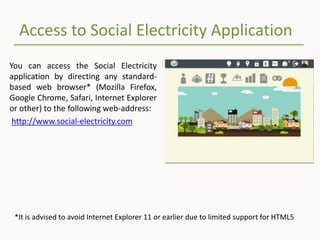
Access to Social Electricity Application
You can access the Social Electricity
application by directing any standard-
based web browser* (Mozilla Firefox,
Google Chrome, Safari, Internet Explorer
or other) to the following web-address:
http://www.social-electricity.com
*It is advised to avoid Internet Explorer 11 or earlier due to limited support for HTML5
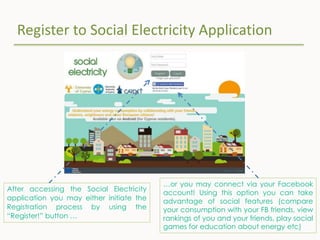
Register to Social Electricity Application
After accessing the Social Electricity
application you may either initiate the
Registration process by using the
“Register!” button …
…or you may connect via your Facebook
account! Using this option you can take
advantage of social features (compare
your consumption with your FB friends, view
rankings of you and your friends, play social
games for education about energy etc)
Registration process in 4 steps
There are 4 steps for registering to the Social Electricity application. At each
step you shall fill in a set of personal information.
I. Step 1 requires you to fill in information about your person, choose
application username and password.
II. Step 2 asks details about your residence. This information is essential for
the application to better categorize registered users and provide useful
comparisons of electricity consumption among similar citizens.
III. Step 3 asks you to upload a profile picture to the application.
IV. Step 4 asks you to provide information about the location of your
residence. This information is used by the application to provide detailed
energy consumption information and statistics of the area where you live.
Logging-in to the Social Electricity Application
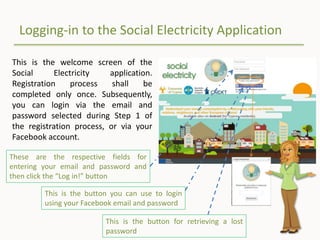
This is the welcome screen of the
Social Electricity application.
Registration process shall be
completed only once. Subsequently,
you can login via the email and
password selected during Step 1 of
the registration process, or via your
Facebook account.
These are the respective fields for
entering your email and password and
then click the “Log in!” button
This is the button you can use to login
using your Facebook email and password
This is the button for retrieving a lost
password
Home Screen
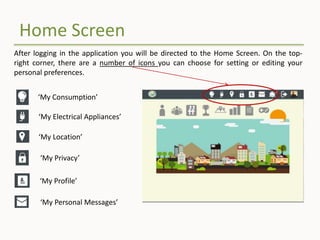
After logging in the application you will be directed to the Home Screen. On the top-
right corner, there are a number of icons you can choose for setting or editing your
personal preferences.
‘My Consumption’
‘My Location’
‘My Privacy’
‘My Profile’
‘My Personal Messages’
‘My Electrical Appliances’
Personal preferences
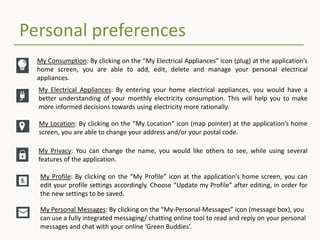
My Consumption: By clicking on the “My Electrical Appliances” icon (plug) at the application’s
home screen, you are able to add, edit, delete and manage your personal electrical
appliances.
My Location: By clicking on the “My Location” icon (map pointer) at the application’s home
screen, you are able to change your address and/or your postal code.
My Privacy: You can change the name, you would like others to see, while using several
features of the application.
My Profile: By clicking on the “My Profile” icon at the application’s home screen, you can
edit your profile settings accordingly. Choose “Update my Profile” after editing, in order for
the new settings to be saved.
My Personal Messages: By clicking on the “My-Personal-Messages” icon (message box), you
can use a fully integrated messaging/ chatting online tool to read and reply on your personal
messages and chat with your online ‘Green Buddies’.
My Electrical Appliances: By entering your home electrical appliances, you would have a
better understanding of your monthly electricity consumption. This will help you to make
more informed decisions towards using electricity more rationally.
Personal Features
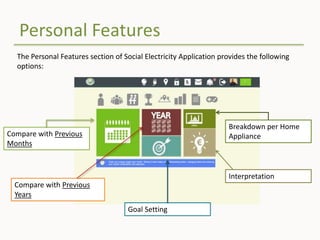
The Personal Features section of Social Electricity Application provides the following
options:
Compare with Previous
Months
Compare with Previous
Years
Goal Setting
Breakdown per Home
Appliance
Interpretation
Personal Features
• Compare with Previous Months: Using this feature, you can compare your electricity consumption
against the recorded consumption at the same month of the previous year(s). The application
presents a happy emoticon (in case of achieving reductions) or a sad one (in case of increased
consumption).
• Compare with Previous Year: Using this feature, you can compare your electricity consumption
against the recorded consumption at the same month of the previous year(s). The application
presents a happy emoticon (in case of achieving reductions) or a sad one (in case of increased
consumption).
• Goal Setting: With the Goal Setting feature, you can set and monitor your personal goals for future
electricity consumption savings.
• Breakdown per Home Appliance: This feature is useful for better understanding of your monthly
electricity consumption, concerning, which of your electrical appliances contribute in your overall
bill and how. By knowing the effects of each appliance on your total consumption, you would be
able to make better decisions towards saving electricity.
• Interpretation: This feature shows the equivalent of your monthly energy consumption in terms of
– Total cost [in EURO]
– Total mass of carbon dioxide (CO2) released in the atmosphere for energy production [in Kg]
– Total amount of hours for running a 5,000 BTU air conditioner in the house
– Total amount of days for having the TV switched on
Comparison Features
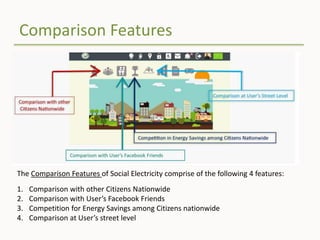
The Comparison Features of Social Electricity comprise of the following 4 features:
1. Comparison with other Citizens Nationwide
2. Comparison with User’s Facebook Friends
3. Competition for Energy Savings among Citizens nationwide
4. Comparison at User’s street level
Comparison with other Citizens Nationwide
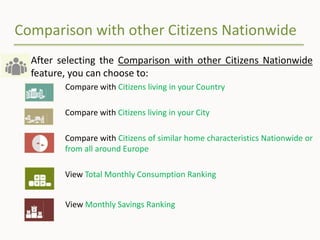
After selecting the Comparison with other Citizens Nationwide
feature, you can choose to:
Compare with Citizens living in your Country
Compare with Citizens living in your City
Compare with Citizens of similar home characteristics Nationwide or
from all around Europe
View Total Monthly Consumption Ranking
View Monthly Savings Ranking
Comparison with User’s Facebook Friends
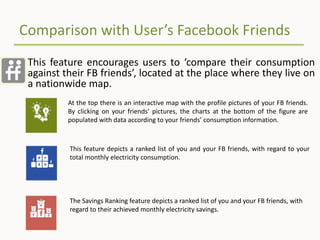
This feature encourages users to ‘compare their consumption
against their FB friends’, located at the place where they live on
a nationwide map.
At the top there is an interactive map with the profile pictures of your FB friends.
By clicking on your friends’ pictures, the charts at the bottom of the figure are
populated with data according to your friends’ consumption information.
This feature depicts a ranked list of you and your FB friends, with regard to your
total monthly electricity consumption.
The Savings Ranking feature depicts a ranked list of you and your FB friends, with
regard to their achieved monthly electricity savings.
Competition in Energy Savings among Citizens
Nationwide
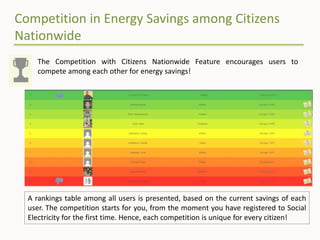
A rankings table among all users is presented, based on the current savings of each
user. The competition starts for you, from the moment you have registered to Social
Electricity for the first time. Hence, each competition is unique for every citizen!
The Competition with Citizens Nationwide Feature encourages users to
compete among each other for energy savings!
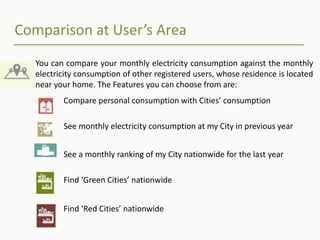
Comparison at User’s Area
You can compare your monthly electricity consumption against the monthly
electricity consumption of other registered users, whose residence is located
near your home. The Features you can choose from are:
Compare personal consumption with Cities’ consumption
See monthly electricity consumption at my City in previous year
See a monthly ranking of my City nationwide for the last year
Find ‘Green Cities’ nationwide
Find ‘Red Cities’ nationwide
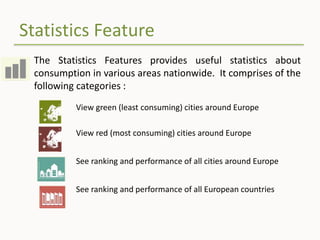
Statistics Feature
The Statistics Features provides useful statistics about
consumption in various areas nationwide. It comprises of the
following categories :
View green (least consuming) cities around Europe
View red (most consuming) cities around Europe
See ranking and performance of all cities around Europe
See ranking and performance of all European countries
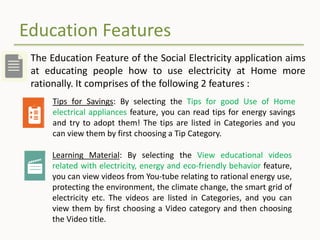
Education Features
The Education Feature of the Social Electricity application aims
at educating people how to use electricity at Home more
rationally. It comprises of the following 2 features :
Tips for Savings: By selecting the Tips for good Use of Home
electrical appliances feature, you can read tips for energy savings
and try to adopt them! The tips are listed in Categories and you
can view them by first choosing a Tip Category.
Learning Material: By selecting the View educational videos
related with electricity, energy and eco-friendly behavior feature,
you can view videos from You-tube relating to rational energy use,
protecting the environment, the climate change, the smart grid of
electricity etc. The videos are listed in Categories, and you can
view them by first choosing a Video category and then choosing
the Video title.
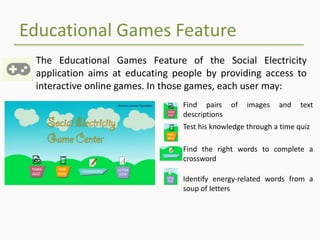
Educational Games Feature
The Educational Games Feature of the Social Electricity
application aims at educating people by providing access to
interactive online games. In those games, each user may:
Find pairs of images and text
descriptions
Test his knowledge through a time quiz
Find the right words to complete a
crossword
Identify energy-related words from a
soup of letters
The End
Happy Savings! 

Social Electricity User Manual

  • 1.
  • 2.
    Introduction European citizens needto understand the political, social and environmental implications of energy over-consumption, and dedicate their efforts to consume energy more rationally. A crucial issue, that hinders the awareness of citizens about their energy footprint is the absence of effective ICT infrastructures, that would help people to perceive their consumption in relation to the consumption of other citizens of their country, and the effects of their actions on the physical and urban environment.
  • 3.
    What are theaims of Social Electricity? Social Electricity is inspired by the fact that, according to numerous psychological and sociological studies, energy awareness of people can be reinforced by means of social interaction and social comparisons of electricity consumption among peers. Social Electricity primarily aims to motivate users to become more aware about their energy consumption. It also targets to be used as a healthy competition, through which each user competes with his friends or relatives for less consumed energy. People from the same area are encouraged to cooperate to reduce the total aggregated consumption and improve the overall "green ranking" of the area.
  • 4.
    What is SocialElectricity? Social Electricity is a green, energy management ICT online social platform, operating at a European scale. Its main goal is to raise the energy awareness of its users, motivating them to reduce their electricity footprint The application offers modern features such as goal setting, competitions, local and social comparisons, management of consumption and breakdowns to individual electrical appliances. International Recognition This social application was recognized as an innovative initiative worldwide and in September, 2012 it was awarded the first prize in the 2nd Green ICT Application Challenge, organized by the International Telecommunication Union (ITU).
  • 5.
    Access to SocialElectricity Application You can access the Social Electricity application by directing any standard- based web browser* (Mozilla Firefox, Google Chrome, Safari, Internet Explorer or other) to the following web-address: http://www.social-electricity.com *It is advised to avoid Internet Explorer 11 or earlier due to limited support for HTML5
  • 6.
    Register to SocialElectricity Application After accessing the Social Electricity application you may either initiate the Registration process by using the “Register!” button … …or you may connect via your Facebook account! Using this option you can take advantage of social features (compare your consumption with your FB friends, view rankings of you and your friends, play social games for education about energy etc)
  • 7.
    Registration process in4 steps There are 4 steps for registering to the Social Electricity application. At each step you shall fill in a set of personal information. I. Step 1 requires you to fill in information about your person, choose application username and password. II. Step 2 asks details about your residence. This information is essential for the application to better categorize registered users and provide useful comparisons of electricity consumption among similar citizens. III. Step 3 asks you to upload a profile picture to the application. IV. Step 4 asks you to provide information about the location of your residence. This information is used by the application to provide detailed energy consumption information and statistics of the area where you live.
  • 8.
    Logging-in to theSocial Electricity Application This is the welcome screen of the Social Electricity application. Registration process shall be completed only once. Subsequently, you can login via the email and password selected during Step 1 of the registration process, or via your Facebook account. These are the respective fields for entering your email and password and then click the “Log in!” button This is the button you can use to login using your Facebook email and password This is the button for retrieving a lost password
  • 9.
    Home Screen After loggingin the application you will be directed to the Home Screen. On the top- right corner, there are a number of icons you can choose for setting or editing your personal preferences. ‘My Consumption’ ‘My Location’ ‘My Privacy’ ‘My Profile’ ‘My Personal Messages’ ‘My Electrical Appliances’
  • 10.
    Personal preferences My Consumption:By clicking on the “My Electrical Appliances” icon (plug) at the application’s home screen, you are able to add, edit, delete and manage your personal electrical appliances. My Location: By clicking on the “My Location” icon (map pointer) at the application’s home screen, you are able to change your address and/or your postal code. My Privacy: You can change the name, you would like others to see, while using several features of the application. My Profile: By clicking on the “My Profile” icon at the application’s home screen, you can edit your profile settings accordingly. Choose “Update my Profile” after editing, in order for the new settings to be saved. My Personal Messages: By clicking on the “My-Personal-Messages” icon (message box), you can use a fully integrated messaging/ chatting online tool to read and reply on your personal messages and chat with your online ‘Green Buddies’. My Electrical Appliances: By entering your home electrical appliances, you would have a better understanding of your monthly electricity consumption. This will help you to make more informed decisions towards using electricity more rationally.
  • 11.
    Personal Features The PersonalFeatures section of Social Electricity Application provides the following options: Compare with Previous Months Compare with Previous Years Goal Setting Breakdown per Home Appliance Interpretation
  • 12.
    Personal Features • Comparewith Previous Months: Using this feature, you can compare your electricity consumption against the recorded consumption at the same month of the previous year(s). The application presents a happy emoticon (in case of achieving reductions) or a sad one (in case of increased consumption). • Compare with Previous Year: Using this feature, you can compare your electricity consumption against the recorded consumption at the same month of the previous year(s). The application presents a happy emoticon (in case of achieving reductions) or a sad one (in case of increased consumption). • Goal Setting: With the Goal Setting feature, you can set and monitor your personal goals for future electricity consumption savings. • Breakdown per Home Appliance: This feature is useful for better understanding of your monthly electricity consumption, concerning, which of your electrical appliances contribute in your overall bill and how. By knowing the effects of each appliance on your total consumption, you would be able to make better decisions towards saving electricity. • Interpretation: This feature shows the equivalent of your monthly energy consumption in terms of – Total cost [in EURO] – Total mass of carbon dioxide (CO2) released in the atmosphere for energy production [in Kg] – Total amount of hours for running a 5,000 BTU air conditioner in the house – Total amount of days for having the TV switched on
  • 13.
    Comparison Features The ComparisonFeatures of Social Electricity comprise of the following 4 features: 1. Comparison with other Citizens Nationwide 2. Comparison with User’s Facebook Friends 3. Competition for Energy Savings among Citizens nationwide 4. Comparison at User’s street level
  • 14.
    Comparison with otherCitizens Nationwide After selecting the Comparison with other Citizens Nationwide feature, you can choose to: Compare with Citizens living in your Country Compare with Citizens living in your City Compare with Citizens of similar home characteristics Nationwide or from all around Europe View Total Monthly Consumption Ranking View Monthly Savings Ranking
  • 15.
    Comparison with User’sFacebook Friends This feature encourages users to ‘compare their consumption against their FB friends’, located at the place where they live on a nationwide map. At the top there is an interactive map with the profile pictures of your FB friends. By clicking on your friends’ pictures, the charts at the bottom of the figure are populated with data according to your friends’ consumption information. This feature depicts a ranked list of you and your FB friends, with regard to your total monthly electricity consumption. The Savings Ranking feature depicts a ranked list of you and your FB friends, with regard to their achieved monthly electricity savings.
  • 16.
    Competition in EnergySavings among Citizens Nationwide A rankings table among all users is presented, based on the current savings of each user. The competition starts for you, from the moment you have registered to Social Electricity for the first time. Hence, each competition is unique for every citizen! The Competition with Citizens Nationwide Feature encourages users to compete among each other for energy savings!
  • 17.
    Comparison at User’sArea You can compare your monthly electricity consumption against the monthly electricity consumption of other registered users, whose residence is located near your home. The Features you can choose from are: Compare personal consumption with Cities’ consumption See monthly electricity consumption at my City in previous year See a monthly ranking of my City nationwide for the last year Find ‘Green Cities’ nationwide Find ‘Red Cities’ nationwide
  • 18.
    Statistics Feature The StatisticsFeatures provides useful statistics about consumption in various areas nationwide. It comprises of the following categories : View green (least consuming) cities around Europe View red (most consuming) cities around Europe See ranking and performance of all cities around Europe See ranking and performance of all European countries
  • 19.
    Education Features The EducationFeature of the Social Electricity application aims at educating people how to use electricity at Home more rationally. It comprises of the following 2 features : Tips for Savings: By selecting the Tips for good Use of Home electrical appliances feature, you can read tips for energy savings and try to adopt them! The tips are listed in Categories and you can view them by first choosing a Tip Category. Learning Material: By selecting the View educational videos related with electricity, energy and eco-friendly behavior feature, you can view videos from You-tube relating to rational energy use, protecting the environment, the climate change, the smart grid of electricity etc. The videos are listed in Categories, and you can view them by first choosing a Video category and then choosing the Video title.
  • 20.
    Educational Games Feature TheEducational Games Feature of the Social Electricity application aims at educating people by providing access to interactive online games. In those games, each user may: Find pairs of images and text descriptions Test his knowledge through a time quiz Find the right words to complete a crossword Identify energy-related words from a soup of letters
  • 21.