SOAP Tips, Tricks & Tools
               March 12, 2008

Rob Richards
http://xri.net/=rob.richards
www.cdatazone.org
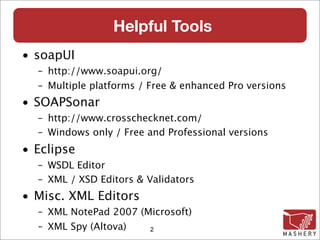
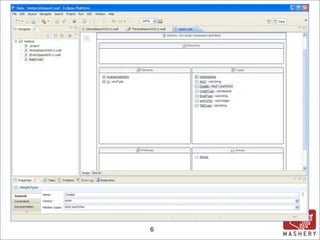
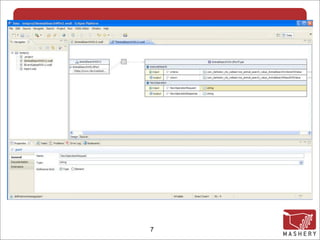
Helpful Tools
• soapUI
  – http://www.soapui.org/
  – Multiple platforms / Free & enhanced Pro versions
• SOAPSonar
  – http://www.crosschecknet.com/
  – Windows only / Free and Professional versions
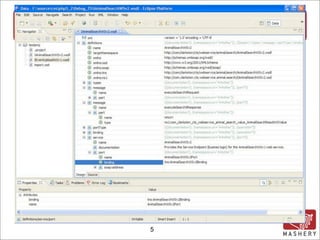
• Eclipse
  – WSDL Editor
  – XML / XSD Editors & Validators
• Misc. XML Editors
  – XML NotePad 2007 (Microsoft)‫‏‬
  – XML Spy (Altova)‫‏‬  2
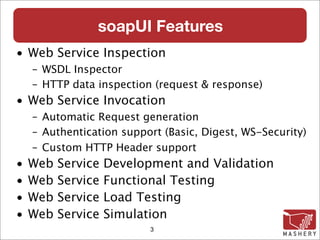
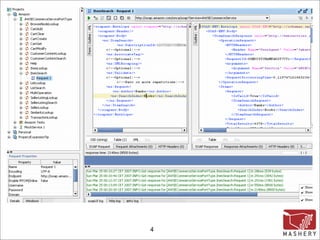
soapUI Features
• Web Service Inspection
    – WSDL Inspector
    – HTTP data inspection (request & response)‫‏‬
• Web Service Invocation
    – Automatic Request generation
    – Authentication support (Basic, Digest, WS-Security)‫‏‬
    – Custom HTTP Header support
•   Web   Service   Development and Validation
•   Web   Service   Functional Testing
•   Web   Service   Load Testing
•   Web   Service   Simulation
                           3
4
5
6
7
Making SOAP Requests
Tips and Tricks working with the SoapClient
Canadian Cattle Identification Agency
                   (CCIA)‫‏‬

• Handles cattle age verification
• Provides a centralized database where
  producers can maintain cattle information
• Information is readily available to help speed
  up import/exports
• Information can be correlated with RFID tags
• System is entirely online
• SOAP is used for application integration
• Website: http://www.canadaid.ca/


                     9
Canadian Cattle Identification Agency
               (CCIA)‫‏‬

 Access to the CCIA services
 requires authentication through
 the use of WS-Security in the
 means of a UsernameToken.

 To simplify the examples,
 authentication has been omitted.

                10
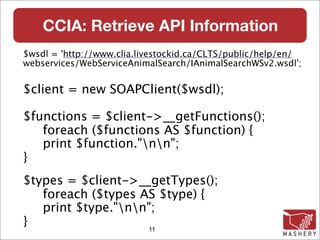
CCIA: Retrieve API Information
$wsdl = 'http://www.clia.livestockid.ca/CLTS/public/help/en/
webservices/WebServiceAnimalSearch/IAnimalSearchWSv2.wsdl';


$client = new SOAPClient($wsdl);

$functions = $client->__getFunctions();
   foreach ($functions AS $function) {
   print $function."nn";
}
$types = $client->__getTypes();
   foreach ($types AS $type) {
   print $type."nn";
}                   11
CCIA: Can We Be Any More
                    Descriptive?
com_clarkston_cts_webservice_animal_search_value_AnimalSearchResultWSValue
 executeSearch (com_clarkston_cts_webservice_animal_search_value_
AnimalSearchCriteriaWSValue $criteria)‫‏‬


struct
    com_clarkston_cts_webservice_animal_search_value_AnimalSearchCriteriaWSValue {
 ArrayOfcom_clarkston_cts_webservice_value_TagRangeWSValue tagRangeList;
 string publicAccountId;
}

struct com_clarkston_cts_webservice_value_TagRangeWSValue {
 string tagType;
 string endTag;
 string startTag;
}

com_clarkston_cts_webservice_value_TagRangeWSValue
  ArrayOfcom_clarkston_cts_webservice_value_TagRangeWSValue[]


                                     12
CCIA: Functions and Types Translated

AnimalResult executeSearch(AnimalCriteria $criteria)‫‏‬

struct TagRange {
   string tagType;
   string endTag;
   string startTag;
}

TagRange ArrayOfTagRange[]

struct AnimalCriteria {
   ArrayOfTagRange        tagRangeList;
   string                 publicAccountId;
}

                           13
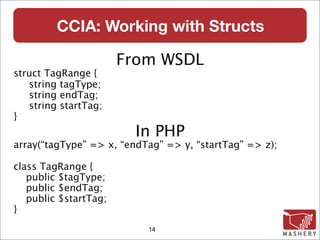
CCIA: Working with Structs

                       From WSDL
struct TagRange {
   string tagType;
   string endTag;
   string startTag;
}
                        In PHP
array(“tagType” => x, “endTag” => y, “startTag” => z);

class TagRange {
   public $tagType;
   public $endTag;
   public $startTag;
}
                           14
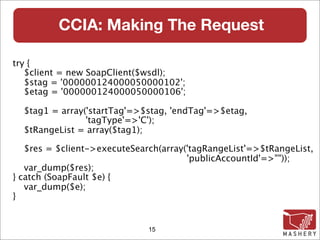
CCIA: Making The Request

try {
   $client = new SoapClient($wsdl);
   $stag = '000000124000050000102';
   $etag = '000000124000050000106';

  $tag1 = array('startTag'=>$stag, 'endTag'=>$etag,
                'tagType'=>'C');
  $tRangeList = array($tag1);

   $res = $client->executeSearch(array('tagRangeList'=>$tRangeList,
                                       'publicAccountId'=>""));
   var_dump($res);
} catch (SoapFault $e) {
   var_dump($e);
}


                              15
CCIA: DOH! . . . Denied


         16
CCIA: DOH! . . . Denied
object(SoapFault)#3 (9) {
    ...
    ["faultstring"]=> string(273) "No Deserializer
     found to deserialize a 'http://
     com.clarkston.cts.webservice.animal.search/
     IAnimalSearchWSv2.xsd:ArrayOfcom_clarkston_cts_w
     ebservice_value_TagRangeWSValue' using
     encoding style 'http://schemas.xmlsoap.org/soap/
     encoding/'. [java.lang.IllegalArgumentException]"

    ["faultcode"]=> string(15) "SOAP-ENV:Client"
    ["faultactor"]=> string(22) "/CLTS/
     AnimalSearchWSv2"
}                         17
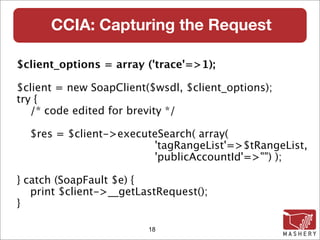
CCIA: Capturing the Request

$client_options = array ('trace'=>1);

$client = new SoapClient($wsdl, $client_options);
try {
   /* code edited for brevity */

  $res = $client->executeSearch( array(
                        'tagRangeList'=>$tRangeList,
                        'publicAccountId'=>"") );

} catch (SoapFault $e) {
   print $client->__getLastRequest();
}

                         18
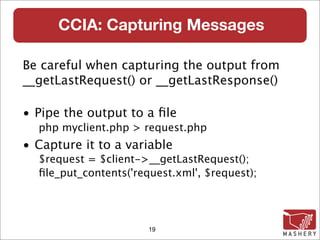
CCIA: Capturing Messages

Be careful when capturing the output from
__getLastRequest() or __getLastResponse()‫‏‬

• Pipe the output to a file
  php myclient.php > request.php
• Capture it to a variable
  $request = $client->__getLastRequest();
  file_put_contents('request.xml', $request);


                       19
CCIA: The SOAP Request (edited)‫‏‬
<ns1:executeSearch>
 <criteria xsi:type="ns2:AnimalSearchCriteriaWSValue">
   <tagRangeList SOAP-ENC:arrayType="ns2:TagRange[1]"
                    xsi:type="ns2:ArrayOfTagRange">
     <item xsi:type="ns2:TagRange">
       <tagType xsi:type="xsd:string">C</tagType>
       <endTag xsi:type="xsd:string">. . .00106</endTag>
       <startTag xsi:type="xsd:string">. . .00102</startTag>
     </item>
   </tagRangeList>
   <publicAccountId xsi:type="xsd:string"/>
 </criteria>
</ns1:executeSearch>

                           20
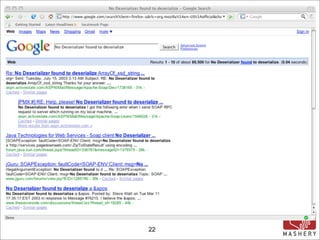
CCIA: So Where’s the Problem?


 Time to pull out one or more of
         your SOAP tools

   Fire up your favorite search
              engine


               21
22
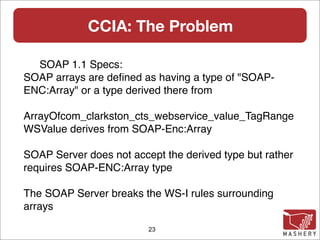
CCIA: The Problem

  SOAP 1.1 Specs:
SOAP arrays are defined as having a type of "SOAP-
ENC:Array" or a type derived there from

ArrayOfcom_clarkston_cts_webservice_value_TagRange
WSValue derives from SOAP-Enc:Array

SOAP Server does not accept the derived type but rather
requires SOAP-ENC:Array type

The SOAP Server breaks the WS-I rules surrounding
arrays

                         23
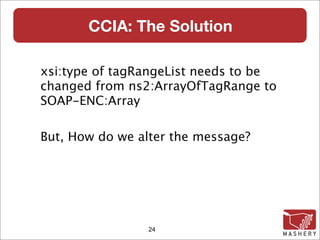
CCIA: The Solution

xsi:type of tagRangeList needs to be
changed from ns2:ArrayOfTagRange to
SOAP-ENC:Array

But, How do we alter the message?


                24
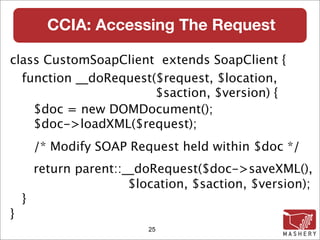
CCIA: Accessing The Request

class CustomSoapClient extends SoapClient {
  function __doRequest($request, $location,
                       $saction, $version) {
    $doc = new DOMDocument();
    $doc->loadXML($request);
        /* Modify SOAP Request held within $doc */
        return parent::__doRequest($doc->saveXML(),
                        $location, $saction, $version);
    }
}
                           25
CCIA: Modifying The Request
$root = $doc->documentElement;
$encprefix = $root->lookupPrefix('. . .schemas.xmlsoap.org/soap/encoding/');
$xpath = new DOMXPath($doc);
$xpath->registerNamespace("myschem", 'http://. . ./XMLSchema-instance');
$xpath->registerNamespace("myxsi",
                         'http://schemas.xmlsoap.org/soap/. . .');

$query = '/*/*/*//*[@myxsi:arrayType and @myschem:type]';

if ($nodelists = $xpath->query($query)) {
 foreach ($nodelists AS $node) {
   if ($attnode =
       $node->getAttributeNodeNS('http://. . ./XMLSchema-instance', 'type'))‫‏‬
   {
            $attnode->nodeValue = $encprefix.':Array';
           ...
                                    26
CCIA: The Altered Request

<ns1:executeSearch>
 <criteria xsi:type="ns2:AnimalSearchCriteriaWSValue">
   <tagRangeList SOAP-ENC:arrayType="ns2:TagRange[1]"
                   xsi:type="SOAP-ENC:Array">
     <item xsi:type="ns2:TagRange">
       <tagType xsi:type="xsd:string">C</tagType>
       <endTag xsi:type="xsd:string">. . .00106</endTag>
       <startTag xsi:type="xsd:string">. . .00102</startTag>
     </item>
   </tagRangeList>
   <publicAccountId xsi:type="xsd:string"/>
 </criteria>
</ns1:executeSearch>

                           27
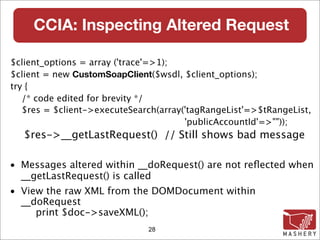
CCIA: Inspecting Altered Request

 $client_options = array ('trace'=>1);
 $client = new CustomSoapClient($wsdl, $client_options);
 try {
How Did You Get The Request?
    /* code edited for brevity */
    $res = $client->executeSearch(array('tagRangeList'=>$tRangeList,
                                        'publicAccountId'=>""));
    $res->__getLastRequest() // Still shows bad message

 • Messages altered within __doRequest() are not reflected when
   __getLastRequest() is called
 • View the raw XML from the DOMDocument within
   __doRequest
      print $doc->saveXML();
                               28
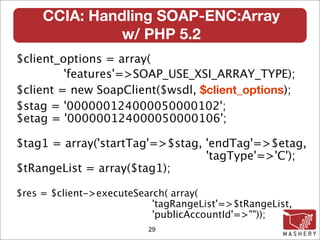
CCIA: Handling SOAP-ENC:Array
               w/ PHP 5.2
$client_options = array(
         'features'=>SOAP_USE_XSI_ARRAY_TYPE);
$client = new SoapClient($wsdl, $client_options);
$stag = '000000124000050000102';
$etag = '000000124000050000106';

$tag1 = array('startTag'=>$stag, 'endTag'=>$etag,
                                 'tagType'=>'C');
$tRangeList = array($tag1);

$res = $client->executeSearch( array(
                           'tagRangeList'=>$tRangeList,
                           'publicAccountId'=>""));
                          29
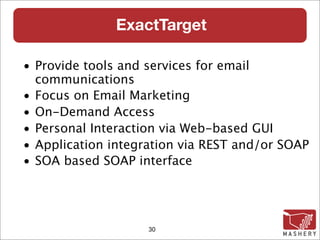
ExactTarget

• Provide tools and services for email
  communications
• Focus on Email Marketing
• On-Demand Access
• Personal Interaction via Web-based GUI
• Application integration via REST and/or SOAP
• SOA based SOAP interface


                    30
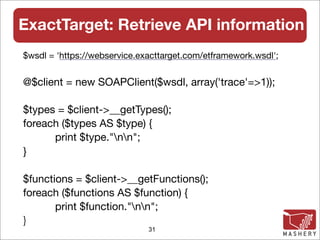
ExactTarget: Retrieve API information
$wsdl = 'https://webservice.exacttarget.com/etframework.wsdl';


@$client = new SOAPClient($wsdl, array('trace'=>1));
	
$types = $client->__getTypes();
foreach ($types AS $type) {
	     print $type."nn";
}

$functions = $client->__getFunctions();
foreach ($functions AS $function) {
	      print $function."nn";
}
                              31
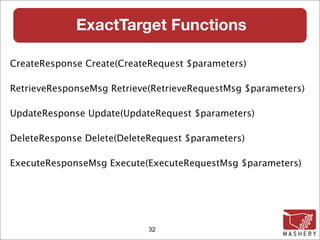
ExactTarget Functions

CreateResponse Create(CreateRequest $parameters)‫‏‬

RetrieveResponseMsg Retrieve(RetrieveRequestMsg $parameters)‫‏‬

UpdateResponse Update(UpdateRequest $parameters)‫‏‬

DeleteResponse Delete(DeleteRequest $parameters)‫‏‬

ExecuteResponseMsg Execute(ExecuteRequestMsg $parameters)‫‏‬


                            32
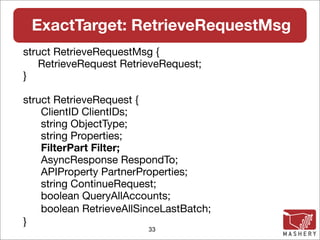
ExactTarget: RetrieveRequestMsg
struct RetrieveRequestMsg {
   RetrieveRequest RetrieveRequest;
}

struct RetrieveRequest {
    ClientID ClientIDs;
    string ObjectType;
    string Properties;
    FilterPart Filter;
    AsyncResponse RespondTo;
    APIProperty PartnerProperties;
    string ContinueRequest;
    boolean QueryAllAccounts;
    boolean RetrieveAllSinceLastBatch;
}
                         33
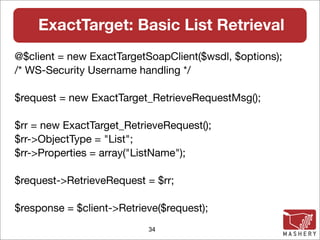
ExactTarget: Basic List Retrieval
@$client = new ExactTargetSoapClient($wsdl, $options);
/* WS-Security Username handling */

$request = new ExactTarget_RetrieveRequestMsg();

$rr = new ExactTarget_RetrieveRequest();
$rr->ObjectType = "List";
$rr->Properties = array("ListName");

$request->RetrieveRequest = $rr;

$response = $client->Retrieve($request);
                           34
ExactTarget: List Retrieval Response
object(stdClass)#6 (3) {
 ["OverallStatus"]=> string(2) "OK"
 ["RequestID"]=> string(36) "6bb27c71-16e6-4167-
  a57c-32df045174c4"
 ["Results"]=>
 array(2) {
   [0]=> object(stdClass)#12 (3) {
     ["PartnerKey"]=> NULL
     ["ObjectID"]=> NULL
     ["ListName"]=> string(8) "RobsList"
   }
   [1]=> object(stdClass)#8 (3) {
     ["PartnerKey"]=> NULL
     ["ObjectID"]=> NULL
     ["ListName"]=> string(12) "New Rob List"
                      35
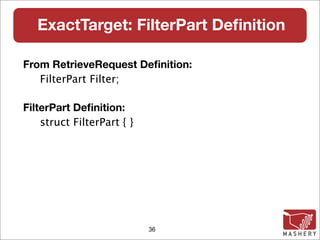
ExactTarget: FilterPart Definition

From RetrieveRequest Definition:
   FilterPart Filter;

FilterPart Definition:
    struct FilterPart { }


                            36
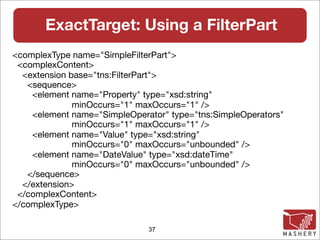
ExactTarget: Using a FilterPart
<complexType name="SimpleFilterPart">
 <complexContent>
  <extension base="tns:FilterPart">
   <sequence>
    <element name="Property" type="xsd:string"
              minOccurs="1" maxOccurs="1" />
    <element name="SimpleOperator" type="tns:SimpleOperators"
              minOccurs="1" maxOccurs="1" />
    <element name="Value" type="xsd:string"
              minOccurs="0" maxOccurs="unbounded" />
    <element name="DateValue" type="xsd:dateTime"
              minOccurs="0" maxOccurs="unbounded" />
   </sequence>
  </extension>
 </complexContent>
</complexType>

                              37
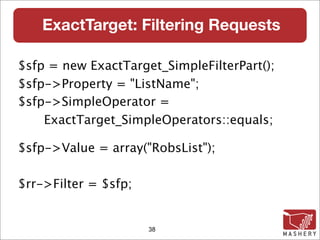
ExactTarget: Filtering Requests

$sfp = new ExactTarget_SimpleFilterPart();
$sfp->Property = "ListName";
$sfp->SimpleOperator =
    ExactTarget_SimpleOperators::equals;

$sfp->Value = array("RobsList");

$rr->Filter = $sfp;


                      38
ExactTarget: Filter Results

object(stdClass)#7 (2) {
  ["OverallStatus"]=>
  string(60) "Error: Object reference not set
   to an instance of an object."
  ["RequestID"]=>
  string(36) "9c7ebf66-
   d211-43cf-9984-0adfb4b1e476"
}

      This Doesn't Look Right!
                     39
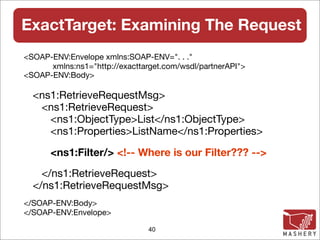
ExactTarget: Examining The Request
<SOAP-ENV:Envelope xmlns:SOAP-ENV=". . ."
      xmlns:ns1="http://exacttarget.com/wsdl/partnerAPI">
<SOAP-ENV:Body>

  <ns1:RetrieveRequestMsg>
   <ns1:RetrieveRequest>
     <ns1:ObjectType>List</ns1:ObjectType>
     <ns1:Properties>ListName</ns1:Properties>

      <ns1:Filter/> <!-- Where is our Filter??? -->
    </ns1:RetrieveRequest>
  </ns1:RetrieveRequestMsg>
</SOAP-ENV:Body>
</SOAP-ENV:Envelope>

                                40
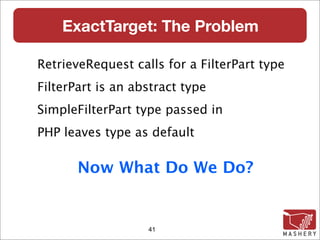
ExactTarget: The Problem

RetrieveRequest calls for a FilterPart type
FilterPart is an abstract type
SimpleFilterPart type passed in
PHP leaves type as default

       Now What Do We Do?


                   41
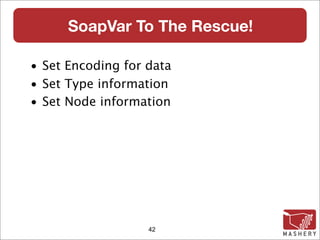
SoapVar To The Rescue!

• Set Encoding for data
• Set Type information
• Set Node information


                   42
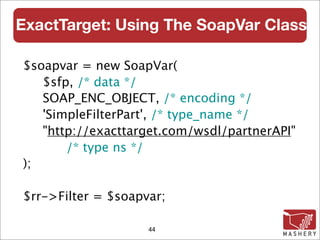
ExactTarget: Using The SoapVar Class

 class SoapVar {
   __construct ( mixed $data,
                  int $encoding
                  [, string $type_name
                  [, string $type_namespace
                  [, string $node_name
                  [, string $node_namespace
                ]]]] )
 }

                     43
ExactTarget: Using The SoapVar Class

$soapvar = new SoapVar(
   $sfp, /* data */
   SOAP_ENC_OBJECT, /* encoding */
   'SimpleFilterPart', /* type_name */
   "http://exacttarget.com/wsdl/partnerAPI"
       /* type ns */
);

$rr->Filter = $soapvar;

                    44
ExactTarget: Filtered Results

object(stdClass)#8 (3) {
  ["OverallStatus"]=>string(2) "OK"
  ["RequestID"]=>string(36) "638f2307-xxxxxx"
  ["Results"]=>
  object(stdClass)#14 (3) {
    ["PartnerKey"]=>NULL
    ["ObjectID"]=>NULL
    ["ListName"]=>string(8) "RobsList"
  }
}
                    45
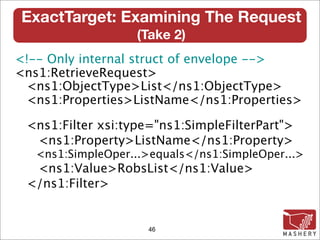
ExactTarget: Examining The Request
                   (Take 2)‫‏‬
<!-- Only internal struct of envelope -->
<ns1:RetrieveRequest>
 <ns1:ObjectType>List</ns1:ObjectType>
 <ns1:Properties>ListName</ns1:Properties>

 <ns1:Filter xsi:type="ns1:SimpleFilterPart">
  <ns1:Property>ListName</ns1:Property>
   <ns1:SimpleOper...>equals</ns1:SimpleOper...>
  <ns1:Value>RobsList</ns1:Value>
 </ns1:Filter>


                     46
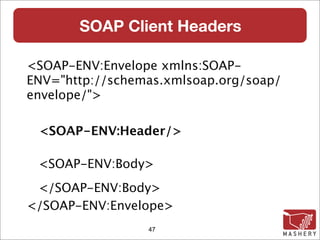
SOAP Client Headers

<SOAP-ENV:Envelope xmlns:SOAP-
ENV="http://schemas.xmlsoap.org/soap/
envelope/">

 <SOAP-ENV:Header/>

 <SOAP-ENV:Body>
 </SOAP-ENV:Body>
</SOAP-ENV:Envelope>
                 47
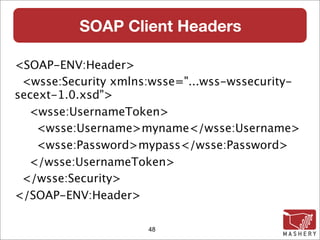
SOAP Client Headers

<SOAP-ENV:Header>
 <wsse:Security xmlns:wsse="...wss-wssecurity-
secext-1.0.xsd">
  <wsse:UsernameToken>
    <wsse:Username>myname</wsse:Username>
    <wsse:Password>mypass</wsse:Password>
  </wsse:UsernameToken>
 </wsse:Security>
</SOAP-ENV:Header>

                     48
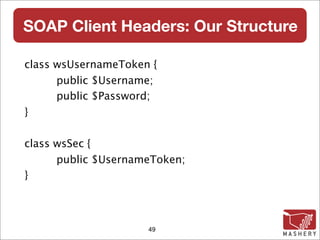
SOAP Client Headers: Our Structure

class wsUsernameToken {

     public $Username;

     public $Password;
}

class wsSec {

     public $UsernameToken;
}


                     49
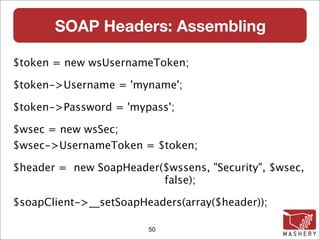
SOAP Headers: Assembling

$token = new wsUsernameToken;

$token->Username = 'myname';

$token->Password = 'mypass';

$wsec = new wsSec;
$wsec->UsernameToken = $token;

$header = new SoapHeader($wssens, "Security", $wsec,
                         false);

$soapClient->__setSoapHeaders(array($header));

                        50
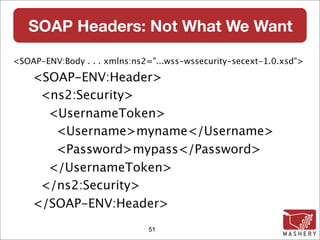
SOAP Headers: Not What We Want

<SOAP-ENV:Body . . . xmlns:ns2="...wss-wssecurity-secext-1.0.xsd">

    <SOAP-ENV:Header>
     <ns2:Security>
      <UsernameToken>
       <Username>myname</Username>
       <Password>mypass</Password>
      </UsernameToken>
     </ns2:Security>
    </SOAP-ENV:Header>
                              51
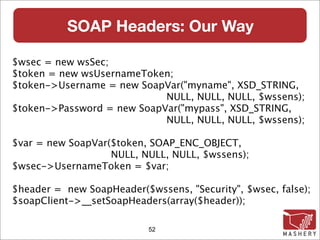
SOAP Headers: Our Way

$wsec = new wsSec;
$token = new wsUsernameToken;
$token->Username = new SoapVar("myname", XSD_STRING,
                            NULL, NULL, NULL, $wssens);
$token->Password = new SoapVar("mypass", XSD_STRING,
                            NULL, NULL, NULL, $wssens);

$var = new SoapVar($token, SOAP_ENC_OBJECT,
                   NULL, NULL, NULL, $wssens);
$wsec->UsernameToken = $var;

$header = new SoapHeader($wssens, "Security", $wsec, false);
$soapClient->__setSoapHeaders(array($header));

                           52
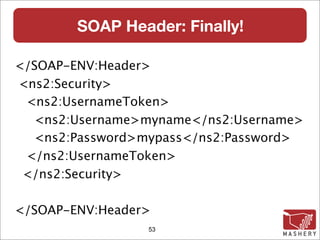
SOAP Header: Finally!

</SOAP-ENV:Header>
<ns2:Security>
 <ns2:UsernameToken>
  <ns2:Username>myname</ns2:Username>
  <ns2:Password>mypass</ns2:Password>
 </ns2:UsernameToken>
 </ns2:Security>

</SOAP-ENV:Header>
                 53
Server Sided SOAP
Working through server sided issues
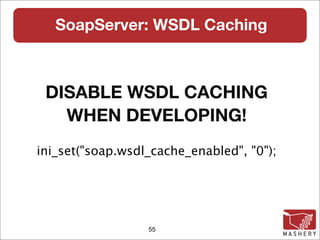
SoapServer: WSDL Caching


 DISABLE WSDL CACHING
   WHEN DEVELOPING!
ini_set("soap.wsdl_cache_enabled", "0");


                  55
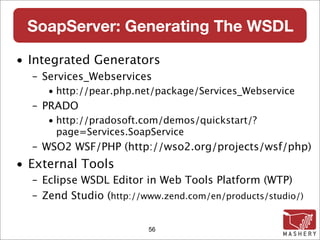
SoapServer: Generating The WSDL

• Integrated Generators
  – Services_Webservices
     • http://pear.php.net/package/Services_Webservice
  – PRADO
     • http://pradosoft.com/demos/quickstart/?
       page=Services.SoapService
  – WSO2 WSF/PHP (http://wso2.org/projects/wsf/php)
• External Tools
  – Eclipse WSDL Editor in Web Tools Platform (WTP)
  – Zend Studio (http://www.zend.com/en/products/studio/)


                         56
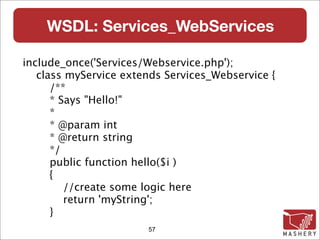
WSDL: Services_WebServices

include_once('Services/Webservice.php');
   class myService extends Services_Webservice {
      /**
      * Says "Hello!"
      *
      * @param int
      * @return string
      */
      public function hello($i )
      {
         //create some logic here
         return 'myString';
      }
                       57
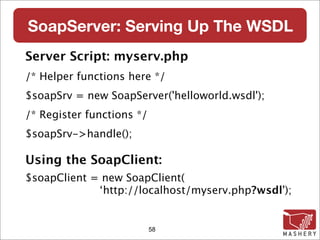
SoapServer: Serving Up The WSDL
Server Script: myserv.php
/* Helper functions here */
$soapSrv = new SoapServer('helloworld.wsdl');
/* Register functions */
$soapSrv->handle();

Using the SoapClient:
$soapClient = new SoapClient(
             ‘http://localhost/myserv.php?wsdl');


                           58
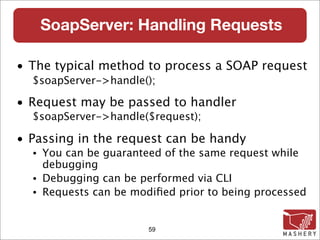
SoapServer: Handling Requests

• The typical method to process a SOAP request
  $soapServer->handle();

• Request may be passed to handler
  $soapServer->handle($request);

• Passing in the request can be handy
  •   You can be guaranteed of the same request while
      debugging
  •   Debugging can be performed via CLI
  •   Requests can be modified prior to being processed


                         59
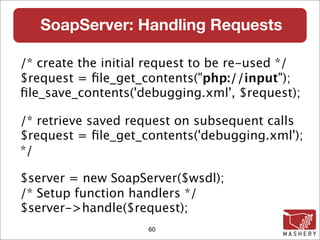
SoapServer: Handling Requests

/* create the initial request to be re-used */
$request = file_get_contents("php://input");
file_save_contents('debugging.xml', $request);

/* retrieve saved request on subsequent calls
$request = file_get_contents('debugging.xml');
*/

$server = new SoapServer($wsdl);
/* Setup function handlers */
$server->handle($request);
                     60
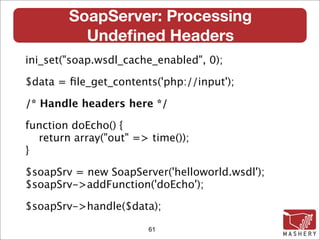
SoapServer: Processing
          Undefined Headers
ini_set("soap.wsdl_cache_enabled", 0);

$data = file_get_contents('php://input');

/* Handle headers here */

function doEcho() {
  return array("out" => time());
}

$soapSrv = new SoapServer('helloworld.wsdl');
$soapSrv->addFunction('doEcho');

$soapSrv->handle($data);

                        61
SoapServer: Processing
            Undefined Headers
$sxe = simplexml_load_file('php://input');
$sxe->registerXPathNamespace('mywsse', $wsens);

$secnode = $sxe->xpath('//mywsse:Security');
if (! empty($secnode)) {
  $sec = $secnode[0];
  $token = $sec->children($wsens)->UsernameToken;
     if ($token->Username != 'myname' &&
       $token->Password != 'mypass') {
         throw new SoapFault("Server", 'Bad Credentials');
    }
}
$data = $sxe->asXML();
                          62
SoapServer: Handling Headers
There has to be an easier way!


             63
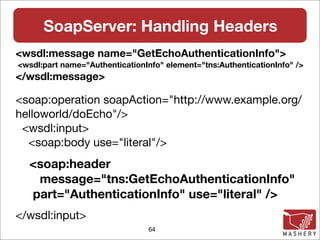
SoapServer: Handling Headers
<wsdl:message name="GetEchoAuthenticationInfo">
<wsdl:part name="AuthenticationInfo" element="tns:AuthenticationInfo" />
</wsdl:message>

<soap:operation soapAction="http://www.example.org/
helloworld/doEcho"/>
 <wsdl:input>
  <soap:body use="literal"/>
  <soap:header
   message="tns:GetEchoAuthenticationInfo"
  part="AuthenticationInfo" use="literal" />
</wsdl:input>
                                64
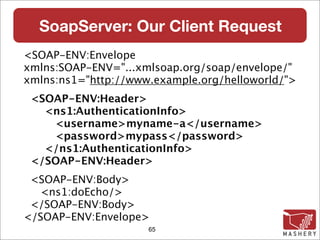
SoapServer: Our Client Request
<SOAP-ENV:Envelope
xmlns:SOAP-ENV="...xmlsoap.org/soap/envelope/"
xmlns:ns1="http://www.example.org/helloworld/">
 <SOAP-ENV:Header>
   <ns1:AuthenticationInfo>
    <username>myname-a</username>
    <password>mypass</password>
   </ns1:AuthenticationInfo>
 </SOAP-ENV:Header>
 <SOAP-ENV:Body>
  <ns1:doEcho/>
 </SOAP-ENV:Body>
</SOAP-ENV:Envelope>
                     65
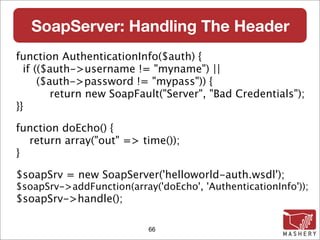
SoapServer: Handling The Header
function AuthenticationInfo($auth) {
  if (($auth->username != "myname") ||
      ($auth->password != "mypass")) {
         return new SoapFault("Server", "Bad Credentials");
}}

function doEcho() {
  return array("out" => time());
}

$soapSrv = new SoapServer('helloworld-auth.wsdl');
$soapSrv->addFunction(array('doEcho', 'AuthenticationInfo'));
$soapSrv->handle();

                           66
Swiss Army SOAP
  When All Else Fails
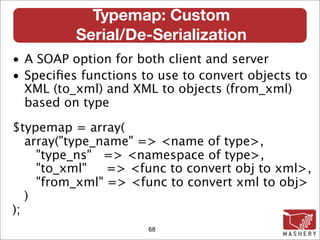
Typemap: Custom
          Serial/De-Serialization
• A SOAP option for both client and server
• Specifies functions to use to convert objects to
  XML (to_xml) and XML to objects (from_xml)
  based on type

$typemap = array(
   array("type_name" => <name of type>,
     "type_ns" => <namespace of type>,
     "to_xml"   => <func to convert obj to xml>,
     "from_xml" => <func to convert xml to obj>
   )
);
                      68
Typemap: SoapClient Example


RESTful / SOAP translator


            69
TypeMap: Rest / SOAP Translator

if (empty($_GET['fname']) || empty($_GET['lname'])) {

     echo '<error>Missing parameters</error>';

     exit;
}

$soapClient = new SOAPClient('http://
172.16.183.129/transformer.wsdl');

$myperson = array('fname' => $_GET['fname'],
                  'lname' => $_GET['lname']);
$res = $soapClient->getPerson($myperson);
var_dump($res);

                        70
TypeMap: Rest / SOAP Translator
                          Output

  http://localhost/translatorclient.php?
  fname=Joe&lname=Schmoe


object(stdClass)[2]
 public 'fullname' => string 'Joe Schmoe' (length=10)
 public 'age' => int 94
 public 'sex' => string 'M' (length=1)


                           71
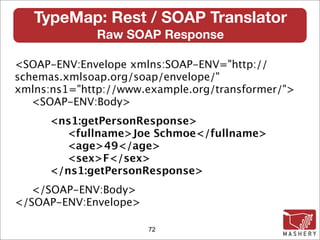
TypeMap: Rest / SOAP Translator
              Raw SOAP Response

<SOAP-ENV:Envelope xmlns:SOAP-ENV="http://
schemas.xmlsoap.org/soap/envelope/"
xmlns:ns1="http://www.example.org/transformer/">
   <SOAP-ENV:Body>
      <ns1:getPersonResponse>
        <fullname>Joe Schmoe</fullname>
        <age>49</age>
        <sex>F</sex>
      </ns1:getPersonResponse>
  </SOAP-ENV:Body>
</SOAP-ENV:Envelope>

                       72
TypeMap: Rest / SOAP Translator
function getResults($person) {
  return $person;
}
$myperson = array('fname' => $_GET['fname'],
                   'lname' => $_GET['lname']);

$tmap = array(
  array('type_name' => 'getPersonResponse',
   "type_ns" => '...example.org/transformer/',
   "to_xml"    => NULL,
   "from_xml" => 'getResults'));
$soapClient = new SOAPClient($mywsdl,
                      array('typemap'=>$tmap));
echo $soapClient->getPerson($myperson);
                                73
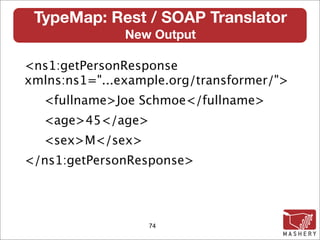
TypeMap: Rest / SOAP Translator
               New Output

<ns1:getPersonResponse
xmlns:ns1="...example.org/transformer/">
  <fullname>Joe Schmoe</fullname>
  <age>45</age>
  <sex>M</sex>
</ns1:getPersonResponse>


                  74
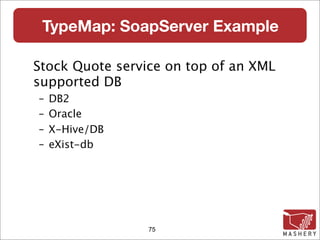
TypeMap: SoapServer Example

Stock Quote service on top of an XML
supported DB
–   DB2
–   Oracle
–   X-Hive/DB
–   eXist-db


                 75
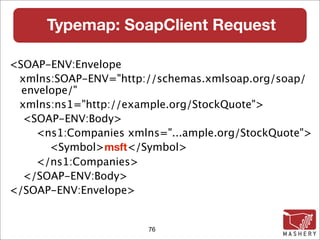
Typemap: SoapClient Request

<SOAP-ENV:Envelope
 xmlns:SOAP-ENV="http://schemas.xmlsoap.org/soap/
  envelope/"
 xmlns:ns1="http://example.org/StockQuote">
  <SOAP-ENV:Body>
    <ns1:Companies xmlns="...ample.org/StockQuote">
       <Symbol>msft</Symbol>
    </ns1:Companies>
  </SOAP-ENV:Body>
</SOAP-ENV:Envelope>


                       76
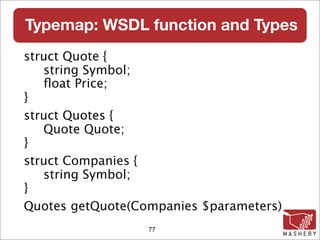
Typemap: WSDL function and Types
struct Quote {
   string Symbol;
   float Price;
}
struct Quotes {
   Quote Quote;
}
struct Companies {
   string Symbol;
}
Quotes getQuote(Companies $parameters)‫‏‬
                  77
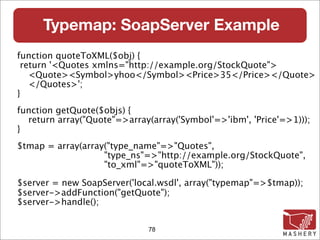
Typemap: SoapServer Example
function quoteToXML($obj) {
 return '<Quotes xmlns="http://example.org/StockQuote">
   <Quote><Symbol>yhoo</Symbol><Price>35</Price></Quote>
   </Quotes>';
}
function getQuote($objs) {
  return array("Quote"=>array(array('Symbol'=>'ibm', 'Price'=>1)));
}
$tmap = array(array("type_name"=>"Quotes",
                   "type_ns"=>"http://example.org/StockQuote",
                   "to_xml"=>"quoteToXML"));

$server = new SoapServer('local.wsdl', array("typemap"=>$tmap));
$server->addFunction("getQuote");
$server->handle();


                              78
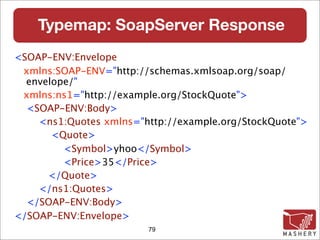
Typemap: SoapServer Response
<SOAP-ENV:Envelope
 xmlns:SOAP-ENV="http://schemas.xmlsoap.org/soap/
  envelope/"
 xmlns:ns1="http://example.org/StockQuote">
  <SOAP-ENV:Body>
    <ns1:Quotes xmlns="http://example.org/StockQuote">
       <Quote>
         <Symbol>yhoo</Symbol>
         <Price>35</Price>
      </Quote>
    </ns1:Quotes>
  </SOAP-ENV:Body>
</SOAP-ENV:Envelope>
                        79
WSO2
Web Services Framework for PHP
           WSF/PHP

http://wso2.org/projects/wsf/php
WSO2 WSF/PHP

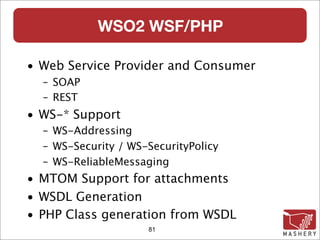
• Web Service Provider and Consumer
  – SOAP
  – REST
• WS-* Support
  – WS-Addressing
  – WS-Security / WS-SecurityPolicy
  – WS-ReliableMessaging
• MTOM Support for attachments
• WSDL Generation
• PHP Class generation from WSDL
                     81
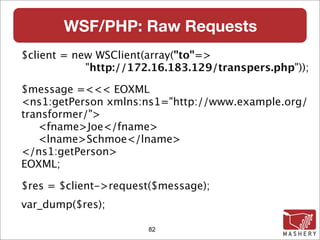
WSF/PHP: Raw Requests
$client = new WSClient(array("to"=>
            "http://172.16.183.129/transpers.php"));

$message =<<< EOXML
<ns1:getPerson xmlns:ns1="http://www.example.org/
transformer/">
   <fname>Joe</fname>
   <lname>Schmoe</lname>
</ns1:getPerson>
EOXML;

$res = $client->request($message);
var_dump($res);

                      82
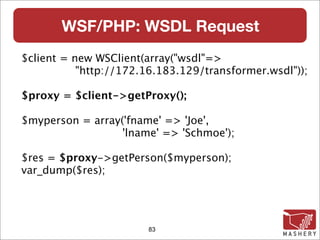
WSF/PHP: WSDL Request
$client = new WSClient(array("wsdl"=>
           "http://172.16.183.129/transformer.wsdl"));

$proxy = $client->getProxy();

$myperson = array('fname' => 'Joe',
                  'lname' => 'Schmoe');

$res = $proxy->getPerson($myperson);
var_dump($res);


                       83
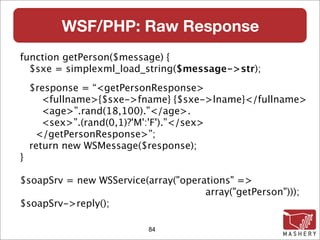
WSF/PHP: Raw Response
function getPerson($message) {
  $sxe = simplexml_load_string($message->str);
    $response = “<getPersonResponse>
       <fullname>{$sxe->fname} {$sxe->lname}</fullname>
       <age>”.rand(18,100).”</age>.
       <sex>”.(rand(0,1)?'M':'F').”</sex>
     </getPersonResponse>”;
    return new WSMessage($response);
}

$soapSrv = new WSService(array("operations" =>
                                     array("getPerson")));
$soapSrv->reply();

                          84
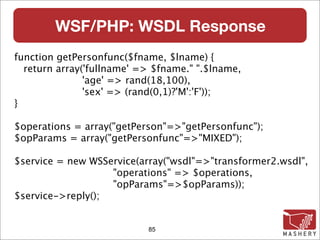
WSF/PHP: WSDL Response
function getPersonfunc($fname, $lname) {
  return array('fullname' => $fname." ".$lname,
               'age' => rand(18,100),
               'sex' => (rand(0,1)?'M':'F'));
}

$operations = array("getPerson"=>"getPersonfunc");
$opParams = array("getPersonfunc"=>"MIXED");

$service = new WSService(array("wsdl"=>"transformer2.wsdl",
                   "operations" => $operations,
                   "opParams"=>$opParams));
$service->reply();


                           85
Questions?


SOAP Tips, Tricks & Tools


         Rob Richards
 http://xri.net/=rob.richards
  http://www.cdatazone.org


             86

Soap tips

  • 1.
    SOAP Tips, Tricks& Tools March 12, 2008 Rob Richards http://xri.net/=rob.richards www.cdatazone.org
  • 2.
    Helpful Tools • soapUI – http://www.soapui.org/ – Multiple platforms / Free & enhanced Pro versions • SOAPSonar – http://www.crosschecknet.com/ – Windows only / Free and Professional versions • Eclipse – WSDL Editor – XML / XSD Editors & Validators • Misc. XML Editors – XML NotePad 2007 (Microsoft)‫‏‬ – XML Spy (Altova)‫‏‬ 2
  • 3.
    soapUI Features • WebService Inspection – WSDL Inspector – HTTP data inspection (request & response)‫‏‬ • Web Service Invocation – Automatic Request generation – Authentication support (Basic, Digest, WS-Security)‫‏‬ – Custom HTTP Header support • Web Service Development and Validation • Web Service Functional Testing • Web Service Load Testing • Web Service Simulation 3
  • 4.
  • 5.
  • 6.
  • 7.
  • 8.
    Making SOAP Requests Tipsand Tricks working with the SoapClient
  • 9.
    Canadian Cattle IdentificationAgency (CCIA)‫‏‬ • Handles cattle age verification • Provides a centralized database where producers can maintain cattle information • Information is readily available to help speed up import/exports • Information can be correlated with RFID tags • System is entirely online • SOAP is used for application integration • Website: http://www.canadaid.ca/ 9
  • 10.
    Canadian Cattle IdentificationAgency (CCIA)‫‏‬ Access to the CCIA services requires authentication through the use of WS-Security in the means of a UsernameToken. To simplify the examples, authentication has been omitted. 10
  • 11.
    CCIA: Retrieve APIInformation $wsdl = 'http://www.clia.livestockid.ca/CLTS/public/help/en/ webservices/WebServiceAnimalSearch/IAnimalSearchWSv2.wsdl'; $client = new SOAPClient($wsdl); $functions = $client->__getFunctions(); foreach ($functions AS $function) { print $function."nn"; } $types = $client->__getTypes(); foreach ($types AS $type) { print $type."nn"; } 11
  • 12.
    CCIA: Can WeBe Any More Descriptive? com_clarkston_cts_webservice_animal_search_value_AnimalSearchResultWSValue executeSearch (com_clarkston_cts_webservice_animal_search_value_ AnimalSearchCriteriaWSValue $criteria)‫‏‬ struct com_clarkston_cts_webservice_animal_search_value_AnimalSearchCriteriaWSValue { ArrayOfcom_clarkston_cts_webservice_value_TagRangeWSValue tagRangeList; string publicAccountId; } struct com_clarkston_cts_webservice_value_TagRangeWSValue { string tagType; string endTag; string startTag; } com_clarkston_cts_webservice_value_TagRangeWSValue ArrayOfcom_clarkston_cts_webservice_value_TagRangeWSValue[] 12
  • 13.
    CCIA: Functions andTypes Translated AnimalResult executeSearch(AnimalCriteria $criteria)‫‏‬ struct TagRange { string tagType; string endTag; string startTag; } TagRange ArrayOfTagRange[] struct AnimalCriteria { ArrayOfTagRange tagRangeList; string publicAccountId; } 13
  • 14.
    CCIA: Working withStructs From WSDL struct TagRange { string tagType; string endTag; string startTag; } In PHP array(“tagType” => x, “endTag” => y, “startTag” => z); class TagRange { public $tagType; public $endTag; public $startTag; } 14
  • 15.
    CCIA: Making TheRequest try { $client = new SoapClient($wsdl); $stag = '000000124000050000102'; $etag = '000000124000050000106'; $tag1 = array('startTag'=>$stag, 'endTag'=>$etag, 'tagType'=>'C'); $tRangeList = array($tag1); $res = $client->executeSearch(array('tagRangeList'=>$tRangeList, 'publicAccountId'=>"")); var_dump($res); } catch (SoapFault $e) { var_dump($e); } 15
  • 16.
    CCIA: DOH! .. . Denied 16
  • 17.
    CCIA: DOH! .. . Denied object(SoapFault)#3 (9) { ... ["faultstring"]=> string(273) "No Deserializer found to deserialize a 'http:// com.clarkston.cts.webservice.animal.search/ IAnimalSearchWSv2.xsd:ArrayOfcom_clarkston_cts_w ebservice_value_TagRangeWSValue' using encoding style 'http://schemas.xmlsoap.org/soap/ encoding/'. [java.lang.IllegalArgumentException]" ["faultcode"]=> string(15) "SOAP-ENV:Client" ["faultactor"]=> string(22) "/CLTS/ AnimalSearchWSv2" } 17
  • 18.
    CCIA: Capturing theRequest $client_options = array ('trace'=>1); $client = new SoapClient($wsdl, $client_options); try { /* code edited for brevity */ $res = $client->executeSearch( array( 'tagRangeList'=>$tRangeList, 'publicAccountId'=>"") ); } catch (SoapFault $e) { print $client->__getLastRequest(); } 18
  • 19.
    CCIA: Capturing Messages Becareful when capturing the output from __getLastRequest() or __getLastResponse()‫‏‬ • Pipe the output to a file php myclient.php > request.php • Capture it to a variable $request = $client->__getLastRequest(); file_put_contents('request.xml', $request); 19
  • 20.
    CCIA: The SOAPRequest (edited)‫‏‬ <ns1:executeSearch> <criteria xsi:type="ns2:AnimalSearchCriteriaWSValue"> <tagRangeList SOAP-ENC:arrayType="ns2:TagRange[1]" xsi:type="ns2:ArrayOfTagRange"> <item xsi:type="ns2:TagRange"> <tagType xsi:type="xsd:string">C</tagType> <endTag xsi:type="xsd:string">. . .00106</endTag> <startTag xsi:type="xsd:string">. . .00102</startTag> </item> </tagRangeList> <publicAccountId xsi:type="xsd:string"/> </criteria> </ns1:executeSearch> 20
  • 21.
    CCIA: So Where’sthe Problem? Time to pull out one or more of your SOAP tools Fire up your favorite search engine 21
  • 22.
  • 23.
    CCIA: The Problem SOAP 1.1 Specs: SOAP arrays are defined as having a type of "SOAP- ENC:Array" or a type derived there from ArrayOfcom_clarkston_cts_webservice_value_TagRange WSValue derives from SOAP-Enc:Array SOAP Server does not accept the derived type but rather requires SOAP-ENC:Array type The SOAP Server breaks the WS-I rules surrounding arrays 23
  • 24.
    CCIA: The Solution xsi:typeof tagRangeList needs to be changed from ns2:ArrayOfTagRange to SOAP-ENC:Array But, How do we alter the message? 24
  • 25.
    CCIA: Accessing TheRequest class CustomSoapClient extends SoapClient { function __doRequest($request, $location, $saction, $version) { $doc = new DOMDocument(); $doc->loadXML($request); /* Modify SOAP Request held within $doc */ return parent::__doRequest($doc->saveXML(), $location, $saction, $version); } } 25
  • 26.
    CCIA: Modifying TheRequest $root = $doc->documentElement; $encprefix = $root->lookupPrefix('. . .schemas.xmlsoap.org/soap/encoding/'); $xpath = new DOMXPath($doc); $xpath->registerNamespace("myschem", 'http://. . ./XMLSchema-instance'); $xpath->registerNamespace("myxsi", 'http://schemas.xmlsoap.org/soap/. . .'); $query = '/*/*/*//*[@myxsi:arrayType and @myschem:type]'; if ($nodelists = $xpath->query($query)) { foreach ($nodelists AS $node) { if ($attnode = $node->getAttributeNodeNS('http://. . ./XMLSchema-instance', 'type'))‫‏‬ { $attnode->nodeValue = $encprefix.':Array'; ... 26
  • 27.
    CCIA: The AlteredRequest <ns1:executeSearch> <criteria xsi:type="ns2:AnimalSearchCriteriaWSValue"> <tagRangeList SOAP-ENC:arrayType="ns2:TagRange[1]" xsi:type="SOAP-ENC:Array"> <item xsi:type="ns2:TagRange"> <tagType xsi:type="xsd:string">C</tagType> <endTag xsi:type="xsd:string">. . .00106</endTag> <startTag xsi:type="xsd:string">. . .00102</startTag> </item> </tagRangeList> <publicAccountId xsi:type="xsd:string"/> </criteria> </ns1:executeSearch> 27
  • 28.
    CCIA: Inspecting AlteredRequest $client_options = array ('trace'=>1); $client = new CustomSoapClient($wsdl, $client_options); try { How Did You Get The Request? /* code edited for brevity */ $res = $client->executeSearch(array('tagRangeList'=>$tRangeList, 'publicAccountId'=>"")); $res->__getLastRequest() // Still shows bad message • Messages altered within __doRequest() are not reflected when __getLastRequest() is called • View the raw XML from the DOMDocument within __doRequest print $doc->saveXML(); 28
  • 29.
    CCIA: Handling SOAP-ENC:Array w/ PHP 5.2 $client_options = array( 'features'=>SOAP_USE_XSI_ARRAY_TYPE); $client = new SoapClient($wsdl, $client_options); $stag = '000000124000050000102'; $etag = '000000124000050000106'; $tag1 = array('startTag'=>$stag, 'endTag'=>$etag, 'tagType'=>'C'); $tRangeList = array($tag1); $res = $client->executeSearch( array( 'tagRangeList'=>$tRangeList, 'publicAccountId'=>"")); 29
  • 30.
    ExactTarget • Provide toolsand services for email communications • Focus on Email Marketing • On-Demand Access • Personal Interaction via Web-based GUI • Application integration via REST and/or SOAP • SOA based SOAP interface 30
  • 31.
    ExactTarget: Retrieve APIinformation $wsdl = 'https://webservice.exacttarget.com/etframework.wsdl'; @$client = new SOAPClient($wsdl, array('trace'=>1)); $types = $client->__getTypes(); foreach ($types AS $type) { print $type."nn"; } $functions = $client->__getFunctions(); foreach ($functions AS $function) { print $function."nn"; } 31
  • 32.
    ExactTarget Functions CreateResponse Create(CreateRequest$parameters)‫‏‬ RetrieveResponseMsg Retrieve(RetrieveRequestMsg $parameters)‫‏‬ UpdateResponse Update(UpdateRequest $parameters)‫‏‬ DeleteResponse Delete(DeleteRequest $parameters)‫‏‬ ExecuteResponseMsg Execute(ExecuteRequestMsg $parameters)‫‏‬ 32
  • 33.
    ExactTarget: RetrieveRequestMsg struct RetrieveRequestMsg{ RetrieveRequest RetrieveRequest; } struct RetrieveRequest { ClientID ClientIDs; string ObjectType; string Properties; FilterPart Filter; AsyncResponse RespondTo; APIProperty PartnerProperties; string ContinueRequest; boolean QueryAllAccounts; boolean RetrieveAllSinceLastBatch; } 33
  • 34.
    ExactTarget: Basic ListRetrieval @$client = new ExactTargetSoapClient($wsdl, $options); /* WS-Security Username handling */ $request = new ExactTarget_RetrieveRequestMsg(); $rr = new ExactTarget_RetrieveRequest(); $rr->ObjectType = "List"; $rr->Properties = array("ListName"); $request->RetrieveRequest = $rr; $response = $client->Retrieve($request); 34
  • 35.
    ExactTarget: List RetrievalResponse object(stdClass)#6 (3) { ["OverallStatus"]=> string(2) "OK" ["RequestID"]=> string(36) "6bb27c71-16e6-4167- a57c-32df045174c4" ["Results"]=> array(2) { [0]=> object(stdClass)#12 (3) { ["PartnerKey"]=> NULL ["ObjectID"]=> NULL ["ListName"]=> string(8) "RobsList" } [1]=> object(stdClass)#8 (3) { ["PartnerKey"]=> NULL ["ObjectID"]=> NULL ["ListName"]=> string(12) "New Rob List" 35
  • 36.
    ExactTarget: FilterPart Definition FromRetrieveRequest Definition: FilterPart Filter; FilterPart Definition: struct FilterPart { } 36
  • 37.
    ExactTarget: Using aFilterPart <complexType name="SimpleFilterPart"> <complexContent> <extension base="tns:FilterPart"> <sequence> <element name="Property" type="xsd:string" minOccurs="1" maxOccurs="1" /> <element name="SimpleOperator" type="tns:SimpleOperators" minOccurs="1" maxOccurs="1" /> <element name="Value" type="xsd:string" minOccurs="0" maxOccurs="unbounded" /> <element name="DateValue" type="xsd:dateTime" minOccurs="0" maxOccurs="unbounded" /> </sequence> </extension> </complexContent> </complexType> 37
  • 38.
    ExactTarget: Filtering Requests $sfp= new ExactTarget_SimpleFilterPart(); $sfp->Property = "ListName"; $sfp->SimpleOperator = ExactTarget_SimpleOperators::equals; $sfp->Value = array("RobsList"); $rr->Filter = $sfp; 38
  • 39.
    ExactTarget: Filter Results object(stdClass)#7(2) { ["OverallStatus"]=> string(60) "Error: Object reference not set to an instance of an object." ["RequestID"]=> string(36) "9c7ebf66- d211-43cf-9984-0adfb4b1e476" } This Doesn't Look Right! 39
  • 40.
    ExactTarget: Examining TheRequest <SOAP-ENV:Envelope xmlns:SOAP-ENV=". . ." xmlns:ns1="http://exacttarget.com/wsdl/partnerAPI"> <SOAP-ENV:Body> <ns1:RetrieveRequestMsg> <ns1:RetrieveRequest> <ns1:ObjectType>List</ns1:ObjectType> <ns1:Properties>ListName</ns1:Properties> <ns1:Filter/> <!-- Where is our Filter??? --> </ns1:RetrieveRequest> </ns1:RetrieveRequestMsg> </SOAP-ENV:Body> </SOAP-ENV:Envelope> 40
  • 41.
    ExactTarget: The Problem RetrieveRequestcalls for a FilterPart type FilterPart is an abstract type SimpleFilterPart type passed in PHP leaves type as default Now What Do We Do? 41
  • 42.
    SoapVar To TheRescue! • Set Encoding for data • Set Type information • Set Node information 42
  • 43.
    ExactTarget: Using TheSoapVar Class class SoapVar { __construct ( mixed $data, int $encoding [, string $type_name [, string $type_namespace [, string $node_name [, string $node_namespace ]]]] ) } 43
  • 44.
    ExactTarget: Using TheSoapVar Class $soapvar = new SoapVar( $sfp, /* data */ SOAP_ENC_OBJECT, /* encoding */ 'SimpleFilterPart', /* type_name */ "http://exacttarget.com/wsdl/partnerAPI" /* type ns */ ); $rr->Filter = $soapvar; 44
  • 45.
    ExactTarget: Filtered Results object(stdClass)#8(3) { ["OverallStatus"]=>string(2) "OK" ["RequestID"]=>string(36) "638f2307-xxxxxx" ["Results"]=> object(stdClass)#14 (3) { ["PartnerKey"]=>NULL ["ObjectID"]=>NULL ["ListName"]=>string(8) "RobsList" } } 45
  • 46.
    ExactTarget: Examining TheRequest (Take 2)‫‏‬ <!-- Only internal struct of envelope --> <ns1:RetrieveRequest> <ns1:ObjectType>List</ns1:ObjectType> <ns1:Properties>ListName</ns1:Properties> <ns1:Filter xsi:type="ns1:SimpleFilterPart"> <ns1:Property>ListName</ns1:Property> <ns1:SimpleOper...>equals</ns1:SimpleOper...> <ns1:Value>RobsList</ns1:Value> </ns1:Filter> 46
  • 47.
    SOAP Client Headers <SOAP-ENV:Envelopexmlns:SOAP- ENV="http://schemas.xmlsoap.org/soap/ envelope/"> <SOAP-ENV:Header/> <SOAP-ENV:Body> </SOAP-ENV:Body> </SOAP-ENV:Envelope> 47
  • 48.
    SOAP Client Headers <SOAP-ENV:Header> <wsse:Security xmlns:wsse="...wss-wssecurity- secext-1.0.xsd"> <wsse:UsernameToken> <wsse:Username>myname</wsse:Username> <wsse:Password>mypass</wsse:Password> </wsse:UsernameToken> </wsse:Security> </SOAP-ENV:Header> 48
  • 49.
    SOAP Client Headers:Our Structure class wsUsernameToken { public $Username; public $Password; } class wsSec { public $UsernameToken; } 49
  • 50.
    SOAP Headers: Assembling $token= new wsUsernameToken; $token->Username = 'myname'; $token->Password = 'mypass'; $wsec = new wsSec; $wsec->UsernameToken = $token; $header = new SoapHeader($wssens, "Security", $wsec, false); $soapClient->__setSoapHeaders(array($header)); 50
  • 51.
    SOAP Headers: NotWhat We Want <SOAP-ENV:Body . . . xmlns:ns2="...wss-wssecurity-secext-1.0.xsd"> <SOAP-ENV:Header> <ns2:Security> <UsernameToken> <Username>myname</Username> <Password>mypass</Password> </UsernameToken> </ns2:Security> </SOAP-ENV:Header> 51
  • 52.
    SOAP Headers: OurWay $wsec = new wsSec; $token = new wsUsernameToken; $token->Username = new SoapVar("myname", XSD_STRING, NULL, NULL, NULL, $wssens); $token->Password = new SoapVar("mypass", XSD_STRING, NULL, NULL, NULL, $wssens); $var = new SoapVar($token, SOAP_ENC_OBJECT, NULL, NULL, NULL, $wssens); $wsec->UsernameToken = $var; $header = new SoapHeader($wssens, "Security", $wsec, false); $soapClient->__setSoapHeaders(array($header)); 52
  • 53.
    SOAP Header: Finally! </SOAP-ENV:Header> <ns2:Security> <ns2:UsernameToken> <ns2:Username>myname</ns2:Username> <ns2:Password>mypass</ns2:Password> </ns2:UsernameToken> </ns2:Security> </SOAP-ENV:Header> 53
  • 54.
    Server Sided SOAP Workingthrough server sided issues
  • 55.
    SoapServer: WSDL Caching DISABLE WSDL CACHING WHEN DEVELOPING! ini_set("soap.wsdl_cache_enabled", "0"); 55
  • 56.
    SoapServer: Generating TheWSDL • Integrated Generators – Services_Webservices • http://pear.php.net/package/Services_Webservice – PRADO • http://pradosoft.com/demos/quickstart/? page=Services.SoapService – WSO2 WSF/PHP (http://wso2.org/projects/wsf/php) • External Tools – Eclipse WSDL Editor in Web Tools Platform (WTP) – Zend Studio (http://www.zend.com/en/products/studio/) 56
  • 57.
    WSDL: Services_WebServices include_once('Services/Webservice.php'); class myService extends Services_Webservice { /** * Says "Hello!" * * @param int * @return string */ public function hello($i ) { //create some logic here return 'myString'; } 57
  • 58.
    SoapServer: Serving UpThe WSDL Server Script: myserv.php /* Helper functions here */ $soapSrv = new SoapServer('helloworld.wsdl'); /* Register functions */ $soapSrv->handle(); Using the SoapClient: $soapClient = new SoapClient( ‘http://localhost/myserv.php?wsdl'); 58
  • 59.
    SoapServer: Handling Requests •The typical method to process a SOAP request $soapServer->handle(); • Request may be passed to handler $soapServer->handle($request); • Passing in the request can be handy • You can be guaranteed of the same request while debugging • Debugging can be performed via CLI • Requests can be modified prior to being processed 59
  • 60.
    SoapServer: Handling Requests /*create the initial request to be re-used */ $request = file_get_contents("php://input"); file_save_contents('debugging.xml', $request); /* retrieve saved request on subsequent calls $request = file_get_contents('debugging.xml'); */ $server = new SoapServer($wsdl); /* Setup function handlers */ $server->handle($request); 60
  • 61.
    SoapServer: Processing Undefined Headers ini_set("soap.wsdl_cache_enabled", 0); $data = file_get_contents('php://input'); /* Handle headers here */ function doEcho() { return array("out" => time()); } $soapSrv = new SoapServer('helloworld.wsdl'); $soapSrv->addFunction('doEcho'); $soapSrv->handle($data); 61
  • 62.
    SoapServer: Processing Undefined Headers $sxe = simplexml_load_file('php://input'); $sxe->registerXPathNamespace('mywsse', $wsens); $secnode = $sxe->xpath('//mywsse:Security'); if (! empty($secnode)) { $sec = $secnode[0]; $token = $sec->children($wsens)->UsernameToken; if ($token->Username != 'myname' && $token->Password != 'mypass') { throw new SoapFault("Server", 'Bad Credentials'); } } $data = $sxe->asXML(); 62
  • 63.
    SoapServer: Handling Headers Therehas to be an easier way! 63
  • 64.
    SoapServer: Handling Headers <wsdl:messagename="GetEchoAuthenticationInfo"> <wsdl:part name="AuthenticationInfo" element="tns:AuthenticationInfo" /> </wsdl:message> <soap:operation soapAction="http://www.example.org/ helloworld/doEcho"/> <wsdl:input> <soap:body use="literal"/> <soap:header message="tns:GetEchoAuthenticationInfo" part="AuthenticationInfo" use="literal" /> </wsdl:input> 64
  • 65.
    SoapServer: Our ClientRequest <SOAP-ENV:Envelope xmlns:SOAP-ENV="...xmlsoap.org/soap/envelope/" xmlns:ns1="http://www.example.org/helloworld/"> <SOAP-ENV:Header> <ns1:AuthenticationInfo> <username>myname-a</username> <password>mypass</password> </ns1:AuthenticationInfo> </SOAP-ENV:Header> <SOAP-ENV:Body> <ns1:doEcho/> </SOAP-ENV:Body> </SOAP-ENV:Envelope> 65
  • 66.
    SoapServer: Handling TheHeader function AuthenticationInfo($auth) { if (($auth->username != "myname") || ($auth->password != "mypass")) { return new SoapFault("Server", "Bad Credentials"); }} function doEcho() { return array("out" => time()); } $soapSrv = new SoapServer('helloworld-auth.wsdl'); $soapSrv->addFunction(array('doEcho', 'AuthenticationInfo')); $soapSrv->handle(); 66
  • 67.
    Swiss Army SOAP When All Else Fails
  • 68.
    Typemap: Custom Serial/De-Serialization • A SOAP option for both client and server • Specifies functions to use to convert objects to XML (to_xml) and XML to objects (from_xml) based on type $typemap = array( array("type_name" => <name of type>, "type_ns" => <namespace of type>, "to_xml" => <func to convert obj to xml>, "from_xml" => <func to convert xml to obj> ) ); 68
  • 69.
  • 70.
    TypeMap: Rest /SOAP Translator if (empty($_GET['fname']) || empty($_GET['lname'])) { echo '<error>Missing parameters</error>'; exit; } $soapClient = new SOAPClient('http:// 172.16.183.129/transformer.wsdl'); $myperson = array('fname' => $_GET['fname'], 'lname' => $_GET['lname']); $res = $soapClient->getPerson($myperson); var_dump($res); 70
  • 71.
    TypeMap: Rest /SOAP Translator Output http://localhost/translatorclient.php? fname=Joe&lname=Schmoe object(stdClass)[2] public 'fullname' => string 'Joe Schmoe' (length=10) public 'age' => int 94 public 'sex' => string 'M' (length=1) 71
  • 72.
    TypeMap: Rest /SOAP Translator Raw SOAP Response <SOAP-ENV:Envelope xmlns:SOAP-ENV="http:// schemas.xmlsoap.org/soap/envelope/" xmlns:ns1="http://www.example.org/transformer/"> <SOAP-ENV:Body> <ns1:getPersonResponse> <fullname>Joe Schmoe</fullname> <age>49</age> <sex>F</sex> </ns1:getPersonResponse> </SOAP-ENV:Body> </SOAP-ENV:Envelope> 72
  • 73.
    TypeMap: Rest /SOAP Translator function getResults($person) { return $person; } $myperson = array('fname' => $_GET['fname'], 'lname' => $_GET['lname']); $tmap = array( array('type_name' => 'getPersonResponse', "type_ns" => '...example.org/transformer/', "to_xml" => NULL, "from_xml" => 'getResults')); $soapClient = new SOAPClient($mywsdl, array('typemap'=>$tmap)); echo $soapClient->getPerson($myperson); 73
  • 74.
    TypeMap: Rest /SOAP Translator New Output <ns1:getPersonResponse xmlns:ns1="...example.org/transformer/"> <fullname>Joe Schmoe</fullname> <age>45</age> <sex>M</sex> </ns1:getPersonResponse> 74
  • 75.
    TypeMap: SoapServer Example StockQuote service on top of an XML supported DB – DB2 – Oracle – X-Hive/DB – eXist-db 75
  • 76.
    Typemap: SoapClient Request <SOAP-ENV:Envelope xmlns:SOAP-ENV="http://schemas.xmlsoap.org/soap/ envelope/" xmlns:ns1="http://example.org/StockQuote"> <SOAP-ENV:Body> <ns1:Companies xmlns="...ample.org/StockQuote"> <Symbol>msft</Symbol> </ns1:Companies> </SOAP-ENV:Body> </SOAP-ENV:Envelope> 76
  • 77.
    Typemap: WSDL functionand Types struct Quote { string Symbol; float Price; } struct Quotes { Quote Quote; } struct Companies { string Symbol; } Quotes getQuote(Companies $parameters)‫‏‬ 77
  • 78.
    Typemap: SoapServer Example functionquoteToXML($obj) { return '<Quotes xmlns="http://example.org/StockQuote"> <Quote><Symbol>yhoo</Symbol><Price>35</Price></Quote> </Quotes>'; } function getQuote($objs) { return array("Quote"=>array(array('Symbol'=>'ibm', 'Price'=>1))); } $tmap = array(array("type_name"=>"Quotes", "type_ns"=>"http://example.org/StockQuote", "to_xml"=>"quoteToXML")); $server = new SoapServer('local.wsdl', array("typemap"=>$tmap)); $server->addFunction("getQuote"); $server->handle(); 78
  • 79.
    Typemap: SoapServer Response <SOAP-ENV:Envelope xmlns:SOAP-ENV="http://schemas.xmlsoap.org/soap/ envelope/" xmlns:ns1="http://example.org/StockQuote"> <SOAP-ENV:Body> <ns1:Quotes xmlns="http://example.org/StockQuote"> <Quote> <Symbol>yhoo</Symbol> <Price>35</Price> </Quote> </ns1:Quotes> </SOAP-ENV:Body> </SOAP-ENV:Envelope> 79
  • 80.
    WSO2 Web Services Frameworkfor PHP WSF/PHP http://wso2.org/projects/wsf/php
  • 81.
    WSO2 WSF/PHP • WebService Provider and Consumer – SOAP – REST • WS-* Support – WS-Addressing – WS-Security / WS-SecurityPolicy – WS-ReliableMessaging • MTOM Support for attachments • WSDL Generation • PHP Class generation from WSDL 81
  • 82.
    WSF/PHP: Raw Requests $client= new WSClient(array("to"=> "http://172.16.183.129/transpers.php")); $message =<<< EOXML <ns1:getPerson xmlns:ns1="http://www.example.org/ transformer/"> <fname>Joe</fname> <lname>Schmoe</lname> </ns1:getPerson> EOXML; $res = $client->request($message); var_dump($res); 82
  • 83.
    WSF/PHP: WSDL Request $client= new WSClient(array("wsdl"=> "http://172.16.183.129/transformer.wsdl")); $proxy = $client->getProxy(); $myperson = array('fname' => 'Joe', 'lname' => 'Schmoe'); $res = $proxy->getPerson($myperson); var_dump($res); 83
  • 84.
    WSF/PHP: Raw Response functiongetPerson($message) { $sxe = simplexml_load_string($message->str); $response = “<getPersonResponse> <fullname>{$sxe->fname} {$sxe->lname}</fullname> <age>”.rand(18,100).”</age>. <sex>”.(rand(0,1)?'M':'F').”</sex> </getPersonResponse>”; return new WSMessage($response); } $soapSrv = new WSService(array("operations" => array("getPerson"))); $soapSrv->reply(); 84
  • 85.
    WSF/PHP: WSDL Response functiongetPersonfunc($fname, $lname) { return array('fullname' => $fname." ".$lname, 'age' => rand(18,100), 'sex' => (rand(0,1)?'M':'F')); } $operations = array("getPerson"=>"getPersonfunc"); $opParams = array("getPersonfunc"=>"MIXED"); $service = new WSService(array("wsdl"=>"transformer2.wsdl", "operations" => $operations, "opParams"=>$opParams)); $service->reply(); 85
  • 86.
    Questions? SOAP Tips, Tricks& Tools Rob Richards http://xri.net/=rob.richards http://www.cdatazone.org 86