Scaling Your Applications with the
IMS Catalog
Richard Tran (richtran@us.ibm.com)
Omaha RUG
May 2015
© 2014 IBM Corporation
Please Note
• IBM’s statements regarding its plans, directions, and intent are subject to change or
withdrawal without notice at IBM’s sole discretion.
• Information regarding potential future products is intended to outline our general
product direction and it should not be relied on in making a purchasing decision.
• The information mentioned regarding potential future products is not a commitment,
promise, or legal obligation to deliver any material, code or functionality. Information
about potential future products may not be incorporated into any contract.
• The development, release, and timing of any future features or functionality described
for our products remains at our sole discretion.
Performance is based on measurements and projections using standard IBM benchmarks
in a controlled environment. The actual throughput or performance that any user will
experience will vary depending upon many factors, including considerations such as
the amount of multiprogramming in the user’s job stream, the I/O configuration, the
storage configuration, and the workload processed. Therefore, no assurance can be
given that an individual user will achieve results similar to those stated here.
2
Agenda
• The IMS catalog
 What is it?
 IMS features built leveraging the IMS catalog
 Integration opportunities available through the IMS catalog
• Using the IMS catalog within the cloud
 Scaling POJO
 Scaling Java EE applications
 Scaling for mobile development
• IMS Explorer demo on database and catalog capabilities
3
What is the IMS catalog?
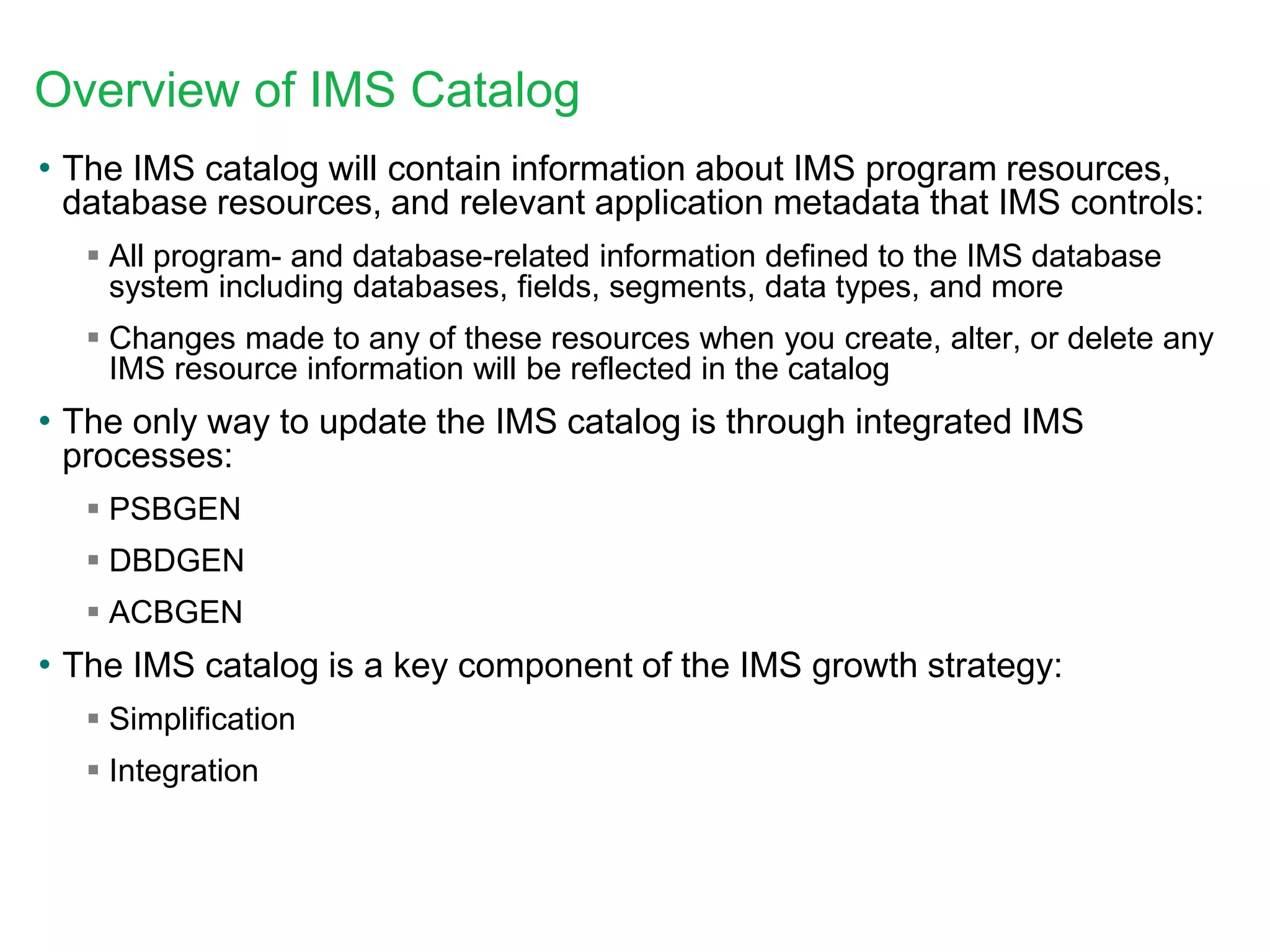
Overview of IMS Catalog
• The IMS catalog will contain information about IMS program resources,
database resources, and relevant application metadata that IMS controls:
 All program- and database-related information defined to the IMS database
system including databases, fields, segments, data types, and more
 Changes made to any of these resources when you create, alter, or delete any
IMS resource information will be reflected in the catalog
• The only way to update the IMS catalog is through integrated IMS
processes:
 PSBGEN
 DBDGEN
 ACBGEN
• The IMS catalog is a key component of the IMS growth strategy:
 Simplification
 Integration
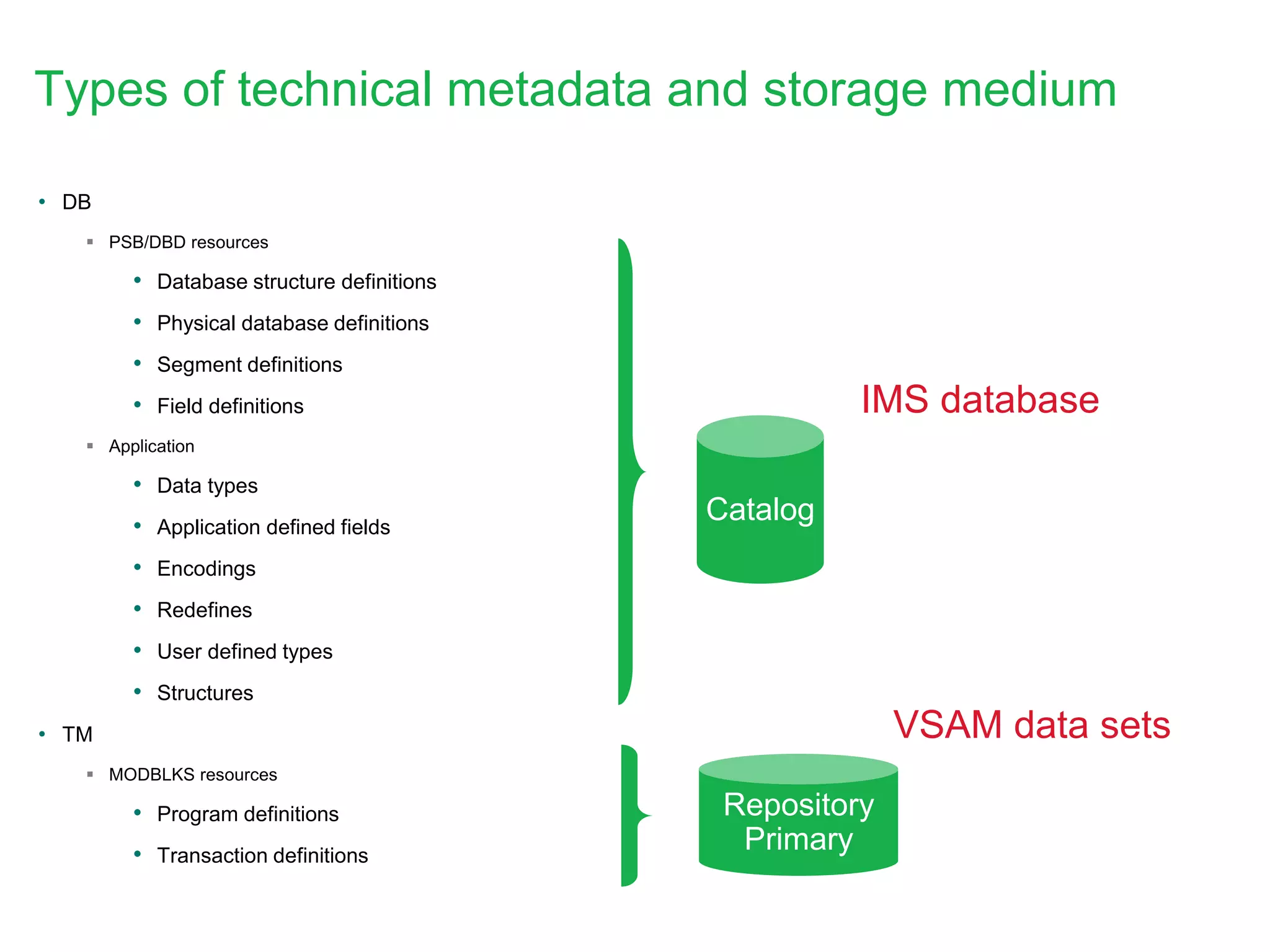
Types of technical metadata and storage medium
• DB
 PSB/DBD resources
• Database structure definitions
• Physical database definitions
• Segment definitions
• Field definitions
 Application
• Data types
• Application defined fields
• Encodings
• Redefines
• User defined types
• Structures
• TM
 MODBLKS resources
• Program definitions
• Transaction definitions
Catalog
IMS database
VSAM data sets
Repository
Primary
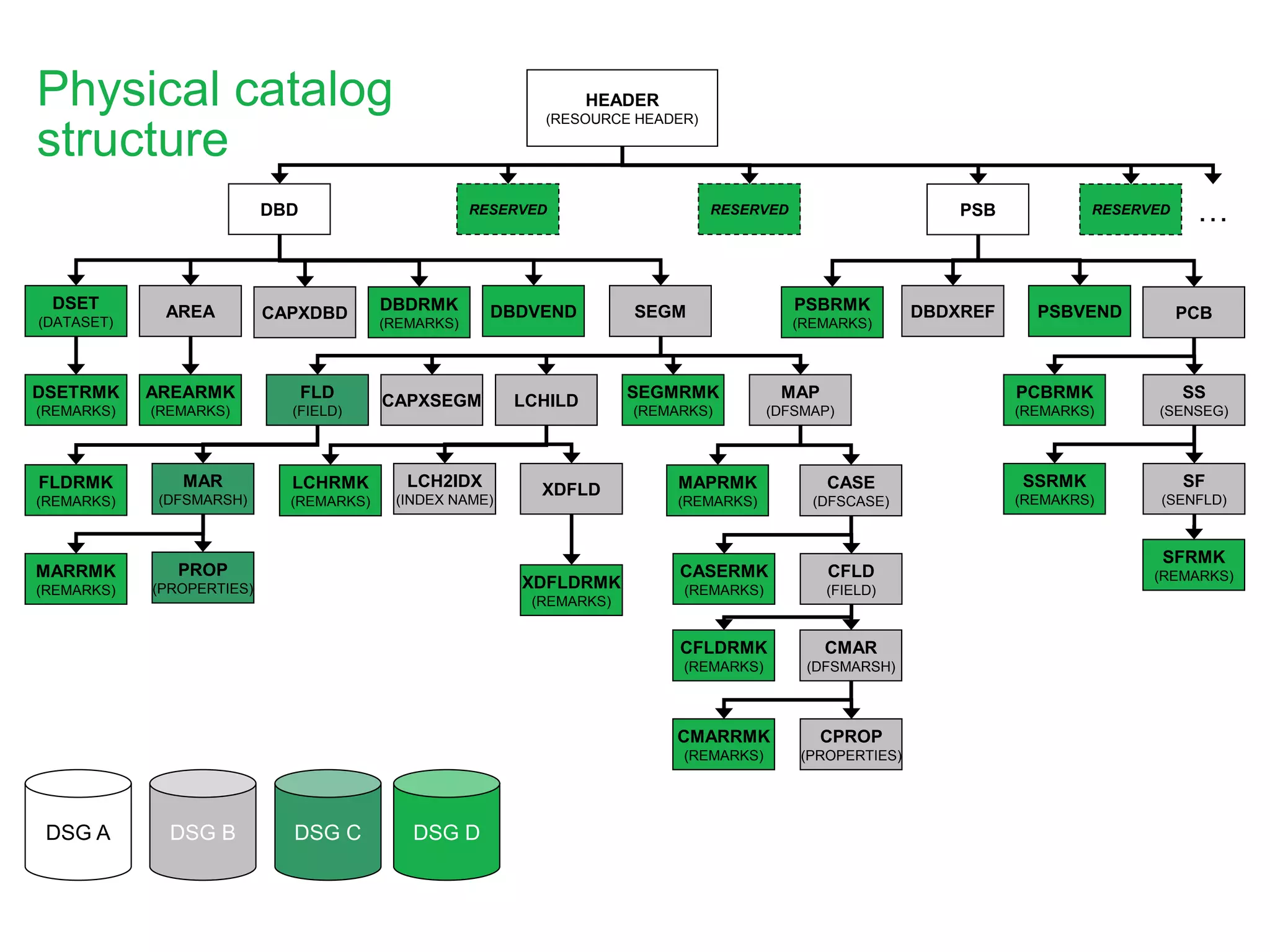
HEADER
(RESOURCE HEADER)
SS
(SENSEG)
PCB
PSB
SF
(SENFLD)
PSBVENDPSBRMK
(REMARKS)
PCBRMK
(REMARKS)
SFRMK
(REMARKS)
SSRMK
(REMAKRS)
XDFLD
LCHILD
AREA CAPXDBD SEGMDSET
(DATASET)
DBD
MAP
(DFSMAP)
DBDRMK
(REMARKS)
CAPXSEGM
CASE
(DFSCASE)
LCHRMK
(REMARKS)
SEGMRMK
(REMARKS)
CMAR
(DFSMARSH)
CPROP
(PROPERTIES)
CFLD
(FIELD)
DBDVEND
CFLDRMK
(REMARKS)
CMARRMK
(REMARKS)
DBDXREF
DSETRMK
(REMARKS)
AREARMK
(REMARKS)
FLD
(FIELD)
MAR
(DFSMARSH)
FLDRMK
(REMARKS)
PROP
(PROPERTIES)
MARRMK
(REMARKS)
MAPRMK
(REMARKS)
CASERMK
(REMARKS)
RESERVED RESERVED
LCH2IDX
(INDEX NAME)
XDFLDRMK
(REMARKS)
Physical catalog
structure
…RESERVED
DSG A DSG B DSG DDSG C
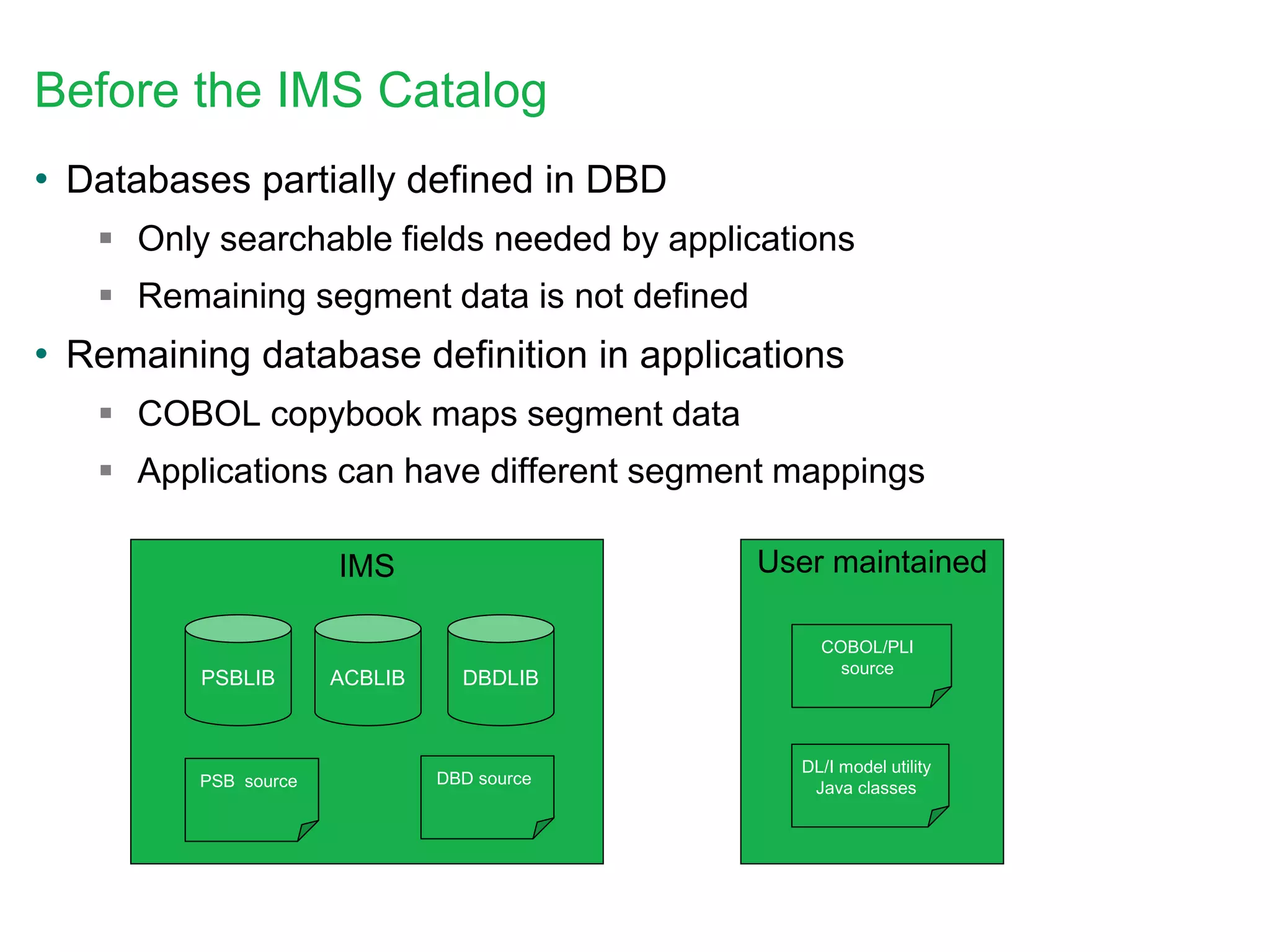
Before the IMS Catalog
• Databases partially defined in DBD
 Only searchable fields needed by applications
 Remaining segment data is not defined
• Remaining database definition in applications
 COBOL copybook maps segment data
 Applications can have different segment mappings
PSBLIB DBDLIBACBLIB
COBOL/PLI
source
DBD sourcePSB source
IMS User maintained
DL/I model utility
Java classes
DBD++ source
IMS Catalog life cycle
Catalog
PSB++ source
PSBLIB++
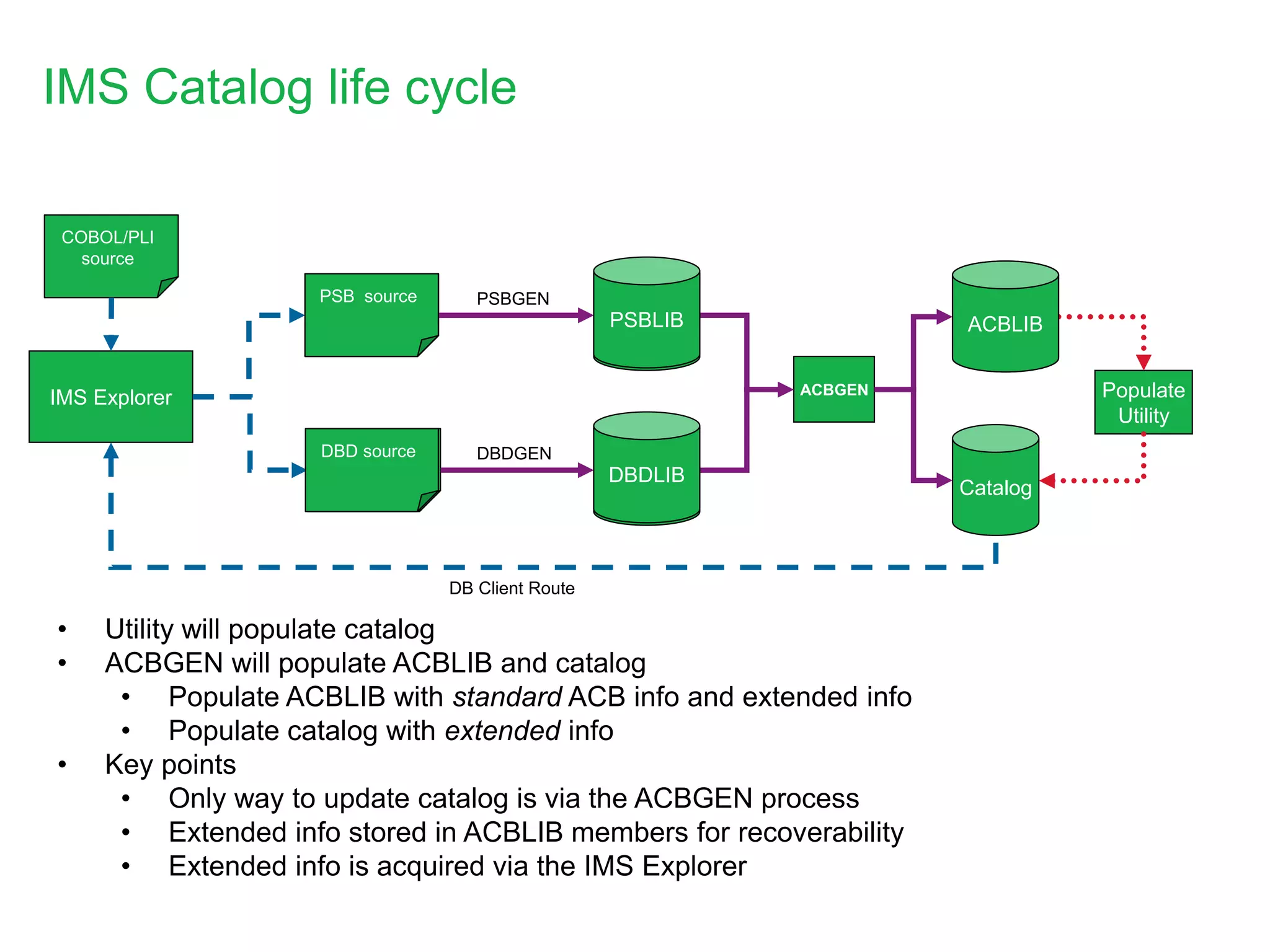
• Utility will populate catalog
• ACBGEN will populate ACBLIB and catalog
• Populate ACBLIB with standard ACB info and extended info
• Populate catalog with extended info
• Key points
• Only way to update catalog is via the ACBGEN process
• Extended info stored in ACBLIB members for recoverability
• Extended info is acquired via the IMS Explorer
DBDLIB++
PSBGEN
DBDGEN
ACBGEN
IMS Explorer
COBOL/PLI
source
Populate
Utility
DB Client Route
ACBLIB++
DBD source
PSB source
PSBLIB
DBDLIB
ACBLIB
Application metadata pre-catalog
10
SEGM NAME=HOSPITAL,
PARENT=0,
BYTES=900,
RULES=(,HERE),
SSPTR=0,
ENCODING=Cp1047
FIELD NAME=(HOSPCODE,SEQ,U),
BYTES=12,
START=3,
TYPE=C,
FIELD NAME=(HOSPLL),
BYTES=2,
START=1,
TYPE=X,
FIELD NAME=(HOSPNAME),
BYTES=17,
START=15,
TYPE=C,
01 HOSPITAL.
05 HOSPLL PICTURE S9(3) COMP.
05 HOSPITAL_CODE PICTURE X(12).
05 HOSPITAL_NAME PICTURE X(17).
DBD
Copybook
private DLITypeInfo[] PCB01HOSPITALArray() {
DLITypeInfo[] PCB01HOSPITALArray= {
new DLITypeInfo("HOSPLL", DLITypeInfo.SMALLINT, 1, 2,
"HOSPLL", DBType.DEDB, false),
new DLITypeInfo("HOSPITAL_CODE", DLITypeInfo.CHAR, 3, 12,
"HOSPCODE", DLITypeInfo.UNIQUE_KEY,
DBType.DEDB, true),
new DLITypeInfo("HOSPITAL_NAME", DLITypeInfo.CHAR, 15, 17,
"HOSPNAME", DBType.DEDB, false)
};
return PCB01HOSPITALArray;
}
Java Metadata file
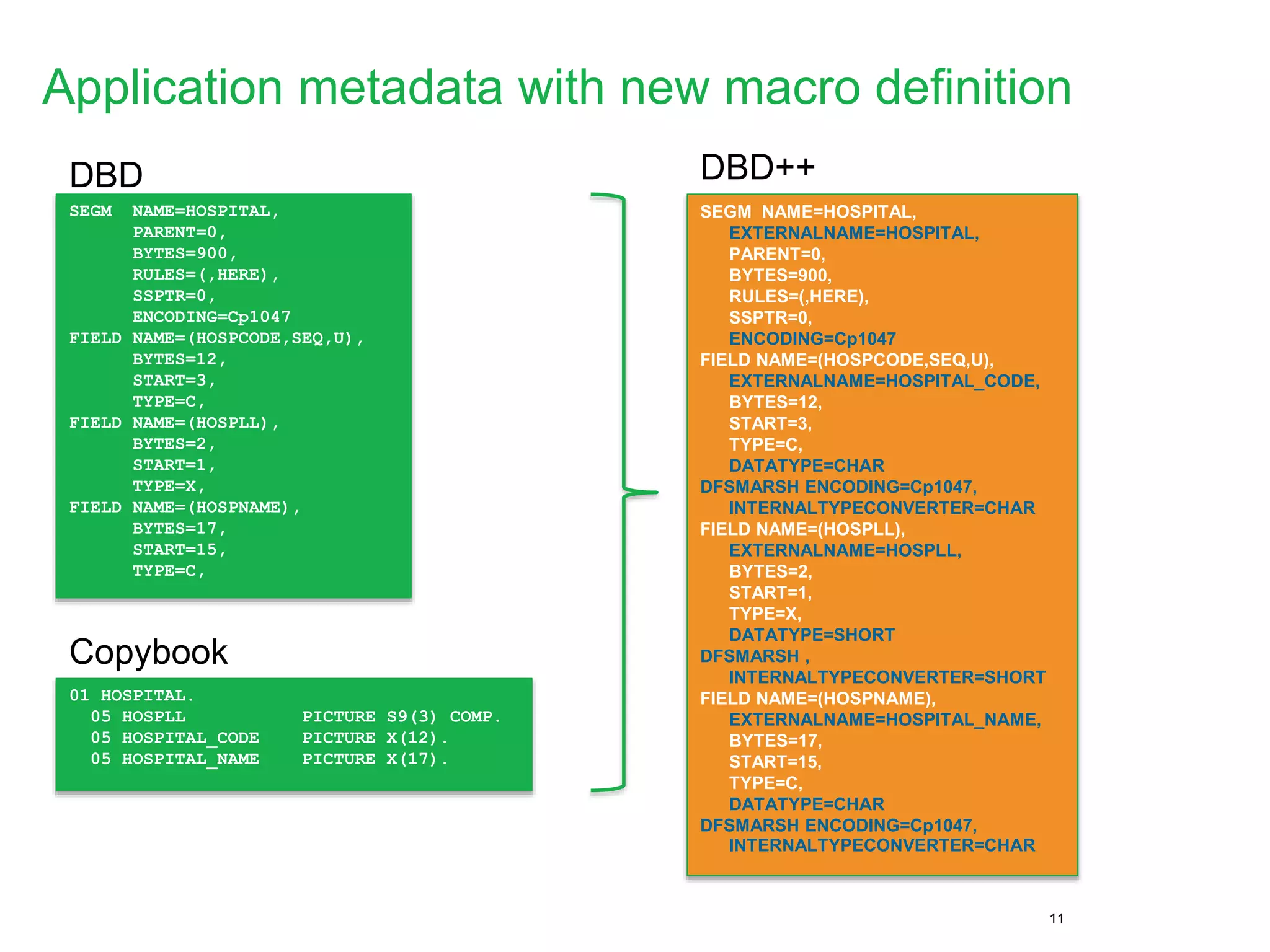
Application metadata with new macro definition
11
SEGM NAME=HOSPITAL,
PARENT=0,
BYTES=900,
RULES=(,HERE),
SSPTR=0,
ENCODING=Cp1047
FIELD NAME=(HOSPCODE,SEQ,U),
BYTES=12,
START=3,
TYPE=C,
FIELD NAME=(HOSPLL),
BYTES=2,
START=1,
TYPE=X,
FIELD NAME=(HOSPNAME),
BYTES=17,
START=15,
TYPE=C,
01 HOSPITAL.
05 HOSPLL PICTURE S9(3) COMP.
05 HOSPITAL_CODE PICTURE X(12).
05 HOSPITAL_NAME PICTURE X(17).
DBD
Copybook
SEGM NAME=HOSPITAL,
EXTERNALNAME=HOSPITAL,
PARENT=0,
BYTES=900,
RULES=(,HERE),
SSPTR=0,
ENCODING=Cp1047
FIELD NAME=(HOSPCODE,SEQ,U),
EXTERNALNAME=HOSPITAL_CODE,
BYTES=12,
START=3,
TYPE=C,
DATATYPE=CHAR
DFSMARSH ENCODING=Cp1047,
INTERNALTYPECONVERTER=CHAR
FIELD NAME=(HOSPLL),
EXTERNALNAME=HOSPLL,
BYTES=2,
START=1,
TYPE=X,
DATATYPE=SHORT
DFSMARSH ,
INTERNALTYPECONVERTER=SHORT
FIELD NAME=(HOSPNAME),
EXTERNALNAME=HOSPITAL_NAME,
BYTES=17,
START=15,
TYPE=C,
DATATYPE=CHAR
DFSMARSH ENCODING=Cp1047,
INTERNALTYPECONVERTER=CHAR
DBD++
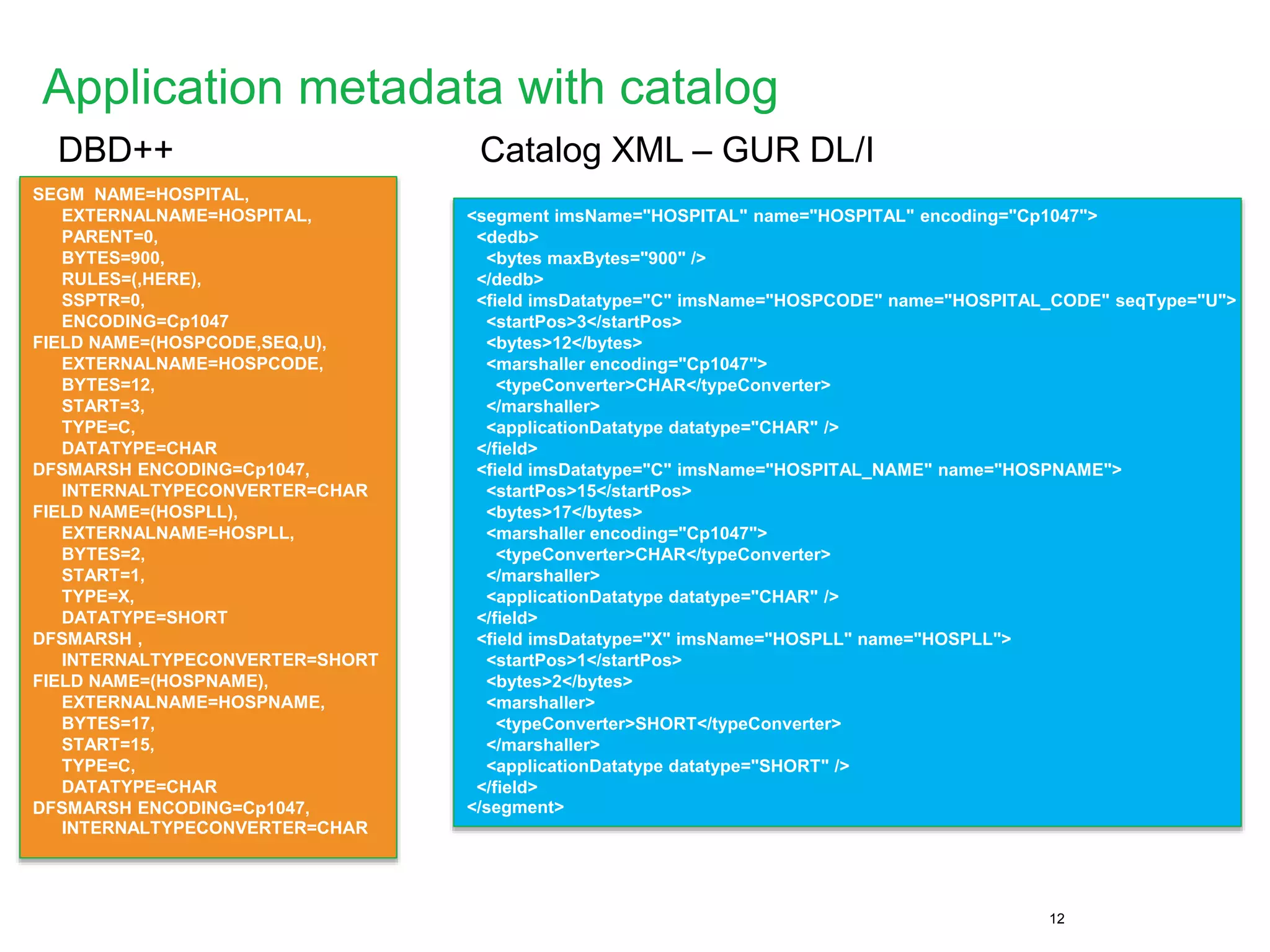
Application metadata with catalog
12
SEGM NAME=HOSPITAL,
EXTERNALNAME=HOSPITAL,
PARENT=0,
BYTES=900,
RULES=(,HERE),
SSPTR=0,
ENCODING=Cp1047
FIELD NAME=(HOSPCODE,SEQ,U),
EXTERNALNAME=HOSPCODE,
BYTES=12,
START=3,
TYPE=C,
DATATYPE=CHAR
DFSMARSH ENCODING=Cp1047,
INTERNALTYPECONVERTER=CHAR
FIELD NAME=(HOSPLL),
EXTERNALNAME=HOSPLL,
BYTES=2,
START=1,
TYPE=X,
DATATYPE=SHORT
DFSMARSH ,
INTERNALTYPECONVERTER=SHORT
FIELD NAME=(HOSPNAME),
EXTERNALNAME=HOSPNAME,
BYTES=17,
START=15,
TYPE=C,
DATATYPE=CHAR
DFSMARSH ENCODING=Cp1047,
INTERNALTYPECONVERTER=CHAR
DBD++
<segment imsName="HOSPITAL" name="HOSPITAL" encoding="Cp1047">
<dedb>
<bytes maxBytes="900" />
</dedb>
<field imsDatatype="C" imsName="HOSPCODE" name="HOSPITAL_CODE" seqType="U">
<startPos>3</startPos>
<bytes>12</bytes>
<marshaller encoding="Cp1047">
<typeConverter>CHAR</typeConverter>
</marshaller>
<applicationDatatype datatype="CHAR" />
</field>
<field imsDatatype="C" imsName="HOSPITAL_NAME" name="HOSPNAME">
<startPos>15</startPos>
<bytes>17</bytes>
<marshaller encoding="Cp1047">
<typeConverter>CHAR</typeConverter>
</marshaller>
<applicationDatatype datatype="CHAR" />
</field>
<field imsDatatype="X" imsName="HOSPLL" name="HOSPLL">
<startPos>1</startPos>
<bytes>2</bytes>
<marshaller>
<typeConverter>SHORT</typeConverter>
</marshaller>
<applicationDatatype datatype="SHORT" />
</field>
</segment>
Catalog XML – GUR DL/I
IMS features leveraging the IMS
catalog
New IMS V13 features based on the IMS catalog
• Native SQL support
 .NET Data Provider
• Database Versioning
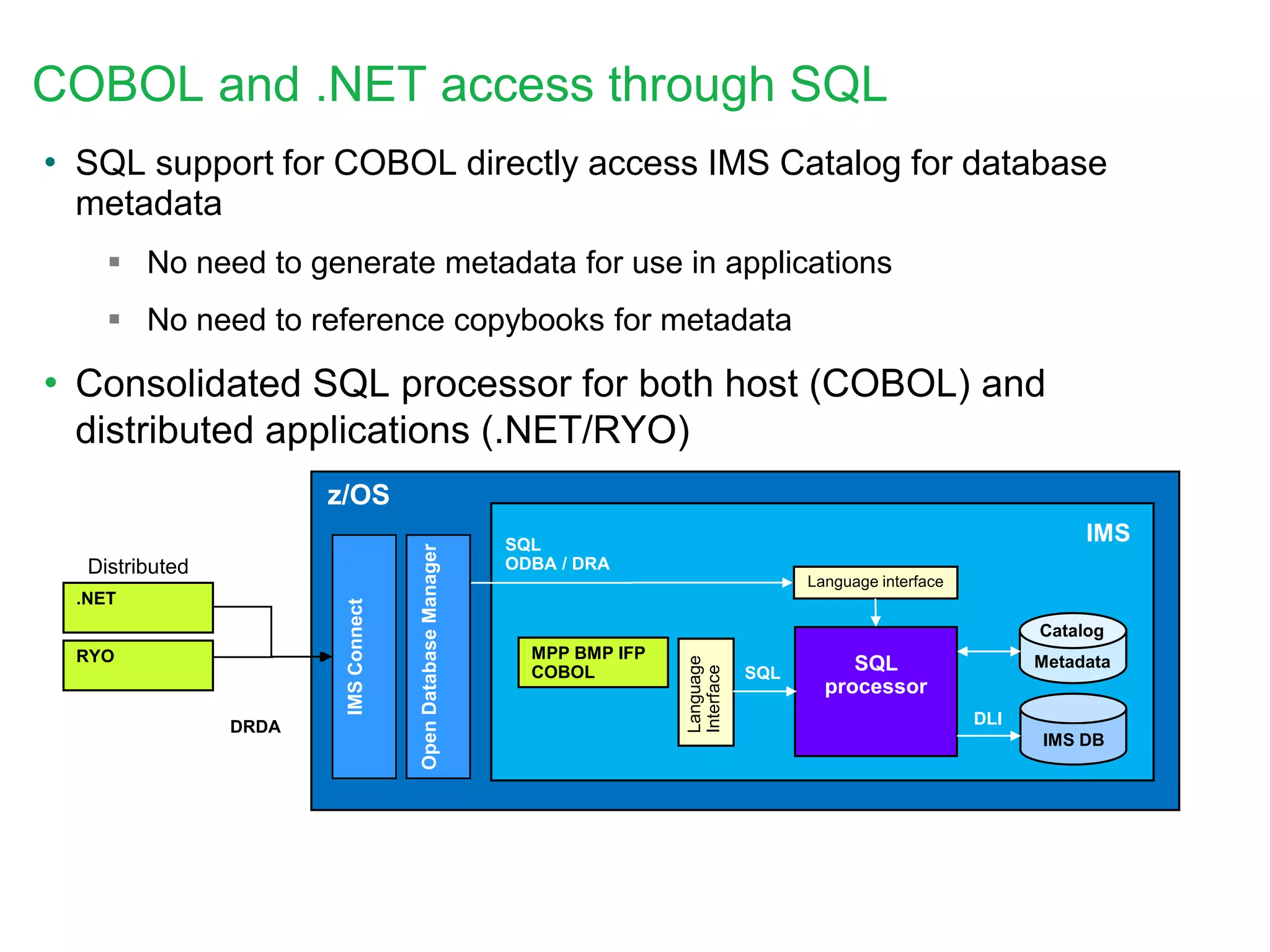
z/OS
IMS DB
DLI
SQL
processor
Catalog
Metadata
SQL
IMSConnect
DRDA
MPP BMP IFP
COBOL
Language
Interface
IMS
OpenDatabaseManager
Language interface
SQL
ODBA / DRADistributed
COBOL and .NET access through SQL
• SQL support for COBOL directly access IMS Catalog for database
metadata
 No need to generate metadata for use in applications
 No need to reference copybooks for metadata
• Consolidated SQL processor for both host (COBOL) and
distributed applications (.NET/RYO)
.NET
RYO
16
Database Versioning Overview
• Database Versioning provides the ability to assign user-
defined version identifiers to different versions of a
database structure
 Enables structural changes to a database while
providing multiple views of the physical IMS data to
application programs
• Applications referencing a new physical database
structure can be brought online without affecting
applications that use previous database structures
 Applications which do not require sensitivity to the new
physical structure, do not need to be modified and can
continue to access the database
17
• Database Versioning requires enablement of the IMS catalog
 DBD definitions for versioned databases must be in the IMS catalog
• Database Versioning must be enabled
• Versioning is at the DBD level
 Users define the version of a database definition on the DBD
 Version numbers must be maintained in incremented values
• Application programs select the desired database version by
 Specifying the version number on the PCB of the PSB
 Specifying the version number on a DL/I INIT call
Database Versioning Overview (cont’d)
IMS catalog integration
capabilities
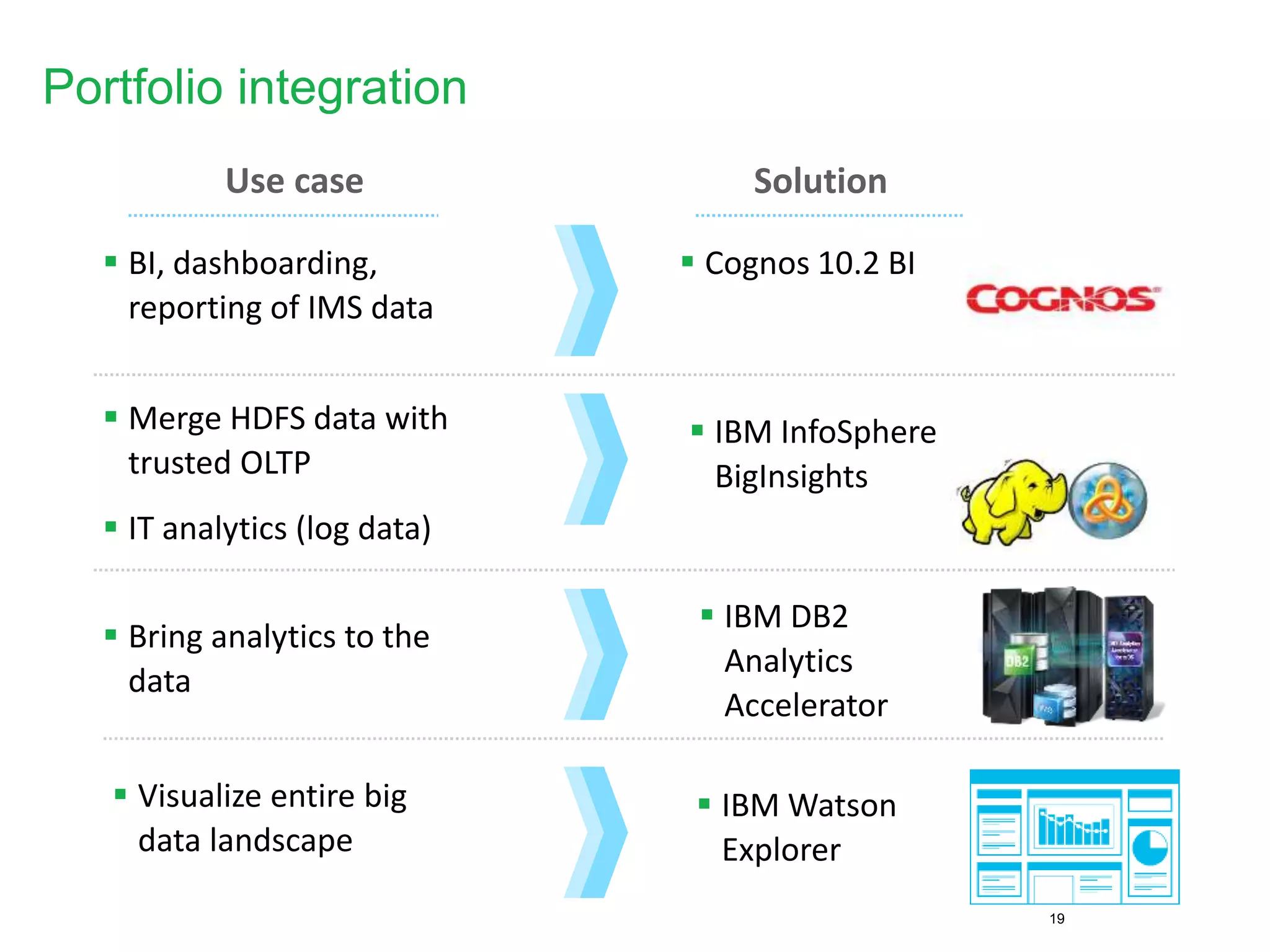
Portfolio integration
19
Solution
 Cognos 10.2 BI
 IBM InfoSphere
BigInsights
 IBM DB2
Analytics
Accelerator
 IBM Watson
Explorer
Use case
 BI, dashboarding,
reporting of IMS data
 Merge HDFS data with
trusted OLTP
 IT analytics (log data)
 Bring analytics to the
data
 Visualize entire big
data landscape
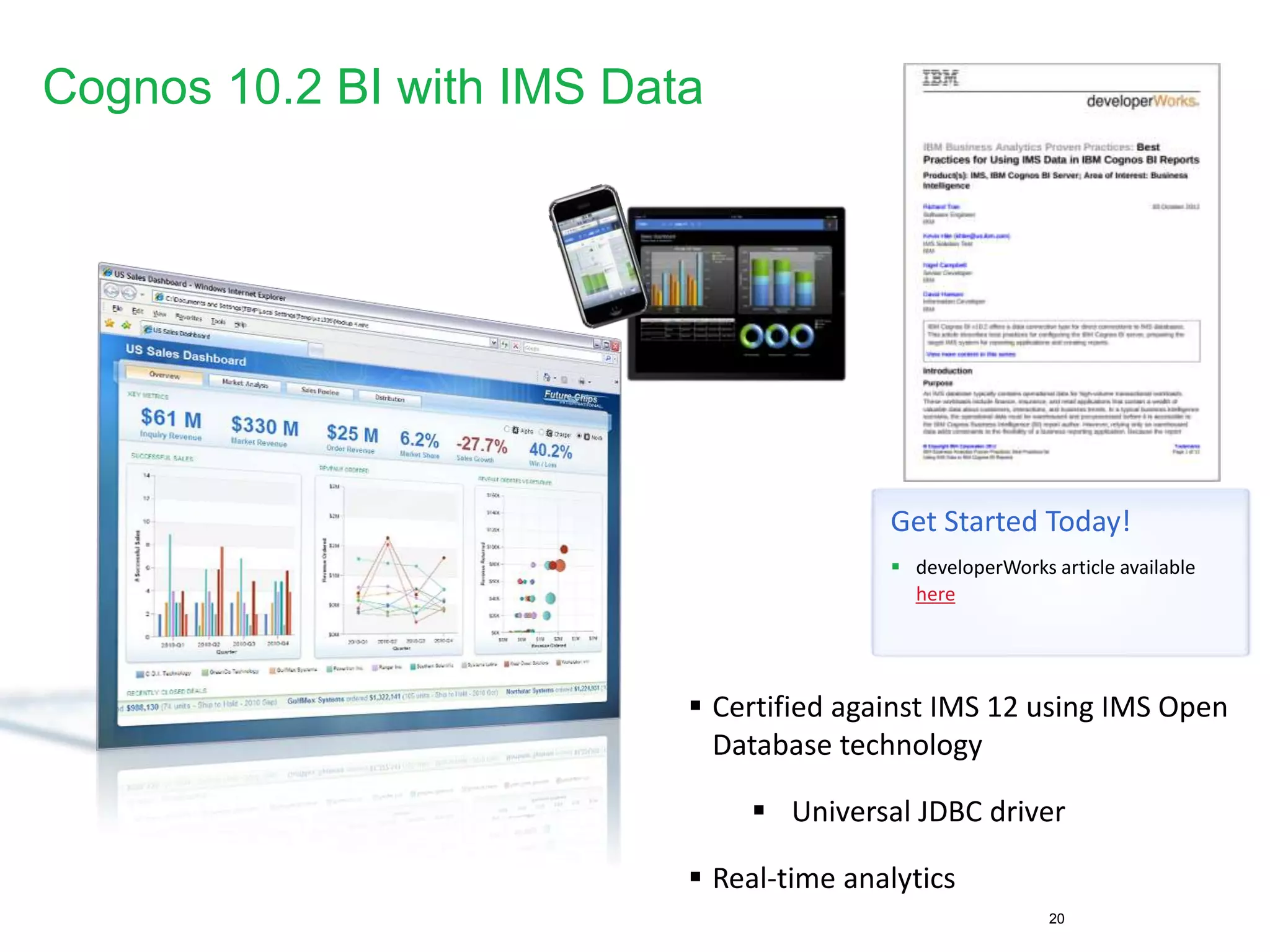
Cognos 10.2 BI with IMS Data
20
 Certified against IMS 12 using IMS Open
Database technology
 Universal JDBC driver
 Real-time analytics
Get Started Today!
 developerWorks article available
here
IMS Integration
“Information as a Service”
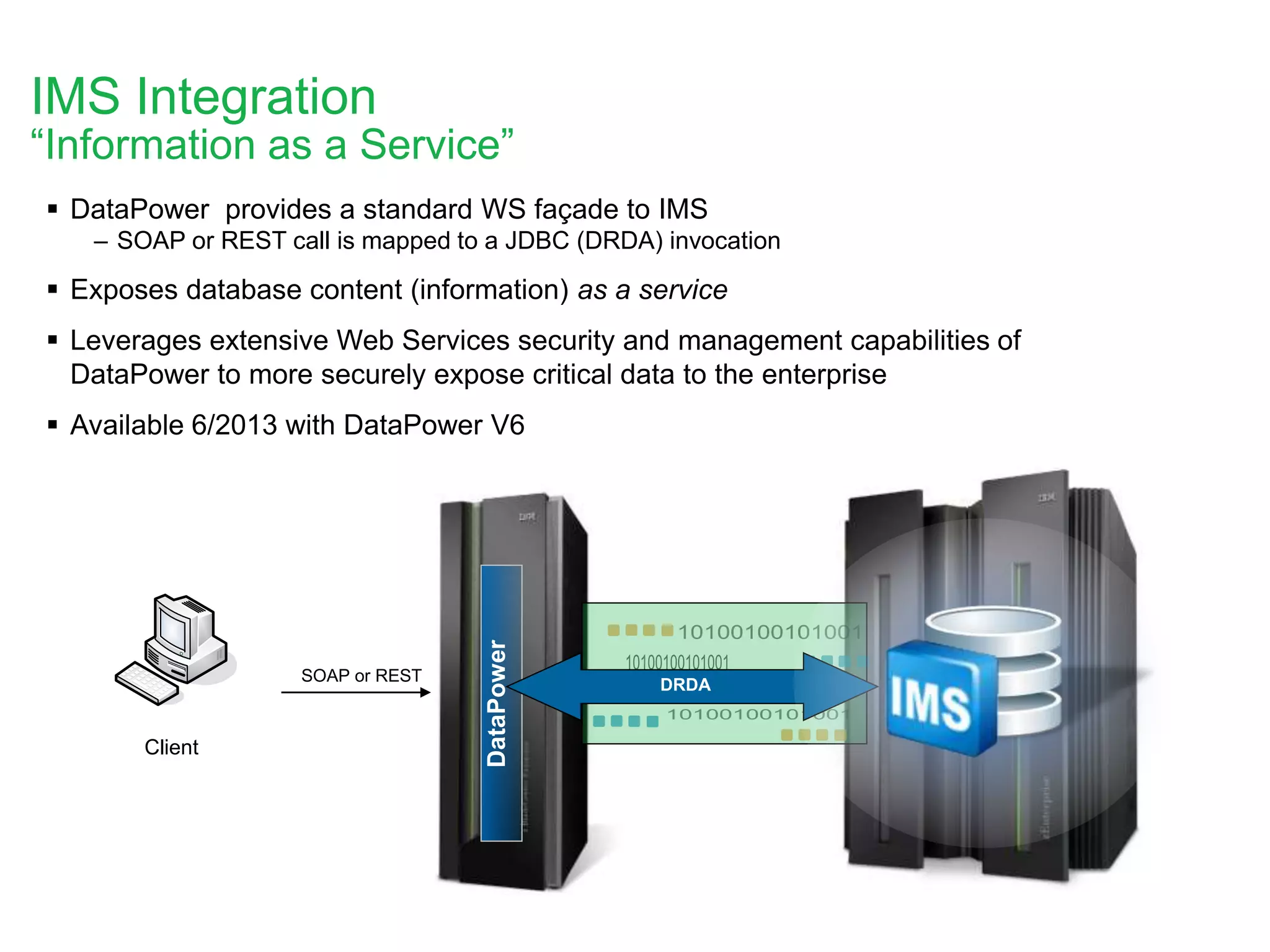
 DataPower provides a standard WS façade to IMS
– SOAP or REST call is mapped to a JDBC (DRDA) invocation
 Exposes database content (information) as a service
 Leverages extensive Web Services security and management capabilities of
DataPower to more securely expose critical data to the enterprise
 Available 6/2013 with DataPower V6
DataPower
Client
SOAP or REST`
DRDA
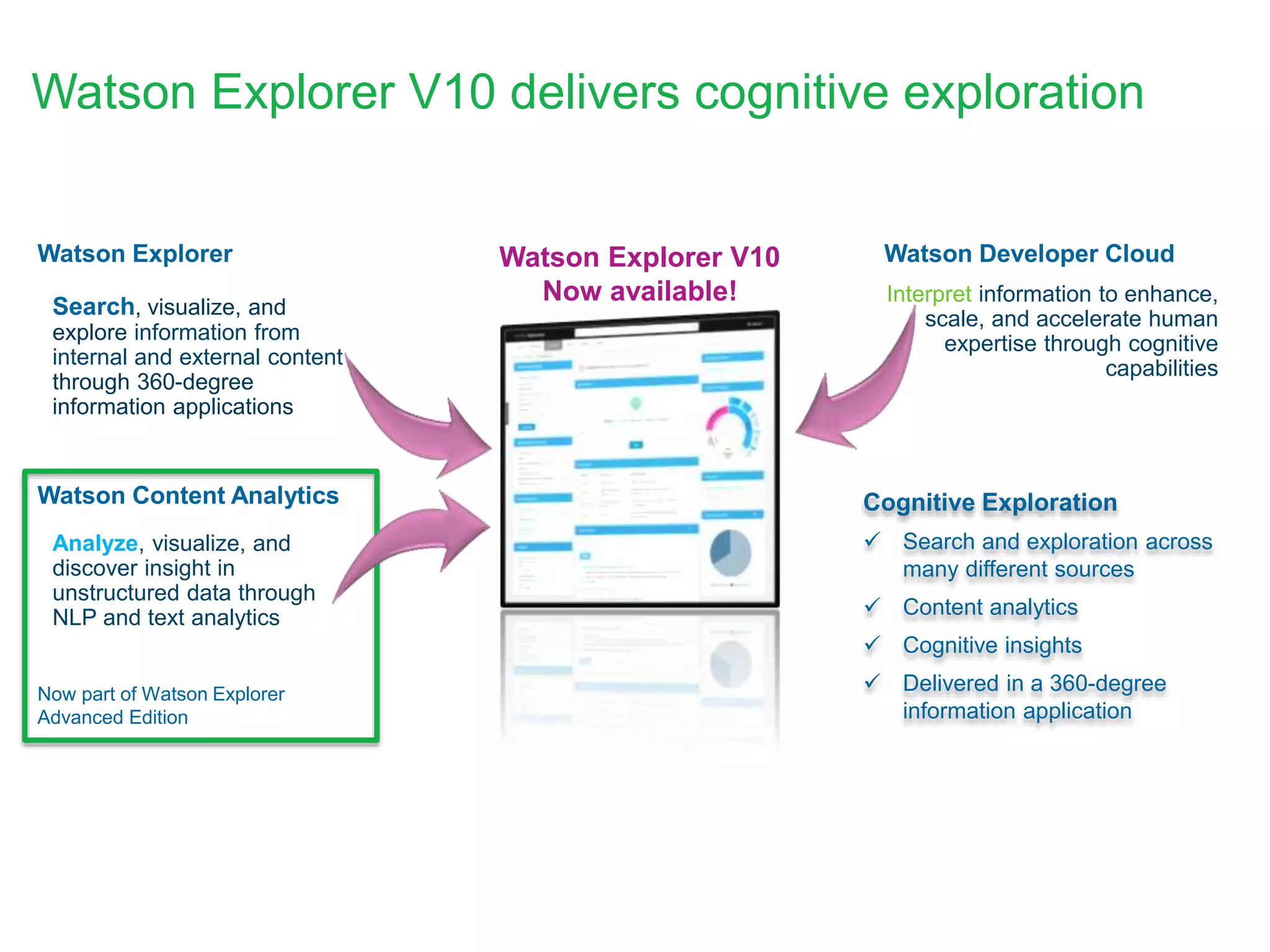
• Analyze, visualize, and
discover insight in
unstructured data through
NLP and text analytics
• Search, visualize, and
explore information from
internal and external content
through 360-degree
information applications
• Interpret information to enhance,
scale, and accelerate human
expertise through cognitive
capabilities
Watson Explorer
Watson Content Analytics
Watson Developer Cloud
Cognitive Exploration
 Search and exploration across
many different sources
 Content analytics
 Cognitive insights
 Delivered in a 360-degree
information application
Watson Explorer V10
Now available!
Now part of Watson Explorer
Advanced Edition
Watson Explorer V10 delivers cognitive exploration
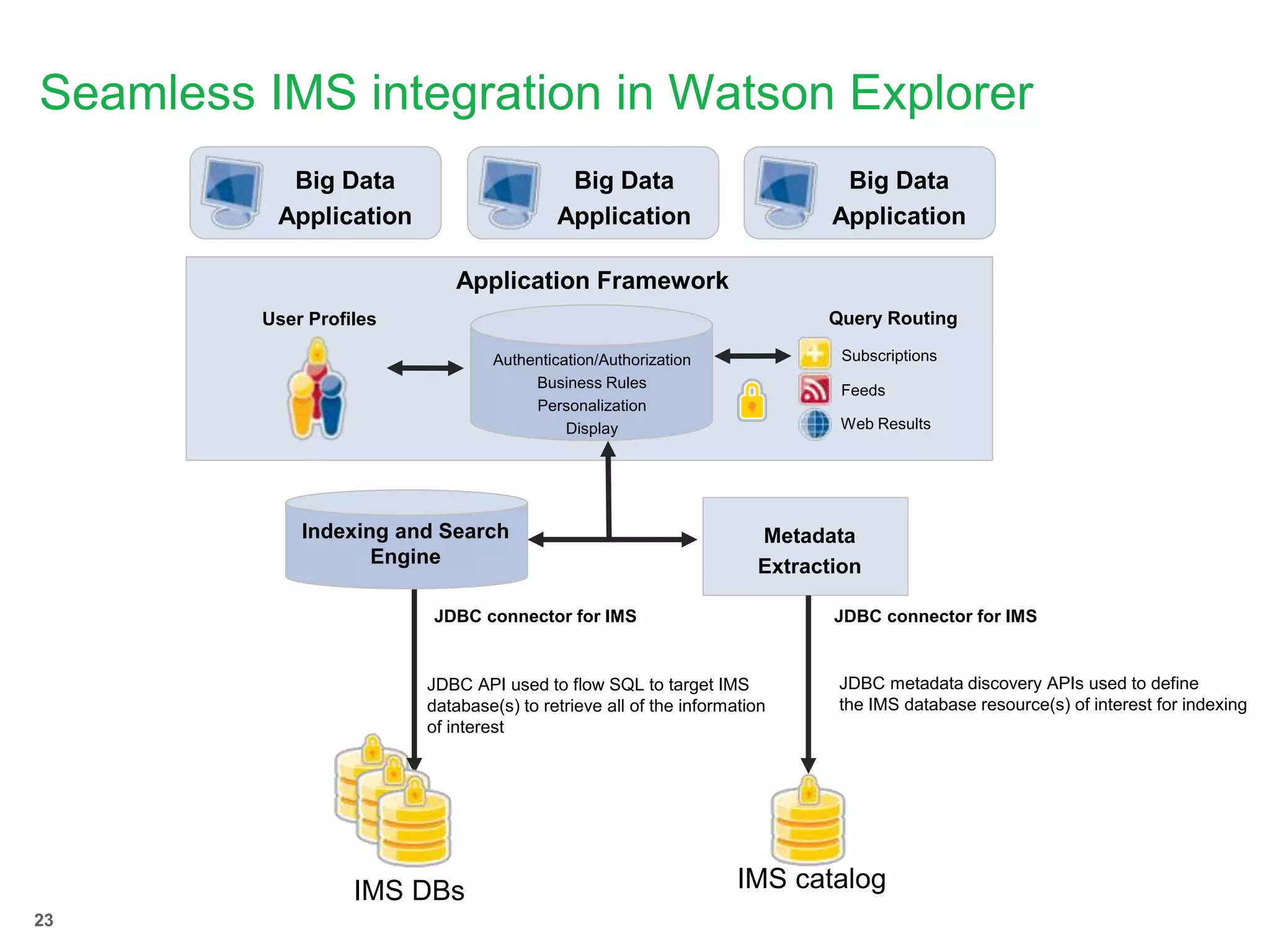
Seamless IMS integration in Watson Explorer
Big Data
Application
Big Data
Application
Big Data
Application
Web Results
Feeds
Subscriptions
Query RoutingUser Profiles
Authentication/Authorization
Business Rules
Personalization
Display
Application Framework
Indexing and Search
Engine
Metadata
Extraction
IMS DBs
JDBC connector for IMS
IMS catalog
JDBC connector for IMS
JDBC API used to flow SQL to target IMS
database(s) to retrieve all of the information
of interest
JDBC metadata discovery APIs used to define
the IMS database resource(s) of interest for indexing
23
24
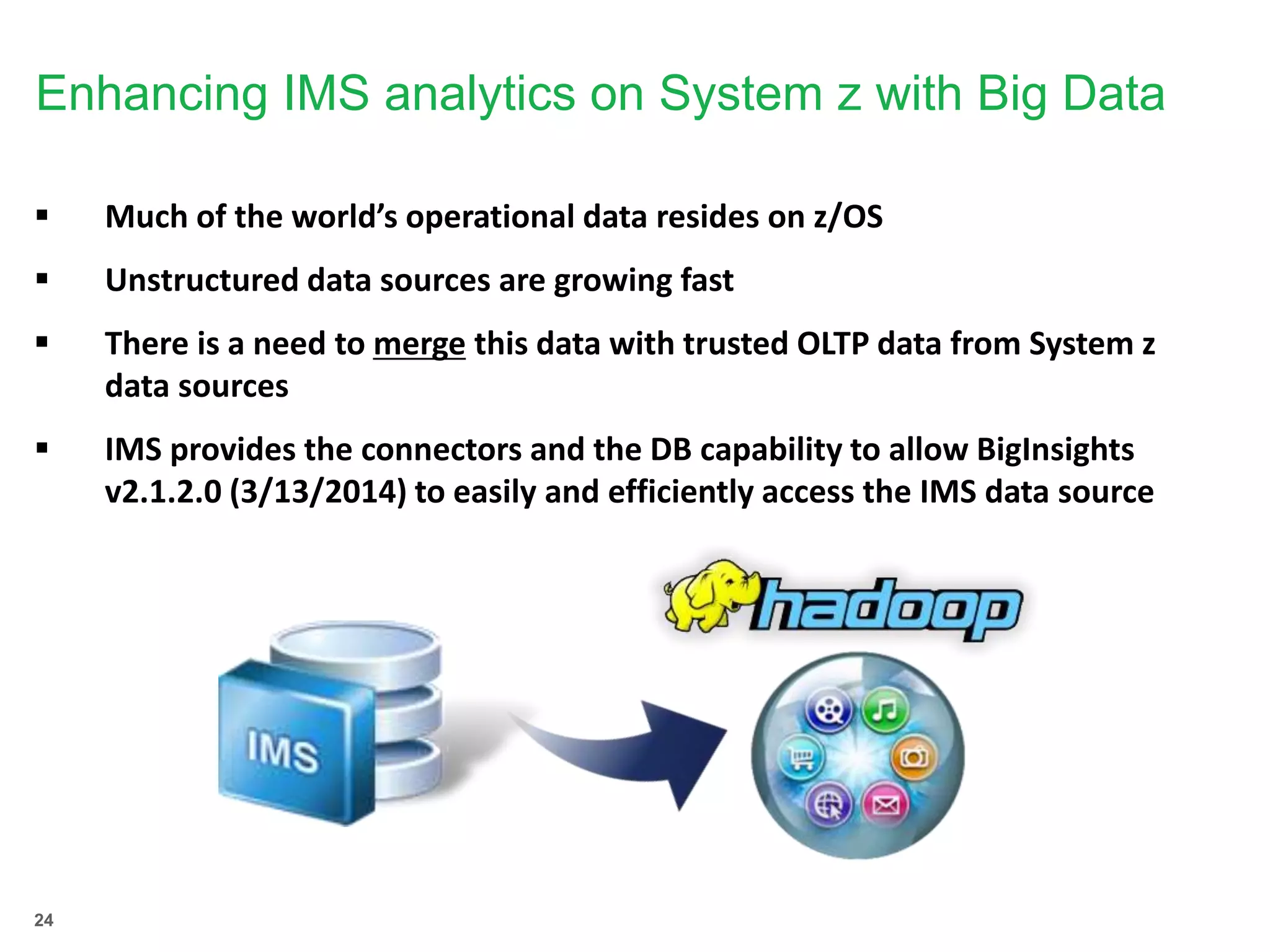
Enhancing IMS analytics on System z with Big Data
 Much of the world’s operational data resides on z/OS
 Unstructured data sources are growing fast
 There is a need to merge this data with trusted OLTP data from System z
data sources
 IMS provides the connectors and the DB capability to allow BigInsights
v2.1.2.0 (3/13/2014) to easily and efficiently access the IMS data source
25
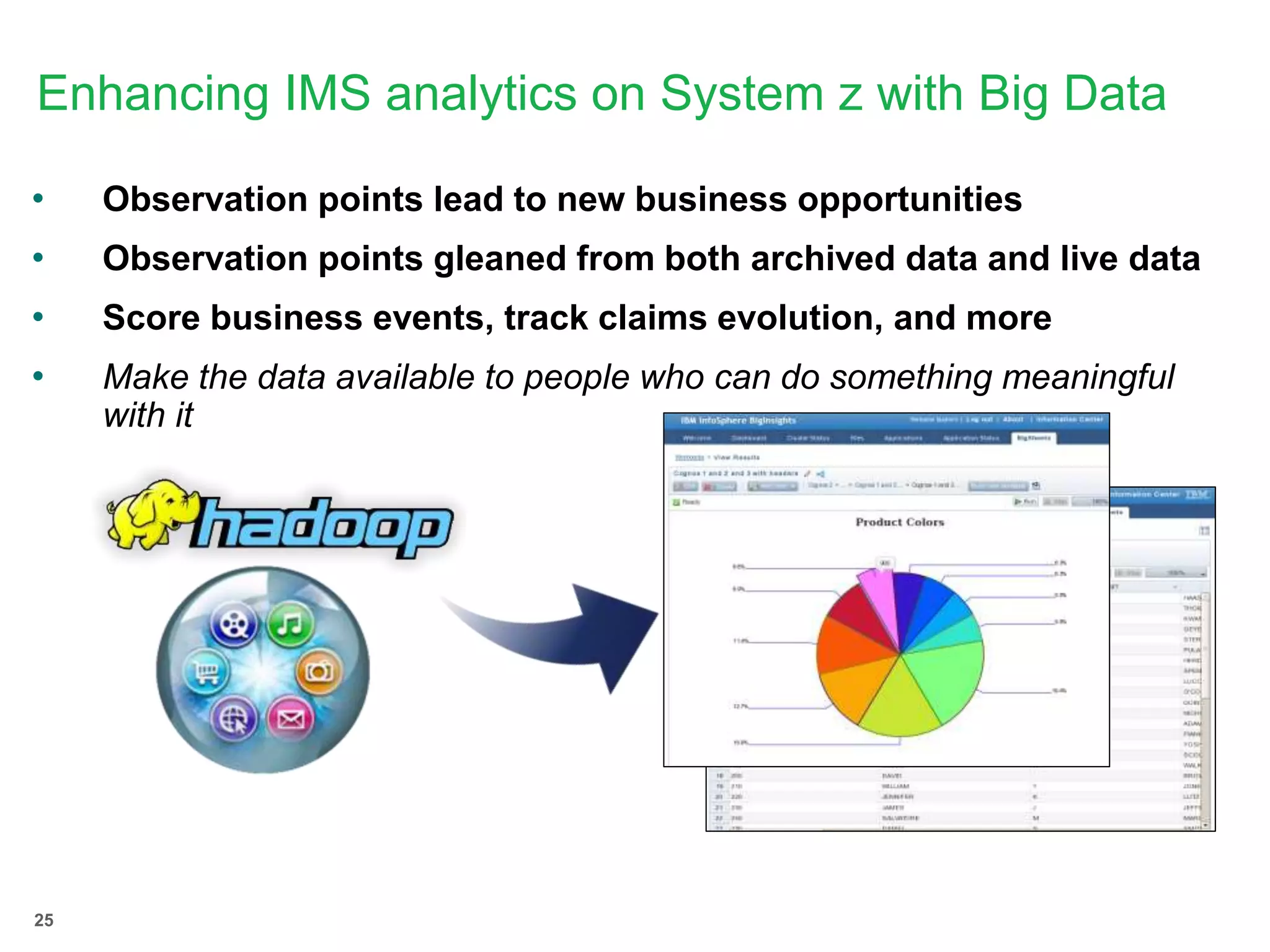
Enhancing IMS analytics on System z with Big Data
• Observation points lead to new business opportunities
• Observation points gleaned from both archived data and live data
• Score business events, track claims evolution, and more
• Make the data available to people who can do something meaningful
with it
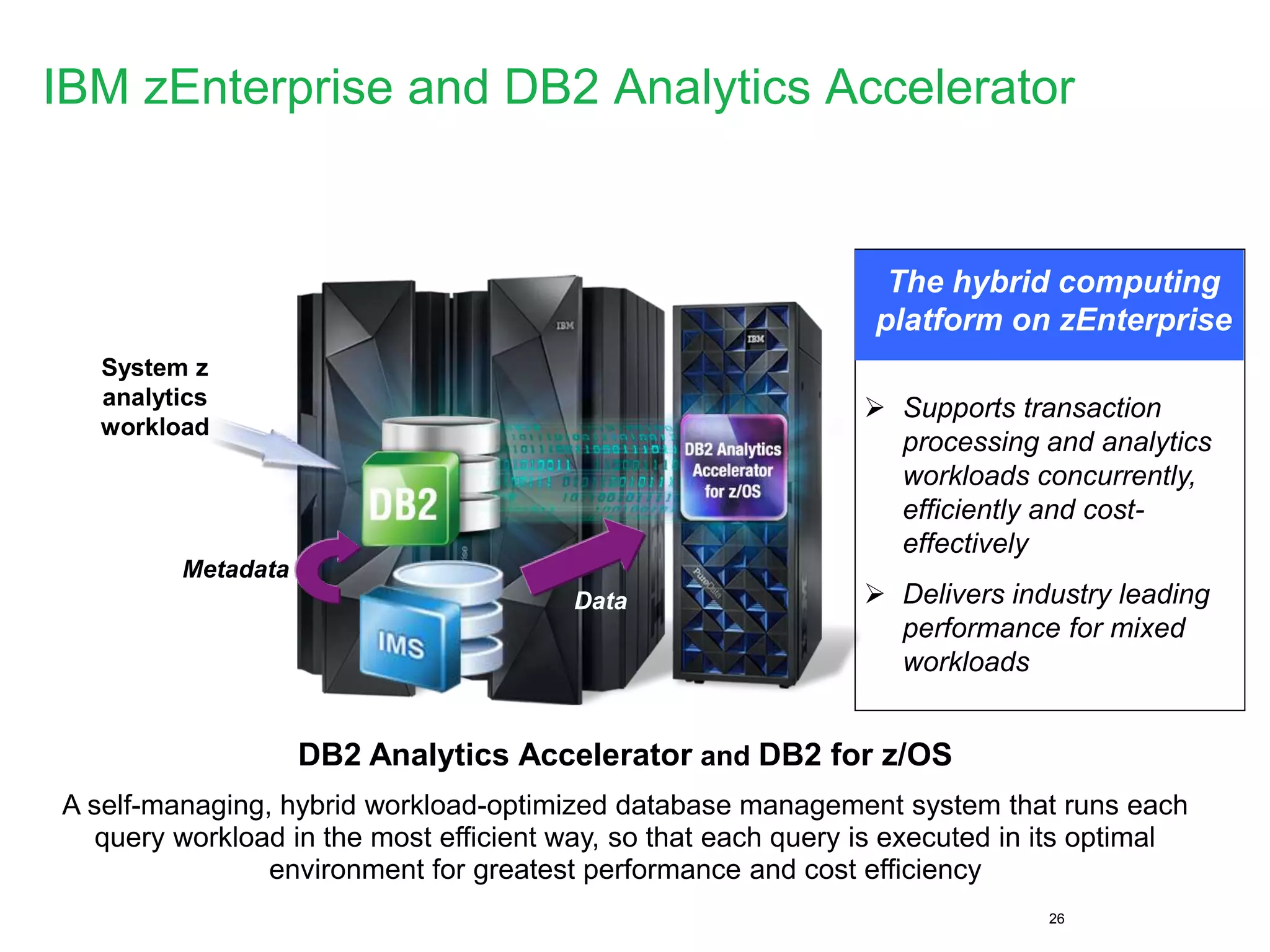
IBM zEnterprise and DB2 Analytics Accelerator
26
The hybrid computing
platform on zEnterprise
System z
analytics
workload
DB2 Analytics Accelerator and DB2 for z/OS
A self-managing, hybrid workload-optimized database management system that runs each
query workload in the most efficient way, so that each query is executed in its optimal
environment for greatest performance and cost efficiency
 Supports transaction
processing and analytics
workloads concurrently,
efficiently and cost-
effectively
 Delivers industry leading
performance for mixed
workloads
Metadata
Data
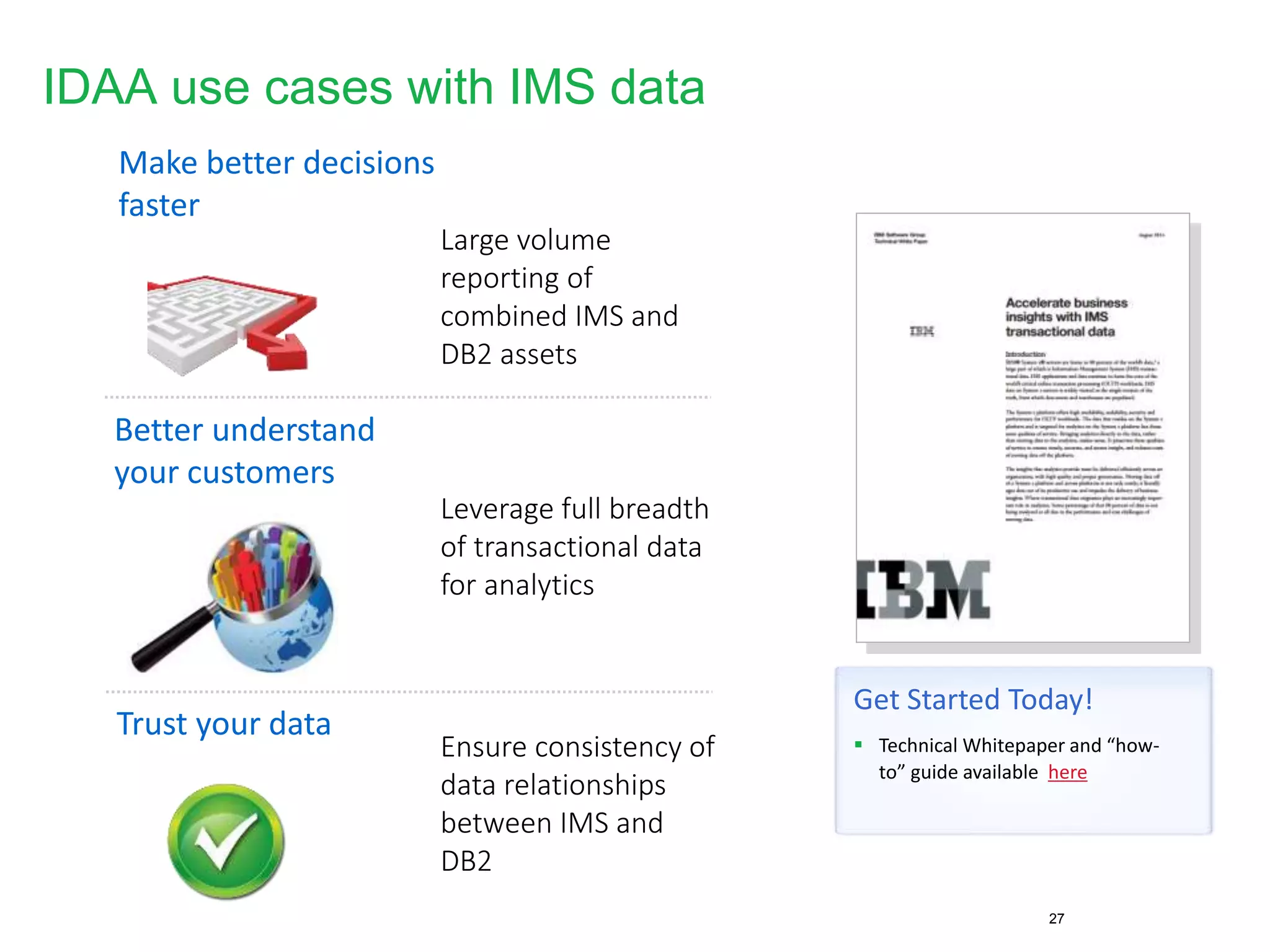
IDAA use cases with IMS data
27
Make better decisions
faster
Better understand
your customers
Trust your data
Large volume
reporting of
combined IMS and
DB2 assets
Leverage full breadth
of transactional data
for analytics
Ensure consistency of
data relationships
between IMS and
DB2
Get Started Today!
 Technical Whitepaper and “how-
to” guide available here
Using the IMS catalog within the
cloud
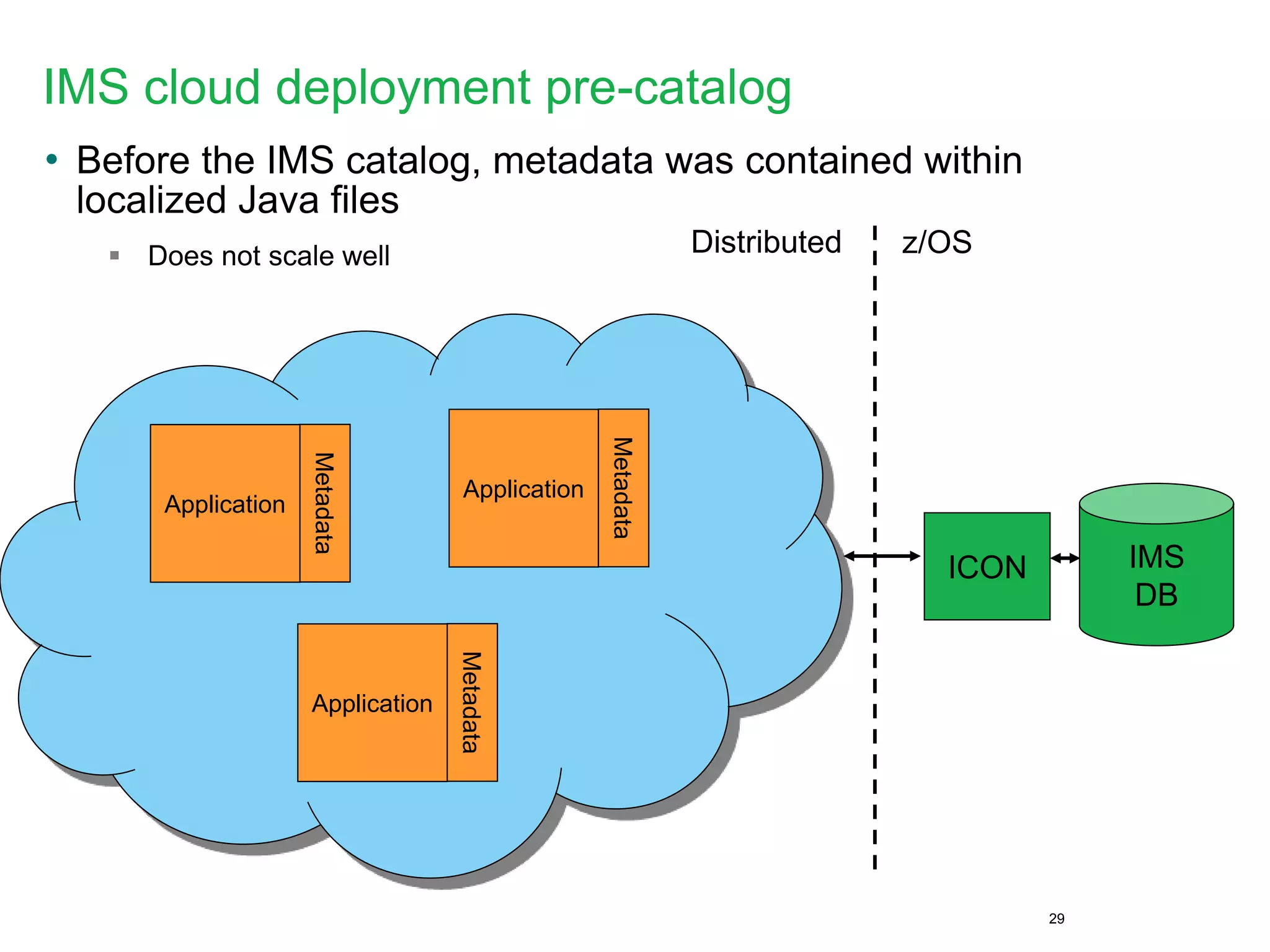
IMS cloud deployment pre-catalog
• Before the IMS catalog, metadata was contained within
localized Java files
 Does not scale well
29
IMS
DB
ICON
Metadata
Application
z/OSDistributed
Metadata
Application
Metadata
Application
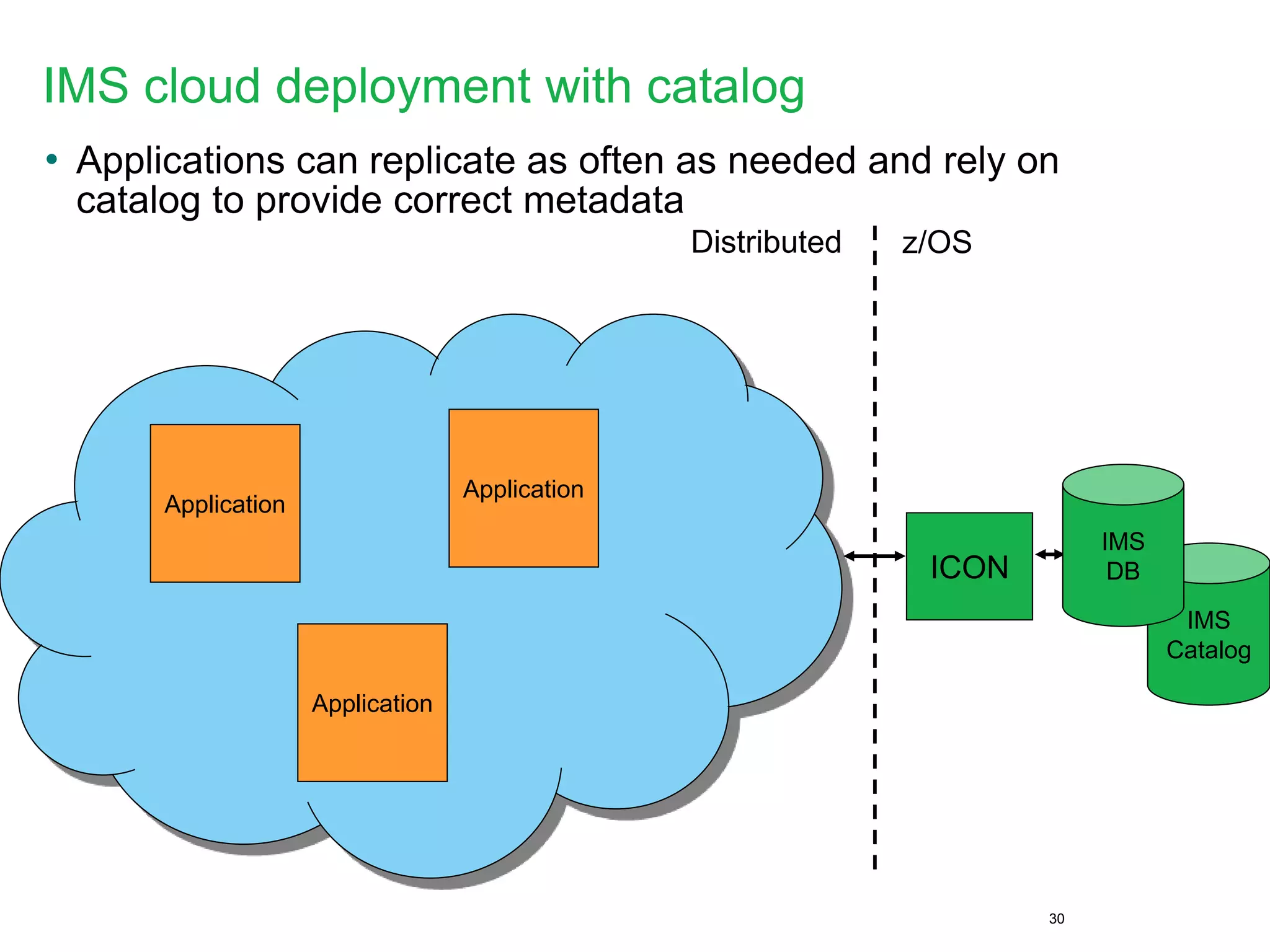
IMS cloud deployment with catalog
• Applications can replicate as often as needed and rely on
catalog to provide correct metadata
30
IMS
Catalog
ICON
Application
z/OSDistributed
Application
Application
IMS
DB
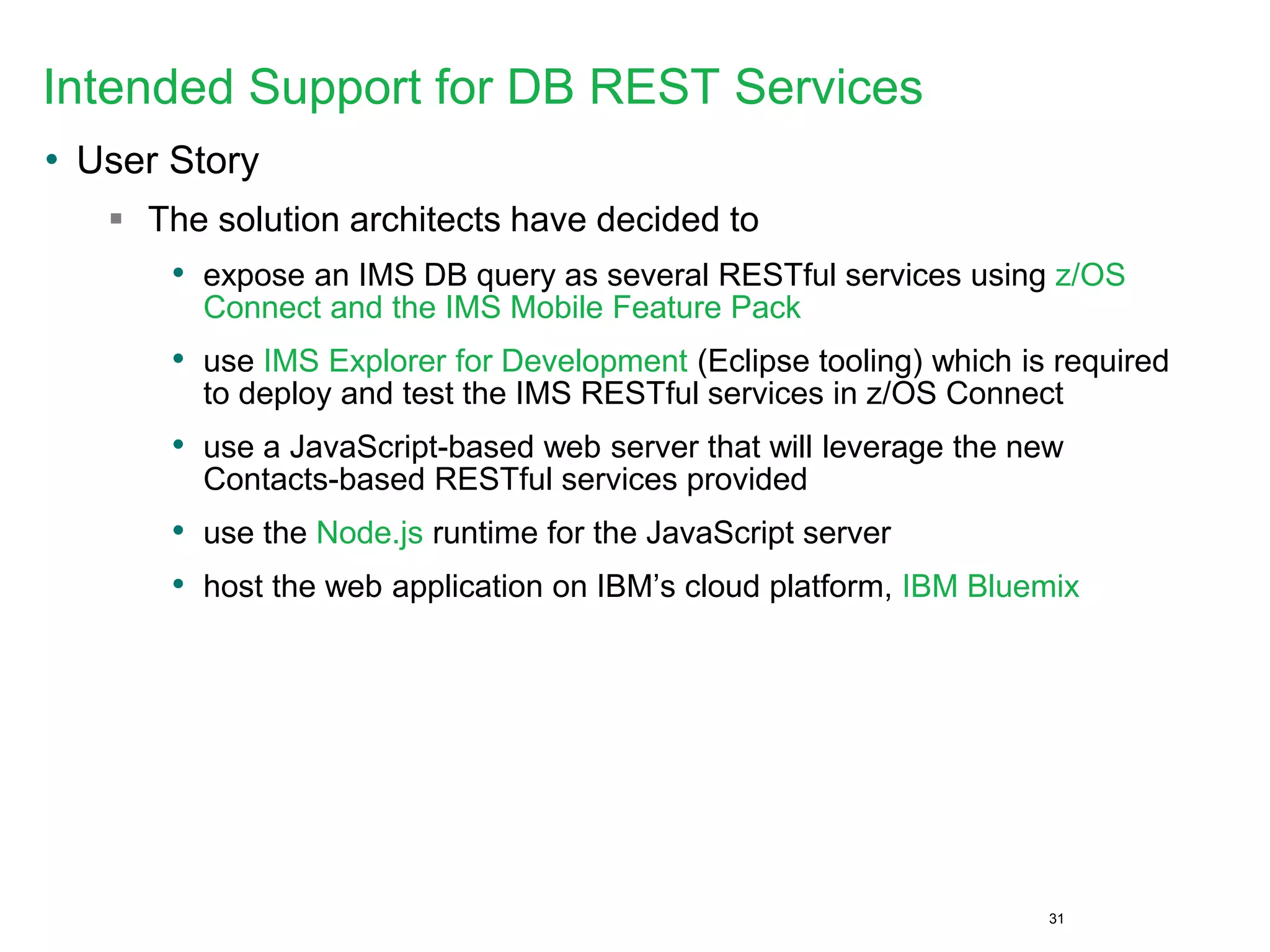
Intended Support for DB REST Services
• User Story
 The solution architects have decided to
• expose an IMS DB query as several RESTful services using z/OS
Connect and the IMS Mobile Feature Pack
• use IMS Explorer for Development (Eclipse tooling) which is required
to deploy and test the IMS RESTful services in z/OS Connect
• use a JavaScript-based web server that will leverage the new
Contacts-based RESTful services provided
• use the Node.js runtime for the JavaScript server
• host the web application on IBM’s cloud platform, IBM Bluemix
31
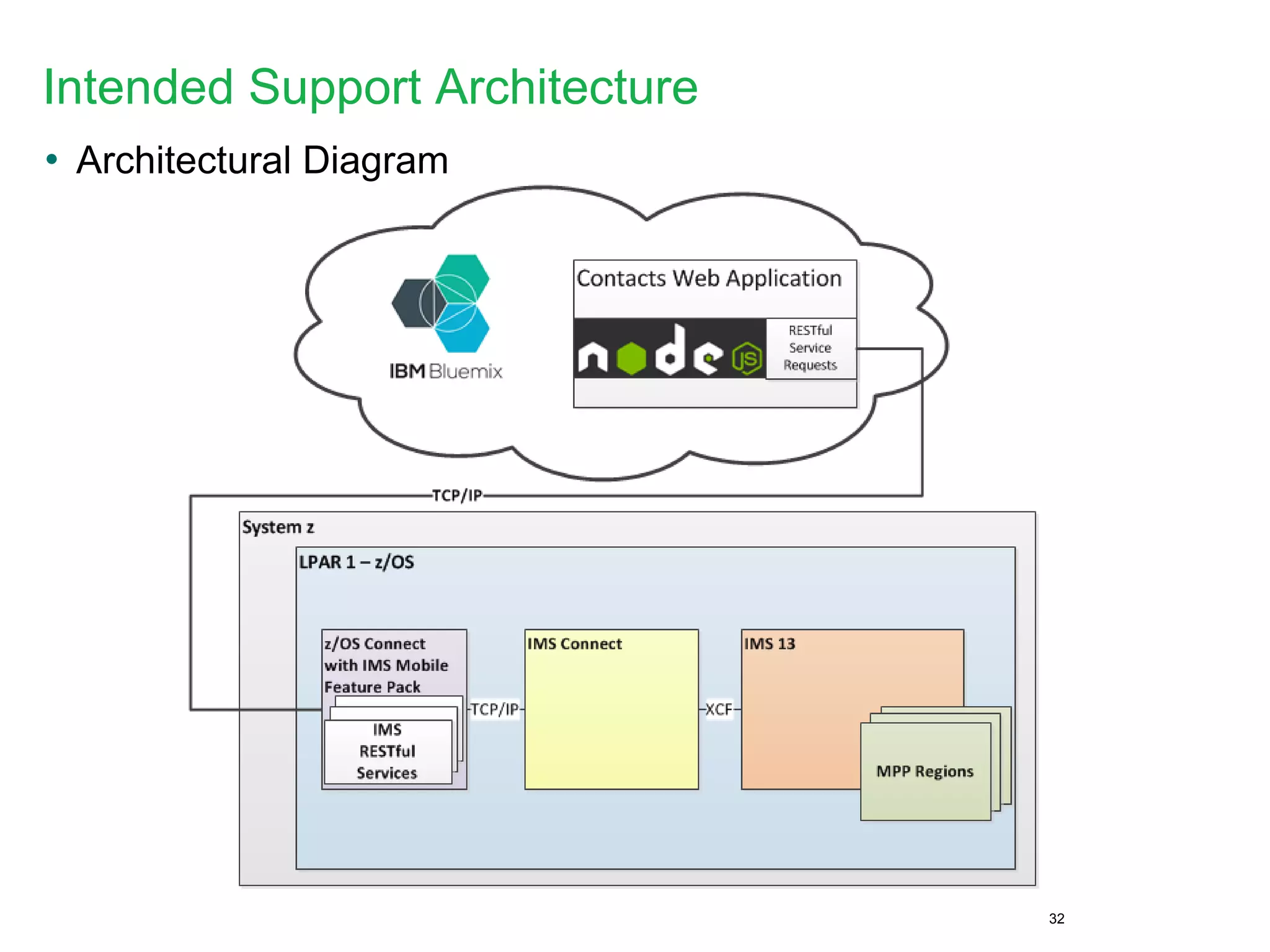
Intended Support Architecture
• Architectural Diagram
32
IMS Explorer Demo
Additional Resources
• The IMS catalog
 http://www.redbooks.ibm.com/abstracts/redp4812.html?Open
• IMS Native SQL Application Programming Guide
 http://www-
01.ibm.com/support/knowledgecenter/SSEPH2_13.1.0/com.ibm.ims13.doc.apg/ims_appprog
_sql.htm
• IMS database versioning
 http://www-
01.ibm.com/support/knowledgecenter/SSEPH2_13.1.0/com.ibm.ims13.doc.rpg/ims_over13_d
b_dbver.htm
• IMS Explorer for Development
 http://www-
01.ibm.com/support/knowledgecenter/SS9NWR_3.1.0/com.ibm.ims.explorer31.doc/wb_conta
iner_imsexplorer.htm?lang=en
• IMS and Cognos
 http://www.ibm.com/developerworks/library/ba-pp-infrastructure-cognos_specific-page630/
• IMS and Big Data
 Attend Session #6128 – 10/30 10am in Banyan C
34
Thank You
Demo backup
37
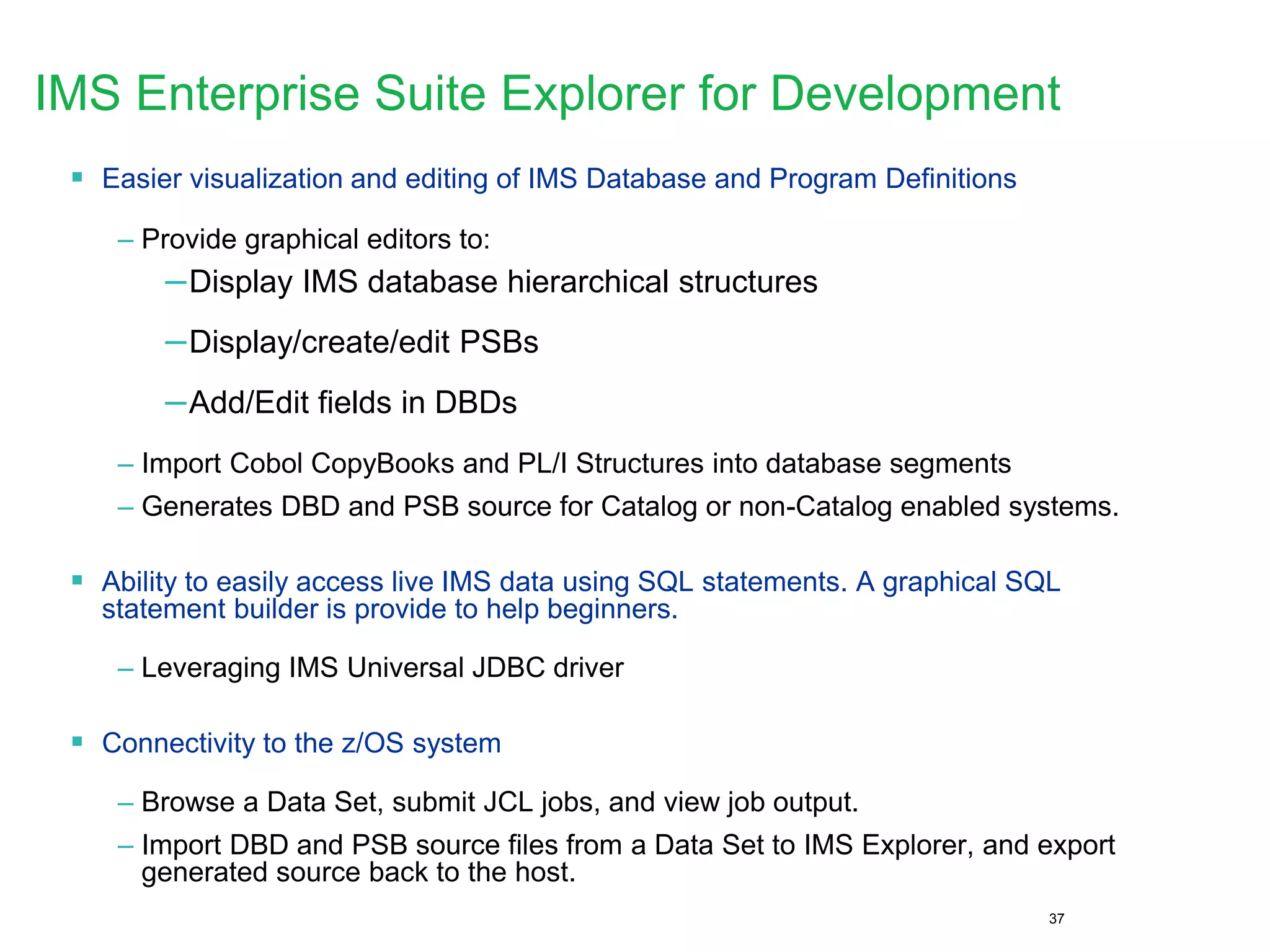
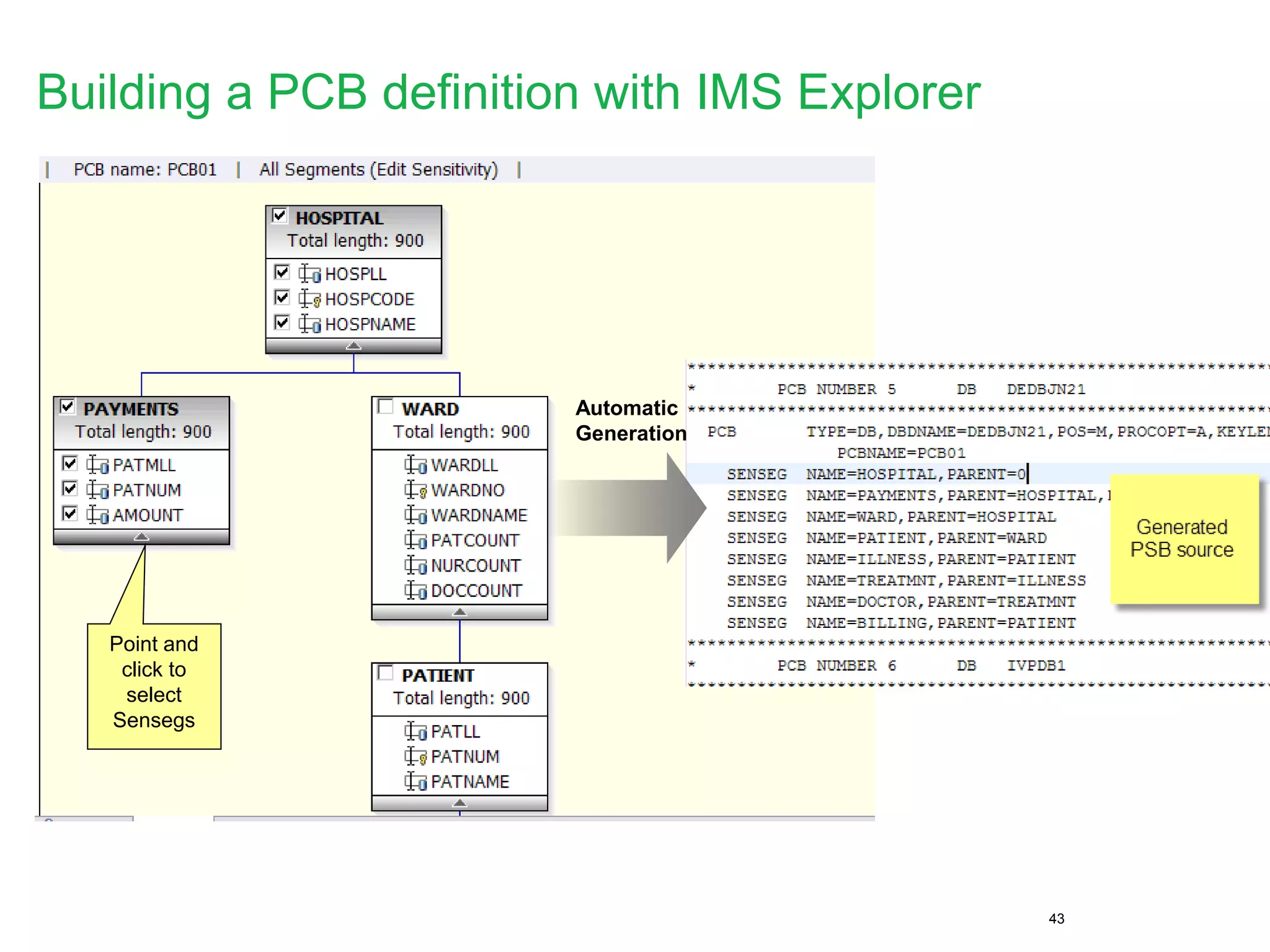
IMS Enterprise Suite Explorer for Development
 Easier visualization and editing of IMS Database and Program Definitions
– Provide graphical editors to:
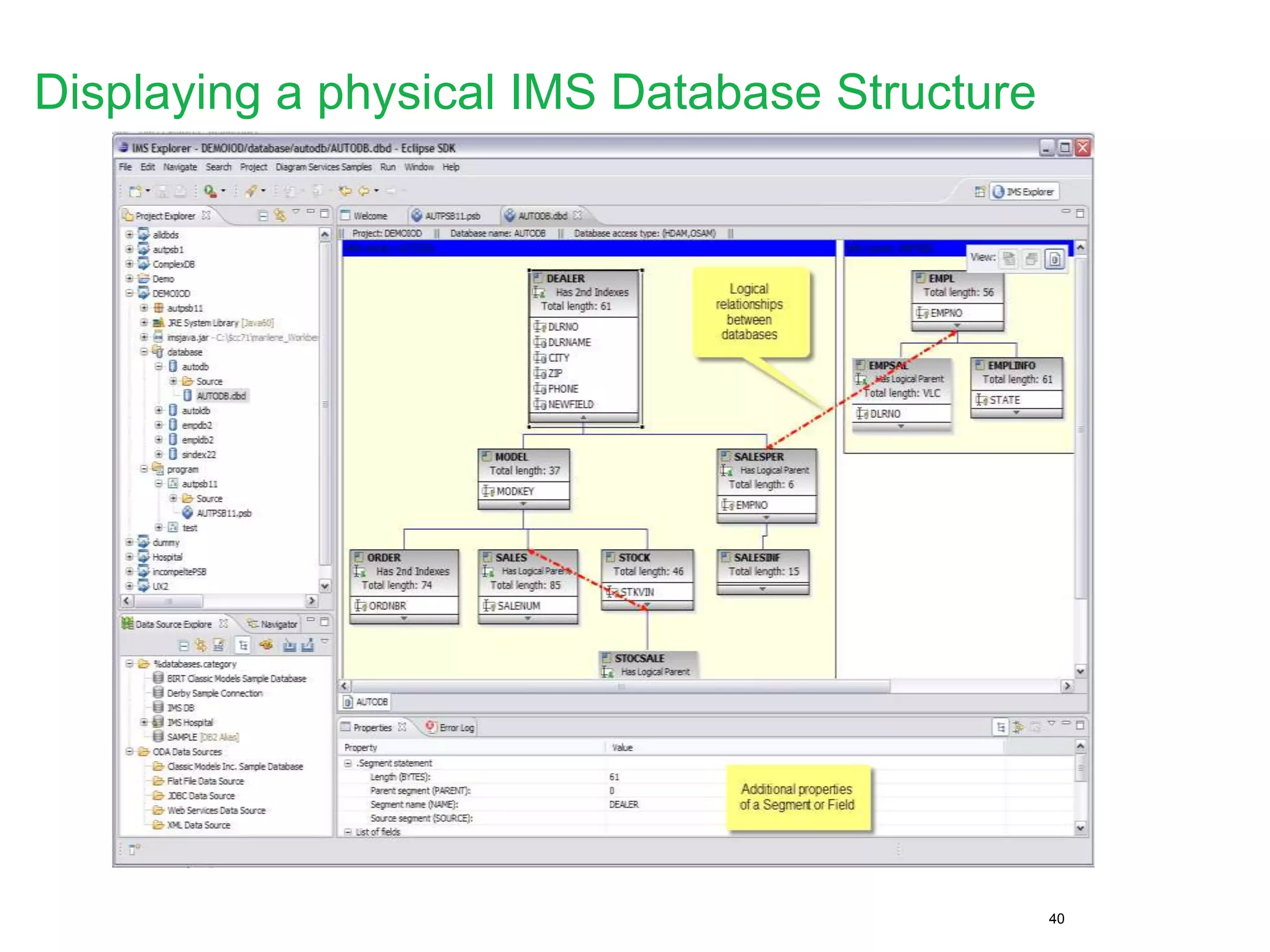
–Display IMS database hierarchical structures
–Display/create/edit PSBs
–Add/Edit fields in DBDs
– Import Cobol CopyBooks and PL/I Structures into database segments
– Generates DBD and PSB source for Catalog or non-Catalog enabled systems.
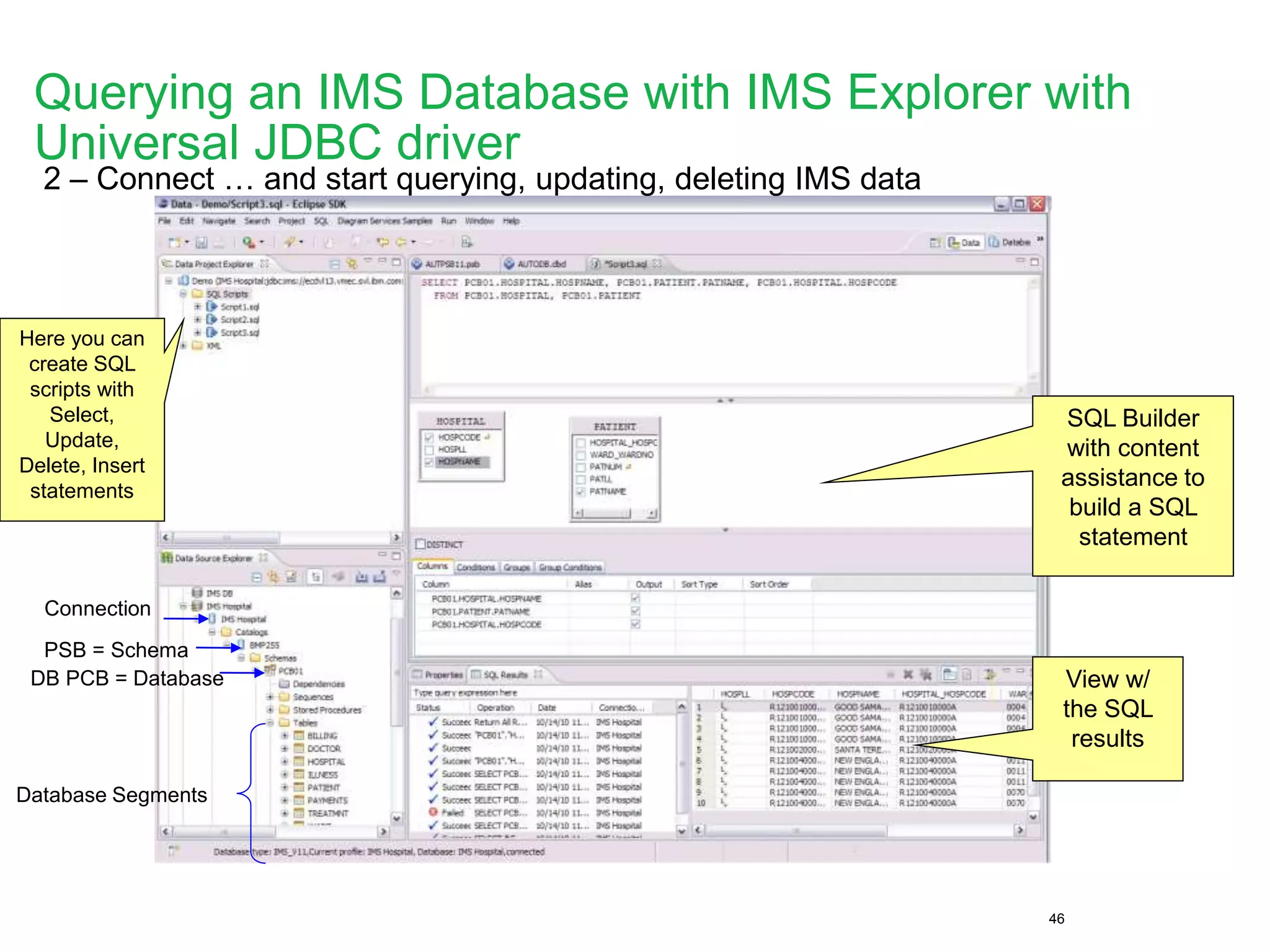
 Ability to easily access live IMS data using SQL statements. A graphical SQL
statement builder is provide to help beginners.
– Leveraging IMS Universal JDBC driver
 Connectivity to the z/OS system
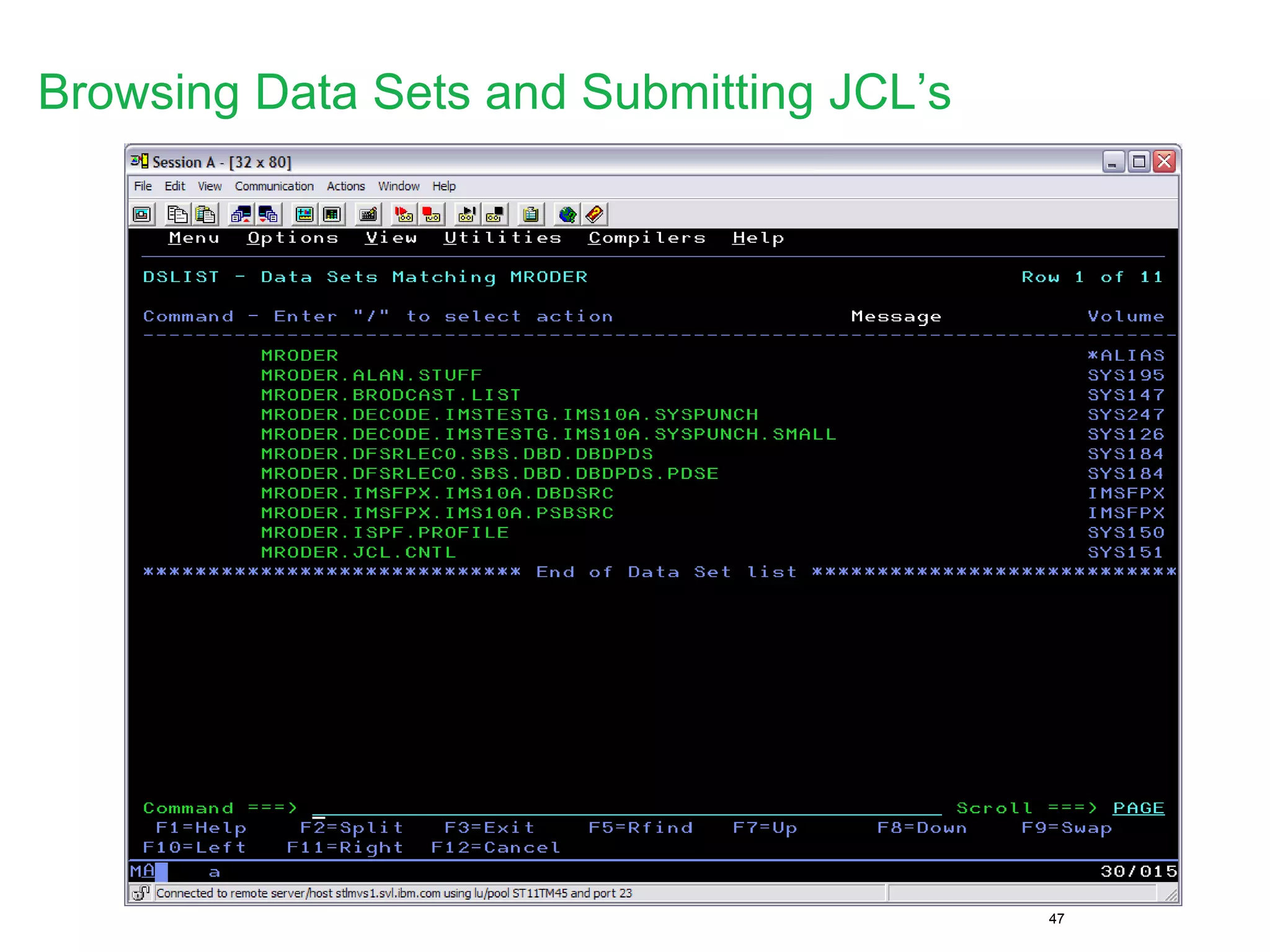
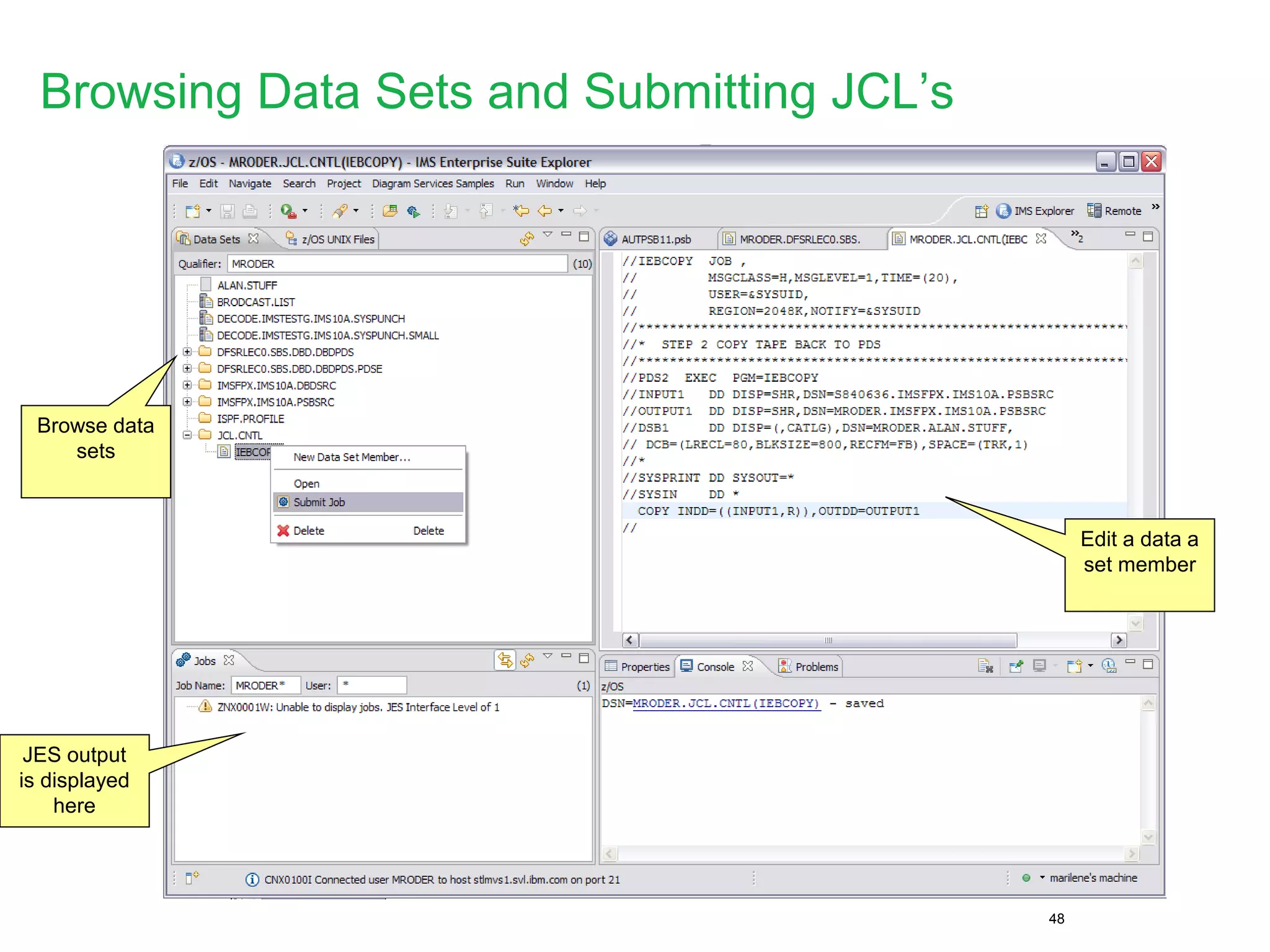
– Browse a Data Set, submit JCL jobs, and view job output.
– Import DBD and PSB source files from a Data Set to IMS Explorer, and export
generated source back to the host.
38
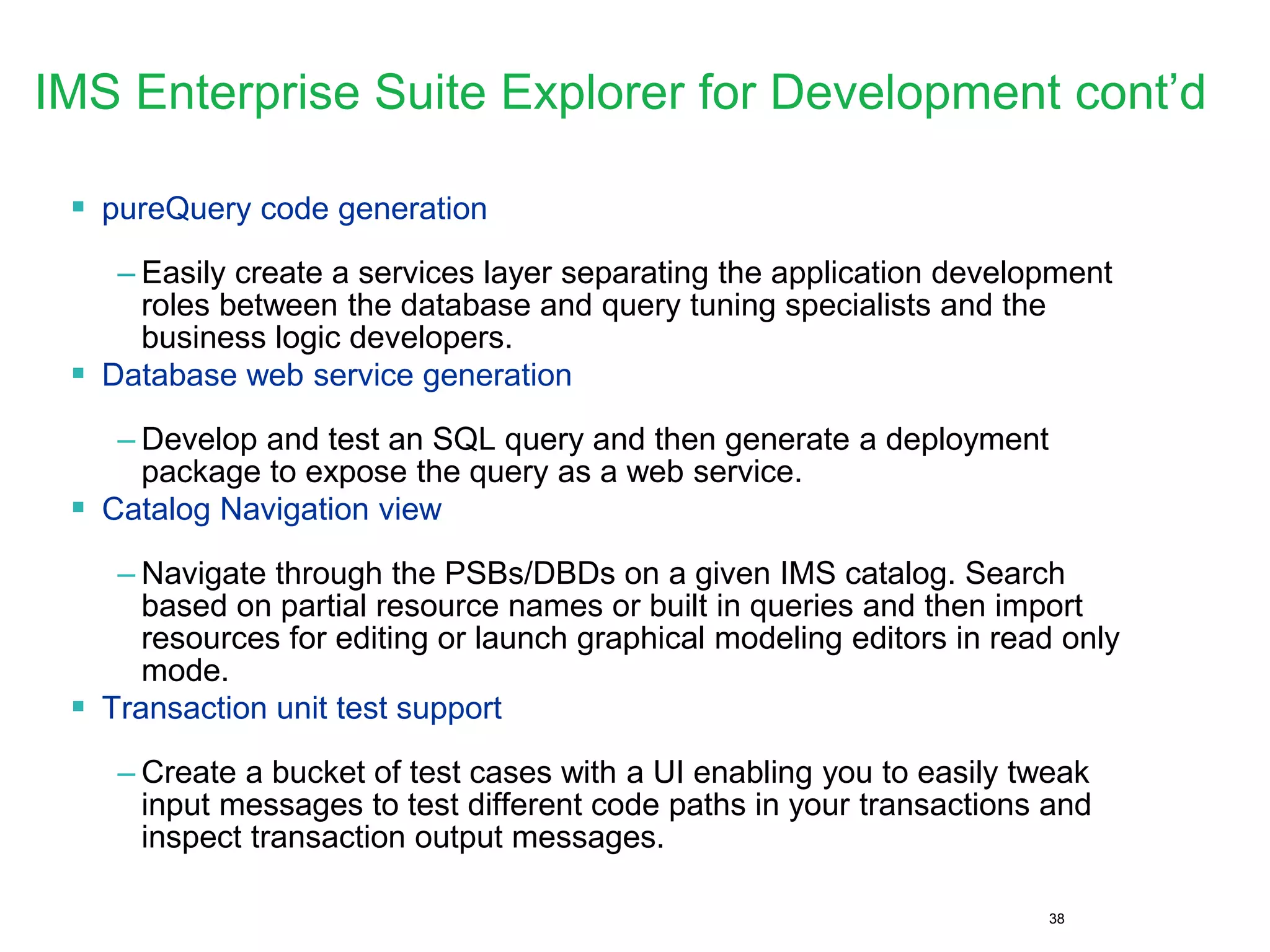
IMS Enterprise Suite Explorer for Development cont’d
 pureQuery code generation
– Easily create a services layer separating the application development
roles between the database and query tuning specialists and the
business logic developers.
 Database web service generation
– Develop and test an SQL query and then generate a deployment
package to expose the query as a web service.
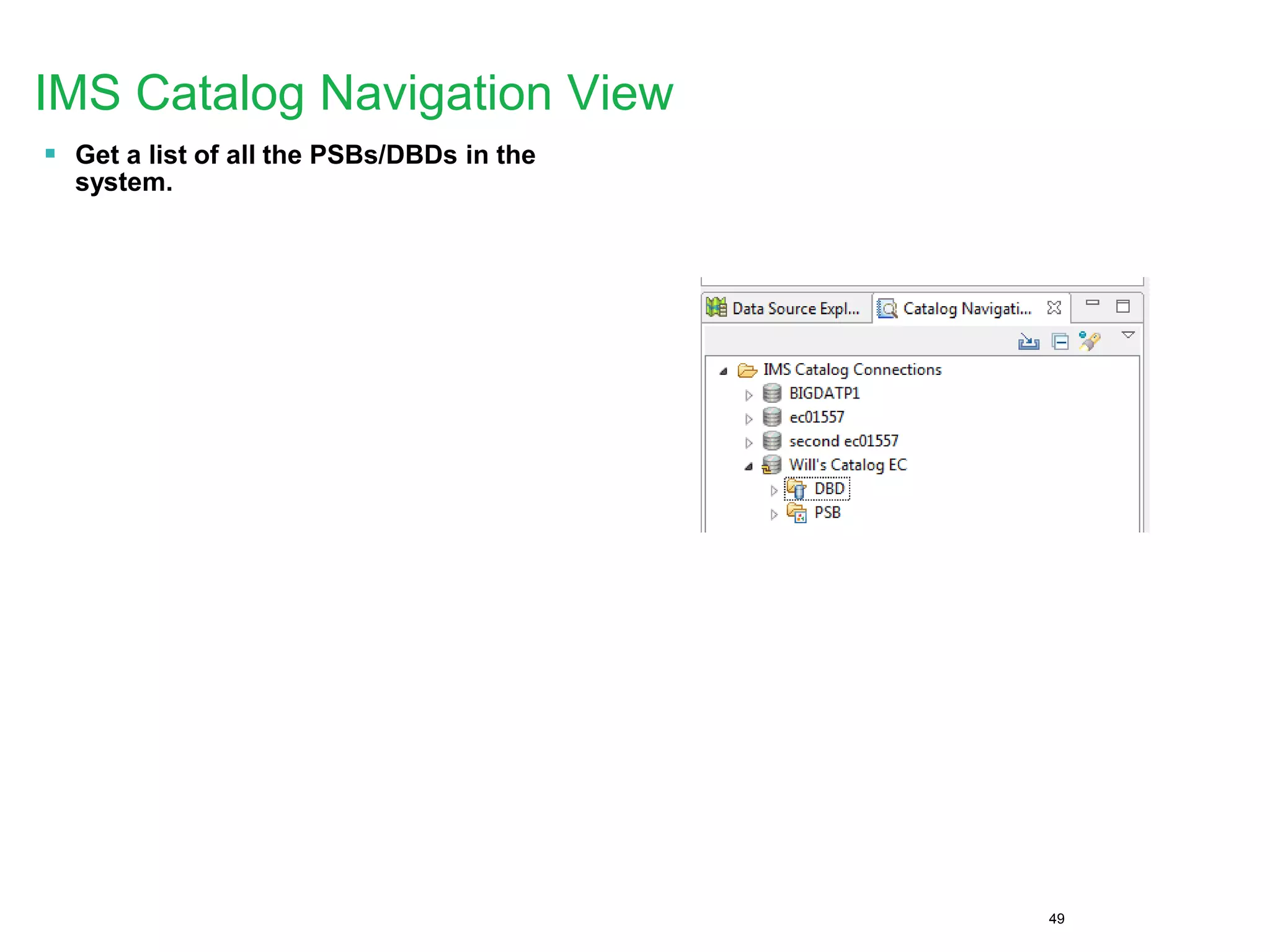
 Catalog Navigation view
– Navigate through the PSBs/DBDs on a given IMS catalog. Search
based on partial resource names or built in queries and then import
resources for editing or launch graphical modeling editors in read only
mode.
 Transaction unit test support
– Create a bucket of test cases with a UI enabling you to easily tweak
input messages to test different code paths in your transactions and
inspect transaction output messages.
39
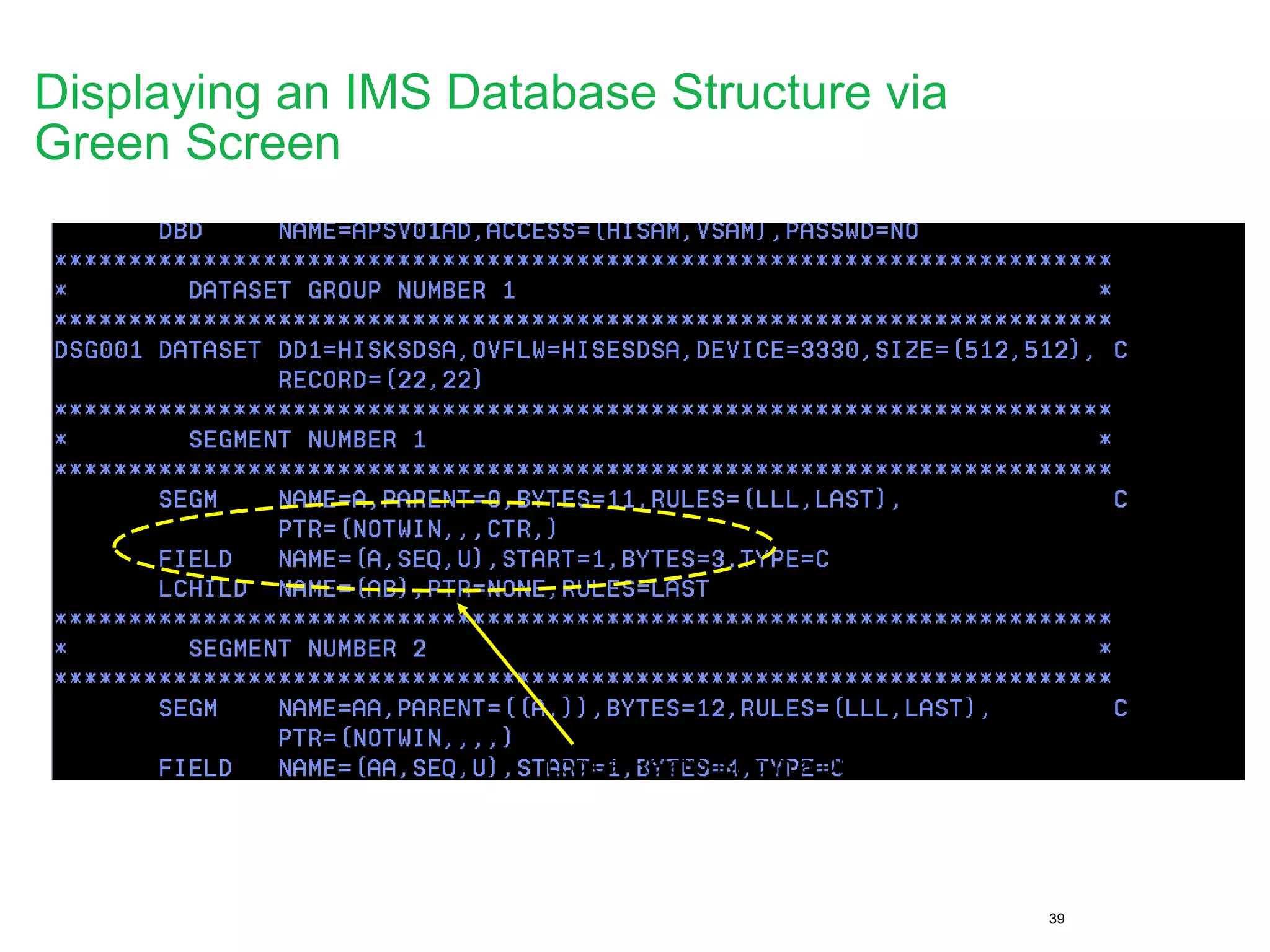
Logical Relationship in a DBD Source
Displaying an IMS Database Structure via
Green Screen
40
Displaying a physical IMS Database Structure
41
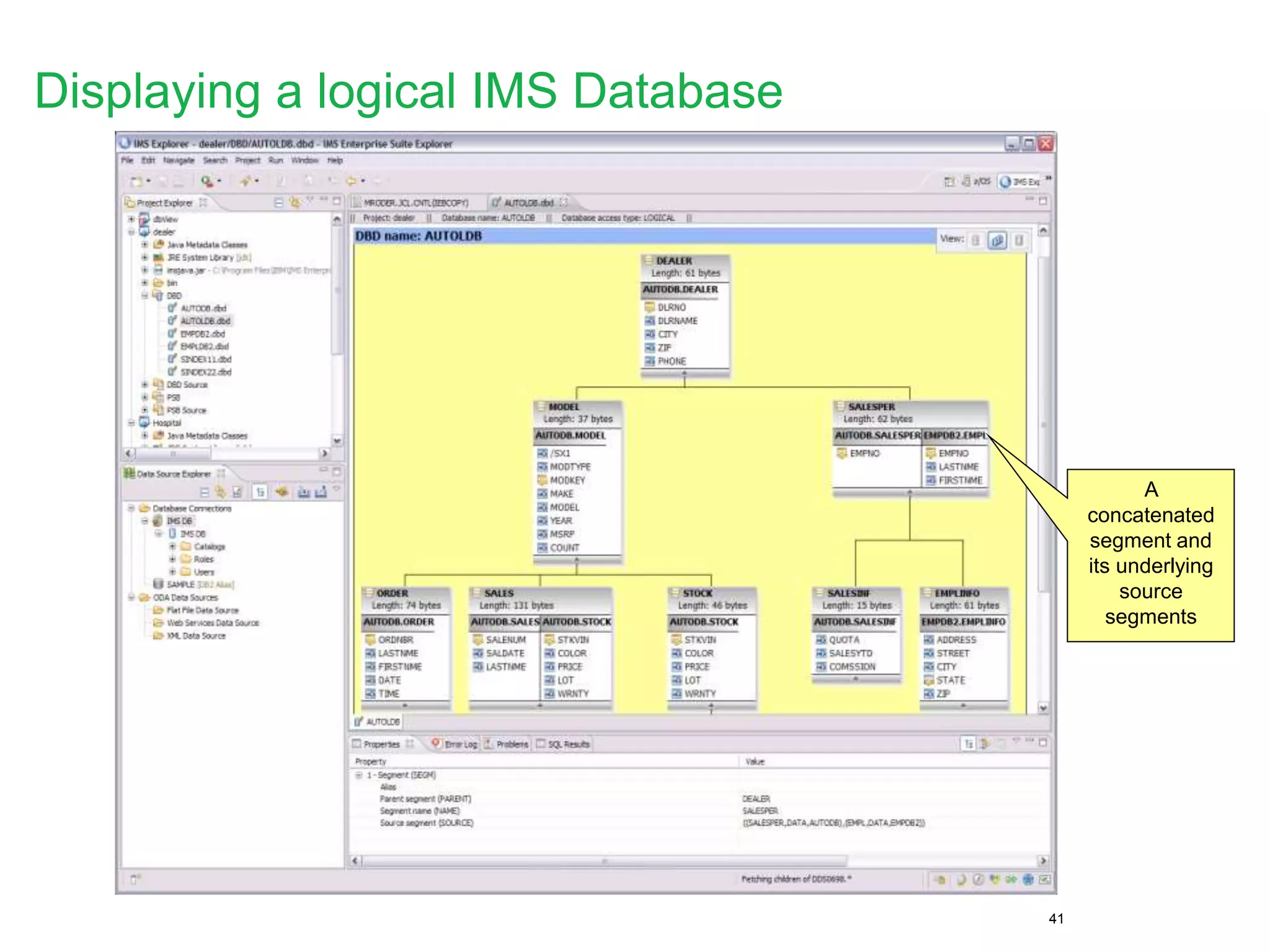
A
concatenated
segment and
its underlying
source
segments
Displaying a logical IMS Database
42
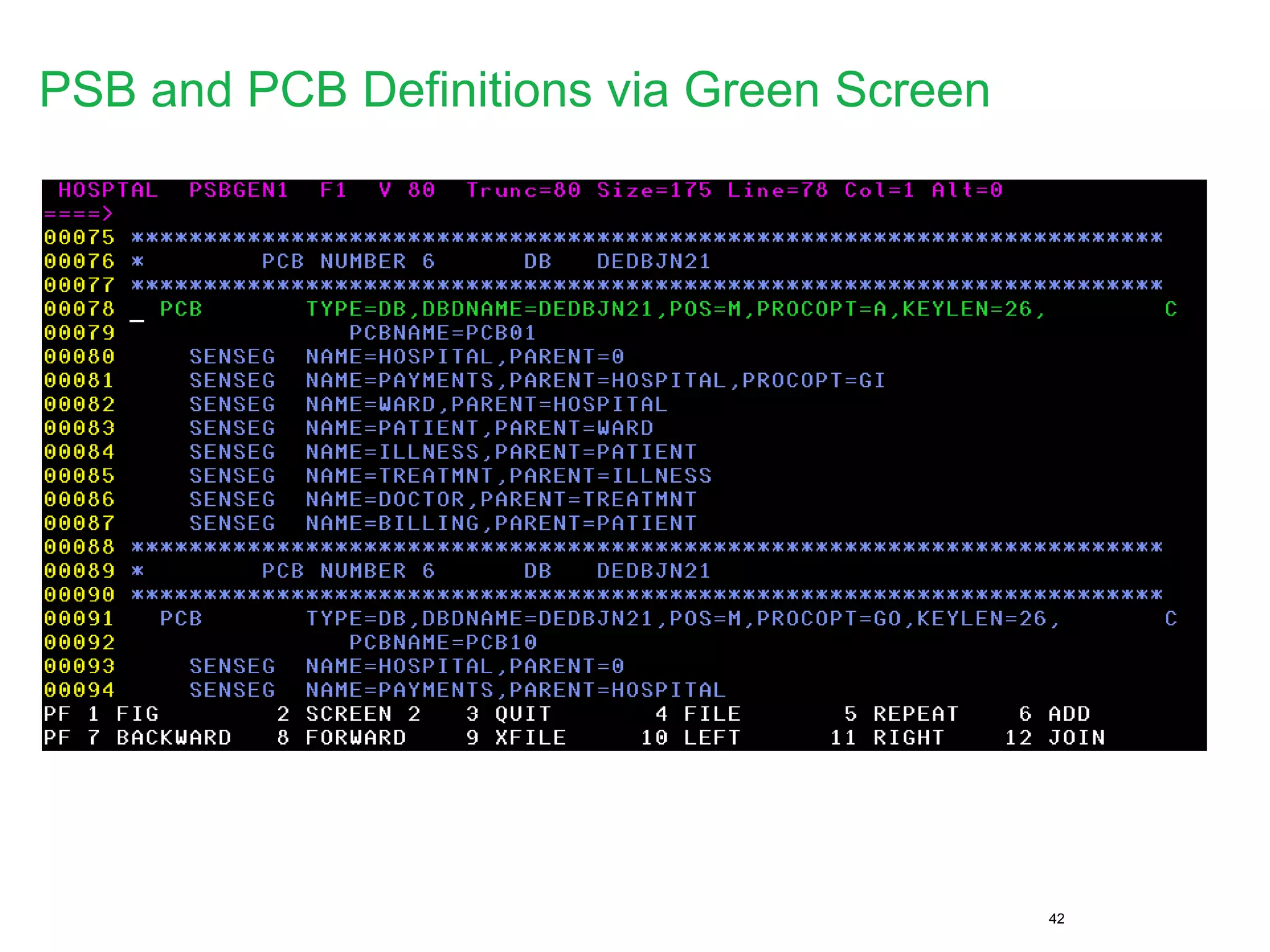
PSB and PCB Definitions via Green Screen
43
Automatic
Generation
Point and
click to
select
Sensegs
Building a PCB definition with IMS Explorer
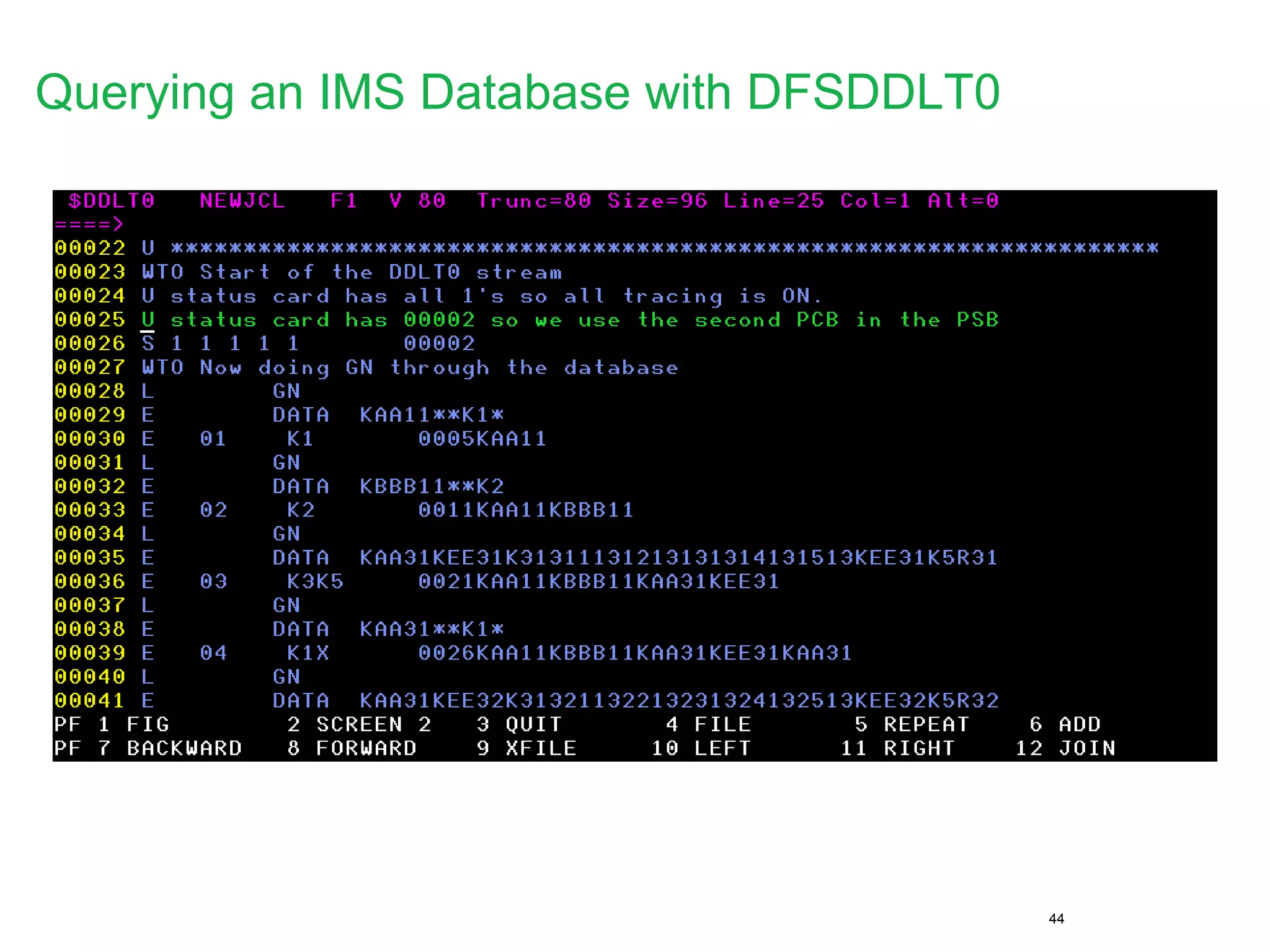
44
Querying an IMS Database with DFSDDLT0
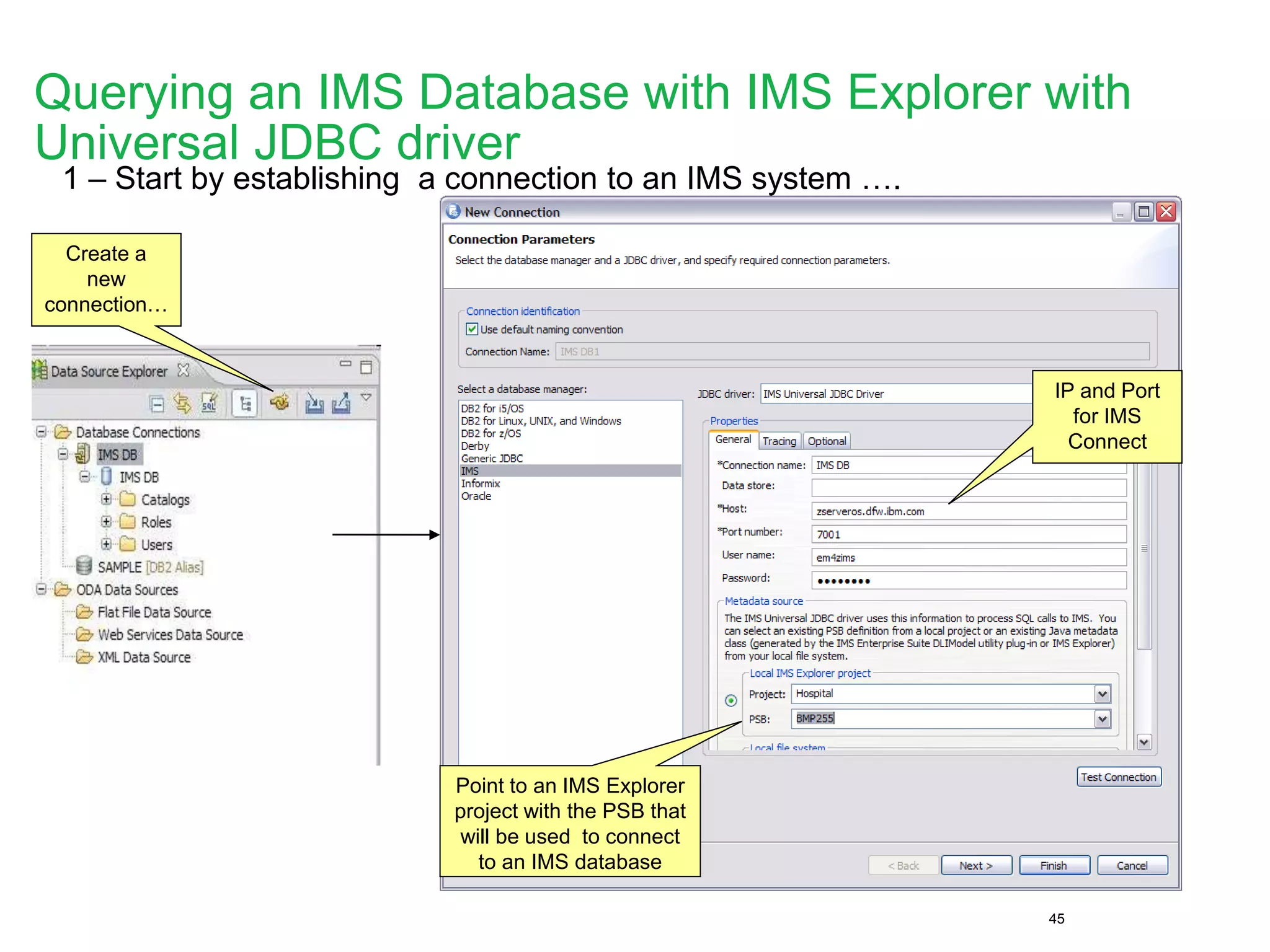
45
1 – Start by establishing a connection to an IMS system ….
IP and Port
for IMS
Connect
Point to an IMS Explorer
project with the PSB that
will be used to connect
to an IMS database
Create a
new
connection…
Querying an IMS Database with IMS Explorer with
Universal JDBC driver
46
2 – Connect … and start querying, updating, deleting IMS data
View w/
the SQL
results
SQL Builder
with content
assistance to
build a SQL
statement
Connection
PSB = Schema
DB PCB = Database
Database Segments
Here you can
create SQL
scripts with
Select,
Update,
Delete, Insert
statements
Querying an IMS Database with IMS Explorer with
Universal JDBC driver
47
Browsing Data Sets and Submitting JCL’s
48
Browsing Data Sets and Submitting JCL’s
JES output
is displayed
here
Browse data
sets
Edit a data a
set member
49
IMS Catalog Navigation View
 Get a list of all the PSBs/DBDs in the
system.
50
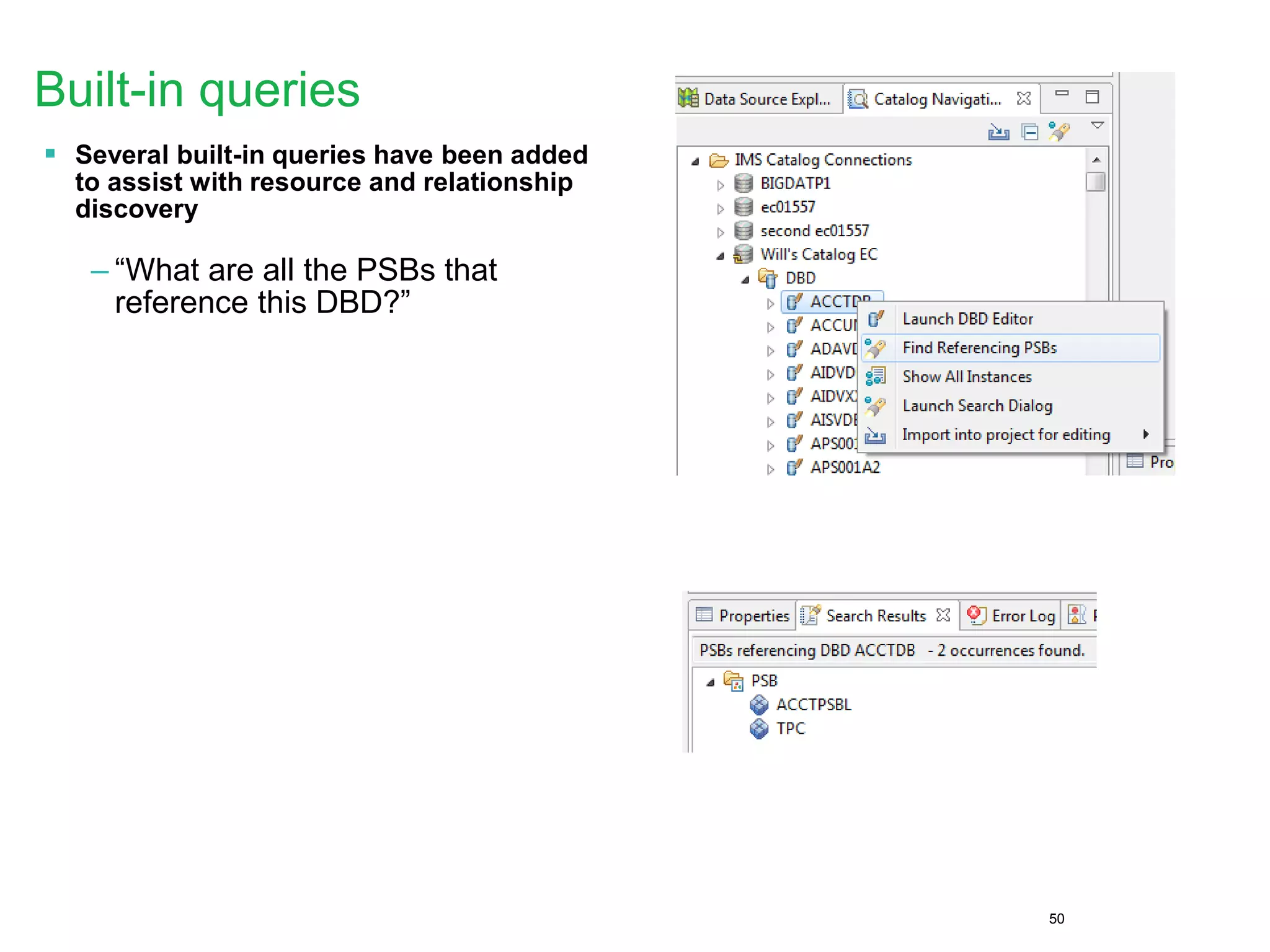
Built-in queries
 Several built-in queries have been added
to assist with resource and relationship
discovery
– “What are all the PSBs that
reference this DBD?”
51
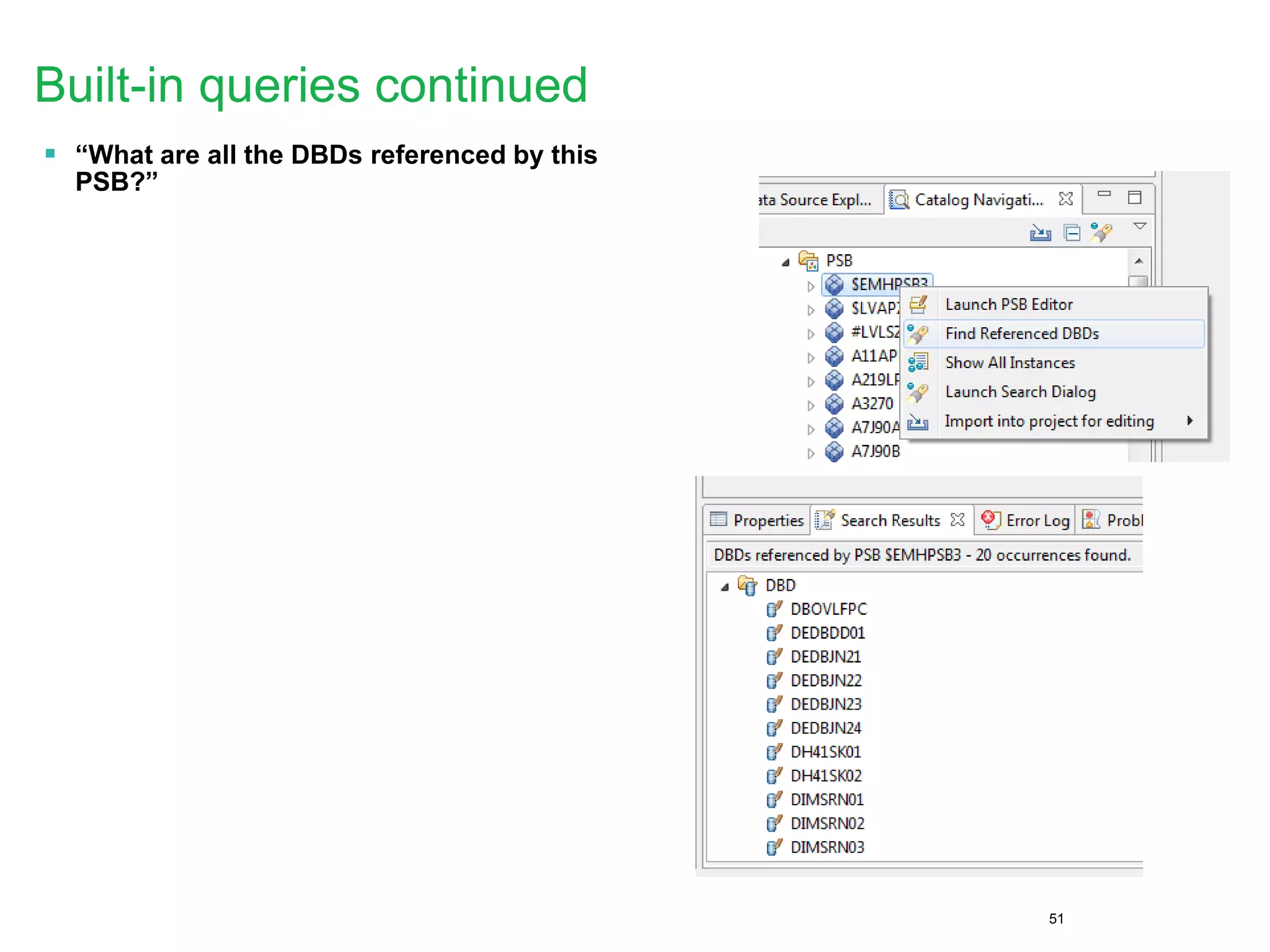
Built-in queries continued
 “What are all the DBDs referenced by this
PSB?”

Scaling your applications with the ims catalog

  • 1.
    Scaling Your Applicationswith the IMS Catalog Richard Tran (richtran@us.ibm.com) Omaha RUG May 2015 © 2014 IBM Corporation
  • 2.
    Please Note • IBM’sstatements regarding its plans, directions, and intent are subject to change or withdrawal without notice at IBM’s sole discretion. • Information regarding potential future products is intended to outline our general product direction and it should not be relied on in making a purchasing decision. • The information mentioned regarding potential future products is not a commitment, promise, or legal obligation to deliver any material, code or functionality. Information about potential future products may not be incorporated into any contract. • The development, release, and timing of any future features or functionality described for our products remains at our sole discretion. Performance is based on measurements and projections using standard IBM benchmarks in a controlled environment. The actual throughput or performance that any user will experience will vary depending upon many factors, including considerations such as the amount of multiprogramming in the user’s job stream, the I/O configuration, the storage configuration, and the workload processed. Therefore, no assurance can be given that an individual user will achieve results similar to those stated here. 2
  • 3.
    Agenda • The IMScatalog  What is it?  IMS features built leveraging the IMS catalog  Integration opportunities available through the IMS catalog • Using the IMS catalog within the cloud  Scaling POJO  Scaling Java EE applications  Scaling for mobile development • IMS Explorer demo on database and catalog capabilities 3
  • 4.
    What is theIMS catalog?
  • 5.
    Overview of IMSCatalog • The IMS catalog will contain information about IMS program resources, database resources, and relevant application metadata that IMS controls:  All program- and database-related information defined to the IMS database system including databases, fields, segments, data types, and more  Changes made to any of these resources when you create, alter, or delete any IMS resource information will be reflected in the catalog • The only way to update the IMS catalog is through integrated IMS processes:  PSBGEN  DBDGEN  ACBGEN • The IMS catalog is a key component of the IMS growth strategy:  Simplification  Integration
  • 6.
    Types of technicalmetadata and storage medium • DB  PSB/DBD resources • Database structure definitions • Physical database definitions • Segment definitions • Field definitions  Application • Data types • Application defined fields • Encodings • Redefines • User defined types • Structures • TM  MODBLKS resources • Program definitions • Transaction definitions Catalog IMS database VSAM data sets Repository Primary
  • 7.
    HEADER (RESOURCE HEADER) SS (SENSEG) PCB PSB SF (SENFLD) PSBVENDPSBRMK (REMARKS) PCBRMK (REMARKS) SFRMK (REMARKS) SSRMK (REMAKRS) XDFLD LCHILD AREA CAPXDBDSEGMDSET (DATASET) DBD MAP (DFSMAP) DBDRMK (REMARKS) CAPXSEGM CASE (DFSCASE) LCHRMK (REMARKS) SEGMRMK (REMARKS) CMAR (DFSMARSH) CPROP (PROPERTIES) CFLD (FIELD) DBDVEND CFLDRMK (REMARKS) CMARRMK (REMARKS) DBDXREF DSETRMK (REMARKS) AREARMK (REMARKS) FLD (FIELD) MAR (DFSMARSH) FLDRMK (REMARKS) PROP (PROPERTIES) MARRMK (REMARKS) MAPRMK (REMARKS) CASERMK (REMARKS) RESERVED RESERVED LCH2IDX (INDEX NAME) XDFLDRMK (REMARKS) Physical catalog structure …RESERVED DSG A DSG B DSG DDSG C
  • 8.
    Before the IMSCatalog • Databases partially defined in DBD  Only searchable fields needed by applications  Remaining segment data is not defined • Remaining database definition in applications  COBOL copybook maps segment data  Applications can have different segment mappings PSBLIB DBDLIBACBLIB COBOL/PLI source DBD sourcePSB source IMS User maintained DL/I model utility Java classes
  • 9.
    DBD++ source IMS Cataloglife cycle Catalog PSB++ source PSBLIB++ • Utility will populate catalog • ACBGEN will populate ACBLIB and catalog • Populate ACBLIB with standard ACB info and extended info • Populate catalog with extended info • Key points • Only way to update catalog is via the ACBGEN process • Extended info stored in ACBLIB members for recoverability • Extended info is acquired via the IMS Explorer DBDLIB++ PSBGEN DBDGEN ACBGEN IMS Explorer COBOL/PLI source Populate Utility DB Client Route ACBLIB++ DBD source PSB source PSBLIB DBDLIB ACBLIB
  • 10.
    Application metadata pre-catalog 10 SEGMNAME=HOSPITAL, PARENT=0, BYTES=900, RULES=(,HERE), SSPTR=0, ENCODING=Cp1047 FIELD NAME=(HOSPCODE,SEQ,U), BYTES=12, START=3, TYPE=C, FIELD NAME=(HOSPLL), BYTES=2, START=1, TYPE=X, FIELD NAME=(HOSPNAME), BYTES=17, START=15, TYPE=C, 01 HOSPITAL. 05 HOSPLL PICTURE S9(3) COMP. 05 HOSPITAL_CODE PICTURE X(12). 05 HOSPITAL_NAME PICTURE X(17). DBD Copybook private DLITypeInfo[] PCB01HOSPITALArray() { DLITypeInfo[] PCB01HOSPITALArray= { new DLITypeInfo("HOSPLL", DLITypeInfo.SMALLINT, 1, 2, "HOSPLL", DBType.DEDB, false), new DLITypeInfo("HOSPITAL_CODE", DLITypeInfo.CHAR, 3, 12, "HOSPCODE", DLITypeInfo.UNIQUE_KEY, DBType.DEDB, true), new DLITypeInfo("HOSPITAL_NAME", DLITypeInfo.CHAR, 15, 17, "HOSPNAME", DBType.DEDB, false) }; return PCB01HOSPITALArray; } Java Metadata file
  • 11.
    Application metadata withnew macro definition 11 SEGM NAME=HOSPITAL, PARENT=0, BYTES=900, RULES=(,HERE), SSPTR=0, ENCODING=Cp1047 FIELD NAME=(HOSPCODE,SEQ,U), BYTES=12, START=3, TYPE=C, FIELD NAME=(HOSPLL), BYTES=2, START=1, TYPE=X, FIELD NAME=(HOSPNAME), BYTES=17, START=15, TYPE=C, 01 HOSPITAL. 05 HOSPLL PICTURE S9(3) COMP. 05 HOSPITAL_CODE PICTURE X(12). 05 HOSPITAL_NAME PICTURE X(17). DBD Copybook SEGM NAME=HOSPITAL, EXTERNALNAME=HOSPITAL, PARENT=0, BYTES=900, RULES=(,HERE), SSPTR=0, ENCODING=Cp1047 FIELD NAME=(HOSPCODE,SEQ,U), EXTERNALNAME=HOSPITAL_CODE, BYTES=12, START=3, TYPE=C, DATATYPE=CHAR DFSMARSH ENCODING=Cp1047, INTERNALTYPECONVERTER=CHAR FIELD NAME=(HOSPLL), EXTERNALNAME=HOSPLL, BYTES=2, START=1, TYPE=X, DATATYPE=SHORT DFSMARSH , INTERNALTYPECONVERTER=SHORT FIELD NAME=(HOSPNAME), EXTERNALNAME=HOSPITAL_NAME, BYTES=17, START=15, TYPE=C, DATATYPE=CHAR DFSMARSH ENCODING=Cp1047, INTERNALTYPECONVERTER=CHAR DBD++
  • 12.
    Application metadata withcatalog 12 SEGM NAME=HOSPITAL, EXTERNALNAME=HOSPITAL, PARENT=0, BYTES=900, RULES=(,HERE), SSPTR=0, ENCODING=Cp1047 FIELD NAME=(HOSPCODE,SEQ,U), EXTERNALNAME=HOSPCODE, BYTES=12, START=3, TYPE=C, DATATYPE=CHAR DFSMARSH ENCODING=Cp1047, INTERNALTYPECONVERTER=CHAR FIELD NAME=(HOSPLL), EXTERNALNAME=HOSPLL, BYTES=2, START=1, TYPE=X, DATATYPE=SHORT DFSMARSH , INTERNALTYPECONVERTER=SHORT FIELD NAME=(HOSPNAME), EXTERNALNAME=HOSPNAME, BYTES=17, START=15, TYPE=C, DATATYPE=CHAR DFSMARSH ENCODING=Cp1047, INTERNALTYPECONVERTER=CHAR DBD++ <segment imsName="HOSPITAL" name="HOSPITAL" encoding="Cp1047"> <dedb> <bytes maxBytes="900" /> </dedb> <field imsDatatype="C" imsName="HOSPCODE" name="HOSPITAL_CODE" seqType="U"> <startPos>3</startPos> <bytes>12</bytes> <marshaller encoding="Cp1047"> <typeConverter>CHAR</typeConverter> </marshaller> <applicationDatatype datatype="CHAR" /> </field> <field imsDatatype="C" imsName="HOSPITAL_NAME" name="HOSPNAME"> <startPos>15</startPos> <bytes>17</bytes> <marshaller encoding="Cp1047"> <typeConverter>CHAR</typeConverter> </marshaller> <applicationDatatype datatype="CHAR" /> </field> <field imsDatatype="X" imsName="HOSPLL" name="HOSPLL"> <startPos>1</startPos> <bytes>2</bytes> <marshaller> <typeConverter>SHORT</typeConverter> </marshaller> <applicationDatatype datatype="SHORT" /> </field> </segment> Catalog XML – GUR DL/I
  • 13.
    IMS features leveragingthe IMS catalog
  • 14.
    New IMS V13features based on the IMS catalog • Native SQL support  .NET Data Provider • Database Versioning
  • 15.
    z/OS IMS DB DLI SQL processor Catalog Metadata SQL IMSConnect DRDA MPP BMPIFP COBOL Language Interface IMS OpenDatabaseManager Language interface SQL ODBA / DRADistributed COBOL and .NET access through SQL • SQL support for COBOL directly access IMS Catalog for database metadata  No need to generate metadata for use in applications  No need to reference copybooks for metadata • Consolidated SQL processor for both host (COBOL) and distributed applications (.NET/RYO) .NET RYO
  • 16.
    16 Database Versioning Overview •Database Versioning provides the ability to assign user- defined version identifiers to different versions of a database structure  Enables structural changes to a database while providing multiple views of the physical IMS data to application programs • Applications referencing a new physical database structure can be brought online without affecting applications that use previous database structures  Applications which do not require sensitivity to the new physical structure, do not need to be modified and can continue to access the database
  • 17.
    17 • Database Versioningrequires enablement of the IMS catalog  DBD definitions for versioned databases must be in the IMS catalog • Database Versioning must be enabled • Versioning is at the DBD level  Users define the version of a database definition on the DBD  Version numbers must be maintained in incremented values • Application programs select the desired database version by  Specifying the version number on the PCB of the PSB  Specifying the version number on a DL/I INIT call Database Versioning Overview (cont’d)
  • 18.
  • 19.
    Portfolio integration 19 Solution  Cognos10.2 BI  IBM InfoSphere BigInsights  IBM DB2 Analytics Accelerator  IBM Watson Explorer Use case  BI, dashboarding, reporting of IMS data  Merge HDFS data with trusted OLTP  IT analytics (log data)  Bring analytics to the data  Visualize entire big data landscape
  • 20.
    Cognos 10.2 BIwith IMS Data 20  Certified against IMS 12 using IMS Open Database technology  Universal JDBC driver  Real-time analytics Get Started Today!  developerWorks article available here
  • 21.
    IMS Integration “Information asa Service”  DataPower provides a standard WS façade to IMS – SOAP or REST call is mapped to a JDBC (DRDA) invocation  Exposes database content (information) as a service  Leverages extensive Web Services security and management capabilities of DataPower to more securely expose critical data to the enterprise  Available 6/2013 with DataPower V6 DataPower Client SOAP or REST` DRDA
  • 22.
    • Analyze, visualize,and discover insight in unstructured data through NLP and text analytics • Search, visualize, and explore information from internal and external content through 360-degree information applications • Interpret information to enhance, scale, and accelerate human expertise through cognitive capabilities Watson Explorer Watson Content Analytics Watson Developer Cloud Cognitive Exploration  Search and exploration across many different sources  Content analytics  Cognitive insights  Delivered in a 360-degree information application Watson Explorer V10 Now available! Now part of Watson Explorer Advanced Edition Watson Explorer V10 delivers cognitive exploration
  • 23.
    Seamless IMS integrationin Watson Explorer Big Data Application Big Data Application Big Data Application Web Results Feeds Subscriptions Query RoutingUser Profiles Authentication/Authorization Business Rules Personalization Display Application Framework Indexing and Search Engine Metadata Extraction IMS DBs JDBC connector for IMS IMS catalog JDBC connector for IMS JDBC API used to flow SQL to target IMS database(s) to retrieve all of the information of interest JDBC metadata discovery APIs used to define the IMS database resource(s) of interest for indexing 23
  • 24.
    24 Enhancing IMS analyticson System z with Big Data  Much of the world’s operational data resides on z/OS  Unstructured data sources are growing fast  There is a need to merge this data with trusted OLTP data from System z data sources  IMS provides the connectors and the DB capability to allow BigInsights v2.1.2.0 (3/13/2014) to easily and efficiently access the IMS data source
  • 25.
    25 Enhancing IMS analyticson System z with Big Data • Observation points lead to new business opportunities • Observation points gleaned from both archived data and live data • Score business events, track claims evolution, and more • Make the data available to people who can do something meaningful with it
  • 26.
    IBM zEnterprise andDB2 Analytics Accelerator 26 The hybrid computing platform on zEnterprise System z analytics workload DB2 Analytics Accelerator and DB2 for z/OS A self-managing, hybrid workload-optimized database management system that runs each query workload in the most efficient way, so that each query is executed in its optimal environment for greatest performance and cost efficiency  Supports transaction processing and analytics workloads concurrently, efficiently and cost- effectively  Delivers industry leading performance for mixed workloads Metadata Data
  • 27.
    IDAA use caseswith IMS data 27 Make better decisions faster Better understand your customers Trust your data Large volume reporting of combined IMS and DB2 assets Leverage full breadth of transactional data for analytics Ensure consistency of data relationships between IMS and DB2 Get Started Today!  Technical Whitepaper and “how- to” guide available here
  • 28.
    Using the IMScatalog within the cloud
  • 29.
    IMS cloud deploymentpre-catalog • Before the IMS catalog, metadata was contained within localized Java files  Does not scale well 29 IMS DB ICON Metadata Application z/OSDistributed Metadata Application Metadata Application
  • 30.
    IMS cloud deploymentwith catalog • Applications can replicate as often as needed and rely on catalog to provide correct metadata 30 IMS Catalog ICON Application z/OSDistributed Application Application IMS DB
  • 31.
    Intended Support forDB REST Services • User Story  The solution architects have decided to • expose an IMS DB query as several RESTful services using z/OS Connect and the IMS Mobile Feature Pack • use IMS Explorer for Development (Eclipse tooling) which is required to deploy and test the IMS RESTful services in z/OS Connect • use a JavaScript-based web server that will leverage the new Contacts-based RESTful services provided • use the Node.js runtime for the JavaScript server • host the web application on IBM’s cloud platform, IBM Bluemix 31
  • 32.
    Intended Support Architecture •Architectural Diagram 32
  • 33.
  • 34.
    Additional Resources • TheIMS catalog  http://www.redbooks.ibm.com/abstracts/redp4812.html?Open • IMS Native SQL Application Programming Guide  http://www- 01.ibm.com/support/knowledgecenter/SSEPH2_13.1.0/com.ibm.ims13.doc.apg/ims_appprog _sql.htm • IMS database versioning  http://www- 01.ibm.com/support/knowledgecenter/SSEPH2_13.1.0/com.ibm.ims13.doc.rpg/ims_over13_d b_dbver.htm • IMS Explorer for Development  http://www- 01.ibm.com/support/knowledgecenter/SS9NWR_3.1.0/com.ibm.ims.explorer31.doc/wb_conta iner_imsexplorer.htm?lang=en • IMS and Cognos  http://www.ibm.com/developerworks/library/ba-pp-infrastructure-cognos_specific-page630/ • IMS and Big Data  Attend Session #6128 – 10/30 10am in Banyan C 34
  • 35.
  • 36.
  • 37.
    37 IMS Enterprise SuiteExplorer for Development  Easier visualization and editing of IMS Database and Program Definitions – Provide graphical editors to: –Display IMS database hierarchical structures –Display/create/edit PSBs –Add/Edit fields in DBDs – Import Cobol CopyBooks and PL/I Structures into database segments – Generates DBD and PSB source for Catalog or non-Catalog enabled systems.  Ability to easily access live IMS data using SQL statements. A graphical SQL statement builder is provide to help beginners. – Leveraging IMS Universal JDBC driver  Connectivity to the z/OS system – Browse a Data Set, submit JCL jobs, and view job output. – Import DBD and PSB source files from a Data Set to IMS Explorer, and export generated source back to the host.
  • 38.
    38 IMS Enterprise SuiteExplorer for Development cont’d  pureQuery code generation – Easily create a services layer separating the application development roles between the database and query tuning specialists and the business logic developers.  Database web service generation – Develop and test an SQL query and then generate a deployment package to expose the query as a web service.  Catalog Navigation view – Navigate through the PSBs/DBDs on a given IMS catalog. Search based on partial resource names or built in queries and then import resources for editing or launch graphical modeling editors in read only mode.  Transaction unit test support – Create a bucket of test cases with a UI enabling you to easily tweak input messages to test different code paths in your transactions and inspect transaction output messages.
  • 39.
    39 Logical Relationship ina DBD Source Displaying an IMS Database Structure via Green Screen
  • 40.
    40 Displaying a physicalIMS Database Structure
  • 41.
  • 42.
    42 PSB and PCBDefinitions via Green Screen
  • 43.
  • 44.
    44 Querying an IMSDatabase with DFSDDLT0
  • 45.
    45 1 – Startby establishing a connection to an IMS system …. IP and Port for IMS Connect Point to an IMS Explorer project with the PSB that will be used to connect to an IMS database Create a new connection… Querying an IMS Database with IMS Explorer with Universal JDBC driver
  • 46.
    46 2 – Connect… and start querying, updating, deleting IMS data View w/ the SQL results SQL Builder with content assistance to build a SQL statement Connection PSB = Schema DB PCB = Database Database Segments Here you can create SQL scripts with Select, Update, Delete, Insert statements Querying an IMS Database with IMS Explorer with Universal JDBC driver
  • 47.
    47 Browsing Data Setsand Submitting JCL’s
  • 48.
    48 Browsing Data Setsand Submitting JCL’s JES output is displayed here Browse data sets Edit a data a set member
  • 49.
    49 IMS Catalog NavigationView  Get a list of all the PSBs/DBDs in the system.
  • 50.
    50 Built-in queries  Severalbuilt-in queries have been added to assist with resource and relationship discovery – “What are all the PSBs that reference this DBD?”
  • 51.
    51 Built-in queries continued “What are all the DBDs referenced by this PSB?”