How Did You Use Media
Technologies In The
Construction, Research,
Planning & Evaluation
Stages?
Saad Khan
Research
 Researching trailers and posters I had gotten help off the internet,
using websites such as YouTube, Google and other search engines
such as Yahoo and Bing. I had used Google to search for
researching on what genre I should use and the contents that I
need to take into consideration. YouTube was used for the
purpose of getting ideas on how I need to create my trailer and
what possibilities I can place into my trailer.
 My Device – using my phone I also had the availablity of the
internet. This only came in use if I had no access to any other
internet outlets, this again helped me in deciding what I need to
include on my magazine front cover, trailer poster and trailer itself.
Using my phone I had the same accessability as I would had on a
normal PC or Mac. YouTube and Google was again used to
search for ideas on what I could include in my three media
products.
Research & Planning
 Blogger was used by our entire class whilst in the process of
the creation of our media products. I kept track of what I
needed to do as well as uploading pictures of the Recce and
write up of my storyboard and script. I had blogged almost
every step and every Ideas I had thought of, to use for future
ideas.
 Blogger was used almost like a diary, to keep track of what
needed to be done as well as what has been done, the
blogger helped me keep track of I had to do, and when I
needed to do it. It also allows me to upload pictures and any
other ideas.
 Target audience, schedule shooting and questionnaires are
only some of th documents uploaded onto the blogger, to
show what I had done, in terms of planning, during the
creation of my media products.
Software's
 Using software's such as Microsoft Office and PowerPoint I
was able to come up with my questionnaires. Coming up
with questions to ask was written up in Microsoft as it was
easy and available on almost every computer outlet
available to me.
 Microsoft PowerPoint was used to create bars and graphs,
to show my responses I had received from my
questionnaires, this allows me to put into a clear picture of
what my audience thinks about my trailer poster,
magazine front cover and trailer itself.
 Microsoft Word was also used to create my script. My
script was planned and written up in Microsoft because of
it being easy and accessible from anywhere.
Construction
 To do the filming, we were provided with the
Panasonic Camera. This camera would allow me to
record in bulk or in stages. Along with the camera
was a tripod, to hold in place the camera whilst it
was recording. The camera also allowed me to
upload clips easily onto the software I had decided
to use to create my trailer, Adobe Premier, from
which the video clips were used and put together to
create the trailer. Still cameras were also used to
take pictures for the magazine front cover and trailer
poster, a Panasonic still camera was provided to my
by my teacher. The camera also allowed me to
upload pictures straight from the device to the
software I had chosen to use, Adobe Illustrator.
Editing
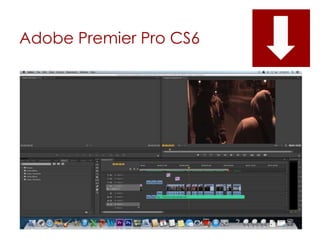
 I had used Adobe Premier to create my trailer. This is
because the software provides you with a timeline
to manage your clips as well as separate sections
on managing audio and video. Adobe Premier was
suitable for my clips both long and short. Adobe is
also compatible with Apple Macs, which was the
main outlet of the creation of my three media
products. It was easy and quick to use as well as
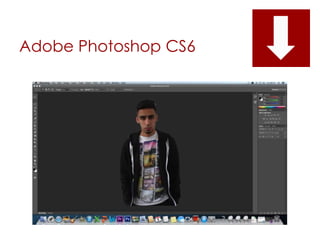
being simple. Adobe Photoshop was also used in
the creation of my cover and trailer cover to cut
out bits and to add effect. Once effects were
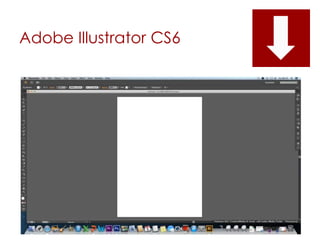
added I had used Adobe illustrator to put my items
together for it to form my magazine front cover and
trailer poster.
Adobe Premier Pro CS6
Adobe Photoshop CS6
Adobe Illustrator CS6
Audience Feedback
 I had used social networking sites such as Facebook
and Twitter to gain feedback on people opinions of my
movie trailer.
 Facebook allowed me to share my video to everyone
on my friends list, and required the people to click the
“like” button if they had liked it. People were also able
to leave comments on what they personally think
about the trailer.
 Twitter allowed me to tweet my video to everyone on
my friends list. Similar to Facebook, people had easy
access to watching the video and were urged to
leave their comment and opinions on what I need to
keep and what improvements I need to make.
Evaluation – Slide
share/PowerPoint
 To finalize my coursework, I had used PowerPoint
and slide share to map out a visual presentation
on what I have been doing over the course of
the year, what videos, Ideas and software's I had
to used to construct my complete coursework.
Both PowerPoint and Slide share were easy to use
and simple to upload seeing as their functions
are basic and easy to read and understand.

SlideShare - Q4

  • 1.
    How Did YouUse Media Technologies In The Construction, Research, Planning & Evaluation Stages? Saad Khan
  • 2.
    Research  Researching trailersand posters I had gotten help off the internet, using websites such as YouTube, Google and other search engines such as Yahoo and Bing. I had used Google to search for researching on what genre I should use and the contents that I need to take into consideration. YouTube was used for the purpose of getting ideas on how I need to create my trailer and what possibilities I can place into my trailer.  My Device – using my phone I also had the availablity of the internet. This only came in use if I had no access to any other internet outlets, this again helped me in deciding what I need to include on my magazine front cover, trailer poster and trailer itself. Using my phone I had the same accessability as I would had on a normal PC or Mac. YouTube and Google was again used to search for ideas on what I could include in my three media products.
  • 3.
    Research & Planning Blogger was used by our entire class whilst in the process of the creation of our media products. I kept track of what I needed to do as well as uploading pictures of the Recce and write up of my storyboard and script. I had blogged almost every step and every Ideas I had thought of, to use for future ideas.  Blogger was used almost like a diary, to keep track of what needed to be done as well as what has been done, the blogger helped me keep track of I had to do, and when I needed to do it. It also allows me to upload pictures and any other ideas.  Target audience, schedule shooting and questionnaires are only some of th documents uploaded onto the blogger, to show what I had done, in terms of planning, during the creation of my media products.
  • 4.
    Software's  Using software'ssuch as Microsoft Office and PowerPoint I was able to come up with my questionnaires. Coming up with questions to ask was written up in Microsoft as it was easy and available on almost every computer outlet available to me.  Microsoft PowerPoint was used to create bars and graphs, to show my responses I had received from my questionnaires, this allows me to put into a clear picture of what my audience thinks about my trailer poster, magazine front cover and trailer itself.  Microsoft Word was also used to create my script. My script was planned and written up in Microsoft because of it being easy and accessible from anywhere.
  • 5.
    Construction  To dothe filming, we were provided with the Panasonic Camera. This camera would allow me to record in bulk or in stages. Along with the camera was a tripod, to hold in place the camera whilst it was recording. The camera also allowed me to upload clips easily onto the software I had decided to use to create my trailer, Adobe Premier, from which the video clips were used and put together to create the trailer. Still cameras were also used to take pictures for the magazine front cover and trailer poster, a Panasonic still camera was provided to my by my teacher. The camera also allowed me to upload pictures straight from the device to the software I had chosen to use, Adobe Illustrator.
  • 6.
    Editing  I hadused Adobe Premier to create my trailer. This is because the software provides you with a timeline to manage your clips as well as separate sections on managing audio and video. Adobe Premier was suitable for my clips both long and short. Adobe is also compatible with Apple Macs, which was the main outlet of the creation of my three media products. It was easy and quick to use as well as being simple. Adobe Photoshop was also used in the creation of my cover and trailer cover to cut out bits and to add effect. Once effects were added I had used Adobe illustrator to put my items together for it to form my magazine front cover and trailer poster.
  • 7.
  • 8.
  • 9.
  • 10.
    Audience Feedback  Ihad used social networking sites such as Facebook and Twitter to gain feedback on people opinions of my movie trailer.  Facebook allowed me to share my video to everyone on my friends list, and required the people to click the “like” button if they had liked it. People were also able to leave comments on what they personally think about the trailer.  Twitter allowed me to tweet my video to everyone on my friends list. Similar to Facebook, people had easy access to watching the video and were urged to leave their comment and opinions on what I need to keep and what improvements I need to make.
  • 11.
    Evaluation – Slide share/PowerPoint To finalize my coursework, I had used PowerPoint and slide share to map out a visual presentation on what I have been doing over the course of the year, what videos, Ideas and software's I had to used to construct my complete coursework. Both PowerPoint and Slide share were easy to use and simple to upload seeing as their functions are basic and easy to read and understand.