INTRODUCTION
Simulation techniques areintegral to modern building design, enabling architects and
engineers to predict and enhance building performance across various parameters such as
energy efficiency, daylight availability, thermal comfort, and indoor air quality. Utilizing simulation
techniques in building design is pivotal for optimizing performance, ensuring sustainability, and
enhancing occupant comfort. A variety of advanced software tools are available to assist
architects and engineers in evaluating different aspects of building performance. Below is a
categorized list of notable simulation software applicable to building design, testing, and
evaluation:
3.
A. ENERGY SIMULATIONTOOLS
1. IES Virtual Environment (IESVE)
2. eQUEST
(Quick Energy Simulation Tool)
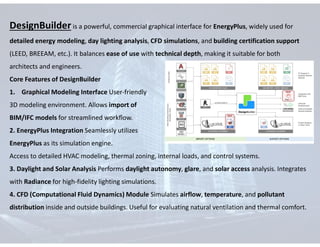
B. DAYLIGHT ANALYSIS TOOLS
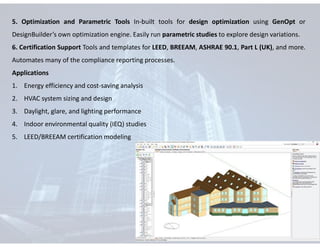
1. Radiance
2. VELUX Daylight Visualizer
3. DIVA for Rhino
4. RadVR
C. THERMAL COMFORT AND HVAC SIMULATION
1. ESP-r
2. DesignBuilder
D. INTEGRATED BUILDING PERFORMANCE
PLATFORMS
1. cove.tool
2. ClimateStudio
E. VISUALIZATION & VIRTUAL REALITY
1. Enscape
2. Lumion
4.
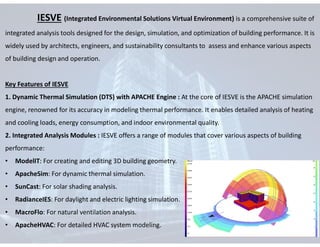
IESVE (Integrated EnvironmentalSolutions Virtual Environment) is a comprehensive suite of
integrated analysis tools designed for the design, simulation, and optimization of building performance. It is
widely used by architects, engineers, and sustainability consultants to assess and enhance various aspects
of building design and operation.
Key Features of IESVE
1. Dynamic Thermal Simulation (DTS) with APACHE Engine : At the core of IESVE is the APACHE simulation
engine, renowned for its accuracy in modeling thermal performance. It enables detailed analysis of heating
and cooling loads, energy consumption, and indoor environmental quality.
2. Integrated Analysis Modules : IESVE offers a range of modules that cover various aspects of building
performance:
• ModelIT: For creating and editing 3D building geometry.
• ApacheSim: For dynamic thermal simulation.
• SunCast: For solar shading analysis.
• RadianceIES: For daylight and electric lighting simulation.
• MacroFlo: For natural ventilation analysis.
• ApacheHVAC: For detailed HVAC system modeling.
5.
• 3. Parametricand Optimization Studies The software supports parametric simulations, allowing
users to assess the impact of varying design parameters on building performance. This facilitates
informed decision-making during the design process.
• 4. Compliance and Certification Support : IESVE aids in demonstrating compliance with various
building codes and standards, such as ASHRAE 90.1, LEED, and BREEAM, by providing necessary
simulation outputs and reports.
• 5. Integration with BIM Tools: The platform integrates with Building Information Modeling (BIM)
tools like Revit and SketchUp, streamlining the workflow from design to analysis.
Applications of IESVE
• Energy Modeling: Assessing energy consumption and identifying opportunities for energy savings.
• HVAC Design: Sizing and optimizing HVAC systems for comfort and efficiency.
• Daylight Analysis: Evaluating natural lighting to enhance occupant well-being and reduce artificial
lighting needs.
• Natural Ventilation: Designing for effective passive cooling strategies.
• Carbon Emission Reduction: Analyzing and minimizing the carbon footprint of buildings.
6.
eQUEST (Quick EnergySimulation Tool) is a free, user-friendly software used to model and
analyze the energy performance of buildings. It integrates a graphical user interface with the DOE-2
simulation engine to provide detailed insights into building energy use.
Key Features
• User-Friendly Interface Offers a wizard-based interface for easy model creation, ideal for beginners
and professionals alike.
• Detailed Energy Analysis Simulates energy consumption for: HVAC systems, Lighting, Envelope
performance, Plug loads, Schedules and operational conditions.
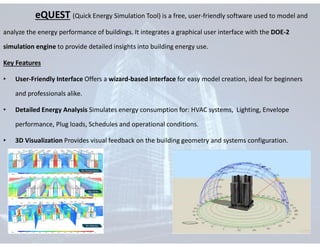
• 3D Visualization Provides visual feedback on the building geometry and systems configuration.
7.
• Design AlternativesComparison Users can compare multiple design options to evaluate cost and
energy performance implications.
• Comprehensive Reporting Generates detailed reports for:
Energy use breakdowns
Load summaries
• Compliance Support Supports modeling in line with ASHRAE 90.1, LEED, and other energy codes.
APPLICATIONS
• Early-stage building design analysis
• Retrofit studies for existing buildings
• Preliminary energy modeling before advancing to tools like EnergyPlus or IESVE
• Cost-benefit analysis of energy conservation measures
8.
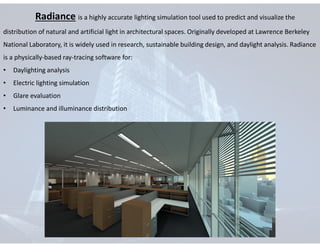
Radiance is ahighly accurate lighting simulation tool used to predict and visualize the
distribution of natural and artificial light in architectural spaces. Originally developed at Lawrence Berkeley
National Laboratory, it is widely used in research, sustainable building design, and daylight analysis. Radiance
is a physically-based ray-tracing software for:
• Daylighting analysis
• Electric lighting simulation
• Glare evaluation
• Luminance and illuminance distribution
9.
Key Features
1. Ray-TracingRendering Engine Accurately simulates how light interacts with surfaces and materials
Uses backward ray tracing to calculate light paths from the viewer or sensor point to the light source
2. Daylight Analysis Ideal for daylight factor, daylight autonomy, UDI (Useful Daylight Illuminance), and
annual sunlight exposure (ASE) simulations
3. Glare Analysis Supports calculation of Daylight Glare Index (DGI) and Visual Comfort Probability (VCP)
4. Luminance Mapping Creates false-color renderings to show light intensity in spaces
Essential for understanding contrast and visual comfort
5. Material Accuracy Supports a wide range of reflective, trans missive, and translucent materials with
accurate light interaction behavior
Applications
1. Architectural Day lighting Design
2. LEED/BREEAM Compliance daylight simulations
3. Interior lighting optimization
4. Visual comfort studies in workspaces, schools, and healthcare facilities
5. Glare risk assessments
10.
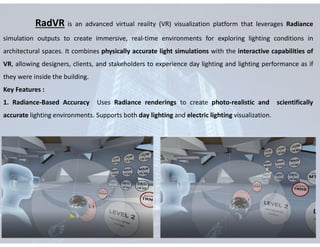
RadVR is anadvanced virtual reality (VR) visualization platform that leverages Radiance
simulation outputs to create immersive, real-time environments for exploring lighting conditions in
architectural spaces. It combines physically accurate light simulations with the interactive capabilities of
VR, allowing designers, clients, and stakeholders to experience day lighting and lighting performance as if
they were inside the building.
Key Features :
1. Radiance-Based Accuracy Uses Radiance renderings to create photo-realistic and scientifically
accurate lighting environments. Supports both day lighting and electric lighting visualization.
11.
2. Virtual RealityIntegration Allows users to walk through buildings and interact with lighting conditions
using VR headsets (e.g., Oculus, HTC Vive). Dynamic exploration of different times of day, seasonal
changes, and lighting scenarios.
3. Architectural Decision Support Helps architects and engineers make decisions based on visual
comfort, glare risk, and luminance distribution. Enhances communication of design intent with clients
and non-technical stakeholders.
4. Material and Geometry Fidelity Maintains accurate material properties (reflectance, transparency,
etc.) and geometries as used in the Radiance model.
Applications :
1. Daylight and glare studies
2. LEED and WELL certification support
3. Design validation in immersive environments
12.
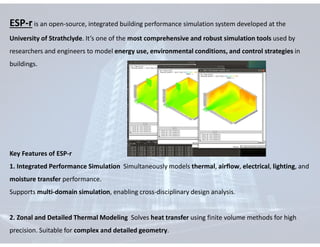
ESP-r is anopen-source, integrated building performance simulation system developed at the
University of Strathclyde. It’s one of the most comprehensive and robust simulation tools used by
researchers and engineers to model energy use, environmental conditions, and control strategies in
buildings.
Key Features of ESP-r
1. Integrated Performance Simulation Simultaneously models thermal, airflow, electrical, lighting, and
moisture transfer performance.
Supports multi-domain simulation, enabling cross-disciplinary design analysis.
2. Zonal and Detailed Thermal Modeling Solves heat transfer using finite volume methods for high
precision. Suitable for complex and detailed geometry.
13.
3. Airflow andVentilation Simulation Includes both natural and mechanical ventilation systems.
Uses nodal airflow models for simulating internal and external air movement.
4. Electrical Power Flow Modeling Capable of simulating electrical systems, including renewable
energy (PV, wind), storage, and control systems.
5. Lighting and Daylighting Models internal illuminance from daylight and artificial lighting.
Integrates with Radiance for advanced lighting visualization.
6. Control Systems Simulation Allows dynamic modeling of control logic for HVAC, lighting, blinds,
etc. Enables design and testing of smart building systems.
Applications
• Passive and active design strategy evaluation
• Research and development of building technologies
• Policy modeling for energy efficiency
14.
DesignBuilder is apowerful, commercial graphical interface for EnergyPlus, widely used for
detailed energy modeling, day lighting analysis, CFD simulations, and building certification support
(LEED, BREEAM, etc.). It balances ease of use with technical depth, making it suitable for both
architects and engineers.
Core Features of DesignBuilder
1. Graphical Modeling Interface User-friendly
3D modeling environment. Allows import of
BIM/IFC models for streamlined workflow.
2. EnergyPlus Integration Seamlessly utilizes
EnergyPlus as its simulation engine.
Access to detailed HVAC modeling, thermal zoning, internal loads, and control systems.
3. Daylight and Solar Analysis Performs daylight autonomy, glare, and solar access analysis. Integrates
with Radiance for high-fidelity lighting simulations.
4. CFD (Computational Fluid Dynamics) Module Simulates airflow, temperature, and pollutant
distribution inside and outside buildings. Useful for evaluating natural ventilation and thermal comfort.
15.
5. Optimization andParametric Tools In-built tools for design optimization using GenOpt or
DesignBuilder’s own optimization engine. Easily run parametric studies to explore design variations.
6. Certification Support Tools and templates for LEED, BREEAM, ASHRAE 90.1, Part L (UK), and more.
Automates many of the compliance reporting processes.
Applications
1. Energy efficiency and cost-saving analysis
2. HVAC system sizing and design
3. Daylight, glare, and lighting performance
4. Indoor environmental quality (IEQ) studies
5. LEED/BREEAM certification modeling
16.
ClimateStudio is astate-of-the-art environmental analysis plugin for Rhinoceros 3D,
developed by Solemma. It is used by architects, engineers, and researchers to simulate and optimize
building performance, especially in terms of daylighting, thermal comfort, energy usage, and carbon
emissions. It is known for speed, accuracy, and an intuitive workflow that supports early design
decision-making.
Key Features of ClimateStudio
1. Daylighting Analysis Annual and point-in-time daylight simulations using Radiance and Accelerad
(GPU-accelerated). Supports LEED daylight credits and IES LM-83 standards. Glare analysis using DGP
(Daylight Glare Probability).
2. Thermal Comfort and Energy Use Dynamic thermal simulations to evaluate operative temperature,
PMV/PPD, and ASHRAE 55 compliance. Can integrate with EnergyPlus via workflow export for
advanced energy modeling.
3. Climate-Based Simulation Imports EPW weather files to simulate building performance based on
local climate data. Visualizes solar radiation, wind, temperature, and other factors across different time
scales.
17.
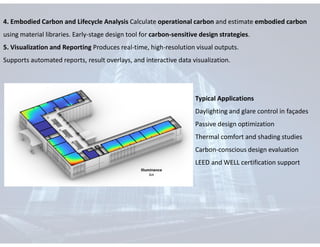
4. Embodied Carbonand Lifecycle Analysis Calculate operational carbon and estimate embodied carbon
using material libraries. Early-stage design tool for carbon-sensitive design strategies.
5. Visualization and Reporting Produces real-time, high-resolution visual outputs.
Supports automated reports, result overlays, and interactive data visualization.
Typical Applications
Daylighting and glare control in façades
Passive design optimization
Thermal comfort and shading studies
Carbon-conscious design evaluation
LEED and WELL certification support
18.
Conclusion
In conclusion, simulationtechniques have become indispensable tools in the pursuit of
sustainable, efficient, and high-performing buildings. From energy modeling with EnergyPlus and
IESVE, to daylight analysis using Radiance and ClimateStudio, and immersive visualization through tools
like RadVR—each software plays a critical role in informing design decisions and optimizing
performance outcomes.
As buildings grow more complex and sustainability standards rise, simulation technologies
empower architects and engineers to predict, evaluate, and improve building behavior before
construction even begins. These tools not only help reduce energy consumption and environmental
impact but also enhance occupant comfort and compliance with international green building standards.
Ultimately, integrating these simulation techniques early in the design process is not just a
technical advantage—it is a professional responsibility toward creating a more sustainable built
environment.



![[Deck] What's New in Spark-Iceberg Integration via DSV2.pptx](https://cdn.slidesharecdn.com/ss_thumbnails/deckwhatsnewinspark-icebergintegrationviadsv2-260210005337-25955b12-thumbnail.jpg?width=640&height=640&fit=bounds)


