EMEA WEBINARS
Simplifying Cloud Architectures
with Data Virtualization
Speakers
Paul Moxon
SVP Data Architecture & Chief Evangelist
Denodo
Director, EMEA Sales Engineering
Denodo
Mark Pritchard
Agenda
1. The Journey to the Cloud
2. Navigating the Journey with Data Virtualization
3. Product Demo
4. Customer Case Study
5. Q&A
6. Next Steps
4
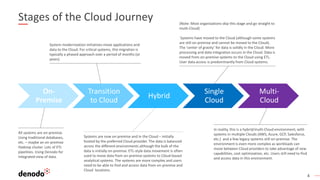
Stages of the Cloud Journey
All systems are on-premise.
Using traditional databases,
etc. – maybe an on-premise
Hadoop cluster. Lots of ETL
pipelines. Using Denodo for
integrated view of data.
In reality, this is a hybrid/multi-Cloud environment, with
systems in multiple Clouds (AWS, Azure, GCP, Salesforce,
etc.) and a few legacy systems still on-premise. The
environment is even more complex as workloads can
move between Cloud providers to take advantage of new
capabilities, cost optimization, etc. Users still need to find
and access data in this environment.
System modernization initiatives move applications and
data to the Cloud. For critical systems, this migration is
typically a phased approach over a period of months (or
years).
On-
Premise
Transition
to Cloud
Hybrid
Single
Cloud
Multi-
Cloud
(Note: Most organizations skip this stage and go straight to
multi-Cloud)
Systems have moved to the Cloud (although some systems
are still on-premise and cannot be moved to the Cloud).
The ‘center of gravity’ for data is solidly in the Cloud. More
processing and data integration occurs in the Cloud. Data is
moved from on-premise systems to the Cloud using ETL.
User data access is predominantly from Cloud systems.
Systems are now on-premise and in the Cloud – initially
hosted by the preferred Cloud provider. The data is balanced
across the different environments although the bulk of the
data is initially on-premise. ETL-style data movement is often
used to move data from on-premise systems to Cloud-based
analytical systems. The systems are more complex and users
need to be able to find and access data from on-premise and
Cloud locations.
5
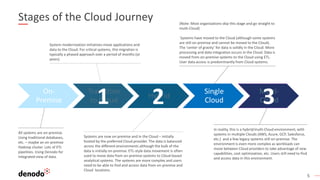
Stages of the Cloud Journey
All systems are on-premise.
Using traditional databases,
etc. – maybe an on-premise
Hadoop cluster. Lots of ETL
pipelines. Using Denodo for
integrated view of data.
Systems are now on-premise and in the Cloud – initially
hosted by the preferred Cloud provider. The data is balanced
across the different environments although the bulk of the
data is initially on-premise. ETL-style data movement is often
used to move data from on-premise systems to Cloud-based
analytical systems. The systems are more complex and users
need to be able to find and access data from on-premise and
Cloud locations.
In reality, this is a hybrid/multi-Cloud environment, with
systems in multiple Clouds (AWS, Azure, GCP, Salesforce,
etc.) and a few legacy systems still on-premise. The
environment is even more complex as workloads can
move between Cloud providers to take advantage of new
capabilities, cost optimization, etc. Users still need to find
and access data in this environment.
System modernization initiatives move applications and
data to the Cloud. For critical systems, this migration is
typically a phased approach over a period of months (or
years).
On-
Premise
Transition
to Cloud
Hybrid
Single
Cloud
Multi-
Cloud
(Note: Most organizations skip this stage and go straight to
multi-Cloud)
Systems have moved to the Cloud (although some systems
are still on-premise and cannot be moved to the Cloud).
The ‘center of gravity’ for data is solidly in the Cloud. More
processing and data integration occurs in the Cloud. Data is
moved from on-premise systems to the Cloud using ETL.
User data access is predominantly from Cloud systems.
1 2 3
6
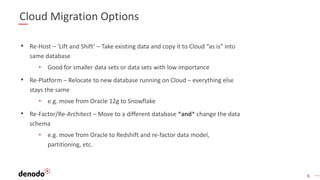
Cloud Migration Options
• Re-Host – ‘Lift and Shift’ – Take existing data and copy it to Cloud “as is” into
same database
• Good for smaller data sets or data sets with low importance
• Re-Platform – Relocate to new database running on Cloud – everything else
stays the same
• e.g. move from Oracle 12g to Snowflake
• Re-Factor/Re-Architect – Move to a different database *and* change the data
schema
• e.g. move from Oracle to Redshift and re-factor data model,
partitioning, etc.
7
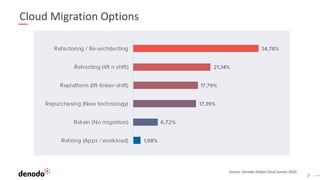
Cloud Migration Options
Source: Denodo Global Cloud Survey 2020
8
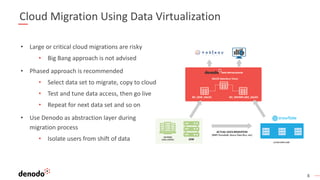
Cloud Migration Using Data Virtualization
• Large or critical cloud migrations are risky
• Big Bang approach is not advised
• Phased approach is recommended
• Select data set to migrate, copy to cloud
• Test and tune data access, then go live
• Repeat for next data set and so on
• Use Denodo as abstraction layer during
migration process
• Isolate users from shift of data
9
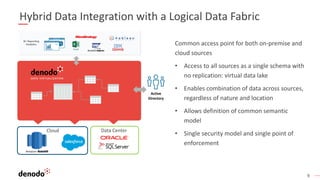
Hybrid Data Integration with a Logical Data Fabric
Common access point for both on-premise and
cloud sources
• Access to all sources as a single schema with
no replication: virtual data lake
• Enables combination of data across sources,
regardless of nature and location
• Allows definition of common semantic
model
• Single security model and single point of
enforcement
Active
Directory
Data CenterCloud
10
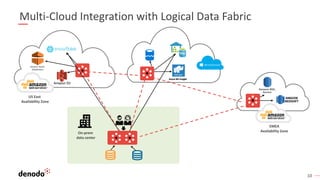
Multi-Cloud Integration with Logical Data Fabric
Amazon RDS,
Aurora
US East
Availability Zone
EMEA
Availability ZoneOn-prem
data center
11
Simplifying Cloud Architectures with Data Virtualization
Product Demo
12
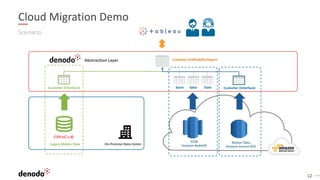
Scenario
Cloud Migration Demo
EDW
Amazon Redshift
Master Data
Amazon Aurora RDS
On-Premise Data Center
Store Sales Date
Legacy Master Data
Customer Profitability Report
Customer (Interface) Customer (Interface)
Abstraction Layer
Demo
14
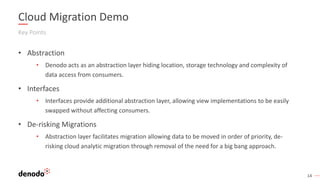
Cloud Migration Demo
Key Points
• Abstraction
• Denodo acts as an abstraction layer hiding location, storage technology and complexity of
data access from consumers.
• Interfaces
• Interfaces provide additional abstraction layer, allowing view implementations to be easily
swapped without affecting consumers.
• De-risking Migrations
• Abstraction layer facilitates migration allowing data to be moved in order of priority, de-
risking cloud analytic migration through removal of the need for a big bang approach.
Customer Case Study
Migrating to the Cloud
16
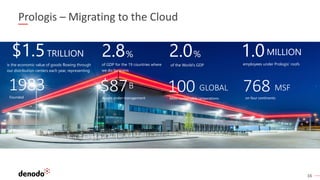
$1.5TRILLION
is the economic value of goods flowing through
our distribution centers each year, representing:
2.8%
of GDP for the 19 countries where
we do business
%2.0
of the World’s GDP
1983 100 GLOBAL 768 MSF
Founded Most sustainable corporations
$87B
Assets under management on four continents
MILLION
employees under Prologis’ roofs
1.0
Prologis – Migrating to the Cloud
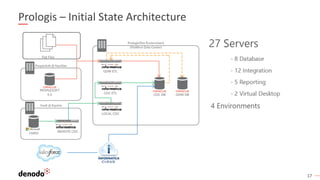
17
Prologis – Initial State Architecture
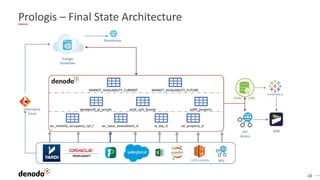
18
Prologis – Final State Architecture
Q&A
20
Next Steps
Access Denodo Platform in the Cloud!
Take a Test Drive today!
www.denodo.com/TestDrive
GET STARTED TODAY
www.denodo.com info@denodo.com
© Copyright Denodo Technologies. All rights reserved
Unless otherwise specified, no part of this PDF file may be reproduced or utilized in any for or by any means, electronic or mechanical, including photocopying and microfilm,
without prior the written authorization from Denodo Technologies.

Simplifying Cloud Architectures with Data Virtualization

  • 1.
    EMEA WEBINARS Simplifying CloudArchitectures with Data Virtualization
  • 2.
    Speakers Paul Moxon SVP DataArchitecture & Chief Evangelist Denodo Director, EMEA Sales Engineering Denodo Mark Pritchard
  • 3.
    Agenda 1. The Journeyto the Cloud 2. Navigating the Journey with Data Virtualization 3. Product Demo 4. Customer Case Study 5. Q&A 6. Next Steps
  • 4.
    4 Stages of theCloud Journey All systems are on-premise. Using traditional databases, etc. – maybe an on-premise Hadoop cluster. Lots of ETL pipelines. Using Denodo for integrated view of data. In reality, this is a hybrid/multi-Cloud environment, with systems in multiple Clouds (AWS, Azure, GCP, Salesforce, etc.) and a few legacy systems still on-premise. The environment is even more complex as workloads can move between Cloud providers to take advantage of new capabilities, cost optimization, etc. Users still need to find and access data in this environment. System modernization initiatives move applications and data to the Cloud. For critical systems, this migration is typically a phased approach over a period of months (or years). On- Premise Transition to Cloud Hybrid Single Cloud Multi- Cloud (Note: Most organizations skip this stage and go straight to multi-Cloud) Systems have moved to the Cloud (although some systems are still on-premise and cannot be moved to the Cloud). The ‘center of gravity’ for data is solidly in the Cloud. More processing and data integration occurs in the Cloud. Data is moved from on-premise systems to the Cloud using ETL. User data access is predominantly from Cloud systems. Systems are now on-premise and in the Cloud – initially hosted by the preferred Cloud provider. The data is balanced across the different environments although the bulk of the data is initially on-premise. ETL-style data movement is often used to move data from on-premise systems to Cloud-based analytical systems. The systems are more complex and users need to be able to find and access data from on-premise and Cloud locations.
  • 5.
    5 Stages of theCloud Journey All systems are on-premise. Using traditional databases, etc. – maybe an on-premise Hadoop cluster. Lots of ETL pipelines. Using Denodo for integrated view of data. Systems are now on-premise and in the Cloud – initially hosted by the preferred Cloud provider. The data is balanced across the different environments although the bulk of the data is initially on-premise. ETL-style data movement is often used to move data from on-premise systems to Cloud-based analytical systems. The systems are more complex and users need to be able to find and access data from on-premise and Cloud locations. In reality, this is a hybrid/multi-Cloud environment, with systems in multiple Clouds (AWS, Azure, GCP, Salesforce, etc.) and a few legacy systems still on-premise. The environment is even more complex as workloads can move between Cloud providers to take advantage of new capabilities, cost optimization, etc. Users still need to find and access data in this environment. System modernization initiatives move applications and data to the Cloud. For critical systems, this migration is typically a phased approach over a period of months (or years). On- Premise Transition to Cloud Hybrid Single Cloud Multi- Cloud (Note: Most organizations skip this stage and go straight to multi-Cloud) Systems have moved to the Cloud (although some systems are still on-premise and cannot be moved to the Cloud). The ‘center of gravity’ for data is solidly in the Cloud. More processing and data integration occurs in the Cloud. Data is moved from on-premise systems to the Cloud using ETL. User data access is predominantly from Cloud systems. 1 2 3
  • 6.
    6 Cloud Migration Options •Re-Host – ‘Lift and Shift’ – Take existing data and copy it to Cloud “as is” into same database • Good for smaller data sets or data sets with low importance • Re-Platform – Relocate to new database running on Cloud – everything else stays the same • e.g. move from Oracle 12g to Snowflake • Re-Factor/Re-Architect – Move to a different database *and* change the data schema • e.g. move from Oracle to Redshift and re-factor data model, partitioning, etc.
  • 7.
    7 Cloud Migration Options Source:Denodo Global Cloud Survey 2020
  • 8.
    8 Cloud Migration UsingData Virtualization • Large or critical cloud migrations are risky • Big Bang approach is not advised • Phased approach is recommended • Select data set to migrate, copy to cloud • Test and tune data access, then go live • Repeat for next data set and so on • Use Denodo as abstraction layer during migration process • Isolate users from shift of data
  • 9.
    9 Hybrid Data Integrationwith a Logical Data Fabric Common access point for both on-premise and cloud sources • Access to all sources as a single schema with no replication: virtual data lake • Enables combination of data across sources, regardless of nature and location • Allows definition of common semantic model • Single security model and single point of enforcement Active Directory Data CenterCloud
  • 10.
    10 Multi-Cloud Integration withLogical Data Fabric Amazon RDS, Aurora US East Availability Zone EMEA Availability ZoneOn-prem data center
  • 11.
    11 Simplifying Cloud Architectureswith Data Virtualization Product Demo
  • 12.
    12 Scenario Cloud Migration Demo EDW AmazonRedshift Master Data Amazon Aurora RDS On-Premise Data Center Store Sales Date Legacy Master Data Customer Profitability Report Customer (Interface) Customer (Interface) Abstraction Layer
  • 13.
  • 14.
    14 Cloud Migration Demo KeyPoints • Abstraction • Denodo acts as an abstraction layer hiding location, storage technology and complexity of data access from consumers. • Interfaces • Interfaces provide additional abstraction layer, allowing view implementations to be easily swapped without affecting consumers. • De-risking Migrations • Abstraction layer facilitates migration allowing data to be moved in order of priority, de- risking cloud analytic migration through removal of the need for a big bang approach.
  • 15.
  • 16.
    16 $1.5TRILLION is the economicvalue of goods flowing through our distribution centers each year, representing: 2.8% of GDP for the 19 countries where we do business %2.0 of the World’s GDP 1983 100 GLOBAL 768 MSF Founded Most sustainable corporations $87B Assets under management on four continents MILLION employees under Prologis’ roofs 1.0 Prologis – Migrating to the Cloud
  • 17.
    17 Prologis – InitialState Architecture
  • 18.
    18 Prologis – FinalState Architecture
  • 19.
  • 20.
    20 Next Steps Access DenodoPlatform in the Cloud! Take a Test Drive today! www.denodo.com/TestDrive GET STARTED TODAY
  • 21.
    www.denodo.com info@denodo.com © CopyrightDenodo Technologies. All rights reserved Unless otherwise specified, no part of this PDF file may be reproduced or utilized in any for or by any means, electronic or mechanical, including photocopying and microfilm, without prior the written authorization from Denodo Technologies.