Connect 
AngularJS to 
Servers 
Examples on GitHub
agenda 
- Making XHR requests 
- Accessing to REST API 
- Overcoming to CORS
MAKING XHR REQUESTS
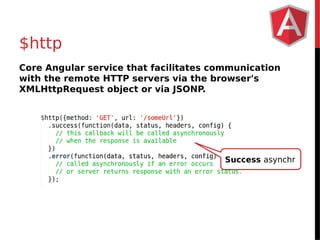
$http 
Core Angular service that facilitates communication 
with the remote HTTP servers via the browser's 
XMLHttpRequest object or via JSONP. 
Success asynchr
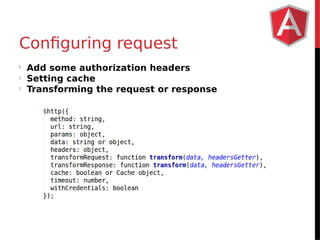
Configuring request 
l Add some authorization headers 
l Setting cache 
l Transforming the request or response
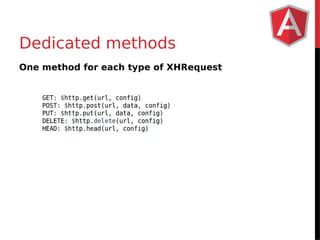
Dedicated methods 
One method for each type of XHRequest
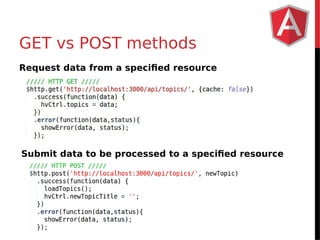
GET vs POST methods 
Request data from a specified resource 
Submit data to be processed to a specified resource
Example 
POSTMAN 
$http
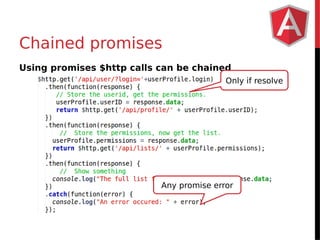
Chained promises 
Using promises $http calls can be chained 
Only if resolve 
Any promise error
ACCESS TO REST API
$resource service 
A factory which creates a resource object that lets you 
interact with RESTful server-side data sources. 
The returned resource object has action methods 
which provide high-level behaviors without the need to 
interact with the low level $http service.
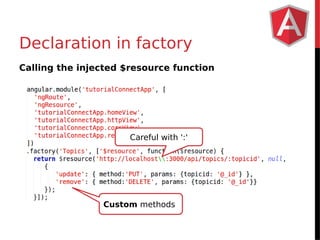
Declaration in factory 
Calling the injected $resource function 
Careful with ':' 
Custom methods
Benefits of ngResource 
- Simplified code (encapsulation) 
- No callbacks (unless wanted) 
- Unit tests with ngResource 
- Custom methods
Example 
$resource
Problems of ngResource 
- Any custom behavior expect (big) extra effort 
- Once you get the data you can not do much, so you 
should deliver it in its final state 
- Does not return promises (directly) 
- Building custom URLs is not easy 
Check Restangular 
https://github.com/mgonto/restangular 
More to come in Angular 2.0
OVERCOMING CORS
Overcoming same-origin policy 
Cross-origin Resource Sharing (CORS) allows to get a 
resource from another domain, forbidden by browsers. 
- External resources 
- Different domain or port 
Solutions 
1. Modify server 
2. JSONP
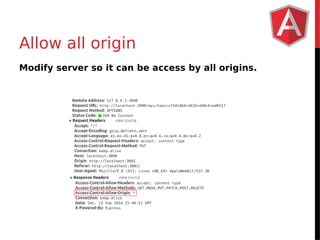
Allow all origin 
Modify server so it can be access by all origins.
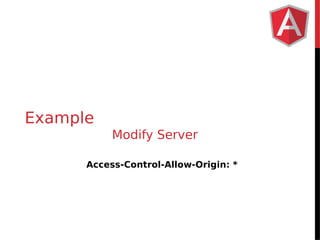
Example 
Modify Server 
Access-Control-Allow-Origin: *
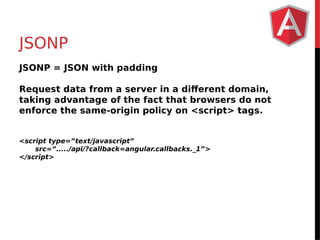
JSONP 
JSONP = JSON with padding 
Request data from a server in a different domain, 
taking advantage of the fact that browsers do not 
enforce the same-origin policy on <script> tags. 
<script type=”text/javascript” 
src=”...../api/?callback=angular.callbacks._1”> 
</script>
Example 
JSONP
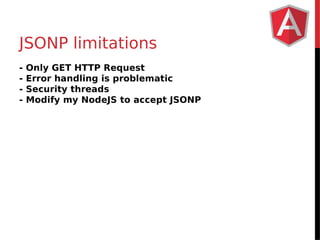
JSONP limitations 
- Only GET HTTP Request 
- Error handling is problematic 
- Security threads 
- Modify my NodeJS to accept JSONP
MANY 
THANKS 
http://about.me/Carlos_Morales 
https://github.com/carlos-/ajs-connectserver

How to connect AngularJS to servers

  • 1.
    Connect AngularJS to Servers Examples on GitHub
  • 2.
    agenda - MakingXHR requests - Accessing to REST API - Overcoming to CORS
  • 3.
  • 4.
    $http Core Angularservice that facilitates communication with the remote HTTP servers via the browser's XMLHttpRequest object or via JSONP. Success asynchr
  • 5.
    Configuring request lAdd some authorization headers l Setting cache l Transforming the request or response
  • 6.
    Dedicated methods Onemethod for each type of XHRequest
  • 7.
    GET vs POSTmethods Request data from a specified resource Submit data to be processed to a specified resource
  • 8.
  • 9.
    Chained promises Usingpromises $http calls can be chained Only if resolve Any promise error
  • 10.
  • 11.
    $resource service Afactory which creates a resource object that lets you interact with RESTful server-side data sources. The returned resource object has action methods which provide high-level behaviors without the need to interact with the low level $http service.
  • 12.
    Declaration in factory Calling the injected $resource function Careful with ':' Custom methods
  • 13.
    Benefits of ngResource - Simplified code (encapsulation) - No callbacks (unless wanted) - Unit tests with ngResource - Custom methods
  • 14.
  • 15.
    Problems of ngResource - Any custom behavior expect (big) extra effort - Once you get the data you can not do much, so you should deliver it in its final state - Does not return promises (directly) - Building custom URLs is not easy Check Restangular https://github.com/mgonto/restangular More to come in Angular 2.0
  • 16.
  • 17.
    Overcoming same-origin policy Cross-origin Resource Sharing (CORS) allows to get a resource from another domain, forbidden by browsers. - External resources - Different domain or port Solutions 1. Modify server 2. JSONP
  • 18.
    Allow all origin Modify server so it can be access by all origins.
  • 19.
    Example Modify Server Access-Control-Allow-Origin: *
  • 20.
    JSONP JSONP =JSON with padding Request data from a server in a different domain, taking advantage of the fact that browsers do not enforce the same-origin policy on <script> tags. <script type=”text/javascript” src=”...../api/?callback=angular.callbacks._1”> </script>
  • 21.
  • 22.
    JSONP limitations -Only GET HTTP Request - Error handling is problematic - Security threads - Modify my NodeJS to accept JSONP
  • 23.
    MANY THANKS http://about.me/Carlos_Morales https://github.com/carlos-/ajs-connectserver