PRAKTIKUM SISTEM BASIS DATA
SQL Function
Sorting (Pengurutan)
ORDER BY
 Digunakan untuk mengurutkan hasil-ditetapkan oleh
kolom tertentu
 Secara default urutan yang terjadi adalah dari urutan
terkecil ke urutan terbesar (ASC)
 Namun apabila ingin menggunakan urutan yang
sebaliknya (dari besar ke kecil) maka dapat digunakan
key-word “DESC”
SELECT column_name(s)
FROM table_name
ORDER BY column_name(s) ASC|DESC
Now we want to select all the persons from the table
above, however, we want to sort the persons by their last name
SELECT * FROM Persons
ORDER BY LastName
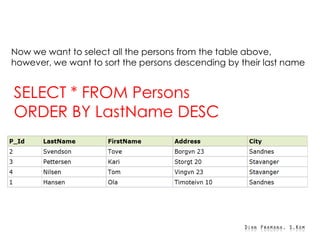
Now we want to select all the persons from the table above,
however, we want to sort the persons descending by their last name
SELECT * FROM Persons
ORDER BY LastName DESC
FUNGSI-FUNGSI BUILT IN
 Secara umum fungsi-fungsi built in dalam SQL dibagi
menjadi 2, yaitu:
 Fungsi Agregasi
 AVG() – mencari nilai rata-rata
 COUNT() – mencari jumlah baris
 MAX() – mencari nilai terbesar
 MIN() – mencari nilai terkecil
 SUM() – mencari jumlah total
 Fungsi Skalar
 UPPER() – membuat karakter menjadi berhuruf kapital
 LOWER() – membuat karakter menjadi huruf biasa
 SUBSTRING() – menentukan karakter yang akan dicari
 LEN() – menentukan panjang karakter
AVG ()
SELECT AVG(column_name) FROM
table_name
Now we want to find the average value of the "OrderPrice"
fields.
SELECT AVG(OrderPrice) AS OrderAverage FROM
Orders
Now we want to find the customers that have an OrderPrice value
higher than the average OrderPrice value
SELECT Customer FROM Orders
WHERE OrderPrice>(SELECT AVG(OrderPrice)
FROM Orders)
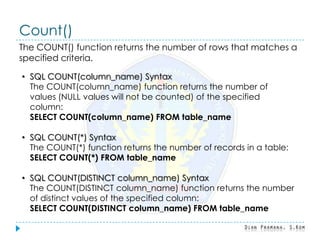
Count()
The COUNT() function returns the number of rows that matches a
specified criteria.
• SQL COUNT(column_name) Syntax
The COUNT(column_name) function returns the number of
values (NULL values will not be counted) of the specified
column:
SELECT COUNT(column_name) FROM table_name
• SQL COUNT(*) Syntax
The COUNT(*) function returns the number of records in a table:
SELECT COUNT(*) FROM table_name
• SQL COUNT(DISTINCT column_name) Syntax
The COUNT(DISTINCT column_name) function returns the number
of distinct values of the specified column:
SELECT COUNT(DISTINCT column_name) FROM table_name
We have the following "Orders" table:
Now we want to count the number of orders from "Customer Nilsen".
SELECT COUNT(Customer) AS CustomerNilsen
FROM Orders
WHERE Customer='Nilsen'
The result of the SQL statement above will be 2, because the customer
Nilsen has made 2 orders in total:
If we omit the WHERE clause, like this:
SELECT COUNT(*) AS NumberOfOrders
FROM Orders
The result-set will look like this:
which is the total number of rows in the table.
Now we want to count the number of unique customers in the "Orders"
table.
SELECT COUNT(DISTINCT Customer) AS
NumberOfCustomers FROM Orders
The result-set will look like this:
which is the number of unique customers (Hansen, Nilsen, and Jensen) in
the "Orders" table.
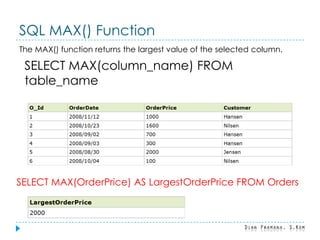
SQL MAX() Function
The MAX() function returns the largest value of the selected column.
SELECT MAX(column_name) FROM
table_name
SELECT MAX(OrderPrice) AS LargestOrderPrice FROM Orders
The MIN() Function
The MIN() function returns the smallest value of the selected column.
SELECT MIN(column_name) FROM
table_name
SELECT MIN(OrderPrice) AS SmallestOrderPrice FROM Orders
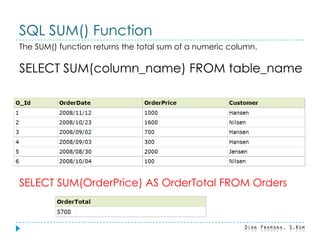
SQL SUM() Function
The SUM() function returns the total sum of a numeric column.
SELECT SUM(column_name) FROM table_name
SELECT SUM(OrderPrice) AS OrderTotal FROM Orders
SQL GROUP BY Statement
The GROUP BY statement is used in conjunction with the aggregate
functions to group the result-set by one or more columns.
SELECT column_name,
aggregate_function(column_name)
FROM table_name
WHERE column_name operator value
GROUP BY column_name
Now we want to find the total sum (total order) of each customer.
We will have to use the GROUP BY statement to group the customers.
SELECT Customer,SUM(OrderPrice) FROM Orders
GROUP BY Customer
GROUP BY More Than One Column
SELECT Customer, OrderDate,
SUM(OrderPrice) FROM Orders
GROUP BY Customer, OrderDate
The HAVING Clause
The HAVING clause was added to SQL because the WHERE keyword
could not be used with aggregate functions.
SELECT column_name,
aggregate_function(column_name)
FROM table_name
WHERE column_name operator value
GROUP BY column_name
HAVING aggregate_function(column_name)
operator value
Now we want to find if any of the customers have a total order of less than
2000.
SELECT Customer,SUM(OrderPrice)
FROM Orders
GROUP BY Customer
HAVING SUM(OrderPrice)<2000
Now we want to find if the customers "Hansen" or "Jensen" have a total
order of more than 1500.
SELECT Customer,SUM(OrderPrice) FROM Orders
WHERE Customer='Hansen' OR Customer='Jensen'
GROUP BY Customer
HAVING SUM(OrderPrice)>1500
The UPPER() Function
The UPPER() function converts the value of a field to uppercase.
SELECT UPPER(column_name) FROM table_name
Now we want to select the content of the "LastName" and "FirstName"
columns above, and convert the "LastName" column to uppercase.
SELECT UPPER(LastName) as LastName,FirstName
FROM Persons
The LOWER() Function
The LOWER() function converts the value of a field to lowercase.
SELECT LOWER(column_name) FROM table_name
SELECT LOWER(LastName) as
LastName,FirstName FROM Persons
SQL SUBSTRING() Function
The SUBSTRING() function is used to extract characters from a text field.
SELECT SUBSTRING(column_name, start, length)
FROM table_name
Parameter Description
column_name Required. The field to extract characters from
start Required. Specifies the starting position (starts at 1)
length Optional. The number of characters to return. If omitted,
the SUBSTRING() function returns the rest of the text
Now we want to extract the first four characters of the "City" column above.
SELECT SUBSTRING(City,1,4) as SmallCity FROM
Persons
SQL LEN() Function
The LEN() function returns the length of the value in a text field.
SELECT LEN(column_name) FROM table_name
Now we want to select the length of the values in the "Address" column
above.
SELECT LEN(Address) as LengthOfAddress
FROM Persons
SEKIAN

Si0302 20140320131934

  • 1.
    PRAKTIKUM SISTEM BASISDATA SQL Function
  • 2.
    Sorting (Pengurutan) ORDER BY Digunakan untuk mengurutkan hasil-ditetapkan oleh kolom tertentu  Secara default urutan yang terjadi adalah dari urutan terkecil ke urutan terbesar (ASC)  Namun apabila ingin menggunakan urutan yang sebaliknya (dari besar ke kecil) maka dapat digunakan key-word “DESC” SELECT column_name(s) FROM table_name ORDER BY column_name(s) ASC|DESC
  • 3.
    Now we wantto select all the persons from the table above, however, we want to sort the persons by their last name SELECT * FROM Persons ORDER BY LastName
  • 4.
    Now we wantto select all the persons from the table above, however, we want to sort the persons descending by their last name SELECT * FROM Persons ORDER BY LastName DESC
  • 5.
    FUNGSI-FUNGSI BUILT IN Secara umum fungsi-fungsi built in dalam SQL dibagi menjadi 2, yaitu:  Fungsi Agregasi  AVG() – mencari nilai rata-rata  COUNT() – mencari jumlah baris  MAX() – mencari nilai terbesar  MIN() – mencari nilai terkecil  SUM() – mencari jumlah total  Fungsi Skalar  UPPER() – membuat karakter menjadi berhuruf kapital  LOWER() – membuat karakter menjadi huruf biasa  SUBSTRING() – menentukan karakter yang akan dicari  LEN() – menentukan panjang karakter
  • 6.
    AVG () SELECT AVG(column_name)FROM table_name Now we want to find the average value of the "OrderPrice" fields.
  • 7.
    SELECT AVG(OrderPrice) ASOrderAverage FROM Orders Now we want to find the customers that have an OrderPrice value higher than the average OrderPrice value SELECT Customer FROM Orders WHERE OrderPrice>(SELECT AVG(OrderPrice) FROM Orders)
  • 8.
    Count() The COUNT() functionreturns the number of rows that matches a specified criteria. • SQL COUNT(column_name) Syntax The COUNT(column_name) function returns the number of values (NULL values will not be counted) of the specified column: SELECT COUNT(column_name) FROM table_name • SQL COUNT(*) Syntax The COUNT(*) function returns the number of records in a table: SELECT COUNT(*) FROM table_name • SQL COUNT(DISTINCT column_name) Syntax The COUNT(DISTINCT column_name) function returns the number of distinct values of the specified column: SELECT COUNT(DISTINCT column_name) FROM table_name
  • 9.
    We have thefollowing "Orders" table: Now we want to count the number of orders from "Customer Nilsen". SELECT COUNT(Customer) AS CustomerNilsen FROM Orders WHERE Customer='Nilsen' The result of the SQL statement above will be 2, because the customer Nilsen has made 2 orders in total:
  • 10.
    If we omitthe WHERE clause, like this: SELECT COUNT(*) AS NumberOfOrders FROM Orders The result-set will look like this: which is the total number of rows in the table.
  • 11.
    Now we wantto count the number of unique customers in the "Orders" table. SELECT COUNT(DISTINCT Customer) AS NumberOfCustomers FROM Orders The result-set will look like this: which is the number of unique customers (Hansen, Nilsen, and Jensen) in the "Orders" table.
  • 12.
    SQL MAX() Function TheMAX() function returns the largest value of the selected column. SELECT MAX(column_name) FROM table_name SELECT MAX(OrderPrice) AS LargestOrderPrice FROM Orders
  • 13.
    The MIN() Function TheMIN() function returns the smallest value of the selected column. SELECT MIN(column_name) FROM table_name SELECT MIN(OrderPrice) AS SmallestOrderPrice FROM Orders
  • 14.
    SQL SUM() Function TheSUM() function returns the total sum of a numeric column. SELECT SUM(column_name) FROM table_name SELECT SUM(OrderPrice) AS OrderTotal FROM Orders
  • 15.
    SQL GROUP BYStatement The GROUP BY statement is used in conjunction with the aggregate functions to group the result-set by one or more columns. SELECT column_name, aggregate_function(column_name) FROM table_name WHERE column_name operator value GROUP BY column_name
  • 16.
    Now we wantto find the total sum (total order) of each customer. We will have to use the GROUP BY statement to group the customers. SELECT Customer,SUM(OrderPrice) FROM Orders GROUP BY Customer
  • 17.
    GROUP BY MoreThan One Column SELECT Customer, OrderDate, SUM(OrderPrice) FROM Orders GROUP BY Customer, OrderDate
  • 18.
    The HAVING Clause TheHAVING clause was added to SQL because the WHERE keyword could not be used with aggregate functions. SELECT column_name, aggregate_function(column_name) FROM table_name WHERE column_name operator value GROUP BY column_name HAVING aggregate_function(column_name) operator value
  • 19.
    Now we wantto find if any of the customers have a total order of less than 2000. SELECT Customer,SUM(OrderPrice) FROM Orders GROUP BY Customer HAVING SUM(OrderPrice)<2000
  • 20.
    Now we wantto find if the customers "Hansen" or "Jensen" have a total order of more than 1500. SELECT Customer,SUM(OrderPrice) FROM Orders WHERE Customer='Hansen' OR Customer='Jensen' GROUP BY Customer HAVING SUM(OrderPrice)>1500
  • 21.
    The UPPER() Function TheUPPER() function converts the value of a field to uppercase. SELECT UPPER(column_name) FROM table_name Now we want to select the content of the "LastName" and "FirstName" columns above, and convert the "LastName" column to uppercase. SELECT UPPER(LastName) as LastName,FirstName FROM Persons
  • 22.
    The LOWER() Function TheLOWER() function converts the value of a field to lowercase. SELECT LOWER(column_name) FROM table_name SELECT LOWER(LastName) as LastName,FirstName FROM Persons
  • 23.
    SQL SUBSTRING() Function TheSUBSTRING() function is used to extract characters from a text field. SELECT SUBSTRING(column_name, start, length) FROM table_name Parameter Description column_name Required. The field to extract characters from start Required. Specifies the starting position (starts at 1) length Optional. The number of characters to return. If omitted, the SUBSTRING() function returns the rest of the text
  • 24.
    Now we wantto extract the first four characters of the "City" column above. SELECT SUBSTRING(City,1,4) as SmallCity FROM Persons
  • 25.
    SQL LEN() Function TheLEN() function returns the length of the value in a text field. SELECT LEN(column_name) FROM table_name Now we want to select the length of the values in the "Address" column above. SELECT LEN(Address) as LengthOfAddress FROM Persons
  • 26.