CS2072 Database EngineeringLaboratory
&
CS2082 Database Management Systems
Laboratory
(LAB-4)
Prof. Sambit Bakshi
Computer Science and Engineering,
National Institute of Technology, Rourkela.
bakshisambit@nitrkl.ac.in
2.
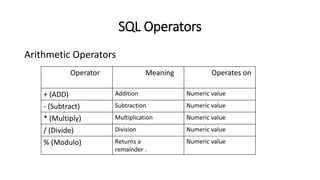
SQL Operators
Arithmetic Operators
OperatorMeaning Operates on
+ (ADD) Addition Numeric value
- (Subtract) Subtraction Numeric value
* (Multiply) Multiplication Numeric value
/ (Divide) Division Numeric value
% (Modulo) Returns a
remainder .
Numeric value
3.
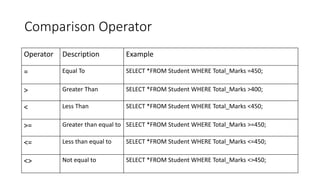
Comparison Operator
Operator DescriptionExample
= Equal To SELECT *FROM Student WHERE Total_Marks =450;
> Greater Than SELECT *FROM Student WHERE Total_Marks >400;
< Less Than SELECT *FROM Student WHERE Total_Marks <450;
>= Greater than equal to SELECT *FROM Student WHERE Total_Marks >=450;
<= Less than equal to SELECT *FROM Student WHERE Total_Marks <=450;
<> Not equal to SELECT *FROM Student WHERE Total_Marks <>450;
4.
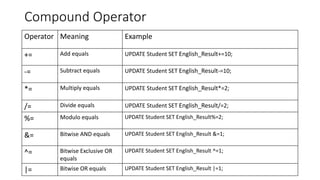
Compound Operator
Operator MeaningExample
+= Add equals UPDATE Student SET English_Result+=10;
-= Subtract equals UPDATE Student SET English_Result-=10;
*= Multiply equals UPDATE Student SET English_Result*=2;
/= Divide equals UPDATE Student SET English_Result/=2;
%= Modulo equals UPDATE Student SET English_Result%=2;
&= Bitwise AND equals UPDATE Student SET English_Result &=1;
^= Bitwise Exclusive OR
equals
UPDATE Student SET English_Result ^=1;
|= Bitwise OR equals UPDATE Student SET English_Result |=1;
5.
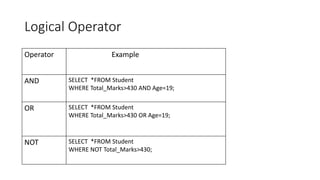
Logical Operator
Operator Example
ANDSELECT *FROM Student
WHERE Total_Marks>430 AND Age=19;
OR SELECT *FROM Student
WHERE Total_Marks>430 OR Age=19;
NOT SELECT *FROM Student
WHERE NOT Total_Marks>430;
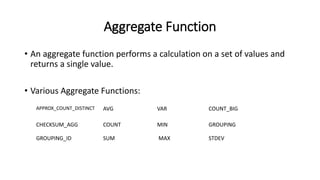
Aggregate Function
• Anaggregate function performs a calculation on a set of values and
returns a single value.
• Various Aggregate Functions:
APPROX_COUNT_DISTINCT AVG VAR COUNT_BIG
CHECKSUM_AGG COUNT MIN GROUPING
GROUPING_ID SUM MAX STDEV
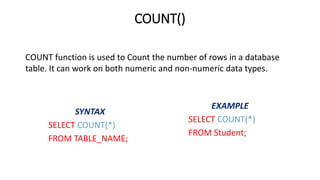
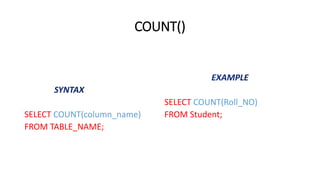
COUNT()
SELECT COUNT(*)
FROM TABLE_NAME;
SELECTCOUNT(*)
FROM Student;
COUNT function is used to Count the number of rows in a database
table. It can work on both numeric and non-numeric data types.
MIN()
SELECT MIN(column_name)
FROM TABLE_NAME;
SELECTMIN(Total_Marks)
FROM Student;
MIN function is used to find the minimum value of a certain column.
This function determines the smallest value of all selected values of a
column.
19.
MAX()
SELECT MAX(column_name)
FROM TABLE_NAME;
SELECTMAX(Total_Marks)
FROM Student;
MAX function is used to find the maximum value of a certain column.
This function determines the largest value of all selected values of a
column.
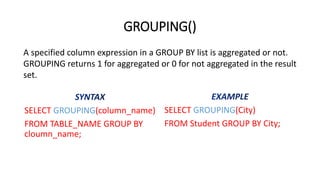
GROUPING()
SELECT GROUPING(column_name)
FROM TABLE_NAMEGROUP BY
cloumn_name;
SELECT GROUPING(City)
FROM Student GROUP BY City;
A specified column expression in a GROUP BY list is aggregated or not.
GROUPING returns 1 for aggregated or 0 for not aggregated in the result
set.
String Manipulation Function
Stringmanipulation function is a built-in functions which take an input
string and return a string or numeric value.
26.
ASCII()
SELECT ASCII (column_name ) AS
Alias_name FROM TABLE_NAME;
SELECT ASCII ( Grade ) AS
Grade_ASCII FROM Students;
Returns the ASCII code value of the leftmost character of a character
expression.
27.
CHAR()
SELECT CHAR( column_name) AS
Alias_name FROM TABLE_NAME;
SELECT CHAR( Roll_NO ) AS
CHAR_Roll_NO FROM Student;
Returns the single-byte character with the specified integer code.
28.
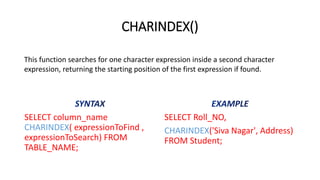
CHARINDEX()
SELECT column_name
CHARINDEX( expressionToFind,
expressionToSearch) FROM
TABLE_NAME;
SELECT Roll_NO,
CHARINDEX('Siva Nagar', Address)
FROM Student;
This function searches for one character expression inside a second character
expression, returning the starting position of the first expression if found.
29.
PATINDEX()
SELECT column_name PATINDEX(
expressionToFind,
expressionToSearch) FROM
TABLE_NAME;
SELECT Roll_NO,
PATINDEX('Siva Nagar', Address)
FROM Student;
Returns the starting position of the first occurrence of a pattern in a
specified expression, or zeros if the pattern is not found.
30.
CONCAT()
SELECT CONCAT( column_name1,‘ ‘,
column_name2) AS Alias_name
FROM TABLE_NAME;
SELECT CONCAT( First_Name,‘
‘,Last_Name)
AS Result
FROM Student;
This function returns a string resulting from the concatenation, or joining, of two or
more string values in an end-to-end manner.
31.
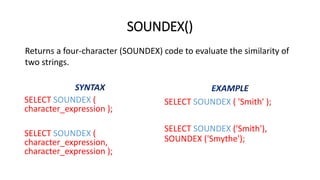
SOUNDEX()
SELECT SOUNDEX (
character_expression);
SELECT SOUNDEX (
character_expression,
character_expression );
SELECT SOUNDEX ( 'Smith' );
SELECT SOUNDEX ('Smith'),
SOUNDEX ('Smythe');
Returns a four-character (SOUNDEX) code to evaluate the similarity of
two strings.
32.
DIFFERENCE()
SELECT DIFFERENCE (
character_expression,
character_expression );
SELECT DIFFERENCE('Smith',
'Smyth');
This function returns an integer value measuring the difference
between the SOUNDEX() values of two different character
expressions.
33.
LEFT()
SELECT LEFT(column_name, 3)
ASAlias_name
FROM TABLE_NAME;
SELECT LEFT(First_Name, 3) AS RESULT
FROM Student;
Returns the left part of a character string with the specified number of
characters.
34.
RIGHT()
SELECT RIGHT(column_name, 2)
ASAlias_name
FROM TABLE_NAME;
SELECT RIGHT(First_Name, 2) AS
'RIGHT_NAME'
FROM Student;
Returns the right part of a character string with the specified number
of characters.
35.
LEN()
SELECT LEN(column_name) AS
Alias_name,column_name FROM
TABLE_NAME;
SELECT LEN(First_Name) AS
Length, First_Name FROM
Student;
Returns the number of characters of the specified string expression,
excluding trailing spaces.
36.
LOWER()
SELECT LOWER(column_name) AS
Alias_nameFROM TABLE_NAME;
SELECT LOWER(Grade) AS
Grade_Lower FROM Student;
Returns a character expression after converting uppercase character
data to lowercase.
37.
UPPER()
SELECT UPPER(column_name) AS
Alias_nameFROM TABLE_NAME;
SELECT UPPER(First_Name) AS
Name FROM Student;
Returns a character expression with lowercase character data
converted to uppercase.
38.
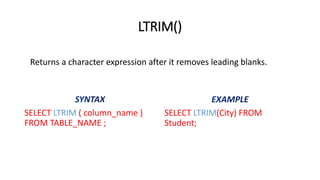
LTRIM()
SELECT LTRIM (column_name )
FROM TABLE_NAME ;
SELECT LTRIM(City) FROM
Student;
Returns a character expression after it removes leading blanks.
39.
RTRIM()
SELECT RTRIM (column_name)
FROM TABLE_NAME;
SELECT RTRIM(City) FROM
Student;
Returns a character string after truncating all trailing spaces.
40.
REPLACE()
SELECT REPLACE (
string_expression, string_pattern
, string_replacement ) AS
Alias_name FROM TABLE_NAME ;
SELECT REPLACE
(Address,'Block','Street') AS
replaced_data FROM Student;
Replaces all occurrences of a specified string value with another string
value.
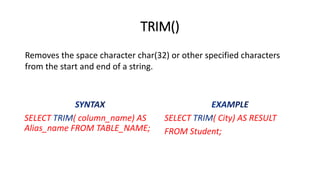
TRIM()
SELECT ( column_name)AS
Alias_name FROM TABLE_NAME;
SELECT ( City) AS RESULT
FROM Student;
Removes the space character char(32) or other specified characters
from the start and end of a string.


![COUNT with WHERE
SELECT COUNT(*)
FROM TABLE_NAME
WHERE [condition];
SELECT COUNT(*)
FROM Student
WHERE Total_Marks>400;](https://image.slidesharecdn.com/0716330552518dbmslabtheorysqloperator1-250220135416-1cecc62f/85/0716330552518_DBMS_LAB_THEORY_SQL_OPERATOR-1-pdf-12-320.jpg)


![SUM() with WHERE
SELECT SUM(column_name)
FROM TABLE_NAME
WHERE [condition];
SELECT SUM(Total_Marks)
FROM Student
WHERE Total_marks>400 ;](https://image.slidesharecdn.com/0716330552518dbmslabtheorysqloperator1-250220135416-1cecc62f/85/0716330552518_DBMS_LAB_THEORY_SQL_OPERATOR-1-pdf-16-320.jpg)