©  2014 DataVard # 1
Martin Mihalik
Joseph O‘Leary
How to shrink your
database by 40-50 %
And increase
performance
©  2014 DataVard # 2
Today present:
Martin Mihalik Joseph O‘Leary
Senior ILM & Performance
Optimization Consultant
DataVard s.r.o.
martin.mihalik@datavard.com
Product Manager ILM &
Performance Optimization
DataVard, Inc.
joseph.o.leary@datavard.com
©  2014 DataVard # 3
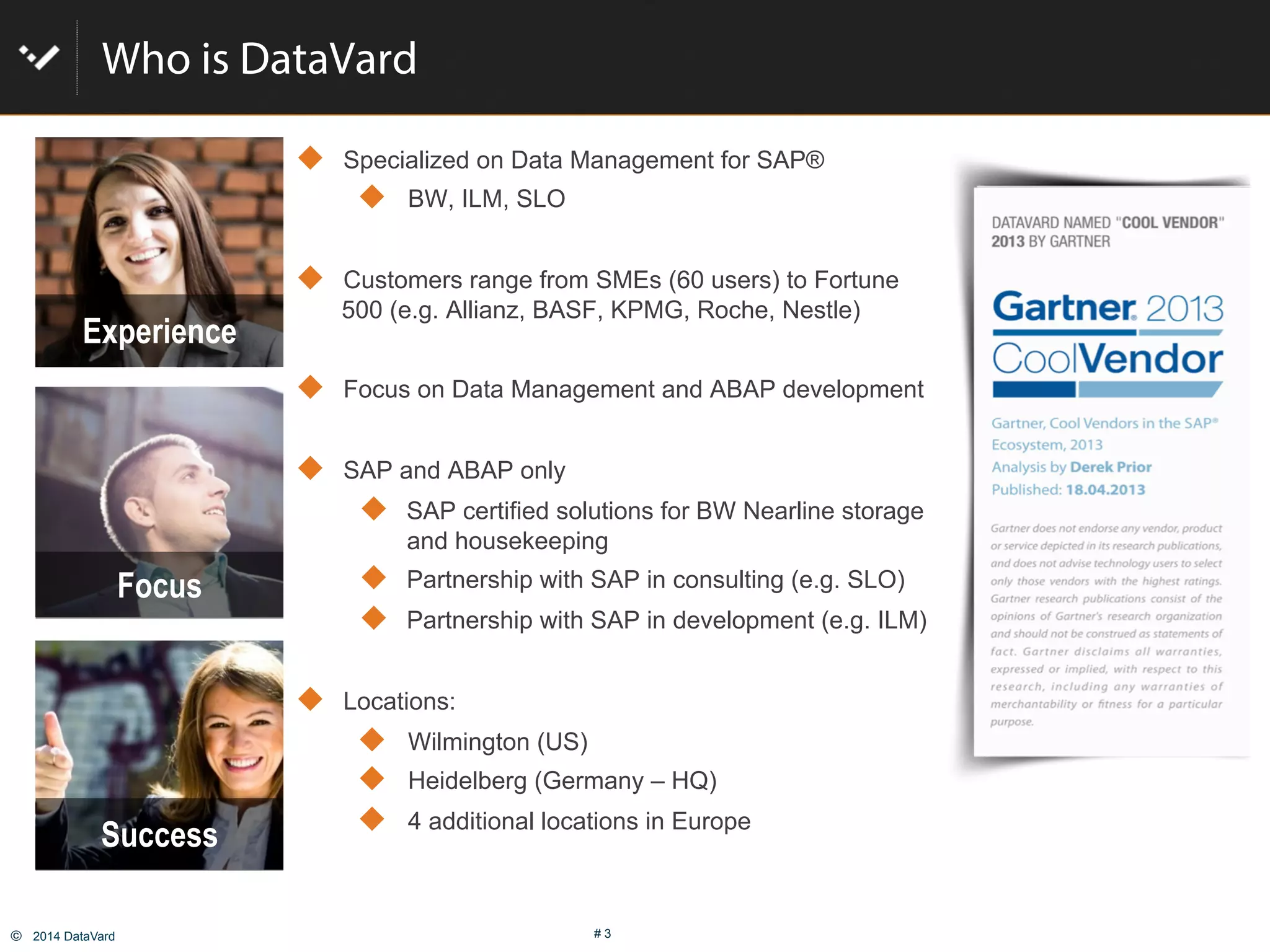
Who is DataVard
!  Specialized on Data Management for SAP®
!  BW, ILM, SLO
!  Customers range from SMEs (60 users) to Fortune
500 (e.g. Allianz, BASF, KPMG, Roche, Nestle)
!  Focus on Data Management and ABAP development
!  SAP and ABAP only
!  SAP certified solutions for BW Nearline storage
and housekeeping
!  Partnership with SAP in consulting (e.g. SLO)
!  Partnership with SAP in development (e.g. ILM)
!  Locations:
!  Wilmington (US)
!  Heidelberg (Germany – HQ)
!  4 additional locations in Europe
Success
Experience
Focus
©  2014 DataVard # 4
What‘s the issue with Managing Data
1.  Data is growing more rapidly.
30-35% p.a. is common.
2.  More users are asking for new
applications, new countries are
going live
3.  Users are requesting high
granularity of data
4.  No classification of the importance
and usage of data
5.  Load times are getting longer and
longer
6.  Data is kept in the database (just in
case…)
©  2014 DataVard # 5
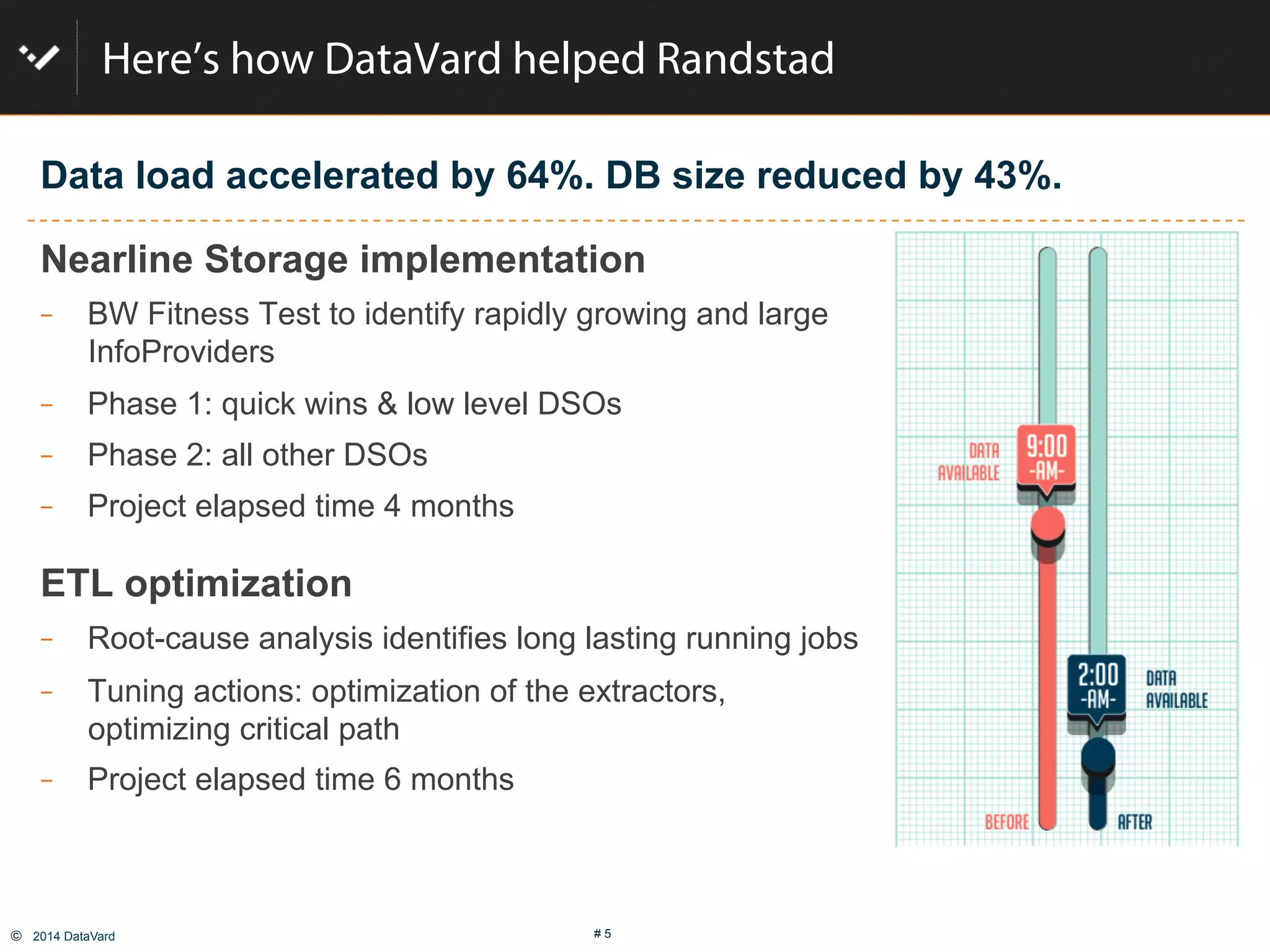
Here’s how DataVard helped Randstad
Nearline Storage implementation
  BW Fitness Test to identify rapidly growing and large
InfoProviders
  Phase 1: quick wins & low level DSOs
  Phase 2: all other DSOs
  Project elapsed time 4 months
ETL optimization
  Root-cause analysis identifies long lasting running jobs
  Tuning actions: optimization of the extractors,
optimizing critical path
  Project elapsed time 6 months
Data load accelerated by 64%. DB size reduced by 43%.
©  2014 DataVard # 6
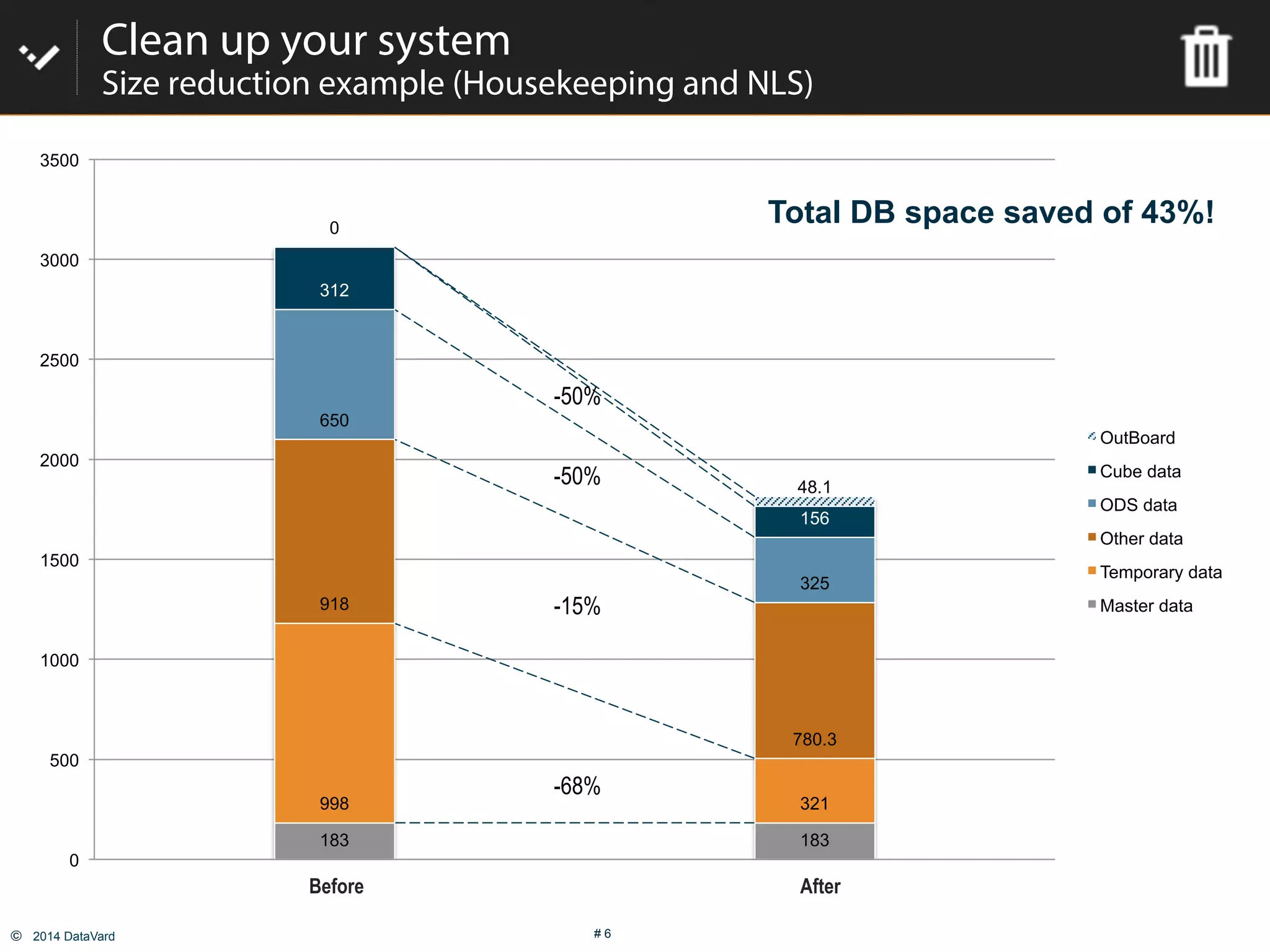
Clean up your system
Size reduction example (Housekeeping and NLS)
183 183
998 321
918
780.3
650
325
312
156
0
48.1
0
500
1000
1500
2000
2500
3000
3500
Heute mit OutBoard und ERNA
OutBoard
Cube data
ODS data
Other data
Temporary data
Master data
Before After
-68%
-15%
-50%
-50%
Total DB space saved of 43%!
©  2014 DataVard # 7
User
happiness
TCO&data
access
TCO
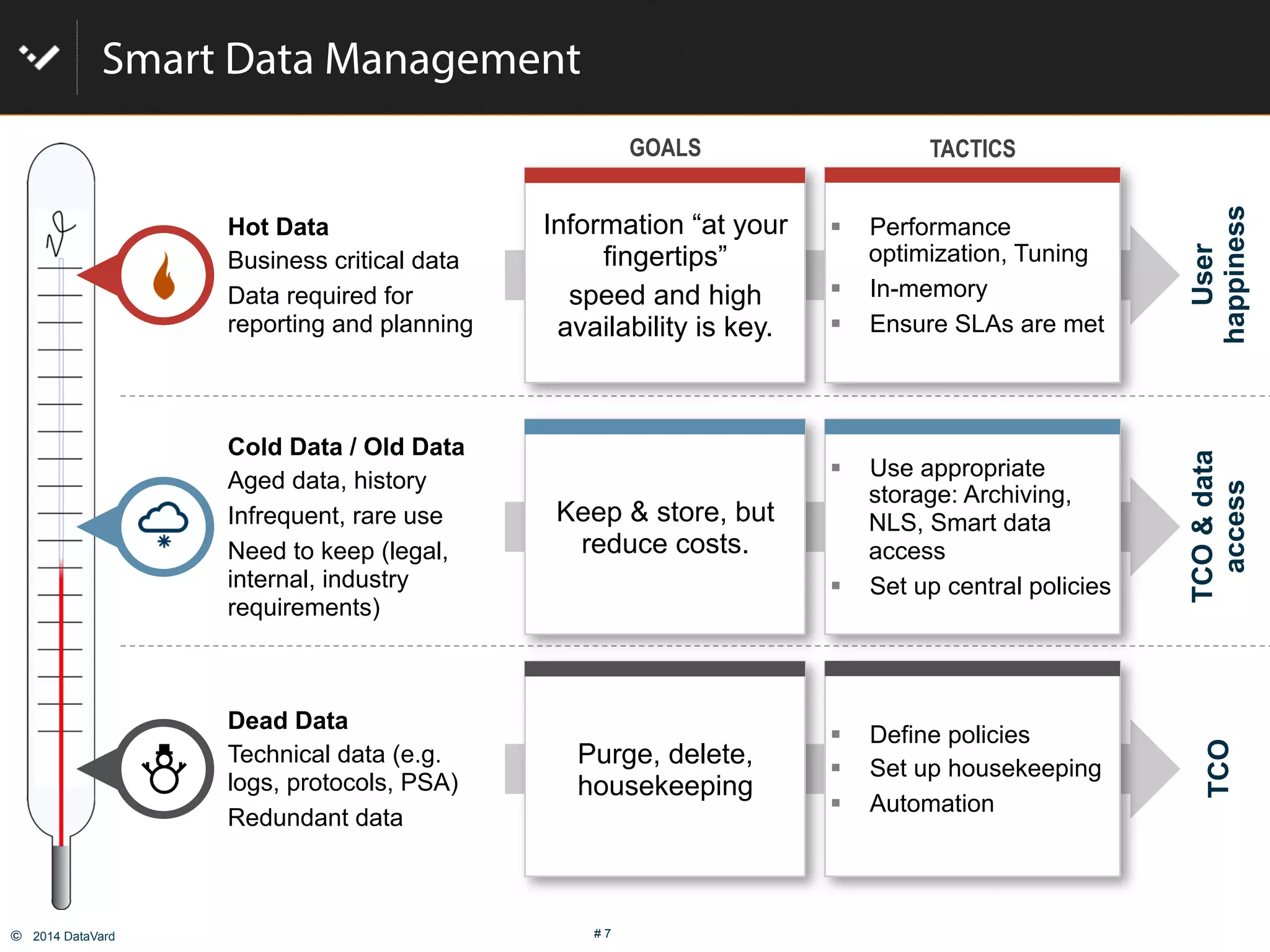
Smart Data Management
"  Performance
optimization, Tuning
"  In-memory
"  Ensure SLAs are met
GOALS TACTICS
"  Use appropriate
storage: Archiving,
NLS, Smart data
access
"  Set up central policies
"  Define policies
"  Set up housekeeping
"  Automation
Information “at your
fingertips”
speed and high
availability is key.
Keep & store, but
reduce costs.
Purge, delete,
housekeeping
Hot Data
Business critical data
Data required for
reporting and planning
Cold Data / Old Data
Aged data, history
Infrequent, rare use
Need to keep (legal,
internal, industry
requirements)
Dead Data
Technical data (e.g.
logs, protocols, PSA)
Redundant data
©  2014 DataVard # 8
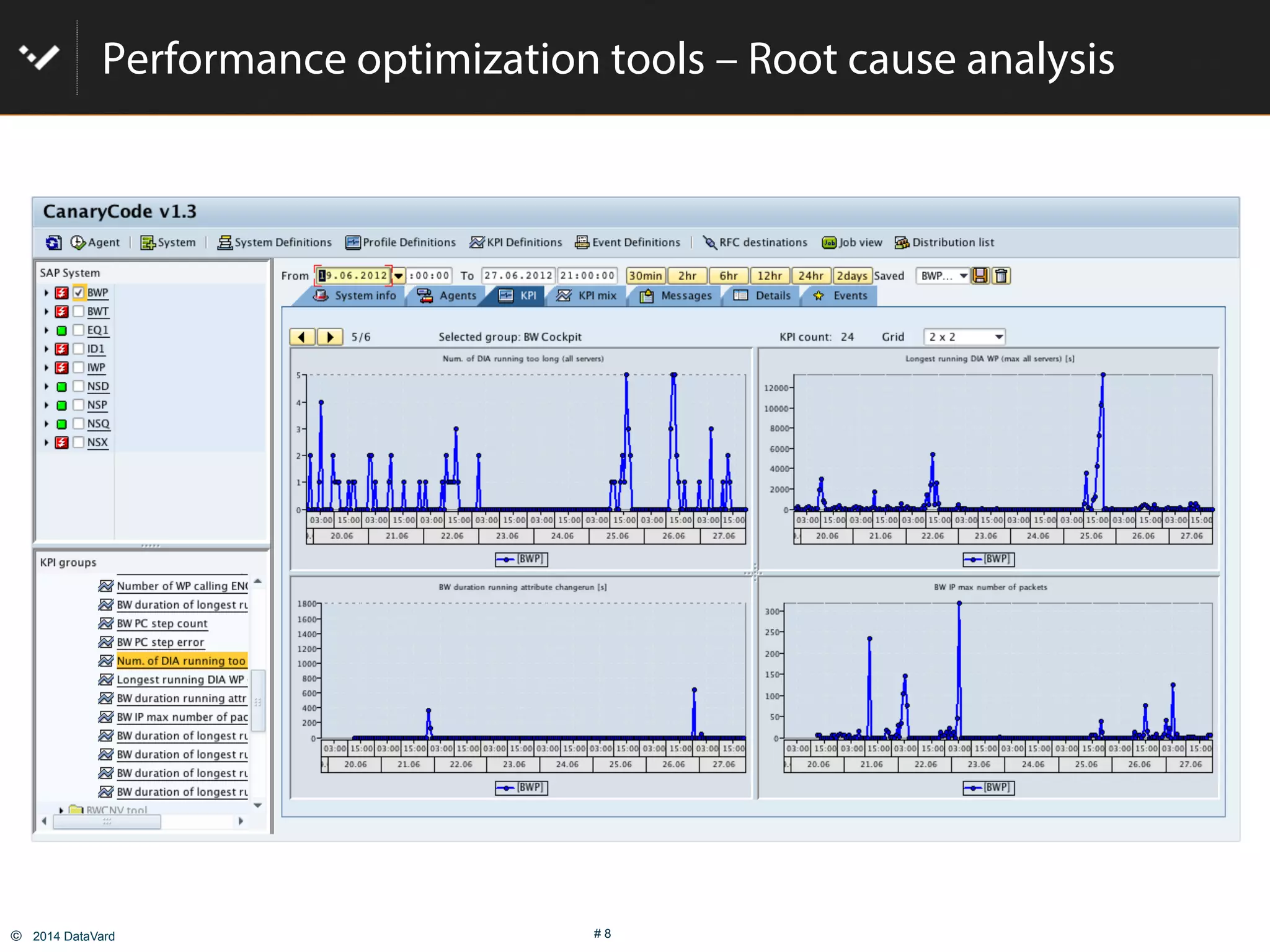
Performance optimization tools – Root cause analysis
©  2014 DataVard # 9
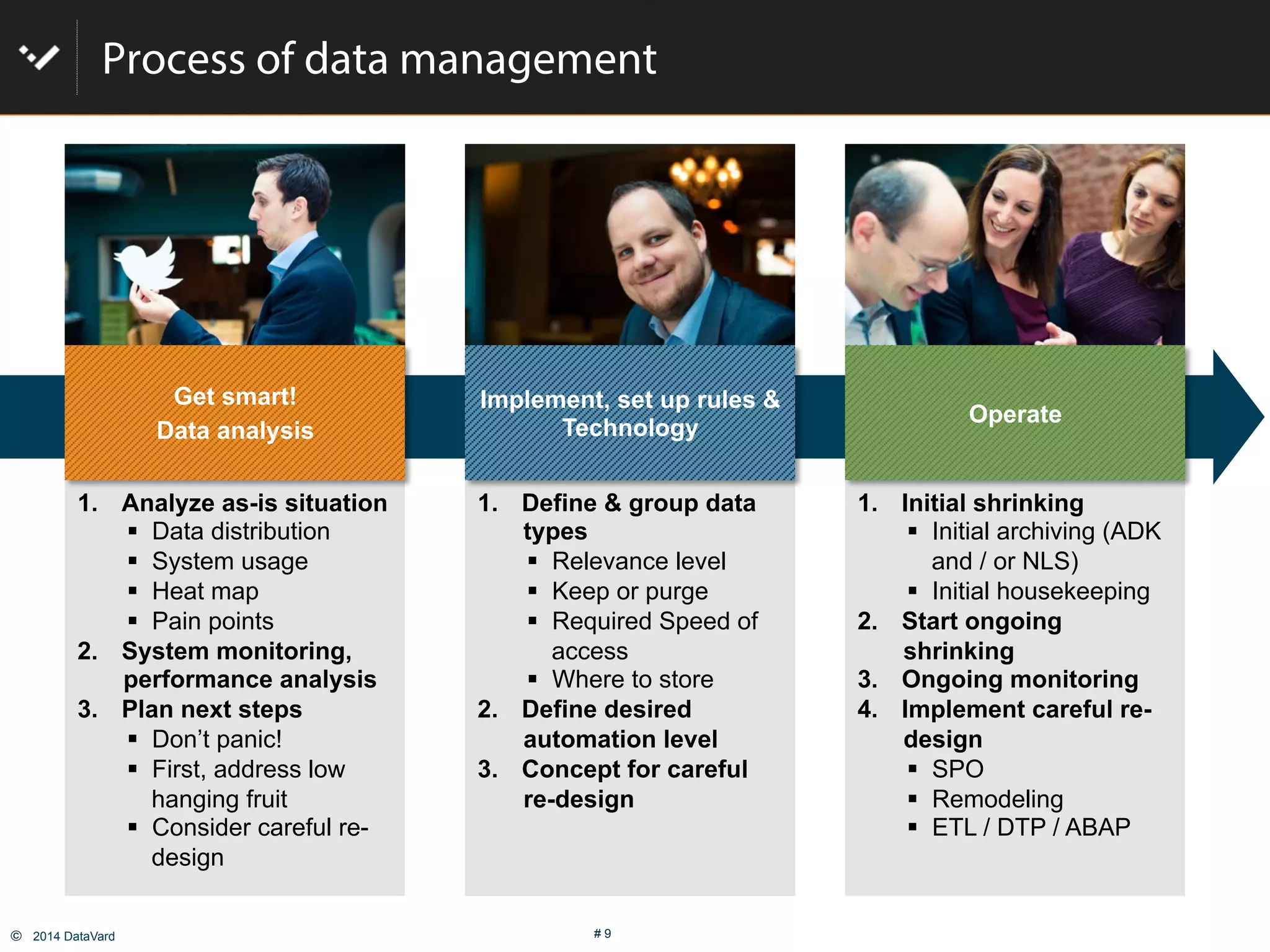
Process of data management
1.  Analyze as-is situation
"  Data distribution
"  System usage
"  Heat map
"  Pain points
2.  System monitoring,
performance analysis
3.  Plan next steps
"  Don’t panic!
"  First, address low
hanging fruit
"  Consider careful re-
design
1.  Define & group data
types
"  Relevance level
"  Keep or purge
"  Required Speed of
access
"  Where to store
2.  Define desired
automation level
3.  Concept for careful
re-design
1.  Initial shrinking
"  Initial archiving (ADK
and / or NLS)
"  Initial housekeeping
2.  Start ongoing
shrinking
3.  Ongoing monitoring
4.  Implement careful re-
design
"  SPO
"  Remodeling
"  ETL / DTP / ABAP
Get smart!
Data analysis
Implement, set up rules &
Technology
Operate
©  2014 DataVard # 11
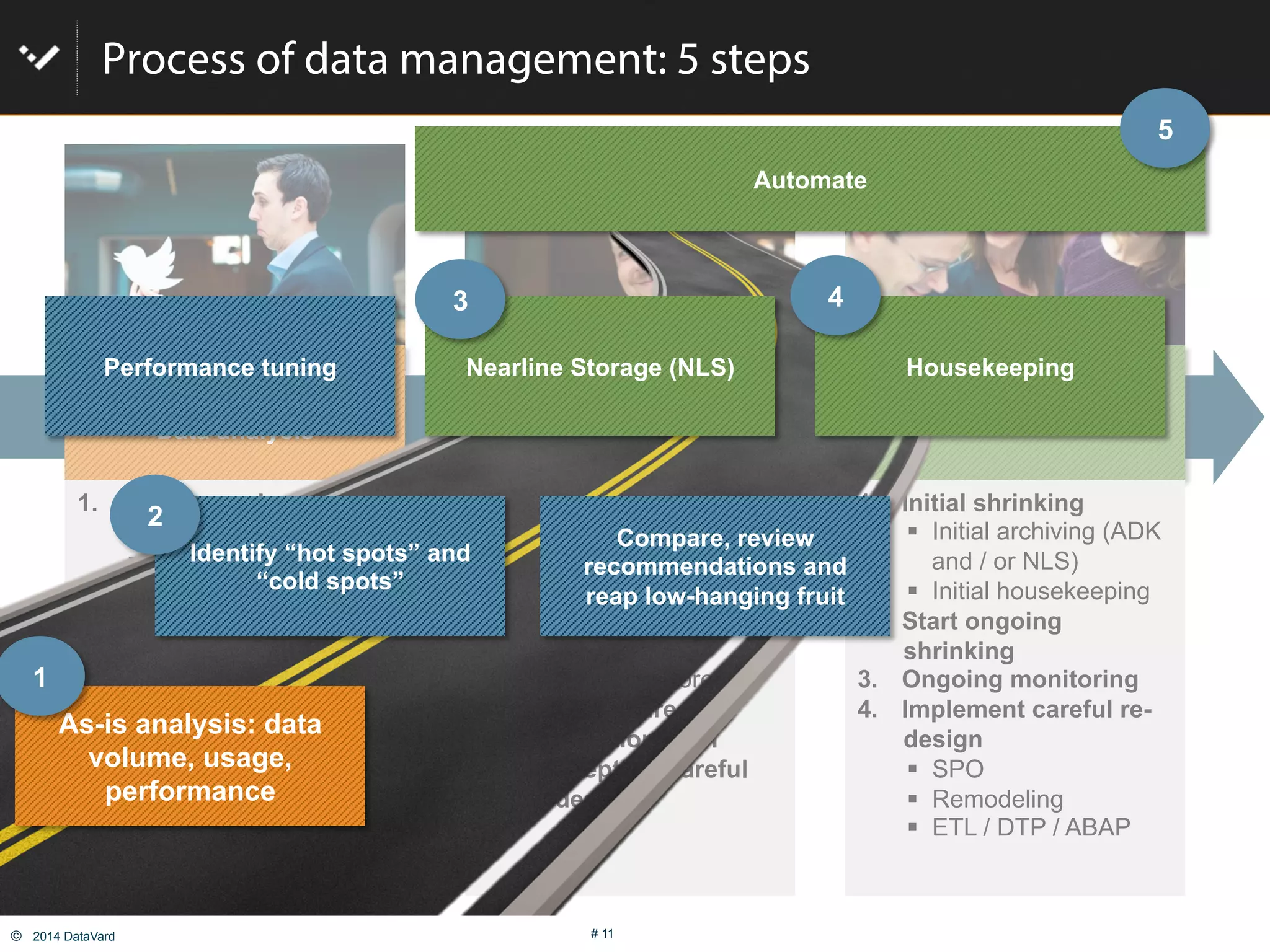
Process of data management: 5 steps
Get smart!
Data analysis
Implement, set up rules &
Technology
Operate
1.  Analyze as-is situation
"  Data distribution
"  System usage
"  Heat map
"  Pain points
2.  System monitoring,
performance analysis
3.  Plan next steps
"  Don’t panic!
"  First, address low
hanging fruit
"  Consider careful re-
design
1.  Define & group data
types
"  Relevance level
"  Keep or purge
"  Required Speed of
access
"  Where to store
2.  Define desired
automation level
3.  Concept for careful
re-design
1.  Initial shrinking
"  Initial archiving (ADK
and / or NLS)
"  Initial housekeeping
2.  Start ongoing
shrinking
3.  Ongoing monitoring
4.  Implement careful re-
design
"  SPO
"  Remodeling
"  ETL / DTP / ABAP
As-is analysis: data
volume, usage,
performance
Compare, review
recommendations and
reap low-hanging fruit
Nearline Storage (NLS) Housekeeping
Automate
Identify “hot spots” and
“cold spots”
Performance tuning
1
2
3 4
5
©  2014 DataVard # 12
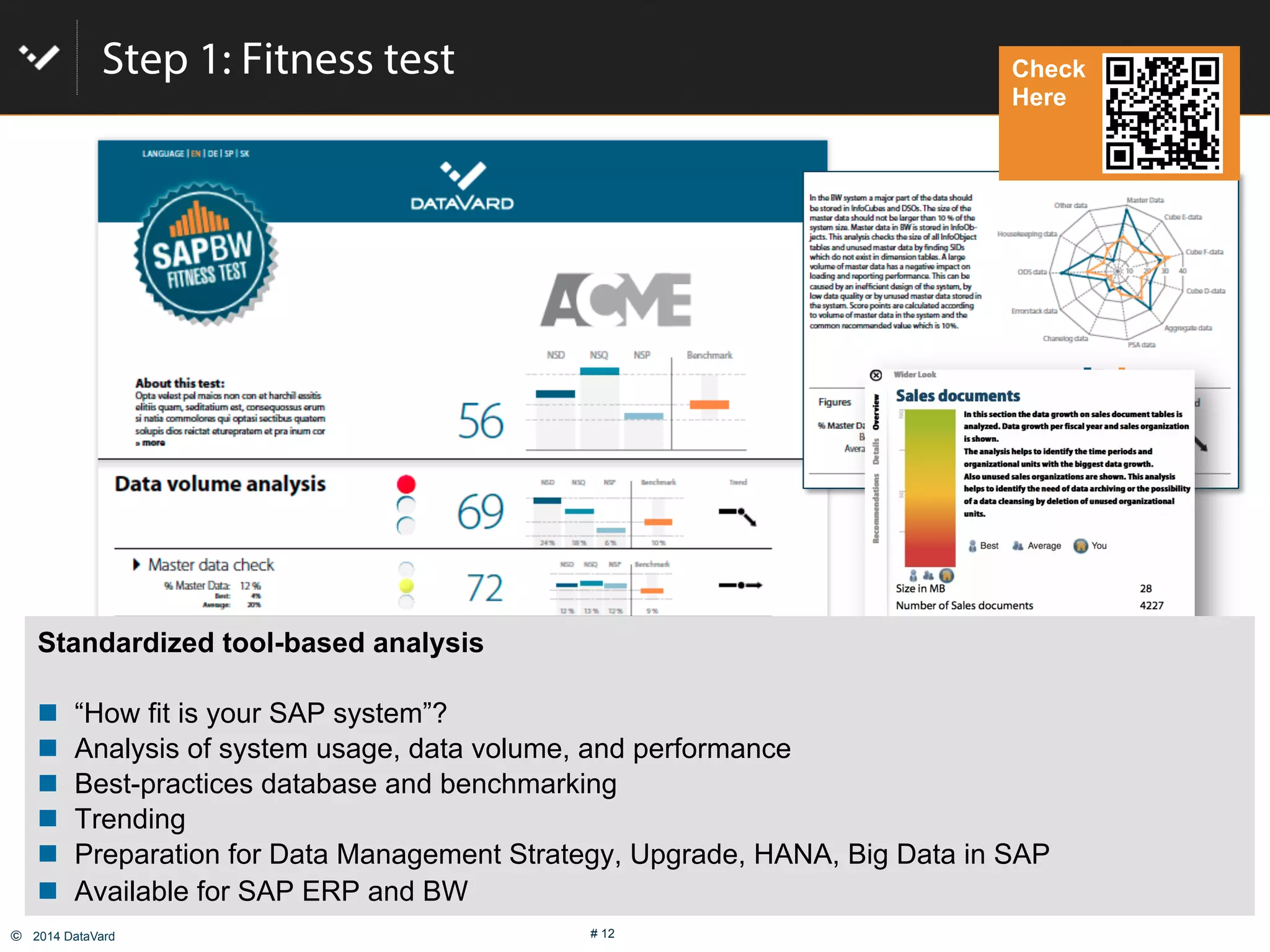
Step 1: Fitness test
Standardized tool-based analysis
#  “How fit is your SAP system”?
#  Analysis of system usage, data volume, and performance
#  Best-practices database and benchmarking
#  Trending
#  Preparation for Data Management Strategy, Upgrade, HANA, Big Data in SAP
#  Available for SAP ERP and BW
Check
Here
©  2014 DataVard # 13
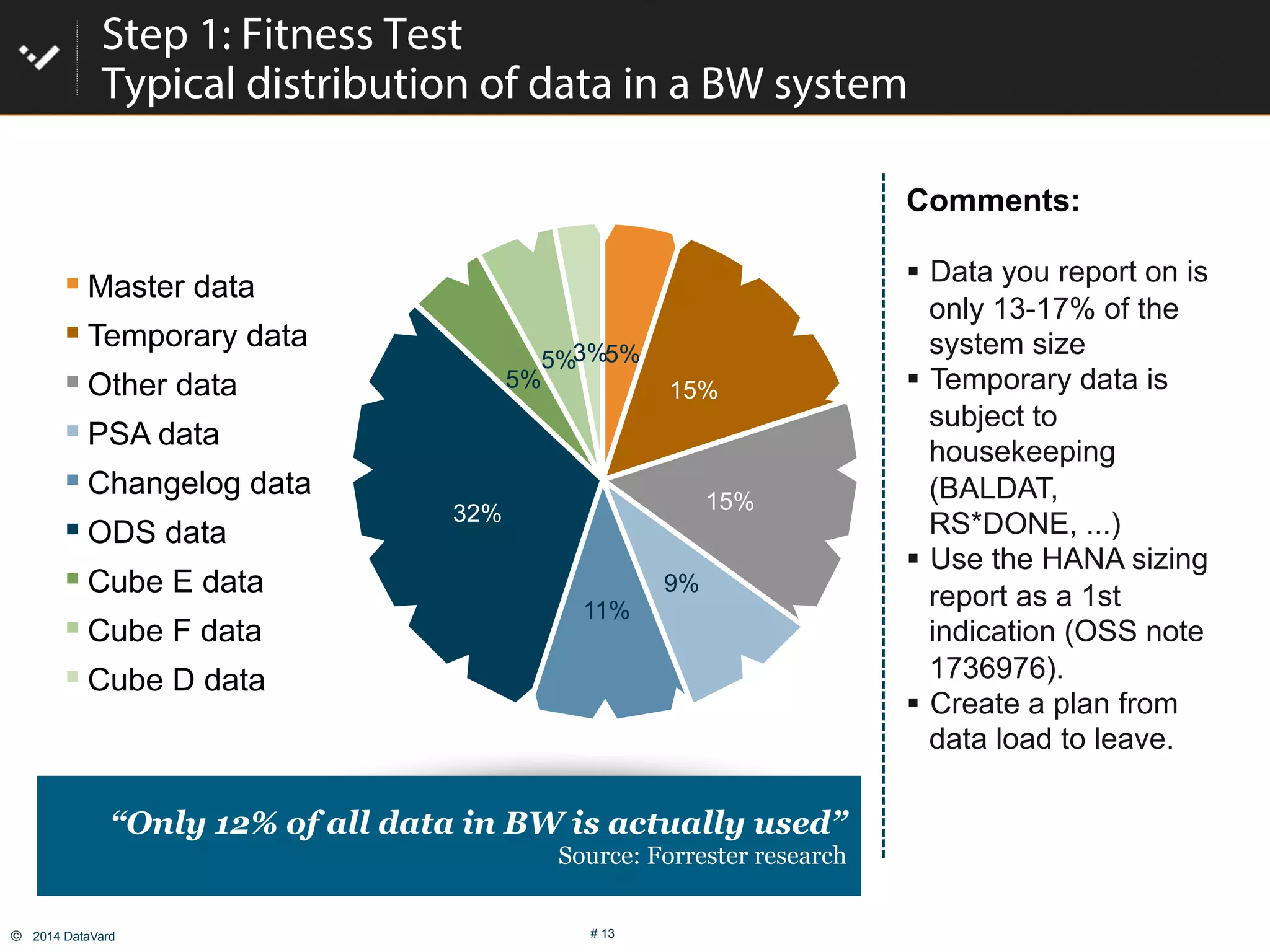
5%
15%
15%
9%
11%
32%
5%
5%3%
Master data
Temporary data
Other data
PSA data
Changelog data
ODS data
Cube E data
Cube F data
Cube D data
Step 1: Fitness Test
Typical distribution of data in a BW system
Comments:
"  Data you report on is
only 13-17% of the
system size
"  Temporary data is
subject to
housekeeping
(BALDAT,
RS*DONE, ...)
"  Use the HANA sizing
report as a 1st
indication (OSS note
1736976).
"  Create a plan from
data load to leave.
“Only 12% of all data in BW is actually used”
Source: Forrester research
©  2014 DataVard # 14
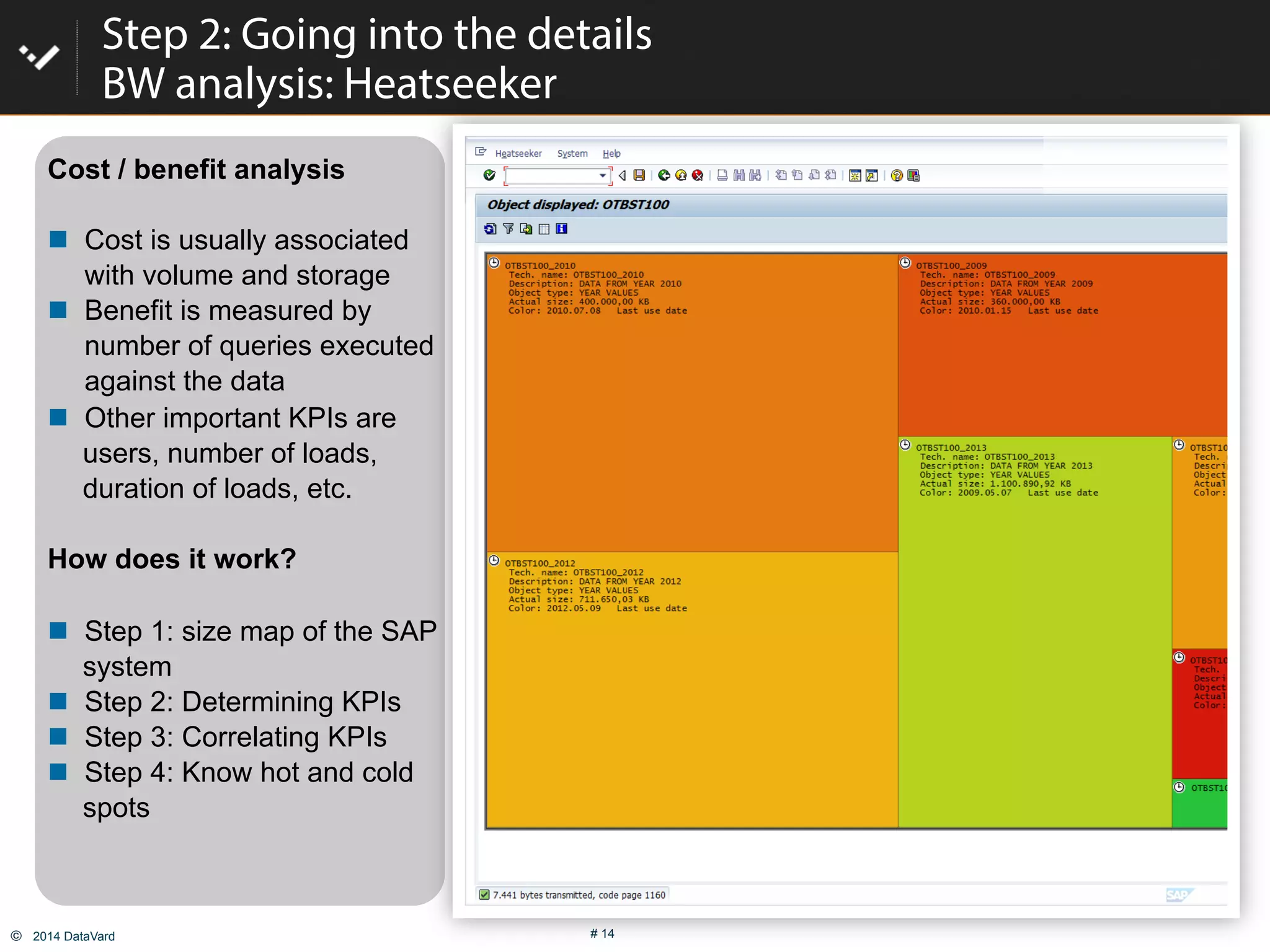
Cost / benefit analysis
#  Cost is usually associated
with volume and storage
#  Benefit is measured by
number of queries executed
against the data
#  Other important KPIs are
users, number of loads,
duration of loads, etc.
How does it work?
#  Step 1: size map of the SAP
system
#  Step 2: Determining KPIs
#  Step 3: Correlating KPIs
#  Step 4: Know hot and cold
spots
Step 2: Going into the details
BW analysis: Heatseeker
©  2014 DataVard # 15
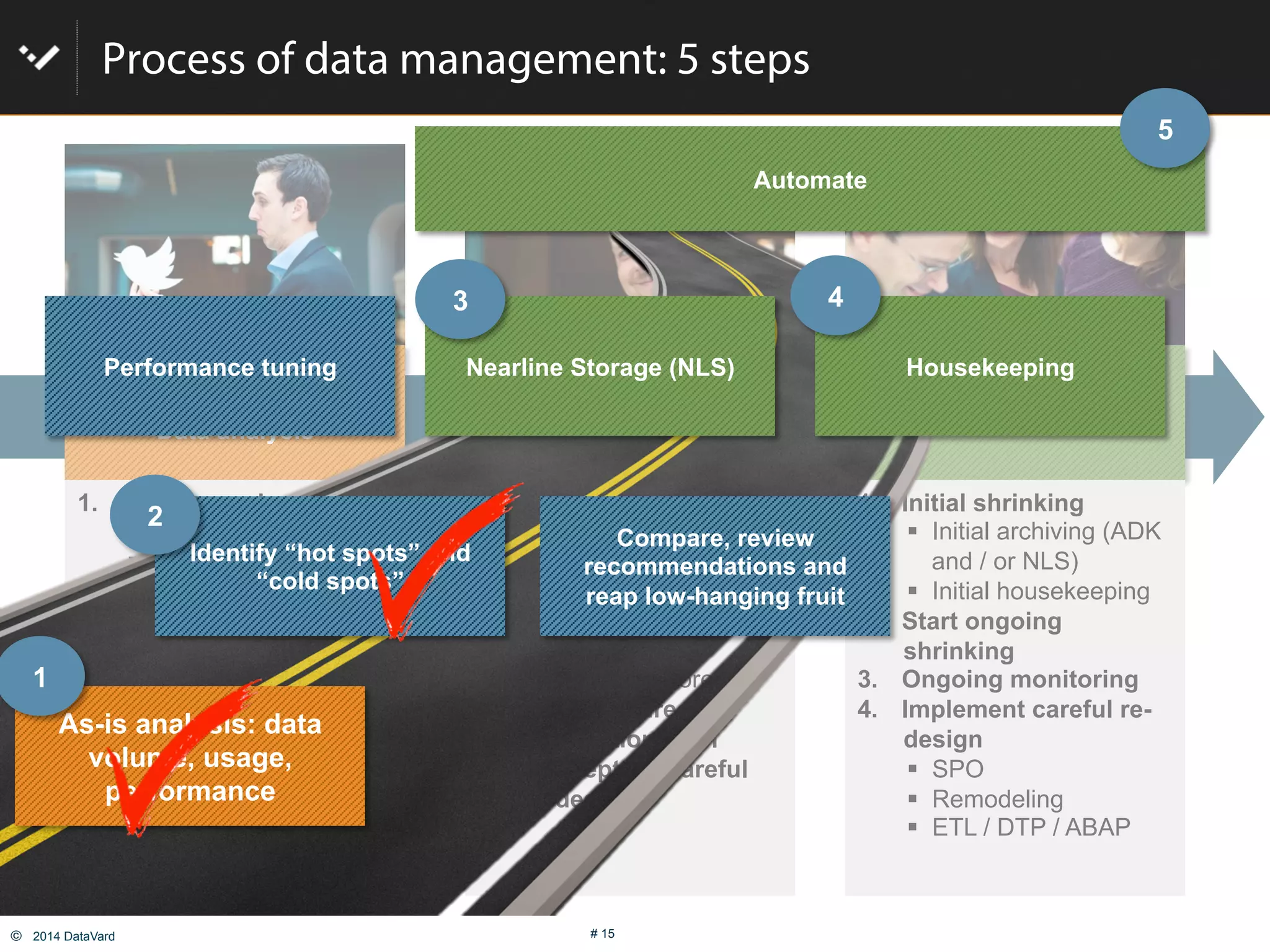
Process of data management: 5 steps
Get smart!
Data analysis
Implement, set up rules &
Technology
Operate
1.  Analyze as-is situation
"  Data distribution
"  System usage
"  Heat map
"  Pain points
2.  System monitoring,
performance analysis
3.  Plan next steps
"  Don’t panic!
"  First, address low
hanging fruit
"  Consider careful re-
design
1.  Define & group data
types
"  Relevance level
"  Keep or purge
"  Required Speed of
access
"  Where to store
2.  Define desired
automation level
3.  Concept for careful
re-design
1.  Initial shrinking
"  Initial archiving (ADK
and / or NLS)
"  Initial housekeeping
2.  Start ongoing
shrinking
3.  Ongoing monitoring
4.  Implement careful re-
design
"  SPO
"  Remodeling
"  ETL / DTP / ABAP
As-is analysis: data
volume, usage,
performance
Compare, review
recommendations and
reap low-hanging fruit
Nearline Storage (NLS) Housekeeping
Automate
Identify “hot spots” and
“cold spots”
Performance tuning
1
2
3 4
5
©  2014 DataVard # 16
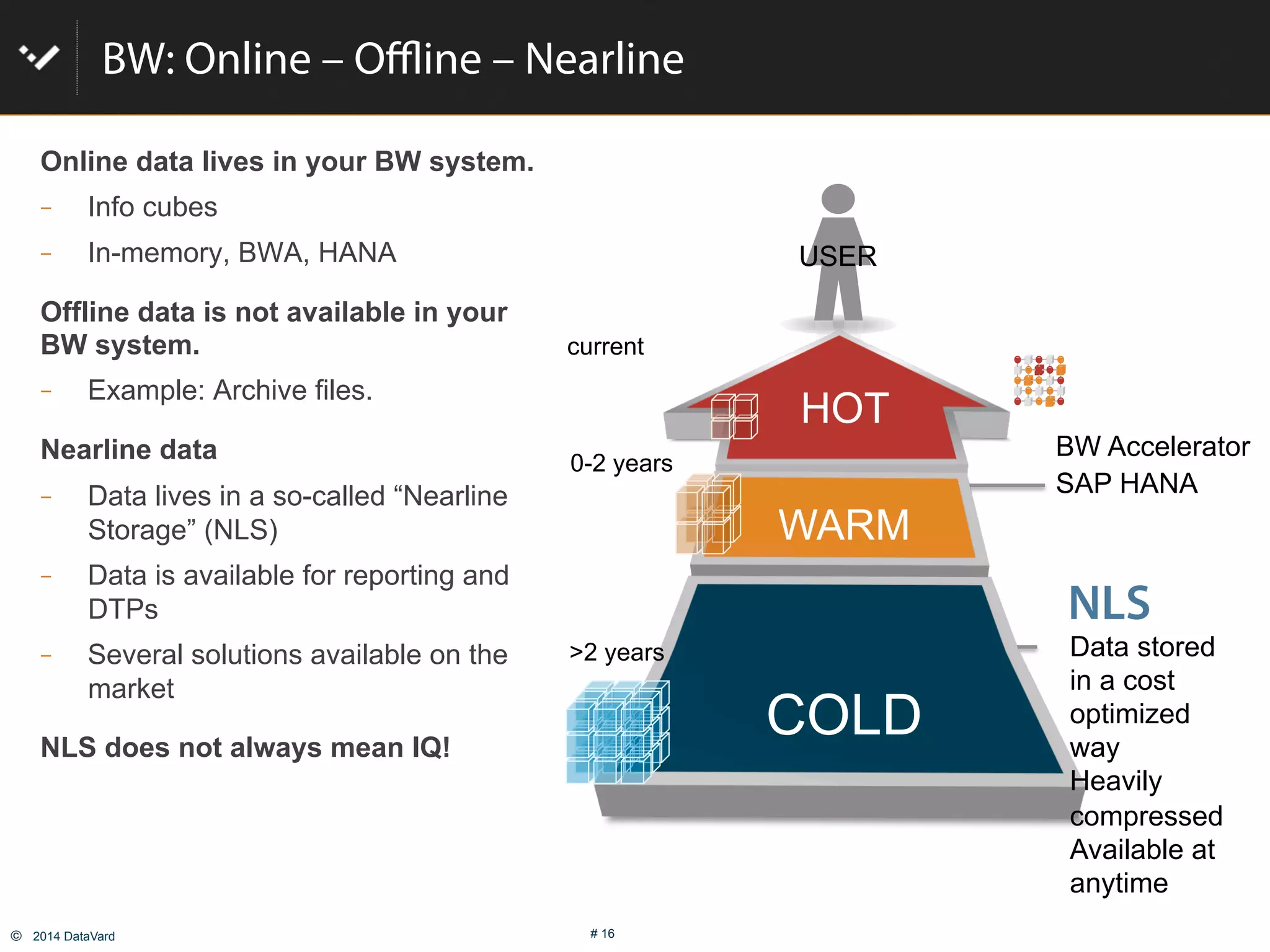
BW: Online – Offline – Nearline
Online data lives in your BW system.
  Info cubes
  In-memory, BWA, HANA
Offline data is not available in your
BW system.
  Example: Archive files.
Nearline data
  Data lives in a so-called “Nearline
Storage” (NLS)
  Data is available for reporting and
DTPs
  Several solutions available on the
market
NLS does not always mean IQ!
USER
BW Accelerator
SAP HANA
NLS
HOT
WARM
COLD
Data stored
in a cost
optimized
way
Heavily
compressed
Available at
anytime
current
0-2 years
>2 years
©  2014 DataVard # 17
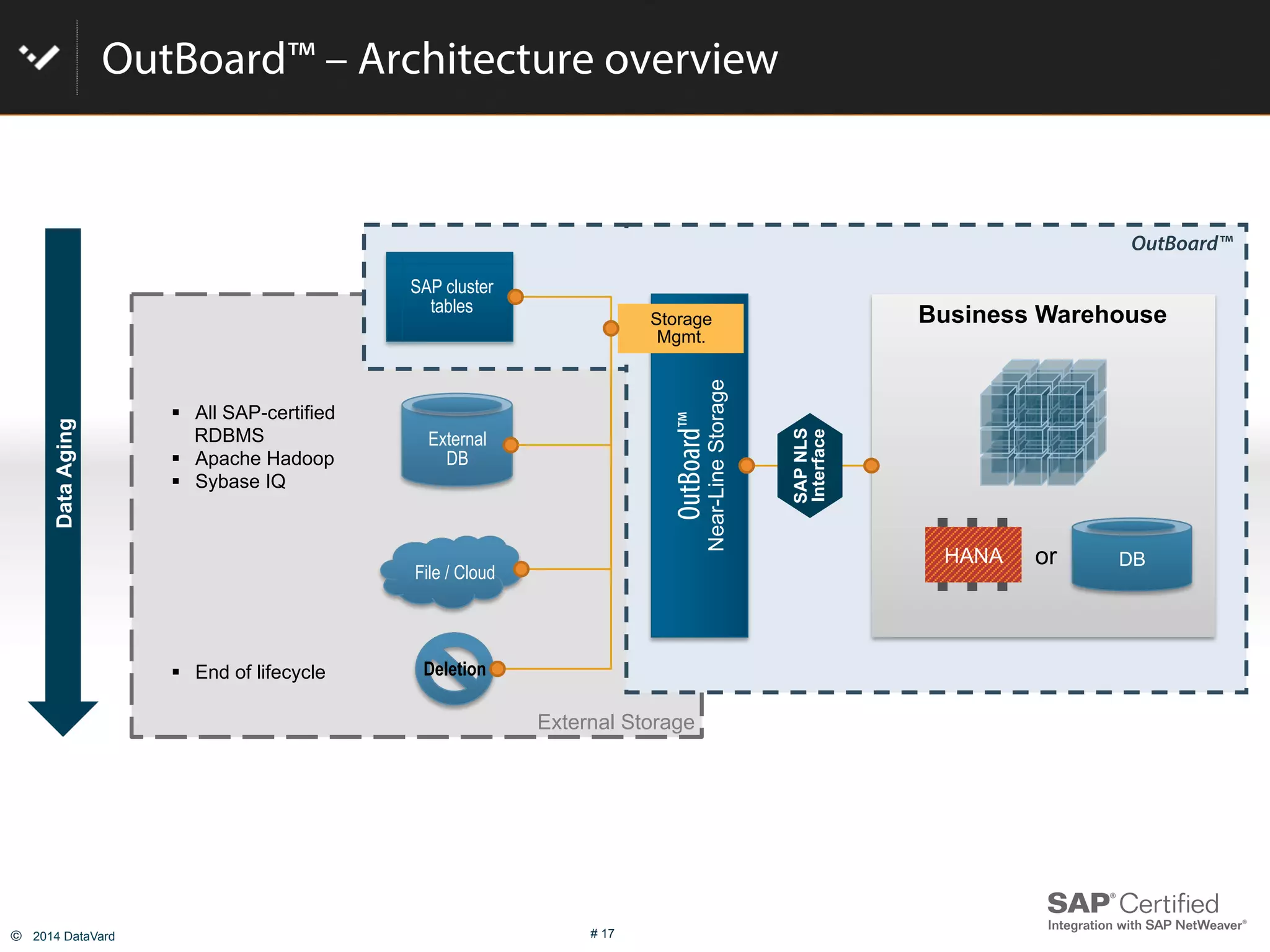
OutBoard™ – Architecture overview
External Storage
OutBoard™
DataAging
OutBoard™
Near-LineStorage
Business Warehouse
SAPNLS
Interface
Storage
Mgmt.
SAP cluster
tables
File / Cloud
External
DB
"  All SAP-certified
RDBMS
"  Apache Hadoop
"  Sybase IQ
"  End of lifecycle Deletion
HANA DBor
©  2014 DataVard # 18
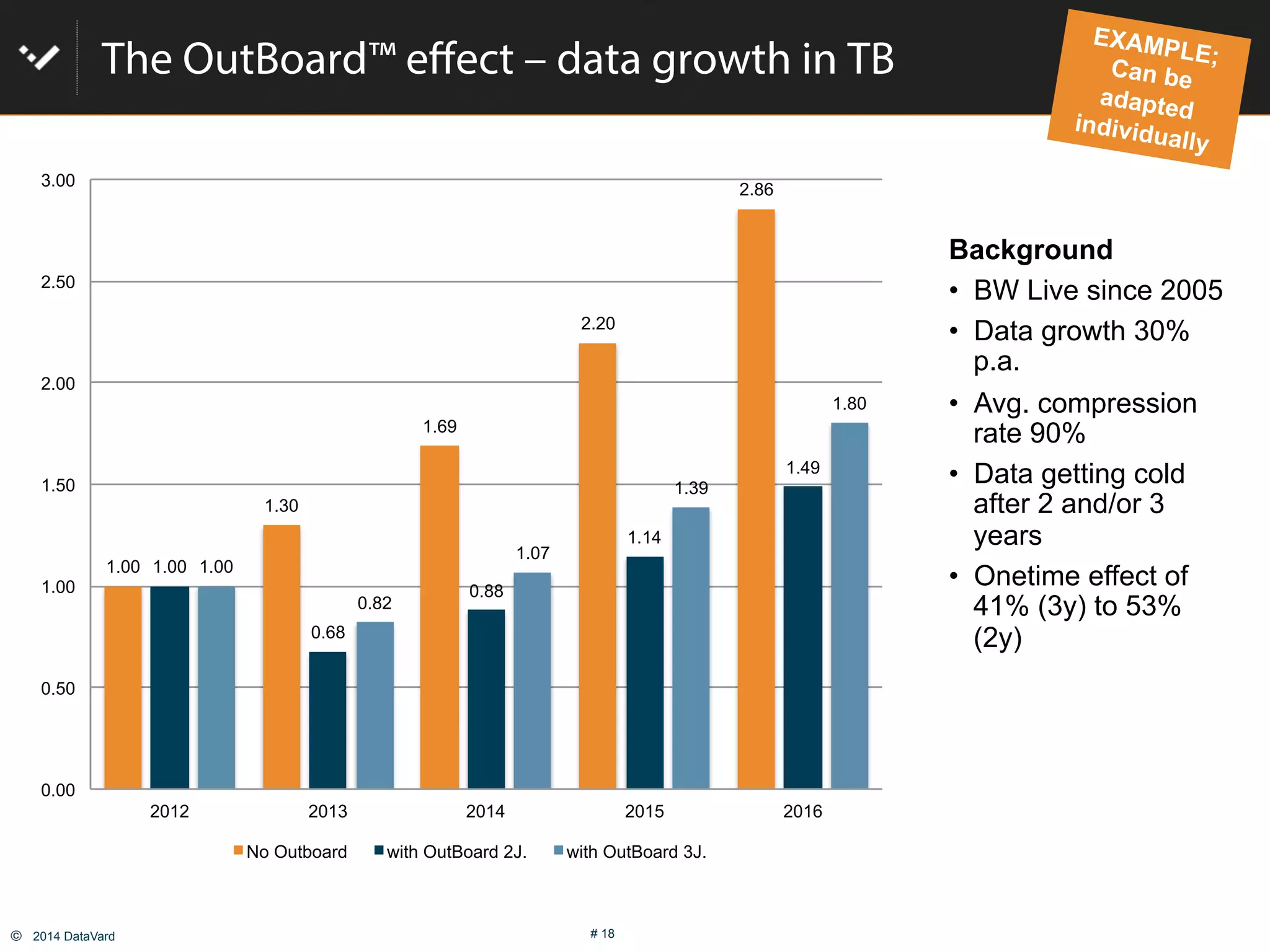
The OutBoard™ effect – data growth in TB
Background
•  BW Live since 2005
•  Data growth 30%
p.a.
•  Avg. compression
rate 90%
•  Data getting cold
after 2 and/or 3
years
•  Onetime effect of
41% (3y) to 53%
(2y)
EXAMPLE;Can be
adapted
individually
1.00
1.30
1.69
2.20
2.86
1.00
0.68
0.88
1.14
1.49
1.00
0.82
1.07
1.39
1.80
0.00
0.50
1.00
1.50
2.00
2.50
3.00
2012 2013 2014 2015 2016
No Outboard with OutBoard 2J. with OutBoard 3J.
©  2014 DataVard # 19
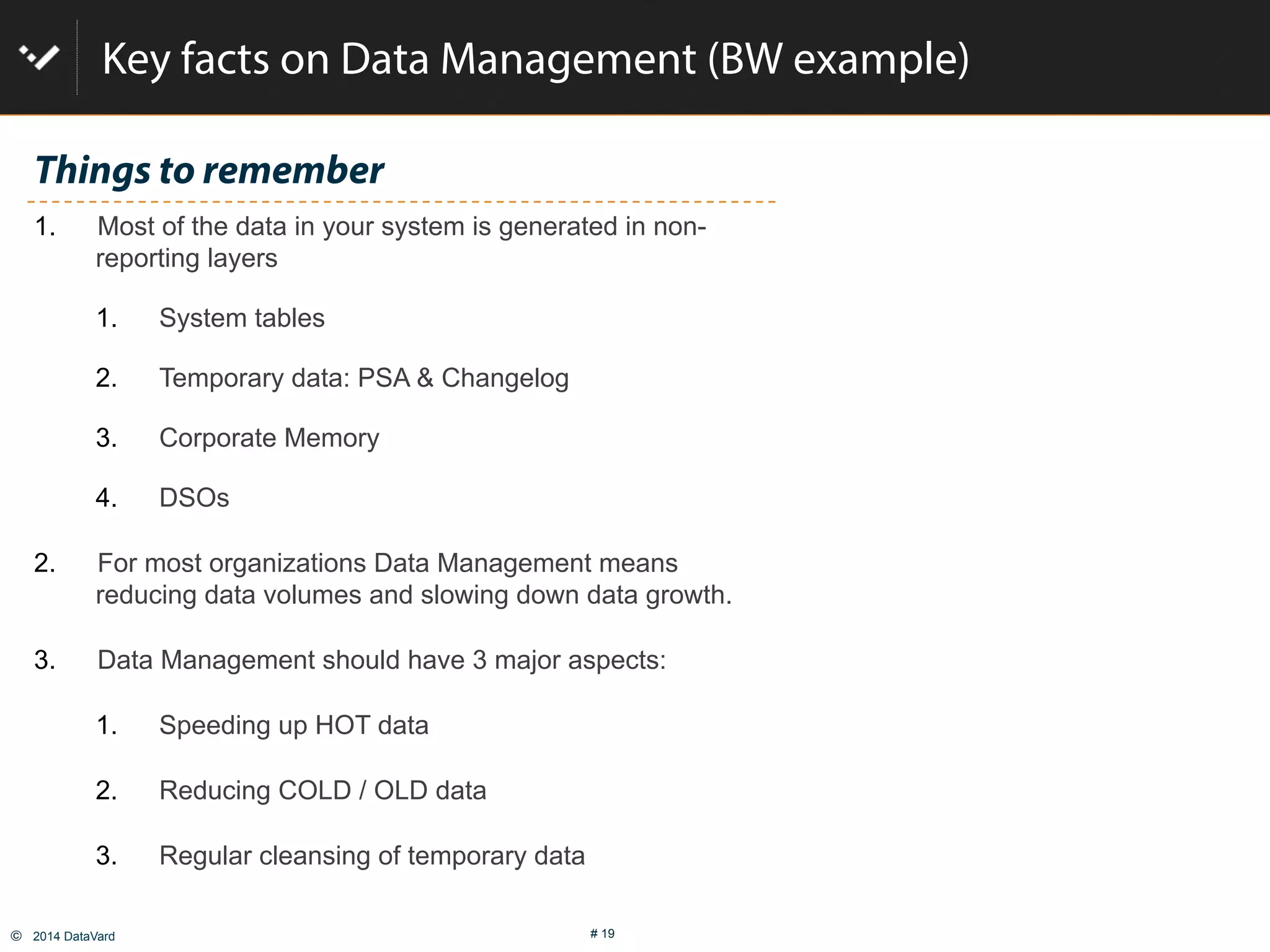
Key facts on Data Management (BW example)
Things to remember
1.  Most of the data in your system is generated in non-
reporting layers
1.  System tables
2.  Temporary data: PSA & Changelog
3.  Corporate Memory
4.  DSOs
2.  For most organizations Data Management means
reducing data volumes and slowing down data growth.
3.  Data Management should have 3 major aspects:
1.  Speeding up HOT data
2.  Reducing COLD / OLD data
3.  Regular cleansing of temporary data
©  2014 DataVard # 20
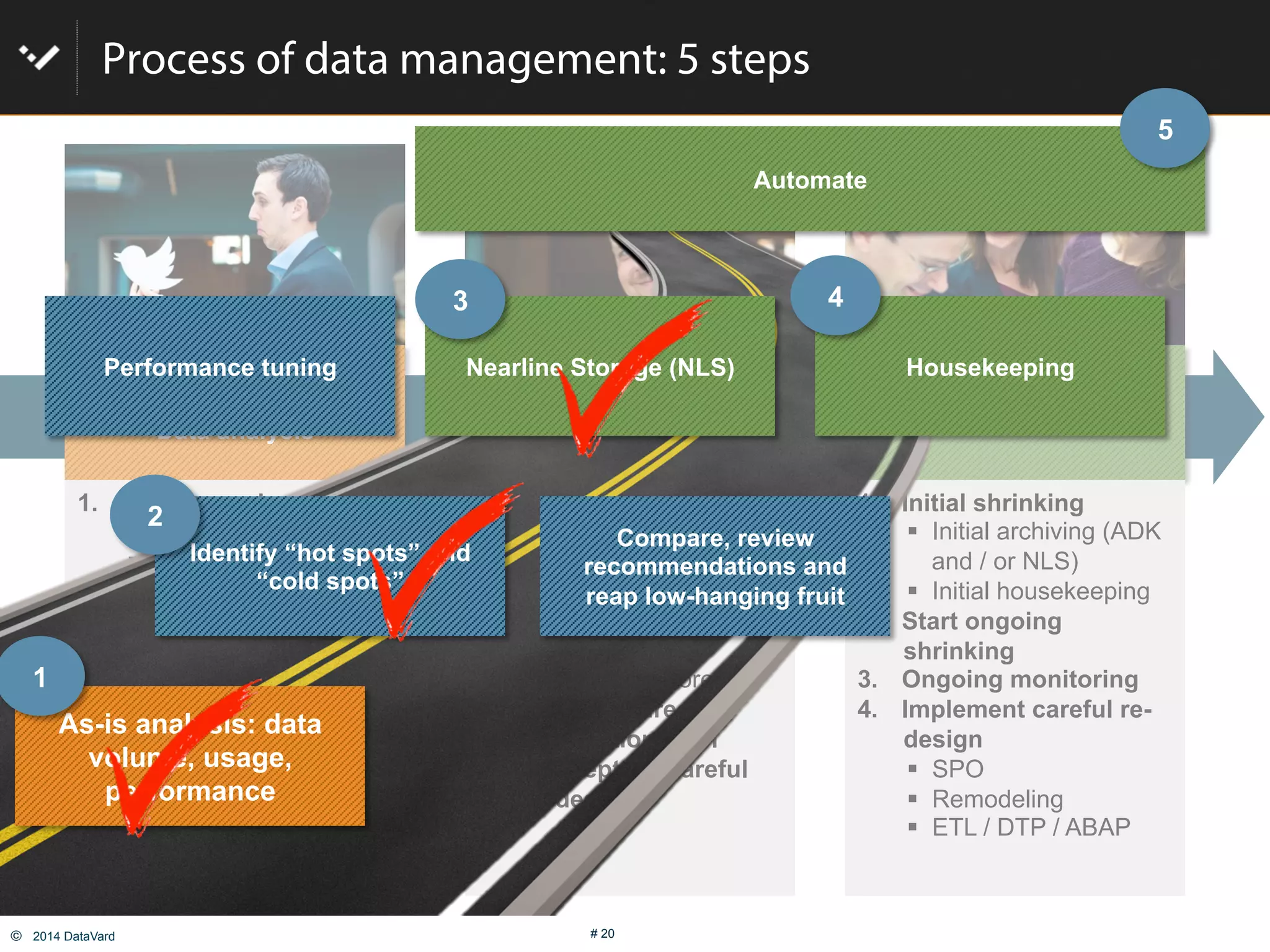
Process of data management: 5 steps
Get smart!
Data analysis
Implement, set up rules &
Technology
Operate
1.  Analyze as-is situation
"  Data distribution
"  System usage
"  Heat map
"  Pain points
2.  System monitoring,
performance analysis
3.  Plan next steps
"  Don’t panic!
"  First, address low
hanging fruit
"  Consider careful re-
design
1.  Define & group data
types
"  Relevance level
"  Keep or purge
"  Required Speed of
access
"  Where to store
2.  Define desired
automation level
3.  Concept for careful
re-design
1.  Initial shrinking
"  Initial archiving (ADK
and / or NLS)
"  Initial housekeeping
2.  Start ongoing
shrinking
3.  Ongoing monitoring
4.  Implement careful re-
design
"  SPO
"  Remodeling
"  ETL / DTP / ABAP
As-is analysis: data
volume, usage,
performance
Compare, review
recommendations and
reap low-hanging fruit
Nearline Storage (NLS) Housekeeping
Automate
Identify “hot spots” and
“cold spots”
Performance tuning
1
2
3 4
5
©  2014 DataVard # 21
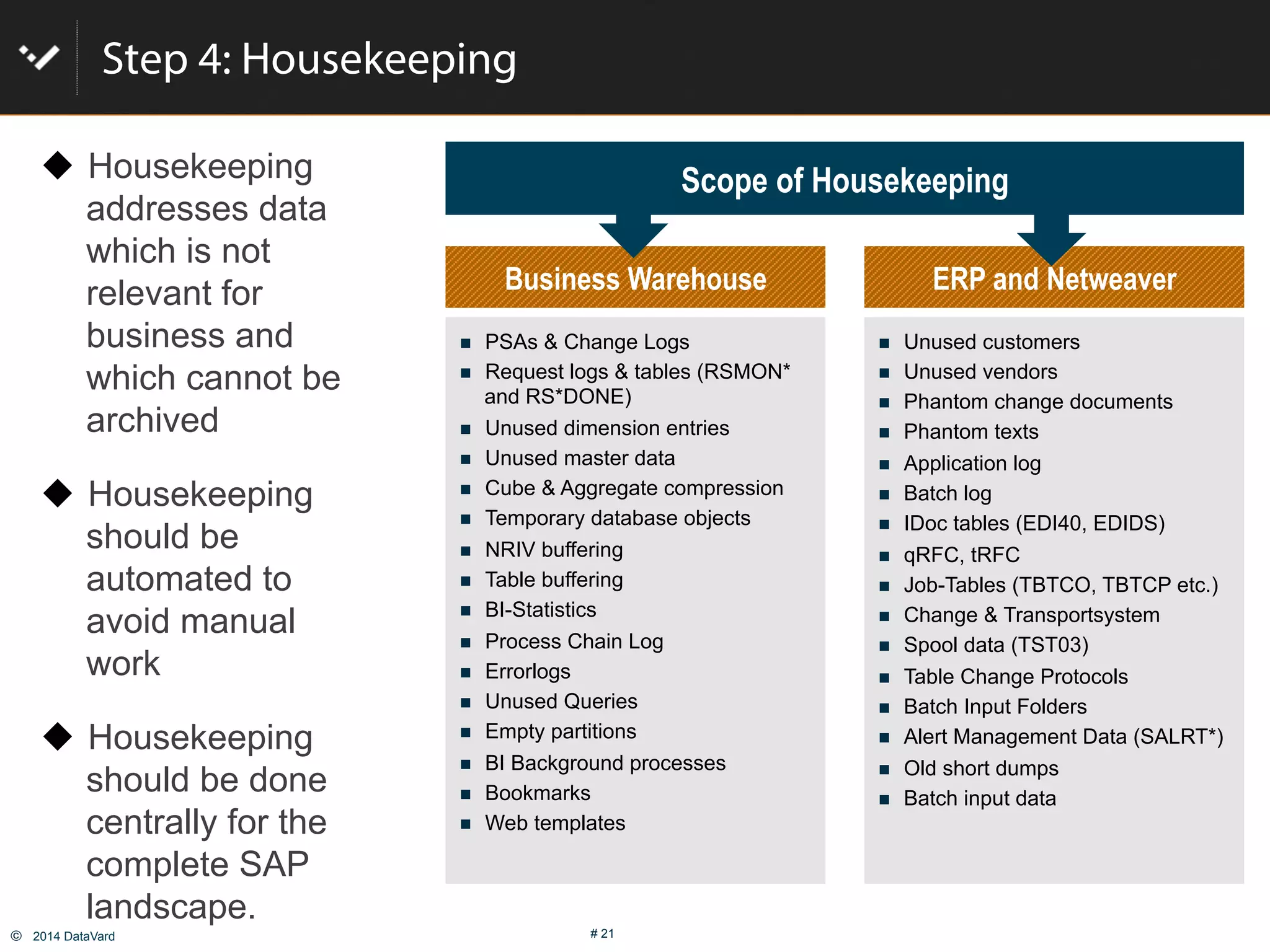
Step 4: Housekeeping
Scope of Housekeeping
#  Unused customers
#  Unused vendors
#  Phantom change documents
#  Phantom texts
#  Application log
#  Batch log
#  IDoc tables (EDI40, EDIDS)
#  qRFC, tRFC
#  Job-Tables (TBTCO, TBTCP etc.)
#  Change & Transportsystem
#  Spool data (TST03)
#  Table Change Protocols
#  Batch Input Folders
#  Alert Management Data (SALRT*)
#  Old short dumps
#  Batch input data
ERP and Netweaver
#  PSAs & Change Logs
#  Request logs & tables (RSMON*
and RS*DONE)
#  Unused dimension entries
#  Unused master data
#  Cube & Aggregate compression
#  Temporary database objects
#  NRIV buffering
#  Table buffering
#  BI-Statistics
#  Process Chain Log
#  Errorlogs
#  Unused Queries
#  Empty partitions
#  BI Background processes
#  Bookmarks
#  Web templates
Business Warehouse
!  Housekeeping
addresses data
which is not
relevant for
business and
which cannot be
archived
!  Housekeeping
should be
automated to
avoid manual
work
!  Housekeeping
should be done
centrally for the
complete SAP
landscape.
©  2014 DataVard # 22
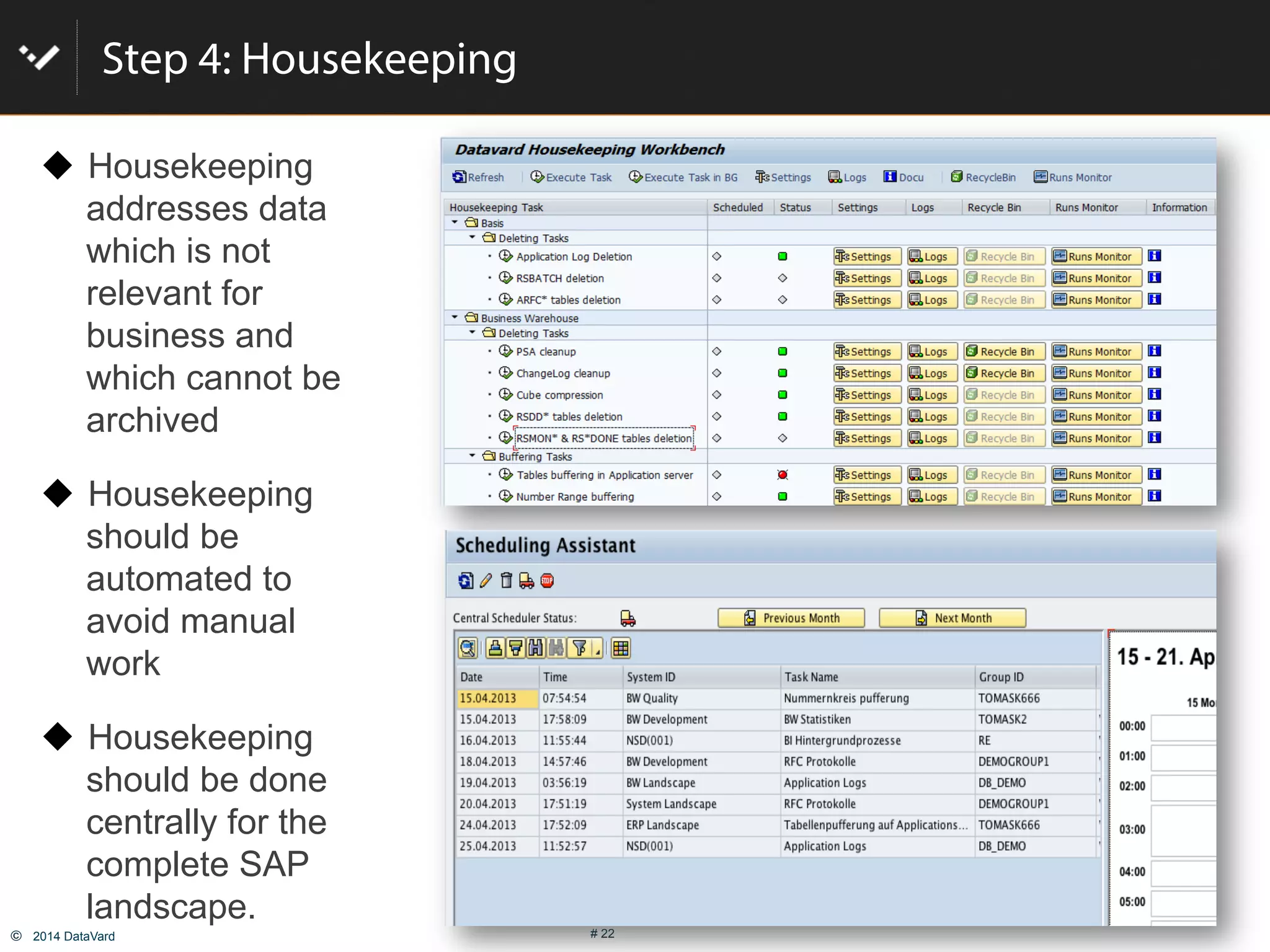
Step 4: Housekeeping
!  Housekeeping
addresses data
which is not
relevant for
business and
which cannot be
archived
!  Housekeeping
should be
automated to
avoid manual
work
!  Housekeeping
should be done
centrally for the
complete SAP
landscape.
©  2014 DataVard # 23
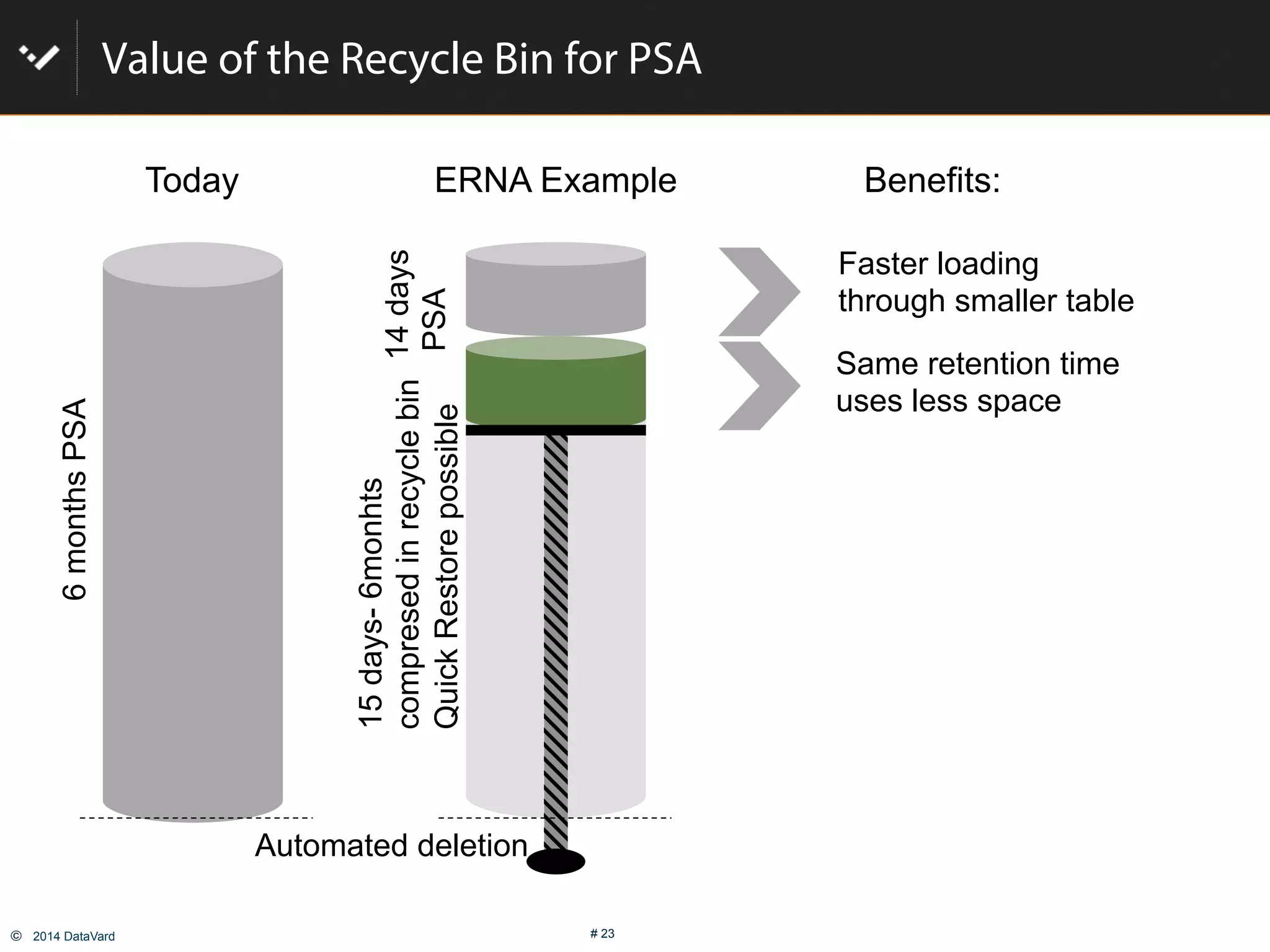
Value of the Recycle Bin for PSA
Faster loading
through smaller table
Same retention time
uses less space
Today
6monthsPSA
14days
PSA
15days-6monhts
compresedinrecyclebin
QuickRestorepossible
Benefits:ERNA Example
Automated deletion
©  2014 DataVard # 24
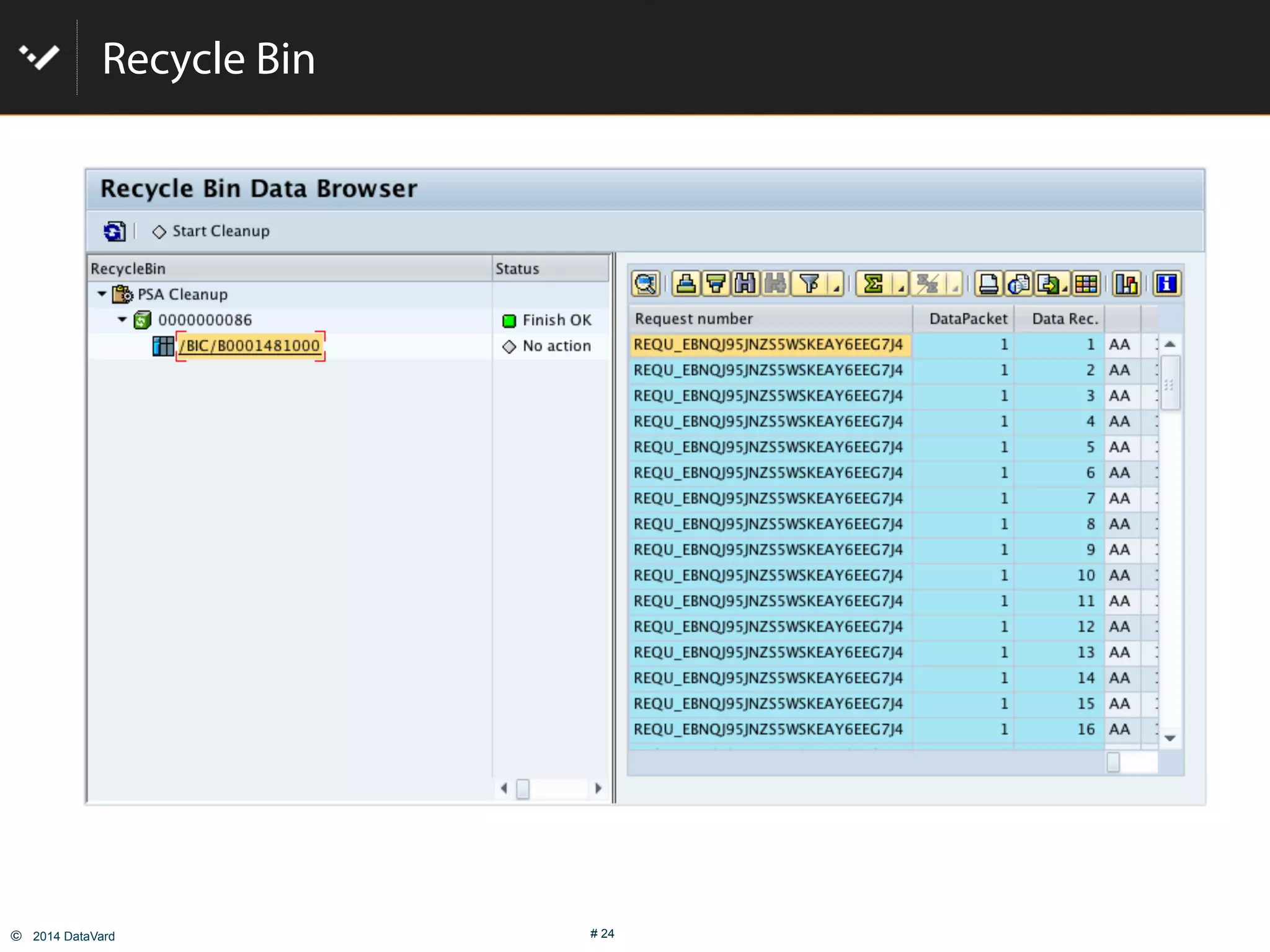
Recycle Bin
©  2014 DataVard # 25
Step 5: Automate
Nearline Storage (OutBoard™)
  Via smart grouping of similar InfoProviders
  Initial archiving during implementation project
  Ongoing archiving
"  Implement in process chains
"  Execute weekly, monthly, or quarterly
"  Regularly check on compression stats and data growth (e.g. quarterly / yearly)
Housekeeping (ERNA)
  Initial implementation, e.g. on Solution Manager
  Ongoing housekeeping
"  Define settings and schedule jobs
©  2014 DataVard # 26
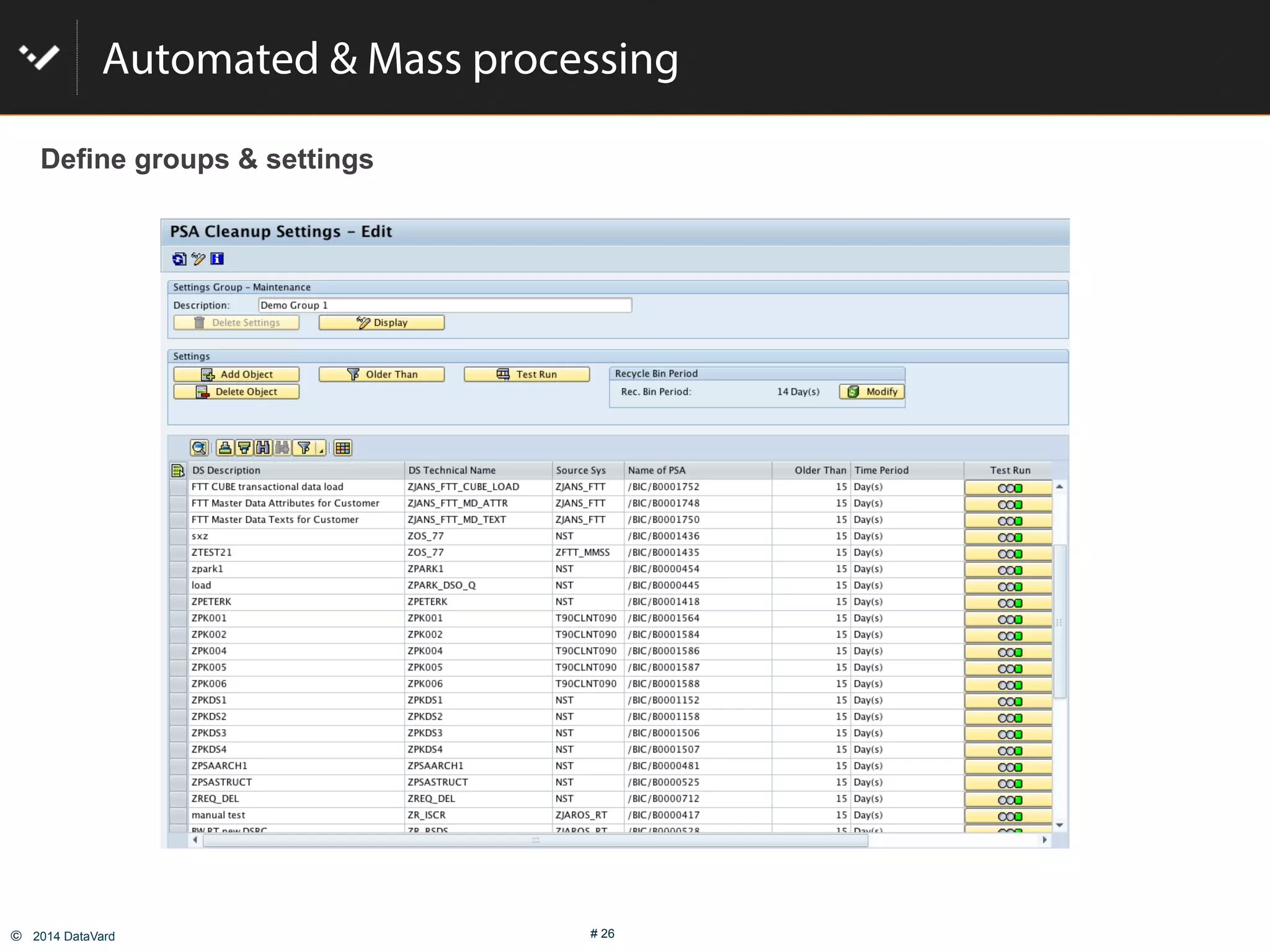
Automated & Mass processing
Define groups & settings
©  2014 DataVard # 27
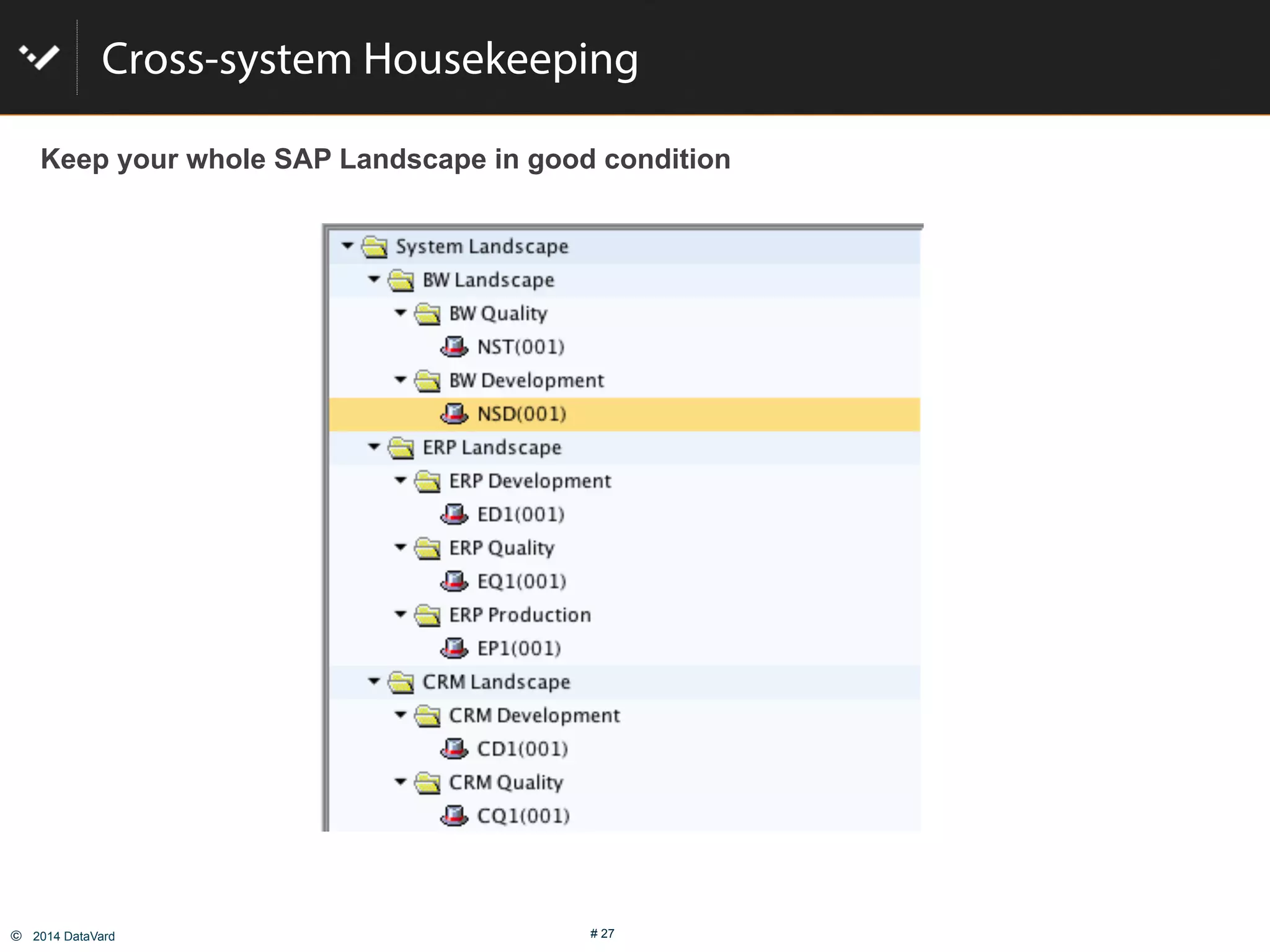
Cross-system Housekeeping
Keep your whole SAP Landscape in good condition
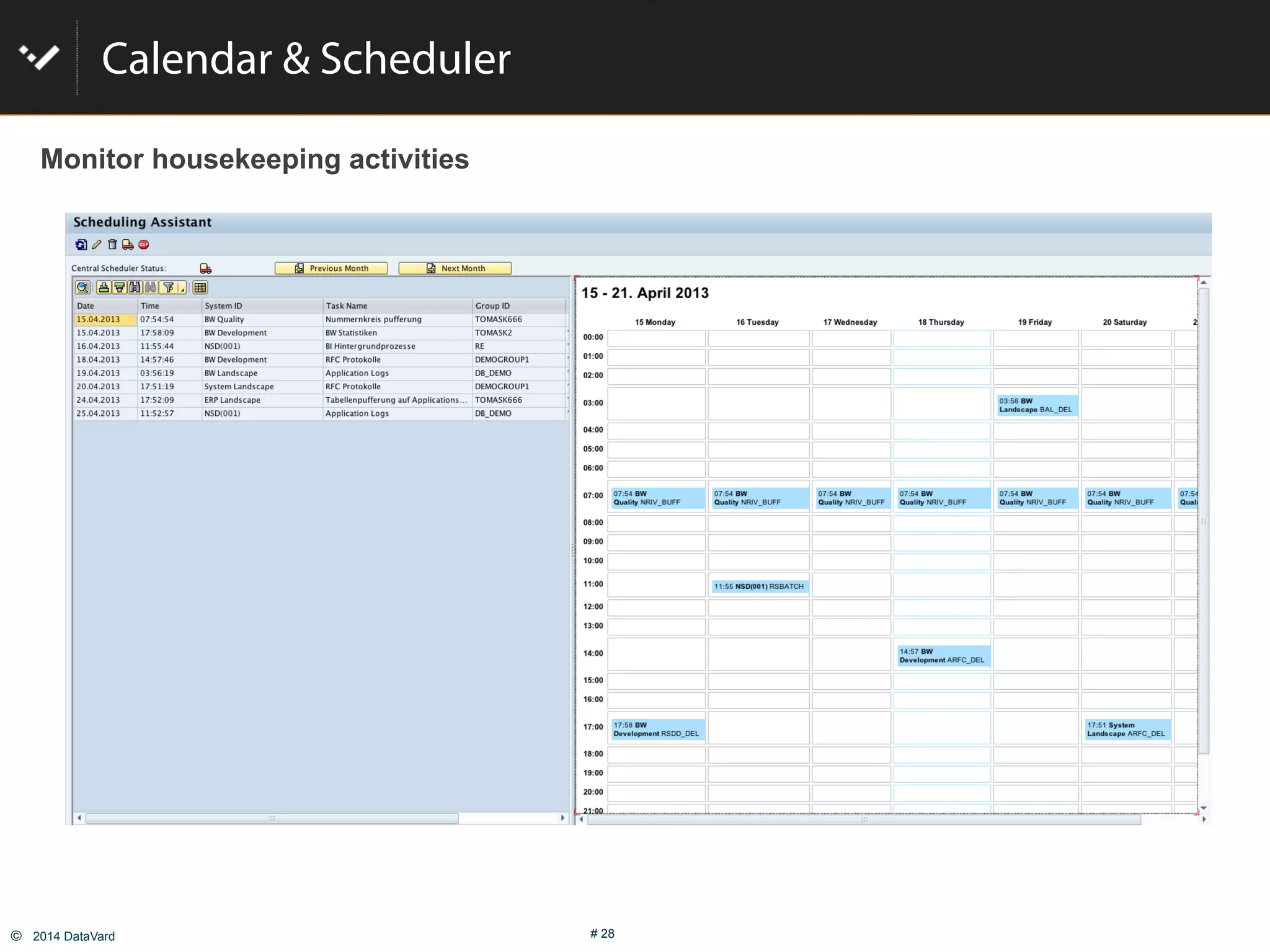
©  2014 DataVard # 28
Calendar & Scheduler
Monitor housekeeping activities
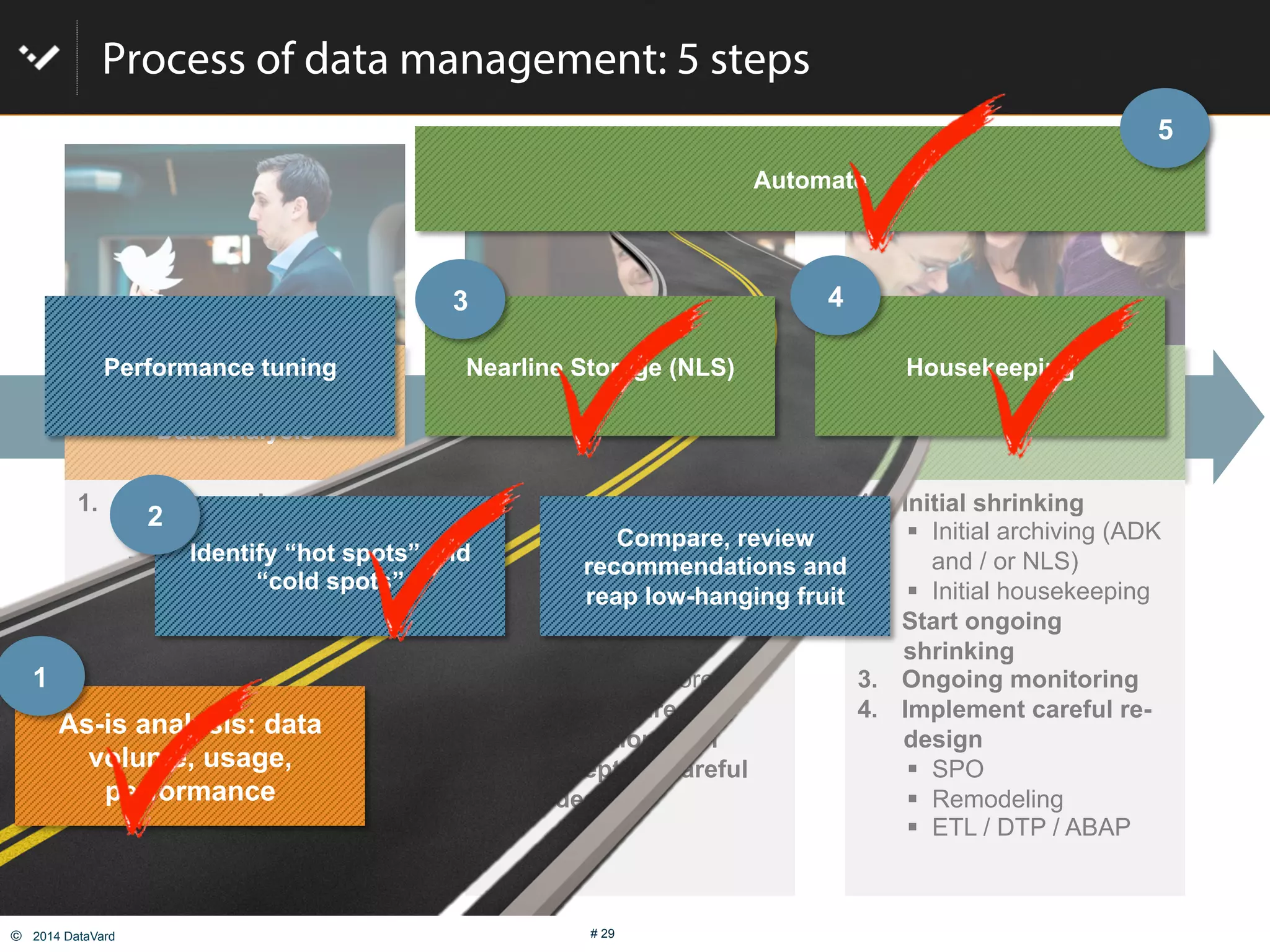
©  2014 DataVard # 29
Process of data management: 5 steps
Get smart!
Data analysis
Implement, set up rules &
Technology
Operate
1.  Analyze as-is situation
"  Data distribution
"  System usage
"  Heat map
"  Pain points
2.  System monitoring,
performance analysis
3.  Plan next steps
"  Don’t panic!
"  First, address low
hanging fruit
"  Consider careful re-
design
1.  Define & group data
types
"  Relevance level
"  Keep or purge
"  Required Speed of
access
"  Where to store
2.  Define desired
automation level
3.  Concept for careful
re-design
1.  Initial shrinking
"  Initial archiving (ADK
and / or NLS)
"  Initial housekeeping
2.  Start ongoing
shrinking
3.  Ongoing monitoring
4.  Implement careful re-
design
"  SPO
"  Remodeling
"  ETL / DTP / ABAP
As-is analysis: data
volume, usage,
performance
Compare, review
recommendations and
reap low-hanging fruit
Nearline Storage (NLS) Housekeeping
Automate
Identify “hot spots” and
“cold spots”
Performance tuning
1
2
3 4
5
Contact us at nls@datavard.com for more
information
©  2014 DataVard # 31
Copyright DataVard Inc. All rights reserved.
No part of this publication may be reproduced or transmitted in any form or for any purpose without the
express permission of DataVard GmbH. The information contained herein may be changed without prior
notice.
DataVard and OutBoard are trademarks or registered trademarks of DataVard GmbH and its affiliated
companies.
SAP, R/3, SAP NetWeaver, SAP BusinessObjects, SAP MaxDB, SAP HANA and other SAP products and
services mentioned herein as well as their respective logos are trademarks or registered trademarks of SAP
AG in Germany and other countries.
All other product and service names mentioned are the trademarks of their respective companies. Data
contained in this document serves informational purposes only. National product specifications may vary.
These materials are provided by DataVard GmbH and its affiliated companies (“DataVard") for informational
purposes only, without representation or warranty of any kind, and DataVard shall not be liable for errors or
omissions with respect to the materials. The only warranties for DataVard products and services are those
that are set forth in the express warranty statements accompanying such products and services, if any.
Nothing herein should be construed as constituting an additional warranty.
Copyright

Shrink your DB and increase SAP BW performance

  • 1.
    ©  2014 DataVard# 1 Martin Mihalik Joseph O‘Leary How to shrink your database by 40-50 % And increase performance
  • 2.
    ©  2014 DataVard# 2 Today present: Martin Mihalik Joseph O‘Leary Senior ILM & Performance Optimization Consultant DataVard s.r.o. martin.mihalik@datavard.com Product Manager ILM & Performance Optimization DataVard, Inc. joseph.o.leary@datavard.com
  • 3.
    ©  2014 DataVard# 3 Who is DataVard !  Specialized on Data Management for SAP® !  BW, ILM, SLO !  Customers range from SMEs (60 users) to Fortune 500 (e.g. Allianz, BASF, KPMG, Roche, Nestle) !  Focus on Data Management and ABAP development !  SAP and ABAP only !  SAP certified solutions for BW Nearline storage and housekeeping !  Partnership with SAP in consulting (e.g. SLO) !  Partnership with SAP in development (e.g. ILM) !  Locations: !  Wilmington (US) !  Heidelberg (Germany – HQ) !  4 additional locations in Europe Success Experience Focus
  • 4.
    ©  2014 DataVard# 4 What‘s the issue with Managing Data 1.  Data is growing more rapidly. 30-35% p.a. is common. 2.  More users are asking for new applications, new countries are going live 3.  Users are requesting high granularity of data 4.  No classification of the importance and usage of data 5.  Load times are getting longer and longer 6.  Data is kept in the database (just in case…)
  • 5.
    ©  2014 DataVard# 5 Here’s how DataVard helped Randstad Nearline Storage implementation   BW Fitness Test to identify rapidly growing and large InfoProviders   Phase 1: quick wins & low level DSOs   Phase 2: all other DSOs   Project elapsed time 4 months ETL optimization   Root-cause analysis identifies long lasting running jobs   Tuning actions: optimization of the extractors, optimizing critical path   Project elapsed time 6 months Data load accelerated by 64%. DB size reduced by 43%.
  • 6.
    ©  2014 DataVard# 6 Clean up your system Size reduction example (Housekeeping and NLS) 183 183 998 321 918 780.3 650 325 312 156 0 48.1 0 500 1000 1500 2000 2500 3000 3500 Heute mit OutBoard und ERNA OutBoard Cube data ODS data Other data Temporary data Master data Before After -68% -15% -50% -50% Total DB space saved of 43%!
  • 7.
    ©  2014 DataVard# 7 User happiness TCO&data access TCO Smart Data Management "  Performance optimization, Tuning "  In-memory "  Ensure SLAs are met GOALS TACTICS "  Use appropriate storage: Archiving, NLS, Smart data access "  Set up central policies "  Define policies "  Set up housekeeping "  Automation Information “at your fingertips” speed and high availability is key. Keep & store, but reduce costs. Purge, delete, housekeeping Hot Data Business critical data Data required for reporting and planning Cold Data / Old Data Aged data, history Infrequent, rare use Need to keep (legal, internal, industry requirements) Dead Data Technical data (e.g. logs, protocols, PSA) Redundant data
  • 8.
    ©  2014 DataVard# 8 Performance optimization tools – Root cause analysis
  • 9.
    ©  2014 DataVard# 9 Process of data management 1.  Analyze as-is situation "  Data distribution "  System usage "  Heat map "  Pain points 2.  System monitoring, performance analysis 3.  Plan next steps "  Don’t panic! "  First, address low hanging fruit "  Consider careful re- design 1.  Define & group data types "  Relevance level "  Keep or purge "  Required Speed of access "  Where to store 2.  Define desired automation level 3.  Concept for careful re-design 1.  Initial shrinking "  Initial archiving (ADK and / or NLS) "  Initial housekeeping 2.  Start ongoing shrinking 3.  Ongoing monitoring 4.  Implement careful re- design "  SPO "  Remodeling "  ETL / DTP / ABAP Get smart! Data analysis Implement, set up rules & Technology Operate
  • 10.
    ©  2014 DataVard# 11 Process of data management: 5 steps Get smart! Data analysis Implement, set up rules & Technology Operate 1.  Analyze as-is situation "  Data distribution "  System usage "  Heat map "  Pain points 2.  System monitoring, performance analysis 3.  Plan next steps "  Don’t panic! "  First, address low hanging fruit "  Consider careful re- design 1.  Define & group data types "  Relevance level "  Keep or purge "  Required Speed of access "  Where to store 2.  Define desired automation level 3.  Concept for careful re-design 1.  Initial shrinking "  Initial archiving (ADK and / or NLS) "  Initial housekeeping 2.  Start ongoing shrinking 3.  Ongoing monitoring 4.  Implement careful re- design "  SPO "  Remodeling "  ETL / DTP / ABAP As-is analysis: data volume, usage, performance Compare, review recommendations and reap low-hanging fruit Nearline Storage (NLS) Housekeeping Automate Identify “hot spots” and “cold spots” Performance tuning 1 2 3 4 5
  • 11.
    ©  2014 DataVard# 12 Step 1: Fitness test Standardized tool-based analysis #  “How fit is your SAP system”? #  Analysis of system usage, data volume, and performance #  Best-practices database and benchmarking #  Trending #  Preparation for Data Management Strategy, Upgrade, HANA, Big Data in SAP #  Available for SAP ERP and BW Check Here
  • 12.
    ©  2014 DataVard# 13 5% 15% 15% 9% 11% 32% 5% 5%3% Master data Temporary data Other data PSA data Changelog data ODS data Cube E data Cube F data Cube D data Step 1: Fitness Test Typical distribution of data in a BW system Comments: "  Data you report on is only 13-17% of the system size "  Temporary data is subject to housekeeping (BALDAT, RS*DONE, ...) "  Use the HANA sizing report as a 1st indication (OSS note 1736976). "  Create a plan from data load to leave. “Only 12% of all data in BW is actually used” Source: Forrester research
  • 13.
    ©  2014 DataVard# 14 Cost / benefit analysis #  Cost is usually associated with volume and storage #  Benefit is measured by number of queries executed against the data #  Other important KPIs are users, number of loads, duration of loads, etc. How does it work? #  Step 1: size map of the SAP system #  Step 2: Determining KPIs #  Step 3: Correlating KPIs #  Step 4: Know hot and cold spots Step 2: Going into the details BW analysis: Heatseeker
  • 14.
    ©  2014 DataVard# 15 Process of data management: 5 steps Get smart! Data analysis Implement, set up rules & Technology Operate 1.  Analyze as-is situation "  Data distribution "  System usage "  Heat map "  Pain points 2.  System monitoring, performance analysis 3.  Plan next steps "  Don’t panic! "  First, address low hanging fruit "  Consider careful re- design 1.  Define & group data types "  Relevance level "  Keep or purge "  Required Speed of access "  Where to store 2.  Define desired automation level 3.  Concept for careful re-design 1.  Initial shrinking "  Initial archiving (ADK and / or NLS) "  Initial housekeeping 2.  Start ongoing shrinking 3.  Ongoing monitoring 4.  Implement careful re- design "  SPO "  Remodeling "  ETL / DTP / ABAP As-is analysis: data volume, usage, performance Compare, review recommendations and reap low-hanging fruit Nearline Storage (NLS) Housekeeping Automate Identify “hot spots” and “cold spots” Performance tuning 1 2 3 4 5
  • 15.
    ©  2014 DataVard# 16 BW: Online – Offline – Nearline Online data lives in your BW system.   Info cubes   In-memory, BWA, HANA Offline data is not available in your BW system.   Example: Archive files. Nearline data   Data lives in a so-called “Nearline Storage” (NLS)   Data is available for reporting and DTPs   Several solutions available on the market NLS does not always mean IQ! USER BW Accelerator SAP HANA NLS HOT WARM COLD Data stored in a cost optimized way Heavily compressed Available at anytime current 0-2 years >2 years
  • 16.
    ©  2014 DataVard# 17 OutBoard™ – Architecture overview External Storage OutBoard™ DataAging OutBoard™ Near-LineStorage Business Warehouse SAPNLS Interface Storage Mgmt. SAP cluster tables File / Cloud External DB "  All SAP-certified RDBMS "  Apache Hadoop "  Sybase IQ "  End of lifecycle Deletion HANA DBor
  • 17.
    ©  2014 DataVard# 18 The OutBoard™ effect – data growth in TB Background •  BW Live since 2005 •  Data growth 30% p.a. •  Avg. compression rate 90% •  Data getting cold after 2 and/or 3 years •  Onetime effect of 41% (3y) to 53% (2y) EXAMPLE;Can be adapted individually 1.00 1.30 1.69 2.20 2.86 1.00 0.68 0.88 1.14 1.49 1.00 0.82 1.07 1.39 1.80 0.00 0.50 1.00 1.50 2.00 2.50 3.00 2012 2013 2014 2015 2016 No Outboard with OutBoard 2J. with OutBoard 3J.
  • 18.
    ©  2014 DataVard# 19 Key facts on Data Management (BW example) Things to remember 1.  Most of the data in your system is generated in non- reporting layers 1.  System tables 2.  Temporary data: PSA & Changelog 3.  Corporate Memory 4.  DSOs 2.  For most organizations Data Management means reducing data volumes and slowing down data growth. 3.  Data Management should have 3 major aspects: 1.  Speeding up HOT data 2.  Reducing COLD / OLD data 3.  Regular cleansing of temporary data
  • 19.
    ©  2014 DataVard# 20 Process of data management: 5 steps Get smart! Data analysis Implement, set up rules & Technology Operate 1.  Analyze as-is situation "  Data distribution "  System usage "  Heat map "  Pain points 2.  System monitoring, performance analysis 3.  Plan next steps "  Don’t panic! "  First, address low hanging fruit "  Consider careful re- design 1.  Define & group data types "  Relevance level "  Keep or purge "  Required Speed of access "  Where to store 2.  Define desired automation level 3.  Concept for careful re-design 1.  Initial shrinking "  Initial archiving (ADK and / or NLS) "  Initial housekeeping 2.  Start ongoing shrinking 3.  Ongoing monitoring 4.  Implement careful re- design "  SPO "  Remodeling "  ETL / DTP / ABAP As-is analysis: data volume, usage, performance Compare, review recommendations and reap low-hanging fruit Nearline Storage (NLS) Housekeeping Automate Identify “hot spots” and “cold spots” Performance tuning 1 2 3 4 5
  • 20.
    ©  2014 DataVard# 21 Step 4: Housekeeping Scope of Housekeeping #  Unused customers #  Unused vendors #  Phantom change documents #  Phantom texts #  Application log #  Batch log #  IDoc tables (EDI40, EDIDS) #  qRFC, tRFC #  Job-Tables (TBTCO, TBTCP etc.) #  Change & Transportsystem #  Spool data (TST03) #  Table Change Protocols #  Batch Input Folders #  Alert Management Data (SALRT*) #  Old short dumps #  Batch input data ERP and Netweaver #  PSAs & Change Logs #  Request logs & tables (RSMON* and RS*DONE) #  Unused dimension entries #  Unused master data #  Cube & Aggregate compression #  Temporary database objects #  NRIV buffering #  Table buffering #  BI-Statistics #  Process Chain Log #  Errorlogs #  Unused Queries #  Empty partitions #  BI Background processes #  Bookmarks #  Web templates Business Warehouse !  Housekeeping addresses data which is not relevant for business and which cannot be archived !  Housekeeping should be automated to avoid manual work !  Housekeeping should be done centrally for the complete SAP landscape.
  • 21.
    ©  2014 DataVard# 22 Step 4: Housekeeping !  Housekeeping addresses data which is not relevant for business and which cannot be archived !  Housekeeping should be automated to avoid manual work !  Housekeeping should be done centrally for the complete SAP landscape.
  • 22.
    ©  2014 DataVard# 23 Value of the Recycle Bin for PSA Faster loading through smaller table Same retention time uses less space Today 6monthsPSA 14days PSA 15days-6monhts compresedinrecyclebin QuickRestorepossible Benefits:ERNA Example Automated deletion
  • 23.
    ©  2014 DataVard# 24 Recycle Bin
  • 24.
    ©  2014 DataVard# 25 Step 5: Automate Nearline Storage (OutBoard™)   Via smart grouping of similar InfoProviders   Initial archiving during implementation project   Ongoing archiving "  Implement in process chains "  Execute weekly, monthly, or quarterly "  Regularly check on compression stats and data growth (e.g. quarterly / yearly) Housekeeping (ERNA)   Initial implementation, e.g. on Solution Manager   Ongoing housekeeping "  Define settings and schedule jobs
  • 25.
    ©  2014 DataVard# 26 Automated & Mass processing Define groups & settings
  • 26.
    ©  2014 DataVard# 27 Cross-system Housekeeping Keep your whole SAP Landscape in good condition
  • 27.
    ©  2014 DataVard# 28 Calendar & Scheduler Monitor housekeeping activities
  • 28.
    ©  2014 DataVard# 29 Process of data management: 5 steps Get smart! Data analysis Implement, set up rules & Technology Operate 1.  Analyze as-is situation "  Data distribution "  System usage "  Heat map "  Pain points 2.  System monitoring, performance analysis 3.  Plan next steps "  Don’t panic! "  First, address low hanging fruit "  Consider careful re- design 1.  Define & group data types "  Relevance level "  Keep or purge "  Required Speed of access "  Where to store 2.  Define desired automation level 3.  Concept for careful re-design 1.  Initial shrinking "  Initial archiving (ADK and / or NLS) "  Initial housekeeping 2.  Start ongoing shrinking 3.  Ongoing monitoring 4.  Implement careful re- design "  SPO "  Remodeling "  ETL / DTP / ABAP As-is analysis: data volume, usage, performance Compare, review recommendations and reap low-hanging fruit Nearline Storage (NLS) Housekeeping Automate Identify “hot spots” and “cold spots” Performance tuning 1 2 3 4 5
  • 29.
    Contact us atnls@datavard.com for more information
  • 30.
    ©  2014 DataVard# 31 Copyright DataVard Inc. All rights reserved. No part of this publication may be reproduced or transmitted in any form or for any purpose without the express permission of DataVard GmbH. The information contained herein may be changed without prior notice. DataVard and OutBoard are trademarks or registered trademarks of DataVard GmbH and its affiliated companies. SAP, R/3, SAP NetWeaver, SAP BusinessObjects, SAP MaxDB, SAP HANA and other SAP products and services mentioned herein as well as their respective logos are trademarks or registered trademarks of SAP AG in Germany and other countries. All other product and service names mentioned are the trademarks of their respective companies. Data contained in this document serves informational purposes only. National product specifications may vary. These materials are provided by DataVard GmbH and its affiliated companies (“DataVard") for informational purposes only, without representation or warranty of any kind, and DataVard shall not be liable for errors or omissions with respect to the materials. The only warranties for DataVard products and services are those that are set forth in the express warranty statements accompanying such products and services, if any. Nothing herein should be construed as constituting an additional warranty. Copyright