Clarity. Direction. Confidence.


 THE RIGHT INTRODUCTION TO
SHAREPOINT FOR DEVELOPERS
   (It doesn‟t have to be so painful)

            Mark Rackley


                         BEST PRACTICES CONFERENCE SHAREPOINT
BEST PRACTICES CONFERENCE SHAREPOINT
About the speaker…
The Hillbilly
  Mr. Ackley
    Catcher of all things that flow downhill
    Solutions Architect & SharePoint Practice Lead for Juniper Strategy,
    LLC.
    www.juniper-strategy.com
    Speaker, Blogger, (soon to be) Author
    Blog: www.sharepointhillbilly.com
    Twitter: @mrackley
    E-mail: mrackley@gmail.com


                                            BEST PRACTICES CONFERENCE SHAREPOINT
Session Overview
What is SharePoint & what can it do for me?
SharePoint Overview
What IS SharePoint Development?
Development Basics
Importance of Community


                                BEST PRACTICES CONFERENCE SHAREPOINT
BEST PRACTICES CONFERENCE SHAREPOINT
5 Stages of Learning SharePoint
Denial – “They aren‟t really going to make me learn this. They‟ll
forget all about it in the next few months and move onto the next
shiny new toy.”
Anger – “What a piece of garbage! This is SO stupid! I can‟t believe
they are making me learn this! It‟s impossible!”
Bargaining – “Okay.. How about this, I‟ll do support 24/7 for the rest
of my life, just don‟t make me learn this!”
Depression – “It‟s hopeless. I‟ll never learn this. I wonder
McDonalds is hiring?”
Acceptance – “Well, it looks like I have no choice… maybe it won‟t
be that bad? Hey! At least it will look good on my resume? And I hear
there‟s this magical think called „SharePint‟”


                                        BEST PRACTICES CONFERENCE SHAREPOINT
What IS SharePoint?


                      BEST PRACTICES CONFERENCE SHAREPOINT
What IS SharePoint?
File Share?
Content Management?
Workflow Engine?
Collaboration Portal?
A silver bullet for all your business processes?
The cure for cancer?


                                   BEST PRACTICES CONFERENCE SHAREPOINT
SharePoint is a PLATFORM
“A ‘platform’ is a system that can be programmed
 and therefore customized by outside developers
 — users — and in that way, adapted to countless
 needs and niches that the platform’s original
 developers could not have possibly
 contemplated, much less had time to
 accommodate.”

- Marc Andreessen, Netscape


                              BEST PRACTICES CONFERENCE SHAREPOINT
What can SharePoint do for me?

                 .NET                     SharePoint
                  Data Storage                     Data Storage
                   Presentation                    Presentation
                      Security                        Security
                    Clustering                        Security
                        API’s                           API’s
                  Web Services                     Web Services
               Office Integration                Office Integration
                     Features                         Features


Source: http://www.sharepointcowboy.com
                                          BEST PRACTICES CONFERENCE SHAREPOINT
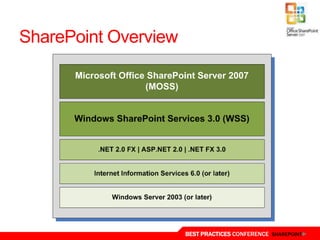
SharePoint Overview


                      BEST PRACTICES CONFERENCE SHAREPOINT
SharePoint Overview


                      BEST PRACTICES CONFERENCE SHAREPOINT
Terminology
       (Remember when a Web Application was a Web Application)
Farm
               Elevated Privileges                                            Safe Control
                                           CAML
  Site Column                                                Feature               Declarative Workflow
                              STSADM
Site Collection                          Persisted Object         Application Page
                                      Content Type          Site Definition          List Definition
       Solution Package
                                                                       Scope
Content Database                                                                     List Instance
                                       Event Receiver
                                                              Central Administration
   Publishing Page                                                                              ONET
                            Web Application
                                                                              Theme
 List View                           Feature Receiver
            Field Control                                        Team Site
                                     Client Object Model


                                                            BEST PRACTICES CONFERENCE SHAREPOINT
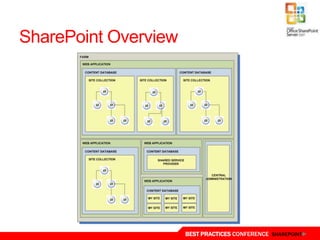
Server Farms                         Server Farm

 A collection of SharePoint role
 servers and a SQL database server   Web Front
 Servers can perform one or more     Ends
 functions (web front end, search,
 application, etc.)
 Farm-level features are managed
 via Central Administration          Application
 Custom code can be deployed at
 the Farm level and managed
 centrally
 Solution Packages allow custom      Database
 code to be automatically deployed
 across the farm


                                       BEST PRACTICES CONFERENCE SHAREPOINT
SharePoint Overview


                      BEST PRACTICES CONFERENCE SHAREPOINT
SharePoint Overview


                      BEST PRACTICES CONFERENCE SHAREPOINT
SharePoint Overview
Information Architecture
   http://www.microsoft.com/industry/healthcare/technology/hpo/kno
   wledgeworker/moss2007informationarchitecture.aspx
Logical Architecture
   http://technet.microsoft.com/en-us/library/cc261995.aspx
Governance


                                       BEST PRACTICES CONFERENCE SHAREPOINT
Becoming a SharePoint Developer


                   BEST PRACTICES CONFERENCE SHAREPOINT
Path To SharePoint Developer
End User
Power User
Administrator
Developer


                    BEST PRACTICES CONFERENCE SHAREPOINT
What about Architects?
    Be able to use all
     the acronyms
     appropriately
    Fake everything else
     (I‟m kidding of course)


                               BEST PRACTICES CONFERENCE SHAREPOINT
What IS SharePoint Development?

 Out of the Box
 SharePoint Designer
 Javascript / jQuery
 Web Services
 Object Model


                       BEST PRACTICES CONFERENCE SHAREPOINT
Choose the right tool for the job!


                       BEST PRACTICES CONFERENCE SHAREPOINT
Know your tools!
jQuery
  Deployable and Maintainable
    Document Library or File System
  Secure
    Runs with permissions of current user
  Full CRUD on SharePoint List Data
    Web Services (SPServices)


                                            BEST PRACTICES CONFERENCE SHAREPOINT
Know your tools!
SharePoint Designer
  Remote Development
  Dataview Web Parts
  MasterPages,Page Layouts, CSS
  Connect to external data sources
  Workflows
    Be very wary in 2007
    Much improved in 2010


                                     BEST PRACTICES CONFERENCE SHAREPOINT
SharePoint Designer 2007…
The Good
   Don‟t have to develop on the server
   SPD Workflows
   Developing Branding
   Data View Web Parts
The Bad
   SPD Workflows
   Un-Ghosting (Export your Web Parts!!)
The Ugly
   Possible to break a site collection
     Be careful modifying default aspx files
   Migration & Restores
     Disconnect Workflows
   Maintenance
     Don‟t tell your boss what you have to do


                                                BEST PRACTICES CONFERENCE SHAREPOINT
Know your tools!
Visual Studio
   Solution Packaging! (.WSP files)
   Web Services
   Web Parts
   Custom Workflows
   Event Receivers
   Complicated Business logic
   If you can do it in .NET you can do it in SharePoint (but should
   you?)


                                        BEST PRACTICES CONFERENCE SHAREPOINT
Custom Development Basics
Necessary Skills
   .NET development
   XML
   CAML
   JavaScript
   Glutton for punishment
   Stubbornness


                            BEST PRACTICES CONFERENCE SHAREPOINT
Custom Development
Features
  {SP Root}TEMPLATEFEATURE
  Feature.XML
    Scopes
    Web – Specific SharePoint Site
    Site – Specific Site Collection and all Sub Sites
    WebApplication – Web Application, all Site Collections, and all Sub Sites
    Farm – All Web Applications, all Site Collections, and all Sub Sites


                                                BEST PRACTICES CONFERENCE SHAREPOINT
Custom Development
Features
  Elements.XML
    Specified in Feature <ElementManifests>
    Many types
    Content Types
    Custom actions
    Delegate Controls
    Document converters
    Event registrations
    Feature site template associations (stapling)
    Field Definitions (site columns)
    Etc.. Etc.. Etc..


                                                BEST PRACTICES CONFERENCE SHAREPOINT
DEMOS!


         BEST PRACTICES CONFERENCE SHAREPOINT
Custom Development
What‟s new in 2010?
  Sandboxed Solutions
  Client Object Model
  REST
  Visual Studio 2010 enhancements


                                    BEST PRACTICES CONFERENCE SHAREPOINT
Create Solution Packages!


                    BEST PRACTICES CONFERENCE SHAREPOINT
Solution Packages
.WSP file (WSS Solution Package)
Easily Deploy and Retract Files
SharePoint manages deploying to multiple WFEs
Deployed with STSADM
#1 Best Practice For Developers!


                              BEST PRACTICES CONFERENCE SHAREPOINT
Solution Packages
Contains two things
   All necessary files
   Instructions for handling those files
What Can be deployed?
   Assemblies
   Any file to SharePoint Root
   Custom Code Access Security Policies
   Web Part definitions and resources


                                           BEST PRACTICES CONFERENCE SHAREPOINT
DEMO


       BEST PRACTICES CONFERENCE SHAREPOINT
Debugging
Look in the Event Log
   Admin Tools->Computer Management-> Event Viewer


                                  BEST PRACTICES CONFERENCE SHAREPOINT
Debugging
 SharePoint   Logs
   C:Program FilesCommon FilesMicrosoft
    ShareWeb Server Extensions12LOGS
   Can write to logs when writing custom code


                            BEST PRACTICES CONFERENCE SHAREPOINT
Debugging - Code


                   BEST PRACTICES CONFERENCE SHAREPOINT
Free Tools…
Custom Development / Deployment
   STSDev
   WSP Builder
SPServices
   Access SharePoint Web Services using jQuery
   http://spservices.codeplex.com
Fiddler – Web Debugging Proxy
    http://www.fiddler2.com/Fiddler2/version.asp
    Performance Tuning, inspect session data, etc

Don‟t forget to check CodePlex!


                                                    BEST PRACTICES CONFERENCE SHAREPOINT
A Word (or two) About Community


                    BEST PRACTICES CONFERENCE SHAREPOINT
The Best Way to Avoid SharePoint Fail


           Image Source: http://theroosterstrikes.files.wordpress.com


                                             BEST PRACTICES CONFERENCE SHAREPOINT
You Gotta Drink the Kool-Aid!
Attend Events
Read/Write Blogs
Read Books
Join the Community
Setup a VHD
DON‟T BE AFRAID TO
DO SOMETHING!


                      Image Source: http://www.irvinehousingblog.com


                     BEST PRACTICES CONFERENCE SHAREPOINT
Clarity. Direction. Confidence.


     QUESTIONS?
Please be sure to fill out your
    session evaluation!


                  BEST PRACTICES CONFERENCE SHAREPOINT

SharePoint - Right Intro To Development

  • 1.
    Clarity. Direction. Confidence. THE RIGHT INTRODUCTION TO SHAREPOINT FOR DEVELOPERS (It doesn‟t have to be so painful) Mark Rackley BEST PRACTICES CONFERENCE SHAREPOINT
  • 2.
  • 3.
    About the speaker… TheHillbilly Mr. Ackley Catcher of all things that flow downhill Solutions Architect & SharePoint Practice Lead for Juniper Strategy, LLC. www.juniper-strategy.com Speaker, Blogger, (soon to be) Author Blog: www.sharepointhillbilly.com Twitter: @mrackley E-mail: mrackley@gmail.com BEST PRACTICES CONFERENCE SHAREPOINT
  • 4.
    Session Overview What isSharePoint & what can it do for me? SharePoint Overview What IS SharePoint Development? Development Basics Importance of Community BEST PRACTICES CONFERENCE SHAREPOINT
  • 5.
  • 6.
    5 Stages ofLearning SharePoint Denial – “They aren‟t really going to make me learn this. They‟ll forget all about it in the next few months and move onto the next shiny new toy.” Anger – “What a piece of garbage! This is SO stupid! I can‟t believe they are making me learn this! It‟s impossible!” Bargaining – “Okay.. How about this, I‟ll do support 24/7 for the rest of my life, just don‟t make me learn this!” Depression – “It‟s hopeless. I‟ll never learn this. I wonder McDonalds is hiring?” Acceptance – “Well, it looks like I have no choice… maybe it won‟t be that bad? Hey! At least it will look good on my resume? And I hear there‟s this magical think called „SharePint‟” BEST PRACTICES CONFERENCE SHAREPOINT
  • 7.
    What IS SharePoint? BEST PRACTICES CONFERENCE SHAREPOINT
  • 8.
    What IS SharePoint? FileShare? Content Management? Workflow Engine? Collaboration Portal? A silver bullet for all your business processes? The cure for cancer? BEST PRACTICES CONFERENCE SHAREPOINT
  • 9.
    SharePoint is aPLATFORM “A ‘platform’ is a system that can be programmed and therefore customized by outside developers — users — and in that way, adapted to countless needs and niches that the platform’s original developers could not have possibly contemplated, much less had time to accommodate.” - Marc Andreessen, Netscape BEST PRACTICES CONFERENCE SHAREPOINT
  • 10.
    What can SharePointdo for me? .NET SharePoint Data Storage Data Storage Presentation Presentation Security Security Clustering Security API’s API’s Web Services Web Services Office Integration Office Integration Features Features Source: http://www.sharepointcowboy.com BEST PRACTICES CONFERENCE SHAREPOINT
  • 11.
    SharePoint Overview BEST PRACTICES CONFERENCE SHAREPOINT
  • 12.
    SharePoint Overview BEST PRACTICES CONFERENCE SHAREPOINT
  • 13.
    Terminology (Remember when a Web Application was a Web Application) Farm Elevated Privileges Safe Control CAML Site Column Feature Declarative Workflow STSADM Site Collection Persisted Object Application Page Content Type Site Definition List Definition Solution Package Scope Content Database List Instance Event Receiver Central Administration Publishing Page ONET Web Application Theme List View Feature Receiver Field Control Team Site Client Object Model BEST PRACTICES CONFERENCE SHAREPOINT
  • 14.
    Server Farms Server Farm A collection of SharePoint role servers and a SQL database server Web Front Servers can perform one or more Ends functions (web front end, search, application, etc.) Farm-level features are managed via Central Administration Application Custom code can be deployed at the Farm level and managed centrally Solution Packages allow custom Database code to be automatically deployed across the farm BEST PRACTICES CONFERENCE SHAREPOINT
  • 15.
    SharePoint Overview BEST PRACTICES CONFERENCE SHAREPOINT
  • 16.
    SharePoint Overview BEST PRACTICES CONFERENCE SHAREPOINT
  • 17.
    SharePoint Overview Information Architecture http://www.microsoft.com/industry/healthcare/technology/hpo/kno wledgeworker/moss2007informationarchitecture.aspx Logical Architecture http://technet.microsoft.com/en-us/library/cc261995.aspx Governance BEST PRACTICES CONFERENCE SHAREPOINT
  • 18.
    Becoming a SharePointDeveloper BEST PRACTICES CONFERENCE SHAREPOINT
  • 19.
    Path To SharePointDeveloper End User Power User Administrator Developer BEST PRACTICES CONFERENCE SHAREPOINT
  • 20.
    What about Architects?  Be able to use all the acronyms appropriately  Fake everything else (I‟m kidding of course) BEST PRACTICES CONFERENCE SHAREPOINT
  • 21.
    What IS SharePointDevelopment? Out of the Box SharePoint Designer Javascript / jQuery Web Services Object Model BEST PRACTICES CONFERENCE SHAREPOINT
  • 22.
    Choose the righttool for the job! BEST PRACTICES CONFERENCE SHAREPOINT
  • 23.
    Know your tools! jQuery Deployable and Maintainable Document Library or File System Secure Runs with permissions of current user Full CRUD on SharePoint List Data Web Services (SPServices) BEST PRACTICES CONFERENCE SHAREPOINT
  • 24.
    Know your tools! SharePointDesigner Remote Development Dataview Web Parts MasterPages,Page Layouts, CSS Connect to external data sources Workflows Be very wary in 2007 Much improved in 2010 BEST PRACTICES CONFERENCE SHAREPOINT
  • 25.
    SharePoint Designer 2007… TheGood Don‟t have to develop on the server SPD Workflows Developing Branding Data View Web Parts The Bad SPD Workflows Un-Ghosting (Export your Web Parts!!) The Ugly Possible to break a site collection Be careful modifying default aspx files Migration & Restores Disconnect Workflows Maintenance Don‟t tell your boss what you have to do BEST PRACTICES CONFERENCE SHAREPOINT
  • 26.
    Know your tools! VisualStudio Solution Packaging! (.WSP files) Web Services Web Parts Custom Workflows Event Receivers Complicated Business logic If you can do it in .NET you can do it in SharePoint (but should you?) BEST PRACTICES CONFERENCE SHAREPOINT
  • 27.
    Custom Development Basics NecessarySkills .NET development XML CAML JavaScript Glutton for punishment Stubbornness BEST PRACTICES CONFERENCE SHAREPOINT
  • 28.
    Custom Development Features {SP Root}TEMPLATEFEATURE Feature.XML Scopes Web – Specific SharePoint Site Site – Specific Site Collection and all Sub Sites WebApplication – Web Application, all Site Collections, and all Sub Sites Farm – All Web Applications, all Site Collections, and all Sub Sites BEST PRACTICES CONFERENCE SHAREPOINT
  • 29.
    Custom Development Features Elements.XML Specified in Feature <ElementManifests> Many types Content Types Custom actions Delegate Controls Document converters Event registrations Feature site template associations (stapling) Field Definitions (site columns) Etc.. Etc.. Etc.. BEST PRACTICES CONFERENCE SHAREPOINT
  • 30.
    DEMOS! BEST PRACTICES CONFERENCE SHAREPOINT
  • 31.
    Custom Development What‟s newin 2010? Sandboxed Solutions Client Object Model REST Visual Studio 2010 enhancements BEST PRACTICES CONFERENCE SHAREPOINT
  • 32.
    Create Solution Packages! BEST PRACTICES CONFERENCE SHAREPOINT
  • 33.
    Solution Packages .WSP file(WSS Solution Package) Easily Deploy and Retract Files SharePoint manages deploying to multiple WFEs Deployed with STSADM #1 Best Practice For Developers! BEST PRACTICES CONFERENCE SHAREPOINT
  • 34.
    Solution Packages Contains twothings All necessary files Instructions for handling those files What Can be deployed? Assemblies Any file to SharePoint Root Custom Code Access Security Policies Web Part definitions and resources BEST PRACTICES CONFERENCE SHAREPOINT
  • 35.
    DEMO BEST PRACTICES CONFERENCE SHAREPOINT
  • 36.
    Debugging Look in theEvent Log Admin Tools->Computer Management-> Event Viewer BEST PRACTICES CONFERENCE SHAREPOINT
  • 37.
    Debugging  SharePoint Logs  C:Program FilesCommon FilesMicrosoft ShareWeb Server Extensions12LOGS  Can write to logs when writing custom code BEST PRACTICES CONFERENCE SHAREPOINT
  • 38.
    Debugging - Code BEST PRACTICES CONFERENCE SHAREPOINT
  • 39.
    Free Tools… Custom Development/ Deployment STSDev WSP Builder SPServices Access SharePoint Web Services using jQuery http://spservices.codeplex.com Fiddler – Web Debugging Proxy http://www.fiddler2.com/Fiddler2/version.asp Performance Tuning, inspect session data, etc Don‟t forget to check CodePlex! BEST PRACTICES CONFERENCE SHAREPOINT
  • 40.
    A Word (ortwo) About Community BEST PRACTICES CONFERENCE SHAREPOINT
  • 41.
    The Best Wayto Avoid SharePoint Fail Image Source: http://theroosterstrikes.files.wordpress.com BEST PRACTICES CONFERENCE SHAREPOINT
  • 42.
    You Gotta Drinkthe Kool-Aid! Attend Events Read/Write Blogs Read Books Join the Community Setup a VHD DON‟T BE AFRAID TO DO SOMETHING! Image Source: http://www.irvinehousingblog.com BEST PRACTICES CONFERENCE SHAREPOINT
  • 43.
    Clarity. Direction. Confidence. QUESTIONS? Please be sure to fill out your session evaluation! BEST PRACTICES CONFERENCE SHAREPOINT

Editor's Notes

  • #6 This is the most common screen you will see in SharePoint… and also the main reason SharePoint is a woman… “I’m mad at you, and I’m not going to tell you why!”
  • #34 The SharePoint Server has gained a lot of popularity with the release of Microsoft Office SharePoint Server 2007. With the inclusion of document management and enterprise search capabilities, as well as Records Center and Excel Services modules, more and more companies are turning toward SharePoint in search of solutions to their business problems. With this growth comes big opening for business opportunities, but those who don’t have the right training approach stand to lose out on a customer’s or internal business units satisfaction.Some of the SharePoint environment roles are often defined as IT related, and information workers are often overlooked.Lack of training is the number one